Mastering John the Ripper: A Complete Guide to Password Cracking

- Category: CTI
- Source article: https://medium.com/@1200km/mastering-john-the-ripper-a-complete-guide-to-password-cracking-e42d68239c71
- Published: 2024-11-15
- Preserved media: 6 image(s), including cover images, screenshots, diagrams, and infographics where present.
- Preserved technical blocks: 22 code/configuration block(s).
Ecosystem Fit
This page mirrors the original Medium article into the 1200km.com Docusaurus ecosystem. The original article flow, images, screenshots, infographics, and technical blocks are preserved from the export.
Unlock the power of John the Ripper, from basic setups to advanced password recovery strategies
Introduction
In the vast and ever-evolving world of cybersecurity, password security remains a cornerstone of protecting digital assets. John the Ripper, often simply referred to as ‘John,’ stands out as one of the most renowned and powerful tools in the arsenal of security professionals for cracking passwords. Originally developed for UNIX systems, it has since expanded its capabilities to support a myriad of platforms and environments.
John the Ripper primarily serves to test the strength of passwords against common cracking methods, including dictionary attacks, brute force, and rainbow tables. Its versatility allows it to handle not only simple password types but also complex hashes and encrypted representations from a wide array of applications. Whether you’re a security enthusiast trying to understand the vulnerabilities of password policies or a professional tasked with auditing the security of systems, John the Ripper offers the critical tools needed to measure and enhance password security effectively.
In this guide, we’ll explore how to install and operate John the Ripper, discuss its various modes and configurations, and provide insights on advanced techniques for effective password cracking, ensuring you are well-equipped to use this tool proficiently in your security assessments.
Installation
**1. Installing on Linux:**John the Ripper is readily available in the repositories of most Linux distributions, making it easy to install via package management systems.
- **Debian-based systems (like Ubuntu):**Open the terminal and type the following command:
sudo apt-get install john
- **Red Hat-based systems (like Fedora or CentOS):**Use the following command in the terminal:
sudo yum install john
- **Arch Linux:**Use the pacman package manager:
sudo pacman -S john
After installation, you can locate the binary typically in/usr/sbin/john.
**2. Installing on macOS:**John the Ripper can be installed on macOS using Homebrew, a package manager for macOS.
- First, install Homebrew by pasting the following in a terminal:
/bin/bash -c "$(curl -fsSL https://raw.githubusercontent.com/Homebrew/install/HEAD/install.sh)"
- Once Homebrew is installed, install John the Ripper by running:
brew install john
**3. Installing on Windows:**Windows users can download John the Ripper as part of the Cygwin environment, which emulates a Linux distribution on Windows.
-
Download the Cygwin installer fromCygwin’s official website.
-
During the installation process, make sure to select the “john” package under the “Security” category.
Alternatively, you can download a native Windows version, compiled with MinGW, from the official John the Ripper repo.
The Why and Where of Password Hashing
Passwords are hashed as a security measure to protect the original plaintext password from being easily accessed or stolen. Hashing transforms the plaintext password into a fixed-size string of characters, which is typically a sequence of random-looking characters.
More information about hashed passwords here:
2john
John the Ripper includes several utilities prefixed with different variations of “2john” that are designed to extract hashes from various file formats and systems. These utilities make it possible to prepare these hashes for cracking in John the Ripper. However, there isn’t a universal list of options for each utility because the options can vary based on the specific file type or system.
You can find this tools in your PC:
cd /snap/john-the-ripper/639/run/
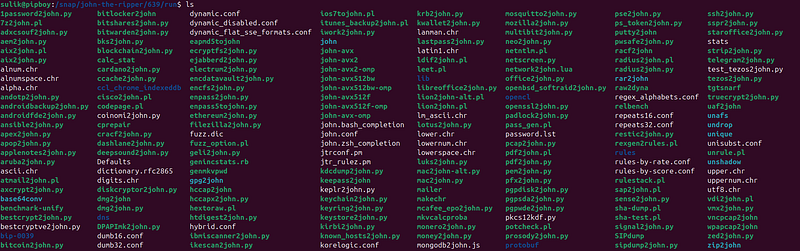
List with this tools with short explanations here:
How to use:
Creating hashes with John the Ripper, especially for different file types like ZIP files, involves using specialized utilities that come with John the Ripper. These utilities are designed to extract the hash values from various file formats so that they can be cracked by John the Ripper. For ZIP files, the utility you mentioned,zip2john, is used. Here’s how you can usezip2johnto create a hash from a ZIP file:
Step 1: Obtain zip2john
Ensure that you have the full version of John the Ripper installed, which includes thezip2johnutility. This utility is part of the "community-enhanced" version of John (often referred to as "jumbo" version), which includes additional features and support for more file types compared to the standard version.
Step 2: Prepare Your ZIP File
Make sure your ZIP file is ready and note its path. The file should have some form of password protection.
Step 3: Run zip2john
-
Open your command line interface(Terminal on Linux and macOS, CMD or PowerShell on Windows).
-
Navigate to the directory containing
**zip2john**if it is not added to your system path. -
Execute
**zip2john**followed by the path to your ZIP fileto extract the hash. The command would look like this:
zip2john /path/to/your/file.zip > /path/to/output/hash_file.txt
- This command directs zip2john to process the specified ZIP file and outputs the hash to a text file, which can then be used with John the Ripper. Same technic for other types of 2john tools.
Step 4: Use John the Ripper to Crack the Hash
Once you have the hash, you can use John the Ripper to attempt to crack it. Here’s how you might do that:
john /path/to/output/hash_file.txt
This command tells John to start cracking the hashes stored inhash_file.txt. You can use various options to specify wordlists, rules, or other cracking methods.
Basic Usage
John the Ripper is primarily a command-line tool, offering powerful options for password cracking. This section covers basic commands and options to get you started with password cracking tasks.
Running John the Ripper:
john

Basic Command Structure:
john [options] password_file
- Replace
password_filewith the path to the file containing the password hashes.
I have file with hash of password from office file:
Example:
- To start cracking passwords, you can use a command like:
john /path/to/your/hashes.txt
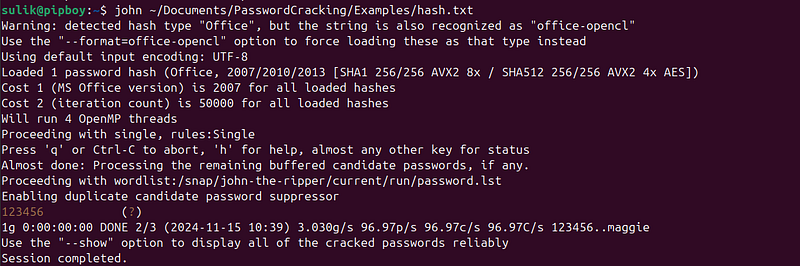
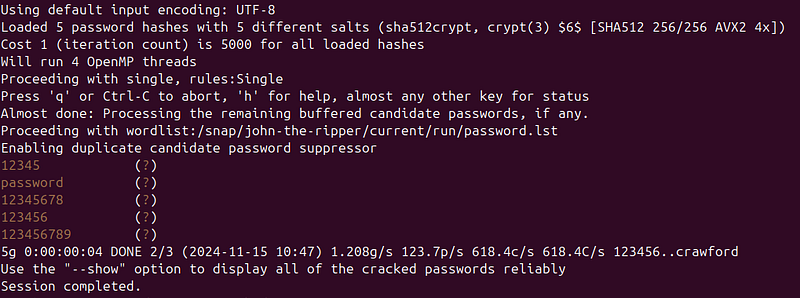
When you use a default configuration, John use basic password list:/usr/share/john/password.lst, you can add more passwords for this list if you want, or use external lists.
Common Command-Line Options:
-
**--wordlist**: Specifies a wordlist file to use for dictionary attacks.
john --wordlist=/path/to/wordlist.txt /path/to/hashes.txt
--rules :
Enables word mangling rules to try variations of words from the wordlist.
john --wordlist=/path/to/wordlist.txt --rules /path/to/hashes.txt
Default rulesinJohn the Ripperare predefined word-mangling rules specified in the configuration file (john.conf). These rules apply common password transformations to a base wordlist, increasing the chances of cracking passwords without requiring custom rule creation.
Where Default Rules Are Defined
-
Default rules are found in the
[List.Rules:Wordlist]section of thejohn.conffile. -
Other predefined rule sets like
[List.Rules:Single]and[List.Rules:Jumbo]may also exist, depending on your John installation.
You can examine these rules by opening the configuration file:
nano /usr/share/john/john.conf
(or wherever the file is located on your system).
How Default Rules Work
Default rules perform transformations on each word from the wordlist to generate variations. Common transformations include:
-
Case Transformations
-
Capitalizing the first letter.
-
Making all characters uppercase or lowercase.
2. Appending Characters
- Adding numbers, symbols, or specific sequences to the word (e.g.,
password1,password123,password!).
3. Prepending Characters
- Adding numbers or symbols to the beginning of the word (e.g.,
1password,!password).
4. Reversing Words
- Changing
passwordtodrowssap.
5. Leetspeak Substitution
- Replacing letters with numbers or symbols (
password→p@ssw0rd).
6. Combining Words
- Concatenating two words from the list.
Examples of Default Rules
Here are examples of some rules in the[List.Rules:Wordlist]section ofjohn.conf:
c               # Capitalize the first letter
Az"[0-9]"       # Append numbers 0-9
cAz"[0-9]"      # Capitalize, then append numbers 0-9
Az"123"         # Append the sequence "123"
r               # Reverse the word
Applying Default Rules
You can apply default rules using the--rulesoption without specifying a particular rule set. For example:
john --wordlist=/path/to/wordlist.txt --rules /path/to/hashfile
This will apply all the rules in[List.Rules:Wordlist]to the words in your wordlist.
Testing Default Rules
You can see how default rules modify your wordlist using the--stdoutoption:
john --wordlist=/path/to/wordlist.txt --rules --stdout | head -20
For a wordlist containing**password**, the output might look like this:
password
Password
PASSWORD
password1
password123
password!
p@ssword
123password
passwordpassword
drowssap
When to Use Default Rules
Default rules are particularly effective for:
-
Passwords following common patterns (e.g., adding
123, capitalizing the first letter). -
Quick attacks with minimal configuration.
-
Initial stages of penetration testing or password recovery.
Customizing or Expanding Default Rules
You can modify the[List.Rules:Wordlist]section injohn.confto add or remove rules as needed. For example, to add a rule that prepends123, you can add:
[List.Rules:Wordlist]
Az"123"          # Prepend 123 to all words
--incremental :
Uses brute force mode, attempting all possible character combinations.
john --incremental /path/to/hashes.txt
--format :
Specifies the type of hash. This is useful when the hash type is not automatically detected.
john --format=md5 /path/to/hashes.txt
--show :
Displays the cracked passwords.
john --show /path/to/hashes.txt
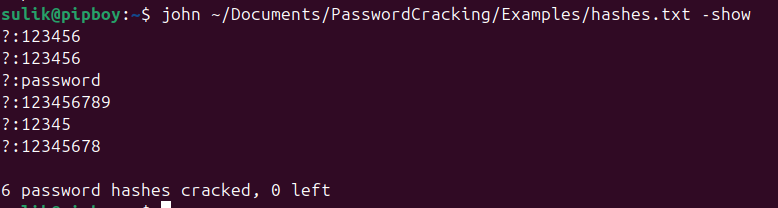
**Checking the Status:**While John the Ripper is running, you can check the progress by pressing any key. To see more detailed status information, pressCtrl + Cto pause the cracking process, and John will display the current status, including the speed of attempts and how many passwords have been cracked so far.
**Stopping and Resuming:**You can safely stop the cracking process at any time by pressingCtrl + C. John the Ripper saves the progress automatically, and you can resume the process later by simply rerunning the command without any changes.
Conclusion: Harnessing John the Ripper’s Versatility for Secure Password Management
John the Ripper stands out in the field of cybersecurity as a versatile and powerful tool designed for password cracking and security auditing. With its array of “2john” utilities, John can process a wide range of file types and encryption protocols, from conventional operating systems’ passwords to modern encrypted wallet files and network protocols. This adaptability allows users to recover lost passwords, test the strength of password policies, and conduct security assessments across diverse platforms and environments.
The appropriate use of John the Ripper hinges on ethical and legal considerations. It is paramount to use this tool within the confines of authorized environments only. This includes conducting penetration testing or security assessments with explicit permission, recovering passwords for which you have legitimate rights, or practicing on personal or openly shared projects designed for educational purposes. Unauthorized use of John the Ripper, as with any hacking tool, can lead to legal repercussions and ethical violations.
John the Ripper’s functionality extends beyond mere password recovery. It serves as an educational tool that sheds light on the effectiveness of current encryption methods and password complexity requirements. By analyzing how passwords are secured and how they can be cracked, cybersecurity professionals can better understand and improve the security measures protecting sensitive information.
In summary, John the Ripper is an indispensable tool in the cybersecurity toolkit, offering both practical solutions for password recovery and a platform for enhancing system security. Whether you’re a security professional, a system administrator, or a cybersecurity enthusiast, understanding and utilizing John the Ripper responsibly can greatly contribute to a deeper understanding of securing digital assets against emerging threats.