Mastering the Basics: Essential CLI Tools for Reconnaissance in Penetration Testing

- Category: CTI
- Source article: https://medium.com/@1200km/mastering-the-basics-essential-cli-tools-for-reconnaissance-in-penetration-testing-ee7fd9e36394
- Published: 2024-11-09
- Preserved media: 11 image(s), including cover images, screenshots, diagrams, and infographics where present.
- Preserved technical blocks: 8 code/configuration block(s).
Ecosystem Fit
This page mirrors the original Medium article into the 1200km.com Docusaurus ecosystem. The original article flow, images, screenshots, infographics, and technical blocks are preserved from the export.
A Comprehensive Guide to Command Line Tools for Network Exploration: How to Effectively Use Ping, Netdiscover, Whois, and More to Uncover Web Vulnerabilities and Strengthen Security Defenses
Title of contact
Ping
Netdiscover
Whois
NSLookup
Ping
Introduction
Thepingcommand is a fundamental network tool used in diagnostics and performance measurement of networks. It operates by sending Internet Control Message Protocol (ICMP) echo request packets to a target host and listens for echo replies. This process helps determine the operational status of the target and the network's latency - the time it takes for a packet to travel from the sender to the receiver and back.
How Ping Works
pinguses the ICMP protocol, which is a part of the Internet Protocol Suite that is used by network devices, like routers, to send error messages indicating, for example, that a requested service is not available or that a host or router could not be reached. When you execute apingcommand, it sends ICMP echo request packets to the address you specify. The target host, if reachable, responds with an echo reply.
Thepingtool measures the time between the sending of the echo request and the receipt of the corresponding reply. It typically reports this time in milliseconds and provides details on the sequence of the data packets, loss, and sometimes the route taken by the packets.
Syntax and Options
The basic syntax forpingin most operating systems is:
ping
[options]
 <destination>
Typical Responses from the ping Command
-
Echo Reply:
-
What It Means: The most standard response, indicating that the target is reachable and responding to your requests.
-
Output Example:
64

bytes

from

192.168
.1
.1
: icmp_seq=
1
 ttl=
64
 time=
10.1
 ms

- Details: Shows the size of the packet, the IP address of the sender, the ICMP sequence number, the time-to-live (TTL), and the round-trip time.
2. Destination Host Unreachable:
-
What It Means: The local router or a router along the path doesn’t have a route to the destination IP, or the destination host is down and not connected to the network.
-
Output Example:
From

192.168
.
1.1
 icmp_seq=
1
 Destination Host Unreachable

- Details: Indicates problems in the network path or that the target system is off.
3. Request Timed Out:
-
What It Means: No Echo Reply was received within the default time frame (usually 1 second for each packet). This can mean heavy network congestion, a misconfigured network, FireWall, ICMP filtering, or a non-responsive host.
-
Output Example:
Request timed out. -
Details: Suggests a break in the connection or excessive network latency.
-
Time To Live Exceeded:
-
What It Means: The packet has traveled through more network devices (routers or switches) than allowed by its TTL value. Each device decreases the TTL value of the packet by one, and if it reaches zero, the packet is discarded, and this message is sent back.
-
Output Example:
From 192.168.1.1 icmp_seq=1 Time to live exceeded -
Details: Usually indicates a routing loop or excessively long route to the destination.
-
Unknown Host:
-
What It Means: The DNS name of the target cannot be resolved to an IP address.
-
Output Example:
ping: unknown host[www.example.com](http://www.example.com) -
Details: Indicates a DNS problem, where the hostname entry is incorrect, missing, or the DNS server is not reachable.
-
Redirect Received:
-
What It Means: A router has sent a redirect message indicating a more efficient route is available for the traffic.
-
Output Example:
-
Redirect Network(new nexthop: 192.168.1.1) -
Details: Not common in modern networks but can indicate routing protocol misconfigurations or attacks.
How to Interpret These Responses
Good Responses:
- Regular echo replies with consistent and reasonable times suggest a healthy network connection to the target.
Problematic Responses:
- Loss of packets, high variability in response times, or error messages like “Destination Host Unreachable” point to network issues that might require reconfiguration or troubleshooting.
Network Configuration and Security:
- Unexpected redirects or TTL exceeded errors might suggest deeper investigations into routing protocols, firewall rules, and overall network security posture.
During the reconnaissance stage of penetration testing, certainpingcommand options are particularly valuable for gathering information about the target network's structure, security posture, and operational characteristics. Here are somepingoptions that are useful for reconnaissance along with their use cases:
1. -t <ttl> (Time to Live)
ping -t
1

192.168
.126
.130
Functionality:
-
Unix/Linux & Windows: This option sets the TTL for the packets. It’s useful for determining the number of hops (routers passed) to the target and potentially identifying weak spots in the network’s perimeter.
-
Use Case:
-
A penetration tester can use varying TTL values to map out network routes and identify the presence of firewalls or additional routers that may not be documented.
2. -a
ping -
a
 google
.com
-
Functionality:
-
Windows: Resolves IP addresses to hostnames, which can provide additional insights into the target network, such as naming conventions and server roles.
In Linux/Unix use -4 flag

-
Use Case:
-
Useful for mapping IP addresses to more descriptive device names which might hint at the function or importance of certain systems within the target environment.
3. -v (Verbose)
-
Functionality:
-
Unix/Linux & Windows: Provides detailed output for each packet sent and received. This can reveal inconsistencies or anomalies in packet handling.
-
Use Case:
-
This option can help in identifying packet filtering rules based on the ICMP packet structure or payload, indicating the presence of firewalls or intrusion detection systems.
Netdiscover
Netdiscover is a popular network tool used for network reconnaissance, particularly for discovering active hosts on a local subnet. This tool is especially useful in the initial stages of penetration testing or for network administrators who want to inventory or monitor their network.
Key Features of Netdiscover:
- ARP-Based Scanning:
Netdiscover uses ARP (Address Resolution Protocol) to find active hosts on a local Ethernet network. Unlike tools that rely on ICMP (Internet Control Message Protocol) likeping, Netdiscover does not depend on ICMP replies which can be blocked by personal firewalls. This makes it particularly effective in environments where ICMP packets are filtered.
2. Passive and Active Scanning Modes:
-
**Passive Mode:**In this mode, Netdiscover listens for ARP requests and replies on the network without sending any packets itself. This is useful for stealthy reconnaissance where the scanner should not generate additional network traffic.
-
**Active Mode:**Netdiscover actively sends ARP requests to determine which addresses are in use on the local network. This mode is faster and more direct but more likely to be noticed.
3. MAC Address and Vendor Identification:
- When a host is discovered, Netdiscover retrieves the MAC address of the host and can often determine the manufacturer of the network interface (based on the MAC address), providing clues about the hardware used by the target.
4. Customizable Scanning:
- Users can specify a range of IP addresses to scan or allow Netdiscover to automatically scan the network. This flexibility makes it suitable for different network sizes and configurations.
Typical Use Cases for Netdiscover:
-
Network Inventory:
-
Quickly identify all devices connected to a local network segment, including those that might otherwise be hidden (e.g., network printers, IoT devices).
2. Penetration Testing:
- Map out live hosts on a network segment before launching more invasive tests. This helps in planning attack vectors that are more likely to succeed.
3. Detection of Unauthorized Devices:
- Detect unauthorized or rogue devices connected to a network, which could be potential security risks.
Usage
Basic command:
sudo netdiscover
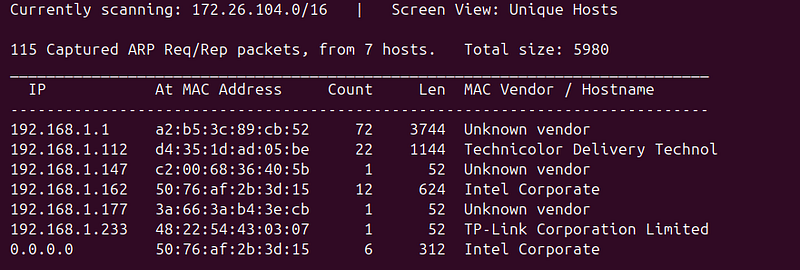
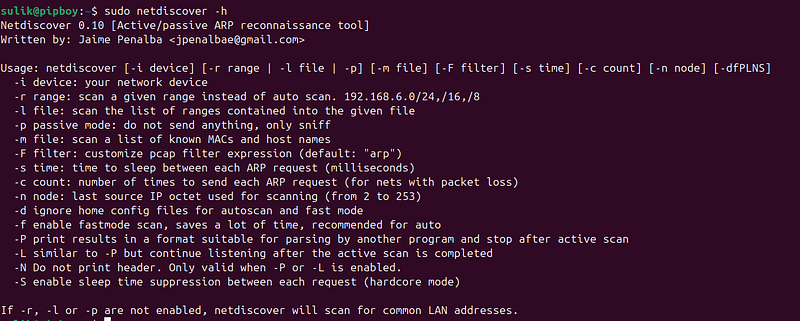
help
netdiscover -h
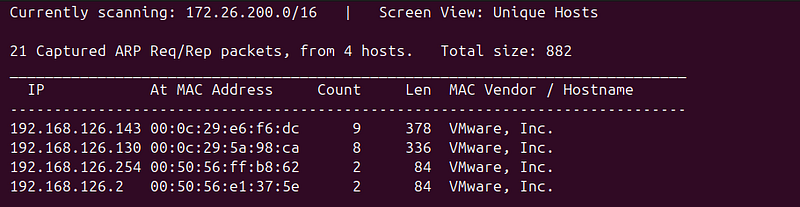
-i Use other interface:
sudo netdiscover -
i
 vmnet8
Whois
whoisis a query and response protocol that is widely used for querying databases that store the registered users or assignees of an Internet resource, such as a domain name, an IP address block, or an autonomous system. The tool provides detailed information about the domain or IP address in question, such as the ownership details, contact information, domain availability status, and when it was last updated.
How Whois Is Useful for Penetration Testing:
-
Reconnaissance Phase:
-
Identifying Targets:
whoisis used in the reconnaissance phase of penetration testing to gather intelligence about a target organization’s Internet footprint. By running awhoisquery on a domain, testers can learn about the network blocks, domain registrations, and associated IP addresses which might provide gateways to internal networks. -
**Gathering Contact Info:**Sometimes
whoisprovides contact details for the administrators of a domain. This information can be useful for social engineering attacks or for understanding the structure of the company.
2. Domain Information:
-
**Registration Details:**Testers can find out when a domain was registered and when it is due to expire. Sudden changes in domain registration details can sometimes indicate a change in ownership potentially due to corporate actions (like mergers or acquisitions) which might introduce instabilities or configuration lapses in IT systems.
-
**Registrar Information:**Knowing where the domain was registered can provide insights into the administrative practices of the target, such as the choice of service providers and potentially weak links in security due to less reputable third-party services.
3. Network Size and Scope:
- IP Allocation and ASN Information:
whoisqueries can provide details about allocated IP address blocks and Autonomous System Numbers (ASN). This information is crucial for mapping out the network infrastructure of the target organization, which can help in identifying possible network ranges to probe for vulnerabilities.
4. Legal and Compliance Aspects:
- **Understanding Compliance Posture:**Information on the geographical location of IP addresses and servers can aid in understanding the compliance landscape the target operates under. This might impact the types of security protocols they are likely to implement.
Example Uses of Whois:
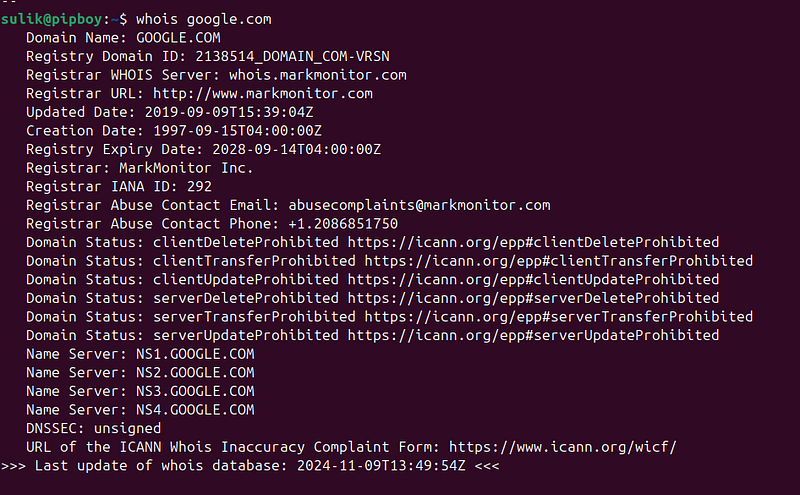
- Domain Research:
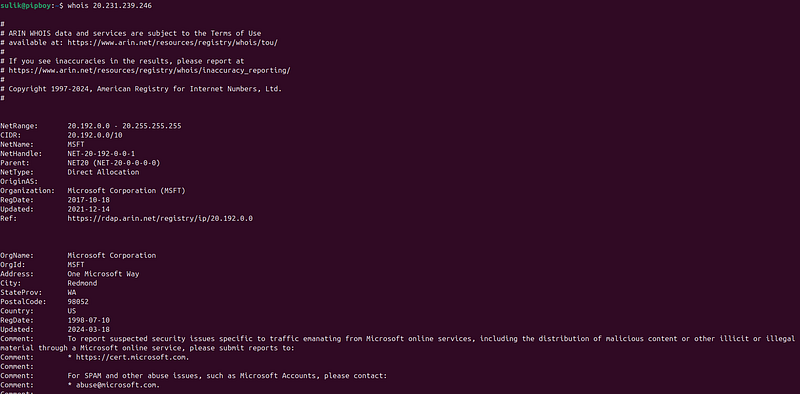
whois google.comwould reveal information about the registrant, contact details, registration dates, and name servers of Google. This information can be used to identify additional domains owned by the company or to prepare for further DNS-based or network-level attacks.
- IP Research:
whois 172.217.0.0can provide details about the IP addresses that Google owns. This helps in creating a map of network infrastructure and can lead to the discovery of less secure or neglected network segments.
NSLookup
nslookupstands for "name server lookup" and is available on most Unix-like operating systems as well as on Microsoft Windows. It allows users to query DNS servers to discover DNS details, including IP addresses associated with a domain, the mail servers configured for a domain, and the name servers responsible for a domain. This can be very helpful in gathering information about a target's Internet presence and network infrastructure.
Key Features of nslookup :
-
Query Specific DNS Records:
-
Allows for querying specific DNS record types such as A (addresses), MX (mail exchanges), NS (name servers), PTR (pointer records for reverse DNS lookups), and more.
2. Interactive and Non-Interactive Modes:
- Can be used in an interactive mode for complex DNS investigations or non-interactive mode for quick lookups.
3. Testing DNS Resolution:
- Helps in diagnosing common DNS issues and verifying that DNS servers are correctly resolving names and IP addresses.
How nslookup Is Useful for Penetration Testing:
-
Domain and Network Mapping:
-
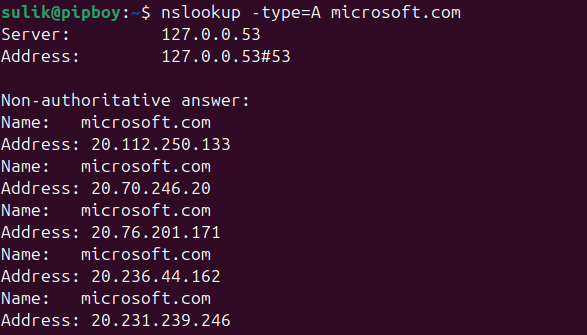
By querying A and AAAA records, penetration testers can identify all the associated IP addresses with a domain. This is crucial for network mapping and subsequent vulnerability scanning.
2. Mail Server Discovery:
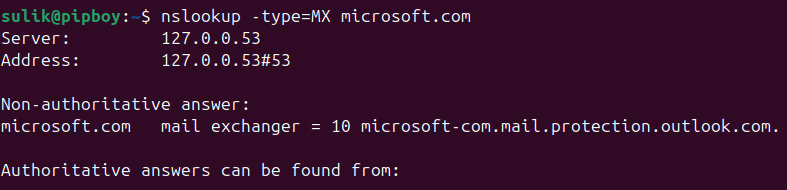
- MX records can be queried to identify mail servers, which can be targeted in further attacks such as phishing or spamming.
3. Name Server Enumeration:
- Discovering NS records helps in understanding how a target’s domain is structured and could reveal poorly secured DNS infrastructure that could be exploited.
4. Reverse DNS Lookup:
nslookupcan perform reverse DNS lookups to find out the domain name associated with an IP address. This can be particularly useful in identifying what part of a network an IP address is associated with
Example Uses of nslookup :
-
Querying DNS Records:
-
To find the IP addresses associated with a domain:
-
nslookup -type=A example.com -
To find the mail servers for a domain:
-
nslookup -query=MX example.com -
To discover the name servers for a domain:
-
nslookup -type=NS example.com -
Reverse DNS Lookup:
-
To find which domain a specific IP address is associated with:
-
nslookup 192.0.2.1