Mastering Nmap: A Comprehensive Guide to Network Exploration and Security Auditing. Part 4. Scripts

- Category: CTI
- Source article: https://medium.com/@1200km/mastering-nmap-a-comprehensive-guide-to-network-exploration-and-security-auditing-part-4-s-5ec77704057f
- Published: 2024-10-30
- Preserved media: 14 image(s), including cover images, screenshots, diagrams, and infographics where present.
- Preserved technical blocks: 19 code/configuration block(s).
Ecosystem Fit
This page mirrors the original Medium article into the 1200km.com Docusaurus ecosystem. The original article flow, images, screenshots, infographics, and technical blocks are preserved from the export.
This a fours part of comprehensive Medium post will delve into Exploring the Depths of Network Security with Nmap Scripts: A Detailed Guide on Enhancing Network Scanning and Security Audits through Advanced Scripting Techniques
About author
Hello and welcome to my article. My name is Andrey, and I am a penetration tester and cybersecurity researcher
Table of contents:
-
Introduction
-
Categories of NSE Scripts
-
Most useful and powerful scripts sort by categories
-
Auth
-
http-default-accounts
-
http-auth-finder
-
http-wordpress-users
-
Broadcast
-
broadcast-dhcp-discover
-
broadcast-dns-service-discovery
-
broadcast-wake-on-lan
-
Brute
-
ssh-brute
-
smb-brute
-
Default
Introduction to NSE (Nmap Scripting Engine)
Enhancing the basic capabilities of Nmap, the Nmap Scripting Engine (NSE) is a powerful tool that allows users to write scripts to automate a wide range of network monitoring tasks. These scripts can perform network discovery, vulnerability detection, exploitation, and more. Introduced in Nmap 4.50 (released in 2007), NSE was designed to extend Nmap’s functionality, allowing users to write scripts for custom tasks.
NSE operates using scripts written in Lua, a lightweight programming language ideal for configuration and automation. By leveraging NSE, users can customize their scans to conduct complex procedures, such as detecting vulnerable versions of applications, finding and exploiting vulnerabilities, and gathering more detailed information about their network targets.
The role of NSE in enhancing Nmap’s capabilities is critical, as it allows for much greater flexibility and adaptability in handling diverse network environments and security scenarios. This adaptability makes Nmap not just a tool for simple network scanning but a comprehensive solution for network security diagnostics and forensics.
With NSE, Nmap transforms from a simple network scanning tool into an integrated platform capable of sophisticated network security assessments, making it an invaluable resource for any cybersecurity toolkit. As we delve deeper into the functionalities and usage of NSE scripts, we will explore how they empower security professionals to perform detailed and efficient security audits that are vital for protecting network infrastructures in today’s dynamic threat landscape.
Here you can see all of NSE scripts
When managing over 606 scripts, identifying the most popular ones individually can be quite challenging. To streamline this process, the Nmap team developed the ‘-sC’ option. This feature allows you to execute the top Nmap scripts simultaneously.
nmap -sC
192.168
.126
.144
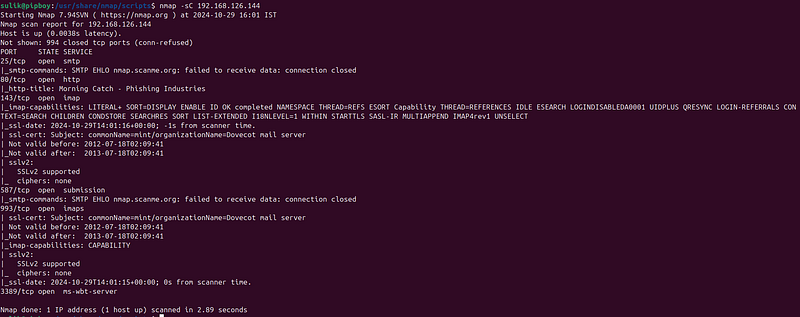
Categories of NSE Scripts
The Nmap Scripting Engine (NSE) organizes scripts into several categories based on their purpose and the nature of their operations. This classification helps users quickly identify the type of script that suits their specific needs, whether it’s for basic information gathering, vulnerability scanning, or advanced exploitation.Here’s a detailed look at these categories.
Execute all the scripts in a category
At times, you might need to execute all the scripts within a specific category. This can be accomplished by using the ‘ -script category’ option, as illustrated below:
nmap
--script
 vuln
192.168
.
126.144
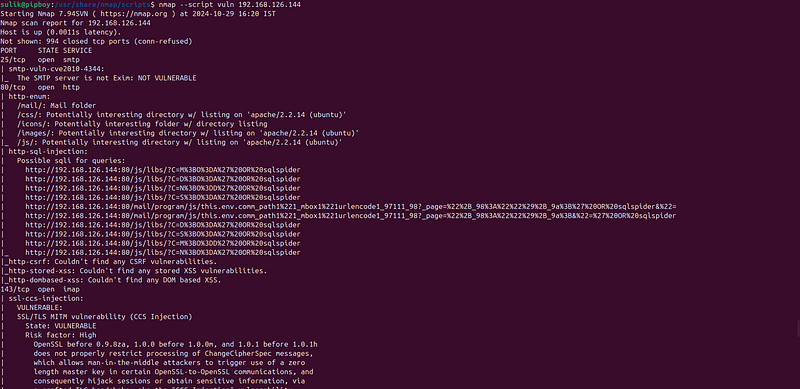
You can also merge two categories if required:
nmap
--script
 vuln, auth
192.168
.
126.144
Execute Nmap scripts using a wildcard:
Nmap enables you to execute scripts using wildcards, allowing you to select multiple scripts that start or conclude with a specific pattern. For instance, if you wish to execute all scripts that start with ‘ftp’, you can use the following syntax:
nmap --script
"ftp-*"
 192.168.126.130
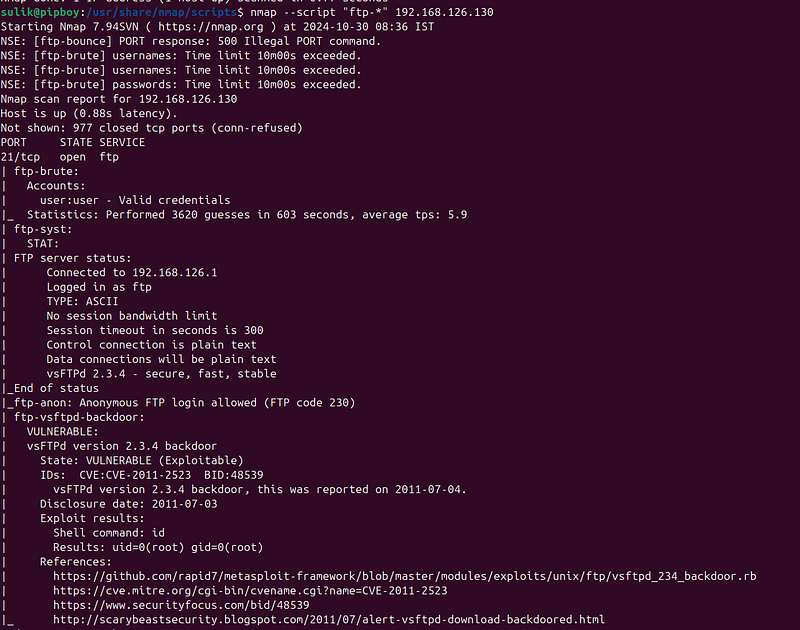
Execute a specific Nmap script
This approach is ideal when you have already determined which script you need to use. For instance, to run the http-brute script for conducting brute force password audits on HTTP basic, digest, and NTLM authentication, use the following command:
nmap -p80 --script=
"http-brute"
 192.168.126.144
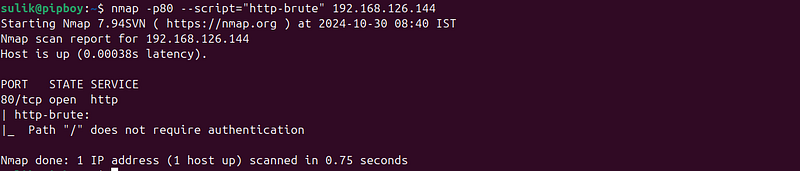
Execute custom scripts
As previously mentioned, the NSE (Nmap Scripting Engine) allows you to create your own scripts and execute them directly from your local operating system. To do this, use the following syntax:
nmap --script=/your-scripts 192.168.1.1
Ensure you replace the path /your-scripts with the actual local directory where your scripts are located.
Combine multiple script types
You’ve learned how straightforward it is to execute individual scripts, categories, and even your own local scripts. Now, let’s integrate all these options into a single command, as demonstrated in the example below:
nmap --script
"vuln,auth,/my_script and not ftp-*"
 192.168.1.1
In this command, we’ve merged two script categories with your own script, while excluding any scripts that start with “ftp-”.
Most useful and powerful scripts sort by categories
Auth
- Purpose: Tests authentication mechanisms to uncover weaknesses like poor passwords or vulnerable authentication protocols.
http-default-accounts
Purpose: This script tests for access using default credentials on various web services.
Command Example:
nmap --script=http-
default
-accounts --script-args http-
default
-accounts.category=web
192.168
.1
.1
This command targets the IP address192.168.1.1and uses the script to attempt logins on web services with default credentials, specifying the category of services to focus on web interfaces.
http-auth-finder
Purpose: Identifies web pages that may require authentication.
Command Example:
nmap
--script=http-auth-finder 192.168.126.145
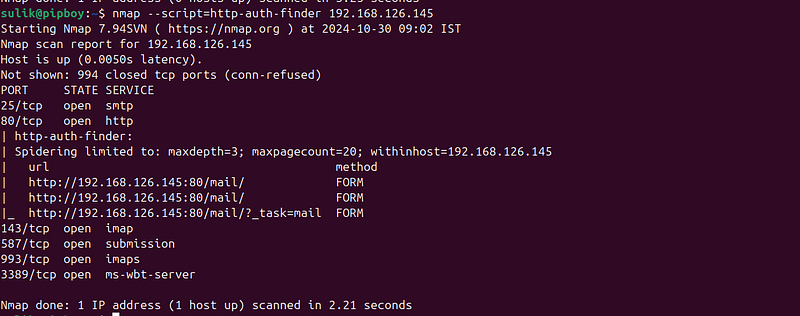
This command scans the IP192.168.126.145to locate HTTP authentication forms, which can help in pinpointing pages that are potential targets for more detailed security assessments.
smb-enum-users
Purpose: This script enumerates users on a target system using the SMB protocol. It can provide valuable information about the users registered on the system, including their roles and other details.
Command Example:
nmap --script=smb-
enum
-users -p445
192.168
.126
.130
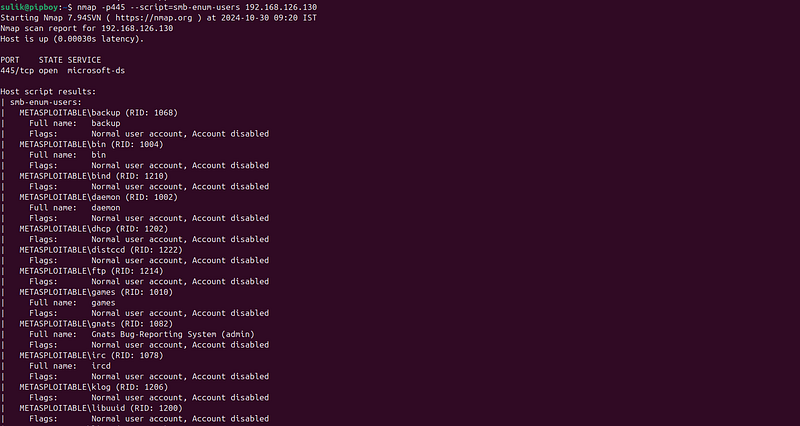
This command specifically targets the SMB service running on port 445 of the IP address192.168.126.130. It aims to list all users on the system, which can be crucial for understanding the target environment and planning further penetration tests or audits.Command Example:
http-wordpress-users
Purpose: This script is designed to enumerate WordPress users from a target website. It can identify user names that could be targeted in brute-force login attempts.
Command Example:
nmap -p443
--script=http-wordpress-users 192.168.122.1

This command scans port 443 (typically used for HTTPS) of the IP address192.168.122.1, specifically focusing on detecting WordPress user accounts. This is particularly useful for penetration testing scenarios where gaining insight into potential usernames could facilitate further exploitation attempts.
Broadcast
- The broadcast category in Nmap's Scripting Engine (NSE) contains scripts that are used to discover hosts on the local network by sending packets to broadcast addresses. These scripts can help identify devices that may not respond to standard unicast probes. Here are three commonly used scripts from this category along with examples of how to use them:
broadcast-dhcp-discover
Purpose: Sends a DHCP request to the broadcast address to discover DHCP servers and their given network settings.
Command Example:
nmap
--script=broadcast-dhcp-discover 192.168.126.1/24
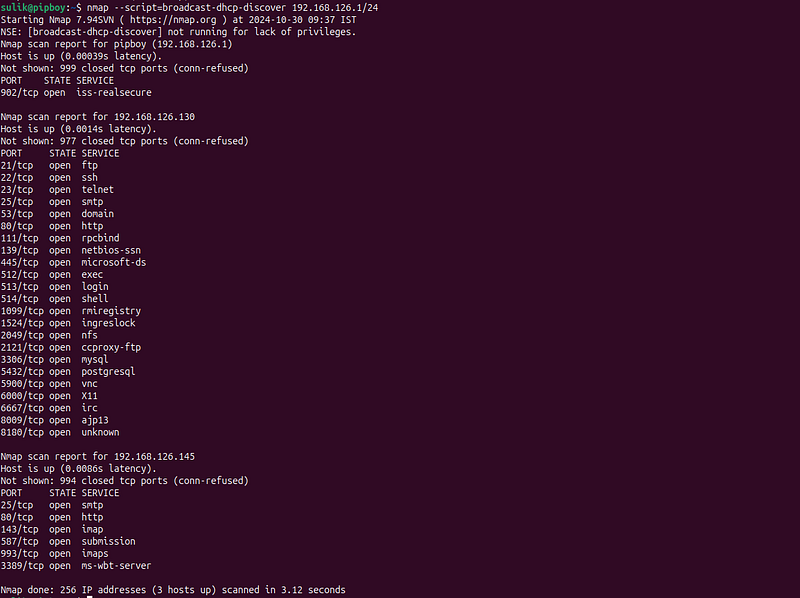
This command can reveal information about DHCP servers in your network, including the IP address range they are offering, lease time, DNS servers, and more. It’s useful for network mapping and troubleshooting DHCP configurations.
broadcast-dns-service-discovery
Purpose: Uses DNS service discovery to find hosts offering certain services on the local network.
Command Example:
nmap
--script=broadcast-dns-service-discovery 192.168.126.1/24
This script sends multicast DNS (mDNS) queries to discover devices and the services they are advertising without needing prior knowledge of their IP addresses. It’s useful for discovering devices like printers, servers, and other networked devices that support mDNS.
broadcast-wake-on-lan
Purpose: This script sends a Wake-on-LAN (WOL) packet to a specified MAC address to power on machines that are configured to listen for WOL packets. This feature is useful for remotely starting up computers that are turned off but have network cards that remain powered and listening for the magic packet.
Command Example:
nmap
--script=broadcast-wake-on-lan --script-args 'broadcast-wake-on-lan.mac=XX:XX:XX:XX:XX:XX'
In this command, you need to replaceXX:XX:XX:XX:XX:XXwith the actual MAC address of the target device that you want to wake up. This script is ideal for network administrators who need to remotely start computers for maintenance or updates without being physically present.4
Brute
The Brute category in Nmap's Scripting Engine (NSE) contains scripts aimed at performing brute-force attacks against various network services to discover weak passwords that could be exploited. Here are three commonly used scripts from this category along with examples of how to use them:
More information about Brute Force Attack here:
ssh-brute
-
Purpose: Conducts a brute-force attack against SSH servers to find weak passwords associated with user accounts.
-
Command Examples:
Default username/password lists:
  nmap -p
22

--script ssh-brute --script-args userdb=users.lst,passdb=pass.lst \

--script-args ssh-brute.timeout=4s <target>
Brute force with your custom lists:
nmap --script=ssh-brute --script-args userdb=~
/Documents/
PasswordCracking
/
Dictionaries
/short.
txt
,passdb=
/home/
sulik/
Documents
/
PasswordCracking
/
Dictionaries
/short.
txt
 -p22
192.168
.126
.130
-
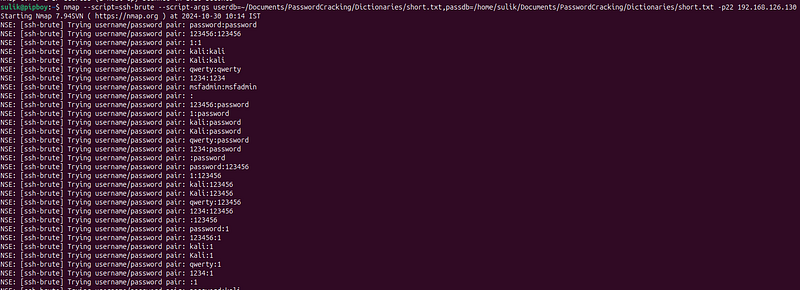
**userdb=~/Documents/PasswordCracking/Dictionaries/short.txt**: This argument specifies the path to a text file containing a list of usernames to use during the brute-force attempt. The path is given as a relative path from the user's home directory (~), which expands to the current user's home directory. -
**passdb=/home/sulik/Documents/PasswordCracking/Dictionaries/short.txt**: This argument specifies the path to a text file containing a list of passwords to try during the brute-force attempt. This path is an absolute path.
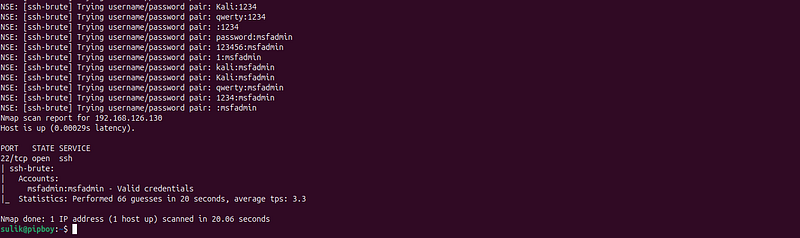
smb-brute
Purpose: Tries to brute-force SMB (Server Message Block) credentials on Windows systems and Samba servers.
Command Examples:
Default command:
nmap
--script=smb-brute -p445 192.168.126.130

- This command applies brute force to the SMB service on port 445 of the IP
192.168.122.1, using a username and password list to potentially crack login credentials. This is particularly useful in penetration testing scenarios where SMB is widely used for file sharing and network communication on Windows networks.
Brute force with your custom lists:
nmap --script=smb-brute --script-args userdb=~
/Documents/
PasswordCracking
/
Dictionaries
/short.
txt
,passdb=
/home/
sulik/
Documents
/
PasswordCracking
/
Dictionaries
/short.
txt
 -p139,
445

192.168
.126
.130

-
**userdb=~/Documents/PasswordCracking/Dictionaries/short.txt**: This argument specifies the path to a text file containing a list of usernames to use during the brute-force attempt. The path is given as a relative path from the user's home directory (~), which expands to the current user's home directory. -
**passdb=/home/sulik/Documents/PasswordCracking/Dictionaries/short.txt**: This argument specifies the path to a text file containing a list of passwords to try during the brute-force attempt. This path is an absolute path.
Default
-
Purpose: Checks for services running with default configurations, which are often insecure.
-
When managing over 606 scripts, identifying the most popular ones individually can be quite challenging. To streamline this process, the Nmap team developed the ‘-sC’ option. This feature allows you to execute the top Nmap scripts simultaneously.
nmap -sC
192.168
.126
.144