Mastering Nmap: A Comprehensive Guide to Network Exploration and Security Auditing. Part 2

- Category: CTI
- Source article: https://medium.com/@1200km/mastering-nmap-a-comprehensive-guide-to-network-exploration-and-security-auditing-part-2-d5a95569031c
- Published: 2024-10-27
- Preserved media: 2 image(s), including cover images, screenshots, diagrams, and infographics where present.
- Preserved technical blocks: 10 code/configuration block(s).
Ecosystem Fit
This page mirrors the original Medium article into the 1200km.com Docusaurus ecosystem. The original article flow, images, screenshots, infographics, and technical blocks are preserved from the export.
This a second part of comprehensive Medium post will delve into the powerful network scanning tool, Nmap, exploring its capabilities from basic to advanced levels. It includes practical tutorials on using Nmap’s various commands, the Nmap Scripting Engine, and integration with other security tools. The guide aims to equip readers with the skills to conduct thorough network explorations and security audits.
Part 1 is here
Part 3 is here
Part 4 is here
About author
Hello and welcome to my article. My name is Andrey, and I am a penetration tester and cybersecurity researcher
Table of contents:
SCAN TECHNIQUES:
-
-sS/sT/sA/sW/sM: TCP SYN/Connect()/ACK/Window/Maimon scans
-
-sU: UDP Scan
-
-sN/sF/sX: TCP Null, FIN, and Xmas scans
-
— scanflags <flags>: Customize TCP scan flags
-
-sI <zombie host[:probeport]>: Idle scan
-
-sY/sZ: SCTP INIT/COOKIE-ECHO scans
-
-sO: IP protocol scan
-
-b <FTP relay host>: FTP bounce scan
SCAN TECHNIQUES:
-sS : TCP SYN Scan
- Description: The SYN scan is perhaps the most popular and default scan option for good reasons. It’s often referred to as a “stealth” scan because it never completes TCP connections. It sends a SYN packet (as if it’s going to open a connection) and listens for a response.
Command Example:
nmap -sS
192.168
.
1.1
This command initiates a TCP SYN scan against the host at 192.168.1.1, checking for open ports without completing the TCP handshake, making it stealthy.
-
Response Handling:
-
If a SYN-ACK is received, the port is considered open.
-
If a RST (reset) is received, the port is considered closed.
-
Usage: This scan is less likely to be logged by systems than a full TCP connection, making it stealthier. It’s widely used for quick, unobtrusive scanning.
-sT : TCP Connect() Scan
- Description: This scan type uses the standard TCP
connect()system call to establish a full TCP connection with the target, rather than sending raw packets.
Command Example:
nmap -sT
192.168
.1
.1
This performs a TCP Connect() scan, using the operating system’s built-in connect() function to fully establish a TCP connection with each scanned port on the host. It’s straightforward but less stealthy.
-
Response Handling:
-
If the connection succeeds, the port is open.
-
If the connection fails (e.g., due to a rejection or timeout), the port is closed or filtered.
-
Usage: It’s the most basic form of TCP scanning but can be more detectable by firewalls and logging systems since it establishes a full connection.
-sA : TCP ACK Scan
- Description: The ACK scan is used primarily to map out firewall rules, not to check whether ports are open or closed. It sends an ACK packet to the target port to see how it responds.
Command Example:
nmap -sA
192.168
.1
.1
This command executes a TCP ACK scan to determine filtering rules by sending ACK packets. It helps map out firewall configurations, as firewalls may react differently to unexpected ACK packets.
-
Response Handling:
-
If an RST response is received, it indicates that the port is unfiltered and that the packet has reached the host.
-
No response or an ICMP error response suggests the port is filtered.
-
Usage: This scan helps identify whether ports are statefully filtered by a firewall.
-sW : TCP Window Scan
Command Example:
-
nmap -sW 192.168.1.1 -
This scans by sending ACK packets and then analyzing the TCP window size field of the RST responses to infer the state of the port. It’s useful for detecting differences in how different systems and configurations handle closed ports.
-
Response Handling:
-
By examining variations in the TCP window field of RST packets, it may infer whether a port is open or closed.
-
Usage: This scan is less common due to its complexity and the specific conditions needed for it to provide useful results. It can sometimes reveal more than a standard ACK scan depending on the system configurations.
-sM : TCP Maimon Scan
- Description: Named after Uriel Maimon, this scan type involves sending a FIN/ACK packet to the target port.
Command Example:
-
nmap -sM 192.168.1.1 -
Initiates a Maimon scan by sending FIN/ACK packets to the target. This scan type can potentially bypass firewalls or intrusion detection systems that do not specifically look for combined FIN/ACK scans.
-
Response Handling:
-
Similar to a FIN scan, open ports might ignore the FIN/ACK packet, while closed ports should send an RST in response.
-
Usage: This is another form of stealth scanning, potentially bypassing some packet inspection systems that look specifically for FIN or SYN packets alone.
-sU: UDP Scan
The-sUoption in Nmap is designated for UDP scans, which are essential for identifying open UDP ports on target hosts. Unlike TCP, UDP is a connectionless protocol, which can make these scans particularly challenging but highly valuable for discovering a wide range of services.
How -sU Works:
When executing a UDP scan with-sU, Nmap sends a UDP packet to the specified ports on the target host. The behavior of the target in response to these packets determines the status of the port:
-
If an ICMP port unreachable error (type 3, code 3) is received, the port is considered closed.
-
If there is no response received, the port could either be open or filtered by a firewall that’s dropping the traffic.
-
In some cases, a clear UDP response from a service indicates an open port.
These scans are particularly effective for identifying and interacting with services that use UDP, such as DNS, SNMP, DHCP, and many real-time applications.
Example Usage of -sU :
nmap -sU
192.168
.1
.0
/
24
This command initiates a UDP scan across all hosts within the subnet192.168.1.0/24, aiming to discover active UDP services. The results will indicate which UDP ports are open but will not detail the services unless combined with version detection (-sV).
Use Cases:
-
Service Discovery: Many crucial network services operate over UDP, and identifying these can help in both securing and optimizing the network.
-
Security Auditing: Identifying open UDP ports is vital for security, as unwanted or unknown UDP services can pose significant vulnerabilities.
-
Network Troubleshooting: Since UDP is widely used for broadcasting and streaming, understanding which UDP ports are open can assist in network performance and troubleshooting efforts.
-sN/sF/sX
The-sN,-sF, and-sXoptions in Nmap are types of stealth TCP scans that manipulate TCP flags to probe systems in ways that standard SYN scans do not. These scans are particularly useful for evading detection by firewalls and intrusion detection systems that primarily look for SYN packets. Here’s an explanation of each, along with command examples and typical usage scenarios:
-sN : TCP Null Scan
- Explanation: In a TCP Null scan, Nmap sends TCP packets with no flags set — hence “null.” According to the TCP standard, no response is received from open ports, while closed ports should respond with an RST (reset) packet.
Command Example:
-
nmap -sN 192.168.1.1 -
Typical Usage: Used to identify open ports on systems that do not respond to malformed packets (packets with no flags set). It’s particularly effective against Unix-based systems where these packets are often ignored by open ports.
-sF : TCP FIN Scan
- Explanation: This scan involves sending TCP packets with only the FIN flag set. A FIN packet is used to politely close a connection. According to TCP protocol behavior, closed ports should reply with an RST, and open ports should ignore the FIN packet.
Command Example:
-
nmap -sF 192.168.1.1 -
Typical Usage: Useful for scanning environments where firewalls or IDS might drop SYN packets. Like the Null scan, the FIN scan is stealthy because many systems do not log these packets as they do with SYN packets.
-sX : TCP Xmas Scan
- Explanation: The Xmas scan sends packets where the FIN, PSH (push), and URG (urgent) flags are set, theoretically lighting up the packet “like a Christmas tree.” The same protocol behavior applies — open ports should ignore these packets, and closed ports should respond with an RST.
Command Example:
-
nmap -sX 192.168.1.1 -
Typical Usage: This scan type is named for the fact that many flags are turned on, just like lights on a Christmas tree. It is often used to test network behavior under non-standard conditions and to bypass less sophisticated security systems that do not specifically filter for such flag combinations.
General Considerations:
-
Stealthiness: All three scans are considered stealthy in that they do not establish a complete TCP connection and can sometimes evade intrusion detection systems that are not configured to look for unusual TCP flags.
-
Reliability: These scans can be unreliable for confirming whether a port is open because many modern network devices and software are configured to drop such unusual packets. Also, firewalls configured to not respond to these scans can make open ports appear closed.
-
Legal and Ethical Use: Always ensure you have permission to scan the network, as unauthorized scanning can lead to legal issues and is considered unethical.
— scanflags <flags>:
The--scanflagsoption in Nmap allows you to customize the TCP flags in the packet headers sent during the scan. This advanced feature lets you specify an arbitrary set of TCP flags to manipulate packet behavior in a highly controlled manner. It can be used to craft packets that might elicit responses from target systems that reveal information about their configuration and response patterns, potentially bypassing standard security mechanisms.
Full Explanation:
With--scanflags, you provide the flags you want to set in the TCP header. Nmap enables you to explicitly set any combination of TCP flags, such as SYN, ACK, FIN, PSH, URG, and RST. This flexibility allows for very granular control over the packet's characteristics, making it possible to simulate different types of communication or malicious patterns to see how a network or host responds.
Flag Definitions:
-
SYN (Synchronize): Initiates a connection.
-
ACK (Acknowledgment): Acknowledges received data.
-
FIN (Finish): Politely closes a connection.
-
PSH (Push): Pushes data to the receiving application.
-
URG (Urgent): Indicates that the data within the packet should be prioritized.
-
RST (Reset): Abruptly aborts a connection.
Command Example:
nmap
--scanflags
 SYNACK
192.168
.
1.1
This command sets both the SYN and ACK flags in the packets sent to192.168.1.1. It's a non-standard flag combination for initiating TCP connections, which can test how devices react to unusual or incorrect signaling.
Typical Usage:
-
Testing Firewall Rules: To determine how firewalls react to various flag combinations, such as packets that do not fit typical patterns seen in either normal communications or common attacks.
-
Simulating Attacks: To mimic certain types of malformed traffic that might be used in evasion techniques or other attack scenarios.
-
Advanced Network Testing: For network administrators and security researchers trying to understand how their network devices handle different TCP scenarios, or to troubleshoot response configurations.
-sI <zombie host[:probeport]>: Idle scan
The-sIoption in Nmap represents the Idle Scan, a sophisticated scanning technique that allows for stealthy scanning of a target network using a so-called "zombie" host. This type of scan can be used to map out a target's ports without exposing the scanner's IP address, making it one of the most stealthy and indirect methods of scanning available in Nmap.
Full Explanation:
An Idle Scan utilizes a third party (zombie) to send packets to the target. This zombie host must meet certain criteria: it should have an incremental IP ID sequence and be relatively idle (not sending many packets). The technique exploits the predictable incrementing of this ID in the IP packet headers to indirectly determine the status of ports on a target machine.
When Nmap sends a spoofed packet to the target that appears to come from the zombie, the target’s response (if any) will be sent to the zombie. By observing changes in the IP ID sequence on the zombie, the scanner can infer the target’s response to the spoofed packets.
Command Example:
nmap -sI zombie_host
[:probeport]
 target_host
-
zombie_host: An IP address of a machine that fulfills the criteria of being a suitable zombie.
-
probeport (optional): A specific port on the zombie host that is known to be open and incrementing the IP ID counter.
-
target_host: The IP address of the target machine you wish to scan.
Example with specified probe port:
nmap -sI
192.168
.1
.100
:
80

192.168
.1
.200
This command uses the host at192.168.1.100with port 80 as the zombie to scan the target at192.168.1.200.
Typical Usage:
-
Stealth Scanning: When you need to scan a target without revealing your own IP address. This is useful in penetration testing and red team engagements where avoiding detection is crucial.
-
Bypassing Firewall Rules: Useful for environments where firewall rules block scans from known external addresses but may allow traffic from internal or trusted hosts.
-
Security Research and Testing: For testing how systems respond to indirect network interactions and for educational purposes in learning about advanced network scanning techniques.
-sY/sZ: SCTP INIT/COOKIE-ECHO scans
The-sYand-sZoptions in Nmap are used for scanning using the SCTP (Stream Control Transmission Protocol) protocol, which is an alternative to TCP and UDP and supports features like multi-streaming and multi-homing. These options specify two types of SCTP scans: INIT scan and COOKIE-ECHO scan. Here's a detailed explanation of each type, their command usage, and typical applications.
-sY : SCTP INIT Scan
- Full Explanation: An SCTP INIT scan involves sending an SCTP INIT chunk to a target port. The INIT chunk is used to initiate an SCTP association. This scan type is similar in purpose to a TCP SYN scan. It helps determine if a port is listening by checking for responses to the INIT request.
Command Example :
-
nmap -sY 192.168.1.1 -
This command performs an SCTP INIT scan on all open ports of the host at
192.168.1.1.
Typical Usage :
SCTP INIT scans are particularly useful in environments where SCTP is used, such as telecommunication networks. It’s used to identify open ports that are ready to accept SCTP associations, which could be integral to signaling and switching protocols in telecom applications.
-sZ : SCTP COOKIE-ECHO Scan
- Full Explanation: This scan type sends an SCTP COOKIE-ECHO chunk after an INIT chunk. The COOKIE-ECHO is part of the association establishment process in SCTP, used to confirm and establish the connection securely. This scan can reveal whether a port is open without fully establishing a connection, as it checks how the port responds to the COOKIE-ECHO chunk following the INIT.
Command Example:
-
nmap -sZ 192.168.1.1 -
This command initiates an SCTP COOKIE-ECHO scan on the host at
192.168.1.1, probing the response to COOKIE-ECHO chunks. -
Typical Usage: Similar to the INIT scan, the COOKIE-ECHO scan is valuable in networks utilizing SCTP. It offers a deeper level of scanning for SCTP services, often employed in telecommunications to manage connections more securely and robustly against certain types of network attacks.
General Considerations:
-
Specialized Network Environments: Both
-sYand-sZscans are specific to networks where SCTP is deployed. SCTP is less common than TCP or UDP but is crucial in certain industries, particularly in IP telephony and carrier-grade IP networks. -
Security Implications: These scans can help security professionals identify and assess the security posture of SCTP implementations, which might be overlooked in environments primarily focused on TCP and UDP.
-
Compliance and Legal Concerns: As with all scanning activities, ensure that you have authorization to perform these scans to avoid legal and ethical issues.
-sO: IP protocol scan
The-sOoption in Nmap specifies an IP protocol scan, which is used to determine which IP protocols (e.g., TCP, ICMP, UDP, etc.) are supported by the target machines. This type of scan is less about the ports and more about understanding what protocols are being used or allowed through a network device like a firewall or router.
Full Explanation:
An IP protocol scan sends raw IP packets to the target, using the protocol field in the IP header to determine which protocols are supported by the host. Instead of checking what services are running on which ports, this scan checks for the availability of different protocols at the IP level. For each protocol number, Nmap sends a packet and listens for a response. This is particularly useful for identifying security filters at a network level that may allow or block certain types of traffic.
Command Example:
nmap -sO
192.168
.1
.1
This command initiates an IP protocol scan against the host at192.168.1.1, probing to see which IP protocols are supported or allowed through the network.
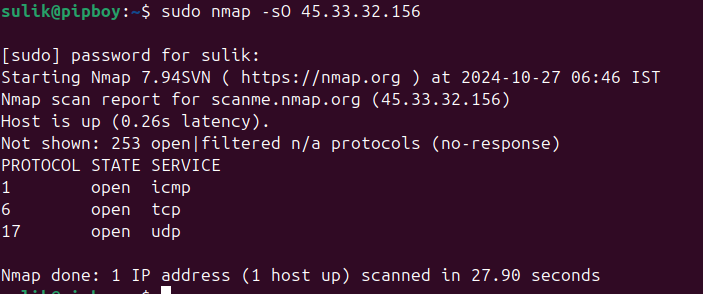
Nmap utilizes the standard IP protocol numbers as defined by the Internet Assigned Numbers Authority (IANA). These protocol numbers are used to specify the protocol carried in the IP datagram’s protocol field.
You can find a comprehensive table of IP protocol numbers on the IANAwebsiteor in various network-related documentation. However, for quick reference, here are some of the common protocol numbers that are frequently used with tools like Nmap:
-
1: ICMP (Internet Control Message Protocol)
-
6: TCP (Transmission Control Protocol)
-
17: UDP (User Datagram Protocol)
-
2: IGMP (Internet Group Management Protocol)
-
4: IP-in-IP (a tunneling protocol)
-
41: IPv6 encapsulation
-
47: GRE (Generic Routing Encapsulation)
-
50: ESP (Encapsulating Security Payload, used in IPsec)
-
51: AH (Authentication Header, used in IPsec)
-
88: EIGRP (Enhanced Interior Gateway Routing Protocol)
-
89: OSPF (Open Shortest Path First)
Typical Usage:
-
Firewall Auditing: Determining which IP protocols are allowed through a firewall. This can help in auditing firewall rules to ensure that only the desired protocols are permitted.
-
Network Mapping: In complex networks, especially those involving routers and multi-layer switches, understanding which protocols are supported on different devices can assist in network mapping and troubleshooting.
-
Security Testing: Security professionals might use an IP protocol scan to test network response to non-standard IP traffic, which can help in identifying misconfigured network devices or potential security weaknesses.
-b <FTP relay host>: FTP bounce scan
The-boption in Nmap is used for conducting an FTP bounce scan. This type of scan leverages an FTP server to "bounce" a scan or other traffic off of the FTP server, masking the origin of the scan and using the FTP server as a proxy. This technique exploits the FTP protocol’sPORTcommand, which tells the FTP server to open a data connection to a specified IP address and port. Essentially, it can be used to scan other hosts from the perspective of the FTP server, making the traffic appear to originate from the FTP server rather than the actual scanning machine.
Full Explanation:
FTP bounce scans utilize a feature of the FTP protocol that allows a client to request the server to connect back to an arbitrary IP address and port. Originally intended for sending data to third parties directly, this feature can be misused to scan ports on other systems. When conducting an FTP bounce scan, Nmap sends commands to the FTP server to have it connect to third-party hosts and ports. Depending on the response from the target, the scanner can infer the status of the ports.
Command Example:
nmap -
b
 FTP_user:FTP_password@FTP_relay_host target_host
-
FTP_user: The username for the FTP server.
-
FTP_password: The password for the FTP server.
-
FTP_relay_host: The FTP server being used to perform the bounce.
-
target_host: The target of the scan.
For example:
nmap -
b
 admin:password@
192.168
.
1.100

192.168
.
2.1
This command uses the FTP server at192.168.1.100with the usernameadminand passwordpasswordto scan the host at192.168.2.1.
Typical Usage:
-
Evasion and Anonymity: FTP bounce scans can be used to obscure the source of a scan, making it difficult for the target to identify and block the scanner.
-
Penetration Testing: Used in penetration testing to demonstrate the potential for misusing an FTP server and to check for network paths that are only visible or accessible from the FTP server’s perspective.
-
Vulnerability Assessment: To assess the vulnerability of FTP servers that allow PORT commands to arbitrary hosts, which is considered a security risk.