Mastering DirBuster: A Strategic Approach to Uncovering Hidden Web Assets
- Category: CTI
- Source article: https://medium.com/@1200km/mastering-dirbuster-a-strategic-approach-to-uncovering-hidden-web-assets-31c8406a892b
- Published: 2024-11-10
- Preserved media: 5 image(s), including cover images, screenshots, diagrams, and infographics where present.
- Preserved technical blocks: 6 code/configuration block(s).
Ecosystem Fit
This page mirrors the original Medium article into the 1200km.com Docusaurus ecosystem. The original article flow, images, screenshots, infographics, and technical blocks are preserved from the export.
A comprehensive guide to using DirBuster for uncovering hidden directories and files in web applications.
Introduction
DirBuster, an open-source tool from the Open Web Application Security Project (OWASP), is a critical asset for uncovering hidden files and directories on web servers. Designed to perform brute-force attacks, DirBuster helps identify potential security vulnerabilities by testing for common and less-known directory names. This tool is indispensable for penetration testers and cybersecurity professionals aiming to enhance their security assessments and protect web applications from unseen risks.
Legal Disclaimer
The content provided in this post is for educational purposes only. DirBuster is a powerful tool intended for use in authorized security assessments and penetration testing environments. Unauthorized use of DirBuster to scan websites, servers, or networks without explicit permission from the rightful owners is illegal and may violate local, national, or international law. Users are advised to ensure all activities conducted with DirBuster comply with applicable legal standards and ethical guidelines. The author of this post disclaims any liability for misuse of the information provided or for any damage resulting from such misuse.
Key Features of DirBuster:
How DirBuster’s Brute Force Capabilities Work:
Wordlist Usage:
-
DirBuster operates by using wordlists that contain potential names for directories and files commonly found on web servers. These wordlists are composed of names that might not be linked directly from the site but could still be accessible via direct URL entry.
-
Users can utilize the default wordlists provided with DirBuster or create and import custom lists tailored to specific targets or environments.
HTTP Request Simulation:
-
DirBuster sends HTTP or HTTPS requests to the web server, appending each entry from the wordlist to the base URL of the target. For example, if testing
www.example.comwith a wordlist entry ofadmin, DirBuster would check[www.example.com/admin](http://www.example.com/admin). -
It then observes the server’s response to each request. A
200 OKresponse indicates that the resource exists and is accessible, while responses like404 Not Foundsuggest non-existence. Other responses, such as301 Moved Permanentlyor403 Forbidden, provide additional clues about server configuration and security measures.
Recursive Testing:
- DirBuster can perform recursive testing on directories it finds. This means if it discovers a directory like
www.example.com/admin, it can then test additional wordlist entries within that directory (e.g.,[www.example.com/admin/settings](http://www.example.com/admin/settings%29)).
Multi-threading:
- To expedite the scanning process, DirBuster can run multiple threads simultaneously. This allows it to test many different paths in parallel, significantly speeding up the process when compared to sequential testing. However, this can also increase the load on the target server.
Importance of Brute Force Capabilities in Security Testing:
Discovering Hidden Resources:
- Many web applications hide resources that are not intended for public access but are still accessible without proper authorization. Discovering these can highlight security lapses where sensitive directories or files are inadequately protected.
Identifying Misconfigurations:
- Finding accessible directories or files that should have been restricted can indicate misconfigurations in server settings or inadequate security policies, guiding further security enhancements.
Testing Security Policies:
- By attempting to access various resources, organizations can test their security policies’ effectiveness in real-world scenarios, ensuring that protective measures like authentication and authorization are properly enforced.
Enhancing Web Application Security:
- The insights gained from a DirBuster scan enable developers and security professionals to better secure web applications by ensuring that all accessible directories and files are intended to be accessible and are protected by appropriate security measures.
Installation
Step 1: Install Java
Before installing DirBuster, ensure that Java is installed on your system since DirBuster requires Java to run.
-
Open a terminal.
-
Update your package list:
sudo apt
update
- Install Java:
sudo apt install
default
-jre
Step 2: Install DirBuster
As of my last training cut-off, DirBuster isn’t typically available directly viaapt-getbecause it's not included in the standard repositories due to it being a more niche tool for penetration testing. However, if it were available, the process would ideally be:
- Install DirBuster using
apt-get(note this is hypothetical and usually you would need to download it from the OWASP website as mentioned earlier):
sudo apt install dirbuster
Step 3: Run DirBuster
If DirBuster were installable throughapt-get, you would run it from the terminal with:
dirbuster
Alternative Download and Setup
Since DirBuster is not available viaapt-get, here’s how you should actually proceed after installing Java:
-
Visit the OWASP official DirBuster Project page or go directly to itsGitHub repositoryto download the latest version.
-
Unzip the downloaded file to your desired location.
-
Run DirBuster with the following command from the directory where you unzipped it:
java -jar
DirBuster
-x.
x
.
jar
- Replace
x.xwith the actual version number.
Step-by-Step Process of How DirBuster Works:
Setting Up the Target :
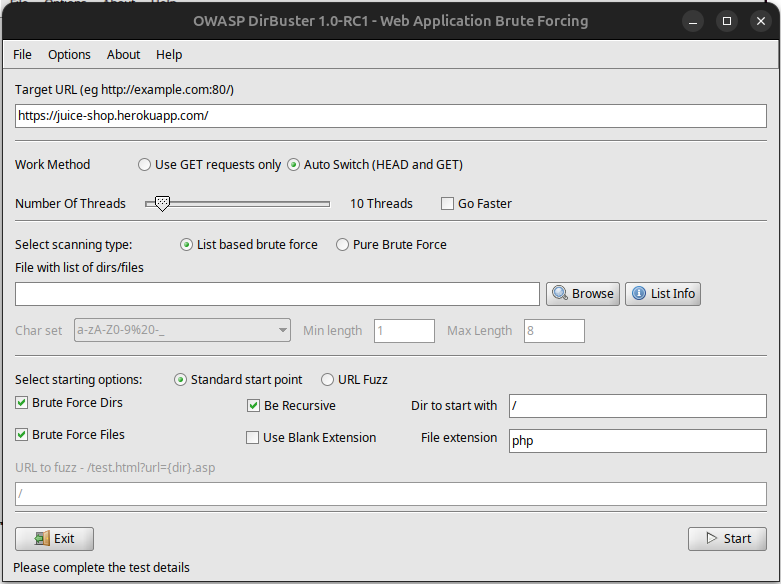
- The first step involves launching DirBuster and entering the target URL, which is the base address of the website or web application you wish to test.
dirbuster
Choosing the Wordlist:
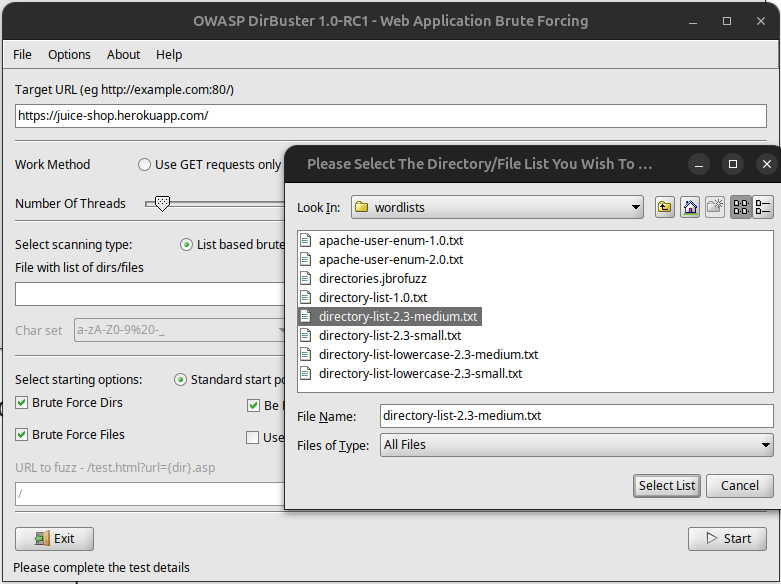
- DirBuster allows you to select from a variety of pre-configured wordlists, which contain possible directory and file names. You can also create or import custom wordlists tailored to your specific testing needs.
Configuring Options:
-
Before starting the scan, you can configure several options such as:
-
The number of threads to use, which dictates how many concurrent requests DirBuster will make.
-
Whether to follow redirects, which can be important for understanding how the server handles requests that point to moved or deleted resources.
-
The types of files to look for, adjusting scan focus depending on the expected content types like HTML, PHP, or JS.
Starting the Scan:
Once configured, the scan begins. DirBuster makes HTTP or HTTPS requests by appending each entry from the selected wordlist to the target URL and checking the server’s response.
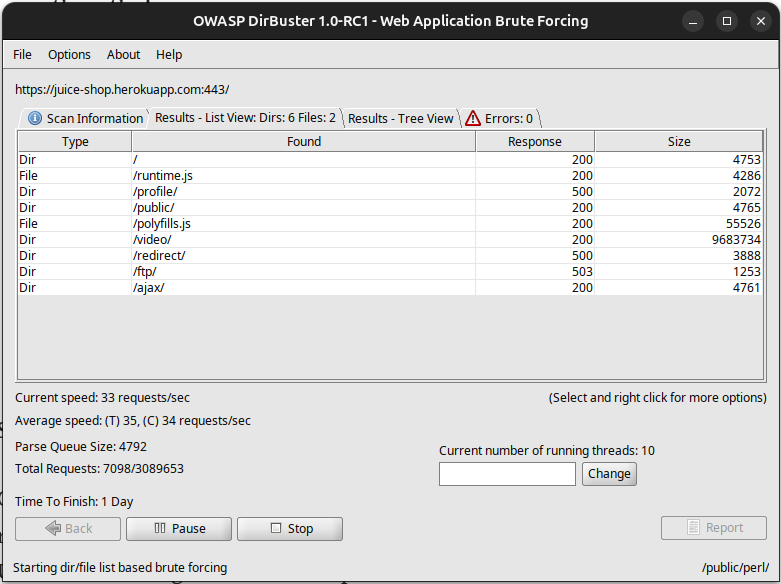
Analyzing Responses
DirBuster uses HTTP status codes to infer the existence and accessibility of web resources. Below are explanations of the common responses and what they potentially indicate:
-
200 OK: The resource exists and is accessible, which could indicate a potentially exploitable directory or file.
-
404 Not Found: The requested resource does not exist; the wordlist entry is invalid for this server, showing no such path is available.
-
403 Forbidden: Although the server recognizes the resource, it refuses to authorize access. This can suggest important files or directories are present but protected, hinting at sensitive areas that are well secured.
-
301/302 Redirect: These responses indicate the resource has been moved to another location, or requests are being systematically redirected. Such redirects need further investigation as they might point to new or hidden endpoints.
-
500 Internal Server Error: Indicates that the server encountered an unexpected condition that prevented it from fulfilling the request. This could be a result of server misconfiguration or an error within the server’s programming.
Recording Results :
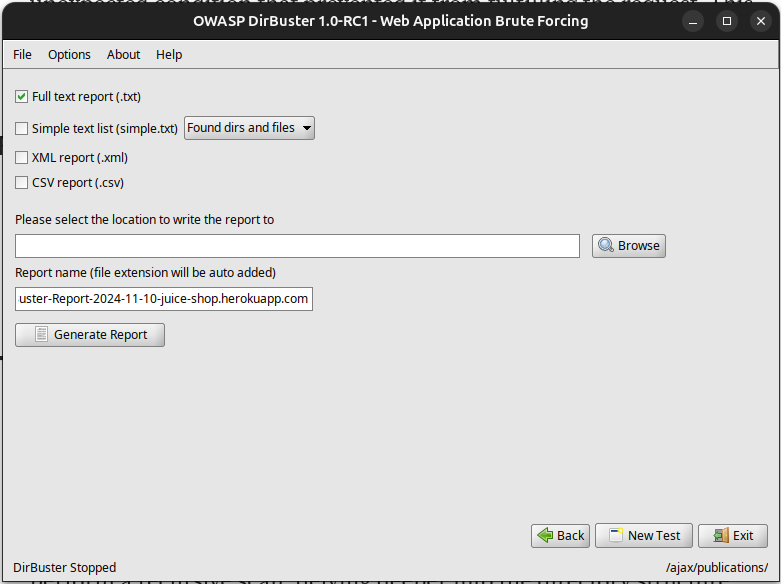
- All discovered paths are logged, including their response codes. DirBuster can also provide a graphical representation of the discovered directory structure.