OWASP Amass Project guide

- Category: CTI
- Source article: https://medium.com/@1200km/owasp-amass-project-guide-94bd55521f91
- Published: 2024-11-06
- Preserved media: 3 image(s), including cover images, screenshots, diagrams, and infographics where present.
- Preserved technical blocks: 7 code/configuration block(s).
Ecosystem Fit
This page mirrors the original Medium article into the 1200km.com Docusaurus ecosystem. The original article flow, images, screenshots, infographics, and technical blocks are preserved from the export.
In-depth Attack Surface Mapping and Asset Discovery.
TheOWASP Amass Projectis a prominent open-source initiative under the Open Web Application Security Project (OWASP), designed to help with in-depth reconnaissance, network mapping, and identifying assets associated with a target domain. It’s particularly valuable in the reconnaissance phase of penetration testing and red teaming exercises, providing cybersecurity professionals with a comprehensive understanding of a target’s external infrastructure.
Key Features of OWASP Amass
-
Domain Enumeration: Amass excels at discovering subdomains associated with a target domain. It leverages passive, active, and third-party services, as well as data sources, to enumerate as many subdomains as possible.
-
Network Mapping: The tool is capable of mapping the network ranges and autonomous system numbers (ASNs) related to the domain. This feature helps visualize the internet-facing infrastructure of a target, revealing how domains are interconnected.
-
Data Sources: Amass integrates a wide variety of data sources, such as WHOIS, DNS, search engines, and more, enabling it to pull in publicly available information to identify subdomains and associated assets comprehensively.
-
Infrastructure Discovery: It can reveal related IPs, ranges, and services, helping testers understand the scope of a target’s infrastructure and discover potential entry points.
-
Configuration and Customization: Amass is highly customizable, with options for setting up proxies, using API keys for enhanced data collection from specific sources, and tweaking DNS and enumeration settings.
Usage in Penetration Testing
For web application penetration testing, Amass is often used to conduct adetailed reconnaissance phasebefore moving to more active testing. By identifying hidden subdomains and linked infrastructure, penetration testers can:
-
Identify potential attack vectors.
-
Discover forgotten or unmonitored assets.
-
Outline the target’s footprint more clearly, which can reveal security blind spots.
Example Use Cases
-
Passive Subdomain Enumeration: Amass can gather information about subdomains without actively interacting with the target, reducing the chance of detection.
-
Active Network Mapping: For engagements where active scanning is allowed, Amass provides features for probing DNS servers, performing reverse DNS lookups, and identifying open ports and services.
-
Asset Tracking and Management: Large organizations can use Amass to continuously monitor for new subdomains and changes in their network infrastructure.
The user’s guide can be found here:
An example configuration file can be found here:
The Amass tutorial can be found here:
Usage examples:
Basic command:
amass
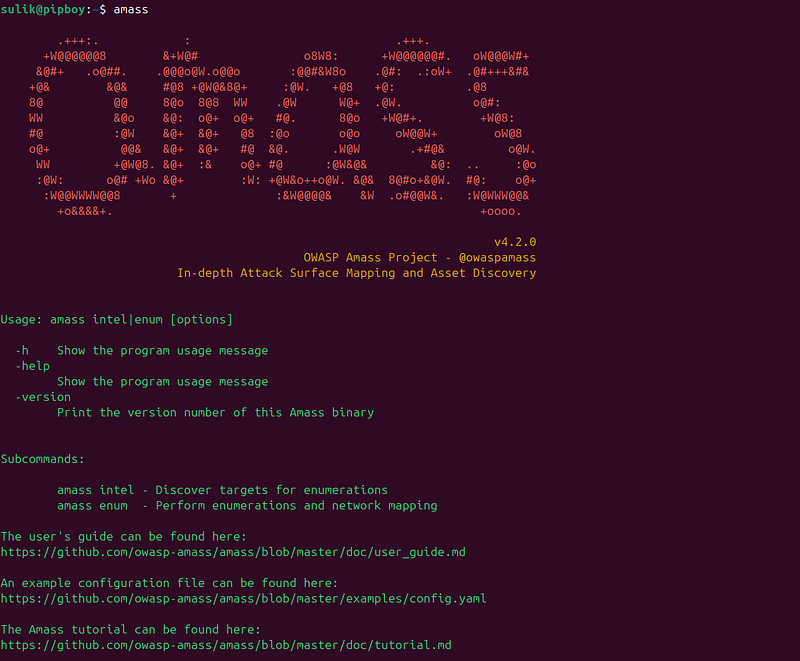
Amass Intel
The Amass intel subcommand, or module if you want, can aid with collecting open source intelligence on the organization and allow you to find further root domain names associated with the organization. To see the available options of this subcommand, simply type it at the terminal:
$ amass intel
[...]
Usage: amass intel [options] [-whois -d DOMAIN] [-addr ADDR -asn ASN -cidr CIDR]
  -active
        Attempt certificate name grabs
  -
addr
value
        IPs
and

ranges
 (
192.168
.1
.1
-254
) separated
by
 commas
  -asn
value
        ASNs separated
by

commas
 (
can be used multiple times
)
[...]
It is probably worth noting at this point that another great perk of Amass is that all the subcommands attempt to maintain argument consistency.
This subcommand will use a number of information gathering techniques and data sources by default, such as WHOIS, in order to obtain intelligence and parent domains owned by the organization, unless these are explicitly disabled in Amass’ configuration file. An example Amass configuration file is availableon the GitHub config repository.
Flags:
  -active
     Attempt certificate name grabs
  -addr value
     IPs
and
 ranges (
192.168
.
1.1
-
254
) separated
by
 commas
  -asn value
     ASNs separated
by
 commas (can be used multiple times)
  -cidr value
     CIDRs separated
by
 commas (can be used multiple times)
  -config
string
     Path
to
 the YAML configuration file. Additional details below
  -d value
     Domain names separated
by
 commas (can be used multiple times)
  -demo
     Censor output
to
 make it suitable
for
 demonstrations
  -df value
     Path
to
 a file providing root domain names
  -dir
string
     Path
to
 the directory containing the output files
  -ef
string
     Path
to
 a file providing data sources
to
 exclude
  -exclude value
     Data source names separated
by
 commas
to
 be excluded
  -h Show the program usage message
  -help
     Show the program usage message
  -
if

string
     Path
to
 a file providing data sources
to
 include
  -include value
     Data source names separated
by
 commas
to
 be included
  -ip
     Show the IP addresses
for
 discovered names
  -ipv4
     Show the IPv4 addresses
for
 discovered names
  -ipv6
     Show the IPv6 addresses
for
 discovered names
  -list
     Print additional information
  -log
string
     Path
to
 the log file
where
 errors will be written
  -max-dns-queries int
     Maximum number
of
 concurrent DNS queries
  -o
string
     Path
to
 the
text
 file containing terminal stdout/stderr
  -org
string
     Search
string
 provided against
AS
 description information
  -p value
     Ports separated
by
 commas (
default
:
80
,
443
)
  -r value
     IP addresses
of
 preferred DNS resolvers (can be used multiple times)
  -rf value
     Path
to
 a file providing preferred DNS resolvers
  -timeout int
     Number
of
 minutes
to

let
 enumeration run before quitting
  -v Output status / debug / troubleshooting info
  -whois
     All provided domains are run through reverse whois
Example:
amass intel -d owasp.
org
 -whois
When performing searches with amass intel you can always run it with more configuration options, such as the “-active” argument which will attempt zone transfers and actively scan to fetch SSL/TLS certificates to extract information. As with any engagement, ensure you are authorized to perform active searches against the target.
It is worth noting at this point that some configuration flags will not work along with others and in this case Amass will simply ignore them.
Amass’ findings will not always be accurate, this can be for several reasons, e.g. the data sources used by Amass may not be consistent or up to date. Amass attempts to further validate the information using DNS queries, and more validation techniques will be implemented in the future. Although Amass does a good job, users should still perform further verification checks on results that do not appear to be related to the target. This can be performed using a variety of methods such as:
-
Use utilities to resolve the domains (e.g. dig, nslookup)
-
Perform WHOIS lookups to confirm organizational details
-
Search findings, such as parent domains, on search engines
You can also look for organizational names with Amass which could return ASN IDs assigned to the target, an example is shown below:
Amass Enum
Let’s move to Amass enum, which is where most of Amass’ powerful capabilities reside. Amass enum allows you to perform DNS enumeration and mapping of the target to determine the attack surface exposed by organizations. The enumeration findings are stored in a graph database, which will be located in Amass’ default output folder or the specified output directory with “-dir” flag. This is also the case with other Amass subcommands.
Run Amass under Passive or Active Configuration
Amass enum can be executed under the context of a passive or an active configuration mode. The passive mode is much quicker, but Amass will not validate DNS information, for example by resolving the subdomains. You can run it passively using the “-passive” flag and you will not be able to enable many techniques or configurations, such as DNS brute-forcing and name alterations. There are several reasons for choosing passive mode over the active mode, for example:
-
You need to know all possible subdomains that have been used and may be reused in the future, perhaps because you need to constantly monitor the target’s attack surface for changes or because you are working on a phishing engagement and looking for subdomains.
-
Your perimeter’s security testing process validates DNS information at a later stage and need Amass results quickly.
-
Due to a security engagement’s constraints or requirements, you can only perform passive information gathering.
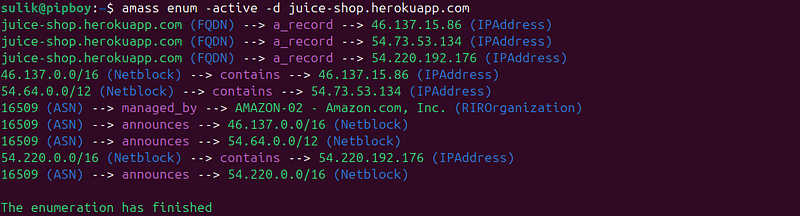
In the below example, we are passively searching for subdomains on
juice-shop.herokuapp.com (special vuln site)
amass
enum
 -active -d juice-shop.herokuapp.com
Amass DB
You can use this subcommand in order to interact with an Amass graph database, either the default or the one specified with the “-dir” flag.
For example, the below command would list all the names discovered during enumerations you have performed against owasp.org and stored in the “amass4owasp” graph database:
$
amass db -
dir
 amass4owasp -names -d juice-shop.herokuapp.com
Next, with a similar command, you could retrieve the complete output for owasp.org and stored in the “amass4owasp” graph database:
$
amass db -
dir
 amass4owasp -d owasp.org -show -ip
You may want to maintain the same Amass output directory for statistical or historical purposes, through which you perform all the subdomain enumeration exercises, as Amass tracking can be used only against the same graph database and output directory.
Conclusion
In closing, OWASP Amass is a project that is becoming increasingly popular. We highly recommend that you incorporate Amass in your workflow/processes if you have information gathering and subdomain discovery requirements, and stay tuned as more and more features and improvements will be added with every release. Finally, you can always refer to the officialUser’s Guideof Amass.