Cracking Web Interfaces with Burp Suite: A Comprehensive Tutorial

- Category: CTI
- Source article: https://medium.com/@1200km/cracking-web-interfaces-with-burp-suite-a-comprehensive-tutorial-33087bb286b0
- Published: 2024-10-24
- Preserved media: 14 image(s), including cover images, screenshots, diagrams, and infographics where present.
- Preserved technical blocks: 0 code/configuration block(s).
Ecosystem Fit
This page mirrors the original Medium article into the 1200km.com Docusaurus ecosystem. The original article flow, images, screenshots, infographics, and technical blocks are preserved from the export.
In this guide, I will detail how to use Burp Suite, a popular web security tool, to perform password cracking attacks on web interfaces. Web interfaces are common targets for cyber attacks due to their accessibility and potential security lapses.
Importance of Security Securing web interfaces is crucial as they are often gateways to sensitive information. An unsecured web interface can lead to data breaches, unauthorized access, and other cyber threats. Employing tools like Burp Suite allows security professionals to identify and mitigate vulnerabilities effectively.
Disclaimer
Legal Use Only The information and tools provided in this guide are for educational and authorized professional use only. You must obtain explicit, written consent from the rightful owner before engaging in any form of penetration testing or security assessments on systems, networks, or web interfaces. Unauthorized use of these techniques and tools can result in legal consequences, including criminal and civil penalties. Use responsibly and ethically within the bounds of the law.
What is Burp Suite?
Tool Overview
Burp Suite is a comprehensive platform for performing security testing of web applications. It includes various tools bundled into one suite, including a scanner, proxy, repeater, and intruder. The intruder component is particularly useful for conducting brute force attacks on web interfaces.
You can download this tool from official sitehere
Using Burp Suite to Crack Passwords on Web Interfaces
Burp Suite is a powerful tool used in security testing and cybersecurity fields to perform various tasks, including password cracking. This guide will walk you through the process of setting up Burp Suite to crack passwords by intercepting web requests.
Step 1: Configure Proxy
-
Objective: Set up Burp Suite as a proxy to intercept your browser’s requests.
-
How to Do It:
-
Open Burp Suite and go to the “Proxy” tab.
-
Ensure that the “Intercept” tab’s button is toggled to “Intercept is on.”
-
Configure your browser to use Burp Suite as its proxy server (usually localhost with port 8080).
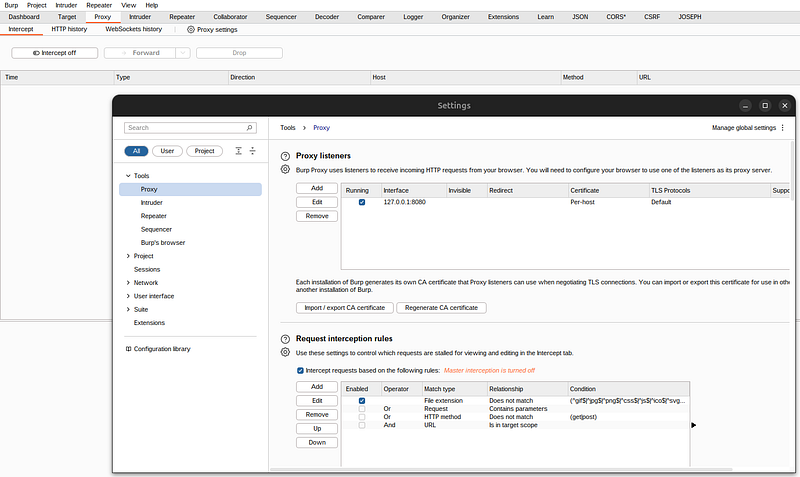
Step 2: Configure Proxy Management in Your Browser
-
Objective: Use a proxy management tool like Proxy Foxy for Firefox to easily manage and switch between different proxy settings while using Burp Suite.
-
How to Do It:
-
Install Proxy Management Tool: Download and install a proxy management extension like Proxy Foxy from the Firefox Add-ons store.
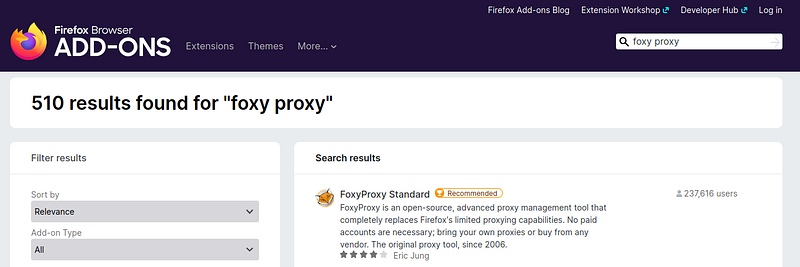
2. Add New Proxy Configuration: Set up a new proxy profile in the tool, specifying the IP address and port (usually 127.0.0.1 and 8080 for local Burp Suite proxy).
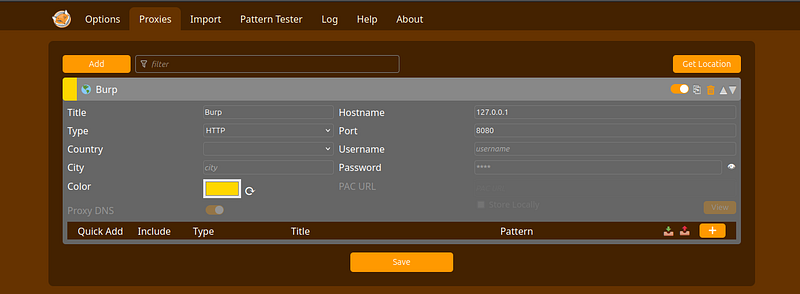
3. Switch Proxies Easily: Use the extension to switch quickly between using Burp Suite as a proxy and direct internet access, enhancing your testing workflow without changing your browser settings manually each time.
Or you can use burpsuite browser:
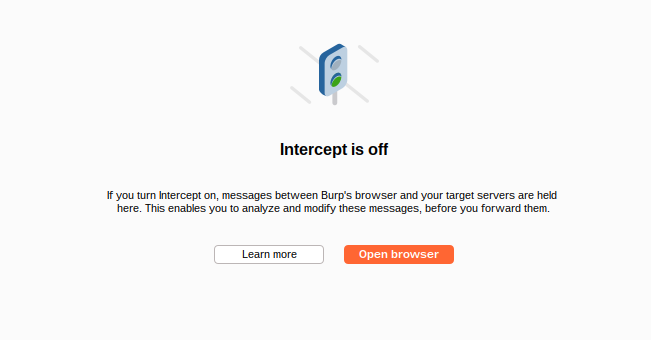
Step 3: Identify the Login Form
For legal training I’ll useportswiggerslabs.
This is the most common authentication interface:
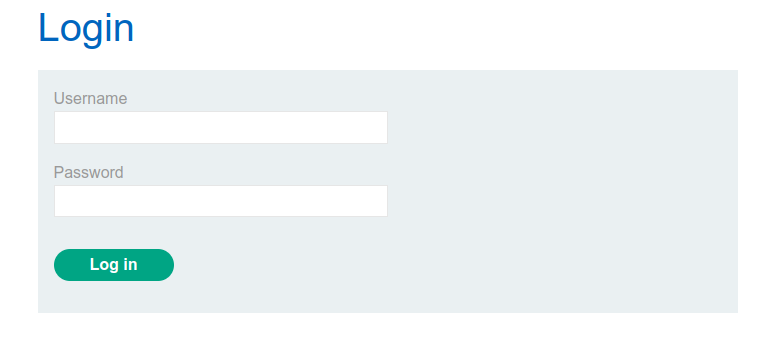
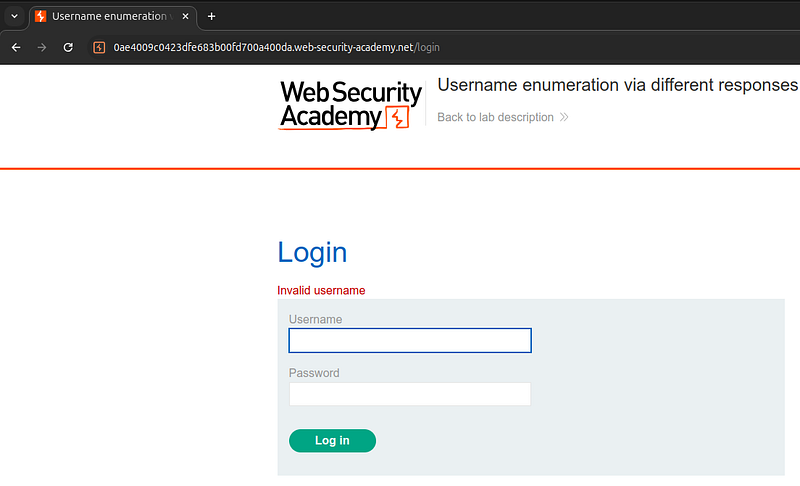
If you try to insert random username you can see reflection: invalid username. We can use it for cracking username
-
Objective: Capture the request made when a login form is submitted.
-
How to Do It:
-
Navigate to the web interface you want to test.
-
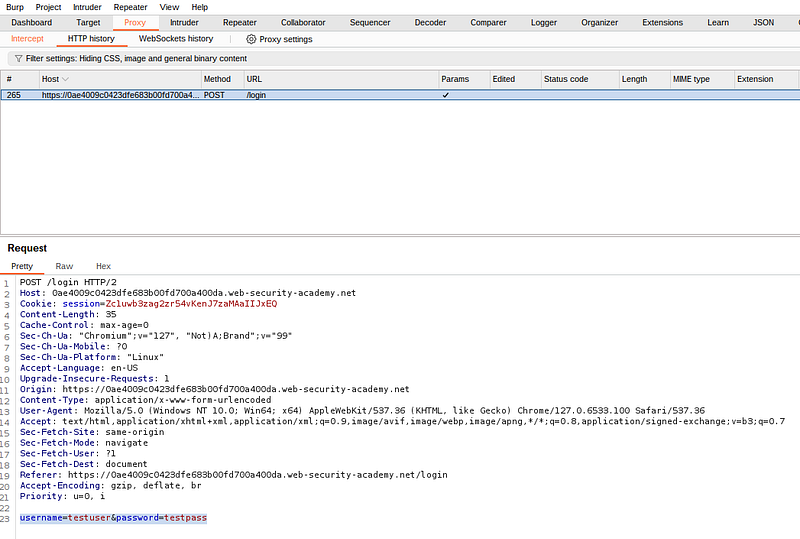
Enter dummy credentials into the login liketestuser:testpassform and submit it.
-
Burp Suite will capture the request in the “HTTP history” tab under the “Proxy” tab.
Step 4: Use Intruder
-
Objective: Set up the Intruder to automate the submission of different username and password combinations.
-
How to Do It:
-
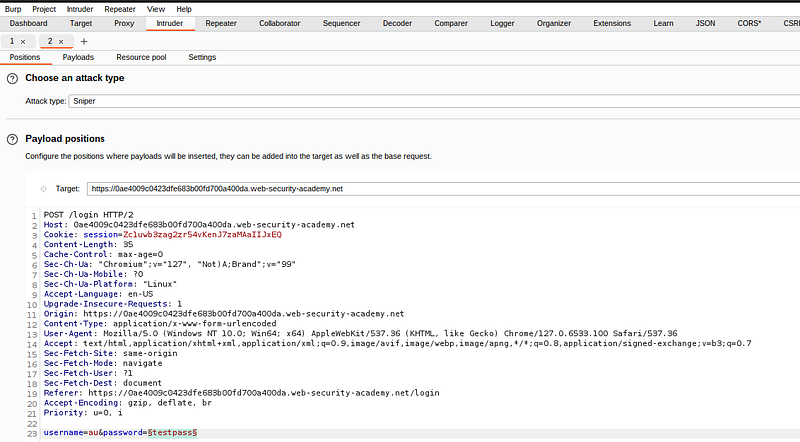
Right-click to this request and choose “Send to intruder” or press Ctrl+i
-
In Burp Suite, go to the “Intruder” tab and select the captured login request.
-
Click “Clear §” to clear existing payload positions.
-
Highlight the username in the request and click “Add §” to set these as payload positions.
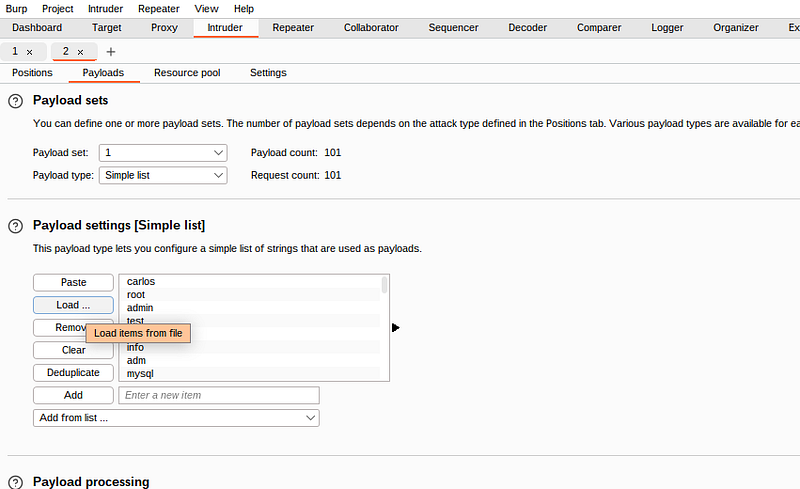
Step 5: Set Payloads
Now we can try to bruteforce username based response.
More information about brtute force attackhere
-
Objective: Configure payloads for both usernames and passwords.
-
How to Do It:
-
Go to the “Payloads” tab within the “Intruder.”
-
Select “Payload type” as “Simple list.”
-
Load your lists of usernames into the respective payload positions.
How to gain lists with usernames and passwordshere
Step 6: Start the Attack
-
Objective: Execute the brute force attack.
-
How to Do It:
-
Before starting, ensure all settings are correctly configured.
-
Click “Start attack” to initiate the brute force process.
-
Burp Suite will attempt to log in using all combinations from your payload lists.
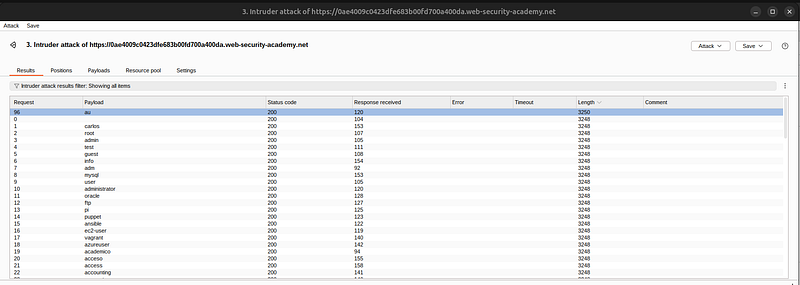
Step 7: Analyze the Results
**Objective:**Determine if any of the attempted credential combinations were successful, particularly by analyzing changes in response length that may indicate incorrect usernames.
How to Do It:
-
**Review the Responses:**Once the attack is complete, examine the responses listed in the Intruder’s results window. Burp Suite will display a table with details of each trial, including status codes and response lengths.
-
Analyze Response Lengths:
-
Sort the results by the response length column. This feature helps in identifying variations in the size of the responses returned by the server.
-
Look for outliers where the response length significantly differs from others. A different response length can indicate a different server behavior, which may occur if the username is correct but the password is wrong, or vice versa.
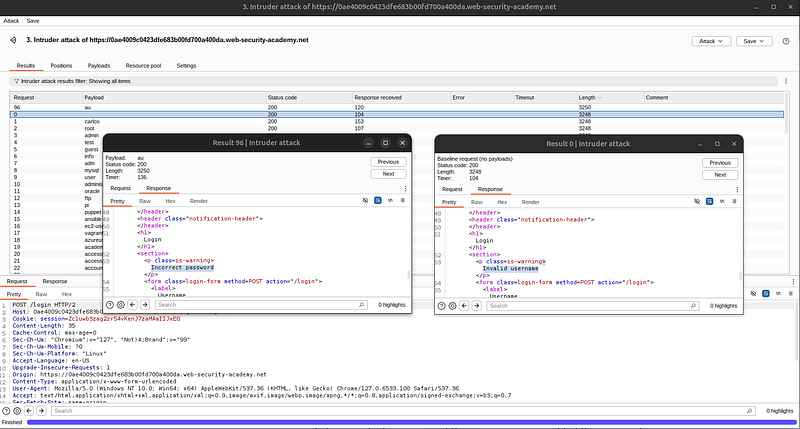
So correct user name is “au”.
Step 8: Try to Brute Force Password for Identified Username
**Objective:**Once a username is suspected to be correct based on the analysis of response lengths or specific success indicators from Step 7, the next step is to concentrate efforts on cracking the password for that username.
How to Do It:
-
Configure Intruder for Targeted Password Attack:
-
Open Burp Suite’s Intruder tab and set up a new attack targeting the previously identified username.
-
Use the same request you captured initially, but this time, remove the payload position from the username field and keep it only on the password field. The username should be set to the one you identified as potentially valid.
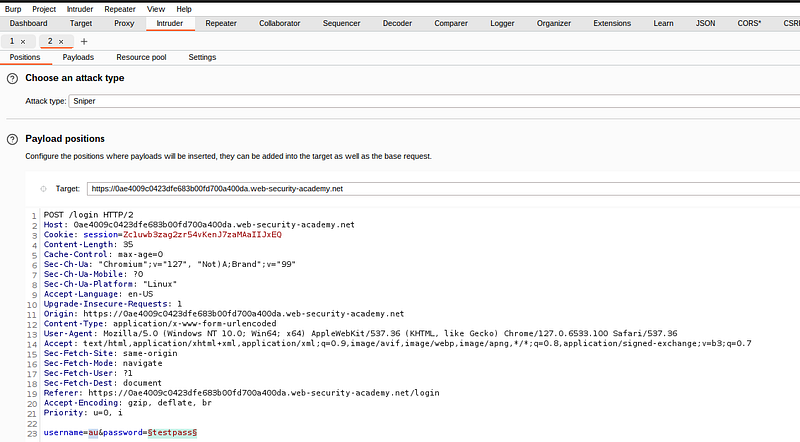
2. Load Password List:
-
Prepare a comprehensive list of potential passwords. This list can be based on common passwords, password patterns observed in the organization, or sophisticated guessing techniques (like using variations of common words associated with the user or company).
-
How to gain lists with usernames and passwordshere
-
Load this list into the Payloads section of the Intruder. Make sure you configure the payload type to “Simple list” and load your password list into it.
3. Adjust Attack Type:
- For password cracking, using a ‘Sniper’ attack type may be most efficient as it tests each entry from the password list against the fixed username.
4. Optimize Request Handling:
- To improve the efficiency of the attack, adjust the request handling rules in Burp Suite to throttle the requests if necessary, avoid locking out accounts, and handle HTTP sessions more effectively.
5. Run the Attack:
- Start the Intruder attack. Monitor the progress and responses. As with the username, you’re looking for variations in response length and HTTP status codes that differ from those observed during incorrect attempts.
6. Analyze Password Attack Results:
- Sort and filter the results in the Intruder output to identify successful login attempts. Successful attempts are usually indicated by significantly different response lengths, or by other status codes like 302/200 OK (if they are not used misleadingly by the application).
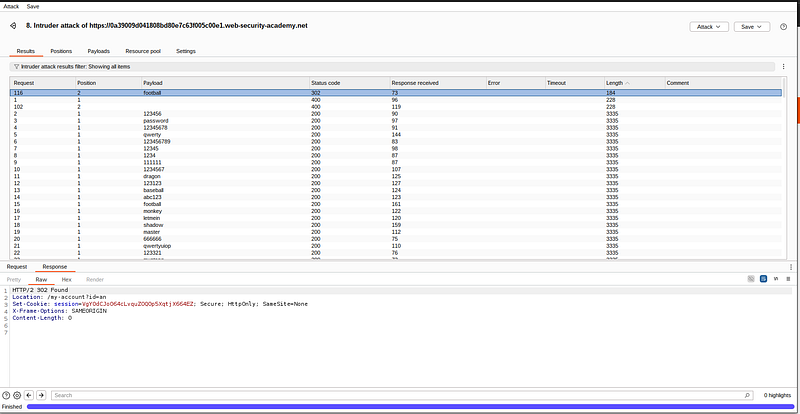
Success: username:au, password:football
Conclusion
The method described in this guide represents the simplest but most common example of web interface authentication cracking. It focuses on fundamental techniques using Burp Suite’s Intruder tool to identify valid usernames and then crack passwords. This approach is particularly effective against systems that do not employ robust security measures such as rate limiting, account lockout, or CAPTCHA mechanisms.
While this method is sufficient for demonstrating basic vulnerabilities and testing simple authentication systems, real-world scenarios often present more complex challenges. In future posts, I will delve into more sophisticated techniques and scenarios, including but not limited to:
-
Cracking advanced authentication mechanismsthat use multi-factor authentication and other security layers.
-
Bypassing security featuressuch as CAPTCHA, CSRF tokens, and advanced session management controls.
-
Automating attacksto handle large-scale testing with more complex and less predictable patterns.
-
Utilizing advanced payloadsand custom scripts within Burp Suite to adapt to unique security configurations and defenses.
Stay tuned for these upcoming discussions where we will explore deeper into the art of penetration testing and ethical hacking to uncover and mitigate more advanced security vulnerabilities.
Remember, always ensure that you have proper authorization before testing any systems, and strive to use your skills to improve security rather than exploit it.
Author: Andrey Pautov
Email: 1200km@gmail.com