Cracking RTSP Security: A Comprehensive Guide to Using the RTSP Brute Force Tool

- Category: CTI
- Source article: https://medium.com/@1200km/cracking-rtsp-security-a-comprehensive-guide-to-using-the-rtsp-brute-force-tool-ad1c29b9e5ee
- Published: 2024-10-23
- Preserved media: 3 image(s), including cover images, screenshots, diagrams, and infographics where present.
- Preserved technical blocks: 5 code/configuration block(s).
Ecosystem Fit
This page mirrors the original Medium article into the 1200km.com Docusaurus ecosystem. The original article flow, images, screenshots, infographics, and technical blocks are preserved from the export.
This article introduces a powerful tool designed for ethical penetration testing — the RTSP Brute Force Tool — developed to help security professionals test and strengthen RTSP implementations against unauthorized access.
Understanding RTSP and Its Vulnerabilities
RTSP plays a pivotal role in media streaming but often remains poorly secured, making it a target for cyberattacks. A common vulnerability arises from weak authentication mechanisms, which can be exploited using brute force techniques. This underscores the necessity for rigorous security practices, including the use of strong, hard-to-guess credentials.
Connecting to an RTSP Stream Using VLC Media Player and FFplay
Understanding how to connect to RTSP streams, both with and without credentials, is essential for anyone working with RTSP servers. Here’s a step-by-step guide on how to use VLC Media Player and FFplay, two of the most widely used media players that support RTSP streaming.
VLC Media Player
Without Credentials:
-
Open VLC Media Player.
-
**Go to Media > Open Network Stream…**or press
Ctrl+N. -
Enter the RTSP URLin the format:
rtsp://IP_Address:Port/Path -
Example:
rtsp://192.168.1.143:554/media.sdp -
Click Playto start streaming.
With Credentials:
-
If the RTSP stream requires a username and password, include them directly in the URL:
-
rtsp://username:password@IP_Address:Port/Path -
Example:
-
rtsp://admin:1234@192.168.1.143:554/media.sdp -
Follow the same steps as aboveto open and play the stream.
FFplay (Part of FFmpeg)
Without Credentials:
- Open a command line interface and enter:
ffplay rtsp:
//IP_Address:Port/Path
- Example:
ffplay rtsp://192.168.1.143:554/media.sdp
With Credentials:
- Include the credentials directly in the RTSP URL:
ffplay rtsp:
//us
ername:password@IP_Address:Port/Path
- Example:
ffplay rtsp://admin:1234@192.168.1.143:554/media.sdp
And if you want to connect to camera and you don’t know a valid credentials?
First step is to find correct URL:
For this propose you can useNmapscript forrtsp-url-bruteforce:
Full guide for Nmaphere
nmap
--script
 rtsp-url-brute -
p

554
 <ip>
Introducing the RTSP Brute Force Tool
TheRTSP Brute Force Toolis an advanced utility built to test the resilience of RTSP services against brute force attacks. Here’s what makes this tool indispensable for security testing:
-
Efficiency and Precision: Utilizes multithreading to conduct swift and thorough authentication tests.
-
User-Friendly: Simple setup and execution with prompt-based user interactions.
-
Adaptive Testing: Adjusts tactics based on response times and error messages from the target server.
Introducing the RTSP Brute Force Tool
TheRTSP Brute Force Toolis an advanced utility built to test the resilience of RTSP services against brute force attacks. Here’s what makes this tool indispensable for security testing:
What is bruteforce password cracking you can readhere
-
Efficiency and Precision: Utilizes multithreading to conduct swift and thorough authentication tests.
-
User-Friendly: Simple setup and execution with prompt-based user interactions.
-
Adaptive Testing: Adjusts tactics based on response times and error messages from the target server.
Setting Up the Tool
Prerequisites:
-
Python 3.x installed on your machine.
-
Network access to the RTSP service intended for testing.
-
Legal authorization to test the target network.
Installation:
-
Clone the tool from the GitHub repository:
-
git clone[https://github.com/anpa1200/RTSP-brute-force-tool.git](https://github.com/anpa1200/RTSP-brute-force-tool.git)
- Navigate to the tool’s directory:
cd rtsp-brute-force-tool
Using the Tool
-
Start the Tool: Run the script with Python.
-
python3 rtsp_brute_force.py
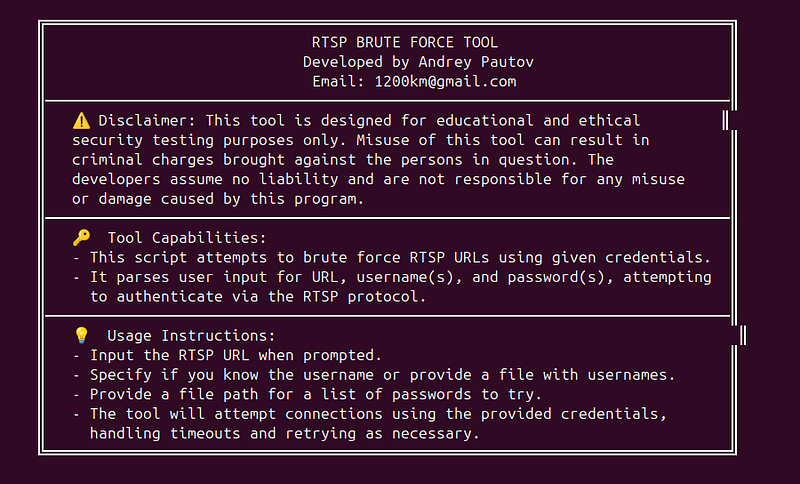
2. Input Details: Follow the prompts to enter the RTSP URL, decide if you know the username or need to load it from a file, and specify the path to your password list.
-
**Enter the RTSP URL (e.g., rtsp://IP_Address:port/extension(not required):**rtsp://192.168.1.143:1024/h264_pcm.sdp **Do you know the username? (yes/no) [y/n]:**y **Enter the username:**admin (or path to file with usernames) Enter the path to the password list file:./Dictionaries/short_pass_list.txt
-
How to gain passwords listshere

Conclusion
The RTSP Brute Force Tool exemplifies the dual nature of security testing tools: they are potent in both reinforcing security by identifying vulnerabilities and, if misused, in exploiting them. As cybersecurity practitioners, our responsibility is to use such tools judiciously, ensuring our actions align with ethical standards and contribute positively to the digital world.
Author: Andrey Pautov
Email: 1200km@gmail.com