Accessing Remote Desktops: A Beginner’s Guide to RDP Cracking with Crowbar and PPG tools
- Category: CTI
- Source article: https://medium.com/@1200km/accessing-remote-desktops-a-beginner-s-guide-to-rdp-cracking-with-crowbar-and-ppg-tools-5f50027115b7
- Published: 2024-10-20
- Preserved media: 3 image(s), including cover images, screenshots, diagrams, and infographics where present.
- Preserved technical blocks: 4 code/configuration block(s).
Ecosystem Fit
This page mirrors the original Medium article into the 1200km.com Docusaurus ecosystem. The original article flow, images, screenshots, infographics, and technical blocks are preserved from the export.
Master the Techniques: Unveiling the Power of Crowbar and PPG to Unlock Remote Desktop Protocols
Introduction
Brief Overview
Remote Desktop Protocol (RDP) is a proprietary protocol developed by Microsoft that allows users to connect to another computer over a network connection with a graphical interface. It’s commonly used by IT professionals and remote workers to access and manage systems remotely, essentially giving the user control over a computer from a distant location as if they were sitting right in front of it. RDP’s widespread use in corporate environments and among remote support teams highlights its utility but also makes it a significant target for cyber attacks.
Importance of Security
Securing RDP is crucial because its vulnerabilities can be exploited to gain unauthorized access to network systems and sensitive data. Poorly secured RDP setups may lead to cyber attacks such as ransomware infections, data breaches, and unauthorized use of company resources. Implementing strong security measures, such as using strong passwords, enabling two-factor authentication, and restricting access through firewalls, are necessary to mitigate these risks.
What is Crowbar?
Tool Overview
Crowbar is a brute-force attack tool developed to crack open network services that support various authentication mechanisms. It is widely used for RDP cracking, but also supports protocols like SSH, OpenVPN, and VNC. The primary function of Crowbar is to perform attacks where credentials are tested en masse to find combinations that grant access. Crowbar stands out for its ability to handle connections that use keys instead of passwords, as well as for managing its attacks by spreading them over multiple IP addresses to avoid detection.
Setting Up the Environment
Requirements
To use Crowbar effectively, you will need:
-
A Linux operating system, with Kali Linux recommended for its built-in support for penetration testing tools.
-
Python 2.7 or newer.
-
Network access to the target service (RDP, SSH, etc.).
-
Appropriate permissions to conduct penetration testing on the target network.
Installation
Here’s a step-by-step guide to installing Crowbar:
For Kali Repository Users: If you are using Kali Linux and have access to its repository, you can install Crowbar directly using the package manager. Simply open a terminal and enter the command:sudo apt install crowbar
This command will download and install Crowbar along with its dependencies.
-
For Non-Repository Users: If you are not using Kali or prefer to install Crowbar from source:
-
Clone the repository: Open a terminal and clone the Crowbar GitHub repository by entering:
git
clone
 https://github.com/galkan/crowbar.git
- Navigate to the directory: Change into the directory with
cd crowbar.
Install dependencies: Depending on your Linux distribution, you might need to install dependencies. For most users, running:
sudo apt-
get
 install python-pip
pip install -r requirements.txt
Make it executable: Grant execution permissions to the script with
chmod
 +x crowbar.py
Usage
-
-b: Target service. Crowbar supports:
openvpn,rdp,sshkey,vnckey -
-c: Static password to login with (if you know a password)
-
-C:
</path/to/file>for passwords list -
-d: Run a tcp port scan (nmap) on the IP range (
-s/-S) before trying to brute force. This will discover whether the target's port is open -
-D: Enable debug mode
-
-h: Shows a help menu
-
-k:
</path/to/file-or-folder>for key files (for SSH or VNC) -
-l:
</path/to/file>to store the log file (default is./crowbar.log) -
-m:
</path/to/file>for a OpenVPN configuration file -
-n: Thread count
-
-o:
</path/to/file>to store the successfully attempt(s) (default is./crowbar.out) -
-p: Port number (if the service is not on the default port)
-
-q: Enable quiet mode (only show successful logins)
-
-s: Target IP address/range (in CIDR notation)
-
-S:
</path/to/file>which is stores target IP addresses -
-t: Timeout value
-
-u: Single username (If you know a username)
-
-U:
</path/to/file>which stores the username list -
-v: Enable verbose mode (shows all the attempts)
If you want see all usage options, please use:./crowbar.py --help.
For example:
crowbar -b rdp -C /home/sulik/Documents/PasswordCracking/Dictionaries/short_pass_list.txt -s 172.16.131.128/32 -U /home/sulik/Documents/PasswordCracking/Dictionaries/1000_usernames.txt -v
-
**-b rdp**: This flag specifies the type of service to attack. Here,rdpindicates that the Remote Desktop Protocol is being targeted. -
**-C /home/sulik/Documents/PasswordCracking/Dictionaries/short_pass_list.txt**: This flag points to the file that contains the list of passwords to be tried during the attack. The path/home/sulik/Documents/PasswordCracking/Dictionaries/short_pass_list.txtshould lead to a text file where each line is a different password attempt. -
**-s 172.16.131.128/32**: This flag defines the target IP address and subnet. The/32indicates a single IP address (in this case,172.16.131.128) is targeted, as/32is the subnet mask for a single host. -
**-U /home/sulik/Documents/PasswordCracking/Dictionaries/1000_usernames.txt**: This flag specifies the path to the file containing usernames to use in the attack. Similar to the password file, each line in/home/sulik/Documents/PasswordCracking/Dictionaries/1000_usernames.txtshould contain one username. -
**-v**: This is the verbosity flag. Including-vmeans the output of the Crowbar tool will be more detailed, providing more information about the ongoing attack process. This can be useful for debugging or understanding more about how the attack is proceeding.
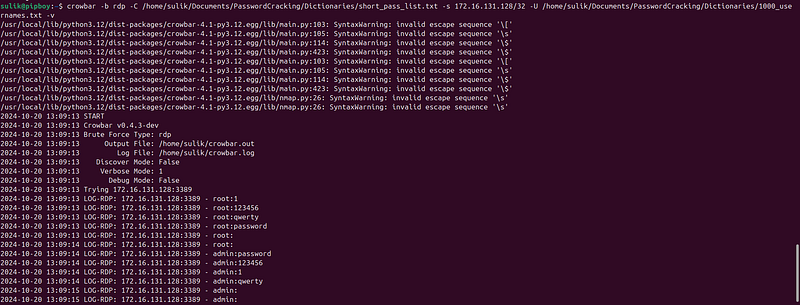
Succsessfull attempt:

Username: “Malware” Password: “1”
Important tips
To find lists of the most popular usernames for security testing purposes like brute-force attacks, you can use several resources:
-
SecLists: This is a collection of multiple types of lists used during security assessments, compiled by Daniel Miessler and other contributors. It includes usernames, passwords, URLs, sensitive data patterns, and much more. You can find the SecLists on GitHub, specifically under the Usernames directory for username lists.
-
GitHub Repositories: There are various other repositories on GitHub where users have compiled lists of common usernames. You can search for terms like “common usernames”, “username list”, or “default credentials” to find these repositories.
-
Online Security Forums and Websites: Websites like Offensive Security, Hack Forums, or Stack Exchange may have posts or resources where users share lists for educational and testing purposes.
-
Books and Publications: Books on penetration testing and ethical hacking often include appendices or references to common usernames and passwords, which might be useful for your needs.
-
Past Data Breaches: Analyzing usernames from past data breaches can also provide insight into common usernames. However, using this information ethically and legally is crucial, so focus on publicly available, anonymized data.
How can I gain list of passwords?
To create or find a dictionary (wordlist) for password cracking, you can either download pre-existing wordlists or generate custom ones using tools**PPG — Personal Pass Generator.**Here’s a step-by-step explanation:
1. Finding Pre-Existing Dictionaries: You can often find wordlists that are publicly available and have been compiled from various sources, such as leaked password databases or common password lists. Some popular resources include:
**SecLists:**A large collection of wordlists for various security tools, available on GitHub. **RockYou:**One of the most famous password lists from a large data breach. It’s often included in tools like Kali Linux. To use these wordlists:
Download them from repositories like GitHub or security forums. You can directly apply these wordlists with tools like aircrack-ng for password cracking.
2. Creating a Custom Dictionary with Tool (PPG — Personal Pass Generator)
There is full explanation about this tool
Personal Pass Generator — https://github.com/anpa1200/Passwords
Description The Personal Pass Generator (PPG) is an advanced tool designed for security professionals and ethical hackers to create extensive, personalized lists of potential passwords. This tool is especially useful for conducting penetration tests or security assessments where custom or brute-force attacks might be necessary.
**Key Features: **Extensive Password Lists: PPG can generate password lists that are unusually large — ranging from 1GB to over 30GB — tailored to specific security testing scenarios. **Customization Options:**Users can specify various parameters including the inclusion of symbols, alphanumeric characters, and more, allowing for highly customized password sets that are adapted to the target environment or system characteristics. Efficiency and Scalability: The tool is optimized for efficient generation of large datasets while allowing users to scale the output based on their storage and processing capabilities. **How It Works: **PPG employs a combination of standard and advanced cryptographic principles, utilizing permutations and combinations of characters from predefined sets (including special characters, numbers, and letters). This approach ensures that the generated passwords are both random and comprehensive, covering a wide range of possible password combinations that might be used by an individual or organization.
Applications: Security Testing: Ideal for penetration testers and red teams needing custom password lists to test the resilience of systems to password cracking. **Research and Development:**Useful for researchers studying password security and the effectiveness of password policies. Training and Workshops: Can be used in educational settings to demonstrate the importance of strong password policies and the potential vulnerabilities of weak passwords. Requirements Python 3.x Usage To use the Personal Pass Generator, simply download fromhereand run the script in your Python environment
Warning Please be aware that generating very large password lists can consume significant storage and computing resources. Ensure you have adequate space and computing power to handle the outputs.
To protect yourself from RDP brute force attacks, a critical step is managing RDP services and ports effectively, especially if they are not actively needed:
How to Prevent ourselves from this attack?
Close Unused RDP Ports and Services
If you do not require Remote Desktop Protocol (RDP) for your daily operations, it’s safest to disable it entirely to reduce the risk of attacks:
-
Disable RDP: Navigate to the Control Panel on your Windows system, select ‘System and Security’, then ‘System’. Click on ‘Remote settings’ to access the System Properties dialog box, and under the Remote tab, choose “Don’t allow remote connections to this computer”.
-
Manage Ports: If RDP is necessary, consider changing the default RDP port to a less commonly used number and configure your firewall to restrict access to the RDP port to only trusted IP addresses.
Use Strong, Unique Passwords
Ensure that all user accounts have strong, unique passwords that combine letters, numbers, and symbols to make brute force cracking considerably more challenging.
Implement Account Lockout Policies
Protect accounts from brute force attacks by setting a limit on failed login attempts. After several failed attempts, the account should be locked for a specified duration.
Enable Two-Factor Authentication (2FA)
Adding a second layer of security through two-factor authentication can significantly increase the security of your RDP access.
Use RDP Gateways
An RDP Gateway can help manage and secure RDP access by centralizing entry into your network. It provides a more secure and controlled entry point.
Keep Systems Updated
Regularly update your systems and software, including RDP applications. Security patches are crucial for closing vulnerabilities that could be exploited by attackers.
Network Level Authentication (NLA)
Enable Network Level Authentication (NLA) for RDP. NLA requires users to authenticate themselves before establishing a full RDP session, adding an additional layer of security.
Monitor and Audit RDP Access
Implement comprehensive monitoring and auditing to track access and spot suspicious activities. Use logs to analyze failed login attempts and follow up on any anomalies.
Conclusion
Understanding the tools and methods used for RDP cracking, such as Crowbar and the Personal Pass Generator, is crucial for recognizing the vulnerabilities in your own systems. By employing robust security measures like closing unused RDP services, using strong and unique passwords, enabling two-factor authentication, and consistently updating and monitoring your systems, you can significantly enhance your defenses against brute force attacks. Always remember that the best defense is a proactive approach — stay informed, stay prepared, and prioritize the security of your digital infrastructure to safeguard against potential cyber threats.
Thank you for reading.
**Author:**Andrey Pautov **Email:**1200km@gmail.com