Personal Pass Generator (PPG): The Ultimate Tool for Custom Password Lists
- Category: CTI
- Source article: https://medium.com/@1200km/personal-pass-generator-ppg-the-ultimate-tool-for-custom-password-lists-4979a3a1385c
- Published: 2024-10-20
- Preserved media: 2 image(s), including cover images, screenshots, diagrams, and infographics where present.
- Preserved technical blocks: 0 code/configuration block(s).
Ecosystem Fit
This page mirrors the original Medium article into the 1200km.com Docusaurus ecosystem. The original article flow, images, screenshots, infographics, and technical blocks are preserved from the export.
Personal Pass Generator (PPG) . This advanced tool is designed for penetration testers, ethical hackers, and cybersecurity researchers who need custom wordlists for their brute-force and dictionary-based password attacks.
What is a Brute-Force Attack?
Abrute-force attackis a password-cracking method that systematically tries every possible combination of characters until the correct one is found. While this method guarantees success, it can be extremely time-consuming, especially for long or complex passwords.
How Does Brute-Force Work?
-
Character Sets: The attacker specifies a character set (e.g., lowercase letters, uppercase letters, numbers, symbols).
-
Combinations: The attack generates every possible combination of characters within that set, starting with short combinations and increasing in length.
-
Testing: Each generated password is tested against the target until the correct one is found.
While brute-force is slow, it’s effective because it doesn’t rely on common passwords or pre-existing lists — eventually, it will crack any password.
Title: Introducing the Personal Pass Generator (PPG): The Ultimate Tool for Custom Password Lists
Hello, my name is Andrey Pautov, and today I’m excited to introduce you to my latest tool, thePersonal Pass Generator (PPG). This advanced tool is designed for penetration testers, ethical hackers, and cybersecurity researchers who need custom wordlists for their brute-force and dictionary-based password attacks.
In this post, we’ll explore:
-
What brute-force and dictionary attacks are.
-
How to create or download dictionaries.
-
Why PPG is an excellent tool for generating custom password lists.
What is a Brute-Force Attack?
Abrute-force attackis a password-cracking method that systematically tries every possible combination of characters until the correct one is found. While this method guarantees success, it can be extremely time-consuming, especially for long or complex passwords.
How Does Brute-Force Work?
-
Character Sets: The attacker specifies a character set (e.g., lowercase letters, uppercase letters, numbers, symbols).
-
Combinations: The attack generates every possible combination of characters within that set, starting with short combinations and increasing in length.
-
Testing: Each generated password is tested against the target until the correct one is found.
While brute-force is slow, it’s effective because it doesn’t rely on common passwords or pre-existing lists — eventually, it will crack any password.
What is a Dictionary Attack?
Adictionary attackis a faster and more efficient method than brute-force because it uses a predefined list of possible passwords (known as a dictionary or wordlist). Instead of testing every possible combination, it tests passwords from this list. The success of a dictionary attack depends on how closely the wordlist matches the potential password.
How Does a Dictionary Attack Work?
-
The attacker loads a wordlist, which is a collection of passwords that are commonly used or relevant to the target (e.g., leaked passwords, default passwords, etc.).
-
The attack tests each password from the wordlist until it either finds a match or exhausts the list.
While this method is quicker, its success is limited by the quality and relevance of the wordlist being used.
How to Create or Download Dictionaries
For a dictionary attack to be effective, you need a good wordlist. You can eitherdownload existing dictionariesorcreate custom ones. Let’s explore both options.
Downloading Dictionaries
There are many freely available wordlists that can be downloaded, such as:
-
RockYou: A famous password list from a large data breach.
-
SecLists: A collection of wordlists for security testing, available on GitHub.
These are great starting points, but they might not always match the specific requirements of the target environment.
Creating Custom Dictionaries with PPG
This is where thePersonal Pass Generator (PPG)comes in. PPG allows you tocreate tailored wordliststhat match the specific characteristics of the target system or environment. By defining custom parameters, such as the inclusion of symbols, numbers, or specific lengths, you can generate wordlists that are more likely to crack a password than generic dictionaries.
Why PPG is the Perfect Tool for This Purpose
The**Personal Pass Generator (PPG)**excels in creating extensive, personalized wordlists for password cracking. Here’s why it stands out:
1. Extensive Password Lists
PPG can generate massive password lists, ranging from 1MBto over 30GB. Whether you need a small list for quick testing or a massive dataset for a long-running brute-force attack, PPG can handle it.
2. Customization Options
PPG allows you to customize the wordlist according to your needs:
-
Include symbols, numbers, or letters.
-
Specify minimum and maximum password lengths.
-
Focus on specific character sets for the target environment.
-
Use many types of target personal information
This flexibility ensures that your wordlist is highly relevant, increasing the chances of cracking the password.
3. Efficiency and Scalability
PPG is designed to efficiently generate large datasets, optimized for security testing. It allows users to scale the output based on their storage and processing capabilities, ensuring that even very large password lists are generated in a reasonable amount of time.
How to Use the Personal Pass Generator (PPG)
Here’s a simple guide on how to get started with thePersonal Pass Generator (PPG):
Download the Script Visit my GitHub repository and download the script: PPG Personal Pass Generator—https://github.com/anpa1200/Passwords
Run the Script in Python 3 Open your terminal or command prompt, navigate to the directory where you downloaded the script, and run the following command in your Python 3 environment:python3 ./PPG_personal_pass_generator.py
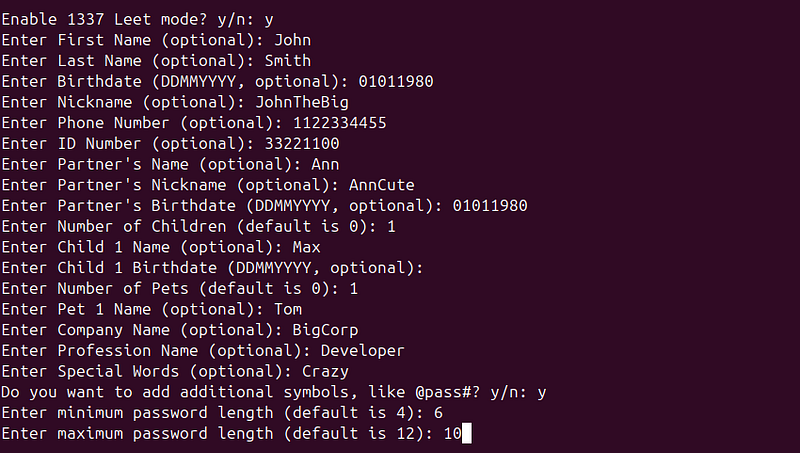
Input Information About Your Target The script will prompt you to enter relevant information about your target (e.g., password length, character set, etc.). Based on this input, the tool will generate a custom wordlist.
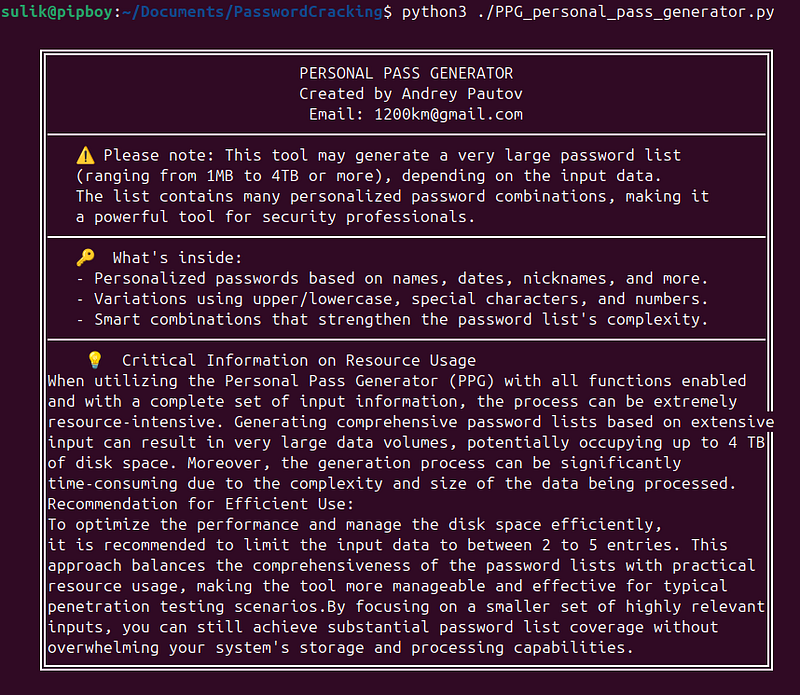
Critical Information on Resource Usage
When utilizing the Personal Pass Generator (PPG) with all functions enabled and with a complete set of input information, the process can be extremely resource-intensive. Generating comprehensive password lists based on extensive input can result in very large data volumes, potentially occupying up to 4 TB of disk space. Moreover, the generation process can be significantly time-consuming due to the complexity and size of the data being processed.
Recommendation for Efficient Use:
To optimize the performance and manage the disk space efficiently, it is recommended to limit the input data to between 2 to 5 entries. This approach balances the comprehensiveness of the password lists with practical resource usage, making the tool more manageable and effective for typical penetration testing scenarios.
By focusing on a smaller set of highly relevant inputs, you can still achieve substantial password list coverage without overwhelming your system’s storage and processing capabilities.
Enjoy!
Use the generated wordlist in your password-cracking efforts or security assessments.
This simple process will allow you to create highly personalized and efficient password lists tailored
Conclusion
The**Personal Pass Generator (PPG)**is a powerful and customizable tool for creating personalized password lists that can be used in brute-force and dictionary attacks. Whether you’re conducting security assessments, penetration testing, or research, PPG is designed to help you generate highly effective wordlists tailored to your specific needs.
Feel free to explore the tool onGitHub, and let me know how it works for you!
Author: Andrey Pautov Email: 1200km@gmail.com