Breaking the Code: How to Use Hashcat for Effective Password Cracking

- Category: CTI
- Source article: https://medium.com/@1200km/breaking-the-code-how-to-use-hashcat-for-effective-password-cracking-15f8da8facb8
- Published: 2024-11-03
- Preserved media: 2 image(s), including cover images, screenshots, diagrams, and infographics where present.
- Preserved technical blocks: 17 code/configuration block(s).
Ecosystem Fit
This page mirrors the original Medium article into the 1200km.com Docusaurus ecosystem. The original article flow, images, screenshots, infographics, and technical blocks are preserved from the export.
Your step-by-step guide to mastering Hashcat, from setting it up on your system to deploying it against complex passwords.
Overview
Hashcat stands as the premier password recovery tool, known for its robust performance across multiple platforms. It offers versatile attack modes, from brute-force to more sophisticated hybrid attacks, capitalizing on the power of GPUs to expedite password cracking. Ideal for both novices and experts, Hashcat not only cracks complex passwords but also serves as a critical tool for highlighting security vulnerabilities. This guide will navigate you through its setup, usage, and best practices, ensuring you harness Hashcat’s capabilities ethically and effectively.
Legal and Ethical Use Disclaimer
The information provided in this article about Hashcat is intended for educational purposes only and should be used with the utmost responsibility. The author does not endorse or promote the use of Hashcat or any password cracking tools for unauthorized or illegal activities. It is crucial to obtain explicit permission before testing or deploying these techniques on any systems or networks. Unauthorized access to computer systems and data is illegal under various laws and can lead to severe penalties including criminal prosecution. Users must adhere to all applicable laws and ethical guidelines when utilizing password recovery tools like Hashcat. By using this information, you agree to do so at your own risk and hold the author harmless from any and all repercussions or damages that may arise from such activities.
Table of contents:
Introduction to Hashcat
Core Features of Hashcat
Modes of Operation
Installation and Setup Guide for Hashcat
Configuring Hashcat for Optimal Performance
Basic Command Syntax for Hashcat
Commonly Used Options in Hashcat
-
Mode Selector
-
Attack Mode
-
Output File
-
Rules
-
Workload Profile
Introduction to Hashcat
Hashcat is the gold standard in password recovery, renowned for its ability to crack encrypted passwords at speeds unmatched by any other software. Primarily utilized by cybersecurity professionals and ethical hackers, Hashcat’s purpose is to assess security protocols by exposing vulnerabilities in password infrastructures. By recovering passwords, Hashcat helps users gauge the strength of these passwords and understand potential weaknesses in their security setups.
The development of Hashcat began as a hobby project by Jens Steube under the alias “atom” in 2007. Initially designed for UNIX-like systems and exploiting the power of CPUs, the tool was first called “Ighashgpu.” As GPUs became more powerful, the project evolved, and in 2009 it was renamed “oclHashcat” to reflect its new capabilities using GPUs through OpenCL. The project continued to evolve, incorporating support for multiple platforms and a wide variety of hashing algorithms. In 2015, the tool was unified under the name “Hashcat,” dropping the distinction between CPU and GPU versions. Today, it remains open source, with a vibrant community supporting its ongoing development, ensuring it stays at the forefront of password recovery technology.
Hashcat’s journey from a simple CPU-based password recovery tool to an advanced multi-platform utility illustrates not only the advancements in computing hardware but also the growing importance of cybersecurity tools in protecting digital information.
Core Features of Hashcat
Hashcat offers several powerful features that make it an indispensable tool for password recovery. Understanding its operational modes and hardware optimization capabilities can help users maximize their effectiveness in cracking passwords:
Modes of Operation :
-
Brute-Force Attack: This mode attempts every possible combination of characters to find the password. It’s highly effective but time-consuming, especially for complex passwords.
-
Dictionary Attack: Uses a list of pre-arranged words (a dictionary) to crack passwords. This mode is faster and effective against passwords that are simple words or common phrases.
-
Hybrid Attack: Combines the brute-force and dictionary approaches. For example, it might append or prepend numbers or symbols to dictionary words, bridging the gap between the two methods for a more refined attack.
-
Rule-Based Attack: This advanced mode applies various modification rules to base words from a dictionary to create new password guesses, allowing for complex pattern testing based on typical user behaviors in password creation.
Hardware Acceleration :
-
GPUs and FPGAs: Hashcat is optimized to take advantage of the parallel processing power of modern GPUs and even Field-Programmable Gate Arrays (FPGAs), significantly accelerating the password cracking process. This capability allows Hashcat to perform at speeds many times faster than tools limited to CPU-based attacks.
-
Multi-Platform Support: Hashcat can run on a variety of operating systems and harnesses the power of different hardware architectures, making it versatile for various setups and user preferences.
Support for Multiple Hashing Algorithms :
- Hashcat supports a wide array of hashing algorithms, including popular ones like MD5, SHA-1, and WPA2, to less common ones such as Kerberos AFS and NetNTLMv2. This extensive support ensures that Hashcat can be applied to virtually any password cracking scenario, from forensic computing to testing the security of corporate networks.
These features position Hashcat as a highly versatile and powerful tool in the arsenal of cybersecurity professionals, capable of adapting to different security environments and cracking needs. By leveraging these capabilities, users can conduct thorough security assessments and ensure that password policies withstand the most rigorous tests.
Installation and Setup Guide for Hashcat
Hashcat is compatible with Windows, Linux, and macOS, making it accessible to a wide range of users. Below are the installation instructions for each operating system along with tips to configure Hashcat for optimal performance.
Windows Installation:
-
Download Hashcat: Visit theofficial Hashcat websiteand download the latest version of Hashcat for Windows. Choose the version that matches your system architecture (32-bit or 64-bit).
-
Extract Files: Once downloaded, extract the zip file to a folder of your choice, typically
C:\Hashcatis used for ease of access. -
Open Command Prompt: Navigate to the Hashcat directory by opening Command Prompt and typing
cd C:\Hashcat. -
Test Installation: Test if Hashcat is installed correctly by running
hashcat -Ito display version information and available devices.
Linux Installation:
If you work with Kali repo, use:
sudo apt install hashcat
- Install Dependencies: Open a terminal and install necessary libraries with:
sudo apt-
get
 install build-essential
2. Clone Repository: Clone the Hashcat repository from GitHub using:
git
clone
 https://github.com/hashcat/hashcat.git
3. Navigate and Compile: Navigate to the cloned directory, and compile the source code usingmake.
cd
 hashcat
make
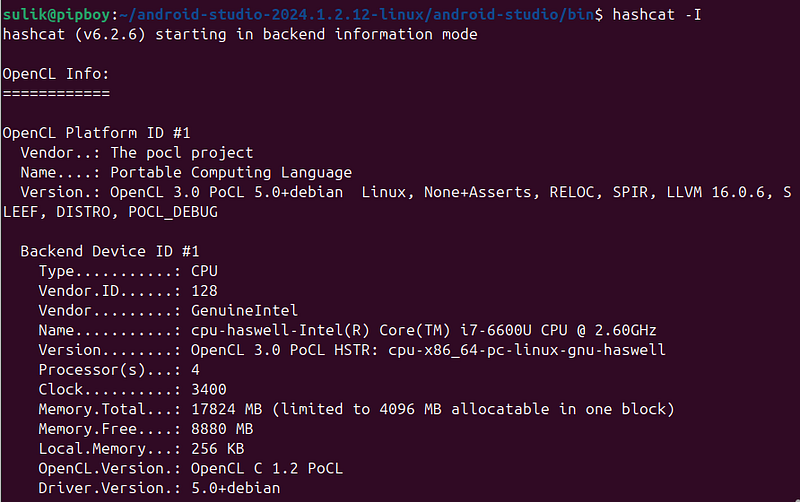
4. Test Installation: Verify the installation by running .
hashcat -
I
macOS Installation:
- Install Homebrew: If not already installed, set up Homebrew by running:
/bin/bash -c
"
$(curl -fsSL https://raw.githubusercontent.com/Homebrew/install/HEAD/install.sh)
"
.
2. Install Hashcat: Install Hashcat using Homebrew with:
brew install hashcat
3. Verify Installation: Check that Hashcat is installed correctly by typinghashcat -Iin the terminal.
Configuring Hashcat for Optimal Performance:
-
Use Dedicated GPUs: For best performance, ensure Hashcat is running on dedicated GPU hardware. Integrated graphics can be significantly slower.
-
Adjust Workload Profiles: Hashcat offers various workload profiles ranging from 1 (low) to 4 (nightmare). These can be adjusted with the
-woption, e.g.,hashcat -w 3. Select a profile based on your urgency and the thermal/energy constraints of your hardware. -
Manage Temperature: Avoid overheating by using the
--hwmon-temp-abort=XXoption whereXXis the maximum temperature in Celsius. It automatically stops the process at a safe temperature threshold. -
Utilize Rule-Based Attacks: Improve the effectiveness of dictionary attacks by applying rules to adapt guesses to more complex password policies.
Basic Command Syntax for Hashcat
The basic command structure for Hashcat consists of several components, which are typically concatenated in a single command line. Each component is prefixed with a dash (-) or double dash (--), followed by an identifier or a keyword. Here's how it generally looks:
hashcat [options]
<
hashfile
>

<
wordlist
>
-
hashcat: This is the command to run the Hashcat program.
-
[options]: These are various options you can set to customize Hashcat’s behavior. Each option changes how Hashcat performs the cracking process.Full options list here:
-
<hashfile>: This is the path to the file containing the hash values you wish to crack.
-
<wordlist>: This is the path to the wordlist file used for the attack, applicable in dictionary attack modes.
Commonly Used Options in Hashcat
1. Mode Selector ( -m ):
-
Usage:
-m <mode> -
Description: Specifies the type of hash to crack. Each hash type, such as MD5, SHA-1, or WPA2, is assigned a unique number called a mode. For example,
-m 0for MD5,-m 1000for NTLM, etc. -
Example:
hashcat -m 1000 hashes.txt wordlist.txt -
-m 0: MD5
-
-m 100: SHA-1
-
-m 1400: SHA-256
-
-m 1700: SHA-512
-
-m 1000: NTLM (Windows Hash)
-
-m 2500: WPA/WPA2 (WiFi Hash)
-
-m 200: MySQL323
-
-m 13600: WinZip
-
-m 9600: Office 2013 (DOCX)
-
-m 10400: PDF 1.4–1.6 (Acrobat 5–8)
2. Attack Mode ( -a ):
-
Usage:
-a <attack-mode> -
Description: Sets the attack mode. Common modes include 0 for straight (dictionary attack), 3 for brute force, and 1 for combination.
-
Example:
-
Full list is here
hashcat -
a

3
 -m
0
 hashes
.txt
 ?
a
?
a
?
a
?
a
?
a
?
a
-a 0: Straight (Dictionary attack)
-
Description: This mode uses a list of known words (dictionary) to attempt to crack passwords. It’s the simplest form of password recovery and relies on trying words directly from the wordlist without any modifications.
-
Common Use: Effective against passwords that are common words or straightforward combinations of dictionary words.
-a 1: Combination attack
-
Description: This attack combines words from two separate wordlists to form passwords. It concatenates words from the first list with words from the second, essentially multiplying the potential guesses based on the contents of both lists.
-
Common Use: Useful when passwords are expected to be compound words or when two common words are combined as a single password.
-a 3: Brute-force attack
-
Description: In this mode, Hashcat tries all possible combinations of characters until the password is found. This method is comprehensive but can be time-consuming, especially for long passwords with a wide range of possible characters.
-
Common Use: Employed when there is no clue about the potential password, ensuring that all possible combinations are tested.
-a 6: Hybrid Wordlist + Mask
-
Description: This mode appends or prepends characters to words from a specified wordlist according to a mask. A mask defines a pattern of characters to add to the words, allowing for customized alterations like adding numbers or symbols at the beginning or end of dictionary words.
-
Common Use: Ideal for scenarios where passwords are known to follow common structures, such as a word followed by numbers (e.g., password2023).
-a 7: Hybrid Mask + Wordlist
-
Description: Similar to mode 6 but reverses the order; it starts with the mask and then appends or prepends words from the wordlist. This approach allows for prefixing words with characters specified by the mask.
-
Common Use: Useful when passwords are likely structured with a prefix followed by a common word (e.g., 123password).
3. Output File ( -o ):
-
Usage:
-o <output-file> -
Description: Directs Hashcat to write the results (cracked passwords) to a specified file.
-
Example:
hashcat -m
0
 -
a

0
 -o cracked
.txt
 hashes
.txt
 wordlist
.txt
-
hash
-
Output:
user1hash:salt123 -
Description: Shows the hash and, if applicable, the salt.
2. plain
-
Output:
password123 -
Description: Outputs the plaintext of the cracked password.
3. hex_plain
-
Output:
70617373776f7264313233 -
Description: Displays the plaintext password in hexadecimal format.
4. crack_pos
-
Output:
42 -
Description: Indicates the position where the password was found.
5. timestamp absolute
-
Output:
2024-11-03 12:34:56 -
Description: Provides the exact date and time when the password was cracked.
6. timestamp relative
-
Output:
00:00:42 -
Description: Shows the time elapsed from the start of the session to when the password was cracked.
4. Rules ( -r ):
-
Usage:
-r <rule-file> -
Description: Applies rules to modify input words from a wordlist during a dictionary attack. This can greatly increase the effectiveness by simulating common password variations.
-
Example:
hashcat -m 0 -a 0 -r rules/best64.rule hashes.txt wordlist.txt
Finding-Rule
-
Output:
Rule1 -
Description: This format outputs the name or identifier of the rule that successfully cracked the password.
-
Example:
Rule1indicates the specific transformation rule applied to derive the password.
Original-Word
-
Output:
password -
Description: Displays the original word from the wordlist before any rules were applied.
-
Example:
passwordshows the base word used to eventually crack the hash.
Original-Word
-
Output:
password:Rule1 -
Description: Combines the original word with the rule that led to a successful crack.
-
Example:
password:Rule1whereRule1might represent appending digits.
Original-Word:Finding-Rule
-
Output:
password:Rule1:password123 -
Description: Outputs the original word, the rule applied, and the resulting processed word that cracked the hash.
-
Example:
password:Rule1:password123illustrates the transformation from the original word to the cracked password.
Original-Word:Finding-Rule:Processed-Word
-
Output:
password:Rule1:password123:wordlist.txt -
Description: This detailed format includes the original word, the applied rule, the processed word, and the wordlist file name used.
-
Example:
password:Rule1:password123:wordlist.txtprovides a comprehensive trace of how the cracking process unfolded from the original word to the successful result, specifying even the wordlist used.
5. Workload Profile ( -w ):
-
Usage:
-w <workload-profile> -
Description: Adjusts the performance demand on the system by setting different workload profiles, where 1 is lightest and 4 is heaviest.
-
Example:
hashcat -m 1000 -w 3 hashes.txt wordlist.txt
Low (Profile 1)
-
Performance: Provides the lowest performance to minimize impact.
-
Runtime: Each operation or task takes about 2 milliseconds.
-
Power Consumption: Consumes the least amount of power.
-
Desktop Impact: Has minimal impact on desktop usage, allowing you to perform other tasks without noticeable slowdown.
Default (Profile 2)
-
Performance: Offers balanced performance suitable for regular use.
-
Runtime: Typical runtime is around 12 milliseconds per operation.
-
Power Consumption: Optimized for economic power usage without excessive strain.
-
Desktop Impact: Noticeable impact, but generally manageable for multitasking.
High (Profile 3)
-
Performance: High performance for faster cracking at the cost of higher resource use.
-
Runtime: A significant increase in runtime at 96 milliseconds per operation.
-
Power Consumption: High power usage, reflecting the increased processing effort.
-
Desktop Impact: May render the system unresponsive due to the intense resource demands.
Nightmare (Profile 4)
-
Performance: Maximizes performance to achieve the fastest cracking times.
-
Runtime: Extremely high at 480 milliseconds per operation, focusing solely on cracking.
-
Power Consumption: Insane levels of power consumption, suitable only when system resources are dedicated solely to Hashcat.
-
Desktop Impact: Recommended for headless operation (no graphical desktop) as it will likely monopolize system resources, making other operations impractical.
6. Incremental Mode ( -i ):
-
Usage:
-i -
Description: Enables incremental attack mode, which systematically tries password candidates from shorter to longer.
-
Example:
hashcat -m
1000
 -
a

3
 -
i
 hashes
.txt
7. Show ( --show ):
-
Usage:
--show -
Description: Displays the cracked passwords from a result file without retesting the hashes.
-
Example:
hashcat -m
1000

--show
 hashes
.txt
8. Session ( --session ):
-
Usage:
--session <session-name> -
Description: Assigns a name to the session which allows for managing multiple concurrent or successive cracking tasks.
-
Example:
hashcat
--session
 mycrack -m
1000
 hashes
.txt
9. Limit ( --limit ):
-
Usage:
--limit <limit> -
Description: Limits the number of attempts to a specified number. Useful for testing or when time is a factor.
-
Example:
hashcat -m
1000
 -
a

3

--limit

1000000
 hashes
.txt
 ?
a
?
a
?
a
?
a
?
a
10. Skip ( --skip ):
-
Usage:
--skip <skip> -
Description: Skips a certain number of attempts. This is useful when resuming a long attack process without starting over.
-
Example:
hashcat -m
1000
 -
a

3

--skip

1000000
 hashes
.txt
 ?
a
?
a
?
a
?
a
?
a
Real life examples:
ZIP Files password recovery with hashcat
PDF Files password recovery with hashcat