PDF file Password cracking. Guide with real life examples!
- Category: CTI
- Source article: https://medium.com/@1200km/pdf-file-password-cracking-guide-with-real-life-examples-901ee411a6f4
- Published: 2024-10-28
- Preserved media: 7 image(s), including cover images, screenshots, diagrams, and infographics where present.
- Preserved technical blocks: 6 code/configuration block(s).
Ecosystem Fit
This page mirrors the original Medium article into the 1200km.com Docusaurus ecosystem. The original article flow, images, screenshots, infographics, and technical blocks are preserved from the export.
Unlock the secrets of PDF file password cracking with our in-depth guide. Learn the tools, techniques, and strategies used to breach PDF file encryption, illustrated with vivid real-life examples. Whether you’re a cybersecurity enthusiast or a professional, this article will provide you with actionable insights into the world of digital security and password recovery.
About author
Hello and welcome to my article. My name is Andrey, and I am a penetration tester and cybersecurity researcher
Disclaimer: Educational Purpose Only
The information provided in this article, is intended for educational purposes only. The techniques and methods described herein are discussed as a means to understand and improve security measures and should not be used for illegal purposes. The author and publisher disclaim any liability from the misuse of this information. Readers are urged to use this knowledge to enhance their cybersecurity defenses and are reminded that unauthorized hacking into any system is illegal and unethical.
PDF file password cracking
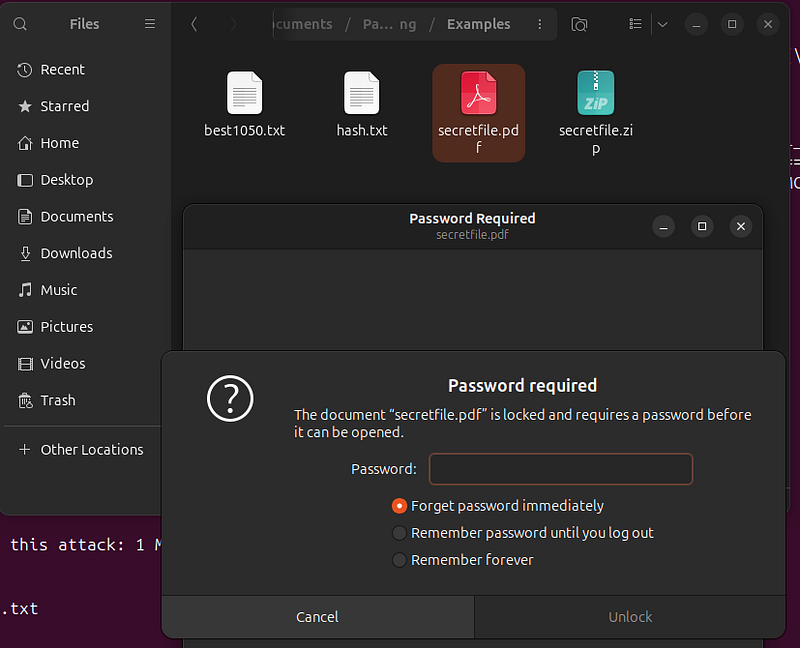
I have a password-protected PDF file.secretfile.pdf
Brute force/Dictionary Brute force
1. Extraction of Encrypted Data
When you have a pdf file that is password-protected, the actual password isn’t stored anywhere in plaintext or any easily readable format. Instead, what is stored is a cryptographic hash of the password. This hash is generated by applying a hashing algorithm to the password when the pdf file is created. By creating a hash file from the pdf file, you essentially extract this encrypted representation of the password, which is what you will attempt to crack.
For this propose you can usepdf2john
pdf2john secretfile.pdf >
hash
.txt && sed
's/[^:]*:\(.*\)/\1/'

hash
.txt > temp.txt && mv temp.txt
hash
.txt
If you have error: pdf2john: command not found
Verify pdf2john Availability
After installing, you should check ifpdf2johnis indeed available:
-
Navigate to the directory where John the Ripper is installed, particularly where the
runsubdirectory is located. -
Check if
pdf2johnis listed there by runninglsor directly try executing it from that directory (./pdf2john or ./pdf2john.pl).
3. Ensure Correct PATH Settings
Ifpdf2johnexists but isn't recognized globally, you might need to add it to your system's PATH:
-
Linux/Mac: You can add it to your PATH by modifying your shell configuration file (like
.bashrcor.zshrc). Add a line such as: -
export PATH="/path/to/john/run:$PATH" -
Replace
/path/to/john/runwith the actual path to therundirectory of John the Ripper. After editing the file, refresh your shell settings withsource ~/.bashrc(or corresponding file for your shell). -
Try to run
pdf2john/pdf2john.pl/pdf2john.py
Command:
pdf2john.pl secretfile.pdf >
hash
.txt && sed
's/[^:]*:\(.*\)/\1/'

hash
.txt > temp.txt && mv temp.txt
hash
.txt
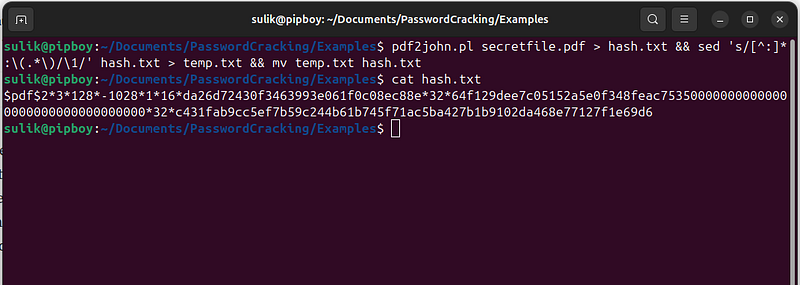
Command Breakdown
Part 1:**pdf2john.pl secretfile.pdf > hash.txt**
-
**pdf2john.pl**: This script is part of the John the Ripper suite, specifically used to extract password hashes from PDF files. The.plextension indicates that it's a Perl script. This script processes thesecretfile.pdfto extract any password hashes used to encrypt the PDF. -
**secretfile.pdf**: This is the input file, the PDF from which you want to extract the password hash. -
**>**: This is a redirection operator in Unix/Linux that directs the output of the command on the left (output frompdf2john.pl) to the file on the right (hash.txt). -
**hash.txt**: This file is used to store the raw output frompdf2john.pl, which includes the extracted hash along with some additional information, typically prefixed by the file name.
Part 2:**sed 's/[^:]*:\(.*\)/\1/' hash.txt > temp.txt**
-
**sed**: Stream Editor for filtering and transforming text. It's used here to process the contents ofhash.txt. -
**'s/[^:]*:\(.*\)/\1/'**: Thissedcommand pattern is a regular expression used to modify each line of input: -
[^:]*:: Matches and discards any characters up to and including the first colon (:). This part typically matches the filename and the colon following it, effectively removing the filename prefix from each line. -
\(.*\): Captures everything after the first colon. This is where the actual hash data starts. -
The overall effect of the substitution (
s///) command is to replace each line with just the captured hash data, effectively stripping out the filename. -
**>**: Redirects the output of thesedcommand totemp.txt. -
**temp.txt**: This file temporarily holds the cleaned-up hash data.
Part 3:**mv temp.txt hash.txt**
-
**mv**: The move command in Unix/Linux. It's used here to renametemp.txtback tohash.txt, effectively replacing the originalhash.txtwith the cleaned version that no longer includes the filename prefixes. -
This step finalizes the process, ensuring that
hash.txtnow contains only the necessary hash data, formatted correctly for use in further password cracking attempts.
2. Compatibility with Cracking Tools
Tools like[hashcat](https://hashcat.net/hashcat/)andJohn the Ripperare designed to work with hashes rather than directly with files or passwords. They use various algorithms to attempt to match provided hashes with hashes generated from potential passwords. In essence, these tools need the specific hash data to function correctly. By converting the PDF file into a hash format using tools likepdf2john, you transform the password protection into a form that these cracking tools can process.
3. Efficiency and Focus
When you extract the hash from a PDF file, you’re focusing the password cracking effort directly on what needs to be decoded — the password’s hash — rather than dealing with the entire file encryption scheme. This makes the cracking process more direct and efficient because the tool can concentrate all its computational power on breaking the hash, rather than navigating through file encryption methods, which might include additional complexities.
4. Enables Automated and Targeted Attacks
Creating a hash file allows the use of automated tools that can apply complex, targeted attacks like brute force, dictionary attacks, and others. These tools can handle large volumes of data and apply sophisticated patterns and methods to efficiently crack the password. Without converting the PDF file’s protection into a hash, leveraging these powerful tools wouldn’t be possible.
For example in this file the password is just digits and maximum lenght is 8 chars.
Command:
hashcat -
a

3
 -m
10500

--increment

--increment-min

1

--increment-max

7
 hash
.txt
 ?d?d?d?d?d?d?d
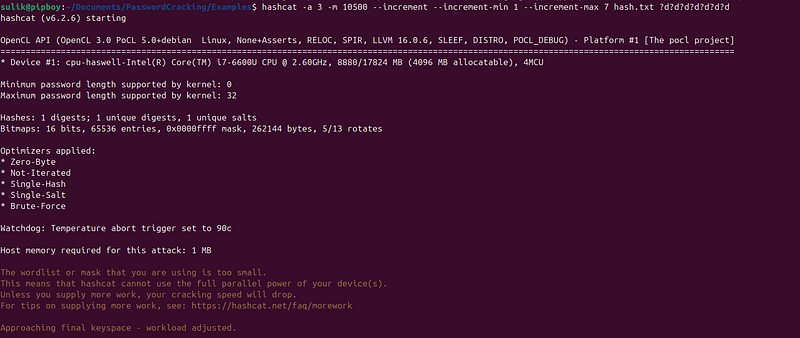
Detailed Breakdown of the Command
-
hashcat: This is the command to invoke the
hashcattool, which is one of the most powerful password recovery tools available, supporting numerous algorithms and attack modes. -
List with all Optionshere.
-
-a 3: Specifies the attack mode to 3, which is brute force. This mode attempts to crack passwords by trying every possible combination within the defined character set and mask.
-
List with all Attack Modeshere
-
-m 10500: Sets the mode to 10500, indicating that the hash type is specific to PDF 1.4–1.6 (Acrobat 5–8). (If not work correctry try other types of PDF modes) This mode is necessary because different types of hashes require different handling and algorithms for effective cracking.
-
Table with hash modeshere
-
— increment: This option enables the incremental attack mode. Incremental mode is particularly useful when you do not know the exact length of the password but you have a range in mind. It starts at the shortest length and increases until it reaches either the password length or the specified maximum.
-
— increment-min 1: Sets the minimum starting length for the incremental attack at 1, meaning
hashcatwill start by trying all single-digit possibilities. -
— increment-max 7: Sets the maximum length for the incremental attack at 7, meaning
hashcatwill increment the password length up to 7 digits, trying all combinations at each length. -
hash.txt: This is the file containing the hash you aim to crack. This file should be prepared beforehand, containing the hash data extracted from the target PDF file.
-
?d?d?d?d?d?d?d: This mask pattern tells
hashcatto use digits (0-9) for the password attempts. In the context of this command,hashcatwill start with the first?dand incrementally add more up to a total of seven digits as specified.
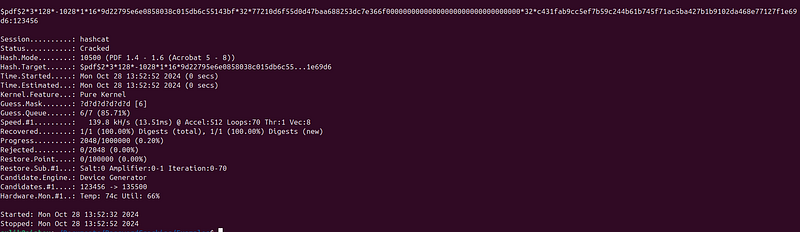
Done! Password was found — “123456”
Command flow for password-protected PDF file simple brute force:
pdf2john.pl secretfile.pdf > hash.txt && sed
's/[^:]*:\(.*\)/\1/'
 hash.txt > temp.txt &&
mv
 temp.txt hash.txt
hashcat -a 3 -m 10500 --increment --increment-min 1 --increment-max 7 hash.txt ?d?d?d?d?d?d?d
For more complicated password cracking I need to use Dictionary Brute Force Attack:
Download or create file with passwords (dictionary)
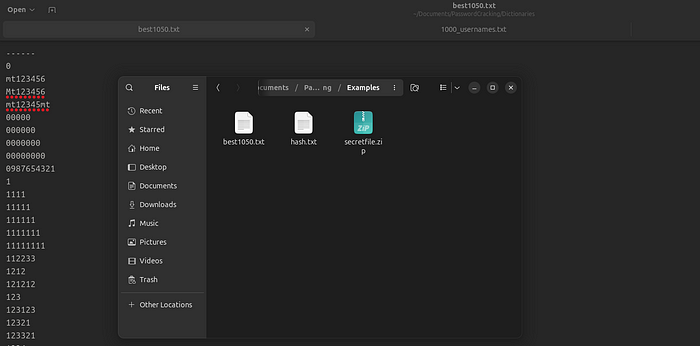
Use this list with “hashcat” to Dictionary Attack
Command:
hashcat -a 0 -m 10500 ./hash.txt ./best1050.txt
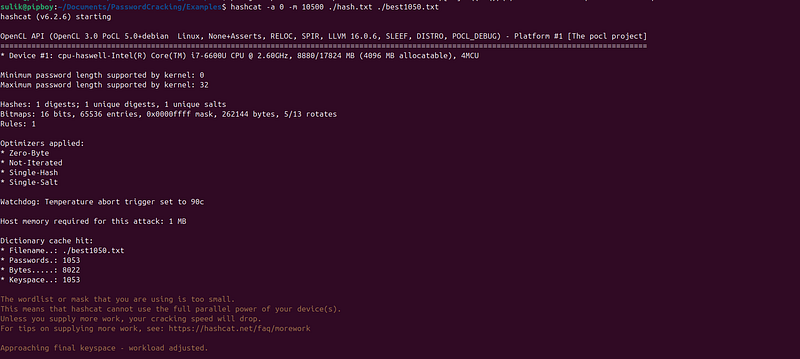
Detailed Breakdown of the Command
-
hashcat: This is the command to invoke the
hashcattool, which is one of the most powerful password recovery tools available, supporting numerous algorithms and attack modes. -
List with all Optionshere.
-
-a 0: Specifies the attack mode to 0, which is a dictionary attack. In this mode,
hashcatuses a list of predefined words or phrases as potential passwords from a specified wordlist file. -
List with all Attack Modeshere
-
-m 10500: Sets the mode to 10500, indicating that the hash type is specific to PDF 1.4–1.6 (Acrobat 5–8). (If not work correctry try other types of PDF modes) This mode is necessary because different types of hashes require different handling and algorithms for effective cracking.
-
Table with hash modeshere
-
hash.txt: This is the file containing the hash you aim to crack. This file should be prepared beforehand, containing the hash data extracted from the target PDF file.
-
best1050.txt: This represents the wordlist or dictionary file that
hashcatwill use as the source of potential passwords. The file"best1050.txt"should contain a list of passwords thathashcatwill try against the hash. Each line in the file should represent a different password attempt.
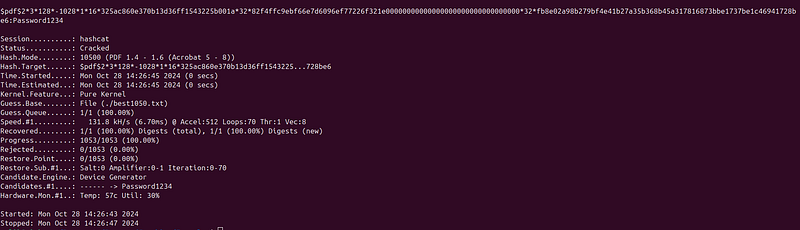
Done! Password was found — “Password1234”
Command flow for password-protected PDF file simple brute force:
pdf2john.pl secretfile.pdf >
hash
.txt && sed
's/[^:]*:\(.*\)/\1/'

hash
.txt > temp.txt && mv temp.txt
hash
.txt
hashcat -a
0
 -m
10500
 ./
hash
.txt ./best1050.txt