Sublist3r. Your Essential Tool for Subdomain Enumeration
- Category: CTI
- Source article: https://medium.com/@1200km/sublist3r-your-essential-tool-for-subdomain-enumeration-c1910121d712
- Published: 2024-11-07
- Preserved media: 3 image(s), including cover images, screenshots, diagrams, and infographics where present.
- Preserved technical blocks: 20 code/configuration block(s).
Ecosystem Fit
This page mirrors the original Medium article into the 1200km.com Docusaurus ecosystem. The original article flow, images, screenshots, infographics, and technical blocks are preserved from the export.
Uncovering Subdomains for Enhanced Reconnaissance: A Comprehensive Guide to Using Sublist3r for Effective OSINT and Penetration Testing
Introduction to Sublist3r Sublist3r is an open-source reconnaissance tool designed to discover subdomains associated with a target domain. By aggregating data from multiple sources, Sublist3r helps cybersecurity professionals quickly map a domain’s external footprint, revealing potential entry points for further investigation. It’s a powerful tool used in the early stages of penetration testing and OSINT (Open Source Intelligence) for identifying overlooked or forgotten assets.
Disclaimer: Sublist3r is intended solely for ethical and authorized use. Before using Sublist3r, obtain explicit permission from the domain owner or conduct testing within a legally approved scope, such as a bug bounty program or authorized penetration test. Unauthorized use of Sublist3r may violate laws and lead to serious legal consequences. Always ensure compliance with legal and ethical standards when using reconnaissance tools.
Installation
git
clone
 https://github.com/aboul3la/Sublist3r.git
Recommended Python Version:
Sublist3r currently supports Python 2 and Python 3.
-
The recommended version for Python 2 is 2.7.x
-
The recommended version for Python 3 is 3.4.x
Dependencies:
Sublist3r depends on therequests,dnspythonandargparsepython modules.
These dependencies can be installed using the requirements file:
- Installation on Windows:
c:\python27\python.exe -m pip install -r requirements.txt
- Installation on Linux
sudo pip install -r requirements.
txt
Alternatively, each module can be installed independently as shown below.
Requests Module ( http://docs.python-requests.org/en/latest/ )
- Install for Windows:
c:\python27\python.exe -m pip install requests
- Install for Ubuntu/Debian:
sudo apt-
get
 install python-requests
- Install for Centos/Redhat:
sudo yum install python-requests
- Install using pip on Linux:
sudo pip install request
dnspython Module ( http://www.dnspython.org/ )
- Install for Windows:
c:\python27\python.exe -m pip install dnspython
- Install for Ubuntu/Debian:
sudo apt-
get
 install python-dnspython
- Install using pip:
sudo pip install dnspython
argparse Module
- Install for Ubuntu/Debian:
sudo apt-
get
 install python-argparse
- Install for Centos/Redhat:
sudo yum install python-argparse
- Install using pip:
sudo pip install argparse
For coloring in windows install the following libraries
c:\python27\python.exe -m pip install win_unicode_console colorama
Usage
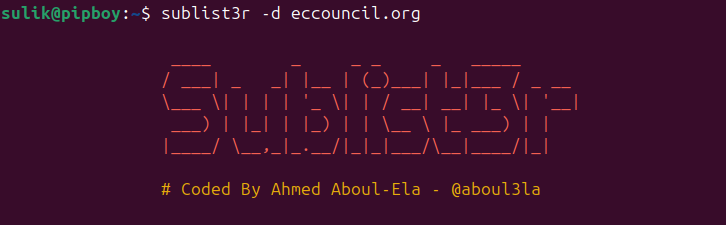
Basic command:
sublist3r -d eccouncil.
org

-
**-d**/**--domain** -
Description: This option specifies the target domain to enumerate subdomains for.
-
Usage: Essential for setting the domain scope, such as
example.com. Without this, Sublist3r won’t know what domain to target. -
Example:
sublist3r -d example.
com
-
**-b**/**--bruteforce** -
Description: Enables the subbrute bruteforce module, which tries to discover subdomains by brute-forcing possible names.
-
Usage: Useful for uncovering subdomains not listed in public sources, which are often hidden or less commonly used.
-
Example:
sublist3r -d example
.com
 -
b
-
**-p**/**--ports** -
Description: Allows Sublist3r to scan the discovered subdomains against specific TCP ports, checking if they are open or hosting services.
-
Usage: Useful for identifying which services (like HTTP or HTTPS) are running on each subdomain, aiding in further testing and reconnaissance.
-
Example:
sublist3r -d example
.com
 -
p

80
,
443
-
**-v**/**--verbose** -
Description: Enables verbose mode, showing results in real-time as they are discovered.
-
Usage: Useful for monitoring progress, especially for large domains with many subdomains, where real-time updates are helpful.
-
Example:
sublist3r -d example.
com
 -v
-
**-t**/**--threads** -
Description: Sets the number of threads used for the bruteforce module, allowing faster subdomain discovery by parallelizing requests.
-
Usage: Helpful for speeding up bruteforce by specifying more threads; however, higher threads may cause network strain.
-
Example:
sublist3r -d example
.com
 -
b
 -t
10
-
**-e**/**--engines** -
Description: Allows specification of a comma-separated list of search engines for discovery, such as Google or Bing.
-
Usage: Useful for targeting specific engines or expanding the search scope by querying multiple sources for comprehensive subdomain discovery.
-
Example:
sublist3r -d example.com -e google,bing -
**-o**/**--output** -
Description: Saves the results to a specified text file, making it easy to review or integrate into other tools later.
-
Usage: Essential for documentation and reporting, allowing you to save discovered subdomains for future reference.
-
Example:
sublist3r -d example.com -o subdomains.txt -
**-h**/**--help** -
Description: Displays the help message and exits, providing a quick reference for all available options.
-
Usage: Useful for beginners or anyone who needs a refresher on the command syntax or available options.
-
Example:
sublist3r -h