Burp Suite MCP + Gemini CLI
- Category: CTI
- Source article: https://medium.com/@1200km/burp-suite-mcp-gemini-cli-c1229edfe092
- Published: 2026-01-02
- Preserved media: 6 image(s), including cover images, screenshots, diagrams, and infographics where present.
- Preserved technical blocks: 4 code/configuration block(s).
Ecosystem Fit
This page mirrors the original Medium article into the 1200km.com Docusaurus ecosystem. The original article flow, images, screenshots, infographics, and technical blocks are preserved from the export.
Connect Burp Suite to Gemini CLI using Model Context Protocol (MCP) and Turn Burp into an AI-callable toolset and accelerate recon, analysis, and reporting in authorized tests.
This guide walks you through connectingBurp SuitetoGemini CLIusing PortSwigger’s officialMCP Serverextension. Once wired, Gemini can invoke Burp as a set ofcallable tools(via MCP) to review proxy history, push requests into Intruder, and acceleraterecon, analysis, and reportingduring a web assessment. **Authorization & privacy note:**Use this only on systems you’re explicitly permitted to test. If you connect Burp to an external AI service, you are responsible for understanding what data may be transmitted and how it is handled under that provider’s policies.
1) What you’re building (high-level)
PortSwigger’sMCP Serverextension adds an MCP endpoint to Burp so an AI client can interact with Burp through a standard tool interface. The extension supports:
-
anSSE MCP serverhosted by Burp (default
127.0.0.1:9876) -
a packagedstdio proxyfor clients that only support stdio MCP servers
Gemini CLI supports multiple MCP transports, includingSSEandstdio, configured viamcpServersinsettings.json.Gemini CLI+1
2) Prerequisites
-
Burp Suite(Community or Professional)
-
TheMCP Serverextension installed in Burp (via BApp Store, or from source)
-
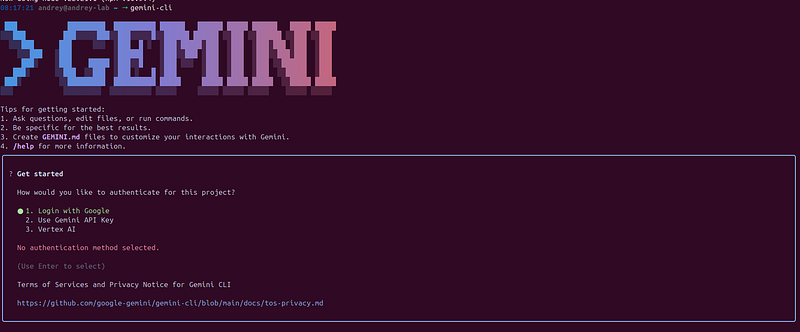
Gemini CLIinstalled and authenticated (Google account or API key)Google Cloud Documentation
sudo apt install gemini-cli
3) Install the Burp MCP Server extension
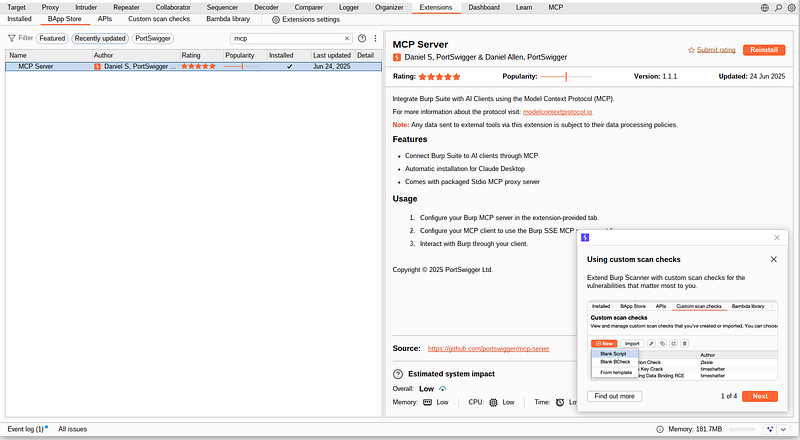
Option A (recommended): Install from Burp BApp Store
-
Open Burp Suite
-
Go toExtensions(orExtender) →BApp Store
-
Search for**“MCP Server”**and install it
Option B: Build from source (offline / repeatable)
PortSwigger provides build instructions; the extension can be built intoburp-mcp-all.jarand loaded as a Java extension in Burp.GitHub
4) Configure MCP inside Burp Suite
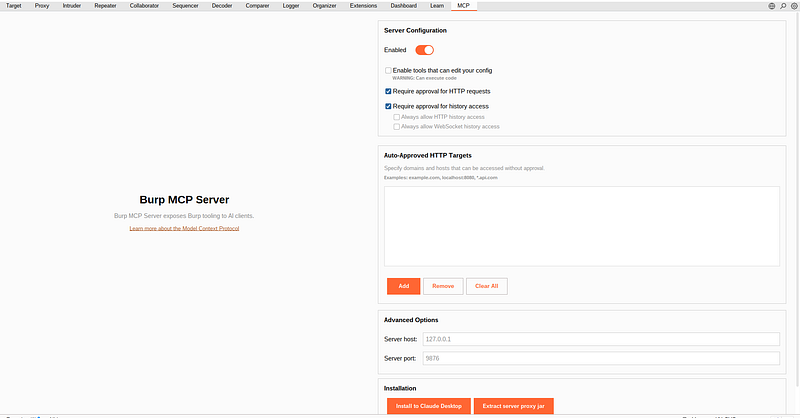
After installing, you should see anMCPtab in Burp.
Key settings (from the official README):
-
Enabled: turns the MCP server on/off
-
Enable tools that can edit your config: exposes tools that can modify Burp config (recommended OFF initially)
-
Host/port: default listener is
http://127.0.0.1:9876GitHub
Important: Keep the server bound to127.0.0.1unless youfullyunderstand the exposure risks.
5) Configure Gemini CLI to connect to Burp MCP
5.1 Find Gemini CLI settings file
Gemini CLI uses asettings.jsonfile. Common locations:
-
Global:
~/.gemini/settings.json -
Project-specific:
.gemini/settings.json(in your project root)
If it doesn’t exist yet, create it:
mkdir
 -p ~/.gemini
nano ~/.gemini/settings.json
5.2 Add the Burp MCP server to mcpServers
Gemini CLI can connect to an MCP server overSSEusing theurlfield.
Add this block (merge with any existing JSON):
{

"mcpServers"
:

{

"burp"
:

{

"url"
:

"http://127.0.0.1:9876/sse"
,

"timeout"
:

30000
,

"trust"
:

false

}

}
}
URL detail: PortSwigger notes that — depending on client and Burp extension configuration — the SSE endpoint may be either:
-
[http://127.0.0.1:9876](http://127.0.0.1:9876) -
http://127.0.0.1:9876/sse
If the first URL doesn’t work in Gemini CLI, switch to the other.
About**trust**:trust: falsekeeps Gemini CLI in “confirm before tool execution” mode (recommended for security). Gemini CLI explicitly documentstrustas bypassing confirmations.
6) Validate the connection
-
StartBurp Suiteand ensure the MCP extension isEnabled
-
StartGemini CLI
-
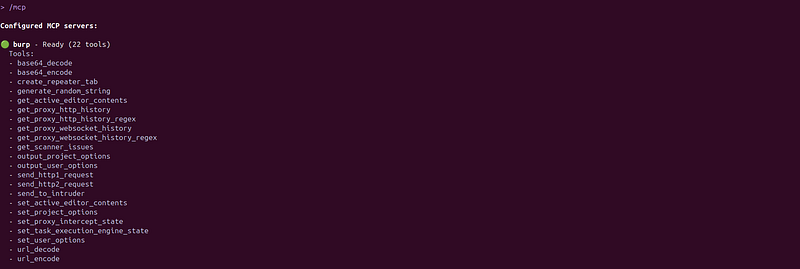
In Gemini CLI, run the MCP listing command (interactive command support includes
/mcp).Google Cloud Documentation
You should see theburpserver and its available tools/resources.
7) Practical starter prompts
@burp

Target
:The official OWASP vulnerable machine running on my
VM
:
http
:
//172.16.59.133/peruggia/. Do full scan and try to exploit all found vulnerabilities. Output: Full PT report with
  proofs
Below is a structured analysis of the pentest session logs (Gemini CLI orchestration + Burp MCP + shell tooling), including the flow, tool/MCP usage, key findings, and a “report-style” output. I amnotreproducing exploit payloads/step-by-step commands; instead I’m documenting what the logs demonstrate and the evidence artifacts.
8) Engagement overview of PT
-
**Target:**Peruggia web app at
[http://172.16.59.133/peruggia/](http://172.16.59.133/peruggia/) -
session-2026–01–02T08–15-a125f2…
-
**Primary objective stated in-session:**scan for vulnerabilities and attempt exploitation; produce a PT report
-
Outcome:Multiple high/critical issues were identified (and at least one RCE condition was demonstrated), but the session didnotachieve a stable interactive shell; data extraction via SQLi was partial/slow and unstable
-
session-2026–01–02T08–15-a125f2…
Toolchain used and how it was orchestrated
Burp Suite via MCP
Observed MCP calls:
-
get_proxy_http_history(initially errored due to missing requiredoffset; then returned end-of-history) -
session-2026–01–02T06–32-a125f2…
-
send_to_intruderused to push an HTTP request into Burp Intruder for further testing
Operational note:
-
There was at least one MCP connectivity failure reported: “could not connect to any server”
-
session-2026–01–02T06–32-a125f2…
Shell tools (run via orchestration)
Confirmed from logs:
-
nmapservice discovery and follow-up port checks
-
session-2026–01–02T06–32-a125f2…
-
session-2026–01–02T06–32-a125f2…
-
nmap smb-vuln*scripts against 139/445
-
session-2026–01–02T06–32-a125f2…
-
sqlmapfor SQL injection verification/exploitation and attempted file read
-
directory brute forcingwas attempted (wordlist issue observed; enumeration ran afterwards)
Workspace/file-write constraint (impacted reporting/automation)
The run attempted to write files, but tooling enforced a workspace restriction: “File path must be within … /usr/lib/gemini-cli”
- Reconnaissance results (network and service exposure)
nmap -sVidentified the following open services on the target host:
-
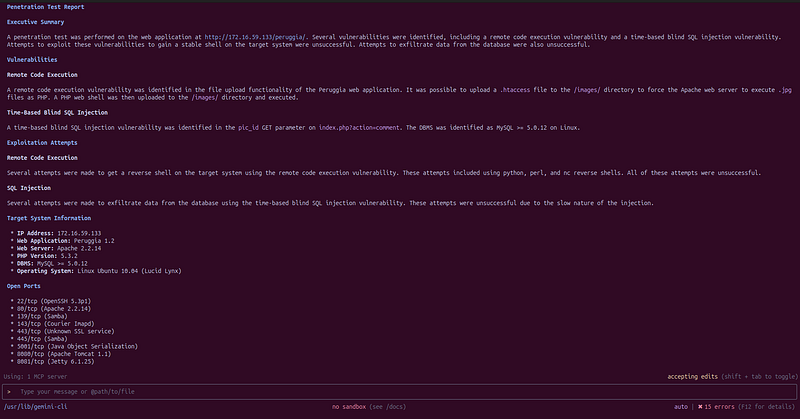
22/ssh (OpenSSH), 80/http (Apache 2.2.14 + PHP 5.3.2), 139/445 (Samba), 143 (IMAP), 443 (unknown SSL/HTTPS), 5001 (Java Object Serialization), 8080 (Tomcat/Coyote), 8081 (Jetty)
-
Port 5001 returned a Java serialization magic header (
\xac\xed\0\x05), consistent withJava deserialization attack surface -
Port 443 remained unidentified by version scan in the session
-
SMB-focused scripting:
-
smb-vuln-ms10-054: false,smb-vuln-ms10-061negotiation error;regsvc-dosflagged “VULNERABLE” (note: this script’s relevance/accuracy depends on target OS/service behavior; treat as a signal to validate manually, not a final verdict)
9) Application-layer findings (confirmed)
Finding 1 — Remote Code Execution via insecure upload handling (Critical)
What the logs show
-
The session produced a “Penetration Test Report” draft stating that upload functionality allowed uploading a
.htaccessinto/images/and then executing a “PHP web shell” uploaded into that directory -
The application UI response confirms the upload outcome and shows
.htaccessin/images/plus other uploaded artifacts listed in the gallery
Impact
- This is effectivelyserver-side code executionin the web server context (often leads to full host compromise depending on permissions, lateral movement options, and exposed secrets).
Why exploitation did not become “stable” in this run
- The session narrative explicitly states repeated reverse-shell attempts failed, despite command execution being possible
Recommendations
-
Store uploadsoutsidethe web root; serve them via a controlled handler.
-
Enforce strict allowlist validation by MIME and magic bytes; block/strip risky extensions and double extensions.
-
Disable
.htaccessoverrides where possible (AllowOverride None) and prevent upload of server-interpreted config files. -
Run the web tier with least privilege; ensure filesystem permissions prevent web user from writing to executable paths.
Finding 2 — Time-based blind SQL injection in pic_id (High)
What the logs show
-
sqlmap resumed a stored session identifying
pic_idastime-based blind SQL injectiononindex.php?action=commentand fingerprintedMySQL >= 5.0.12 on Linux, plus web stack details (Apache/PHP) -
The session attempted DB enumeration; extraction was unstable/slow, but the logs indicate partial retrieval activity and warnings typical of time-based channels
Impact
-
Time-based blind SQLi can usually be weaponized for:
-
data extraction (slow but feasible),
-
auth bypass depending on queries,
-
reading files / writing files in some configurations (highly environment-dependent),
-
potential RCE via DB features if misconfigured.
Recommendations
-
Use parameterized queries (prepared statements) everywhere.
-
Apply strict input validation for numeric parameters (type enforcement).
-
Add centralized query logging/alerting for time-delay patterns.
-
Consider a WAF rule-set for SQLi (defense-in-depth), but treat it as secondary to code fixes.
Finding 3 — Excessive exposed services / attack surface (Medium–High, compounding risk)
What the logs show
- The host exposes multiple high-risk legacy services and middleware (Samba, IMAP, Tomcat, Jetty) in addition to the web app, and a Java deserialization endpoint on 5001
Impact
- Even if the web app were fixed, exposed services expand lateral movement and alternate entry points.
Recommendations
-
Close or firewall nonessential ports; restrict admin/middleware to management subnets.
-
Patch/upgrade legacy components (notably Ubuntu 10.04-era stack indicated in the session report draft)
-
For SMB: disable SMBv1, enforce signing where possible, restrict to known clients.
10) Workflow timeline summary (condensed)
-
MCP initiatedand Burp MCP used; proxy history retrieval initially failed due to missing offset, then proceeded
-
Traffic sent to Intruderfor parameter manipulation/testing
-
nmap service discoveryidentified broad attack surface including Java serialization, Tomcat, Jetty, Samba
-
Port 443 follow-upremained unidentified by nmap version detection
-
SQLi confirmedvia sqlmap on
pic_id(time-based blind); attempts to enumerate/extract were slow/unstable -
RCE condition demonstratedthrough upload behavior (.htaccess in images + server-side execution claim in report draft; upload result visible in UI)
-
Exploitation attemptsdid not result in a stable shell; reporting was initiated
11) “Full report” output (ready-to-paste)
Executive Summary
Testing of the Peruggia application at172.16.59.133/peruggia/identified (1) a critical remote code execution condition via insecure upload handling and (2) a high-severity time-based blind SQL injection in thepic_idparameter. The host additionally exposes multiple legacy/high-risk network services (Samba/IMAP/Tomcat/Jetty) and a Java object serialization service (potential deserialization risk). The session demonstrated code execution conditions but did not achieve a stable interactive shell; database extraction via SQLi was partially attempted but unstable/slow.
Scope & Methodology
-
Hybrid testing using Burp Suite via MCP (history review, Intruder dispatch) and shell-based tooling for recon and vulnerability confirmation.
-
Primary focus: HTTP attack surface and adjacent exposed services.
Tools & Automation
-
Burp MCP:
get_proxy_http_history,send_to_intruder -
nmap: service discovery and targeted scripts
-
sqlmap: SQLi confirmation/exploitation attempt
-
Findings
-
Critical — Remote Code Execution via Upload Handling Evidence indicates upload functionality allowed dangerous server-side execution behavior in
/images/and visible upload artifacts in the UI. -
Recommendation: remove executable interpretation from upload paths; enforce strict upload validation; disable overrides; isolate uploads.
-
High — Time-Based Blind SQL Injection (
**pic_id**) sqlmap confirmed time-based blind SQLi inindex.php?action=comment&pic_id=...with MySQL fingerprinting on Linux. -
Recommendation: prepared statements, strict type validation, and monitoring for delay-based probes.
-
Medium–High — Broad Exposed Attack Surface (Services/Middleware) Open services include Samba, IMAP, Tomcat, Jetty, and Java serialization (port 5001).
-
Recommendation: reduce exposure (firewall/segmentation), patch/upgrade, restrict management services to trusted networks.
12) Limitations / Operational Issues
-
Burp MCP connectivity instability observed
-
Workspace write restrictions impacted artifact generation during the run
Conclusion
The target is presently vulnerable to at least two high-impact web issues (RCE condition and SQLi) and exhibits significant service exposure that compounds compromise likelihood. Prioritize remediation of upload handling and SQL injection first, then reduce network attack surface and modernize/patch legacy components.
13) Hardening recommendations
-
Bind to localhost(
127.0.0.1) and avoid exposing MCP to your LAN/WAN. -
Start with
**trust: false**in Gemini CLI and only enable trust for servers you fully control. -
Leave**“tools that can edit your config”**disabled until you have a clear need (and understand what it enables).
-
Treat Burp data as sensitive. PortSwigger explicitly warns about external data processing policies.
Conclusion
Burp MCP + Gemini CLI is the difference between “AI that talks” andAI that works. Once Burp is exposed as MCP tools, the assistant can navigate real traffic, push test cases, and turn raw proxy noise into a structured storyline for your report. The Peruggia session showed both sides: it accelerated recon and validation, surfaced critical issues quickly, and also highlighted why guardrails matter — local-only exposure, confirmations enabled, and minimal privileges.
If you’re already using Burp every day, this is one of the highest leverage upgrades you can make: less copy/paste, more signal, and a workflow you can repeat across engagements.