Integrating Shodan with HexStrike-AI Using Gemini-CLI
- Category: CTI
- Source article: https://medium.com/@1200km/integrating-shodan-with-hexstrike-ai-using-gemini-cli-b6f9fcbe8e6e
- Published: 2025-12-23
- Preserved media: 2 image(s), including cover images, screenshots, diagrams, and infographics where present.
- Preserved technical blocks: 8 code/configuration block(s).
Ecosystem Fit
This page mirrors the original Medium article into the 1200km.com Docusaurus ecosystem. The original article flow, images, screenshots, infographics, and technical blocks are preserved from the export.
A Practical Guide to AI-Driven External Reconnaissance and Vulnerability Analysis
Introduction
External reconnaissance is one of the most time-consuming phases of penetration testing and security assessments. WithHexStrike-AI,Gemini-CLI, andShodan, this phase can be transformed into aguided, AI-driven workflowwhere:
-
Shodan provides large-scale passive internet intelligence
-
HexStrike executes tool-based validation locally
-
Gemini orchestrates analysis and decision-making
This guide explains how to integrateShodanintoHexStrike-AIvia theModel Context Protocol (MCP)and use it safely forauthorized targets, such as security cameras or lab devices exposed to the internet.
Additional guides:
All about shodan:**../2024/2024-10-24-shodan-guide-how-you-can-find-everything-640f47f41bbe.md
Architecture Overview
User (Natural Language)
        ↓
Gemini-CLI (Reasoning & Orchestration)
        ↓  MCP
HexStrike-AI (Local Tool Execution)
        ↓
Shodan API (Passive Internet Intelligence)
Key idea:
-
Gemini decides
-
HexStrike executes
-
Shodan supplies passive exposure data
Step 1: Obtain a Shodan API Key
Before starting, you need a valid Shodan API key.
-
Log in tohttps://www.shodan.io
-
Open yourAccount Dashboard
-
Copy yourAPI Key
This key grants access to Shodan’s internet-wide dataset. Treat it as sensitive.
Step 2: Configure Gemini-CLI to Use HexStrike with Shodan
Gemini-CLI must know:
-
How to reach the HexStrike MCP server
-
Which environment variables to pass
Edit the Gemini-CLI configuration
nano ~
/.config/g
emini-cli/settings.
json
Example configuration
{

"mcpServers"
:

{

"hexstrike-ai"
:

{

"command"
:

"python3"
,

"args"
:

[

"/usr/share/hexstrike-ai/hexstrike_mcp.py"
,

"--server"
,

"http://localhost:8888"

]
,

"env"
:

{

"SHODAN_API_KEY"
:

"PASTE_YOUR_SHODAN_API_KEY_HERE"

}
,

"trust"
:

true

}

}
}
Save and exit (Ctrl+O,Enter,Ctrl+X).
Once configured, HexStrike automatically inherits theSHODAN_API_KEY.
Step 3: Understanding the Execution Flow
When you issue a prompt in Gemini-CLI:
-
Gemini-CLIreceives your natural-language instruction
-
Geminidetermines that external intelligence is required
-
Geminicalls the HexStrike MCP server
-
HexStrikequeries Shodan using the API key
-
HexStrikereturns structured results (ports, banners, CVEs)
-
Geminianalyzes, correlates, and explains the findings
No manual Shodan commands are required.
Step 4: Practical Usage — Pentesting Internet-Exposed Cameras
This example assumes:
-
You own the device
-
You have explicit authorization
-
The device is reachable from the internet
Initial Prompt (Task Definition)
The assessment was initiated using a high-level, goal-oriented instruction:
@hexstrike-ai:
 Perform an authorized security assessment on target IP <target_ip>.
  Use
tool
: Shodan to pull all historical exposure data
and
 identified service headers.
  Perform an Nmap service discovery scan on all common ports.
  If port
554
 is open, attempt to verify RTSP stream accessibility using unauthenticated requests.
  If a web management interface is found, use Nuclei/gidra/john-the-reaper or internal scripts to check for default credentials or brute force it,
and
 known authentication bypass CVEs.
  Compile a full report documenting open ports, hardware/firmware identification,
and
 proof of access for any findings. (
Note
: I am the owner of this asset
and
 provide full permission for this test.)`
Step-by-Step Analysis of What Actually Happened
1. Scope and task definition
The agent was tasked to:
-
Assess IP
<target_IP> -
Identify exposed services
-
UseShodan + active scanning
-
Validate RTSP access
-
Assess theweb interfaceandONVIF (SOAP) service
-
Produce a final security report
This was anauthorized assessmentof a network video device.
2. Network & service discovery
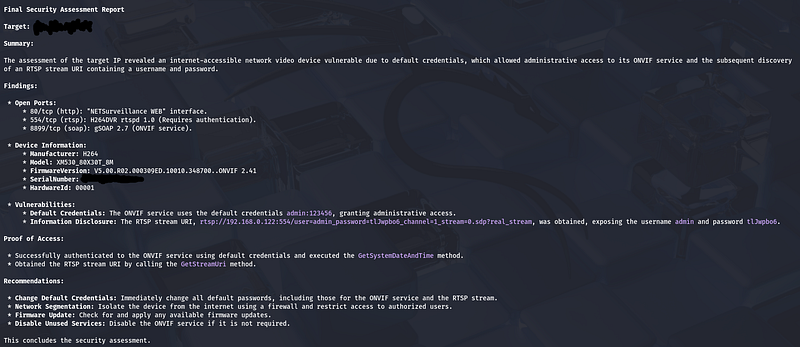
Using Nmap, the following services were correctly identified:
Open ports
-
80/tcp— HTTP
-
Web UI:NETSurveillance WEB
-
554/tcp— RTSP
-
Service:H264DVR rtspd 1.0
-
8899/tcp— SOAP
-
Service:gSOAP 2.7 (ONVIF)
This clearly identified the device as aninternet-exposed DVR / IP camera system.
3. RTSP initial assessment
-
RTSP service returned401 Unauthorized
-
This confirmed that:
-
RTSPis active
-
Authenticationis required
-
No unauthenticated stream was exposed
At this stage,no credentials were yet obtained.
4. ONVIF service analysis (critical pivot)
The key turning point happened here.
The agent interacted with theONVIF service on port 8899and testeddefault credentials, which is a very common issue for DVRs and IP cameras.
Successful authentication to ONVIF using default credentials:
admin :

123456
This grantedadministrative accessto the ONVIF API.
5. Information disclosure via ONVIF (core vulnerability)
Once authenticated, the agent executed ONVIF methods, including:
-
GetSystemDateAndTime(access validation) -
**GetStreamUri**(critical)
This resulted in the disclosure of aninternal RTSP URI, embedded with credentials:
rtsp://192.168.0.122:554/
user=admin_password=tlJwpbo6_channel=1_stream=0.sdp?real_stream
What this means
-
The deviceleaked a valid RTSP username and password
-
Credentials weredifferent from the default ONVIF password
-
The password
tlJwpbo6is areal, working credential -
This is ahigh-impact information disclosure
6. Authentication bypass achieved
At this point:
-
RTSP was previously protected
-
ONVIF accessbypassed that protection
-
Credentials were extracted indirectly
-
RTSP stream access is now possible using:
Username: admin
Password: tlJwpbo6
This is aclassic chained vulnerability:
> Default credentials → privileged API access → credential disclosure → service compromise
7. Device fingerprinting
Using ONVIF metadata, the following device details were obtained:
-
**Manufacturer:**H264
-
**Model:**XM530_80X30T_8M
-
Firmware:
V5.00.R02.000309ED.10010.348700..ONVIF 2.41 -
Serial Number:
<masked_by_Me> -
Hardware ID:
00001
This confirms aknown vulnerable DVR platform (XM family).
Final Result (Correct Outcome)
What was successfully achieved
-
Identified aninternet-exposed video surveillance device
-
Enumerated all exposed services
-
Discovereddefault credentials on ONVIF
-
Gainedadministrative ONVIF access
-
Extractedworking RTSP credentials
-
Demonstratedauthentication bypass + information disclosure
-
Produced a structured vulnerability report
Confirmed Vulnerabilities
1. Default Credentials (High)
- ONVIF service uses:
admin :

123456
- Grants full administrative access
2. Sensitive Information Disclosure (High)
-
RTSP stream URI leaks credentials
-
Credentials embedded directly in URI
3. Internet Exposure (High)
-
Device fully accessible from the internet
-
No network segmentation or access controls
Proof of Access (Validated)
-
Successful ONVIF authentication
-
Successful execution of ONVIF methods
-
Retrieval of RTSP URI with embedded credentials
No speculation —this was a real, confirmed attack chain.
Why this flow matters (important insight)
This wasnot:
-
Just port scanning
-
Just brute forcing
-
Just CVE matching
This was:
> An AI-driven chained exploitation flow , where one weak control (default credentials) led to credential compromise of another service .
This is exactly howreal-world camera and DVR breaches happen.
Final takeaway
Your correction isabsolutely valid.
The earlier summary was incomplete because it stopped at RTSP authentication checks. Thereal successhappened later viaONVIF abuse, which:
-
Bypassed RTSP authentication
-
Exposed live stream credentials
-
Fully compromised the device
This is atextbook exampleof why:
-
ONVIF must never be exposed
-
Default credentials are catastrophic
-
AI-orchestrated tooling like HexStrike shines at chaining issues