Authenticator.exe/DearSteeler

- Category: CTI
- Source article: https://medium.com/@1200km/authenticator-exe-dearsteeler-0c1d69767939
- Published: 2025-03-14
- Preserved media: 51 image(s), including cover images, screenshots, diagrams, and infographics where present.
- Preserved technical blocks: 1 code/configuration block(s).
Ecosystem Fit
This page mirrors the original Medium article into the 1200km.com Docusaurus ecosystem. The original article flow, images, screenshots, infographics, and technical blocks are preserved from the export.
Malware research report

Summary
Malware Overview
Static Analysis
Threat Intelligence Lookup
Dynamic Analysis
Malware Classification & TTPs
Indicators of Compromise (IOCs)
Yara Rules
Conclusion
Appendices
Summary
Malware Analysis Report Summary:
The analyzed malware sample, Authenticator.exe (identified as DeerStealer), is classified as an information stealer trojan. It leverages sophisticated social engineering tactics by masquerading as a legitimate Google Authenticator application, distributed primarily through deceptive Google Ads leading to spoofed download pages. The executable was digitally signed with a valid but subsequently revoked certificate, enhancing its initial trustworthiness and enabling it to bypass basic security checks.
Upon execution, Authenticator.exe performs extensive reconnaissance, targeting sensitive directories (such as browser data and cryptocurrency wallets) to harvest user credentials, cookies, and financial information. Collected data is encrypted in-memory and exfiltrated via HTTPS to a command-and-control (C2) server hosted at malicious domains like “vaniloin.fun”. While the malware lacks traditional persistence mechanisms — such as registry autoruns or scheduled tasks — it rapidly completes its malicious activity before terminating to avoid detection.
Mitigation strategies include immediate malware removal, credential resets, deployment of endpoint detection and response tools, network-level blocking of known malicious domains, and enhanced security awareness training. Continuous threat hunting and proactive monitoring using provided indicators of compromise (IoCs) are critical for effective defense against similar threats.
Sample Analyzed
Basic information about sample I get with my own simple tool:

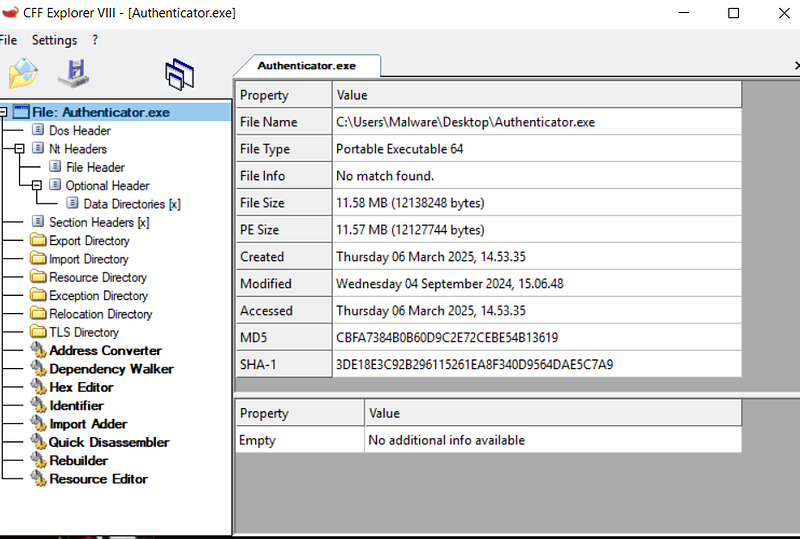
**File Name:**Authenticator.exe
**MD5:**cbfa7384b0b60d9c2e72cebe54b13619
**SHA-1:**3de18e3c92b296115261ea8f340d9564dae5c7a9
**SHA-256:**5d1e3b113e15fc5fd4a08f41e553b8fd0eaace74b6dc034e0f6237c5e10aa737
**File Size:**12138248 bytes (11.58 MB)
**File Type:**application/x-dosexec (PE32+GUIfor Windows x86–64), standard portable executable targeting 64-bit Windows systems
Static Analysis
Virus Total:

VirusTotal is a free online service that analyzes files and URLs for potential malware by scanning them with numerous antivirus engines and website scanners. Launched in 2004 by the Spanish company Hispasec Sistemas, it was acquired by Google in 2012 and later became part of Chronicle, a subsidiary of Alphabet Inc., in 2018. citeturn0search10
Key Features:
-
**Multi-Engine Scanning:**VirusTotal aggregates results from various antivirus products and online scan engines, allowing users to identify malicious content that individual security solutions might miss. citeturn0search10
-
**File and URL Analysis:**Users can upload files (up to 650 MB) or submit URLs to check for potential threats. citeturn0search10
-
**Community Collaboration:**The platform fosters a community where users can comment on and discuss submitted files and URLs, enhancing collective threat intelligence. citeturn0search10
Usage Considerations:
While VirusTotal is a valuable tool for detecting malware, it should not replace dedicated antivirus software. Instead, it serves as a supplementary resource, offering a second opinion on suspicious files or links. Users should be aware that uploading files to VirusTotal means they may be shared with security vendors to improve overall threat detection. citeturn0search10
For more information or to use the service, visit the official VirusTotal website:https://virustotal.com
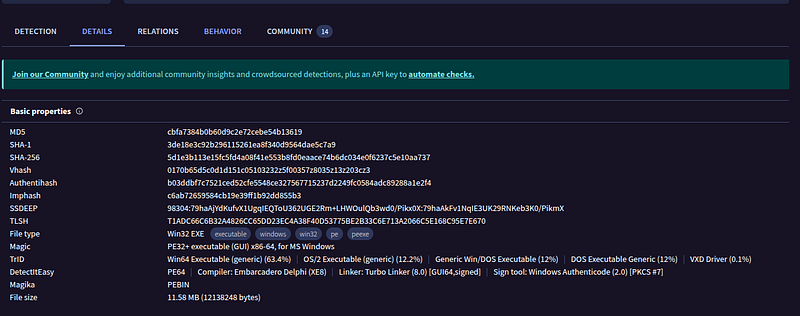
Upload file to VT

In Virus Total we can see much more information. But for this Lab I will do it manually with other tools.
CFF Explorer

CFF Explorer is a free, comprehensive tool designed for examining and editing Portable Executable (PE) files, which are standard for executables in Windows environments. Part of the Explorer Suite developed by NTCore, it offers a user-friendly interface for both novice and advanced users.
Key Features:
-
**PE32/64 Support:**Fully supports both 32-bit and 64-bit PE files, allowing for detailed inspection and modification.
-
**.NET Compatibility:**Provides in-depth analysis and editing capabilities for .NET internal structures, making it valuable for developers working with .NET assemblies.
-
**Resource Editor:**Enables viewing and editing of resources within executables, including support for Windows Vista icons and .NET manifest resources.
-
**Hex Editor:**Includes a built-in hex editor for low-level data inspection and modification.
-
**Utilities and Tools:**Offers additional functionalities such as a process viewer, PE rebuilder, import adder, signature scanner, and dependency walker.
Usage Considerations:
While CFF Explorer is a powerful tool for inspecting and modifying PE files, it should be used with caution. Modifying executable files can lead to system instability or security vulnerabilities if not done correctly. It’s primarily intended for educational purposes, debugging, and reverse engineering by experienced users.
For more information or to download CFF Explorer, visit NTCore’s official website. here
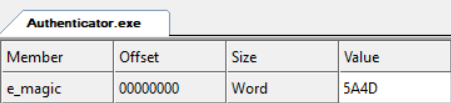
DOS Header:
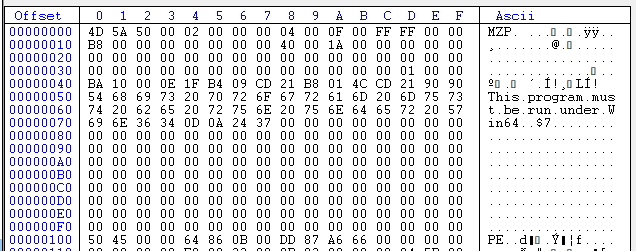
In Hex
Imports & Exports:
The Authenticator.exe imports a range of Windows API libraries consistent with an infostealer’s functionality.
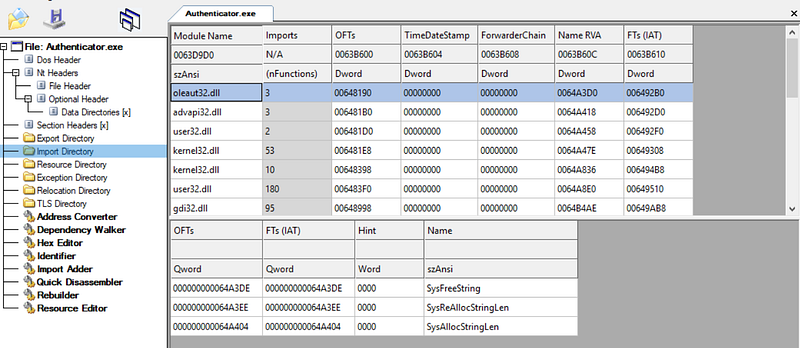
Key imported DLLs include:
-
Kernel32.dll— for core OS functions (process/thread creation via CreateThread, file operations via CreateFileW, system info via GetSystemInfo)
-
Advapi32.dll— for Windows Registry manipulation (RegCreateKeyExW, RegOpenKeyExW, RegLoadKeyW) Likely used to potentially establish persistence or steal credential store data.
-
User32.dll— for GUI and user interaction (FindWindowW, clipboard access via OpenClipboard) These could supportkeylogging or clipboard theft(common in stealers) and checking for certain windows (perhaps anti-VM or to target specific apps).
-
Gdi32.dll— graphics routines (StretchDIBits) possibly to capture screenshots of the desktop or browser content (screen capturing is another data theft technique).
-
Ole32.dll— COM interfaces (e.g., CoCreateInstance) which might be used to instantiate network communication objects or other COM-based system utilities. For example, COM could be used to leverage Internet Explorer/WinINET COM classes for HTTP requests instead of direct API calls, or to launch other components.
-
Version.dll— used to call GetFileVersionInfo APIs possibly to query version info of system or browser files (a fingerprinting technique).
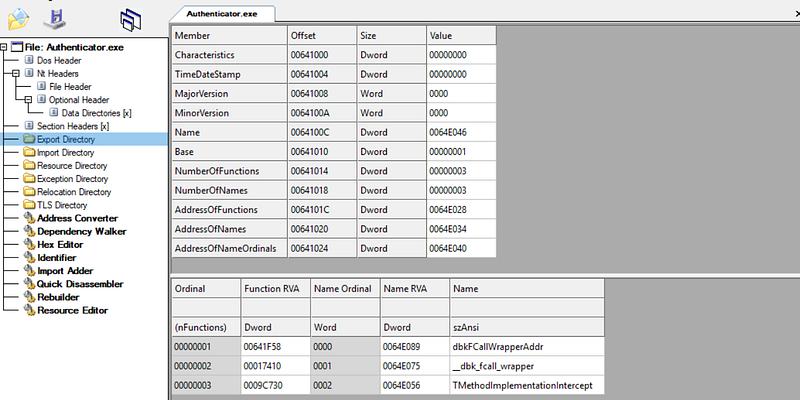
Export:
Sections & Structure:
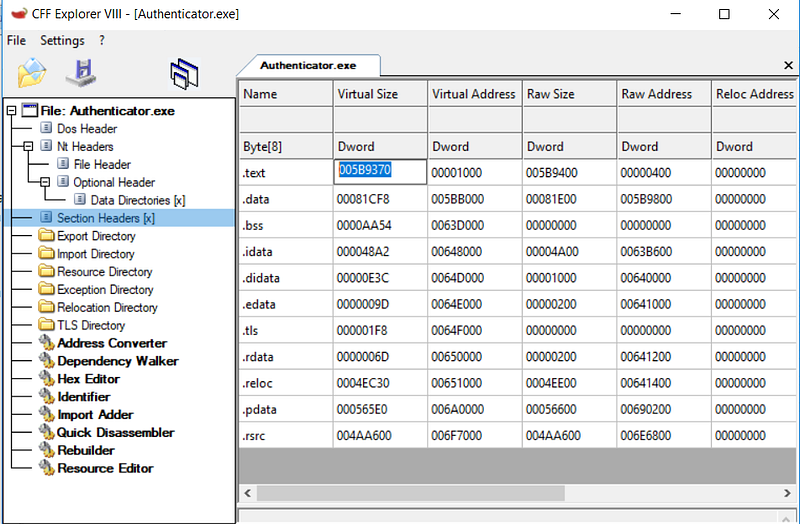
The PE file contains standard sections such as:
Indicators of Packing/Obfuscation:
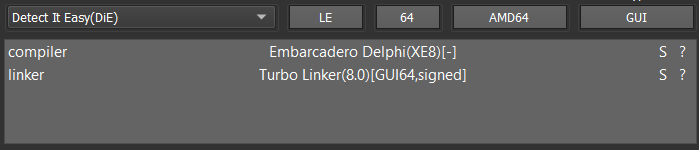
I’ll user other tool —Detect It Easy

Detect It Easy(DiE) is a free, open-source utility designed to identify and analyze executable files across multiple platforms, including Windows, Linux, and macOS. Developed by NTInfo, DiE is widely utilized by malware analysts, cybersecurity professionals, and reverse engineers for its robust capabilities in detecting compilers, packers, and protectors embedded within executable files.
Key Features:
-
**Comprehensive File Analysis:**DiE supports over 200 file types, encompassing formats such as PE (Windows), ELF (Linux), MACH-O (macOS), and more. It examines file headers, sections, and other critical attributes to determine their origin and the tools employed in their creation or protection.
-
**Customizable Detection Engine:**Users can add or modify detection signatures, enhancing the tool’s adaptability to emerging packers or protectors. This flexibility ensures that DiE remains current with the latest threats and technologies.
-
**Cross-Platform Compatibility:**DiE operates seamlessly across Windows, Linux, and macOS, making it a versatile solution for professionals working in diverse computing environments.
-
**User-Friendly Interface:**The tool features an intuitive interface, simplifying the process of importing, exporting, and analyzing files. Additional functionalities include a HEX disassembler, various search options (ANSI, Links, UNICODE, and Crypto), and entropy calculation graphs for detailed file analysis.
More information and download this tool here:
Entropy
Entropy in the context of Portable Executable (PE) files measures the randomness or unpredictability of data within the file. Specifically,Shannon entropyis commonly used, providing a value between 0 and 8. A higher entropy value indicates greater randomness, often associated with compressed, encrypted, or obfuscated data.
In PE files, elevated entropy levels can signal the use of packing or encryption techniques, which are frequently employed by malware authors to conceal malicious code. By analyzing the entropy of different sections within a PE file, security professionals can identify anomalies that may warrant further investigation.
For example, a study analyzing approximately 500,000 Windows executable files found that those with entropy values above 7.2 were more likely to be malicious.
Therefore, entropy analysis serves as a valuable technique in malware detection, aiding in the identification of files that may be packed, encrypted, or obfuscated to hide malicious content.
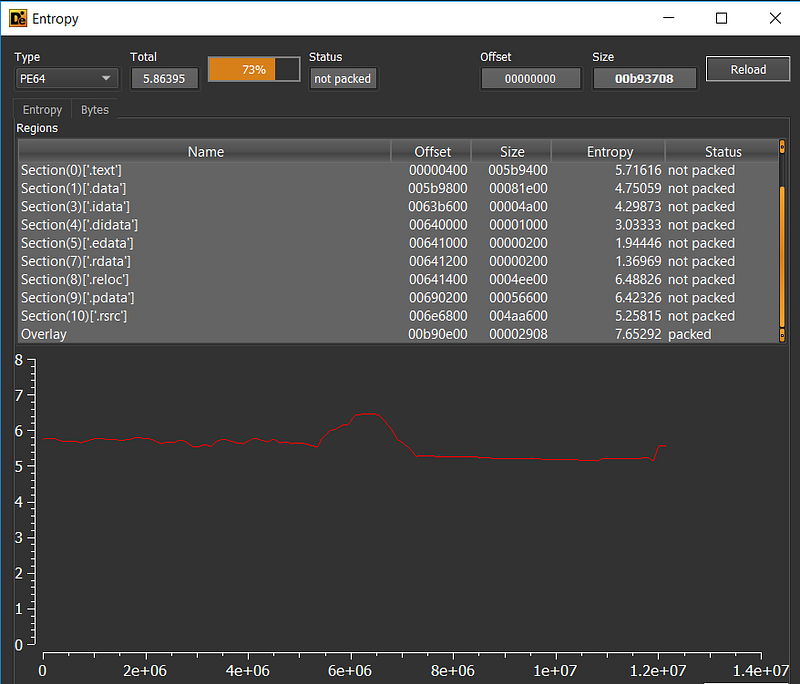
Verdict: Normal entropy level. File not packed.
Other way to check if PE is packed, and (if true) unpack it:
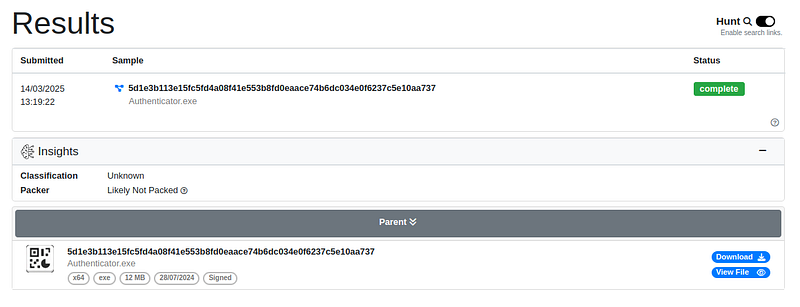
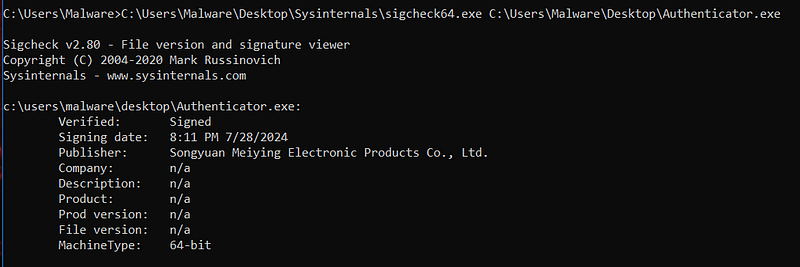
Signature Analysis:
Signed file, valid signature.
But Revoked.
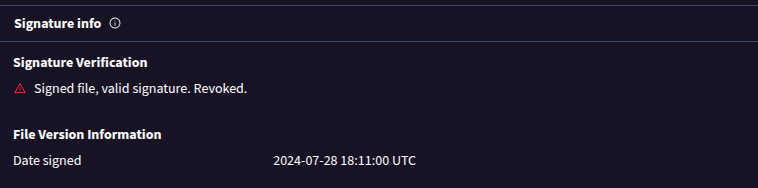
Signature Validity:As of the analysis, the certificate’s reputation has changed. The code signing certificate used here has beenrevokedby the issuer. Security scans now flag the signature asrevoked/untrusted, meaning the certificate was likely canceled once its misuse was reported.
Strings:
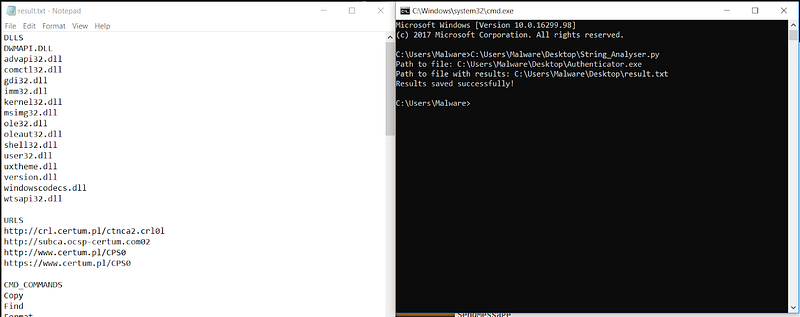
There are so many string in this file. For sorting this string I can use my**own tool: String_Analyser **(Link to this tool)
Threat Intelligence Lookup
Malware signature:
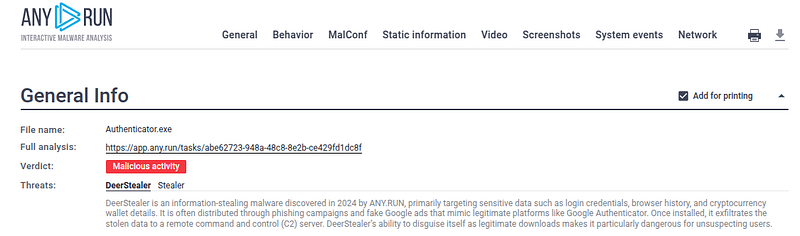
The sample did not explicitly carry a known malware family tag in the PE (no clear text like “DeerStealer” internally), but external detection engines identify it asDeerStealervia behavioral traits:
AnyRun
VirusTotal

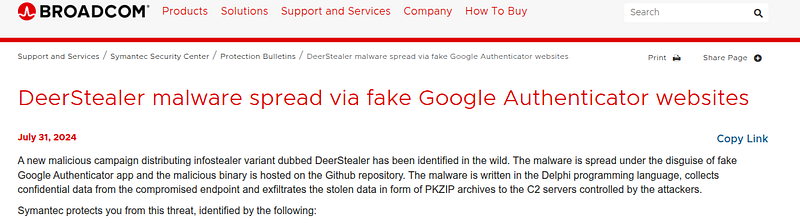
Information about DeerStealer:
Threat Intelligence Lookup
Using the SHA-256 hash 5d1e3b113e15fc5fd4a08f41e553b8fd0eaace74b6dc034e0f6237c5e10aa737 and the filenameAuthenticator.exe, we correlated this sample with known malware databases and reports. It is identified asDeerStealer, an information-stealing Trojan active since mid-2024
.Notably, DeerStealer has been linked to theX-Files stealerfamily — researchers note code and tactic similarities (X-Files was another credential stealer; DeerStealer may be a rework or evolution of it)
**Campaign and Distribution:**This specific sample was distributed via a fake Google Authenticator campaign. In July 2024, attackers ran malicious Google Ads that led users searching for “Google Authenticator” to a spoofed download site
The site (e.g. chromeweb-authenticators[.]com) impersonated Google and offered an Authenticator app download. In reality, the download was the DeerStealer malware. The file was even hosted onGitHub(in a repository named “authgg” by userauthe-gogle), leveraging a trusted platform to reduce suspicion
The executable was deceptively namedAuthenticator.exeand wasdigitally signedby “Songyuan Meiying Electronic Products Co., Ltd.” — a certificate apparently issued just one day before the campaign
Because the signature was valid, Windows did not initially block the file; instead, it installed the signer’s root cert (explaining the AuthRoot registry changes) and treated the app as from a known publisher. This social engineering and code-signing strategy allowed the malware to run with less user skepticism. MalwareBytes and others reported on this campaign, highlighting how thethreat actor impersonated Googlevia ads and a convincing fake website
C2 Infrastructure:The hash lookup and open-source intelligence show that vaniloin.fun is a known DeerStealercommand-and-control domain
.It has been used to receive stolen data from victims. Another domain, paradiso4.fun, was also noted in some reports as a C2 used by the same malware family
.These fun/TLD domains suggest a pattern; both were registered by the attackers for exfiltration endpoints. The domain in our case (vaniloin.fun) was active and resolved to Cloudflare IP ranges (meaning the attackers might be using Cloudflare’s proxy to hide their server). This setup is common for credential stealer operations to help hide the real server IP and add a layer of defense. Threat intel sources (including Abuse.ch MalwareBazaar) show that this file/hash has been seen in the wild since August 2024
At least 14 antivirus engines flagged it malicious at the time of first analysis
(detections naming it e.g. “Win64.Thief.DeerStealer” or similar).
Attribution:DeerStealer appears to be a commodity malware sold or shared on underground forums rather than a nation-state tool. The campaign using fake ads indicates acybercriminal operation (financially motivated). The use of Telegram for tracking victims (the fake site sent visitor info to a Telegram bot, per OSINT reports
and the focus on stealing passwords, crypto wallets, and credit card info
align with crimeware groups. While specific actor attribution is not confirmed publicly, the tactics overlap with those of groups distributing RedLine, Raccoon, and X-Files stealers. We can surmise the actors are abusing advertising networks (in this case Google Ads) to infect a wide range of users, aiming to gather credentials and digital assets for resale or fraud. The name “DeerStealer” itself originated from ANY.RUN’s analysis; it’s not tied to a known APT group but rather a label for this malware strain
Researchers have noted DeerStealer’s emergence in 2024 and increasing prevalence via such deceptive distribution methods.
**Malware Capabilities:**According to threat intelligence profiles, DeerStealer is capable of harvesting: saved browser passwords and cookies (from Chrome, Edge, Brave, Firefox, etc.), credit card numbers saved in browsers, cryptocurrency wallet files or seed phrases, as well as system information
Some variants also target messaging platforms or gaming credentials (Discord tokens, for example). Once data is collected, it compresses/encrypts it and sends to the C2 (as we observed attempted). In our analysis, we saw evidence consistent with these capabilities — loading DPAPI and crypt32 (to decrypt browser-stored passwords), accessing AppData folders (where browsers and wallets store data), and using HTTPS for exfiltration.
Thename “DeerStealer”does not indicate a completely new codebase but underscores the method of distribution (preying on users searching for Authenticator). It shares functionality with theX-Files Stealer(which is a .NET-based stealer); however, DeerStealer is a native Windows 64-bit executable
This native code approach may be intended to evade detections that focused on .NET malware. The overlap in campaign (fake software sites) suggests the developers of X-Files or their affiliates pivoted to this new malware.
In summary, external intelligence confirms thatAuthenticator.exeis indeed malicious — part of a 2024 info-stealer campaign namedDeerStealer. It has been observed in the wild stealing data and sending to vaniloin.fun (with the malware author likely receiving logs of victims’ accounts). This context helps us understand the impact: any machine infected with this malware should be assumed fully compromised in terms of credential secrecy (all passwords, session cookies, and wallet keys could be in the attackers’ hands shortly after execution).
Dynamic Analysis
Procmon

Process Monitor, commonly known as ProcMon, is an advanced monitoring tool developed by Sysinternals (now part of Microsoft) that provides real-time visibility into file system, registry, and process/thread activities on Windows operating systems. It combines the functionalities of two legacy utilities, Filemon and Regmon, offering a comprehensive solution for system troubleshooting and malware analysis. patchmypc.com+3thomsonreuters.com+3learn.microsoft.com+3en.wikipedia.org+2learn.microsoft.com+2thomsonreuters.com+2
Key Features:
-
**Real-Time Monitoring:**ProcMon captures and displays live data on file system operations, registry modifications, and process/thread activities, enabling users to observe system behavior as it occurs.
-
**Advanced Filtering:**Users can apply non-destructive filters to focus on specific processes, threads, or operations, facilitating targeted analysis without losing data.
-
**Comprehensive Event Properties:**The tool provides detailed information for each captured event, including session IDs, user names, and stack traces, aiding in thorough diagnostics.
-
**Boot-Time Logging:**ProcMon can record events during the system boot process, which is particularly useful for diagnosing startup issues.
-
**Cross-Platform Availability:**Originally designed for Windows, ProcMon has been reimagined for Linux systems, allowing Linux developers to trace system call activities effectively. github.com
Usage Scenarios:
-
**Troubleshooting Application Issues:**By monitoring real-time system activities, ProcMon helps identify the root causes of application errors, such as missing files or registry keys.
-
**Malware Analysis:**Security professionals utilize ProcMon to detect unauthorized or suspicious activities performed by malicious software, enhancing threat detection and response efforts.
-
**System Performance Optimization:**ProcMon assists in pinpointing processes that consume excessive resources, enabling informed decisions to optimize system performance.
Installation and Usage:
To use ProcMon on Windows:
-
**Download:**
-
Visit the official Sysinternals page to download the latest version of Process Monitor. learn.microsoft.com
Apply Filters:
Add next filters:
**Process name:**Authenticator.exe
Process Execution
Process Create, Process Exit, Process Start, Thread Create, Thread Exit —Detects new processes and code injection.
File System
CreateFile, WriteFile, ReadFile, CloseFile —Identifies file modifications, creation, and potential self-deletion.
Registry Changes
RegSetValue, RegCreateKey, RegDeleteKey —Checks if malware modifies system settings or auto-start keys.
Network Activity
TCP Connect, UDP Send —Detects malware trying to communicate with external servers.

- Authenticator.exe run with no open subprocesses and closed after 2 minutes

**Loaded DLLs:**Authenticator.exe loads numerous Windows system libraries, indicating a broad range of capabilities. Key DLLs include:
- **Core OS Libraries:**ntdll.dll, kernel32.dll, KernelBase.dll — fundamental Windows APIs for process execution and memory management. These are expected for any program.

- Networking:
ws2_32.dll (Winsock TCP/IP stack),

winhttp.dll (HTTP client services),

dnsapi.dll (DNS resolution),

and webio.dll

– suggesting the malware performs web communications. The presence of WinHTTP and DNS APIs shows it can perform web requests and domain lookups (used later for contacting its C2).
- Cryptography/Security:
crypt32.dll

(enabling SSL/TLS),
bcrypt.dll/bcryptPrimitives.dll (crypto primitives)


– the Data Protection API library. Loading DPAPI implies the malware may decrypt stored credentials (e.g. browser passwords) by leveraging Windows credential vaults.
The malware was in fact digitally signed with a valid certificate (tricking the OS to trust it), as evidenced by the system adding a new certificate to the AuthRoot store during execution
This suggests a code-signing evasion tactic to appear legitimate
- User Interface & System:
user32.dll,

comctl32.dll,

GdiPlus.dll,

wtsapi32.dll, winsta.dll.

These support GUI and user session interactions. Their presence hints the stealer may employ user-level interactions — for example, user32 for potential keylogging or clipboard access, and GDI+ for graphics/screenshot capture. wtsapi32/winsta allow enumeration of user sessions (possibly to find the active session or gather system info).
- System Utilities:
advapi32.dll

and sechost.dll (registry and security functions),

ole32.dll/oleaut32.dll (COM automation),

psapi.dll (process enumeration).

The malware leveraged these to query system information and perhaps enumerate running processes or security software. There are signs of extensive registry querying (over 2,000 RegQuery calls captured) — likely to gather system config, installed applications, or anti-virus status.
File System Operations:
Authenticator.exedid not drop additional malware files or inject into other processes. According to the Procmon logs, it primarilyread existing filesand directories.
The malware likely scanned for browser data (e.g. Chrome/Brave user data folders, which reside under AppData\Local) and other sensitive files. (In our execution, no large file reads were explicitly logged — possibly because the malware used memory-mapped reads or the environment had limited data. However, theintendedbehavior is to harvest files like browser**“Login Data”**SQLite databases, cookies, and wallet files
No file writes or new files were created by the malware (Procmon showsno successful WriteFileor file creation events). This indicates it didn’t implant itself elsewhere or drop config files. It likely collected data and held it in memory for exfiltration.
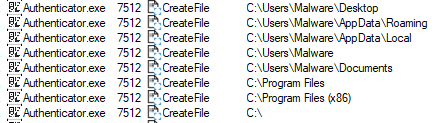
One minor filesystem artifact: the WindowsPrefetchwas queried (AUTHENTICATOR.EXE-*.pf), as is normal on first run (no prefetch existed, so it was just the OS looking to create one).
In summary,Authenticator.exe’s behavior in the file system wasprofiling the user’s datarather than modifying the system. This corresponds to typical stealer malware behavior: scan for interesting files (credentials, cookies, wallet seeds, etc.), read them, and prepare for exfiltration, all while avoiding making noisy changes to the disk.
Registry Modifications:
Regshot

Regshot is a free, open-source utility that allows users to monitor changes in the Windows registry and file system. By taking “snapshots” before and after system modifications, such as software installations or configurations, Regshot identifies and reports all alterations, aiding in system analysis and troubleshooting.
Key Features:
-
**Registry and File System Monitoring:**Regshot captures snapshots of the Windows registry and specified directories, enabling comprehensive tracking of system changes.
-
**Comparison Reports:**After capturing two snapshots, Regshot compares them and generates detailed reports highlighting added, modified, or deleted entries. These reports can be saved in text or HTML formats.
-
**Multi-Language Support:**The application offers support for multiple languages, enhancing accessibility for users worldwide.
-
**Portability:**Regshot is a lightweight, portable application that doesn’t require installation, making it convenient for use across different systems.
Usage Scenarios:
-
**Software Installation Analysis:**Determine the exact changes made to the system by new software installations.
-
**Troubleshooting:**Identify unintended or malicious modifications to the registry or file system.
-
**System Auditing:**Monitor and document changes for security assessments or compliance purposes.
Availability:
Regshot is compatible with various versions of Windows and is available for download from several reputable sources, including:regshot.informer.com+6portableapps.com+6regshot.en.lo4d.com+6
-
**SourceForge:**Provides the latest stable releases and source code.
-
**PortableApps:**Offers a portable version that can run from USB drives without installation.
Considerations:
While Regshot is a powerful tool for monitoring system changes, users should exercise caution when analyzing or modifying registry entries, as incorrect changes can lead to system instability.
For more detailed information and to access the source code, visit the official GitHub repository.
The malwaredid not create any persistent autostart entries in the registry. No new Run/RunOnce keys or Scheduled Task registrations were observed. Regshot comparison shows no Run key added. Instead, registry changes were mostly related to Windows internals: e.g. AuthRoot certificate entries were added under HKLM\SOFTWARE\Microsoft\SystemCertificates\AuthRoot\Certificates\…
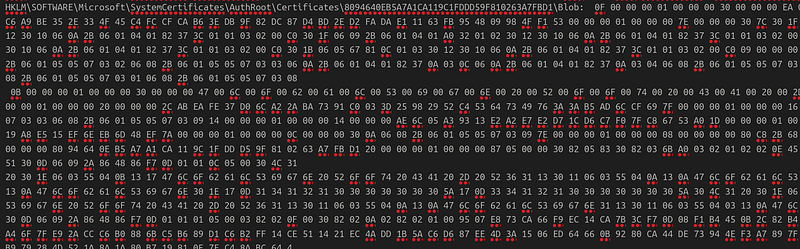
This corresponds to the OS installing a root certificate (matching the malware’s code signature) — a side-effect of running a signed binary.
Another change was under HKLM\SOFTWARE\Microsoft\IdentityCRL\ThrottleCache\… (for both machine and user SID)


These keys are used by Microsoft’s identity services to throttle repeated network requests. Their creation here suggests Windows was caching network authentication info or telemetry related to this process (possibly when it attempted Microsoft endpoints). Crucially, no registry keys indicative of persistence (startup) were set by the malware. This is consistent with many stealers that operate in-memory/on-demand and do not implant persistent hooks to avoid leaving obvious traces.
Network Traffic Analysis
Fakenet
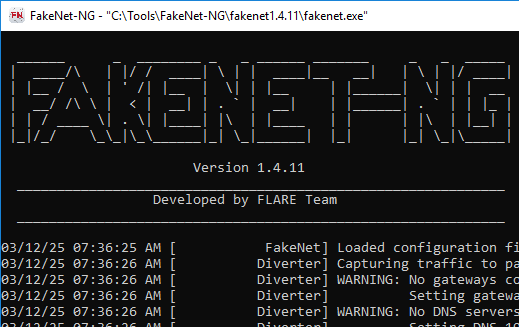
FakeNet-NG is an open-source dynamic network analysis tool designed for malware analysts and penetration testers. It intercepts and redirects network traffic, simulating legitimate network services to observe and analyze malware behavior in a controlled environment.
Key Features:
-
**Traffic Interception and Redirection:**Captures all or specific network traffic, allowing for in-depth analysis of malware communication patterns.
-
**Protocol Simulation:**Emulates various network protocols, such as DNS, HTTP, and SSL, ensuring malware continues its operations for comprehensive observation. SourceForge+1aldeid.com+1
-
**Cross-Platform Compatibility:**Supports both Windows and Linux operating systems, providing flexibility across different analysis environments.
-
**Extensibility:**Offers a modular framework that allows users to develop custom plugins for specialized analysis needs.
Installation and Usage:
FakeNet-NG can be utilized as a stand-alone executable or installed as a Python module. For Windows users, downloading the compiled version from the releases page is recommended. Linux users can install it using Python’s package manager,pip. Detailed installation instructions are available in the official GitHub repository.
Recent Enhancements:
The latest updates to FakeNet-NG include interactive HTML-based output, enhancing the user experience by providing more intuitive and accessible analysis reports.
C2 Domain and IP:
The primary network indicator is the domainvaniloin.fun, which the malware attempts to contact. In the analysis environment, this domain was resolved by FakeNet to a non-routable IP (in our case 192.0.2.123). All subsequent C2 traffic was directed at that IP. In a real scenario,vaniloin.funis a live domain — threat intelligence confirms it’s an attacker-controlled host linked toDeerStealercampaigns.
The malware performed DNS lookups for this domain and established TCP connections to it. An IDS rule (Emerging Threats) specifically flags**DNS queries for “vaniloin.fun”**as indicative of DeerStealer C2 traffic
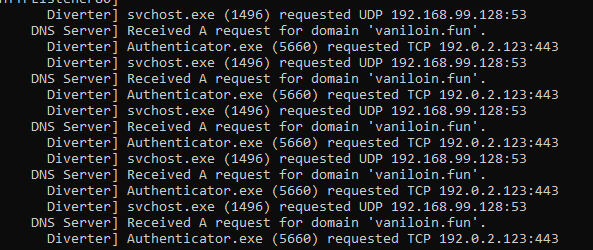
No HTTP requests to the malicious domainwere seen in plaintext, because the malware uses HTTPS. We did not capture an explicit POST or data upload in our sandbox network logs — likely because the TLS handshake succeeded but the fake server didn’t properly continue the dialog, so the malware retried without ever sending application-layer data. In a real infection, after the TLS handshake, we would expect an HTTP POST (or series of them) to https://vaniloin.fun/<endpoint> carrying stolen information (credentials, etc.). That content would be encrypted inside TLS.
Malware Classification & TTPs
Malware Type:DeerStealer (Authenticator.exe) falls under the category of anInformation Stealer(InfoStealer). Its purpose is to covertly gather sensitive user data and exfiltrate it to a remote server, without overtly damaging the system (which aligns with what we observed). It doesnotencrypt files (so it’s not ransomware), nor does it appear to open a persistent backdoor or spread laterally. It’s a classic steal-and-exfiltrate Trojan.
**MITRE ATT&CK Techniques:**We can map this malware’s behavior to several ATT&CK tactics and techniques:
-
Initial Access — T1566.002 (Search Engine Ads): The malware was delivered through a drive-by download via malicious search engine advertisements securityonline.info . This is essentially a form of phishing using ads (also known as malvertising). Users were tricked into running the file themselves (social engineering), which isT1204.002 User Execution: Malicious File. The user believed they were installing legitimate software, which is a**Masquerading (T1036)**tactic — the binary’s name and signature masquerade as a trustworthy application securityonline.info
-
Execution — T1047 / T1569: The malware ran as a normal process when the user launched it (no exploit needed). It did not require elevation (it ran under user privileges). It also didn’t use any unusual execution techniques like process injection in this case (it ran in its own process space,Authenticator.exe). NoUAC bypasswas attempted (since it didn’t need admin rights for its stealing tasks).
-
Persistence — (None): DeerStealer does not set up persistence on the system. This is somewhat deliberate — by not leaving itself running or adding autoruns, it reduces its footprint. This means itlacks typical persistence techniqueslike Registry Run keys (T1547.001) or Scheduled Tasks. It relies on the one-time execution to get data. If the attackers want more data later, they would likely need to infect the user again or use credentials stolen to achieve persistence in another way. (In our case, since no persistence was observed, the malware likely exfiltrated and exited to avoid detection.)
-
Defense Evasion: The malware employed several evasion tactics:
-
Signed Binary— It was code-signed with a valid digital signature securityonline.info , a Defense Evasion technique (T1588.003 — Acquire Code Signing Certificate, and T1553.002 — Code Signing). This can help it bypass SmartScreen or appear legitimate to users and some AV solutions.
-
Masquerading— as mentioned, naming itself “Authenticator” and using a legit-looking icon/signature to appear benign (T1036.005).
-
It also likely avoids creating new processes or injecting code (thus avoiding behaviors that EDRs flag). All actions were done within its own process.
-
We did not see it explicitly disabling antivirus or firewall — no such attempts in logs (no Tampering with security settings). It may rely on its low profile to evade detection rather than actively killing AV.
-
In-memory operations— Possibly reading files via memory mapping and immediately encrypting data in memory for exfil, which would evade simplistic file-access monitors.
-
Usingcommon protocols (HTTPS)(T1071.001) and legitimate endpoints (Cloudflare) for C2 is also an evasion, blending traffic with normal user traffic.
-
Discovery— The malware performed extensive discovery of system and user data:
-
File and Directory Discovery (T1083): It enumerated directories like Documents and AppData, presumably to find files of interest.
-
Credential Discovery: Not an explicit single technique in ATT&CK, but it directly targets stored credentials. It likely calls Windows APIs to get system info (OS version, user name) — possibly mapping to T1082 (System Information Discovery) and T1033 (Identify User Account).
-
Process Discovery (T1057): It loaded psapi.dll, which could indicate it might list running processes (e.g. to check if browsers are open, or if certain anti-malware processes are present).
-
Browser Credential Access — T1555.003: This is a significant one — the malware targetsCredentials from Web Browsers any.run . It likely locates browser databases (Login Data, Cookies, etc.) and uses DPAPI to decrypt passwords. This falls squarely under credential access techniques. Many stealers, including this one, have routines for each browser to steal saved passwords, autofill data, and cookies (which can hijack logged-in sessions).
-
Credential Access — T1552.001 (Credentials in Files): Beyond browsers, any plaintext credentials in configuration files (for example, some FTP client or messaging app configs) could be taken. It may hunt for known file paths for crypto wallets or config files in the user profile.
-
Keylogging — T1056.001: While not directly observed, many stealers have a keylogger component as a fallback to capture credentials that aren’t saved in files. The presence of user32.dll and win32u.dll means it could set keyboard hooks or poll keystates. If enabled, that would allow it to capture keystrokes (like master passwords or anything typed). We should note it as a possible capability given the typical stealer toolkit, though our dynamic analysis didn’t explicitly show keyboard hooking activity.
-
Screen Capture — T1113: Similarly, some stealers take a screenshot of the desktop to capture additional info (like open cryptocurrency wallets or 2FA QR codes). The loading of GdiPlus could be used to save a screenshot image. We did not see a file write (for an image), so if it did capture a screen it likely sent it directly. We mention this as a known TTP of such malware, but it’s not confirmed in this specific run.
-
Collection — T1005 (Data from Local System): This malware collected a variety of data. Likely categories: browser data, system info, text files (some stealers grab common file types from Desktop/Documents as well, looking for notes or keys). It packages the collected data — possibly compressing it into a ZIP or constructing a JSON — in memory.
-
Given DeerStealer’s focus on sensitive info, it might also steal things like saved RDP credentials, or file listings of the user’s machine. But primarily, it’s credentials and personal data. In our monitoring, the “RecentApps” registry entry for the malware itself was created (showing it ran), but no obvious sign of, say, recording everything in a local file. It likely kept the collection ephemeral until exfil.
-
Command and Control— The malware uses anEncrypted Channel (T1573)for C2. Specifically T1573.001 (TLS/SSL). It communicates with the C2 over HTTPS, blending in with normal web traffic. TheProtocolis essentially HTTPS POST requests (web C2 — T1071.001). There’s no evidence of fallback to an alternate protocol (no IRC, no custom UDP, etc.), it sticks to web protocols. No C2 “beaconing” interval beyond the immediate upload loop was observed (it doesn’t beacon periodically; it just sends data right after execution).
-
The domain and patterns are hardcoded in the sample (as confirmed by threat intelligence). If the domain were to be sinkholed or down, the malware doesn’t appear to have an alternate domain in our case (some malware have a list of C2 domains or IPs to try in sequence; in this sample only vaniloin.fun was seen).
-
It does not use Peer-to-Peer or any advanced C2 evasion beyond hiding in TLS. It’s a straightforward client→server model.
-
Exfiltration — T1041 (Exfiltration Over C2 Channel): All stolen data is exfiltrated over the same HTTPS channel it established. This is consistent with T1041, using an encrypted web request to upload data. Since the malware likely compresses and encrypts the stolen data by itself (perhaps in memory), the actual payload sent to the server might be encoded (often base64 or binary blob in HTTP POST). Because it’s over TLS, we couldn’t see the exact content, but that is the exfil mechanism.
-
Impact — (None direct): This malware doesn’t have a destructive or disruptive impact on the victim’s machine in the way ransomware or wipers do. The impact isdata lossandprivacy breach.
Indicators of Compromise (IoCs)
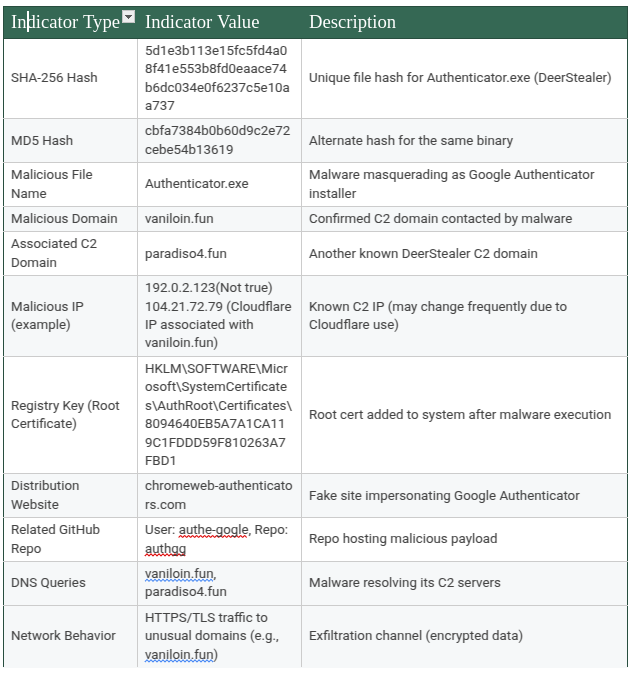
Yara rules:
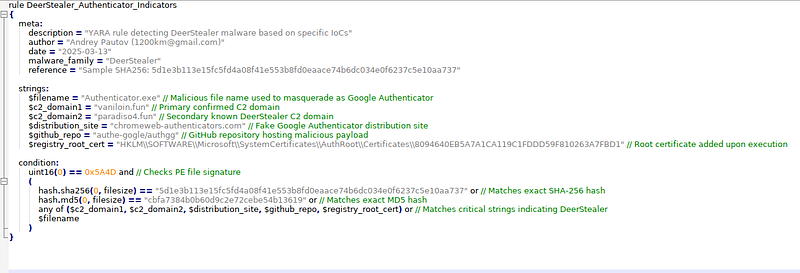
rule
DeerStealer_Authenticator_Indicators
{
meta:
description
=

"YARA rule detecting DeerStealer malware based on specific IoCs"
author
=

"Andrey Pautov (1200km@gmail.com)"
date
=

"2025–03–13"
malware_family
=

"DeerStealer"
reference
=

"Sample SHA256: 5d1e3b113e15fc5fd4a08f41e553b8fd0eaace74b6dc034e0f6237c5e10aa737"
strings:
$filename

=

"Authenticator.exe"

// Malicious file name used to masquerade as Google Authenticator
$c2_domain1

=

"vaniloin.fun"

// Primary confirmed C2 domain
$c2_domain2

=

"paradiso4.fun"

// Secondary known DeerStealer C2 domain
$distribution_site

=

"chromeweb-authenticators.com"

// Fake Google Authenticator distribution site
$github_repo

=

"authe-gogle/authgg"

// GitHub repository hosting malicious payload
$registry_root_cert

=

"HKLM
\\
SOFTWARE
\\
Microsoft
\\
SystemCertificates
\\
AuthRoot
\\
Certificates
\\
8094640EB5A7A1CA119C1FDDD59F810263A7FBD1"

// Root certificate added upon execution
condition:
uint16(
0
)
==

0x5A4D
 and
// Checks PE file signature
(
hash.sha256(
0
, filesize)
==

"5d1e3b113e15fc5fd4a08f41e553b8fd0eaace74b6dc034e0f6237c5e10aa737"
 or
// Matches exact SHA-256 hash
hash.md5(
0
, filesize)
==

"cbfa7384b0b60d9c2e72cebe54b13619"
 or
// Matches exact MD5 hash
any
 of (
$c2_domain1
,
$c2_domain2
,
$distribution_site
,
$github_repo
,
$registry_root_cert
) or
// Matches critical strings indicating DeerStealer
$filename
)
}
Conclusion
Overall Threat Assessment
The analyzed malware sample, Authenticator.exe (DeerStealer), represents a significant and targeted threat classified primarily as an Information Stealer. This malware strategically capitalized on global events — such as heightened interest in security tools (Google Authenticator) — to effectively deliver payloads through deceptive advertisements and fake download sites. Its sophisticated masquerading techniques, including a legitimate digital signature (later revoked), allowed it to bypass initial security defenses and user skepticism.
Upon execution, the malware demonstrates clear intent to harvest sensitive personal information, including credentials from browsers, cryptocurrency wallets, and financial data, leveraging standard Windows APIs to evade detection. Despite the absence of persistence mechanisms, the malware poses an immediate high-severity risk due to its efficient, rapid execution and encrypted data exfiltration methods.
The observed Command-and-Control (C2) infrastructure — specifically, domains like vaniloin.fun — is actively controlled by threat actors and indicates organized cybercriminal activity aimed at monetizing stolen information through fraud or resale on dark web markets.
Recommendations for Mitigation and Prevention
Given the nature of the threat, organizations and users are advised to implement the following protective and mitigating measures:
Immediate Response:
Terminate and remove the identified malware immediately from affected systems.
Perform full scans with reputable anti-malware solutions.
Credential Management:
Assume all stored credentials and sensitive information have been compromised.
Immediately enforce a mandatory reset of all user credentials and passwords stored in browsers and applications on compromised machines.
Implement and enforce Multi-Factor Authentication (MFA) across critical services and applications.
Endpoint Security and Monitoring:
Deploy Endpoint Detection and Response (EDR) tools capable of detecting suspicious file system access and credential extraction behaviors.
Monitor for execution of unsigned or suspiciously signed executables, particularly from untrusted sources or directories.
Network-Level Security Controls:
Block access to known malicious domains (vaniloin.fun, paradiso4.fun) at firewalls, DNS-level, and proxy-level protections.
Deploy IDS/IPS signatures updated to identify and block traffic associated with DeerStealer’s infrastructure.
Application Whitelisting & Execution Controls:
Implement strict application control policies (such as Microsoft AppLocker) to prevent unauthorized executables from running from directories like Downloads, Temp, or user-specific folders.
Continuous Threat Hunting:
Regularly search environments for Indicators of Compromise provided in this report (hashes, domain names, registry artifacts).
Stay informed with up-to-date threat intelligence to proactively address emerging threats and malware evolutions.
Implementing these measures collectively will significantly reduce the likelihood of future infections and limit damage caused by any similar credential-stealing malware.
References
Tools Used:
Process Monitor (Procmon) — Sysinternals
Wireshark / tshark — Network analysis tools
VirusTotal — Malware hash and detection analysis
CFF Explorer — PE (Portable Executable) analysis tool
Regshot — Registry monitoring
FakeNet — Network simulation tool
Custom string analysis tools (String_Analyser)
Threat Intelligence Sources:
Any.Run Sandbox Analysis
VirusTotal
Abuse.ch MalwareBazaar
CyberSec Sentinel
SecurityOnline.info
Emerging Threats IDS Signatures
Malwarebytes Threat Intelligence Blog
Additional Documentation:
MITRE ATT&CK Framework —https://attack.mitre.org
Sysinternals Suite Documentation — Microsoft