Static Malware Analysis. File Fingerprinting
- Category: CTI
- Source article: https://medium.com/@1200km/static-malware-analysis-file-fingerprinting-3ddf9bdd7864
- Published: 2025-04-01
- Preserved media: 8 image(s), including cover images, screenshots, diagrams, and infographics where present.
- Preserved technical blocks: 0 code/configuration block(s).
Ecosystem Fit
This page mirrors the original Medium article into the 1200km.com Docusaurus ecosystem. The original article flow, images, screenshots, infographics, and technical blocks are preserved from the export.
Understanding File Signatures, Hash, Digital Signatures
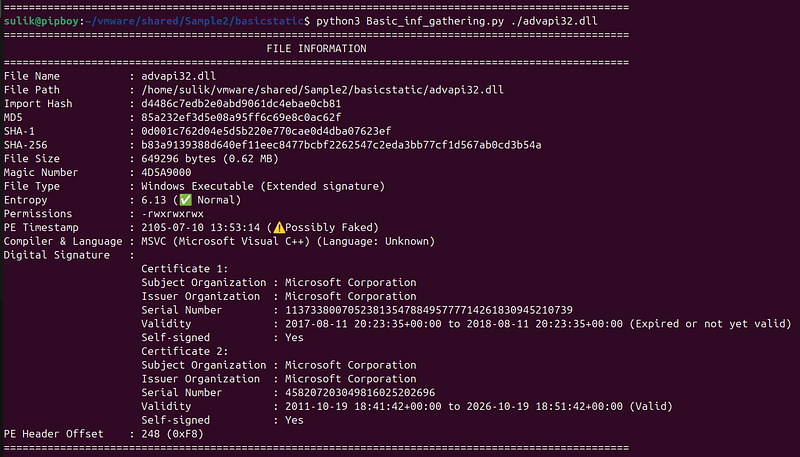
My own custom Lightweight Utility for Analyzing File Structure and Signatures:
What Are File Signatures
A file signature, also known as amagic number, is a specific sequence of bytes at the beginning of a file that identifies its true format. These signatures act like digital fingerprints, telling us what a filereallyis — regardless of its name or extension.
When analyzing potentially malicious files, checking the file signature is one of the first steps instatic analysis. Before you even think about executing a sample in a sandbox or decompiling code, it’s smart to verify:“Is this file actually what it claims to be?”
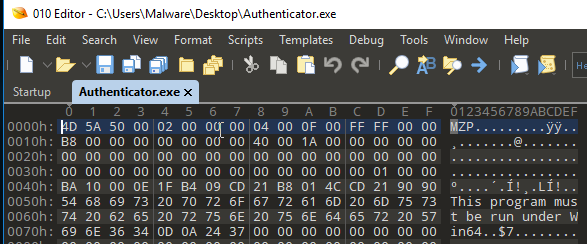
Common File Signature (Magic Number) Examples:
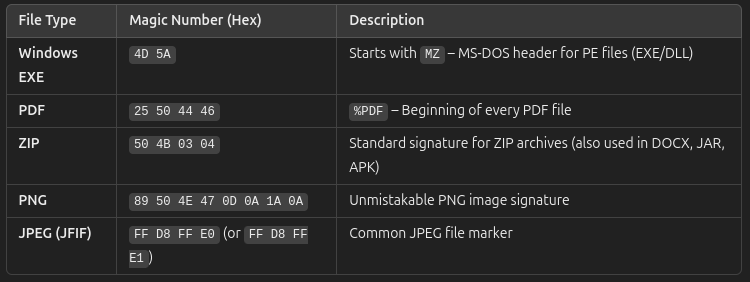
More “magic numbers”hereandhere
Afile signatureis a specific pattern of bytes found at a known location in a file — usually right at the start — that uniquely identifies the file’s format. When a program opens a file, it reads this signature to figure out what kind of file it’s dealing with. Based on that, the program knows how to properly process the file — whether it should render an image, play a sound, or run an application.
File signatures are especially useful because they offer amore trustworthy way to recognize file typescompared to just looking at file extensions or metadata. File extensions can be easily renamed to hide a file’s real purpose, which is a common trick used in malware. In contrast, the file signature is embedded in the file’s structure and is much harder to fake — making it amore accurate methodfor identifying what a file truly is.
Identifying Unknown Files with File Signatures
Determining the nature of files without a clear extension can be challenging. One effective approach is to analyze the file signature — a unique sequence of bytes at the beginning of a file that reveals its type and format.
File signatures serve as distinctive markers embedded in files. Each file type usually has a characteristic signature, and in some cases, there may be multiple valid signatures for a single type. By inspecting these initial bytes, you can often deduce the file’s true identity.
To use file signatures for identification, consider leveraging a file signature database or a dedicated analysis tool. A database maps known signatures to specific file types, while an analysis tool can automatically interpret the signature and provide detailed information.
Steps to Identify an Unknown File:
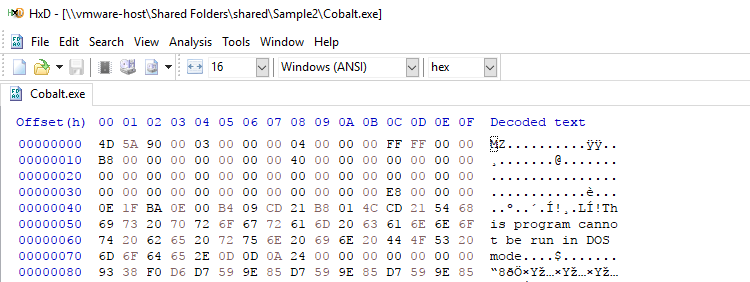
- Open the File: Use a hex editor (or a text editor if necessary) to view the file’s content in hexadecimal format. A hex editor is ideal because it clearly displays the signature.
-
Locate the Signature: Focus on the first few bytes at the beginning of the file; these contain the file’s signature.
-
Analyze the Signature: Compare the extracted signature against a file signature database or run it through an analysis tool to determine the file type, including its name, extension, and format.
-
Open with the Appropriate Software: Once you’ve identified the file type, use a suitable program (e.g., a PDF reader for PDF files) to open the file.
Keep in mind that file signatures can sometimes be altered or faked, so they shouldn’t be the only method used for identification. Always exercise caution when handling unknown files, as they might contain malicious code or viruses.
File Hashes: A Critical Component in Malware Analysis
File hashes are unique digital fingerprints created by applying cryptographic algorithms (such as MD5, SHA-1, or SHA-256) to a file’s contents. Even a slight modification to a file will produce a completely different hash, making these values exceptionally reliable for verifying file integrity.
Why File Hashes Are Essential in Malware Analysis
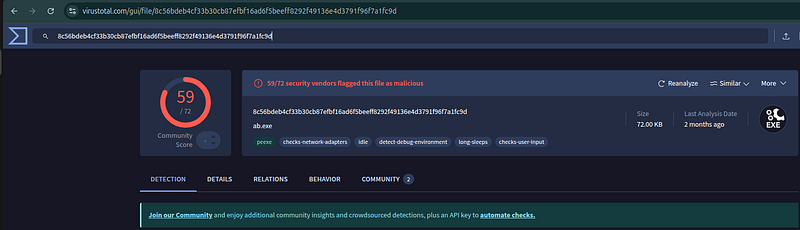
- Identification and Classification: By comparing a file’s hash to those in known malware databases or threat intelligence repositories, analysts can quickly identify if a file has been previously flagged as malicious.
For example Virus Total
-
Integrity Verification: Hashes confirm that a file has not been altered or tampered with. If a file’s hash changes over time, it can signal that the file has been modified, possibly indicating malicious activity.
-
Incident Response: During threat hunting, file hashes serve as Indicators of Compromise (IOCs). Security tools and monitoring systems can use these IOCs to detect, isolate, and remediate malicious files across networks and endpoints.
How to Generate a File Hash
There are several methods to generate file hashes:
-
Command-Line Tools:
-
**Linux/macOS:**Use commands like:
-
md5sum filename -
sha1sum filename -
sha256sum filename -
**Windows:**Use PowerShell with:
-
Get-FileHash filename -Algorithm SHA256
Import Hash (Imphash) Explained
Theimphashis a specialized hash value computed from the import table of a Windows Portable Executable (PE) file. Unlike conventional hashes (e.g., MD5, SHA-256) that are derived from the entire file content, the imphash focuses solely on the list of external functions (and their associated DLLs) that the executable imports.
How Imphash Works
-
Extraction of the Import Table:
-
A PE file contains an import table that lists all the DLLs and their functions that the executable depends on.
-
This table is parsed to retrieve each imported DLL and the function names it provides.
2. Normalization:
-
To ensure consistency, all DLL and function names are typically converted to a standard format (for example, all lowercase).
-
The order of imports may be standardized (or considered in the given order) to create a canonical representation.
3. Concatenation:
- The normalized names (e.g.,
"kernel32.dll.GetProcAddress","user32.dll.MessageBoxA") are concatenated into a single string, often using a delimiter like a comma.
4. Hashing:
-
An MD5 hash is then computed over this concatenated string.
-
The resulting MD5 hash is the imphash.
Why Imphash Is Useful
-
Family Identification: Malware samples that belong to the same family often share a similar import table, even if other parts of the code are modified (obfuscated or repacked). The imphash provides a quick way to correlate such samples.
-
Resilience to Minor Changes: Since the imphash is based on the list of imported functions, it can remain constant across different builds or minor modifications of the malware. This helps analysts track variants that might otherwise have different conventional file hashes.
-
Threat Hunting and Detection: Analysts and automated detection systems (e.g., YARA rules) often use imphash values as indicators of compromise (IOCs) to group related malware and detect suspicious files with similar functionality.
Limitations
-
Order Sensitivity: If the order of imported functions changes (either naturally or intentionally by malware authors), the imphash might differ, even if the actual imported functions are the same.
-
Evasion Techniques: Some sophisticated malware may deliberately modify or obfuscate its import table to evade imphash-based detection.
-
Partial Representation: The imphash only reflects the external dependencies of a file, not its entire behavior or structure. Therefore, it should be used alongside other analysis techniques for comprehensive malware identification.
Digital signatures
Digital signatures play a critical role in establishing the authenticity and integrity of files, but they’re not an absolute guarantee against malware.
What Is a Digital Signature?
Definition and Purpose: A digital signature is a cryptographic mechanism used to verify the origin and integrity of a file. It uses public key infrastructure (PKI) where the file’s creator signs it using a private key. Anyone with the corresponding public key can verify that the file hasn’t been altered since it was signed.
How It Works:
-
**Hashing:**The file is first processed through a hash function to create a unique digest.
-
**Encryption:**This digest is then encrypted with the signer’s private key to form the digital signature.
-
**Verification:**To verify, the recipient decrypts the signature with the signer’s public key and compares it with a freshly computed hash of the file. If they match, it confirms that the file is authentic and unchanged.
Checking a Digital Signature
Tools and Methods:
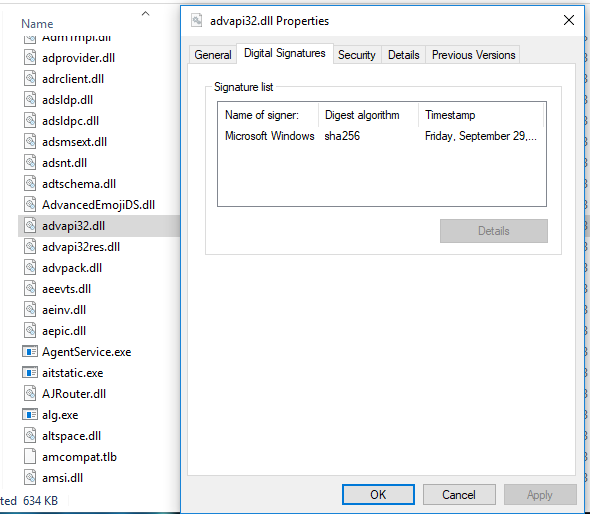
Operating System Utilities:
-
Windows users can use tools likeSigcheckorSigntoolto inspect code signatures. Or right-click:)
-
macOS and Linux have similar utilities (like
codesignon macOS) to verify signatures.
Third-Party Software: There are various software options that can check the digital signature and certificate chain to ensure that the signing certificate is valid and hasn’t been revoked.
Steps to Verify:
-
**Extract the Signature:**Use a verification tool to extract the digital signature from the file.
-
**Check the Certificate Chain:**Ensure that the certificate used for signing is issued by a trusted Certificate Authority (CA).
-
**Validate the Integrity:**The tool computes the file’s hash and compares it to the decrypted signature.
-
**Revocation Check:**Modern verification tools also check if the certificate has been revoked via Certificate Revocation Lists (CRLs) or Online Certificate Status Protocol (OCSP).
Does a Digital Signature Guarantee a File is Non-Malicious?
-
Authenticity and Integrity: A valid digital signature tells you that the file originated from a known source and hasn’t been altered post-signing. However, it does not provide a comprehensive guarantee that the file is free from malware.
-
Context of Use:
-
A trusted publisher can still inadvertently sign a file that contains malicious code if their system was compromised.
-
Malicious actors may obtain valid certificates through fraudulent means, meaning a file could be signed yet still be dangerous.
How Can Hackers Exploit Digital Signatures?
Obtaining a Legitimate Certificate Illicitly:
-
**Stolen Certificates:**Hackers may steal certificates from legitimate developers or companies.
-
**Fraudulent Issuance:**Some attackers use social engineering or exploit weaknesses in the certificate issuance process to obtain a valid code signing certificate.
Creating Fake Signatures:
-
**Self-Signing:**An attacker might create a self-signed certificate. While technically valid for verifying integrity, such certificates are not trusted by operating systems unless the attacker manages to trick users into installing their certificate as a trusted root.
-
**Compromised Authorities:**In rare cases, if a certificate authority is compromised, fraudulent certificates can be issued that appear legitimate.
-
Certificate Revocation: The scenario you mentioned highlights a key safeguard — if a certificate is misused or compromised, it can be revoked by the issuer. Once revoked, modern security tools flag the signature as untrusted. This is exactly what happens when security scans indicate that the signature is “revoked/untrusted,” meaning that even though the file was once signed, the certificate’s trustworthiness has been rescinded due to misuse.
Conclusion
Digital signatures are an essential tool in verifying the authenticity and integrity of files, but they are not a silver bullet against malware. They ensure that the file hasn’t been tampered with since signing and confirm the identity of the signer. However, the presence of a valid digital signature does not guarantee that the file is safe — especially if the certificate is later revoked or if the certificate was obtained by malicious means. Hackers can exploit weaknesses in the certificate issuance process or use stolen credentials, emphasizing the need for a layered security approach in malware analysis.
My own custom Lightweight Utility for Analyzing File Structure and Signatures:
Basic_inf_gathering.pyis a lightweight, powerful utility designed to quickly extract a wide range of basic information from a file — the perfect first step in static malware analysis. Rather than relying solely on file extensions (which can be easily faked), this tool examines the file’s magic number (signature) to determine its true format. It then supplements this with critical data such as hash values (MD5, SHA-1, SHA-256), file size, entropy (which can indicate packing or obfuscation), file permissions, and even digital signature analysis (when applicable).
How to Use the Tool:
-
Run It from the Command Line: Simply execute the script with the path to the target file, for example:
python3 Basic_inf_gathering.py unknown_file -
Interpret the Output: The tool prints a neatly formatted table with:
-
**File Signature Analysis:**Determines the file type by comparing the first 32 bytes against a built‑in database of common file signatures.
-
**Hash Calculations:**Provides Imphash, MD5, SHA‑1, and SHA‑256 hashes for integrity verification and IOC correlation.
-
**Entropy Measurement:**Indicates if a file might be packed or encrypted.
-
**Digital Signature Details:**Extracts key certificate information (like the organization names for the subject and issuer) for further validation.
-
**PE Header Offset:**the PE header offset is important because it anchors the entire structure of a PE file, enabling both normal execution and detailed analysis. Any irregularity in this value can be a red flag during malware analysis.
Why This Tool Is Great for Static Malware Analysis:
-
Comprehensive Yet Simple: It quickly consolidates essential data from a file — making it ideal for the initial triage during malware analysis.
-
Accurate File Identification: By analyzing the file signature rather than just the extension, it helps reveal a file’s true identity, even if the extension is misleading.
-
Efficient Information Gathering: With just one command, you get detailed insights (hashes, file type, entropy, permissions, and digital signature information) that can guide your next steps in analysis.
-
Open Source and Extensible: Available on GitHub, it serves as a robust starting point for further customization and integration into broader analysis workflows.
In summary, this tool is a simple yet powerful asset for any malware analyst looking to quickly assess a file’s basic properties before diving deeper into its behavior or potential maliciousness.