Static Malware Analysis . Obfuscation.
- Category: CTI
- Source article: https://medium.com/@1200km/static-malware-analysis-obfuscation-51de3992065d
- Published: 2025-03-30
- Preserved media: 15 image(s), including cover images, screenshots, diagrams, and infographics where present.
- Preserved technical blocks: 7 code/configuration block(s).
Ecosystem Fit
This page mirrors the original Medium article into the 1200km.com Docusaurus ecosystem. The original article flow, images, screenshots, infographics, and technical blocks are preserved from the export.
Understanding Code Obfuscation in Malware
In the evolving landscape of cybersecurity, malware authors are constantly enhancing their techniques to evade detection. One of the most common strategies they employ is code obfuscation. In this guide, we’ll dive deep into what obfuscation is, why it matters, the different types of obfuscation techniques, the tools used to analyze obfuscated code, and methods to both detect and deobfuscate malware.
What is Code Obfuscation?
At its core, code obfuscation is the deliberate act of making source or binary code harder to read, understand, and analyze. While legitimate developers might use obfuscation to protect intellectual property, malware authors use it as a shield to complicate static analysis and hinder reverse engineering efforts.
Example of simple obfuscated code
(
function
(
_0xarr, _0xshiftCount
) {

var
 _0xrotate =
function
(
_0xnum
) {

while
 (--_0xnum) {
      _0xarr.
push
(_0xarr.
shift
());
    }
  };

_0xrotate
(++_0xshiftCount);
})([
'\x48\x65\x6C\x6C\x6F'
,
'\x20'
,
'\x4F\x62\x66\x75\x73\x63\x61\x74\x65\x64\x20\x57\x6F\x72\x6C\x64'
],
0x2
);
var
 _0xgetString =
function
(
index
) {

return
 [
'Hello'
,
' '
,
'Obfuscated World'
][index];
};
console
.
log
(
_0xgetString
(
0
) +
_0xgetString
(
1
) +
_0xgetString
(
2
));
Why Do Malware Authors Use Obfuscation?
Malware developers leverage obfuscation to:
-
**Evade detection:**By altering recognizable patterns, malware can bypass traditional signature-based detection methods.
-
**Hinder analysis:**Obfuscated code can deter security researchers by increasing the complexity of reverse engineering.
-
**Preserve functionality:**Even when parts of the code are deciphered, obfuscation ensures that key routines remain concealed.
Types of Obfuscation Techniques
Understanding the common obfuscation strategies is critical for static malware analysis. Here are several prevalent types:
1. Control Flow Obfuscation
This method involves altering the logical sequence of instructions. Instead of a straightforward execution path, the control flow is restructured with unnecessary jumps, loops, or conditional branches. This makes it difficult to follow the program’s logic during disassembly.
Below is an example in Python that demonstrates control flow obfuscation. The code uses a state machine to perform a simple task — printing a message — instead of a straightforward sequential execution. Each state is documented with comments explaining its purpose.
# Control Flow Obfuscation Example in Python
#
# This code is intentionally written in an obfuscated manner by using a state machine
# approach. The program executes a simple task (printing a message) while the control flow
# is deliberately convoluted to hinder straightforward analysis.
def obfuscated_print():

# Initialize a state variable to control the flow of the program.

state
 =
0

while
 True:

if

state
 ==
0
:

# State 0: Initialization.

# Here, we set up our message and an arbitrary counter.
            message =
"Hello, Obfuscated World!"
            counter =
5

# A dummy counter to add extra steps.

state
 =
1

# Transition to state 1.

        elif
state
 ==
1
:

# State 1: A loop to decrement the counter.

# This loop doesn't change the overall functionality, but it obscures the control flow.

if
 counter >
0
:
                counter -=
1

# Decrement the counter.

# Stay in state 1 until the counter reaches zero.

else
:

state
 =
2

# Once done, move to state 2.

        elif
state
 ==
2
:

# State 2: Decision branch.

# Although we check a condition here, it is always true in this context.

if
 len(message) >
0
:

state
 =
3

# Condition met, transition to state 3.

else
:

state
 =
4

# Unreachable branch; adds to the confusion.

        elif
state
 ==
3
:

# State 3: Main action.

# The actual functionality of the program: print the message.

print
(message)

state
 =
4

# Transition to state 4 after printing.

        elif
state
 ==
4
:

# State 4: End state.

# Break the loop to end the function.

break


else
:

# Default catch-all (should never be reached) to safely exit.

break
# Run the obfuscated function
if
 __name_
_
 ==
"__main__"
:
    obfuscated_print()
Explanation of Obfuscation Techniques:
-
**State Machine:**Instead of a simple, linear sequence, the code uses multiple states and transitions, making the execution path less obvious.
-
**Redundant Logic:**The use of an arbitrary counter and a seemingly unnecessary decision branch increases complexity without altering functionality.
-
**Unreachable Branches:**Conditions that lead to branches which will never be executed are included solely to confuse analysis.
2. String Encryption and Encoding
Malware often encrypts or encodes strings — such as URLs, commands, or configuration details — to prevent detection by simple pattern matching. During runtime, these strings are decrypted or decoded, but their static representation in the binary is obscured.
import
base64
# Example of String Encryption/Encoding Obfuscation
#
# The original string "https://malicious.example.com/config" is encoded using Base64.
# This makes it harder for static analysis tools to detect the string by simple pattern matching.
# During runtime, the string is decoded to retrieve its actual value.
# Encoded version of "https://malicious.example.com/config"
encoded_str =
"aHR0cHM6Ly9tYWxpY2lvdXMuZXhhbXBsZS5jb20vY29uZmln"
# Step 1: Decode the Base64 string into bytes
decoded_bytes = base64.b64decode(encoded_str)
# Step 2: Convert the bytes back into a human-readable string
decoded_str = decoded_bytes.decode(
'utf-8'
)
# Use the decoded string in your program (e.g., print it, use it as a URL, etc.)
print
(
"Decoded URL:"
, decoded_str)
Explanation:
The variable encoded_str holds the Base64-encoded version of the sensitive string.
At runtime, the program decodes this string using base64.b64decode() and then converts the resulting bytes into a UTF-8 string.
This method prevents the sensitive string from being easily detected in the static binary while still allowing it to be used during execution.
3. Code Packing and Compression
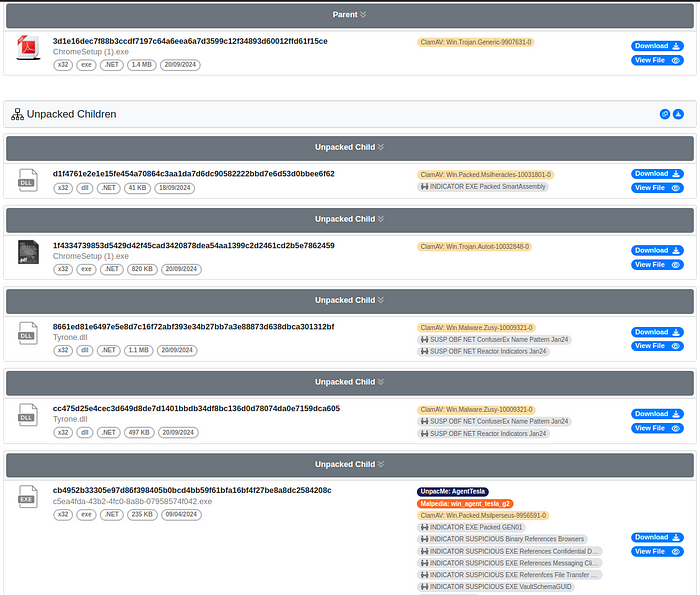
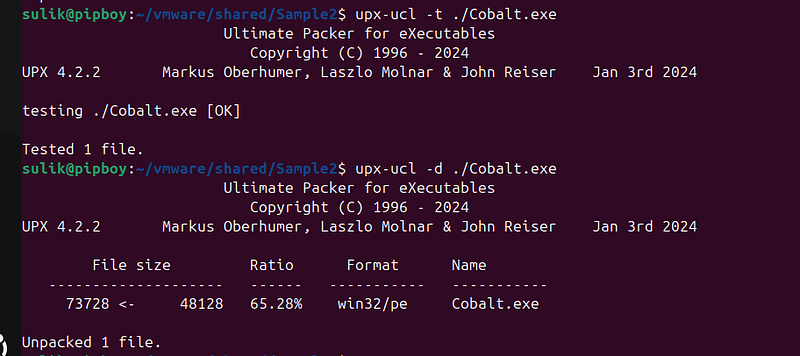
Packers compress and encrypt the executable, wrapping the original code inside a “stub” that unpacks the code during execution. This not only reduces the file size but also masks the true code structure, complicating static analysis.
Demonstration of unpacking packed malware.
4. Polymorphic and Metamorphic Techniques
Polymorphic obfuscation
creates multiple, functionally equivalent variants of the same malware. The decryption routine itself changes with each iteration, making signature detection challenging.
Example: Two Variants of a Decryption Routine
Both variants decrypt an encrypted payload that, when executed, prints a message. Notice that each variant uses a different approach to arrive at the same result.
Variant 1 — Simple XOR Decryption
# Polymorphic Obfuscation Example - Variant 1
#
# In this variant, the payload "print('Hello, Polymorphic World!')" is encrypted using a simple XOR with key 42.
# The decryption routine uses a loop to XOR each byte with the key.
# Although the underlying payload is the same, the decryption logic is one possible "mutation" of the code.
def

decrypt_variant1
(
data
):
    key =
42

# XOR key

# Decrypt each byte by XOR-ing it with the key
    decrypted =
''
.join(
chr
(byte ^ key)
for
 byte
in
 data)

return
 decrypted
# Encrypted payload: XOR encryption of "print('Hello, Polymorphic World!')"
encrypted_payload_variant1 = [
ord
(c) ^
42

for
 c
in

"print('Hello, Polymorphic World!')"
]
# Decrypt and execute the payload
payload_code = decrypt_variant1(encrypted_payload_variant1)
exec
(payload_code)
Variant 2 — Altered Control Flow with Additional Operations
# Polymorphic Obfuscation Example - Variant 2
#
# In this variant, the same payload is encrypted as before.
# The decryption routine, however, is altered:
# - It reverses the encrypted data before decryption.
# - It computes the XOR key in a different way.
# - It reverses the decrypted string to restore the correct order.
# These extra steps illustrate how the decryption routine can be mutated while still producing the same outcome.
def

decrypt_variant2
(
data
):

# Reverse the encrypted data to add confusion
    reversed_data = data[::-
1
]

# Compute the key in a non-obvious way (still resulting in 42)
    key =
84
 //
2

# Decrypt each byte using a loop
    decrypted_chars = []

for
 byte
in
 reversed_data:
        decrypted_chars.append(
chr
(byte ^ key))

# Reverse again to obtain the original order of the payload
    decrypted =
''
.join(decrypted_chars[::-
1
])

return
 decrypted
# Encrypted payload is generated in the same way as before.
encrypted_payload_variant2 = [
ord
(c) ^
42

for
 c
in

"print('Hello, Polymorphic World!')"
]
# Use Variant 2 decryption and execute the payload
payload_code = decrypt_variant2(encrypted_payload_variant2)
exec
(payload_code)
Key Points on Polymorphism:
-
**Multiple Variants:**Each variant decrypts the same payload but through different decryption routines.
-
**Changing Appearance:**Even though the output is identical, the structure of the decryption code changes, making static signature detection challenging.
-
**Runtime Decryption:**The payload remains hidden until runtime, which is a typical tactic in polymorphic malware.
Metamorphic obfuscation
goes a step further by altering the entire code structure while keeping the underlying behavior intact. This can include code reordering, register swapping, and more.
Example: Reordering and Variable Swapping
The following example shows a simple program whose goal is to print a message. However, the code has been deliberately restructured and includes redundant operations that obscure its true intent.
# Metamorphic Obfuscation Example in Python
#
# This example demonstrates how the same functionality (printing a message) can be implemented
# using a restructured, non-linear code flow. The code employs variable swapping and redundant
# operations to obscure the true order of execution while still printing the message "Hello, Metamorphic World!".
def

metamorphic_variant
():

# Define parts of the message out of their natural order.
    part1 =
"World!"
    part2 =
"Hello, "
    part3 =
"Metamorphic "

# Swap variables to obscure the intent.

# After swapping, part2 will hold "World!" and part1 will hold "Hello, "
    temp = part1
    part1 = part2
    part2 = temp

# The natural order to print the message would be part1 + part3 + part2.

# However, we intentionally mix the operations.
    combined = part1 + part3
# Expected to be "Hello, Metamorphic "


# Insert a redundant operation: split and reassemble the combined string.
    mid =
len
(combined) //
2
    first_half = combined[:mid]
    second_half = combined[mid:]


# Reassemble in a non-intuitive way then correct it by reversing the operation.
    obfuscated_combination = second_half + first_half

# Reverse the obfuscation to get back the original combined string.
    corrected_combination = obfuscated_combination[::-
1
][::-
1
]


# Finally, append the swapped part2 ("World!") to complete the message.
    final_message = corrected_combination + part2

# Print the final message

print
(final_message)
if
 __name__ ==
"__main__"
:
    metamorphic_variant()
Key Points on Metamorphism:
-
**Structural Changes:**The code is intentionally reorganized — variables are defined out of order, and operations are split and then reassembled.
-
**Redundant Operations:**Extra steps such as splitting, swapping, and reversing the string add confusion without altering the final output.
-
**Behavior Preservation:**Despite the reordering and insertion of redundant logic, the program still prints the intended message.
5. Virtualization-based Obfuscation
In this advanced technique, the original code is translated into a custom, often proprietary, instruction set. A virtual machine embedded in the binary then executes these instructions. This method can significantly raise the bar for analysis, as analysts must first understand the custom virtual machine’s architecture.
Below is an example in Python that simulates virtualization-based obfuscation. In this approach, the original functionality — printing a message — is translated into a custom bytecode instruction set, and a bespoke virtual machine (VM) is implemented to interpret these instructions. This makes it much harder for an analyst to quickly deduce the intended behavior without understanding the VM’s design.
# Virtualization-based Obfuscation Example in Python
#
# In this example, we define a simple custom virtual machine (VM) that interprets
# a proprietary instruction set. The original code functionality (printing a message)
# is first translated into custom bytecode. An embedded VM then executes these
# instructions. This obfuscates the static representation of the code and complicates
# reverse engineering efforts.
# Define custom opcodes for our proprietary instruction set.
OP_PUSH  =
1

# Push a literal value onto the VM's stack.
OP_PRINT =
2

# Print the top value from the stack.
OP_HALT  =
99

# Halt the VM execution.
# The custom bytecode representation of our program.
# Here, the functionality "print('Hello, Virtualized World!')" is broken down into:
# 1. Pushing the string onto the stack.
# 2. Printing the top of the stack.
# 3. Halting the execution.
bytecode = [
    (OP_PUSH,
"Hello, Virtualized World!"
),
# Instruction: Push the message onto the stack.
    (OP_PRINT,
None
),
# Instruction: Print the message from the stack.
    (OP_HALT,
None
)
# Instruction: End execution.
]
def

run_bytecode
(
code
):

"""
    A simple virtual machine (VM) that executes our custom bytecode.

    Parameters:
      code (list): A list of tuples representing the bytecode instructions.

    The VM maintains:
      - A program counter (pc) to track the current instruction.
      - A stack to hold literal values.
    """
    pc =
0

# Program counter to track instruction execution.
    stack = []
# Stack used for storing literal values.


while
 pc <
len
(code):
        opcode, operand = code[pc]


if
 opcode == OP_PUSH:

# For OP_PUSH, add the operand (a literal value) to the stack.
            stack.append(operand)

elif
 opcode == OP_PRINT:

# For OP_PRINT, output the value at the top of the stack.

if
 stack:

print
(stack[-
1
])

else
:

print
(
"Error: Stack is empty!"
)

elif
 opcode == OP_HALT:

# For OP_HALT, terminate the VM execution.

break

else
:

# Handle unknown opcodes.

print
(
f"Unknown opcode:
{opcode}
"
)


# Move to the next instruction.
        pc +=
1
# Execute the virtual machine with the custom bytecode.
if
 __name__ ==
"__main__"
:
    run_bytecode(bytecode)
Explanation:
-
Custom Instruction Set: The program defines three opcodes:
-
**OP_PUSH:**Pushes a literal onto the VM stack.
-
**OP_PRINT:**Pops (or in this case, reads) the top value from the stack and prints it.
-
**OP_HALT:**Stops the VM execution.
-
Bytecode Translation: The functionality of printing
"Hello, Virtualized World!"is broken into instructions. Rather than having the print statement directly in the code, it’s now encoded as bytecode, which is not immediately human-readable. -
Custom VM Execution: The
run_bytecodefunction acts as a simple VM. It interprets the bytecode by reading each opcode, performing the associated action, and thereby recreating the original program behavior. -
Obfuscation Impact: In a real-world scenario, the bytecode could be the result of a complex transformation process, and the VM could be much more intricate. This extra layer of abstraction forces an analyst to reverse-engineer both the bytecode format and the VM’s architecture before understanding the malware’s true behavior.
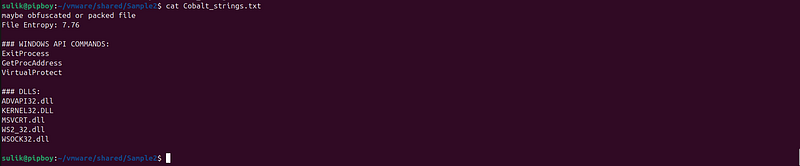
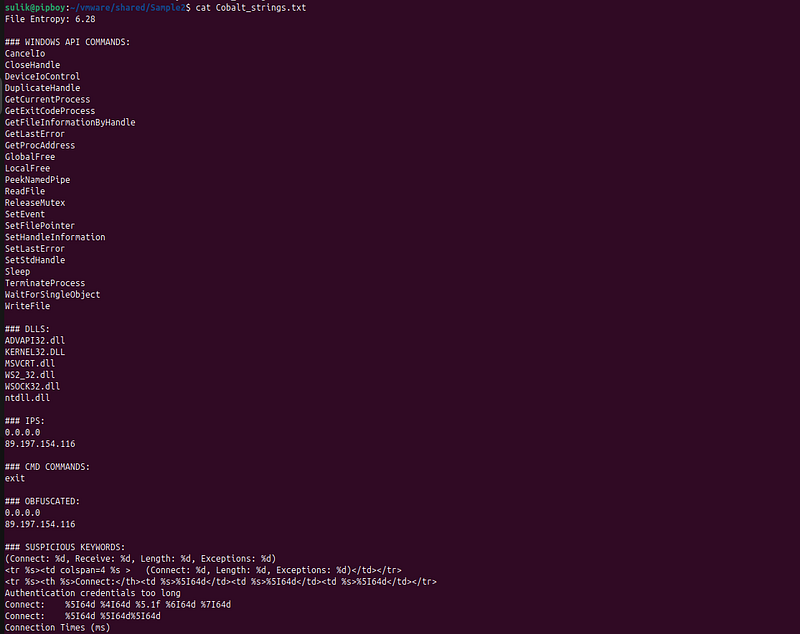
The difference between packed or obfuscated files and their unpacked or deobfuscated counterparts:
Packed:
Unpacked:
Tools for Analyzing Obfuscated Malware
Static analysis of obfuscated malware relies on a combination of automated and manual tools. Some of the most common ones include:
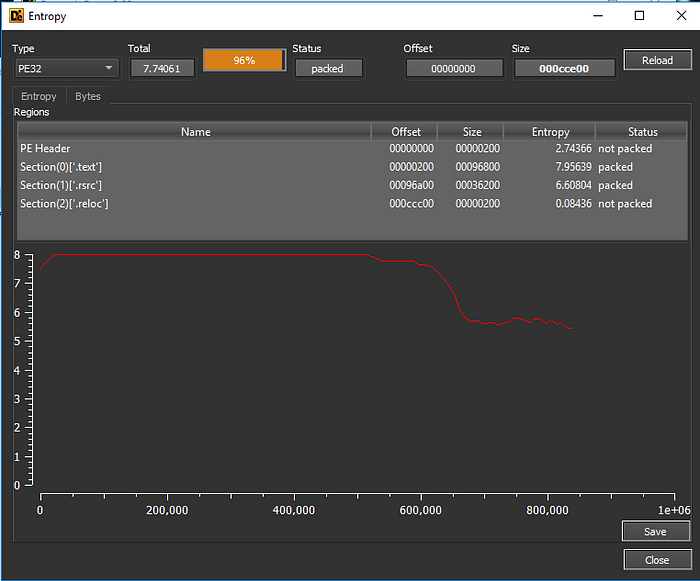
- Detect It Easy (DIE): DIE is a powerful automated tool designed to identify file types, packers, cryptors, and obfuscation methods. It uses a database of signatures and heuristics to flag suspicious regions in binaries, making it easier to decide which parts of the code need in-depth analysis.
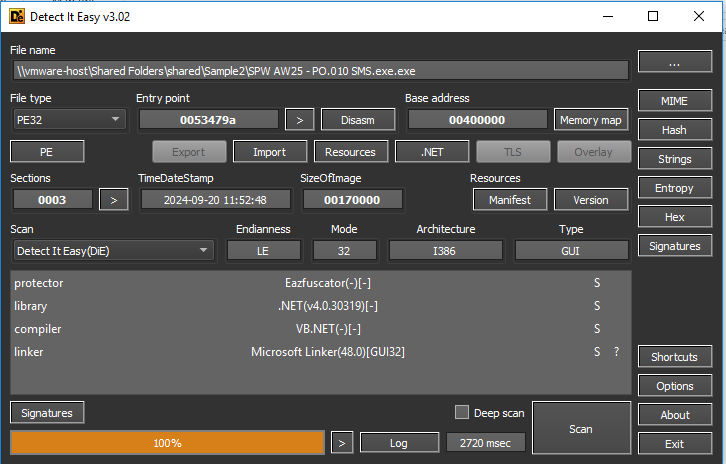
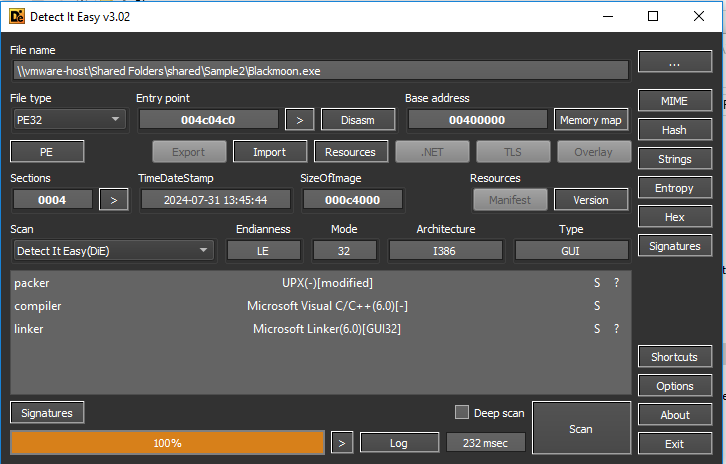
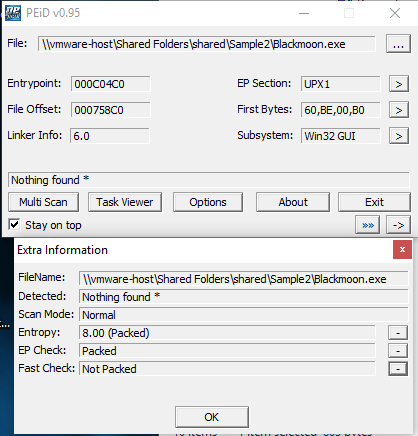
- PEiD: Although somewhat dated, PEiD remains a popular tool for detecting packers and cryptors in Windows executables. It can quickly recognize common obfuscation and packing schemes, providing analysts with immediate insights into the file’s structure.
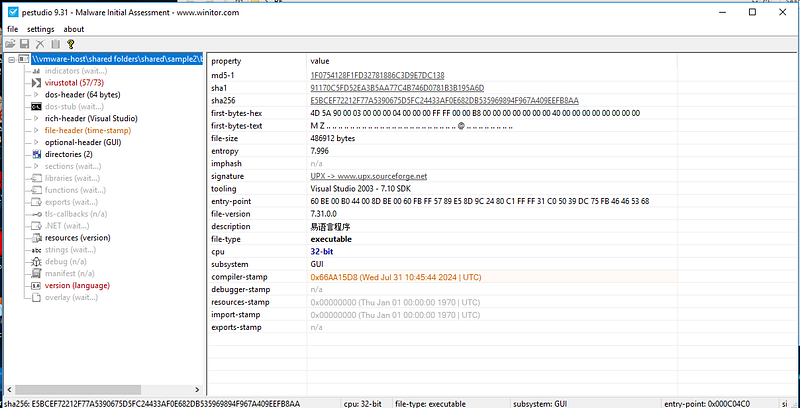
- PEStudio: PEStudio is another comprehensive tool that analyzes various aspects of Windows executables. It scans for anomalies, embedded resources, and suspicious patterns (such as obfuscated strings or non-standard sections), which can indicate the presence of obfuscation or malware.
- Unpacker Frameworks (e.g., UPX Unpacker): Many obfuscated samples are packed. Tools and frameworks that automatically unpack executables — such as UPX unpackers or other custom solutions — are invaluable for revealing the underlying code before further static analysis.

-
Disassemblers and Debuggers:
-
IDA ProandGhidraare industry-standard disassemblers that provide detailed insights into the binary.
Complete guide to IDA — under construction.
- OllyDbgis popular for dynamic analysis and stepping through code execution.
Complete guide to debuging— under construction.
-
Deobfuscation Tools:
-
de4dotis effective for deobfuscating .NET binaries.
de4dot
de4dotis anopen-source .NET deobfuscatorused toreverse obfuscationapplied to**.NET assemblies**. It’s popular among malware analysts and reverse engineers tounpack and cleanobfuscated .NET malware for easier analysis.


- Specialized unpackers likeUPXor custom scripts can help reverse packing and compression layers.
-
Entropy Analysis Tools:
-
Tools that calculate the entropy of code sections can signal obfuscation or packing if a segment has unusually high entropy, suggesting encryption or compression.
Deobfuscation Techniques
Once obfuscation is detected, analysts have several strategies to peel away the layers:
-
Automated Unpacking: Use automated unpackers when available. Tools like UPX unpackers or custom scripts can reverse the effects of common packers.
-
Manual Analysis: When automated tools fall short, manual inspection using disassemblers and debuggers is essential. Identify key routines, follow the control flow, and understand the decryption algorithms used for strings or code segments.
-
Emulation and Symbolic Execution: Emulators or sandbox environments can run the obfuscated code to observe runtime behavior. Symbolic execution can assist in understanding the transformation logic used by the obfuscator.
- Pattern Recognition: Over time, common obfuscation patterns emerge. Maintaining a library of known patterns can help quickly identify the obfuscation method and apply the appropriate deobfuscation techniques.
Continued Exploration: Deep Dive into Obfuscations and Packers
-
Diverse Techniques: Malware authors use a variety of obfuscation techniques (e.g., control flow obfuscation, string encryption, polymorphism, metamorphism, and virtualization) and packers to hide their code. Each method has its own intricacies and may require tailored strategies to analyze and reverse-engineer effectively.
-
Thorough Research is Key: When you encounter a new or unfamiliar obfuscation technique, you need to dig deeper. This might involve:
-
Searching academic and industry research for insights into similar techniques.
-
Reviewing case studies and presentations from cybersecurity conferences (e.g., Black Hat, DEF CON).
-
Experimenting with different deobfuscation tools and custom scripts.
-
Iterative Analysis: Start by using automated tools to detect anomalies, and then combine them with manual analysis. If IDA flags unusual control flows or encrypted strings, consider dynamic analysis or emulation to better understand the hidden behavior.
-
Stay Up-to-Date: The field of malware analysis is dynamic — new obfuscation methods and packers are developed constantly. Regularly update your knowledge base, follow security research blogs, and participate in community forums to stay informed about emerging threats and deobfuscation techniques.
Remember, effective malware analysis often involves a combination of automated scanning and hands-on investigation. By continuously deep diving into the techniques and searching for tailored solutions, you can improve your ability to peel back layers of obfuscation and reveal the true behavior of the malware.
Conclusion
In the constantly evolving world of cybersecurity, understanding code obfuscation is essential for anyone involved in malware analysis. This guide has walked through the key obfuscation techniques — from simple control flow obfuscation and string encryption to advanced methods like polymorphic, metamorphic, and virtualization-based obfuscation. Each technique presents its own challenges, requiring analysts to combine automated tools like IDA, DIE, and de4dot with thorough manual investigation.
Obfuscation and packing are not one-size-fits-all problems; they demand a deep dive into the nuances of each sample. As malware authors continue to innovate, staying informed through research, case studies, and community engagement becomes crucial. By continuously refining your toolkit and adapting your strategies, you’ll be better equipped to peel back the layers hiding the true behavior of sophisticated malware.
Ultimately, effective malware analysis is an iterative, ever-evolving process — one that requires persistence, creativity, and a commitment to ongoing learning.