Sending EKS Control Plane Logs via AWS Lambda
- Category: CTI
- Source article: https://medium.com/@1200km/sending-eks-control-plane-logs-via-aws-lambda-c4ce0cf84c5b
- Published: 2025-07-11
- Preserved media: 23 image(s), including cover images, screenshots, diagrams, and infographics where present.
- Preserved technical blocks: 18 code/configuration block(s).
Ecosystem Fit
This page mirrors the original Medium article into the 1200km.com Docusaurus ecosystem. The original article flow, images, screenshots, infographics, and technical blocks are preserved from the export.
A step-by-step guide to forwarding Amazon EKS control plane logs to SIEM/LogCOllector/XPLG using a lightweight AWS-native Lambda integration.
Introduction
Amazon EKS makes Kubernetes operations easier by managing the control plane for you, but that convenience also changes how logging works. Unlike application or node logs, EKS control plane logs are generated by AWS-managed components such as the Kubernetes API server, audit layer, scheduler, controller manager, and authenticator. These logs are critical for security monitoring, auditing, troubleshooting, and detecting suspicious administrative activity — but they are not available directly from the cluster nodes.
For teams using XPLG as a central log analysis and investigation platform, this creates an important integration challenge: how do you collect managed EKS control plane logs and forward them into XPLG when there is no local file, pod, or Fluent Bit agent that can access them directly?
The answer is to use an AWS-native forwarding path:EKS Control Plane Logs → Amazon CloudWatch Logs → AWS Lambda → XPLG.
In this guide, we will build a lightweight Lambda-based bridge that receives EKS control plane log events from CloudWatch, decodes and parses them, and forwards them to an XPLG HTTP listener. This approach works well for lab environments, internal Kubernetes deployments, and private-network architectures where the XPLG listener is reachable only from inside the AWS VPC.
By the end of this guide, you will understand why direct forwarding is not possible, how the CloudWatch-to-Lambda flow works, how to configure the required IAM and VPC access, and how to send EKS control plane logs into XPLG for investigation, detection, and operational visibility. This introduction is aligned with the article’s current architecture and goal.
Table of Contents
-
Introduction
-
What Are EKS Control Plane Logs?
-
Why Forward EKS Control Plane Logs to SIEM/XPLG?
-
Why Direct Forwarding Is Not Possible
-
Solution Architecture
-
What Is AWS Lambda?
-
Step-by-Step guide
-
Create the AWS Lambda Function
-
References
What Are Control Plane Logs in EKS?
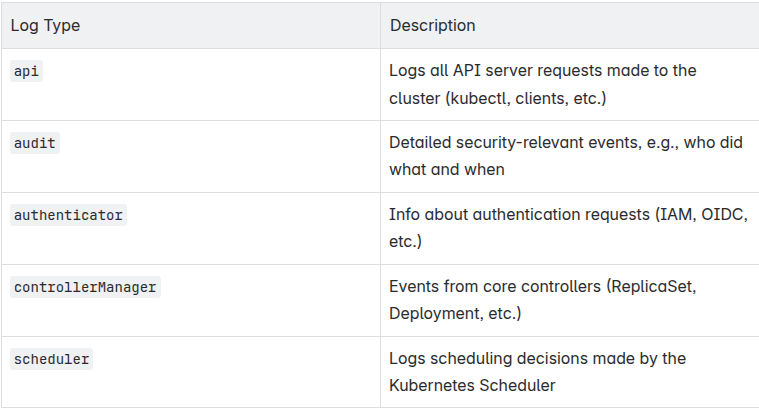
In Amazon EKS (Elastic Kubernetes Service),Control Plane Logsare logs generated by theKubernetes control plane componentsthat manage the overall state of the cluster.
These logs arenot logs from your application pods, but from theinternal Kubernetes servicesrunning on the managed control plane.Types of EKS Control Plane Logs
Main Types of Control Plane Logs
Amazon EKS allows you to enable the following control plane log types:
Why Use Control Plane Logs?
Control Plane Logs are critical for:
Security Monitoring
-
Detecting unauthorized access attempts
-
IAM/OIDC misuse
-
API abuse or unusual activity
Compliance & Auditing
-
Tracking administrative actions (who accessed what and when)
-
Meeting logging requirements for standards like ISO 27001, SOC 2, etc.
Debugging & Troubleshooting
-
Understanding why a pod failed to schedule
-
Tracing issues in resource reconciliation or authentication
Performance Analysis
-
Identifying API throttling
-
Diagnosing latency in resource provisioning
Example Use Cases
Detecting Misconfigured IAM Roles
authenticatorlog shows denied access due to missing permissions.
Tracing Unauthorized kubectl Access
auditlog shows someone tried to delete resources using kubectl.
Monitoring High-Frequency API Calls
apilog reveals unusual volume of calls to/podsor/secrets.
Troubleshooting Pod Scheduling
schedulerlog explains why a pod is stuck in Pending (e.g., no suitable node).
Why You Can’t Forward EKS Control Plane Logs Directly to SIEM/XPLG
Unlike pod/application logs that reside inside your Kubernetes nodes,EKS control plane logs are managed by AWS, and you don’t have direct access to them on disk or over the network. Here’s why direct forwarding isn’t possible:
1. Control Plane Is Fully Managed by AWS
-
Youdon’t control the control planein EKS — it runs on AWS-managed infrastructure.
-
You cannot install Fluent Bit or any sidecar on the control plane.
-
There’sno filesystem or processyou can hook into like with regular pods.
> These logs are emitted by AWS, not your nodes.
2. Control Plane Logs Are Only Available via CloudWatch
-
EKS provides control plane logs by publishing them toAmazon CloudWatch Logs.
-
There’sno direct socket, file, or APIfrom which Fluent Bit or XPLG can pull them.
-
Your only option is tosubscribeto these logs using CloudWatch features.
3. CloudWatch Doesn’t Support Direct Output to HTTP (XPLG)
-
CloudWatch Logs can only natively forward to:
-
Amazon S3
-
Amazon Kinesis
-
Lambda functions
-
There’sno native optionto send them via HTTP directly to a log management system like XPLG.
> You can’t configure CloudWatch to send logs to a custom HTTP endpoint like XPLG’s /logger.jsp .
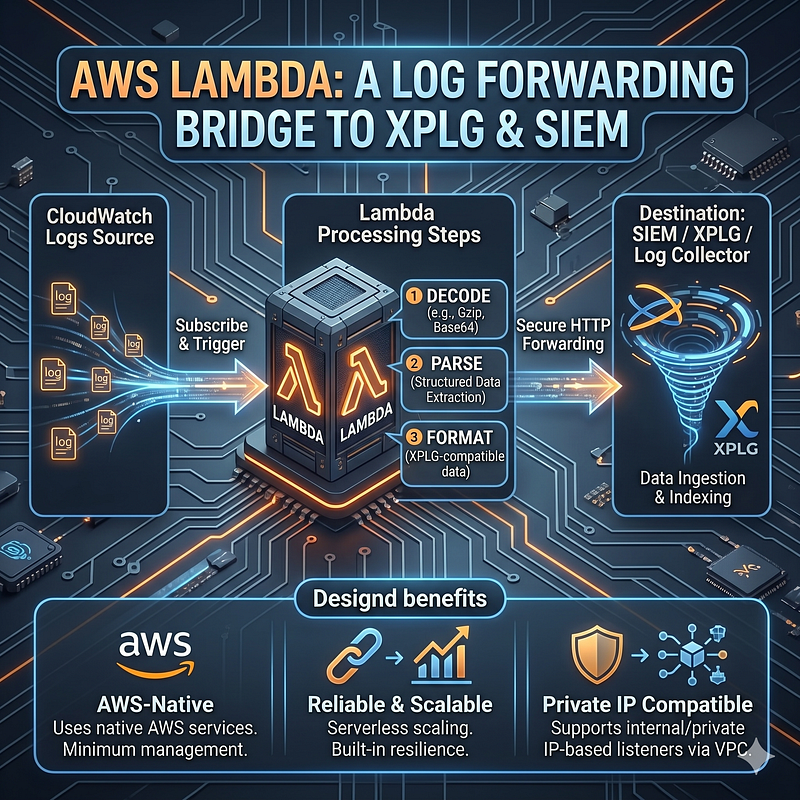
The Solution: Use AWS Lambda as a Bridge
-
CloudWatch → Lambda Subscribe CloudWatch to trigger a Lambda function when logs arrive.
-
Lambda → SIEM/XPLG The Lambda function decodes, parses, and forwards the logs to XPLG over HTTP.
This design is:
-
AWS-native
-
Reliable and scalable
-
Compatible with internal/private IP-based listeners
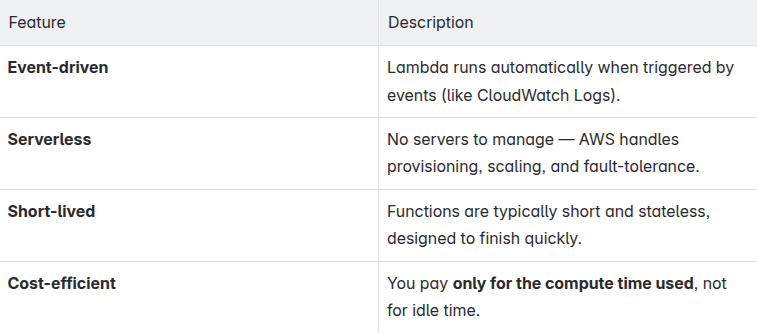
What Is AWS Lambda?
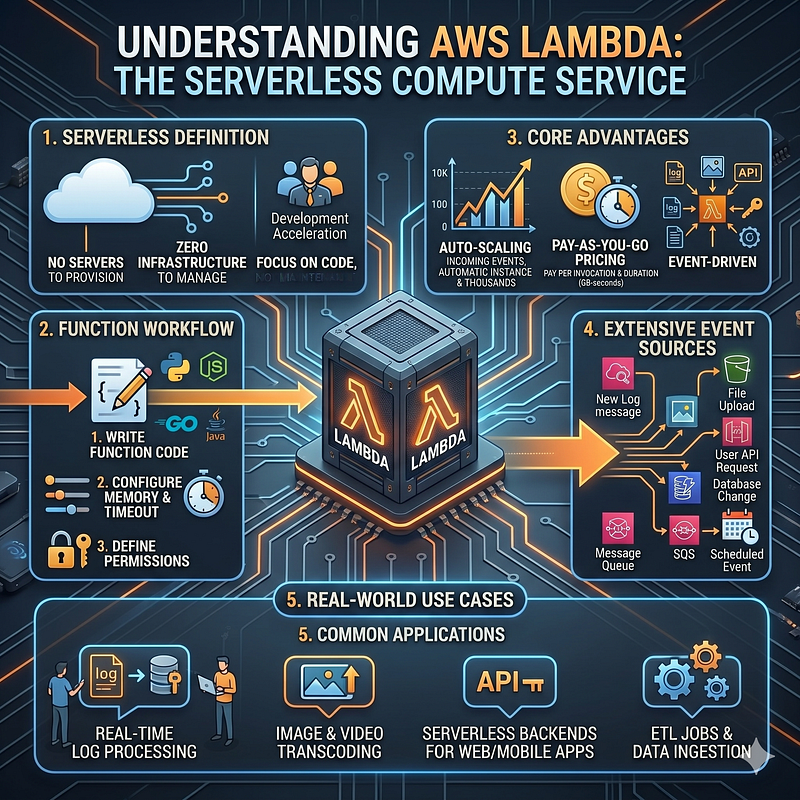
AWS Lambdais aserverless compute servicefrom Amazon Web Services that lets yourun code without provisioning or managing servers.
You simply write your function code, and AWS runs itin response to events— such as a new log message arriving, a file being uploaded, or a user making an API request.
Key concepts
Step-by-Step guide
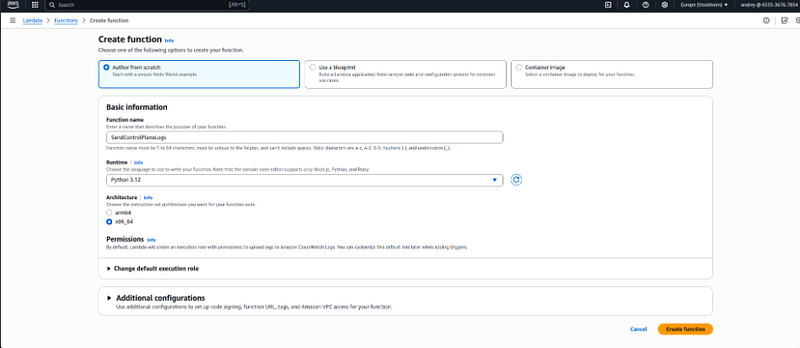
1. Create Lambda Function
Go to the AWS Lambda Console:
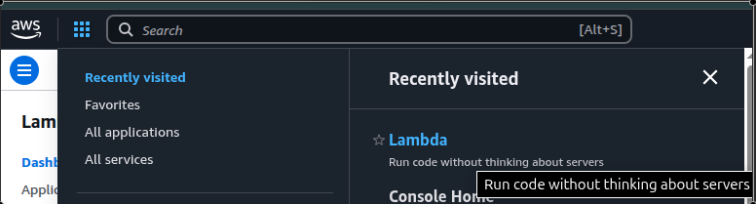
OpenAWS Lambda Console.
Click**“Create function”**.

Configure the Function
Function name:SendControlPlaneLogs
Runtime:Python 3.12(or latest available)
Permissions:
Choose**“Create a new role with basic Lambda permissions”**.
ClickCreate function.
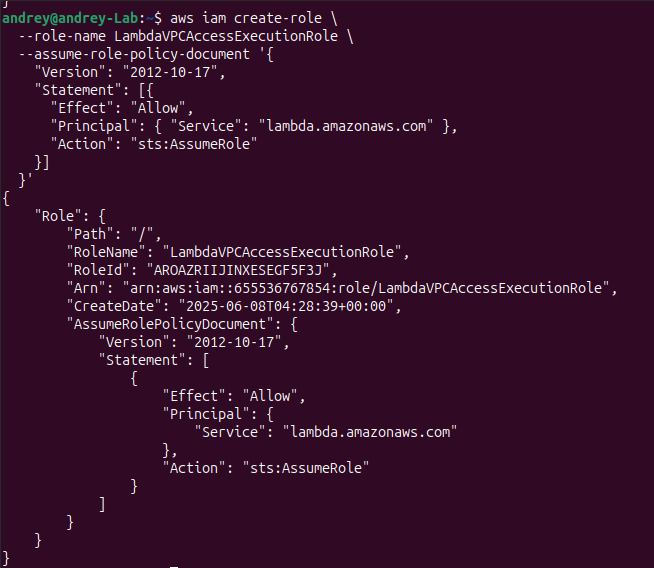
Create IAM Role for Lambda with Trust Policy
Purpose of This Role It allows AWS Lambda to perform actions on your behalf.
Specifically, this role is trusted by the Lambda service (i.e., Lambda can assume this role).
Once assumed, it gains any permissions you attach (like VPC access, logging, etc.).
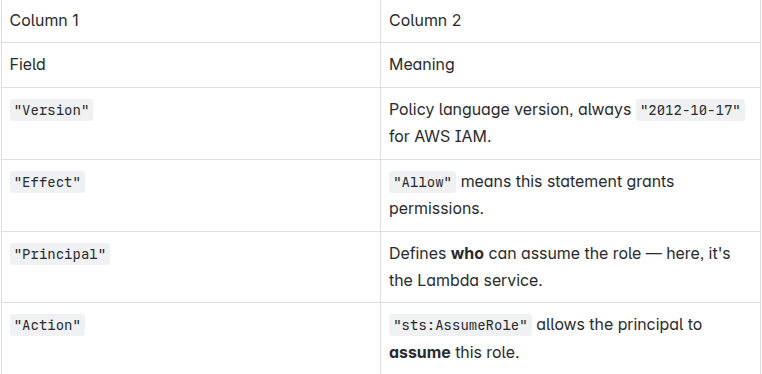
aws iam
create
-role \
--role-name LambdaVPCAccessExecutionRole \
--assume-role-policy-document '{

"Version"
:
"2012-10-17"
,

"Statement"
: [{

"Effect"
:
"Allow"
,

"Principal"
: {
"Service"
:
"lambda.amazonaws.com"
 },

"Action"
:
"sts:AssumeRole"
  }]
}
'
Attach Required Policies
You can choose predefined managed policies or a custom inline policy.
Option A: Attach AWS-managed policies
aws iam attach-role-policy \

--role-name LambdaVPCAccessExecutionRole \

--policy-arn arn:aws:iam::aws:policy/service-role/AWSLambdaVPCAccessExecutionRole
aws iam attach-role-policy \

--role-name LambdaVPCAccessExecutionRole \

--policy-arn arn:aws:iam::aws:policy/CloudWatchLogsFullAccess
This policy allows Lambda to:
-
Create and manage network interfaces inside a VPC
-
Access internal resources like your XpoLog pod via private IP
-
Required when you configure the Lambda to run inside a private subnet
Permissions included: ec2:CreateNetworkInterface
-
ec2:DescribeNetworkInterfaces
-
ec2:DeleteNetworkInterface
-
logs:* (basic logging)
Option B: Create and attach custom inline policy
Createpolicy.json:
{

"Version"
:

"2012-10-17"
,

"Statement"
:

[

{

"Effect"
:

"Allow"
,

"Action"
:

[

"ec2:CreateNetworkInterface"
,

"ec2:DescribeNetworkInterfaces"
,

"ec2:DeleteNetworkInterface"
,

"logs:CreateLogGroup"
,

"logs:CreateLogStream"
,

"logs:PutLogEvents"

]
,

"Resource"
:

"*"

}

]
}
Then attach the police to the role
aws iam put-role-policy \

--role-name
 LambdaVPCAccessExecutionRole \

--policy-name
 VPCAndLoggingAccess \

--policy-document
 file://policy.json
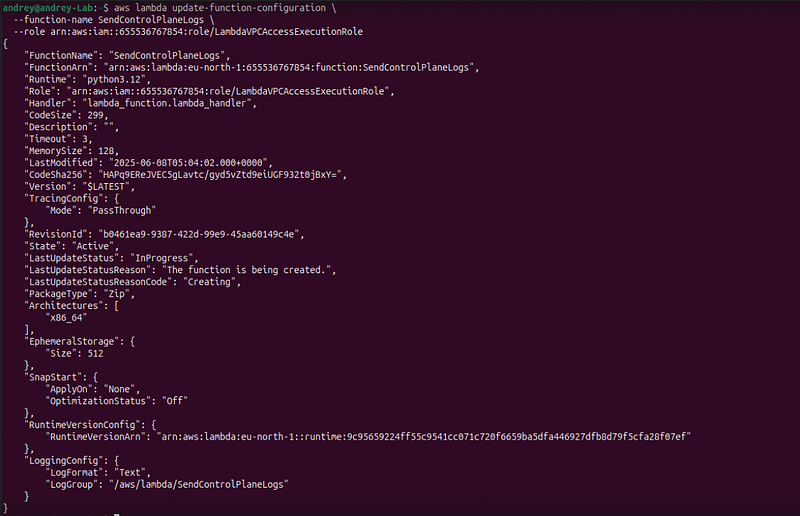
And attach a role to a function:
aws lambda
update
-
function
-
configuration \

--function-name <LAMBDA_NAME> \

--role <ROLE_ARN>
Get ARN by role name
aws iam
get
-
role \

--role-name <ROLE_NAME> \

--query 'Role.Arn' \

--output text

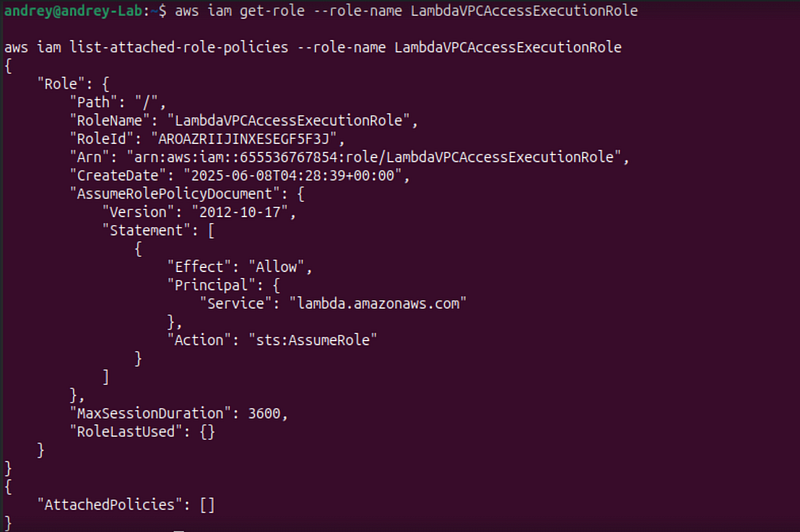
Confirm Role is Attached. Check the attached role and policies:
aws iam
get
-
role
--role-name LambdaVPCAccessExecutionRole
aws iam list
-
attached
-
role
-
policies
--role-name LambdaVPCAccessExecutionRole
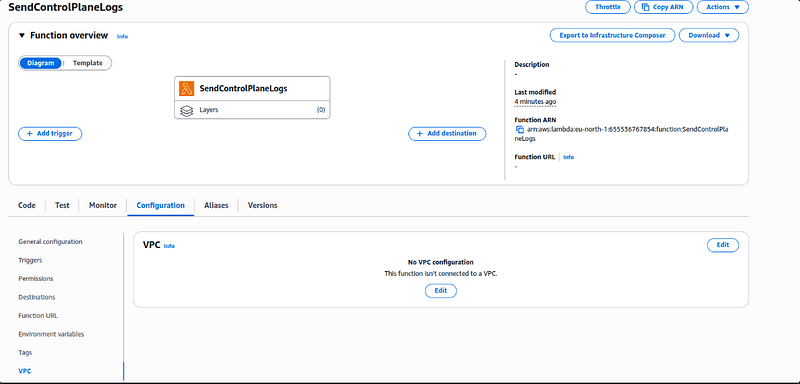
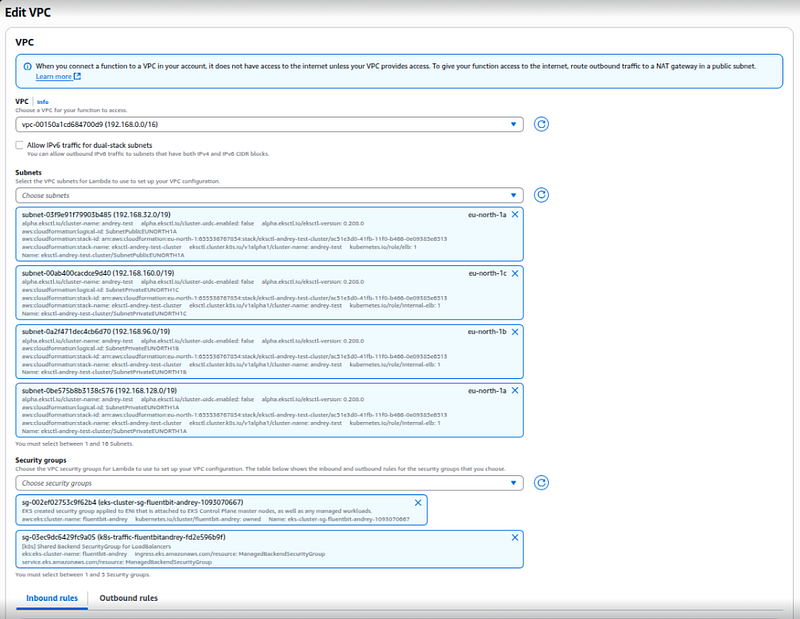
Configure VPC Access
In theLambda configuration page:
-
Go toConfiguration > VPC
-
ClickEdit
-
Choose:
-
VPC: same as your EKS cluster
-
Subnets: selectat least one private subnet(used by EKS nodes)
-
Security Groups: Use thesame SG as your EKS nodes(this gives access to internal IPs)
ClickSave.
Or CLI version below
Get the Internal IP of the XpoLog Listener Pod
kubectl
get
 pods -l app=xpolog -o wide

Get container port:
kubectl describe pod -l app=xpolog |
grep

"Port:"
Deploy Lambda in same VPC and Subnet as EKS Worker Node Your Lambda must be deployed inside the same VPC and subnet so it can access the internal IP.
Get VPC ID of your EKS:
aws eks describe-cluster \

--name
 <your-cluster-name> \

--query
 "cluster
.resourcesVpcConfig
.vpcId
" \

--output
 text

Get private subnets in this VPC:
aws ec2
describe
-
subnets \

--filters Name=vpc-id,Values=<VPC-ID> \

--query "Subnets[?MapPublicIpOnLaunch==\`false\`].[SubnetId,AvailabilityZone]" \

--output table
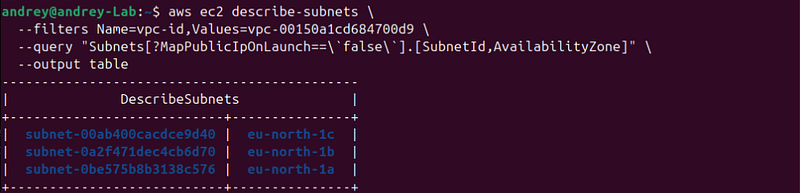
Choose any of the returned Subnet IDs for your Lambda.
Get the security group from the EKS Node:
aws ec2 describe-instances --filters
"Name=private-ip-address,Values=*"
 --
query

"Reservations[].Instances[].SecurityGroups[].GroupId"
 --output text

You can reuse one of these SGs for the Lambda or create a new one.
: Allow Lambda’s Security Group to talk to XpoLog pod IP:PORT
Assuming:
XpoLog pod IP is 192.168.108.148
Listener port is 30303
Lambda uses security group: sg-1234567890abcdef0
If your pod is behind host networking or NodePort, allow access to the Node’s IP instead.
aws ec2 authorize
-
security
-
group
-
ingress \

--group-id sg-<XPOLOG-SG-ID> \

--protocol tcp \

--port 30303 \

--source-group sg-1234567890abcdef0
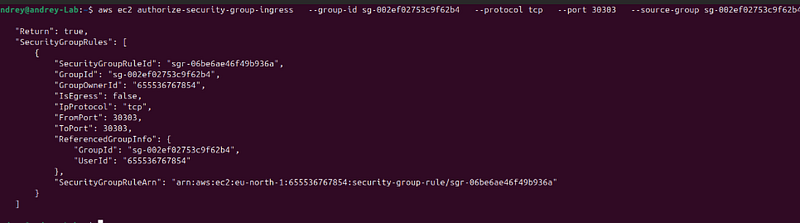
aws ec2 authorize
-
security
-
group
-
ingress \

--group-id sg-<XPOLOG-SG-ID> \

--protocol tcp \

--port 30303 \

--cidr <subnet-cidr>/20
Deploy Lambda with VPC Access Your Lambda should be configured like this:
VPC: your EKS VPC
Subnets: any private subnet where EKS runs
Security Group: one that allows egress to 192.168.108.148:30303
You can use the following AWS CLI snippet to update an existing Lambda:
aws lambda
update
-
function
-
configuration \

--function-name SendControlPlaneLogs \

--vpc-config SubnetIds=subnet-xxxxxxxx,subnet-yyyyyyyy,SecurityGroupIds=sg-xxxxxxxx
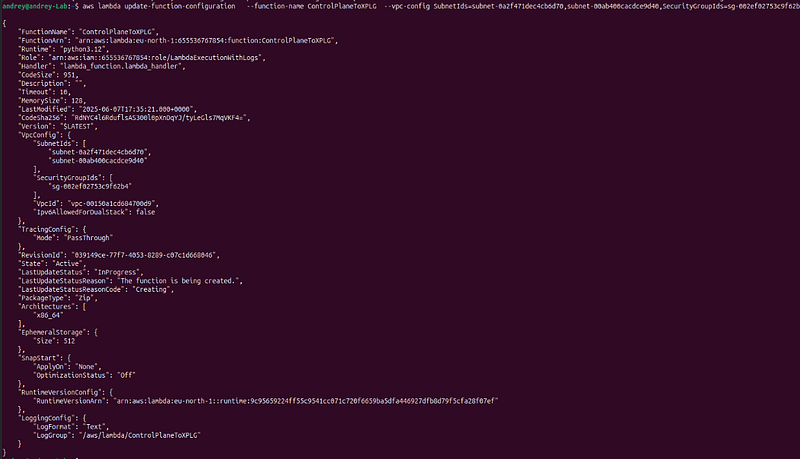
Code of Lambda:
Open code bar and Insect code of your lambda
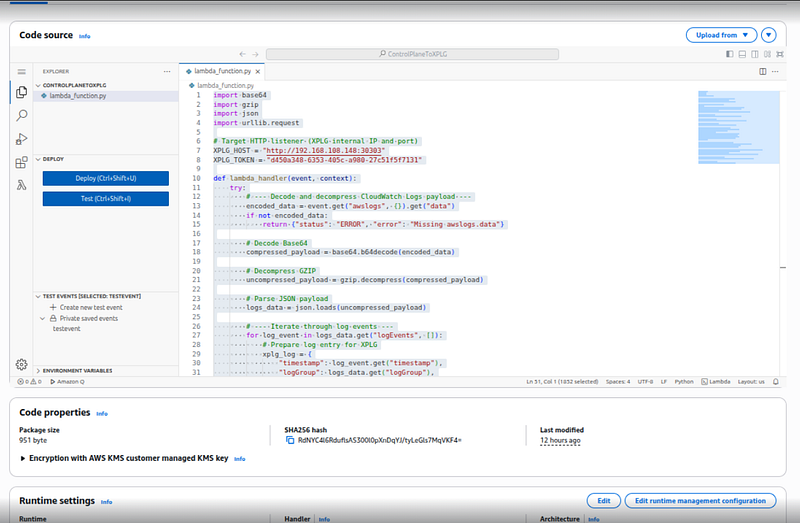
import
 base64, gzip, json, urllib.request
XPLG_URL =
"http://192.168.108.148:30303/logeye/api/logger.jsp?token=d450a348-6353-405c-a980-27c51f5f7131"
def

lambda_handler
(
event, context
):

try
:

# 1. Decode and decompress the CloudWatch logs payload
        payload = base64.b64decode(event[
"awslogs"
][
"data"
])
        logs = json.loads(gzip.decompress(payload))

# 2. Send each log event to XPLG

for
 e
in
 logs.get(
"logEvents"
, []):
            log = {

"timestamp"
: e.get(
"timestamp"
),

"logGroup"
: logs.get(
"logGroup"
),

"logStream"
: logs.get(
"logStream"
),

"message"
: e.get(
"message"
),
            }
            req = urllib.request.Request(
                XPLG_URL, data=json.dumps(log).encode(), headers={
"Content-Type"
:
"application/json"
}, method=
"POST"
            )

with
 urllib.request.urlopen(req)
as
 resp:

if
 resp.status !=
200
:

raise
 Exception(
f"HTTP
{resp.status}
"
)

return
 {
"status"
:
"OK"
,
"sent"
:
len
(logs.get(
"logEvents"
, []))}

except
 Exception
as
 ex:

return
 {
"status"
:
"ERROR"
,
"error"
:
str
(ex)}
Then press Deploy
Enable CloudWatch → Lambda Trigger (Control Plane Logs) You can configure CloudWatch Logs subscription filter to invoke the Lambda function automatically:
aws logs put-subscription-
filter
 \
  --log-group-name
"/aws/eks/<cluster-name>/cluster"
 \
  --
filter
-name
"ToXpoLog"
 \
  --
filter
-pattern
""
 \
  --destination-arn
"arn:aws:lambda:<region>:<account-id>:function:SendControlPlaneLogs"
You must grant CloudWatch permission to invoke the Lambda:
aws lambda
add
-
permission \

--function-name SendControlPlaneLogs \

--statement-id AllowCW \

--action "lambda:InvokeFunction" \

--principal logs.amazonaws.com \

--source-arn "arn:aws:logs:<region>:<account-id>:log-group:/aws/eks/<cluster-name>/cluster:*"
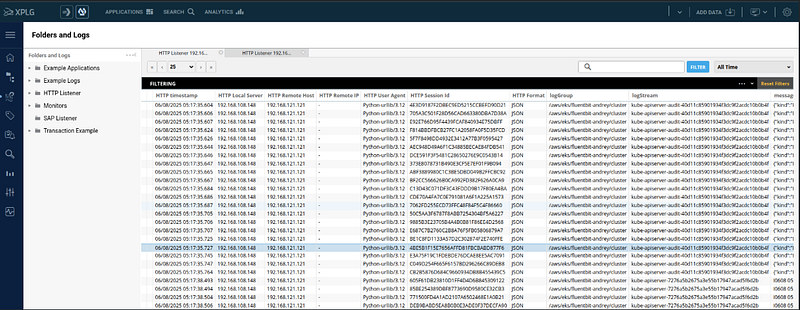
Done!
References
Amazon EKS Control Plane Logging Send control plane logs to CloudWatch Logs — Amazon EKS
- Official documentation on the types of logs (api, audit, scheduler, etc.) and how to enable them.
Amazon CloudWatch Logs Subscriptions Log group-level subscription filters — Amazon CloudWatch Logs
- How to create filters and subscribe Lambda functions to log groups.
AWS Lambda Documentation What is AWS Lambda? — AWS Lambda
- Full reference on how to create, configure, and deploy Lambda functions.
Using AWS Lambda with VPC Giving Lambda functions access to resources in an Amazon VPC — AWS Lambda
- Instructions on how to attach Lambda to a VPC, configure subnets and security groups.
IAM Roles for Lambda Use an IAM role to grant permissions to applications running on Amazon EC2 instances — AWS Identity and Access Management
- Guide to trust policies and attaching permissions for VPC and CloudWatch access.
AWS CLI Command Reference aws — AWS CLI 2.27.47 Command Reference
- Reference for
aws iam,aws lambda,aws logs, and other CLI commands used in the guide.
Splunk Example (CloudWatch Logs to HTTP via Lambda)
- Real-world example of forwarding logs to an HTTP endpoint using Lambda — used as a model for this guide.
Follow for practical cybersecurity research
If you’re interested in**Offensive security,**AI security, real-world attack simulations, CTI, and detection engineering— this is exactly what I focus on.
Stay connected:
→Subscribe on Medium:medium.com/@1200km →Connect on LinkedIn:andrey-pautov →GitHub — tools & labs:github.com/anpa1200 →Contact:1200km@gmail.com