Information Security Awareness: Principles and Best Practices for Employees
- Category: CTI
- Source article: https://medium.com/@1200km/information-security-awareness-principles-and-best-practices-for-employees-6e518eda752c
- Published: 2025-07-25
- Preserved media: 4 image(s), including cover images, screenshots, diagrams, and infographics where present.
- Preserved technical blocks: 0 code/configuration block(s).
Ecosystem Fit
This page mirrors the original Medium article into the 1200km.com Docusaurus ecosystem. The original article flow, images, screenshots, infographics, and technical blocks are preserved from the export.
What Is Information Security and Why Does It Matter
Information security (often calledInfoSec) is the practice of protecting information and information systems from unauthorized access, misuse, disclosure, destruction, or disruptionen.wikipedia.org. In essence, it aims topreserve the confidentiality, integrity, and availabilityof an organization’s data. This is critically important because modern organizations handle vast amounts of sensitive information — from personal customer data to financial records — that must be safeguarded against ever-present cyber threats and leaks. A failure in security can lead tofinancial losses, legal penalties, operational downtime, and reputational damagenumberanalytics.com.
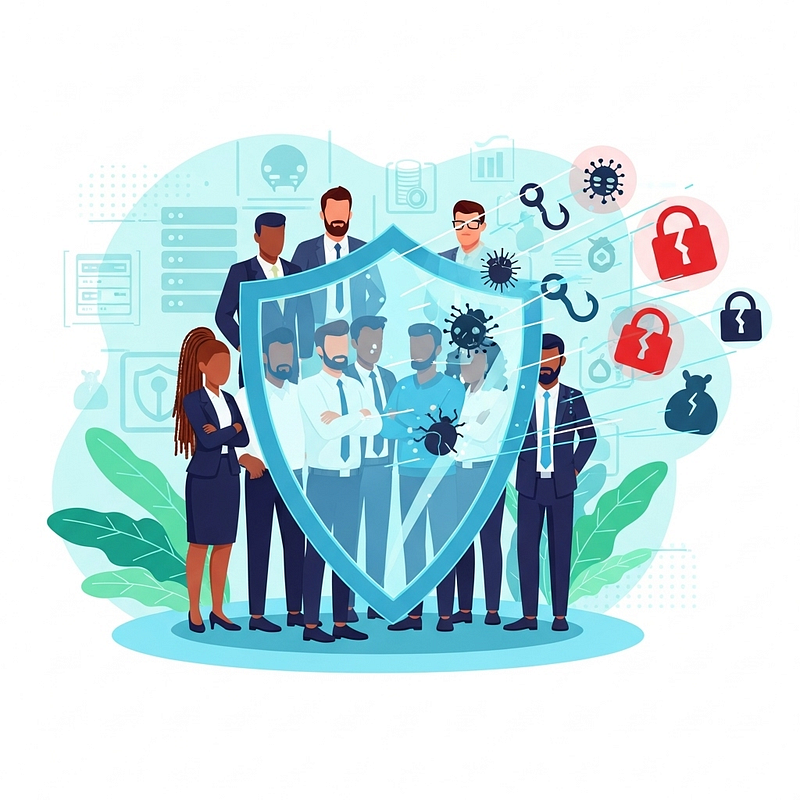
Equally important,**information security is not just an IT concern — it’s everyone’s responsibility in the workplace.**Employees are often the weakest link or the first line of defense in security. In fact, studies indicate that roughlythree-quarters of data breaches are caused by human error or negligenceblogs.stickmancyber.com. This means that even the best technical protections can be undone by an inattentive click on a phishing email or a misplaced laptop. Conversely, a well-informed and vigilant workforce can prevent incidents before they happen. For this reason, building a culture of security awareness among all staff is essential to protecting the company’s information assetsblogs.stickmancyber.com. Every employee has a role to play in keeping data safe, following security policies, and practicing smart habits day to day.
Core Principles: The CIA Triad (Confidentiality, Integrity, Availability)
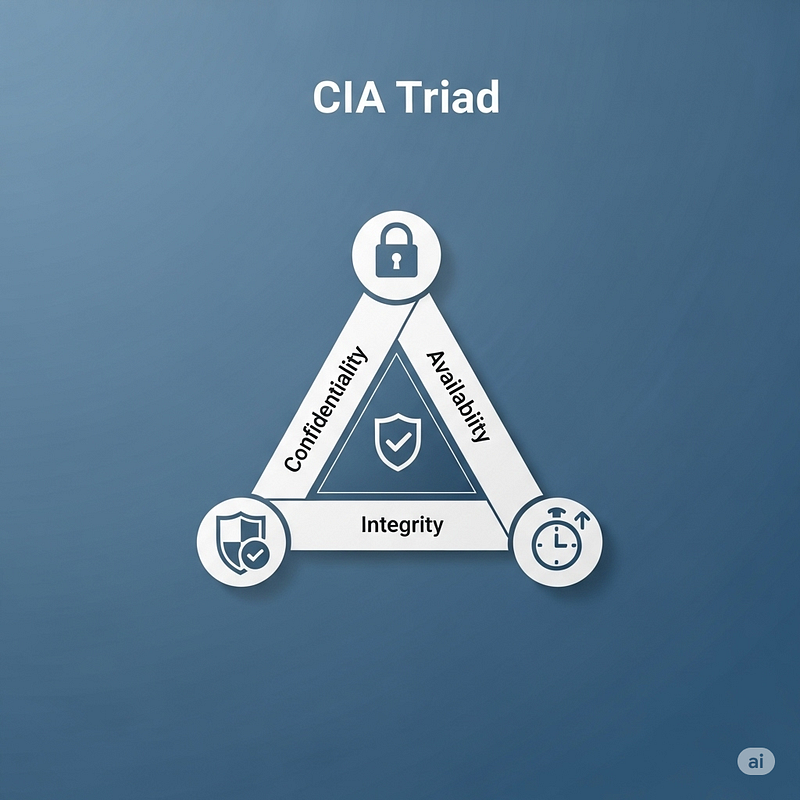
The foundation of information security is often illustrated by theCIA Triad— the three core principles ofConfidentiality,Integrity, andAvailability. All security measures and policies are ultimately meant to uphold one or more of these principles:
-
Confidentiality:Ensuring that information isaccessed only by authorized personsand kept out of the hands of unauthorized individuals. In practice, this means using access controls, encryption, and other safeguards so that sensitive data remains private.(Risk example: Criminal hackers stealing users’ login credentials would violate confidentiality by giving attackers access to private dataiso.org.)
-
Integrity:Protecting information fromunauthorized modification or destruction, so data remains accurate and trustworthy. This involves controls like checksums, version control, and permissions to prevent accidental or malicious alteration of data.(Risk example: An employee accidentally deleting or altering a critical file would compromise data integrityiso.org.)
-
Availability:Ensuring that information and systems arereliably accessibleto authorized users when needed. This involves maintaining uptime, backups, and disaster recovery so that business operations are not disrupted.(Risk example: A server failure without proper backups could bring down a database, making vital information unavailable to usersiso.org.)
Maintaining a balance ofCIAis the goal of an effective security programiso.org. If any one of these principles is weakened (for instance, a highly confidential system might be so locked down that it’s hard for staff to access when needed, harming availability), the organization’s security and productivity can suffer. Employees contribute to CIA by following policies: keeping data confidential (e.g. not sharing passwords or sensitive documents inappropriately), upholding integrity (entering data carefully and reporting mistakes), and aiding availability (using systems correctly and reporting outages).
Common Threats to Information Security
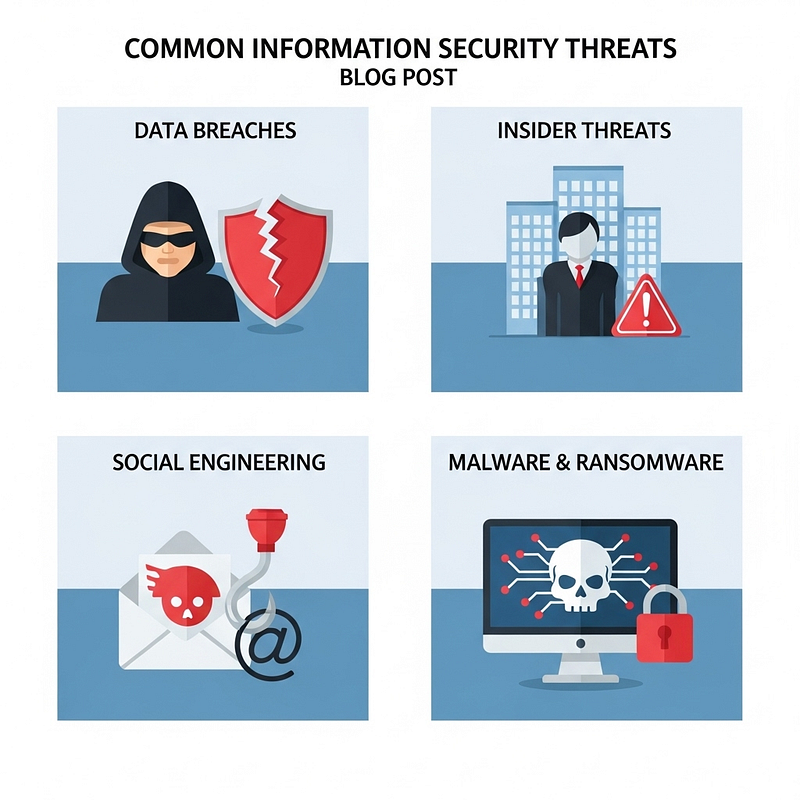
Modern organizations face a wide array of threats that can exploit weaknesses in technologyandhuman behavior. Some of the most common threats employees should be aware of includeexternal cyber-attacks, insider risks, social engineering scams, and malwarenumberanalytics.com. Key examples are:
-
Data Breaches (External Attacks):Incidents where sensitive data isaccessed or stolen by unauthorized outsiders. Breaches often result from hacking (e.g. exploiting software vulnerabilities or weak passwords), but can also occur through lost/stolen devices or inadvertent exposure. Such breaches can leak customers’ personal information or company secrets, leading to regulatory fines and loss of customer trust. High-profile examples in the news underscore how costly breaches can be, and they often start with an attacker finding a single weak point to get into a network.
-
**Insider Threats:**Security threats that originate from within the organization — for example, a disgruntled employee abusing their access to steal data, or a well-meaning employee whose careless mistake exposes the company.Insidersalready have some level of trust and access, which can make their actions especially damaging. Insider threats can be malicious (e.g. theft of intellectual property by an employee leaving the company) or accidental (e.g. an employee unknowingly emailing a sensitive file to the wrong person). Strong access controls and monitoring, as well as fostering a positive, security-conscious workplace, help mitigate insider risks.
-
Social Engineering (Phishing and Scams):****Social engineeringrefers to tactics that trick or manipulate people into divulging confidential information or performing risky actions. The most prevalent form isphishing, where attackers send fraudulent emails or messages that appear legitimate, hoping to lure employees into clicking malicious links or revealing passwords. (For instance, an email might pose as a message from IT asking you to reset your password on a fake website.)Phishing is extremely common— cybercriminals launch new phishing attacks every day, counting on a few recipients to be fooled. Other social engineering methods include phone scams (vishing), text message scams (smishing), or even in-person impersonation. Employees need to stay vigilant and skeptical of unsolicited requests, because justone wrong clickcanallow hackers into the company networklrqa.com.
-
Malware and Ransomware:****Malwareis malicious software designed to harm or exploit systems. This category includes computerviruses, worms, spyware, trojans,and the especially destructiveransomware. Malware can arrive via email attachments, infected websites or USB drives, and even through legitimate-looking software installs. Once executed, malware might spy on user activity, corrupt or exfiltrate data, or in the case of ransomware,encrypt data and hold it hostage. Ransomware attacks have surged in recent years, where criminals lock up an organization’s files and demand payment for the decryption key. These attacks can cripple business operations. For example, an employee unwittingly opening a malware-infected attachment could trigger a company-wide outage or data loss. Up-to-date anti-malware protection and user caution are critical defenses.
Other threats includepassword breaches,network eavesdropping,denial-of-service attacksthat interrupt services, andphysical theftof devices. It’s important to note that many attacks aremultifaceted— for instance, a hacker might use social engineering (phishing) to deliver malware or steal an insider’s credentials, leading to a data breach. By understanding these common threats, employees can better recognize warning signs and follow practices to avoid falling victim. Security awareness training often focuses on these scenarios to prepare staff for real-world attack techniques.
The ISO/IEC 27000 Series and Information Security Management Systems (ISMS)
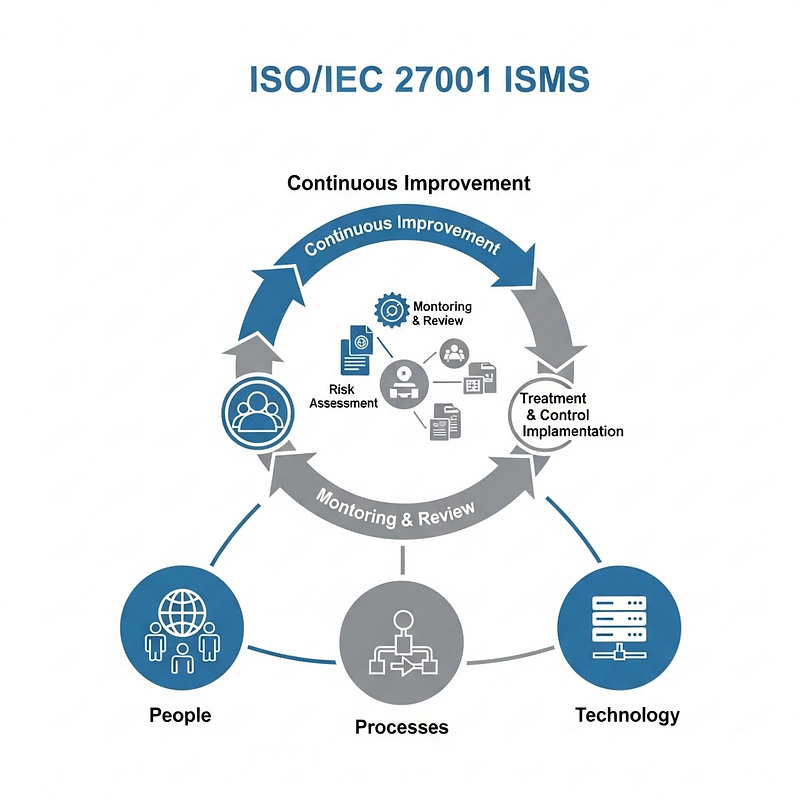
To manage security in a comprehensive way, many organizations rely on standards and frameworks. One of the most important isISO/IEC 27001, an internationally recognized standard for establishing anInformation Security Management System (ISMS). An ISMS is a structured approach to managing sensitive data and the associated security processes and controls.ISO/IEC 27001:2022provides arisk-based frameworkto help organizations systematically protect their information assetsiso.org. Implementing ISO 27001 means a company has put in place a coherent set of policies, procedures, and technologies to preserve the confidentiality, integrity, and availability of information, and continually improves those controls through a formal management process.
ISO 27001 takes aholistic approachto security — it addressespeople, processes, and technologyall togetheriso.org. This is important because good security isn’t just about buying the right firewall or antivirus software; it also means having the right policies (e.g. an access control policy), trained and trustworthy people, and organizational processes (like incident response and audit) working in concert. The standard requires organizations to assess their security risks, implement appropriate controls (from physical door locks to encryption to employee training), and periodically review and improve their security posture. An information security management system built on ISO 27001 is essentially atool for risk management and cyber resilience, aligning security efforts with business objectives and regulatory requirementsiso.org.
ISO/IEC 27001 is part of the broaderISO/IEC 27000 family(sometimes called the ISO 27K series) of standards on information security. ThisISO 27000 seriesprovides best-practice guidance on all aspects of information security management — helping organizations manage information risks through well-defined security controls within the context of an ISMSen.wikipedia.org. The series covers not only the requirements for certification (27001 itself), but also includes standards likeISO/IEC 27002(which offers detailed guidelines on security controls),ISO/IEC 27005(guidance on information security risk management), and several others addressing specific topics (for example, cloud security, incident management, etc.). These standards are designed to bebroadly applicable to organizations of all types and sizes, and emphasize continuous risk assessment and improvement as the threat landscape evolvesen.wikipedia.org. In practice, this means companies are encouraged to regularly assess where their sensitive data might be at risk, implement controls tailored to those risks, and update their security measures in response to new threats or business changes.
Adopting ISO/IEC 27001 can bring tangible benefits.Thousands of organizations worldwide have become ISO 27001 certified, demonstrating their commitment to security — in fact, as of 2022 there were over70,000 certificates issued in 150+ countriesiso.org. Certification involves an independent audit to verify the ISMS meets the standard’s requirements, which can enhance customer and partner confidence. Even without formal certification, using ISO 27001 as a framework helps ensure that security is systematically addressed and integrated into business processesiso.orgiso.org. Many companies find that following the standard not only reduces the risk of breaches but also improves efficiency (through well-defined processes) and helps meet legal or regulatory obligations by demonstrating due diligence in protecting information. In summary, the ISO 27000 series provides ablueprint for building a robust security program, and ISO 27001 in particular is a valuable roadmap for any organization seeking to instill best practices in information security management.
Risk Management: Identifying, Assessing, and Mitigating Security Risks
At the heart of both ISO 27001 and effective information security in general isrisk management.Risk managementis the process of understanding what threats your organization faces, how likely those threats are to occur, and how severe the impact would be if they did — and then taking steps tocontrol or reduce those risks to an acceptable level. Rather than blindly deploying security for security’s sake, risk management ensures that resources are focused on the most significant vulnerabilities and threats.
In practical terms, risk management involves a few key stages:
-
**Risk Identification:**First, the organization (often led by the security team but involving asset owners and other stakeholders)identifies potential threats and vulnerabilities. This means cataloging what could go wrong — for example, “loss of customer data via phishing attack” or “server outage due to power failure” or “employee misuse of confidential files.” It also involves identifying the assets at risk (like databases, laptops, network systems, etc.) and any vulnerabilities they have (such as outdated software, weak passwords, or lack of backups). The goal is to map out all plausible risks to the organization’s information assets.
-
Risk Assessment (Analysis and Evaluation):Once risks are identified, each risk isanalyzed to estimate two main factors: the likelihood of it happening and the impact if it does happen. Often this is done qualitatively (e.g. low/medium/high) or quantitatively if data is available. For instance, a widespread phishing attack might be very likely (high probability) and could have a high impact if it leads to a breach, whereas a localized office theft might be less likely but still concerning. By evaluatingseverityandlikelihood, organizations can prioritize risks. This process helps answer “Which risks are the most critical?” and “What level of risk are we willing to accept?”isms.online. Some form of risk rating or matrix is usually used to compare different risks.
-
Risk Treatment (Mitigation):After assessment, the organization decides how torespond to each risk. Common risk treatment options include:mitigatingthe risk by implementing security controls to reduce its likelihood or impact (for example, to mitigate phishing risk, provide training and deploy email filters);avoidingthe risk by stopping the risky activity altogether (e.g. if a certain practice is too risky, not doing it);transferringthe risk to a third party (for example, via insurance or outsourcing, so that someone else bears the impact); oracceptingthe risk (acknowledging it but deciding it’s low enough or too costly to mitigate further)isms.online. Often mitigation is the main strategy for high risks — implementing appropriate controls from the company’s security toolkit. Notably, the updated ISO 27001:2022 even recognizes**“risk exploiting”or“enhancing”in some cases — meaning an organization might choose totake certain risks deliberately for a business advantage**, but this is usually outside the scope of everyday security decisionsisms.online. For most employees, the key point is that the company will put in place measures to handle major risks (like encryption for data loss risk, backups for system outage risk, etc.), and you might be asked to follow new procedures as part of those risk mitigations.
-
Continuous Monitoring and Review:Risk management is not a one-time project — it’s anongoing cycle. Threats evolve, business processes change, and new vulnerabilities emerge, so the organization must periodically re-evaluate risks and the effectiveness of controlsisms.online. In an ISMS context, this is achieved through regular security assessments, audits, and reviews. When a new risk is identified (say, a new type of malware or a shift to remote work introducing new risks), the cycle begins again: analyze it and decide on additional treatments. Continuous monitoring (such as network monitoring or security alerts) also helps detect issues early and feed back into the risk management process.
For employees, understanding risk management means recognizing why certain policies or controls are in place — they exist to mitigate real risks. For example, if you’re required to use multifactor authentication or change passwords regularly, it’s because the assessed risk of account breach is high and those measures reduce it. If USB drives are banned in the office, it might be to avoid the risk of malware introduction or data leakage. By being aware of the risks around your daily activities and following the controls designed to address them, you actively contribute to the company’s risk management efforts. In summary,identify → assess → mitigate → monitoris the continuous loop that keeps the organization one step ahead of threats. When done well, risk management ensures that security measures are both effective and commensurate with the actual challenges the company faces.
Key Policies and Controls in an Information Security Program (ISMS)
A robust information security program is underpinned by a variety ofpolicies, procedures, and controlsthat collectively protect the organization’s data. An**Information Security Management System (ISMS)**per ISO 27001 encompasses administrative, technical, and physical controls. Here we outline some of the key policies and control areas typically found in an ISMS, which employees should be aware of:
-
Information Security Policy:This high-level policy is the cornerstone of the ISMS. It defines the organization’s commitment to security and lays out theoverall expectations and objectivesfor information security management. In essence, it’s a formal document approved by top management that sayswhatthe organization will do to protect information (for example, “We will protect customer data through appropriate access control, encryption, and employee training”). It often assigns security responsibilities and aligns security goals with business goals. All employees are expected to know and follow the information security policy, which might be presented in an employee handbook or intranet site.
-
Acceptable Use Policy (AUP):This policy sets the rules for how employees mayuse the organization’s IT resources and data. It covers topics like proper use of email and internet, prohibitions on installing unauthorized software or connecting personal devices to the corporate network, and guidelines for handling company information. The AUP’s purpose is to prevent misuse that could lead to security incidents — for instance, visiting unsafe websites or using work systems for illegal activities. Employees typically sign an acceptable use agreement when they join. Following the AUP helps maintain security (e.g. no one should download unvetted applications that might contain malware, or use company email to send sensitive data to personal accounts).
-
Access Control and Identity Management:Controls in this category ensure thateach employee has access only to the information and systems required for their job — and no more(the principle ofleast privilege). User accounts, passwords, and permissions are tightly managed so that sensitive data is restricted to those with a need-to-know. For example, HR records might be accessible only to HR staff. Strong authentication mechanisms (such as unique user IDs, complex passwords, and multi-factor authentication) fall under this domain.Access control policiesalso define how access is granted, reviewed, and revoked (for instance, when someone changes roles or leaves the company). By limiting access, the company reduces the chance of both accidental exposure and deliberate misuse.Put simply, employees should not be able to view or modify information that isn’t relevant to their dutiessecureframe.com. Systems are configured to enforce this, and extra care (like two-factor authentication) is used for highly sensitive accounts. As an employee, you might experience these controls as the need to maintain strong passwords, keep your login credentials secret, use VPN or MFA for remote access, and periodically confirm your access rights. All of these measures serve to protect company data from unauthorized access.
-
Asset Management and Data Classification:These policies ensure the organizationknows what assets (information and IT equipment) it has, and how those assets should be protected. Asset management involves keeping an inventory of hardware (computers, USB drives, phones) and data assets (databases, documents, backups) and assigning ownership for their security. A related concept isdata classification— categorizing data based on sensitivity (e.g. public, internal, confidential, highly confidential) and handling it accordingly. For instance, a company might classify customer personal data as “Confidential” and mandate that it be encrypted and not emailed externally without approval. Employees are often trained on data classification so they know how to label documents or which channels are acceptable for sharing certain information. By tracking assets and labeling sensitive information, the company can apply the right level of protection (like encryption, access restrictions, or additional monitoring) where it’s needed most. For example,removable media(USB drives, etc.) might be controlled or encrypted if used to store classified datasecureframe.com
-
Incident Response and Reporting:Despite preventive measures,security incidentscan still happen — a malware infection, a lost laptop, a detected intrusion, etc. AnIncident Response Planoutlines the procedures to follow when an incident occurs. Key elements include: how to report an incident (employees should know the internal hotline or email for reporting suspected phishing emails, lost badges, strange computer behavior, etc.), who is in the response team, and the steps they will take to contain and investigate the issue.Information security incident managementpolicies ensure that when something goes wrong, the organization reacts quickly and effectivelysecureframe.com. For example, if you think you accidentally clicked a phishing link, the plan might require you to immediately call IT support; the IT team then might isolate your machine, change your credentials, and investigate the scope of the breach. The plan also covers communication (who needs to be notified, e.g. management, customers, authorities in case of a data breach) and recovery (how to restore systems or data from backups). After an incident, there’s usually a debrief to learn lessons and improve controls. As an employee,your responsibility is to report incidents or suspicious events immediately— timely reporting can dramatically reduce the damage of an incident. Remember that incidents aren’t just cyber-attacks; losing a company smartphone or seeing someone tailgating into the office without a badge also count as security incidents that you should report.
-
Business Continuity and Backup Plans:These controls aim to maintain or quickly restoreavailabilityof systems and data in the face of disruptions (major incidents, disasters, or outages). Key components includeregular data backups(so that if data is corrupted or ransomed, the organization can restore from a recent copy) andbusiness continuity plansfor operating during emergencies (like a fire, pandemic, or cyberattack). For example, critical servers might have off-site backups or redundant systems; important documents might be copied to a secure cloud storage. Employees might be given guidelines on how to access systems if primary networks are down, or whom to contact in a crisis. Testing of disaster recovery procedures (through drills) is often done to ensure readiness. From the employee perspective, following backup and continuity procedures — such as saving files on approved servers (so they are backed up) rather than only locally on your hard drive — is crucial. If everyone stores data properly and understands the continuity plan, the company can recover much more smoothly when something goes wrong.
-
Physical and Environmental Security:Not all threats are digital — securing thephysical premises and hardwareis another important piece. Policies in this area cover things like door locks, badge access systems, visitor sign-in procedures, CCTV monitoring, and protection of server rooms or other sensitive areas.Physical security controlsensure that unauthorized people cannot physically access company offices, data centers, or documents. For employees, this often means wearing your access badge, not holding doors open for unknown persons (to prevent “tailgating” into secure areas), and securing your workspace. A common policy is the**“clean desk” rule**— sensitive paperwork should not be left out in the open; desks should be cleared of confidential files when not in use, and computer screens should be locked when you step away. Likewise,**“clear screen”policies mean you shouldn’t leave information visible on a monitor unattendedsecureframe.com. If you work remotely or travel, physical security extends to you as well: be careful with laptop theft, shoulder-surfing (someone glancing at your screen), and storage of work devices. Something as simple as an employee leaving a laptop in a café unattended can lead to a serious breachsecureframe.com. Therefore, the ISMS includes guidance to“lock it up”— lock your screen, lock your filing cabinets, secure laptops with cable locks or keep them with you, and generally prevent unauthorized physical access to sensitive info.
-
Technical Security Controls:These are the technology-centric measures implemented (often by IT) to defend systems and data. They includefirewalls and network security(to block unauthorized network traffic),antivirus/anti-malware softwareon endpoints,encryptionof data (both in transit and at rest) to protect confidentiality,intrusion detection systemsand monitoring, and secure configuration of servers and applications. While many technical controls operate behind the scenes, employees do interact with some of them — for instance, using a VPN (Virtual Private Network) when connecting from home, which encrypts your network traffic for securitylrqa.com. Another example is email security filters that may quarantine suspicious attachments or links; employees should heed the warnings these tools provide. Technical controls are mapped to various threats (e.g. an email filter for phishing, a web proxy for blocking malicious sites, encryption to protect data on a stolen laptop, etc.). The ISMS will typically have standards for secure system configuration and change management to ensure new software or hardware is securely set up.
-
Compliance and Legal:An often overlooked but important area, these policies ensure the organizationcomplies with relevant laws, regulations, and contractual requirementsregarding information security and privacy. For example, if the company handles personal data, there may be GDPR or other data protection laws to follow; if it’s in finance or healthcare, there are industry-specific security requirements. Compliance controls might include regular audits, documentation, and specific policies to meet standards (like encryption of personal data, or user consent forms). Employees might be required to take additional steps for compliance — for instance, completing mandatory privacy training, or following procedures for handling customer data in line with regulations. Non-compliance can result in heavy fines or legal consequences, so the ISMS ties into corporate compliance efforts. Often, meeting ISO 27001 itself helps with regulatory compliance because it covers many best practices that regulators expect (for example, protecting personal information, having incident response, etc.)secureframe.com.
-
Security Awareness and Training:Humans are a critical factor in security, so most ISMS programs have a component of ongoingsecurity awareness training. This might not be a “policy” per se, but rather a control activity: employees are regularly educated on security practices, company policies, and how to spot threats. Training can take the form of e-learning modules, phishing simulation tests, workshops, or newsletters. The goal is to keep security top-of-mind and ensure everyone knows their role. Many standards (including ISO 27001) explicitly require that staff receive appropriate security training. As an employee, you might recall annual security training sessions — while sometimes they may feel routine, they are quite important. By taking training seriously and applying it, employees help build an informed workforce that is less likely to make mistakes. In fact,cybersecurity is not simply the duty of IT or security specialists; it’s the responsibility of each employee to know and follow their organization’s security policies and procedureslrqa.com. A well-trained staff can recognize a phishing email or respond correctly to a suspected incident, significantly reducing the organization’s risk.
The above list is not exhaustive, but it covers thecommon pillars of an organizational security program. When a company is certified to ISO 27001 (or just aligns with it), it will have controls across all these areas (and more detailed ones) to form adefense in depth. For employees, the key takeaway is that there are reasons behind each policy or rule — they map to specific security needs. By understanding these controls and adhering to them in daily work, employees become vital contributors to the company’s security posture. If you ever have questions about policies (e.g. “Why can’t I use Dropbox for work files?” or “Why do I need approval to install software?”), the answer usually lies in the risk and control framework the company has adopted. Don’t hesitate to ask your security team for clarification; knowing the “why” helps everyone implement the “how” more effectively.
Practical Security Best Practices for Employees
Security might seem like an abstract or technical topic, but it boils down topractical habits and behaviorsthat every employee can incorporate into their work routine. By following best practices, employees greatly reduce the likelihood of incidents. Below are someactionable tipsand examples of good security practices at the individual level:
-
Be Vigilant for Phishing and Scams:*Think before you click.*The easiest way for attackers to breach a company is by tricking an employee. Always be on the lookout forphishing emails or messagesthat look suspicious — unsolicited emails asking for sensitive info, messages with urgent scare tactics, unknown links or attachments, etc. If an email’s legitimacy is questionable, do not click links or open attachments. Verify the sender’s address carefully (attackers often use look-alike addresses). When in doubt, contact the supposed sender via a known legitimate channel.Never provide your login credentials or personal information in response to an unsolicited email or pop-uplrqa.com. Phishers often impersonate IT support, HR, or even executives. Remember that reputable organizations won’t ask for your password via email. By staying alert andreporting phishing attemptsto IT/security, you can prevent breaches. (Many companies have a “Report Phishing” button or an email address to forward suspicious emails to.) Consider every unexpected link or attachment as potentially dangerous — a healthy skepticism goes a long way in foiling social engineering.
-
Use Strong Passwords and Multi-Factor Authentication (MFA):****Passwordsare a primary defense for user accounts, so it’s crucial to make them strong. Use passwords (or passphrases) that arelong, complex, and uniquefor each account. A strong password typically has a mix of uppercase and lowercase letters, numbers, and special symbols, and doesnotcontain easy-to-guess info like your name or common wordslrqa.com. Avoid reusing your corporate account password on any other websites. Change your password periodically if your organization requires it, and certainly change it immediately if you suspect it’s been compromised. In addition, take advantage ofmulti-factor authenticationwherever possible (many companies mandate MFA for VPNs, email, etc.). MFA provides an extra layer (like a one-time code on your phone or a biometric check) so that even if an attacker guesses or steals your password, theystillcan’t log in without that second factorlrqa.com. This dramatically lowers the risk of account breaches. Yes, it can be slightly inconvenient, but it is one of the most effective security measures. Think of it like a second lock on your door. By using strong passwords and MFA, you make it exceedingly hard for attackers to break into your accounts.
-
**Secure Your Devices and Networks:Whether working in the office or remotely, be mindful of the networks and devices you use.Keep work devices secure— always lock your computer screen (Windows + L or Ctrl+Alt+Delete, Lock on Mac) when stepping away, even for a moment. Ensure your laptop, phone, or tablet has a strong passcode/password and encryption enabled (most modern devices do).Avoid using public Wi-Fi without protection. If you’re on the go (airport, café, etc.), remember that public Wi-Fi networks are often unsafe — attackers can eavesdrop on traffic. Whenever possible, use a company-providedVPN (Virtual Private Network)**when connecting from untrusted networks; a VPN encrypts your connection and helps shield your data from prying eyeslrqa.com. If a VPN isn’t available, consider using your phone’s secure hotspot instead of unknown Wi-Fi. At home, secure your Wi-Fi with a strong password and encryption (WPA2 or WPA3). Also,be careful with external devices: do not plug in random USB drives you find, and only use approved USB devices since USBs can carry malware. Keeping devices physically safe is important too — don’t leave laptops or sensitive documents in your car unattended or out in public. By maintaining secure connections and handling devices cautiously, you protect the gateways to company data.
-
Keep Software Updated and Install Security Software:****Updates and patchesare crucial because they fix known security vulnerabilities in software. Make sure your work computer is set to update automatically, and apply those updates promptly (for your operating system, web browser, and other applications). The IT department often manages updates for company-provided systems, but if you see prompts for updates, do not ignore them. Similarly, keep your smartphone and any other devices you use for work up to date.Cyber threats evolve constantly, and software vendors regularly release patches to address newly discovered weaknesseslrqa.com. Many cyber incidents (like ransomware outbreaks) exploit vulnerabilities in unpatched software. In addition to updates,run approved security software: ensure your antivirus/anti-malware program is active and updated with the latest virus definitions. If the company provides endpoint protection, do not disable it. These tools can detect and block many threats (e.g. they might prevent you from visiting a malicious website or quarantine a suspicious file you downloaded). Also, be cautious in installing any software on your work machine — only use software that is authorized by your IT/security policy. Unapproved software might not be vetted and could introduce malware or conflicts. In short,patch early, patch often, and let your security tools do their job; these behind-the-scenes defenses significantly reduce risk.
-
Back Up Important Data:Regularlybacking up your filesensures that you can recover your work if something goes wrong — whether it’s a ransomware attack locking your files, a hardware failure, or accidental deletion. Most organizations implement automated backup solutions for central servers, but for endpoint devices, you may need to save files to a network drive or cloud service that is backed up. Follow your company’s guidelines on data backup: for example, save your project documents on the company’s SharePoint or file server rather than just your laptop’s desktop. If your role involves managing critical data on a local system, coordinate with IT to make sure it’s backed up. In case of ransomware (which is one of the most serious threats now), having recent backups means the company doesn’t have to pay ransom to restore data — the data can be recovered from backupslrqa.com. Backups should be kept secure (encrypted and not constantly connected to the live system, so malware can’t infect the backups themselves). As an employee, verify that you can access previous versions or backups of your important files, and alert IT if you think something critical is not being backed up. Never rely solely on a single copy of an essential file. The old adage is:*“Data that isn’t backed up is data you should expect to lose.”*With proper backups, even if an attack or accident occurs, the damage is limited and work can resume with minimal disruption.
-
Follow Company Policies and Security Training:All the policies and controls we described earlier only work if employees actually follow them. Make it a point toknow your organization’s security policies— for example, policies on data protection, clean desk, BYOD (bring your own device), remote work security, etc. If you haven’t read them recently, take some time to refresh your knowledge. Alwayscomply with procedural security requirements, such as using the company’s password manager if one is provided, or labeling confidential documents correctly. Importantly,take security awareness training seriously. These training sessions or modules are designed to equip you with knowledge about current threats and proper practices. Treat it not as a checkbox chore but as an opportunity to strengthen your skills in protecting both the company and yourself (many practices, like spotting scams, also help in personal life). If the company tests employees with phishing simulations or other drills, do your best and learn from any mistakes. Ultimately, creating a secure workplace is a team effort — it only takes one person ignoring policy to create a vulnerability. By staying informed and engaged with the company’s security program, you contribute to a safer environment. Remember,cybersecurity is not just the IT department’s job — every employee is accountable for safeguarding information by following the rules and best practiceslrqa.com.
-
**Speak Up: Report Incidents and Ask Questions:**If you see something, say something.Report any security incidents or near-misses immediatelythrough the proper channels. This includes obvious events like realizing you clicked on a phishing link or lost a company device, but also smaller anomalies — your computer behaving oddly, finding a virus in a file, noticing someone tailgating into the office, or accidentally emailing a document to the wrong external address. Don’t hesitate or feel embarrassed about reporting; early reporting can prevent a minor issue from turning into a major breach. Most organizations have a defined incident response team ready to help. The faster they know, the faster they can contain the problem (e.g. by isolating an infected machine or locking a compromised account). Additionally,if you’re ever unsure about a security matter, ask for guidance. Not sure if an email is legit? Unsure if a website is safe for work use? Need a new software tool and wonder if it’s approved? Your IT or security department would prefer you ask and be safe, rather than take a gamble that could introduce risk. Security staff are not there to impede your work — they are there to help you work securely. By fostering open communication about security concerns and questions, organizations can catch issues early and continually improve their defenses.
By incorporating these best practices into your daily routine, you become a strong human firewall for the company. Most cyber incidents can be traced back to a missed best practice — an unpatched system, a weak password, a click on a bad link, or an unreported concern. On the flip side,when everyone follows these practices, the organization’s risk plummets. It’s much harder for attackers to succeed when employees are well-trained and diligent. So, stay alert, follow the rules, and never think “it can’t happen to me” — a little healthy paranoia in cybersecurity is actually beneficial! The goal is not to create fear, but to empower you with knowledge and habits that protect all of us.
Building a Security Culture: The Human Factor
In the end, the strongest defense in information security is aculture of security consciousnessshared by all members of the organization. Technology alone cannot stop every threat; it’s thebehavior and vigilance of peoplethat often make the decisive difference. As we’ve discussed, many security breaches are enabled by human mistakes or lapses. Conversely, many attacks can be thwarted by an attentive employee at the right moment — for example, the staff member who notices something phishy and reports it before damage is done, or the administrator who double-checks a strange request and thereby prevents fraud.
Every employee, regardless of role or seniority, has the power to either weaken or strengthen the company’s security postureblogs.stickmancyber.com**.**When even one person neglects security practices, it can open a door for attackers; when each person does their part, those doors stay securely shut. Building a strong security culture means that good security habits are ingrained in daily work, not seen as optional or as someone else’s problem. It means colleagues look out for one another (maybe gently reminding a teammate to lock their screen or follow protocol) and there is a collective pride in protecting the organization’s trust. Leadership plays a key role in fostering this culture — when managers and executives lead by example and prioritize security, it sends the message that everyone should do the sameblogs.stickmancyber.com. But culture isn’t top-down only; it’s also bottom-up, with employees embracing their responsibility.
Practically, a positive security culture is supported by ongoing education, easy-to-follow policies, and an environment where people feel comfortable reporting issues (rather than hiding mistakes for fear of punishment). Companies might run internal awareness campaigns — posters, newsletters, or cybersecurity challenge events — to keep security awareness high.**The goal is to make “secure behavior” the default behavior.**For instance, thinking “Is this data sensitive? Should I encrypt this email?” should become second nature, as should verifying identities before sharing information and treating company data with the same care one would treat personal valuable possessions.
Compliance with security policies is a natural outcome of a good culture. Instead of viewing policies as annoying rules, employees understandwhythey matter and take pride in following them to safeguard the business and its customers. It’s helpful to remember that behind every security requirement, there is a real risk that the company is trying to mitigate. By following policies, you are essentially helping tomitigate those risks and protect the organization’s mission.
Finally, it’s worth noting thatinformation security is an ongoing journey, not a destination. Threats will continue to evolve, and our defenses and awareness must evolve with them. Stay curious and informed — for example, keep an eye on security-related announcements your company or industry puts out (“there’s a new phishing scam going around targeting finance departments,” etc.). Embrace new security tools or practices as they are introduced, knowing they are there to address new challenges. And remember thatsecurity done well enables the business— it builds customer trust, protects jobs and revenue, and allows the company to innovate confidently. By being a conscientious participant in that effort, you are contributing to the success of the organization.
In summary,information security is everyone’s job. By understanding the principles, recognizing the threats, following best practices, and complying with your organization’s ISMS policies, you become a crucial link in the security chain rather than a potential weakest link. The human factor can be the greatest vulnerability, but it can also be the greatest strength — it all depends on awareness and action. Keep security in mind as you go about your work, and never underestimate the impact that your own behavior can have on protecting the information we are entrusted with. Together, through collective vigilance and smart practices, company employees can create a strong human firewall that complements the technical defenses, ensuring that valuable information remains safe and secure.
Stay safe, stay alert, and keep security first — your organization is counting on you!
Sources:
-
ISO/IEC 27001:2022 — Information Security Management (International Organization for Standardization)iso.org
-
ISO/IEC 27000 Family — Information security standards overview (Wikipedia)en.wikipedia.org
-
Stickman Cyber,“Why Cybersecurity in the Workplace Is Everyone’s Responsibility”— on human error and security cultureblogs.stickmancyber.com
-
NumberAnalytics Blog,“Information Security Risk Communication Guide”— FAQ on common threatsnumberanalytics.com
-
LRQA,“7 Cyber Security Best Practices for Employees”— practical tips (phishing, passwords, networks, patches, backups, training)lrqa.comlrqa.comlrqa.comlrqa.comlrqa.com
-
Secureframe,“ISO 27001 Controls Explained”— examples of ISMS control themes (access control, incident management, physical security)secureframe.com
-
ISO.org,“What are the three principles of information security (CIA)?”— definitions of confidentiality, integrity, availability with examplesiso.org
-
ISMS.online,“Ultimate Guide to ISO 27001”— on risk management process (identification, assessment, treatment options)isms.onlineisms.online
-
ISO.org,“Why is ISO/IEC 27001 important?”— holistic approach (people, policies, technology) and benefits of ISMSiso.orgiso.org
-
ISO.org,“ISO Survey 2022”— adoption of ISO 27001 globally (certification statistics)iso.org