Phishing Email Awareness: Protecting Employees and Organizations

- Category: CTI
- Source article: https://medium.com/@1200km/phishing-email-awareness-protecting-employees-and-organizations-cf5bc57a0511
- Published: 2025-07-25
- Preserved media: 6 image(s), including cover images, screenshots, diagrams, and infographics where present.
- Preserved technical blocks: 0 code/configuration block(s).
Ecosystem Fit
This page mirrors the original Medium article into the 1200km.com Docusaurus ecosystem. The original article flow, images, screenshots, infographics, and technical blocks are preserved from the export.
What is Email Phishing and Why It’s Dangerous
Emailphishingis a form of social engineering where attackers send fraudulent emails that appear to come from trustworthy sources. The goal is to trick recipients into revealing sensitive information (like passwords or financial details) or into clicking links/attachments that install malwarecisa.gov. Phishing isextremely commonbecause it exploits human trust and curiosity rather than technical vulnerabilities — in other words, it targets the**“human element”. Numerous breach investigations show that phishing is one of the top entry points for attackers; in fact, Verizon’s data indicates the three primary ways intruders get into organizations are stolen credentials, phishing, and exploiting vulnerabilitiesverizon.com. Attackers favor phishing for a simple reason:it worksibm.com. By sending carefully crafted emails to many targets, cybercriminals can bypass technical defenses by persuading an unwary employee toopen the door for them**.
The Scale of the Phishing Threat (By the Numbers)
Phishing isn’t a minor nuisance — it is a massive and growing threat. Recent statistics underline how pervasive phishing has become:
-
Prevalence of Attacks:An estimated3.4 billion phishing emailsare sent every single day, masquerading as communications from trusted senderspaubox.com. The Anti-Phishing Working Group (APWG) recorded4.7 millionphishing attacks in 2022 alone — a150% increasecompared to 2019paubox.com. These numbers highlight an explosive growth in phishing activity.
-
**Top Cyber Crime:Phishing is consistently the most reported cybercrime. The FBI’s Internet Crime Complaint Center received859,000+cybercrime complaints in 2024 with losses over $16 billion, and the#1 category by volume was phishing (including related spoofing scams)fbi.gov. In 2022, phishing scams similarly topped the list with over 300,000 incidents reported to the FBIiafci.org. Clearly,no other cyber threat is as frequently encounteredas phishing.
-
Impact on Organizations:The vast majority of companies are targeted. 84% of organizations experiencedat least onephishing attack in 2022, up 15% from the previous yearpaubox.com. One industry survey even found that94% of organizationsdealt with phishing incidents in 2023infosecurity-magazine.com, meaning almost every business will face phishing attempts.
-
Role in Breaches:Phishing isn’t just abundant — it’s effective. Roughly36% of data breaches involve phishingas a key factorpaubox.com. Some analyses go further, estimating thatas many as 91% of all cyber-attacks begin with a phishing emailpaubox.com. In any case, social engineering is a factor in the majority of security incidents; Verizon’s research found74% of breachesinclude a “human element” (errors, misuse or social engineering)verizon.com. Phishing remains the largest chunk of that human factor.
-
Financial Cost:Falling for a phishing email can be extremely costly for organizations. According to IBM’s 2024 report, theaverage cost of a data breach originating from phishing is $4.88 millionhoxhunt.com. This reflects incident response, downtime, lost business, regulatory fines, and so on. The average cost has risen nearly 10% in the past yearhoxhunt.com, indicating phishing breaches are getting more expensive. Business Email Compromise (BEC) — a form of targeted phishing — is particularly damaging; in 2022 BEC scams led to$2.7 billionin reported losses (just in the U.S.)iafci.org. Overall, large enterprises are estimated to lose**$15 million annually**to phishing attacks (roughly $1,500 per employee) when you factor in all direct and indirect costspaubox.com.
In short, phishing iswidespreadand has asignificant impacton both individuals and companies worldwide. It’s not only the volume of attacks that’s concerning, but the fact that phishing is the opening move for many larger cyberattacks, as we explore next.
Notable Phishing Attacks in Recent Years
To understand the consequences of phishing, consider a few high-profile incidents that began with a simple email scam:
-
Google & Facebook Fraud (2013–2015):Even tech giants aren’t immune. Over several years, criminals conned Google and Facebook out ofmore than $100 millionby sending bogus invoices via emailbitdefender.combitdefender.com. The attacker impersonated a hardware supplier (Quanta Computer), using lookalike email addresses and forged documents, and tricked employees in accounts payable into wiring huge sums to fraudulent bank accounts. This notorious BEC scam, led by a Lithuanian man, shows how convincing phishing can manipulate even savvy companies.
-
**Sony Pictures Hack (2014):**A devastating state-sponsored cyberattack against Sony Pictures was launched via spear-phishing. North Korean hackers (the “Lazarus Group”) sent malware-laced phishing emails to Sony employees, which enabled them to breach the networkjustice.gov. They stole massive amounts of data, erased systems, and caused an international incident. This attack demonstrated that phishing emails are not only used for fraud — they can also serve as the entry for destructive attacks and espionage.
-
Bangladesh Bank Heist (2016):One of the largest bank thefts in history started with a phishing email. Attackers sent spear-phishing messages to employees of Bangladesh’s central bank, successfully compromising the networkjustice.gov. Using the access gained, they orchestrated fraudulent transfers via the SWIFT banking system, stealing$81 millionfrom the bank’s account at the New York Federal Reserve. This bold attack underscores that phishing can lead directly to large-scale theft of funds.
-
“Shark Tank” CEO Scam (2020):In February 2020, Barbara Corcoran — a famous investor andShark TankTV star — nearly lost$380,000due to an email phishing scamproofpoint.com. Her bookkeeper received an invoice email that looked like it came from Corcoran’s assistant, approving a payment for a real estate renovation. In reality, the attacker had registered a lookalike email address (misspelled by one letter) to pose as the assistantproofpoint.com. The scam succeeded until a slight anomaly (the misspelled domain) was noticed, but by then the money had been wired out. This case shows howattackers exploit trust and small details— and thatanyonecan be a target, even well-known executives.
-
Ransomware Outbreaks:Phishing has been at the root of many ransomware incidents as well. For example, the notoriousWannaCryransomware (2017) and countless others were initially spread via phishing emails carrying malicious attachments or links. In 2023 and 2024, ransomware groups frequently used phishing to gain an initial foothold in corporate networksblog.talosintelligence.compaubox.com. One analysis estimated that45% of ransomware attacks are triggered by phishing emailsas the initial infection vectorpaubox.com.
These examples (among many others) illustrate the range of damage that can result from phishing — from multi-million dollar fraud to massive data breaches and malware outbreaks. They highlight why we must treat any suspicious email with extreme caution.
Phishing as a Gateway to Bigger Threats
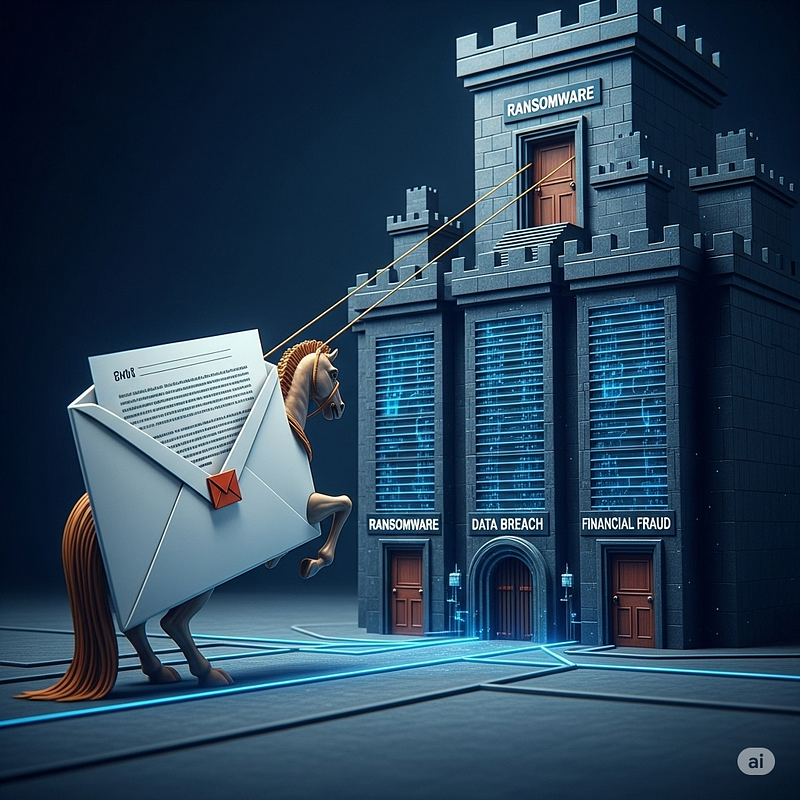
Phishing is often justphase oneof a larger attack. A single click on a phishy link or a moment of trust in a fake email canopen the door to major cyber threats:
-
**Credential Theft and Data Breaches:**Many phishing emails aim to steal login credentials (usernames, passwords). Once attackers have an employee’s credentials, they can infiltrate email accounts, VPNs, or cloud services undetected. This often leads to a full-blown data breach — accessing sensitive data or further penetrating the network. It’s no surprise that stolen credentials and phishing are leading causes of breaches, together accounting for about one-third of incidentsspycloud.com. For example, the 2016 breach of a U.S. political organization (DNC) was traced back to a staffer falling for a phony password-reset email, showing how one credential phish can alter the course of events.
-
Ransomware and Malware Delivery:Phishing is a top method to distribute malware such as ransomware. Cybercriminals frequently use email attachments or links to deliver malicious code that, once run, gives them a foothold on the victim’s system. Studies by IBM X-Force found phishing was the #1 initial infection vector in 2022, observed in 41% of incidentsibm.com. Often the email carries aweaponized attachment(e.g. an Office document with macros or a disguised executable) or a link to a malware download. If an employee runs that payload, attackers can then deploy ransomware that encrypts company files and systems. Many recent ransomware attacks on businesses and even critical infrastructure began with an employee opening a malicious email attachment. Good email hygiene can thus literally prevent a company-wide crisis.
-
Business Email Compromise (BEC):Not all phishing involves malware — some aim directly atfinancial fraud. In BEC schemes (also called CEO fraud), attackers impersonate a company executive, supplier, or partner via email and attempt to trick employees into transferring money or sensitive data. These emails often contain no malware, so they may evade technical filters. Yet BEC has become one of the costliest cyber threats: in 2022, BEC scams reported to the FBI resulted in**$2.7 billion**in lossesiafci.org. For instance, the Google/Facebook scam and Barbara Corcoran case above are classic BEC tactics. Phishing thus enables fraudsters to pull off large thefts by exploiting trust and authority.
-
Launching Point for Lateral Attacks:A successful phish can give attackers a beachhead inside an organization’s network. From there, they might install backdoors, move laterally to other systems, or conduct espionage. Advanced attackers (including nation-state hackers) often start with a spear-phishing email to an employee as theinitial compromise, then escalate their attack. In the Sony Pictures case, what began as an email to one employee ended with hackers crippling an entire studio’s networ kjustice.gov. Similarly, phishing was used to penetrate a bank’s systems in the Bangladesh heistjustice.govand even to target defense contractorsjustice.gov. In essence, phishing is a cheap, effective way for attackers to get inside the gates — after which they can unleash far more damaging exploits.
In summary, phishing is not an isolated threat; it isinterconnected with virtually every other cyber threat. Whether it’s stealing money, installing ransomware, or breaching data, phishing is very often thefirst link in the kill chain. That’s why preventing that initial click is so critical.
Common Phishing Techniques and Tactics
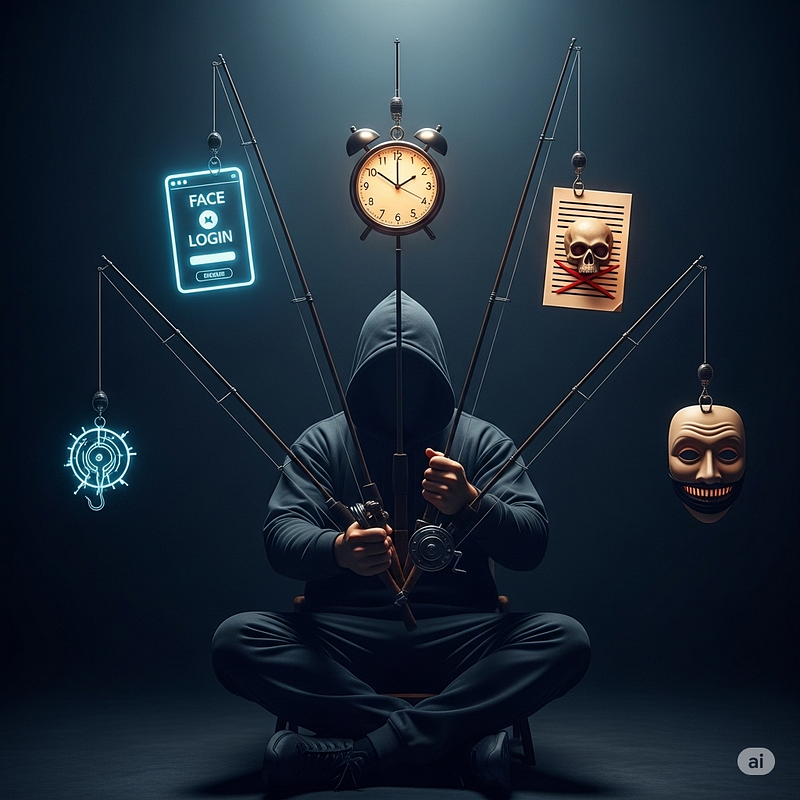
Phishers have developed a variety of tricks to make their emails convincing. Here are some of the most common tactics attackers use to lure their victims:
-
Spoofed Sender Identities:Phishing emails frequentlyforge the sender’s addressto impersonate a trusted source. Attackers may register look-alike domain names (e.g.
micros0ft.cominstead ofmicrosoft.com) or simply change the display name to pose as someone the target knows. In Barbara Corcoran’s case, the scammers created an email address one letter off from her assistant’s real addressproofpoint.com. It’s easy to be fooled at a glance. Always inspect the actual email address, not just the display name – subtle misspellings or odd domains are big red flagscisa.gov. -
Urgency and Fear Appeals:Phishing messages often try topanic or pressure the recipientinto acting quickly. For example, an email might claim*“Your account will be closed in 24 hours!”or“Immediate payment required to avoid penalty.”*This sense of urgency is deliberate — attackers want you to click impulsively without thinking. Any unsolicited email that uses threatening language or tight deadlines (“urgent response needed”, “last warning”) should be treated with skepticismcrowdstrike.comcisa.gov. Legitimate organizations rarely demand immediate action via email under threat of dire consequences.
-
Impersonating Trusted Brands or People:Many phish attempt tomasquerade as well-known companies(banks, IT services, package delivery, etc.) or as a person of authority (your CEO, HR department, IT support). “Brand phishing” is rampant — Microsoft is consistently one of the most impersonated brands in phishing campaigns, as attackers know many businesses use Microsoft 365guardz.com. Likewise, spear-phishing emails might appear to come from a colleague or manager. Attackers often research their targets on social media or company websites to make these emails more believable (this is calledspear phishingwhen it’s highly targeted). Always verify unexpected requests supposedly from a colleague or vendor via a separate communication channel.
-
Credential Harvesting Links:A common phish tactic is to include alink to a fake login page. The email might say “Your account has been locked, click here to verify your password.” The link opens a site that looks legitimate (e.g., a replica of an Office 365 login or bank website), but entering your credentials sends them straight to the attacker. About 80% of phishing campaigns aim to steal passwords, especially for cloud services like Microsoft 365 or Google Workspacehoxhunt.com. If an email link directs you to a login page or asks for sensitive info, that’s a huge warning sign — it’s safer to navigate to the company’s site yourself or call their support to confirm.
-
**Malicious Attachments:**Phishing emails may include file attachments (often Office documents, PDFs, or ZIP files) that contain malware. The email message will entice the user to open the attachment — for instance, claiming it’s an invoice, a form to review, or even a résumé for a job posting. Common file types like
.docx,.xlsx, or.pdfcan be weaponized with malicious macros or exploits. IBM’s incident data found that among phishing-based attacks,62% involved a malicious email attachmentas the infection methodibm.com. The rule of thumb is:never open attachments from unknown senders, and even if it appears to come from someone you know, be cautious if you weren’t expecting it. When in doubt, verify with the sender. -
Spoofed or Obscured URLs:Phishers often hide the true destination of links. They may useURL shortening servicesor HTML tricks so that the hyperlink text looks valid while the actual URL is differentcisa.gov. Increasingly, attackers even obtain SSL certificates for their fake sites, so seeing the padlock (HTTPS) in your browser alone isn’t proof of safety. Always hover over links in an email (without clicking) to preview the URL — if the web address is unfamiliar, misspelled, or doesn’t match the purported company’s domain,do not clickcisa.gov. Some phishing emails now also embed QR codes instead of links (a tactic called “quishing”), hoping to evade filters. Treat QR codes in unsolicited emails the same as links — with caution, since they can direct you to malicious sitesapwg.org.
-
Generic Greeting or Odd Language:Phishing emails targeting a mass audience often use generic greetings like “Dear Customer” or “Hello Sir/Madam” and may contain noticeable grammar or spelling mistakes. Legitimate businesses usually address you by name and have professionally proofread contentcisa.govcisa.gov. An obvious typo or stilted phrasing (“we are contact you for verify account”) can indicate the email is not what it seems. That said, some targeted phish are quite polished, so absence of errors doesn’t guarantee legitimacy — butpresence of bad grammar is a strong warning signof a scam.
-
**Advanced Tactics (Spear-Phishing and Whaling):**In highly targeted attacks, scammers tailor their messages with personal details to appear convincing. This is known as spear-phishing. For example, an attacker might reference a recent project or impersonate a specific coworker. These customized attacks have a frighteningly high success rate — one study noted spear-phishing, while a smaller portion of overall phishing volume, was involved in 66% of breachespaubox.com.Whalingis a term for spear-phishing aimed at big “whales” — senior executives or high-profile targets. Since the shift to remote work, whaling attempts have surged (131% increase)paubox.com, often impersonating CEOs or finance chiefs to authorize fraudulent payments. The lesson is that even if an email’s content references internal information or appears to come from the highest levels, you must remain vigilant if anything about the request is unusual.
Attackers mix and match these techniques to craft emails thatbait employees into a click. They might, for instance, spoof a familiar vendor’s address, use a subject like “Urgent Invoice Payment Due”, attach a PDF invoice laced with malware, and write a brief message that “As per the boss’s request, please pay this today.” This combines impersonation, urgency, and a malicious attachment all in one. Understanding these tactics helps you recognize when you’re being phished.
Spotting a Phishing Email: Anatomy of an Attack
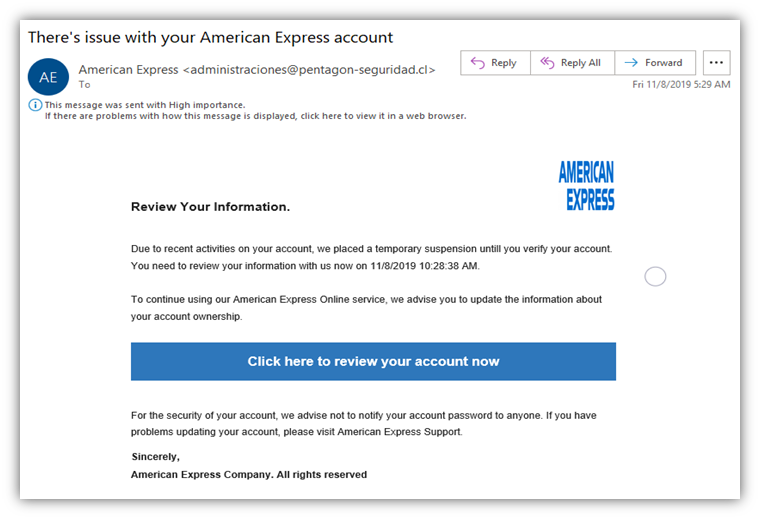
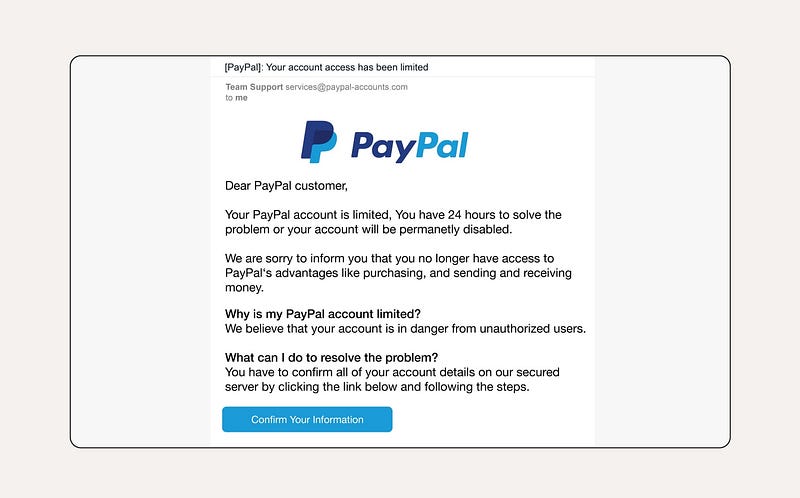
Figure: Example of a phishing email impersonating a known brand (PayPal), with telltale signs highlighted: a deceptive sender address, urgent language, generic greeting, and a misleading hyperlink (hovering reveals a mismatched URL).
While phishing emails come in many forms, they tend to share commonwarning signs. By examining a suspect email closely, you can often identify cues that it’s fraudulent. Here’s a breakdown of signs to look for whenever you review an email in your inbox:
-
**Sender’s Email Address:**Don’t just trust the display name — click or hover on the sender’s name to see the actual email address. If the address is not from the organization’s true domain (e.g., an email claiming to be from PayPal is using
@outlook.com), that’s a dead giveawaycisa.gov. Many phishing emails use addresses thatresemblea legitimate one, but contain extra characters or misspellings (e.g.,support@paypa1.comwith a “1” instead of “l”). Internal company emails that come from external domains are also suspect.If the sender is someone internal but the email says from a Gmail/Yahoo account, be wary. -
**Generic or Suspicious Greeting:**Phishing emails often use generic salutations like “Dear Customer” or “Hello Sir/Madam” because the attackers may not know your namecisa.gov. Legitimate businesses you have accounts withdoknow your name and usually personalize the greeting. An absence of your name, or an awkward greeting, can be a sign of a mass phishing attempt. On the flip side, spear-phishing might use your actual name, so combine this clue with others.
-
**Content Urgency or Threats:**As mentioned, urgent calls to action (“Immediate update required,” “Your account will be suspended!”) are a common phishing ploy. If an email puts you in a panic — take a breath and double-check everything. Legitimate organizations (banks, IT support, etc.) rarely demand instant action via email under threat. Treat subject lines or email bodies that are trying to scare you or rush you as very suspiciouscrowdstrike.comcrowdstrike.com.
-
Requests for Sensitive Info:Be extremely cautious if an email asks you to provide sensitive data (passwords, social security number, bank details) or toclick a login linkto “verify” or “unlock” an accountcrowdstrike.com. Credible companies willnever ask for your password over email. As a rule, do not send confidential information by email, and do not click on email links to enter credentials — if you think the request might be real, navigate to the website by typing the known URL yourself or calling the organization. Almost always, such direct requests in emails arephishing in nature.
-
Attachments or Links — Check Before Clicking:Look at the email for any attachments or hyperlinks. If there’s an attachment you did not expect — especially if it’s oddly named or a file type you normally wouldn’t receive — treat it with caution or consult IT before opening. For links, use the hover technique: place your mouse over the link (without clicking) and see what URL displays. If the link text says one thing but the actual URL is different or nonsensical, it’s likely maliciouscisa.gov. For example, a hyperlink might say
https://PayPal.com/verifybut hovering shows a totally different site (likehttp://121.XYZ.ipaddress/~login). That mismatch is a sure sign of a phish. Donot clicksuspicious links to “see what it is” – that curiosity can lead to compromise. -
Poor Grammar or Design:Many phishing emails originating from cybercriminal groups overseas containspelling mistakes, grammatical errors, or strange formattingcisa.gov. Perhaps the email uses broken English or an unusual tone. Professional companies have editors and templates for official emails, so glaring mistakes are uncommon. If the email reads like a sloppy effort, it likely is. However, note that some phishing emails today are quite polished (and attackers are even leveraging AI tools to improve their language), so use this sign in combination with others.
-
**Unusual Sender Behavior:**Consider the context — is this the type of email you usually get from this sender? For instance, would your boss normally ask you to buy 50 gift cards via email? Would your bank ever ask you to confirm your PIN through a link? If anything in the email content strikes you as out-of-character or implausible, trust your instincts. It’s better to double-check by contacting the supposed sender through a known-good channel. Often, just a moment’s pause and a skeptical mindset can uncover a phishing attempt.
By applying these checks, you become significantly less likely to be fooled. Remember, phishing emails are designed tobypass our rational filters by preying on emotion and habit. The key is to stay calm and scrutinize the details. When in doubt,do not click— verify through other means. It’s always okay to ask your security team for help reviewing a suspicious email. A bit of caution can prevent a major incident.
Defending Against Phishing: Tools and Techniques
Given the prevalence of phishing, organizations employ multiple layers of defense. However, no single tool is foolproof — a combination oftechnical solutions and human vigilanceworks best. Here’s how phishing can be detected and blocked, and what measures companies and employees can take:
Technical Protections (Email Security):
-
**Email Filtering and Gateways:**Companies use secure email gateway appliances or cloud email security services to automatically filter out spam and known phishing emails. These systems scan incoming messages for malware, malicious links, and signs of phishing (suspicious sender domains, keywords, etc.) and either block or quarantine them. They are quite effective at reducing the volume of obvious phish that reach inboxes. For example, Gmail and Microsoft 365 have built-in filters that block millions of phishy emails daily. That said, determined phishers constantly adapt their tactics to evade filters (using new domains, tweaking content, etc.), so some phishing emails will inevitably slip through. Never assume an email is safe just because it reached you — filtering stops a lot, but not 100%.
-
**Domain Authentication (SPF/DKIM/DMARC):**On the back-end, organizations implement protocols like SPF, DKIM, and DMARC to make it harder for attackers to spoof their email domains. SPF (Sender Policy Framework) and DKIM (DomainKeys Identified Mail) allow senders to validate that an email truly comes from their servers, and DMARC provides instructions to receivers on what to do with unauthenticated emailscisa.gov. In plain terms, these help email providers identify fake emails claiming to be from, say, yourcompany.com and reject or flag them. Users might notice, for instance, a warning banner on emails that fail checks (e.g., “This email may not be from the sender it claims”). These technologies reduce impersonation, but they require widespread adoption and correct configuration. Many phishing emails still get through using lookalike domains or by compromising legitimate email accounts.
-
Anti-Malware and Link Scanning:Modern email security tools will oftensandboxattachments — isolating them and executing them in a virtual environment to see if they are malicious before delivering to the user. Similarly, some systems useURL rewriting and scanning, where any link you click in an email is first routed through a safe browsing service that checks it against threat databases. If you’ve ever clicked a link at work and seen a warning page “This site is blocked due to malicious reputation,” that is your security stack protecting you. These defenses help catch known phishing sites or malware. But new phishing websites (spun up just for an attack) might not yet be on blocklists, so you can still encounter dangerous links.
-
Browser and Endpoint Protection:If a phishing email does lead someone to click, additional layers can mitigate damage. Web browsers like Chrome and Firefox have phishing protection (Google Safe Browsing, etc.) that warn if you try to visit known phishing pages. Endpoint security software (antivirus/EDR) on your computer may detect and stop malicious payloads if opened. Keeping these tools updated is crucial. They are like thesafety netif a phish bypasses other filters and a user clicks — they might catch the resulting malware. However, brand-new malware or cleverly crafted attacks can evade detection initially. Ransomware, for instance, can sometimes sneak past antivirus until it’s too late. So while these tools are vital, the goal is to not have to rely on them; avoiding the phish in the first place is safest.
-
Threat Intelligence and AI:Many security providers employ AI and machine learning to analyze email language and patterns to spot phishing (for example, unusual phrasing, or an employee suddenly emailing outside their normal hours). These can flag or block emails that “don’t sound right.” Some advanced systems even detect BEC attempts by analyzing writing style or the context of requests. These innovations are promising and add another hurdle for attackers. But phishers also leverage AI (e.g., to create more convincing, grammatically correct emailspaubox.com), so it’s an arms race. Technology alone cannot stop every phish; it significantly reduces risk, butattacker ingenuity and human error can still defeat technology.
Human Defenses (Employee Vigilance and Training):
-
Security Awareness Training:One of the most effective defenses is analert and educated workforce. Regular training sessions and phishing simulation exercises help employees learn how to spot phish and reinforce good habits. Many companies run simulated phishing campaigns — sending fake phish to employees (in a safe context) to see who clicks and then providing instant feedback. Over time, this can dramatically improve click rates on real phish. According to one report, organizations saw a 6× improvement in phishing detection after just 6 months of behavior-based traininghoxhunt.com. Training should cover the kind of topics in this guide: how to examine emails, what red flags to look for, and company-specific procedures for handling suspicious messages. The goal is tobuild a human firewall— employees become an active part of the defense, not the weakest link.
-
Reporting and Incident Response:Employees should know how and where toreport a suspected phishing email. Companies often provide an easy mechanism (like a “Report Phish” button in the email client or a dedicated email address to forward suspicious emails). Reporting is critical because it allows the security team to investigate and warn others. If one person reports a phish, IT can potentially remove that email from all mailboxes or block the malicious domain for everyone, averting disaster. The FBI and security agencies urge timely reporting — it’s one of the best ways to counter scams and mitigate lossfbi.gov. Internally, security teams should foster a culture where employees arenotpunished for clicking a phish but are encouraged to report it immediately. Speed matters: if you think you fell for a phish (entered credentials or opened a weird file), notify ITright away. They can take steps (like resetting passwords, isolating machines) to minimize harm. It’s far worse to stay silent out of embarrassment — quick reporting might save the company.
-
Verification Policies:Organizations should establish clear policies for verifying sensitive requests. For example, if an email from a company executive asks finance to transfer money or send sensitive files, the policy could require asecondary confirmation(like a phone call or face-to-face verification) before action. This helps stop BEC attacks in their tracks — even if an employee is fooled by a spoofed CEO email, the out-of-band verification will reveal the fraud. Similarly, employees should be instructed never to send certain data over email (passwords, customer data, etc.), and to follow predefined procedures (like using secure file transfer or encrypted email if needed). By having standard processes, anything deviating (like a sudden request to “pay this invoice to a new account”) will stand out and can be halted. Essentially,trust but verify— especially for financial or high-risk transactions.
-
**Personal Accountability and Caution:**Each employee has a role in phishing defense. Simple practices go a long way: hovering over links, examining sender addresses, being skeptical of unsolicited requests. If something feels “off” about an email, it’s better to be cautious and double-check. Cybersecurity experts often say “Don’t trust, verify.” That mindset at the individual level can prevent most phishing attacks from succeeding. For instance, if you get an email from IT support to install an update, but it’s out of the blue, take a moment to call the IT department or check if the request was legitimate. Often, that one phone call can stop an impostor.
-
**Use of Multi-Factor Authentication (MFA):**While not a direct phishingdetectionmethod, having MFA on accounts can drastically reduce the impact of credential phishing. If an attacker steals your password but you have a required one-time code or mobile approval, the stolen password alone is not enough for them to log in. MFA isn’t foolproof (attackers have tactics to phish MFA codes too, or use reverse-proxies to intercept tokens), but it does stop many bulk phishing attacks. It’s a vital safety net if an employee accidentally gives away credentials. Enabling MFA on all critical accounts (email, VPN, financial systems) is one of the best countermeasures against phishing-based account takeoverbloomberg.comdarkreading.com.
In summary,technology can block a large percentage of generic phishing attempts, and trained users can catch many of the rest. But neither can rest on their laurels — attackers constantly evolve their methods, so defenses must be continually improved and users regularly reminded. Phishing defense is an ongoing effort ofpeople + process + technology.
By deploying layered email security toolsandfostering an attentive, well-informed workforce, organizations greatly improve their odds of detecting or thwarting phishing attacks before damage is done.
Best Practices for Employees to Avoid Phishing Scams
For employees, preventing phishing boils down to a set of smart habits and precautions. Here arekey best practicesevery staff member should follow to stay safe from phishing, both at work and in personal life:
-
**Think Before You Click:**Always pause and examine emails, especially ones asking you to click a link or open an attachment. Ask yourself —*were you expecting this email?**Does anything look inconsistent or suspicious?*If the email is unexpected or urges quick action,don’t click links or attachments immediately. Take a moment to verify the sender and content through another channel if needed.
-
**Verify Sender Authenticity:**Check the sender’s email address closely. Ensure emails that purport to come from within the company actually have an internal company email address (and not an external domain). For external senders, see if the domain name is spelled correctly and matches the supposed organization. If an email claims to be from a company you do business with, but the address is off (like a misspelled domain or a free email service), treat it as fraudulent until proven otherwisecisa.gov.
-
**Be Cautious with Attachments:**As a rule,do not open email attachmentsunless you are expecting them and trust the source. Malware can hide in documents, PDFs, spreadsheets, etc. If you receive an attachment that seems even slightly suspicious (e.g., “invoice.zip” from someone you’ve never communicated with), notify IT or delete the email. If it appears to come from a colleague but wasn’t mentioned beforehand, verify with that colleague (the account could be compromised). Always have antivirus active to scan files, but remember that zero-day malware might bypass it, so the best approach isnot opening unknown attachments at all.
-
**Hover to Inspect Links:**Before clicking any link, hover your mouse cursor over it to see the URL (usually it will show in a tooltip or at the bottom of your email client). Check if the link’s domain looks legitimate and corresponds to the email context. If it doesn’t clearly match or uses a numeric IP address or odd domain,do not clickcisa.gov. If the link looks okay but you’re still uncertain (for instance, a link to your bank’s site that came via email), it’s safer to navigate to the site manually via your browser or app. Never enter login credentials on a site you reached by clicking an email link without verifying the URL first.
-
**Guard Personal Information:**Never provide sensitive personal or company information in response to an unsolicited email. Legitimate institutions won’t ask for your password, credit card number, or identification details via email. If an email is asking for such info (or for a one-time code, etc.), it’s almost certainly a scam. When in doubt, contact the supposed sender organization using official contact info (from their website or your records, not the info in the email) and confirm if the request is real. Nine times out of ten, you’ll find it was a phish.
-
**Use Multi-Factor Authentication:**Enable MFA on any work accounts that offer it (email, VPN, SaaS apps, etc.). This won’t prevent phishing, but it provides a crucial second layer of defense. If you accidentally divulge your password to a phisher, MFA can stop them from actually using it to log in. It’s an extra step for you, but it dramatically improves security. Many phishing-driven breaches could have been averted if MFA had been in place on accounts, as attackers would need the one-time code or push approval which they typically wouldn’t have.
-
**Keep Software Updated:**Ensure your computer and applications apply security updates promptly. Phishing emails sometimes exploit known software vulnerabilities (for example, a malicious PDF might try to use a bug in your PDF reader). By staying up-to-date on patches, you reduce the risk that clicking a bad link or file will successfully infect your system. This is more of a background measure, but it’s important — let your IT department apply updates or, if you’re prompted to update your browser, do it. Updated security tools and browsers have better phishing detection and malware protection built in as well.
-
Trust Your Instincts and Report Suspicion:If something feels “off” about an email, even if you can’t put your finger on why,trust that instinct. Don’t ignore that uneasy feeling. Security folks would much rather examine a hundred false alarms from employees than miss the one real phishing attack. So, if you suspect an email might be phishing: do not click anything, do not reply, and report it according to your company’s procedures (usually by using a Report Phish button or emailing the security team). By reporting, you’re helping protect the entire organization. And if you realize youdidclick a malicious link or download a suspicious file, notify ITimmediately— quick response can contain the damage (for example, changing a leaked password before attackers use it, or isolating an infected machine). There’s no shame in being a victim of a clever phish; the real mistake would be keeping it secret and allowing the attackers to continue unhindered.
-
Maintain Healthy Skepticism:Make phishing awareness a daily habit. Be skeptical of unsolicited offers, prize notifications, urgent financial requests, or anything that just lands unexpectedly in your inbox. Remember thatemail is not a 100% verified medium— just because it looks like a person or company emailed you doesn’t mean it’s truly them. When you read an email, mentally ask:*“Could this be a scam?”*If the answer is yes or even maybe, take protective actions. It’s far better to verify a legitimate email than to fall for a fake one.
By following these practices, employees can dramatically reduce the likelihood of falling victim to phishing attacks. It often comes down to stayingalert, inquisitive, and cautiouswhen handling emails. Cybersecurity is truly a team sport — every individual’s actions matter. One person’s smart decision not to click can save the whole company from a breach.
Strengthening Organizational Resilience: Policies and Training
In addition to individual precautions, companies should implement policies and programs to create a phishing-resistant culture:
-
Regular Training and Simulations:Ongoing security awareness training is essential. This includes formal training sessions on recognizing phishing and periodicphishing simulation exercises. By simulating phishing attacks, companies can measure how employees respond and provide targeted coaching. Over time, click rates on fake phish should trend downward as awareness grows. Make the training engaging — use real-world examples of phishing, share news of recent scams, and celebrate when employees report phish. A well-trained workforce can stop an attack in its tracks.
-
**Clear Reporting and Response Process:**Establish a straightforward process for employees to report suspected phishing emails (e.g., a one-click “Report Phish” button or a dedicated security mailbox). Ensure employees knowthey will not be penalizedfor reporting or for being phished — the emphasis is on quick containment. On the security team side, have an incident response playbook for phishing events: when a report comes in, swiftly analyze the email, remove it from all mailboxes if it’s malicious, reset affected accounts, etc. Speed can prevent a single clicked phish from turning into a wider compromisehoxhunt.com.
-
Email and Transaction Policies:Implement policies that address common phishing vectors. For instance, a policy thatfinancial transfers over a certain amount must be verified by phonecan stop large BEC fraud. Set rules that employees should not share passwords or sensitive data over email. Introduce an “External Email” banner or tag on emails originating outside the company, to help employees spot when an email is potentially spoofing an internal colleague. Make sure these policies are communicated and periodically reinforced so everyone is aware. When a new phishing tactic emerges (like a wave of fake CEO emails), send a company-wide alert so people remain on guard.
-
Defense-in-Depth Technology:While this is more on IT leadership, it’s worth noting: ensure the company uses alayered security approach. This means robust email filtering, up-to-date anti-malware on endpoints, network protections, and strong authentication practices (like MFA and conditional access). Combine that with monitoring and alerting tools so that any anomalies (e.g., a login from an unusual location after a possible phish) are caught quickly. No single layer is sufficient, but multiple layers create a net that’s hard for phish to slip through. Leadership should also stay updated via threat intelligence on new phishing trends (e.g., increases in QR code phishingapwg.orgor attacks targeting certain departments) and adjust defenses accordingly.
-
**Empower and Test Employees:**Encourage a workplace culture where employees feel responsible for cybersecurity. Simple initiatives like phishing awareness posters, internal phishing challenges or competitions (reward departments that report the most phish, for example), and leadership messaging about security can keep it top of mind. Some companies find success in creating an internal brand around security (e.g., calling employees “human firewalls” or having security champions in each team). The idea is to make security a shared mission. Additionally, test employees in a supportive way — for example, send a benign phishing test that, if clicked, leads to a quick training blurb: “Oops, this was a test! Here’s what you could have spotted.” This immediate feedback loop can be very effective in changing behavior.
-
Strong Policies for Remote Work:With many employees working remotely or in hybrid setups, ensure that security policies extend to home offices. Phishing often strikes when employees are outside the traditional office network. Companies should guide remote staff on securing home Wi-Fi, using corporate VPNs, and being cautious of personal email or messaging apps where phishing attempts might occur. Also, consider extra authentication for remote logins since attackers may target remote access channels. After the shift to remote work, 62% of security professionals reported an increase in phishing attackspaubox.com, so this area warrants attention. Regularly remind remote workers that the same skepticism and verification are needed, even if they’re getting communications via Slack, Teams, or phone — those can be avenues for phishing (known asvoice phishing/vishingorSMS phishing/smishing) too.
-
**Incident Recovery Plan:**Despite best efforts, assume that eventually a phishing attack may succeed. Having a solid incident response and business continuity plan will reduce the impact. This means: backups of critical data (in case of ransomware), procedures to isolate infected machines, contact info for law enforcement if needed (for significant fraud attempts, companies can reach out to authorities — the FBI, for instance, has a recovery asset team for BEC scamsiafci.org). Running drills for a hypothetical phishing-induced breach can help the organization react more smoothly when real events occur. Preparedness can turn a potential crisis into a manageable event.
In conclusion,phishing awareness and defense is an ongoing, collective effort. Companies that invest in both their people and technical safeguards create an environment where phishing emails are more likely to be caught early or deflected entirely. The combination ofknowledgeable employees, well-defined processes, and effective security toolsmakes it exponentially harder for phishers to succeed. Given that phishing is not going away — if anything, it’s evolving with new tricks — continuous vigilance is key.
By following the guidance in this information package, employees will be better equipped torecognize phishing attempts and respond appropriately, and organizations can significantly lower their risk of falling victim to email-based attacks. Phishing may be one of the oldest cyber tricks in the book, but with awareness and caution, we can keep this threat at bay and protect our company’s assets and data from ending up “on the hook” of a phishing scamkroll.comkroll.com.
Sources:
-
Anti-Phishing Working Group (APWG) —Phishing Activity Trends Reportsapwg.orgpaubox.com
-
FBI Internet Crime Complaint Center —2024 Internet Crime Report (Press Release)fbi.gov;2022 Crime Report Summaryiafci.orgiafci.org
-
Verizon —Data Breach Investigations Report(2023)verizon.comphishingbox.com
-
IBM Security X-Force —Threat Intelligence Index 2023ibm.com
-
IBM/Ponemon —Cost of a Data Breach Report 2024hoxhunt.com
-
Station X / Paubox —2024 Phishing Statisticspaubox.compaubox.compaubox.com
-
Proofpoint —State of the Phish 2023/2024 Reportsinfosecurity-magazine.com
-
Notable incident reports: Bitdefender (G. Cluley) on Google/Facebook BECbitdefender.combitdefender.com; U.S. DOJ on Sony Pictures & bank heistsjustice.govjustice.gov; Proofpoint on Barbara Corcoran BEC scamproofpoint.com; CISA security tipscisa.govcisa.govcisa.gov; CrowdStrike phishing guidecrowdstrike.comcrowdstrike.com; Kroll reports on phishing trendskroll.comkroll.com.