Deep Dive: Automating Static Malware Analysis with Three Python Tools
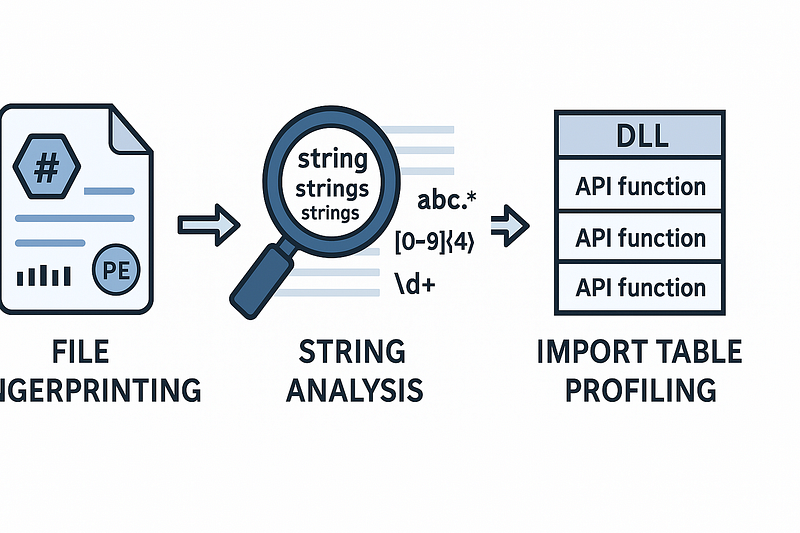
- Category: CTI
- Source article: https://medium.com/@1200km/deep-dive-automating-static-malware-analysis-with-three-python-tools-46a26c0a7f87
- Published: 2025-04-17
- Preserved media: 2 image(s), including cover images, screenshots, diagrams, and infographics where present.
- Preserved technical blocks: 17 code/configuration block(s).
Ecosystem Fit
This page mirrors the original Medium article into the 1200km.com Docusaurus ecosystem. The original article flow, images, screenshots, infographics, and technical blocks are preserved from the export.
Static malware analysis involves multiple stages, each revealing different facets of a sample’s behavior. Automating these stages ensures consistency, speed, and depth. Below, I present three Python tools that I’ve developed and open-sourced on GitHub. For each, you’ll find
-
Detailed tool overview(capabilities & code highlights)
-
Analysis stage served & why it matters
-
Key functions & outputs
-
Usage examples & dependencies
-
Links to Medium deep dives & GitHub repos
1. Basic File Information Gathering
**Analysis Stage:**Initial Triage & File Fingerprinting GitHub:https://github.com/anpa1200/Basic-File-Information-Gathering-Script Medium Guide to this stage of analysis:File Fingerprinting
Features
-
Cryptographic Hashes: MD5, SHA-1, SHA-256
-
Entropy Analysis: Shannon entropy to detect packing/encryption
-
Permissions: Human-readable UNIX file permissions
-
PE Metadata: Compilation timestamp, compiler/runtime, import hash, header offset, entry point
-
Magic Number Detection: Recognize 50+ common file types (PDF, PNG, ZIP, EXE, ELF, etc.)
-
Digital Signatures: Parse and report certificate details (subject, issuer, validity)
-
Packer Heuristics: Section entropy and name-based detection
-
Clean Output: ANSI‑free, well‑aligned table for CLI
Why It Matters
Security teams often receive hundreds of new binaries daily. This tool provides acomprehensive fingerprint— hashes, entropy, compiler info, and signature details — in under a second, prioritizing samples for deeper analysis and matching against threat feeds.
Installation
Download the script and install dependencies:
# Download the latest version
# Download the latest version
curl -O https://raw.githubusercontent.com/anpa1200/Basic-File-Information-Gathering-Script/main/Basic_inf_gathering.py
# (Optional) Clone the repository to get examples and LICENSE
# (Optional) Clone the repository to get examples and LICENSE
git
clone
 https://github.com/anpa1200/Basic-File-Information-Gathering-Script.git &&
cd
 Basic-File-Information-Gathering-Script
# Create and activate virtual environment (recommended)
python3 -m venv venv
source
 venv/bin/activate
# Install required packages
pip install lief
# For digital signature parsing
pip install cryptography
Usage & Output Example
curl -O https://raw.githubusercontent.com/anpa1200/Basic-File-Information-Gathering-Script/main/Basic_inf_gathering.py
pip install lief cryptography
python3 Basic_inf_gathering.py samples/malware.exe
Sample Output Snippet:
$

python3

Basic_inf_gathering.py

samples/malicious.exe
================================================================================

📄

FILE

INFORMATION

SUMMARY

📄

================================================================================
File Name            :

malicious.exe
File Path            :

/home/user/samples/malicious.exe
Import Hash          :

abcdef1234567890abcdef1234567890
MD5                  :

0123456789abcdef0123456789abcdef
SHA-1                :

fedcba9876543210fedcba9876543210fedcba98
SHA-256              :

...
File Size            :

1.23

MB
Magic Number         :

4D5A9000
File Type            :

Windows

Executable

(EXE)
Entropy              :

6.12

(✅

Normal)
Permissions          :

-rwxr--r--
PE Timestamp         :

2020-05-10 12:34:56
UTC

(✅

Legit)
Compiler

&

Language  :

MSVC

(Microsoft

Visual

C++)
Digital Signature    :

•

Subject Org.:

Example

Corp

•

Issuer Org. :

Example

CA

•

Validity    :

2020-01-01

→

2022-01-01

(Expired)
PE Header Offset     :

128

(0x80)
Entry Point          : RVA:

0x1200
,

VA:

0x401200
Packer Detection     :

Unpacked
================================================================================
2. String Analysis with String Analyzer
**Analysis Stage:**Artifact Extraction & IOC Discovery GitHub:https://github.com/anpa1200/String-Analyzer- Medium Guides:
Features
This script provides a comprehensive suite of string extraction and analysis capabilities:
-
String Extraction: Parses a binary file byte by byte to pull out all printable ASCII sequences of a configurable minimum length (default 4 characters). This helps you quickly surface embedded URLs, commands, file paths, and other human-readable artifacts.
-
Entropy Calculation: Calculates Shannon entropy for both the entire file and individual strings. High entropy may indicate packed or encrypted data blobs, guiding further unpacking or decryption efforts.
-
Regex-Based Pattern Detection:
-
IPv4 & IPv6 Addresses: Identifies potential IP indicators via strict regex, useful for mapping network-based indicators of compromise.
-
URLs & Domains: Captures HTTP/HTTPS endpoints embedded in the binary for phishing or command-and-control communication analysis.
-
Email Addresses: Finds credential or notification email references, often abused in social engineering or exfiltration tactics.
-
Windows Registry Keys: Detects registry access patterns (
HKLM\,HKCU\) to reveal persistence or configuration modifications. -
System Paths & Filenames: Matches common Windows system directories and executable extensions, uncovering potential file-dropping or auto-start locations.
-
Command Identification:
-
Windows API Calls: Recognizes a curated list of 300+ Win32 API functions, indicating possible dynamic loading or function invocation patterns.
-
CMD Commands: Filters built-in Windows shell commands (e.g.,
dir,copy,net user) to detect batch-like activity or script snippets. -
PowerShell Cmdlets: Flags PowerShell-specific commands (e.g.,
Get-Process,Invoke-Command) often used in modern attacks or post-exploitation scripts. -
Obfuscation Pattern Matching: Uses regex to detect bracketed, dotted, or substituted obfuscated IPs and URLs (e.g.,
h[.]xxp[:]//,dotnotations), exposing attempts to evade simple string-based detection. -
Automated Decoding:
-
Base64 Decoding: Automatically decodes long, valid Base64 candidates into readable strings, revealing embedded configuration or secondary payloads.
-
Hex Decoding: Converts hex-encoded sequences back to ASCII, unmasking hidden or encoded strings.
-
Suspicious Keyword Flagging: Cross-references extracted strings against a list of 300+ malware-related keywords (
ransomware,backdoor,exploit) to prioritize high-risk indicators. -
**AI Analysis Prompt Generation:**Formats filtered findings into a structured markdown prompt, ready to feed into an AI model for deeper behavioral analysis or report drafting. It includes entropy, categories, and actual items for context.
-
Dual Mode Output:
-
Unfiltered Mode: Dumps all extracted strings into a plain text file for manual triage.
-
Filtered Mode: Saves only categorized and relevant strings, reducing noise and focusing on actionable intelligence.
Installation
# Download the script
curl -O https://raw.githubusercontent.com/anpa1200/String-Analyzer-/main/string_analyser.py
# (Optional) Clone the repository for examples and LICENSE
git
clone
 https://github.com/anpa1200/String-Analyzer-.git &&
cd
 String-Analyzer-
# Create and activate virtual environment (recommended)
python3 -m venv venv
source
 venv/bin/activate
# No external dependencies required (uses only Python stdlib) (uses only Python stdlib)
Usage & Output Example
curl -O https://raw.githubusercontent.com/anpa1200/String-Analyzer-/main/string_analyser.py
python3 string_analyser.py
-
Enter path to the binary when prompted.
-
Choose mode:
-
Unfiltered: Dump all extracted strings to file.
-
Filtered: Group strings by category and save.
-
AI Prompt: Optionally generate an AI-ready analysis prompt.
-
Output: Strings and reports saved in
<basename>_strings.txtor custom filename.
### WINDOWS API COMMANDS:
- CreateFile
- ReadFile
### URLS:
-
http://malicious.example.com/loader
### OBFUSCATED:
- hxxp[:]//evil[.]domain
### DECODED_BASE64:
- c29tZS1jb25maWc= -> some-config
### SUSPICIOUS_KEYWORDS:
- payload
- shellcode
3. Import Table Profiling with PE Import Analyzer
**Analysis Stage:**API Surface Enumeration & Behavior Prediction GitHub:https://github.com/anpa1200/PE-Import-Analyzer Medium Guide:Static Analysis Guide
Features
-
Import Table Extraction: Uses LIEF to parse PE files and extract all imported DLLs and their functions.
-
DLL Summaries: Built-in explanations for core Windows DLLs (e.g.,
kernel32.dll,user32.dll,advapi32.dll,ntdll.dll,ws2_32.dll,wininet.dll, etc.). -
API Explanations: Up to 20 common API calls per DLL with concise descriptions.
-
Placeholder Expansion: Automatically pads each DLL’s API list to a minimum of 100 entries if needed.
-
Dangerous Function Flagging: Optionally include a section for known suspicious or high-risk API calls.
-
HTML & Plain Text Output: Interactive prompt to choose the output format and filename (default
<basename>.htmlor<basename>.txt). -
Customizable: Easily extend the
dll_api_explanationsdictionary with additional DLLs and APIs.
Installation
# Download the script
the script
curl -O https://raw.githubusercontent.com/anpa1200/PE-Import-Analyzer/main/PE-Import-Analyzer.py
# (Optional) Clone the repository for examples and LICENSE
git
clone
 https://github.com/anpa1200/PE-Import-Analyzer.git &&
cd
 PE-Import-Analyzer
# Create and activate virtual environment (recommended)
python3 -m venv venv
source
 venv/bin/activate
# Install dependencies
pip install lief
```bash
# Download the script
curl -O https://raw.githubusercontent.com/anpa1200/Malware_analysis/main/PE-Import-Analyzer.py
# (Optional) Clone the repository for examples and LICENSE
git
clone
 https://github.com/anpa1200/Malware_analysis.git &&
cd
 Malware_analysis
# Create and activate virtual environment (recommended)
python3 -m venv venv
source
 venv/bin/activate
# Install dependencies
pip install lief
Usage & Output Example
curl -O https://raw.githubusercontent.com/anpa1200/PE-Import-Analyzer/main/PE-Import-Analyzer.py
pip install lief
python3 PE-Import-Analyzer.py samples/malware.exe --html --dangerous
-
<path_to_pe_file>: Path to the target PE file. -
--html: Generate a styled HTML report (default is plain text). -
--dangerous: Include functions flagged as potentially dangerous (e.g., process/thread manipulation, cryptographic, injection APIs).
Interactive Steps
-
Launch the script with required arguments.
-
When prompted, confirm whether to include dangerous functions.
-
Choose output format (HTML or TXT).
-
Specify output filename or accept the default.
-
View the generated report in your terminal or browser.
Example
$ python3 Import_Extraction.py samples/malware.exe --html --dangerous
Include dangerous API
functions
? (
yes
/no):
yes
Output format? (html/txt): html
Output file (default: malware_imports.html): report.html
Report generated: report.html
Include dangerous API
functions
? (
yes
/no):
yes
Output format? (html/txt): html
Output file (default: malware_imports.html): report.html
Report generated: report.html
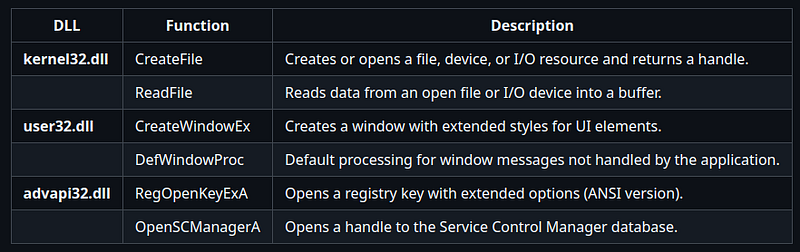
Example Text Report
--- Import Table Analysis ---
DLL: kernel32.dll

-
 CreateFile        : Creates
or
 opens a file, device,
or
 I
/
O resource
and

returns
 a handle.

-
 ReadFile          :
Reads
 data
from
 an
open
 file
or
 I
/
O device
into
 a buffer.
  ... (up
to

20
 functions)
DLL: user32.dll

-
 CreateWindowEx    : Creates an overlapped, pop
-
up,
or
 child
window

with
 extended styles.

-
 DefWindowProc     : Provides
default
 processing
for

window
 messages
not
 handled
by
 the
window
 procedure.
  ... (up
to

20
 functions)
[Additional DLL sections]
--------------------------
Example HTML Report
Putting It All Together
Automate these tools in a single script or CI pipeline forcomprehensive static triage:
# File fingerprinting
git
clone
 https://github.com/anpa1200/Basic-File-Information-Gathering-Script.git
python3 Basic_inf_gathering.py sample.bin > fingerprint.txt
# String analysis
python3 string_analyser.py sample.bin
# Import profiling
git clone
https://github.com/anpa1200/PE-Import-Analyzer.git
python3 PE-Import-Analyzer.py sample.bin --html --dangerous > imports.html
Each tool’s output feeds the next stage, creating arich dossierfor security teams to act on in minutes, not hours.
🔗GitHub Repos
-
Basic File Info:https://github.com/anpa1200/Basic-File-Information-Gathering-Script
-
String Analyzer:https://github.com/anpa1200/String-Analyzer-
-
PE Import Analyzer:https://github.com/anpa1200/PE-Import-Analyzer
🔗Medium Articles
-
File Fingerprinting:2025-04-01-static-malware-analysis-file-fingerprinting-3ddf9bdd7864.md
-
Static Analysis Guide:2025-03-29-static-malware-analysis-strings-analysis-e876640cfdb0.md
-
Obfuscation Techniques:2025-03-30-static-malware-analysis-obfuscation-51de3992065d.md
Happy analyzing and automating!