Infrastructure Pivoting: How CTI Analysts Expand From a Single IOC to a Full Attacker Network

- Category: CTI
- Source article: https://medium.com/@1200km/infrastructure-pivoting-how-cti-analysts-expand-from-a-single-ioc-to-a-full-attacker-netwo-1295d50ec29c
- Published: 2026-03-21
- Preserved media: 26 image(s), including cover images, screenshots, diagrams, and infographics where present.
- Preserved technical blocks: 58 code/configuration block(s).
Ecosystem Fit
This page mirrors the original Medium article into the 1200km.com Docusaurus ecosystem. The original article flow, images, screenshots, infographics, and technical blocks are preserved from the export.
The field manual for tracing attacker infrastructure — from one domain to dozens
Table of Contents
-
Introduction: Why Infrastructure Pivoting Is a Core CTI Skill
-
The Mental Model: Why Attackers Leave Trails
-
The Pivoting Workflow: Domain → IP → ASN → Certificates → Expanded Infrastructure
-
Pivot Type 1: Domain → IP Resolution
-
Pivot Type 2: Passive DNS — The History Book of the Internet
-
Pivot Type 3: IP → ASN / Hosting Reuse
-
Pivot Type 4: TLS Certificates — The Most Underused Pivot
-
Pivot Type 5: Subdomain Patterns and Enumeration
-
Pivot Type 6: Shodan / Censys / FOFA — Fingerprinting Infrastructure
-
Pivot Type 7: WHOIS and Registration Pattern Analysis
-
The Complete Tooling Stack
-
Full Worked Example: Tracing a C2 Network End-to-End
-
Automating the Workflow with Python
-
Common Pivoting Mistakes and Dead Ends
-
Interview-Ready: Answering “How Do You Discover Attacker Infrastructure?”
-
Quick Reference Cheatsheet
-
Conclusion
-
References and Further Reading
Introduction: Why Infrastructure Pivoting Is a Core CTI Skill
Every threat actor starts with a single observable artifact that gets reported: a phishing domain, a C2 IP, a malware hash. A junior analyst treats this as a list of IOCs to block. A senior CTI analyst treats it as a starting point — a thread that, when pulled correctly, unravels an entire attacker infrastructure.
This discipline is calledinfrastructure pivoting: the systematic process of using one known indicator to discover related, previously-unknown attacker infrastructure. Done well, it transforms a single domain into a map of dozens of C2 servers, staging hosts, and supporting infrastructure — most of which the attacker believes is still unknown.
Infrastructure pivoting matters because:
**Blocking known IOCs is reactive.**By the time an IOC is published, the attacker has likely already rotated that infrastructure. Adding a domain to a blocklist after it has been used is closing the barn door after the horse has left.
**Attacker infrastructure is expensive to build.**Registering domains, acquiring servers, configuring C2 frameworks, and establishing anonymization chains takes time, money, and operational effort. Attackers do not reinvent their infrastructure pattern for every campaign — they reuse hosting providers, registration habits, certificate patterns, and naming conventions. These reuse patterns are the analyst’s most powerful tool.
**Known infrastructure expands to unknown infrastructure through shared patterns.**A single confirmed C2 IP leads to the ASN it is hosted on → other IPs in the same block with similar fingerprints → domains that resolved to those IPs → TLS certificates shared across domains → a network of related infrastructure that the attacker did not intend to expose.
By the end of this guide, you will be able to start from any single IOC and systematically expand it into a comprehensive infrastructure picture.
The Mental Model: Why Attackers Leave Trails
Before learning the pivot techniques, understandwhythey work. Attackers leave infrastructure trails for three structural reasons:
Reason 1: Operational Consistency (Habit)
Every attacker has a provisioning workflow. When building infrastructure, they make choices:
-
Which hosting provider? (OVH, Vultr, DigitalOcean, Frantech, Leaseweb — each has a different risk profile for the attacker)
-
Which domain registrar? (Namecheap, Porkbun, GoDaddy, EPAG — often chosen for privacy protection or payment method acceptance)
-
Which payment method? (Cryptocurrency type, prepaid cards, stolen payment data — each leaves financial traces)
-
Which certificate authority? (Let’s Encrypt, ZeroSSL, Sectigo — and how the certificates are configured)
-
How are domains named? (Mimicking legitimate vendor names, using common words, following a specific pattern)
These choices tend to beconsistent across campaignsbecause changing them is operationally disruptive. An analyst who knows an actor’s provisioning preferences can find new infrastructure before it is used in an attack.
Reason 2: Resource Constraints (Budget and Time)
Sophisticated actors budget their infrastructure investment. They do not acquire hundreds of unique IPs from hundreds of unique ASNs for every campaign — that would be prohibitively expensive and operationally complex. Instead, they:
-
Cluster operations on a small number of preferred hosting providers
-
Reuse certificate templates, configuration files, and server setups
-
Register multiple campaign domains simultaneously (creating registration timestamp clusters)
-
Reuse C2 framework configurations across operations (creating consistent fingerprints)
Reason 3: Technical Fingerprinting (Configuration Leakage)
Every server configured with a C2 framework leaves technical fingerprints:
-
The HTTP response headers a C2 server returns
-
The TLS configuration parameters it presents
-
The ports it listens on and the service banners it returns
-
The SSL certificate’s Common Name, Subject Alternative Names, and issuance timing
These fingerprints are indexed continuously by Shodan, Censys, and FOFA — meaning that an attacker’s C2 server is often findable from its technical fingerprint alone, before any victim has connected to it.
The Analyst’s Advantage
An attacker who has compromised 100 targets has used the same C2 infrastructure to communicate with all 100 victims. The analyst who discovers that infrastructure is not finding 1/100 of the attack — they are finding all of it at once.
The Pivoting Workflow: Domain → IP → ASN → Certificates → Expanded Infrastructure
The core workflow is a branching chain. Each pivot point generates new observables, each of which opens new pivot paths. The goal is to follow every thread until you reach diminishing returns — infrastructure that is shared with too many unrelated actors to be attributable.
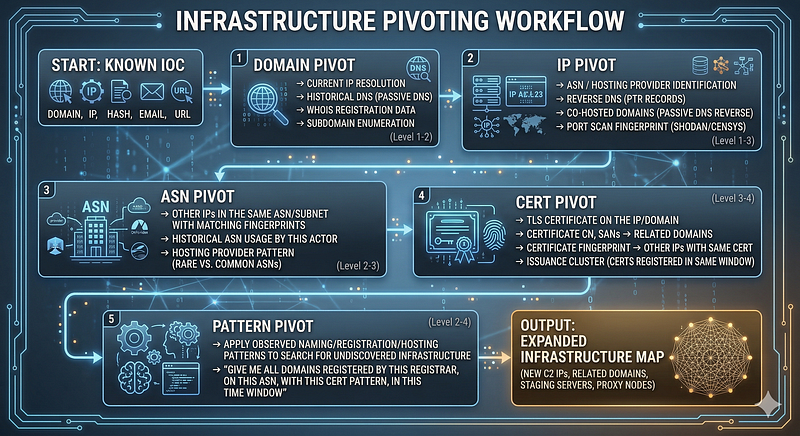
Each step generates artifacts that feed the next step. The workflow terminates when:
-
All threads lead to infrastructure shared with unrelated actors (common hosting, shared IP blocks)
-
All threads are confirmed exhausted
-
You have reached infrastructure that was not known before and can be attributed to the same actor cluster
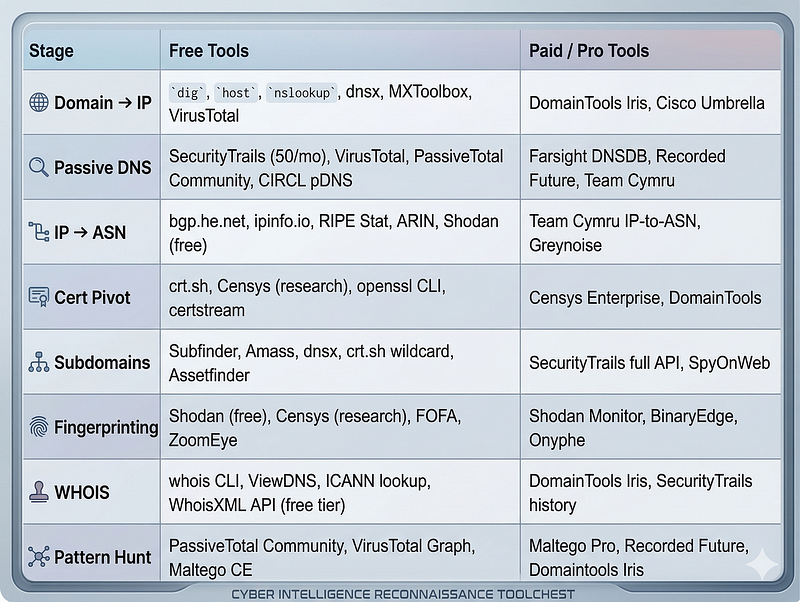
Tools by Workflow Stage
Pivot Type 1: Domain → IP Resolution
> Tools: dig · host · nslookup · dnsx · MXToolbox · VirusTotal · SecurityTrails · DNSlytics · ViewDNS
Current Resolution
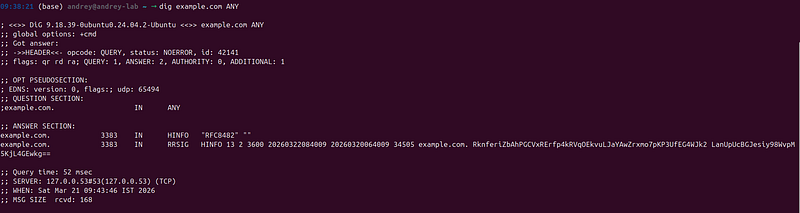
The most basic pivot: what IP address does this domain currently resolve to?
# Basic resolution
dig example.com A +
short

#
All
 record types
dig example.com
ANY
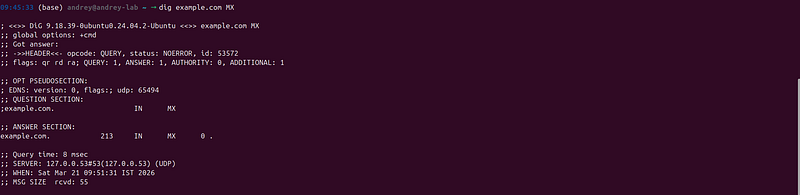
# MX records (mail infrastructure - attackers use for phishing)
dig example.com MX
# Check TTL (short TTL = fast-flux; attacker is rotating IPs frequently)
dig example.com A |
grep
 -E
"IN\s+A"

# dnsx - fast bulk resolution (ProjectDiscovery)
echo

"example.com"
 | dnsx -a -resp -silent

# host - simpler alternative to dig
host example.com

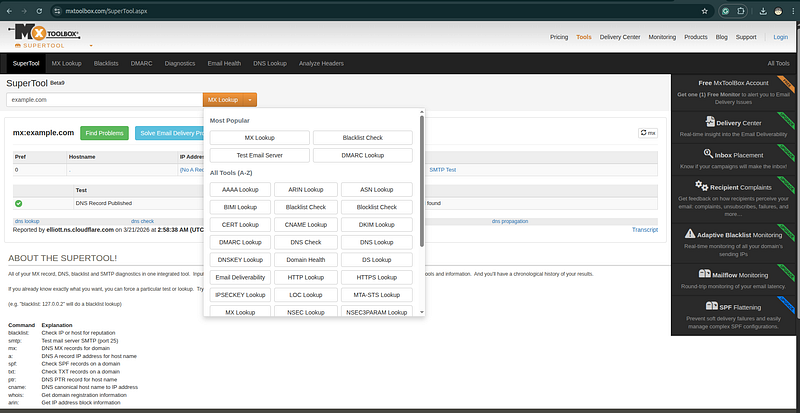
MXToolbox online (no install):https://mxtoolbox.com/SuperTool.aspx
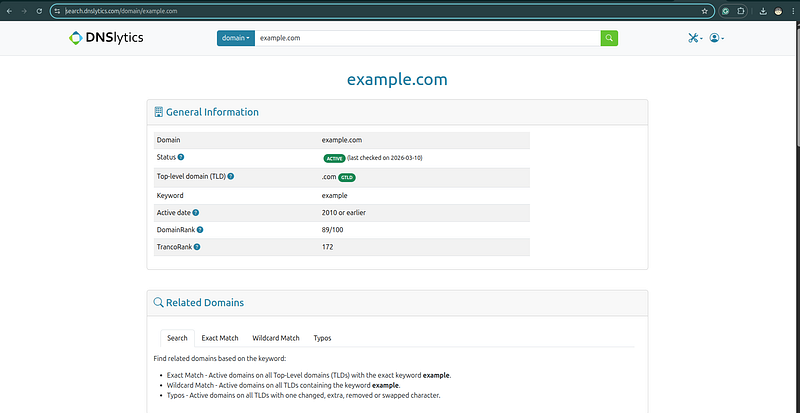
DNSlytics full DNS record view:https://dnslytics.com/domain/example.com
VirusTotal DNS tab:https://www.virustotal.com/gui/domain/example.com/details
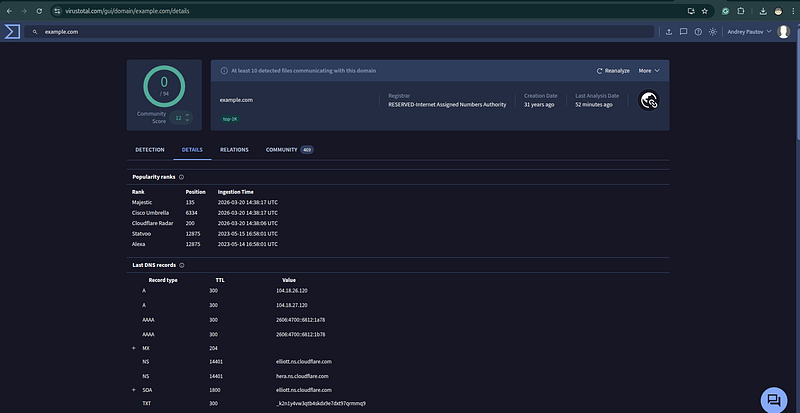
What TTL tells you:
-
TTL 60–300 seconds = likely fast-flux rotation, attacker is actively cycling IPs
-
TTL 3600+ = stable infrastructure, more likely to persist for investigation
-
Consistent TTL across multiple actor domains = infrastructure provisioning fingerprint
Nameserver Analysis
The nameserver a domain uses is often an overlooked pivot point. Actors who register multiple domains for a campaign often configure them all with the same custom nameserver — a distinctive fingerprint.
# Check nameserver
dig example.com NS +
short

elliott.
ns
.
cloudflare
.
com
.
hera.
ns
.
cloudflare
.
com
.
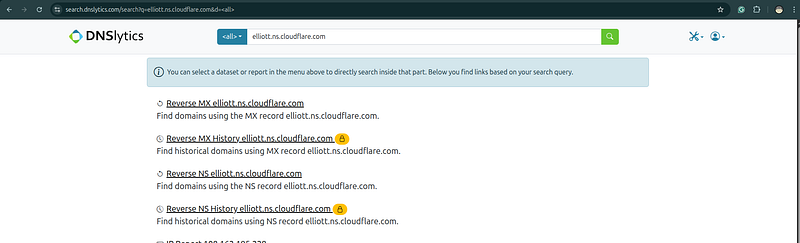
Lookup: who else uses this nameserver? → SecurityTrails:https://securitytrails.com/list/ns/elliott.ns.cloudflare.com
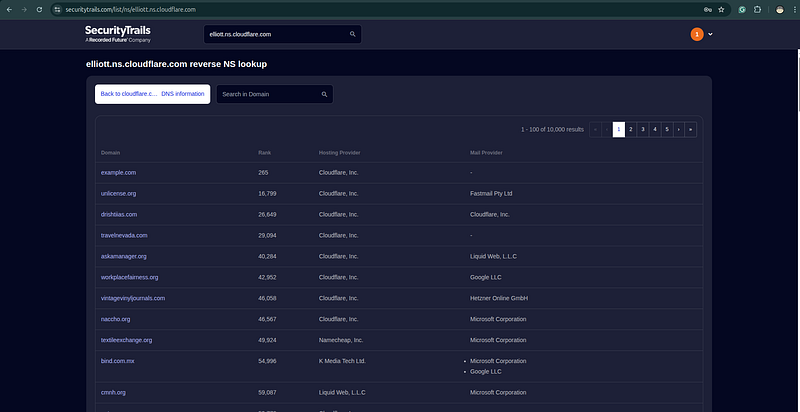
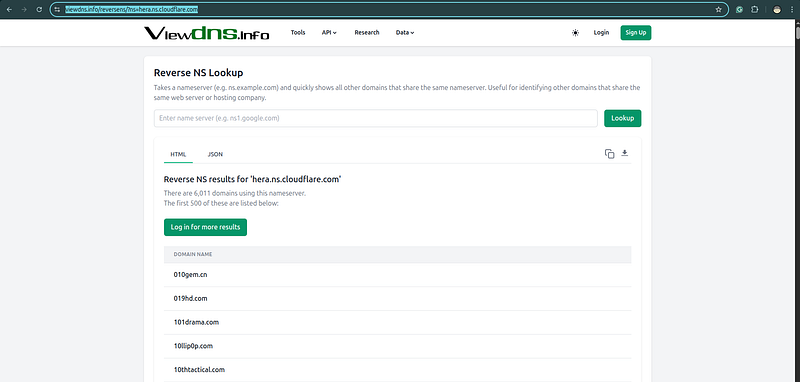
→ PassiveTotal: Subdomains/Infrastructure query on the NS record → DNSlytics reverse NS:https://dnslytics.com/reverse-ns/elliott.ns.cloudflare.com
→ ViewDNS reverse NS:https://viewdns.info/reversens/?ns=hera.ns.cloudflare.com
SpyOnWeb:https://spyonweb.com/elliott.ns.cloudflare.com
If a threat actor registers their own nameserver (e.g.,ns1.actorns[.]com), every domain pointing to that nameserver is part of their infrastructure — regardless of other pivot relationships.
Pivot Type 2: Passive DNS — The History Book of the Internet
> Tools: SecurityTrails · PassiveTotal / RiskIQ · VirusTotal · Farsight DNSDB · CIRCL pDNS · Validin · Shodan · Cisco Umbrella Investigate
What Passive DNS Is
Passive DNS is a collection of historical DNS resolution records. When a recursive DNS resolver answers a query, passive DNS sensors log the question and answer: “Domain X resolved to IP Y at timestamp Z.” These logs accumulate over months and years, creating a historical record of who pointed where, when.
This is the analyst’s most powerful basic pivot tool, because:
-
Attackers rotate infrastructure after detection— but passive DNS captures what the domain pointed tobeforerotation
-
Multiple domains pointing to the same IP reveals clustering— even if the domains are named differently, passive DNS shows they were co-hosted
-
Timing reveals registration campaigns— domains registered and resolved within hours of each other are likely the same operation
Primary Passive DNS Sources
Practical Passive DNS Queries
Query 1: What IPs has this domain resolved to historically?
SecurityTrails:  https://securitytrails.com/domain/DOMAIN/history/a
PassiveTotal API:
  GET /v2/dns/passive?query=DOMAIN
  → Returns
all historical A record resolutions with timestamps
VirusTotal
:
https
:
//www.virustotal.com/gui/domain/DOMAIN/details  (DNS tab)
CIRCL
pDNS
:
https
:
//www.circl.lu/pdns/query/DOMAIN  (free, no login)
Validin
:
https
:
//app.validin.com/detail?s=DOMAIN
Farsight
DNSDB
:
https
:
//www.dnsdb.info  (community: 1000 free lookups/day)
Query 2: What other domains have resolved to this IP?
This is the critical reverse pivot: given a known C2 IP, what other domains have pointed to it?
SecurityTrails:  https://securitytrails.com/list/ip/IP_ADDRESS
PassiveTotal:
  GET /v2/dns/passive?query=IP_ADDRESS
  → Returns
all domains that have historically resolved to this IP
VirusTotal
:
https
:
//www.virustotal.com/gui/ip-address/IP/relations
                 →
"Resolutions"
 tab
CIRCL
pDNS
:
https
:
//www.circl.lu/pdns/query/IP_ADDRESS
Validin
:
https
:
//app.validin.com/detail?s=IP_ADDRESS
DNSlytics
:
https
:
//dnslytics.com/reverse-ip/IP_ADDRESS
ViewDNS
:
https
:
//viewdns.info/reverseip/?host=IP_ADDRESS
Shodan
:          shodan search
"ip:IP_ADDRESS"
 → Hostnames section
**Output interpretation:**If a known C2 IP shows 12 domains historically resolving to it, and you confirmed 3 as actor infrastructure, examine the remaining 9 — they are likely the same actor’s other campaign domains.
Query 3: What other IPs has this domain resolved to over time?
SecurityTrails DNS History → A Record History
PassiveTotal: domain query
with

date

range
An actor who migrates a campaign domain from IP A to IP B reveals both IPs as their infrastructure. Examine IP B for all other domains — the actor may have moved other campaign domains to the same new server.
Reading Passive DNS Timestamps
The timing of DNS resolutions is itself a pivot signal:
SCENARIO: Three domains registered
on
 the same
day
,
all
 resolving
to
 the same IP
within
 a
4
-
hour
 window.
domain
-
alpha[.]com    →
185.220
.100
.x  (registered
2024
-03
-15

08
:
22
 UTC)
document
-
update
[.]net →
185.220
.100
.x  (registered
2024
-03
-15

09
:
47
 UTC)
security
-
patch[.]org  →
185.220
.100
.x  (registered
2024
-03
-15

11
:
03
 UTC)
INTERPRETATION: This
is
 an infrastructure deployment event.
All
 three domains
are
 likely the same actor, same campaign, same C2 server. Even if
only

one
was confirmed malicious, the other two
are
 high
-
confidence actor infrastructure.
Pivot Type 3: IP → ASN / Hosting Reuse
> Tools: bgp.he.net · ipinfo.io · RIPE Stat · ARIN · ipapi.co · Shodan · Censys · FOFA · Greynoise · BinaryEdge · Team Cymru
Why ASN Analysis Matters
An ASN (Autonomous System Number) identifies a network under a single administrative entity — typically a hosting provider, ISP, or organization. When an actor consistently uses infrastructure in a specific ASN, that ASN becomes an attribution signal.
But the real value is not blocking a single IP — it is identifying all IPs in the same /24 or /16 subnet that share the actor’s fingerprint, and finding other actor infrastructure that has not yet been used in an observed attack.
IP Range and ASN Lookups
# Get ASN for an IP
whois IP_ADDRESS | grep -E
"origin:|AS[0-9]+"
# BGP.he.net - best free UI for ASN investigation + routing history
https://bgp.he.net/ip/IP_ADDRESS
# IPinfo.io - fast API-accessible lookup, geolocation + org
curl https://ipinfo.io/IP_ADDRESS/json
# ipapi.co - ASN + org name, free REST API
curl https://ipapi.co/IP_ADDRESS/json/
# RIPE Stat (authoritative for RIPE region / European IPs)
https://stat.ripe.net/IP_ADDRESS
# ARIN (authoritative for ARIN region / North American IPs)
https://search.arin.net/rdap/?query=IP_ADDRESS
# Team Cymru IP-to-ASN mapping (free, extremely fast, bulk-capable)
whois -h whois.cymru.com
" -v IP_ADDRESS"
# Or bulk file: https://team-cymru.com/community-services/ip-asn-mapping/
# Greynoise - is this IP a scanner/noise source or targeted infrastructure?
# Important: confirm actor-owned IPs before pivoting on them
https://viz.greynoise.io/ip/IP_ADDRESS
# Get all IPs in the same /24 with Shodan
shodan search
"net:185.220.100.0/24"
# BinaryEdge - alternative to Shodan, sometimes better data on specific ASNs
https://app.binaryedge.io/services/query?query=asn:ASXXXXX
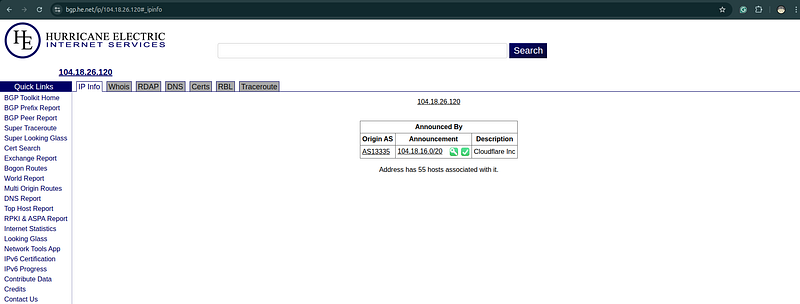
Shodan ASN-Based Pivoting
Once you have the ASN, search for all IPs in that ASN that match the technical fingerprint of the known C2:
# Shodan:
all
 IPs
in
 an ASN
with

specific
 port
open
 (e.g.,
8443
 — common C2)
shodan
search
 "asn:AS13335 port:8443"
# Combined: ASN
+

specific
 HTTP header
pattern
shodan
search
 "asn:AS12345 http.title:'Index of /'"
# Combined: ASN
+
 TLS certificate
pattern
shodan
search
 "asn:AS12345 ssl.cert.subject.cn:*.evil-domain.com"
# Shodan: find
all
 IPs
with
 same Cobalt Strike fingerprint
in

specific
 ASN
shodan
search
 "asn:AS12345 product:Cobalt Strike Beacon"
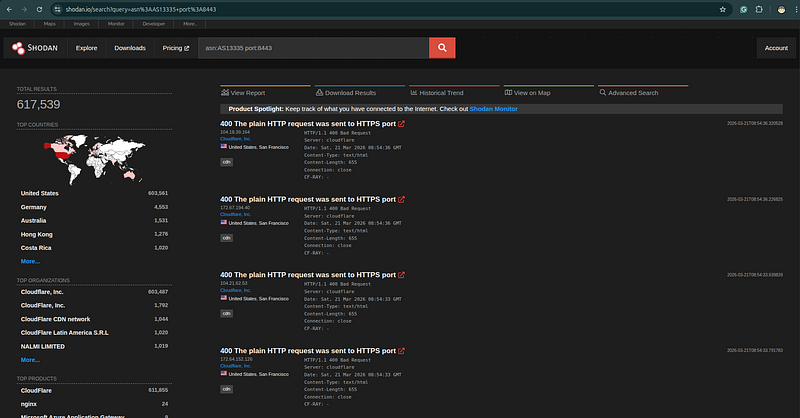
Hosting Provider Pattern Analysis
Different types of actors prefer different hosting providers. Understandingwhyhelps you predict where to look:
An actor who consistently uses Frantech (AS9009) is making a deliberate choice — document it and look for other Frantech IPs with similar fingerprints.
Subnet Clustering
When an actor acquires multiple IPs for a campaign, they often come from the same /24 subnet — either because they purchased a block, or because the hosting provider allocates IPs sequentially and they ordered multiple VPS instances in rapid succession.
# Given confirmed C2: 185.220.100.52
# Check the /24 for similar fingerprints
shodan search
"net:185.220.100.0/24 port:443"
# Then examine each live host in the subnet for C2 framework fingerprints
# Many will be unrelated - focus on matching technical fingerprints
Pivot Type 4: TLS Certificates — The Most Underused Pivot
> Tools: crt.sh · Censys · Shodan · openssl CLI · certstream · Facebook CT Monitor · Google CT log · Entrust CT search
Why TLS Certificates Are Goldmines
A TLS certificate contains structured metadata: who it was issued to (Common Name, Subject Alternative Names), when it was issued, and by which CA. Certificate Transparency logs record every publicly issued certificate. This creates a comprehensive, searchable index of every certificate ever issued — including certificates for attacker infrastructure.
The pivot opportunities:
-
Subject Alternative Names (SANs): A certificate issued for
evil-domain.commay listadmin.evil-domain.comandc2.evil-domain.comin its SANs, revealing infrastructure the analyst had no other way to find. -
Certificate fingerprint (SHA-1/SHA-256): Two different IPs presenting the same certificate means the operator moved the server but forgot to rotate the certificate. One confirmed C2 IP → find the certificate → find all IPs serving that certificate.
-
Issuance timing clusters: An attacker who sets up a campaign registers multiple domains and then issues certificates for them, often within a short window. Searching for certificates issued to domains with similar naming patterns in a short time window reveals the full campaign scope.
-
Certificate subject organization: Self-signed certificates and certificates from specific CAs with specific organization names are actor fingerprints.
Certificate Transparency — Primary Tools
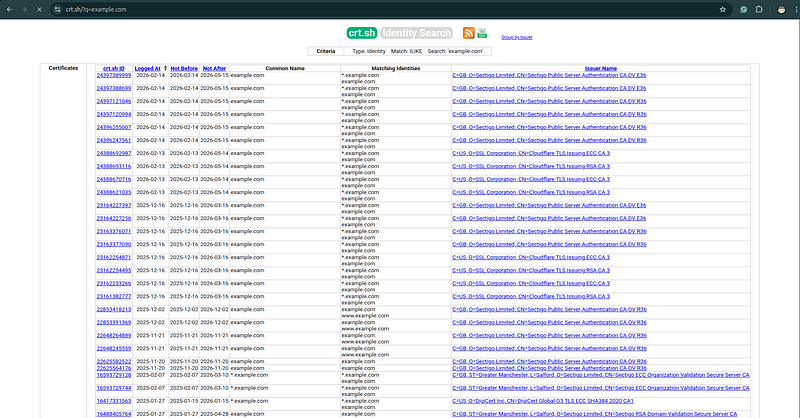
crt.sh— Free, comprehensive CT log search (no account needed):
# Find all certificates for a domain and its subdomains
https://crt.sh/?q=%.evil-domain.com
# Find certificates issued to a specific organization
https://crt.sh/?q=Acme+Corp&match=LIKE
# Find by SHA-1 or SHA-256 fingerprint
https://crt.sh/?q=SHA256_FINGERPRINT
# API access - returns JSON array of all matching certs
curl
"https://crt.sh/?q=%.evil-domain.com&output=json"
 | jq
'.[].common_name'
# Extract all unique names (CN + SANs) from CT results
curl
"https://crt.sh/?q=%.evil-domain.com&output=json"
 \
  | jq -r
'.[].name_value'
 |
tr

','

'\n'
 |
sort
 -u
certstream— Real-time CT log streaming (catch new actor certs as they are issued):
# Watch for new certificates matching a pattern — catches infrastructure at setup time
import
 certstream
def

callback
(
message, context
):

if
 message[
'message_type'
] ==
"certificate_update"
:
        domains = message[
'data'
][
'leaf_cert'
][
'all_domains'
]

for
 d
in
 domains:

if

'banklogin'

in
 d
or

'secure-update'

in
 d:

print
(
f"[CERT STREAM]
{d}
"
)
certstream.listen_for_events(callback, url=
"wss://certstream.calidog.io/"
)
Entrust CT Search— good alternative to crt.sh for cross-CA searches:
https://ui.ctsearch.entrust.com/ui/ctsearchui
# Supports: domain, organization, fingerprint, serial number search
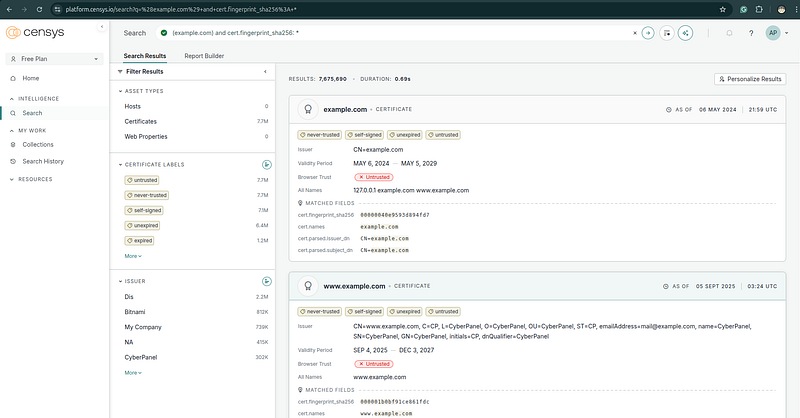
Censys Certificate Search— Most powerful for analyst workflows:
# Find all IPs presenting a specific certificate
services.tls.certificates.leaf_data.subject.common_name:

"evil-domain.com"
# Find certificates with specific SANs
services.tls.certificates.leaf_data.names:

"evil-domain.com"
# Find certificates issued in a specific time window with a naming pattern
services.tls.certificates.leaf_data.subject.common_name:

/.*update.*/
AND services.tls.certificates.leaf_data.issuer.common_name:

"Let's Encrypt"
# Find IPs with self-signed certificates using actor's naming convention
services.tls.certificates.leaf_data.issuer_dn

=

services.tls.certificates.leaf_data.subject_dn
AND services.tls.certificates.leaf_data.subject.common_name:

"evil-domain.com"
Shodan TLS pivoting:
# Find
all
 hosts
with
 a
specific
 certificate SHA
-256
 fingerprint
shodan
search
 "ssl.cert.fingerprint:SHA256_HERE"
# Find
all
 hosts
with
 certificate issued
to
 same domain
pattern
shodan
search
 "ssl.cert.subject.cn:*.evil-domain.com"
# Find certificates
from
 the same actor based
on
 organization field
shodan
search
 "ssl.cert.subject.organization:\"Acme Corp\""
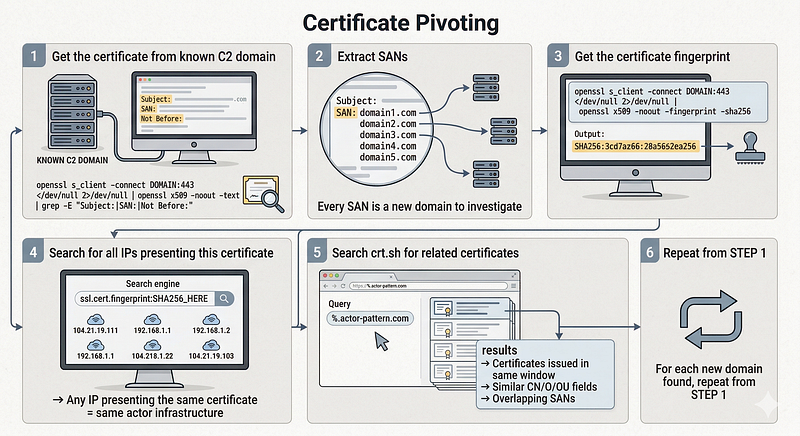
The Certificate Pivot Workflow
STEP
1
:
Get
 the certificate
from
 the known C2 domain
  openssl s_client
-
connect
 DOMAIN:
443

<
/
dev
/
null

2
>
/
dev
/
null
 \

|
 openssl x509
-
noout
-
text
|
 grep
-
E "Subject:|SAN:|Not Before:"
STEP
2
: Extract SANs
-
 these
are
 additional domains
on
 the certificate

Every
 SAN
is
 a
new
 domain
to
 investigate
STEP
3
:
Get
 the certificate fingerprint
  openssl s_client
-
connect
 DOMAIN:
443

<
/
dev
/
null

2
>
/
dev
/
null
 \

|
 openssl x509
-
noout
-
fingerprint
-
sha256
STEP
4
:
Search

for

all
 IPs presenting this certificate
  shodan
search
 "ssl.cert.fingerprint:SHA256_HERE"
  →
Any
 IP presenting the same certificate
=
 same actor infrastructure
STEP
5
:
Search
 crt.sh
for
 related certificates
  Query:
%
.actor
-
pattern.com
  → Look
for
 certificates issued
in
 the same
time

window
  → Certificates
with

similar
 CN
/
O
/
OU fields
  → Certificates
with
 overlapping SANs
STEP
6
:
For

each

new
 domain found, repeat
from
 STEP
1
Let’s Encrypt as an Attacker Fingerprint
The majority of modern attacker infrastructure uses Let’s Encrypt certificates — they are free, automated, and require no identity verification. But the combination of Let’s Encrypt issuance + specific domain naming pattern + specific hosting ASN can be a distinctive actor fingerprint when all three are consistent.
Additionally, Let’s Encrypt certificates are valid for 90 days. An actor who auto-renews will generate a new CT log entry every 90 days, providing ongoing visibility into infrastructure that is still active.
Pivot Type 5: Subdomain Patterns and Enumeration
> Tools: Subfinder · Amass · dnsx · httpx · Assetfinder · crt.sh · SecurityTrails · VirusTotal · PassiveTotal · Shosubgo · theHarvester
Why Subdomains Reveal Infrastructure Architecture
Threat actors structure their infrastructure with subdomains that reflect operational function:
-
c2.evil-domain.com— C2 server -
dl.evil-domain.com— Payload download server -
mail.evil-domain.com— Phishing mail server -
admin.evil-domain.com— Actor's own management interface -
cdn.evil-domain.com— Staging/delivery server mimicking a CDN
Discovering subdomains of a known actor domain expands the infrastructure picture beyond the initial C2 and reveals the full operational architecture.
Subdomain Discovery Techniques
Passive discovery (no active probing of actor infrastructure):
# SecurityTrails — best passive subdomain data
https://securitytrails.com/domain/evil-domain.com/subdomains
# API:
curl
"https://api.securitytrails.com/v1/domain/evil-domain.com/subdomains"
 \
  -H
"apikey: YOUR_KEY"
 | jq
'.subdomains[]'
# VirusTotal subdomain search
https://www.virustotal.com/gui/domain/evil-domain.com/relations
# Look under "Subdomains"
# crt.sh wildcard - reveals all subdomains that have ever had a certificate issued
curl
"https://crt.sh/?q=%.evil-domain.com&output=json"
 \
  | jq -r
'.[].name_value'
 |
tr

','

'\n'
 | sed
's/^\*\.//'
 |
sort
 -u
# PassiveTotal subdomain search
https://community.riskiq.com/search/evil-domain.com/subdomains
# Assetfinder (Tom Hudson) - lightweight, fast passive source aggregation
assetfinder --subs-only evil-domain.com
# theHarvester - broader OSINT including emails, subdomains, IPs from multiple sources
theHarvester -d evil-domain.com -b all
# Shosubgo - uses Shodan API to find subdomains from SSL certificates
shosubgo -d evil-domain.com -s YOUR_SHODAN_KEY
[theHarvester: Your Essential Tool for OSINT and Reconnaissance in Cybersecurity Learn how to leverage theHarvester to gather emails, subdomains, IPs, and more from open sources
DNS brute-forcing (only on confirmed attacker infrastructure — not on victim domains):
# Subfinder — passive subdomain enumeration aggregator (50+ sources)
subfinder -d evil-domain.com -all -recursive -o subs.txt
# Amass - active + passive with extensive source integration
amass enum -passive -d evil-domain.com
amass enum -active -d evil-domain.com
# Only on actor infrastructure
# dnsx - fast resolution of discovered subdomains + A record extraction
cat
 subs.txt | dnsx -a -resp -silent
# httpx - probe which discovered subdomains are live web servers
cat
 subs.txt | httpx -silent -status-code -title -tech-detect
# Combine passive enumeration sources and resolve in one pipeline:
subfinder -d evil-domain.com -silent | \

cat
 - <(curl -s
"https://crt.sh/?q=%.evil-domain.com&output=json"
 | \
    jq -r
'.[].name_value'
 |
tr

','

'\n'
 | sed
's/^\*\.//'
) | \

sort
 -u | dnsx -a -resp -silent
[OWASP Amass Project guide In-depth Attack Surface Mapping and Asset Discovery.
Naming Pattern Analysis
Subdomain naming patterns reveal actor conventions. If you observe:
-
login.evil-domain.com -
portal.evil-domain.com -
secure.evil-domain.com -
webmail.evil-domain.com
…you can predict thatvpn.evil-domain.com,remote.evil-domain.com, andadmin.evil-domain.commay also exist — and more importantly, you can apply this naming pattern when searching forotheractor domains:
“Find me all domains registered on the same ASN, with the same nameserver, that have subdomains following this login/portal/secure pattern.”
Naming Convention Pivoting to New Domains
If an actor uses domains like:
-
microsoft-update[.]net -
windows-security[.]org -
office365-login[.]com
The pattern is:[legitimate-brand]-[IT-function].[common-TLD]
You can search for undiscovered actor domains using this pattern:
SecurityTrails DNS
Search
:
  Domain
contains
: "microsoft"
AND
 "update"
  Registered:
last

90
 days
  Resolves
to
: ASN matching known actor hosting preference
Pivot Type 6: Shodan / Censys / FOFA — Fingerprinting C2 Infrastructure
> Tools: Shodan · Censys · FOFA · ZoomEye · BinaryEdge · Onyphe · Greynoise · JARM · ja3er.com · LeakIX
The Most Powerful Pivot: Finding C2 Before It’s Used
Shodan, Censys, and FOFA continuously scan the entire internet and index every exposed service. They record HTTP response headers, TLS certificate details, port availability, and service banners for every accessible host.
When a threat actor sets up a new C2 server, it gets scanned by these services before it is ever used in an attack. An analyst with the right queries can find attacker infrastructure at the time of setup — not after the first victim is compromised.
Cobalt Strike Fingerprinting
Cobalt Strike is one of the most widely used C2 frameworks. Even when configured with custom Malleable C2 profiles, it leaves fingerprints that can be identified:
# Default Cobalt Strike HTTPS listener fingerprint
# CS serves a specific certificate format and responds with specific headers
shodan search
"product:\"Cobalt Strike Beacon\""
# Cobalt Strike with specific malleable profile (based on known HTTP response)
shodan search
"http.html:\"<title>404 Not Found</title>\" port:443 ssl"
# Cobalt Strike JA3 fingerprint (more reliable than header-based)
# JA3: 72a7c4bb3e61c2b01aef3f76ae7d50c2 is a known CS fingerprint
shodan search
"ssl.jarm:07d14d16d21d21d07c42d41d00041d24a458a375eef0c576d23a7bab9a9fb1"
# Censys: Cobalt Strike beacon detection
services.tls.certificates.leaf_data.subject.
common_name
:

"Major Cobalt Strike"
# OR based on default certificate organization
services.tls.certificates.leaf_data.subject.
organization
:

"cobaltstrike"
JARM Fingerprinting
JARM is an active TLS fingerprinting tool developed by Salesforce that generates a unique fingerprint for a TLS server based on its specific implementation and configuration. C2 frameworks running on default or near-default configurations produce consistent JARM hashes.
# Install JARM
git
clone
 https://github.com/salesforce/jarm
# Fingerprint a server
python3 jarm.py TARGET_DOMAIN 443
# Known JARM hashes for common C2 frameworks:
# Cobalt Strike: 07d14d16d21d21d07c42d41d00041d24a458a375eef0c576d23a7bab9a9fb1
# Metasploit:    07d19d1ad21d21d00042d43d000000300c68d0a09e4253b6c3e8ad2928bfdc3
# Sliver:        29d29d15d29d29d00029d29d29d29dea7c4eb8f7f2ef42d7b01f8f6e2a2c82d
# Shodan search by JARM hash
shodan search
"ssl.jarm:JARM_HASH_HERE"
# → Returns all IPs currently presenting this exact TLS configuration
HTTP Response Header Fingerprinting
C2 frameworks and attacker-operated servers often respond with distinctive HTTP headers — especially on non-standard ports or when using default/near-default configurations.
# Find servers
with

specific
 custom header
pattern
shodan
search
 "http.headers.x-custom-header: specific-value"
# Find servers
with

no
 Server header (unusual
-
 worth investigating
on

specific
 ASN)
shodan
search
 "asn:AS12345 -http.server"
# Find servers responding
with

default
 Cobalt Strike
404
 page
shodan
search
 "http.html_hash:-2032435768"
# Censys: servers
with

specific
 HTTP response
services.http.response.headers.server: "nginx"
AND
 services.port:
8443
AND
 services.tls.certificates.leaf_data.issuer.common_name: "Let's Encrypt"
AND
 autonomous_system.asn:
12345
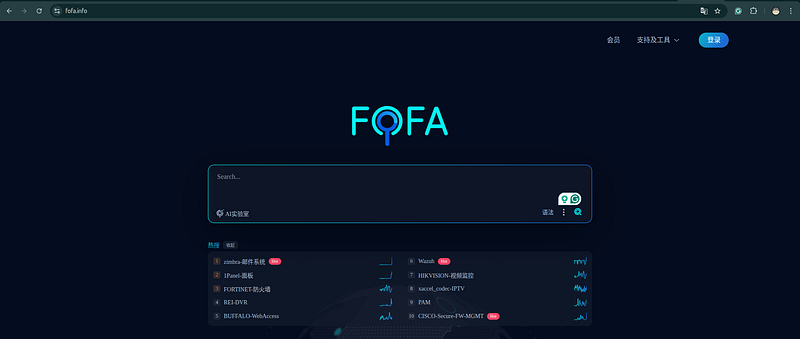
FOFA (Chinese Internet Intelligence Platform)
FOFA indexes a significant portion of the Chinese-reachable internet and provides search syntax particularly useful for finding C2 infrastructure popular with APT actors:
# FOFA query syntax examples:
# Find servers with specific header
header
=
"X-Custom-Header: value"
# Find Cobalt Strike based on response
app
=
"Cobalt-Strike-Beacon"
# Combined: specific ASN + port + header
asn
=
"AS12345"
 && port=
"8443"
 && header=
"Server: Microsoft-IIS/8.5"
# IP range + certificate subject
cert
=
"evil-domain.com"
 && country=
"US"
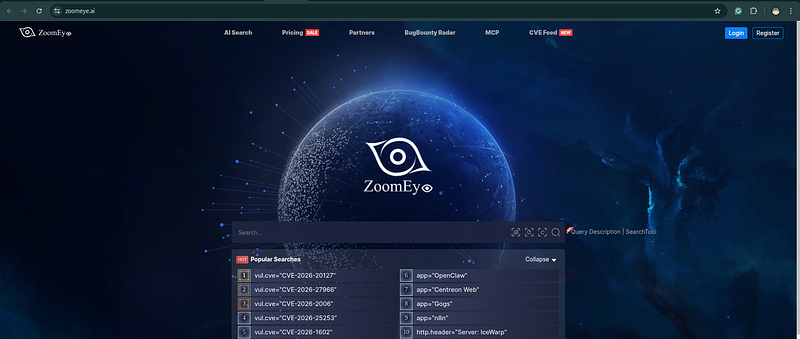
ZoomEye — Chinese Internet Intelligence (Broader Asian Coverage)
ZoomEye is FOFA’s main competitor — often surfaces infrastructure in Asian hosting providers and CDNs that FOFA misses:
# ZoomEye query syntax:
app:
"Cobalt Strike Beacon"
port:
8443
 ssl:
"evil-domain.com"
hostname:
"evil-domain.com"
ip:
"185.220.101.0/24"
 + port:
443
BinaryEdge — Alternative Port Scanning Database
BinaryEdge independently scans the internet and often captures services at different timestamps than Shodan — useful for confirming infrastructure presence or finding short-lived hosts:
# BinaryEdge search:
https
:
//app.binaryedge.io/services/
query
?
query
=
ip
:
185.220
.
101.0
/
24
+
port
:
8443
https
:
//app.binaryedge.io/services/
query
?
query
=
ssl_subject_cn
:
evil-domain.com
# BinaryEdge API:
curl
"https://api.binaryedge.io/v2/query/search?query=ssl_subject_cn:evil-domain.com"
 \
  -H
"X-Key: YOUR_KEY"
Onyphe — European-focused Internet Intelligence
Onyphe indexes both passive DNS and active scanning, with good European IP coverage:
# Onyphe query syntax:
category:datascan ip:185.220.101.47
category:datascan domain:evil-domain.com
category:resolver ip:185.220.101.47  (passive DNS)
Greynoise — Separating Noise from Targeted Activity
Greynoise is a critical complement to Shodan: it tells you whether an IP is a mass internet scanner (noise) or targeted/purposeful infrastructure:
# Before pivoting on an IP from Shodan, check Greynoise:
https://viz.greynoise.io/ip/IP_ADDRESS
# If Greynoise tags it "Benign" or "Malicious Scanner" → it's mass scanning noise, not actor infra
# If Greynoise has no data → more likely to be targeted C2 or staging infrastructure
# API: curl "https://api.greynoise.io/v3/community/IP_ADDRESS" -H "key: YOUR_KEY"
LeakIX — Service Exposure and Misconfiguration Detection
LeakIX indexes exposed services with a focus on misconfigurations — useful for finding actor-operated servers with exposed admin panels or unintended services:
https:
/
/
leakix.net
/
search
?
scope
=
leak
&
q
=
+
ssl.domain:evil
-
domain.com
https:
/
/
leakix.net
/
search
?
scope
=
service
&
q
=
+
ip:
185.220
.101
.47
Pivot Type 7: WHOIS and Registration Pattern Analysis
> Tools: whois CLI · ViewDNS · DomainTools · SecurityTrails · ICANN RDAP · WhoisXML API · SpyOnWeb · DomainTools Iris · AnalyzeID · HackerTarget
What WHOIS Reveals (and What It Doesn’t)
Modern WHOIS data is often heavily redacted due to GDPR and registrar privacy services. However, even redacted WHOIS contains pivoting value:
-
Registrar identity: Which registrar was used? (Namecheap, Porkbun, GoDaddy, etc.)
-
Registration date: When was this domain registered? Proximity to known campaign dates is significant.
-
Privacy service: Which privacy protection service? Some actors consistently use specific privacy services.
-
Nameservers: What nameservers are configured? (See earlier section on NS pivoting)
-
Expiration pattern: When is it set to expire? Actors often set domains to auto-renew or to expire shortly after the expected campaign end.
# Basic WHOIS (CLI)
whois evil-domain.com
# ICANN RDAP - standardized, more reliable than legacy WHOIS
https:
//l
ookup.icann.org/en/lookup?name=evil-domain.com
# ViewDNS.info - historical WHOIS data (free)
https:
//
viewdns.info/whois/?domain=evil-domain.com
# SecurityTrails WHOIS history (free tier)
https:
//s
ecuritytrails.com/domain/evil-domain.com/history/whois
# DomainTools - best historical WHOIS, registrant tracking
https:
//
whois.domaintools.com/evil-domain.com
# WhoisXML API - free tier (500/mo), bulk WHOIS, registrant email monitoring
https:
//main
.whoisxmlapi.com/
# AnalyzeID - pivots on email, phone, nameserver across WHOIS records (free)
https:
//anal
yzeid.com/email/registrant@evil.com
https:
//anal
yzeid.com/ns/ns1.custom-nameserver.example
# HackerTarget reverse WHOIS (free, limited)
https:
//
hackertarget.com/
reverse
-whois-lookup/?
q
=registrant@evil.com
# SpyOnWeb - pivot on analytics IDs, adsense, nameservers across domains
https:
//sp
yonweb.com/ns1.custom-nameserver.example
Registrant Email Pivoting
When WHOIS data is not redacted (older registrations, some TLDs), the registrant email is a high-value pivot:
# PassiveTotal: reverse WHOIS by email
# "Find all domains registered with this email address"
https://community.riskiq.com/search/registrant@evil.com/whois
# SecurityTrails reverse WHOIS
curl
"https://api.securitytrails.com/v1/domains/list"
 \
  -d '{
"filter"
: {
"whois_email"
:
"registrant@evil.com"
}}' \
  -H
"apikey: YOUR_KEY"
# DomainTools Iris (subscription)
# Full reverse WHOIS across multiple fields simultaneously
When an actor uses the same email address (or email address pattern) to register multiple campaign domains, every domain registered by that email is actor infrastructure.
Registration Timestamp Clustering
Actors who set up campaigns register multiple domains in a compressed time window. Searching passive DNS and WHOIS data for domains registered:
-
In the same 24–48 hour window
-
On the same registrar
-
With the same nameservers
-
Resolving to the same IP block
…reveals the full scope of a campaign infrastructure deployment, even if only one domain was initially reported.
# DomainTools Iris query (example concept):
registrar
=

"Namecheap"
AND registered_date BETWEEN
"2024-03-15"
 AND
"2024-03-16"
AND ns1
=

"dns1.registrar-servers.com"
AND resolves_to_asn
=

"AS9009"
AND NOT historical_malicious_flag
# This type of query, applied to an actor's known registrar+NS+ASN pattern,
# surfaces undetected actor domains from the same registration campaign.
The Complete Tooling Stack
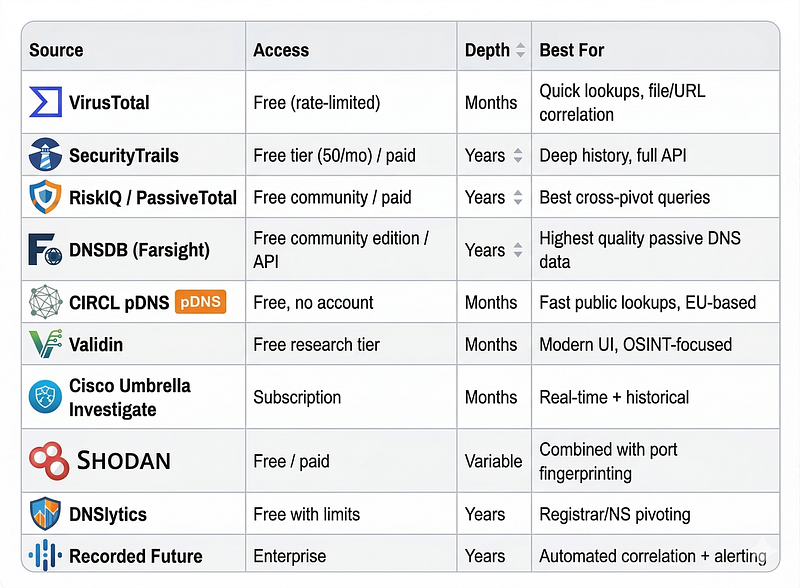
Free Tier Tools (Sufficient for Most Analysis)
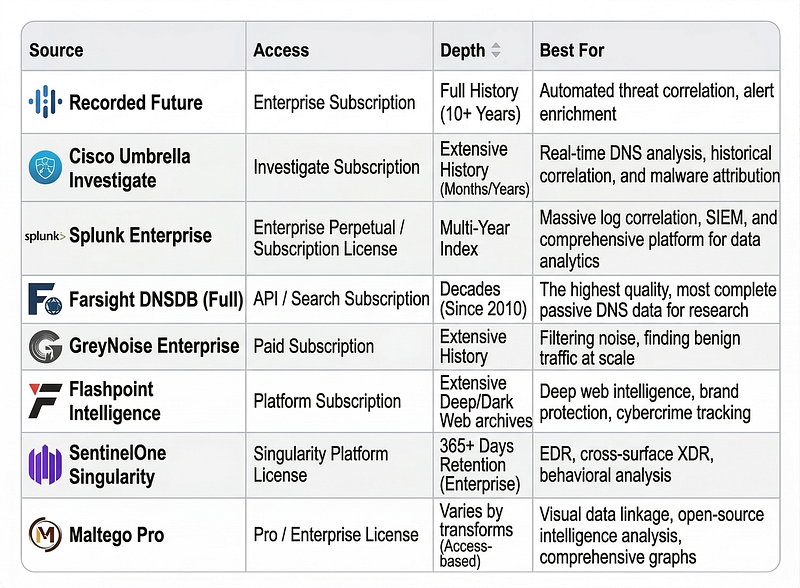
Paid / Subscription Tools (Enterprise Standard)
The Analyst’s Minimum Viable Stack (Free)
For a CTI analyst without budget access, this combination covers the core workflow:
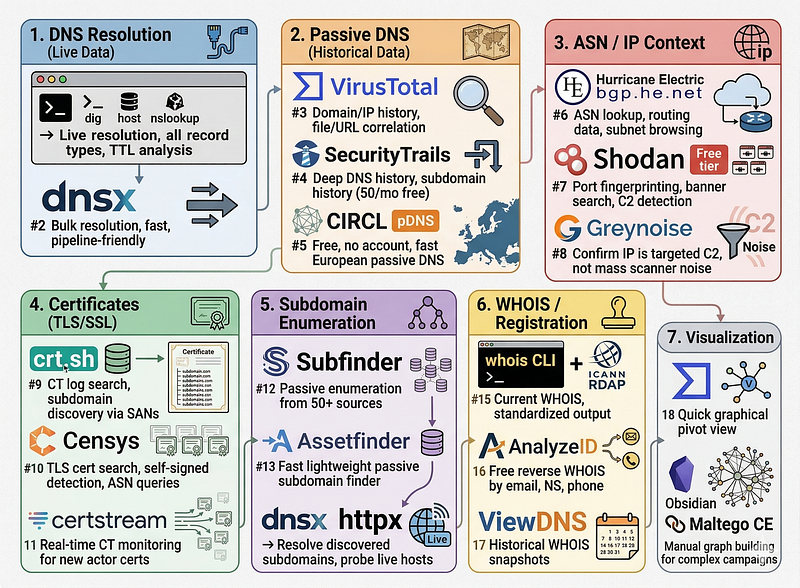
DNS RESOLUTION:
  1.
 dig / host / nslookup    → Live resolution, all record types, TTL analysis
  2.
 dnsx                     → Bulk resolution, fast, pipeline-friendly
PASSIVE DNS:
  3.
 VirusTotal               → Domain/IP history, file/URL correlation
  4.
 SecurityTrails           → Deep DNS history, subdomain history (50/mo free)
  5.
 CIRCL pDNS               → Free, no account, fast European passive DNS
ASN / IP:
  6.
 bgp.he.net               → ASN lookup, routing data, subnet browsing
  7.
 Shodan (free)            → Port fingerprinting, banner search, C2 detection
  8.
 Greynoise (community)    → Confirm IP is targeted C2, not mass scanner noise
CERTIFICATES:
  9.
 crt.sh                   → CT log search, subdomain discovery via SANs
 10.
 Censys (research)        → TLS cert search, self-signed detection, ASN queries
 11.
 certstream               → Real-time CT monitoring for new actor certs
SUBDOMAINS:
 12.
 Subfinder                → Passive enumeration from 50+ sources
 13.
 Assetfinder              → Fast lightweight passive subdomain finder
 14.
 dnsx + httpx             → Resolve discovered subdomains, probe live hosts
WHOIS / REGISTRATION:
 15.
 whois CLI + ICANN RDAP   → Current WHOIS, standardized output
 16.
 AnalyzeID                → Free reverse WHOIS by email, NS, phone
 17.
 ViewDNS                  → Historical WHOIS snapshots
VISUALIZATION:
 18.
 VirusTotal Graph         → Quick graphical pivot view
 19.
 Obsidian / Maltego CE    → Manual graph building for complex campaigns
Full Worked Example: Tracing a C2 Network End-to-End
Starting Point
You receive a threat intelligence report with a single indicator:
> “A phishing campaign targeting financial sector organizations has been observed using the domain secure-banklogin[.]com as a credential harvesting page."
That is all you have. One domain. No IP. No actor attribution. Let’s build the picture.
Step 1: Initial Domain Pivot
# Current resolution
dig secure-banklogin.com A +
short
# OUTPUT: 185.220.101.47
# NS records
dig secure-banklogin.com NS +
short
# OUTPUT: ns1.nameserver-provider.com
#         ns2.nameserver-provider.com
# WHOIS
whois secure-banklogin.com
# OUTPUT:
#   Registrar: Namecheap
#   Registered: 2024-11-15T09:23:14Z
#   Registrant: REDACTED
#   Name Server: NS1.NAMESERVER-PROVIDER.COM
Findings so far:
-
IP:
185.220.101.47 -
Registrar: Namecheap
-
Registration date: November 15, 2024 (09:23 UTC)
-
Nameservers: ns1/ns2.nameserver-provider.com
Step 2: Passive DNS — Historical Resolution
SecurityTrails query:

secure-banklogin.com

→

DNS

History

(A

records)
RESULTS:

185.220
.101
.47

(current,

since

2024-11-15
)

185.220
.101
.31

(previous,

2024-11-08
to

2024-11-15
)
**New finding:**The domain previously resolved to185.220.101.31. The actor moved their server but kept the domain. Both IPs are actor infrastructure.
Step 3: IP Pivot — Reverse DNS Lookup
PassiveTotal / SecurityTrails:

What

other

domains

resolved

to

185.220
.101
.47
?
RESULTS:

secure-banklogin.com

(our

starting

domain)

paypal-verify[.]net

(registered

2024-11-15

-

same

day!)

account-suspended[.]com

(registered

2024-11-14
)

login-banking[.]org

(registered

2024-11-15
)

update-your-info[.]net

(registered

2024-11-13
)
**Critical finding:**Four additional phishing domains on the same IP, all registered within a 3-day window around the same date. This is a campaign deployment event. All five domains are actor infrastructure.
Now perform the same pivot on the previous IP185.220.101.31:
Reverse

DNS

on

185.220
.101
.31
:
RESULTS
:

support-helpdesk
[.]
com
    (
2024
-
11
-
01
)

verify-account
[.]
net
      (
2024
-
11
-
03
)

customer-service
[.]
org
    (
2024
-
11
-
01
)
**Extended finding:**Three more domains from an earlier deployment on the staging IP. The actor appears to have been running this campaign since at least November 1.
Total actor domains discovered so far:8(up from 1)
Step 4: ASN Analysis
# Get ASN for 185.220.101.47
whois
185.220
.
101.47

|
 grep -i
"AS\|origin\|netname"
# OUTPUT:
#   origin: AS47674
#   netname: NET-FRANTECH-185-220-101
#   descr: FranTech Solutions
# bgp.he.net confirms: AS9009 / Frantech Solutions (this is Frantech's range)
**Finding:**The actor is using Frantech/M247 (AS9009) — a bulletproof hosting provider known for high abuse tolerance. This is a significant pattern signal. Note it for actor profiling.
# Shodan: Look for other hosts in the same /24 with C2-like characteristics
shodan search
"net:185.220.101.0/24 port:443"
# RESULTS show 12 active hosts in the subnet.
# Check each for C2 framework fingerprints.
# 3 of the 12 return responses consistent with phishing page templates.
**New finding:**3 additional infrastructure nodes in the same subnet that may be related. Flag for investigation.
Step 5: TLS Certificate Pivot
# Get certificate from the known domain
openssl s_client -
connect
 secure-banklogin.com:
443
 <
/dev/null

2
>
/dev/null
 \
  | openssl x509 -noout -text
# OUTPUT:
# Subject: CN = secure-banklogin.com
# Subject Alternative Names:
#   DNS:secure-banklogin.com
#   DNS:www.secure-banklogin.com
# Issuer: CN = Let's Encrypt R3
# Not Before: Nov 15 09:31:05 2024 GMT
# Not After : Feb 13 09:31:04 2025 GMT
# SHA256 Fingerprint: a3:b4:c5:... [FINGERPRINT]
**Certificate observation:**Issued by Let’s Encrypt,8 minutes after domain registration(domain registered 09:23, cert issued 09:31). This is automated infrastructure provisioning — the actor has scripted their setup.
# Shodan: find all IPs serving this exact certificate
shodan search
"ssl.cert.fingerprint:A3B4C5..."
# RESULT: 185.220.101.47 only — certificate is unique to this domain
Now search crt.sh for certificates issued to the same naming pattern around the same time:
crt.sh query:

%login%.com

AND issuance:

2024-11-13
to

2024-11-17
Filter:

Let's

Encrypt

+

IP

resolves

to

AS9009
RESULTS:

paypal-login[.]com

(cert

issued

2024-11-14
)

banklogin-secure[.]net

(cert

issued

2024-11-15
)

mobile-login[.]org

(cert

issued

2024-11-13
)
**New finding:**3 more domains matching the naming pattern + registrar + certificate timeline. All likely same actor.
Total actor domains discovered so far:11(up from 1)
Step 6: WHOIS Registration Pattern Pivot
All discovered domains: Namecheap, registered November 13–15, 2024. Let’s search for more:
SecurityTrails
/
 PassiveTotal query:
  registrar
=
 "Namecheap"
  nameserver
contains
 "nameserver-provider"
  registered
between

2024
-11
-10

and

2024
-11
-20
  resolves_to_asn
=

9009
 (Frantech)
This query surfaces 4 additional domains matching the pattern that were not yet captured by direct pivot:
bank-account-update
[.]
com (
2024
-
11
-
13
)
  secure-payment-
form
[.]
net  (
2024
-
11
-
14
)
  login-security-check
[.]
org (
2024
-
11
-
16
)
  account-verification
[.]
com (
2024
-
11
-
11
)
Step 7: Subdomain Enumeration
subfinder -d secure-banklogin.com -all 2>/dev/null
# RESULTS:
  www.secure-banklogin.com     → same IP
  mail.secure-banklogin.com    → 185.220.101.48 (DIFFERENT IP!)
  admin.secure-banklogin.com   → 185.220.101.48
# New IP: 185.220.101.48
**Critical finding:**The actor’s mail server and admin panel are on an adjacent IP in the same /24 subnet. The mail server is used for sending phishing emails — confirming this is a phishing campaign rather than a passive redirect.
Reverse DNS on185.220.101.48reveals additional actor domains.
Final Infrastructure Map
Starting from1 domain, systematic pivoting discovered:
ACTOR

INFRASTRUCTURE

MAP

(Phishing

Campaign

—

November

2024
)
CONFIRMED C2/PHISHING INFRASTRUCTURE:

IPs:

185.220
.101
.31
,

185.220
.101
.47
,

185.220
.101
.48

ASN:

AS9009

(Frantech/Bulletproof)

DOMAINS

(15

total

discovered):

Credential harvesting:

secure-banklogin[.]com

paypal-verify[.]net

account-suspended[.]com

login-banking[.]org

update-your-info[.]net

bank-account-update[.]com

secure-payment-form[.]net

login-security-check[.]org

account-verification[.]com

paypal-login[.]com

banklogin-secure[.]net

mobile-login[.]org

Infrastructure:

mail.secure-banklogin[.]com

(phishing

email

sending)

admin.secure-banklogin[.]com

(actor

management

interface)

From earlier campaign:

support-helpdesk[.]com

verify-account[.]net

customer-service[.]org
CAMPAIGN PATTERN:

Registrar:

Namecheap

(consistent)

Nameserver:

nameserver-provider.com

(consistent)

Hosting:

Frantech

AS9009

(bulletproof)

Certificate:

Let's

Encrypt,

automated

provisioning

Registration timing:

Batch

deployments

3
-5

days

before

campaign

activation

Naming convention:
 [
legitimate-brand/action
]
-[banking-term].[common-TLD]
**Outcome:**From one reported phishing domain, you have identified 15+ infrastructure nodes, two campaign waves, the actor’s infrastructure pattern, and predictive indicators for future campaigns.
12. Automating the Workflow with Python
For repeated pivoting on multiple IOCs, automation saves hours. Here is a Python skeleton using the VirusTotal and SecurityTrails APIs:
nano autoWF.py
import requests
import json
import os
import sys
from datetime import datetime, timezone
VT_API_KEY = os.environ.get(
"VT_API_KEY"
,
"YOUR_VT_KEY"
)
ST_API_KEY = os.environ.get(
"ST_API_KEY"
,
"YOUR_ST_KEY"
)
TIMEOUT = 30
def vt_domain_info(domain: str) -> dict:

""
"Get domain info from VirusTotal including passive DNS and relationships."
""
    headers = {
"x-apikey"
: VT_API_KEY}

# Domain report
    resp = requests.get(
        f
"https://www.virustotal.com/api/v3/domains/{domain}"
,
        headers=headers,

timeout
=TIMEOUT
    )
    resp.raise_for_status()

# Historical resolutions
    res_resp = requests.get(
        f
"https://www.virustotal.com/api/v3/domains/{domain}/resolutions"
,
        headers=headers,

timeout
=TIMEOUT
    )
    res_resp.raise_for_status()
    data = resp.json()
    res_data = res_resp.json()
    dns_history = [
        {

"ip"
: r[
"attributes"
][
"ip_address"
],

"date"
: r[
"attributes"
][
"date"
]
        }

for
 r
in
 res_data.get(
"data"
, [])
    ]

return
 {

"domain"
: domain,

"last_dns_records"
: data.get(
"data"
, {}).get(
"attributes"
, {}).get(
"last_dns_records"
, []),

"dns_history"
: dns_history
    }
def st_reverse_ip(ip: str) -> list:

""
"Find all domains that have resolved to an IP (passive DNS reverse)."
""
    headers = {
"apikey"
: ST_API_KEY}
    resp = requests.get(
        f
"https://api.securitytrails.com/v1/search/list?ipv4={ip}"
,
        headers=headers,

timeout
=TIMEOUT
    )
    resp.raise_for_status()
    records = resp.json()

return
 [r[
"hostname"
]
for
 r
in
 records.get(
"records"
, [])]
def st_subdomains(domain: str) -> list:

""
"Get all known subdomains for a domain."
""
    headers = {
"apikey"
: ST_API_KEY}
    resp = requests.get(
        f
"https://api.securitytrails.com/v1/domain/{domain}/subdomains"
,
        headers=headers,

timeout
=TIMEOUT
    )
    resp.raise_for_status()
    subs = resp.json().get(
"subdomains"
, [])

return
 [f
"{s}.{domain}"

for
 s
in
 subs]
def crtsh_certificates(domain: str) -> list:

""
"Get all certificates issued for a domain and its subdomains."
""
    try:
        resp = requests.get(
            f
"https://crt.sh/?q=%.{domain}&output=json"
,

timeout
=TIMEOUT
        )
        resp.raise_for_status()
        certs = resp.json()
    except (requests.RequestException, ValueError) as e:

print
(f
"  [WARN] crt.sh query failed for {domain}: {e}"
)

return
 []

return
 list(
set
([
        entry.get(
"common_name"
,
""
)

for
 entry
in
 certs

if
 entry.get(
"common_name"
)
    ]))
def pivot_domain(seed_domain: str) -> dict:

""
"
    Full pivot workflow from a seed domain.
    Returns all discovered infrastructure.
    "
""
    results = {

"seed"
: seed_domain,

"timestamp"
: datetime.now(timezone.utc).isoformat(),

"discovered_ips"
:
set
(),

"discovered_domains"
:
set
([seed_domain]),

"subdomains"
:
set
(),

"certificate_names"
:
set
()
    }

print
(f
"[*] Starting pivot on: {seed_domain}"
)

# Step 1: VT domain info + passive DNS
    vt_data = vt_domain_info(seed_domain)

for
 record
in
 vt_data.get(
"dns_history"
, []):
        ip = record[
"ip"
]
        results[
"discovered_ips"
].add(ip)

print
(f
"  [DNS] Historical resolution: {seed_domain} → {ip}"
)

# Step 2: Reverse IP pivot for each discovered IP (IPv4 only)

if

":"

in
 ip:

print
(f
"  [SKIP] IPv6 not supported by ST reverse lookup: {ip}"
)

continue
        co_hosted = st_reverse_ip(ip)

for
 d
in
 co_hosted:

if
 d not
in
 results[
"discovered_domains"
]:
                results[
"discovered_domains"
].add(d)

print
(f
"  [IP PIVOT] {ip} → {d}"
)

# Step 3: Subdomain enumeration
    subs = st_subdomains(seed_domain)
    results[
"subdomains"
].update(subs)

for
 sub
in
 subs:

print
(f
"  [SUB] {sub}"
)

# Step 4: Certificate transparency
    cert_names = crtsh_certificates(seed_domain)
    results[
"certificate_names"
].update(cert_names)

for
 cn
in
 cert_names:

if
 cn != seed_domain and cn not
in
 results[
"discovered_domains"
]:

print
(f
"  [CERT] Found in CT logs: {cn}"
)

# Convert sets to sorted lists for output
    results[
"discovered_ips"
] = sorted(results[
"discovered_ips"
])
    results[
"discovered_domains"
] = sorted(results[
"discovered_domains"
])
    results[
"subdomains"
] = sorted(results[
"subdomains"
])
    results[
"certificate_names"
] = sorted(results[
"certificate_names"
])

return
 results
if
 __name__ ==
"__main__"
:

if
 VT_API_KEY ==
"YOUR_VT_KEY"
 or ST_API_KEY ==
"YOUR_ST_KEY"
:

print
(
"ERROR: Set VT_API_KEY and ST_API_KEY env vars before running."
)
        sys.exit(1)
    seed = sys.argv[1]
if
 len(sys.argv) > 1
else

"example.com"
    result = pivot_domain(seed)

print
(
"\n=== PIVOT SUMMARY ==="
)

print
(json.dumps(result, indent=2))
Usage:
export
 VT_API_KEY=your_actual_key
export
 ST_API_KEY=your_actual_key
python3 autoWF.py example.com
13. Common Pivoting Mistakes and Dead Ends
Mistake 1: Over-Pivoting on Shared Infrastructure
**Problem:**Bulletproof hosting providers like Frantech host thousands of customers, including many unrelated threat actors. Pivoting on “all domains on AS9009” produces enormous noise that obscures the signal.
**Fix:**Always pivot oncombinationsof signals, not single signals. Frantech ASN + specific nameserver + Namecheap + November 2024 registration window is specific. Frantech ASN alone is noise.
Mistake 2: Treating CDN IPs as Actor Infrastructure
**Problem:**Cloudflare, Akamai, Fastly, and other CDN providers show massive IP-to-domain relationships because they serve millions of domains from shared IPs. Pivoting on a Cloudflare IP returns hundreds of unrelated domains.
**Fix:**Identify CDN IPs immediately.whois IP | grep Cloudflare→ stop the pivot, go back to the domain level. CDN IPs have no attribution value — pivot on the origin server IP instead.
Mistake 3: Assigning Attribution Too Early
**Problem:**You discover 15 domains on the same IP with similar naming patterns. You immediately write in the report “these are all operated by APT-X.”
**Fix:**Infrastructure discovery isnotattribution. The infrastructure map tells you what is connected. Attribution requires TTP analysis, historical comparison to known actor profiles, and multiple evidence types. Document the infrastructure cluster, note it as “consistent with Actor X’s infrastructure provisioning patterns,” and proceed to TTP analysis before claiming attribution.
Mistake 4: Missing Domain Expiration and Reuse
**Problem:**Passive DNS shows thatevil-domain.comresolved to a known APT IP in 2019. You note this as ongoing actor infrastructure. But the domain was abandoned in 2020, expired in 2021, re-registered by an unrelated party in 2023, and is now a parked domain.
**Fix:**Always check registration history and current status before including historical DNS data in an infrastructure map. A domain that points to actor infrastructure historically is only actor infrastructure if it was controlled by the actor when the C2 activity occurred.
Mistake 5: Ignoring TTL Patterns
**Problem:**You focus only on the current DNS resolution and miss that the domain is fast-fluxing across dozens of IPs.
**Fix:**Check TTL values. Short TTL (60–300 seconds) combined with changing resolutions across your passive DNS query indicates fast-flux. In fast-flux networks, the IPs are often not actor infrastructure themselves — they are infected hosts acting as proxies. Focus on the domain, the nameserver, and the registration pattern rather than the rotating IPs.
14. Interview-Ready: Answering “How Do You Discover Attacker Infrastructure Beyond Initial IOCs?”
The Full Answer Framework
When this question comes up in an interview, structure your answer around the workflow:
Opening statement — the principle:“Infrastructure pivoting exploits the fact that attackers reuse patterns. Every time they set up new infrastructure, they make choices — registrar, hosting provider, certificate authority, naming convention — that tend to be consistent across campaigns. A single confirmed IOC is a key that unlocks those patterns.”
The workflow — walk through each step:“Starting from one domain, I would: resolve current and historical DNS to find IPs; reverse-pivot on those IPs to find co-hosted domains; identify the ASN and look for other actor-owned infrastructure on that hosting provider; analyze the TLS certificate for SANs and fingerprint all IPs serving that certificate; enumerate subdomains; and look at WHOIS registration metadata to find other domains registered in the same time window with the same registrar and nameserver pattern.”
The tools — demonstrate practical knowledge:“For passive DNS I use SecurityTrails or PassiveTotal. For certificate transparency I use crt.sh and Censys. For infrastructure fingerprinting I use Shodan, with specific queries for C2 framework JA3 and JARM hashes. For reverse WHOIS I use DomainTools or PassiveTotal.”
The outcome — what you can build:“Done systematically, pivoting from a single phishing domain can surface an actor’s full campaign infrastructure — all their C2 nodes, staging servers, and phishing pages — most of which are still active and undiscovered. It also reveals their infrastructure provisioning pattern, which I document as a behavioral fingerprint for detecting future campaigns before they launch.”
The caveat — shows analytical maturity:“Infrastructure analysis is intelligence, not attribution. Finding connected infrastructure tells me what is linked. It takes TTP analysis and historical comparison to say who is operating it.”
Quick-Fire Interview Q&A
Q: “What is the difference between IOC overlap and infrastructure analysis?”→ IOC overlap = same indicator observed in two places. Infrastructure analysis = understanding the behavioral pattern of how infrastructure is built and maintained. The first is a single data point; the second is a fingerprint.
Q: “What is passive DNS and why is it useful?”→ Historical record of all DNS resolutions. Tells you what a domain pointed tobeforethe actor rotated infrastructure, and what else pointed to the same IP — connecting related infrastructure even when indicators have been rotated.
Q: “How do you find Cobalt Strike servers?”→ JARM fingerprinting via Shodan (specific hashes for default CS TLS configuration), Censys certificate queries for default CS certificate CN, and HTTP response header analysis for default profile signatures. Combine with ASN/subnet analysis for actors using known hosting providers.
Q: “What is Certificate Transparency and how do you use it for CTI?”→ CT logs record every publicly issued TLS certificate. I use crt.sh and Censys to search for certificates issued to actor domains — which reveals subdomains I couldn’t find otherwise — and to find clusters of certificates issued in the same time window with similar naming patterns, indicating campaign deployment events.
Q: “How do you avoid false positives in infrastructure pivoting?”→ Pivot oncombinationsof signals, not individual ones. A single IP or ASN in common with another actor is noise. The same IP + same registrar + same nameserver + same registration window + same certificate authority + similar naming convention is high-confidence.
15. Quick Reference Cheatsheet
The Full Pivot Workflow in 7 Steps
1.
 DOMAIN →
CURRENT
 IP
   dig DOMAIN A
+
short
2.
 DOMAIN → HISTORICAL IPs (passive DNS)
   SecurityTrails
/
 PassiveTotal: domain history query
3.
 IP → CO
-
HOSTED DOMAINS (reverse passive DNS)
   SecurityTrails
/
 PassiveTotal: IP reverse query
   VirusTotal: IP relations tab
4.
 IP → ASN → SUBNET FINGERPRINTING
   bgp.he.net
/
 whois IP
   shodan
search
 "net:IP.IP.IP.0/24 port:PORT"
   shodan
search
 "asn:ASXXXX FINGERPRINT_QUERY"
5.
 DOMAIN
/
IP → TLS CERTIFICATE
   openssl s_client
-
connect
 DOMAIN:
443
   crt.sh:
%
.DOMAIN
   Censys: services.tls.certificates.leaf_data.names: DOMAIN
   shodan
search
 "ssl.cert.fingerprint:SHA256"
6.
 DOMAIN → SUBDOMAINS
   subfinder
-
d DOMAIN
-
all
   crt.sh:
%
.DOMAIN (wildcard)
   SecurityTrails:
/
domain
/
DOMAIN
/
subdomains
7.
 REGISTRATION
PATTERN
 PIVOT
   WHOIS: registrar, NS, registration
date
   PassiveTotal: reverse WHOIS
by
 registrar
/
NS
pattern
   SecurityTrails: DNS history
+
 registration metadata
Essential Shodan Queries
# C2 Framework Detection
shodan
search
 "product:\"Cobalt Strike Beacon\""
shodan
search
 "ssl.jarm:07d14d16d21d21d07c42d41d00041d24a458a375eef0c576d23a7bab9a9fb1"
# Certificate pivoting
shodan
search
 "ssl.cert.fingerprint:SHA256_HASH"
shodan
search
 "ssl.cert.subject.cn:*.DOMAIN.com"
# ASN
+
 port combination
shodan
search
 "asn:AS12345 port:8443"
shodan
search
 "net:IP.IP.IP.0/24 port:443"
# HTTP response fingerprinting
shodan
search
 "http.html_hash:HASH"
shodan
search
 "http.title:\"
Specific
 Title\""
Essential Censys Queries
# TLS certificate search
services.tls.certificates.leaf_data.names:

"domain.com"
services.tls.certificates.leaf_data.subject.common_name:

"domain.com"
# Self-signed certificates on specific ASN
services.tls.certificates.leaf_data.issuer_dn

=

services.tls.certificates.leaf_data.subject_dn
AND autonomous_system.asn:

12345
# Find related infrastructure by certificate subject
services.tls.certificates.leaf_data.subject.organization:

"Organization Name"
Pivot Point Value Ranking
⭐⭐⭐⭐⭐
Unique
 nameserver (actor
-
controlled NS)
⭐⭐⭐⭐⭐  Registrant email (non
-
redacted WHOIS)
⭐⭐⭐⭐   Certificate SANs (multiple domains
on

one
 cert)
⭐⭐⭐⭐   JARM
/
 JA3 C2 fingerprint
⭐⭐⭐⭐   Registration
timestamp
 cluster (same registrar, same
day
)
⭐⭐⭐    Hosting ASN
+
 port fingerprint combination
⭐⭐⭐    Passive DNS co
-
hosted domains
⭐⭐     Nameserver provider (shared
with
 thousands)
⭐⭐     Registrar alone (Namecheap used
by
 millions)
⭐       Single IP overlap (
without

pattern
 context)
⭐       Single ASN membership (
without
 fingerprint
match
)
OSINT Infrastructure Analysis Toolbox
PASSIVE DNS:

SecurityTrails,

PassiveTotal,

VirusTotal,

Farsight

DNSDB,

CIRCL

pDNS,

Validin,

DNSlytics,

Cisco Umbrella InvestigateCERT ANALYSIS:

crt.sh,

Censys,

Shodan

(ssl.*),

openssl

CLI,

certstream,

Entrust

CT

Search,

Google

Transparency

Report
IP/ASN:

bgp.he.net,

ipinfo.io,

RIPE

Stat,

ARIN,

Team

Cymru,

ipapi.co,

Shodan,

Censys,

Greynoise
WHOIS:

whois

CLI,

ICANN

RDAP,

ViewDNS,

SecurityTrails,

WhoisXML

API,

DomainTools,

AnalyzeID,

HackerTarget,

SpyOnWeb
SUBDOMAINS:

Subfinder,

Amass,

dnsx,

httpx,

Assetfinder,

theHarvester,

Shosubgo,

crt.sh

wildcard,

SecurityTrails
C2 DETECTION:

Shodan

(JARM/JA3),

Censys,

FOFA,

ZoomEye,

BinaryEdge,

Onyphe,

LeakIX,

Greynoise
SCANNING:

Nmap

(on

confirmed

actor

infra

only),

dnsx,

httpx,

masscan
VISUALIZATION:

Maltego

CE,

VirusTotal

Graph,

SpiderFoot,

Obsidian

(manual)
Conclusion
Infrastructure pivoting transforms a list of IOCs into a behavioral understanding of how a threat actor operates. The analyst who can look at a single domain and see — through systematic pivoting — the hosting provider pattern, the certificate provisioning workflow, the registration timing habits, and the full scope of a campaign’s infrastructure is an analyst who can write intelligence that is operationally ahead of the attacker.
The skills are not exotic. They require only methodical application of freely available tools, disciplined documentation of each pivot step, and the analytical habit of treating every finding as a new starting point rather than an endpoint.
The answer to “how do you discover attacker infrastructure beyond initial IOCs?” is: one pivot at a time, following every thread until the patterns run out.
Author: Andrey PautovPublished: March 2026Tags: Threat Intelligence, CTI, OSINT, Infrastructure Analysis, Passive DNS, TLS Certificates, Shodan, Censys, Attribution, C2 Detection
References and Further Reading
-
RiskIQ / PassiveTotal documentation:https://community.riskiq.com
-
Shodan search reference:https://help.shodan.io/the-basics/search-query-fundamentals
-
Censys search documentation:https://search.censys.io/search/language
-
crt.sh Certificate Transparency:https://crt.sh
-
SecurityTrails API documentation:https://docs.securitytrails.com
-
JARM GitHub (Salesforce):https://github.com/salesforce/jarm
-
Subfinder (ProjectDiscovery):https://github.com/projectdiscovery/subfinder
-
DomainTools Iris:https://www.domaintools.com/products/iris
-
“Tracking Threat Actor Infrastructure” — DomainTools blog series
-
SANS FOR578 (Cyber Threat Intelligence) — infrastructure analysis module