PE Import Analyzer: A Practical Guide for Malware Analysts and Reverse Engineers
- Category: CTI
- Source article: https://medium.com/@1200km/pe-import-analyzer-a-practical-guide-for-malware-analysts-and-reverse-engineers-29b8b98aeaf3
- Published: 2026-02-26
- Preserved media: 3 image(s), including cover images, screenshots, diagrams, and infographics where present.
- Preserved technical blocks: 6 code/configuration block(s).
Ecosystem Fit
This page mirrors the original Medium article into the 1200km.com Docusaurus ecosystem. The original article flow, images, screenshots, infographics, and technical blocks are preserved from the export.
How to quickly understand what a Windows executable does — before you run it.
PE Import Analyzerhas grown into apowerful, production-ready tool: it doesn’t just list imports — it classifies every API by risk (Dangerous, Suspicious, Uncommon, Common), detectssuspicious combinationsof APIs and DLLs (e.g. classic injection, persistence, keylogging), and covers100 DLLswith1,500+ API descriptionsbased on Microsoft documentation. All in one command, no execution required.
GitHub - anpa1200/PE-Import-Analyzer: A command-line utility to analyze the import table of PE… *A command-line utility to analyze the import table of PE files. Provides detailed DLL descriptions, API function…*github.com
Table of Contents
-
Why Import Tables Matter
-
Installation
-
First Run: One Command, One Report
-
What Makes It Powerful
-
Output Formats: When to Use Which
-
Dangerous-API Categories and Risk Classification
-
Suspicious Combination Detection
-
Handy Options
-
Limitations and Tips
-
Wrap-Up
Why Import Tables Matter
When you pick up an unknown.exein a sandbox or during an incident, one of the first questions is:what does it do?Disassembly is powerful but slow. Strings can hint at behavior. Theimport tablesits in the sweet spot: it lists the Windows APIs the binary intends to call—file access, registry, network, process injection, crypto—without executing a single instruction.
PE Import Analyzerautomates that and goes further: it parses the PE, resolves each import to a short description (based on Microsoft docs),classifies every API by risk level, andflags suspicious combinations(e.g. VirtualAllocEx + WriteProcessMemory + CreateRemoteThread) so you see not justwhatis imported buthow riskyit is andwhat patternsit matches. In this guide we’ll install it, run it on real samples, and read the results like a analyst.
What You’ll Need
-
Python 3.8+
-
LIEF(
pip install lief) — the library that parses PE files -
A Windows PE file to analyze (or the samples below)
Installation (Under a Minute)
git
clone
 https://github.com/anpa1200/PE-Import-Analyzer.git
cd
 PE-Import-Analyzer
python3 -m venv venv
source
 venv/bin/activate
# Windows: venv\Scripts\activate
pip install -r requirements.txt
That’s it. No heavy IDE, no commercial tools.
First Run: One Command, One Report
For a quick overview, non-interactive mode is best: no prompts, output goes to a file.
python3 PE-Import-Analyzer
.py
 sample
.exe

--html

--dangerous

--no-prompt
 -o report
.html
-
--html— produce a readable HTML report (you can also use--txtor--json). -
--dangerous— include a section that flags suspicious APIs (injection, persistence, crypto, etc.). -
--no-prompt— no interactive questions; ideal for scripts and automation. -
-o report.html— output path.
Openreport.htmlin a browser. You’ll see:
-
Per-DLL sections— each imported DLL with a one-line explanation and a table of every imported function with ashort descriptionand aRiskcolumn:Dangerous,Suspicious,Uncommon, orCommon.
-
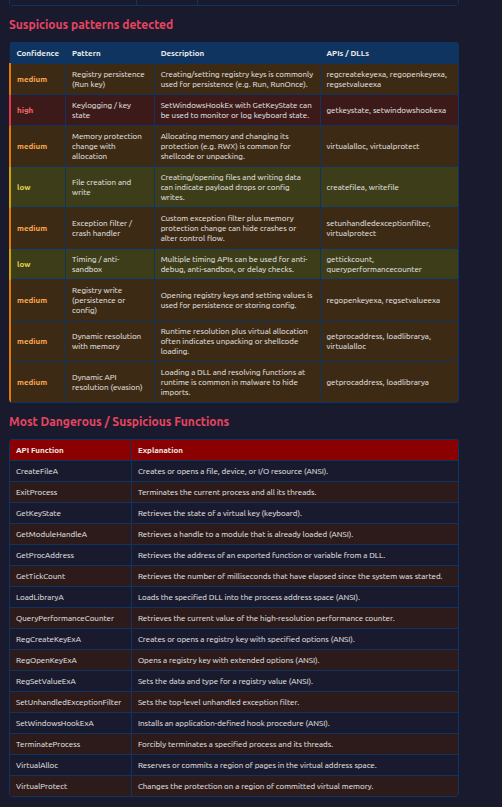
Suspicious patterns detected— a table ofmatched behavioral patterns(e.g. “Classic process injection”, “Thread context hijacking”, “Registry persistence”) with confidence (high/medium/low) and the APIs or DLLs involved. No manual correlation needed.
-
Most dangerous / suspicious functions— a dedicated table of high-risk APIs (e.g.
CreateRemoteThread,WriteProcessMemory,RegSetValueExA) with categories.
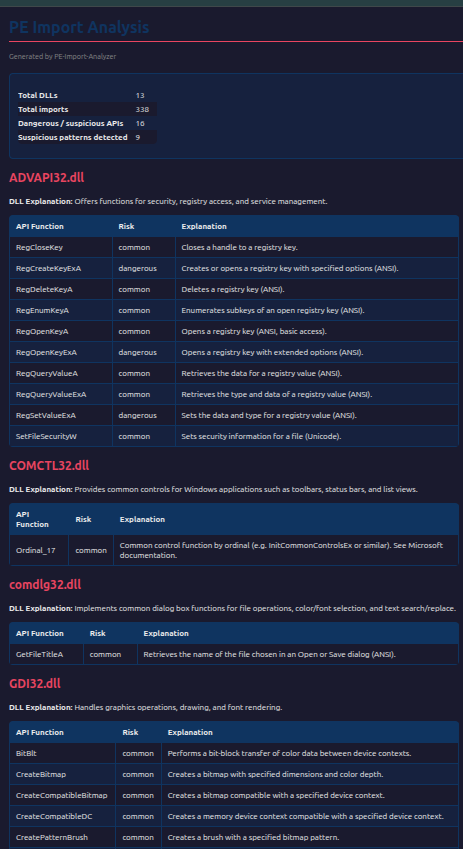
Unknown DLLs are never hidden: they appear with “No description available” and their full import list. The tool supportsdelay-load importstoo (shown asDLL (delay-load)).
What Makes It Powerful
-
100 DLLs, 1,500+ API descriptions— Kernel32, User32, Advapi32, Ntdll, Winsock, WinINet, WinHTTP, WinCred, DbgHelp, NetAPI, WTSAPI, UserEnv, Shell, ImageHlp, BCrypt, NCrypt, RPC, URLMon, DNS, WFP, Event Log, Wintrust, CryptSP, MSI, WinMM, UXTheme, DWM, GDI+, RpcRt4, WlanAPI, WinUSB, HID, AMSI, AppHelp, ESE, CLFS, Offline Files, and many more. Descriptions are based onMicrosoft documentation.
-
Four-level risk classification— Every API is tagged asDangerous,Suspicious,Uncommon, orCommon. You see at a glance which imports are high risk (injection, persistence, crypto, evasion) and which are merely noteworthy (e.g. process enumeration, hooks).
-
Suspicious combination detection— The tool runs arule engineover the full import set. It detects patterns such as: classic process injection (VirtualAllocEx + WriteProcessMemory + CreateRemoteThread), thread context hijacking, registry persistence, service-based persistence, keylogging/hooks, dynamic API resolution (LoadLibrary + GetProcAddress), network C2 (WinINet), anti-debug/timing, crypto + memory, process termination capability, and suspicious DLL combinations. Each pattern has aconfidence(high/medium/low).
- HTML, text, JSON, and LLM prompt— Human-readable reports, machine-readable JSON (with
risk_classper API andsuspicious_patterns[]), and anLLM-ready prompt(--llm) you can paste into ChatGPT, Claude, or similar for a natural-language assessment.
Output Formats: When to Use Which
-
HTML— best for human review: open in a browser, share with colleagues, or screenshot for reports.
-
TXT— same content, plain text; good for logs and terminals.
-
JSON— for automation: ingest into SIEM, run stats, or build your own dashboards. The JSON includes:
-
dlls[]with name, explanation, and per-API entries:name,explanation, andrisk_class(dangerous/suspicious/uncommon/common) -
suspicious_patterns[]— each matched pattern with id, name, description, confidence, apis_involved, dlls_involved
-
dangerous_functions[]withcategory(e.g.injection_and_memory,persistence_and_registry) -
summary(total DLLs, total imports, dangerous count,suspicious_patterns_count) -
LLM prompt(
--llm) — a single, copy-paste-ready block for ChatGPT, Claude, or other LLMs. It includes an analysis instruction, summary, full imports with risk tags and short descriptions, suspicious patterns, and dangerous APIs, then asks the model for a short assessment (benign/suspicious/malicious and main indicators). Output defaults to{filename}_prompt.txtwith--no-prompt, or use-o prompt.txt.
Example for automation:
python3 PE-Import-Analyzer
.py
 sample
.exe

--json

--dangerous

--no-prompt
 -o report
.json
 -
q
# Then: your_script.py report.json
Example for LLM assessment:
python3 PE-Import-Analyzer
.py
 sample
.exe

--llm

--dangerous

--no-prompt
 -o prompt
.txt
# Paste prompt
.txt
 into ChatGPT or Claude for
a
 short verdict and
main
 indicators.
Prompt:
Analyze the following Windows PE executable import table
for
 malicious
or
 suspicious behavior.
Consider:
 injection, persistence, keylogging, C2, anti-debug, credential access,
and
 evasion.
--- Summary ---
File:
 ./samples/malware1.exe
Total DLLs:
4
  |  Total
imports
:
48
  |  Dangerous/suspicious APIs:
14
  |  Suspicious patterns:
3
---
Imports

by
 DLL (API [risk]: explanation) ---
ADVAPI32.dll: Offers functions
for
 security, registry access,
and
 service management.
  • CryptAcquireContextW — Acquires a handle
to
 a cryptographic service provider (
Unicode
).
  • CryptDecrypt [dangerous] — Decrypts data
using
 a specified cryptographic
key
.
  • CryptDestroyKey — Destroys a cryptographic
key

and
 frees its handle.
  • CryptEncrypt [dangerous] — Encrypts data
using
 a specified cryptographic
key
.
  • CryptImportKey —
Imports
 a cryptographic
key

from
 a
key
 blob
into
 the CSP.
  • CryptReleaseContext — Releases a handle
to
 a cryptographic service provider.
  • CryptSetKeyParam — Sets parameters
for
 a cryptographic
key
.
  • RegCloseKey — Closes a handle
to
 a registry
key
.
  • RegEnumKeyExA — Enumerates subkeys
of
 an open registry
key
 (
ANSI
).
  • RegOpenKeyExA [dangerous] — Opens a registry
key

with
 extended options (
ANSI
).
  • RegQueryValueExA — Retrieves the type
and
 data
of
 a registry value (
ANSI
).
KERNEL32.dll: Provides core system functions such
as
 memory management, process/thread creation, file I/O,
and
 synchronization.
  • CloseHandle — Closes an open
object
 handle
and
 releases its resources.
  • CreateProcessA [dangerous] — Creates a
new
 process
and
 its primary thread (
ANSI
).
  • CreateToolhelp32Snapshot [suspicious] — Takes a snapshot
of
 processes, heaps, modules,
or
 threads
in
 the system.
  • DuplicateHandle [suspicious] — Duplicates an
object
 handle
for
 use
in
 another process.
  • FreeLibrary — Frees a loaded DLL
from
 the process address space.
  • GetCurrentProcess — Returns a pseudo-handle
for
 the current process.
  • GetCurrentProcessId — Returns the process identifier
of
 the calling process.
  • GetLastError — Retrieves the calling thread
's last error code.
  • GetProcAddress [dangerous] — Retrieves the address
of
 an exported
function

or
 variable
from
 a DLL.
  • GetSystemWow64DirectoryA — Retrieves the path
of
 the system directory used
by
 WOW64 (
ANSI
).
  • GetThreadContext [dangerous] — Retrieves the context
of
 the specified thread.
  • GetVolumeInformationW — Retrieves information about a file system
and
 volume (
Unicode
).
  • LCIDToLocaleName — Converts a locale identifier
to
 a locale name.
  • LoadLibraryA [dangerous] — Loads the specified DLL
into
 the process address space (
ANSI
).
  • LocalFree — Frees memory allocated
from
 the local heap.
  • MultiByteToWideChar — Maps a multibyte
string

to
 a wide-character (UTF-
16
)
string
.
  • OpenProcess [dangerous] — Opens an existing process
with
 specified access rights.
  • Process32FirstW [suspicious] — Retrieves information about the first process
in
 a snapshot (
Unicode
).
  • Process32NextW [suspicious] — Retrieves information about the
next
 process
in
 a snapshot (
Unicode
).
  • ResumeThread [dangerous] — Resumes a suspended thread.
  • SetThreadContext [dangerous] — Sets the context
of
 the specified thread.
  • Sleep [dangerous] — Suspends the execution
of
 the current thread
for
 a specified time interval.
  • TerminateProcess [dangerous] — Forcibly terminates a specified process
and
 its threads.
  • VirtualAllocEx [dangerous] — Reserves
or
 commits memory
in
 the virtual address space
of
 another process.
  • WaitForSingleObject — Waits
until
 a specified
object

is

in
 the signaled state.
  • WideCharToMultiByte — Maps a wide-character
string

to
 a multibyte
string
.
  • WriteProcessMemory [dangerous] — Writes data
to
 memory
in
 a specified process.
ole32.dll: Enables COM
object
 creation, activation,
and
 OLE functionality.
  • CoCreateGuid — Creates a
new
 globally unique identifier (GUID).
  • StringFromGUID2 — Converts a
binary
 GUID
to
 a
string
 representation.
Secur32.dll: Provides authentication
and
 security context management
for
 SSPI (Security Support Provider
Interface
).
  • AcquireCredentialsHandleA — Obtains a handle
to
 credentials
for
 the specified security principal (
ANSI
).
  • DecryptMessage — Decrypts a message that was encrypted
with
 EncryptMessage.
  • DeleteSecurityContext — Frees a security context
and
 associated resources.
  • EncryptMessage — Encrypts a message
to
 provide confidentiality.
  • FreeContextBuffer — Frees a buffer allocated
by
 an SSPI
function
.
  • FreeCredentialsHandle — Frees a credential handle obtained
from
 AcquireCredentialsHandle.
  • InitializeSecurityContextA — Initiates a security context
for
 the client side
of
 a connection (
ANSI
).
  • QueryContextAttributesW — Retrieves attributes
of
 a security context (
Unicode
).
--- Suspicious patterns detected ---
  [high] Thread context hijacking: Getting/setting thread context
with
 remote memory allocation suggests thread hijacking
or
 injection.
    APIs/DLLs: getthreadcontext, setthreadcontext, virtualallocex
  [medium] Dynamic API resolution (evasion): Loading a DLL
and
 resolving functions at runtime
is
 common
in
 malware
to
 hide
imports
.
    APIs/DLLs: getprocaddress, loadlibrarya
  [medium] Process termination capability: Ability
to
 open
and
 terminate other processes (e.g. killing security tools).
    APIs/DLLs: openprocess, terminateprocess
--- Most dangerous/suspicious APIs ---
  • CreateProcessA — Creates a
new
 process
and
 its primary thread (
ANSI
).
  • CryptDecrypt — Decrypts data
using
 a specified cryptographic
key
.
  • CryptEncrypt — Encrypts data
using
 a specified cryptographic
key
.
  • GetProcAddress — Retrieves the address
of
 an exported
function

or
 variable
from
 a DLL.
  • GetThreadContext — Retrieves the context
of
 the specified thread.
  • LoadLibraryA — Loads the specified DLL
into
 the process address space (
ANSI
).
  • OpenProcess — Opens an existing process
with
 specified access rights.
  • RegOpenKeyExA — Opens a registry
key

with
 extended options (
ANSI
).
  • ResumeThread — Resumes a suspended thread.
  • SetThreadContext — Sets the context
of
 the specified thread.
  • Sleep — Suspends the execution
of
 the current thread
for
 a specified time interval.
  • TerminateProcess — Forcibly terminates a specified process
and
 its threads.
  • VirtualAllocEx — Reserves
or
 commits memory
in
 the virtual address space
of
 another process.
  • WriteProcessMemory — Writes data
to
 memory
in
 a specified process.
---
End

of
 data ---
Provide a
short
 assessment: likely benign, suspicious,
or
 malicious,
and
 the main behavioral indicators.
LLM Response:
Assessment:
 Malicious (high confidence)
This import
set
 strongly aligns
with
 a process-injection loader that can decrypt an embedded payload, inject it
into
 another process,
and
 optionally evade analysis / disable defenses.
Main behavioral indicators (mapped
to
 your categories)
Injection / code execution (very strong)
The combination below
is
 one
of
 the clearest “classic injection / thread hijack” signatures you can see purely
from

imports
:
Process discovery: CreateToolhelp32Snapshot + Process32FirstW + Process32NextW (enumerate processes
to
 find a target
like
 explorer.exe, svchost.exe, browsers, etc.)
Remote process access: OpenProcess
Remote memory + write: VirtualAllocEx + WriteProcessMemory
Thread hijack: GetThreadContext + SetThreadContext + ResumeThread
Handle manipulation: DuplicateHandle (often used
to
 move/duplicate access
to
 remote
handles

or
 adjust capabilities)
➡️ This strongly suggests remote thread context manipulation rather than only benign “read another process” behavior.
Evasion / stealth (strong)
Dynamic API resolution: LoadLibraryA + GetProcAddress
Common
in
 malware
to
 reduce visible
imports
, selectively load APIs,
and
 bypass
static
 detection.
Timing / sandbox evasion: Sleep
Often used
to
 delay execution
to
 outlast sandboxes
or
 stagger stages.
Payload protection / C2 support (moderate)
CryptoAPI:
 CryptAcquireContextW, CryptImportKey, CryptEncrypt, CryptDecrypt, CryptSetKeyParam
Typical
for
 decrypting an embedded payload, config, strings,
or
 network traffic.
SSPI (Secur32): AcquireCredentialsHandleA, InitializeSecurityContextA, EncryptMessage, DecryptMessage, QueryContextAttributesW
This
is
 consistent
with
 setting up authenticated sessions (Kerberos/NTLM/Schannel-related flows depending
on
 SSP)
and
/
or
 wrapping traffic. It can support C2 comms
or
 internal lateral-auth style communication, but
by
 itself isn’t proof
of
 C2.
Defense disruption (moderate)
Kill capability: OpenProcess + TerminateProcess
Frequently used
to

stop
 security tools, sandboxes,
or
 competing malware.
Persistence (weak
from

imports
)
Registry APIs present: RegOpenKeyExA, RegEnumKeyExA, RegQueryValueExA, RegCloseKey
But no obvious “write” persistence calls (e.g., RegSetValueEx, CreateService, StartService, scheduled task APIs).
➡️ More consistent
with
 recon/lookup
or
 configuration reads than persistence creation.
Keylogging (
not
 indicated here)
No
imports

like
 GetAsyncKeyState, SetWindowsHookEx, GetKeyState, Raw Input, etc. So keylogging
is

not
 suggested
from
 this table.
Anti-debug (weak/none
from

imports
)
You don’t have typical anti-debug
imports
 (IsDebuggerPresent, CheckRemoteDebuggerPresent, NtQueryInformationProcess, timing checks beyond Sleep). Evasion
is
 present, but
not
 classic anti-debug.
Bottom line
Likely role: a loader / injector that decrypts something (payload/config), selects a target process, injects via thread context hijacking,
and
 can terminate other processes.
Dangerous-API Categories and Risk Classification
Every API in the report is assigned arisk class:
-
Dangerous— High-risk: injection (e.g.
VirtualAllocEx,WriteProcessMemory,CreateRemoteThread), process/thread control (CreateProcess,OpenProcess,TerminateProcess,SetThreadContext), persistence (RegCreateKeyEx,RegSetValueEx,CreateService), network/C2 (InternetOpen,HttpSendRequest,WSAConnect), crypto (CryptEncrypt,CryptDecrypt), evasion (GetProcAddress,LoadLibrary,SetUnhandledExceptionFilter,IsDebuggerPresent), file/system (CreateFile,NtCreateFile). These are grouped in categories (injection_and_memory, process_and_thread, persistence_and_registry, network_and_c2, crypto_and_evasion, file_and_system). -
Suspicious— Often abused: process/snapshot APIs (
CreateToolhelp32Snapshot,Process32First/Next),DuplicateHandle,GetThreadContext/SetThreadContext, hooks (SetWindowsHookEx), key state (GetAsyncKeyState), and similar. -
Uncommon— Rare in benign apps: manyNt* APIs,
RtlGenRandom,IsDebuggerPresent, etc. -
Common— Everything else (normal file I/O, string ops, etc.).
So you can quickly answer: “Does it touch the registry? Does it use classic injection APIs? Is this API dangerous or just uncommon?”
Suspicious Combination Detection
The tool doesn’t stop at single-API risk. It runscombination rulesover the full import set and reports whenmultiple APIs or DLLsappear together in a way that suggests a known technique:
So you get not only “it imports WriteProcessMemory” but “it matches theclassic process injectionpattern.” That’s what makes the tool powerful for triage.
Handy Options
-
--all-apis— by default the report caps at 20 APIs per DLL; use this to list every import. -
--no-delay-load— skip delay-loaded imports (by default they’re included and labeled “(delay-load)”). -
-q— quiet: only errors to stderr; no “Output saved to …” message. -
-v— verbose logging. -
--version— print version and exit. -
--llm— output an LLM-ready prompt (paste into ChatGPT/Claude). Saved as{name}_prompt.txtwith--no-promptunless-ois set.
Exit codes:0= success,2= file not found,3= permission denied,4= not a valid PE,5= output write error. That makes it easy to use in scripts and pipelines.
Limitations and Tips
-
Packed or obfuscated binaries— the import table may be stripped or minimal; the tool will still report what’s there (or reject the file if it’s not a valid PE). Combine with dynamic analysis and unpacking when needed.
-
Delay-load and dynamic resolution— many samples resolve APIs at runtime via
GetProcAddress/LoadLibrary. The tool highlights those; the rest of the behavior still needs runtime or disassembly. -
Not a substitute for execution analysis— import analysis is a fasttriagingstep. Use it to decide what to run in a sandbox and what to dig into in a disassembler.
Wrap-Up
PE Import Analyzeris now apowerful, production-ready tool: it gives you a fast, readable map of what a Windows executable iscapableof doing from its import table —100 DLLs,1,500+ API descriptions(Microsoft-docs based),four-level risk classification(Dangerous/Suspicious/Uncommon/Common), andautomatic detection of suspicious API/DLL combinations(injection, persistence, keylogging, C2, anti-debug, and more). Running it on real samples shows not only which APIs are imported but whichpatternsthey form and how confident the tool is. It correctly rejects non-PE files and supports delay-load imports and full CLI automation.
If you’re doing malware triage, incident response, or reverse engineering on Windows binaries, add this to your first steps — right after hashing and strings — and before you run anything in a sandbox.
-
**Requirements:**Python 3.8+, LIEF
-
**License:**MIT
Stay safe, and analyze before you execute.