Building a Dockerized AI-Powered Host Vulnerability Assessment Tool
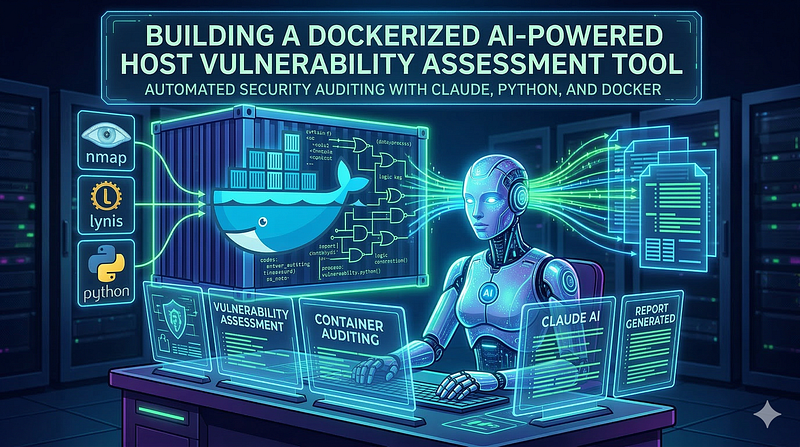
- Category: CTI
- Source article: https://medium.com/@1200km/building-a-dockerized-ai-powered-host-vulnerability-assessment-tool-cd6e2147ce59
- Published: 2026-03-11
- Preserved media: 8 image(s), including cover images, screenshots, diagrams, and infographics where present.
- Preserved technical blocks: 44 code/configuration block(s).
Ecosystem Fit
This page mirrors the original Medium article into the 1200km.com Docusaurus ecosystem. The original article flow, images, screenshots, infographics, and technical blocks are preserved from the export.
How I automated security auditing with Claude, Python, and Docker — and what it found on my own machine
Introduction
Security assessments are expensive, time-consuming, and often reserved for enterprise environments with dedicated teams. But what if you could run a comprehensive vulnerability scan of your own Linux host in under 10 minutes, get AI-analyzed findings ranked by real exploitability, and receive a professional report — all from a single command?
That’s exactly what I built. This article walks through the architecture, design decisions, and how to run it yourself.
GitHub - anpa1200/AuditAI *Contribute to anpa1200/AuditAI development by creating an account on GitHub.*github.com
Table of Contents
-
The Problem with Traditional Host Auditing
-
Getting Started
-
What It Found on My Machine
-
Reading the Report
-
Result
-
Architecture Overview
-
The Nine Scanner Modules
-
The AI Layer
-
The Report
-
Handling API Errors Gracefully
-
Security Considerations
-
Extending the Tool
-
What’s Next
-
Conclusion
The Problem with Traditional Host Auditing
Most security tools solve one specific problem.nmapscans ports.lynischecks hardening.chkrootkitlooks for rootkits. You end up running five different tools, staring at raw text output, and trying to manually correlate:"If this port is open AND this service runs as root AND there's a SUID binary in /tmp — does that create an attack chain?"
That correlation step is exactly where human error creeps in, and where AI genuinely helps.
The tool I built —AuditAI— runs nine scanner modules in parallel, feeds their output to Claude, and gets back:
-
Findings with severity ratings grounded inactual evidencefrom your system
-
Attack chain analysis showing how findings combine into real exploits
-
A prioritized top-10 list based on your specific configuration
-
A self-contained HTML report you can open in any browser
Getting Started
Step 1: Install Docker
AuditAI runs entirely inside Docker — no Python, nmap, or lynis installation required on your host.
Ubuntu / Debian:
curl -fsSL https://get.docker.com | sh
sudo usermod -aG docker
$USER
newgrp docker
# apply group change without logout
docker --version
# verify
Fedora / RHEL / Rocky:
sudo dnf install -y docker-ce docker-ce-cli containerd.io
sudo systemctl
enable
 --now docker
sudo usermod -aG docker
$USER
newgrp docker
Arch:
sudo pacman -S docker
sudo systemctl
enable
 --now docker
sudo usermod -aG docker
$USER
> Note: Adding your user to the docker group grants effective root access to the host. This is standard Docker practice and required for AuditAI to work without sudo .
Step 2: Get an Anthropic API Key
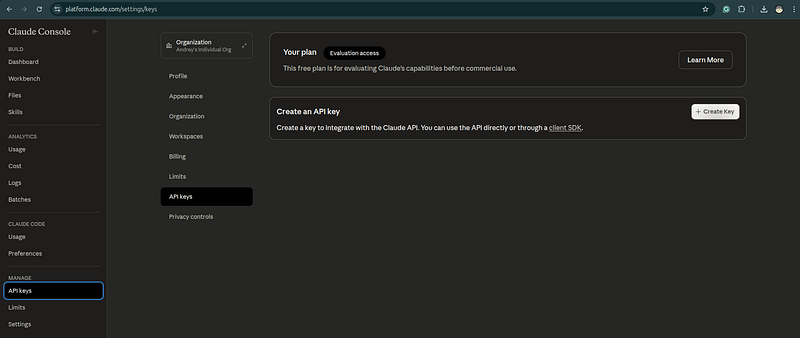
AuditAI uses Claude to analyze scanner output and generate findings. You need an API key from Anthropic.
-
Sign up or log in
-
Navigate toAPI Keys→Create Key
-
Copy the key — it starts with
sk-ant-
The key is only used inside the container and is never written to disk or included in any report. If you prefer not to send data to the API, the--no-aiflag runs all scanners and produces a raw report without any external calls.
Step 3: Clone and Run
git
clone
 https://github.com/anpa1200/AuditAI.git
cd
 AuditAI
Set your API key and launch:
export
 ANTHROPIC_API_KEY=sk-ant-...
./run.sh
That’s the entire installation. There is nopip install, no virtualenv, no dependency management on your side — everything is baked into the Docker image.
What Happens When You Run It
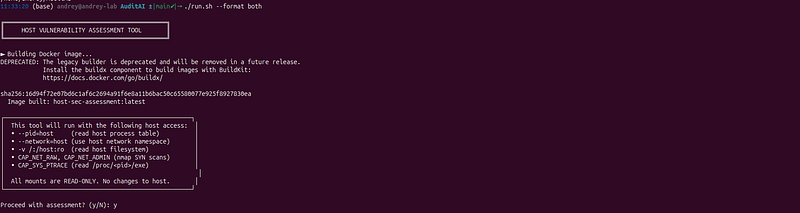
run.shwalks you through three steps before touching your system:
1. Image build(first run only, ~2–3 minutes)
►

Building

Docker

image...

Image built:

auditai:latest
On subsequent runs the image is cached and this step takes under a second.
2. Consent prompt— it shows you exactly what host access it will request and asks for confirmation:
┌─────────────────────────────────────────────────────┐
│  This tool will run with the following host access:  │
│  • --pid=host     (
read
 host process table)          │
│  • --network=host (use host network namespace)       │
│  • -v /:/host:ro  (
read
 host filesystem)             │
│  • CAP_NET_RAW, CAP_NET_ADMIN (nmap SYN scans)       │
│  • CAP_SYS_PTRACE (
read
 /proc/<pid>/exe)             │
│                                                       │
│  All mounts are READ-ONLY. No changes to host.       │
└─────────────────────────────────────────────────────┘
Proceed with assessment? (y/N):
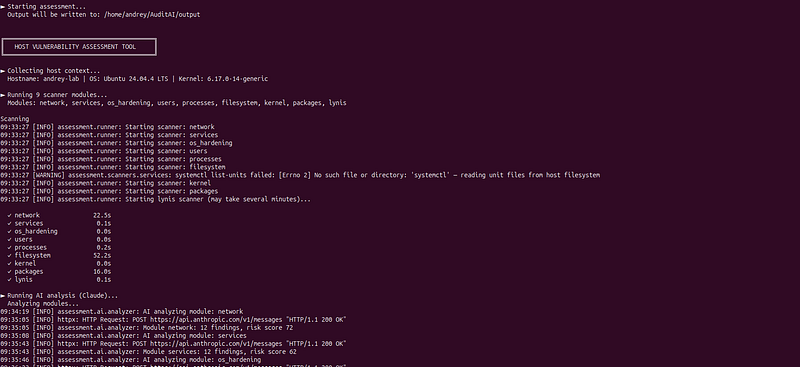
3. Assessment runs— you see live progress as each module completes:
► Running 9 scanner modules...
  Modules: network, services, os_hardening,
users
, processes,
           filesystem, kernel, packages, lynis
  ✓ network              12.3s
  ✓ services              3.1s
  ✓ os_hardening          1.8s
  ✓ users                 2.4s
  ✓ processes             8.7s
  ✓ filesystem           31.2s
  ✓ kernel                1.1s
  ✓ packages             18.9s
  ✓ lynis               247.6s
► Running AI analysis (Claude)...
  Analyzing modules...
  Running synthesis...
► Generating reports...
  HTML:     ./output/report_2026-03-11T08-22-01Z.html
  Markdown: ./output/report_2026-03-11T08-22-01Z.md
4. Summary printed to terminal:
╔══════════════════

SUMMARY

══════════════════╗

Overall Risk:

HIGH

(67/100)

Lynis Hardening Index:

58
/100

Findings:

3

Critical

11

High

24

Medium

18

Low
  Top Action: Disable PasswordAuthentication in /etc/ssh/sshd_config
╚══════════════════════════════════════════════╝

Reading the Report
Open./output/report_*.htmlin any browser. No internet connection required — the file is fully self-contained.
The report is structured from most to least actionable:
-
Overall risk badgeat the top — CRITICAL / HIGH / MEDIUM / LOW with a 0–100 score
-
Immediate actions— the 3–5 things to fix today, in order
-
Attack chains— how individual findings chain into real exploits onyour specific host
-
Top 10 priorities— findings ranked by actual exploitability, not just severity label
-
Module sections— collapsible, each with a risk score and all findings with evidence and remediation commands
-
Findings table— filterable by severity (click the severity buttons at the top)
The Markdown report (report_*.md) contains the same content and is useful for pasting into tickets, committing to a private repo, or sharing over encrypted channels.
Result:
# Host Vulnerability Assessment Report
| Field | Value |
|-------|-------|
|
**Hostname**
 |
`andrey-lab`
 |
|
**Scan Time**
 | 2026-03-11T09:33:27Z |
|
**OS**
 | Ubuntu 24.04.4 LTS |
|
**Overall Risk**
 |
**CRITICAL**
 (82/100) |
## Finding Summary
| Severity | Count |
|----------|-------|
| 🔴 CRITICAL | 0 |
| 🟠 HIGH | 23 |
| 🟡 MEDIUM | 34 |
| 🔵 LOW | 16 |
| ⚪ INFO | 9 |
## Executive Summary
This Linux host (Ubuntu 24.04.4 LTS, 192.168.1.164) presents a CRITICAL overall security posture driven by the convergence of multiple high-severity misconfigurations across every assessed domain. The most urgent concerns are: a completely open firewall (all iptables/ip6tables chains default to ACCEPT with no effective rules), SMB/NetBIOS services exposed on all interfaces, an unrecognized unlocked user account 'xplg' with an active password hash that may represent a backdoor, and 174 SUID binaries including large VMware and VirtualBox privileged executables that provide numerous local privilege escalation paths. These issues do not exist in isolation — they combine into realistic, multi-step attack chains that could result in full host compromise from the local network without requiring any zero-day exploits.
The host's network attack surface is severely over-exposed. SMB ports 139/445 are reachable from the LAN with no firewall restriction, VMware remote console port 902 is similarly exposed, and an unidentified HTTP service on port 8080 is accessible without TLS. IPv4 forwarding is enabled, allowing the host to act as a network pivot point if compromised. The combination of default-ACCEPT firewall policies, empty nftables chains, and incomplete UFW rules means that no traffic is being blocked at the network layer. This is compounded by IPv6 services bound to [::] with equally absent ip6tables rules.
At the host level, the absence of any audit rules means that a compromise would leave no forensic trail. PAM allows null passwords, password aging is effectively disabled (PASS
_MAX_
DAYS=99999), the 'andrey' account uses the weaker SHA-512 hash rather than the system-configured yescrypt, and the su wheel restriction is disabled. The unknown account 'xplg' with an active yescrypt password hash and no documented purpose must be treated as a potential backdoor until proven otherwise. Three CVE-flagged packages with active vulnerabilities in containerd (CVE-2025-64329), libcap2 (CVE-2025-1390), and Docker overlay networking (CVE-2023-28840/28841) add software-layer risk on top of the configuration weaknesses.
The host appears to be a security research or lab workstation running VMware Workstation, VirtualBox, Docker, Minikube, and Ollama simultaneously, which explains some of the service sprawl. However, this context does not justify the absence of basic hardening controls. The 429,758 dpkg integrity failures, zombie Docker processes, and five stale Docker bridge networks suggest the system has accumulated significant technical debt. The Lynis scanner also failed to execute due to a misconfigured command, leaving a gap in the security baseline. Immediate remediation should focus on: (1) implementing a default-DENY firewall policy, (2) investigating and removing the 'xplg' account, (3) patching vulnerable packages, and (4) removing unnecessary SUID bits from VMware/VirtualBox binaries.
## Immediate Actions Required
1.
 IMMEDIATE: Investigate and disable/remove the 'xplg' account — run 'passwd -l xplg' to lock immediately, then 'userdel -r xplg' after investigation: 'grep xplg /etc/passwd /etc/shadow /var/log/auth.log' to determine origin and activity
2.
 IMMEDIATE: Implement default-DENY firewall policy — run 'iptables -P INPUT DROP; iptables -P FORWARD DROP; iptables -P OUTPUT ACCEPT' and add explicit ACCEPT rules only for required services (SSH, SMB if needed); mirror for ip6tables
3.
 IMMEDIATE: Remove or restrict SUID bits from VMware binaries not required for normal operation: 'chmod u-s /lib/vmware/bin/vmware-vmx /lib/vmware/bin/vmware-vmx-debug /lib/vmware/bin/vmware-vmx-stats /sbin/vmware-authd /usr/sbin/vmware-authd'
4.
 IMMEDIATE: Remove SUID bits from Docker overlay layer binaries to prevent host privilege escalation: 'find /var/lib/docker/overlay2 -perm /4000 -exec chmod u-s {} \;'
5.
 URGENT: Disable IPv4 forwarding unless this host is intentionally a router: 'sysctl -w net.ipv4.ip
_forward=0' and persist in /etc/sysctl.d/99-hardening.conf
6. URGENT: Configure auditd rules immediately — install a baseline ruleset: 'apt install auditd audispd-plugins && augenrules --load' and add rules for privilege escalation, file access to /etc/shadow, /etc/passwd, and SUID execution
7. URGENT: Update vulnerable packages: 'apt-get update && apt-get install --only-upgrade containerd libcap2 docker.io curl bash bash-completion'
8. URGENT: Remove John the Ripper from the production host: 'apt-get remove --purge john && rm -f /etc/cron.d/john'
9. HIGH: Fix /etc/shadow permissions: 'chmod 000 /etc/shadow' (or 600 minimum) to prevent group-readable access by shadow group members
10. HIGH: Restrict SMB to localhost or specific trusted IPs only — edit /etc/samba/smb.conf to add 'bind interfaces only = yes' and 'interfaces = lo 192.168.1.164' then restrict via firewall to trusted hosts only, or disable if not required: 'systemctl disable --now smbd nmbd'
11. HIGH: Disable ICMP redirect acceptance and sending: add to /etc/sysctl.d/99-hardening.conf: 'net.ipv4.conf.all.accept_
redirects=0', 'net.ipv4.conf.default.accept
_redirects=0', 'net.ipv6.conf.all.accept_
redirects=0', 'net.ipv4.conf.all.send
_redirects=0' then run 'sysctl --system'
12. HIGH: Remove the UFW UDP 517 rule with no justification: 'ufw delete allow 517/udp' and audit all UFW rules for necessity
13. HIGH: Set fs.suid_
dumpable=0 and kernel.sysrq=0 in /etc/sysctl.d/99-hardening.conf and apply with 'sysctl --system'
14.
 HIGH: Remove or lock the 'andrey' account's SHA-512 password and force re-authentication with yescrypt: 'passwd -e andrey' to force password change on next login, which will re-hash using the system default yescrypt
15.
 MEDIUM: Enable PAM wheel restriction for su by uncommenting 'auth required pam
_wheel.so' in /etc/pam.d/su and ensure only authorized users are in the wheel group
16. MEDIUM: Remove nullok from /etc/pam.d/common-auth pam_
unix.so line to prevent empty password authentication
17.
 MEDIUM: Disable unnecessary services: 'systemctl disable --now cups saned whoopsie kerneloops' and evaluate sssd, openvpn for necessity
18.
 MEDIUM: Set PASS
_MAX_
DAYS=365 and PASS
_MIN_
DAYS=1 in /etc/login.defs and apply to existing accounts: 'chage -M 365 andrey'
19.
 MEDIUM: Investigate the 429,758 dpkg integrity failures — run 'dpkg --verify 2>&1 | head -100' and reinstall affected packages: 'apt-get install --reinstall libctf0 cups'
20.
 LOW: Replace /etc/issue and /etc/issue.net content with a legal warning banner instead of OS version disclosure
## Attack Chain Analysis
### LAN Attacker → SMB Exploitation → SUID Binary Privilege Escalation → Full Root Compromise
**Likelihood:**
 HIGH |
**Impact:**
 HIGH
**Steps:**
1.
 Attacker on the same LAN (192.168.1.x) scans the host and discovers SMB ports 139/445 open on 0.0.0.0 with no firewall restriction (iptables
_default_
accept
_policy, smb_
exposed
_on_
all
_interfaces)
1. Attacker exploits a Samba vulnerability or performs credential brute-force against the SMB service to gain initial access as a low-privileged user
1. Once on the host, attacker enumerates SUID binaries and identifies VMware vmware-vmx (25-33 MB, SUID root) or VirtualBox VBoxNetAdpCtl (SUID+SGID root) as privilege escalation vectors (vmware_
suid
_binaries, virtualbox_
suid
_sgid_
binaries)
1.
 Attacker exploits a vulnerability in one of the large SUID VMware/VirtualBox binaries to execute code as root, achieving full system compromise
1.
 With root access, attacker installs persistence via the already-present John the Ripper cron infrastructure or creates a new backdoor account similar to 'xplg' (john
_the_
ripper
_installed, unknown_
unlocked
_user_
xplg)
1.
 No audit rules are present to record any of these actions, eliminating forensic evidence (no
_audit_
rules
_configured)
**Related Findings:**
 `iptables_
default
_accept_
policy
`, `
smb
_exposed_
on
_all_
interfaces
`, `
vmware
_suid_
binaries
`, `
virtualbox
_suid_
sgid
_binaries`, `no_
audit
_rules_
configured
`, `
john
_the_
ripper
_installed`, `unknown_
unlocked
_user_
xplg`
### Local User → Docker Overlay SUID Abuse → Root Escalation → Container Escape
**Likelihood:**
 MEDIUM |
**Impact:**
 HIGH
**Steps:**
1.
 A local unprivileged user (e.g., compromised 'andrey' account via SHA-512 password crack) gains shell access to the host (andrey
_sha512_
weak
_hash, no_
password
_policy_
enforcement)
1.
 User navigates to /var/lib/docker/overlay2/ directories which are accessible from the host filesystem and contain SUID root binaries (sudo, su, passwd, mount) from container layers (suid
_binaries_
in
_docker_
overlay)
1.
 User executes one of the SUID binaries directly from the overlay path (e.g., /var/lib/docker/overlay2/.../diff/usr/bin/sudo) to escalate to root on the host
1.
 With root on the host, attacker exploits Docker overlay network encryption bypass (CVE-2023-28840/28841) to intercept or inject traffic in running container networks (docker
_overlay_
network
_cves)
1. Attacker leverages containerd CVE-2025-64329 to escape container boundaries and access other containerized workloads (containerd_
cve
_2025_
64329)
1.
 IPv4 forwarding enabled allows attacker to pivot to Docker bridge networks and reach other VMs or containers (ip
_forwarding_
enabled)
**Related Findings:**

`andrey_sha512_weak_hash`
,
`no_password_policy_enforcement`
,
`suid_binaries_in_docker_overlay`
,
`docker_overlay_network_cves`
,
`containerd_cve_2025_64329`
,
`ip_forwarding_enabled`
### Backdoor Account 'xplg' → Persistent Unauthorized Access → Credential Harvesting
**Likelihood:**
 HIGH |
**Impact:**
 HIGH
**Steps:**
1.
 Attacker (or insider) authenticates to the host using the 'xplg' account which has an active yescrypt password hash and is not locked (unknown
_unlocked_
user
_xplg)
1. PAM nullok configuration and absence of wheel restriction for su allow the attacker to attempt privilege escalation without group membership controls (pam_
nullok
_enabled, su_
wheel
_restriction_
disabled)
1.
 Attacker reads /etc/shadow directly since it is group-readable (mode 0640) and extracts password hashes for all accounts including 'andrey' (shadow
_group_
readable)
1.
 Attacker uses the already-installed John the Ripper to crack the SHA-512 hash for 'andrey' offline, gaining that account's credentials (john
_the_
ripper
_installed, andrey_
sha512
_weak_
hash)
1.
 With no audit rules configured, all authentication and file access activity goes unlogged (no
_audit_
rules
_configured)
1. Attacker maintains persistence as passwords never expire (no_
password
_max_
age
_andrey, password_
max
_age_
unlimited)
**Related Findings:**

`unknown_unlocked_user_xplg`
,
`pam_nullok_enabled`
,
`su_wheel_restriction_disabled`
,
`shadow_group_readable`
,
`john_the_ripper_installed`
,
`andrey_sha512_weak_hash`
,
`no_audit_rules_configured`
,
`no_password_max_age_andrey`
### Network Pivot via IPv4 Forwarding → ICMP Redirect Injection → Man-in-the-Middle
**Likelihood:**
 MEDIUM |
**Impact:**
 HIGH
**Steps:**
1.
 Attacker on the LAN identifies that the host has IPv4 forwarding enabled (net.ipv4.ip
_forward=1) and is connected to multiple network segments including Docker bridges and VMware virtual networks (ip_
forwarding
_enabled)
1. Attacker sends crafted ICMP redirect packets to the host, which accepts them due to net.ipv4.conf.default.accept_
redirects=1, poisoning the host's routing table to redirect traffic through the attacker (icmp
_redirects_
accepted)
1.
 Host also sends ICMP redirects (net.ipv4.conf.all.send
_redirects=1), allowing attacker to manipulate routing on adjacent hosts on the same segment (send_
redirects
_enabled)
1. With routing manipulated, attacker intercepts traffic between the host's Docker containers and external services, leveraging Docker overlay CVEs to inject plaintext into encrypted overlay networks (docker_
overlay
_network_
cves)
1.
 NetBIOS UDP 137/138 broadcast exposure across all interfaces enables NBNS spoofing to redirect SMB authentication attempts to attacker-controlled server, capturing NTLMv2 hashes (netbios
_udp_
137
_138_
broadcast
_exposure)
1. No firewall rules exist to detect or block this traffic manipulation (iptables_
default
_accept_
policy, ip6tables
_default_
accept
_policy)
**Related Findings:**
 `ip_
forwarding
_enabled`, `icmp_
redirects
_accepted`, `send_
redirects
_enabled`, `docker_
overlay
_network_
cves
`, `
netbios
_udp_
137
_138_
broadcast
_exposure`, `iptables_
default
_accept_
policy
`, `
ip6tables
_default_
accept
_policy`
### Unauthenticated VMware Console Access → VM Compromise → Host Escape
**Likelihood:**
 MEDIUM |
**Impact:**
 HIGH
**Steps:**
1. Attacker on the LAN connects to TCP port 902 (VMware remote console) which is bound to 0.0.0.0 with no firewall restriction (vmware_
port
_902_
exposed
_all_
interfaces, iptables
_default_
accept
_policy)
1. Attacker exploits VMware-specific vulnerabilities or uses default/weak credentials to gain access to the VMware management interface, potentially accessing running VMs including Metasploitable2 and OWASP Broken Web Apps (vmware_
port
_902_
exposed
_all_
interfaces)
1.
 From within a compromised VM, attacker targets the vmware-authd SUID root binary (5.6 MB, duplicated at /sbin and /usr/sbin) on the host to attempt host escape via a VMware vulnerability (vmware
_authd_
suid)
1.
 World-writable VMware .vmx.lck lock directories allow the attacker to manipulate VM lock files, causing VM state corruption or denial of service (vmx
_lock_
dirs
_world_
writable)
1.
 fs.suid
_dumpable=2 allows core dumps from the SUID vmware-authd process, potentially leaking credentials or cryptographic keys from process memory (fs_
suid
_dumpable_
enabled)
1.
 With no audit rules, the entire attack chain is unlogged (no
_audit_
rules
_configured)
**Related Findings:**
 `vmware_
port
_902_
exposed
_all_
interfaces
`, `
iptables
_default_
accept
_policy`, `vmware_
authd
_suid`, `vmx_
lock
_dirs_
world
_writable`, `fs_
suid
_dumpable_
enabled
`, `
no
_audit_
rules
_configured`
## Top Priority Findings
1. 🟠
**Unknown Unlocked User 'xplg' with Active Password Hash**
 (HIGH) — users
2. 🟠
**iptables INPUT/FORWARD/OUTPUT Default Policy is ACCEPT**
 (HIGH) — network
3. 🟠
**No Audit Rules Configured**
 (HIGH) — os_
hardening
4.
 🟠
**Samba (SMB) Ports 139/445 Exposed on All Network Interfaces**
 (HIGH) — network
5.
 🟠
**SUID Binaries in Docker/Minikube Overlay Layers Accessible from Host**
 (HIGH) — filesystem
6.
 🟠
**VMware SUID Root Binaries Present**
 (HIGH) — filesystem
7.
 🟠
**Critical CVE in containerd (CVE-2025-64329)**
 (HIGH) — packages
8.
 🟠
**IPv4 Forwarding Enabled on Non-Router Host**
 (HIGH) — os
_hardening
9. 🟠
**John the Ripper Password Cracker Installed**
 (HIGH) — services
10. 🔵
**/etc/shadow Is Group-Readable**
 (LOW) — users
## Detailed Findings by Module
### Network
**Risk Score:**
 72/100 |
**Findings:**
 12 |
**Duration:**
 22.5s
The host presents a significant network attack surface driven by three critical issues: SMB (139/445), VMware (902), and an unidentified HTTP service (8080) all bound to 0.0.0.0 with no effective firewall restriction, as both iptables and ip6tables default to ACCEPT on all chains. UFW rules exist but are incomplete and include a suspicious UDP 517 allow rule, while nftables is configured with empty chains that provide no filtering. The combination of default-ACCEPT firewall policies, widely-bound legacy protocols (NetBIOS/SMB), and multiple stale virtual network interfaces results in a high overall risk score for this module.
#### 🟠 iptables INPUT/FORWARD/OUTPUT Default Policy is ACCEPT
**Severity:**
 HIGH
**Description:**
 All iptables filter chains (INPUT, FORWARD, OUTPUT) have a default policy of ACCEPT, meaning any traffic not explicitly matched by a rule is allowed. This provides no baseline deny posture and relies entirely on explicit DROP/REJECT rules to block unwanted traffic.
**Evidence:**
 `firewall_
iptables.filter.default
_accept_
policy: true; Chain INPUT (policy ACCEPT), Chain FORWARD (policy ACCEPT), Chain OUTPUT (policy ACCEPT)`
**Remediation:**
 iptables -P INPUT DROP && iptables -P FORWARD DROP && iptables -P OUTPUT ACCEPT (then add explicit ACCEPT rules for required traffic)
#### 🟠 Samba (SMB) Ports 139/445 Exposed on All Network Interfaces
**Severity:**
 HIGH
**Description:**
 TCP ports 139 (NetBIOS) and 445 (SMB) are bound to 0.0.0.0 and [::], making them accessible from the LAN (192.168.1.164) and all virtual network interfaces. SMB is a frequent target for lateral movement and exploitation (e.g., EternalBlue).
**Evidence:**

`ss: tcp LISTEN 0.0.0.0:139, 0.0.0.0:445, [::]:139, [::]:445; nmap_primary confirms open on 192.168.1.164`

**Remediation:**
 Restrict Samba to loopback or specific interface in /etc/samba/smb.conf: bind interfaces only = yes; interfaces = lo; or block via: ufw deny 139 && ufw deny 445
#### 🟠 VMware Remote Console Port 902 Exposed on All Interfaces
**Severity:**
 HIGH
**Description:**
 TCP port 902 (VMware ESXi/Workstation remote console) is bound to 0.0.0.0 and [::], making it accessible from the LAN. This port can allow unauthorized VM management or be exploited via VMware-specific vulnerabilities.
**Evidence:**

`ss: tcp LISTEN 0.0.0.0:902 and [::]:902; nmap_primary confirms open on 192.168.1.164`

**Remediation:**
 Restrict VMware authd to localhost only or block externally: ufw deny 902
#### 🟠 HTTP Service on Port 8080 Exposed on All Interfaces
**Severity:**
 HIGH
**Description:**
 TCP port 8080 is bound to 0.0.0.0 and is accessible from the LAN (confirmed by nmap on 192.168.1.164). An unidentified HTTP service on a non-standard port without TLS may expose sensitive functionality or data.
**Evidence:**

`ss: tcp LISTEN 0.0.0.0:8080; nmap_primary: port 8080 open on 192.168.1.164`

**Remediation:**
 Identify the service (ss -tlnp | grep 8080), restrict to localhost if not required externally, or block: ufw deny 8080
#### 🟠 ip6tables Default Policy is ACCEPT on All Chains
**Severity:**
 HIGH
**Description:**
 IPv6 iptables (ip6tables) filter chains all default to ACCEPT, providing no baseline protection for IPv6 traffic. Services bound to [::] (e.g., ports 139, 445, 902) are reachable over IPv6 with no firewall restriction.
**Evidence:**

`firewall_iptables.ip6_filter.default_accept_policy: true; Chain INPUT (policy ACCEPT), Chain FORWARD (policy ACCEPT)`

**Remediation:**
 ip6tables -P INPUT DROP && ip6tables -P FORWARD DROP && ip6tables -P OUTPUT ACCEPT (then add explicit ACCEPT rules)
#### 🟡 UFW Allows Inbound UDP Port 517 from Any Source
**Severity:**
 MEDIUM
**Description:**
 UFW user rules explicitly allow UDP port 517 (historically associated with the 'talk' daemon) from any source (0.0.0.0/0 and ::/0) with no comment or justification. This is an unusual rule that may be a misconfiguration or leftover.
**Evidence:**

`/host/etc/ufw/user.rules: -A ufw-user-input -p udp --dport 517 -j ACCEPT (no comment, from any source)`

**Remediation:**
 ufw delete allow 517/udp
#### 🟡 NetBIOS UDP Ports 137/138 Bound Across All Virtual and Physical Interfaces
**Severity:**
 MEDIUM
**Description:**
 NetBIOS Name Service (UDP 137) and Datagram Service (UDP 138) are bound to every interface including physical LAN (192.168.1.164), all Docker bridges, and VMware virtual networks. This leaks NetBIOS name information and enables NBNS spoofing attacks.
**Evidence:**

`ss: udp UNCONN 192.168.1.164:137, 192.168.1.164:138, 172.17.0.1:137, 172.18.0.1:137, 172.19.0.1:137, 172.20.0.1:137, 0.0.0.0:137`

**Remediation:**
 In /etc/samba/smb.conf set: bind interfaces only = yes; interfaces = lo virbr0; and restart Samba
#### 🟡 mDNS (UDP 5353) Listening on Multiple Interfaces Including LAN
**Severity:**
 MEDIUM
**Description:**
 mDNS is bound to 0.0.0.0:5353, [::]:5353, and multiple multicast addresses across all interfaces, enabling service discovery information leakage to the LAN and all virtual networks.
**Evidence:**

`ss: udp UNCONN 224.0.0.251:5353 (x7 entries), 0.0.0.0:5353, [::]:5353`

**Remediation:**
 Restrict avahi-daemon to specific interfaces in /etc/avahi/avahi-daemon.conf: allow-interfaces=lo; or disable: systemctl disable --now avahi-daemon
#### 🟡 nftables Configured with Empty Filter Chains (No Rules)
**Severity:**
 MEDIUM
**Description:**
 The nftables configuration defines input, forward, and output chains but contains no rules, providing zero filtering. If nftables takes precedence over iptables/UFW, all traffic would be permitted unconditionally.
**Evidence:**

`firewall_nftables: chain input {type filter hook input priority filter;} — no rules in any chain`

**Remediation:**
 Either populate nftables with appropriate rules or remove the conflicting empty ruleset: nft flush ruleset (and rely solely on iptables/UFW)
#### 🔵 libvirt DNS/DHCP Services Exposed on virbr0
**Severity:**
 LOW
**Description:**
 A DNS (TCP/UDP 53) and DHCP (UDP 67) service is listening on 192.168.122.1 (virbr0), which is the libvirt NAT network. While expected for VM networking, the interface is DOWN and these services remain active, representing unnecessary attack surface.
**Evidence:**

`ss: udp UNCONN 192.168.122.1:53, tcp LISTEN 192.168.122.1:53, udp UNCONN 0.0.0.0%virbr0:67; virbr0 state: DOWN`

**Remediation:**
 If VMs are not in use: virsh net-destroy default && virsh net-autostart --disable default
#### 🔵 Ollama AI Service Listening on Localhost Port 11434
**Severity:**
 LOW
**Description:**
 TCP port 11434 (Ollama LLM inference server) is listening on 127.0.0.1, limiting exposure to local processes only. However, any local user or compromised process can interact with the AI service without authentication.
**Evidence:**

`ss: tcp LISTEN 127.0.0.1:11434`

**Remediation:**
 Ensure Ollama is not reconfigured to bind to 0.0.0.0; verify with: systemctl cat ollama | grep OLLAMA
_HOST
#### ⚪ Multiple Stale Docker Bridge Networks Present
**Severity:**
 INFO
**Description:**
 Five Docker bridge interfaces (docker0, br-4857c7a75a1b, br-732e5cda3413, br-a3ad0e16a256, br-d5400280cc32) are present and all in DOWN state, indicating unused/stale networks that expand the host's network attack surface and complicate firewall rule management.
**Evidence:**
 `interfaces: br-4857c7a75a1b (DOWN, 172.19.0.1), br-732e5cda3413 (DOWN, 192.168.49.1), br-a3ad0e16a256 (DOWN, 172.20.0.1), br-d5400280cc32 (DOWN, 172.18.0.1)`
**Remediation:**
 docker network prune (removes all unused networks)
### Services
**Risk Score:**
 62/100 |
**Findings:**
 12 |
**Duration:**
 0.1s
The host presents a broad attack surface with multiple high-risk findings: John the Ripper password cracker is installed with a cron configuration, Samba/NetBIOS services are actively listening on network interfaces, and numerous unnecessary services (CUPS, SSSD, saned, multiple hypervisors) are enabled. The combination of 120 enabled systemd units, multiple active bridge networks, and telemetry services indicates this lab host has accumulated significant service sprawl that should be reduced following the principle of least privilege.
#### 🟠 John the Ripper Password Cracker Installed
**Severity:**
 HIGH
**Description:**
 John the Ripper, a password cracking tool, is installed on the system with a cron job configuration file present at /etc/cron.d/john. While the cron entries are currently commented out, the presence of this tool on a production host is a significant security concern.
**Evidence:**
 `/host/etc/cron.d/john: '# Start john everyday at the same to try to crack the passwords.'`
**Remediation:**
 apt-get remove --purge john && rm -f /etc/cron.d/john
#### 🟠 Samba (SMB/NetBIOS) Services Active and Listening
**Severity:**
 HIGH
**Description:**
 Samba services (smbd, nmbd, samba-ad-dc) are present in init scripts and NetBIOS ports (UDP 137) are actively listening on multiple network interfaces including public-facing ones. SMB/NetBIOS exposure increases the attack surface significantly.
**Evidence:**
 `init_
scripts: ['nmbd', 'smbd', 'samba-ad-dc']; listening: 192.168.1.164:137, 192.168.1.255:137 (UDP)`
**Remediation:**
 systemctl disable --now smbd nmbd samba-ad-dc && ufw deny 137,138,139,445
#### 🟡 SSSD (System Security Services Daemon) Enabled
**Severity:**
 MEDIUM
**Description:**
 SSSD is enabled in init scripts, suggesting integration with a directory service (LDAP/AD). If not actively required, this expands the authentication attack surface and may expose credentials.
**Evidence:**

`init_scripts includes 'sssd'`

**Remediation:**
 systemctl disable --now sssd
#### 🟡 CUPS Printing Service Enabled
**Severity:**
 MEDIUM
**Description:**
 CUPS (Common Unix Printing System) is enabled in init scripts. On a server or lab host, CUPS is typically unnecessary and has historically had exploitable vulnerabilities including the recent CVE-2024-47176.
**Evidence:**

`init_scripts includes 'cups'`

**Remediation:**
 systemctl disable --now cups cups-browsed
#### 🟡 mDNS (Avahi/Multicast DNS) Listening on Multiple Interfaces
**Severity:**
 MEDIUM
**Description:**
 Multiple UDP sockets are listening on 224.0.0.251:5353 (mDNS multicast) and 0.0.0.0:5353, indicating Avahi or systemd-resolved mDNS is active. mDNS can leak hostname and service information to the local network.
**Evidence:**

`udp UNCONN 0.0.0.0:5353 and 224.0.0.251:5353 (7 multicast entries visible)`

**Remediation:**
 systemctl disable --now avahi-daemon && sed -i 's/#MulticastDNS=yes/MulticastDNS=no/' /etc/systemd/resolved.conf && systemctl restart systemd-resolved
#### 🟡 libvirt Virtual Network DNS/DHCP Listening on Bridge Interface
**Severity:**
 MEDIUM
**Description:**
 libvirt's dnsmasq is listening on 192.168.122.1:53 (DNS) and 0.0.0.0%virbr0:67 (DHCP), indicating an active virtual network bridge. While expected for virtualization, misconfiguration could allow guest-to-host network attacks.
**Evidence:**

`udp UNCONN 192.168.122.1:53 and 0.0.0.0%virbr0:67`

**Remediation:**
 If virtualization is not required: virsh net-destroy default && virsh net-autostart --disable default
#### 🟡 Multiple Container/VM Bridge Networks Active
**Severity:**
 MEDIUM
**Description:**
 Multiple bridge network interfaces (172.16.x, 172.17.x, 172.18.x, 172.19.x, 172.20.x, 192.168.49.x) are active with NetBIOS listeners, suggesting numerous container or VM networks running simultaneously, expanding the network attack surface.
**Evidence:**

`NetBIOS UDP 137 listeners on 172.17.0.1, 172.18.0.1, 172.19.0.1, 172.20.0.1, 192.168.49.1, 172.16.163.1`

**Remediation:**
 Review and remove unused network bridges: ip link delete
<
bridge_name
>
 and disable corresponding services
#### 🔵 Crash Reporting / Telemetry Services Enabled
**Severity:**
 LOW
**Description:**
 Whoopsie and kerneloops are enabled, which automatically send crash reports to Ubuntu/Canonical servers. These services may leak sensitive system information including kernel state and application data.
**Evidence:**

`init_scripts includes 'whoopsie' and 'kerneloops'`

**Remediation:**
 systemctl disable --now whoopsie kerneloops apport
#### 🔵 OpenVPN Service Enabled in Init Scripts
**Severity:**
 LOW
**Description:**
 OpenVPN is listed in init scripts. If not actively used, this represents an unnecessary service; if active, VPN configuration security should be verified.
**Evidence:**

`init_scripts includes 'openvpn'`

**Remediation:**
 systemctl disable --now openvpn
#### 🔵 VMware and VirtualBox Services Enabled
**Severity:**
 LOW
**Description:**
 Both VMware and VirtualBox services (including vmware-USBArbitrator) are present in init scripts. Running multiple hypervisor stacks simultaneously is unusual and increases the kernel module attack surface.
**Evidence:**

`init_scripts includes 'virtualbox', 'vmware', 'vmware-USBArbitrator'`

**Remediation:**
 Disable unused hypervisor: systemctl disable --now vmware vmware-USBArbitrator virtualbox
#### 🔵 SANE Scanner Network Daemon Enabled
**Severity:**
 LOW
**Description:**
 saned (SANE network scanner daemon) is present in init scripts. This service exposes scanner hardware over the network and is rarely needed on a lab/server host.
**Evidence:**

`init_scripts includes 'saned'`

**Remediation:**
 systemctl disable --now saned
#### ⚪ Large Number of Enabled Systemd Units
**Severity:**
 INFO
**Description:**
 120 systemd units are enabled out of 301 total, indicating a large attack surface with many services running. Principle of least privilege recommends disabling all non-essential services.
**Evidence:**

`enabled_unit_count: 120, total_unit_count: 301`

**Remediation:**
 Run 'systemctl list-units --state=active' and disable all non-essential services
### Os Hardening
**Risk Score:**
 68/100 |
**Findings:**
 12 |
**Duration:**
 0.0s
The host has significant hardening gaps across kernel parameters, auditing, and boot security. The most critical issues are the complete absence of audit rules (eliminating forensic capability), IPv4 forwarding enabled (network pivoting risk), and the lack of Secure Boot. Thirteen sysctl parameters are non-compliant, PAM allows null passwords, and password aging is effectively disabled, collectively presenting a broad attack surface that should be remediated via a consolidated sysctl hardening file and policy updates.
#### 🟠 No Audit Rules Configured
**Severity:**
 HIGH
**Description:**
 The auditd rule set is completely empty, meaning no kernel-level activity (file access, privilege escalation, syscalls) is being logged. This eliminates forensic capability and violates most compliance frameworks.
**Evidence:**

`audit_rules: "" (empty string)`

**Remediation:**
 apt install auditd audispd-plugins && cp /usr/share/doc/auditd/examples/rules/30-stig.rules /etc/audit/rules.d/ && augenrules --load
#### 🟠 IPv4 Forwarding Enabled on Non-Router Host
**Severity:**
 HIGH
**Description:**
 net.ipv4.ip
_forward=1 allows the host to route packets between interfaces, enabling potential network pivoting if the host is compromised. This should be disabled unless the host is intentionally acting as a router.
**Evidence:**
 `net.ipv4.ip_
forward: current=1, expected=0`
**Remediation:**
 echo 'net.ipv4.ip
_forward = 0' >> /etc/sysctl.d/99-hardening.conf && sysctl -p /etc/sysctl.d/99-hardening.conf
#### 🟠 Secure Boot Not Enabled (Legacy/No EFI)
**Severity:**
 HIGH
**Description:**
 The system is booting without Secure Boot, meaning no cryptographic verification of the bootloader or kernel occurs. This allows an attacker with physical or boot-level access to load unsigned or malicious kernels.
**Evidence:**
 `secure_
boot.status: "EFI not present (legacy boot or no EFI vars)"`
**Remediation:**
 Configure the system firmware to boot in UEFI mode with Secure Boot enabled and re-install the bootloader with sbctl or mokutil.
#### 🟠 Magic SysRq Key Partially Enabled
**Severity:**
 HIGH
**Description:**
 kernel.sysrq=176 enables a subset of SysRq functions (SAK, remount, signalling, reboot) that can be abused by a local attacker with physical or console access to crash or manipulate the system. It should be set to 0 to fully disable.
**Evidence:**

`kernel.sysrq: current=176, expected=0`

**Remediation:**
 echo 'kernel.sysrq = 0' >> /etc/sysctl.d/99-hardening.conf && sysctl -p /etc/sysctl.d/99-hardening.conf
#### 🟠 Core Dumps Enabled for SUID Programs
**Severity:**
 HIGH
**Description:**
 fs.suid
_dumpable=2 allows SUID/privileged processes to produce core dumps, which may contain sensitive memory contents (credentials, keys) readable by the process owner. It should be set to 0.
**Evidence:**
 `fs.suid_
dumpable: current=2, expected=0`
**Remediation:**
 echo 'fs.suid
_dumpable = 0' >> /etc/sysctl.d/99-hardening.conf && sysctl -p /etc/sysctl.d/99-hardening.conf
#### 🟡 ICMP Redirects Accepted on IPv4 and IPv6
**Severity:**
 MEDIUM
**Description:**
 Accepting ICMP redirects allows a malicious host on the same network to alter the routing table, enabling man-in-the-middle attacks. Both IPv4 default and IPv6 all/default interfaces are affected.
**Evidence:**
 `net.ipv4.conf.default.accept_
redirects=1, net.ipv6.conf.all.accept
_redirects=1, net.ipv6.conf.default.accept_
redirects=1 (all expected=0)`
**Remediation:**
 printf 'net.ipv4.conf.default.accept
_redirects=0\nnet.ipv6.conf.all.accept_
redirects=0\nnet.ipv6.conf.default.accept
_redirects=0\n' >> /etc/sysctl.d/99-hardening.conf && sysctl -p /etc/sysctl.d/99-hardening.conf
#### 🟡 ICMP Redirect Sending Enabled
**Severity:**
 MEDIUM
**Description:**
 net.ipv4.conf.all.send_
redirects=1 allows the host to send ICMP redirect messages, which can be exploited to manipulate routing on adjacent hosts. This should be disabled on non-router systems.
**Evidence:**

`net.ipv4.conf.all.send_redirects: current=1, expected=0`

**Remediation:**
 echo 'net.ipv4.conf.all.send
_redirects = 0' >> /etc/sysctl.d/99-hardening.conf && sysctl -p /etc/sysctl.d/99-hardening.conf
#### 🟡 Kernel Pointer Exposure Partially Restricted
**Severity:**
 MEDIUM
**Description:**
 kernel.kptr_
restrict=1 hides pointers from unprivileged users but still exposes them to processes with CAP
_SYSLOG. Setting it to 2 hides pointers from all users, reducing kernel ASLR bypass risk.
**Evidence:**
 `kernel.kptr_
restrict: current=1, expected=2`
**Remediation:**
 echo 'kernel.kptr
_restrict = 2' >> /etc/sysctl.d/99-hardening.conf && sysctl -p /etc/sysctl.d/99-hardening.conf
#### 🟡 IPv6 Router Advertisements Accepted
**Severity:**
 MEDIUM
**Description:**
 net.ipv6.conf.all.accept_
ra=1 allows the host to accept IPv6 router advertisements, which can be used to inject rogue default routes or enable IPv6 on an otherwise IPv4-only network segment.
**Evidence:**

`net.ipv6.conf.all.accept_ra: current=1, expected=0`

**Remediation:**
 echo 'net.ipv6.conf.all.accept
_ra = 0' >> /etc/sysctl.d/99-hardening.conf && sysctl -p /etc/sysctl.d/99-hardening.conf
#### 🟡 Password Maximum Age Set to Unlimited
**Severity:**
 MEDIUM
**Description:**
 PASS_
MAX
_DAYS=99999 in /etc/login.defs effectively means passwords never expire, increasing the window of exposure for compromised credentials. CIS benchmarks recommend a maximum of 365 days.
**Evidence:**
 `login_
defs.PASS
_MAX_
DAYS: 99999, PASS
_MIN_
DAYS: 0`
**Remediation:**
 sed -i 's/^PASS
_MAX_
DAYS.
*/PASS_MAX_DAYS 90/' /etc/login.defs && sed -i 's/^PASS_MIN_DAYS.*
/PASS
_MIN_
DAYS 1/' /etc/login.defs
#### 🟡 PAM Allows Null/Empty Passwords
**Severity:**
 MEDIUM
**Description:**
 The pam
_unix.so entry in /etc/pam.d/common-auth includes the 'nullok' option, permitting authentication with an empty password for accounts that have no password set. This should be removed to enforce password requirements.
**Evidence:**
 `/etc/pam.d/common-auth: auth [success=2 default=ignore] pam_
unix.so nullok`
**Remediation:**
 sed -i 's/pam
_unix.so nullok/pam_
unix.so/' /etc/pam.d/common-auth
#### 🔵 OS Version Disclosed in Login Banners
**Severity:**
 LOW
**Description:**
 Both /etc/issue and /etc/issue.net display the full OS name and version ('Ubuntu 24.04.4 LTS'), providing attackers with reconnaissance information before authentication. These should be replaced with a legal warning banner.
**Evidence:**

`issue: "Ubuntu 24.04.4 LTS \n \l", issue.net: "Ubuntu 24.04.4 LTS"`

**Remediation:**
 echo 'Authorized use only. All activity may be monitored and reported.' | tee /etc/issue /etc/issue.net
### Users
**Risk Score:**
 52/100 |
**Findings:**
 12 |
**Duration:**
 0.0s
The host presents several user account security concerns, most notably an unrecognized unlocked account 'xplg' with an active password hash that warrants immediate investigation as a potential unauthorized backdoor. Active user accounts lack enforced password complexity policies and the primary user 'andrey' uses the weaker SHA-512 hash algorithm instead of the system-configured yescrypt. Additional misconfigurations include unrestricted su access, a group-readable shadow file, and the root account retaining an interactive login shell.
#### 🟠 Unknown Unlocked User 'xplg' with Active Password Hash
**Severity:**
 HIGH
**Description:**
 User 'xplg' has an active yescrypt password hash ($y$) and is not locked, yet does not appear in the login
_users list with a recognizable purpose. This unrecognized account with a valid password represents a potential backdoor or unauthorized account.
**Evidence:**
 `shadow entry: username=xplg, hash_
type=$y$, locked=false, last
_change=20465, max_
days=''`
**Remediation:**
 Investigate account origin:
`passwd -l xplg`
 to lock immediately, then
`chage -E 0 xplg`
 to expire if unauthorized.
#### 🟡 System Account 'sync' Has Interactive Login Shell
**Severity:**
 MEDIUM
**Description:**
 The 'sync' account (uid=4) has shell '/bin/sync' and is listed as having a login shell, allowing anyone who can access it to execute the sync command as a system account. While the account is locked in shadow, the shell assignment is a misconfiguration.
**Evidence:**

`login_users: username=sync, uid=4, shell=/bin/sync, has_login_shell=true`

**Remediation:**
 usermod -s /usr/sbin/nologin sync
#### 🟡 Password Quality Policy Not Configured (All Defaults Commented Out)
**Severity:**
 MEDIUM
**Description:**
 The /etc/security/pwquality.conf file contains only commented-out defaults, meaning no minimum length, complexity, or other password quality requirements are enforced beyond cracklib dictionary checks. This allows weak passwords to be set for accounts like 'andrey' and 'xplg'.
**Evidence:**

`pwquality config: all parameters commented out (minlen, dcredit, ucredit, lcredit, minclass all unset)`

**Remediation:**
 echo -e 'minlen=12\nminclass=3\ndcredit=-1\nucredit=-1\nlcredit=-1\nocredit=-1\nenforce
_for_
root' >> /etc/security/pwquality.conf
#### 🟡 User 'andrey' Password Uses SHA-512 ($6$) Instead of yescrypt
**Severity:**
 MEDIUM
**Description:**
 The 'andrey' account uses the older SHA-512 hash algorithm ($6$) while the system PAM is configured to use yescrypt for new passwords. SHA-512 is significantly faster to brute-force compared to yescrypt, increasing offline cracking risk.
**Evidence:**

`shadow entry: username=andrey, hash_type=$6$, locked=false`

**Remediation:**
 Force password reset to re-hash with yescrypt:
`passwd andrey`
 (or
`chage -d 0 andrey`
 to force change at next login)
#### 🟡 No Password Maximum Age Enforced for Active User Accounts
**Severity:**
 MEDIUM
**Description:**
 User 'andrey' has max
_days set to 99999 (effectively never expires), and 'xplg' has no max_
days set at all. Without password expiration, compromised credentials remain valid indefinitely.
**Evidence:**

`shadow: andrey max_days=99999, xplg max_days='' (no expiry)`

**Remediation:**
 chage -M 90 andrey && chage -M 90 xplg
#### 🟡 su Command Not Restricted to Wheel/Admin Group
**Severity:**
 MEDIUM
**Description:**
 The PAM configuration for su (/etc/pam.d/su) has the pam
_wheel.so restriction commented out, allowing any user with knowledge of the root password to use su to gain root access without group membership controls.
**Evidence:**
 `su_
pam: '# auth       required   pam
_wheel.so' (commented out)`
**Remediation:**
 sed -i 's/# auth       required   pam_
wheel.so/auth       required   pam
_wheel.so/' /etc/pam.d/su
#### 🟡 Root Account Has Interactive Login Shell Enabled
**Severity:**
 MEDIUM
**Description:**
 The root account (uid=0) has shell '/bin/bash' and has_
login
_shell=true. While the shadow entry shows root is locked (*), the login shell configuration permits direct root login if the lock is ever removed or via SSH with key auth.
**Evidence:**
 `login_
users: username=root, uid=0, shell=/bin/bash, has
_login_
shell=true`
**Remediation:**
 usermod -s /usr/sbin/nologin root
#### 🔵 /etc/shadow Is Group-Readable
**Severity:**
 LOW
**Description:**
 The shadow file has permissions 0640 (group-readable), meaning any process or user in the shadow group can read password hashes. The recommended permission is 0000 or 0600 (owner root only).
**Evidence:**

`shadow_permissions: path=/host/etc/shadow, mode=0o640, group_readable=true, owner_uid=0`

**Remediation:**
 chmod 600 /etc/shadow
#### 🔵 No SSH Authorized Keys for Primary User (Key-Based Auth Not Configured)
**Severity:**
 LOW
**Description:**
 User 'andrey' has zero authorized SSH keys configured, indicating reliance on password-based SSH authentication. Password authentication is more susceptible to brute-force attacks than key-based authentication.
**Evidence:**

`user_ssh_keys: andrey_authorized_keys count=0`

**Remediation:**
 Generate and install an SSH key pair:
`ssh-keygen -t ed25519`
 then
`ssh-copy-id andrey@localhost`
#### 🔵 Unrecognized System Account 'bdot' Present
**Severity:**
 LOW
**Description:**
 Account 'bdot' exists in shadow with a recent last
_change date (20486) but is not present in login_
users and has no recognizable system service purpose. While locked, its presence should be audited.
**Evidence:**

`shadow entry: username=bdot, hash_type=!, locked=true, last_change=20486`

**Remediation:**
 Audit account purpose:
`getent passwd bdot`
 and remove if unnecessary with
`userdel bdot`
#### ⚪ GNOME Remote Desktop Service Account Present
**Severity:**
 INFO
**Description:**
 A 'gnome-remote-desktop' service account exists, indicating the GNOME remote desktop service is installed. This service exposes the desktop remotely and should be verified as intentional and properly secured.
**Evidence:**

`shadow entry: username=gnome-remote-desktop, hash_type=!*, locked=true, last_change=20305`

**Remediation:**
 Verify if remote desktop is needed:
`systemctl status gnome-remote-desktop`
 and disable if not required with
`systemctl disable gnome-remote-desktop`
#### ⚪ Ollama AI Service Account Present
**Severity:**
 INFO
**Description:**
 An 'ollama' service account exists (last
_change=20452), indicating an AI/LLM inference service is installed. This service may expose network endpoints and should be reviewed for access controls.
**Evidence:**
 `shadow entry: username=ollama, hash_
type=!, locked=true, last
_change=20452`
**Remediation:**
 Review ollama service exposure: `systemctl status ollama` and ensure it binds only to localhost if not intended for network access.
### Processes
**Risk Score:**
 42/100 |
**Findings:**
 4 |
**Duration:**
 0.2s
The process scan reveals one significant misconfiguration: a Python assessment CLI tool running as root with 17 broad capabilities including CAP_
SYS
_PTRACE and CAP_
NET
_RAW, which should be remediated by dropping to a non-root user with minimal required capabilities. The host also shows a high proportion of root-owned processes (264/474, 55.7%) and two zombie Docker processes indicating a Docker lifecycle management issue. Kernel thread capability exposure is inherent to Linux architecture and not actionable beyond keeping the kernel patched.
#### 🟠 Python Assessment Process Running as Root with Broad Capabilities
**Severity:**
 HIGH
**Description:**
 A Python process (PID 2131565) is running as root (uid=0, euid=0) with 17 capabilities including CAP_
SYS
_PTRACE, CAP_
NET
_ADMIN, CAP_
NET
_RAW, CAP_
SETUID, and CAP
_SETGID, far exceeding what a security assessment CLI tool requires. This violates the principle of least privilege and could allow full system compromise if the process is exploited.
**Evidence:**
 `pid=2131565, name=python, uid=0, euid=0, cmdline='/opt/venv/bin/python -m assessment.cli --format both', capabilities include CAP_
SYS
_PTRACE, CAP_
NET
_ADMIN, CAP_
NET
_RAW, CAP_
SETUID, CAP
_SETGID`
**Remediation:**
 Run the assessment tool as a non-root user with only required capabilities: setcap 'cap_
net
_raw,cap_
net
_admin+ep' /opt/venv/bin/python or use a dedicated service account with targeted capability grants.
#### 🟡 Excessive Number of Root-Owned Processes
**Severity:**
 MEDIUM
**Description:**
 264 out of 474 total processes (55.7%) are running as root, which significantly expands the attack surface. A vulnerability in any of these processes could lead to full system compromise without requiring privilege escalation.
**Evidence:**
 `root_
process
_count=264, total_
process
_count=474 (55.7% running as root)`
**Remediation:**
 Audit root processes with 'ps -eo pid,user,cmd | grep ^root' and migrate services to dedicated non-root service accounts where possible.
#### 🔵 Zombie Docker Processes Indicate Resource Management Issue
**Severity:**
 LOW
**Description:**
 Two zombie Docker processes (PIDs 2106813 and 2119125) exist in state 'Z', indicating their parent process has not properly reaped them. While zombies consume minimal resources, they indicate a Docker process management issue and can accumulate over time exhausting PID space.
**Evidence:**
 `pid=2106813 name=docker state=Z uid=1000; pid=2119125 name=docker state=Z uid=1000`
**Remediation:**
 Identify and restart the parent Docker process: ps -o ppid= -p 2106813 2119125, then kill -SIGCHLD
<
parent_pid
>
 or restart the Docker daemon with 'systemctl restart docker'.
#### ⚪ Kernel Threads Holding Full Capability Set (Inherent Architecture)
**Severity:**
 INFO
**Description:**
 All kernel threads (kthreadd, kworker, ksoftirqd, migration, etc.) hold the full Linux capability set including CAP_
SYS
_ADMIN, CAP_
SYS
_MODULE, and CAP_
BPF. This is expected Linux kernel behavior and not a misconfiguration, but represents inherent exposure if a kernel vulnerability is exploited.
**Evidence:**

`pid=2 name=kthreadd and all kernel threads hold 40 capabilities including CAP_SYS_MODULE, CAP_SYS_ADMIN, CAP_BPF, CAP_CHECKPOINT_RESTORE`

**Remediation:**
 Ensure kernel is kept up to date (current: 6.17.0-14-generic) and consider enabling kernel lockdown mode: echo 'GRUB
_CMDLINE_
LINUX="lockdown=confidentiality"' >> /etc/default/grub && update-grub.
### Filesystem
**Risk Score:**
 72/100 |
**Findings:**
 12 |
**Duration:**
 52.2s
The filesystem presents a HIGH overall risk profile driven by an excessive number of SUID/SGID binaries (174 SUID, 53 SGID) including large-attack-surface VMware and VirtualBox privileged binaries, SUID binaries accessible within Docker overlay layers from the host, and the presence of pkexec. Secondary concerns include 100 world-writable directories lacking sticky bits, an overly permissive /etc/crontab, and unowned Kubernetes binaries in minikube volumes. Immediate action should focus on removing unnecessary SUID bits from VMware/VirtualBox binaries, hardening Docker overlay directory access, and fixing /etc/crontab permissions.
#### 🟠 VMware SUID Root Binaries Present
**Severity:**
 HIGH
**Description:**
 Three VMware VMX binaries with SUID root are present: vmware-vmx, vmware-vmx-debug, and vmware-vmx-stats. These large privileged binaries (25-33 MB each) significantly expand the attack surface for local privilege escalation if any vulnerability exists in them.
**Evidence:**

`/lib/vmware/bin/vmware-vmx mode=0o4755 uid=0 size=25942368; /lib/vmware/bin/vmware-vmx-debug size=33758872; /lib/vmware/bin/vmware-vmx-stats size=30036192`

**Remediation:**
 chmod u-s /lib/vmware/bin/vmware-vmx /lib/vmware/bin/vmware-vmx-debug /lib/vmware/bin/vmware-vmx-stats && chmod u-s /usr/lib/vmware/bin/vmware-vmx /usr/lib/vmware/bin/vmware-vmx-debug /usr/lib/vmware/bin/vmware-vmx-stats
#### 🟠 VirtualBox SUID+SGID Root Binaries Present
**Severity:**
 HIGH
**Description:**
 Multiple VirtualBox binaries (VBoxSDL, VBoxNetAdpCtl, VBoxNetDHCP, VBoxNetNAT, VirtualBoxVM, VBoxHeadless) have both SUID and SGID bits set (mode 0o6755), doubling privilege escalation risk. Each binary runs as both root user and root group.
**Evidence:**

`/lib/virtualbox/VBoxNetAdpCtl mode=0o6755 uid=0; /lib/virtualbox/VirtualBoxVM mode=0o6755 uid=0 (duplicated under /usr/lib/virtualbox/)`

**Remediation:**
 chmod ug-s /lib/virtualbox/VBoxSDL /lib/virtualbox/VBoxNetAdpCtl /lib/virtualbox/VBoxNetDHCP /lib/virtualbox/VBoxNetNAT /lib/virtualbox/VirtualBoxVM /lib/virtualbox/VBoxHeadless
#### 🟠 pkexec SUID Binary Exposed (PwnKit Risk)
**Severity:**
 HIGH
**Description:**
 The pkexec binary has SUID root set (mode 0o4755). This binary was the vector for CVE-2021-4034 (PwnKit), a local privilege escalation vulnerability; even if patched, its presence should be minimized on non-desktop systems.
**Evidence:**

`/bin/pkexec mode=0o4755 owner_uid=0 size=30952`

**Remediation:**
 chmod u-s /bin/pkexec
#### 🟠 SUID Binaries in Docker/Minikube Overlay Layers Accessible from Host
**Severity:**
 HIGH
**Description:**
 Numerous SUID root binaries (su, passwd, mount, umount, sudo, ksu, auth
_pam_
tool) exist within Docker and Minikube overlay2 filesystem layers that are directly accessible on the host filesystem. A local attacker with access to /var/lib/docker can execute these binaries to escalate privileges.
**Evidence:**

`/var/lib/docker/overlay2/1da716fe.../diff/usr/bin/sudo mode=0o4755 uid=0; /var/lib/docker/overlay2/.../diff/usr/bin/su mode=0o4755 uid=0 (across 10+ overlay layers)`

**Remediation:**
 Restrict access to /var/lib/docker with: chmod 710 /var/lib/docker && chown root:docker /var/lib/docker, and ensure only trusted users are in the docker group.
#### 🟠 vmware-authd SUID Root Binary
**Severity:**
 HIGH
**Description:**
 The vmware-authd daemon binary has SUID root set and is 5.6 MB in size, providing a large attack surface for privilege escalation. It is duplicated at both /sbin/vmware-authd and /usr/sbin/vmware-authd.
**Evidence:**

`/sbin/vmware-authd mode=0o4755 owner_uid=0 size=5620120; /usr/sbin/vmware-authd mode=0o4755 owner_uid=0 size=5620120`

**Remediation:**
 chmod u-s /sbin/vmware-authd /usr/sbin/vmware-authd
#### 🟡 Xorg.wrap Has SUID+SGID Bits Set
**Severity:**
 MEDIUM
**Description:**
 The Xorg.wrap binary has both SUID and SGID bits set (mode 0o6755), running as root user and group. Historical Xorg vulnerabilities have leveraged this to achieve local privilege escalation.
**Evidence:**

`/lib/xorg/Xorg.wrap mode=0o6755 owner_uid=0 size=14488; /usr/lib/xorg/Xorg.wrap mode=0o6755 owner_uid=0`

**Remediation:**
 chmod ug-s /lib/xorg/Xorg.wrap /usr/lib/xorg/Xorg.wrap
#### 🟡 /etc/crontab Is World-Readable (Too Permissive)
**Severity:**
 MEDIUM
**Description:**
 /etc/crontab has mode 0o644, making it readable by all users; the expected maximum is 0o600. This allows any local user to enumerate scheduled tasks, aiding reconnaissance for privilege escalation.
**Evidence:**

`/etc/crontab actual_mode=0o644 expected_max_mode=0o600 owner_uid=0 too_permissive=true`

**Remediation:**
 chmod 600 /etc/crontab
#### 🟡 World-Writable Directories Without Sticky Bit
**Severity:**
 MEDIUM
**Description:**
 100 world-writable directories were found, with at least 20 confirmed risky (no sticky bit), including paths under /home/andrey/Downloads/elector.co.il/users
_resources and Android AVD data. Without the sticky bit, any user can delete or rename files owned by others in these directories.
**Evidence:**
 `/home/andrey/Downloads/elector.co.il/users_
resources mode=0o777 sticky
_bit=false; /home/andrey/.android/avd/test_
android.avd/data/misc/pstore mode=0o777 sticky
_bit=false`
**Remediation:**
 find /home/andrey -type d -perm 0777 -exec chmod 1777 {} \;
#### 🟡 VMware VM Lock Directories Are World-Writable
**Severity:**
 MEDIUM
**Description:**
 VMware .vmx.lck lock directories for Metasploitable2 and OWASP Broken Web Apps VMs are world-writable (0o777) without sticky bit. An attacker could manipulate VM lock files to interfere with VM state or cause denial of service.
**Evidence:**
 `/home/andrey/Downloads/metasploitable-linux-2.0.0/Metasploitable2-Linux/Metasploitable.vmx.lck mode=0o777 sticky_
bit=false`
**Remediation:**
 chmod 700 "/home/andrey/Downloads/metasploitable-linux-2.0.0/Metasploitable2-Linux/Metasploitable.vmx.lck"
#### 🟡 Unowned Files in Docker/Minikube Volumes
**Severity:**
 MEDIUM
**Description:**
 Critical Kubernetes binaries (kubelet, kubeadm, kubectl) and Yarn package files within minikube volumes have no valid owner UID on the host system. Unowned files can be claimed by newly created users and may indicate orphaned or tampered container data.
**Evidence:**

`/var/lib/docker/volumes/minikube/_data/lib/minikube/binaries/v1.35.0/kubelet (unowned); /var/lib/docker/volumes/minikube/_data/lib/minikube/binaries/v1.35.0/kubeadm (unowned)`

**Remediation:**
 find /var/lib/docker/volumes/minikube -nouser -exec chown root:root {} \;
#### 🔵 Excessive Total SUID/SGID Binary Count
**Severity:**
 LOW
**Description:**
 The host has 174 SUID and 53 SGID binaries, a very high count that significantly increases the privilege escalation attack surface. Many are duplicated across /bin, /usr/bin, /lib, and /usr/lib paths.
**Evidence:**

`suid_count=174, sgid_count=53 across host filesystem including duplicates in /bin and /usr/bin`

**Remediation:**
 Run: find / -perm /6000 -type f 2>/dev/null | xargs dpkg -S 2>/dev/null | grep 'no path found' to identify non-package SUID/SGID binaries and remove unnecessary ones.
#### 🔵 Browser Chrome-Sandbox Binaries Have SUID Bit
**Severity:**
 LOW
**Description:**
 Both FortiClient and Google Chrome ship chrome-sandbox binaries with SUID root (mode 0o4755). While required for browser sandboxing, these binaries have historically been vectors for container escapes and local privilege escalation.
**Evidence:**

`/opt/forticlient/gui/chrome-sandbox mode=0o4755 uid=0 size=54240; /opt/google/chrome/chrome-sandbox mode=0o4755 uid=0 size=15248`

**Remediation:**
 Ensure Chrome and FortiClient are fully patched; if FortiClient is unused, remove it: sudo apt remove forticlient
### Kernel
**Risk Score:**
 15/100 |
**Findings:**
 4 |
**Duration:**
 0.0s
The kernel module shows a generally healthy security posture with all 19 tracked CPU vulnerabilities fully mitigated and no dmesg errors present. The primary concern is the use of kernel 6.17.0-14-generic, which is not the standard LTS kernel for Ubuntu 24.04 and may not receive long-term security support. No critical or high-severity kernel findings were identified.
#### 🟡 Non-LTS Kernel Version in Use
**Severity:**
 MEDIUM
**Description:**
 The host is running kernel 6.17.0-14-generic, which is not an Ubuntu LTS-supported kernel for Ubuntu 24.04 LTS (expected 6.8.x series). Non-LTS kernels may not receive long-term security patches and could introduce instability.
**Evidence:**

`Kernel: 6.17.0-14-generic on Ubuntu 24.04.4 LTS`

**Remediation:**
 apt-get install --install-recommends linux-generic-hwe-24.04 && reboot
**References:**
 https://ubuntu.com/kernel/lifecycle
#### ⚪ 19 CPU Vulnerability Mitigations Present
**Severity:**
 INFO
**Description:**
 The kernel reports 19 known CPU vulnerability categories (e.g., Spectre, Meltdown, MDS, etc.) being tracked. All are currently mitigated, but the large attack surface reflects the hardware's exposure to speculative execution flaws.
**Evidence:**

`cpu_vulnerabilities_total: 19, cpu_vulnerabilities_not_mitigated: {}`

**Remediation:**
 Ensure kernel and microcode are kept up to date: apt-get update && apt-get upgrade
**References:**
 https://www.kernel.org/doc/html/latest/admin-guide/hw-vuln/index.html
#### ⚪ All CPU Vulnerabilities Are Mitigated
**Severity:**
 INFO
**Description:**
 No unmitigated CPU vulnerabilities were detected across all 19 tracked categories. This indicates that kernel mitigations and CPU microcode are properly applied.
**Evidence:**

`cpu_vulnerabilities_not_mitigated: {} (empty)`

**Remediation:**
 Continue monitoring with: grep -r '' /sys/devices/system/cpu/vulnerabilities/
**References:**
 https://www.kernel.org/doc/html/latest/admin-guide/hw-vuln/index.html
#### ⚪ No Kernel dmesg Errors Detected
**Severity:**
 INFO
**Description:**
 The dmesg scan returned no errors, indicating no kernel-level hardware faults, driver crashes, or critical subsystem failures at the time of assessment.
**Evidence:**

`dmesg_errors: []`

**Remediation:**
 Periodically review dmesg logs: dmesg --level=err,crit,alert,emerg
### Packages
**Risk Score:**
 52/100 |
**Findings:**
 11 |
**Duration:**
 16.0s
The host has 10 CVE-flagged packages spanning containerd, libcap2, docker.io, curl, bash, and bash-completion, with the most critical being 2025-era vulnerabilities in containerd and libcap2 and Docker overlay network encryption bypasses. A severe dpkg integrity anomaly reporting 429,758 missing-file issues warrants investigation as it may indicate package corruption or tampering. Positively, auto-updates are enabled, no pending security updates are reported, and the OS is within its support lifecycle until 2029.
#### 🟠 Critical CVE in containerd (CVE-2025-64329)
**Severity:**
 HIGH
**Description:**
 containerd version 1.7.28-0ubuntu1~24.04.2 is affected by CVE-2025-64329, a recently disclosed vulnerability in the container runtime. Exploitation could allow container escape or privilege escalation in containerized workloads.
**Evidence:**

`package: containerd, version: 1.7.28-0ubuntu1~24.04.2, vuln_id: DEBIAN-CVE-2025-64329`

**Remediation:**
 sudo apt-get install --only-upgrade containerd
#### 🟠 Vulnerability in libcap2 (CVE-2025-1390)
**Severity:**
 HIGH
**Description:**
 libcap2 version 1:2.66-5ubuntu2.2 is affected by CVE-2025-1390, a 2025 vulnerability in the Linux capabilities library used system-wide. Exploitation may allow privilege escalation via capability manipulation.
**Evidence:**

`package: libcap2, version: 1:2.66-5ubuntu2.2, vuln_id: DEBIAN-CVE-2025-1390`

**Remediation:**
 sudo apt-get install --only-upgrade libcap2
#### 🟠 Docker Overlay Network Encryption Bypass (CVE-2023-28840, CVE-2023-28841)
**Severity:**
 HIGH
**Description:**
 docker.io 28.2.2 is affected by CVE-2023-28840 and CVE-2023-28841, which allow plaintext data exposure and traffic injection in encrypted overlay networks. An attacker on the same network segment could intercept or inject container traffic.
**Evidence:**

`package: docker.io, version: 28.2.2-0ubuntu1~24.04.1, vuln_ids: DEBIAN-CVE-2023-28840, DEBIAN-CVE-2023-28841`

**Remediation:**
 sudo apt-get install --only-upgrade docker.io
#### 🟡 Docker Supplementary Group Privilege Escalation (CVE-2022-36109)
**Severity:**
 MEDIUM
**Description:**
 docker.io 28.2.2 is affected by CVE-2022-36109, where supplementary groups are not dropped when running containers, potentially allowing access to sensitive host resources. This is a container isolation weakness.
**Evidence:**

`package: docker.io, version: 28.2.2-0ubuntu1~24.04.1, vuln_id: DEBIAN-CVE-2022-36109`

**Remediation:**
 sudo apt-get install --only-upgrade docker.io
#### 🟡 Bash Heap Buffer Overflow (CVE-2022-3715)
**Severity:**
 MEDIUM
**Description:**
 bash 5.2.21-2ubuntu4 is affected by CVE-2022-3715, a heap buffer overflow in the bash readline library that could be triggered by malicious input. This may lead to arbitrary code execution in scripts processing untrusted data.
**Evidence:**

`package: bash, version: 5.2.21-2ubuntu4, vuln_id: DEBIAN-CVE-2022-3715`

**Remediation:**
 sudo apt-get install --only-upgrade bash
#### 🟡 Multiple CVEs in curl (CVE-2021-22922, CVE-2021-22923, CVE-2022-42916)
**Severity:**
 MEDIUM
**Description:**
 curl 8.5.0-2ubuntu10.7 is flagged for three CVEs including credential leakage via IMAP/POP3/SMTP (CVE-2021-22923), incorrect data handling (CVE-2021-22922), and HSTS bypass over HTTP (CVE-2022-42916). These could expose sensitive data in curl-based operations.
**Evidence:**

`package: curl, version: 8.5.0-2ubuntu10.7, vuln_ids: DEBIAN-CVE-2021-22922, DEBIAN-CVE-2021-22923, DEBIAN-CVE-2022-42916`

**Remediation:**
 sudo apt-get install --only-upgrade curl libcurl4
#### 🟡 bash-completion Arbitrary Code Execution (CVE-2018-7738)
**Severity:**
 MEDIUM
**Description:**
 bash-completion 1:2.11-8 is affected by CVE-2018-7738, where the 'umount' completion script allows arbitrary code execution via a crafted mountpoint name. An attacker with local access could exploit tab-completion to execute commands.
**Evidence:**

`package: bash-completion, version: 1:2.11-8, vuln_id: DEBIAN-CVE-2018-7738`

**Remediation:**
 sudo apt-get install --only-upgrade bash-completion
#### 🟡 Massive dpkg Package Integrity Failures (429,758 issues)
**Severity:**
 MEDIUM
**Description:**
 dpkg verification reports 429,758 integrity issues including missing files for libctf0 and cups-related binaries, indicating packages are registered but files are absent. This may indicate incomplete installations, manual deletions, or a compromised package state.
**Evidence:**

`dpkg_verify issues_found: 429758; missing: /usr/lib/x86_64-linux-gnu/libctf.so.0.0.0, /usr/bin/ippfind, /usr/sbin/ippeveprinter`

**Remediation:**
 sudo apt-get install --reinstall libctf0 cups-ipp-utils && sudo dpkg --audit
#### 🔵 Automatic Reboot After Security Updates Disabled
**Severity:**
 LOW
**Description:**
 Unattended-upgrades is configured and active, but automatic reboot is commented out, meaning kernel and security patches requiring a reboot will not be applied until manual intervention. This leaves the system running a potentially vulnerable kernel after security updates.
**Evidence:**

`//Unattended-Upgrade::Automatic-Reboot "false"; (commented out in /host/etc/apt/apt.conf.d/50unattended-upgrades)`

**Remediation:**
 echo 'Unattended-Upgrade::Automatic-Reboot "true";' | sudo tee -a /etc/apt/apt.conf.d/50unattended-upgrades
#### 🔵 Unattended Upgrades Excludes Non-Security Updates
**Severity:**
 LOW
**Description:**
 The unattended-upgrades configuration only allows security and ESM origins; the updates pocket (${distro
_codename}-updates) is commented out. Bug-fix updates that are not security-classified will not be automatically applied.
**Evidence:**
 `// "${distro_
id}:${distro
_codename}-updates"; (commented out in /host/etc/apt/apt.conf.d/50unattended-upgrades)`
**Remediation:**
 Uncomment the '${distro_
id}:${distro
_codename}-updates' line in /etc/apt/apt.conf.d/50unattended-upgrades
#### ⚪ OS Support Status: Ubuntu 24.04 LTS (Active)
**Severity:**
 INFO
**Description:**
 Ubuntu 24.04 LTS is currently supported with an EOL date of 2029-04-30, providing long-term security update coverage. No immediate action required.
**Evidence:**
 `distro: ubuntu, version: 24.04, eol_
date: 2029-04-30, is
_eol: false`
**Remediation:**
 No action required; continue monitoring for EOL approaching 2029-04-30
### Lynis
**Risk Score:**
 10/100 |
**Findings:**
 3 |
**Duration:**
 0.1s
The Lynis security scan failed entirely due to an invalid command-line option ('--report-file=/tmp/lynis-report.dat'), producing exit code 64 and no usable report data. As a result, no actual host security findings could be assessed from this scan run. The risk score reflects the operational gap in security visibility rather than confirmed host vulnerabilities; the scan must be re-executed with correct syntax to obtain meaningful results.
#### 🟠 Lynis Security Scan Failed to Execute
**Severity:**
 HIGH
**Description:**
 The Lynis audit did not complete because an invalid command-line option was passed, resulting in exit code 64 and no report file being generated. This means no security baseline data was collected for the host, leaving the system's security posture unassessed.
**Evidence:**
 `Error: Invalid option '--report-file=/tmp/lynis-report.dat'; exit_
code: 64; status: 'completed (no report file)'`
**Remediation:**
 Run lynis with a supported option: sudo lynis audit system --no-colors --quiet 2>&1 | tee /tmp/lynis-output.txt
#### 🟡 No Lynis Report File Generated
**Severity:**
 MEDIUM
**Description:**
 Because the scan failed before producing output, there is no report file at /tmp/lynis-report.dat to parse for security findings. Continuous security scanning gaps can allow misconfigurations to go undetected.
**Evidence:**

`status: 'completed (no report file)'; expected report path /tmp/lynis-report.dat not created`

**Remediation:**
 Re-run the scan using the correct syntax: sudo lynis audit system --report-file /tmp/lynis-report.dat (note: space instead of '=')
#### 🔵 Lynis Version May Not Support --report-file Option Syntax
**Severity:**
 LOW
**Description:**
 The installed version of Lynis rejected the '--report-file=/tmp/lynis-report.dat' flag, suggesting either an outdated version or a version that uses different option syntax. Running an outdated security scanner may miss recent vulnerability checks.
**Evidence:**

`Error: Invalid option '--report-file=/tmp/lynis-report.dat'`

**Remediation:**
 Check and update Lynis: sudo lynis show version && sudo apt-get install --only-upgrade lynis
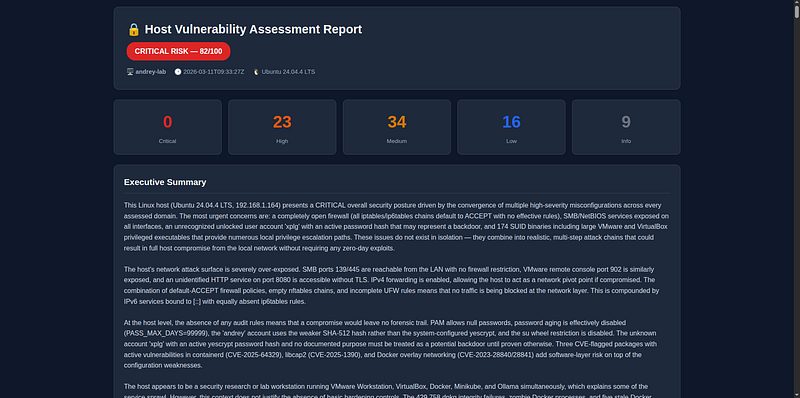
Common Usage Patterns
Fast scan — skip lynis, no AI(~2 minutes, no API calls):
./run
.sh

--skip
 lynis
--no-ai
Useful for a quick check during development or when you just want raw scanner output.
Network and user audit only:
./run.sh --modules network,
users
,services
Scans only the three specified modules, useful when you’ve already fixed filesystem and kernel findings and want to recheck access controls.
Only show actionable findings:
./run.sh --severity HIGH
Filters the report to HIGH and CRITICAL only. Useful when you have many LOW/INFO findings you’ve already acknowledged.
Use a more powerful model for deeper analysis:
./run.sh --model claude-opus-4-6
Claude Opus produces more detailed attack chain reasoning and longer remediation explanations. Costs more per run but worthwhile for a quarterly deep-dive.
Run without the launcher script(Docker Compose):
ANTHROPIC_API_KEY
=sk-ant-... docker compose run assessment --skip lynis
Run directly on the host(no Docker, development mode):
HOST_ROOT
=
""
 python3 -m assessment.cli --modules kernel,os_hardening --
no
-ai
SettingHOST_ROOT=""makes all paths resolve to/instead of/host, so the scanners read your real system directly. Useful when iterating on a scanner module without rebuilding the image.
Architecture Overview
The Big Picture
AuditAI is structured as a three-stage pipeline. Each stage is a clean handoff — scanners know nothing about AI, the AI layer knows nothing about report templates, and the report layer just renders aReportdataclass.
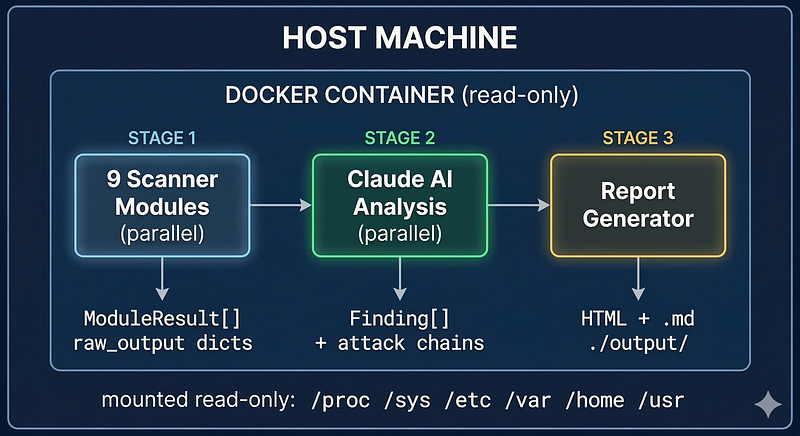
Why Docker?
Running security tooling directly on a host is messy — it means installing nmap, lynis, Python dependencies, and dealing with version conflicts across distributions. Docker gives you a clean, reproducible environment with all tools pre-installed, pinned to known versions.
The bigger advantage isisolation without losing visibility. The trick is giving the containerread-onlyaccess to the host system it’s assessing through a precise set of Docker flags:
docker run
--rm \

--pid=host \

--network=host \

--cap-add=NET_ADMIN \

--cap-add=NET_RAW \

--cap-add=SYS_PTRACE \

--cap-add=AUDIT_READ \
  -v /:/host:ro \
  -v /proc:/host/proc:ro \
  -v /sys:/host/sys:ro \
  -v /var/
log
:/host/var/
log
:ro \
  -v ./
output
:/
output
 \
  auditai:latest
Each flag exists for a specific reason — none are added “just in case”:
The container runs as root internally — required for raw socket nmap and/procreads — but--privilegedis explicitlynotused. Without--privileged, the container still operates within Linux namespace boundaries and cannot modify host kernel parameters, load kernel modules, or escape via device access.
The Path Convention
Every scanner uses a single path prefix defined inconfig.py:
HOST_ROOT
 = os.environ.get(
"HOST_ROOT"
,
"/host"
)
PROC_PATH
 = f
"{HOST_ROOT}/proc"

# /host/proc  →  host's process table
SYS_PATH
  = f
"{HOST_ROOT}/sys"

# /host/sys   →  kernel interfaces
ETC_PATH
  = f
"{HOST_ROOT}/etc"

# /host/etc   →  config files
VAR_PATH
  = f
"{HOST_ROOT}/var"

# /host/var   →  package databases, logs
HOME_PATH
 = f
"{HOST_ROOT}/home"

# /host/home  →  user directories
SettingHOST_ROOT=""collapses every path back to the real system root, so the tool runs directly on a bare host without Docker. This makes local development painless — no Docker rebuild needed to test a scanner change.
Stage 1: Scanner Execution Model
All nine scanners extend a single abstract base class:
class

BaseScanner
(
ABC
):

name:
 str

def

run
(
self
) ->
ModuleResult
:
          start = time.time()

try:
              raw_output, findings =
self
._scan()

return

ModuleResult
(
                  module_name=
self
.name,
                  findings=findings,
# empty list before AI analysis
                  raw_output=raw_output,
# everything collected, sent to AI
                  duration_seconds=time.time() - start,
              )
          except
Exception
 as
e:

# Critical design: a failed scanner never aborts the run

return

ModuleResult
(..., error=str(e))

@abstractmethod

def

_scan
(
self
) -> tuple[dict, list]:
          ...
The base class enforces two contracts:
-
**Error isolation.**A scanner that throws an exception returns an empty
ModuleResultwitherrorset. The rest of the assessment continues unaffected. If nmap fails becauseNET_RAWwasn't granted, the network module fails gracefully while the other eight modules complete normally. The final report marks the failed module clearly. -
**Separation of collection and analysis.**Scanners return raw data in
raw_output— they do not produce findings. Findings come from the AI in Stage 2. This means a scanner never needs to be updated when security baselines change; only the AI prompt needs tuning.
**Execution order matters.**The runner uses aThreadPoolExecutorto run the eight fast scanners in parallel, while lynis (which takes 3–7 minutes) runs concurrently in a separate thread:
t=0s   ┌── network scanner    ──┐
       ├── services scanner   ──┤
       ├── os_hardening       ──┤  complete ~30–90s
       ├──
users
 scanner      ──┤
       ├── processes scanner  ──┤
       ├── filesystem scanner ──┤
       ├── kernel scanner     ──┤
       └── packages scanner   ──┘
       ┌── lynis scanner ──────────────────────┐  complete ~3–7min
All results are collected before Stage 2 begins. If lynis is skipped via--skip lynis, the total scan time drops to under 2 minutes.
Stage 2: The Data Flow into AI
Scanners collect raw data indiscriminately — everything that could be relevant ends up inraw_output. Before any of that reaches Claude, it passes through apreprocessorthat filters and compresses each module's output:
network scanner
raw_output

(before)
:              network scanner input (after):
{
                                                 {

"nmap_localhost"
: {
"xml"
:
"...3000 lines"
},
"nmap_localhost"
: {

"interfaces"
: [...full ip addr JSON...],
"open_ports"
: [

"firewall_iptables"
: {
"filter"
:
"..."
},                    {
"port"
:
22
,
"service"
:
"ssh"
},

"open_ports_ss"
:
"Netid State..."
,                         {
"port"
:
80
,
"service"
:
"http"
}
    ...                                                    ]
}  ← ~
85
,
000
 chars                                    },

"firewall_iptables"
: {

"filter"
: {

"rule_count"
:
3
,

"default_accept_policy"
:
true
                                                          }
                                                      },
                                                      ...
                                                  }  ← ~
8
,
000

chars
  (
90
% smaller)
The preprocessor applies different logic per module:
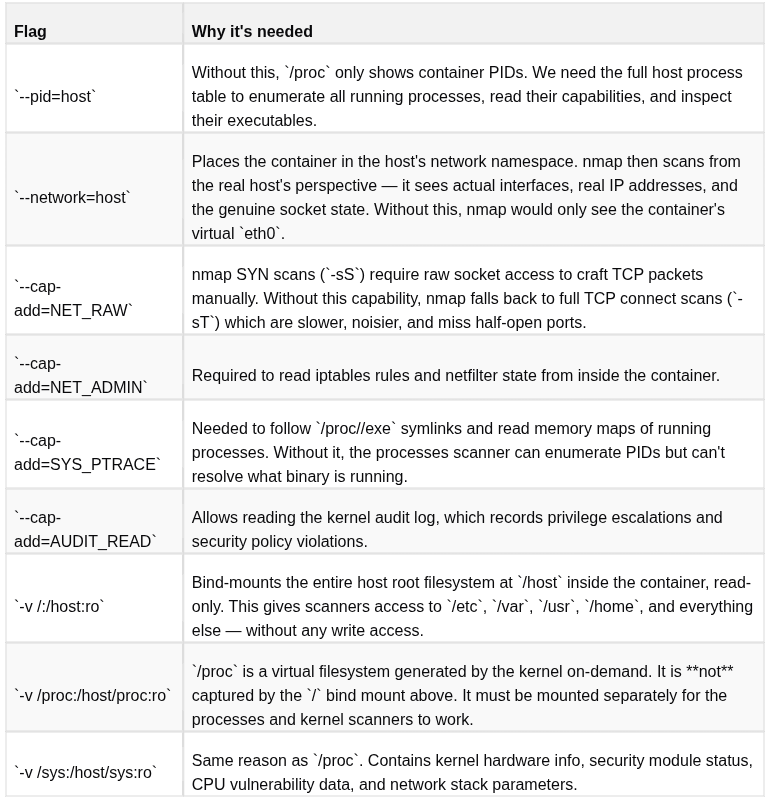
This reduces prompt size 60–90%, which has two concrete benefits: Claude never hits token limits mid-response (eliminating JSON truncation errors), and each API call costs significantly less.
The filtered output is serialized to JSON and wrapped in the analysis prompt. The AI returns structured JSON with findings, a risk score, and a module summary. Those are deserialized back intoFindingdataclasses and attached to theModuleResult.
Per-module AI calls runsequentiallywith a small delay between each. Running them in parallel triggers rate limits on Anthropic Tier 1 accounts (the $5 entry level). Sequential execution is slightly slower but completes reliably on any account tier.
Stage 3: Synthesis and Report Assembly
After all modules have AI-annotated findings, a second AI call performs cross-module synthesis. This is where the tool’s real value emerges: the synthesis prompt receives all findings from all modules at once and is explicitly asked to identifyattack chains— sequences of findings that chain together into a real exploit path.
The synthesis produces:
-
overall_risk_rating+overall_risk_score— a single risk verdict for the host -
attack_chains— 2–5 multi-step attack scenarios grounded in the actual findings -
top_10_priorities— finding IDs ranked by real exploitability onthishost, not generic severity -
executive_summary— non-technical prose for a system owner -
recommended_immediate_actions— ordered action list
Everything assembles into a singleReportdataclass which is then rendered to HTML and Markdown in parallel:
@dataclass
class Report:

hostname:

str

scan_timestamp:

str

os_info:

dict

module_results:

list[ModuleResult]

# all 9 modules

attack_chains:

list[AttackChain]

# from synthesis

top_priorities:

list[str]

# finding IDs

overall_risk_score:

int

# 0–100

overall_risk_rating:

str

# CRITICAL/HIGH/MEDIUM/LOW

executive_summary:

str

lynis_score:

int

|

None

recommended_actions:

list[str]

all_findings:

list[Finding]

# flattened, populated post-init
Component Map
assessment
/
├── cli.py          Entry point. Parses args, orchestrates
all
 three stages,
│                   prints the summary
table

to
 stdout.
│
├── config.py       Single source
of
 truth
for

all
 paths (HOST_ROOT prefix),
│                   sysctl baselines, known
-
safe SUID list, dangerous packages.
│
├── models.py       Pure data: Finding, ModuleResult, AttackChain, Report.
│
No
 business logic. Safe
to
 import anywhere.
│
├── runner.py       Stage
1
 orchestration. Validates mounts, collects host
│                   context (OS, kernel, hostname), runs scanners
in
 parallel.
│
├── scanners
/
│   ├── base.py     Abstract BaseScanner
with
 error isolation
+
 timing.
│   └──
*
.py
One
 file
per
 module.
Each
 implements _scan() only.
│
No
 AI,
no
 reporting,
no

cross
-
module
 awareness.
│
├── ai
/
│   ├── client.py      Anthropic SDK wrapper. Handles retries, rate limits,
│   │                  JSON parsing, billing errors,
and
 code fence stripping.
│   ├── preprocessor.py Filters
and
 compresses raw scanner output before AI.
│   │                  Reduces prompt size
60
–
90
%

per
 module.
│   ├── prompts.py
All
 prompt templates
in

one
 place. Edit this
to
 tune
│   │                  AI analysis quality
or
 finding verbosity.
│   └── analyzer.py    Stage
2
 orchestration. Preprocesses data, runs
│
per
-
module
 analysis sequentially,
then
 synthesis.
│
└── reports
/
    ├── html.py     Self
-
contained HTML renderer. Inline CSS
+
 JS,
no
 CDN.
    └── markdown.py Markdown renderer
for
 archiving
and
 plain
-
text sharing.
The Nine Scanner Modules
Each scanner inherits fromBaseScanner, which handles timing, error isolation, and result structure:
class

BaseScanner
(ABC)
:
    name: str =

"base"
    def run(self) -> ModuleResult:
        start = time.time()
        try:
            raw_output, findings = self._scan()
            return ModuleResult(
                module_name=self.name,
                findings=findings,
                raw_output=raw_output,
                ...
            )
        except Exception as e:
            # A failed scanner returns an empty result, not an exception
            # The rest of the assessment continues
            return ModuleResult(..., error=str(e))
This error isolation design is important: if lynis times out or nmap fails due to missing capabilities, the other seven modules still complete and get analyzed.
Module 1: Network
Uses nmap for port scanning and service fingerprinting:
nmap -sS -sV
--top-ports

1000
 -T4
--open
 -oX -
127.0
.
0.1
nmap -sS -sV
--top-ports

1000
 -T4
--open
 -oX - <primary_ip>
Also reads iptables/nftables/ufw rules, checks IPv6 exposure, and usesss -tlnputo map listening processes to ports.
Key finding this catches: services binding to0.0.0.0(all interfaces) when they should bind only to localhost.
Module 2: Services
Enumerates systemd units looking for:
-
Failed services (which might indicate crashed security daemons)
-
Services enabled at boot that shouldn’t be there
-
Services running as UID 0
-
The docker socket: if
/var/run/docker.sockis world-readable, any user can become root trivially
def _check_docker_socket() -> dict:
    socket_path =
"/var/run/docker.sock"
    if os.path.
exists
(socket_path):
        st = os.
stat
(socket_path)
        return {
            "exists": True,

"mode"
:
oct
(st.st_mode),

"world_readable"
:
bool
(st.st_mode &
0
o006),  # Critical if True
        }
An interesting Docker-specific challenge:systemctlis not available inside the container because it communicates withsystemdover D-Bus, and the host's D-Bus session isn't shared into the container. The scanner handles this gracefully — it triessystemctlfirst, and if unavailable, reads.serviceunit files directly from the host filesystem:
/
host
/
lib
/
systemd
/
system
/
     ← package
-
installed services
/
host
/
etc
/
systemd
/
system
/
     ←
user
-
modified services
/
host
/
usr
/
lib
/
systemd
/
system
/
 ←
system
 services
/
host
/
etc
/
systemd
/
system
/*.wants/ ← symlinks reveal which are enabled
This means the services scanner works correctly even inside a minimal Docker container with no init system.
Module 3: OS Hardening
Reads 25+ sysctl parameters directly from/proc/sys/and compares them against secure baselines. Nosysctlcommand needed:
SYSCTL_CHECKS = {

"kernel.randomize_va_space"
: (2,
"ASLR full randomization"
),

"kernel.dmesg_restrict"
:     (1,
"Restrict dmesg to privileged users"
),

"kernel.kptr_restrict"
:      (2,
"Hide kernel pointers"
),

"kernel.yama.ptrace_scope"
:  (1,
"Restrict ptrace to parent processes"
),

"net.ipv4.tcp_syncookies"
:   (1,
"SYN flood protection"
),

# ... 20 more
}
Also checks AppArmor/SELinux status, GRUB boot parameters (looking fornokaslr, missingaudit=1), PAM configuration, and core dump settings.
Module 4: Users
Parses/etc/passwd,/etc/shadow,/etc/sudoers, and SSH configuration to find:
-
Accounts with UID 0 other than root
-
System accounts (UID < 1000) with login shells
-
NOPASSWDentries in sudoers -
Root’s authorized SSH keys
-
Legacy files (
.rhosts,.netrc) in home directories -
SSH configuration weaknesses (PermitRootLogin, PasswordAuthentication, etc.)
Module 5: Processes
Iterates/proc/with--pid=hostgiving access to all host PIDs. For each process it reads:
#
/proc/<pid>/status
for
 UID, capabilities
#
/proc/<pid>/cmdline
for

command
 line
#
/proc/<pid>/exe
for
 executable path
The capability decoding is particularly useful — it translates the hex bitmask from/proc/<pid>/statusinto human-readable capability names:
cap_int =
int
(
"0000003fffffffff"
,
16
)
caps = [CAP_NAMES[i]
for
 i in
range
(
41
)
if
 cap_int & (
1
 << i)]
# → [
'CAP_CHOWN'
,
'CAP_DAC_OVERRIDE'
, ...,
'CAP_SYS_ADMIN'
]
It also flags processes with deleted executables, shells running from/tmp, and command-line patterns suggesting reverse shells (/dev/tcp,bash -i,0>&1).
Module 6: Filesystem
Walks the filesystem looking for SUID/SGID binaries, world-writable files in system directories, incorrect permissions on sensitive files, and missing sticky bits:
sensitive_files = {

"/etc/shadow"
:         0o640,
# max allowed mode

"/etc/sudoers"
:        0o440,

"/etc/sshd_config"
:    0o600,

"/boot/grub/grub.cfg"
: 0o600,
}
Unknown SUID binaries — those not in the known-good baseline list — are flagged as high-priority findings.
Module 7: Kernel
Reads CPU vulnerability status directly from/sys/devices/system/cpu/vulnerabilities/:
spectre_v1: Mitigation: usercopy/swapgs barriers and __user pointer sanitization
spectre_v2: Mitigation: Enhanced IBRS
meltdown:   Not affected
srbds:      Mitigation: Microcode
Each entry is parsed to determine whether mitigations are actually active or the CPU is exposed. Also checks kernel lockdown mode, whether kexec is disabled, and BPF access restrictions.
Module 8: Packages
Uses the dpkg status database directly (no package manager command needed) and cross-references installed packages against the OSV.dev vulnerability database — no API key required:
payload = {

"package"
: {
"name"
:
"openssl"
,
"ecosystem"
:
"Debian"
},

"version"
:
"3.0.2-0ubuntu1.12"
,
}
response = requests.post(
"https://api.osv.dev/v1/query"
, json=payload)
# Returns list of CVEs affecting this exact version
Also checks for dangerous legacy packages (telnetd,rsh-server,nis), package integrity viadpkg --verify, and whether automatic security updates are configured.
Module 9: Lynis
Wraps thelyniscommand-line tool, running it against the mounted host filesystem:
lynis audit system
--rootdir
 /host
--no-colors

--quiet
 \

--report-file
 /tmp/lynis-report
.dat
Then parses the structured report file to extract the hardening index score (0–100), warnings, suggestions, and per-category test results. The lynis score becomes a key metric in the final report.
The AI Layer
This is where the tool differentiates from a plain script. There are two analysis passes.
Pass 1: Per-Module Analysis
Each module’s preprocessed output is sent to Claude. The prompt explicitly constrains output size to prevent response truncation:
Analyze

the

following
 {
module_name
}
scan

results.
HOST CONTEXT:

OS,

kernel,

hostname...
RAW SCAN DATA:
{
preprocessed_json
}
Return

at

most

12

findings

-

prioritise

by

severity,

merge

duplicates.
Keep each field concise:

description

≤

2

sentences,

evidence

≤

1

line,
remediation

≤

1

command.
Output JSON:
{

"findings":
 [
...
],

"module_risk_score":

0
-100
,

"module_summary":

"2-3 sentences"
}
Temperature is set to 0 for deterministic, consistent findings. Theevidencefield is crucial — it forces the model to ground every finding in actual data from the scan, preventing hallucinated findings. The 12-finding cap and conciseness constraints ensure the response always fits withinmax_tokens=8192.
Calls are made sequentially with a short inter-request delay, which keeps the tool well within Anthropic’s rate limits on Tier 1 accounts.
Pass 2: Synthesis
After all modules are analyzed, a synthesis prompt combines all findings and asks for:
-
Attack chains— realistic multi-step scenarios specific tothis host’sactual findings
-
Top 10 priorities— ranked by exploitability and impact, not just generic severity
-
Executive summary— suitable for a system owner, not a security researcher
-
Overall risk rating— CRITICAL/HIGH/MEDIUM/LOW with justification
The attack chain analysis is the most valuable output. It identifies combinations like:“The nginx service (finding: exposed_http_service) runs as root (finding: nginx_root_process), and there is a known CVE in the installed nginx version (finding: nginx_cve_2024_xxxx). A remote attacker exploiting the CVE would gain immediate root access.”
Handling API Errors Gracefully
Running nine AI calls in sequence means there are multiple opportunities for transient failures. The tool handles them distinctly:
**Rate limits (429):**Backed off with exponential delay and retried up to 4 times. Base delay is 15 seconds, so the backoff sequence is 15s → 30s → 60s → 120s. This is generous enough for Tier 1 accounts which reset limits per minute.
**Insufficient credits (400):**Detected immediately by matching the error message against known billing phrases. No retry — retrying a billing error is pointless and wastes time. Instead, the tool stops with a clear message:
ERROR: Anthropic API rejected the request due
to
 insufficient credits.
  →
Check
 your balance
at
 https:
/
/
console.anthropic.com
/
settings
/
billing
  → If you just topped up, wait a few minutes
for
 credits
to
 propagate.
  → Re
-
run
with

--no-ai to get scanner-only output while you resolve billing.
Note: there is often a 5–30 minute delay after first purchasing API credits before the API accepts requests. The scanner-only output (--no-ai) is fully useful on its own while waiting.
**JSON decode errors:**If a response can’t be parsed as JSON (rare but possible if the model produces unexpected output), the tool retries with the same prompt. On final failure it records an empty findings list for that module rather than aborting the run.
**Scanner failures:**If an individual scanner crashes — nmap timeout, permission denied, missing binary — it records the error inModuleResult.errorand the run continues. The final report marks the failed module clearly.
The Report
The HTML report is a single self-contained file — no CDN dependencies, no external JavaScript. Open it offline, share it via email, archive it. It includes:
-
Color-coded severity dashboard
-
Filterable findings table (click “Critical” to show only critical findings)
-
Collapsible module sections with risk scores
-
Attack chain cards
-
Full lynis output in an appendix
The dark theme was a deliberate choice — security professionals spend a lot of time staring at these reports.
Security Considerations
A few important notes if you use this:
**The tool only reads, never writes.**Every host mount is:ro. The only write path is the./output/directory where reports are saved. Verify this yourself by checking thedocker runcommand inrun.shbefore running.
**Keep reports private.**The HTML report contains detailed information about your system’s configuration, installed packages, and vulnerabilities. Treat it like a password — don’t commit it to a public repository, don’t share it over unencrypted channels.
**Your scan data goes to Anthropic’s API.**The raw scanner output is sent to Claude for analysis. Review Anthropic’s data handling policies before running this in regulated environments. The--no-aiflag produces reports with no external data transmission.
**This is not a replacement for a professional penetration test.**It finds configuration weaknesses and known CVEs. It does not attempt exploitation, it doesn’t cover application-layer vulnerabilities, and it won’t catch a skilled attacker who has already compromised your system. It’s a hardening tool, not a forensics tool.
Extending the Tool
Adding a new scanner is straightforward. Create a class inassessment/scanners/:
class

MyScanner
(
BaseScanner
):
    name =
"my_module"

def

_scan
(
self
) -> tuple[dict, list]:
        result = {}

# Collect data, store in result dict
        result[
"something"
] = read_something()

# Return raw data - AI will identify findings

return
 result, []
Register it inassessment/scanners/__init__.py:
ALL_SCANNERS = {
    ...

"my_module"
: MyScanner,
}
That’s it. The AI analysis, report generation, and CLI integration are automatic.
What’s Next
A few things I’m planning to add:
-
Differential reports— compare two scans over time to see what changed
-
Remediation scripts— auto-generated bash scripts to apply the recommended fixes (with dry-run mode)
-
CI/CD integration— fail a pipeline if a scan finds CRITICAL severity issues
-
Rootkit detection— integrate
rkhunterorchkrootkitas an additional module -
Container scanning— extend the tool to also assess running Docker containers on the host
Conclusion
Security tooling has historically required either significant expertise to interpret or significant budget to outsource. Large language models change that equation. Not because they replace security expertise — they don’t — but because they can take the output of established tools and turn raw data into prioritized, actionable findings that a non-specialist can understand and act on.
The combination of Docker (clean, reproducible tooling), Python (rapid scanner development), and Claude (findings correlation and natural language output) produces something that would have taken a team weeks to build a few years ago.
The full source code is available onGitHub. Run it on your machine. You might be surprised what you find