Kubernetes Logging and Monitoring: Complete Guide
- Category: CTI
- Source article: https://medium.com/@1200km/kubernetes-logging-and-monitoring-complete-guide-2ce9d4bdba80
- Published: 2026-02-11
- Preserved media: 9 image(s), including cover images, screenshots, diagrams, and infographics where present.
- Preserved technical blocks: 28 code/configuration block(s).
Ecosystem Fit
This page mirrors the original Medium article into the 1200km.com Docusaurus ecosystem. The original article flow, images, screenshots, infographics, and technical blocks are preserved from the export.
A comprehensive reference for every major log type in Kubernetes: what it is, what you can monitor with it, how to include or exclude it, and why it matters.
Introduction
Kubernetes does not produce “logs” as a single stream. It producessignals across layers— applications, control plane, nodes, infrastructure add-ons, Events, and audit trails — each answering a different operational or security question.
Most teams fail at Kubernetes logging not because they lack tools, but because theycollect everything without understanding why. This leads to noisy dashboards, high ingestion costs, and — ironically — missing the one log that actually mattered during an incident.
This guide is designed as adecision framework, not just a how-to:
-
What log types exist in Kubernetes
-
What each log can tell you
-
How to include or exclude it correctly
-
When it matters for security, reliability, compliance, or cost
Using Fluent Bit as a concrete reference implementation, the guide walks from first deployment to advanced filtering, persistent buffering, and real-world use cases. By the end, you should be able tojustify every log you collect — and every log you intentionally drop.
Table of Contents
-
Introduction: The Kubernetes Log Landscape
-
First Steps: Deploy Fluent Bit as a DaemonSet
-
Fluent Bit DB and Chunk Storage
-
Application & Workload Logs
-
Control Plane Logs
-
Node & Runtime Logs
-
Infrastructure & Add-on Logs
-
Kubernetes Events
-
Audit Logs
-
Inclusion and Exclusion Patterns
-
Use Cases: Security, Infrastructure, Application, and More
-
Summary Matrix and Checklist
-
Example Training Cluster
-
Showing Cluster Configuration with kubectl
-
References
1. Introduction: The Kubernetes Log Landscape
In a Kubernetes cluster, logs are produced in several layers. Each layer answers different questions:*What did my app do?**Why did the scheduler place this pod here?**Who changed that resource?*Why was the pod killed?
Central idea:You don’t have to collect everything. Choose log types based on what you need tomonitor,debug, andprove(compliance). This guide explains each type so you can decide what to include or exclude.
2. First Steps: Deploy Fluent Bit as a DaemonSet
To get logs from every node into a central place, runFluent Bit as a DaemonSet: one pod per node that tails container logs, enriches them with Kubernetes metadata, and forwards to your outputs. Use the following order.
Prerequisites
-
A cluster (e.g. Minikube) with
kubectlconfigured. -
Aloggingnamespace (create with
kubectl create namespace loggingif needed). -
Optional: a log receiver (e.g. thetraining-cluster log-listeneror an external system like XPLG).
1. Fluent Bit configuration (ConfigMap)
The configuration definesinputs(tail container logs),filters(Kubernetes metadata), andoutputs(HTTP to your backend). The current simple config includesallcontainer logs and sends to two HTTP endpoints: an in-cluster log-listener and (for Minikube) an XPLG endpoint athost.minikube.internal:30304.
Apply the ConfigMap in theloggingnamespace:
kubectl apply -f training-cluster/
03
-fluent-bit-
config
.yaml
This createsfluent-bit-configwithfluent-bit.confandparsers.conf.
# Fluent Bit: SIMPLE config — include ALL logs, 2 outputs (listener + XPLG)
# Use this as the first config for the training cluster (no exclusions).
apiVersion: v1
kind: ConfigMap
metadata:
  name: fluent-bit-config
  namespace: logging
  labels:
    app: fluent-bit
data:
  fluent-bit.conf: |
    [SERVICE]
        Flush
2
        Grace
30
        Log_Level     info
        Parsers_File  /fluent-bit/etc/parsers.conf
    [INPUT]
        Name              tail
        Tag               kube.*
        Path              /var/
log
/containers/*.log
        Parser            docker
        DB                /fluent-bit/data/flb_kube.db
        Mem_Buf_Limit
5
MB
        Skip_Long_Lines   On
        Refresh_Interval
10
        Ignore_Older
5
m
    [FILTER]
        Name                kubernetes
        Match               kube.*
        Kube_URL            https:
//
kubernetes.default.svc:
443
        Kube_CA_File        /var/run/secrets/kubernetes.io/serviceaccount/ca.crt
        Kube_Token_File     /var/run/secrets/kubernetes.io/serviceaccount/token
        Kube_Tag_Prefix     kube.var.log.containers.
        Merge_Log           On
        Keep_Log            On
    [FILTER]
        Name    modify
        Match   kube.*
        Rename
log
 message
    [OUTPUT]
        Name            http
        Match           kube.*
        Host
log
-listener.logging.svc
        Port
8080
        URI             /ingest
        Format          json_stream
        Json_date_key   timestamp
        Json_date_format iso8601
    [OUTPUT]
        Name                http
        Match               kube.*
        Host                host.minikube.internal
        Port
30304
        URI                 /logeye/api/logger.jsp?token=
4
ca8e61e-abbb-
4663
-
9
c24-
636
e4d5fad8d
        Format              json
        Json_date_key
time
        Json_date_format    iso8601
  parsers.conf: |
    [PARSER]
        Name        cri
        Format      regex
        Regex       ^(?<
time
>[^ ]+) (?<stream>stdout|stderr) (?<logtag>[^ ]*) (?<
log
>.*)$
        Time_Key
time
        Time_Format %Y-%m-%dT%H:%M:%S.%L%z
    [PARSER]
        Name        docker
        Format      json
        Time_Key
time
        Time_Format %Y-%m-%dT%H:%M:%S.%L%z
        Time_Keep   On
Main pieces:
-
INPUT:
tailon/var/log/containers/*.logwithParser docker, DB for resume, 5mIgnore_Older. -
FILTER:
kubernetesfilter for namespace/pod/labels;modifyto renamelog→message. -
**OUTPUT:**HTTP to
log-listener.logging.svc:8080/ingest(JSON stream) and, in the same config, HTTP to XPLG (adjust host/port/token for your environment).
2. RBAC (ServiceAccount, ClusterRole, ClusterRoleBinding)
Fluent Bit needs read access to namespaces and pods for metadata. Apply:
kubectl apply -f training-cluster/
03
-fluent-bit-rbac.
yaml
piVersion:

v1
kind:

ServiceAccount
metadata:

name:

fluent-bit

namespace:

logging
---
apiVersion:

rbac.authorization.k8s.io/v1
kind:

ClusterRole
metadata:

name:

fluent-bit
rules:

-

apiGroups:
 [
""
]

resources:
 [
"namespaces"
,
"pods"
]

verbs:
 [
"get"
,
"list"
]
---
apiVersion:

rbac.authorization.k8s.io/v1
kind:

ClusterRoleBinding
metadata:

name:

fluent-bit
roleRef:

apiGroup:

rbac.authorization.k8s.io

kind:

ClusterRole

name:

fluent-bit
subjects:

-

kind:

ServiceAccount

name:

fluent-bit

namespace:

logging
This creates thefluent-bitServiceAccount inloggingand a ClusterRole that canget,list``namespacesandpods, bound to that ServiceAccount.
3. DaemonSet
The DaemonSet runs one Fluent Bit pod per node, with the ConfigMap mounted and host paths for/var/logand (for Docker runtime)/var/lib/docker/containers. Apply:
kubectl apply -f training-cluster/
03
-fluent-bit-daemonset.
yaml
apiVersion:

apps/v1
kind:

DaemonSet
metadata:

name:

fluent-bit

namespace:

logging

labels:

app:

fluent-bit
spec:

selector:

matchLabels:

app:

fluent-bit

template:

metadata:

labels:

app:

fluent-bit

spec:

serviceAccountName:

fluent-bit

tolerations:

-

key:

node-role.kubernetes.io/control-plane

operator:

Exists

effect:

NoSchedule

containers:

-

name:

fluent-bit

image:

cr.fluentbit.io/fluent/fluent-bit:2.2.0

imagePullPolicy:

IfNotPresent

ports:

-

containerPort:

2020

name:

metrics

resources:

requests:

cpu:

50m

memory:

64Mi

limits:

cpu:

200m

memory:

128Mi

volumeMounts:

-

name:

varlog

mountPath:

/var/log

readOnly:

true

-

name:

flb-db

mountPath:

/fluent-bit/data

-

name:

varlibdockercontainers

mountPath:

/var/lib/docker/containers

readOnly:

true

-

name:

config

mountPath:

/fluent-bit/etc/

securityContext:

readOnlyRootFilesystem:

false

runAsNonRoot:

false

runAsUser:

0

terminationGracePeriodSeconds:

30

volumes:

-

name:

varlog

hostPath:

path:

/var/log

-

name:

flb-db

emptyDir:
 {}

-

name:

varlibdockercontainers

hostPath:

path:

/var/lib/docker/containers

-

name:

config

configMap:

name:

fluent-bit-config
The DaemonSet uses:
-
Image:
cr.fluentbit.io/fluent/fluent-bit:2.2.0 -
ServiceAccount:
fluent-bit -
**Volumes:**hostPath
/var/log,emptyDirfor Fluent Bit DB, hostPath for Docker containers (if applicable), and thefluent-bit-configConfigMap at/fluent-bit/etc/. -
**Tolerations:**so it can run on control-plane nodes (e.g. single-node Minikube).
Verify
- Check that the DaemonSet is running one pod per node:
kubectl get daemonset -n loggingkubectl get pods -n logging -l app=fluent-bit

- Check Fluent Bit logs:
kubectl logs -n logging -l app=fluent-bit --tail=50
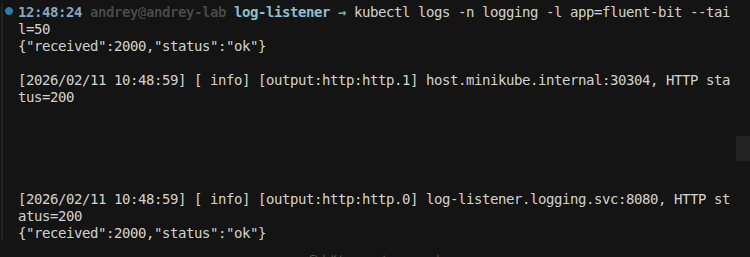
If the config points tolog-listener.logging.svc:8080, ensure the log-listener Deployment and Service are deployed (seeExample Training Cluster); then you can port-forward and open/events/hierarchyor/xplg-styleto see events.
3. Fluent Bit DB and Chunk Storage
Once Fluent Bit is running as a DaemonSet, two configuration details directly affect reliability and resource use: thetail plugin DB(resume position) andchunk storage(disk buffering). Both benefit from using amounted filesystemso data persists across pod restarts.
What the tail plugin DB is
In the tail input you set:
DB                /fluent-bit/data/flb_kube.db
Mem_Buf_Limit     5MB
-
**DB**– Path to aSQLite databasethat the tail plugin uses to record which log files it is tracking and theread offset(position) in each file. -
Why it matters:When Fluent Bit restarts (pod restart, upgrade, node drain), it canresumefrom the last position instead of re-reading from the beginning. Without a persistent DB:
-
You getduplicatelog lines after every restart, or
-
With
Ignore_Older 5m, youlosethe last 5 minutes of logs because the plugin skips "old" lines from its perspective. -
Ephemeral vs persistent:If
/fluent-bit/datais anemptyDir, the DB is lost when the pod is removed. Use amounted volume(hostPath or PVC) at/fluent-bit/dataso the DB file persists on the node or on shared storage.
What Mem_Buf_Limit does
-
Purpose:Maximummemory buffer per monitored file. When a container writes logs faster than Fluent Bit can send them to outputs, the tail plugin buffers in memory up to this limit.
-
Effect:Prevents one busy log stream from using unbounded memory (OOM). When the limit is reached, the tail plugin canpausereading that file (backpressure) or, ifstorageis enabled (see below), spill to disk.
Chunk storage (disk buffering)
When the pipeline or an output is under pressure, Fluent Bit can writechunks(buffered records) to disk so it does not drop data. You enable this in the main config:
[SERVICE]
    ...
    storage
.path
  /fluent-bit/data/chunks
    storage
.sync

normal
-
storage.path— Directory for chunk files. Put it under thesame mounted volumeas the DB (e.g.
/fluent-bit/data/chunks) so chunks use the same external or cluster-mounted filesystem. -
storage.sync—
normalorfull; controls how often chunk files are synced to disk.
The tail input (and outputs) can then use this path when in-memory buffering is insufficient. SoDBandchunksshare one mount: e.g. hostPath at/var/lib/fluent-bit(or a PVC) mounted in the container as/fluent-bit/data.
Saving DB and chunks on a mounted filesystem
To keep the DB and chunk storageoutsidethe container andpersistentacross pod restarts, use a volume that lives on the node or on cluster storage.
Option 1: hostPath (node-mounted FS)
Data is stored on thenode’s filesystemat a path such as/var/lib/fluent-bit. Each DaemonSet pod uses its node's path. You can mount NFS (or another filesystem) on each node at that path so the directory is actually on shared storage.
In the DaemonSet:
volumes:

-

name:

flb-db

hostPath:

path:

/var/lib/fluent-bit

type:

DirectoryOrCreate
WithmountPath: /fluent-bit/data, Fluent Bit writes:
-
DB→
/fluent-bit/data/flb_kube.db→ on the node at/var/lib/fluent-bit/flb_kube.db -
Chunks→
/fluent-bit/data/chunks→ on the node at/var/lib/fluent-bit/chunks
**Pros:**Simple, no StorageClass or PVC.**Cons:**Tied to the node; if the node is replaced, that node’s DB and chunks are gone unless the path was a shared mount (e.g. NFS).
Option 2: PersistentVolumeClaim (cluster-mounted FS)
Use aPVCso DB and chunks use acluster-backed mounted filesystem(e.g. NFS PV, cloud ReadWriteMany volume). For a DaemonSet, use a singleReadWriteManyPVC and give each pod aper-node subdirectoryviasubPathExpr: $(NODE_NAME)so nodes do not overwrite each other's data.
-
Create a PVC with
ReadWriteManyand setstorageClassNameto a StorageClass that supports it (e.g. NFS). -
In the DaemonSet, use that PVC for the volume mounted at
/fluent-bit/data, withsubPathExpr: $(NODE_NAME)and injectNODE_NAMEfrom the downward API (spec.nodeName).
Requirement:A StorageClass that supportsReadWriteMany(e.g. NFS provisioner). Many default cluster StorageClasses are ReadWriteOnce only.
Summary
Use one volume (hostPath or PVC) mounted at/fluent-bit/dataso that bothDB /fluent-bit/data/flb_kube.dbandstorage.path /fluent-bit/data/chunkspersist on the mounted filesystem. The training-cluster manifests use hostPath by default; optional PVC manifests are intraining-cluster/03-fluent-bit-pvc.yamland03-fluent-bit-daemonset-pvc.yaml(see the repo'sdocs/FluentBit_DB_and_Storage.mdfor step-by-step use).
4. Application & Workload Logs
What this log is
-
Source:Anything your containers write tostdoutorstderr(e.g.
print(),logger.info(), stack traces). -
**Format:**Per line, the runtime usually writes CRI-style JSON, e.g.
{"log":"...\n","stream":"stdout","time":"2024-01-15T10:30:00.123Z"}. -
**Location:**On each node, under
/var/log/containers/<pod>_<namespace>_<container>-<id>.log(symlinks) and/var/log/pods/<namespace>_<pod>_<uid>/<container>/<n>.log. -
**Identity:**Enriched by metadata:
namespace,pod_name,container_name,labels,annotations(e.g. via Fluent Bit Kubernetes filter).
What you can monitor with this log
How to include or exclude this log
**Include (default):**Tail all container logs on the node:
[INPUT]
    Name
tail
    Tag    kube.*
    Path   /var/log/containers/*.
log
    Parser docker
Exclude by pod name(e.g. drop coredns):
[
FILTER
]
    Name    grep

Match
   kube.
*
    Exclude kubernetes.pod_name coredns
Exclude by namespace(e.g. ignorekube-system):
Exclude kubernetes.namespace_name kube-
system
Include only specific namespaces(e.g. onlyproductionandstaging):
Use two grep filters: first drop all, then keep only the ones you want—or use a singleInclude(if your Fluent Bit version supports it). More portable approach: exclude everything you don’t want:
[
FILTER
]
    Name    grep

Match
   kube.
*
    Exclude kubernetes.namespace_name kube
-
system
    Exclude kubernetes.namespace_name kube
-
public
    Exclude kubernetes.namespace_name logging
Exclude by container name(e.g. sidecars you don’t care about):
Exclude
 kubernetes.
container_name
 istio-proxy
Exclude by label(e.g. skip pods withlogging=no):
Possible with a Lua or record_modifier filter that checkskubernetes.labels.loggingand then a grep that drops when that field equalsno. Simpler: usepod annotationand filter on it if your agent supports nested keys.
Why this log matters
-
**Primary record of application behavior.**When a pod is gone, these logs are often the only evidence of errors or abuse.
-
Required for debuggingand for linking with traces and metrics (same request ID in logs and spans).
-
Foundation for security monitoring(anomalies, injection attempts) andcompliance(evidence of access and actions).
**Recommendation:**Collect application logs from all namespaces you care about; exclude only noisy or irrelevant workloads (e.g. sidecars, system pods you already get from control-plane/infra streams) to control volume and cost.
5. Control Plane Logs
What this log is
Sources:
-
kube-apiserver— API requests, auth, admission, errors.
-
kube-controller-manager— Reconcile loops, scaling, node lifecycle.
-
kube-scheduler— Scheduling decisions, failures, preemption.
-
etcd— Storage layer for the API (often logged separately).
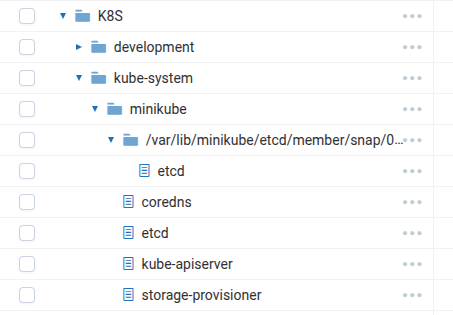
**Format:**Plain text or structured (e.g. klog-style with level and timestamp).
**Location:**Depends on deployment:
- Static pods(e.g. on control-plane node): same as workload logs under
/var/log/containers/and/var/log/pods/.
**Systemd:**sometimes underjournaldor a log file under/var/log.
- Identity:
namespace_name=kube-system,pod_namelikekube-apiserver-minikube,kube-controller-manager-*,kube-scheduler-*,etcd-*.
What you can monitor with this log
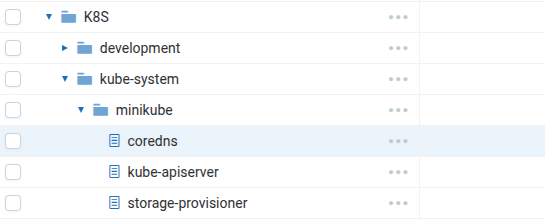
Use these for:cluster health,capacity and scheduling,security(failed auth, suspicious API patterns), andtroubleshooting(why a pod wasn’t scheduled, why a controller didn’t fix state).
How to include or exclude this log
**Include:**If control plane runs as pods, they are already in/var/log/containers/*.log. No extra path needed; same tail input as application logs.
Include only control plane(drop application namespaces):
[
FILTER
]
    Name    grep

Match
   kube.
*
    Exclude kubernetes.namespace_name kube
-
system
Then in a second grep,keeponlykube-system(so only control plane + other kube-system pods). Orexcludeall non–control-plane pod names:
[
FILTER
]
    Name    grep

Match
   kube.
*
    Include kubernetes.namespace_name kube
-
system
Then exclude add-ons you don’t need (e.g. coredns, storage-provisioner) so only api/controller/scheduler/etcd remain.
Exclude control plane(only application logs):
[
FILTER
]
    Name    grep

Match
   kube.
*
    Exclude kubernetes.namespace_name kube
-
system
Exclude specific components(e.g. no scheduler logs):
Exclude
 kubernetes.
pod_name
 kube-scheduler
Why this log matters
-
**Root cause for many cluster issues:**scheduling failures, controller loops, API overload, etcd problems.
-
**Security:**Failed auth, privilege escalation attempts, and admission denials show up here.
-
**Stability:**Detecting API latency, admission webhook timeouts, or etcd slowness early prevents outages.
**Recommendation:**Always collect control plane logs in production; exclude only if you have a separate, dedicated pipeline (e.g. different cluster or tier) that already ingests them.
6. Node & Runtime Logs
What this log is
-
Sources:
-
kubelet— Node status, pod lifecycle, volume mount, image pull, health checks.
-
Container runtime(containerd, CRI-O, Docker) — Image pull, start/stop, OOM, runtime errors.
-
**Format:**Usually klog or vendor-specific text.
-
**Location:**Depends on install: host
/var/log, or (when run in pods) under/var/log/containers// journald. -
**Identity:**When run as pods:
pod_namelikekubelet, or node name in logs/metadata.
What you can monitor with this log
Use for:node health,pod lifecycle(why a pod didn’t start),image and storage issues, andresource pressure(OOM, eviction).
How to include or exclude this log
-
If kubelet/runtime runon the host(not in Kubernetes), their logs arenotunder
/var/log/containers/*.log. You include them by tailing host paths (e.g./var/log/syslog,/var/log/kubelet.log) or journald from the node. -
If they runas pods(e.g. in kube-system), they are included in the same tail as other pods; exclude with:
Exclude kubernetes.pod_name kube
let
Exclude
 kubernetes.container_name containerd
Excludewhen you only care about application logs and already have node monitoring elsewhere.
Why this log matters
-
**Node-level truth:**Explains why a pod never started or why it was killed (OOM, eviction).
-
**Image and storage:**Pull errors and mount failures are only visible here (or in Events).
-
**Security:**Runtime and kubelet logs can show abuse (e.g. privileged container start).
**Recommendation:**Collect on critical nodes; exclude only if you have another node-level log pipeline or if volume is a concern and you already get the same signal from Events/metrics.
7. Infrastructure & Add-on Logs
What this log is
Sources:
-
CoreDNS— DNS queries, errors, cache.
-
Ingress controllers— Access logs, TLS, routing errors.
-
CNI— Network attach/detach, policy.
-
Metrics-server— Scraping errors, API.
-
Storage / CSI— Attach, mount, errors.
**Format:**Application-dependent (often text or JSON).
- **Location:**Same as workload logs when run as pods (e.g.
coredns-*,ingress-nginx-*inkube-systemoringressnamespace).
Identity:kubernetes.pod_name,kubernetes.namespace_name,kubernetes.container_name(e.g.coredns,controller).
What you can monitor with this log
Use for:networking and DNSissues,ingress and TLShealth,resource metricspipeline, andstorageproblems.
How to include or exclude this log
**Include:**Same tail as all pods; no extra config.
Exclude by pod name(e.g. reduce noise from CoreDNS):
[
FILTER
]
    Name    grep

Match
   kube.
*
    Exclude kubernetes.pod_name coredns
Exclude by container name(e.g. only CoreDNS app container):
Exclude
 kubernetes.
container_name
 coredns
Include only infrastructure(e.g. onlykube-systemandingressnamespace):
[
FILTER
]
    Name    grep

Match
   kube.
*
    Include kubernetes.namespace_name kube
-
system
Then optionally exclude control-plane pod names so only add-ons (coredns, metrics-server, etc.) remain.
Why this log matters
-
DNS and networkingare the first place to look for “can’t resolve” or “can’t reach” issues.
-
Ingress logsare the basis for access analytics, WAF, and TLS monitoring.
-
Metrics-serverlogs explain wrong or missing metrics (e.g. HPA not scaling).
-
CSIlogs explain volume attach/mount failures.
**Recommendation:**Include by default; exclude only specific components (e.g. coredns) if volume is high and you don’t need per-query analysis. Prefer sampling or aggregation over dropping entirely for security-sensitive add-ons.
8. Kubernetes Events
What this log is
Source:API server createsEventobjects when significant things happen (pod scheduled, failed, killed, image pull back-off, etc.).
- **Format:**Structured API object (e.g.
reason,message,involvedObject,source,count,firstTimestamp,lastTimestamp).
Location:Stored inetcd; visible viakubectl get events. Not in/var/log/containers/; you need anevent exporteror an agent that reads the Events API and forwards them as log records.
What you can monitor with this log
Events areshort-livedin etcd (typically 1 hour by default); exporting them to a log backend gives you history and alerting.
How to include or exclude this log
-
Include:Deploy anevent exporter(e.g. event-exporter, or a small controller that lists/watches Events and sends to your log pipeline). Fluent Bit does not read the Events API by default; you’d add a custom input (e.g. HTTP server receiving from an exporter) or use a sidecar that pushes events.
-
**Exclude:**Don’t run an event exporter, or filter in the exporter (e.g. only
WarningandNormalwith certain reasons).
Filtering by reason(in the exporter or downstream):
-
Include only:
OOMKilling,FailedScheduling,Failed,BackOff,FailedMount,FailedAttachVolume. -
Exclude: high-volume
Pulling,Pulled,Created,Startedif you don’t need lifecycle noise.
Why this log matters
-
Canonical “what happened” for pod and node lifecycle(OOM, eviction, scheduling failure, image pull back-off).
-
No need to scrapemany different components; one stream summarizes scheduler, kubelet, and controller actions.
-
Essential for alertingon failures and forpost-incidentanalysis.
**Recommendation:**Export Events to your log/alerting backend; filter byreasonand severity to control volume.
9. Audit Logs
What this log is
Source:****kube-apiserverwrites anaudit logfor every request (or a subset) when an audit policy is configured.
- **Format:**JSON (or legacy) with user, verb, resource, namespace, response code, request URI, etc.
Location:File on the control-plane node(s) or sent to awebhook(e.g. your SIEM or log backend).
- **Identity:**Not in container logs under
/var/log/containers/; separate file or stream.
How to include or exclude this log
-
Include:Configureaudit policyandaudit backend(log file or webhook). Then tail the audit log file from the control-plane node (or ingest from webhook). Fluent Bit can tail that file like any other.
-
Exclude:Don’t enable audit, or in theaudit policyexclude certain stages (e.g. only
RequestResponsefor secrets,Metadatafor others) or verbs/resources to reduce size.
Policy example (conceptual):
LogMetadatafor all resources; logRequestResponseonly forsecrets,configmaps, andpods/logto balance security and volume.
Why this log matters
-
**Authority for “who did what”**at the API level (users, service accounts, IPs).
-
Required for many compliance frameworks(e.g. PCI, SOC2) that need access and change logs.
-
Critical for security(detect privilege escalation, suspicious access patterns).
**Recommendation:**Enable audit in production; send to a secure, immutable backend and restrict access. Tune policy (stages, resources) to control volume.
10. Inclusion and Exclusion Patterns
By namespace
By pod name (regex)
-
Exclude coredns:
Exclude kubernetes.pod_name coredns -
Exclude all scheduler pods:
Exclude kubernetes.pod_name kube-scheduler -
Exclude by prefix:
Exclude kubernetes.pod_name ^my-noisy-job-
By container name
-
Exclude sidecar:
Exclude kubernetes.container_name istio-proxy -
Exclude init containers(if tagged): same idea with the init container name.
By path (input level)
-
**Only certain namespaces at read time:**Not directly in Fluent Bit for CRI; path is
/var/log/containers/*.log(all). Filtering is done with grep/modify after Kubernetes metadata is added. -
**Multiple paths:**You can add a second
[INPUT] tailwith a differentPath(e.g./var/log/audit/audit.log) and a differentTagto collect audit logs.
Split pipelines (e.g. infra vs app)
-
UseLuaorrecord_modifierto set a field (e.g.
log_type=infrastructureorapp) fromkubernetes.namespace_nameorpod_name. -
Userewrite_tagto re-emit with a new tag (e.g.
infrastructure.*,app.*). -
Useseparate OUTPUTswith
Match infrastructure.*andMatch app.*to send to different collector paths or backends.
11. Use Cases: Security, Infrastructure, Application, and More
Below arenumbered use casesthat map real-world goals to which logs to collect, what to monitor, and how to include or exclude them.
11.1 Security monitoring
**Summary:**For security,includeaudit, control plane (at least apiserver), application logs, and node/runtime.Excludeonly for volume/cost after tuning (e.g. audit stages).
11.2 Infrastructure monitoring
**Summary:**For infrastructure,includeCoreDNS, ingress, CNI, metrics-server, CSI, kubelet.Excludeonly specific add-ons (e.g. coredns) if you accept losing that signal and volume is critical.
11.3 Application and workload monitoring
**Summary:**For application monitoring,includeapplication logs (all or per-namespace) and Events.Excludesidecars, init containers, or very noisy workloads to control volume.
11.4 Compliance and auditability
**Summary:**For compliance,includeaudit (tuned by policy) and any application logs that record access.Excludeonly where policy explicitly allows (e.g. non-production).
11.5 Cost control and operational focus
Summary:For cost,excludeorsamplenoisy or non-critical streams;splitinfra vs app if retention/backends differ.
11.6 Debugging and incident response
**Summary:**For debugging,includeEvents, control plane, kubelet, and application;excludeonly when narrowing scope for a specific test.
12. Summary Matrix and Checklist
Log type → what to monitor, include/exclude, why it matters
Minimal production checklist
-
Application logsfrom all namespaces you care about (with exclusions for known noise).
-
Control plane(api, controller, scheduler; etcd if possible).
-
Eventsexported to log/alerting backend (at least Warning + critical reasons).
-
Auditenabled and sent to secure backend (tuned for volume).
-
Infrastructure(at least DNS, ingress) unless you explicitly exclude for cost.
-
Node/runtimewhere you need to debug node-level and runtime issues.
13. Example Training Cluster
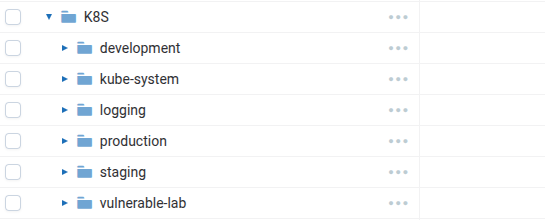
Atraining clusteris provided in the repo to practice logging and monitoring with the guide. It is fully functional and includes all components needed to collect and view logs.
Cluster description
Manifests location:training-cluster/in the repo.
-
00-namespaces.yaml— logging, production, staging, development -
01-apps-production.yaml— frontend, backend, worker -
01-apps-staging.yaml— api, cache, cron -
01-apps-development.yaml— dev-web, dev-db, dev-queue -
02-log-listener.yaml— Deployment + Service (logging ns) -
03-fluent-bit-config.yaml— ConfigMap (simple pipeline, 2 outputs) -
03-fluent-bit-rbac.yaml— ServiceAccount, ClusterRole, ClusterRoleBinding -
03-fluent-bit-daemonset.yaml— DaemonSet
**Apply order:**Namespaces → Apps → Log-listener → Fluent Bit (config, RBAC, DaemonSet). Seetraining-cluster/README.mdfor exact commands and Minikube image build/load for the log-listener.
14. Showing Cluster Configuration with kubectl
Use these commands to inspect and document your cluster’s logging-related configuration.
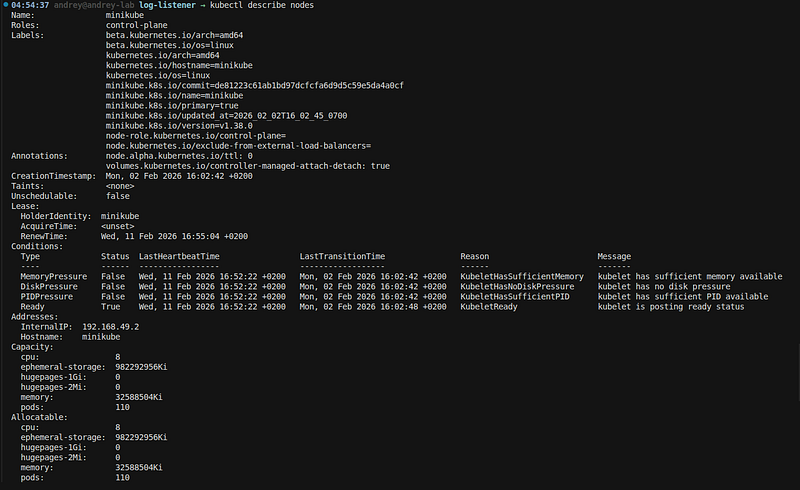
Cluster and nodes
# Cluster info (name, server, version)
kubectl cluster-info
# Nodes (names, roles, status, age)
kubectl get nodes -o wide
# Node labels and capacity
kubectl describe nodes

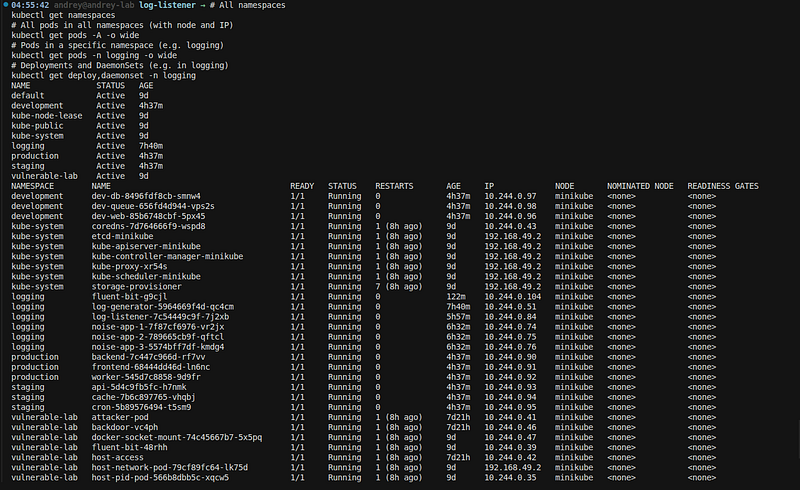
Namespaces and workloads
#
All
 namespaces
kubectl
get
 namespaces
#
All
 pods
in

all
 namespaces (
with
 node
and
 IP)
kubectl
get
 pods
-
A
-
o wide
# Pods
in
 a
specific
 namespace (e.g. logging)
kubectl
get
 pods
-
n logging
-
o wide
# Deployments
and
 DaemonSets (e.g.
in
 logging)
kubectl
get
 deploy,daemonset
-
n logging
Fluent Bit configuration
# ConfigMap that holds fluent-bit.conf and parsers
kubectl get configmap fluent-bit-config -n logging -o yaml
# Only the main config (fluent-bit.conf)
kubectl get configmap fluent-bit-config -n logging -o jsonpath=
'{.data.fluent-bit\.conf}'
# Fluent Bit pods (DaemonSet)
kubectl get pods -n logging -l app=fluent-bit
kubectl logs -n logging -l app=fluent-bit --
tail
=50
Log-listener and services
# Log-listener deployment and service
kubectl get deploy,svc -n logging -l app=
log
-listener
# Service endpoints (which pod backs the listener)
kubectl get endpoints -n logging
log
-listener
RBAC (Fluent Bit)
# ServiceAccount used by Fluent Bit
kubectl
get
 sa fluent-bit -n logging
# ClusterRole and ClusterRoleBinding
kubectl
get
 clusterrole fluent-bit
kubectl
get
 clusterrolebinding fluent-bit -o yaml
One-liner overview (training cluster)
# Namespaces and pod count per namespace
kubectl get pods -A --no-headers | awk
'{print $1}'
 |
sort
 |
uniq
 -c
# List all deployments and DaemonSets
kubectl get deploy,daemonset -A
Use these to confirm the training cluster layout (namespaces, apps, Fluent Bit, log-listener, RBAC) and to document “as deployed” for the guide.
15. References
A message from our Founder
Hey,Sunil**here.**I wanted to take a moment to thank you for reading until the end and for being a part of this community.
Did you know that our team run these publications as a volunteer effort to over 3.5m monthly readers?We don’t receive any funding, we do this to support the community. ❤️
If you want to show some love, please take a moment tofollow me onLinkedIn,TikTok,Instagram. You can also subscribe to ourweekly newsletter.
And before you go, don’t forget toclapandfollowthe writer️!