ATT&CK as a Working Tool: Theory and Hands-On Practical Usage
- Category: CTI
- Source article: https://medium.com/@1200km/att-and-ck-as-a-working-tool-theory-and-hands-on-practical-usage-d63835c9f101
- Published: 2026-03-19
- Preserved media: 40 image(s), including cover images, screenshots, diagrams, and infographics where present.
- Preserved technical blocks: 29 code/configuration block(s).
Ecosystem Fit
This page mirrors the original Medium article into the 1200km.com Docusaurus ecosystem. The original article flow, images, screenshots, infographics, and technical blocks are preserved from the export.
A practitioner’s guide for CTI analysts, detection engineers, and threat hunters
Table of Contents
-
Introduction: Why You Need This Guide
-
A Note on How to Use This Guide
-
Why ATT&CK Exists — The Problem It Solves
-
Framework Anatomy — Reading the Map
-
The 14 Tactics: Adversary Goals, Not Steps
-
Techniques, Sub-Techniques, and Procedures
-
ATT&CK Domains: Enterprise, Mobile, ICS
-
How a CTI Analyst Actually Uses ATT&CK
-
Use Case 1: Mapping a Threat Report to ATT&CK
-
Use Case 2: Coverage Gap Analysis with ATT&CK Navigator
-
What ATT&CK Navigator Is and Why It Matters
-
Use Case 3: Detection Engineering (Sigma + ATT&CK)
-
Use Case 4: Threat Hunting with ATT&CK
-
Use Case 5: Adversary Emulation and Purple Teaming
-
Hands-On: Step-by-Step Worked Example
-
Essential Tooling Reference
-
Common Pitfalls and Analyst Mistakes
-
ATT&CK in a CTI Workflow: Putting It All Together
-
Quick Reference Cheatsheet
Introduction: Why You Need This Guide
Every week, another threat report drops. Another advisory from CISA(Cybersecurity and Infrastructure Security Agency). Another vendor blog about a ransomware group. Another IR team publishing a post-mortem. The information is abundant. The problem is not a shortage of threat data — the problem ismaking that data usable across teams, tools, and time.
This is exactly the problem that MITRE ATT&CK was designed to solve, and it is also the reason why, in 2026, ATT&CK has become the closest thing the security industry has to a universal standard for describing adversary behavior. Whether you work in threat intelligence, detection engineering, incident response, red teaming, or security management, you cannot do your job at a high level without being fluent in ATT&CK.
But fluency is not the same as familiarity. Most security professionals haveheard ofATT&CK. They have seen a heatmap. They have read reports with T-codes appended. Far fewer have internalized how to actuallywork with the framework— how to map behavior to techniques with analytical rigor, how to use Navigator for meaningful gap analysis rather than false confidence, how to connect a CTI report’s ATT&CK table to a detection engineering backlog, how to run a threat hunt driven by TTP data.
**This guide teaches practical, daily-use ATT&CK skills.**It is not a marketing overview. It is not a “here is the matrix, good luck” introduction. It is a working practitioner’s reference built around the tasks you actually do when you sit down to analyze a threat actor, write a CTI report, build detection rules, or run a purple team exercise.
Who This Guide Is For
This guide is written for three primary audiences:
CTI Analystswho need to produce structured, actionable threat intelligence reports — not just narrative prose — and who need to map adversary behavior to ATT&CK with the kind of evidence discipline and confidence labeling that makes intelligence actually useful to downstream consumers.
Detection Engineers and SOC Analystswho need to understand why the T-codes in CTI reports matter, how to translate them into detection rules, and how to measure whether their current rule coverage actually addresses the threats their organization faces.
Security practitioners transitioning into threat intelligencewho understand how attacks work technically but haven’t yet developed the structured analytical workflow that separates intelligence work from incident response or penetration testing.
You do not need to have prior ATT&CK experience to follow this guide. You do need a basic understanding of how attacks work — what phishing is, what credential dumping means, what lateral movement looks like. The guide builds structured analytical methodology on top of that technical foundation.
What You Will Be Able to Do After Reading This
By the time you finish this guide and work through the practical exercises, you will be able to:
-
Read any threat report and extract a complete, evidence-labeled ATT&CK mapping table with correct technique IDs, tactic assignments, and confidence levels
-
Build ATT&CK Navigator layers that accurately represent a threat actor’s TTP profile
-
Overlay a threat actor profile against your detection coverage and produce a prioritized gap analysis
-
Write Sigma detection rules correctly tagged with ATT&CK IDs, based on the technique’s documented data sources
-
Design a threat hunt hypothesis from ATT&CK technique data and formulate the corresponding queries
-
Explain — in an interview, in a report, or to leadership — how ATT&CK fits into the complete intelligence-to-defense cycle
-
Identify and avoid the seven most common analyst mistakes that undermine the framework’s value
A Note on How to Use This Guide
The guide is structured to work both as alinear readand as areference document. If you are new to ATT&CK, read sections 1–6 in order first — they build the conceptual foundation that makes the practical use cases in sections 7–12 comprehensible and immediately applicable. If you are already familiar with the framework, jump directly to the use case sections or the worked example in section 12.
Every claim about how techniques map to real-world behaviors is grounded in MITRE ATT&CK’s public knowledge base (v16, Enterprise). Every tool referenced is open source or publicly accessible. Every workflow described is based on how actual CTI teams operate — not how vendor whitepapers say they should.
1. Why ATT&CK Exists — The Problem It Solves
The Fragmentation Problem
Before MITRE ATT&CK, cybersecurity teams across defenders, red teams, CTI analysts, and vendors all described adversary behavior in incompatible languages. A red teamer said “pass-the-hash.” A SIEM vendor said “lateral movement via credential reuse.” An incident responder said “mimikatz activity detected.” A CTI analyst wrote “the actor pivoted using stolen NTLM hashes.” Same behavior. Four different descriptions. Zero interoperability.
This fragmentation had real consequences. A CTI team produced a detailed report on a threat actor’s methods. The detection engineering team received it, read through the narrative, and had to manually decode every behavioral description into something they could turn into a detection rule — and they often got it wrong because the terminology was imprecise. The red team was told to “simulate APT29 behavior” but had no structured definition of what that meant. The CISO asked “are we protected against this group?” and nobody could give a definitive answer because “protected” meant different things to different teams.
The problem was structural. Cybersecurity lacked a shared taxonomy. Every team, every vendor, every researcher used their own vocabulary. Intelligence could not flow cleanly between producers and consumers because there was no common language to carry it.
The MITRE Solution
**ATT&CK (Adversary Tactics, Techniques, and Common Knowledge)**was created by MITRE Corporation in 2013 as an internal research project. The original goal was modest: document the post-compromise behavior of adversaries observed on MITRE’s own networks, creating a structured reference for the organization’s internal red team operations. The project was made public in 2015, and what followed was one of the most rapid adoptions of any framework in the security industry’s history.
The core idea was deceptively simple: observe real adversary behavior in real incidents, document it, categorize it into a structured taxonomy, and make that taxonomy openly available. Every entry in the knowledge base must be grounded in evidence from actual intrusions — not theoretical attacks, not vendor feature marketing, not what attackscouldlook like.
The result is acommon operating languagethat lets:
-
ACTI analystwrite “the actor used T1566.001 (Spearphishing Attachment)” in a report
-
Adetection engineerimmediately build a Sigma rule tagged
attack.t1566.001— no interpretation required -
Ared teameremulate that exact behavior with an Atomic Red Team test for
T1566.001 -
Athreat hunterknow exactly what data sources to search and what anomalies to look for
-
ACISOlook at a Navigator heatmap and see at a glance which techniques their controls cover against the techniques their adversaries use
One ID. One behavior. One shared understanding across every team in the organization.
The Scale of Adoption
As of 2026, ATT&CK is referenced in virtually every major threat intelligence report, government advisory (CISA, NCSC, ANSSI, BSI), and security platform. EDR vendors tag their alerts with ATT&CK IDs. SIEMs ship ATT&CK-mapped detection content. ISACs share threat data in ATT&CK-aligned formats. Security certifications and job postings list ATT&CK fluency as a baseline requirement.
This ubiquity matters for a practical reason:ATT&CK is the lingua franca of the industry. Not using it fluently puts you at a disadvantage in every cross-team and cross-organization conversation about threat behavior.
What ATT&CK Is NOT
Understanding the framework’s boundaries is as important as understanding what it covers:
It is not a kill chain.The Cyber Kill Chain (Lockheed Martin, 2011)describes an attack as a linear, sequential process:Reconnaissance → Weaponization → Delivery → Exploitation → Installation → C2 → Actions on Objectives. The Kill Chain is useful for high-level attack lifecycle framing but fails at the behavioral level — adversaries don’t move in neat steps. ATT&CK, by contrast, describes amenu of behaviors. Adversaries skip tactics, repeat them, run them in parallel, and return to earlier ones. A ransomware operator might go from Initial Access directly to Impact in under 45 minutes, skipping Discovery and Lateral Movement entirely. ATT&CK handles this reality; the Kill Chain does not.
**It is not a compliance checklist.**One of the most dangerous misuses of ATT&CK is treating it as a compliance framework — checking boxes to claim coverage. Claiming “we have a rule for T1003” means nothing if that rule has never been validated, never fires in practice, or fires against a data source you stopped collecting six months ago. ATT&CK is a behavioral taxonomy, not a control inventory.
**It is not exhaustive.**ATT&CK documents what has been observed with sufficient public evidence to support an entry. Novel zero-day techniques, classified nation-state operations, and incidents where forensic evidence was destroyed or never collected are systematically underrepresented. The framework is comprehensive, but it is not complete — and it will never be complete, because adversary tradecraft evolves continuously.
**It is not a vulnerability database.**ATT&CK describeshowadversaries behave after a foothold is established (and increasingly, before it, via the Reconnaissance and Resource Development tactics). It does not catalog vulnerabilities. CVEs live in theNational Vulnerability Database. The connection between a CVE and ATT&CK is: the CVE is the vehicle (e.g., T1190 Exploit Public-Facing Application), not the destination.
**It is not a replacement for analysis.**ATT&CK provides structure, not judgment. A framework can tell you which techniques exist. It cannot tell you which techniques your specific adversary will use next, whether a specific piece of telemetry constitutes evidence of a technique, or whether your detection is actually effective. Those judgments require a trained analyst — which is what this guide helps you become.
2. Framework Anatomy — Reading the Map
The Matrix Structure
ATT&CK is visualized as a matrix — a grid where columns are tactics and cells within each column are techniques. When you openattack.mitre.org, you are looking at this matrix. Understanding how to read it is the prerequisite for everything else.
The four-level hierarchy of the framework:
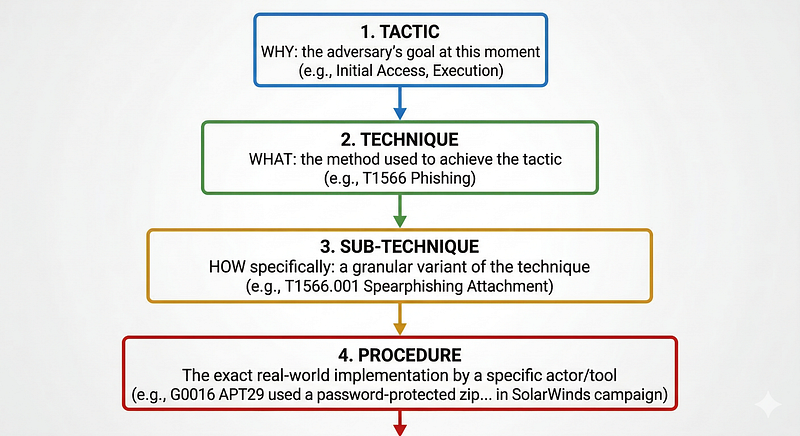
Each level answers a different question. Tactics answerwhy. Techniques answerwhat. Sub-techniques answerhow, specifically. Procedures answerwho did what, exactly, in which incident.
The Matrix Visualization
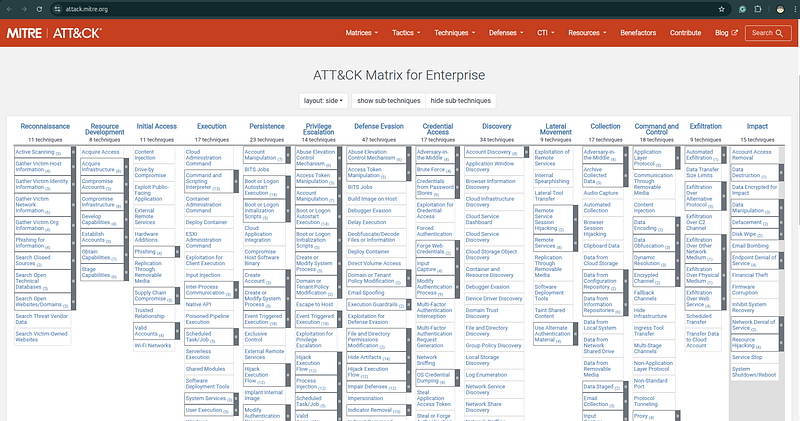
Every cell in the matrix is a technique. Techniques that have sub-techniques appear with a small triangle indicator on the website — clicking expands the sub-technique list. Techniques without sub-techniques stand alone.
What a Technique Page Contains
When you click on any technique — for example, T1566.001 (Spearphishing Attachment) — you land on a page with a standardized structure. Understanding this structure is essential, because the technique page is your primary working document:
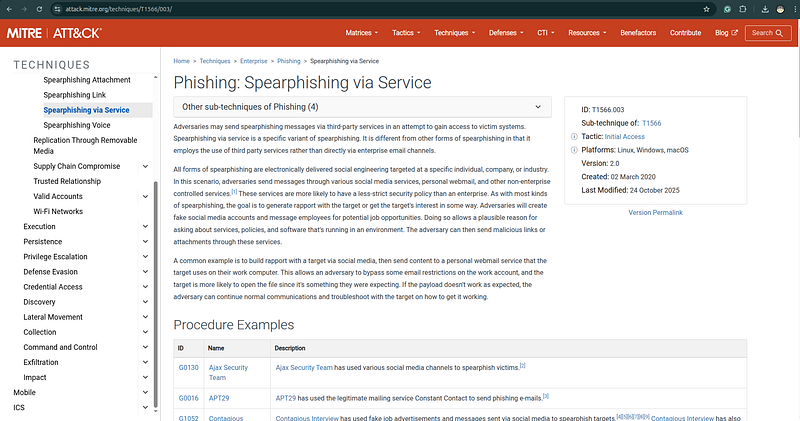
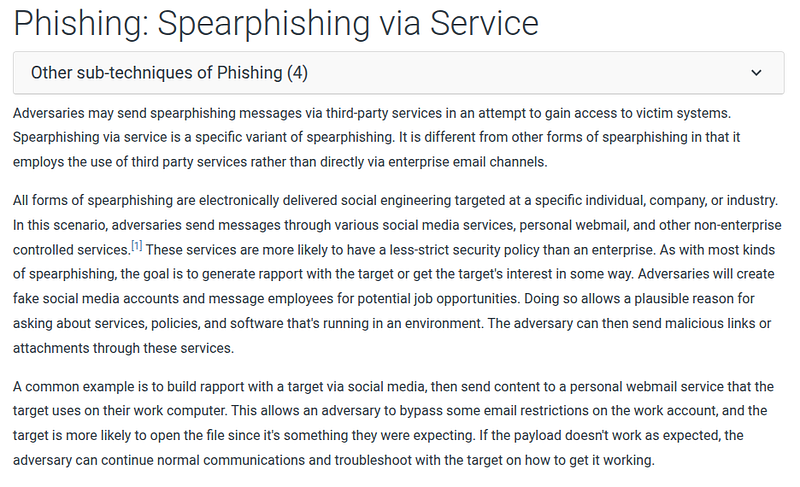
**Description:**A detailed explanation of what the technique is, why adversaries use it, what variations exist in the wild, and what makes it effective. Read this section carefully. The description contains behavioral nuances that inform both detection logic and mapping decisions.
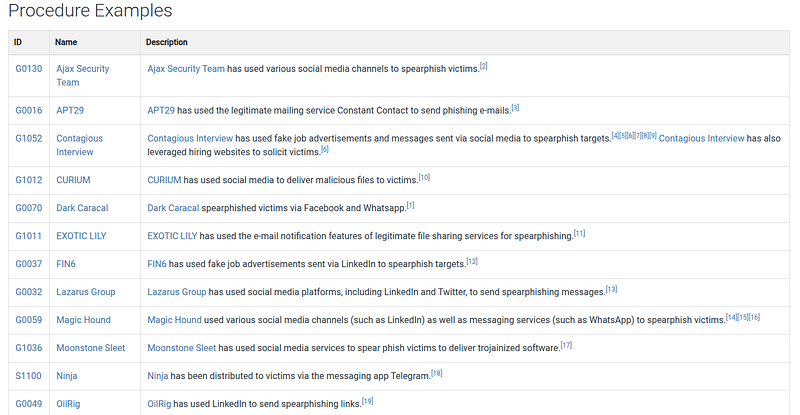
**Procedure Examples:**A curated list of real-world usages by specific threat groups and malware families, each linked to the Groups or Software entry where the evidence originated. This is the empirical backbone of ATT&CK — every entry comes from a real incident with documented evidence. When you read “APT29 used spearphishing attachments in the following campaigns,” those claims are sourced to government advisories, vendor reports, or IR findings.
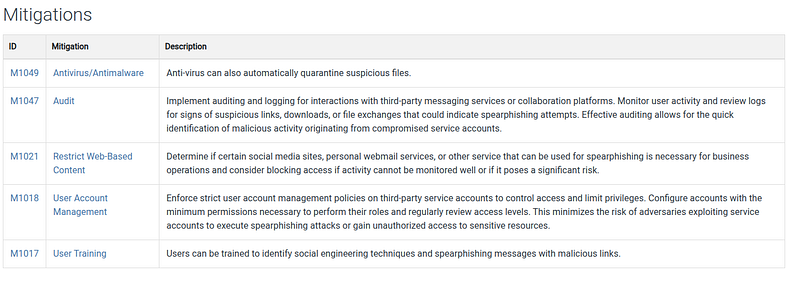
**Mitigations:**Recommended preventive controls, linked to ATT&CK’s Mitigation entries (M-codes). For T1566.001, mitigations include user training (M1017), antivirus/antimalware (M1049), and software configuration (M1054). These are useful for writing defensive recommendations in CTI reports.
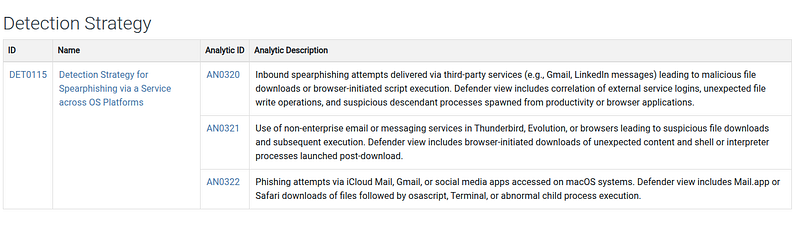
**Detection:**The most actionable section for detection engineers and threat hunters. This section lists:
-
Data Sources— what telemetry you need to collect to have visibility (process creation, email logs, file monitoring, etc.)
-
Detection approaches— what patterns, behaviors, or anomalies to look for in that telemetry
**References:**Every claim in ATT&CK is cited. The references section lists the primary sources — vendor threat reports, government advisories, academic papers, blog posts from reputable researchers. If you need to verify an ATT&CK claim or read the original evidence, start here.
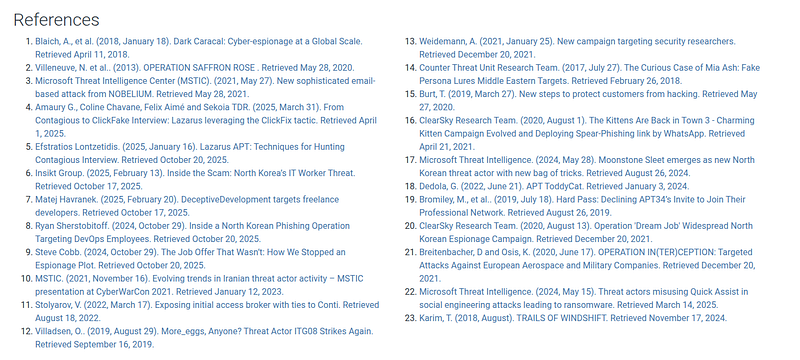
The Groups and Software Pages

ATT&CK maintains two additional knowledge bases tightly integrated with the technique matrix:
**Groups (G-codes):**Entries for known threat actor groups, organized by their ATT&CK ID. For example, G0016 is APT29, G0034 is Sandworm, G0065 is Leviathan/APT40. Each group page lists: all techniques observed being used by that group (with procedure examples), associated software/tools, and references. When you want to understand what a specific threat actor does, the Group page is your starting point.
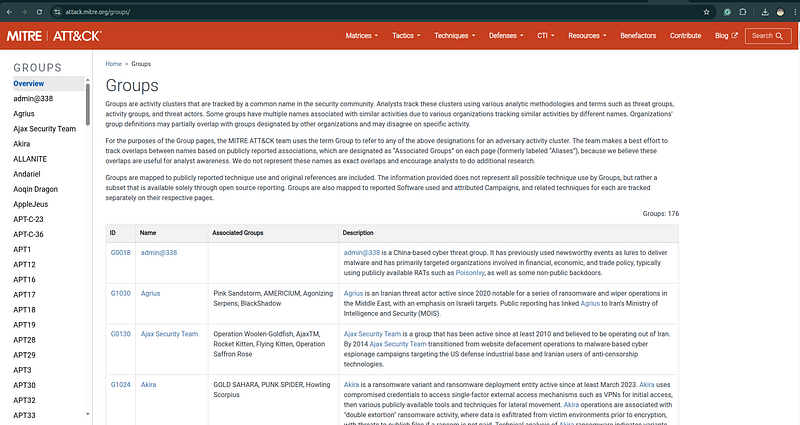
**Software (S-codes):**Entries for malware families, tools, and utilities used by adversaries. For example, S0002 is Mimikatz, S0105 is dsquery, S0154 is Cobalt Strike. Each software entry lists which techniques it implements and which groups use it. This allows you to chain threat actor → tool → technique in both directions.
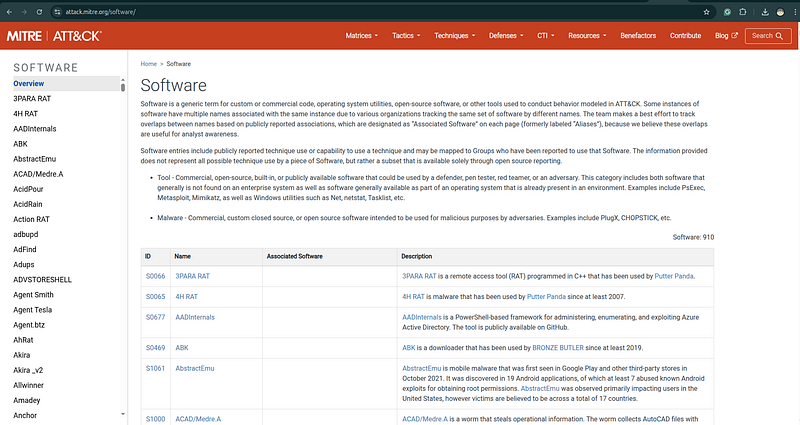
Understanding these three linked knowledge bases — Techniques, Groups, Software — gives you a complete picture of adversary behavior that is far richer than the matrix alone.
3. The 14 Tactics: Adversary Goals, Not Steps
What a Tactic Actually Means
A tactic is thereasonan adversary is performing a behavior. It is their immediate objective. The word “tactic” in ATT&CK does not carry the military strategy connotation you might expect — it is closer to “goal” or “phase of operation.”
This distinction is critical:tactics are not sequential phases. They are categories of intent. An adversary may be simultaneously operating under multiple tactics — exfiltrating data while maintaining persistence while evading defense — and may revisit the same tactic multiple times in a single operation. Do not let the matrix’s column order mislead you into thinking left-to-right equals time.
The 14 Enterprise Tactics in Depth
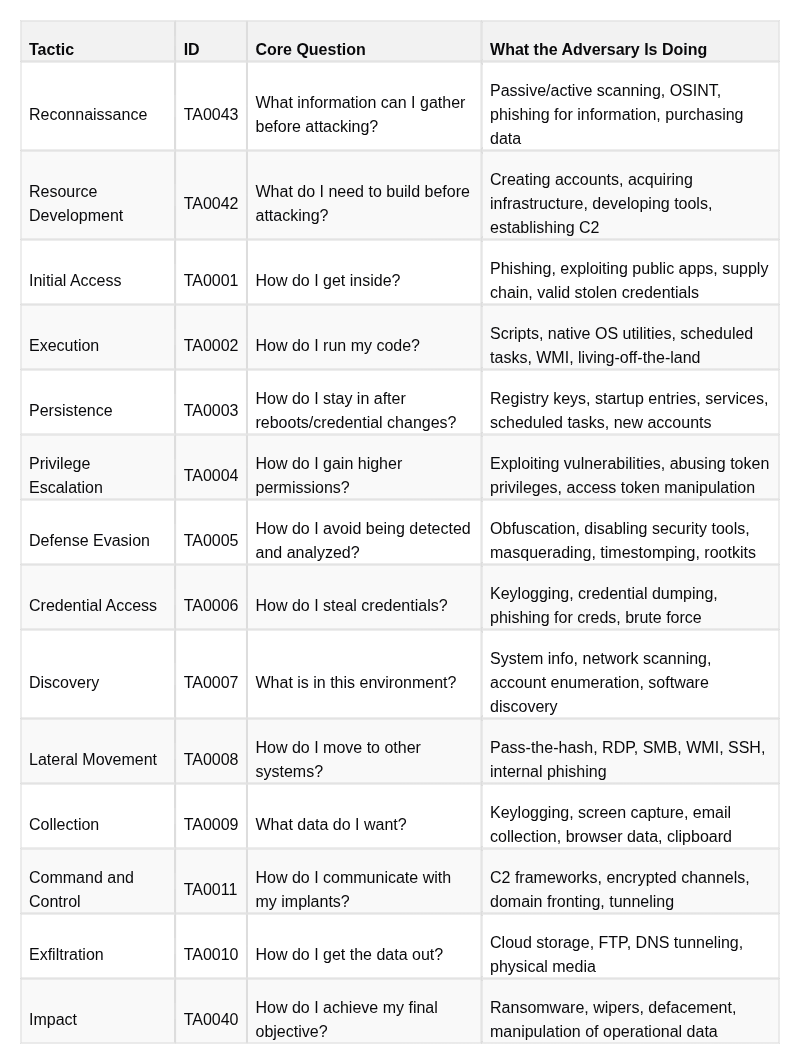
Note thatReconnaissanceandResource Developmentare pre-compromise tactics — they describe what the adversary doesbeforebreaching the target environment. This is important for CTI analysts: intelligence about these tactics (infrastructure acquisition, typosquatting domains, persona creation) can enableanticipatorydefense, not just reactive response.
Why This Matters for Mapping
When you map a behavior to ATT&CK, you assignbotha tactic and a technique. The same observable — for example, PowerShell executing a command — can belong to different tactics depending on context:
-
PowerShell running a download cradle to fetch a payload =Execution(T1059.001) +C2(T1105)
-
PowerShell enumerating Active Directory =Discovery(T1059.001 + T1087.002)
-
PowerShell deleting logs =Defense Evasion(T1059.001 + T1070.001)
-
PowerShell encrypting files =Impact(T1059.001 + T1486)
The tactic assignment tells the readerwhat the adversary was trying to accomplishat that moment. It provides strategic context to the technical observation.
Analyst Note on Tactic Ordering
The matrix displays tactics in a rough left-to-right operational flow, but this is a convenience for visualization, not a prescribed sequence. Adversaries frequently:
-
UseExecutionbefore completingPersistence— run the payload immediately, establish persistence in the next step
-
Skip tactics entirely — many modern ransomware operations proceed directly from Initial Access through Execution to Impact in under an hour, bypassing Discovery and Lateral Movement if they have already mapped the environment in prior reconnaissance
-
Return to earlier tactics — re-establish C2 after losing a beacon, move back to Credential Access after an initial lateral move fails
-
Operate multiple tactics simultaneously — collecting files while maintaining C2 while evading defense
When mapping behaviors to ATT&CK, always assign the tactic based on thepurposeof the observed action — not its position in a timeline.
4. Techniques, Sub-Techniques, and Procedures
Techniques in Depth
Atechniqueis a specific method an adversary uses to achieve a tactic goal. Techniques are the core analytical unit of ATT&CK. When you say “map the behavior to ATT&CK,” you are primarily identifying which techniques were observed.
Technique IDs are formatted asTfollowed by four digits:T1003,T1059,T1566. The numbers are not hierarchical or sequential — they are assigned identifiers, not ordered by importance or frequency.
Each technique describes a class of behavior abstract enough to cover multiple specific implementations while specific enough to have a distinct detection profile. For example:
- T1003 — OS Credential Dumping: The adversary extracts credentials from the operating system. This is specific enough to have clear detection indicators (process access to LSASS, access to SAM registry hive, ntdsutil execution) but abstract enough to cover multiple tools and approaches.
Sub-Techniques in Depth
Sub-techniques representspecific implementationsof a parent technique. They were introduced in ATT&CK v7 to resolve a tension: parent techniques were too broad for precise detection, but adding a separate top-level technique for every tool and variation would make the matrix unmanageable.
Sub-technique IDs are formatted asT+ four digits +.+ three digits:T1003.001.
The full sub-technique tree for T1003 illustrates the pattern:
T1003 — OS Credential Dumping
  ├── T1003.
001
 — LSASS Memory
  │     → Dumping credentials
from
 the Local Security Authority Subsystem Service
  │     → Tools:
Mimikatz
 (sekurlsa::
logonpasswords
), ProcDump, comsvcs.dll MiniDump
  │
  ├── T1003.
002
 — Security Account
Manager
 (SAM)
  │     → Reading the SAM registry hive
for
 local account hashes
  │     → Tools: reg save,
Mimikatz
 (lsadump::
sam
)
  │
  ├── T1003.
003
 — NTDS
  │     → Extracting the Active
Directory

database
 (NTDS.dit)
  │     → Tools: ntdsutil, vssadmin + manual copy, secretsdump
  │
  ├── T1003.
004
 — LSA Secrets
  │     → Reading cached service account passwords
from
 LSA registry keys
  │     → Tools:
Mimikatz
 (lsadump::
secrets
), secretsdump
  │
  ├── T1003.
005
 — Cached Domain Credentials
  │     → Extracting domain credentials cached locally
for
 offline authentication
  │     → Tools:
Mimikatz
 (lsadump::
cache
)
  │
  ├── T1003.
006
 — DCSync
  │     → Impersonating a domain controller to replicate credential data via MS-DRSR
  │     → Tools:
Mimikatz
 (lsadump::
dcsync
), secretsdump
  │
  ├── T1003.
007
 — Proc
Filesystem
 (Linux)
  │     → Reading process memory via /proc/[pid]/mem on Linux systems
  │
  └── T1003.
008
 — /etc/passwd
and
 /etc/
shadow
 (Linux)
        → Directly reading Linux credential files
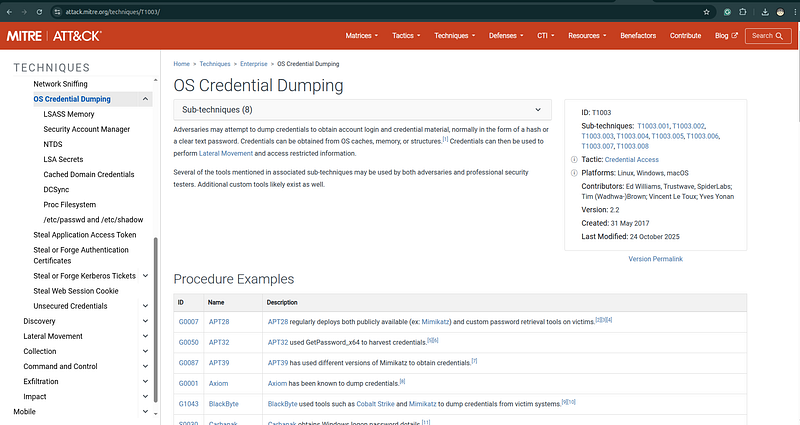
Each sub-technique has its own detection profile, data sources, and procedure examples. T1003.001 (LSASS) is detected via Sysmon EventID 10 (process access). T1003.003 (NTDS) is detected via ntdsutil.exe execution, VSSAdmin commands, and NTDS.dit file access monitoring. T1003.006 (DCSync) is detected via Windows Event 4662 (directory service replication) on domain controllers. These are completely different detection approaches despite all belonging to the same parent technique.
**The practical implication:**Never conflate parent and sub-technique when writing detection rules. A rule for “OS Credential Dumping” that only monitors LSASS access will completely miss a DCSync attack happening on a domain controller. Sub-technique granularity is detection granularity.
The Parent-vs-Sub-Technique Decision Rule
A question every analyst faces: should I map to the parent or the sub-technique?
The answer is driven by evidence, not preference:
Do you have specific evidence of the implementation method?
  →
YES
: Use the sub-technique (T1003
.001
, T1003
.006
, etc.)
  →
NO
:  Use the parent technique (T1003)
"Specific evidence" means:
  - A tool name with a specific command or module
  - A log entry showing the specific access pattern
  - A malware sample that implements a specific approach
  - A credible vendor report with artifact-level detail
"Not specific evidence" means:
  - The report says "credentials were stolen"
  - The actor is known to use credential dumping generally
  - An alert fired for "suspicious LSASS access" without further forensics
Never assign a sub-technique because it seems like the most probable implementation. Assign the parent, note the uncertainty, and flag it for further investigation. Over-specific mappings create false confidence and mislead downstream consumers.
Procedures in Depth
Aprocedureis the specific, real-world implementation of a technique by a particular threat actor or tool, in a particular observed incident. Procedures are not a separate taxonomy level with their own IDs — they are documented as prose examples on technique pages and as structured entries on Group and Software pages.
An example of what a procedure entry looks like:
> APT29 — Used Mimikatz’s sekurlsa::logonpasswords command to dump credentials from LSASS memory on compromised hosts prior to lateral movement. Observed in the SolarWinds supply chain campaign, 2020. [Source: CISA AA21-008A]
This is theprocedure: APT29, Mimikatz, sekurlsa::logonpasswords, in the context of the SolarWinds campaign. It maps to thetechniqueT1003.001 (LSASS Memory).
The three-level separation — technique / sub-technique / procedure — is what makes ATT&CK useful at different levels of abstraction:
Technique level:
"We need detection for credential dumping"
                    → Build detections
for
 T1003
and
 its
sub
-techniques
Sub-technique level: "We need LSASS-specific detection"
                    → Build detection based on T1003.001 data sources and indicators
Procedure level:   "APT29 specifically uses Mimikatz sekurlsa::logonpasswords"
                    → Add Mimikatz-specific indicators (command line, hash) to detection
                    → Hunt for that specific string in historical telemetry
In CTI report writing:**document procedures in your narrative, map them to techniques in your ATT&CK table.**Both serve different readers. The procedure description serves the analyst who wants to understand what the actor actually did. The technique mapping serves the detection engineer who needs to know what to build.
5. ATT&CK Domains: Enterprise, Mobile, ICS
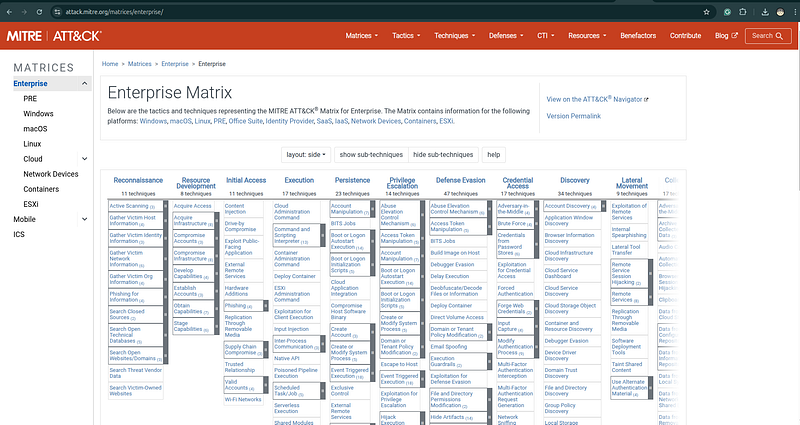
ATT&CK is not a single matrix — it is three distinct knowledge bases, each organized around a different platform context. Failing to specify which domain you are mapping to is an analytical error.
Enterprise ATT&CK
Enterprise is the largest and most widely used domain. It covers adversary behavior against:
-
Windows, macOS, Linux— endpoint and server operating systems, covering the majority of corporate and government environments
-
Cloud platforms— AWS, Azure, GCP, and SaaS applications (Office 365, Google Workspace). Cloud coverage was added in ATT&CK v7 and has expanded significantly, reflecting the reality that most modern environments are hybrid. Cloud-specific techniques cover identity-based attacks, storage manipulation, serverless abuse, and container escape.
-
Network devices— routers, switches, and other network infrastructure running proprietary operating systems. This sub-platform covers attacks on Cisco IOS, JunOS, and similar systems that most endpoint-focused tools cannot monitor.
-
Containers— Docker and Kubernetes environments, including container escape techniques, image tampering, and Kubernetes RBAC abuse.
For the majority of corporate threat intelligence work, Enterprise is the default matrix. When a CTI report says “mapped to ATT&CK” without specifying a domain, it almost certainly means Enterprise.
**Cloud sub-platform deserves specific attention.**As organizations migrate workloads to cloud environments, threat actors have developed cloud-native attack techniques that have no equivalent on traditional enterprise endpoints. T1078.004 (Valid Accounts: Cloud Accounts), T1530 (Data from Cloud Storage Object), T1537 (Transfer Data to Cloud Account), and T1619 (Cloud Storage Object Discovery) are examples of techniques that require cloud-specific telemetry (CloudTrail, Azure Monitor, GCP Audit Logs) — telemetry that many organizations either don’t collect or don’t analyze with the same rigor as endpoint logs.
Mobile ATT&CK
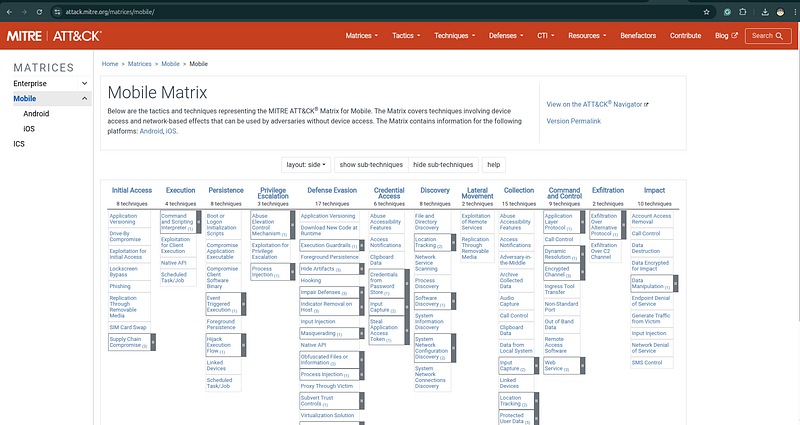
Mobile ATT&CK covers adversary behavior targetingAndroid and iOSdevices. It includes tactics and techniques that have no Enterprise equivalent, reflecting the fundamentally different attack surface of mobile platforms:
-
Network-Based Effects— techniques that intercept or manipulate network communications at the carrier or Wi-Fi level, without requiring device compromise
-
Remote Service Effects— techniques that leverage device management systems or cloud-connected services to affect devices without direct on-device access
-
Device Access via Physical Access— techniques unique to physical possession scenarios
Mobile ATT&CK is used primarily by teams tracking mobile surveillance tooling (Pegasus, FinFisher, Predator), nation-state operations targeting activists and journalists, and mobile financial fraud. For most enterprise CTI teams, Mobile ATT&CK is relevant when tracking actors known to deploy mobile implants alongside traditional enterprise operations.
ICS ATT&CK
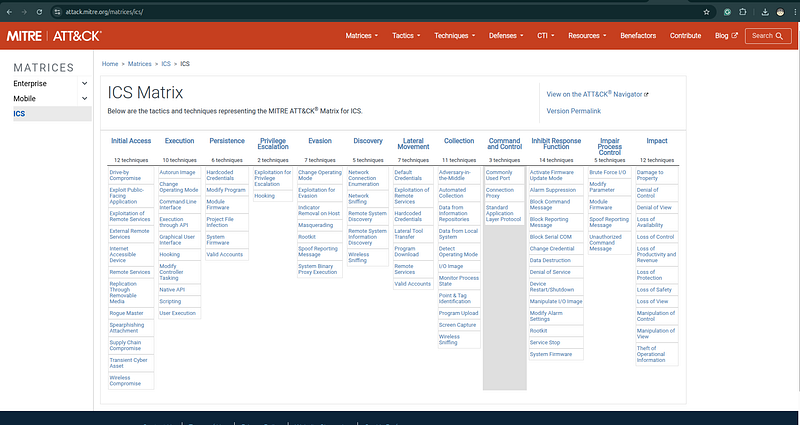
ICS (Industrial Control Systems) ATT&CK covers adversary behavior targeting operational technology environments: SCADA systems, PLCs (Programmable Logic Controllers), HMIs (Human-Machine Interfaces), engineering workstations, and safety systems.
ICS ATT&CK was developed by analyzing major OT/ICS incidents including:
-
Stuxnet (2010)— the first confirmed destructive cyberweapon, targeting Iranian uranium enrichment centrifuges via Siemens PLCs
-
Industroyer/CrashOverride (2016)— attacked Ukrainian power grid switching equipment, causing a 1-hour blackout in Kyiv
-
Triton/TRISIS (2017)— targeted safety instrumented systems (SIS) at a Saudi petrochemical facility, the first known malware explicitly targeting safety systems
-
PIPEDREAM/Incontroller (2022)— modular ICS attack framework capable of targeting multiple PLC and OT protocols
ICS ATT&CK has different tactics than Enterprise, reflecting the different adversary objectives in OT environments:
-
Inhibit Response Function— preventing safety systems and operators from responding to an attack
-
Impair Process Control— manipulating industrial processes to cause physical damage or unsafe conditions
-
Impact— achieving the physical consequence (explosion, outage, equipment damage)
**Critical analyst note:**Sophisticated attacks on critical infrastructure frequently combine Enterprise ATT&CK (using IT networks to reach OT) with ICS ATT&CK (acting within the OT environment). The Industroyer2 attack on Ukrainian power infrastructure in 2022 used standard Enterprise techniques for initial access and lateral movement from IT to OT, then ICS-specific techniques to interact with IEC-104 power grid protocols. A complete CTI report on such an actor requires mapping to both domains explicitly.
6. How a CTI Analyst Actually Uses ATT&CK
The Five Core Workflows
In practice, a CTI analyst uses ATT&CK in five core workflows. These are not theoretical — they are the actual tasks that appear in a typical week of threat intelligence work:
1.
 MAPPING       — Reading intelligence and extracting structured ATT&CK mappings
2.
 PROFILING     — Building a comprehensive behavioral model of a threat actor
3.
 GAP ANALYSIS  — Identifying where your defenses have no coverage against your threats
4.
 PRIORITIZING  — Deciding which detections to build first, based on threat relevance
5.
 COMMUNICATING — Writing intelligence that other teams can act on immediately
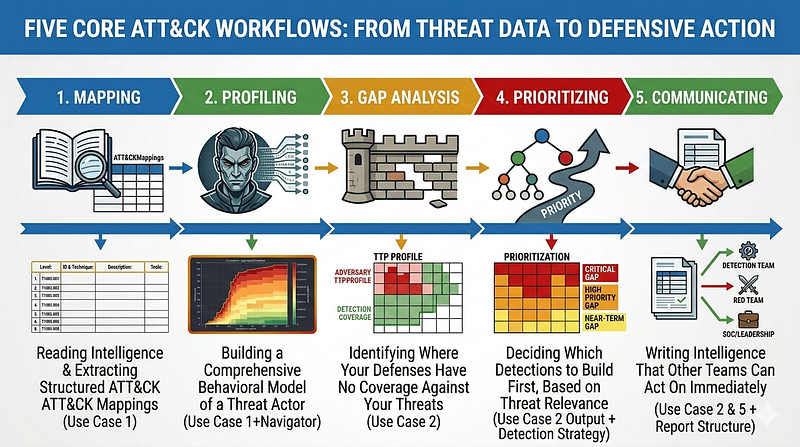
Each workflow is covered in a dedicated use case section below. But before going hands-on, the most important thing to internalize is the analyst mindset that makes these workflows produce reliable results.
The ATT&CK Analyst Mindset: Evidence Discipline
Evidence first, technique second.
This is the most important principle in ATT&CK analysis, and the one most frequently violated. Never assign a technique because itseems likely, because the actor isknown forthat technique, or because the reportimpliesit happened. Assign a technique only when you have observable evidence: a log entry, a command line, a file artifact, a forensic finding, or a credible vendor report with artifact-level detail.
The failure mode here is common and serious. An analyst reads a CTI report about a ransomware group, knows that ransomware groups typically dump credentials before lateral movement, and maps T1003 even though the report contains no evidence of credential dumping. Now the mapping says this actor uses T1003. That mapping is cited in the next report. Then cited again. Soon there is a vendor intelligence card attributing credential dumping to this actor based on a chain of citations that trace back to a single analyst’s inference. This is how intelligence degrades. Evidence discipline is what prevents it.
Be as specific as the evidence allows — no more, and no less.
If the evidence says “credentials were compromised,” map to T1003 (parent). If the evidence says “Mimikatz was executed,” map to T1003.001 (LSASS Memory) — because Mimikatz’s primary credential dumping function operates against LSASS. If the evidence says “ntdsutil snapshot was created and NTDS.dit was copied,” map to T1003.003 (NTDS). Moving up in specificity requires evidence; mapping at the parent level is always analytically safe when sub-technique evidence is absent.
One behavior can, and often should, map to multiple techniques across multiple tactics.
This is a design feature of ATT&CK, not a bug. Real adversary behaviors are multifunctional. A Base64-encoded PowerShell command executed from a Word macro and downloading a second stage simultaneously demonstrates:
-
T1566.001(Spearphishing Attachment) — Initial Access: delivered via email attachment
-
T1204.002(Malicious File) — Execution: user opened the document
-
T1059.001(PowerShell) — Execution: PowerShell was invoked
-
T1027.010(Command Obfuscation) — Defense Evasion: Base64 encoding
-
T1105(Ingress Tool Transfer) — C2: second-stage payload downloaded from remote
Mapping each of these separately gives your downstream consumers maximum actionability. The detection engineer builds a rule for T1027.010. The threat hunter designs a query for T1105. The SOC analyst understands the full kill chain. If you had mapped only “T1059.001” for the PowerShell execution, the other dimensions would be invisible.
Absence of a technique in a report does not mean absence of that behavior.
If a threat actor report doesn’t mention persistence mechanisms, it does not mean the actor didn’t establish persistence. It may mean the forensic evidence was wiped, the analyst didn’t look for it, the information was withheld, or the actor operates without traditional persistence (relying on re-infection instead). When building a comprehensive actor profile, be explicit about what is documented versus what is unknown. The gaps in your ATT&CK table are as informative as the entries.
7. Use Case 1: Mapping a Threat Report to ATT&CK
Mapping is the daily bread of CTI analysis. You receive intelligence — a vendor advisory, an IR debrief, a government alert, a OSINT finding — and you extract structured ATT&CK mappings from it. The output of mapping feeds every other workflow: actor profiles, gap analysis, detection engineering, threat hunting.
Step-by-Step Mapping Process
Step 1: Read the report for behavior statements
Read the entire report once for understanding, then read it again specifically looking for sentences that describewhat the adversary did. Mark every action verb and its subject.
Filter ruthlessly. You are not interested in:
-
Attribution claims(“believed to be affiliated with…”)
-
Victimology(“the targeted organization is a financial institution…”)
-
Impact narrative(“the attack resulted in operational downtime…”)
-
Actor motive speculation(“likely motivated by espionage…”)
You are only interested intechnical behavioral statements: what the adversary executed, what network connections they made, what files they created or modified, what commands they ran.
Example report excerpt:
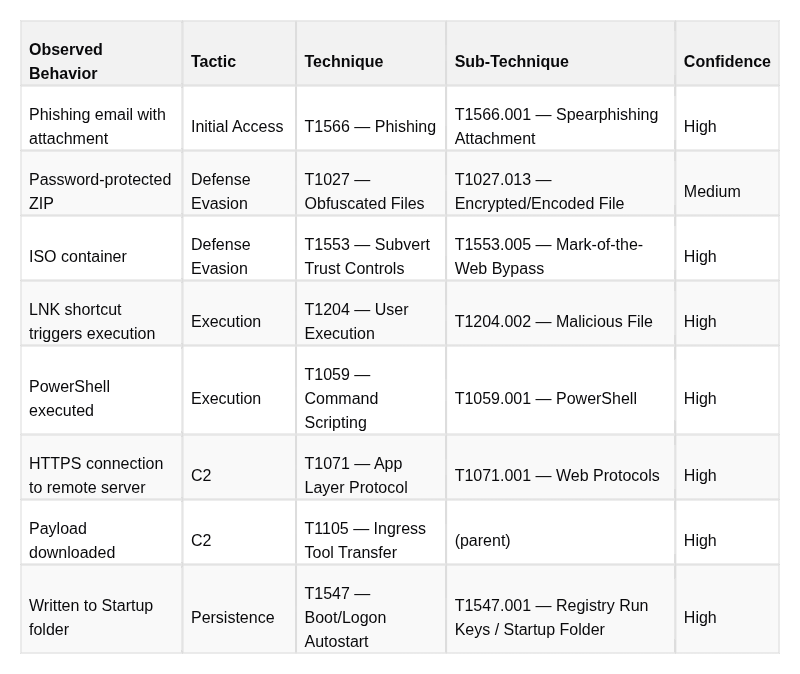
> “The actor sent phishing emails with password-protected ZIP attachments containing an ISO file. Upon mounting the ISO, a LNK shortcut executed PowerShell to download a second-stage payload from a remote server over HTTPS. The payload was written to %APPDATA%\Microsoft\Windows\Start Menu\Programs\Startup\ for persistence.”
Step 2: Extract atomic behaviors
Decompose the narrative into individual, atomic observable actions. Each action that can be independently detected or evidenced should be its own entry:
-
Phishing email containing an attachment
-
Attachment is a password-protected ZIP (evasion mechanism)
-
ZIP contains an ISO file (container for MOTW bypass)
-
LNK file inside ISO triggers execution
-
LNK executes PowerShell
-
PowerShell connects to remote server over HTTPS
-
PowerShell downloads a payload (second stage)
-
Payload written to Startup folder for persistence
Note that step 2 (password-protected ZIP) and step 3 (ISO container) are distinct defensive evasion behaviors even though they appear in the same sentence. Both deserve separate technique mappings.
Step 3: Map each behavior to technique + tactic
For each atomic behavior, identify:
-
Which technique best describes the behavior (search attack.mitre.org if unsure)
-
Which tactic that technique serves in this context
-
The most specific sub-technique the evidence supports
Step 4: Assign confidence labels consistently
Confidence is not intuition — it is a structured assessment of the evidence behind each mapping. Use a three-tier model that you apply consistently across all mappings:
-
High confidence: Direct technical evidence you can cite. This means: a command line visible in logs, a binary with a known hash, a network connection with a captured PCAP, a forensic file artifact, or a vendor report with artifact-level documentation (not just narrative).
-
Medium confidence: Credible secondary source reporting with partial technical support. The behavior is described by a reputable vendor with a track record of accuracy, and there is at least one artifact (even if incomplete), but you cannot independently verify the full technical detail.
-
Low/Assessed confidence: Analytically inferred from the overall pattern of evidence. The specific behavior was not directly observed but is consistent with and implied by confirmed behaviors. Use sparingly and label clearly.
The password-protected ZIP in the example above gets Medium confidence not because the behavior is uncertain, but because the specific sub-technique (T1027.013) represents an inference from the observed delivery mechanism — the report mentioned a password-protected ZIP, which we interpret as intentional anti-analysis measure, but we don’t have direct forensic evidence of that intent.
Step 5: Document as a structured table in your report
The output of mapping is a formatted table that lives in your report’s ATT&CK section. Minimum fields:
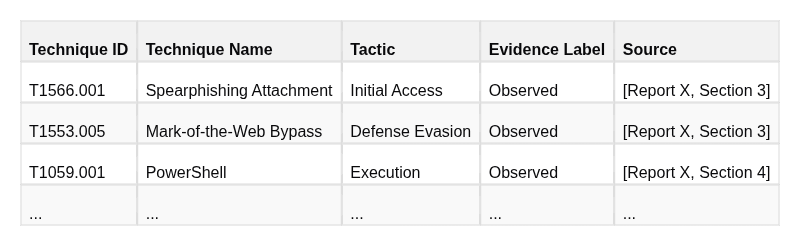
This table, plus a Navigator layer export, constitutes a complete ATT&CK-mapped deliverable. Anyone on any team can read it and immediately know what tools they need, what data sources they need to check, and what detection rules they need to build.
Live Example: Mapping Handala Hack Group Activity
Handala Hack Group (also tracked as Void Manticore / BANISHED KITTEN) provides a concrete real-world mapping exercise. From published threat reporting and the CTI research assessment:
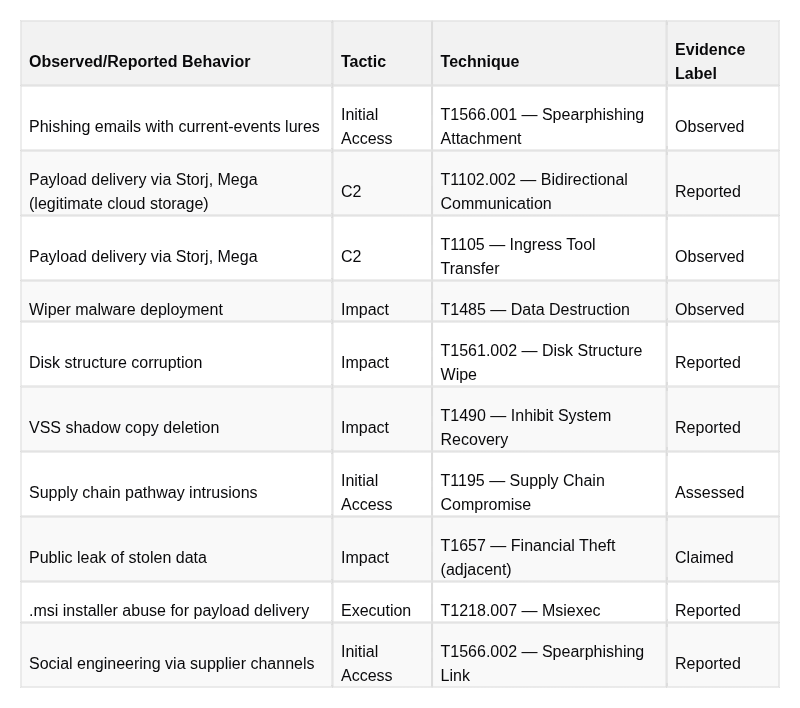
References for this section:
> [1] Pautov, Andrey. “CTI Research: Handala Hack Group (aka Handala Hack Team) — Evidence-Labeled Threat Intelligence Assessment and SOC Defensive Guidance (December 2023 to March 2026).” Medium / InfoSec Write-ups, March 6, 2026. 2026-03-06-cti-research-handala-hack-group-aka-handala-hack-team-ddbdd294cfb8.md
> [2] Check Point Research. “Bad Karma, No Justice: Void Manticore Destructive Activities in Israel.” Check Point Research Blog, May 2024. https://research.checkpoint.com/2024/bad-karma-no-justice-void-manticore-destructive-activities-in-israel/ (Primary report directly equating Void Manticore with Handala Hack Team; artifact-level wiper analysis, BiBi wiper variants, C2 infrastructure, and collaboration with Storm-0861/Scarred Manticore for initial access.)
> [2b] Check Point Research. “Handala Hack — Unveiling Group’s Modus Operandi.” Check Point Research Blog, 2026. https://research.checkpoint.com/2026/handala-hack-unveiling-groups-modus-operandi/ (Updated 2026 analysis covering RDP/NetBird lateral movement, AI-assisted PowerShell wipers, and expanded targeting beyond Israel to US enterprises.)
> [3] Security Joes IR Team. “BiBi-Linux: A New Wiper Dropped by Pro-Hamas Hacktivist Group.” Security Joes Blog, October 30, 2023. https://www.securityjoes.com/post/bibi-linux-a-new-wiper-dropped-by-pro-hamas-hacktivist-group (First public technical analysis of the BiBi wiper family from Security Joes IR forensics; includes ELF binary analysis, file hashes, and behavioral breakdown. Data Destruction T1485 confidence: Observed.)
> [4] BlackBerry Research and Intelligence Team. “BiBi Wiper Used in the Israel-Hamas War Now Runs on Windows.” BlackBerry Blog, November 2023. https://blogs.blackberry.com/en/2023/11/bibi-wiper-used-in-the-israel-hamas-war-now-runs-on-windows (Windows PE variant analysis discovered one day after Security Joes’ Linux disclosure; confirms cross-platform wiper capability and VSS deletion. Inhibit System Recovery T1490 and Disk Structure Wipe T1561.002 confidence: Observed.)
> [5] Microsoft Threat Intelligence. “Iran Surges Cyber-Enabled Influence Operations in Support of Hamas.” Microsoft Security Insider, 2023. https://www.microsoft.com/en-us/security/security-insider/threat-landscape/iran-surges-cyber-enabled-influence-operations-in-support-of-hamas (Documents collaboration between Storm-0861 (access provider) and Storm-0842 (wiper executor) against Israeli and Albanian targets; assessed overlap with Handala persona.)
> [6] Palo Alto Unit 42. “Insights: Increased Risk of Wiper Attacks — Handala Hack.” Unit 42 Threat Research, 2024. https://unit42.paloaltonetworks.com/handala-hack-wiper-attacks/ (Independent technical analysis of Handala wiper campaigns with ATT&CK-relevant behavioral detail.)
> [7] SOCRadar. “Dark Web Profile: Storm-842 (Void Manticore).” SOCRadar Blog. https://socradar.io/blog/dark-web-profile-storm-842-void-manticore/ (Cross-vendor naming crosswalk and actor profile summary.)
> [8] CrowdStrike Intelligence. BANISHED KITTEN — Threat Actor Profile. CrowdStrike Intelligence Portal (subscription required). (CrowdStrike’s tracking name for the same MOIS-linked cluster; named in the Check Point [2] crosswalk.)
> [9] Recorded Future. “Dune” Cluster Tracking. Recorded Future Intelligence Cloud (subscription required). (Recorded Future’s alias for the same MOIS-linked cluster; cited in multiple vendor crosswalks.)
Reading the evidence labels in this mapping:
Wiper deployment (T1485) isObserved— Security Joes [3][4] and Check Point [2] published full technical analyses including binary hashes, behavioral sandbox reports, and static analysis. This is artifact-level evidence: the strongest possible confidence tier.
VSS deletion (T1490) isReported— documented by Check Point [2] with technical detail describing the wiper’s recovery-inhibition behavior, but independent forensic verification from victim organizations is not publicly available.
The supply chain pathway (T1195) isAssessed— inferred from victim patterns showing compromise of organizations connected to Handala’s primary targets through third-party relationships. No direct forensic documentation of the supply chain entry point has been publicly released.
Public data leaks areClaimed— the actor asserts exfiltration and destruction via Telegram channels and hacktivist forums. Actor claims are collection leads, not evidence. They prompt investigation; they do not constitute ATT&CK-mappable behavior until corroborated by independent technical findings.
This level of rigor in evidence labeling is what distinguishes a production CTI report from a narrative summary — and it is exactly why evidence labels belong in every ATT&CK mapping table you publish.8. Use Case 2: Coverage Gap Analysis with ATT&CK Navigator
What ATT&CK Navigator Is and Why It Matters
https://mitre-attack.github.io/attack-navigator/
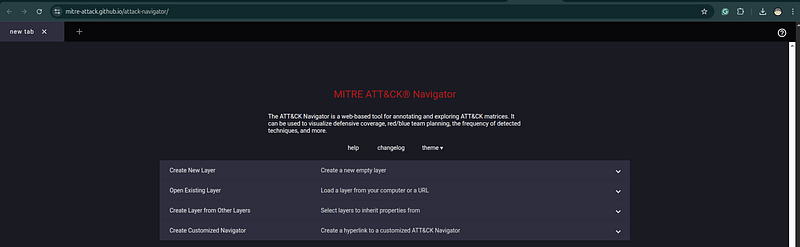
ATT&CK Navigatoris the official open-source visualization tool for the ATT&CK matrix. It is a browser-based application that lets you create, layer, and compare color-coded representations of the ATT&CK matrix. It is the primary tool for coverage analysis, threat actor profiling, and communicating detection status to both technical and non-technical audiences.
The core value of Navigator is that it makesinvisible things visible. When you look at a list of 300 detection rules, you cannot intuitively understand which parts of the adversary kill chain you can detect and which parts you are blind to. When you project those rules onto an ATT&CK heatmap and overlay them against the techniques used by your priority threat actors, the gaps become immediately apparent.
Navigator operates on the concept oflayers— JSON files that describe colors, scores, and annotations for technique cells. You can create multiple layers, import them from MITRE’s pre-built actor profiles, and combine them for multi-dimensional analysis.
Hands-On: Building a Coverage Map
**Access:**Openmitre-attack.github.io/attack-navigatorin your browser. No installation or account required. For persistent work, use the self-hosted version or export layers as JSON.
Workflow 1: Map your existing detections
This workflow answers: “What does my current detection coverage look like against the ATT&CK matrix?”
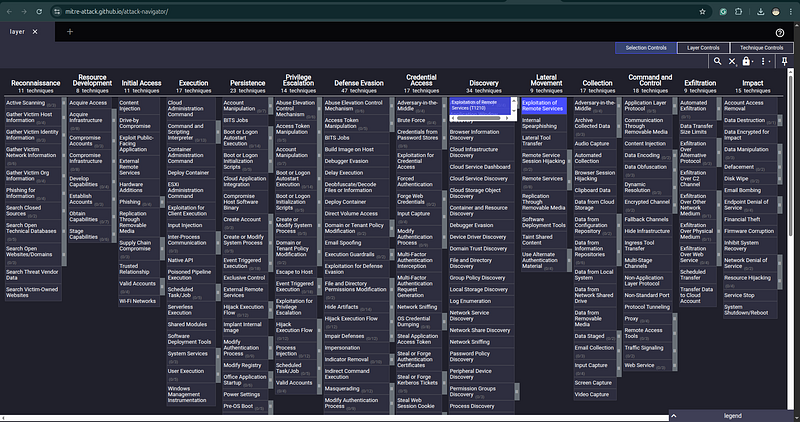
- Open Navigator → click “Create New Layer” → select “ATT&CK Enterprise” and the current version
-
You will see the full matrix with all techniques visible but uncolored (gray)
-
For each detection rule in your SIEM/EDR/tool stack, identify which ATT&CK technique it addresses
-
Sigma rules: check the
tags:field — technique IDs are listed there -
SIEM rules without ATT&CK tags: manually map based on rule logic
-
EDR alerts: most modern EDR vendors tag alerts with ATT&CK IDs in their documentation
- Select the technique cell in Navigator (click to select, hold Shift to select multiple)
-
Use the color selector to mark covered techniques green
-
For partial or weak coverage (rule exists but untested / high false positive rate), use yellow
-
Uncolored cells = your blind spots
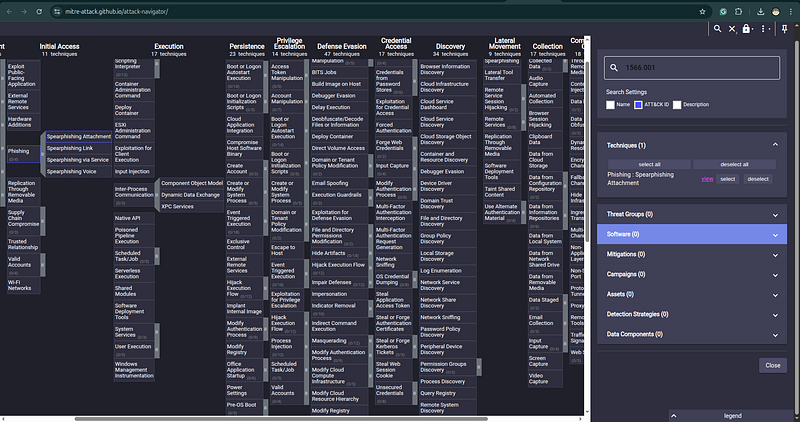
The resulting green-yellow-gray heatmap is yourdetection coverage layer.
Workflow 2: Import a threat actor profile
This workflow answers: “What techniques does my priority threat actor use?”
-
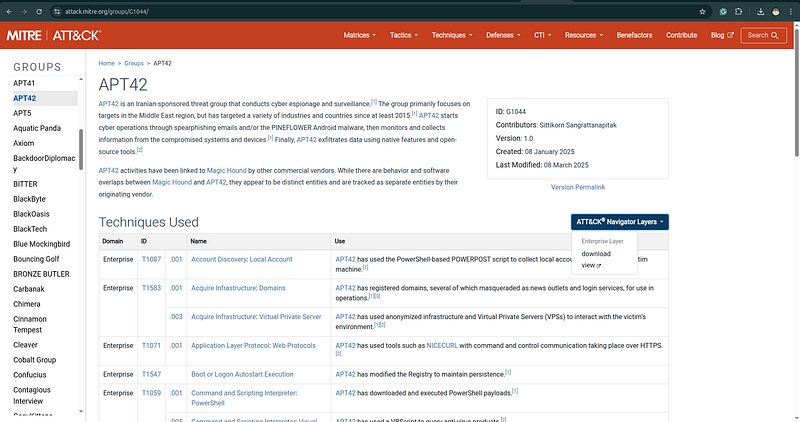
Go to attack.mitre.org/groups/ and find your actor
-
On the group page, scroll to the bottom → click “ATT&CK Navigator Layers” → download the JSON for the current version
-
In Navigator → “Open Existing Layer” → select the downloaded JSON
-
The layer automatically loads with the actor’s known techniques highlighted
Json:
{

"description"
:

"Enterprise techniques used by APT42, ATT&CK group G1044 (v1.0)"
,

"name"
:

"APT42 (G1044)"
,

"domain"
:

"enterprise-attack"
,

"versions"
:

{

"layer"
:

"4.5"
,

"attack"
:

"18"
,

"navigator"
:

"5.2.0"

}
,

"techniques"
:

[

{

"techniqueID"
:

"T1087"
,

"showSubtechniques"
:

true

}
,

{

"techniqueID"
:

"T1087.001"
,

"comment"
:

"[APT42](https://attack.mitre.org/groups/G1044) has used the PowerShell-based POWERPOST script to collect local account names from the victim machine.(Citation: Mandiant APT42-charms) "
,

"score"
:

1
,

"color"
:

"#66b1ff"
,

"showSubtechniques"
:

true

}
,

{

"techniqueID"
:

"T1583"
,

"showSubtechniques"
:

true

}
,

{

"techniqueID"
:

"T1583.001"
,

"comment"
:

"[APT42](https://attack.mitre.org/groups/G1044) has registered domains, several of which masqueraded as news outlets and login services, for use in operations.(Citation: Mandiant APT42-charms)(Citation: TAG APT42)  "
,

"score"
:

1
,

"color"
:

"#66b1ff"
,

"showSubtechniques"
:

true

}
,

{

"techniqueID"
:

"T1583.003"
,

"comment"
:

"[APT42](https://attack.mitre.org/groups/G1044) has used anonymized infrastructure and Virtual Private Servers (VPSs) to interact with the victim’s environment.(Citation: Mandiant APT42-charms)(Citation: Mandiant APT42-untangling) "
,

"score"
:

1
,

"color"
:

"#66b1ff"
,

"showSubtechniques"
:

true

}
,

{

"techniqueID"
:

"T1071"
,

"showSubtechniques"
:

true

}
,

{

"techniqueID"
:

"T1071.001"
,

"comment"
:

"[APT42](https://attack.mitre.org/groups/G1044) has used tools such as [NICECURL](https://attack.mitre.org/software/S1192) with command and control communication taking place over HTTPS.(Citation: Mandiant APT42-untangling) "
,

"score"
:

1
,

"color"
:

"#66b1ff"
,

"showSubtechniques"
:

true

}
,

{

"techniqueID"
:

"T1547"
,

"comment"
:

"[APT42](https://attack.mitre.org/groups/G1044) has modified the Registry to maintain persistence.(Citation: Mandiant APT42-charms) "
,

"score"
:

1
,

"color"
:

"#66b1ff"
,

"showSubtechniques"
:

false

}
,

{

"techniqueID"
:

"T1059"
,

"showSubtechniques"
:

true

}
,

{

"techniqueID"
:

"T1059.001"
,

"comment"
:

"[APT42](https://attack.mitre.org/groups/G1044) has downloaded and executed PowerShell payloads.(Citation: Mandiant APT42-charms) "
,

"score"
:

1
,

"color"
:

"#66b1ff"
,

"showSubtechniques"
:

true

}
,

{

"techniqueID"
:

"T1059.005"
,

"comment"
:

"[APT42](https://attack.mitre.org/groups/G1044) has used a VBScript to query anti-virus products.(Citation: Mandiant APT42-untangling) "
,

"score"
:

1
,

"color"
:

"#66b1ff"
,

"showSubtechniques"
:

true

}
,

{

"techniqueID"
:

"T1555"
,

"showSubtechniques"
:

true

}
,

{

"techniqueID"
:

"T1555.003"
,

"comment"
:

"[APT42](https://attack.mitre.org/groups/G1044) has used custom malware to steal credentials.(Citation: Mandiant APT42-charms) "
,

"score"
:

1
,

"color"
:

"#66b1ff"
,

"showSubtechniques"
:

true

}
,

{

"techniqueID"
:

"T1132"
,

"showSubtechniques"
:

true

}
,

{

"techniqueID"
:

"T1132.001"
,

"comment"
:

" [APT42](https://attack.mitre.org/groups/G1044) has encoded C2 traffic with Base64.(Citation: Mandiant APT42-untangling) "
,

"score"
:

1
,

"color"
:

"#66b1ff"
,

"showSubtechniques"
:

true

}
,

{

"techniqueID"
:

"T1530"
,

"comment"
:

"[APT42](https://attack.mitre.org/groups/G1044) has collected data from Microsoft 365 environments.(Citation: Mandiant APT42-untangling)(Citation: Mandiant APT42-charms)   "
,

"score"
:

1
,

"color"
:

"#66b1ff"
,

"showSubtechniques"
:

false

}
,

{

"techniqueID"
:

"T1573"
,

"showSubtechniques"
:

true

}
,

{

"techniqueID"
:

"T1573.002"
,

"comment"
:

"[APT42](https://attack.mitre.org/groups/G1044) has used tools such as [NICECURL](https://attack.mitre.org/software/S1192) with command and control communication taking place over HTTPS.(Citation: Mandiant APT42-untangling) "
,

"score"
:

1
,

"color"
:

"#66b1ff"
,

"showSubtechniques"
:

true

}
,

{

"techniqueID"
:

"T1585"
,

"showSubtechniques"
:

true

}
,

{

"techniqueID"
:

"T1585.002"
,

"comment"
:

"[APT42](https://attack.mitre.org/groups/G1044) has created email accounts to use in spearphishing operations.(Citation: TAG APT42)"
,

"score"
:

1
,

"color"
:

"#66b1ff"
,

"showSubtechniques"
:

true

}
,

{

"techniqueID"
:

"T1656"
,

"comment"
:

"[APT42](https://attack.mitre.org/groups/G1044) has impersonated legitimate people in phishing emails to gain credentials.(Citation: Mandiant APT42-charms)(Citation: TAG APT42) "
,

"score"
:

1
,

"color"
:

"#66b1ff"
,

"showSubtechniques"
:

false

}
,

{

"techniqueID"
:

"T1070"
,

"comment"
:

"[APT42](https://attack.mitre.org/groups/G1044) has cleared Chrome browser history.(Citation: Mandiant APT42-untangling) "
,

"score"
:

1
,

"color"
:

"#66b1ff"
,

"showSubtechniques"
:

true

}
,

{

"techniqueID"
:

"T1070.008"
,

"comment"
:

"[APT42](https://attack.mitre.org/groups/G1044) has deleted login notification emails and has cleared the Sent folder to cover their tracks.(Citation: Mandiant APT42-charms) "
,

"score"
:

1
,

"color"
:

"#66b1ff"
,

"showSubtechniques"
:

true

}
,

{

"techniqueID"
:

"T1056"
,

"comment"
:

"[APT42](https://attack.mitre.org/groups/G1044) has used credential harvesting websites.(Citation: Mandiant APT42-untangling) "
,

"score"
:

1
,

"color"
:

"#66b1ff"
,

"showSubtechniques"
:

true

}
,

{

"techniqueID"
:

"T1056.001"
,

"comment"
:

"[APT42](https://attack.mitre.org/groups/G1044) has used custom malware to log keystrokes.(Citation: Mandiant APT42-charms) "
,

"score"
:

1
,

"color"
:

"#66b1ff"
,

"showSubtechniques"
:

true

}
,

{

"techniqueID"
:

"T1036"
,

"showSubtechniques"
:

true

}
,

{

"techniqueID"
:

"T1036.005"
,

"comment"
:

"[APT42](https://attack.mitre.org/groups/G1044) has masqueraded the VINETHORN payload as a VPN application.(Citation: Mandiant APT42-charms) "
,

"score"
:

1
,

"color"
:

"#66b1ff"
,

"showSubtechniques"
:

true

}
,

{

"techniqueID"
:

"T1112"
,

"comment"
:

"[APT42](https://attack.mitre.org/groups/G1044) has modified Registry keys to maintain persistence.(Citation: Mandiant APT42-charms) "
,

"score"
:

1
,

"color"
:

"#66b1ff"
,

"showSubtechniques"
:

false

}
,

{

"techniqueID"
:

"T1111"
,

"comment"
:

"[APT42](https://attack.mitre.org/groups/G1044) has intercepted SMS-based one-time passwords and has set up two-factor authentication.(Citation: Mandiant APT42-charms) Additionally, [APT42](https://attack.mitre.org/groups/G1044) has used cloned or fake websites to capture MFA tokens.(Citation: Mandiant APT42-untangling) "
,

"score"
:

1
,

"color"
:

"#66b1ff"
,

"showSubtechniques"
:

false

}
,

{

"techniqueID"
:

"T1588"
,

"showSubtechniques"
:

true

}
,

{

"techniqueID"
:

"T1588.002"
,

"comment"
:

"[APT42](https://attack.mitre.org/groups/G1044) has used built-in features in the Microsoft 365 environment and publicly available tools to avoid detection.(Citation: Mandiant APT42-untangling) "
,

"score"
:

1
,

"color"
:

"#66b1ff"
,

"showSubtechniques"
:

true

}
,

{

"techniqueID"
:

"T1566"
,

"showSubtechniques"
:

true

}
,

{

"techniqueID"
:

"T1566.002"
,

"comment"
:

"[APT42](https://attack.mitre.org/groups/G1044) has sent spearphishing emails containing malicious links.(Citation: Mandiant APT42-charms)(Citation: Mandiant APT42-untangling)(Citation: TAG APT42) "
,

"score"
:

1
,

"color"
:

"#66b1ff"
,

"showSubtechniques"
:

true

}
,

{

"techniqueID"
:

"T1053"
,

"showSubtechniques"
:

true

}
,

{

"techniqueID"
:

"T1053.005"
,

"comment"
:

"[APT42](https://attack.mitre.org/groups/G1044) has used scheduled tasks for persistence.(Citation: Mandiant APT42-charms) "
,

"score"
:

1
,

"color"
:

"#66b1ff"
,

"showSubtechniques"
:

true

}
,

{

"techniqueID"
:

"T1113"
,

"comment"
:

"[APT42](https://attack.mitre.org/groups/G1044) has used malware, such as GHAMBAR and POWERPOST, to take screenshots.(Citation: Mandiant APT42-charms) "
,

"score"
:

1
,

"color"
:

"#66b1ff"
,

"showSubtechniques"
:

false

}
,

{

"techniqueID"
:

"T1518"
,

"showSubtechniques"
:

true

}
,

{

"techniqueID"
:

"T1518.001"
,

"comment"
:

"[APT42](https://attack.mitre.org/groups/G1044) has used Windows Management Instrumentation (WMI) to check for anti-virus products.(Citation: Mandiant APT42-untangling) "
,

"score"
:

1
,

"color"
:

"#66b1ff"
,

"showSubtechniques"
:

true

}
,

{

"techniqueID"
:

"T1608"
,

"showSubtechniques"
:

true

}
,

{

"techniqueID"
:

"T1608.001"
,

"comment"
:

"[APT42](https://attack.mitre.org/groups/G1044) has used its infrastructure for C2 and for staging the VINETHORN payload, which masqueraded as a VPN application.(Citation: Mandiant APT42-charms) "
,

"score"
:

1
,

"color"
:

"#66b1ff"
,

"showSubtechniques"
:

true

}
,

{

"techniqueID"
:

"T1539"
,

"comment"
:

"[APT42](https://attack.mitre.org/groups/G1044) has used custom malware to steal login and cookie data from common browsers.(Citation: Mandiant APT42-charms) "
,

"score"
:

1
,

"color"
:

"#66b1ff"
,

"showSubtechniques"
:

false

}
,

{

"techniqueID"
:

"T1082"
,

"comment"
:

"[APT42](https://attack.mitre.org/groups/G1044) has used malware, such as GHAMBAR and POWERPOST, to collect system information.(Citation: Mandiant APT42-charms) "
,

"score"
:

1
,

"color"
:

"#66b1ff"
,

"showSubtechniques"
:

false

}
,

{

"techniqueID"
:

"T1016"
,

"comment"
:

"[APT42](https://attack.mitre.org/groups/G1044) has used malware, such as GHAMBAR and POWERPOST, to collect network information.(Citation: Mandiant APT42-charms) "
,

"score"
:

1
,

"color"
:

"#66b1ff"
,

"showSubtechniques"
:

false

}
,

{

"techniqueID"
:

"T1102"
,

"comment"
:

"[APT42](https://attack.mitre.org/groups/G1044) has used various links, such as links with typo-squatted domains, links to Dropbox files and links to fake Google sites, in spearphishing operations.(Citation: Mandiant APT42-untangling)(Citation: Mandiant APT42-charms)(Citation: TAG APT42) "
,

"score"
:

1
,

"color"
:

"#66b1ff"
,

"showSubtechniques"
:

false

}
,

{

"techniqueID"
:

"T1047"
,

"comment"
:

"[APT42](https://attack.mitre.org/groups/G1044) has used Windows Management Instrumentation (WMI) to query anti-virus products.(Citation: Mandiant APT42-untangling) "
,

"score"
:

1
,

"color"
:

"#66b1ff"
,

"showSubtechniques"
:

false

}

]
,

"gradient"
:

{

"colors"
:

[

"#ffffff"
,

"#66b1ff"

]
,

"minValue"
:

0
,

"maxValue"
:

1

}
,

"legendItems"
:

[

{

"label"
:

"used by APT42"
,

"color"
:

"#66b1ff"

}

]
}
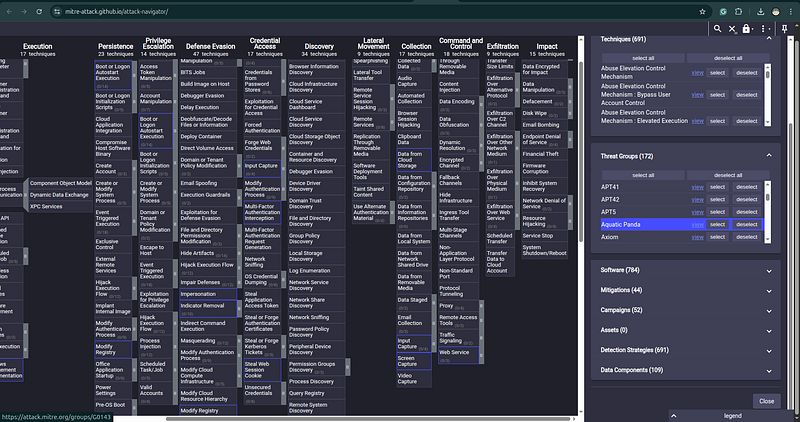
Alternatively, for actors that MITRE doesn’t have a Group entry for (e.g., newly emerged groups, actors tracked under internal names), you can manually build a profile by creating a new layer and coloring techniques based on your own CTI analysis.
Workflow 3: Overlay for gap analysis
This is the most powerful Navigator workflow. It answers: “Which techniques does my threat actor use that I currently cannot detect?”
-
In Navigator, click the “+” tab to open a new layer tab
-
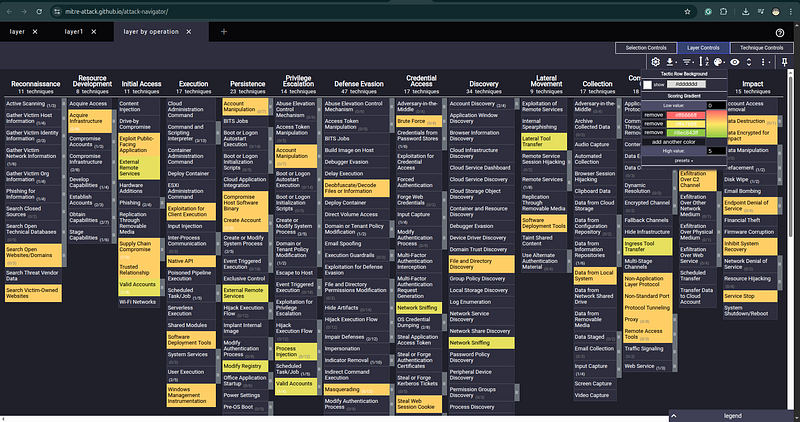
Import both your detection layer (green) and your threat actor layer (red/orange) as separate tabs
-
Click the tab that says “new layer” → select “Create Layer from Other Layers”
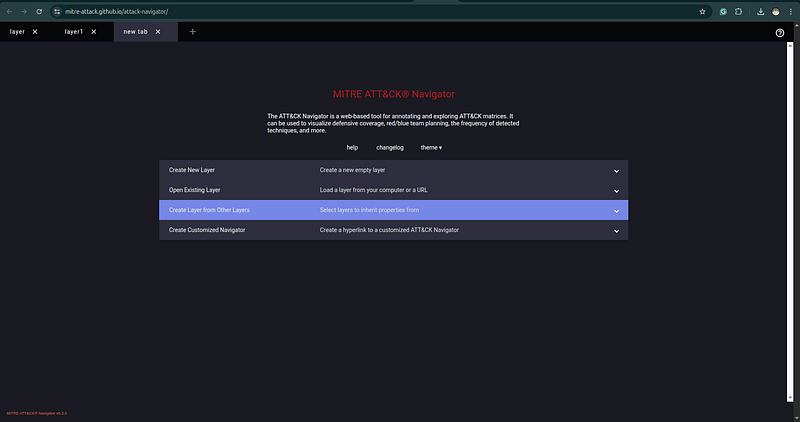
- In the layer operation dialog, select both layers and configure the scoring:
-
Detection layer score: 1
-
Threat actor layer score: 1
-
Operation: “sum” or use the “populated from” option to show intersection
- Alternatively, use the multi-select tab view to visually compare both layers side by side
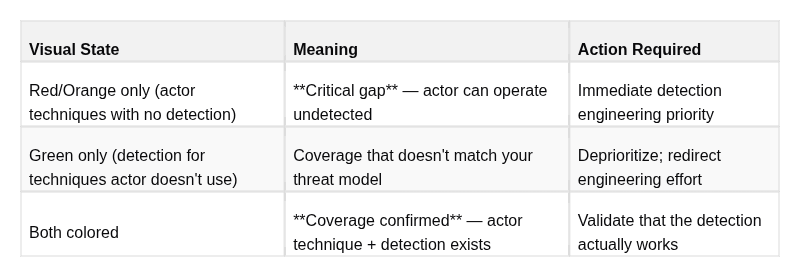
The resulting view reveals three categories:
Workflow 4: Prioritized gap output
Export the gap analysis and build a detection roadmap:
Priority
1
 — Immediate (
next
 sprint):
  Techniques
in
 Red that appear frequently
in
 actor profile + high impact
  Example: T1003
.003
 (NTDS
dump
), T1490 (VSS deletion), T1055 (Process injection)
Priority 2 — Near-term (next 30 days):
  Techniques in Red with lower frequency in actor profile or moderate impact
  Example: T1087.002 (AD account enum), T1018 (network scanning)
Priority 3 — Roadmap (next 90 days):
  Techniques in Yellow (partial coverage) that appear in actor profile
  Example: T1078 (valid accounts) — rule exists but detection is too broad to be actionable
This is the framework for athreat-informed detection roadmap— prioritization driven by actual threat data, not vendor recommendations or framework compliance percentages.
Reading and Communicating Gap Analysis Results
When presenting Navigator outputs to a SOC team or security leadership:
-
Avoid percentage-coverage metrics without context.“We cover 40% of ATT&CK” is meaningless. “We cover 78% of techniques used by our priority threat actors, with critical gaps in credential dumping and impact-phase techniques” is actionable.
-
**Anchor the discussion to your threat model.**The question is not “how much ATT&CK do we cover?” It is “can we detect the techniques that adversaries targeting our sector are actually using?”
-
**Distinguish theoretical coverage from validated coverage.**A technique has theoretical coverage if a rule exists for it. It has validated coverage if that rule has been confirmed to fire against a realistic test of the technique (Atomic Red Team, purple team exercise). Mark the difference explicitly in your layer.
9. Use Case 3: Detection Engineering with Sigma + ATT&CK
Why Sigma Is the Right Integration Point
Detection engineering teams face a persistent problem: every SIEM and EDR platform uses a different query language. A detection rule written for Splunk SPL cannot be directly used in Microsoft Sentinel KQL, Elastic EQL, or Chronicle YARA-L. This forces teams to either commit to a single platform or maintain parallel rule sets — wasting engineering effort and creating inconsistencies.
Sigmais an open, vendor-neutral YAML-based rule format that solves this. A Sigma rule describes the detection logic in abstract terms (which log source, which field patterns, which conditions) and can be converted to any SIEM’s query language using the pySigma converter. Critically for ATT&CK integration, every Sigma rule includes an explicit ATT&CK tag list — making it the natural bridge between the framework and live production detections.
The SigmaHQ/sigma repository on GitHub contains thousands of community-maintained Sigma rules, the vast majority of which are ATT&CK-tagged. This is one of the most practical starting points for any detection engineering program.
Anatomy of a Sigma Rule with ATT&CK Tags
title: Suspicious PowerShell Download Cradle
id: 3b6ab547-8ec2-4991-a01c-5d46b3e88a8a
status: test
description: >
  Detects PowerShell using common download methods (DownloadString, DownloadFile,
  WebClient, IEX) to pull
content from a remote server. This pattern is frequently
  observed in initial access and C2 establishment phases of intrusions.
references
:
    -
https
:
//attack.mitre.org/techniques/T1059/001/
    -
https
:
//attack.mitre.org/techniques/T1105/
    -
https
:
//attack.mitre.org/techniques/T1027/
author
: Andrey Pautov
date
:
2026
/
03
/
19
tags
:
    - attack.execution
    - attack.t1059.
001
         # PowerShell
    - attack.command_and_control
    - attack.t1105             # Ingress Tool Transfer
    - attack.defense_evasion
    - attack.t1027             # Obfuscated Files or Information
logsource
:

category
: process_creation

product
: windows
detection
:

selection
:
        CommandLine|
contains
:
            -
'DownloadString'
            -
'DownloadFile'
            -
'WebClient'
            -
'IEX'
            -
'Invoke-Expression'
            -
'Net.WebClient'
            -
'Start-BitsTransfer'

filter_legitimate
:
        ParentImage|
contains
:
            -
'C:\Windows\System32\wsus'
            -
'C:\Program Files\ManagementEngine'

condition
: selection
and

not
 filter_legitimate
falsepositives
:
    - Legitimate administrative scripts using WebClient for automation
    - Software deployment
and
 management tools (WSUS, MECM)
    - Security scanning tools
level
: high
Key fields for ATT&CK integration:
Thetags:field is the critical integration point. Each tag follows a specific format:
-
attack.<tactic-name>— references the tactic (lowercase, spaces replaced by underscores) -
attack.t<technique-number>.<sub-technique-number>— references the specific technique/sub-technique
One rule carries multiple ATT&CK tags when the observed behavior spans multiple techniques. The PowerShell download cradle above tags three techniques across three tactics because the behavior serves all three purposes simultaneously.
When you import Sigma rules into a platform like Splunk or Elastic with ATT&CK integration, these tags automatically populate the ATT&CK field in alert metadata — enabling ATT&CK-based alerting dashboards, statistics, and Navigator layer exports directly from your SIEM.
From ATT&CK Technique to Detection Rule: The Complete Process
Most detection engineering guides start with log data. The ATT&CK-first approach starts with the threat:
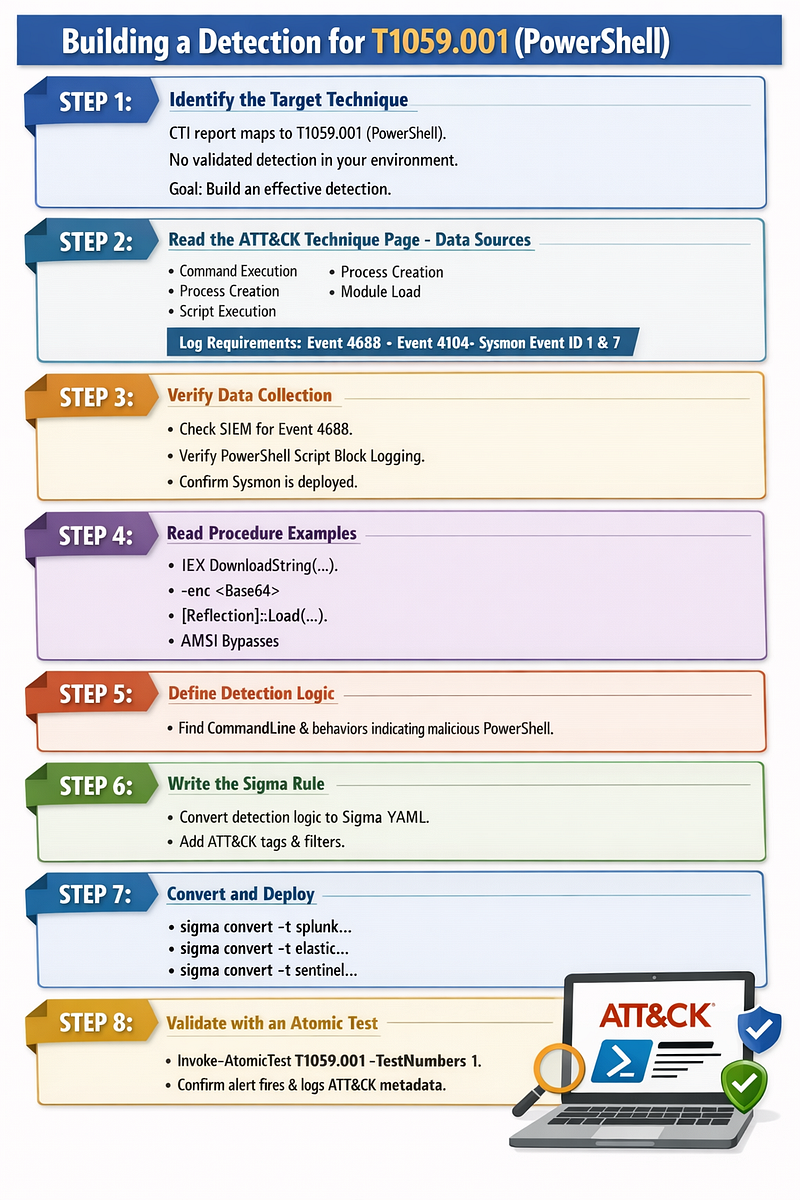
STEP

1
: Identify the target technique
  You have a CTI report that maps an actor
's behavior to T1059.001 (PowerShell).
  You have no validated detection
for
 this technique
in
 your environment.
  Goal: build an effective detection.
STEP

2
: Read the ATT&CK technique page - Data Sources section
  Navigate
to
 attack.mitre.org/techniques/T1059/
001
/
  Data Sources listed:
    - Command: Command Execution
    - Process: Process Creation
    -
Module
:
Module
 Load
    - Script: Script Execution
  Translation:
To
 detect PowerShell abuse, you need:
    - Process creation logs (Windows
Event

4688

or
 Sysmon EventID
1
)
    - PowerShell script block logging (Windows
Event

4104
)
    -
Module
 load events (Sysmon EventID
7
)
for
 .NET
assembly
 loading
STEP

3
: Verify you collect the required data sources
  Check your SIEM: are you receiving Windows
Event

4688

with
 full command line?
  Check:
is
 PowerShell Script Block Logging enabled (HKLM\SOFTWARE\Policies\Microsoft\Windows\PowerShell\ScriptBlockLogging)?
  Check:
do
 you have Sysmon deployed
with
 appropriate config?

If
 the answer
is
 no
to
 any
of
 these: fix the data collection BEFORE writing detection rules.
  A rule without the data source it needs will never fire.
STEP

4
: Read the procedure examples
for
 behavioral pattern
  ATT&CK
's procedure examples show what PowerShell abuse actually looks like:
    - Download cradles: IEX (
New
-
Object
 Net.WebClient).DownloadString(...)
    - Encoded commands: powershell.exe -enc <base64>
    - Reflection: [System.Reflection.
Assembly
]::Load(...)
    - AMSI bypass patterns
    - Living-
off
-the-land:
using
 built-
in
 PS modules maliciously
STEP

5
: Define detection logic
  Based
on
 the behavioral patterns: what field+value combinations indicate malicious use?
  Consider:
true
 positives (what you want
to

catch
) vs.
false
 positives (what looks similar but isn
't malicious)
  High-confidence indicators
for
 malicious PowerShell:
    - CommandLine contains DownloadString/DownloadFile/WebClient + a URL
    - CommandLine contains -enc / -EncodedCommand
with
 an unexpectedly
long
 Base64
string
    - PowerShell spawned
by
 unexpected parent (Office apps, browsers, email clients)
    - CommandLine contains known bypass strings (AMSI bypass patterns)
STEP

6
: Write the Sigma rule
  Convert the detection logic
to
 YAML following Sigma spec.
  Tag
with
 relevant ATT&CK IDs.
  Include filter conditions
to
 reduce
false
 positives.
  Add falsepositives documentation
for
 the team that will triage alerts.
STEP

7
: Convert
and
 deploy
  sigma convert -t splunk -p splunk_windows rules/powershell_download_cradle.yml
  sigma convert -t elastic -p ecs_windows rules/powershell_download_cradle.yml
  sigma convert -t sentinel rules/powershell_download_cradle.yml
STEP

8
: Validate
with
 an atomic test
  Invoke-AtomicTest T1059.
001
 -TestNumbers
1
  Confirm the alert fires. Confirm the alert contains the expected ATT&CK metadata.
  Document the validation result
in
 your coverage tracking.
ATT&CK Data Sources — The Underused Feature
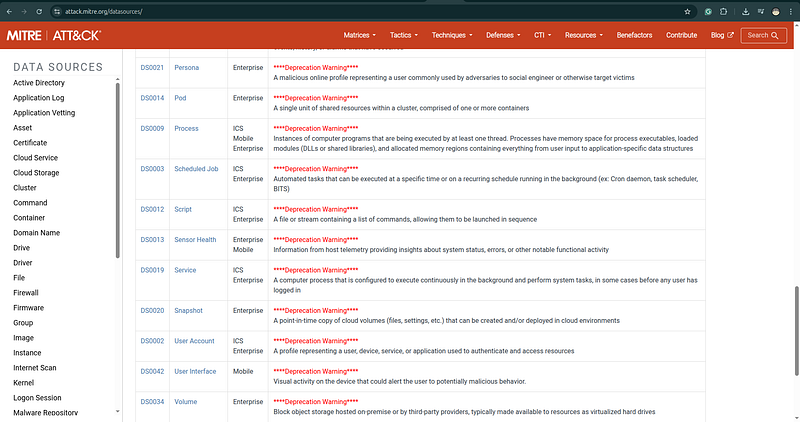
TheData Sourcessection of every ATT&CK technique page is one of the most actionable parts of the framework, and one of the most frequently overlooked.
Each ATT&CK data source is now structured with a source and component, for example:
-
Process: Process Creation— logs of process start events (Sysmon EventID 1, Windows 4688) -
Process: Process Access— logs of one process accessing another's memory (Sysmon EventID 10) -
Command: Command Execution— logs of commands run by scripting interpreters (PowerShell Event 4104) -
File: File Creation— file system events for new file creation (Sysmon EventID 11) -
Network Traffic: Network Connection Creation— network connection events (Sysmon EventID 3) -
Windows Registry: Windows Registry Key Modification— registry change events (Sysmon EventID 13)
A detection engineer who builds rules without first verifying the required data sources are being collected is wasting effort. Before writing any detection:
-
Check which data sources the technique requires
-
Verify those sources are being collected in your environment at the right fidelity
-
If not — fix the collection gap first; a rule without data is a rule that never fires
A common and consequential example: T1003.001 (LSASS Credential Dumping) requiresProcess: Process Access— specifically, logs of processes reading LSASS memory. This requires Sysmon EventID 10, configured with an appropriate rule to capture lsass.exe as a target. If you haven't deployed Sysmon, or your Sysmon config doesn't include lsass access monitoring, every LSASS dumping detection you build will silently fail.
10. Use Case 4: Threat Hunting with ATT&CK
What Makes ATT&CK-Driven Hunting Different
Threat hunting is the proactive, human-led search for adversary activity that automated detection has failed to catch. The fundamental challenge of threat hunting is the blank page problem: where do you start? What are you looking for? How do you know when to stop?
ATT&CK solves the blank page problem by providing a structured catalog of adversary behaviors, each with documented detection approaches. Instead of hunting based on intuition or random exploration, ATT&CK-driven hunting ishypothesis-driven: you select a specific technique your threat actors are known to use, understand how it manifests in telemetry, and go looking for evidence of it.
This approach has three key advantages:
-
Prioritization is objective— you hunt based on threat actor profiles, not gut feeling
-
Scope is bounded— you know exactly what you are looking for and what data you need
-
Outcomes feed the system— confirmed malicious findings become new detection rules; cleared hypotheses become documented baselines
The Complete ATT&CK-Driven Hunt Process
Step 1: Select a hunt hypothesis
Start with your threat intelligence. Which techniques appear in your priority threat actors’ profiles? Cross-reference against your Navigator coverage layer. The intersection of “used by my threat actors” and “not well-covered by my detections” is your hunting queue.
Example hypothesis:“APT29 and related clusters have been observed using T1098.001 (Additional Cloud Credentials) to establish persistent access to Azure environments by adding credentials to existing service principals. We do not have strong detection coverage for this technique in our Azure environment. Hypothesis: this technique has been or is being used in our tenant without triggering any alerts.”
A well-formed hunt hypothesis has three parts:
-
Thetechniquebeing hunted (with ATT&CK ID)
-
Theevidence basisfor why this technique is relevant (threat actor profile, sector incidents)
-
Thecoverage gapthat motivates the hunt (automated detection doesn’t cover this)
Step 2: Understand the technique’s observable artifacts
Read the ATT&CK technique page for your selected technique. Focus on:
-
What the behavior looks like in logs (Detection section)
-
What data sources are required
-
What procedure examples exist (to understand variations to look for)
For T1078 (Valid Accounts) as an example, the observable artifacts include:
-
Logon events from accounts that authenticate infrequently or from new locations
-
Service accounts authenticating interactively (logon type 2 or 10) — service accounts should never do this legitimately
-
Accounts accessing resources they have no business reason to access
-
Authentication from unusual IP ranges or geographies
-
Multiple authentication failures followed by success (credential stuffing pattern)
Step 3: Formulate hunt queries
Translate the behavioral patterns into queries against your data. Write multiple queries — one for each observable variant — rather than trying to catch everything in a single query.
-- Hunt Query 1: Service accounts with interactive logons (T1078 — Valid Accounts)
-- Target: Windows Security Event Log, EventID 4624
-- Hypothesis: compromised service accounts being used for interactive access
SELECT
    AccountName,
    AccountDomain,
    LogonType,
    WorkstationName,
    IpAddress,
    IpPort,

COUNT
(
*
)
as
 event_count,

MIN
(TimeCreated)
as
 first_seen,

MAX
(TimeCreated)
as
 last_seen
FROM
 windows_security_events
WHERE
 EventID
=

4624

AND
 LogonType
IN
 (
2
,
10
)
-- Interactive, RemoteInteractive

AND
 AccountName
LIKE

'%svc%'

-- Matches common service account naming

AND
 AccountName
NOT

LIKE

'%MSOL%'

-- Exclude known automated accounts

AND
 TimeCreated
>
 DATEADD(
day
,
-30
, GETDATE())
GROUP

BY
 AccountName, AccountDomain, LogonType, WorkstationName, IpAddress, IpPort
HAVING

COUNT
(
*
)
<

5

-- Low-frequency interactive logon = suspicious
ORDER

BY
 event_count
ASC
;
-- Hunt Query 2: Account authentication outside normal business hours (T1078)
-- Hypothesis: compromised legitimate accounts used during off-hours operations
SELECT
    AccountName,
    AccountDomain,
    LogonType,
    WorkstationName,
    IpAddress,

HOUR
(TimeCreated)
as
 logon_hour,

COUNT
(
*
)
as
 event_count
FROM
 windows_security_events
WHERE
 EventID
=

4624

AND
 LogonType
IN
 (
3
,
10
)
-- Network, RemoteInteractive

AND

HOUR
(TimeCreated)
NOT

BETWEEN

7

AND

20

-- Outside 7am-8pm local time

AND
 DAYOFWEEK(TimeCreated)
IN
 (
1
,
7
)
-- Weekend

AND
 TimeCreated
>
 DATEADD(
day
,
-14
, GETDATE())
GROUP

BY
 AccountName, AccountDomain, LogonType, WorkstationName, IpAddress, logon_hour
HAVING

COUNT
(
*
)
>

1
ORDER

BY
 logon_hour
ASC
;
Step 4: Investigate anomalies
For each result that looks anomalous, investigate the context:
-
What was the account doing before and after this logon?
-
Is this a known automation workflow? (Check with the account owner or IT)
-
Does the source IP belong to the organization?
-
Are there other signals associated with the same account (failed logins, new process executions, file access)?
Step 5: Close the loop
Every hunt concludes with a documented outcome:
The documentation of “nothing found” is nearly as valuable as finding something — it tells the team that a human looked for this technique in this environment during this window, which prevents wasted duplicate hunting effort.
ATT&CK Technique Prioritization for Hunting
Not every technique is worth hunting with equal urgency. Use this prioritization model:
Tier 1 — Hunt immediately:
-
High-frequency techniques in your sector’s threat actor profiles
-
High-impact techniques (T1485 Data Destruction, T1486 Ransomware, T1003 Credential Dumping)
-
Techniques with zero automated detection coverage in your environment
-
Techniques for which you have data sources but untested rules
Tier 2 — Hunt in next 30 days:
-
Techniques used by secondary threat actors in your threat model
-
Techniques with weak or unvalidated detection coverage
-
Cloud and identity-based techniques if your environment is cloud-heavy
Tier 3 — Hunt when capacity allows:
-
Techniques rarely observed in your sector
-
Techniques your environment structurally cannot support (e.g., ICS techniques if you have no OT)
-
Techniques well-covered by mature, validated detection rules
11. Use Case 5: Adversary Emulation and Purple Teaming
The Problem That Purple Teaming Solves
Traditional red team assessments produce a report of findings. Traditional blue team operations wait for alerts. These two activities happen in isolation, creating an organizational gap: the red team discovers what can be compromised, but the blue team doesn’t know which of their detections would have fired (or failed to fire) during the attack. By the time the red team report reaches the blue team, the context is gone.
Purple teamingcollapses this gap by running red team attacks in real time while the blue team monitors. The red team executes a technique; the blue team immediately checks whether their detection fired. If it didn’t, both teams can investigate together — what data should have been present? Was the data source configured correctly? Was the rule logic wrong? Was there a visibility gap in the infrastructure?
ATT&CK is the operational language that makes this collaboration work. The red team’s emulation plan is structured around ATT&CK techniques. The blue team’s detection dashboard is tagged with ATT&CK IDs. When the red team says “we just executed T1003.001,” the blue team knows exactly what alert to look for. There is no translation overhead.
Atomic Red Team: The Foundational Library
Atomic Red Team(by Red Canary) is the most widely adopted ATT&CK-aligned test library. It provides small, discrete, reproducible test cases — “atomic tests” — each of which emulates a specific ATT&CK technique or sub-technique in isolation. The tests are designed to be safe to run in a test environment, produce realistic telemetry, and clean up after themselves.
The library is organized exactly like ATT&CK: each technique has its own folder, containing one or more atomic tests that exercise different implementations or variations of that technique.
# Installation
Install-Module -Name invoke-atomicredteam, powershell-yaml -Scope CurrentUser
Import-Module invoke-atomicredteam
# List all available atomic tests for a technique
Invoke-AtomicTest T1003.001 -ShowDetailsBrief
# View full details of a specific test before running
Invoke-AtomicTest T1003.001 -TestNumbers 1 -ShowDetails
# Check prerequisites (some tests require specific tools installed)
Invoke-AtomicTest T1003.001 -TestNumbers 1 -CheckPrereqs
# Install prerequisites if needed
Invoke-AtomicTest T1003.001 -TestNumbers 1 -GetPrereqs
# Execute the test
Invoke-AtomicTest T1003.001 -TestNumbers 1
# Clean up artifacts after the test
Invoke-AtomicTest T1003.001 -TestNumbers 1 -Cleanup
# Run all tests for a technique
Invoke-AtomicTest T1003.001
# Run tests for multiple techniques in sequence
Invoke-AtomicTest T1003.001, T1059.001, T1105
The-ShowDetailsoutput tells you exactly what the test does before you run it — what commands execute, what artifacts it creates, what data sources it touches. Read this before running any test.
Purple Team Workflow: Step by Step
PRE-EXERCISE:
1
. CTI team provides actor TTP profile
   → ATT&CK Navigator layer showing which techniques the actor uses
   → Priority ranked: high-impact, frequently-observed techniques first
2
. Red team builds emulation plan
   →
Select
 top
10
-
15
 techniques
from
 the actor profile
for
 this exercise
   → Map
each

to
 one
or
 more Atomic Red Team tests
   → Identify any gaps
where
 Atomic tests don
't cover the technique (custom scripts needed)
   → Write the execution runbook (
order
, timing, target systems)
3
. Blue team prepares
   → Load the actor
's ATT&CK layer in Navigator
   → Identify which techniques have existing detection rules
   →
Set
 up detection dashboard filtered
to
 the exercise
's technique IDs
   → Brief SOC analysts:
"We are emulating this actor profile today; these T-codes are in scope"
DURING EXERCISE:
4
. Red team announces
each
 technique before execution
   →
"Executing T1003.001 - LSASS credential dump in 60 seconds"
   → Allows blue team
to
 note the exact time
for
 log correlation
5
. Red executes atomic test
   → Documents: exact command/tool used, timestamp, target system
6
. Blue team checks detection (within
5
 minutes)
   → Did an alert fire? What was the alert content? How much time did it
take
?
   →
If
 no alert: check raw logs - was the telemetry present but the rule missed it?
7
. Document result immediately
   ✓ Detected - alert fired within X minutes
with
 correct ATT&CK tag
   △ Detected (noisy) - alert fired but
with
 excessive
false
 positives
or
 late
   ✗ Missed - no alert, investigate root cause
   ◌ Data gap - no telemetry present (data source
not
 collected)
POST-EXERCISE:
8
. Compile results
by
 technique
9
. Update Navigator coverage layer
with
 actual validated status
10
. Create detection engineering tickets
for
 all ✗
and
 ◌ findings
11
. Document all △ findings
for
 rule tuning backlog
12
. Write purple team report: what was emulated, what was detected, what was missed, recommendations
VECTR for Tracking

VECTR(by Security Risk Advisors) is an open-source platform designed specifically for tracking adversary emulation and purple team exercise results. It stores campaigns, test cases, and outcomes organized by ATT&CK technique, and generates coverage metrics and trend reports over time.
Key VECTR capabilities:
-
Track multiple campaigns (exercises) over time and compare coverage trends
-
Associate each test case with the ATT&CK technique it exercises
-
Record outcome (Detected / Missed / Partial) and detection details
-
Generate ATT&CK Navigator-compatible layers from exercise results
-
Export executive-level coverage reports
The combination of Atomic Red Team (test execution) + VECTR (tracking) + Navigator (visualization) constitutes a complete, reproducible purple team program.
MITRE CALDERA: Automated Adversary Emulation
CALDERAis MITRE’s own adversary emulation platform. Unlike Atomic Red Team (which runs discrete tests manually), CALDERA operates as a persistent C2 framework that autonomously chains techniques together, mimicking the behavior of an actual adversary making decisions in your environment.
CALDERA is more complex to operate than Atomic Red Team but enables scenario-based testing: “What would happen if an actor with these capabilities got a foothold on this endpoint?” rather than just “Does this specific technique fire an alert?”
CALDERA ships with pre-built adversary profiles aligned to real threat groups, each structured as chains of ATT&CK techniques. Running a CALDERA operation produces a complete, ATT&CK-mapped activity log showing every technique executed, every command run, and every artifact created — a realistic emulation of a full intrusion chain rather than isolated technique tests.
12. Hands-On: Step-by-Step Worked Example
Scenario
You are a CTI analyst at a regional bank. Your team received the following intelligence report from your ISAC (Information Sharing and Analysis Center):
> “A ransomware operator, tracked internally as ALPHA CRYPT, has been observed targeting financial sector organizations in the EMEA region. Initial access is achieved via spear-phishing emails containing macro-enabled Word documents (.docm files). The macro executes cmd.exe, which launches PowerShell with an encoded command to download a Cobalt Strike beacon from a compromised legitimate website over HTTPS. The beacon is injected into a running explorer.exe process using reflective DLL injection. The actor then performs Active Directory reconnaissance using BloodHound (run as a compiled binary) and standard Windows utilities (net.exe, nltest). Domain credentials are extracted by dumping NTDS.dit: the actor creates a Volume Shadow Copy, accesses the shadow copy to copy NTDS.dit and the SYSTEM registry hive, then parses them offline using secretsdump. The actor moves laterally using PsExec over SMB, authenticating with Domain Admin credentials extracted from the credential dump. On all accessible systems, the actor executes a wiper payload that deletes all Volume Shadow Copies, encrypts files, and overwrites the Master Boot Record before rebooting.”
Step 1: Extract Atomic Behaviors
Read through the scenario and list every discrete adversary action:
-
Spear-phishing email sent to targets
-
Email contains a .docm (macro-enabled Word document)
-
User opens the document and enables macros (user execution)
-
Macro executes cmd.exe
-
cmd.exe spawns PowerShell with an encoded command
-
PowerShell decodes and executes the command (encoded command = obfuscation)
-
PowerShell connects to compromised legitimate website over HTTPS
-
PowerShell downloads Cobalt Strike beacon
-
Cobalt Strike beacon uses HTTPS for C2
-
Beacon uses reflective DLL injection into explorer.exe
-
BloodHound binary executed for AD recon
-
net.exe and nltest used for network/domain discovery
-
Volume Shadow Copy created via vssadmin or WMI
-
NTDS.dit copied from shadow copy
-
SYSTEM registry hive copied from shadow copy
-
Offline credential parsing (secretsdump on attacker infra — not detectable on victim side)
-
PsExec deployed to remote systems over SMB
-
PsExec authenticates with stolen Domain Admin credentials
-
Wiper payload deployed to all accessible systems
-
wiper deletes all Volume Shadow Copies
-
Wiper encrypts files
-
Wiper overwrites Master Boot Record (MBR)
-
Systems rebooted (to trigger MBR wipe rendering systems unbootable)
Step 2: Map Each Behavior to ATT&CK
You can use LLM to build NAVIGATOR Ready Json like this:
[

{

"atomic_behavior"
:

"Spear-phishing email sent to targets"
,

"attack_mapping"
:

[

{

"id"
:

"T1566.001"
,

"name"
:

"Spearphishing Attachment"

}

]
,

"why"
:

"Malicious attachment delivered by email."

}
,

{

"atomic_behavior"
:

"Email contains a .docm macro-enabled Word document"
,

"attack_mapping"
:

[

{

"id"
:

"T1566.001"
,

"name"
:

"Spearphishing Attachment"

}

]
,

"why"
:

"The attachment is the delivery vehicle."

}
,

{

"atomic_behavior"
:

"User opens the document and enables macros"
,

"attack_mapping"
:

[

{

"id"
:

"T1204.002"
,

"name"
:

"User Execution: Malicious File"

}

]
,

"why"
:

"Execution depends on the victim opening the file."

}
,

{

"atomic_behavior"
:

"Macro executes cmd.exe"
,

"attack_mapping"
:

[

{

"id"
:

"T1059.005"
,

"name"
:

"Command and Scripting Interpreter: Visual Basic"

}

]
,

"why"
:

"Office VBA macro execution fits Visual Basic."

}
,

{

"atomic_behavior"
:

"cmd.exe spawns PowerShell with an encoded command"
,

"attack_mapping"
:

[

{

"id"
:

"T1059.003"
,

"name"
:

"Command and Scripting Interpreter: Windows Command Shell"

}
,

{

"id"
:

"T1059.001"
,

"name"
:

"Command and Scripting Interpreter: PowerShell"

}

]
,

"why"
:

"cmd.exe is used as a launcher, and PowerShell is the interpreter that follows."

}
,

{

"atomic_behavior"
:

"PowerShell decodes and executes the command"
,

"attack_mapping"
:

[

{

"id"
:

"T1059.001"
,

"name"
:

"Command and Scripting Interpreter: PowerShell"

}
,

{

"id"
:

"T1027"
,

"name"
:

"Obfuscated/Compressed Files and Information"

}

]
,

"why"
:

"Encoded PowerShell is both PowerShell execution and obfuscation."

}
,

{

"atomic_behavior"
:

"PowerShell connects to a compromised legitimate website over HTTPS"
,

"attack_mapping"
:

[

{

"id"
:

"T1071.001"
,

"name"
:

"Application Layer Protocol: Web Protocols"

}

]
,

"why"
:

"Web-based communications over HTTP/HTTPS."

}
,

{

"atomic_behavior"
:

"PowerShell downloads Cobalt Strike beacon"
,

"attack_mapping"
:

[

{

"id"
:

"T1105"
,

"name"
:

"Ingress Tool Transfer"

}

]
,

"why"
:

"Pulling malware/tooling into the victim environment."

}
,

{

"atomic_behavior"
:

"Cobalt Strike beacon uses HTTPS for C2"
,

"attack_mapping"
:

[

{

"id"
:

"T1071.001"
,

"name"
:

"Application Layer Protocol: Web Protocols"

}

]
,

"why"
:

"HTTPS-based C2 over web protocols."

}
,

{

"atomic_behavior"
:

"Beacon uses reflective DLL injection into explorer.exe"
,

"attack_mapping"
:

[

{

"id"
:

"T1055.001"
,

"name"
:

"Process Injection: Dynamic-link Library Injection"

}

]
,

"why"
:

"Reflective DLL injection is best fit here."

}
,

{

"atomic_behavior"
:

"BloodHound binary executed for AD recon"
,

"attack_mapping"
:

[

{

"id"
:

"T1087.002"
,

"name"
:

"Account Discovery: Domain Account"

}
,

{

"id"
:

"T1069.002"
,

"name"
:

"Permission Groups Discovery: Domain Groups"

}
,

{

"id"
:

"T1482"
,

"name"
:

"Domain Trust Discovery"
,

"condition"
:

"depending on collection scope"

}

]
,

"why"
:

"BloodHound is an AD recon tool and commonly enumerates users, groups, privileges, and sometimes trust relationships."

}
,

{

"atomic_behavior"
:

"net.exe used for network/domain discovery"
,

"attack_mapping"
:

[

{

"id"
:

"T1018"
,

"name"
:

"Remote System Discovery"

}
,

{

"id"
:

"T1087.002"
,

"name"
:

"Account Discovery: Domain Account"

}
,

{

"id"
:

"T1069.002"
,

"name"
:

"Permission Groups Discovery: Domain Groups"

}
,

{

"id"
:

"T1135"
,

"name"
:

"Network Share Discovery"
,

"condition"
:

"depending on exact command"

}

]
,

"why"
:

"net view, net user /domain, net group /domain, etc. map differently."

}
,

{

"atomic_behavior"
:

"nltest used for network/domain discovery"
,

"attack_mapping"
:

[

{

"id"
:

"T1482"
,

"name"
:

"Domain Trust Discovery"

}
,

{

"id"
:

"T1018"
,

"name"
:

"Remote System Discovery"
,

"condition"
:

"depending on exact command"

}

]
,

"why"
:

"nltest /domain_trusts fits trust discovery; /dclist fits remote system discovery."

}
,

{

"atomic_behavior"
:

"Volume Shadow Copy created via vssadmin or WMI"
,

"attack_mapping"
:

[

{

"id"
:

"T1003.003"
,

"name"
:

"OS Credential Dumping: NTDS"

}
,

{

"id"
:

"T1047"
,

"name"
:

"Windows Management Instrumentation"
,

"condition"
:

"if WMI is used"

}

]
,

"why"
:

"Shadow copy creation is typically a means to access locked AD database files; WMI is the mechanism when used."

}
,

{

"atomic_behavior"
:

"NTDS.dit copied from shadow copy"
,

"attack_mapping"
:

[

{

"id"
:

"T1003.003"
,

"name"
:

"OS Credential Dumping: NTDS"

}

]
,

"why"
:

"Copying NTDS from snapshot is classic AD credential theft prep."

}
,

{

"atomic_behavior"
:

"SYSTEM registry hive copied from shadow copy"
,

"attack_mapping"
:

[

{

"id"
:

"T1003"
,

"name"
:

"OS Credential Dumping"

}

]
,

"why"
:

"The SYSTEM hive is commonly taken with NTDS for offline extraction of bootkey/secrets."

}
,

{

"atomic_behavior"
:

"Offline credential parsing with secretsdump on attacker infrastructure"
,

"attack_mapping"
:

[
]
,

"why"
:

"This occurs off-host, so it is usually not detectable on the victim endpoint."
,

"note"
:

"No direct victim-side ATT&CK event"

}
,

{

"atomic_behavior"
:

"PsExec deployed to remote systems over SMB"
,

"attack_mapping"
:

[

{

"id"
:

"T1021.002"
,

"name"
:

"Remote Services: SMB/Windows Admin Shares"

}
,

{

"id"
:

"T1569.002"
,

"name"
:

"Service Execution"
,

"condition"
:

"often"

}

]
,

"why"
:

"PsExec commonly copies a binary over SMB and starts a service remotely."

}
,

{

"atomic_behavior"
:

"PsExec authenticates with stolen Domain Admin credentials"
,

"attack_mapping"
:

[

{

"id"
:

"T1078.002"
,

"name"
:

"Valid Accounts: Domain Accounts"

}

]
,

"why"
:

"Abuse of legitimate stolen domain credentials."

}
,

{

"atomic_behavior"
:

"Wiper payload deployed to all accessible systems"
,

"attack_mapping"
:

[

{

"id"
:

"T1570"
,

"name"
:

"Lateral Tool Transfer"

}
,

{

"id"
:

"T1021.002"
,

"name"
:

"Remote Services: SMB/Windows Admin Shares"

}

]
,

"why"
:

"The payload is pushed laterally, often via SMB shares before execution."

}
,

{

"atomic_behavior"
:

"Wiper deletes all Volume Shadow Copies"
,

"attack_mapping"
:

[

{

"id"
:

"T1490"
,

"name"
:

"Inhibit System Recovery"

}

]
,

"why"
:

"Deleting shadows is explicitly covered by ATT&CK here."

}
,

{

"atomic_behavior"
:

"Wiper encrypts files"
,

"attack_mapping"
:

[

{

"id"
:

"T1486"
,

"name"
:

"Data Encrypted for Impact"

}

]
,

"why"
:

"Straight ransomware/wiper-impact behavior."

}
,

{

"atomic_behavior"
:

"Wiper overwrites Master Boot Record (MBR)"
,

"attack_mapping"
:

[

{

"id"
:

"T1561.001"
,

"name"
:

"Disk Structure Wipe"

}

]
,

"why"
:

"MBR overwrite affects disk structure and bootability."

}
,

{

"atomic_behavior"
:

"Systems rebooted to trigger the wipe and render systems unbootable"
,

"attack_mapping"
:

[

{

"id"
:

"T1529"
,

"name"
:

"System Shutdown/Reboot"

}

]
,

"why"
:

"Reboot used as the operational trigger for destructive impact."

}
]
Step 3: Build the Navigator Layer
-
Go to Navigator → New Layer → ATT&CK Enterprise v16
-
Select all techniques from the table above
-
Color scheme:
-
Red (#ff6666): High confidence observations
-
Orange (#ffaa44): Medium confidence observations
-
Add a note to each cell: brief description + confidence + source reference
-
Name the layer: “ALPHA CRYPT — ISAC Report [DATE]”
-
Export as:
-
JSON → attach to report as appendix
-
SVG → embed as figure in the report body;
Or upload Navigator ready JSON from the previous step:
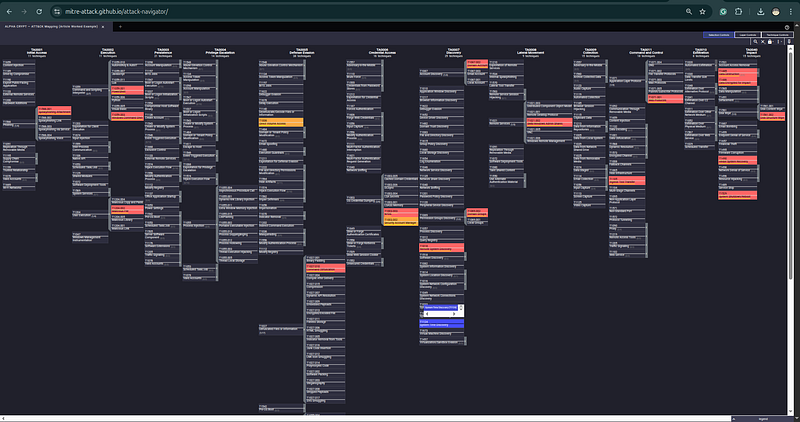
Step 4: Detection Priority Analysis
Cross-reference the mapping against your current detection coverage. For each technique in the table:
-
Green ✓ = detection rule exists and has been validated
-
Yellow △ = rule exists but untested or high false-positive rate
-
Red ✗ = no detection coverage
For the ALPHA CRYPT profile, the most critical undetected techniques (assuming a typical mid-size financial sector SOC):
CRITICAL

GAPS

(detect

now):
✗

T1490

—

Inhibit

System

Recovery

(VSS

deletion)

Why critical:

Last

line

of

defense

before

ransomware

impact.

Detection:

Monitor

for

'vssadmin delete shadows'
,

'wmic shadowcopy delete'
,

'bcdedit /set recoveryenabled no'

Data source:

Process

creation

(Sysmon

EventID

1

/

Windows

4688
)
✗

T1055.001

-

Reflective

DLL

Injection

Why critical:

Allows

beacon

to

operate

hidden

inside

legitimate

process

Detection:

Sysmon

EventID

8

(CreateRemoteThread

into

explorer.exe)

Sysmon

EventID

10

(process

access

with

read/write

to

explorer.exe)

Data source: Process:

Process

Access

(requires

Sysmon)
✗

T1003.003

-

NTDS

Credential

Dump

Why critical:

Leads

directly

to

full

domain

compromise

Detection:

ntdsutil.exe

execution,

vssadmin

create

shadow

/for=C:,

NTDS.dit

file

access

outside

of

AD

process

Data source:

Process

creation

+

File

access

monitoring
HIGH

PRIORITY

GAPS

(address

within

30

days):
△

T1078.002 - Valid Accounts:

Domain

Admin

credentials

used

for

lateral

movement

Existing:

Alert

on

Domain

Admin

logons

outside

business

hours

Gap:

No

baselining

for

legitimate

Domain

Admin

access

patterns

Fix:

Build

behavioral

baseline

for

Domain

Admin

accounts;

alert

on

deviation
△

T1021.002

-

PsExec

lateral

movement

Existing:

Alert

on

psexesvc.exe

installation

(Windows

Event

7045
)

Gap:

Alert

exists

but

generates

too

many

false

positives;

needs

tuning

Fix:

Add

correlation

with

domain

admin

credential

use

in

same

time

window
Step 5: Threat Hunt Derived from Mapping
The mapping reveals immediately actionable hunt hypotheses:
**Hunt 1:**Search for VSS shadow copy creation followed within 24 hours by vssadmin deletion — the combination pattern used by ALPHA CRYPT.
**Hunt 2:**Search for BloodHound-specific file artifacts (BloodHound.exe, SharpHound.exe, bloodhound.zip, acls.csv) created in temp directories or user download folders in the last 90 days.
**Hunt 3:**Search for ntdsutil.exe execution with “activate instance ntds” argument string — the specific invocation used to access the AD database.
Each hunt hypothesis is directly derived from the ATT&CK mapping, provides a specific data source to search, and a specific artifact or behavior to look for.
13. Essential Tooling Reference
Core ATT&CK Knowledge Base Tools
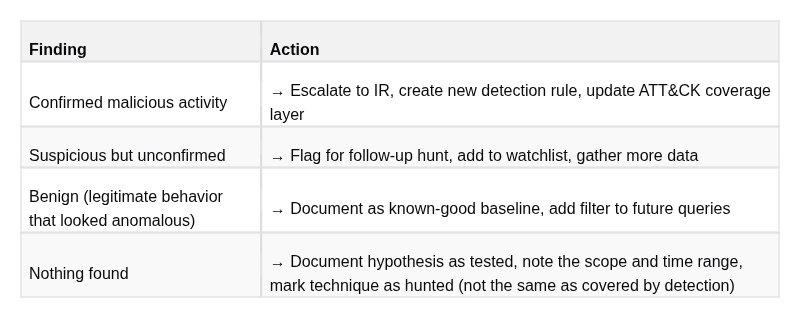
Detection Engineering
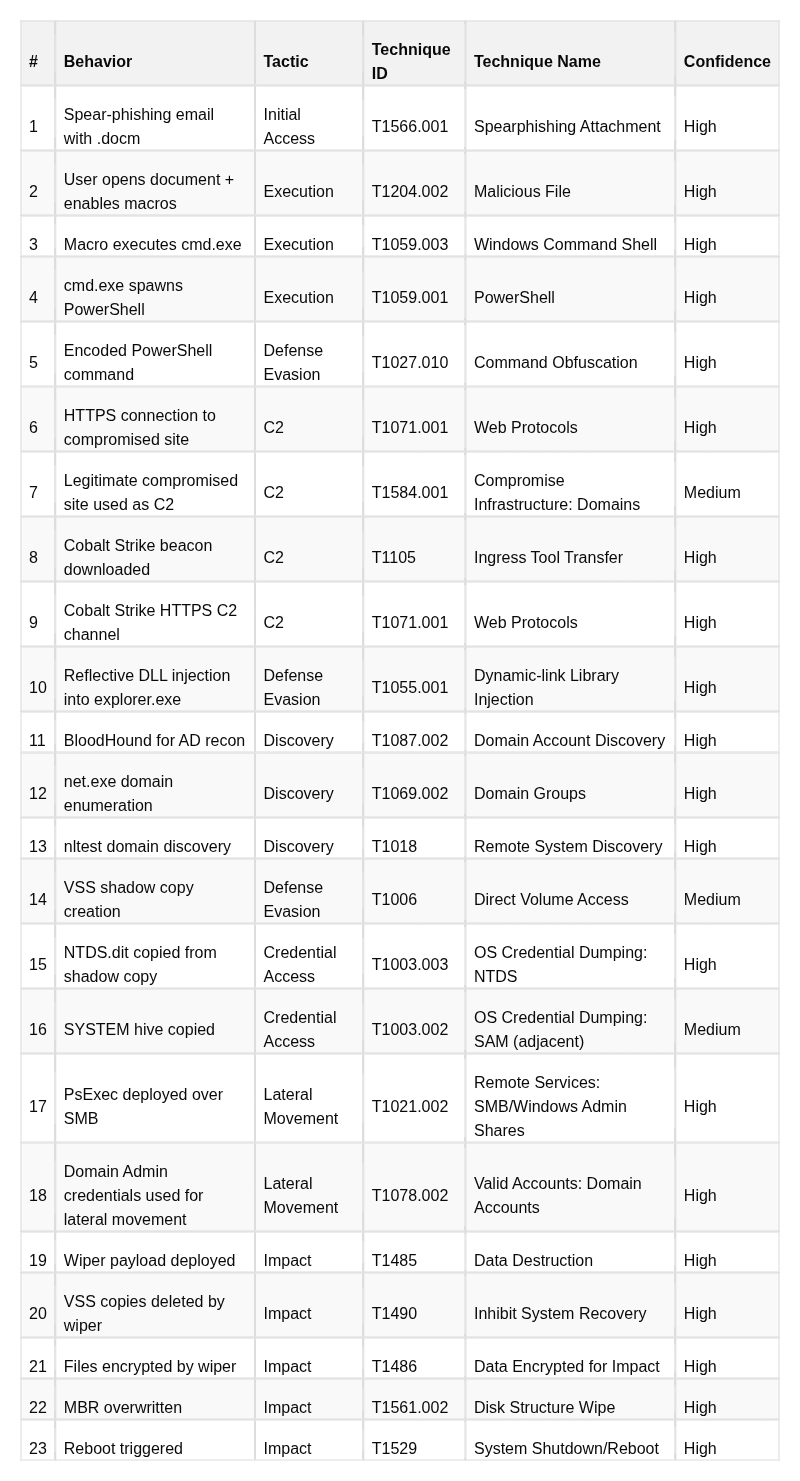
**DeTT&CT in more detail:**Most Navigator coverage maps are aspirational — they show techniques wherea rule exists, not techniques wherea rule has been validated against real telemetry. DeTT&CT forces you to score separately:
-
Data source quality(0–4): Is this log source actually being collected? At what fidelity? From what percentage of systems?
-
Detection quality(0–4): Does the rule actually fire? Has it been tested? Does it produce actionable alerts?
# Install DeTT&CT
pip3 install dettect
# Define your data sources with quality scores
# (Edit data_sources.yaml to reflect your actual collection)
dettect ds -fd data_sources.yaml -l
# → Outputs a Navigator layer showing visibility based on real data collection
# Define your detection rules with quality scores
# (Edit detections.yaml to reflect your actual rule set and validation status)
dettect d -fd detections.yaml -l
# → Outputs a Navigator layer showing real detection coverage
# Combine both for a visibility + detection view
dettect v -fd data_sources.yaml -fd detections.yaml -l
# → The most honest picture of your actual security posture you can build
Adversary Emulation
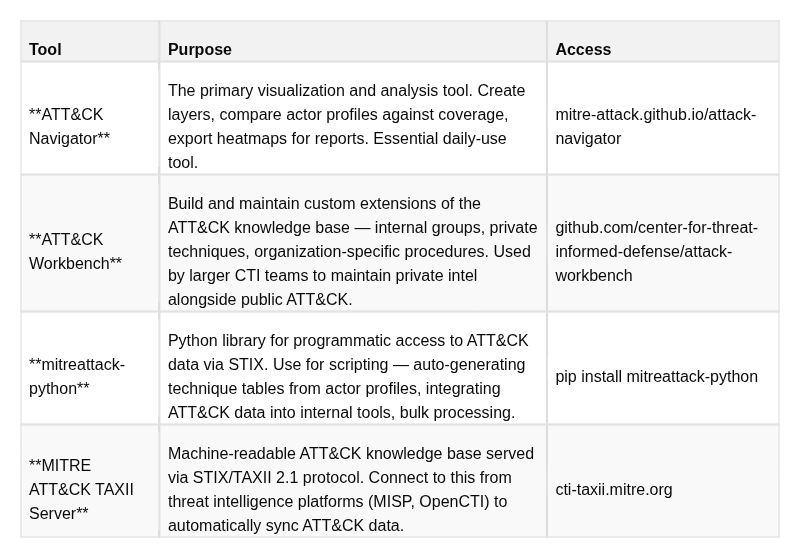
Threat Intelligence Platforms with ATT&CK Integration
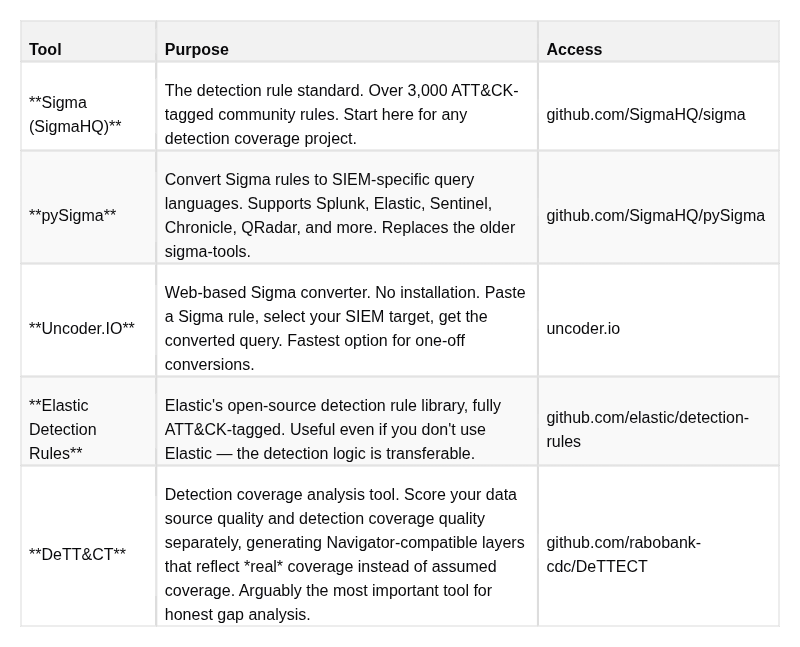
14. Common Pitfalls and Analyst Mistakes
Understanding what goes wrong is as important as understanding what goes right. These seven pitfalls are consistently observed in real CTI and detection engineering teams.
Pitfall 1: Technique Checkbox Theater
**What it looks like:**The security team builds a Navigator layer that is mostly green. The CISO is shown the heatmap and concludes that coverage is strong. In practice, many of those rules have never been validated — they were written, deployed, and never tested against actual adversary behavior. Alerts that should fire don’t.
**Why it happens:**Coverage reporting is often tied to performance metrics. Teams feel pressure to show green cells, so they mark techniques as covered once a rule exists — regardless of whether that rule has ever been tested, whether the data source it relies on is actually being collected, or whether the false positive rate makes it operationally useless.
**The fix:**Institute a coverage validation policy: a technique is only marked covered (green) in Navigator if the corresponding detection has been tested against an Atomic Red Team test or equivalent within the last six months and confirmed to fire. Untested rules get yellow. Rules where the data source is not collected get gray. This creates an honest baseline from which to measure real improvement.
Pitfall 2: Over-Specificity Without Evidence
**What it looks like:**A report mentions “credential dumping was observed.” The analyst, knowing that Mimikatz is the most common tool, maps T1003.001 (LSASS Memory) instead of T1003 (parent). Downstream, this mapping is cited in threat actor profiles and detection recommendations — all of which assume LSASS-specific indicators.
**Why it happens:**Specificity feels rigorous. Analysts want to provide actionable, precise intelligence, and a sub-technique mapping looks more informed than a parent mapping.
**The fix:**Sub-technique specificity must be earned by evidence. The mapping decision tree is simple: if you have specific evidence of the implementation (tool name, command line, forensic artifact indicating the specific approach), use the sub-technique. If you have evidence of the behavior category only, use the parent. Write “T1003 — OS Credential Dumping (specific method unknown)” rather than speculating about Mimikatz. Epistemic humility in mappings is not weakness — it is accuracy.
Pitfall 3: Mapping Actor Claims as Actor Behaviors
**What it looks like:**A hacktivist group announces on Telegram: “We destroyed 50,000 systems belonging to Company X.” The analyst treats this as an intelligence finding and maps T1485 (Data Destruction) and T1561.002 (Disk Structure Wipe) to the actor’s profile. No technical artifacts are examined.
**Why it happens:**Actor communications feel like primary source intelligence. The actors are claiming credit — why would they lie? (They often do, especially hacktivist groups that routinely exaggerate impact for psychological effect.)
**The fix:**Actor claims are collection leads, not evidence. Apply the same evidence standard to actor claims as to any other intelligence source. The claim prompts you to go look for corroborating technical evidence — IR reports, vendor analysis, affected organization statements. If no corroboration exists, document the claim as “Claimed — awaiting technical corroboration” and do not map it to ATT&CK. Map it only when evidence arrives.
Pitfall 4: Using ATT&CK as a Kill Chain
**What it looks like:**An analyst reviews a threat report and notices that techniques are mapped to tactics in a non-sequential order: Lateral Movement appears before Privilege Escalation in the timeline. The analyst flags this as an error or inconsistency in the mapping.
**Why it happens:**The Kill Chain model (Reconnaissance → Weaponization → Delivery → Exploitation → Installation → C2 → Actions on Objectives) is deeply embedded in how the industry thinks about attacks. Seeing ATT&CK tactics in “the wrong order” triggers pattern-matching against the Kill Chain.
**The fix:**ATT&CK tactics describeintent, notsequence. Adversaries operate non-linearly. It is entirely normal for an actor to establish lateral movement before privilege escalation — using valid domain credentials from a phishing compromise to move laterally, then escalating privileges on the target system once they arrive. Map tactics based on the purpose of each observed action, in the order they actually occurred. Never reorder or suppress observations to fit a theoretical kill chain sequence.
Pitfall 5: Ignoring Sub-Technique Granularity in Detection Rules
**What it looks like:**The detection team writes a single Sigma rule for T1059 (Command and Scripting Interpreter) that broadly monitors for any scripting activity. This rule generates enormous volumes of alerts because almost every legitimate administrative task involves scripting. The rule becomes noise, gets ignored, and provides no real coverage.
**Why it happens:**Starting with the parent technique and building “one rule to cover it” seems efficient. The detection engineer writes one rule instead of eight.
**The fix:**Detection rules need to match the specificity of the behaviors they’re designed to catch. T1059.001 (PowerShell), T1059.003 (Windows Command Shell), T1059.005 (Visual Basic), and T1059.007 (JavaScript) all generate different telemetry, have different false positive profiles, and require different rule logic. A PowerShell download cradle detection is completely different from a WScript execution detection. Build rules at the sub-technique level, with specific detection logic appropriate to that implementation. Accept that you need multiple rules — that is the correct outcome.
Pitfall 6: Using ATT&CK Coverage Percentage as a Security Metric
**What it looks like:**Leadership is shown a metric: “We cover 52% of ATT&CK Enterprise techniques.” This is presented as a meaningful measure of security program maturity. The team then sets a goal to increase coverage to 70% by end of year.
**Why it happens:**Percentages are easy to understand and easy to report. They fit naturally into management dashboards and program reviews.
**Why this is wrong:**ATT&CK has 600+ techniques across Enterprise. A team that detects every technique in the matrix that is never used by any actor targeting their sector has “high coverage” but zero improvement in their actual risk posture. Conversely, a team with 40% coverage that specifically covers the 25 techniques most frequently used by their top five adversaries has dramatically better security outcome per engineering hour invested. Coverage percentage without threat-model context is a vanity metric.
**The fix:**Replace “what percentage of ATT&CK do we cover?” with “what percentage of techniques used by our priority threat actors do we cover?” This metric directly measures threat-relevant coverage. A Navigator layer that highlights actor techniques and your coverage against them makes this calculation immediate and visual.
Pitfall 7: Skipping Data Source Verification
**What it looks like:**A detection engineer builds a Sigma rule for T1003.001 (LSASS credential dumping) that triggers on Sysmon EventID 10 (process access). The rule is marked as deployed. Six months later, during a purple team exercise, the rule fails to fire. Investigation reveals that the Sysmon configuration deployed to production endpoints doesn’t include a rule to capture process access events targeting lsass.exe.
**Why it happens:**The rule was written against a test environment with a properly configured Sysmon. When deployed to production, nobody verified that production Sysmon configs matched the test environment configuration.
**The fix:**Before writing any detection rule, explicitly verify that the required data source is being collected in production, at the required fidelity, from the required percentage of systems. Use DeTT&CT to formalize this verification. Add data source checks to your detection rule development checklist. Make it impossible to mark a technique as “covered” without confirming the underlying telemetry is present and correctly configured.
15. ATT&CK in a CTI Workflow: Putting It All Together
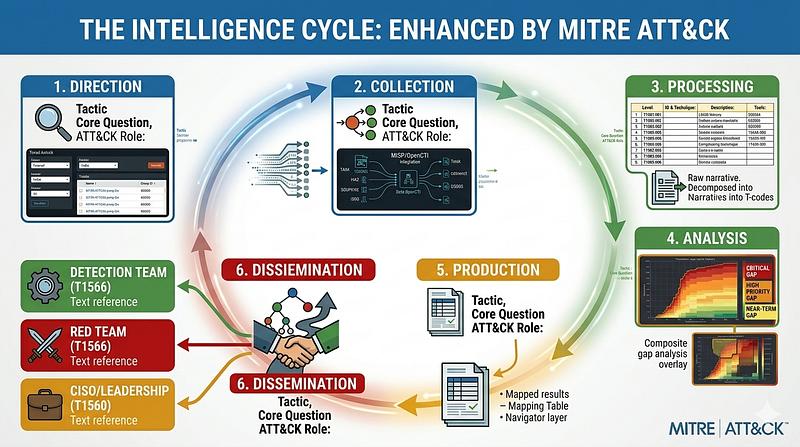
The Intelligence Cycle with ATT&CK Integration
ATT&CK does not exist in isolation. It is a structured language embedded in a broader intelligence production process. Understanding where ATT&CK sits in the intelligence cycle — and what it enables at each stage — is what distinguishes a practitioner who uses ATT&CK as a daily working tool from one who uses it as a report-formatting convention.
┌──────────────────────────────────────────────────────────────────────────────┐
│                         THE INTELLIGENCE CYCLE                               │
│                                                                              │
│
1
. DIRECTION                                                                │
│     The question:
"Which threat actors are relevant to us right now?"
        │
│     ATT&CK role: Use Groups pages
to
 identify actors
by
 sector, region,      │
│     motivation. Filter
by
 techniques
to
 find actors who use methods          │
│     your environment
is
 structurally exposed
to
.                             │
│                                                                              │
│
2
. COLLECTION                                                               │
│     The question:
"Where do we get intelligence about those actors?"
         │
│     ATT&CK role: ATT&CK references point
to
 primary sources. TAXII           │
│     endpoint enables automated ingestion
of
 ATT&CK data
into
 MISP/OpenCTI.  │
│     ATT&CK-tagged ISAC sharing enables normalized intelligence consumption.  │
│                                                                              │
│
3
. PROCESSING                                                               │
│     The question:
"How do we turn raw reports into structured data?"
         │
│     ATT&CK role: Mapping
is
 the core processing
step
. Raw behavioral         │
│     descriptions become T-codes
with
 evidence labels
and
 confidence tiers.   │
│     This
is

where
 ATT&CK discipline matters most.                            │
│                                                                              │
│
4
. ANALYSIS                                                                 │
│     The question:
"What does this mean for our specific situation?"
          │
│     ATT&CK role: Build actor TTP profiles
in
 Navigator. Overlay against      │
│     your detection coverage. Identify critical gaps. Prioritize.             │
│     Answer:
"This actor would likely not be detected at steps X, Y, Z."
     │
│                                                                              │
│
5
. PRODUCTION                                                               │
│     The question:
"How do we document and package this analysis?"
            │
│     ATT&CK role: The ATT&CK mapping table
is
 a standard report section.     │
│     Navigator layer
is
 a standard report appendix. Both enable immediate     │
│     action
by
 downstream consumers without additional translation.           │
│                                                                              │
│
6
. DISSEMINATION                                                            │
│     The question:
"Who needs this and how do we deliver it?"
                 │
│     ATT&CK role: Technique IDs create a direct handoff. Detection engineer  │
│     receives T1003.
003
 → knows exactly what rule
to
 build. Red team         │
│     receives the same → knows exactly which atomic test
to
 run. CISO        │
│     receives the Navigator layer → sees the risk picture without needing    │
│     technical translation. ATT&CK
is
 the common language
of
 dissemination.  │
└──────────────────────────────────────────────────────────────────────────────┘
From Report to Action: The ATT&CK Handoff Chain
The full downstream value of a well-mapped CTI report becomes visible when you trace a single mapping through the entire security organization:
SCENARIO
:
CTI
 report documents
T1003
.
003
 (
NTDS

Credential

Dump
) —
High

Confidence
CTI

Analyst
 publishes:

"Actor observed creating VSS snapshot and copying NTDS.dit.
   Mapped to T1003.003. Data source required: Process Creation.
   High confidence based on [vendor report with command-line evidence]."

↓

HANDOFF

TO

DETECTION

ENGINEERING

↓
Detection

Engineer
 receives:

"T1003.003. I need to detect: ntdsutil.exe, vssadmin create shadow /for=C:,
   and NTDS.dit file access outside of lsass.exe. Data source: Process creation.
   Check if I'm collecting that."

→

Verifies

Sysmon

EventID

1

is
 being collected

→

Writes

Sigma
 rule: monitors ntdsutil.exe
+

VSS
 creation
+

NTDS
.dit access

→

Tags
 rule: attack.credential_access, attack.t1003.
003

→

Deploys
 to
SIEM
, validates against
Atomic
 test
T1003
.
003

↓

HANDOFF

TO

THREAT

HUNTING

↓
Threat

Hunter
 receives:

"T1003.003. No current detection for this. Hunt backwards 90 days.
   Looking for: vssadmin.exe create shadow, ntdsutil 'activate instance ntds',
   any file access to paths containing 'ntds.dit' from non-AD processes."

→

Runs
 hunt queries against historical
SIEM
 data

→

Either
 finds past compromise evidence (escalate to
IR
) or establishes baseline

↓

HANDOFF

TO

RED

TEAM

↓
Red

Team
 receives:

"T1003.003 is in the actor's profile and we have no current detection.
   Add to next purple team exercise. Use Atomic T1003.003."

→

Schedules
 emulation test

→

Executes
: copies
NTDS
.dit via
VSS

in
 test environment

→

Blue
 confirms whether new detection rule fires

↓

HANDOFF

TO

MANAGEMENT

↓
SOC

Lead

/

CISO
 receives:

"An actor targeting our sector uses domain credential theft via T1003.003.
   We previously had no detection. Detection has been built and validated.
   Coverage for this technique: CONFIRMED."

→

Updated

Navigator
 layer shows green
for

T1003
.
003

→

Risk
 of undetected domain
-
wide credential compromise reduced
This handoff chain — from CTI report to validated detection to confirmed hunt baseline — is only possible when the intelligence is structured with ATT&CK. A narrative report without T-codes creates friction at every handoff point. An ATT&CK-mapped report eliminates that friction.
Measuring Program Maturity with ATT&CK
ATT&CK enables objective measurement of security program maturity over time. The metrics that matter:
Detection Coverage Metrics (tracked quarterly):
-
% of priority actor techniques with validated detection coverage (target: >75% within 12 months)
-
% of priority actor techniques with no detection (the gap that drives engineering backlog)
-
Mean time from new technique identified to validated detection rule deployed
Intelligence Quality Metrics (tracked per report):
-
Ratio of High-confidence to Low-confidence ATT&CK mappings (higher = better evidence discipline)
-
Number of techniques mapped per actor per quarter (trending up = improving collection)
-
Time from intelligence publication to detection engineering action
Purple Team Metrics (tracked per exercise):
-
% of emulated techniques detected (baseline + trend)
-
Mean time to alert after technique execution
-
False negative rate (techniques executed but not detected)
These metrics, anchored to ATT&CK, give security leadership a concrete, evidence-based picture of program maturity — not anecdote, not compliance scores, but actual measured capability against actual threat behavior.
16. Quick Reference Cheatsheet
ATT&CK ID Format
TA0001        → Tactic
ID

(Initial Access)
T1566         → Technique
ID

(Phishing)
T1566
.001
     → Sub-technique
ID

(Spearphishing Attachment)
G0016         → Group
ID

(APT29)
G0034         → Group
ID

(Sandworm Team)
S0002         → Software
ID

(Mimikatz)
S0154         → Software
ID

(Cobalt Strike)
C0010         → Campaign ID
M1049         → Mitigation
ID

(Antivirus/Antimalware)
DS0009        → Data Source
ID

(Process)
All 14 Enterprise Tactics
TA0043  Reconnaissance          — Pre
-
attack info gathering
TA0042  Resource Development    — Pre
-
attack infrastructure
/
tool setup
TA0001
Initial
 Access          — Getting the
first
 foothold
TA0002  Execution               —
Running
 malicious code
TA0003  Persistence             — Maintaining access across disruptions
TA0004  Privilege Escalation    — Gaining higher permissions
TA0005  Defense Evasion         — Avoiding detection
TA0006  Credential Access       — Stealing credentials
TA0007  Discovery               — Mapping the environment
TA0008
Lateral
 Movement        — Moving
between
 systems
TA0009  Collection              — Gathering target data
TA0011  Command
and
 Control     — Communicating
with
 implants
TA0010  Exfiltration            — Getting data
out
TA0040  Impact                  — Achieving
final
 objectives
High-Priority Detection Techniques (Most Frequently Used in Observed Campaigns)
INITIAL
 ACCESS
  T1566
.001
   Spearphishing Attachment
  T1566
.002
   Spearphishing Link
  T1190       Exploit Public
-
Facing Application
  T1078       Valid Accounts
EXECUTION
  T1059
.001
   PowerShell
  T1059
.003
   Windows Command Shell
  T1047       Windows Management Instrumentation
  T1053
.005
   Scheduled Task
/
Job: Scheduled Task
PERSISTENCE
  T1547
.001
   Registry Run Keys
/
 Startup Folder
  T1053
.005
   Scheduled Task
  T1136
.001

Create

Local
 Account
  T1505
.003
   Web Shell
DEFENSE EVASION
  T1027       Obfuscated Files
or
 Information
  T1055       Process Injection
  T1070
.001
   Clear Windows Event Logs
  T1553
.005
   Mark
-
of
-
the
-
Web Bypass
CREDENTIAL ACCESS
  T1003
.001
   LSASS Memory Dumping
  T1003
.003
   NTDS
  T1003
.006
   DCSync
  T1110       Brute Force
DISCOVERY
  T1087
.002
   Domain Account Discovery
  T1018       Remote
System
 Discovery
  T1083       File
and
 Directory Discovery
  T1069
.002
   Domain
Groups
LATERAL
 MOVEMENT
  T1021
.001
   Remote Desktop Protocol
  T1021
.002
   SMB
/
Windows Admin Shares
  T1078
.002
   Valid Accounts: Domain Accounts
IMPACT
  T1485       Data Destruction
  T1486       Data Encrypted
for
 Impact
  T1490       Inhibit
System
 Recovery
  T1561
.002
   Disk Structure Wipe
Analyst Decision Tree: Mapping Confidence
OBSERVED BEHAVIOR → what ATT&CK level
to
 assign?
Step

1
:
Is
 there direct technical evidence?
  (command line,
binary
 hash, PCAP, forensic artifact, log entry)
  YES → Use the most specific
sub
-technique the evidence supports → CONFIDENCE: HIGH
Step

2
:
Is
 there credible secondary source reporting
with
 artifacts?
  (vendor report
with
 artifact-level detail, government advisory
with
 technical indicators)
  YES → Use technique
or

sub
-technique per report detail → CONFIDENCE: MEDIUM
Step

3
:
Is
 this an actor claim without corroborating evidence?
  (Telegram post, actor press release, claimed operation)
  YES →
DO

NOT
 map
to
 ATT&CK. Document
as

"Claimed - pending corroboration"
Step

4
:
Is
 this analytically inferred
from
 other confirmed behaviors?
  (pattern consistent
with
 known TTPs, implied
by
 other evidence)
  YES → Use parent technique → CONFIDENCE: LOW/ASSESSED
        Label explicitly:
"[ASSESSED] Likely T1003 based on credential access pattern"
Sigma Tag Format
tags:
    - attack.<tactic-name>
# e.g., attack.execution
    - attack.t<
####>               # e.g., attack.t1059
    - attack.t<
####>.<###>         # e.g., attack.t1059.001
Tactic names for tags (lowercase, underscores):
attack.
reconnaissance
          attack.
resource_development
attack.
initial_access
          attack.
execution
attack.
persistence
             attack.
privilege_escalation
attack.
defense_evasion
         attack.
credential_access
attack.
discovery
               attack.
lateral_movement
attack.
collection
              attack.
command_and_control
attack.
exfiltration
            attack.
impact
Essential URLs
KNOWLEDGE BASE
  https://attack.mitre.org                         Main ATT&CK knowledge base
  https://attack.mitre.org/groups/                 Threat actor profiles
  https://attack.mitre.org/software/               Malware and tool profiles
  https://attack.mitre.org/campaigns/              Campaign tracking
VISUALIZATION
  https://mitre-attack.github.io/attack-navigator  ATT&CK Navigator (hosted)
DETECTION RULES
  https://github.com/SigmaHQ/sigma                 Sigma rule library
  https://github.com/elastic/detection-rules        Elastic detection rules
  https://uncoder.io                               Sigma converter (web)
ADVERSARY EMULATION
  https://github.com/redcanaryco/atomic-red-team   Atomic Red Team tests
  https://github.com/mitre/caldera                 CALDERA emulation platform
  https://github.com/SecurityRiskAdvisors/VECTR    Purple team tracking
COVERAGE ANALYSIS
  https://github.com/rabobank-cdc/DeTTECT          DeTT&CT data
source
 scoring
THREAT INTELLIGENCE PLATFORMS
  https://github.com/MISP/MISP                     MISP (ATT&CK galaxy integration)
  https://github.com/OpenCTI-Platform/opencti      OpenCTI (native ATT&CK)
Conclusion
ATT&CK is not a framework you learn once and apply mechanically. It is aworking language— and like any language, fluency comes from daily use, consistent practice, and disciplined application of its grammar.
The practitioners who get the most value from ATT&CK share specific habits: they map with evidence discipline rather than inference, they use Navigator to drive real decisions rather than produce status theater, they connect their CTI reports to detection engineering backlogs through precise technique mappings, and they treat coverage as something to be validated — not assumed.
The goal is never to “cover ATT&CK.” ATT&CK has hundreds of techniques. Chasing comprehensive coverage is both impossible and misdirected. The goal is to understandyour adversariesbetter than they understandyour defenses— and ATT&CK is the shared map that makes that understanding precise, communicable, and actionable.
Every entry in this guide traces back to that goal. The mapping rigor ensures your intelligence is accurate. The Navigator gap analysis ensures your defenses address real threats. The detection engineering workflow ensures your rules catch what matters. The threat hunting process ensures you catch what your rules don’t. The purple team exercises ensure everything actually works.
Together, these practices constitute threat-informed defense: security built around what adversaries actually do, not what compliance frameworks say you should be able to detect.