Unpacker: A Practical Guide to Modular Malware Packer Detection and Unpacking
- Category: CTI
- Source article: https://medium.com/@1200km/unpacker-a-practical-guide-to-modular-malware-packer-detection-and-unpacking-cf8ba924f25b
- Published: 2026-02-28
- Preserved media: 4 image(s), including cover images, screenshots, diagrams, and infographics where present.
- Preserved technical blocks: 24 code/configuration block(s).
Ecosystem Fit
This page mirrors the original Medium article into the 1200km.com Docusaurus ecosystem. The original article flow, images, screenshots, infographics, and technical blocks are preserved from the export.
Extract and validate unpacked PE/ELF samples with real examples — and prove it using String Analyzer and File Metadata tools.
GitHub - anpa1200/Unpacker *Contribute to anpa1200/Unpacker development by creating an account on GitHub.*github.com
Table of Contents
-
Introduction
-
Git repository
-
What is Unpacker?
-
Architecture at a Glance
-
Unpacking techniques used in this tool
-
Detection: How the Tool Knows What’s Packed
-
Unpackers: One Module per Packer
-
Running the Pipeline
-
Validating Unpacking: Why Proof Matters
-
Validation with String Analyzer
-
Validation with Basic File Information Gathering Script
-
End-to-End Workflow
-
Limitations and Tips
-
Summary and References
Introduction
Packed malware hides real code behind compression or encryption. To analyze behavior, extract indicators, or compare with threat intel, you first need tounpackthe sample. Doing it by hand is tedious and error-prone; using a single rigid tool often fails when the packer isn’t the one it was built for.
Unpackeris a modular pipeline: itdetectsthe packer (UPX, ASPack, Themida, VMProtect, etc.),dispatchesto the right unpacker module, andoutputsa dump you can then analyze. This guide walks through each unpacker withreal samples and proofs, and shows how tocheck and validatecorrect unpacking using two companion tools you may already use:
-
String Analyzer— extract and categorize strings, entropy, and obfuscation hints.
-
Basic File Information Gathering Script (fileinfo.py)— hashes, PE/ELF metadata, packing heuristics, and deep static analysis.
Both tools areread-only(no execution, no decompilation), so you can safely validate unpacked files in automation or air-gapped labs.
Git repository
The project is developed in the open and available on GitHub:
-
Repository:https://github.com/anpa1200/Unpacker
-
Clone and install:
git
clone
 https://github.com/anpa1200/Unpacker.git
cd
 Unpacker pip install -e .
- Run without install(from project root):
python scripts/run_unpacker.py /path/to/sample.exe -o ./unpacked
The repo contains the full source (orchestrator, detector, unpackers), config, scripts, tests, and the in-repo version of this guide. Samples and unpacked results are not committed; use your own samples or the download script (see README) to fetch samples by packer type.
What is Unpacker?
Unpacker is amodular malware packer detection and unpackingtool. It provides:
-
Orchestrator— Runs: detect → select unpacker → unpack → (optional) PE rebuilder; supportsmulti-layerunpacking (e.g. VMProtect over UPX).
-
Multi-method detector— Signatures, section names, entropy, and heuristics; outputs apacker idandconfidence; supportsPE and ELF.
-
Pluggable unpackers— One module per packer (UPX, ASPack, MPRESS, Themida, VMProtect) plus agenericfallback; same interface for all.
You run one command; the tool picks the right unpacker and writes the result to an output directory. You thenvalidatethe result with String Analyzer and fileinfo to prove the sample is really unpacked (e.g. lower entropy, larger size, more readable APIs/strings).
Architecture at a Glance
sample
.exe
    → Detector (signatures, sections, entropy, heuristics)
    → packer_id (e.g. "aspack") + confidence
    → Dispatcher selects Unpacker (e.g. ASPackUnpacker)
    → Unpack (native UPX, or Unipacker emulation for ASPack/Themida/VMProtect)
    → output: sample.unpacked.aspack.exe
    → (optional) multi-layer: detect again and repeat
- Config:
config/config.yaml
# Unpacker configuration
detector:

confidence_threshold:

0.5

use_signatures:

true

use_sections:

true

use_entropy:

true

use_heuristics:

true

# signatures_dir: data/signatures
orchestrator:

max_layers:

5

timeout_seconds:

300

rebuild_iat:

true
unpackers:

# Prefer native UPX when available

upx_prefer_native:

true
-
Detection:
src/unpacker/detector/(pipeline, sections, entropy, heuristics, signatures) -
Unpackers:
src/unpacker/unpackers/(UPX, ASPack, MPRESS, Themida, VMProtect, generic) -
CLI:
scripts/run_unpacker.pyorunpackerafterpip install -e .
Unpacking techniques used in this tool
The tool uses differentunpacking techniquesdepending on the packer and binary format. Below is a more detailed explanation of each.
**Detection (before unpacking):**Section names, file-content fallbacks (e.g. “ASPack”, “VMProtect” in the binary), path hints (path containsvmprotect/themida), entropy, and heuristics. Best match by confidence selects the unpacker.
Unpacking by technique:
-
Native decompression (UPX)— System
upx -dis called. The format is known; UPX decodes and writes the decompressed image. No emulation. Works for PE and ELF. -
Emulation + dump — Unipacker (PE32 only)— Used for ASPack, Themida, and VMProtect 32-bit. The PE is loaded in theUnicornemulator viaUnipacker. Execution starts at theentry point; the engine runs until it detects an “unpacking done” condition (section hop, write+execute, or packer-specific logic). Then itdumpsthe in-memory image to a new PE file. For ASPack, Unipacker uses built-in logic; for Themida/VMProtect it uses ageneric “unknown”strategy (emulate until heuristic, then dump). This repopatchesUnipacker for robustness: safe page-by-page memory read (avoids crashes on unmapped regions) and robust dump (if import fix fails, zero IAT and still write the dump).
-
Emulation + dump — Qiling (PE32+ / 64-bit VMProtect)— When the sample is 64-bit, Unipacker cannot run. The tool usesQilingwith a Windows rootfs: load the PE, run emulation with atimeout, then read the loaded image from memory (base + SizeOfImage) and write it to disk. Generic “run then dump”; heavy protectors may only partially unpack.
-
Stub (MPRESS, generic)— Detection may identify the packer, but the unpacker is not implemented; the pipeline returns an error.
Summary:UPX is direct decompression; ASPack/Themida/VMProtect useemulation-based unpacking(run packed code in an emulator until the real code is in memory, then dump). Multi-layer unpacking re-runs detection on the output and repeats up tomax_layers.
More detail:
-
**UPX:**The format is public; UPX stores compressed data in known sections. The tool calls
upx -d; no execution of the packed binary. UPX decompresses and writes the restored PE/ELF. -
Unipacker (PE32):The packerstubat the entry point allocates memory, decompresses the real code, then jumps to it (OEP). We run the stub in Unicorn; Windows APIs are stubbed. We dump when (1) executionsection hopsto a runtime-written section, (2) awrite+executeregion is entered, or (3) packer-specific logic (ASPack) says so. Dump = read memory from image base, build PE, fix IAT. Our patches: safe page-by-page read (unmapped → zeros) and robust dump (if IAT fix fails, zero import dir and still write). Unipacker is 32-bit only.
-
Qiling (PE32+ VMProtect):Full system emulator with Windows rootfs. We run with atimeoutand dump the image from memory; no “unpack done” heuristic, so the dump may be partial. IAT is not fixed in this path.
-
**Stub:**No implementation; clear error returned.
Is it safe to run real (packed) code in the emulator?The packed code runsinside the emulator, not natively on your CPU. Instructions are interpreted by Unicorn (Unipacker) or Qiling; when the code “calls” Windows APIs,stubsrun instead of the real OS — they typically only update emulated state (e.g. allocate emulated memory, return a fake handle). So the sample cannot directly access your real filesystem, network, or hardware unless a stub explicitly does something on the host. Unipacker’s stubs are designed to simulate behavior, not to perform real dangerous operations. Qiling can map host paths if configured; use a self-contained rootfs and do not map sensitive host directories.Recommendation:treat all samples as hostile and run the unpacker in aVM or dedicated analysis machine; do not run on production or personal systems. UPX unpacking does not run the sample at all (only decompression), so it is safe from a “running code” perspective.
Detection: How the Tool Knows What’s Packed
The detectormergesseveral methods and returns the bestpacker_id(and confidence) for the sample.
-
Section names— Characteristic section names map to packers (case-insensitive), e.g.:
-
UPX0/UPX1→upx(0.98) -
.MPRESS1/.MPRESS2→mpress(0.98) -
.vmp0/.vmp1/.vmp2→vmprotect(0.95) -
ASPack,.aspack,.adata→aspack(0.90) -
Themida→themida(0.90) -
Fallbacks— If section names don’t match, the pipeline can usefile-contenthints (e.g. presence of “ASPack”, “VMProtect”, “.vmp0” in the binary) orpath hints(e.g. path contains
vmprotectorthemida) so samples from known packer folders still get the right unpacker. -
Entropy— High section entropy suggests packed/compressed content; can yieldunknownwith a confidence score.
-
Heuristics— Entry point in last section, few imports, etc., often reported asunknownwhen no section/signature match.
So when you run the pipeline, you’ll see output like:
Detected: aspack (confidence=0.9, method=sections)orDetected: vmprotect (confidence=0.72, method=path_hint).
Unpackers: One Module per Packer
Each unpacker implements the same interface: it takes a sample path and options (output dir, timeout) and returns success/failure and an output path (or buffer).
UPX
-
**Method:**Prefers system
**upx -d**(native decompression). No Python fallback in the default build. -
**Detection:**Section names
UPX0/UPX1, or (for ELF) scan forUPX0/UPX1in the file if section headers are stripped. -
**Samples:**Works on PE and ELF. Place UPX-packed samples in e.g.
samples_by_packer/upx/. -
Output:
sample.unpacked.upx.exe(or.binfor ELF). -
**Validation:**Unpacked file is larger, entropy drops, and the detector no longer reports UPX (or reports “not packed”). Use String Analyzer to see more APIs/readable strings; use fileinfo to compare size and entropy.
ASPack
-
**Method:**Unipacker(emulation-based). Unipacker knows ASPack; it emulates from the entry point and dumps when the real code is unpacked. The project applies patches for safe memory read and robust dump (e.g. surviving
fix_importsfailures). -
**Detection:**Section names
ASPack/.aspack/.adata, or file-content fallback (presence of "ASPack"/"aspack"/".aspack" in the binary). -
**Samples:**e.g.
NotePad_aspack.exeinsamples_by_packer/aspack/. Real proof below uses this sample. -
Output:
sample.unpacked.aspack.exe. -
**Validation:**Same idea:larger file,lower entropy,more readable strings. We’ll show concrete String Analyzer and fileinfo output next.
MPRESS
-
Method:****Stubin the open-source repo (no real unpacking yet). Detector can identify MPRESS by section names
.MPRESS1/.MPRESS2. -
**Use:**Detection works; unpacking returns an error until the module is implemented.
Themida
-
Method:****Unipackerin “unknown” packer mode: emulate from the entry point until section hopping or write+execute is detected, then dump. Themida is not in Unipacker’s built-in list, so it’s treated as generic/unknown.
-
Detection:Section name “Themida”, orpath hint(path contains
themida). -
Samples:e.g. in
samples_by_packer/themida/. PE32 only (Unipacker); PE32+ fails with “Not a valid PE file”. Complex samples maytime out; increase--timeoutif needed. -
Output:
sample.unpacked.themida.exe. -
**Validation:**Same as others: compare entropy, size, and string/API visibility with String Analyzer and fileinfo.
VMProtect
-
**Method:**Same as Themida:Unipackerin unknown mode (emulation then dump).
-
**Detection:**Section names
.vmp0/.vmp1/.vmp2, or file-content/VMProtect path hint. -
**Samples:**e.g. in
samples_by_packer/vmprotect/.PE32 only; 64-bit (PE32+) fails with “Not a valid PE file”. On 32-bit samples the pipeline can apply multiple layers (VMProtect unpacked several times until max layers). -
Output:
sample.unpacked.vmprotect.exe(and further layers if still detected as packed). -
**Validation:**Again, entropy drop, size growth, and richer strings/metadata prove successful unpacking.
Generic
-
Method:Stub— returns “Generic unpacker stub”. Used when the detector reportsunknown(or generic) and no specific unpacker matches.
-
**Use:**Placeholder for future implementation (e.g. Qiling, Speakeasy, or PE-sieve–style dumping for unknown/custom packers).
Running the Pipeline
From the Unpacker project root:
# Basic run: detect + unpack, output to ./unpacked
python scripts/run_unpacker.py /path/to/sample.exe -o ./unpacked
# With timeout (useful for Themida/VMProtect)
python scripts/run_unpacker.py /path/to/sample.exe -o ./unpacked --
timeout
 180
# Optional: max layers, confidence threshold
python scripts/run_unpacker.py /path/to/sample.exe -o ./unpacked --max-layers 5 --confidence 0.5
Example output:

Detected:

aspack

(confidence=0.9,

method=sections)

Layer 1:

packer=aspack

->

ok
Final output:

/path/to/unpacked/aspack/NotePad_aspack.unpacked.aspack.exe
If unpacking fails, you’ll see the error (e.g. “Not a valid PE file” for PE32+, “Unpacking timed out”, or “Generic unpacker stub”).
Validating Unpacking: Why Proof Matters
Unpacking canfail silently(wrong OEP, truncated dump) orsucceedbut leave the file still packed (e.g. multi-layer). Tocheck and validatecorrect unpack you need to:
-
Confirm format— Unpacked file is still valid PE/ELF (magic, structure).
-
Compare size— Unpacked is typicallylargerthan packed (compression removed).
-
Compare entropy— Packed/compressed data hashigher entropy; unpacked code and data usually havelowerentropy and more structure.
-
Re-run detection— Unpacked file shouldno longerbe detected as the same packer (or not packed at all).
-
Inspect strings and metadata— More readable APIs, URLs, paths, and lower “obfuscated” hint suggest real code is visible.
The two tools below give youreproducible, static proofwithout running the sample.
Validation with String Analyzer
[A Practical Guide to String Analyzer: Extract and Analyze Strings from Binaries (Without the… Turn executables, memory dumps, and disk images into actionable intelligence in minutes — with one Python tool and zero…
String Analyzerextracts printable strings, classifies them (URLs, IPs, Windows APIs, DLLs, obfuscation, etc.), and computesfile entropy. High entropy + few “useful” patterns triggers a**“likely obfuscated/packed”note — sobefore/afterunpacking you should seeentropy dropand oftenmore**APIs/DLLs/readable strings.
**Install (if needed):**From/home/andrey/git_project/String-Analyzer:
pip install -e .
#
or: python3 -m string_analyzer --
help
Real example — ASPack packed vs unpacked (NotePad):
Packed:
string-analyzer /home/andrey/git_project/Unpacker/samples_by_packer/upx/Cs2Loader_upx.exe
Filtered results saved -> /home/andrey/git_project/Unpacker/samples_by_packer/upx/Cs2Loader_upx_strings.txt
cat
 /home/andrey/git_project/Unpacker/samples_by_packer/upx/Cs2Loader_upx_strings.txt
File Entropy: 7.86
### CMD COMMANDS:
- exit
### DLLS:
- ADVAPI32.dll
- CRYPT32.dll
- GDI32.dll
- KERNEL32.DLL
- OLEAUT32.dll
- SHELL32.dll
- USER32.dll
- USERENV.dll
- VERSION.dll
- WINHTTP.dll
- WININET.dll
- WS2_32.dll
- api-ms-win-crt-convert-l1-1-0.dll
- api-ms-win-crt-environment-l1-1-0.dll
- api-ms-win-crt-heap-l1-1-0.dll
- api-ms-win-crt-locale-l1-1-0.dll
- api-ms-win-crt-math-l1-1-0.dll
- api-ms-win-crt-private-l1-1-0.dll
- api-ms-win-crt-runtime-l1-1-0.dll
- api-ms-win-crt-stdio-l1-1-0.dll
- api-ms-win-crt-string-l1-1-0.dll
- api-ms-win-crt-time-l1-1-0.dll
- api-ms-win-crt-utility-l1-1-0.dll
- bcrypt.dll
- ncrypt.dll
- ole32.dll
### FILES:
- te.txt
### IPS:
- version="1.0.0.0"
### OBFUSCATED:
- WINHTTP.dll
- WinHttpOpen
- ahttps://a
- version="1.0.0.0"
### SUSPICIOUS KEYWORDS:
- !This program cannot be run in DOS mode.$
- <requestedExecutionLevel level="requireAdministrator" uiAccess="false" />
- <supportedOS Id="{1f676c76-80e1-4239-95bb-83d0f6d0da78}"/>
- <supportedOS Id="{35138b9a-5d96-4fbd-8e2d-a2440225f93a}"/>
- <supportedOS Id="{4a2f28e3-53b9-4441-ba9c-d69d4a4a6e38}"/>
- <supportedOS Id="{8e0f7a12-bfb3-4fe8-b9a5-48fd50a15a9a}"/>
- BCryptDecrypt
- GetUserProfileDirectoryW
- Goc2`9
- J3Tr0`C2258
- NCryptDecrypt
- SHELL32.dll
- USER32.dll
- USERENV.dll
- __setusermatherr
- _configthreadlocale
- gethostname
### WINDOWS API COMMANDS:
- BitBlt
- ExitProcess
- GetDC
- GetProcAddress
- RegCloseKey
- VirtualProtect
Unpacked:
string-analyzer /home/andrey/git_project/Unpacker/unpacked/Cs2Loader_upx.unpacked.upx.exe
Filtered results saved -> /home/andrey/git_project/Unpacker/unpacked/Cs2Loader_upx.unpacked.upx_strings.txt
cat
 /home/andrey/git_project/Unpacker/unpacked/Cs2Loader_upx.unpacked.upx_strings.txt
File Entropy: 6.21
### CMD COMMANDS:
- HostName
- WHERE
- exit
- hostname
### DLLS:
- %s\Mozilla Firefox\nss3.dll
- %s\nss3.dll
- ADVAPI32.dll
- CRYPT32.dll
- GDI32.dll
- KERNEL32.DLL
- OLEAUT32.dll
- SHELL32.dll
- USER32.dll
- USERENV.dll
- VERSION.dll
- WINHTTP.dll
- WININET.dll
- WS2_32.dll
- api-ms-win-crt-convert-l1-1-0.dll
- api-ms-win-crt-environment-l1-1-0.dll
- api-ms-win-crt-heap-l1-1-0.dll
- api-ms-win-crt-locale-l1-1-0.dll
- api-ms-win-crt-math-l1-1-0.dll
- api-ms-win-crt-private-l1-1-0.dll
- api-ms-win-crt-runtime-l1-1-0.dll
- api-ms-win-crt-stdio-l1-1-0.dll
- api-ms-win-crt-string-l1-1-0.dll
- api-ms-win-crt-time-l1-1-0.dll
- api-ms-win-crt-utility-l1-1-0.dll
- bcrypt.dll
- d3d9.dll
- gdiplus.dll
- mozglue.dll
- ncrypt.dll
- nssutil3.dll
- ole32.dll
- plc4.dll
- plds4.dll
- secur32.dll
- smime3.dll
- softokn3.dll
- ssl3.dll
- user32.dll
### FILES:
- #HttpOnly_.roblox.com
- %ls\Mozilla\Firefox\profiles.ini
- %ls\Roblox\LocalStorage\RobloxCookies.dat
- %ls\arcane_le_%u.tmp
- %ls\firefox.exe
- %ls\launcher.exe
- .roblox.com
- Application/Dyn/Passwords.txt
- Application/EXBO/token.txt
- Application/Steam/Token.txt
- Application/WinScp/Sessions.txt
- Application\Discord\Tokens_%s.txt
- Brave.txt
- Browsers\AutoFills\AutoFill_[%s]%s.txt
- Browsers\AutoFills\AutoFill_[%s]_%s.txt
- Browsers\Cookies\Cookies_[%s]%s%s.txt
- Browsers\Cookies\Cookies_[%s]_%s.txt
- Browsers\Cookies\Cookies_[Roblox].txt
- Browsers\CreditCards\CreditCards_[%s]%s.txt
- Browsers\Passwords\Password_[%s]_%s.txt
- Browsers\Passwords\Passwords_[%s]%s.txt
- Browsers\RestoreToken\RestoreToken_[%s]%s.txt
- Brute.txt
- Chrome.txt
- Dolphin Anty.exe
- Dolphin_Anty.exe
- Edge.txt
- FIREFOX.EXE
- Firefox.txt
- Games.txt
- Information.txt
- InstalledBrowsers.txt
- InstalledPrograms.txt
- NTUSER.DAT
- Opera.txt
- ProcessList.txt
- SOFTWARE\Clients\StartMenuInternet\FIREFOX.EXE
- SOFTWARE\Microsoft\Windows\CurrentVersion\App Paths\firefox.exe
- SOFTWARE\WOW6432Node\Microsoft\Windows\CurrentVersion\App Paths\firefox.exe
- VBoxGuest.sys
- VBoxMouse.sys
- VBoxSF.sys
- VBoxVideo.sys
- Vivaldi.txt
- Yandex.txt
- anty.exe
- anyrun.sys
- aolshield.exe
- atom.exe
- avant.exe
- avastbrowser.exe
- baidubrowser.exe
- blackhawk.exe
- blisk.exe
- brave.exe
- bravebrowser.exe
- browser.exe
- ccleanerbrowser.exe
- chrome.exe
- chrome_proxy.exe
- chrome_pwa_launcher.exe
- chromium.exe
- chromodo.exe
- cocbrowser.exe
- colibri.exe
- conkeror.exe
...
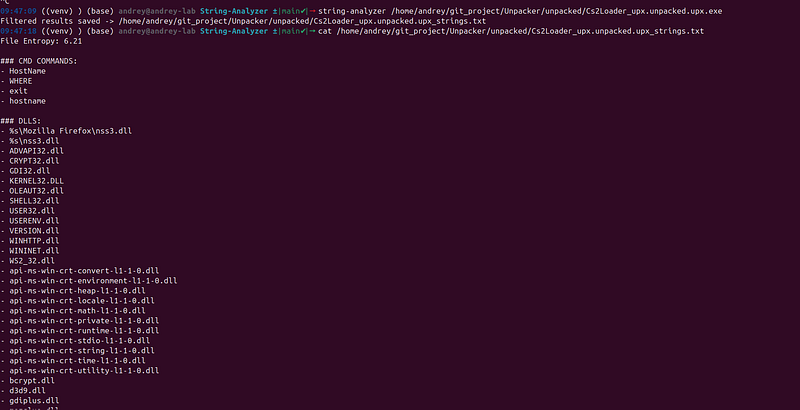
Proof:****Entropy drops from7.86**→6.21 after unpacking. Many APIs, DLLs, Strings appear because the unpacked file now exposes the real code; the packed file had high entropy from compressed/encoded data. So String Analyzer gives you anumeric and structural**check: lower entropy and (in many cases) more or clearer categories indicate successful unpack.
Validation with Basic File Information Gathering Script
[One Tool to Rule Them All: File Metadata & Static Analysis for Malware Analysts and SOC Teams Extract hashes, PE/ELF/Mach-O metadata, strings, YARA hits, and deep static analysis — without ever running the file.
TheBasic File Information Gathering Script(fileinfo.py) gives youhashes, magic, file type, entropy, and PE/ELF metadata(timestamps, entry point, sections, packing heuristic when available). No execution, no decompilation — ideal tocompare packed vs unpackedin one table or JSON.
Location:/home/andrey/git_project/Basic-File-Information-Gathering-Script/fileinfo.py
Real example — same ASPack pair:
Packed:
FILE

INFORMATION

================================================================================

file_name:

Cs2Loader_upx.exe

file_path:

/home/andrey/git_project/Unpacker/samples_by_packer/upx/Cs2Loader_upx.exe

file_size:

70656

file_size_human:

70656

bytes

(0.07

MB)

magic_number:

4D5A7800

file_type:

Windows

Executable

(MZ)

entropy:

7.8552

entropy_note:

High

(possible

packing/encryption)

permissions:

-rw-rw-r--

hashes:

md5:

8958ad7b3a8f31b9fa07836d45db562d

sha1:

c3496c96c968bde177aa47f3c701c6b660c8c48a

sha256:

eaf774319a523aa423c0a1edc693f060ad108d9570495a38549efd0c16953af4
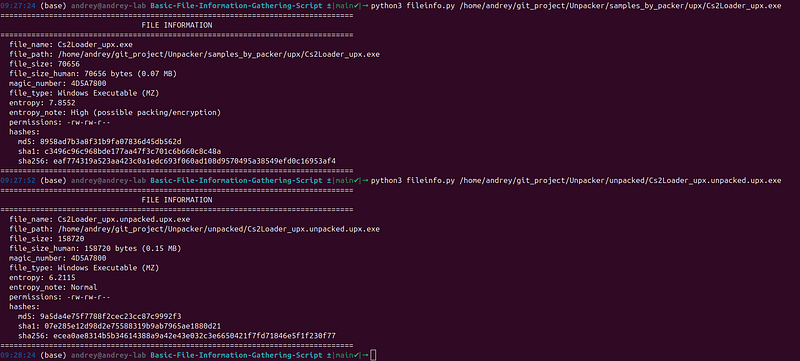
Unpacked:
FILE

INFORMATION

================================================================================

file_name:

Cs2Loader_upx.unpacked.upx.exe

file_path:

/home/andrey/git_project/Unpacker/unpacked/Cs2Loader_upx.unpacked.upx.exe

file_size:

158720

file_size_human:

158720

bytes

(0.15

MB)

magic_number:

4D5A7800

file_type:

Windows

Executable

(MZ)

entropy:

6.2115

entropy_note:

Normal

permissions:

-rw-rw-r--

hashes:

md5:

9a5da4e75f7788f2cec23cc87c9992f3

sha1:

07e285e12d98d2e75588319b9ab7965ae1880d21

sha256:

ecea0ae8314b5b34614388a9a42e43e032c3e6650421f7fd71846e5f1f230f77
Proof:****Size0.07 MB**→0.15 MB (unpacked is larger);entropy7.8552→6.2115 (unpacked is less random). Hashes change because the file content changed. So fileinfo gives yousize, entropy, and hashes**as evidence of correct unpack.
Commands:
cd
 /home/andrey/git_project/Basic-File-Information-Gathering-Script
python3 fileinfo.py /path/to/NotePad_aspack.exe
python3 fileinfo.py /path/to/NotePad_aspack.unpacked.aspack.exe
Formaximum static metadata(sections, imports, entropy blocks, string patterns) without decompilation:
python3 fileinfo
.py

--full
 /path/
to
/sample
.exe
python3 fileinfo
.py

--full

--json
 /path/
to
/sample
.exe
 -o report
.json
You can then diff or comparereport.jsonfor packed vs unpacked (e.g. section count, entropy per block, import list).
End-to-End Workflow
-
Unpack
python scripts/run_unpacker.py samples_by_packer/aspack/NotePad_aspack.exe -o unpacked/aspack -
Validate with String Analyzer Compare entropy and string categories for packed vs unpacked (entropy should drop; you often get more or clearer APIs/strings).
-
Validate with fileinfo Compare file size, entropy, and (with
--full) sections/imports/entropy blocks. Unpacked should be larger and have lower overall entropy. -
Re-detect Run the Unpacker detector on the unpacked file (or use the project’s
verify_unpacking.pyscript where applicable); it should no longer report the same packer (or should report “not packed”). -
Optional: AI triage Run String Analyzer with
--ai-prompton the unpacked sample and feed the prompt to your AI assistant for behavior summary.
Limitations and Tips
-
PE32 vs PE32+:Unipacker-based unpackers (ASPack, Themida, VMProtect) supportPE32 only. For 64-bit samples you’ll see “Not a valid PE file”; you’d need a different backend or 64-bit support.
-
**Timeouts:**Themida/VMProtect can be slow; use
--timeout 180or higher. -
**Path hints:**Samples in folders (or paths) containing
vmprotectorthemidaget a path-hint so the right unpacker is chosen even when section/signature detection doesn’t fire. -
**Multi-layer:**The pipeline can run multiple layers (e.g. VMProtect several times); check the final output and validate that one with String Analyzer and fileinfo.
-
**UPX:**Install system UPX (e.g.
apt install upx-ucl) for native decompression. -
**Unipacker:**For ASPack/Themida/VMProtect,
pip install unipacker; on Python 3.12+ you may needsetuptools<70forpkg_resources.
Summary and References
-
Unpackerdetects packers (sections, entropy, heuristics, path/content hints) and runs the right unpacker (UPX native; ASPack/Themida/VMProtect via Unipacker; MPRESS/generic stubbed).
-
Youvalidatecorrect unpack by comparingentropy,size, andstrings/metadatabefore and after, usingString AnalyzerandBasic File Information Gathering Script (fileinfo.py)— both static, no execution.
-
Real proof: ASPack NotePad sampleentropy 6.25 → 2.38,33 KB → 180 KB, and consistent String Analyzer/fileinfo output show the unpacked file is decompressed and structurally different from the packed one.
References
- Unpacker (source code):https://github.com/anpa1200/Unpacker— clone, install, and run from the repo; full README with examples and proofs is in the repository.
GitHub - anpa1200/Unpacker *Contribute to anpa1200/Unpacker development by creating an account on GitHub.*github.com
- String Analyzer (Medium):A Practical Guide to String Analyzer
[A Practical Guide to String Analyzer: Extract and Analyze Strings from Binaries (Without the… Turn executables, memory dumps, and disk images into actionable intelligence in minutes — with one Python tool and zero…
- File metadata / static analysis (Medium):One Tool to Rule Them All: File Metadata & Static Analysis for Malware Analysts and SOC Teams
[One Tool to Rule Them All: File Metadata & Static Analysis for Malware Analysts and SOC Teams Extract hashes, PE/ELF/Mach-O metadata, strings, YARA hits, and deep static analysis — without ever running the file.
- Tools (example paths): String Analyzer and Basic File Information Gathering Script — see their repos/Medium articles for install locations; use them to validate unpacked output as shown above.
If you’re building a malware triage or unpacking pipeline, Unpacker plus these two validation tools give you a reproducible, proof-based workflow from packed sample to validated unpacked file.