Building a Vulnerable Kubernetes Lab: A Complete Guide to 25 Critical Security Issues
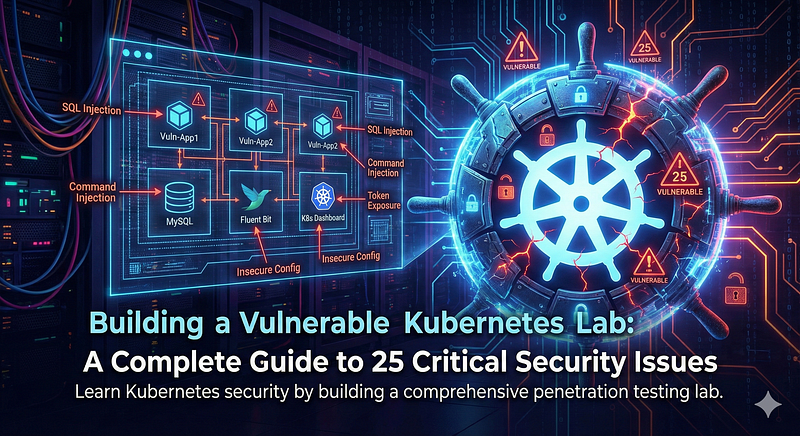
- Category: CTI
- Source article: https://medium.com/@1200km/building-a-vulnerable-kubernetes-lab-a-complete-guide-to-25-critical-security-issues-fae4fc8e3a91
- Published: 2026-02-02
- Preserved media: 6 image(s), including cover images, screenshots, diagrams, and infographics where present.
- Preserved technical blocks: 78 code/configuration block(s).
Ecosystem Fit
This page mirrors the original Medium article into the 1200km.com Docusaurus ecosystem. The original article flow, images, screenshots, infographics, and technical blocks are preserved from the export.
Learn Kubernetes security by building a comprehensive penetration testing lab with 25 real-world vulnerabilities
Introduction
Kubernetes has become the de facto standard for container orchestration, but with great power comes great responsibility — and significant security risks. Understanding these vulnerabilities is crucial for both security professionals and DevOps engineers.
In this guide, we’ll build a complete vulnerable Kubernetes lab containing25 critical and high-severity security issues. This hands-on approach will help you understand:
-
Common Kubernetes misconfigurations
-
How attackers exploit these vulnerabilities
-
Best practices for securing Kubernetes clusters
-
Real-world penetration testing techniques
**⚠️ WARNING:**This lab contains intentional security vulnerabilities.NEVERdeploy this in production or expose it to the internet. Use only in isolated, controlled environments.
Table of Contents
-
Prerequisites
-
Step-by-Step Setup
-
Lab Overview
-
Vulnerability Catalog
-
Conclusion
Prerequisites
Before we begin, ensure you have the following installed:
-
Kubernetes cluster(minikube, kind, k3s, or cloud-based)
-
kubectlconfigured and connected to your cluster
-
Dockerinstalled (for building container images)
-
Basic knowledgeof Kubernetes concepts (pods, services, deployments)
Quick Reference: Installation Commands
**Quick Install:**Run./install-requirements.shfor automated installation.
Installing Required Tools
Detailed installation instructions for each tool:
1. Install Docker
Ubuntu/Debian:
# Update package index
sudo apt-get update
# Install prerequisites
sudo apt-get install -y ca-certificates curl gnupg lsb-release
# Add Docker's official GPG key
sudo
mkdir
 -p /etc/apt/keyrings
curl -fsSL https://download.docker.com/linux/ubuntu/gpg | sudo gpg --dearmor -o /etc/apt/keyrings/docker.gpg
# Set up repository
echo
 \

"deb [arch=
$(dpkg --print-architecture)
 signed-by=/etc/apt/keyrings/docker.gpg] https://download.docker.com/linux/ubuntu \

$(lsb_release -cs)
 stable"
 | sudo
tee
 /etc/apt/sources.list.d/docker.list > /dev/null
# Install Docker
sudo apt-get update
sudo apt-get install -y docker-ce docker-ce-cli containerd.io docker-compose-plugin
# Add your user to docker group (to run without sudo)
sudo usermod -aG docker
$USER
newgrp docker
# Verify installation
docker --version
macOS:
# Install via Homebrew
brew install --cask docker
# Or download Docker Desktop from:
#
https://www.docker.com/products/docker-desktop
Verify Docker is running:
docker ps
2. Install kubectl
Linux:
# Download latest kubectl
curl -LO
"https://dl.k8s.io/release/
$(curl -L -s https://dl.k8s.io/release/stable.txt)
/bin/linux/amd64/kubectl"
# Make executable
chmod
 +x kubectl
# Move to PATH
sudo
mv
 kubectl /usr/local/bin/
# Verify installation
kubectl version --client
macOS:
# Install via Homebrew
brew install kubectl
# Or download directly
curl -LO
"https://dl.k8s.io/release/
$(curl -L -s https://dl.k8s.io/release/stable.txt)
/bin/darwin/amd64/kubectl"
chmod
 +x kubectl
sudo
mv
 kubectl /usr/local/bin/
Windows (PowerShell):
# Download kubectl
curl.exe -LO
"https://dl.k8s.io/release/v1.28.0/bin/windows/amd64/kubectl.exe"
# Add to PATH (or move to a directory in PATH)
Verify installation:
kubectl version
--client

3. Install Kubernetes Cluster Tool
Choose one of the following options:
Option A: Install Kind (Recommended)
Linux:
# Download kind
curl -Lo ./kind https://kind.sigs.k8s.io/dl/v0.20.0/kind-linux-amd64
# Make executable
chmod
 +x ./kind
# Move to PATH
sudo
mv
 ./kind /usr/local/bin/kind
# Verify installation
kind --version
macOS:
# Install via Homebrew
brew install kind
# Or download directly
curl -Lo ./kind https://kind.sigs.k8s.io/dl/v0.20.0/kind-darwin-amd64
chmod
 +x ./kind
sudo
mv
 ./kind /usr/local/bin/kind
Windows:
# Download kind
curl.exe -Lo kind-windows-amd64.exe https://kind.sigs.k8s.io/dl/v0.20.0/kind-windows-amd64
Move-Item .\kind-windows-amd64.exe c:\some-dir-in-your-PATH\kind.exe
Verify installation:
kind
--version
Option B: Install Minikube (v1.0.0+)
Linux:
# Download minikube
curl -LO https://storage.googleapis.com/minikube/releases/latest/minikube-linux-amd64
# Install
sudo install minikube-linux-amd64 /usr/local/bin/minikube
# Verify installation
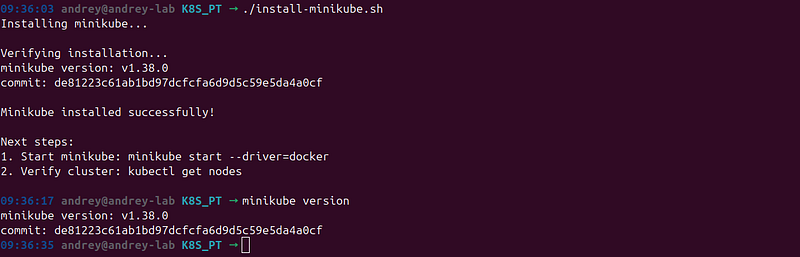
minikube version
macOS:
# Install via Homebrew
brew install minikube
# Or download directly
curl -LO https://storage.googleapis.com/minikube/releases/latest/minikube-darwin-amd64
sudo install minikube-darwin-amd64 /usr/local/bin/minikube
Windows:
# Download minikube
New-Item -Path
"
$HOME
\minikube"
 -ItemType
Directory
 -Force
Invoke-WebRequest -Uri
"https://github.com/kubernetes/minikube/releases/latest/download/minikube-windows-amd64.exe"
 -OutFile
"
$HOME
\minikube\minikube.exe"
# Add to PATH
Verify installation:
minikube version
**Note:**If you have an old minikube version (< 1.0.0), update it using the commands above.
Option C: Install K3s (Lightweight Alternative)
Linux:
# Install k3s
curl -sfL https://get.k3s.io | sh -
# Verify installation
sudo k3s kubectl version
# Set kubeconfig
export
 KUBECONFIG=/etc/rancher/k3s/k3s.yaml
sudo
chmod
 644 /etc/rancher/k3s/k3s.yaml
macOS:
# Install via Homebrew
brew install k3s
# Or use the install script
curl -sfL https://get.k3s.io | sh -
Verify installation:
kubectl version
--client
Verify All Installations
Run these commands to verify everything is installed correctly:
#
Check
 Docker
docker
--version
docker ps
#
Check
 kubectl
kubectl version
--client
#
Check
 cluster tool (choose the
one
 you installed)
kind
--version        # If using kind
minikube version      # If
using
 minikube
k3s
--version

Quick Installation Script
For convenience, we’ve included an automated installation script:
# Make script executable
chmod
 +x install-requirements.sh
# Run installation script
./install-requirements.sh
#!/bin/bash
# Installation script for all requirements
# Supports: Ubuntu/Debian, macOS (via Homebrew), and manual installation
set
 -e
echo

"=========================================="
echo

"Installing Kubernetes Lab Requirements"
echo

"=========================================="
echo

""
# Detect OS
if
 [[
"
$OSTYPE
"
 ==
"linux-gnu"
* ]];
then
    OS=
"linux"
elif
 [[
"
$OSTYPE
"
 ==
"darwin"
* ]];
then
    OS=
"macos"
else
    OS=
"unknown"
fi
echo

"Detected OS:
$OS
"
echo

""
# Function to check if command exists
command_exists
() {

command
 -v
"
$1
"
 >/dev/null 2>&1
}
# 1. Install Docker
echo

"=========================================="
echo

"Step 1: Checking Docker"
echo

"=========================================="
if
 command_exists docker;
then

echo

"✓ Docker is already installed:
$(docker --version)
"
else

echo

"Docker is not installed."

echo

""

echo

"Please install Docker manually:"

echo

"  Ubuntu/Debian: https://docs.docker.com/engine/install/ubuntu/"

echo

"  macOS: https://docs.docker.com/desktop/install/mac-install/"

echo

"  Or run: curl -fsSL https://get.docker.com -o get-docker.sh && sh get-docker.sh"

echo

""

read
 -p
"Press Enter after Docker is installed to continue..."
fi
# Verify Docker is running
if
 docker ps &> /dev/null;
then

echo

"✓ Docker is running"
else

echo

"✗ Docker is not running. Please start Docker and try again."

exit
 1
fi
echo

""
# 2. Install kubectl
echo

"=========================================="
echo

"Step 2: Installing kubectl"
echo

"=========================================="
if
 command_exists kubectl;
then

echo

"✓ kubectl is already installed:
$(kubectl version --client --short 2>/dev/null || echo 'installed')
"
else

echo

"Installing kubectl..."


if
 [[
"
$OS
"
 ==
"linux"
 ]];
then

# Linux installation
        KUBECTL_VERSION=$(curl -L -s https://dl.k8s.io/release/stable.txt)
        curl -LO
"https://dl.k8s.io/release/
${KUBECTL_VERSION}
/bin/linux/amd64/kubectl"

chmod
 +x kubectl
        sudo
mv
 kubectl /usr/local/bin/

echo

"✓ kubectl installed successfully"

elif
 [[
"
$OS
"
 ==
"macos"
 ]];
then

if
 command_exists brew;
then

echo

"Installing kubectl via Homebrew..."
            brew install kubectl

else

echo

"Installing kubectl manually..."
            KUBECTL_VERSION=$(curl -L -s https://dl.k8s.io/release/stable.txt)
            curl -LO
"https://dl.k8s.io/release/
${KUBECTL_VERSION}
/bin/darwin/amd64/kubectl"

chmod
 +x kubectl
            sudo
mv
 kubectl /usr/local/bin/

fi

echo

"✓ kubectl installed successfully"

else

echo

"Please install kubectl manually:"

echo

"  https://kubernetes.io/docs/tasks/tools/"

exit
 1

fi
fi
# Verify kubectl
kubectl version --client --short 2>/dev/null ||
echo

"Note: kubectl installed but cluster not configured yet"
echo

""
# 3. Install Kubernetes cluster tool
echo

"=========================================="
echo

"Step 3: Installing Kubernetes Cluster Tool"
echo

"=========================================="
echo

""
echo

"Choose your preferred tool:"
echo

"  1) Kind (Recommended - Simple, fast, container-based)"
echo

"  2) Minikube (Traditional, requires virtualization)"
echo

"  3) K3s (Lightweight, good for edge/IoT)"
echo

"  4) Skip (Install manually later)"
echo

""
read
 -p
"Enter your choice [1-4]: "
 choice
case

$choice

in
    1)

echo

""

echo

"Installing Kind..."

if
 command_exists kind;
then

echo

"✓ Kind is already installed:
$(kind --version)
"

else

if
 [[
"
$OS
"
 ==
"linux"
 ]];
then
                curl -Lo ./kind https://kind.sigs.k8s.io/dl/v0.20.0/kind-linux-amd64

chmod
 +x ./kind
                sudo
mv
 ./kind /usr/local/bin/kind

elif
 [[
"
$OS
"
 ==
"macos"
 ]];
then

if
 command_exists brew;
then
                    brew install kind

else
                    curl -Lo ./kind https://kind.sigs.k8s.io/dl/v0.20.0/kind-darwin-amd64

chmod
 +x ./kind
                    sudo
mv
 ./kind /usr/local/bin/kind

fi

fi

echo

"✓ Kind installed successfully"

fi
        CLUSTER_TOOL=
"kind"
        ;;
    2)

echo

""

echo

"Installing Minikube..."

if
 command_exists minikube;
then
            VERSION=$(minikube version --short 2>/dev/null ||
echo

"unknown"
)

echo

"✓ Minikube is already installed:
$VERSION
"


# Check if version is too old

if
 minikube version 2>/dev/null | grep -q
"v0\."
;
then

echo

"⚠ Warning: You have an old minikube version. Consider updating."

fi

else

if
 [[
"
$OS
"
 ==
"linux"
 ]];
then
                curl -LO https://storage.googleapis.com/minikube/releases/latest/minikube-linux-amd64
                sudo install minikube-linux-amd64 /usr/local/bin/minikube

elif
 [[
"
$OS
"
 ==
"macos"
 ]];
then

if
 command_exists brew;
then
                    brew install minikube

else
                    curl -LO https://storage.googleapis.com/minikube/releases/latest/minikube-darwin-amd64
                    sudo install minikube-darwin-amd64 /usr/local/bin/minikube

fi

fi

echo

"✓ Minikube installed successfully"

fi
        CLUSTER_TOOL=
"minikube"
        ;;
    3)

echo

""

echo

"Installing K3s..."

if
 command_exists k3s;
then

echo

"✓ K3s is already installed"

else

if
 [[
"
$OS
"
 ==
"linux"
 ]];
then
                curl -sfL https://get.k3s.io | sh -

export
 KUBECONFIG=/etc/rancher/k3s/k3s.yaml
                sudo
chmod
 644 /etc/rancher/k3s/k3s.yaml

else

echo

"K3s is primarily for Linux. Please install manually:"

echo

"  https://k3s.io/"

exit
 1

fi

echo

"✓ K3s installed successfully"

fi
        CLUSTER_TOOL=
"k3s"
        ;;
    4)

echo

"Skipping cluster tool installation."

echo

"Please install one manually:"

echo

"  - Kind: https://kind.sigs.k8s.io/docs/user/quick-start/"

echo

"  - Minikube: https://minikube.sigs.k8s.io/docs/start/"

echo

"  - K3s: https://k3s.io/"
        CLUSTER_TOOL=
"none"
        ;;
    *)

echo

"Invalid choice. Exiting."

exit
 1
        ;;
esac
echo

""
echo

"=========================================="
echo

"Installation Summary"
echo

"=========================================="
echo

""
echo

"Docker:"
docker --version
echo

""
echo

"kubectl:"
kubectl version --client --short 2>/dev/null ||
echo

"  Installed (cluster not configured)"
echo

""
if
 [[
"
$CLUSTER_TOOL
"
 !=
"none"
 ]];
then

echo

"Cluster Tool (
$CLUSTER_TOOL
):"

case

$CLUSTER_TOOL

in
        kind)
            kind --version

echo

""

echo

"Next step: Create cluster with:"

echo

"  kind create cluster --name vulnerable-lab"
            ;;
        minikube)
            minikube version

echo

""

echo

"Next step: Start cluster with:"

echo

"  minikube start --driver=docker"
            ;;
        k3s)
            k3s --version

echo

""

echo

"K3s cluster should be running. Set kubeconfig:"

echo

"  export KUBECONFIG=/etc/rancher/k3s/k3s.yaml"
            ;;

esac
fi
echo

""
echo

"=========================================="
echo

"Installation Complete!"
echo

"=========================================="
echo

""
echo

"Next steps:"
echo

"1. Create/start your Kubernetes cluster"
echo

"2. Build images: ./build-images.sh"
echo

"3. Load images into cluster (if needed)"
echo

"4. Deploy lab: ./deploy.sh"
echo

""
echo

"See README.md for detailed instructions."
echo

""
The script will:
-
Check for Docker and guide you through installation if needed
-
Install kubectl automatically
-
Let you choose between Kind, Minikube, or K3s
-
Verify all installations
Manual Installation Alternative:
If you prefer manual installation or the script doesn’t work for your system, follow the step-by-step instructions above for each tool.
Creating Your Kubernetes Cluster
After installing the tools above, create your cluster using one of these methods:
Option 1: Kind (Recommended for this lab)
# Install kind
curl -Lo ./kind https://kind.sigs.k8s.io/dl/v0.20.0/kind-linux-amd64
chmod
 +x ./kind
sudo
mv
 ./kind /usr/local/bin/kind
# Create cluster
kind create cluster --name vulnerable-lab
# Verify
kubectl cluster-info --context kind-vulnerable-lab
Option 2: Minikube (Requires v1.0.0+)
#
Check
 version
first
minikube version
# If version
is

old
,
update
:
# Ubuntu
/
Debian
curl
-
LO https:
/
/
storage.googleapis.com
/
minikube
/
releases
/
latest
/
minikube_latest_amd64.deb
sudo dpkg
-
i minikube_latest_amd64.deb
#
Start
 cluster
minikube
start

--driver=docker
minikube addons enable ingress
Option 3: K3s (Lightweight)
curl -sfL https://get.k3s.io | sh -
# Set kubeconfig
export
 KUBECONFIG=/etc/rancher/k3s/k3s.yaml
sudo
chmod
 644 /etc/rancher/k3s/k3s.yaml
Option 4: Docker DesktopEnable Kubernetes in Docker Desktop settings (Settings → Kubernetes → Enable Kubernetes)
Lab Overview
Our vulnerable lab includes:
-
3 vulnerable applicationswith different attack vectors
-
25 Kubernetes security vulnerabilitiesacross multiple categories
-
MySQL databasefor SQL injection testing
-
Kubernetes Dashboardwith insecure configuration
-
Fluent Bit cluster monitoringwith log aggregation vulnerabilities
-
Multiple privileged containersfor container escape scenarios
Lab Architecture
┌─────────────────────────────────────────┐
│

Kubernetes

Cluster

│
│

│
│

┌──────────────┐

┌──────────────┐

│
│

│

Vuln-App1

│

│

Vuln-App2

│

│
│

│

(SQL

Inj.)

│

│

(Cmd

Inj.)

│

│
│

│

Port:

30080

│

│

Port:

30081

│

│
│

└──────────────┘

└──────────────┘

│
│

│
│

┌──────────────┐

┌──────────────┐

│
│

│

Vuln-App3

│

│

MySQL

│

│
│

│

(Token

Exp.)

│

│

Database

│

│
│

│

Port:

30082

│

│

│

│
│

└──────────────┘

└──────────────┘

│
│

│
│

┌──────────────┐

┌──────────────┐

│
│

│

Fluent

Bit

│

│

Kubernetes

│

│
│

│

Monitoring

│

│

Dashboard

│

│
│

│

Port:

30200

│

│

Port:

30443

│

│
│

└──────────────┘

└──────────────┘

│
│

│
│

+

Privileged

Containers

│
│

+

Exposed

Secrets

│
│

+

Vulnerable

RBAC

│
└─────────────────────────────────────────┘
Step-by-Step Setup
Step 1: Clone and Navigate to the Lab
First, let’s set up our working directory:
mkdir
 -p ~/K8S_PT
cd
 ~/K8S_PT
Step 2: Create Project Structure
Create the following directory structure:
mkdir
 -p vuln-app1 vuln-app2 k8s/vulnerable-app3
Step 3: Build Vulnerable Application #1 (SQL Injection)
Createvuln-app1/Dockerfile:
FROM python:3.9-slim
WORKDIR /app
# Install dependencies
RUN pip install flask mysql-connector-python
# Copy application
COPY app.py .
# Expose port
EXPOSE 5000
# Run as root (vulnerability)
USER root
CMD [
"python"
,
"app.py"
]
Createvuln-app1/app.py:
#!/usr/bin/env python3
"""
Vulnerable Web Application with SQL Injection
This is intentionally vulnerable for penetration testing purposes.
"""
from
 flask
import
 Flask, request, render_template_string, jsonify
import
 mysql.connector
import
 os
app = Flask(__name__)
# Vulnerable database connection
DB_HOST = os.getenv(
'DB_HOST'
,
'mysql-service'
)
DB_USER = os.getenv(
'DB_USER'
,
'root'
)
DB_PASSWORD = os.getenv(
'DB_PASSWORD'
,
'rootpassword'
)
DB_NAME = os.getenv(
'DB_NAME'
,
'vulndb'
)
HTML_TEMPLATE =
"""
<!DOCTYPE html>
<html>
<head>
    <title>Vulnerable User Search</title>
    <style>
        body { font-family: Arial; margin: 40px; background: #f0f0f0; }
        .container { background: white; padding: 30px; border-radius: 10px; box-shadow: 0 2px 10px rgba(0,0,0,0.1); }
        input { padding: 10px; width: 300px; font-size: 14px; }
        button { padding: 10px 20px; background: #007bff; color: white; border: none; cursor: pointer; }
        .result { margin-top: 20px; padding: 15px; background: #e9ecef; border-radius: 5px; }
        .error { color: red; }
    </style>
</head>
<body>
    <div class="container">
        <h1>User Search System</h1>
        <form method="GET" action="/">
            <input type="text" name="username" placeholder="Enter username to search..." value="{{ username }}">
            <button type="submit">Search</button>
        </form>
        {% if results %}
        <div class="result">
            <h3>Search Results:</h3>
            <pre>{{ results }}</pre>
        </div>
        {% endif %}
        {% if error %}
        <div class="result error">
            <strong>Error:</strong> {{ error }}
        </div>
        {% endif %}
    </div>
</body>
</html>
"""
def

get_db_connection
():

"""Create database connection"""

try
:
        conn = mysql.connector.connect(
            host=DB_HOST,
            user=DB_USER,
            password=DB_PASSWORD,
            database=DB_NAME
        )

return
 conn

except
 Exception
as
 e:

print
(
f"Database connection error:
{e}
"
)

return

None
@app.route(
'/'
)
def

index
():
    username = request.args.get(
'username'
,
''
)
    results =
None
    error =
None


if
 username:
        conn = get_db_connection()

if
 conn:

try
:
                cursor = conn.cursor()

# VULNERABLE: Direct string concatenation - SQL Injection!
                query =
f"SELECT id, username, email, role FROM users WHERE username = '
{username}
'"

print
(
f"[VULNERABLE QUERY]
{query}
"
)
                cursor.execute(query)
                results = cursor.fetchall()
                cursor.close()
                conn.close()


if
 results:
                    results =
"\n"
.join([
f"ID:
{r[
0
]}
, Username:
{r[
1
]}
, Email:
{r[
2
]}
, Role:
{r[
3
]}
"

for
 r
in
 results])

else
:
                    results =
"No users found."

except
 Exception
as
 e:
                error =
str
(e)

else
:
            error =
"Database connection failed"


return
 render_template_string(HTML_TEMPLATE, username=username, results=results, error=error)
@app.route(
'/api/users'
)
def

api_users
():

"""API endpoint - also vulnerable to SQL injection"""
    username = request.args.get(
'username'
,
''
)
    conn = get_db_connection()


if

not
 conn:

return
 jsonify({
"error"
:
"Database connection failed"
}),
500


try
:
        cursor = conn.cursor()

# VULNERABLE: SQL Injection
        query =
f"SELECT * FROM users WHERE username LIKE '%
{username}
%'"
        cursor.execute(query)
        results = cursor.fetchall()
        cursor.close()
        conn.close()

        users = []

for
 r
in
 results:
            users.append({

"id"
: r[
0
],

"username"
: r[
1
],

"email"
: r[
2
],

"role"
: r[
3
]
            })


return
 jsonify({
"users"
: users})

except
 Exception
as
 e:

return
 jsonify({
"error"
:
str
(e)}),
500
@app.route(
'/health'
)
def

health
():

return
 jsonify({
"status"
:
"healthy"
}),
200
if
 __name__ ==
'__main__'
:
    app.run(host=
'0.0.0.0'
, port=
5000
, debug=
True
)
**Key Vulnerability:**The application uses direct string concatenation in SQL queries, allowing attackers to inject malicious SQL code.
Step 4: Build Vulnerable Application #2 (Command Injection)
Createvuln-app2/Dockerfile:
FROM node:18-slim
WORKDIR /app
# Install dependencies
COPY package.json .
RUN npm install
# Copy application
COPY server.js .
# Expose port
EXPOSE 3000
# Run as root (vulnerability)
USER root
CMD [
"node"
,
"server.js"
]
Createvuln-app2/package.json:
{

"name"
:

"vulnerable-api"
,

"version"
:

"1.0.0"
,

"description"
:

"Vulnerable API with command injection"
,

"main"
:

"server.js"
,

"scripts"
:

{

"start"
:

"node server.js"

}
,

"dependencies"
:

{

"express"
:

"^4.18.2"

}
}
Createvuln-app2/server.js:
/**
 * Vulnerable API with Command Injection
 * This is intentionally vulnerable for penetration testing purposes.
 */
const
 express =
require
(
'express'
);
const
 { exec } =
require
(
'child_process'
);
const
 fs =
require
(
'fs'
);
const
 path =
require
(
'path'
);
const
 app =
express
();
const

PORT
 =
3000
;
app.
use
(express.
json
());
app.
use
(express.
urlencoded
({
extended
:
true
 }));
// VULNERABLE: Command Injection endpoint
app.
post
(
'/api/execute'
,
(
req, res
) =>
 {

const
 { command } = req.
body
;


if
 (!command) {

return
 res.
status
(
400
).
json
({
error
:
'Command parameter required'
 });
    }


console
.
log
(
`[VULNERABLE] Executing command:
${command}
`
);


// VULNERABLE: Direct command execution without sanitization

exec
(command,
(
error, stdout, stderr
) =>
 {

if
 (error) {

return
 res.
status
(
500
).
json
({

error
: error.
message
,

stderr
: stderr
            });
        }

        res.
json
({

success
:
true
,

output
: stdout,

stderr
: stderr
        });
    });
});
// VULNERABLE: File read with path traversal
app.
get
(
'/api/read'
,
(
req, res
) =>
 {

const
 { file } = req.
query
;


if
 (!file) {

return
 res.
status
(
400
).
json
({
error
:
'File parameter required'
 });
    }


// VULNERABLE: No path validation - Directory Traversal

const
 filePath = path.
join
(
'/app'
, file);

console
.
log
(
`[VULNERABLE] Reading file:
${filePath}
`
);

    fs.
readFile
(filePath,
'utf8'
,
(
err, data
) =>
 {

if
 (err) {

return
 res.
status
(
500
).
json
({
error
: err.
message
 });
        }

        res.
json
({
content
: data });
    });
});
// VULNERABLE: Environment variable exposure
app.
get
(
'/api/env'
,
(
req, res
) =>
 {

// VULNERABLE: Exposing all environment variables
    res.
json
({

environment
: process.
env
,

message
:
'All environment variables exposed (including secrets!)'
    });
});
// VULNERABLE: System information exposure
app.
get
(
'/api/system'
,
(
req, res
) =>
 {

exec
(
'uname -a && whoami && id && ps aux'
,
(
error, stdout, stderr
) =>
 {
        res.
json
({

system
: stdout,

error
: stderr
        });
    });
});
// Health check
app.
get
(
'/health'
,
(
req, res
) =>
 {
    res.
json
({
status
:
'healthy'
 });
});
// Root endpoint
app.
get
(
'/'
,
(
req, res
) =>
 {
    res.
send
(
`
        <html>
        <head><title>Vulnerable API</title></head>
        <body style="font-family: Arial; margin: 40px;">
            <h1>Vulnerable API Server</h1>
            <h2>Available Endpoints:</h2>
            <ul>
                <li><strong>POST /api/execute</strong> - Execute system commands (Command Injection)</li>
                <li><strong>GET /api/read?file=</strong> - Read files (Path Traversal)</li>
                <li><strong>GET /api/env</strong> - View environment variables</li>
                <li><strong>GET /api/system</strong> - View system information</li>
            </ul>
            <h3>Example Usage:</h3>
            <pre>
curl -X POST http://localhost:3000/api/execute \\
  -H "Content-Type: application/json" \\
  -d '{"command": "ls -la"}'
            </pre>
        </body>
        </html>
    `
);
});
app.
listen
(
PORT
,
'0.0.0.0'
,
() =>
 {

console
.
log
(
`Vulnerable API server running on port
${PORT}
`
);

console
.
log
(
'WARNING: This server contains intentional vulnerabilities!'
);
});
Key Vulnerability:
 The API executes user-supplied commands without validation, allowing arbitrary command execution.
Step 5: Build Vulnerable Application #3 (K8S Token Exposure)
Createk8s/vulnerable-app3/Dockerfile:
FROM
 node:
18
-
slim
WORKDIR
/
app
COPY
 package.json .
RUN npm install
COPY
 server.js .
EXPOSE
8080
USER
 root
CMD ["node", "server.js"]
Createk8s/vulnerable-app3/package.json:
{

"name"
:

"vulnerable-app3"
,

"version"
:

"1.0.0"
,

"description"
:

"Vulnerable app exposing K8S API and tokens"
,

"main"
:

"server.js"
,

"dependencies"
:

{

"express"
:

"^4.18.2"

}
}
Createk8s/vulnerable-app3/server.js:
/**
 * Vulnerable App #3 - Exposes Kubernetes API tokens and secrets
 * VULNERABILITY #6, #8: Service Account Token and API Server Exposure
 */
const
 express =
require
(
'express'
);
const
 fs =
require
(
'fs'
);
const
 path =
require
(
'path'
);
const
 app =
express
();
const

PORT
 =
8080
;
app.
use
(express.
json
());
// VULN #6: Expose service account token
app.
get
(
'/api/token'
,
(
req, res
) =>
 {

const
 tokenPath =
'/var/run/secrets/kubernetes.io/serviceaccount/token'
;

try
 {

const
 token = fs.
readFileSync
(tokenPath,
'utf8'
);
        res.
json
({

token
: token,

message
:
'Service account token exposed!'
        });
    }
catch
 (err) {
        res.
status
(
500
).
json
({
error
: err.
message
 });
    }
});
// VULN #6: Expose namespace
app.
get
(
'/api/namespace'
,
(
req, res
) =>
 {

const
 nsPath =
'/var/run/secrets/kubernetes.io/serviceaccount/namespace'
;

try
 {

const
 namespace = fs.
readFileSync
(nsPath,
'utf8'
);
        res.
json
({
namespace
: namespace.
trim
() });
    }
catch
 (err) {
        res.
status
(
500
).
json
({
error
: err.
message
 });
    }
});
// VULN #8: Kubernetes API access endpoint
app.
get
(
'/api/k8s/*'
,
async
 (req, res) => {

const
 apiPath = req.
params
[
0
];

const
 tokenPath =
'/var/run/secrets/kubernetes.io/serviceaccount/token'
;

const
 namespacePath =
'/var/run/secrets/kubernetes.io/serviceaccount/namespace'
;


try
 {

const
 token = fs.
readFileSync
(tokenPath,
'utf8'
);

const
 namespace = fs.
readFileSync
(namespacePath,
'utf8'
).
trim
();


const
 k8sApi = process.
env
.
KUBERNETES_SERVICE_HOST
 ||
'kubernetes.default.svc'
;

const
 k8sPort = process.
env
.
KUBERNETES_SERVICE_PORT
 ||
'443'
;

const
 url =
`https://
${k8sApi}
:
${k8sPort}
/api/v1/namespaces/
${namespace}
/
${apiPath}
`
;


// VULN #8: Proxy requests to K8S API without validation

const
 https =
require
(
'https'
);

const
 options = {

hostname
: k8sApi,

port
: k8sPort,

path
:
`/api/v1/namespaces/
${namespace}
/
${apiPath}
`
,

method
:
'GET'
,

headers
: {

'Authorization'
:
`Bearer
${token}
`
,

'Accept'
:
'application/json'
            },

rejectUnauthorized
:
false

// VULN: No certificate validation
        };


const
 req2 = https.
request
(options,
(
res2
) =>
 {

let
 data =
''
;
            res2.
on
(
'data'
,
(
chunk
) =>
 { data += chunk; });
            res2.
on
(
'end'
,
() =>
 {
                res.
json
(
JSON
.
parse
(data));
            });
        });

        req2.
on
(
'error'
,
(
e
) =>
 {
            res.
status
(
500
).
json
({
error
: e.
message
 });
        });

        req2.
end
();
    }
catch
 (err) {
        res.
status
(
500
).
json
({
error
: err.
message
 });
    }
});
// VULN #20: Expose logs with sensitive data
app.
get
(
'/api/logs'
,
(
req, res
) =>
 {

try
 {

const
 logs = fs.
readFileSync
(
'/var/log/app.log'
,
'utf8'
);
        res.
json
({
logs
: logs });
    }
catch
 (err) {
        res.
json
({
logs
:
'No logs yet'
,
error
: err.
message
 });
    }
});
app.
get
(
'/'
,
(
req, res
) =>
 {
    res.
send
(
`
        <html>
        <head><title>Vulnerable App #3</title></head>
        <body style="font-family: Arial; margin: 40px;">
            <h1>Vulnerable App #3 - K8S Token Exposure</h1>
            <h2>Endpoints:</h2>
            <ul>
                <li><a href="/api/token">GET /api/token</a> - Expose service account token</li>
                <li><a href="/api/namespace">GET /api/namespace</a> - Expose namespace</li>
                <li><a href="/api/k8s/pods">GET /api/k8s/pods</a> - Access K8S API (pods)</li>
                <li><a href="/api/k8s/secrets">GET /api/k8s/secrets</a> - Access K8S API (secrets)</li>
                <li><a href="/api/logs">GET /api/logs</a> - View logs with sensitive data</li>
            </ul>
        </body>
        </html>
    `
);
});
app.
listen
(
PORT
,
'0.0.0.0'
,
() =>
 {

console
.
log
(
`Vulnerable App #3 running on port
${PORT}
`
);
});
**Key Vulnerability:**The application exposes Kubernetes service account tokens and provides unauthenticated access to the Kubernetes API.
Step 6: Build Container Images
Createbuild-images.sh:
#!/bin/bash
# Build script for vulnerable container images
set
 -e
echo

"=========================================="
echo

"Building Vulnerable Container Images"
echo

"=========================================="
# Build vuln-app1 (SQL Injection vulnerable app)
echo

""
echo

"Building vuln-app1..."
cd
 vuln-app1
docker build -t vuln-app1:latest .
cd
 ..
# Build vuln-app2 (Command Injection vulnerable app)
echo

""
echo

"Building vuln-app2..."
cd
 vuln-app2
docker build -t vuln-app2:latest .
cd
 ..
# Build vuln-app3 (K8S API token exposure)
echo

""
echo

"Building vuln-app3..."
cd
 k8s/vulnerable-app3
docker build -t vuln-app3:latest .
cd
 ../..
echo

""
echo

"=========================================="
echo

"Images built successfully!"
echo

"=========================================="
echo

""
echo

"Available images:"
docker images | grep vuln-app
Make it executable and run:
chmod
 +x build-images.sh
./build-images.sh
For minikube users (v1.0.0+):
minikube image
load
 vuln-app1:latest
minikube image
load
 vuln-app2:latest
minikube image
load
 vuln-app3:latest
For minikube users (old versions < 1.0.0):
# Use eval to set Docker environment
eval
 $(minikube docker-env)
docker build -t vuln-app1:latest ./vuln-app1
docker build -t vuln-app2:latest ./vuln-app2
docker build -t vuln-app3:latest ./k8s/vulnerable-app3
eval
 $(minikube docker-env -u)
# Unset
For kind users:
kind
load
 docker-image vuln-app1:latest
--name vulnerable-lab
kind
load
 docker-image vuln-app2:latest
--name vulnerable-lab
kind
load
 docker-image vuln-app3:latest
--name vulnerable-lab
**For k3s/Docker Desktop users:**Images are available locally, just ensureimagePullPolicy: Neverin deployments (already set in our manifests).
Step 7: Create Kubernetes Manifests
Namespace
Createk8s/namespace.yaml:
apiVersion:

v1
kind:

Namespace
metadata:

name:

vulnerable-lab

labels:

purpose:

penetration-testing
MySQL Database
Createk8s/mysql-deployment.yaml:
apiVersion:

v1
kind:

Service
metadata:

name:

mysql-service

namespace:

vulnerable-lab
spec:

ports:

-

port:

3306

targetPort:

3306

selector:

app:

mysql
---
apiVersion:

apps/v1
kind:

Deployment
metadata:

name:

mysql

namespace:

vulnerable-lab
spec:

replicas:

1

selector:

matchLabels:

app:

mysql

template:

metadata:

labels:

app:

mysql

spec:

containers:

-

name:

mysql

image:

mysql:5.7

env:

-

name:

MYSQL_ROOT_PASSWORD

value:

"rootpassword"

-

name:

MYSQL_DATABASE

value:

"vulndb"

ports:

-

containerPort:

3306

volumeMounts:

-

name:

mysql-init

mountPath:

/docker-entrypoint-initdb.d

volumes:

-

name:

mysql-init

configMap:

name:

mysql-init-script
---
apiVersion:

v1
kind:

ConfigMap
metadata:

name:

mysql-init-script

namespace:

vulnerable-lab
data:

init.sql:

|
    CREATE DATABASE IF NOT EXISTS vulndb;
    USE vulndb;


CREATE

TABLE

IF

NOT

EXISTS

users

(

id

INT

AUTO_INCREMENT

PRIMARY

KEY,

username

VARCHAR(50)

NOT

NULL
,

email

VARCHAR(100)

NOT

NULL
,

role

VARCHAR(50)

NOT

NULL
,

password

VARCHAR(255)

NOT

NULL

);


INSERT

INTO

users

(username,

email,

role,

password)

VALUES

('admin',

'admin@example.com'
,

'administrator'
,

'admin123'
),

('user1',

'user1@example.com'
,

'user'
,

'password123'
),

('test',

'test@example.com'
,

'user'
,

'test123'
),

('john',

'john.doe@example.com'
,

'user'
,

'john123'
);
Vulnerable RBAC Configuration
Createk8s/vulnerable-rbac.yaml:
# VULNERABILITY #1: RBAC Misconfigurations
# Multiple overly permissive RBAC configurations
apiVersion:

v1
kind:

ServiceAccount
metadata:

name:

vulnerable-sa-1

namespace:

vulnerable-lab
---
apiVersion:

v1
kind:

ServiceAccount
metadata:

name:

vulnerable-sa-2

namespace:

vulnerable-lab
---
apiVersion:

v1
kind:

ServiceAccount
metadata:

name:

vulnerable-sa-3

namespace:

vulnerable-lab
---
# VULN #1: Cluster-admin binding
apiVersion:

rbac.authorization.k8s.io/v1
kind:

ClusterRoleBinding
metadata:

name:

vulnerable-cluster-admin-binding
subjects:
-

kind:

ServiceAccount

name:

vulnerable-sa-1

namespace:

vulnerable-lab
roleRef:

kind:

ClusterRole

name:

cluster-admin

apiGroup:

rbac.authorization.k8s.io
---
# VULN #1: Wildcard permissions
apiVersion:

rbac.authorization.k8s.io/v1
kind:

ClusterRole
metadata:

name:

vulnerable-wildcard-role
rules:
-

apiGroups:
 [
"*"
]

resources:
 [
"*"
]

verbs:
 [
"*"
]
---
apiVersion:

rbac.authorization.k8s.io/v1
kind:

ClusterRoleBinding
metadata:

name:

vulnerable-wildcard-binding
subjects:
-

kind:

ServiceAccount

name:

vulnerable-sa-2

namespace:

vulnerable-lab
roleRef:

kind:

ClusterRole

name:

vulnerable-wildcard-role

apiGroup:

rbac.authorization.k8s.io
---
# VULN #1: Secrets read access across all namespaces
apiVersion:

rbac.authorization.k8s.io/v1
kind:

ClusterRole
metadata:

name:

vulnerable-secrets-reader
rules:
-

apiGroups:
 [
""
]

resources:
 [
"secrets"
]

verbs:
 [
"get"
,
"list"
,
"watch"
]
---
apiVersion:

rbac.authorization.k8s.io/v1
kind:

ClusterRoleBinding
metadata:

name:

vulnerable-secrets-binding
subjects:
-

kind:

ServiceAccount

name:

vulnerable-sa-3

namespace:

vulnerable-lab
roleRef:

kind:

ClusterRole

name:

vulnerable-secrets-reader

apiGroup:

rbac.authorization.k8s.io
**Vulnerability Explanation:**This configuration grants cluster-admin permissions to a service account, allowing full control over the Kubernetes cluster. Attackers can create, modify, or delete any resource.
Privileged Containers
Createk8s/privileged-containers.yaml:
# VULNERABILITY #2: Privileged Containers
# Multiple privileged container deployments
apiVersion:

apps/v1
kind:

Deployment
metadata:

name:

privileged-container-1

namespace:

vulnerable-lab
spec:

replicas:

1

selector:

matchLabels:

app:

privileged-1

template:

metadata:

labels:

app:

privileged-1

spec:

serviceAccountName:

vulnerable-sa-1

containers:

-

name:

privileged

image:

alpine:latest

command:
 [
"sleep"
,
"infinity"
]

securityContext:

privileged:

true

allowPrivilegeEscalation:

true

capabilities:

add:
 [
"ALL"
]

drop:
 []

resources:

requests:

memory:

"128Mi"

cpu:

"100m"
---
apiVersion:

apps/v1
kind:

Deployment
metadata:

name:

privileged-container-2

namespace:

vulnerable-lab
spec:

replicas:

1

selector:

matchLabels:

app:

privileged-2

template:

metadata:

labels:

app:

privileged-2

spec:

securityContext:

runAsUser:

0

runAsNonRoot:

false

containers:

-

name:

privileged

image:

alpine:latest

command:
 [
"sleep"
,
"infinity"
]

securityContext:

privileged:

true

allowPrivilegeEscalation:

true

capabilities:

add:

-

SYS_ADMIN

-

NET_ADMIN

-

DAC_OVERRIDE

-

SYS_PTRACE

-

CHOWN

-

FOWNER

-

SETUID

-

SETGID

resources:

requests:

memory:

"128Mi"

cpu:

"100m"
**Vulnerability Explanation:**Privileged containers have access to all host devices and capabilities, effectively breaking container isolation. This allows attackers to escape the container and access the host system.
Exposed Secrets
Createk8s/exposed-secrets.yaml:
# VULNERABILITY #3: Secrets Exposure
# Secrets stored in ConfigMaps and exposed
apiVersion:

v1
kind:

ConfigMap
metadata:

name:

exposed-secrets-cm

namespace:

vulnerable-lab
data:

# VULN #3: Secrets in ConfigMap

database-password:

"SuperSecretDBPassword123!"

api-key:

"stripe_live_example_1234567890abcdefghijklmnop"

jwt-secret:

"my-super-secret-jwt-key-do-not-share"

admin-password:

"admin123"

aws-access-key:

"AKIAIOSFODNN7EXAMPLE"

aws-secret-key:

"wJalrXUtnFEMI/K7MDENG/bPxRfiCYEXAMPLEKEY"
---
# VULN #24: Cluster admin token in ConfigMap
apiVersion:

v1
kind:

ConfigMap
metadata:

name:

admin-token-cm

namespace:

vulnerable-lab
data:

cluster-admin-token:

"eyJhbGciOiJSUzI1NiIsInR5cCI6IkpXVCJ9.eyJpc3MiOiJrdWJlcm5ldGVzL3NlcnZpY2VhY2NvdW50Iiwia3ViZXJuZXRlcy5pby9zZXJ2aWNlYWNjb3VudC9uYW1lc3BhY2UiOiJ2dWxuZXJhYmxlLWxhYiIsImt1YmVybmV0ZXMuaW8vc2VydmljZWFjY291bnQvc2VjcmV0Lm5hbWUiOiJ2dWxuZXJhYmxlLXNhLXRva2VuIiwia3ViZXJuZXRlcy5pby9zZXJ2aWNlYWNjb3VudC9zZXJ2aWNlLWFjY291bnQubmFtZSI6InZ1bG5lcmFibGUtc2EiLCJrdWJlcm5ldGVzLmlvL3NlcnZpY2VhY2NvdW50L3NlcnZpY2UtYWNjb3VudC51aWQiOiIxMjM0NTY3OC05MGFiLWNkZWYtMTIzNC01Njc4OTBhYmNkZWYiLCJzdWIiOiJzeXN0ZW06c2VydmljZWFjY291bnQ6dnVsbmVyYWJsZS1sYWI6dnVsbmVyYWJsZS1zYSJ9"
---
# VULN #21: Image pull secrets exposed
apiVersion:

v1
kind:

ConfigMap
metadata:

name:

exposed-image-pull-secret

namespace:

vulnerable-lab
data:

registry-url:

"registry.example.com"

registry-username:

"admin"

registry-password:

"registry-password-123"

docker-config:

"eyJhdXRocyI6eyJyZWdpc3RyeS5leGFtcGxlLmNvbSI6eyJ1c2VybmFtZSI6ImFkbWluIiwicGFzc3dvcmQiOiJyZWdpc3RyeS1wYXNzd29yZC0xMjMiLCJhdXRoIjoiWVdSdGFXNDZPVEl6TkRVPSJ9fX0="
Vulnerability Explanation:

Storing

secrets

in

ConfigMaps

instead

of

Secrets

means

they’re

stored

in

plain

text

and

can

be

easily

read

by

anyone

with

namespace

access.

ConfigMaps

are

also

logged

in

etcd

without

encryption.
Application Deployments
Createk8s/vuln-app1-deployment.yaml:
apiVersion:

v1
apiVersion:

v1
kind:

Service
metadata:

name:

vuln-app1-service

namespace:

vulnerable-lab
spec:

type:

NodePort

ports:

-

port:

80

targetPort:

5000

nodePort:

30080

selector:

app:

vuln-app1
---
apiVersion:

apps/v1
kind:

Deployment
metadata:

name:

vuln-app1

namespace:

vulnerable-lab
spec:

replicas:

1

selector:

matchLabels:

app:

vuln-app1

template:

metadata:

labels:

app:

vuln-app1

spec:

# VULNERABILITY: Running as root

securityContext:

runAsUser:

0

runAsNonRoot:

false

containers:

-

name:

vuln-app1

image:

vuln-app1:latest

imagePullPolicy:

Never

ports:

-

containerPort:

5000

env:

-

name:

DB_HOST

value:

"mysql-service"

-

name:

DB_USER

value:

"root"

-

name:

DB_PASSWORD

value:

"rootpassword"

-

name:

DB_NAME

value:

"vulndb"

# VULNERABILITY: Privileged container

securityContext:

privileged:

true

allowPrivilegeEscalation:

true

capabilities:

add:

-

SYS_ADMIN

-

NET_ADMIN

-

DAC_OVERRIDE

resources:

requests:

memory:

"128Mi"

cpu:

"100m"

limits:

memory:

"256Mi"

cpu:

"200m"
Create similar deployments forvuln-app2andvuln-app3(see full repository for complete manifests).
Step 7.5: Create Fluent Bit Monitoring Configuration
Createk8s/fluent-bit-deployment.yaml:
apiVersion:

v1
kind:

Namespace
metadata:

name:

vulnerable-lab
---
apiVersion:

v1
kind:

ServiceAccount
metadata:

name:

fluent-bit

namespace:

vulnerable-lab
---
apiVersion:

rbac.authorization.k8s.io/v1
kind:

ClusterRole
metadata:

name:

fluent-bit-read
rules:

-

apiGroups:
 [
""
]

resources:
 [
"namespaces"
,
"pods"
]

verbs:
 [
"get"
,
"list"
,
"watch"
]
---
apiVersion:

rbac.authorization.k8s.io/v1
kind:

ClusterRoleBinding
metadata:

name:

fluent-bit-read
roleRef:

apiGroup:

rbac.authorization.k8s.io

kind:

ClusterRole

name:

fluent-bit-read
subjects:

-

kind:

ServiceAccount

name:

fluent-bit

namespace:

vulnerable-lab
---
apiVersion:

v1
kind:

ConfigMap
metadata:

name:

fluent-bit-config

namespace:

vulnerable-lab
data:

fluent-bit.conf:

|
    [SERVICE]
        Flush         1
        Log_Level     info
        Daemon        off
        Parsers_File  parsers.conf
        HTTP_Server   On
        HTTP_Listen   0.0.0.0
        HTTP_Port     2020
    [
INPUT
]

Name

tail

Path

/var/log/containers/*.log

Parser

docker

Tag

kube.*

Refresh_Interval

5

Mem_Buf_Limit

50MB

Skip_Long_Lines

On
    [
FILTER
]

Name

kubernetes

Match

kube.*

Kube_URL

https://kubernetes.default.svc:443

Kube_CA_File

/var/run/secrets/kubernetes.io/serviceaccount/ca.crt

Kube_Token_File

/var/run/secrets/kubernetes.io/serviceaccount/token

Kube_Tag_Prefix

kube.var.log.containers.

Merge_Log

On

Keep_Log

Off
    [
OUTPUT
]

Name

http

Match

kube.*

Host

host.minikube.internal

Port

30304

URI

/logeye/api/logger.jsp?token=4ca8e61e-abbb-4663-9c24-636e4d5fad8d

Format

json

Json_date_key

time

Json_date_format

iso8601

parsers.conf:

|
    [PARSER]
        Name        docker
        Format      json
        Time_Key    time
        Time_Format %Y-%m-%dT%H:%M:%S.%L%z
        Time_Keep   On
---
apiVersion:

apps/v1
kind:

DaemonSet
metadata:

name:

fluent-bit

namespace:

vulnerable-lab

labels:

app:

fluent-bit
spec:

selector:

matchLabels:

app:

fluent-bit

template:

metadata:

labels:

app:

fluent-bit

spec:

serviceAccountName:

fluent-bit

tolerations:

-

operator:

Exists

containers:

-

name:

fluent-bit

image:

fluent/fluent-bit:2.2.0

imagePullPolicy:

IfNotPresent

volumeMounts:

-

name:

config

mountPath:

/fluent-bit/etc/

-

name:

varlog

mountPath:

/var/log

readOnly:

true

-

name:

varlibdockercontainers

mountPath:

/var/lib/docker/containers

readOnly:

true

volumes:

-

name:

config

configMap:

name:

fluent-bit-config

-

name:

varlog

hostPath:

path:

/var/log

-

name:

varlibdockercontainers

hostPath:

path:

/var/lib/docker/containers
---
apiVersion:

v1
kind:

Service
metadata:

name:

fluent-bit

namespace:

vulnerable-lab
spec:

selector:

app:

fluent-bit

ports:

-

name:

http

port:

2020

targetPort:

2020

type:

ClusterIP
Key Vulnerabilities:
-
DaemonSet deployment— Runs on every node, collecting logs from all containers
-
Monitoring token exposed in ConfigMap and URI
-
Unencrypted log transmission (HTTP, TLS off)
-
Privileged container with root access to read host logs
-
Credentials in environment variables
-
No log filtering — collects all logs including sensitive data
Deploying all vulnerabilities
all
-vulnerabilities
.yaml
# ============================================================================
# ALL KUBERNETES VULNERABILITIES - COMBINED MANIFEST
# ============================================================================
# This file contains all vulnerability manifests combined for easy deployment
# WARNING: This contains intentional security vulnerabilities for testing only!
# ============================================================================
# ============================================================================
# VULNERABILITY #1: RBAC Misconfigurations
# ============================================================================
apiVersion:

v1
kind:

ServiceAccount
metadata:

name:

vulnerable-sa-1

namespace:

vulnerable-lab
---
apiVersion:

v1
kind:

ServiceAccount
metadata:

name:

vulnerable-sa-2

namespace:

vulnerable-lab
---
apiVersion:

v1
kind:

ServiceAccount
metadata:

name:

vulnerable-sa-3

namespace:

vulnerable-lab
---
# VULN #1: Cluster-admin binding
apiVersion:

rbac.authorization.k8s.io/v1
kind:

ClusterRoleBinding
metadata:

name:

vulnerable-cluster-admin-binding
subjects:
-

kind:

ServiceAccount

name:

vulnerable-sa-1

namespace:

vulnerable-lab
roleRef:

kind:

ClusterRole

name:

cluster-admin

apiGroup:

rbac.authorization.k8s.io
---
# VULN #1: Wildcard permissions
apiVersion:

rbac.authorization.k8s.io/v1
kind:

ClusterRole
metadata:

name:

vulnerable-wildcard-role
rules:
-

apiGroups:
 [
"*"
]

resources:
 [
"*"
]

verbs:
 [
"*"
]
---
apiVersion:

rbac.authorization.k8s.io/v1
kind:

ClusterRoleBinding
metadata:

name:

vulnerable-wildcard-binding
subjects:
-

kind:

ServiceAccount

name:

vulnerable-sa-2

namespace:

vulnerable-lab
roleRef:

kind:

ClusterRole

name:

vulnerable-wildcard-role

apiGroup:

rbac.authorization.k8s.io
---
# VULN #1: Secrets read access across all namespaces
apiVersion:

rbac.authorization.k8s.io/v1
kind:

ClusterRole
metadata:

name:

vulnerable-secrets-reader
rules:
-

apiGroups:
 [
""
]

resources:
 [
"secrets"
]

verbs:
 [
"get"
,
"list"
,
"watch"
]
---
apiVersion:

rbac.authorization.k8s.io/v1
kind:

ClusterRoleBinding
metadata:

name:

vulnerable-secrets-binding
subjects:
-

kind:

ServiceAccount

name:

vulnerable-sa-3

namespace:

vulnerable-lab
roleRef:

kind:

ClusterRole

name:

vulnerable-secrets-reader

apiGroup:

rbac.authorization.k8s.io
# ============================================================================
# VULNERABILITY #2: Privileged Containers
# ============================================================================
---
apiVersion:

apps/v1
kind:

Deployment
metadata:

name:

privileged-container-1

namespace:

vulnerable-lab
spec:

replicas:

1

selector:

matchLabels:

app:

privileged-1

template:

metadata:

labels:

app:

privileged-1

spec:

serviceAccountName:

vulnerable-sa-1

containers:

-

name:

privileged

image:

alpine:latest

command:
 [
"sleep"
,
"infinity"
]

securityContext:

privileged:

true

allowPrivilegeEscalation:

true

capabilities:

add:
 [
"ALL"
]

drop:
 []

resources:

requests:

memory:

"128Mi"

cpu:

"100m"
---
apiVersion:

apps/v1
kind:

Deployment
metadata:

name:

privileged-container-2

namespace:

vulnerable-lab
spec:

replicas:

1

selector:

matchLabels:

app:

privileged-2

template:

metadata:

labels:

app:

privileged-2

spec:

securityContext:

runAsUser:

0

runAsNonRoot:

false

containers:

-

name:

privileged

image:

alpine:latest

command:
 [
"sleep"
,
"infinity"
]

securityContext:

privileged:

true

allowPrivilegeEscalation:

true

capabilities:

add:

-

SYS_ADMIN

-

NET_ADMIN

-

DAC_OVERRIDE

-

SYS_PTRACE

-

CHOWN

-

FOWNER

-

SETUID

-

SETGID

resources:

requests:

memory:

"128Mi"

cpu:

"100m"
# ============================================================================
# VULNERABILITY #3, #21, #24: Secrets Exposure
# ============================================================================
---
apiVersion:

v1
kind:

ConfigMap
metadata:

name:

exposed-secrets-cm

namespace:

vulnerable-lab
data:

# VULN #3: Secrets in ConfigMap

database-password:

"SuperSecretDBPassword123!"

api-key:

"stripe_live_example_1234567890abcdefghijklmnop"

jwt-secret:

"my-super-secret-jwt-key-do-not-share"

admin-password:

"admin123"

aws-access-key:

"AKIAIOSFODNN7EXAMPLE"

aws-secret-key:

"wJalrXUtnFEMI/K7MDENG/bPxRfiCYEXAMPLEKEY"
---
# VULN #24: Cluster admin token in ConfigMap
apiVersion:

v1
kind:

ConfigMap
metadata:

name:

admin-token-cm

namespace:

vulnerable-lab
data:

cluster-admin-token:

"eyJhbGciOiJSUzI1NiIsInR5cCI6IkpXVCJ9.eyJpc3MiOiJrdWJlcm5ldGVzL3NlcnZpY2VhY2NvdW50Iiwia3ViZXJuZXRlcy5pby9zZXJ2aWNlYWNjb3VudC9uYW1lc3BhY2UiOiJ2dWxuZXJhYmxlLWxhYiIsImt1YmVybmV0ZXMuaW8vc2VydmljZWFjY291bnQvc2VjcmV0Lm5hbWUiOiJ2dWxuZXJhYmxlLXNhLXRva2VuIiwia3ViZXJuZXRlcy5pby9zZXJ2aWNlYWNjb3VudC9zZXJ2aWNlLWFjY291bnQubmFtZSI6InZ1bG5lcmFibGUtc2EiLCJrdWJlcm5ldGVzLmlvL3NlcnZpY2VhY2NvdW50L3NlcnZpY2UtYWNjb3VudC51aWQiOiIxMjM0NTY3OC05MGFiLWNkZWYtMTIzNC01Njc4OTBhYmNkZWYiLCJzdWIiOiJzeXN0ZW06c2VydmljZWFjY291bnQ6dnVsbmVyYWJsZS1sYWI6dnVsbmVyYWJsZS1zYSJ9"
---
# VULN #21: Image pull secrets exposed
apiVersion:

v1
kind:

ConfigMap
metadata:

name:

exposed-image-pull-secret

namespace:

vulnerable-lab
data:

registry-url:

"registry.example.com"

registry-username:

"admin"

registry-password:

"registry-password-123"

docker-config:

"eyJhdXRocyI6eyJyZWdpc3RyeS5leGFtcGxlLmNvbSI6eyJ1c2VybmFtZSI6ImFkbWluIiwicGFzc3dvcmQiOiJyZWdpc3RyeS1wYXNzd29yZC0xMjMiLCJhdXRoIjoiWVdSdGFXNDZPVEl6TkRVPSJ9fX0="
# ============================================================================
# VULNERABILITY #4: Network Policy Misconfigurations
# ============================================================================
---
# VULN #4: Overly permissive network policy (allows everything)
apiVersion:

networking.k8s.io/v1
kind:

NetworkPolicy
metadata:

name:

allow-all-permissive

namespace:

vulnerable-lab
spec:

podSelector:
 {}

policyTypes:

-

Ingress

-

Egress

ingress:

-
 {}
# Allows all ingress traffic

egress:

-
 {}
# Allows all egress traffic
# ============================================================================
# VULNERABILITY #5, #11: Pod Security Standards Violations
# ============================================================================
---
apiVersion:

apps/v1
kind:

Deployment
metadata:

name:

root-user-pod

namespace:

vulnerable-lab
spec:

replicas:

1

selector:

matchLabels:

app:

root-user

template:

metadata:

labels:

app:

root-user

spec:

# VULN #5: Running as root

securityContext:

runAsUser:

0

runAsNonRoot:

false

runAsGroup:

0

fsGroup:

0

containers:

-

name:

app

image:

alpine:latest

command:
 [
"sleep"
,
"infinity"
]

securityContext:

allowPrivilegeEscalation:

true

resources:

requests:

memory:

"128Mi"

cpu:

"100m"
---
apiVersion:

apps/v1
kind:

Deployment
metadata:

name:

no
-resource-limits

namespace:

vulnerable-lab
spec:

replicas:

1

selector:

matchLabels:

app:

no
-limits

template:

metadata:

labels:

app:

no
-limits

spec:

# VULN #11: No resource limits

containers:

-

name:

app

image:

alpine:latest

command:
 [
"sleep"
,
"infinity"
]

# Missing resources section - can consume unlimited resources
# ============================================================================
# VULNERABILITY #6, #22: Service Account Token Exposure
# ============================================================================
---
apiVersion:

apps/v1
kind:

Deployment
metadata:

name:

token-exposure-pod

namespace:

vulnerable-lab
spec:

replicas:

1

selector:

matchLabels:

app:

token-exposure

template:

metadata:

labels:

app:

token-exposure

spec:

serviceAccountName:

vulnerable-sa-1

containers:

-

name:

app

image:

alpine:latest

command:
 [
"sleep"
,
"infinity"
]

# VULN #6: Token automatically mounted and exposed

volumeMounts:

-

name:

token

mountPath:

/var/run/secrets/kubernetes.io/serviceaccount

readOnly:

false

# Should be readOnly: true

# VULN #6: Token is available at /var/run/secrets/kubernetes.io/serviceaccount/token

# The projected volume automatically mounts the service account token

volumes:

-

name:

token

projected:

sources:

-

serviceAccountToken:

path:

token

expirationSeconds:

86400
---
# VULN #22: Unrestricted ServiceAccount creation
apiVersion:

v1
kind:

ServiceAccount
metadata:

name:

attacker-created-sa

namespace:

vulnerable-lab
automountServiceAccountToken:

true
# ============================================================================
# VULNERABILITY #13, #25: Webhook Misconfigurations
# ============================================================================
---
apiVersion:

admissionregistration.k8s.io/v1
kind:

ValidatingWebhookConfiguration
metadata:

name:

vulnerable-webhook
webhooks:
-

name:

vulnerable.webhook.example.com

clientConfig:

# VULN #13: HTTPS but with empty caBundle (no certificate validation)

#
Note:
 Kubernetes requires HTTPS, but we demonstrate vulnerability by:

# - Empty caBundle (no CA validation)

# - Pointing to non-existent service

# - failurePolicy: Ignore (allows bypass on failure)

url:

"https://webhook-service.vulnerable-lab.svc:8443/validate"

caBundle:

""

# VULNERABLE: Empty - no certificate validation

rules:

-

apiGroups:
 [
"*"
]

apiVersions:
 [
"*"
]

operations:
 [
"*"
]

resources:
 [
"*"
]

admissionReviewVersions:
 [
"v1"
]

sideEffects:

None

# VULN #25: No validation logic - accepts everything on failure

failurePolicy:

Ignore

# Should be Fail, but set to Ignore (allows bypass)
---
apiVersion:

admissionregistration.k8s.io/v1
kind:

MutatingWebhookConfiguration
metadata:

name:

vulnerable-mutating-webhook
webhooks:
-

name:

vulnerable.mutating.webhook.example.com

clientConfig:

# VULN #13: Self-signed certificate, no validation

url:

"https://webhook-service:8443/mutate"

caBundle:

""

# Empty - no CA validation

rules:

-

apiGroups:
 [
"*"
]

apiVersions:
 [
"*"
]

operations:
 [
"*"
]

resources:
 [
"*"
]

admissionReviewVersions:
 [
"v1"
]

sideEffects:

None

failurePolicy:

Ignore
# ============================================================================
# VULNERABILITY #14: Host Namespace Access
# ============================================================================
---
apiVersion:

apps/v1
kind:

Deployment
metadata:

name:

host-network-pod

namespace:

vulnerable-lab
spec:

replicas:

1

selector:

matchLabels:

app:

host-network

template:

metadata:

labels:

app:

host-network

spec:

# VULN #14: Host network access

hostNetwork:

true

hostPID:

true

hostIPC:

true

containers:

-

name:

app

image:

alpine:latest

command:
 [
"sleep"
,
"infinity"
]

securityContext:

privileged:

true

resources:

requests:

memory:

"128Mi"

cpu:

"100m"
---
apiVersion:

apps/v1
kind:

Deployment
metadata:

name:

host-pid-pod

namespace:

vulnerable-lab
spec:

replicas:

1

selector:

matchLabels:

app:

host-pid

template:

metadata:

labels:

app:

host-pid

spec:

# VULN #14: Host PID namespace

hostPID:

true

containers:

-

name:

app

image:

alpine:latest

command:
 [
"sleep"
,
"infinity"
]

securityContext:

privileged:

true

resources:

requests:

memory:

"128Mi"

cpu:

"100m"
# ============================================================================
# VULNERABILITY #15: Volume Mount Vulnerabilities
# ============================================================================
---
apiVersion:

apps/v1
kind:

Deployment
metadata:

name:

hostpath-mount

namespace:

vulnerable-lab
spec:

replicas:

1

selector:

matchLabels:

app:

hostpath

template:

metadata:

labels:

app:

hostpath

spec:

containers:

-

name:

app

image:

alpine:latest

command:
 [
"sleep"
,
"infinity"
]

# VULN #15: Mounting entire host filesystem

volumeMounts:

-

name:

host-root

mountPath:

/host

securityContext:

privileged:

true

volumes:

-

name:

host-root

hostPath:

path:

/

type:

Directory
---
apiVersion:

apps/v1
kind:

Deployment
metadata:

name:

docker-socket-mount

namespace:

vulnerable-lab
spec:

replicas:

1

selector:

matchLabels:

app:

docker-socket

template:

metadata:

labels:

app:

docker-socket

spec:

containers:

-

name:

app

image:

alpine:latest

command:
 [
"sleep"
,
"infinity"
]

# VULN #15: Docker socket access

volumeMounts:

-

name:

docker-sock

mountPath:

/var/run/docker.sock

securityContext:

privileged:

true

volumes:

-

name:

docker-sock

hostPath:

path:

/var/run/docker.sock

type:

Socket
# ============================================================================
# VULNERABILITY #17: Ingress Controller Vulnerabilities
# ============================================================================
---
apiVersion:

networking.k8s.io/v1
kind:

Ingress
metadata:

name:

vulnerable-ingress-no-tls

namespace:

vulnerable-lab

annotations:

nginx.ingress.kubernetes.io/ssl-redirect:

"false"
spec:

# VULN #17: Missing TLS configuration

rules:

-

host:

vuln-app1.example.com

http:

paths:

-

path:

/

pathType:

Prefix

backend:

service:

name:

vuln-app1-service

port:

number:

80
---
apiVersion:

networking.k8s.io/v1
kind:

Ingress
metadata:

name:

vulnerable-ingress-weak-tls

namespace:

vulnerable-lab
spec:

# VULN #17: Weak TLS configuration (if TLS added)

tls:

-

hosts:

-

vuln-app2.example.com

secretName:

weak-tls-secret

# Weak cipher suite

rules:

-

host:

vuln-app2.example.com

http:

paths:

-

path:

/

pathType:

Prefix

backend:

service:

name:

vuln-app2-service

port:

number:

80
# ============================================================================
# VULNERABILITY #19: Dashboard Exposure
# ============================================================================
---
apiVersion:

apps/v1
kind:

Deployment
metadata:

name:

kubernetes-dashboard

namespace:

vulnerable-lab
spec:

replicas:

1

selector:

matchLabels:

app:

kubernetes-dashboard

template:

metadata:

labels:

app:

kubernetes-dashboard

spec:

serviceAccountName:

vulnerable-sa-1

# Has cluster-admin

containers:

-

name:

dashboard

image:

kubernetesui/dashboard:v2.7.0

args:

# VULN #19: Skip login, insecure access

-

--enable-skip-login

-

--enable-insecure-login

-

--disable-settings-authorizer

ports:

-

containerPort:

9090

resources:

requests:

memory:

"256Mi"

cpu:

"100m"
---
apiVersion:

v1
kind:

Service
metadata:

name:

dashboard-service

namespace:

vulnerable-lab
spec:

type:

NodePort

ports:

-

port:

80

targetPort:

9090

nodePort:

30443

selector:

app:

kubernetes-dashboard
# ============================================================================
# VULNERABILITY #20: Logging/Monitoring Data Exposure
# ============================================================================
---
apiVersion:

apps/v1
kind:

Deployment
metadata:

name:

logging-exposure

namespace:

vulnerable-lab
spec:

replicas:

1

selector:

matchLabels:

app:

logger

template:

metadata:

labels:

app:

logger

spec:

containers:

-

name:

logger

image:

alpine:latest

command:


-

sh

-

-c

-

|
          while true; do
            # VULN #20: Logging sensitive data
            echo "Password: EXAMPLE_PASSWORD_123!" >> /var/log/app.log
            echo "API Key: stripe_live_example_1234567890" >> /var/log/app.log
            echo "Database URL: mysql://admin:password@db:3306" >> /var/log/app.log
            sleep 60
          done

env:

# VULN #20: Secrets in environment (will appear in logs)

-

name:

DB_PASSWORD

value:

"database-password-123"

-

name:

API_SECRET

value:

"api-secret-key-456"

volumeMounts:

-

name:

logs

mountPath:

/var/log

volumes:

-

name:

logs

emptyDir:
 {}
---
apiVersion:

v1
kind:

Service
metadata:

name:

logging-service

namespace:

vulnerable-lab
spec:

ports:

-

port:

8080

targetPort:

8080

selector:

app:

logger
# ============================================================================
# VULNERABILITY #20: Fluent Bit Cluster Monitoring (DaemonSet)
# ============================================================================
---
apiVersion:

v1
kind:

ServiceAccount
metadata:

name:

fluent-bit

namespace:

vulnerable-lab
---
apiVersion:

rbac.authorization.k8s.io/v1
kind:

ClusterRole
metadata:

name:

fluent-bit-read
rules:
-

apiGroups:
 [
""
]

resources:

-

namespaces

-

pods

-

pods/log

verbs:
 [
"get"
,
"list"
,
"watch"
]
---
apiVersion:

rbac.authorization.k8s.io/v1
kind:

ClusterRoleBinding
metadata:

name:

fluent-bit-read
roleRef:

apiGroup:

rbac.authorization.k8s.io

kind:

ClusterRole

name:

fluent-bit-read
subjects:
-

kind:

ServiceAccount

name:

fluent-bit

namespace:

vulnerable-lab
---
apiVersion:

v1
kind:

ConfigMap
metadata:

name:

fluent-bit-config

namespace:

vulnerable-lab

labels:

app:

fluent-bit
data:

fluent-bit.conf:

|
    [SERVICE]
        Flush         1
        Log_Level     info
        Daemon        off
        Parsers_File  parsers.conf
        HTTP_Server   On
        HTTP_Listen   0.0.0.0
        HTTP_Port     2020
    [
INPUT
]

Name

tail

Path

/var/log/containers/*.log

Parser

docker

Tag

kube.*

Refresh_Interval

5

Mem_Buf_Limit

50MB

Skip_Long_Lines

On
    [
FILTER
]

Name

kubernetes

Match

kube.*

Kube_URL

https://kubernetes.default.svc:443

Kube_CA_File

/var/run/secrets/kubernetes.io/serviceaccount/ca.crt

Kube_Token_File

/var/run/secrets/kubernetes.io/serviceaccount/token

Kube_Tag_Prefix

kube.var.log.containers.

Merge_Log

On

Keep_Log

Off
    [
OUTPUT
]

Name

http

Match

kube.*

Host

host.minikube.internal

Port

30304

URI

/logeye/api/logger.jsp?token=4ca8e61e-abbb-4663-9c24-636e4d5fad8d

Format

json

Json_date_key

time

Json_date_format

iso8601

parsers.conf:

|
    [PARSER]
        Name        docker
        Format      json
        Time_Key    time
        Time_Format %Y-%m-%dT%H:%M:%S.%L%z
        Time_Keep   On
---
# Fluent Bit DaemonSet - Runs on ALL nodes to collect logs from all containers
# DaemonSet ensures one Fluent Bit pod per node for cluster-wide log collection
apiVersion:

apps/v1
kind:

DaemonSet
metadata:

name:

fluent-bit

namespace:

vulnerable-lab

labels:

app:

fluent-bit

component:

logging
spec:

selector:

matchLabels:

app:

fluent-bit

template:

metadata:

labels:

app:

fluent-bit

spec:

serviceAccountName:

fluent-bit

# VULNERABLE: Running as root

securityContext:

runAsUser:

0

runAsNonRoot:

false

tolerations:

-

operator:

Exists

containers:

-

name:

fluent-bit

image:

fluent/fluent-bit:2.2.0

imagePullPolicy:

IfNotPresent

volumeMounts:

-

name:

config

mountPath:

/fluent-bit/etc/

-

name:

varlog

mountPath:

/var/log

readOnly:

true

-

name:

varlibdockercontainers

mountPath:

/var/lib/docker/containers

readOnly:

true

volumes:

-

name:

config

configMap:

name:

fluent-bit-config

-

name:

varlog

hostPath:

path:

/var/log

-

name:

varlibdockercontainers

hostPath:

path:

/var/lib/docker/containers
---
apiVersion:

v1
kind:

Service
metadata:

name:

fluent-bit

namespace:

vulnerable-lab

labels:

app:

fluent-bit
spec:

selector:

app:

fluent-bit

ports:

-

name:

http

port:

2020

targetPort:

2020
# ============================================================================
# Mock Log Receiver Service (for Fluent Bit)
# ============================================================================
---
apiVersion:

apps/v1
kind:

Deployment
metadata:

name:

log-receiver

namespace:

vulnerable-lab
spec:

replicas:

1

selector:

matchLabels:

app:

log-receiver

template:

metadata:

labels:

app:

log-receiver

spec:

containers:

-

name:

receiver

image:

nginx:alpine

ports:

-

containerPort:

30304

volumeMounts:

-

name:

nginx-config

mountPath:

/etc/nginx/nginx.conf

subPath:

nginx.conf

volumes:

-

name:

nginx-config

configMap:

name:

log-receiver-config
---
apiVersion:

v1
kind:

ConfigMap
metadata:

name:

log-receiver-config

namespace:

vulnerable-lab
data:

nginx.conf:

|
    events {
        worker_connections 1024;
    }
    http {
        server {
            listen 30303;
            server_name _;

            location /logeye/api/logger.jsp {
                access_log /var/log/nginx/received.log;
                error_log /var/log/nginx/error.log;

                # Log all received data
                client_body_in_file_only on;
                client_body_temp_path /tmp/nginx;

                return 200 "OK";
            }

            location / {
                return 200 "Log Receiver Ready";
            }
        }
    }
---
apiVersion:

v1
kind:

Service
metadata:

name:

log-receiver

namespace:

vulnerable-lab
spec:

ports:

-

port:

30303

targetPort:

30304

protocol:

TCP

selector:

app:

log-receiver
Createdeploy.sh:
#!/bin/bash
# Deployment script for vulnerable Kubernetes lab
set
 -e
echo

"=========================================="
echo

"Deploying Vulnerable K8S Lab"
echo

"=========================================="
# Check if kubectl is available
if
 !
command
 -v kubectl &> /dev/null;
then

echo

"Error: kubectl is not installed or not in PATH"

exit
 1
fi
# Create namespace
echo

""
echo

"Creating namespace..."
kubectl apply -f k8s/namespace.yaml
# Deploy MySQL
echo

""
echo

"Deploying MySQL database..."
kubectl apply -f k8s/mysql-deployment.yaml
# Wait for MySQL to be ready
echo

""
echo

"Waiting for MySQL to be ready..."
kubectl
wait
 --
for
=condition=ready pod -l app=mysql -n vulnerable-lab --
timeout
=120s
# Deploy RBAC (vulnerable permissions)
echo

""
echo

"Deploying RBAC configurations..."
kubectl apply -f k8s/rbac.yaml
# Deploy secrets and configmaps
echo

""
echo

"Deploying secrets and configmaps..."
kubectl apply -f k8s/secrets.yaml
# Deploy all vulnerabilities from single combined file
echo

""
echo

"Deploying all vulnerabilities..."
kubectl apply -f k8s/all-vulnerabilities.yaml
# Deploy vulnerable applications
echo

""
echo

"Deploying vulnerable applications..."
kubectl apply -f k8s/vuln-app1-deployment.yaml
kubectl apply -f k8s/vuln-app2-deployment.yaml
kubectl apply -f k8s/vulnerable-app3-deployment.yaml
# Wait for deployments
echo

""
echo

"Waiting for applications to be ready..."
kubectl
wait
 --
for
=condition=available deployment/vuln-app1 -n vulnerable-lab --
timeout
=120s ||
true
kubectl
wait
 --
for
=condition=available deployment/vuln-app2 -n vulnerable-lab --
timeout
=120s ||
true
kubectl
wait
 --
for
=condition=available deployment/vuln-app3 -n vulnerable-lab --
timeout
=120s ||
true
echo

""
echo

"=========================================="
echo

"Deployment Complete!"
echo

"=========================================="
echo

""
echo

"Getting service information..."
kubectl get svc -n vulnerable-lab
echo

""
echo

"Getting pod information..."
kubectl get pods -n vulnerable-lab
echo

""
echo

"=========================================="
echo

"Access Information:"
echo

"=========================================="
echo

""
echo

"Vuln-App1 (SQL Injection):"
echo

"  - NodePort: 30080"
echo

"  - Access: http://<node-ip>:30080"
echo

""
echo

"Vuln-App2 (Command Injection):"
echo

"  - NodePort: 30081"
echo

"  - Access: http://<node-ip>:30081"
echo

""
echo

"Vuln-App3 (K8S Token Exposure):"
echo

"  - NodePort: 30082"
echo

"  - Access: http://<node-ip>:30082"
echo

""
echo

"Kubernetes Dashboard:"
echo

"  - NodePort: 30443"
echo

"  - Access: http://<node-ip>:30443"
echo

""
echo

"To get node IP:"
echo

"  kubectl get nodes -o wide"
echo

""
echo

"=========================================="
echo

"Vulnerabilities Deployed:"
echo

"=========================================="
echo

"1. RBAC Misconfigurations"
echo

"2. Privileged Containers"
echo

"3. Secrets Exposure"
echo

"4. Network Policy Misconfigurations"
echo

"5. Pod Security Standards Violations"
echo

"6. Service Account Token Exposure"
echo

"7. Image Vulnerabilities"
echo

"8. Insecure API Server Access"
echo

"9. etcd Exposure (if accessible)"
echo

"10. Container Escape Vulnerabilities"
echo

"11. Resource Exhaustion"
echo

"12. Admission Controller Bypass"
echo

"13. Webhook Misconfigurations"
echo

"14. Host Namespace Access"
echo

"15. Volume Mount Vulnerabilities"
echo

"16. Service Mesh Misconfigurations"
echo

"17. Ingress Controller Vulnerabilities"
echo

"18. Kubelet API Exposure"
echo

"19. Dashboard Exposure"
echo

"20. Logging Data Exposure"
echo

"21. Image Pull Secrets Exposure"
echo

"22. Unrestricted Service Account Creation"
echo

"23. Pod Disruption Budget Bypass"
echo

"24. Cluster Admin Token in ConfigMap"
echo

"25. Unvalidated Admission Webhooks"
echo

""
echo

"See EXPLOITATION_GUIDE.md for exploitation steps"
echo

"See VULNERABILITIES.md for detailed explanations"
echo

""
chmod
 +x deploy.sh
./deploy.sh
Step 9: Verify Deployment
Check that everything is running:
kubectl
get

all

-
n vulnerable
-
lab
You should see:
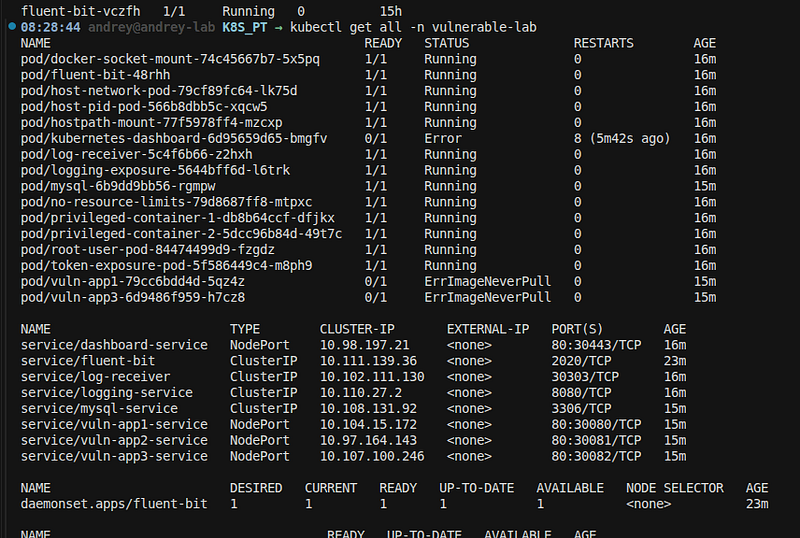
Get your node IP:
# Minikube
minikube ip
# Kind
kubectl get nodes -o jsonpath=
'{.items[0].status.addresses[?(@.type=="InternalIP")].address}'
# K3s
kubectl get nodes -o wide
# Or use port-forwarding as alternative
kubectl port-forward -n vulnerable-lab svc/vuln-app1-service 8080:80
# Then access at http://localhost:8080
Opening Firewall Ports and Fixing Pod Images
Changes Made
1. Firewall Configuration
Problem: NodePort services (30080, 30081, 30082, 30443) were filtered by firewall Solution: Opened ports in UFW firewall
Commands Executed:
sudo ufw allow 30080/tcp comment
"Kubernetes NodePort - vuln-app1"
sudo ufw allow 30081/tcp comment
"Kubernetes NodePort - vuln-app2"
sudo ufw allow 30082/tcp comment
"Kubernetes NodePort - vuln-app3"
sudo ufw allow 30443/tcp comment
"Kubernetes NodePort - dashboard"
2. Container Images
Problem: Pods failing withErrImageNeverPull- images not found
Solution: Built images locally and loaded into minikube
Images Built:
-
vuln-app1:latest- SQL Injection vulnerable app -
vuln-app2:latest- Command Injection vulnerable app -
vuln-app3:latest- K8S Token Exposure app
Commands Executed:
# Built images
docker build -t vuln-app1:latest ./vuln-app1
docker build -t vuln-app2:latest ./vuln-app2
docker build -t vuln-app3:latest ./k8s/vulnerable-app3
# Loaded into minikube
minikube image load vuln-app1:latest
minikube image load vuln-app2:latest
minikube image load vuln-app3:latest
3. ServiceAccount Creation
Problem: vuln-app2 deployment requiredvulnerable-saServiceAccount that didn't exist
Solution: Created the ServiceAccount
Command Executed:
kubectl
create
 serviceaccount vulnerable-sa -n vulnerable-lab
4. Deployment Restart
Commands Executed:
kubectl rollout restart deployment vuln-app1 -n vulnerable-lab
kubectl rollout restart deployment vuln-app2 -n vulnerable-lab
kubectl rollout restart deployment vuln-app3 -n vulnerable-lab
Opening Firewall Ports
Method 1: UFW (Ubuntu/Debian)
Check Current Status:
sudo ufw
status
Open Ports:
# Open individual ports
sudo ufw allow 30080/tcp comment
"Kubernetes NodePort - vuln-app1"
sudo ufw allow 30081/tcp comment
"Kubernetes NodePort - vuln-app2"
sudo ufw allow 30082/tcp comment
"Kubernetes NodePort - vuln-app3"
sudo ufw allow 30443/tcp comment
"Kubernetes NodePort - dashboard"
# Or open all at once
sudo ufw allow 30080/tcp
sudo ufw allow 30081/tcp
sudo ufw allow 30082/tcp
sudo ufw allow 30443/tcp
Verify:
sudo ufw
status
 numbered | grep -E
"30080|30081|30082|30443"
Method 2: firewalld (RHEL/CentOS/Fedora)
# Open ports
sudo firewall-cmd --permanent --add-port=30080/tcp
sudo firewall-cmd --permanent --add-port=30081/tcp
sudo firewall-cmd --permanent --add-port=30082/tcp
sudo firewall-cmd --permanent --add-port=30443/tcp
# Reload firewall
sudo firewall-cmd --reload
# Verify
sudo firewall-cmd --list-ports
Method 3: iptables
# Open ports
sudo iptables -I
INPUT
 -p tcp --dport
30080
 -j ACCEPT
sudo iptables -I
INPUT
 -p tcp --dport
30081
 -j ACCEPT
sudo iptables -I
INPUT
 -p tcp --dport
30082
 -j ACCEPT
sudo iptables -I
INPUT
 -p tcp --dport
30443
 -j ACCEPT
# Save rules (Debian/Ubuntu)
sudo iptables-save
|
 sudo tee /etc/iptables/rules.v4
# Or use netfilter-persistent
sudo netfilter-persistent save
Method 4: Using Script
Use the provided script:
./
OPEN_FIREWALL_PORTS
.
sh
Or manually with password:
echo

"YOUR_PASSWORD"
 | sudo -S ufw allow 30080/tcp
echo

"YOUR_PASSWORD"
 | sudo -S ufw allow 30081/tcp
echo

"YOUR_PASSWORD"
 | sudo -S ufw allow 30082/tcp
echo

"YOUR_PASSWORD"
 | sudo -S ufw allow 30443/tcp
Fixing Pod Images
Step 1: Build Images
Option A: Use Build Script:
cd
 /home/andrey/K8S_PT
./build-images.sh
Option B: Build Manually:
# Build vuln-app1
cd
 vuln-app1
docker build -t vuln-app1:latest .
cd
 ..
# Build vuln-app2
cd
 vuln-app2
docker build -t vuln-app2:latest .
cd
 ..
# Build vuln-app3
cd
 k8s/vulnerable-app3
docker build -t vuln-app3:latest .
cd
 ../..
Step 2: Load Images into Minikube
# Load all images
minikube image load vuln-app1:latest
minikube image load vuln-app2:latest
minikube image load vuln-app3:latest
# Verify images are loaded
minikube image
ls
 | grep vuln-app
Step 3: Create Missing ServiceAccount
# Create ServiceAccount for vuln-app2
kubectl create serviceaccount vulnerable-sa -n vulnerable-lab
# Verify
kubectl
get
 serviceaccount vulnerable-sa -n vulnerable-lab
Step 4: Restart Deployments
# Restart all vulnerable app deployments
kubectl rollout restart deployment vuln-app1 -n vulnerable-lab
kubectl rollout restart deployment vuln-app2 -n vulnerable-lab
kubectl rollout restart deployment vuln-app3 -n vulnerable-lab
# Wait for pods to be ready
kubectl
wait
 --
for
=condition=Ready pod -l app=vuln-app1 -n vulnerable-lab --
timeout
=60s
kubectl
wait
 --
for
=condition=Ready pod -l app=vuln-app2 -n vulnerable-lab --
timeout
=60s
kubectl
wait
 --
for
=condition=Ready pod -l app=vuln-app3 -n vulnerable-lab --
timeout
=60s
Verification
Check Firewall Status
# UFW
sudo ufw status |
grep
 -E
"30080|30081|30082|30443"
# firewalld
sudo firewall-cmd --list-ports |
grep
 -E
"30080|30081|30082|30443"
# iptables
sudo iptables -L -n |
grep
 -E
"30080|30081|30082|30443"
Check Pod Status
#
Check

all
 pods
kubectl
get
 pods
-
n vulnerable
-
lab
#
Check

specific
 apps
kubectl
get
 pods
-
n vulnerable
-
lab
|
 grep
-
E "vuln-app|dashboard"
#
Check
 pod details
kubectl
describe
 pod
-
n vulnerable
-
lab
-
l app
=
vuln
-
app1
Test Service Accessibility
TARGET_IP=
"192.168.49.2"
# Test each service
echo

"Testing vuln-app1 (port 30080)..."
curl -s
"http://
$TARGET_IP
:30080"
 |
head
 -5
echo

"Testing vuln-app2 (port 30081)..."
curl -s
"http://
$TARGET_IP
:30081"
 |
head
 -5
echo

"Testing vuln-app3 (port 30082)..."
curl -s
"http://
$TARGET_IP
:30082"
 |
head
 -5
echo

"Testing dashboard (port 30443)..."
curl -k -s
"https://
$TARGET_IP
:30443"
 |
head
 -5
Port Scan Verification
# Scan with nmap
sudo nmap -sT -p 30080,30081,30082,30443 192.168.49.2
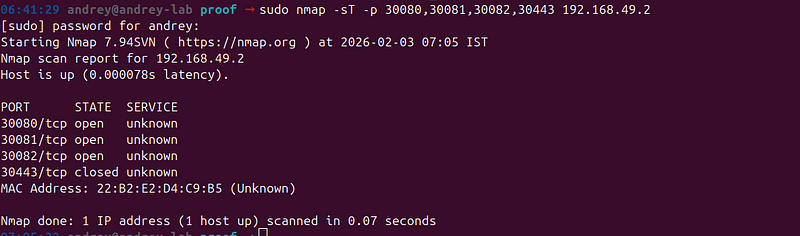
Complete Setup Script
#!/bin/bash
# Complete Lab Environment Setup Script
set
 -e
echo

"=========================================="
echo

"Lab Environment Setup"
echo

"=========================================="
echo

""
# Configuration
TARGET_IP=
"192.168.49.2"
SUDO_PASSWORD=
""

# Set if needed
# Step 1: Open Firewall Ports
echo

"[1/4] Opening firewall ports..."
if

command
 -v ufw &> /dev/null;
then

echo

"
$SUDO_PASSWORD
"
 | sudo -S ufw allow 30080/tcp 2>/dev/null || sudo ufw allow 30080/tcp

echo

"
$SUDO_PASSWORD
"
 | sudo -S ufw allow 30081/tcp 2>/dev/null || sudo ufw allow 30081/tcp

echo

"
$SUDO_PASSWORD
"
 | sudo -S ufw allow 30082/tcp 2>/dev/null || sudo ufw allow 30082/tcp

echo

"
$SUDO_PASSWORD
"
 | sudo -S ufw allow 30443/tcp 2>/dev/null || sudo ufw allow 30443/tcp

echo

"✅ Firewall ports opened"
elif

command
 -v firewall-cmd &> /dev/null;
then
    sudo firewall-cmd --permanent --add-port=30080/tcp
    sudo firewall-cmd --permanent --add-port=30081/tcp
    sudo firewall-cmd --permanent --add-port=30082/tcp
    sudo firewall-cmd --permanent --add-port=30443/tcp
    sudo firewall-cmd --reload

echo

"✅ Firewall ports opened"
fi
# Step 2: Build Images
echo

""
echo

"[2/4] Building container images..."
cd
 /home/andrey/K8S_PT
if
 [ -d
"vuln-app1"
 ];
then
    docker build -t vuln-app1:latest ./vuln-app1 > /dev/null 2>&1

echo

"✅ vuln-app1 built"
fi
if
 [ -d
"vuln-app2"
 ];
then
    docker build -t vuln-app2:latest ./vuln-app2 > /dev/null 2>&1

echo

"✅ vuln-app2 built"
fi
if
 [ -d
"k8s/vulnerable-app3"
 ];
then
    docker build -t vuln-app3:latest ./k8s/vulnerable-app3 > /dev/null 2>&1

echo

"✅ vuln-app3 built"
fi
# Step 3: Load Images into Minikube
echo

""
echo

"[3/4] Loading images into minikube..."
minikube image load vuln-app1:latest > /dev/null 2>&1
minikube image load vuln-app2:latest > /dev/null 2>&1
minikube image load vuln-app3:latest > /dev/null 2>&1
echo

"✅ Images loaded"
# Step 4: Create ServiceAccount and Restart Deployments
echo

""
echo

"[4/4] Fixing deployments..."
kubectl create serviceaccount vulnerable-sa -n vulnerable-lab 2>/dev/null ||
true
kubectl rollout restart deployment vuln-app1 -n vulnerable-lab > /dev/null 2>&1
kubectl rollout restart deployment vuln-app2 -n vulnerable-lab > /dev/null 2>&1
kubectl rollout restart deployment vuln-app3 -n vulnerable-lab > /dev/null 2>&1
echo

"✅ Deployments restarted"
# Wait for pods
echo

""
echo

"Waiting for pods to be ready..."
kubectl
wait
 --
for
=condition=Ready pod -l app=vuln-app1 -n vulnerable-lab --
timeout
=60s > /dev/null 2>&1 ||
true
kubectl
wait
 --
for
=condition=Ready pod -l app=vuln-app2 -n vulnerable-lab --
timeout
=60s > /dev/null 2>&1 ||
true
kubectl
wait
 --
for
=condition=Ready pod -l app=vuln-app3 -n vulnerable-lab --
timeout
=60s > /dev/null 2>&1 ||
true
# Final Status
echo

""
echo

"=========================================="
echo

"Setup Complete!"
echo

"=========================================="
echo

""
echo

"Pod Status:"
kubectl get pods -n vulnerable-lab | grep -E
"vuln-app|NAME"
echo

""
echo

"Service URLs:"
echo

"  - http://
$TARGET_IP
:30080 (vuln-app1)"
echo

"  - http://
$TARGET_IP
:30081 (vuln-app2)"
echo

"  - http://
$TARGET_IP
:30082 (vuln-app3)"
echo

"  - https://
$TARGET_IP
:30443 (dashboard)"
echo

""
Kubernetes Vulnerabilities Summary
Quick reference for all 25 vulnerabilities in this lab.
Critical Vulnerabilities (9)
High Vulnerabilities (16)
Vulnerability Categories
Access Control (7)
-
#1 RBAC Misconfigurations
-
#4 Network Policy Misconfigurations
-
#8 Insecure API Server Access
-
#9 etcd Exposure
-
#18 Kubelet API Exposure
-
#19 Dashboard Exposure
-
#22 Unrestricted Service Account Creation
Privilege Escalation (6)
-
#2 Privileged Containers
-
#5 Pod Security Standards Violations
-
#6 Service Account Token Exposure
-
#10 Container Escape
-
#14 Host Namespace Access
-
#15 Volume Mount Vulnerabilities
Data Exposure (5)
-
#3 Secrets Exposure
-
#6 Service Account Token Exposure
-
#20 Logging Data Exposure
-
#21 Image Pull Secrets Exposure
-
#24 Cluster Admin Token in ConfigMap
Configuration Issues (4)
-
#7 Image Vulnerabilities
-
#11 Resource Exhaustion
-
#13 Webhook Misconfigurations
-
#17 Ingress Controller Vulnerabilities
Policy Bypass (3)
-
#12 Admission Controller Bypass
-
#16 Service Mesh Misconfigurations
-
#25 Unvalidated Admission Webhooks
Exploitation Complexity
Easy (Can exploit via kubectl/curl)
-
#3 Secrets Exposure
-
#6 Service Account Token Exposure
-
#19 Dashboard Exposure
-
#20 Logging Data Exposure
-
#24 Cluster Admin Token in ConfigMap
Medium (Requires pod access)
-
#2 Privileged Containers
-
#5 Pod Security Standards Violations
-
#10 Container Escape
-
#14 Host Namespace Access
-
#15 Volume Mount Vulnerabilities
Advanced (Requires cluster/node access)
-
#8 Insecure API Server Access
-
#9 etcd Exposure
-
#18 Kubelet API Exposure
Attack Vectors
Initial Access
-
#17 Ingress Controller Vulnerabilities
-
#19 Dashboard Exposure
-
#7 Image Vulnerabilities (supply chain)
Privilege Escalation
-
#1 RBAC Misconfigurations
-
#2 Privileged Containers
-
#6 Service Account Token Exposure
-
#14 Host Namespace Access
Lateral Movement
-
#4 Network Policy Misconfigurations
-
#6 Service Account Token Exposure
-
#8 Insecure API Server Access
Data Exfiltration
-
#3 Secrets Exposure
-
#6 Service Account Token Exposure
-
#9 etcd Exposure
-
#20 Logging Data Exposure
Persistence
-
#2 Privileged Containers
-
#10 Container Escape
-
#15 Volume Mount Vulnerabilities
Quick Test Commands
# Test RBAC (Vuln #1)
kubectl get pods --all-namespaces --as=system:serviceaccount:vulnerable-lab:vulnerable-sa-1
# Test Secrets Exposure (Vuln #3)
kubectl get configmap exposed-secrets-cm -n vulnerable-lab -o yaml
# Test Privileged Container (Vuln #2)
kubectl
exec
 -it -n vulnerable-lab deployment/privileged-container-1 --
id
# Test Token Exposure (Vuln #6)
curl http://<NODE_IP>:30082/api/token
# Test Host Namespace (Vuln #14)
kubectl
exec
 -it -n vulnerable-lab deployment/host-network-pod -- ps aux
# Test Volume Mount (Vuln #15)
kubectl
exec
 -it -n vulnerable-lab deployment/hostpath-mount --
ls
 /host
Remediation Priority
Immediate (Critical)
-
Fix RBAC misconfigurations (#1)
-
Remove privileged containers (#2)
-
Secure service account tokens (#6)
-
Encrypt etcd (#9)
-
Secure API server (#8)
High Priority
-
Move secrets to proper Secrets (#3)
-
Implement network policies (#4)
-
Enforce pod security standards (#5)
-
Remove host namespace access (#14)
-
Secure volume mounts (#15)
Medium Priority
-
Fix webhook configurations (#13, #25)
-
Implement resource limits (#11)
-
Secure ingress controllers (#17)
-
Fix logging (#20)
-
Secure image pull secrets (#21)
Conclusion
Building this vulnerable Kubernetes lab provides hands-on experience with:
-
25 real-world security vulnerabilities
-
Multiple attack vectorsand exploitation techniques
-
Defense strategiesand remediation approaches
-
Practical penetration testingskills
Key Takeaways
-
Security is a shared responsibility— Both developers and operators must understand Kubernetes security
-
Configuration matters— Most vulnerabilities stem from misconfigurations
-
Defense in depth— Multiple security layers are essential
-
Regular auditing— Continuous security assessment is crucial
-
Stay updated— Keep Kubernetes and container runtimes updated
Next Steps
-
Practice exploitation— Try exploiting each vulnerability
-
Implement fixes— Remediate vulnerabilities and test
-
Automate security— Use tools like Falco, OPA, or Kyverno
-
Learn more— Study Kubernetes security best practices
-
Share knowledge— Teach others about Kubernetes security
Resources
Remember:This lab is foreducational purposes only. Always ensure you have proper authorization before testing any system. Unauthorized access to computer systems is illegal.
Happy Learning! 🚀