StratusAI: I Built an AI-Powered Cloud Security Scanner for AWS and GCP — Here’s Everything
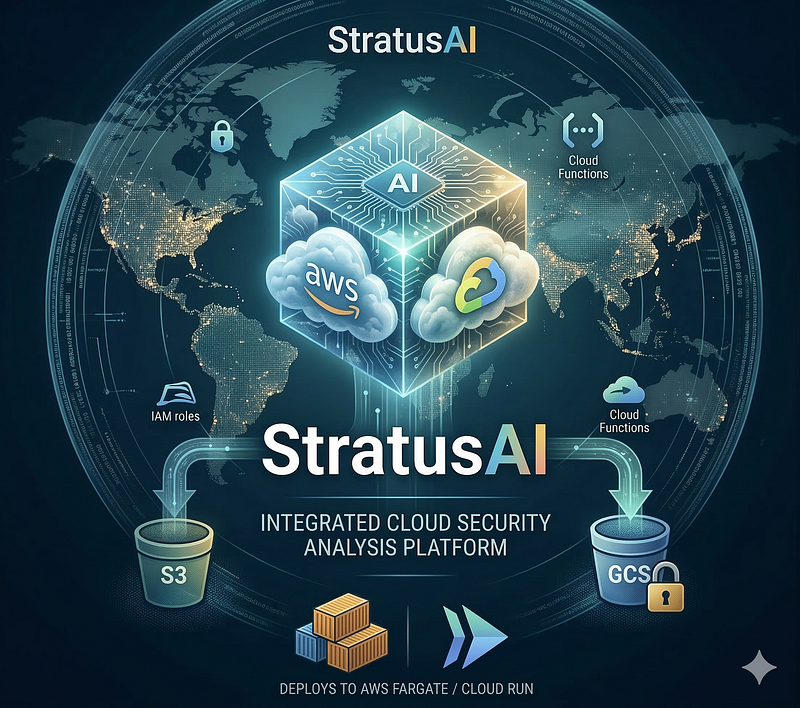
- Category: CTI
- Source article: https://medium.com/@1200km/stratusai-i-built-an-ai-powered-cloud-security-scanner-for-aws-and-gcp-here-s-everything-89c6702d3b84
- Published: 2026-03-14
- Preserved media: 9 image(s), including cover images, screenshots, diagrams, and infographics where present.
- Preserved technical blocks: 116 code/configuration block(s).
Ecosystem Fit
This page mirrors the original Medium article into the 1200km.com Docusaurus ecosystem. The original article flow, images, screenshots, infographics, and technical blocks are preserved from the export.
A complete engineering walkthrough of building, testing, and deploying an intelligent multi-cloud security assessment tool using Python, Claude AI, and Terraform
GitHub - anpa1200/stratus-ai: AI-powered cloud security assessment tool - automated scanning… *AI-powered cloud security assessment tool - automated scanning, Claude AI analysis, Terraform ECS deployment …*github.com
Table of Contents
-
The Problem Every Cloud Team Faces
-
What StratusAI Does
-
Architecture Overview
-
Project Structure
-
Core Data Models
-
The AWS Scanner Layer
-
The GCP Scanner Layer
-
The AI Layer: Where the Magic Happens
-
The Report Layer
-
Testing Strategy: 125 Tests, Zero Cloud Calls
-
Deployment: AWS ECS on Fargate
-
Deployment: GCP Cloud Run Job
-
Running Locally
-
Quick Start with the Wizard
-
Lessons Learned
-
Cost and Performance
-
What’s Next
-
Full Quick-Start Reference
-
Conclusion
The Problem Every Cloud Team Faces
Your cloud environment has been running for two years. You have 47 IAM users, 30+ S3 buckets, GCP service accounts with overly broad roles, EC2 instances in multiple regions, Cloud Run services, Lambda functions, and a Kubernetes cluster. Youknowthere are misconfigurations. You just don’t know which ones are actively dangerous versus which are theoretical.
Traditional security tools give you 800 raw findings and a risk score. They tell you “S3 bucketlogs-2021-archivehas versioning disabled" or "GCP service account has project-level Owner role." Great. Is that a P0 incident or a Tuesday afternoon task?
What you actually need is something that:
-
Scans everythingacross your AWS and GCP environments
-
Understands context— an unencrypted S3 bucket holding Lambda codeplusan EC2 instance with IMDSv1 enabledplusan overprivileged IAM role is an attack chain, not three separate findings; same logic applies to GCP service account misconfigurations
-
Prioritizes ruthlessly— which 5 things should you fix before you close your laptop tonight?
-
Explains in plain Englishwhat an attacker could actually do
That’s what I built:StratusAI, an open-source multi-cloud security assessment tool that combines traditional cloud API scanning (AWS via boto3, GCP via google-cloud SDK) with Claude AI for intelligent analysis and synthesis. This article is a complete engineering guide — architecture, code, testing, and deployment on both clouds included.
What StratusAI Does
In a single CLI command:
# Scan AWS account
stratus
--provider
 aws
--mode
 both
--target
 your-domain
.com
# Scan GCP project
stratus --provider gcp --mode internal --project my-gcp-project
StratusAI will:
-
Run 9 internal AWS scanner modules: IAM, S3, EC2, CloudTrail, RDS, Lambda, KMS, Secrets Manager, EKS
-
Run 7 internal GCP scanner modules: IAM, Compute Engine, Cloud Storage, Cloud Functions, Cloud Run, Secret Manager, Cloud Logging
-
Run 4 external scan modules(cloud-agnostic): port scan (nmap), SSL/TLS analysis, HTTP security headers, DNS/email security (DMARC, SPF, DKIM)
-
Send each module’s raw data to an LLM of your choice— Claude (Anthropic), GPT-4o/o1/o3 (OpenAI), or Gemini (Google)
-
Synthesize everything cross-moduleto identify attack chains (e.g., “public GCS bucket + overprivileged service account + metadata server access = credential theft path”)
-
Generate HTML and Markdown reportswith severity filtering, live search, and executive summary
-
Deploy to AWS ECS(Fargate) orGCP Cloud Run Joband run on a schedule via EventBridge or Cloud Scheduler
The result: an interactive HTML report you can share with your CISO, showing exactly which resources are at risk, what an attacker could do, and the specific CLI commands to fix it.
Architecture Overview
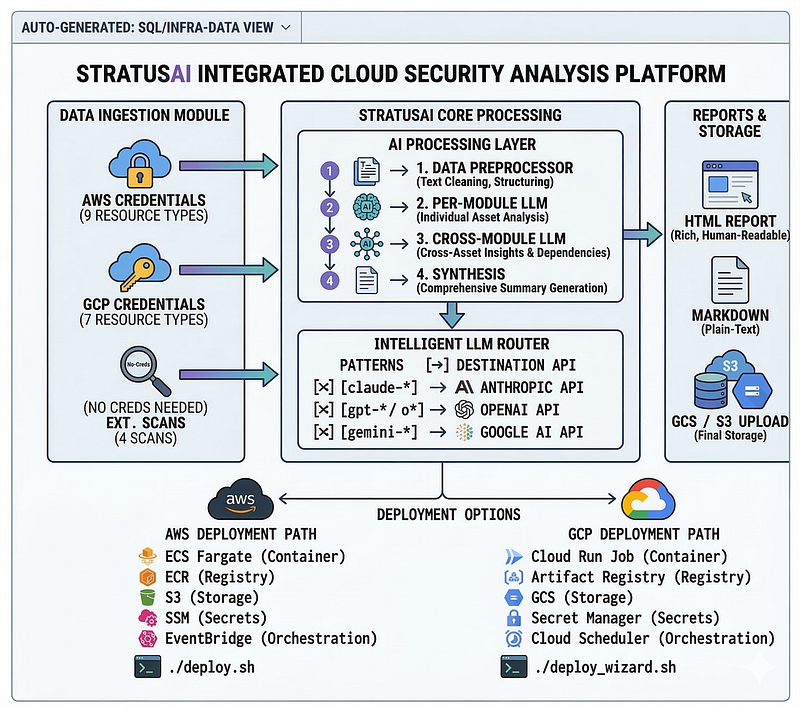
Two-stage AI pipeline:
-
Stage 1— Each module is analyzed independently. The LLM returns structured JSON: findings (with severity, evidence, remediation), risk score, and module summary. Low-signal modules (DNS, SSL, KMS, Cloud Logging) are automatically downgraded to a cheaper model in the same provider family to cut costs.
-
Stage 2— A synthesis pass takes all module summaries and findings, identifies attack chains, produces a top-10 priority list, executive summary, and overall risk rating.
Project Structure
cloud_audit/
├── assessment/
│   ├── cli.py
# Click CLI entrypoint (--provider aws|gcp, --project, ...)
│   ├── config.py
# Thresholds, sensitive ports, model pricing
│   ├── models.py
# Dataclasses: Finding, ModuleResult, Report, AttackChain
│   ├── runner.py
# Parallel scanner execution (ThreadPoolExecutor)
│   ├── ai/
│   │   ├── client.py
# LLM router: Anthropic / OpenAI / Google APIs
│   │   ├── analyzer.py
# Per-module analysis + synthesis orchestration
│   │   ├── preprocessor.py
# Smart data reduction before sending to AI
│   │   └── prompts.py
# System prompt, module prompt, synthesis prompt
│   ├── scanners/
│   │   ├── base.py
# BaseScanner ABC
│   │   ├── aws/
│   │   │   ├── iam.py
# Users, roles, MFA, access keys, password policy
│   │   │   ├── s3.py
# Buckets, ACLs, encryption, versioning, policies
│   │   │   ├── ec2.py
# Instances, SGs, EBS, IMDSv1/v2, public IPs
│   │   │   ├── cloudtrail.py
# Trails, log validation, S3 delivery
│   │   │   ├── rds.py
# Instances, encryption, public access, backups
│   │   │   ├── lambda_scan.py
# Functions, deprecated runtimes, public URLs, env encryption
│   │   │   ├── kms.py
# CMKs, rotation, public key policies
│   │   │   ├── secrets_manager.py
# Rotation, KMS usage, public resource policies
│   │   │   └── eks.py
# Clusters, API endpoint, logging, K8s version
│   │   ├── gcp/
│   │   │   ├── iam.py
# Service accounts, bindings, admin roles, key age
│   │   │   ├── compute.py
# VMs, firewall rules, OS Login, serial port, metadata
│   │   │   ├── storage.py
# Buckets, public ACLs, uniform access, encryption, logging
│   │   │   ├── cloudfunctions.py
# Functions, public ingress, unauthenticated access, runtime
│   │   │   ├── cloudrun.py
# Services, public access, unauthenticated invocation
│   │   │   ├── secretmanager.py
# Secret versions, rotation, IAM bindings
│   │   │   └── logging.py
# Log sinks, audit log config, data access logs
│   │   └── external/
│   │       ├── port_scan.py
# nmap wrapper with XML parsing
│   │       ├── ssl_scan.py
# SSL/TLS certificate and cipher analysis
│   │       ├── http_headers.py
# Security header analysis
│   │       └── dns_scan.py
# DMARC, SPF, DKIM, CAA records
│   └── reports/
│       ├── html.py
# Interactive HTML with search and filtering
│       └── markdown.py
# Clean Markdown for git/docs
├── tests/
│   ├── conftest.py
│   ├── test_aws_scanners.py
# moto-based AWS integration tests
│   ├── test_gcp_scanners.py
# google-cloud mock-based GCP tests
│   ├── test_preprocessor.py
# Unit tests for data reduction
│   ├── test_reports.py
# Unit tests for HTML/Markdown generators
│   ├── test_models.py
# Dataclass tests
│   ├── test_cost.py
# Cost estimation tests
│   └── test_port_scanner.py
# nmap XML parser tests
├── terraform/
# AWS deployment (ECS Fargate)
│   ├── main.tf
│   ├── variables.tf
│   ├── modules/
│   │   ├── ecs/
# ECS cluster + task definition
│   │   ├── ecr/
# Container registry
│   │   ├── iam/
# Task execution roles
│   │   ├── storage/
# S3 + CloudWatch + SSM for API key
│   │   └── scheduler/
# EventBridge Scheduler for periodic runs
│   └── gcp/
# GCP deployment (Cloud Run Job)
│       ├── main.tf
# Cloud Run Job, Artifact Registry, GCS, Secret Manager
│       ├── variables.tf
│       ├── providers.tf
│       └── outputs.tf
├── Dockerfile
# Ubuntu 24.04 + Python + gcloud CLI + nmap
├── start.sh
# Entrypoint: run CLI then upload reports to GCS
├── requirements.txt
├── requirements-dev.txt
├── deploy.sh
# AWS build-push-deploy helper
├── wizard.sh
# Interactive deployment wizard (AWS + GCP)
Core Data Models
Good data models make the whole system coherent. Here’s whatassessment/models.pycontains:
from
 dataclasses
import
 dataclass, field
from
 datetime
import
 datetime
from
 typing
import

Optional
@dataclass
class

Finding
:

id
:
str
    title:
str
    severity:
str

# CRITICAL | HIGH | MEDIUM | LOW | INFO
    category:
str

# module name (iam, s3, ec2, ...)
    description:
str
    evidence:
str
    remediation:
str
    resource:
Optional
[
str
] =
None
    provider:
str
 =
"aws"
    references:
list
 = field(default_factory=
list
)
@dataclass
class

ModuleResult
:
    module_name:
str
    provider:
str
    raw_output:
dict
    findings:
list
[Finding] = field(default_factory=
list
)
    error:
Optional
[
str
] =
None
    module_risk_score:
int
 =
0
    module_summary:
str
 =
""
    duration_seconds:
float
 =
0.0
    input_tokens:
int
 =
0

# Claude API tokens used for this module
    output_tokens:
int
 =
0
@dataclass
class

AttackChain
:
    title:
str
    steps:
list
[
str
]
    findings_involved:
list
[
str
]
    likelihood:
str
 =
"MEDIUM"

# HIGH | MEDIUM | LOW
    impact:
str
 =
"MEDIUM"
@dataclass
class

Report
:
    scan_id:
str
    timestamp: datetime
    provider:
str
    account_id:
str
    regions:
list
[
str
]
    mode:
str
    module_results:
list
[ModuleResult]
    findings:
list
[Finding]
    attack_chains:
list
[AttackChain]
    top_10_priorities:
list
[
str
]
    recommended_immediate_actions:
list
[
str
]
    overall_risk_rating:
str
    overall_risk_score:
int
    executive_summary:
str
    total_input_tokens:
int
 =
0
    total_output_tokens:
int
 =
0
    estimated_cost_usd:
float
 =
0.0
    model_used:
str
 =
""
The key insight:token tracking is first-class. EveryModuleResulttracks how many Claude API tokens it consumed. This means your report always tells you exactly what the AI analysis cost.
The AWS Scanner Layer
Every scanner — AWS and GCP alike — inherits fromBaseScanner:
class

BaseScanner
(
ABC
):
    name:
str

# "iam", "s3", "ec2", ...
    provider:
str

# "aws", "external"
  @abstractmethod

def

_scan
(
self
) ->
tuple
[
dict
,
list
]:

"""Returns (raw_output_dict, list_of_errors)"""

def

scan
(
self
) -> ModuleResult:
          start = time.time()

try
:
              raw_output, errors = self._scan()

return
 ModuleResult(
                  module_name=self.name,
                  provider=self.provider,
                  raw_output=raw_output,
                  duration_seconds=time.time() - start,
              )

except
 Exception
as
 e:

return
 ModuleResult(
                  module_name=self.name,
                  provider=self.provider,
                  raw_output={},
                  error=
str
(e),
                  duration_seconds=time.time() - start,
              )
Scanners run in parallel viaThreadPoolExecutor. A scanner failure never stops other scanners.
IAM Scanner: The Most Important One
IAM is where most cloud breaches start. Here’s whatiam.pychecks:
Root account:
def _check_root_account(iam) -> dict:

"""Check root account security posture via credential report."""
    iam.generate_credential_report()
    content = None

for
 _
in
 range(
12
):

try
:
            resp = iam.get_credential_report()
            content = resp[
"Content"
].decode(
"utf-8"
)

break
        except iam.exceptions.ReportNotPresent:
            time.sleep(
0.5
)

if
 content
is
 None:

return
 {
"error"
:
"credential report not ready after retries"
}
    # Parse CSV credential report
    header = lines[
0
].split(
","
)
    root_row = lines[
1
].split(
","
)

data
 = dict(zip(header, root_row))

return
 {

"mfa_active"
:
data
.
get
(
"mfa_active"
) ==
"true"
,

"access_key_1_active"
:
data
.
get
(
"access_key_1_active"
) ==
"true"
,

"access_key_2_active"
:
data
.
get
(
"access_key_2_active"
) ==
"true"
,

"password_last_used"
:
data
.
get
(
"password_last_used"
,
"N/A"
),
    }
Per-user details— MFA status, access key age (critical if >180 days), attached policies, inline policies, group memberships.
Overprivileged roles— checks both attached managed policies (AdministratorAccess, IAMFullAccess, PowerUserAccess, EC2FullAccess, S3FullAccess) and trust policies allowingPrincipal: "*".
S3 Scanner: The Breach Surface
S3 misconfigurations are the #1 source of data breaches. The scanner checks:
-
Public access block settings at both bucket and account level
-
ACL grants to AllUsers/AuthenticatedUsers
-
Bucket policies with
Principal: "*"and no conditions -
Encryption (SSE-S3, SSE-KMS, or none)
-
Versioning and MFA delete
-
Server access logging
One important implementation detail: boto3 exception attribute accessors can fail for less common errors. Always useClientErrorwith code checking:
# WRONG — can throw AttributeError if moto/boto3 doesn't have this exception:
except
 s3.exceptions.ServerSideEncryptionConfigurationNotFoundError:
# RIGHT - works everywhere:
from
 botocore.exceptions
import
 ClientError
...
except
 ClientError
as
 e:
    code = e.response[
"Error"
][
"Code"
]

if
 code ==
"ServerSideEncryptionConfigurationNotFoundError"
:
        info[
"encryption"
] =
"none"
This is a subtle but important bug. We discovered it during testing with moto.
Lambda Scanner: The Hidden Attack Surface
Lambda functions are often overlooked in security reviews:
class

LambdaScanner
(BaseScanner):
    def _scan(self):
        lmb = self.session.client(
"lambda"
, region_name=self.region)
        functions = []
        paginator = lmb.get_paginator(
"list_functions"
)
for
 page
in
 paginator.paginate():

for
 fn
in
 page[
"Functions"
]:
                info = {

"name"
: fn[
"FunctionName"
],

"runtime"
: fn.
get
(
"Runtime"
,
"unknown"
),

"role"
: fn.
get
(
"Role"
,
""
),

"kms_key_arn"
: fn.
get
(
"KMSKeyArn"
,
""
),  # env
var
 encryption

"vpc_config"
: fn.
get
(
"VpcConfig"
, {}),
                }
                # Check
for

public
 function URLs (auth_type=NONE
is
 critical)

try
:
                    url_config = lmb.get_function_url_config(FunctionName=fn[
"FunctionName"
])
                    info[
"function_url"
] = {

"url"
: url_config.
get
(
"FunctionUrl"
,
""
),

"auth_type"
: url_config.
get
(
"AuthType"
,
""
),

"is_public"
: url_config.
get
(
"AuthType"
) ==
"NONE"
,
                    }
                except ClientError:
                    info[
"function_url"
] = None
                functions.append(info)

return
 {
"functions"
: functions}, []
Key things Lambda scanner flags:
-
Deprecated runtimes: python3.7 and earlier, nodejs14 and earlier — these are EOL and may have unpatched CVEs
-
Public Function URLs with no auth— anyone on the internet can invoke your Lambda
-
Unencrypted environment variables— if your function has DB passwords in env vars, they’re visible to anyone with IAM read access unless KMS-encrypted
-
No VPC placement— Lambda functions handling sensitive data should run inside a VPC
EKS Scanner: The Kubernetes Layer
class

EKSScanner
(BaseScanner):
    DEPRECATED_K8S_VERSIONS = {
"1.23"
,
"1.24"
,
"1.25"
,
"1.26"
,
"1.27"
}
    def _scan(self):
            eks = self.session.client(
"eks"
, region_name=self.region)
            clusters = []

for
 cluster_name
in
 eks.list_clusters()[
"clusters"
]:
                cluster = eks.describe_cluster(name=cluster_name)[
"cluster"
]
                endpoint_config = cluster.
get
(
"resourcesVpcConfig"
, {})
                logging_config = cluster.
get
(
"logging"
, {}).
get
(
"clusterLogging"
, [])
                enabled_log_types = []

for
 lc
in
 logging_config:

if
 lc.
get
(
"enabled"
):
                        enabled_log_types.extend(lc.
get
(
"types"
, []))
                clusters.append({

"name"
: cluster_name,

"version"
: cluster.
get
(
"version"
,
""
),

"endpoint_public_access"
: endpoint_config.
get
(
"endpointPublicAccess"
, True),

"endpoint_public_access_cidrs"
: endpoint_config.
get
(
"publicAccessCidrs"
, []),

"audit_logging_enabled"
:
"audit"

in
 enabled_log_types,

"api_logging_enabled"
:
"api"

in
 enabled_log_types,

"secrets_encryption"
: bool(cluster.
get
(
"encryptionConfig"
)),
                })
The GCP Scanner Layer
GCP scanners use thegoogle-cloud-*Python client libraries and Application Default Credentials (ADC). The sameBaseScannercontract applies —_scan()returns(raw_output_dict, errors_list)and failures are isolated.
GCP IAM Scanner
GCP IAM is structurally different from AWS: permissions are attached to resources (projects, buckets, topics) viabindingsrather than to identities. The scanner checks both directions:
class

GCPIAMScanner
(
BaseScanner
):

def

_scan
(
self
):

from
 googleapiclient
import
 discovery
        crm = discovery.build(
"cloudresourcemanager"
,
"v1"
)
        iam = discovery.build(
"iam"
,
"v1"
)
# Project-level IAM bindings - who has what role on the whole project
        policy = crm.projects().getIamPolicy(resource=self.project).execute()
        bindings = policy.get(
"bindings"
, [])
        risky_roles = [

"roles/owner"
,
"roles/editor"
,

"roles/iam.securityAdmin"
,
"roles/iam.roleAdmin"
,

"roles/resourcemanager.projectIamAdmin"
,
        ]
        risky_bindings = []

for
 b
in
 bindings:
            role = b[
"role"
]
            members = b.get(
"members"
, [])

for
 member
in
 members:

if
 role
in
 risky_roles:
                    risky_bindings.append({

"member"
: member,

"role"
: role,

"is_service_account"
: member.startswith(
"serviceAccount:"
),

"is_public"
: member
in
 (
"allUsers"
,
"allAuthenticatedUsers"
),
                    })

# Service account key age - user-managed keys older than 90 days are risky
        sa_list = iam.projects().serviceAccounts().
list
(
            name=
f"projects/
{self.project}
"
        ).execute().get(
"accounts"
, [])
        stale_keys = []

for
 sa
in
 sa_list:
            keys = iam.projects().serviceAccounts().keys().
list
(
                name=sa[
"name"
], keyTypes=[
"USER_MANAGED"
]
            ).execute().get(
"keys"
, [])

for
 key
in
 keys:
                created = datetime.fromisoformat(
                    key[
"validAfterTime"
].replace(
"Z"
,
"+00:00"
)
                )
                age_days = (datetime.now(timezone.utc) - created).days

if
 age_days >
90
:
                    stale_keys.append({

"service_account"
: sa[
"email"
],

"key_id"
: key[
"name"
].split(
"/"
)[-
1
],

"age_days"
: age_days,
                    })

return
 {

"risky_bindings"
: risky_bindings,

"stale_service_account_keys"
: stale_keys,

"total_bindings"
:
len
(bindings),
        }, []
Key GCP IAM risks the scanner flags:
-
**roles/owner**or**roles/editor**on a project — wildcard permissions, equivalent to*:*in AWS -
**allUsers**or**allAuthenticatedUsers**members — makes resources public to the internet -
User-managed service account keys older than 90 days— long-lived credentials that should be rotated
-
**roles/iam.serviceAccountTokenCreator**— allows impersonating other service accounts
GCP Compute Scanner
class

GCPComputeScanner
(
BaseScanner
):

def

_scan
(
self
):

from
 googleapiclient
import
 discovery
        compute = discovery.build(
"compute"
,
"v1"
)
        instances = []
                agg = compute.instances().aggregatedList(project=self.project).execute()

for
 zone_data
in
 agg.get(
"items"
, {}).values():

for
 inst
in
 zone_data.get(
"instances"
, []):
                        metadata_items = {
                            m[
"key"
]: m.get(
"value"
,
""
)

for
 m
in
 inst.get(
"metadata"
, {}).get(
"items"
, [])
                        }
                        instances.append({

"name"
: inst[
"name"
],

"zone"
: inst[
"zone"
].split(
"/"
)[-
1
],

# OS Login disabled = SSH keys in metadata (risky)

"os_login_enabled"
: metadata_items.get(

"enable-oslogin"
,
"false"
) ==
"true"
,

# Serial port gives console access without SSH

"serial_port_enabled"
: metadata_items.get(

"serial-port-enable"
,
"0"
) ==
"1"
,

# Default SA with editor scope = overprivileged

"default_service_account"
:
any
(

"compute@developer"

in
 sa.get(
"email"
,
""
)

for
 sa
in
 inst.get(
"serviceAccounts"
, [])
                            ),

"public_ip"
:
bool
(
                                inst.get(
"networkInterfaces"
, [{}])[
0
]
                                    .get(
"accessConfigs"
, [])
                            ),
                        })

# Firewall rules - flag rules allowing 0.0.0.0/0 to sensitive ports
                SENSITIVE_PORTS = {
22
,
3389
,
5432
,
3306
,
27017
,
6379
,
9200
}
                fw_rules = compute.firewalls().
list
(project=self.project).execute()
                risky_rules = []

for
 rule
in
 fw_rules.get(
"items"
, []):

if
 rule.get(
"direction"
) ==
"INGRESS"

and

not
 rule.get(
"disabled"
):
                        sources = rule.get(
"sourceRanges"
, [])

if

"0.0.0.0/0"

in
 sources
or

"::/0"

in
 sources:

for
 allowed
in
 rule.get(
"allowed"
, []):

for
 port
in
 allowed.get(
"ports"
, []):
                                    pnum =
int
(port.split(
"-"
)[
0
])

if
 pnum
in
 SENSITIVE_PORTS:
                                        risky_rules.append({

"rule_name"
: rule[
"name"
],

"port"
: port,

"protocol"
: allowed[
"IPProtocol"
],
                                        })

return
 {
"instances"
: instances,
"risky_firewall_rules"
: risky_rules}, []
GCP Storage Scanner
GCS buckets are the GCP equivalent of S3 — and just as commonly misconfigured:
class

GCPStorageScanner
(
BaseScanner
):

def

_scan
(
self
):

from
 google.cloud
import
 storage
        client = storage.Client(project=self.project)
    buckets = []

for
 bucket
in
 client.list_buckets():
                b = client.get_bucket(bucket.name)
                policy = b.get_iam_policy(requested_policy_version=
3
)
                is_public =
any
(
                    member
in
 (
"allUsers"
,
"allAuthenticatedUsers"
)

for
 binding
in
 policy.bindings

for
 member
in
 binding[
"members"
]
                )
                buckets.append({

"name"
: b.name,

"public_access"
: is_public,

# Uniform access = no per-object ACLs (recommended)

"uniform_bucket_level_access"
:
                        b.iam_configuration.uniform_bucket_level_access_enabled,

"versioning_enabled"
: b.versioning_enabled,

"default_kms_key"
: b.default_kms_key_name,

"logging_enabled"
:
bool
(b.logging),

"retention_policy"
: b.retention_policy_effective_time
is

not

None
,
                })

return
 {
"buckets"
: buckets,
"total"
:
len
(buckets)}, []
What it flags: public buckets (allUsersbinding), uniform bucket-level access disabled (allows per-object ACL overrides), no versioning, no CMEK encryption, no access logging.
GCP Secret Manager & Logging Scanners
Secret Managerchecks for secrets with no rotation policy, secrets accessible to overly-broad principals, and secret versions that haven’t been rotated in over 90 days.
Cloud Loggingchecks the audit log configuration — the most commonly missed GCP security gap:
-
Data Access audit logs disabled— by default GCP doesnotlog read/write access to data (e.g., who read what from GCS or Secret Manager). These must be explicitly enabled and are a critical compliance requirement for SOC 2, PCI DSS, and ISO 27001.
-
No log export sink— Cloud Logging’s default retention is 30 days. Without a sink to GCS or a SIEM, forensic evidence disappears.
-
Admin Activity logs— cannot be disabled, but the scanner verifies a log sink is actually capturing them outside of Cloud Logging.
def _check_data_access_logs(project: str) -> dict:
    from googleapiclient import discovery
    crm = discovery.
build
(
"cloudresourcemanager"
,
"v1"
)
    policy = crm.
projects
().
getIamPolicy
(resource=project).
execute
()
    audit_configs = policy.
get
(
"auditConfigs"
, [])
        data_access_enabled =
any
(

any
(alc.
get
(
"logType"
) ==
"DATA_READ"
                for alc in ac.
get
(
"auditLogConfigs"
, []))
            for ac in audit_configs
        )
        return {
            "data_access_logging_enabled": data_access_enabled,

"audit_config_count"
:
len
(audit_configs),
        }
The AI Layer: Where the Magic Happens
Preprocessing: Don’t Send Everything to Claude
Raw cloud scanner output can be enormous — a large IAM scan returns megabytes of JSON. Sending everything to Claude is expensive and hits context limits. The preprocessor reduces data to security-relevant signals:
def
preprocess
(
module_name
: str,
raw_output
: dict,
max_chars
:
int
 =
40_000
) -> str:
    handlers = {

"iam"
: _process_iam,

"s3"
: _process_s3,

"ec2"
: _process_ec2,

"lambda"
: _process_lambda,

"kms"
: _process_kms,

"secretsmanager"
: _process_secrets_manager,

"eks"
: _process_eks,
    }
    handler = handlers.
get
(module_name)
    data =
handler
(raw_output)
if
 handler
else
 raw_output
    result = json.dumps(data, default=str)
    if len(result) > max_chars:
        logger.warning(
            f"[preprocessor] {module_name} output truncated: "
            f"{len(result):,} → {max_chars:,} chars"
        )
        result = result[:max_chars]
    return result
Each handler adds_issuesannotations to highlight what's wrong:
def _process_lambda(raw: dict) -> dict:
    functions = raw.
get
(
"functions"
, [])
    processed = []
    for fn in functions:
        issues = []
        runtime = fn.
get
(
"runtime"
,
""
)
        if runtime in DEPRECATED_LAMBDA_RUNTIMES:
            issues.
append
(f
"deprecated runtime: {runtime}"
)
    url = fn.
get
(
"function_url"
) or {}
            if url
.get
("is_public"):
                issues.
append
(f
"public function URL with no auth: {url.get('url', '')}"
)
            if not fn.
get
(
"kms_key_arn"
):
                issues.
append
(
"environment variables not KMS-encrypted"
)
            if not fn.
get
(
"vpc_config"
, {})
.get
("VpcId"):
                issues.
append
(
"not in VPC"
)
            fn[
"_issues"
] = issues
            if issues:  # Only include functions with issues
                processed.
append
(fn)
        return {"functions_with_issues": processed,
"total_functions"
:
len
(functions)}
This reduces a 100-function Lambda scan from 800KB to maybe 15KB, while preserving everything Claude needs.
The Two-Stage AI Pipeline
Stage 1: Per-module analysis
def
analyze_modules
(
module_results, account_id, region, mode, model
) -> dict:
    total_usage
 = {
"input_tokens"
:
0
,
"output_tokens"
:
0
}
for
 mr
in
 module_results:

if
 mr.error:

continue
        scan_data = preprocess(mr.module_name, mr.raw_output)
        user_content = MODULE_ANALYSIS_PROMPT.format(
            module_name=mr.module_name,
            provider=mr.provider,
            account_id=account_id,
            region=region,
            mode=mode,
            scan_output=scan_data,
        )

try
:
            response_text, usage = call_claude(
                model=model,
                system=SYSTEM_PROMPT,
                user_content=user_content,
            )
            data = json.loads(response_text)
            mr.findings = [
                Finding(
                    id=f
"{mr.module_name}_{f['id']}"
,
                    title=f[
"title"
],
                    severity=f[
"severity"
],
                    category=f.
get
(
"category"
, mr.module_name),
                    description=f[
"description"
],
                    evidence=f.
get
(
"evidence"
,
""
),
                    remediation=f.
get
(
"remediation"
,
""
),
                    resource=f.
get
(
"resource"
),
                    provider=mr.provider,
                )

for
 f
in
 data.
get
(
"findings"
, [])
            ]
            mr.module_risk_score = data.
get
(
"module_risk_score"
,
0
)
            mr.module_summary = data.
get
(
"module_summary"
,
""
)
            mr.input_tokens = usage.
get
(
"input_tokens"
,
0
)
            mr.output_tokens = usage.
get
(
"output_tokens"
,
0
)
            total_usage[
"input_tokens"
] += mr.input_tokens
            total_usage[
"output_tokens"
] += mr.output_tokens
        except Exception
as
 e:
            logger.error(f
"[analyzer] {mr.module_name} analysis failed: {e}"
)

# Continue - don't let one module failure stop the whole run

return
 total_usage
Stage 2: Synthesis
The synthesis prompt provides Claude with:
-
All module summaries (prose descriptions)
-
All findings as JSON
-
Counts by severity
And asks for:
-
2–5 attack chains— specific, realistic scenarios with finding IDs
-
Top 10 priorities— by actual exploitability, not just severity
-
Executive summary— 3–5 paragraphs for a CISO audience
-
Overall risk rating— CRITICAL/HIGH/MEDIUM/LOW with justification
-
5 immediate actions— specific CLI commands or console steps
The synthesis prompt explicitly asks Claude to be specific:
Attack chains should name actual resources: "public S3 bucket
`prod-uploads`
 +
overprivileged IAM role
`ecs-task-role`
 + IMDSv1 enabled on instance
`i-0abc123`
creates a path for SSRF-based credential theft and full account takeover"
The System Prompt: Making Claude a Security Expert
SYSTEM_PROMPT
 =
"""You are a senior cloud security engineer performing an authorized
vulnerability assessment. You are analyzing raw security scan data collected from a
cloud environment.Rules:
- Be specific: cite exact resource names, ARNs, policy names, and configuration values
- Assign severity:
  * CRITICAL: actively exploitable, public exposure, no auth required, or active attacker evidence
  * HIGH: significant misconfiguration likely to be exploited in targeted attack
  * MEDIUM: defense-in-depth failure, increases blast radius if other controls fail
  * LOW: best-practice deviation, low exploitability
  * INFO: informational, no direct security impact
- For each finding provide: title, severity, description, evidence (exact data from scan),
  remediation (specific command, console action, or Terraform/CLI change)
- Do not invent findings not supported by the data
- Consider the combination of findings, not just each in isolation
- Output valid JSON exactly matching the provided schema"""
The key instruction: “Do not invent findings not supported by the data.” This prevents Claude from hallucinating security issues.
The Report Layer
HTML Report with Live Search
The HTML report is self-contained — no CDN dependencies, works offline. Key features:
Live search— filters findings as you type:
function

filterFindings
(
query
) {

const
 q = query.
toLowerCase
();

document
.
querySelectorAll
(
'.finding-card'
).
forEach
(
card
 =>
 {

const
 text = card.
textContent
.
toLowerCase
();
        card.
style
.
display
 = text.
includes
(q) ?
''
 :
'none'
;
    });
}
Severity filter buttons— click CRITICAL to show only critical findings.
Attack chain visualization— each chain shows steps, likelihood badge, impact badge, and which finding IDs are involved.
Cost bar— shows model used, input/output tokens, estimated cost:
claude-sonnet-4-6 | 45,230
in
 / 8,102 out tokens | Est. cost:
$0
.0847
XSS-safe output— all user data passes through_esc():
def
_esc
(s) -> str:
if s is None:
return
""
return (
str
(s)
.
replace
(
"&"
,
"&"
)
.
replace
(
"<"
,
"<"
)
.
replace
(
">"
,
">"
)
.
replace
(
'"'
,
"""
))
Markdown Report
The Markdown report is designed for:
-
Pasting into JIRA/Linear tickets
-
Committing to a security findings repo in git
-
Sharing in Slack or Confluence
# Cloud Security Assessment
**Scan ID:** abc12345
**Date:** 2025-03-11 12:00 UTC
**Provider:** AWS — Account 123456789012
**Regions:** us-east-1
**Mode:** both
**AI Model:** claude-sonnet-4-6 — 45,230 in / 8,102 out tokens — Est. cost: $0.0847
## Overall Risk: 🔴 HIGH (72/100)
> This account has critical security issues requiring immediate attention.
> Root account MFA is disabled. Three S3 buckets are publicly accessible.
> ...
## Immediate Actions
1. Enable MFA on the root account immediately
2. Block public access on S3 bucket `prod-uploads`
...
Testing Strategy: 125 Tests, Zero Cloud Calls
Test Architecture
tests/
├── test_models.py
# Pure unit tests — no AWS, no mocks needed
├── test_cost.py
# Cost estimation math
├── test_port_scanner.py
# nmap XML parser
├── test_preprocessor.py
# Data reduction logic
├── test_reports.py
# HTML/Markdown generators with fixture data
└── test_aws_scanners.py
# boto3 API calls mocked with moto
Using moto for AWS Mocking
motointercepts boto3 API calls and returns realistic responses without hitting AWS. Example:
from
 moto
import
 mock_aws
import
 boto3
@mock_aws
def

test_iam_detects_missing_root_mfa
():
    session = boto3.Session(region_name=
"us-east-1"
)

# No setup needed - moto starts with root MFA disabled by default

from
 assessment.scanners.aws.iam
import
 IAMScanner
    result = IAMScanner(session=session, region=
"us-east-1"
).scan()
    root = result.raw_output[
"root_account"
]

assert
 root[
"mfa_active"
]
is

False
@mock_aws
def

test_s3_detects_encryption_disabled
():
    session = boto3.Session(region_name=
"us-east-1"
)
    s3 = session.client(
"s3"
, region_name=
"us-east-1"
)
    s3.create_bucket(Bucket=
"test-bucket"
)

# No encryption configured - moto returns NoSuchEncryptionConfiguration

from
 assessment.scanners.aws.s3
import
 S3Scanner
    result = S3Scanner(session=session, region=
"us-east-1"
).scan()
    buckets = result.raw_output[
"buckets"
]

assert

len
(buckets) ==
1

assert
 buckets[
0
][
"encryption"
] ==
"none"
Important moto gotcha: moto doesn’t pre-populate AWS managed policies. If you want to testAdministratorAccessattachment, create it first:
@mock_aws
def

test_iam_detects_admin_policy_attachment
():

import
 json

from
 unittest.mock
import
 patch
    session = boto3.Session(region_name=
"us-east-1"
)
    iam = session.client(
"iam"
)
# Create customer-managed policy (moto can't create managed AWS policies)
    resp = iam.create_policy(
        PolicyName=
"AdministratorAccess"
,
        PolicyDocument=json.dumps({

"Version"
:
"2012-10-17"
,

"Statement"
: [{
"Effect"
:
"Allow"
,
"Action"
:
"*"
,
"Resource"
:
"*"
}],
        }),
    )
    policy_arn = resp[
"Policy"
][
"Arn"
]
    iam.create_user(UserName=
"adminuser"
)
    iam.attach_user_policy(UserName=
"adminuser"
, PolicyArn=policy_arn)

# Patch the config constant to use our test ARN

with
 patch(
"assessment.scanners.aws.iam.OVERPRIVILEGED_MANAGED_POLICIES"
, [policy_arn]):

from
 assessment.scanners.aws.iam
import
 IAMScanner
        result = IAMScanner(session=session, region=
"us-east-1"
).scan()
    admin_attachments = result.raw_output[
"attached_admin_policies"
]

assert

any
(a[
"name"
] ==
"adminuser"

for
 a
in
 admin_attachments)
Testing Report Generators Without AWS
For HTML/Markdown tests, we build fixture data and test the output directly:
def
_make_report
(**kwargs) -> Report:

""
"Create a minimal but valid Report for testing."
""
    return
Report
(
        scan_id=
"abc12345"
,
        timestamp=
datetime
(
2025
,
3
,
11
,
12
,
0
,
0
, tzinfo=timezone.utc),
        provider=
"aws"
,
        account_id=
"123456789012"
,
        ...
    )
class TestGenerateHTML:
def test_xss_escape_in_account_id(self):
report = _make_report()
report.account_id = '<script>alert("xss")</script>'
html = generate_html(report)
# Payload must be escaped, not executed
assert 'alert("xss")' not in html
assert "<script>" in html
    def test_contains_cost_info(self):
        html = generate_html(_make_report())
        assert "claude-sonnet-4-6" in html
        assert "0.0480" in html
Test Coverage
tests/test_models.py          18 tests  — dataclass defaults, token fields
tests/test_cost.py            10 tests  — pricing math, model fallback
tests/test_port_scanner.py    12 tests  — nmap XML parsing
tests/test_preprocessor.py    45 tests  — all module handlers, edge cases
tests/test_reports.py         33 tests  — HTML generator, Markdown, _esc()
tests/test_aws_scanners.py    30 tests  — IAM, S3, EC2, Lambda, KMS, SecretsManager
─────────────────────────────────────────
Total: 125 tests, 0 failures
Run them:
pip install -r requirements-dev.
txt
python -m pytest tests/ -v
Deployment: AWS ECS on Fargate
For teams that want automated, scheduled assessments without running anything locally.
Architecture
EventBridge

Scheduler
       │
       ▼
ECS

Task
 (
Fargate
)
  ├──
Container
: stratus-ai (
from

ECR
)
  ├──
IAM

Role
: read-only + specific write to
S3
/
CloudWatch
  ├──
Env
:
ANTHROPIC_API_KEY_SSM
=
/stratus-ai/
anthropic-key
  └──
Reports
 →
S3
 bucket +
CloudWatch

Logs
The Anthropic API key is never stored in container environment variables. Instead, the ECS task role has permission to read an SSM Parameter Store SecureString, and the CLI resolves it at startup:
def _resolve_anthropic_key() -> str:

key
 = os.environ.
get
(
"ANTHROPIC_API_KEY"
,
""
)

if

key
:

return

key
    ssm_name = os.environ.get("ANTHROPIC_API_KEY_SSM", "")
    if ssm_name:
        ssm = boto3.client("ssm")
        resp = ssm.get_parameter(Name=ssm_name, WithDecryption=True)
        return resp["Parameter"]["Value"]
return ""
Terraform Setup
cd terraform
cp terraform.tfvars.example terraform.tfvars
#
Edit terraform.tfvars with your settings:
#
  anthropic_api_key =
"sk-ant-..."
#
  name_prefix       =
"stratus-ai"
#
  aws_region        =
"us-east-1"
terraform init
terraform plan
terraform apply
This creates:
-
ECR repositoryfor the Docker image
-
S3 bucketfor reports (versioned, lifecycle policy, CloudWatch logging)
-
SSM Parameter
/stratus-ai/anthropic-key(SecureString, KMS-encrypted) -
IAM roles— execution role + task role with read-only AWS permissions + S3/SSM write
-
ECS cluster+ task definition
-
EventBridge Scheduler(optional) for weekly runs
Minimal Terraform Example
# terraform/examples/minimal/main.tf
module
"stratus_ai"
 {

source
 =
"../../"
  name_prefix       = "stratus-ai"
  aws_region        = "us-east-1"
  anthropic_api_key = var.anthropic_api_key
  # Use your existing VPC, or let the module find the default VPC
  vpc_id     = ""
  subnet_ids = []
  enable_scheduler = false   # run manually via ECS RunTask
}
Scheduled Example
# terraform/examples/scheduled/main.tf
module
"stratus_ai"
 {

source
 =
"../../"
  name_prefix       = "stratus-ai"
  aws_region        = "us-east-1"
  anthropic_api_key = var.anthropic_api_key
  enable_scheduler        = true
  schedule_expression     = "cron(0 6 ? * MON *)"  # Every Monday at 6am UTC
  schedule_timezone       = "UTC"
  assessment_extra_args   = "--mode internal --severity HIGH"
  report_retention_days   = 90
  ecr_retention_count     = 10
}
Deploying a New Image
# Build and push to ECR
./deploy.sh
# Or manually:
aws ecr get-login-password --region us-east-1 | \
  docker login --username AWS --password-stdin <account>.dkr.ecr.us-east-1.amazonaws.com
docker build -t stratus-ai .
docker tag stratus-ai:latest <account>.dkr.ecr.us-east-1.amazonaws.com/stratus-ai:latest
docker push <account>.dkr.ecr.us-east-1.amazonaws.com/stratus-ai:latest
Running On-Demand from AWS Console or CLI
aws ecs run-task \
  --cluster stratus-ai \
  --task-definition stratus-ai \
  --launch-
type

FARGATE
 \
  --network-configuration
"awsvpcConfiguration={
    subnets=[subnet-abc123],
    securityGroups=[sg-xyz789],
    assignPublicIp=ENABLED
  }"
 \
  --overrides '{

"containerOverrides"
: [{

"name"
:
"stratus-ai"
,

"command"
: [
"--mode"
,
"internal"
,
"--severity"
,
"MEDIUM"
]
    }]
  }'
The task runs for 5–15 minutes depending on account size, uploads reports to S3, and terminates.
Deployment: GCP Cloud Run Job
For GCP, StratusAI runs as aCloud Run Job— a serverless batch container that starts on demand or on a Cloud Scheduler cron, runs to completion, and stops. No always-on infra, no servers to manage.
GCP Architecture
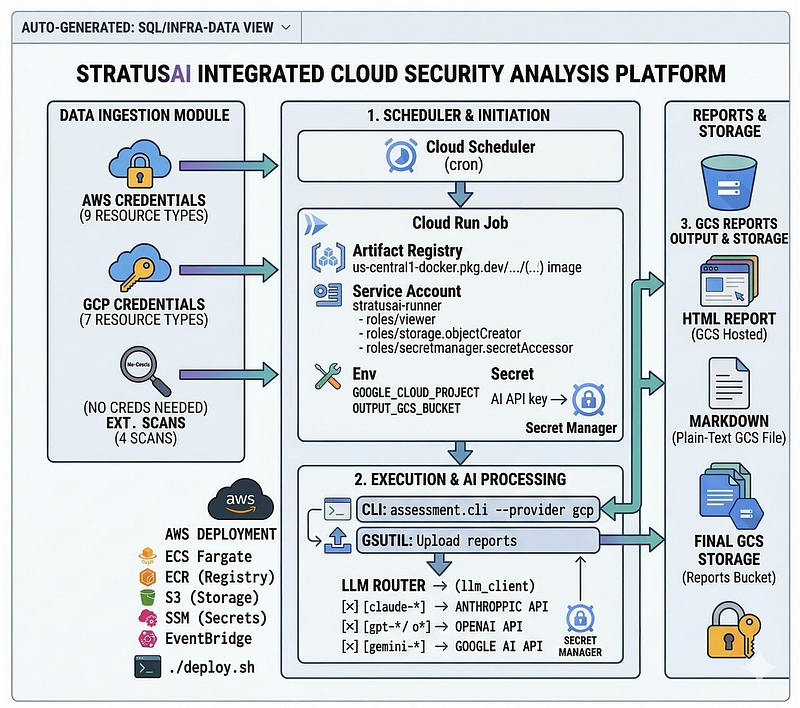
One non-obvious design point: Cloud Run’s filesystem is ephemeral — files written during the job are gone when the container exits. Thestart.shentrypoint wrapper solves this by runninggsutil cpto upload/tmp/output/*to GCS immediately after the CLI completes.
GCP Terraform Setup
cd
 terraform/gcp
cp
 terraform.tfvars.example terraform.tfvars
# Fill in: gcp_project, gcp_region, api_key (your AI provider key)
terraform init
terraform apply
This creates (in oneterraform apply):
Key Terraform design decisions:
Dynamic API key env var name— the correct environment variable (ANTHROPIC_API_KEY,OPENAI_API_KEY, orGOOGLE_API_KEY) is selected at plan time based on the model name prefix:
locals {
  api_key_env_name = (
    can(regex(
"^claude-"
,
var
.ai_model))          ?
"ANTHROPIC_API_KEY"
 :
    can(regex(
"^(gpt-|o1|o3|o4)"
,
var
.ai_model))  ?
"OPENAI_API_KEY"
    :
    can(regex(
"^gemini-"
,
var
.ai_model))           ?
"GOOGLE_API_KEY"
    :

"ANTHROPIC_API_KEY"
  )
}
**args**not**command**in Cloud Run Job— this is a common mistake. In Terraform'sgoogle_cloud_run_v2_job,commandoverrides the DockerENTRYPOINT(the binary itself).argspasses flags to the existing entrypoint. Usingcommand = ["--provider", "gcp"]would try to execute--provideras a binary and crash immediately:
containers {
  image = local.full_image
  args  = local.cli_args
# ← correct: passes flags to start.sh

# command = ...          # ← wrong: would override the entrypoint
}
Two-Phase Deploy with the Wizard
The unifiedwizard.shhandles the full GCP deployment when you pick**"Deploy infrastructure"**at the opening menu:
./wizard.sh
# Step 0: Choose an action:
#   1) Run a scan now
#   2) Deploy infrastructure   ← pick this
There’s a chicken-and-egg problem with GCP deployments: Cloud Run validates the Docker image at job creation time, but the image can’t be pushed until the Artifact Registry repository exists. The wizard solves this with a two-phase apply:
Phase
1
: terraform apply
-
target
=
google_project_service.apis

-
target
=
google_artifact_registry_repository.images
         → Creates
only
 the registry
and
 enables APIs
docker build -t <region>-docker.pkg.dev/<project>/stratusai/stratusai:latest .
docker push  <region>-docker.pkg.dev/<project>/stratusai/stratusai:latest
         → Pushes image to the now-existing registry
Phase 2: terraform apply
         → Creates Cloud Run Job, GCS bucket, Secret Manager, Scheduler
         → Image now exists, so Cloud Run validation passes
The wizard also:
-
Fetches and lists all accessible GCP projects so you pick by number (both for the deploy-into project and the scan target)
-
Reads AI API keys from your environment (no re-entry if already set)
-
Verifies
gcloudauth and ADC before starting -
Supports scanning adifferentproject than the one you deploy into
-
Optionally triggers an immediate scan after deploy
-
Cleans up the GCS bucket before
terraform destroy(avoiding the "bucket not empty" error)Running GCP Scans On-Demand
#
Trigger
 via gcloud
gcloud run jobs
execute
 stratusai
-
scan \

--region us-central1 \

--project my-gcp-project
# Watch logs in real time
gcloud logging read \
  'resource.type=cloud_run_job AND resource.labels.job_name=stratusai-scan' \
  --project my-gcp-project \
  --limit 100 \
  --format "value(textPayload)"
# List completed executions
gcloud run jobs executions list \
  --job stratusai-scan \
  --region us-central1
# Download latest report from GCS
gsutil cp "gs://my-gcp-project-stratusai-reports/reports/*.html" ./
Reports are persisted togs://<project>-stratusai-reports/reports/with versioning enabled and a configurable retention lifecycle (default: 90 days).
Running Locally
Installation
git
clone
 https://github.com/your-org/stratus-ai
cd
 stratus-ai
pip install -r requirements.txt
External scan prerequisites(optional):
# Port scanning
sudo apt-
get
 install nmap
# Linux
brew install nmap
# macOS
# SSL analysis
pip install pyOpenSSL
Basic AWS Assessment
# Configure AWS credentials
export
 AWS_ACCESS_KEY_ID=...
export
 AWS_SECRET_ACCESS_KEY=...
# Or: aws configure
# Set Anthropic API key
export ANTHROPIC_API_KEY=sk-ant-...
# Run assessment
stratus --provider aws --mode internal
# With external scan too
stratus --provider aws --mode both --target your-domain.com
# Scan all default regions
stratus --provider aws --all-regions
# Run only specific modules
stratus --provider aws --modules iam,s3,ec2
# Skip AI analysis (raw scanner output only, free)
stratus --provider aws --no-ai
# Filter to HIGH+ findings only
stratus --provider aws --severity HIGH
# Add environment context to sharpen AI analysis
stratus --provider aws --context "Production fintech, PCI DSS scope, handles cardholder data"
# Use a different LLM provider
stratus --provider aws --model gpt-4o         # OpenAI (requires OPENAI_API_KEY)
stratus --provider aws --model gemini-2.0-flash  # Google (requires GOOGLE_API_KEY)
stratus --provider aws --model o3-mini        # OpenAI reasoning model
# Upload reports to S3
stratus --provider aws --output-s3 my-security-reports-bucket
GCP Assessment
# Authenticate (
one
-
time
 setup)
gcloud auth application
-
default
 login
# Basic GCP internal scan
stratus --provider gcp --project my-gcp-project
# With external scan of a public endpoint
stratus --provider gcp --project my-gcp-project \
  --mode both --target api.myapp.com
# Scan only specific GCP modules
stratus --provider gcp --project my-gcp-project \
  --modules iam,compute,storage
# Use Gemini as the AI (stays within Google ecosystem, no extra key needed if using ADC)
stratus --provider gcp --project my-gcp-project \
  --model gemini-2.0-flash
# Filter to HIGH and above
stratus --provider gcp --project my-gcp-project \
  --severity HIGH
# Add context for sharper AI analysis
stratus --provider gcp --project my-gcp-project \
  --context "Production data platform, handles PII, SOC 2 Type II scope"
# Skip AI (raw scanner output only — useful for quick inventory)
stratus --provider gcp --project my-gcp-project --no-ai
# Or use the interactive wizard — lists all your GCP projects by number
./wizard.sh
Sample Output
► Running 9 scanner modules...
  Modules: aws/iam, aws/s3, aws/ec2, aws/cloudtrail, aws/rds, aws/lambda, aws/kms, aws/secretsmanager, aws/eks
► Running AI analysis (claude-sonnet-4-6)...
  Analyzing modules...
  [iam] analysis complete — 47 findings considered, 8 findings returned (5,230 in / 1,102 out tokens)
  [s3] analysis complete — 12 findings considered, 6 findings returned (3,841 in / 891 out tokens)
  [ec2] analysis complete — 23 findings considered, 5 findings returned (4,102 in / 734 out tokens)
  ...
  Running synthesis...
► Generating reports...
  HTML:     ./output/report_2025-03-11T12-00-00Z.html
  Markdown: ./output/report_2025-03-11T12-00-00Z.md
╔══════════════════════ SUMMARY ════════════════════════╗
  Overall Risk: HIGH (72/100)
  Provider: AWS — 123456789012
  Findings:
    3 Critical  8 High  12 Medium  6 Low
Top Action: Enable MFA on root account immediately
  AI Cost: $0.0847 (45,230 in / 8,102 out tokens)
╚════════════════════════════════════════════════════════╝
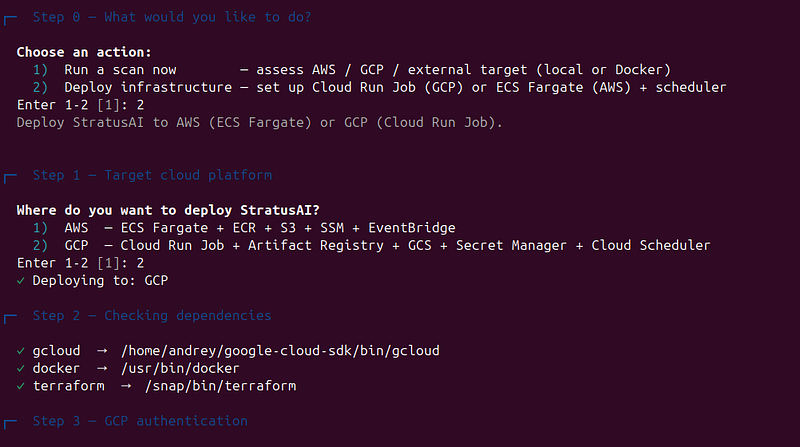
Quick Start with the Wizard
wizard.shis the single entry point for everything: running a scanordeploying the infrastructure. Run it once and it guides you through whichever flow you need.
chmod
 +x wizard.sh
./wizard.sh
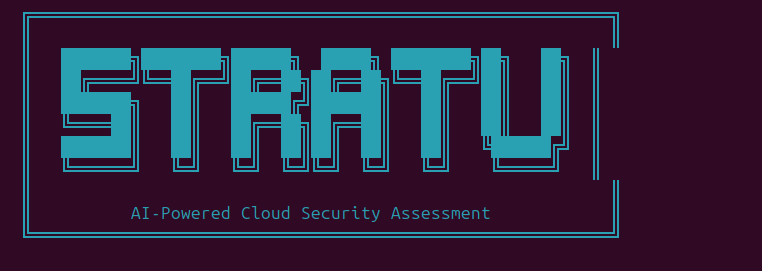
The first thing the wizard asks is what you want to do:
Step

0
 — What would you
like

to

do
?

1
)  Run a scan now        — assess AWS / GCP / external target (local
or
 Docker)

2
)  Deploy infrastructure —
set
 up Cloud Run Job (GCP)
or
 ECS Fargate (AWS) + scheduler
Enter 1-2 [1]:
Scan path (option 1) — 7 steps
Walks you through a one-off assessment. Takes about 2 minutes to configure.
Step
1
 of
7
 — Execution Mode

1
)  Docker  (recommended — no local dependencies needed)

2
)  Local
Python

(
requires
: pip install -r requirements.txt)
  Step 2 of 7 — Cloud Provider
    1)  AWS      — Amazon Web Services
    2)  GCP      — Google Cloud Platform
    3)  External — External-only scan (any public hostname, no cloud credentials)
  Step 3 of 7 — Scan Mode
    1)  Internal  — Cloud API scanning (IAM, storage, compute, …)
    2)  External  — Network scanning (ports, TLS, headers, DNS)
    3)  Both      — Internal + external (recommended)
External target hostname or IP for external scan (Enter to skip): myapp.example.com
  Step 4 of 7 — Cloud Credentials
    # AWS: reads ~/.aws profiles, lets you pick profile + region
    # GCP: checks ADC, then lists all accessible projects by number:
    ▸ Fetching accessible GCP projects...
      1)  my-prod-project-123  —  Production App
      2)  my-staging-4567      —  Staging Environment
      3)  data-pipeline-9999   —  Data Platform
      4)  Enter project ID manually
    Enter 1-4 [1]: 2
  ✓ Selected: my-staging-4567
  Step 5 of 7 — AI Model
    Estimated cost per full scan:
      Gemini 2.0 Flash      ~$0.01   fastest + cheapest
      Claude Haiku 4.5      ~$0.01   fast + cheap
      Claude Sonnet 4.6     ~$0.06   best quality  ← default
      Claude Opus 4.6       ~$0.30   highest quality
    1)  Anthropic  (Claude Sonnet / Haiku / Opus)
    2)  OpenAI     (GPT-4o, GPT-4o mini, o3-mini, o1)
    3)  Google     (Gemini 2.0 Flash, 1.5 Pro, 1.5 Flash)
  Step 6 of 7 — Scan Options
    Minimum severity filter, module selection, environment context, output dir
  Step 7 of 7 — Review
    Prints full configuration summary → asks for confirmation → launches
After the scan, the wizard prints clickablefile://links to every generated report and auto-opens the HTML in your browser:
╔══════════════════════════════════════╗
║
Assessment
 complete!               ║
╚══════════════════════════════════════╝
✓
Reports
 saved
to
:
/home/u
ser/output/
  Generated reports:
    🌐  file:///home/user/output/report_2026-03-14T10-00-00Z.html
    📄  file:///home/user/output/report_2026-03-14T10-00-00Z.md
    📋  file:///home/user/output/report_2026-03-14T10-00-00Z.json
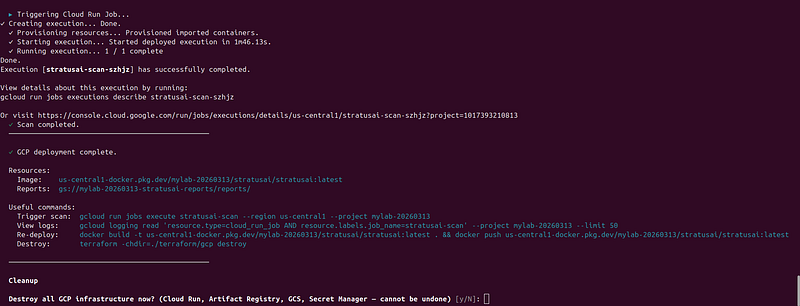
Deploy path (option 2) — 9 steps
Provisions and deploys the full scheduled-scan infrastructure on AWS (ECS Fargate) or GCP (Cloud Run Job).
AWS deploy flow:
Step

1
 — Platform:      AWS
or
 GCP

Step

2
 — Dependencies:  verifies aws / docker / terraform are installed

Step

3
 — AWS auth:      lists configured profiles, verifies via STS

Step

4
 — Settings:      region, name prefix, environment label

Step

5
 — Networking:
auto
-use
default
 VPC
OR
  specify VPC + subnets
                          (lists your VPCs
and
 subnets
for
 easy selection)

Step

6
 — AI model:      pick model + enter API
key
 (reads
from
 env
if

set
)

Step

7
 — Scan config:   regions, severity, external target, modules, context

Step

8
 — Scheduler:     EventBridge rate/cron expression  (e.g. rate(
7
 days))

Step

9
 — Post-deploy:   optionally trigger an immediate scan
  → writes terraform/terraform.tfvars
  → runs ./deploy.sh
GCP deploy flow:
Step

1
 — Platform:      GCP

Step

2
 — Dependencies:  verifies gcloud / docker / terraform

Step

3
 — GCP auth:      checks active account + Application
Default
 Credentials

Step

4
 — Project:       pick deploy-
into
 project
from
 numbered list + region + prefix

Step

5
 — Scan target:   same project
OR
  pick a different project
from
 numbered list

Step

6
 — AI model:      pick model + API
key

Step

7
 — Scan config:   severity, external target, modules, context

Step

8
 — Scheduler:     Cloud Scheduler cron  (e.g.
0

8
 * *
1
 = Mondays at
08
:
00
)

Step

9
 — Post-deploy:   optionally trigger an immediate scan
  → writes terraform/gcp/terraform.tfvars
  → Phase
1
: terraform apply (APIs + Artifact Registry only)
  → docker build + push image
  → Phase
2
: terraform apply (Cloud Run Job + GCS + Secret Manager + Scheduler)
Both deploy paths write aterraform.tfvarsfile, show a full summary before applying, and offer cleanup (destroy) at the end.
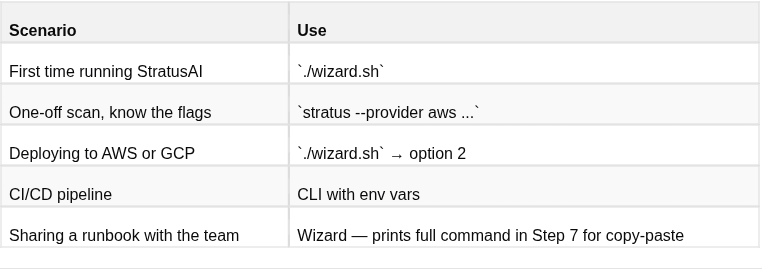
When to use the wizard vs the CLI directly
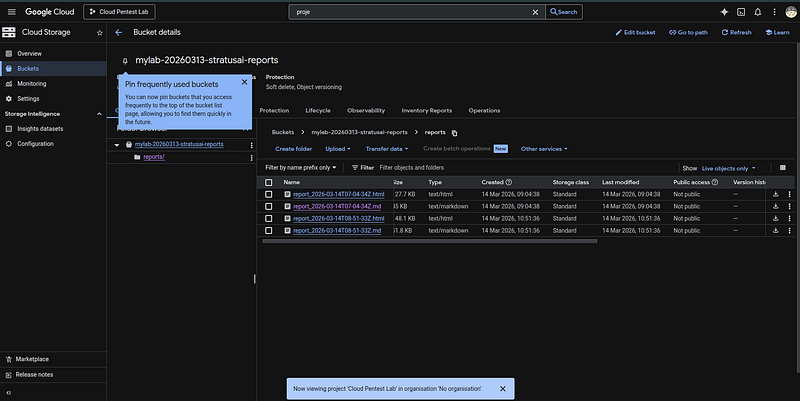
Reports:
md:
# Cloud Security Assessment Report
**Scan ID:**
`2b17023a`
**Timestamp:**
2026-03-14T08:51:33.227303+00:00
**Provider:**
GCP
**Account:**
mylab-20260313
**Regions:**
us-central1
**Mode:**
both
**AI Model:**
claude-sonnet-4-6 — 17,005 in / 16,695 out tokens — Est. cost: $0.3014
## 🔴 Overall Risk: CRITICAL (98/100)
| CRITICAL | HIGH | MEDIUM | LOW | INFO |
|----------|------|--------|-----|------|
| 13 | 16 | 11 | 0 | 0 |
## Executive Summary
Project mylab-20260313 is in a state of immediate, active critical risk across every layer of its security posture. Multiple zero-credential attack paths exist that allow any unauthenticated internet user to achieve full GCP project compromise. The Cloud Function 'vulnerable-fn-f02d146d' is publicly invocable without authentication and exposes plaintext secrets (DB
_PASSWORD, INTERNAL_
API
_TOKEN, SECRET_
KEY) as environment variables, meaning any attacker can retrieve production credentials with a single HTTP request to the public trigger URL. Separately, the web server at 34.133.91.79 has SSH open to the entire internet (0.0.0.0/0), runs with the full 'cloud-platform' OAuth scope, and stores a service account private key in instance metadata — any SSH compromise or SSRF exploit immediately yields unrestricted GCP API access across the entire project.
The IAM posture compounds these risks catastrophically. Service account 'overprivileged-sa-f02d146d@mylab-20260313.iam.gserviceaccount.com' holds five concurrent admin-level roles including roles/owner, and has a user-managed key (f751c341) with an expiry date of 9999-12-31 — effectively permanent. A personal Gmail account (user:1200km@gmail.com) also holds roles/owner with no corporate security controls, MFA enforcement, or offboarding guarantees. Any path to either identity results in total, permanent project takeover including all compute, storage, secrets, and IAM.
The logging posture means that exploitation is currently invisible. DATA
_READ, DATA_
WRITE, and ADMIN
_READ audit logs are disabled across all services, and VPC Flow Logs are disabled on all 44 subnets. An attacker who has already gained access — and the attack surface strongly suggests this may have occurred — can exfiltrate all sensitive data, modify infrastructure, and persist indefinitely without generating any audit evidence. The application layer also operates entirely over plaintext HTTP with login credentials transmitted without TLS, as HTTPS port 443 is non-functional on the public IP.
The combination of publicly exposed secrets, world-open SSH on an over-scoped instance, permanent owner-level service account keys, and complete absence of audit logging represents not merely a misconfiguration but a systemic security architecture failure across every control domain. All three plaintext secrets in the Cloud Function (DB_
PASSWORD, INTERNAL
_API_
TOKEN, SECRET
_KEY) must be treated as already compromised and rotated immediately. The most critical single action is to remove the 'sa-key' metadata entry from web-server-f02d146d, revoke key f751c341 on overprivileged-sa-f02d146d, and immediately restrict Cloud Function invocation to require authentication — these three steps close the highest-probability full-project-compromise paths.
## Immediate Actions
1. REMOVE SA KEY FROM METADATA AND ROTATE: Immediately remove the service account private key from web-server-f02d146d instance metadata: `gcloud compute instances remove-metadata web-server-f02d146d --zone=us-central1-a --keys=sa-key`. Then revoke the exposed key: `gcloud iam service-accounts keys delete f751c341 --iam-account=overprivileged-sa-f02d146d@mylab-20260313.iam.gserviceaccount.com`. Treat this key as fully compromised and audit all API activity it may have performed.
1. REQUIRE AUTHENTICATION ON CLOUD FUNCTION AND ROTATE SECRETS: Remove the allUsers invoker binding from vulnerable-fn-f02d146d: `gcloud functions remove-iam-policy-binding vulnerable-fn-f02d146d --region=us-central1 --member=allUsers --role=roles/cloudfunctions.invoker`. Immediately rotate DB_
PASSWORD, INTERNAL
_API_
TOKEN, and SECRET
_KEY as they must be treated as compromised. Migrate them to Secret Manager: `gcloud functions deploy vulnerable-fn-f02d146d --set-secrets=DB_
PASSWORD=projects/mylab-20260313/secrets/db-password:latest` (remove plaintext env vars).
1.
RESTRICT SSH ACCESS AND REDUCE SA SCOPE: Delete the world-open SSH firewall rule:
`gcloud compute firewall-rules delete allow-ssh-f02d146d`
. Replace with IAP-only access:
`gcloud compute firewall-rules create allow-ssh-iap --network=vulnerable-vpc-f02d146d --allow=tcp:22 --source-ranges=35.235.240.0/20 --target-tags=web-server`
. Simultaneously remove the full cloud-platform scope by stopping the instance and recreating it with a minimal, scoped service account rather than the overprivileged-sa.
1.
REVOKE OVERPRIVILEGED IAM BINDINGS AND REMOVE GMAIL OWNER: Remove roles/owner and all admin roles from overprivileged-sa-f02d146d:
`gcloud projects remove-iam-policy-binding mylab-20260313 --member=serviceAccount:overprivileged-sa-f02d146d@mylab-20260313.iam.gserviceaccount.com --role=roles/owner`
(repeat for roles/compute.admin, roles/iam.securityAdmin, roles/secretmanager.admin, roles/storage.admin). Remove personal Gmail owner access:
`gcloud projects remove-iam-policy-binding mylab-20260313 --member=user:1200km@gmail.com --role=roles/owner`
. Replace both with least-privilege scoped roles tied to corporate identities.
1.
ENABLE ALL AUDIT LOGS AND VPC FLOW LOGS IMMEDIATELY: Enable DATA
_READ, DATA_
WRITE, and ADMIN
_READ audit logs project-wide by updating the IAM audit config: `gcloud projects get-iam-policy mylab-20260313 > policy.yaml`, then add auditConfigs for allServices covering DATA_
READ, DATA
_WRITE, and ADMIN_
READ, then
`gcloud projects set-iam-policy mylab-20260313 policy.yaml`
. Enable VPC flow logs on all subnets:
`gcloud compute networks subnets list --format='value(name,region)' | while read name region; do gcloud compute networks subnets update $name --region=$region --enable-flow-logs; done`
. These steps are essential to detect whether exploitation has already occurred.
## Attack Chains
### Zero-Credential Cloud Function Secret Exfiltration and Full Project Takeover
**Likelihood:**
HIGH |
**Impact:**
HIGH
1.
Attacker discovers the public Cloud Function trigger URL for 'vulnerable-fn-f02d146d' via Google dorking, Shodan, or public API enumeration — no credentials required due to allUsers invoker binding.
2.
Attacker sends a crafted HTTP request to the function trigger URL designed to cause the function to echo or log its environment variables, directly retrieving DB
_PASSWORD, INTERNAL_
API
_TOKEN, and SECRET_
KEY in plaintext.
3.
Using INTERNAL
_API_
TOKEN or DB
_PASSWORD, attacker accesses backend databases or internal APIs. If the function's runtime service account has elevated permissions (not confirmed but consistent with the project's IAM posture), the attacker pivots to GCP API calls.
4. Attacker queries GCP IAM to discover overprivileged-sa-f02d146d, finds or brute-forces its key, and achieves full roles/owner project control with no expiry.
5. With DATA_
READ/DATA
_WRITE logs disabled, all exfiltration and modification activity is undetected and forensically unrecoverable.
*Findings involved: public_
unauthenticated
_invoker, plaintext_
secrets
_in_
env
_vars, combined_
unauthenticated
_plus_
secrets
_exfiltration_
risk, ingress
_allow_
all
_public_
internet, http
_not_
enforced
_secure_
optional, data
_read_
audit
_logs_
disabled, data
_write_
audit
_logs_
disabled, comprehensive
_audit_
logging
_gap*
### SSH Brute-Force to Full Project Compromise via Metadata Service Account Key
**Likelihood:**
HIGH |
**Impact:**
HIGH
1. Attacker port-scans 34.133.91.79 and finds TCP/22 open, confirmed by firewall rule allow-ssh-f02d146d permitting 0.0.0.0/0 ingress to web-server-f02d146d.
2. Attacker performs credential stuffing or brute-force SSH attack against the web server — no firewall logging is enabled so all attempts are silent.
3. Upon gaining shell access, attacker queries the GCE metadata server endpoint (http://metadata.google.internal/computeMetadata/v1/instance/attributes/sa-key) to retrieve the stored service account private key, or alternatively uses the legacy metadata endpoint (v0.1) without needing the Metadata-Flavor header due to legacy endpoint being enabled.
4. Attacker authenticates to GCP APIs using the exfiltrated key or the instance's attached service account token (full cloud-platform scope), gaining unrestricted GCP API access.
5. With roles/owner equivalent access, attacker creates a backdoor IAM binding, exfiltrates all GCS data, reads all secrets from Secret Manager, and disables logging to cover tracks — all undetected due to missing audit logs and VPC flow logs.
*Findings involved: ssh_
open
_to_
internet
_vulnerable_
vpc, web
_server_
sensitive
_metadata_
sa
_key, web_
server
_full_
api
_scope_
public
_ip, legacy_
metadata
_endpoint_
web
_server, no_
firewall
_logging_
across
_rules, owner_
role
_service_
account, sa
_user_
managed
_key_
exists, data
_read_
audit
_logs_
disabled, vpc
_flow_
logs
_completely_
disabled, comprehensive
_audit_
logging
_gap*
### SSRF via Web Application to Metadata Server Full Project Takeover
**Likelihood:**
MEDIUM |
**Impact:**
HIGH
1. Attacker accesses the web application at http://34.133.91.79 (HTTP only, no HTTPS), which redirects to login.php. Attacker identifies an SSRF vulnerability in the application (common in web apps with user-supplied URLs or redirects).
2. Attacker crafts an SSRF payload targeting the legacy GCE metadata endpoint (http://metadata.google.internal/v1beta1/instance/service-accounts/default/token) — legacy endpoint does not require 'Metadata-Flavor: Google' header, making SSRF exploitation trivial.
3. Attacker retrieves the OAuth access token for the attached service account, which has full 'cloud-platform' scope. Using this token, attacker calls GCP APIs to enumerate project resources and IAM policies.
4. Attacker discovers overprivileged-sa-f02d146d with roles/owner and reads the 'sa-key' instance metadata attribute, obtaining the permanent private key (f751c341, valid until 9999-12-31).
5. Attacker exfiltrates all Secret Manager secrets, all GCS bucket contents, Cloud Function environment variables (DB_
PASSWORD, INTERNAL
_API_
TOKEN, SECRET
_KEY), and establishes persistent access via new IAM binding — entirely unlogged.
*Findings involved: http_
plaintext
_redirect_
to
_login, https_
connection
_refused, legacy_
metadata
_endpoint_
web
_server, web_
server
_full_
api
_scope_
public
_ip, web_
server
_sensitive_
metadata
_sa_
key, sa
_user_
managed
_key_
exists, sa
_key_
no
_expiry, owner_
role
_service_
account, sa
_secretmanager_
admin, data
_read_
audit
_logs_
disabled, comprehensive
_audit_
logging
_gap*
### Personal Gmail Account Compromise Leading to Full Project Takeover
**Likelihood:**
MEDIUM |
**Impact:**
HIGH
1. Attacker compromises personal Gmail account user:1200km@gmail.com via phishing, credential stuffing from a data breach, or password spraying — personal accounts lack enforced corporate MFA and are higher-value phishing targets.
2. Attacker authenticates to GCP Console or gcloud CLI using the compromised Gmail session, finding roles/owner on project mylab-20260313.
3. Attacker creates a new service account with roles/owner, generates a key, and exfiltrates it as a persistent backdoor, then deletes evidence of the new SA from logs (or simply doesn't need to — DATA_
READ/WRITE/ADMIN
_READ logs are all disabled).
4. Attacker reads all Secret Manager secrets, copies all GCS data, accesses Cloud SQL via stolen DB_
PASSWORD, and pivots to any downstream systems using INTERNAL
_API_
TOKEN.
5.
Because no audit logs exist for DATA
_READ or DATA_
WRITE events, and ADMIN
_READ is also disabled, the breach is forensically invisible and the organization has no timeline for incident response.
*Findings involved: owner_
role
_personal_
gmail, sa
_user_
managed
_key_
exists, sa
_key_
no
_expiry, plaintext_
secrets
_in_
env
_vars, data_
read
_audit_
logs
_disabled, data_
write
_audit_
logs
_disabled, admin_
read
_audit_
logs
_disabled, comprehensive_
audit
_logging_
gap, sa
_secretmanager_
admin, sa
_storage_
admin*
### Credential Interception via Plaintext HTTP Login and Lateral Movement
**Likelihood:**
MEDIUM |
**Impact:**
HIGH
1.
Attacker positions themselves as a network intermediary (coffee shop, ISP-level, or compromised upstream router) observing traffic to 34.133.91.79.
2.
User navigates to http://34.133.91.79 which redirects to login.php over plaintext HTTP — no HSTS header exists to force HTTPS, and HTTPS port 443 is non-functional, so the browser cannot upgrade the connection.
3.
Attacker performs a passive MitM capture or active SSL-strip attack, harvesting plaintext login credentials from the POST request to login.php.
4.
Using captured application credentials, attacker logs into the web application and exploits application-level vulnerabilities (SSRF, file read) to reach the metadata server and escalate to full GCP access as described in chain 3.
5.
Alternatively, if captured credentials are reused for GCP Console access or the overprivileged service account, attacker achieves full project control.
*Findings involved: http_plaintext_redirect_to_login, https_connection_refused, no_hsts_header, missing_security_headers_baseline, ssl_service_unreachable, ssl_scan_incomplete, legacy_metadata_endpoint_web_server, web_server_full_api_scope_public_ip*
## Top 10 Priorities
1.
**[CRITICAL]**
Combined Risk: Unauthenticated Invocation Enables Direct Secret Exfiltration —
`projects/mylab-20260313/locations/us-central1/functions/vulnerable-fn-f02d146d`
2.
**[CRITICAL]**
Service Account Private Key Exposed in Instance Metadata —
`web-server-f02d146d (us-central1-a)`
3.
**[CRITICAL]**
SSH (TCP/22) Open to 0.0.0.0/0 on vulnerable-vpc —
`allow-ssh-f02d146d (vulnerable-vpc-f02d146d)`
4.
**[CRITICAL]**
Cloud Function Publicly Invocable Without Authentication —
`projects/mylab-20260313/locations/us-central1/functions/vulnerable-fn-f02d146d`
5.
**[CRITICAL]**
Personal Gmail Account Granted Project Owner Role —
`user:1200km@gmail.com`
6.
**[CRITICAL]**
User-Managed Service Account Key Present on Overprivileged SA —
`serviceAccount:overprivileged-sa-f02d146d@mylab-20260313.iam.gserviceaccount.com`
7.
**[CRITICAL]**
Sensitive Secrets Stored as Plaintext Environment Variables —
`projects/mylab-20260313/locations/us-central1/functions/vulnerable-fn-f02d146d`
8.
**[CRITICAL]**
Combined audit logging disabled creates forensics blind spot —
`mylab-20260313`
9.
**[CRITICAL]**
Internet-Exposed Instance with Full cloud-platform API Scope —
`web-server-f02d146d (34.133.91.79)`
10.
**[CRITICAL]**
HTTP redirects to login.php without HTTPS enforcement —
`34.133.91.79`
## Findings by Module
### HTTP
_HEADERS
| Severity | Title | Resource | Remediation |
|----------|-------|----------|-------------|
| 🔴 CRITICAL | HTTP redirects to login.php without HTTPS enforcement | `34.133.91.79` | Configure the load balancer or application to return HTTP 301/308 redirect to ht... |
| 🟠HIGH | HTTPS port (443) unreachable or disabled | `34.133.91.79` | Verify HTTPS listener is configured on port 443; check firewall rules and load b... |
| 🟠HIGH | HTTP Strict-Transport-Security (HSTS) header missing | `34.133.91.79` | Add HTTP response header: Strict-Transport-Security: max-age=31536000; includeSu... |
| 🟡 MEDIUM | No HTTP security headers detected | `34.133.91.79` | Configure application or reverse proxy to add: X-Frame-Options: DENY; X-Content-... |
<
details
>
<
summary
>
🔴 HTTP redirects to login.php without HTTPS enforcement
</
summary
>
**Description:**
The application accepts unencrypted HTTP connections and redirects to login.php without enforcing HTTPS, enabling credential interception via man-in-the-middle attacks. An attacker on the network path can capture login credentials in transit.
**Evidence:**
`http://34.133.91.79 returns status_
code 302, redirects
_to_
https: false, redirect
_location: 'login.php'`
**Remediation:**
`Configure the load balancer or application to return HTTP 301/308 redirect to https://34.133.91.79/login.php; implement HSTS header with max-age >= 31536000 and includeSubDomains`
</
details
>
<
details
>
<
summary
>
🟠HTTPS port (443) unreachable or disabled
</
summary
>
**Description:**
HTTPS connection attempts fail with 'Connection refused', indicating port 443 is not listening or the certificate is misconfigured. This prevents any secure communication and forces all traffic through HTTP.
**Evidence:**
`https check returns error: 'HTTPSConnectionPool...Connection refused'; status_
code: null`
**Remediation:**
`Verify HTTPS listener is configured on port 443; check firewall rules and load balancer target group health; ensure valid TLS certificate is deployed (gcloud compute https-health-checks or AWS ALB target health check)`
</
details
>
<
details
>
<
summary
>
🟠HTTP Strict-Transport-Security (HSTS) header missing
</
summary
>
**Description:**
Absence of HSTS header allows browsers to be downgraded to HTTP on subsequent visits, perpetuating credential exposure risk across sessions. Combined with plaintext redirect, this enables persistent MITM attacks.
**Evidence:**
`hsts_max_age: null, hsts_include_subdomains: null`
**Remediation:**
`Add HTTP response header: Strict-Transport-Security: max-age=31536000; includeSubDomains; preload`
</
details
>
<
details
>
<
summary
>
🟡 No HTTP security headers detected
</
summary
>
**Description:**
The application does not implement standard security headers (CSP, X-Frame-Options, X-Content-Type-Options, etc.), increasing vulnerability to XSS, clickjacking, and MIME-type confusion attacks. This weakens defense-in-depth posture.
**Evidence:**
`missing_security_headers: [], x_powered_by: null, version_disclosure: []`
**Remediation:**
`Configure application or reverse proxy to add: X-Frame-Options: DENY; X-Content-Type-Options: nosniff; Content-Security-Policy: default-src 'self'; X-XSS-Protection: 1; mode=block`
</
details
>
### SSL
| Severity | Title | Resource | Remediation |
|----------|-------|----------|-------------|
| 🟠HIGH | SSL/TLS configuration cannot be audited |
`34.133.91.79`
| Ensure target service is listening and accessible; re-run sslscan with verbose o... |
| 🟡 MEDIUM | SSL/TLS services unreachable on standard ports |
`34.133.91.79:443, 34.133.91.79:8443`
| Verify firewall rules allow inbound traffic on port 443 (and 8443 if in use); co... |
<
details
>
<
summary
>
🟡 SSL/TLS services unreachable on standard ports
</
summary
>
**Description:**
Both HTTPS port 443 and alternative HTTPS port 8443 refuse connections on the public IP 34.133.91.79. This prevents verification of SSL/TLS certificate validity, cipher strength, and protocol configuration posture. Unable to assess critical baseline security controls.
**Evidence:**
`https_443: {"error": "Connection refused"}, https_8443: {"error": "Connection refused"}`
**Remediation:**
`Verify firewall rules allow inbound traffic on port 443 (and 8443 if in use); confirm application is running and listening on the expected interface; check security group/VPC network ACL rules permit HTTPS traffic from assessment source.`
</
details
>
<
details
>
<
summary
>
🟠SSL/TLS configuration cannot be audited
</
summary
>
**Description:**
sslscan produced no vulnerability data (raw
_output_
lines: 3, vulnerable
_protocols_
ciphers: []). This is either due to unreachable service or incomplete scan execution, meaning SSL/TLS misconfigurations (weak protocols, broken ciphers, certificate issues) cannot be detected or validated as compliant. In a production environment handling sensitive data, this is a control gap.
**Evidence:**
`sslscan: {"raw_output_lines": 3, "vulnerable_protocols_ciphers": []}`
**Remediation:**
`Ensure target service is listening and accessible; re-run sslscan with verbose output (sslscan --show-certificate --show-sslv3 --show-tlsv10 --show-tlsv11 34.133.91.79); confirm no firewall or WAF is blocking the assessment.`
</
details
>
### GCP
_CLOUDFUNCTIONS
| Severity | Title | Resource | Remediation |
|----------|-------|----------|-------------|
| 🔴 CRITICAL | Cloud Function Publicly Invocable Without Authentication | `projects/mylab-20260313/locations/us-central1/functions/vulnerable-fn-f02d146d` | gcloud functions remove-iam-policy-binding vulnerable-fn-f02d146d --region=us-ce... |
| 🔴 CRITICAL | Sensitive Secrets Stored as Plaintext Environment Variables | `projects/mylab-20260313/locations/us-central1/functions/vulnerable-fn-f02d146d` | Migrate secrets to Secret Manager and reference them via mounted secrets: gcloud... |
| 🔴 CRITICAL | Combined Risk: Unauthenticated Invocation Enables Direct Secret Exfiltration | `projects/mylab-20260313/locations/us-central1/functions/vulnerable-fn-f02d146d` | Immediately remove allUsers IAM binding AND rotate all three secrets (DB_
PASSWOR... |
| 🟠HIGH | Function Ingress Allows Traffic from Entire Public Internet |
`projects/mylab-20260313/locations/us-central1/functions/vulnerable-fn-f02d146d`
| gcloud functions deploy vulnerable-fn-f02d146d --region=us-central1 --ingress-se... |
| 🟠HIGH | HTTPS Not Enforced — HTTP Connections Permitted |
`projects/mylab-20260313/locations/us-central1/functions/vulnerable-fn-f02d146d`
| gcloud functions deploy vulnerable-fn-f02d146d --region=us-central1 --security-l... |
| 🟡 MEDIUM | No VPC Connector — Function Isolated from Private Network Controls |
`projects/mylab-20260313/locations/us-central1/functions/vulnerable-fn-f02d146d`
| gcloud functions deploy vulnerable-fn-f02d146d --region=us-central1 --vpc-connec... |
<
details
>
<
summary
>
🔴 Cloud Function Publicly Invocable Without Authentication
</
summary
>
**Description:**
The IAM binding grants 'allUsers' the 'roles/cloudfunctions.invoker' role, meaning anyone on the internet can invoke this function without any credentials. An attacker can immediately trigger arbitrary function execution, potentially exfiltrating the plaintext secrets stored in environment variables.
**Evidence:**
`public_invoker: true; issue: 'allUsers has roles/cloudfunctions.invoker — function callable without authentication'`
**Remediation:**
`gcloud functions remove-iam-policy-binding vulnerable-fn-f02d146d --region=us-central1 --member='allUsers' --role='roles/cloudfunctions.invoker'`
</
details
>
<
details
>
<
summary
>
🔴 Sensitive Secrets Stored as Plaintext Environment Variables
</
summary
>
**Description:**
Environment variables DB
_PASSWORD, INTERNAL_
API
_TOKEN, and SECRET_
KEY are stored in plaintext and are readable by anyone with read access to the function configuration (e.g., roles/cloudfunctions.viewer or higher). Combined with the unauthenticated invoker finding, these secrets may also be directly exfiltrated by invoking the function.
**Evidence:**
`suspicious_env_vars: ['DB_PASSWORD', 'INTERNAL_API_TOKEN', 'SECRET_KEY']; env_var_count: 3`
**Remediation:**
`Migrate secrets to Secret Manager and reference them via mounted secrets: gcloud functions deploy vulnerable-fn-f02d146d --set-secrets='DB_PASSWORD=DB_PASSWORD:latest'`
</
details
>
<
details
>
<
summary
>
🟠Function Ingress Allows Traffic from Entire Public Internet
</
summary
>
**Description:**
The ingress setting ALLOW
_ALL permits invocation from any source on the public internet, maximizing the attack surface. Restricting ingress to internal VPC or Cloud Load Balancer traffic would limit exposure even if IAM is misconfigured.
**Evidence:**
`ingress_
settings: 'ALLOW
_ALL'; issue: 'ingress ALLOW_
ALL — callable from public internet'`
**Remediation:**
`gcloud functions deploy vulnerable-fn-f02d146d --region=us-central1 --ingress-settings=internal-only`
</
details
>
<
details
>
<
summary
>
🟠HTTPS Not Enforced — HTTP Connections Permitted
</
summary
>
**Description:**
The security level is set to SECURE
_OPTIONAL, meaning HTTP requests are accepted in addition to HTTPS, exposing credentials and sensitive payloads transmitted to the function to interception via man-in-the-middle attacks. This is especially dangerous given the plaintext secrets context.
**Evidence:**
`security_
level: 'SECURE
_OPTIONAL'; issue: 'security level SECURE_
OPTIONAL (HTTP allowed, not forced HTTPS)'`
**Remediation:**
`gcloud functions deploy vulnerable-fn-f02d146d --region=us-central1 --security-level=secure-always`
</
details
>
<
details
>
<
summary
>
🟡 No VPC Connector — Function Isolated from Private Network Controls
</
summary
>
**Description:**
Without a VPC connector, the function cannot securely access private Cloud SQL, Memorystore, or internal services, forcing those services to be exposed publicly or relying solely on credential-based auth. It also means egress traffic from the function is not subject to VPC firewall controls.
**Evidence:**
`vpc_connector: ''; issue: 'no VPC connector — function cannot access private resources securely'`
**Remediation:**
`gcloud functions deploy vulnerable-fn-f02d146d --region=us-central1 --vpc-connector=projects/mylab-20260313/locations/us-central1/connectors/<connector-name> --egress-settings=all-traffic`
</
details
>
<
details
>
<
summary
>
🔴 Combined Risk: Unauthenticated Invocation Enables Direct Secret Exfiltration
</
summary
>
**Description:**
The combination of allUsers invoker access and plaintext secrets in environment variables means an unauthenticated attacker can craft a request to the public trigger URL that causes the function to return or log its environment variables, fully compromising DB
_PASSWORD, INTERNAL_
API
_TOKEN, and SECRET_
KEY. This represents an active, zero-credential exploit path.
**Evidence:**
`trigger_url: 'https://us-central1-mylab-20260313.cloudfunctions.net/vulnerable-fn-f02d146d'; public_invoker: true; suspicious_env_vars: ['DB_PASSWORD','INTERNAL_API_TOKEN','SECRET_KEY']`
**Remediation:**
`Immediately remove allUsers IAM binding AND rotate all three secrets (DB_PASSWORD, INTERNAL_API_TOKEN, SECRET_KEY) as they must be treated as compromised.`
</
details
>
### GCP
_COMPUTE
| Severity | Title | Resource | Remediation |
|----------|-------|----------|-------------|
| 🔴 CRITICAL | Service Account Private Key Exposed in Instance Metadata | `web-server-f02d146d (us-central1-a)` | Remove the key from metadata: `gcloud compute instances remove-metadata web-serv... |
| 🔴 CRITICAL | Internet-Exposed Instance with Full cloud-platform API Scope | `web-server-f02d146d (34.133.91.79)` | Recreate the instance with a least-privilege SA scope and remove the public IP; ... |
| 🔴 CRITICAL | SSH (TCP/22) Open to 0.0.0.0/0 on vulnerable-vpc | `allow-ssh-f02d146d (vulnerable-vpc-f02d146d)` | `gcloud compute firewall-rules update allow-ssh-f02d146d --source-ranges=
<
YOUR_C...
|
|
ðŸŸ
HIGH
|
Legacy
Metadata
Endpoint
Enabled
on
Internet-Facing
Instance
| `
web-server-f02d146d
(
us-central1-a
)` | `
gcloud
compute
instances
add-metadata
web-server-f02d146d
--zone
=
us-central1-a
...
|
|
ðŸŸ
HIGH
|
Legacy
Metadata
Endpoint
Enabled
on
DB
Server
| `
db-server-f02d146d
(
us-central1-a
)` | `
gcloud
compute
instances
add-metadata
db-server-f02d146d
--zone
=
us-central1-a
-...
|
|
ðŸŸ
HIGH
|
RDP
(
TCP
/
3389
)
Open
to
0.0.0.0
/
0
on
Default
VPC
| `
default-allow-rdp
(
default
)` | `
gcloud
compute
firewall-rules
delete
default-allow-rdp
`
or
restrict
source
rang...
|
|
ðŸŸ
HIGH
|
SSH
(
TCP
/
22
)
Open
to
0.0.0.0
/
0
on
Default
VPC
| `
default-allow-ssh
(
default
)` | `
gcloud
compute
firewall-rules
delete
default-allow-ssh
`
and
replace
with
IAP
tu...
|
|
ðŸŸ
¡
MEDIUM
|
Non-Standard
HTTP
Ports
8080
/
8443
Exposed
to
Internet
| `
allow-http-https-f02d146d
(
vulnerable-vpc-f02d146d
)` | `
gcloud
compute
firewall-rules
update
allow-http-https-f02d146d
--allow
tcp:80
,
t...
|
|
ðŸŸ
¡
MEDIUM
|
Firewall
Logging
Disabled
on
All
Risky
Rules
| `
allow-ssh-f02d146d
,
allow-http-https-f02d146d
,
default-allow-rdp
,
default-allow-ssh
` | `
gcloud
compute
firewall-rules
update
<
RULE_NAME
>
--enable-logging` for each of ... |
| 🟡 MEDIUM | Shielded VM Secure Boot Disabled on Both Instances | `web-server-f02d146d, db-server-f02d146d` | `gcloud compute instances update web-server-f02d146d --shielded-secure-boot && g... |
| 🟡 MEDIUM | OS Login Not Explicitly Enabled on Instances | `web-server-f02d146d, db-server-f02d146d` | `gcloud compute instances add-metadata web-server-f02d146d db-server-f02d146d --... |
<
details
>
<
summary
>
🔴 Service Account Private Key Exposed in Instance Metadata
</
summary
>
**Description:**
The instance stores a service account key in metadata under the key 'sa-key', which is readable by anyone who can access the metadata server or query instance metadata via the GCP API. Combined with the full cloud-platform API scope on the attached service account, an attacker retrieving this key gains unrestricted GCP API access across the entire project.
**Evidence:**
`sensitive_
metadata
_keys: ['sa-key']; service_
account: overprivileged-sa-f02d146d@mylab-20260313.iam.gserviceaccount.com; scopes: ['https://www.googleapis.com/auth/cloud-platform']`
**Remediation:**
`Remove the key from metadata: `
gcloud compute instances remove-metadata web-server-f02d146d --zone=us-central1-a --keys=sa-key
` and rotate/delete the exposed SA key immediately.`
</
details
>
<
details
>
<
summary
>
🔴 Internet-Exposed Instance with Full cloud-platform API Scope
</
summary
>
**Description:**
The web server has a public IP (34.133.91.79), is reachable via SSH from 0.0.0.0/0, and runs with the full 'cloud-platform' OAuth scope on a non-default service account, meaning a single SSH compromise yields complete GCP project control. An attacker can brute-force or exploit SSH, then pivot to the metadata server to steal the SA token.
**Evidence:**
`public_ips: ['34.133.91.79']; has_full_api_scope: true; SA: overprivileged-sa-f02d146d@mylab-20260313.iam.gserviceaccount.com; scopes: ['https://www.googleapis.com/auth/cloud-platform']`
**Remediation:**
`Recreate the instance with a least-privilege SA scope and remove the public IP; restrict SSH via IAP instead: `
gcloud compute instances delete web-server-f02d146d
` then redeploy without public IP and with scoped SA.`
</
details
>
<
details
>
<
summary
>
🔴 SSH (TCP/22) Open to 0.0.0.0/0 on vulnerable-vpc
</
summary
>
**Description:**
Firewall rule allows unrestricted SSH ingress from the entire internet to instances tagged 'vulnerable' and 'web-server', directly enabling brute-force, credential-stuffing, or exploit-based attacks against the public-IP web server. No firewall logging is enabled, so exploitation would be silent.
**Evidence:**
`rule: allow-ssh-f02d146d; source_ranges: ['0.0.0.0/0']; ports: ['22']; tags: ['vulnerable','web-server']; log_config_enabled: false`
**Remediation:**
``gcloud compute firewall-rules update allow-ssh-f02d146d --source-ranges=<YOUR_CORP_CIDR>`
or delete and replace with IAP-based access (
`35.235.240.0/20`
).`
</
details
>
<
details
>
<
summary
>
🟠Legacy Metadata Endpoint Enabled on Internet-Facing Instance
</
summary
>
**Description:**
The legacy metadata endpoint (v0.1/v1beta1) does not require the 'Metadata-Flavor: Google' header, making it exploitable via SSRF vulnerabilities in hosted applications to steal the attached service account's OAuth token. Given the full cloud-platform scope on the SA, successful SSRF leads to full project compromise.
**Evidence:**
`legacy_metadata_endpoint_enabled: true; instance has public IP 34.133.91.79 and SA with cloud-platform scope`
**Remediation:**
``gcloud compute instances add-metadata web-server-f02d146d --zone=us-central1-a --metadata=disable-legacy-endpoints=true`
`
</
details
>
<
details
>
<
summary
>
🟠Legacy Metadata Endpoint Enabled on DB Server
</
summary
>
**Description:**
The database server has the legacy metadata endpoint enabled, allowing SSRF or local exploits to query instance metadata without the required header protection. The presence of a startup-script in metadata may also expose sensitive configuration or credentials.
**Evidence:**
`legacy_metadata_endpoint_enabled: true; metadata_keys: ['startup-script']; issues: ['legacy metadata endpoint enabled (v0.1/v1beta1 accessible without Metadata-Flavor header)']`
**Remediation:**
``gcloud compute instances add-metadata db-server-f02d146d --zone=us-central1-a --metadata=disable-legacy-endpoints=true`
`
</
details
>
<
details
>
<
summary
>
🟠RDP (TCP/3389) Open to 0.0.0.0/0 on Default VPC
</
summary
>
**Description:**
The default VPC has a firewall rule permitting RDP from all internet sources with no target tag restriction, meaning any instance added to the default network is immediately exposed to RDP brute-force and exploitation. No firewall logging is enabled.
**Evidence:**
`rule: default-allow-rdp; source_ranges: ['0.0.0.0/0']; ports: ['3389']; target_tags: []; log_config_enabled: false; network: default`
**Remediation:**
``gcloud compute firewall-rules delete default-allow-rdp`
or restrict source ranges to a known management CIDR.`
</
details
>
<
details
>
<
summary
>
🟠SSH (TCP/22) Open to 0.0.0.0/0 on Default VPC
</
summary
>
**Description:**
The default VPC's catch-all SSH rule applies to all instances with no tag restriction, exposing every instance in this network to internet-sourced SSH attacks. Combined with the default VPC's auto-subnet creation, any new instance is immediately at risk.
**Evidence:**
`rule: default-allow-ssh; source_ranges: ['0.0.0.0/0']; ports: ['22']; target_tags: []; log_config_enabled: false; network: default`
**Remediation:**
``gcloud compute firewall-rules delete default-allow-ssh`
and replace with IAP tunneling rule restricted to
`35.235.240.0/20`
.`
</
details
>
<
details
>
<
summary
>
🟡 Non-Standard HTTP Ports 8080/8443 Exposed to Internet
</
summary
>
**Description:**
Beyond standard 80/443, ports 8080 and 8443 are open to the entire internet on web-server-tagged instances, broadening the attack surface for dev/debug services that may lack production-grade hardening. Firewall logging is disabled, so any exploitation attempts go undetected.
**Evidence:**
`rule: allow-http-https-f02d146d; open_to_internet_ports: ['tcp:80','tcp:443','tcp:8080 (HTTP-alt)','tcp:8443 (HTTPS-alt)']; source_ranges: ['0.0.0.0/0']; log_config_enabled: false`
**Remediation:**
``gcloud compute firewall-rules update allow-http-https-f02d146d --allow tcp:80,tcp:443`
to remove ports 8080 and 8443, or enable logging:
`--enable-logging`
.`
</
details
>
<
details
>
<
summary
>
🟡 Firewall Logging Disabled on All Risky Rules
</
summary
>
**Description:**
All four flagged firewall rules have logging disabled, meaning brute-force attempts, port scans, and successful exploits against internet-exposed services generate no audit trail. This eliminates the ability to detect, investigate, or respond to active attacks.
**Evidence:**
`log_config_enabled: false on all 4 rules: allow-ssh-f02d146d, allow-http-https-f02d146d, default-allow-rdp, default-allow-ssh`
**Remediation:**
``gcloud compute firewall-rules update <RULE_NAME> --enable-logging`
for each of the four rules.`
</
details
>
<
details
>
<
summary
>
🟡 Shielded VM Secure Boot Disabled on Both Instances
</
summary
>
**Description:**
Secure Boot is disabled on both instances despite vTPM being enabled, meaning a rootkit or bootkit can be loaded before the OS starts without detection. In a compromised scenario, an attacker with persistent access could survive re-imaging if the boot process is not verified.
**Evidence:**
`shielded_vm_secure_boot: false; shielded_vm_vtpm: true on both web-server-f02d146d and db-server-f02d146d`
**Remediation:**
``gcloud compute instances update web-server-f02d146d --shielded-secure-boot && gcloud compute instances update db-server-f02d146d --shielded-secure-boot`
(requires stop/start).`
</
details
>
<
details
>
<
summary
>
🟡 OS Login Not Explicitly Enabled on Instances
</
summary
>
**Description:**
OS Login is not configured (null) on either instance, meaning SSH access relies on project-level or instance-level SSH keys in metadata rather than IAM-controlled OS Login, which weakens auditability and key management. This is especially risky on the internet-exposed web server.
**Evidence:**
`os_login_enabled: null on web-server-f02d146d and db-server-f02d146d`
**Remediation:**
``gcloud compute instances add-metadata web-server-f02d146d db-server-f02d146d --metadata=enable-oslogin=TRUE --zone=us-central1-a`
`
</
details
>
### GCP
_IAM
| Severity | Title | Resource | Remediation |
|----------|-------|----------|-------------|
| 🔴 CRITICAL | Service Account Granted Project Owner Role | `serviceAccount:overprivileged-sa-f02d146d@mylab-20260313.iam.gserviceaccount.com` | gcloud projects remove-iam-policy-binding mylab-20260313 --member='serviceAccoun... |
| 🔴 CRITICAL | Personal Gmail Account Granted Project Owner Role | `user:1200km@gmail.com` | gcloud projects remove-iam-policy-binding mylab-20260313 --member='user:1200km@g... |
| 🔴 CRITICAL | User-Managed Service Account Key Present on Overprivileged SA | `serviceAccount:overprivileged-sa-f02d146d@mylab-20260313.iam.gserviceaccount.com` | gcloud iam service-accounts keys delete f751c341 --iam-account=overprivileged-sa... |
| 🟠HIGH | Service Account Holds roles/secretmanager.admin | `serviceAccount:overprivileged-sa-f02d146d@mylab-20260313.iam.gserviceaccount.com` | gcloud projects remove-iam-policy-binding mylab-20260313 --member='serviceAccoun... |
| 🟠HIGH | Service Account Holds roles/iam.securityAdmin | `serviceAccount:overprivileged-sa-f02d146d@mylab-20260313.iam.gserviceaccount.com` | gcloud projects remove-iam-policy-binding mylab-20260313 --member='serviceAccoun... |
| 🟠HIGH | Service Account Holds roles/compute.admin | `serviceAccount:overprivileged-sa-f02d146d@mylab-20260313.iam.gserviceaccount.com` | gcloud projects remove-iam-policy-binding mylab-20260313 --member='serviceAccoun... |
| 🟠HIGH | Service Account Holds roles/storage.admin | `serviceAccount:overprivileged-sa-f02d146d@mylab-20260313.iam.gserviceaccount.com` | gcloud projects remove-iam-policy-binding mylab-20260313 --member='serviceAccoun... |
| 🟠HIGH | Single Service Account Accumulates Five Admin/Owner Roles | `serviceAccount:overprivileged-sa-f02d146d@mylab-20260313.iam.gserviceaccount.com` | Delete this SA and redistribute minimal necessary permissions across dedicated, ... |
| 🟡 MEDIUM | Service Account Key Has Effectively No Expiration (Year 9999) | `serviceAccount:overprivileged-sa-f02d146d@mylab-20260313.iam.gserviceaccount.com key: f751c341` | Enforce a key rotation org policy: gcloud resource-manager org-policies set-poli... |
| 🟡 MEDIUM | No Evidence of Org Policy Restricting User-Managed SA Key Creation | `mylab-20260313` | gcloud resource-manager org-policies enable-enforce --project=mylab-20260313 con... |
<
details
>
<
summary
>
🔴 Service Account Granted Project Owner Role
</
summary
>
**Description:**
The service account holds roles/owner, granting full control over all GCP resources in the project including IAM, billing, and data. An attacker who compromises this SA or its key can fully take over the project.
**Evidence:**
`role: roles/owner, members: [serviceAccount:overprivileged-sa-f02d146d@mylab-20260313.iam.gserviceaccount.com]`
**Remediation:**
`gcloud projects remove-iam-policy-binding mylab-20260313 --member='serviceAccount:overprivileged-sa-f02d146d@mylab-20260313.iam.gserviceaccount.com' --role='roles/owner'`
</
details
>
<
details
>
<
summary
>
🔴 Personal Gmail Account Granted Project Owner Role
</
summary
>
**Description:**
A personal Gmail account (user:1200km@gmail.com) has roles/owner on the production project, which is a significant risk as personal accounts lack corporate MFA enforcement, audit trails, and offboarding controls. Compromise of this Google account yields full project takeover.
**Evidence:**
`role: roles/owner, members: [user:1200km@gmail.com]`
**Remediation:**
`gcloud projects remove-iam-policy-binding mylab-20260313 --member='user:1200km@gmail.com' --role='roles/owner' and replace with a corporate identity and least-privilege role.`
</
details
>
<
details
>
<
summary
>
🔴 User-Managed Service Account Key Present on Overprivileged SA
</
summary
>
**Description:**
A long-lived user-managed RSA-2048 key (key_
id: f751c341) exists on the service account that already holds roles/owner and multiple admin roles. If this key is exfiltrated (e.g., from source control, CI/CD, or a compromised VM), an attacker gains persistent, full project-level access with no expiry until 9999-12-31.
**Evidence:**
`key_id: f751c341, key_type: USER_MANAGED, valid_before: 9999-12-31T23:59:59Z, SA holds roles/owner`
**Remediation:**
`gcloud iam service-accounts keys delete f751c341 --iam-account=overprivileged-sa-f02d146d@mylab-20260313.iam.gserviceaccount.com and migrate to Workload Identity Federation.`
</
details
>
<
details
>
<
summary
>
🟠Service Account Holds roles/secretmanager.admin
</
summary
>
**Description:**
The service account has roles/secretmanager.admin, allowing it to read, create, delete, and modify all secrets in the project. In a production environment with sensitive data, this exposes all stored credentials, API keys, and certificates.
**Evidence:**
`role: roles/secretmanager.admin, members: [serviceAccount:overprivileged-sa-f02d146d@mylab-20260313.iam.gserviceaccount.com]`
**Remediation:**
`gcloud projects remove-iam-policy-binding mylab-20260313 --member='serviceAccount:overprivileged-sa-f02d146d@mylab-20260313.iam.gserviceaccount.com' --role='roles/secretmanager.admin'`
</
details
>
<
details
>
<
summary
>
🟠Service Account Holds roles/iam.securityAdmin
</
summary
>
**Description:**
roles/iam.securityAdmin allows the SA to view and modify IAM policies, enabling privilege escalation by granting itself or an attacker-controlled identity additional roles. Combined with roles/owner this creates a redundant but independently dangerous escalation path.
**Evidence:**
`role: roles/iam.securityAdmin, members: [serviceAccount:overprivileged-sa-f02d146d@mylab-20260313.iam.gserviceaccount.com]`
**Remediation:**
`gcloud projects remove-iam-policy-binding mylab-20260313 --member='serviceAccount:overprivileged-sa-f02d146d@mylab-20260313.iam.gserviceaccount.com' --role='roles/iam.securityAdmin'`
</
details
>
<
details
>
<
summary
>
🟠Service Account Holds roles/compute.admin
</
summary
>
**Description:**
roles/compute.admin grants full control over all Compute Engine resources, enabling an attacker to create VMs, modify firewall rules, exfiltrate disk snapshots, or pivot to other internal resources. This role also permits attaching service accounts to VMs, facilitating further privilege escalation.
**Evidence:**
`role: roles/compute.admin, members: [serviceAccount:overprivileged-sa-f02d146d@mylab-20260313.iam.gserviceaccount.com]`
**Remediation:**
`gcloud projects remove-iam-policy-binding mylab-20260313 --member='serviceAccount:overprivileged-sa-f02d146d@mylab-20260313.iam.gserviceaccount.com' --role='roles/compute.admin'`
</
details
>
<
details
>
<
summary
>
🟠Service Account Holds roles/storage.admin
</
summary
>
**Description:**
roles/storage.admin provides full control over all GCS buckets and objects, enabling exfiltration of all stored data or overwriting of application artifacts, backups, or audit logs in this production project.
**Evidence:**
`role: roles/storage.admin, members: [serviceAccount:overprivileged-sa-f02d146d@mylab-20260313.iam.gserviceaccount.com]`
**Remediation:**
`gcloud projects remove-iam-policy-binding mylab-20260313 --member='serviceAccount:overprivileged-sa-f02d146d@mylab-20260313.iam.gserviceaccount.com' --role='roles/storage.admin'`
</
details
>
<
details
>
<
summary
>
🟠Single Service Account Accumulates Five Admin/Owner Roles
</
summary
>
**Description:**
A single service account simultaneously holds roles/owner, roles/compute.admin, roles/iam.securityAdmin, roles/secretmanager.admin, and roles/storage.admin, violating least privilege and creating a single point of full-project compromise. Any pathway to this identity (key theft, metadata server abuse, or impersonation) results in total project takeover.
**Evidence:**
`overprivileged-sa-f02d146d holds 5 overprivileged roles: owner, compute.admin, iam.securityAdmin, secretmanager.admin, storage.admin`
**Remediation:**
`Delete this SA and redistribute minimal necessary permissions across dedicated, purpose-scoped service accounts using fine-grained predefined or custom roles.`
</
details
>
<
details
>
<
summary
>
🟡 Service Account Key Has Effectively No Expiration (Year 9999)
</
summary
>
**Description:**
The user-managed key is valid until 9999-12-31, meaning it will never rotate or expire organically. Long-lived credentials dramatically increase the window of opportunity for exploitation if the key is ever exfiltrated.
**Evidence:**
`key_id: f751c341, valid_before: 9999-12-31T23:59:59Z, age_days: 0, stale: false`
**Remediation:**
`Enforce a key rotation org policy: gcloud resource-manager org-policies set-policy --project=mylab-20260313 constraints/iam.serviceAccountKeyExpiryHours with a maximum expiry, then delete and recreate the key.`
</
details
>
<
details
>
<
summary
>
🟡 No Evidence of Org Policy Restricting User-Managed SA Key Creation
</
summary
>
**Description:**
A user-managed key was successfully created on a highly privileged SA, indicating the org policy constraints/iam.disableServiceAccountKeyCreation is not enforced. Without this control, any IAM-empowered principal can create exportable long-lived credentials.
**Evidence:**
`key_type: USER_MANAGED present on overprivileged-sa-f02d146d; no org policy restriction observed in scan data`
**Remediation:**
`gcloud resource-manager org-policies enable-enforce --project=mylab-20260313 constraints/iam.disableServiceAccountKeyCreation`
</
details
>
### GCP
_LOGGING
| Severity | Title | Resource | Remediation |
|----------|-------|----------|-------------|
| 🔴 CRITICAL | DATA_
READ audit logs disabled for all services | `mylab-20260313` | Enable DATA
_READ logs via gcloud logging audit-configs update allServices --enab... |
| 🔴 CRITICAL | DATA_
WRITE audit logs disabled for all services | `mylab-20260313` | Enable DATA
_WRITE logs via gcloud logging audit-configs update allServices --ena... |
| 🔴 CRITICAL | Combined audit logging disabled creates forensics blind spot | `mylab-20260313` | Use gcloud logging audit-configs update allServices --enable-log-type=DATA_
READ ... |
| 🟠HIGH | ADMIN
_READ audit logs disabled for all services | `mylab-20260313` | Enable ADMIN_
READ logs via gcloud logging audit-configs update allServices --ena... |
| 🟠HIGH | VPC Flow Logs disabled on all 44 subnets |
`mylab-20260313 (all subnets)`
| Enable VPC Flow Logs for all subnets via gcloud compute networks subnets update ... |
<
details
>
<
summary
>
🔴 DATA
_READ audit logs disabled for all services
</
summary
>
**Description:**
DATA_
READ audit logs are disabled across all services, eliminating visibility into who accessed sensitive data. An attacker with read access can exfiltrate data without any audit trail, making detection and forensics impossible.
**Evidence:**
`data_read_enabled: false, issue: 'DATA_READ audit logs not enabled for allServices'`
**Remediation:**
`Enable DATA_READ logs via gcloud logging audit-configs update allServices --enable-log-type=DATA_READ --project=mylab-20260313`
</
details
>
<
details
>
<
summary
>
🔴 DATA
_WRITE audit logs disabled for all services
</
summary
>
**Description:**
DATA_
WRITE audit logs are disabled across all services, preventing detection of unauthorized modifications or deletions of sensitive data. An attacker can modify critical resources without audit evidence.
**Evidence:**
`data_write_enabled: false, issue: 'DATA_WRITE audit logs not enabled for allServices'`
**Remediation:**
`Enable DATA_WRITE logs via gcloud logging audit-configs update allServices --enable-log-type=DATA_WRITE --project=mylab-20260313`
</
details
>
<
details
>
<
summary
>
🟠ADMIN
_READ audit logs disabled for all services
</
summary
>
**Description:**
ADMIN_
READ audit logs are disabled, reducing visibility into administrative actions and API calls. An attacker can query sensitive metadata and configuration without detection.
**Evidence:**
`admin_read_enabled: false, issue: 'ADMIN_READ audit logs not enabled for allServices'`
**Remediation:**
`Enable ADMIN_READ logs via gcloud logging audit-configs update allServices --enable-log-type=ADMIN_READ --project=mylab-20260313`
</
details
>
<
details
>
<
summary
>
🟠VPC Flow Logs disabled on all 44 subnets
</
summary
>
**Description:**
All 44 subnets lack VPC flow logs, eliminating network traffic visibility and making lateral movement and data exfiltration undetectable. An attacker can perform reconnaissance and move laterally without network-level logs.
**Evidence:**
`total_subnets: 44, subnets_with_flow_logs: 0, issue: '44 of 44 subnets have VPC flow logs disabled'`
**Remediation:**
`Enable VPC Flow Logs for all subnets via gcloud compute networks subnets update SUBNET_NAME --region=REGION --enable-flow-logs --project=mylab-20260313`
</
details
>
<
details
>
<
summary
>
🔴 Combined audit logging disabled creates forensics blind spot
</
summary
>
**Description:**
Disabling DATA
_READ, DATA_
WRITE, and ADMIN
_READ audit logs simultaneously eliminates all data-plane and user activity visibility in a production environment. An attacker gains complete operational freedom without any audit trail.
**Evidence:**
`All three audit log types disabled: data_
read
_enabled=false, data_
write
_enabled=false, admin_
read
_enabled=false`
**Remediation:**
`Use gcloud logging audit-configs update allServices --enable-log-type=DATA_
READ --enable-log-type=DATA
_WRITE --enable-log-type=ADMIN_
READ --project=mylab-20260313`
</
details
>
### GCP
_SECRETMANAGER
| Severity | Title | Resource | Remediation |
|----------|-------|----------|-------------|
| 🟡 MEDIUM | Secret Manager audit logging configuration not confirmed | `projects/mylab-20260313/secrets` | Verify audit logging: gcloud logging sinks list && gcloud logging sinks describe... |
| 🟡 MEDIUM | Secret Manager IAM permissions and access controls not validated | `projects/mylab-20260313` | Audit IAM bindings: gcloud projects get-iam-policy mylab-20260313 --flatten=bind... |
<
details
>
<
summary
>
🟡 Secret Manager audit logging configuration not confirmed
</
summary
>
**Description:**
Scan data does not confirm audit logging is enabled for Secret Manager access. Without audit logs, unauthorized secret access or modifications cannot be detected or investigated. This is critical for compliance and incident response in a production environment.
**Evidence:**
`Scan output contains only secret count and flagged_
secrets status; no audit logging verification data present in results`
**Remediation:**
`Verify audit logging: gcloud logging sinks list && gcloud logging sinks describe secretmanager-audit-sink (if it exists), or create: gcloud logging sinks create secretmanager-audit-sink logging.googleapis.com/projects/mylab-20260313/logs/cloudaudit.googleapis.com --log-filter='resource.type=secretmanager.googleapis.com'`
</
details
>
<
details
>
<
summary
>
🟡 Secret Manager IAM permissions and access controls not validated
</
summary
>
**Description:**
Scan results do not include IAM role analysis for secrets, making it impossible to verify that least-privilege access controls are in place. Overly permissive roles (e.g., roles/secretmanager.admin granted to service accounts) could allow lateral movement or secret exfiltration.
**Evidence:**
`Scan output limited to secret count and clean_secret_count; no IAM binding or role information included`
**Remediation:**
`Audit IAM bindings: gcloud projects get-iam-policy mylab-20260313 --flatten=bindings[].members --filter='bindings.role:secretmanager*' --format='table(bindings.role,bindings.members)'`
</
details
>
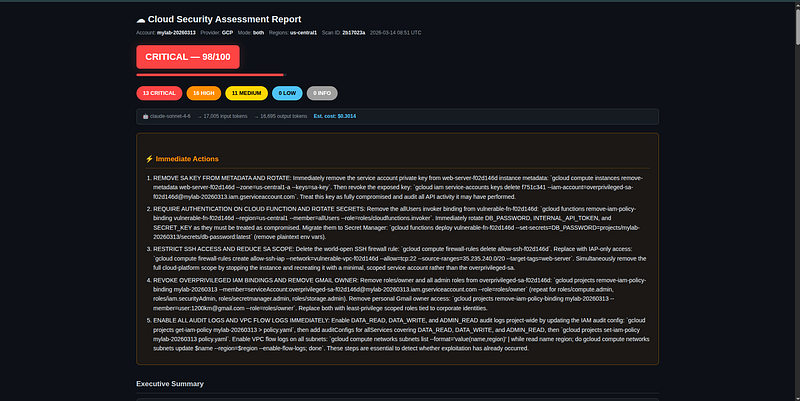
Lessons Learned
1. Don’t Trust boto3 Exception Attributes
# This looks right but can fail:
except
 s3.exceptions.ServerSideEncryptionConfigurationNotFoundError:
    ...
# This always works:
from botocore.exceptions import ClientError
except ClientError as e:
    if e.response["Error"]["Code"] == "ServerSideEncryptionConfigurationNotFoundError":
        ...
The boto3 exception factory sometimes doesn’t have attributes for less-common error codes. UsingClientError+ code string comparison is more robust and works identically in production and with moto.
2. Preprocess Before Sending to AI
Raw AWS output can be gigabytes. For a 500-function Lambda account, listing all functions returns ~2MB of JSON. Sending that to Claude is expensive and often exceeds context windows.
The preprocessor pattern — annotate issues, filter to only problematic items, truncate with a warning — reduces token costs by 80%+ on large accounts while preserving all security-relevant signal.
3. Error Isolation Is Non-Negotiable
If one scanner throws an exception, other scanners must still run. If one module’s AI analysis fails (e.g., response isn’t valid JSON), other modules must still be analyzed. If synthesis fails, partial results should still produce a report.
Every layer has independent try/except with logging. A failed scanner produces aModuleResultwitherrorset but doesn't crash the run.
4. Test With Fixtures, Not Live AWS
The entire test suite runs in 11 seconds with zero real AWS API calls. This means:
-
Tests run in CI without AWS credentials
-
Tests are deterministic — no flaky behavior from AWS rate limiting
-
Edge cases (no password policy, no buckets, malformed XML) are easy to test
-
You can run tests 100 times during development without cost
5. The Synthesis Stage Is Where AI Pays Off
Per-module analysis is useful but not transformative — a rule-based scanner could flag the same individual issues. The synthesis stage is what AI uniquely provides: identifying thatthree separate findings across three modulesform an exploitable attack chain that no human reviewer would have connected.
Example synthesis output:
> “Attack Chain: SSRF to Full Account Takeover
> Steps: 1) Exploit SSRF in Lambda function api-processor via unvalidated user input to HTTP endpoint parameter. 2) Access IMDSv1 metadata endpoint at 169.254.169.254 (EC2 instance i-0abc123 has IMDSv1 not disabled). 3) Retrieve IAM role credentials for ecs-task-role which has iam:PassRole and ec2:* . 4) Create new IAM user with AdministratorAccess. 5) Full account takeover achieved.
> Findings involved: lambda_ssrf_risk, ec2_imdsv1_enabled, iam_role_overprivileged_ecs_task Likelihood: HIGH | Impact: CRITICAL”
No traditional scanner produces output like this.
Cost and Performance
Typical Run Costs
The tiered model feature further reduces costs: simple modules (DNS, SSL, KMS, Secrets Manager) are automatically routed to cheaper models — Haiku, gpt-4o-mini, or gemini-flash — saving 30–50% on typical runs without any loss of finding quality.
Performance
On a medium-sized account with 9 modules:
-
Scanner phase: ~30–60 seconds (runs in parallel via ThreadPoolExecutor)
-
AI analysis: ~90–180 seconds (sequential per-module, network-bound)
-
Report generation: <1 second
Total: 2–4 minutes for a full assessment.
What’s Next
Shipped since the initial release:
-
GCP support— 7 scanner modules (IAM, Compute, Storage, Cloud Functions, Cloud Run, Secret Manager, Logging)
-
Multi-LLM support— Claude (Anthropic), GPT-4o/o1/o3/o4-mini (OpenAI), Gemini 2.0/1.5 (Google)
-
Tiered model selection— low-signal modules auto-downgrade to cheaper models (Haiku, gpt-4o-mini, gemini-flash)
-
**--context**flag— free-text environment description that sharpens AI severity ratings -
**deploy_wizard.sh**— interactive deployment wizard for AWS (ECS Fargate) and GCP (Cloud Run Job); handles auth, Artifact Registry setup, Secret Manager, and optional Cloud Scheduler in one flow -
Numbered project selection—
wizard.shanddeploy_wizard.shnow list all accessible GCP projects on your account so you can pick by number instead of typing a project ID
Features in progress:
-
Azure support— The architecture supports multiple providers; scanner modules are next
-
Drift detection— Compare two reports and highlight what changed (new public bucket, new IAM user without MFA)
-
Remediation automation— For select finding types, offer
--auto-fixmode that applies the remediation command -
GitHub Actions integration— Run on every Terraform plan/apply to catch misconfigs before they land
-
Custom rule support— YAML-based rules so teams can add company-specific checks
-
Multi-account scanning— Use AWS Organizations to scan all accounts in one run
Full Quick-Start Reference
# Clone and install
git
clone
 https://github.com/your-org/stratus-ai
cd
 stratus-ai
pip install -r requirements.txt
# Run tests (no cloud credentials needed)
pip install -r requirements-dev.txt
python -m pytest tests/ -v
# 125 passed
# ── AWS ───────────────────────────────────────────────────────────
export
 AWS_PROFILE=your-profile
export
 ANTHROPIC_API_KEY=sk-ant-...
stratus --provider aws
# internal scan
stratus --provider aws --mode both --target example.com
# + external scan
stratus --provider aws --severity HIGH
# HIGH+ only
stratus --provider aws --model gpt-4o
# use OpenAI
# Deploy to AWS (ECS Fargate)
cd
 terraform &&
cp
 terraform.tfvars.example terraform.tfvars
vim terraform.tfvars && terraform init && terraform apply
./deploy.sh
# build + push Docker image to ECR
# ── GCP ───────────────────────────────────────────────────────────
gcloud auth application-default login
export
 ANTHROPIC_API_KEY=sk-ant-...
stratus --provider gcp --project my-gcp-project
stratus --provider gcp --project my-gcp-project --mode both --target api.example.com
stratus --provider gcp --project my-gcp-project --model gemini-2.0-flash
# Deploy to GCP (Cloud Run Job) - interactive wizard handles everything
./deploy_wizard.sh
# ── Wizard (recommended for first run) ───────────────────────────
./wizard.sh
# guides through provider, credentials, AI model, options
Conclusion
StratusAI demonstrates what’s possible when you combine traditional infrastructure scanning with AI analysis. The individual pieces aren’t new: IAM scanning, S3 bucket analysis, nmap port scanning — these have existed for years in tools like ScoutSuite, Prowler, and Steampipe.
The difference is the AI layer:
-
Context-aware analysis: The LLM understands that “Lambda with SSRF risk + EC2 with IMDSv1 + overprivileged IAM role” is a specific attack path, not three unrelated findings. The same cross-module reasoning applies to GCP: “GCS bucket with
allUsers+ service account withroles/editor+ metadata server accessible = credential theft path." -
Intelligent prioritization: Instead of sorting 400 findings by severity, get a top-10 list ranked by actual exploitability onyourspecific account
-
Human-readable output: Executive summaries that explain what an attacker couldactually do, not just that “bucket versioning is disabled” or “Data Access audit logs are not enabled”
-
Specific remediation: Not “enable encryption” but
aws s3api put-bucket-encryption ...orgcloud projects set-iam-policy ... --member=... --role=roles/viewer -
Provider and model flexibility: Scan AWS or GCP; analyze with Claude, GPT-4o, or Gemini — switch with a single
--modelflag. Running a GCP scan with Gemini keeps everything within the Google ecosystem. -
Serverless deployment on both clouds: AWS ECS Fargate or GCP Cloud Run Job — deploy once, scan on a schedule, reports land in S3 or GCS automatically
The tool runs locally in 5 minutes, deploys to AWS or GCP for automated weekly runs, costs under $0.15 per assessment (or under $0.02 with Gemini), and produces reports your CISO will actually read.
All code is in the repository. The 125-test suite means you can modify anything with confidence.
All code in this article is from the StratusAI project. The tool is designed for authorized security assessments of AWS and GCP environments you own or have explicit permission to scan.