From Threat Intelligence to Detection: A Practitioner’s Guide
- Category: CTI
- Source article: https://medium.com/@1200km/from-threat-intelligence-to-detection-a-practitioner-s-guide-2d930b168426
- Published: 2026-04-14
- Preserved media: 22 image(s), including cover images, screenshots, diagrams, and infographics where present.
- Preserved technical blocks: 31 code/configuration block(s).
Ecosystem Fit
This page mirrors the original Medium article into the 1200km.com Docusaurus ecosystem. The original article flow, images, screenshots, infographics, and technical blocks are preserved from the export.
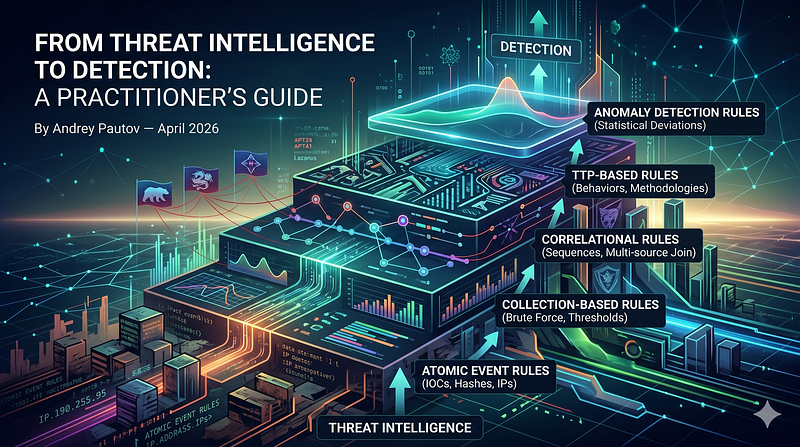
Building atomic, collection, correlational, TTP-based, and anomaly detection rules from real adversary behavior.
ByAndrey Pautov— April 2026
Table of Contents
-
Why IOC-Only Detection Fails
-
The Three APTs: Profiles and Why They Were Chosen
-
Detection Taxonomy
-
Atomic Event Rules
-
Collection-Based Rules
-
Correlational Rules
-
TTP-Based Rules
-
Anomaly Detection Rules
-
The Detection Chain: Layering All Five Tiers
-
Tuning, Validation, and Measurement
-
Rule Lifecycle and Versioning
-
Evasion Considerations
-
Key Sources
Why IOC-Only Detection Fails
The most common detection workflow in threat intelligence consumption looks like this: receive a report, extract IPs, domains, and file hashes, push them into your firewall and EDR blocklist, mark the ticket closed. This is useful as far as it goes — blocked infrastructure is blocked infrastructure — but it answers a question no sophisticated adversary actually leaves unanswered.
IP addresses rotate. Domains age out. Hashes are trivially changed with a recompile or packer swap. A threat actor who has been operating for more than a week has almost certainly burned the IOCs that appear in public reports, because those reports describe what was foundafterthe fact. By the time an IOC reaches your blocklist, the adversary has likely already moved.
The problem is structural. IOC-based detection operates at the very bottom of thePyramid of Pain— the layer where changing indicators costs the attacker almost nothing. Effective detection operates higher up the pyramid: at the level of tools, techniques, and ultimately behavioral patterns that are expensive for an adversary to modify because they are derived from operational necessity, not configuration choices.
This guide builds all five layers of detection from the behavior of three well-documented, sophisticated adversary groups. Each layer answers a different question:
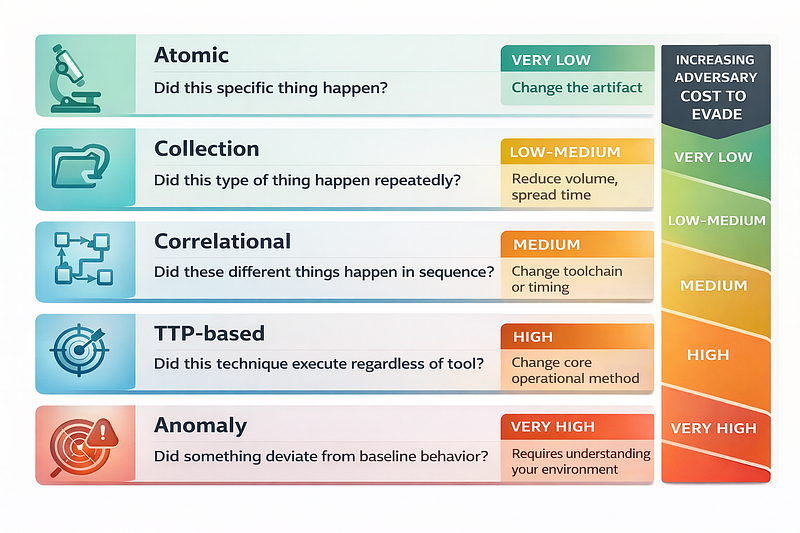
A detection program that only runs at the top row is noisy and incomplete. One that only runs at the bottom row misses everything that has rotated its indicators. The goal is to run all five layers simultaneously, with increasing alert confidence as you move up.
The Three APTs: Profiles and Why They Were Chosen
Three adversary groups were selected on four criteria: technical sophistication, public reporting depth, operational diversity, and breadth of TTPs that generate useful detection examples across all five layers.
1. APT29 — Midnight Blizzard / Cozy Bear (Russia, SVR)

**Classification:**Russian Foreign Intelligence Service (SVR), active since at least 2008 MITRE ATT&CK:G0016 **Primary mission:**Long-duration strategic espionage — government, diplomatic, think tank, and technology targets
**Why chosen:**APT29 is the canonical example of a patient, low-and-slow actor that lives almost entirely off legitimate infrastructure and signed tooling. Their 2019–2020 SolarWinds supply-chain operation (SUNBURST/TEARDROP) remains one of the most technically documented intrusions in open reporting. Their 2023–2024 Microsoft corporate network compromise via OAuth device-code phishing and application impersonation is thoroughly reported by Microsoft MSTIC. They generate rich examples for: supply chain detection, OAuth and SAML abuse, living-off-the-land detection, and long-dwell behavioral anomalies.
Key campaigns and public reporting:
-
**SUNBURST (SolarWinds):**FireEye/Mandiant Dec 2020, CISA AA20–352A, Microsoft MSTIC Dec 2020
-
**NOBELIUM / OAuth abuse:**Microsoft MSTIC Oct 2021, May 2023, Jan 2024
-
**Golden SAML:**CyberArk research, Mandiant 2021 follow-up
-
**WellMess / WellMail:**UK NCSC Jul 2020 advisory
Core TTP profile:
-
T1195.002 — Supply chain compromise via software build system
-
T1078.004 — Valid cloud accounts (Azure AD, M365)
-
T1550.001 — Application access token abuse
-
T1556.006 — Modify authentication process (Golden SAML)
-
T1059.001 — PowerShell
-
T1021.002 — SMB/WMI lateral movement
-
T1560.001 — Archive collected data
-
T1071.001 — Web protocols for C2 (HTTP/S to legitimate cloud services)
2. APT41 — Double Dragon / Winnti (China, MSS-linked)
**Classification:**China Ministry of State Security contractor/affiliated group, active since at least 2012 MITRE ATT&CK:G0096 **Primary mission:**Dual — state-directed espionage AND financially motivated cybercrime (ransomware, cryptocurrency theft, virtual goods)
**Why chosen:**APT41 is the clearest documented case of a single group conducting both state espionage and opportunistic cybercrime. Their toolset is wide, their targeting is broad, and their TTPs are well-documented across multiple vendor reports and U.S. DOJ indictments (2019, 2020). They generate excellent examples of: exploitation chain detection, supply chain DLL hijacking, custom malware staging, living-off-the-land with LOLBins, and multi-phase intrusion correlation.
Key campaigns and public reporting:
-
**Operation ShadowHammer (ASUS Live Update):**Kaspersky Apr 2019
-
**Healthcare/COVID research targeting:**FBI-CISA May 2020
-
**Citrix/ManageEngine exploitation wave:**Mandiant 2022–2023
-
**DOJ indictments:**Sep 2019 (two defendants), Sep 2020 (five defendants)
-
**KEYPLUG / DEADEYE / DUSTPAN malware family:**Mandiant Apr 2022
Core TTP profile:
-
T1190 — Exploit public-facing application (Citrix, ManageEngine, Log4Shell)
-
T1505.003 — Web shell deployment
-
T1574.002 — DLL side-loading (very characteristic of this group)
-
T1036.005 — Match legitimate name or location (masquerading)
-
T1055 — Process injection
-
T1003.001 — LSASS memory dump
-
T1021.006 — WinRM lateral movement
-
T1567.002 — Exfiltration to cloud storage
3. Lazarus Group — HIDDEN COBRA / Diamond Sleet / TraderTraitor (DPRK, RGB)

**Classification:**North Korean Reconnaissance General Bureau (RGB), active since at least 2009 MITRE ATT&CK:G0032 **Primary mission:**Revenue generation for the DPRK regime (cryptocurrency theft, financial fraud, sanctions evasion) AND targeted espionage (defense, nuclear, aerospace)
**Why chosen:**Lazarus provides the richest set of social-engineering-to-intrusion chain examples and is uniquely documented for financial system targeting. Operation Dream Job (fake LinkedIn recruitment), AppleJeus (trojanized crypto software), and the 3CX supply chain compromise give concrete cases for initial access detection. TraderTraitor is documented extensively by CISA, FBI, and the UN Panel of Experts. They generate excellent examples of: initial access via social engineering, cross-platform malware, BYOVD (bring-your-own-vulnerable-driver), and financial API abuse.
Key campaigns and public reporting:
-
**Operation AppleJeus:**Kaspersky Aug 2018, CISA Apr 2021 advisory (AA21–048A)
-
**Operation Dream Job:**ClearSky Jan 2020, Mandiant 2022 follow-up
-
**TraderTraitor (crypto targeting):**CISA/FBI/Treasury Apr 2022, FBI Mar 2023
-
**3CX Supply Chain:**Mandiant/CrowdStrike Apr 2023
-
**BYOVD (Dell DBUtil / POORTRY):**Mandiant Aug 2022, Microsoft Oct 2022
-
**UN Panel of Experts reports:**2021, 2022, 2023
Core TTP profile:
-
T1566.002 — Spear-phishing link (LinkedIn, email with weaponized PDF/ZIP)
-
T1204.002 — User execution of malicious file
-
T1195.002 — Supply chain compromise (3CX, trading software)
-
T1014 — Rootkit (BYOVD with POORTRY/WHIPEDOUT)
-
T1059.001 / T1059.003 — PowerShell and cmd scripting
-
T1041 / T1071.001 — Exfiltration and C2 over HTTPS
-
T1657 — Financial theft (cryptocurrency exchange API abuse)
-
T1070.004 — File deletion / indicator removal
Detection Taxonomy
Before building rules, it helps to be precise about what each tier detects and what data sources it requires.
Detection Layer Definitions
Atomic Event Rulesmatch a single telemetry event against a known-bad signature. The logic is essentially:IF event.field == bad_value THEN alert. No context required, no lookback, no correlation. Fastest to write, fastest to evade.
Collection-Based Rulesaggregate multiple events of thesame typeover a time window and alert when a threshold is crossed:IF count(event_type, 10 minutes) > threshold THEN alert. These detect volume-based techniques like brute force, port scanning, or bulk data staging.
Correlational Rulesjoindifferentevent types — process creation, network connection, file write, authentication — in a temporal sequence tied to a common entity (host, user, process). They model cause-and-effect chains: the attacker did A, then B, then C. Changing any one link breaks the rule; changing all three breaks the campaign.
TTP-Based Rulesdetect atechnique, not a specific tool implementing that technique. A TTP-based rule for credential dumping fires whether the actor uses Mimikatz, ProcDump, comsvcs.dll, or a custom tool — because all of them must access LSASS memory in a way that leaves a detectable behavioral footprint, regardless of file hash.
Anomaly Detection Rulesestablish a behavioral baseline per entity (user, host, service account, application) and alert on statistically significant deviations. They require historical data, a meaningful baseline period, and tolerance tuning. They are the hardest to build, the noisiest when poorly tuned, and the hardest for an adversary to evade in a well-baselined environment.
Required Log Sources by Layer
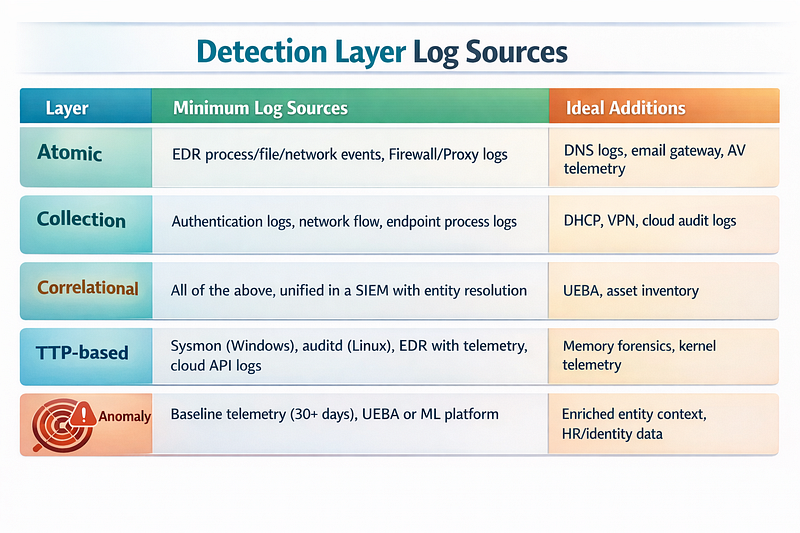
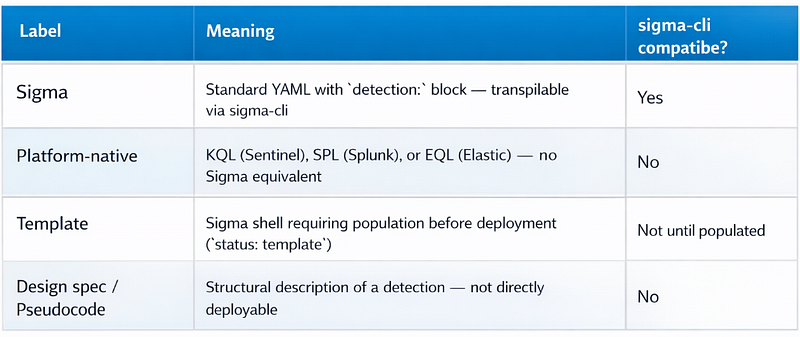
**Rule format guide:**This article uses four distinct formats, indicated in each section header or code block:
Atomic Event Rules
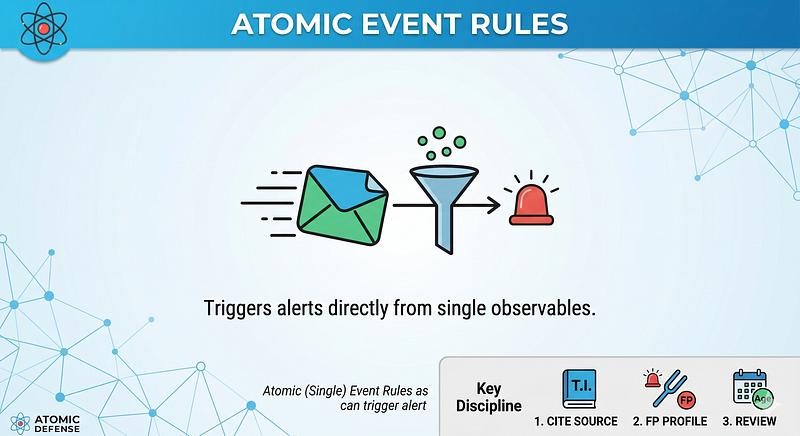
Atomic rules are the foundation. They are fast, deterministic, and directly traceable to a specific observable from a threat report. The key discipline is:every atomic rule must cite its source, have a defined false-positive profile, and be reviewed for continued relevance because indicators age out.
[Single-Event Detection Rules in Cybersecurity Introduction
1. APT29 — SUNBURST DLL Loaded by SolarWinds Process
SUNBURST was delivered as a trojanized update toSolarWinds.Orion.Core.BusinessLayer.dll. The backdoor checked for the presence of specific security tools and domains before activating, with a dormancy period of up to two weeks. The most reliable atomic indicator during initial triage was the combination of parent process, DLL path, and subsequent DNS activity.
title:

SUNBURST

Backdoor

DLL

Load

-

SolarWinds

Orion
id:

4a3f1c2e-8b7d-4e9f-a2c5-1d6e8f3b7a4c
status:

experimental
description:

>
  Fires when the SolarWinds Orion business layer DLL is loaded by the expected
  Orion host process. This is a triage trigger, not a high-confidence alert:
  the detection condition (parent + DLL path) matches both the trojanized and
  the legitimate DLL equally. The analyst must compare the loaded DLL hash
  against vendor-supplied known-good hashes to determine whether this event
  represents the SUNBURST backdoor or a normal Orion update. Use this rule to
  ensure every Orion DLL load is reviewed, not to declare an incident.
references:

-

https://www.mandiant.com/resources/blog/evasive-attacker-leverages-solarwinds-supply-chain-compromises-with-sunburst-backdoor

-

https://msrc.microsoft.com/blog/2020/12/customer-guidance-on-recent-nation-state-cyber-attacks/
author:

Detection

Engineering
date:

2020-12-14
modified:

2024-01-01
tags:

-

attack.initial_access

-

attack.t1195.002

-

apt29

-

sunburst
logsource:

category:

image_load

product:

windows
detection:

selection:

ImageLoaded|endswith:

'\SolarWinds.Orion.Core.BusinessLayer.dll'

Image|endswith:

'\SolarWinds\Orion\SolarWinds.BusinessLayerHost.exe'

condition:

selection
falsepositives:

-

Legitimate

SolarWinds

Orion

updates

—

verify

DLL

hash

against

known-good

values

from

vendor

in

your

triage

workflow.

Alert

on

any

hash

NOT

in

your

approved

baseline.

This

rule

fires

on

the

parent/child

relationship;

hash

validation

is

a

manual

triage

step,

not

part

of

the

detection

condition.
level:

medium

# Triage trigger only — fires on benign Orion updates too. Confidence is

# determined by the analyst's hash comparison, not by this rule alone.
**Detection note:**This is a triage rule, not a high-confidence alert. It fires on the parent/child process relationship — which matches both the malicious and legitimate DLL equally. Every fire requires the analyst to compare the loaded DLL hash against vendor-supplied known-good values before any escalation. The rule’s value is ensuring no Orion DLL load goes unreviewed, not detecting the backdoor directly. Hash validation against vendor-supplied known-good values is a manual triage step: compare the loaded DLL hash against your approved SolarWinds baseline after the rule fires. This design keeps the detection alive against packer-modified variants while ensuring the analyst always verifies the hash before escalating.
2. APT41 — Web Shell Creation in IIS Web Root
APT41 consistently deploys web shells immediately after exploiting public-facing applications (Citrix, ManageEngine, Exchange). The shell is written to the web root by the compromised web application process. This is one of the highest-fidelity single-event detections available for this actor.
title:

Web

Shell

Created

by

IIS

Worker

Process
id:

7b2e4f1a-3c9d-4b8e-f1a7-2e5c8d3b6f9a
status:

experimental
description:

>
  Detects file creation of known web shell extensions in IIS web root paths
  by the IIS worker process (w3wp.exe). APT41 consistently uses this pattern
  immediately after exploiting public-facing applications. This is a high-confidence
  indicator of post-exploitation web shell deployment.
references:

-

https://www.mandiant.com/resources/blog/apt41-us-state-governments

-

https://www.cisa.gov/news-events/cybersecurity-advisories/aa22-277a
author:

Detection

Engineering
date:

2022-03-15
tags:

-

attack.persistence

-

attack.t1505.003

-

apt41
logsource:

category:

file_event

product:

windows
detection:

selection_process:

Image|endswith:

-

'\w3wp.exe'

-

'\tomcat.exe'

-

'\java.exe'

selection_extension:

TargetFilename|endswith:

-

'.aspx'

-

'.asp'

-

'.ashx'

-

'.asmx'

-

'.php'

-

'.jsp'

-

'.jspx'

selection_path:

TargetFilename|contains:

-

'\inetpub\wwwroot\'
      - '
\Inetpub\wwwroot\'

-

'\wwwroot\'
  filter_legitimate:
    TargetFilename|contains:
      - '
\App_Data\'

-

'\obj\'
  condition: selection_process and selection_extension and selection_path and not filter_legitimate
falsepositives:
  - Application deployments by legitimate CI/CD pipelines using the same process
  - Content management system uploads (if CMS runs under w3wp.exe)
  - Mitigate with change-window allowlisting
level: critical
3. Lazarus — Trojanized Installer Executed from User Download Path
Lazarus’s AppleJeus and Dream Job operations deliver trojanized installers to targets, typically via spear-phishing or fake LinkedIn job offers. The trojanized application is executed from a user download or temp path and immediately spawns a child process inconsistent with the legitimate application behavior.
title:

Suspicious

Installer

Spawning

Unexpected

Child

Process
id:

9c4e2a7f-5d1b-4c8e-b3f6-7a2e9d4c1b8f
status:

experimental
description:

>
  Detects installer-type executables (MSI, NSIS-style) spawning unexpected
  child processes from user-writable paths. Characteristic of Lazarus Group
  trojanized installer delivery (AppleJeus, Dream Job operations).
  The trojanized installer appears legitimate but spawns a second-stage dropper.
references:

-

https://securelist.com/operation-applejeus/87553/

-

https://www.cisa.gov/sites/default/files/publications/AppleJeus_Report_508.pdf
author:

Detection

Engineering
date:

2021-05-01
tags:

-

attack.execution

-

attack.t1204.002

-

attack.initial_access

-

attack.t1566.002

-

lazarus
logsource:

category:

process_creation

product:

windows
detection:

selection_parent:

ParentImage|endswith:

-

'\msiexec.exe'

-

'\setup.exe'

-

'\install.exe'

-

'\installer.exe'

ParentCommandLine|contains:

-

'\Users\'
      - '
\AppData\Local\Temp\'

-

'\Downloads\'
  selection_suspicious_child:
    Image|endswith:
      - '
\powershell.exe'

-

'\cmd.exe'

-

'\wscript.exe'

-

'\cscript.exe'

-

'\mshta.exe'

-

'\regsvr32.exe'

-

'\rundll32.exe'

condition:

selection_parent

and

selection_suspicious_child
falsepositives:

-

Legitimate

software

installers

that

invoke

PowerShell

for

post-install

config

-

Suppress

with

signed-installer

allowlist

(verify

Authenticode

chain)
level:

high
4. APT29 — TEARDROP Execution via Encoded Command
TEARDROP was APT29’s second-stage memory-only dropper used to load Cobalt Strike Beacons after SUNBURST. It was observed executing via heavily encoded PowerShell commands. The following rule detects the specific encoding pattern combined with a suspicious parent relationship.
title:

Heavily

Encoded

PowerShell

with

Suspicious

Parent

(TEARDROP

Pattern)
id:

2f8a1c4e-6d3b-4f7a-c2e8-5b1d4f8c3e7a
status:

experimental
description:

>
  Detects PowerShell executing with base64-encoded commands and suspicious
  parent processes. Associated with APT29 TEARDROP dropper behavior
  post-SUNBURST compromise. The combination of encoded command, explicit
  bypass flags, and non-standard parent is highly suspicious.
references:

-

https://www.microsoft.com/security/blog/2020/12/18/analyzing-solorigate-the-compromised-dll-file-that-started-a-sophisticated-cyberattack/
author:

Detection

Engineering
date:

2020-12-20
tags:

-

attack.execution

-

attack.t1059.001

-

attack.defense_evasion

-

attack.t1027

-

apt29
logsource:

category:

process_creation

product:

windows
detection:

selection_powershell:

Image|endswith:

-

'\powershell.exe'

-

'\pwsh.exe'

selection_encoded:

CommandLine|contains:

-

' -EncodedCommand '

-

' -enc '

-

' -e '

selection_bypass:

CommandLine|contains:

-

'-ExecutionPolicy Bypass'

-

'-ep bypass'

-

'-nop'

-

'-NonInteractive'

selection_suspicious_parent:

ParentImage|endswith:

-

'\SolarWinds.BusinessLayerHost.exe'

-

'\mmc.exe'

-

'\wbem\WmiPrvSE.exe'

-

'\services.exe'

condition:

selection_powershell

and

selection_encoded

and

selection_bypass

and

selection_suspicious_parent
falsepositives:

-

Legitimate

management

tools

using

encoded

PowerShell

for

config

tasks

-

Baseline

against

known-good

management

automation

before

deploying
level:

high
5. Cross-Platform: Linux /proc/mem Access by Non-Root Process
On Linux, credential material is stored in process memory — SSH agent keys, sudo session tokens, cloud credential daemons (aws-credentials-helper, gcloud auth), and application secrets all live in the address space of running processes. Adversaries who compromise Linux hosts use/proc/<pid>/memdirect reads orptrace(PTRACE_PEEKDATA)to extract credential material from live processes without touching disk. This is the functional Linux equivalent of LSASS memory access on Windows: the underlying technique is the same (read another process's memory to steal credentials), only the OS mechanism differs.
title:

Suspicious

/proc/mem

Access

or

ptrace

on

Credential

Process

by

Non-Root
id:

3b8f2e1a-6c4d-4b9f-e2a1-8c3f6d2b5e4a
status:

experimental
description:

>
  Detects non-root processes opening /proc/<pid>/mem for reading, or
  issuing ptrace(PTRACE_PEEKDATA) calls, against processes that hold
  credential material (sshd, sudo, cloud credential helpers).
  This is the Linux functional equivalent of LSASS memory access (T1003.001)
  and is used by adversaries to extract credentials from live process memory
  without writing to disk. Requires auditd with SYSCALL auditing enabled.
references:

-

https://attack.mitre.org/techniques/T1003/007/

-

https://www.man7.org/linux/man-pages/man2/ptrace.2.html
author:

Detection

Engineering
date:

2024-03-01
tags:

-

attack.credential_access

-

attack.t1003.007
logsource:

product:

linux

service:

auditd

# SCHEMA NOTE: In auditd SYSCALL records, a0–a3 are syscall arguments

# stored as hex integers, NOT as string paths. The filepath accessed by

# open/openat appears in a correlated PATH record (type=PATH, nametype=NORMAL)

# sharing the same serial number. Standard Sigma cannot express this

# cross-record join natively; the detection below uses the auditd key field

# (set via -k in audit rules) as the primary filter, combined with the

# SIEM-level PATH record join described in the implementation note.

#

# Use the auditd -k (key) flag to tag relevant syscalls, then filter in

# your SIEM on the key and join PATH records to confirm the /proc/*/mem path.
detection:

selection_proc_mem_open:

type:

'SYSCALL'

syscall:

-

'open'

-

'openat'

key:

'proc_mem_access'

# set by auditd rule: -k proc_mem_access

uid|not:

'0'

# Path filter (/proc/<pid>/mem) must be applied at SIEM level by joining

# the PATH record (type=PATH, nametype=NORMAL, name|contains='/proc/')

# that shares the same serial number as this SYSCALL record.

selection_ptrace_peek:

type:

'SYSCALL'

syscall:

'ptrace'

key:

'ptrace_peek'

# set by auditd rule: -k ptrace_peek

# a0 holds PTRACE_PEEKDATA (2) or PTRACE_PEEKTEXT (1)

# auditd logs a0–a3 as unsigned decimal integers WITHOUT 0x prefix

# in most kernel/auditd configurations. PTRACE_PEEKTEXT=1, PTRACE_PEEKDATA=2.

a0:

-

'1'

-

'2'

uid|not:

'0'

filter_target_process_benign:

# Filter known-safe callers by the CALLING process name (comm field)

# For target-process filtering (sshd, sudo), join OBJ_PID records

# in the SIEM — see implementation note below

comm|not:

-

'gdb'

-

'strace'

# Implementation note: auditd does not expose the target PID's process name

# in the SYSCALL record for /proc/<pid>/mem reads. To confirm the TARGET

# process is a credential holder (sshd, sudo, cloud-credential-helper),

# extract the numeric PID from the PATH record name field, then join against

# a concurrent PROCTITLE or EXECVE record with matching pid in the SIEM.

condition:

(selection_proc_mem_open

or

selection_ptrace_peek)

and

not

filter_target_process_benign
falsepositives:

-

Debuggers

(gdb,

strace)

run

by

developers

—

allowlist

by

supplementary

group

membership

(e.g.,

members

of

'debugger'

or

'dev'

group)

-

Java

and

JVM

profilers

that

use

/proc/*/mem

for

heap

inspection

-

Some

container

runtimes

that

inspect

child

process

memory

during

startup

-

Suppress

known-safe

callers

by

binary

path

and

UID,

not

just

process

name
level:

high
Auditd prerequisite rules(add to/etc/audit/rules.d/credential-memory.rules):
# Monitor open/openat syscalls by any non-root process and tag with key.
#
NOTE:
 -F path=/proc monitors the /proc directory inode only — it does NOT
# match /proc/<pid>/mem subdirectory paths. Path filtering must be done at
# the SIEM layer by joining the PATH record (nametype=NORMAL) that shares
# the same serial number as this SYSCALL record.
-
a always
,
exit
-
F
 arch
=
b64
-
S open
,
openat
-
F
 uid
!=
0

-
k proc_mem_access
# Monitor ptrace PEEKDATA (a0=2) and PEEKTEXT (a0=1) calls by non-root.
# auditd -F a0= uses decimal values; auditd logs a0 in hex in the record,
# but the -F filter and Sigma a0 field both use decimal integers.
-
a always
,
exit
-
F
 arch
=
b64
-
S ptrace
-
F
 a0
=
1

-
F
 uid
!=
0

-
k ptrace_peek
-
a always
,
exit
-
F
 arch
=
b64
-
S ptrace
-
F
 a0
=
2

-
F
 uid
!=
0

-
k ptrace_peek
Collection-Based Rules
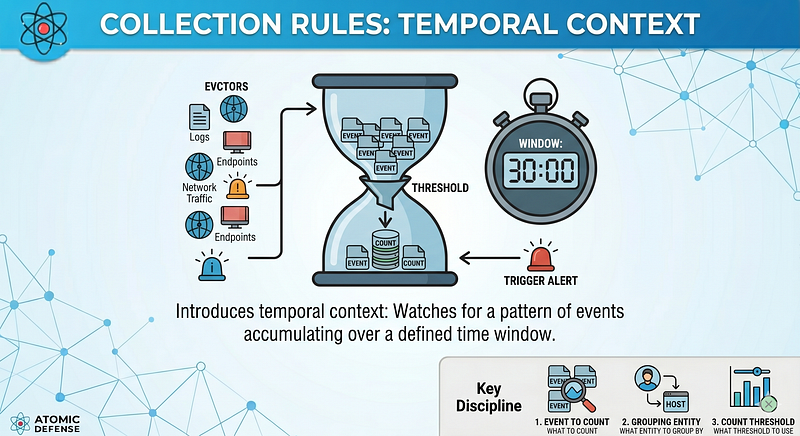
Collection rules introduce temporal context. Rather than a single event, they watch for a pattern of events of the same type accumulating over a time window. The key design decisions are: what to count, what entity to group by, and what threshold to use.
Thresholds should be derived from your baseline, not invented. If you don’t know your normal authentication failure rate, you will either miss attacks or generate constant noise.
> Backend note: The rules in this section use Sigma’s aggregation syntax ( timeframe: + condition: ... | count() by ... ). This syntax is valid Sigma, but backend support varies. The Splunk, Elastic, and Sentinel backends in sigma-cli each transpile aggregation pipes differently. Test the transpiled output against your specific backend before deploying — the aggregated SPL or KQL may require minor adjustments to threshold syntax or field grouping.
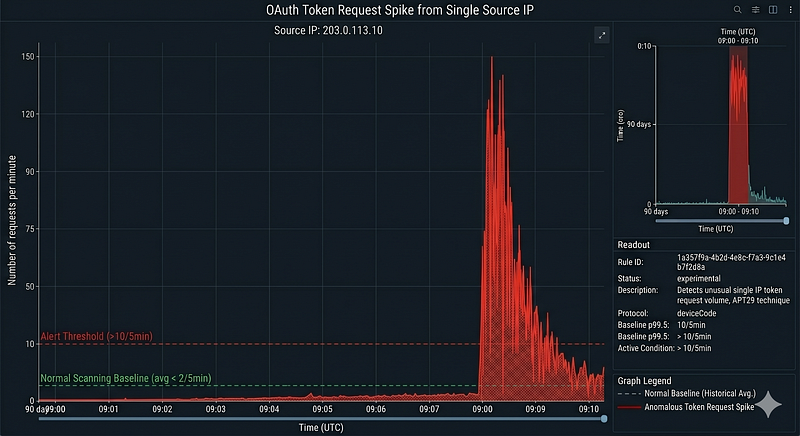
1. APT29 — Spike in OAuth Token Requests from a New IP
APT29’s 2023–2024 Microsoft intrusion abused OAuth device-code flow to obtain tokens for Microsoft Graph API access. The pattern involved a single source IP generating many token requests across multiple accounts. A collection rule catches the volume before a correlational rule catches the sequence.
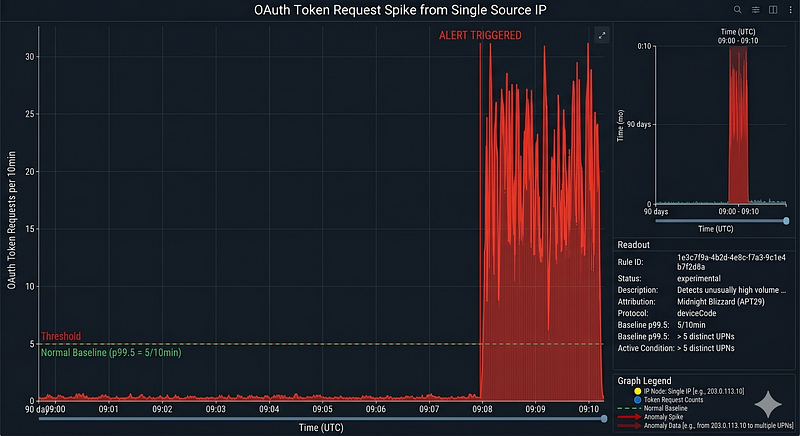
title: OAuth Token Request Spike from Single Source IP
id: 1e3c7f9a-4b2d-4e8c-f7a3-9c1e4b7f2d8a
status: experimental
description: >
  Detects an unusually high volume of OAuth2 token requests originating from
  a single IP address within a short time window. APT29 used this pattern
  in device-code phishing campaigns targeting M365 and Azure AD tenants.
  Baseline your
normal token-request rate before setting thresholds.
  Attribution note
: this technique is associated with Midnight Blizzard (APT29),

NOT
 Volt Typhoon — these are distinct threat actors with no shared TTPs in
  this technique.
  Threshold
note
: run '
count
(distinct UserPrincipalName) by IPAddress,

bin
(TimeGenerated,
10
m)' against
90
 days of historical SigninLogs
and
 set
  the threshold at p99.
5
 of that distribution per IP,
not
 a global constant.
references
:
  -
https
:
//msrc.microsoft.com/blog/2024/01/microsoft-actions-following-attack-by-nation-state-actor-midnight-blizzard/
  -
https
:
//www.microsoft.com/en-us/security/blog/2023/09/14/midnight-blizzard-compromises-microsoft-corporate-email-accounts/
author
: Detection Engineering
date
:
2024
-
01
-
26
tags
:
  - attack.credential_access
  - attack.t1528
  - attack.initial_access
  - attack.t1566
  - apt29
logsource
:

product
: azure

service
: signinlogs
detection
:

selection
:

ResultType
:
'0'
  # Successful token issuance

TokenIssuerType
:
'AzureAD'

AuthenticationProtocol
:
'deviceCode'

timeframe
:
10
m

condition
: selection |
count
(UserPrincipalName) by IPAddress >
5
  # PLACEHOLDER — replace with value from your
90
-day baseline p99 per source IP. The value
5
 is illustrative only.
falsepositives
:
  - Automated provisioning workflows performing device enrollment
  - VPN concentrators appearing as single IP for many users
level
: high
# Splunk equivalent:
# index=azure_signinlogs ResultType=0 AuthenticationProtocol=deviceCode
# | bucket _time span=10m
# | stats dc(UserPrincipalName) as unique_users by _time, IPAddress
# | where unique_users > 5
2. APT41 — Repeated Exploitation Attempts Against Same Service
APT41 systematically probes and exploits public-facing services. Their pattern frequently shows multiple exploitation payloads in rapid succession against the same endpoint — testing different bypass variants — before a successful shell. A collection rule on WAF/IDS events or web server error logs catches this preparatory phase.
title:

Repeated

Web

Application

Exploitation

Attempts

from

Single

Source
id:

3d7b2e5a-8f1c-4d9e-a3b7-2f5c8d1e4b7f
status:

experimental
description:

>
  Detects multiple web application exploitation attempt signatures
  (SQL injection, command injection, path traversal, deserialization)
  originating from a single IP against the same target within a short window.
  Characteristic of APT41 pre-exploitation enumeration against Citrix,
  ManageEngine, and Exchange endpoints.
references:

-

https://www.mandiant.com/resources/blog/apt41-initiates-global-intrusion-campaign-using-multiple-exploits
author:

Detection

Engineering
date:

2022-06-01
tags:

-

attack.initial_access

-

attack.t1190

-

apt41
logsource:

category:

webserver

product:

iis

# Field names below (sc-status, cs-uri-query, c-ip) are IIS W3C Extended

# Log Format fields. For Apache Combined Log Format, replace with:

# sc-status → status, cs-uri-query → request, c-ip → clientip.

# Adjust logsource product accordingly.
detection:

selection_exploit_pattern:

sc-status:

-

'400'

-

'403'

-

'404'

-

'500'

cs-uri-query|contains:

-

'../'

-

'%2e%2e'

-

'cmd='

-

'exec('

-

'${jndi:'

-

'union+select'

-

'eval('

-

'Runtime.exec'

timeframe:

5m

condition:

selection_exploit_pattern

|

count()

by

c-ip

>

10
falsepositives:

-

Legitimate

penetration

tests

(coordinate

with

red

team

schedule)

-

Vulnerability

scanners

(allowlist

known

scanner

IPs)
level:

high
3. Lazarus — Bulk File Staging Before Exfiltration
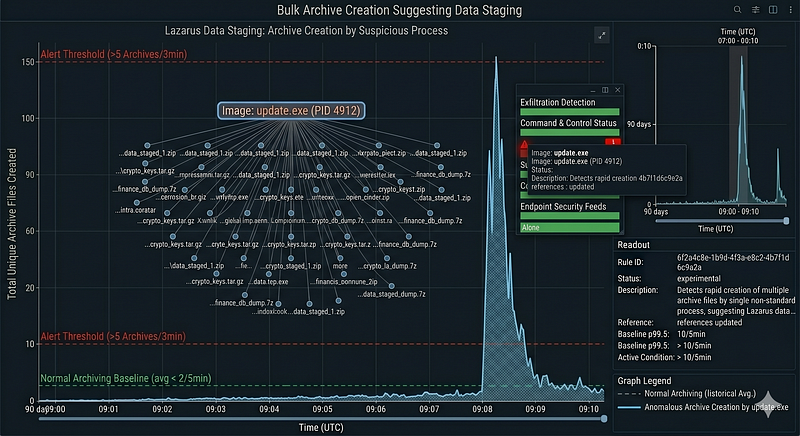
Before exfiltrating cryptocurrency wallet files or financial documents, Lazarus operators stage data by compressing it into archives. A collection rule watching for rapid creation of multiple archive files by a single process catches this staging behavior regardless of the specific archiver used.
title:

Bulk

Archive

Creation

Suggesting

Data

Staging
id:

6f2a4c8e-1b9d-4f3a-e8c2-4b7f1d6c9e2a
status:

experimental
description:

>
  Detects rapid creation of multiple archive files (ZIP, 7z, RAR, tar) by
  a single non-standard process. Lazarus Group consistently stages data into
  compressed archives prior to exfiltration. This rule catches the staging
  phase before exfiltration begins.
references:

-

https://www.cisa.gov/sites/default/files/2023-04/aa23-108a_joint_csa_dprk_cryptocurrency_theft_0.pdf
author:

Detection

Engineering
date:

2023-04-20
tags:

-

attack.collection

-

attack.t1560.001

-

attack.exfiltration

-

lazarus
logsource:

category:

file_event

product:

windows
detection:

selection_archive:

TargetFilename|endswith:

-

'.zip'

-

'.7z'

-

'.rar'

-

'.tar'

-

'.tar.gz'

-

'.tgz'

filter_legitimate_archivers:

Image|endswith:

-

'\7z.exe'

-

'\WinRAR.exe'

-

'\WinZip.exe'

timeframe:

3m

condition:

(selection_archive

and

not

filter_legitimate_archivers)

|

count(TargetFilename)

by

Image

>

5

# Parentheses required — pipe operator has lower precedence than 'and'/'not' in Sigma
falsepositives:

-

Backup

software

creating

many

archives

rapidly

-

CI/CD

build

pipelines

packaging

artifacts

-

Allowlist

known

backup

and

build

process

images
level:

medium
Correlational Rules
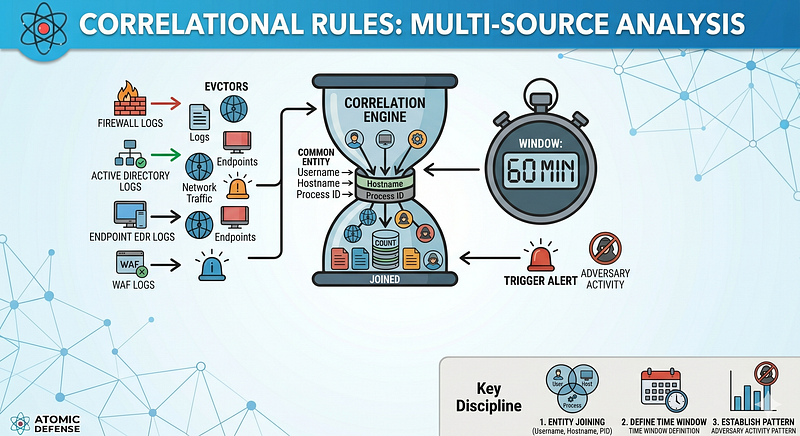
Correlational rules are where detection becomes genuinely difficult for an adversary to evade without restructuring their operation. They require a SIEM capable of joining events across different log sources on a common entity — typically hostname, username, or process ID — within a defined time window.
The discipline here is choosing the right entities for joining and keeping correlation windows tight enough to reduce noise but wide enough to capture the actual technique timing.
1. APT29 — OAuth Token Grant Followed by Immediate Privileged Graph API Access
The 2024 Midnight Blizzard intrusion into Microsoft’s corporate network followed a specific sequence: device-code phishing → token grant → immediate access to Microsoft Graph API for email and file enumeration. The correlation across authentication logs and application activity logs is highly specific.
PLATFORM-NATIVE ANALYTIC — Microsoft Sentinel KQL*(Not expressible as standard Sigma: requires cross-table join between SigninLogs and MicrosoftGraphActivityLogs with temporal window logic. Sigma has no native multi-source join or timeframe-with-offset semantics.)*
Prerequisites:
-
SigninLogsingested into Log Analytics workspace (Azure AD diagnostic settings) -
MicrosoftGraphActivityLogsingested (Microsoft 365 diagnostic settings → Log Analytics) -
Both tables must be present for the join to produce results
**ATT&CK:**T1528 (Steal Application Access Token), T1087.004 (Cloud Account Discovery) **Tags:**apt29, midnight-blizzard References:
-
Microsoft MSRC, January 2024:https://msrc.microsoft.com/blog/2024/01/microsoft-actions-following-attack-by-nation-state-actor-midnight-blizzard/
-
Microsoft Security Blog, January 2024:https://www.microsoft.com/en-us/security/blog/2024/01/25/midnight-blizzard-guidance-for-responders-on-nation-state-attack/
**False positives:**Legitimate users accessing email immediately after OAuth grant on a new device. Allowlist known corporate IP ranges and managed device identifiers.
**Confidence when fires:**Critical — device-code token grant → privileged Graph access within 5 minutes is highly anomalous.

// Platform: Microsoft Sentinel
// IMPORTANT JOIN
NOTE:
 MicrosoftGraphActivityLogs.UserId is an Azure AD
// object GUID (e.g. "f47ac10b-58cc-4372-a567-0e02b2c3d479").
// SigninLogs.UserPrincipalName is a UPN string (e.g. "user@contoso.com").
// Joining on UserPrincipalName when the GraphAccess side carries a GUID
// returns zero results. Join on UserId (GUID) present in both tables.
let
 TokenGrants =
    SigninLogs
    |
where
 AuthenticationProtocol ==
"deviceCode"
    |
where
 ResultType ==
0
    | project
        TokenTime         = TimeGenerated,
        UserId,
// GUID — join key
        UserPrincipalName,
// UPN — display only
        IPAddress,
        CorrelationId;
let
 GraphAccess =
    MicrosoftGraphActivityLogs
    |
where
 RequestUri
has_any
 (
"/me/messages"
,
"/users"
,
"/me/drive"
,
"/directory"
)
    |
where
 ResponseStatusCode
between
 (
200
 ..
299
)
    | project
        GraphTime
  = TimeGenerated,
        UserId,
// GUID — join key
        RequestUri;
TokenGrants
|
join
 kind=inner (GraphAccess)
on
 UserId
|
where
 GraphTime
between
 (
TokenTime .. (TokenTime +
5
m
))
| project
    TokenTime,
    GraphTime,
    UserId,
    UserPrincipalName,
    IPAddress,
    RequestUri,
    CorrelationId
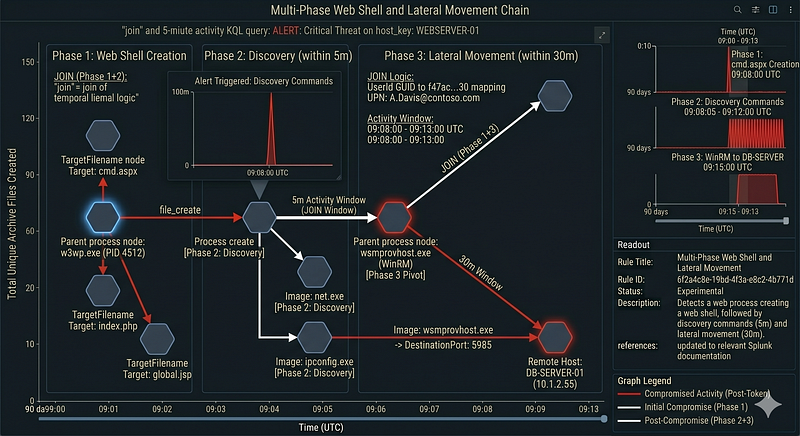
2. APT41 — Exploitation → Web Shell → Lateral Movement Chain
APT41’s intrusion pattern is highly predictable: exploit a public-facing service, write a web shell, use the web shell to execute discovery commands, then move laterally via WMI or WinRM. Each step leaves traces in different log sources; the correlational rule joins them.
PLATFORM-NATIVE DESIGN SPEC — Splunk SPL pseudocode*(Not expressible as standard Sigma: requires multi-event temporal join across three different log sources — Sysmon Event IDs 11, 1, and 3 — within a time-windowed sequence. Sigma has no native multi-source sequence correlation syntax.)*
**ATT&CK:**T1505.003 (Web Shell), T1016 (System Network Configuration Discovery), T1021.006 (WinRM Lateral Movement) **Tags:**apt41 References:
-
Mandiant:https://www.mandiant.com/resources/blog/apt41-us-state-governments
-
DOJ indictment:https://www.justice.gov/opa/pr/seven-international-cyber-defendants-including-apt41-associates-charged-connection-computer
**False positives:**Legitimate application deployments writing ASPX followed by diagnostics. Coordinate with change management to suppress during planned deployments.
**Confidence when fires:**Critical — three-phase chain within 30 minutes is high-confidence APT41-style post-exploitation.
|
 comment
"DESIGN SPEC — adapt index names, field names, and time windows to your environment"
|
 comment
"Phase 1: Web shell file creation by web application process"
index
=
YOUR_SYSMON_INDEX

EventCode
=
11

Image

IN
 (
"*
\\
w3wp.exe"
,
"*
\\
java.exe"
,
"*
\\
tomcat.exe"
)

TargetFilename

IN
 (
"*.aspx"
,
"*.asp"
,
"*.php"
,
"*.jsp"
,
"*.jspx"
)
|
 eval phase1_time
=
_time, host_key
=
host
|
 table host_key, phase1_time,
TargetFilename
|
 comment
"Phase 2: Discovery commands from web process (within 5 min of phase 1)"
|
 join type
=
inner host_key [
    search index
=
YOUR_SYSMON_INDEX

EventCode
=
1

ParentImage

IN
 (
"*
\\
w3wp.exe"
,
"*
\\
java.exe"
,
"*
\\
tomcat.exe"
)

Image

IN
 (
"*
\\
whoami.exe"
,
"*
\\
net.exe"
,
"*
\\
ipconfig.exe"
,

"*
\\
nltest.exe"
,
"*
\\
systeminfo.exe"
,
"*
\\
quser.exe"
)

|
 eval phase2_time
=
_time, host_key
=
host

|

where
 phase2_time
>=
 phase1_time
AND
 phase2_time
<=
 phase1_time
+

300

|
 table host_key, phase2_time
]
|
 comment
"Phase 3: WMI/WinRM lateral movement (within 30 min of phase 1)"
|
 join type
=
inner host_key [
    search index
=
YOUR_SYSMON_INDEX

EventCode
=
3

Image

IN
 (
"*
\\
wmiprvse.exe"
,
"*
\\
wsmprovhost.exe"
)

DestinationPort

IN
 (
"5985"
,
"5986"
,
"135"
)

NOT
 [ search index
=
YOUR_SYSMON_INDEX

EventCode
=
3

|

where
 cidrmatch(
"10.0.0.0/8"
,
DestinationIp
)

OR
 cidrmatch(
"192.168.0.0/16"
,
DestinationIp
)

OR
 cidrmatch(
"172.16.0.0/12"
,
DestinationIp
) ]

|
 eval phase3_time
=
_time, host_key
=
host

|

where
 phase3_time
>=
 phase1_time
AND
 phase3_time
<=
 phase1_time
+

1800

|
 table host_key, phase3_time
]
|
 table host_key, phase1_time, phase2_time, phase3_time,
TargetFilename
3. Lazarus — Spear Phish Execution → Persistence → C2 Beacon
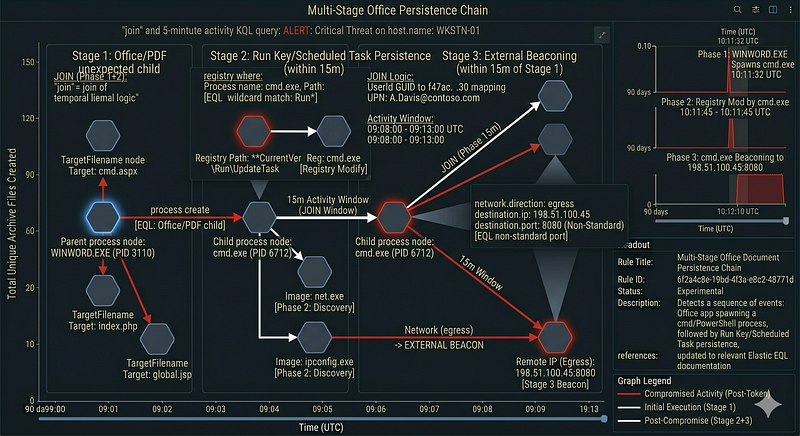
Dream Job and TraderTraitor operations follow a documented sequence: user opens a weaponized document or installer, a dropper establishes persistence (Run key or scheduled task), and then a C2 beacon makes its first outbound connection. The correlational rule joins process creation, registry modification, and network events.
PLATFORM-NATIVE ANALYTIC — Elastic EQL*(Not expressible as standard Sigma: requires a native EQL**sequence*construct with*maxspan*and*by host.name*binding across three event categories. Sigma has no equivalent multi-event sequence syntax, and sigma-cli does not transpile to EQL.)
**ATT&CK:**T1566.001 (Spearphishing Attachment), T1547.001 (Registry Run Keys), T1071.001 (Web Protocol C2) **Tags:**lazarus, dream-job, trader-traitor References:
-
ClearSky, Operation Dream Job:https://www.clearskysec.com/operation-dream-job/
-
CISA AA23–108A:https://www.cisa.gov/sites/default/files/2023-04/aa23-108a_joint_csa_dprk_cryptocurrency_theft_0.pdf
**False positives:**Macro-enabled Office templates that legitimately modify Run keys (rare). Software installers using Office interop. Verify Authenticode chain on the parent process before escalating.
**Confidence when fires:**Critical — three-stage chain on same host within 15 minutes.
/* Platform: Elastic Security (EQL Rule)
   Requires: Sysmon-enriched endpoint events ingested into Elastic.

NOTE:
 the ':' operator in EQL is case-insensitive and supports wildcards.
   'like~' is NOT a valid EQL operator — use ':' for wildcard matching. */
sequence with maxspan
=
15m by host.name

/* Stage 1: Office/PDF spawns unexpected child */
  [process
where
     process.parent.name
in
 (

"WINWORD.EXE"
,
"EXCEL.EXE"
,
"POWERPNT.EXE"
,

"AcroRd32.exe"
,
"msiexec.exe"
)
     and process.name
in
 (

"powershell.exe"
,
"cmd.exe"
,
"wscript.exe"
,
"mshta.exe"
)]

/* Stage 2: Child creates Run key or scheduled task persistence */
  [registry
where
     registry.path :
"*
\\
Software
\\
Microsoft
\\
Windows
\\
CurrentVersion
\\
Run*"
     and process.name
in
 (

"powershell.exe"
,
"cmd.exe"
,
"wscript.exe"
,
"mshta.exe"
,
"reg.exe"
)]

/* Stage 3: New process beacons to external IP on non-standard port */
  [network
where
     network.direction
==

"egress"
     and not cidrMatch(destination.ip,

"10.0.0.0/8"
,
"172.16.0.0/12"
,
"192.168.0.0/16"
,
"127.0.0.0/8"
)
     and destination.port not
in
 (
80
,
443
)]
7. TTP-Based Rules
TTP-based detection is the most durable layer. A rule that detects a technique survives tool changes, infrastructure rotation, and even operator changes within a group. The core insight:every technique has a minimum behavioral footprint that no implementation can fully avoid, because the footprint is determined by what the technique does to the operating system, not by how it does it.
1. LSASS Memory Access (T1003.001) — Technique Used by All Three Actor Groups
All three APTs use credential dumping. APT29 uses Mimikatz variants and custom tooling. APT41 uses ProcDump and comsvcs.dll. Lazarus uses custom LSASS readers. All of them must open a handle tolsass.exewith read-memory access rights. The TTP rule catches all variants.
title: LSASS Memory Read Access by Non-System Process
id: 5e2c7a3f-1b8d-4e5c-a3f7-8c2e5b1d4a7f
status: experimental
description: >
  Detects processes opening a handle to LSASS with memory-read access rights.
  This is the universal footprint of LSASS-based credential dumping regardless
  of the specific tool used — Mimikatz, ProcDump, comsvcs.dll MiniDump,
  custom loaders, or any other implementation must
all open this handle.
  Used by APT29, APT41, and Lazarus Group in documented operations.
references
:
  -
https
:
//attack.mitre.org/techniques/T1003/001/
  -
https
:
//www.microsoft.com/security/blog/2022/10/05/detecting-and-preventing-lsass-credential-dumping-attacks/
author
: Detection Engineering
date
:
2023
-
01
-
10
tags
:
  - attack.credential_access
  - attack.t1003.
001
  - apt29
  - apt41
  - lazarus
logsource
:

category
: process_access

product
: windows

service
: sysmon
detection
:

selection
:
    TargetImage|
endswith
:
'\lsass.exe'
    GrantedAccess|
contains
:
      -
'0x1010'
   # PROCESS_VM_READ | PROCESS_QUERY_INFORMATION
      -
'0x1410'
   # PROCESS_VM_READ | PROCESS_QUERY_INFORMATION | PROCESS_DUP_HANDLE
      -
'0x143a'
   # typical Mimikatz
      -
'0x1fffff'
 # PROCESS_ALL_ACCESS
      -
'0x1f3fff'
 # PROCESS_ALL_ACCESS (older)

filter_legitimate
:
    SourceImage|
endswith
:
      -
'\MsMpEng.exe'
      -
'\csrss.exe'
      -
'\werfault.exe'
      -
'\taskmgr.exe'
   # remove if you don't allow task manager
      -
'\svchost.exe'

condition
: selection
and

not
 filter_legitimate
falsepositives
:
  - EDR agents themselves (add your EDR process to filter_legitimate)
  - Windows Error Reporting accessing LSASS during a crash
  - AV scanning LSASS memory (rare but possible)
level
: critical
2. DLL Side-Loading (T1574.002) — Technique Illustrated by APT41 Operations
APT41 is one of the most consistent users of DLL side-loading in documented threat activity. The technique requires a signed legitimate executable loading an unsigned or attacker-controlled DLL from the same directory. The TTP rule detects this regardless of which signed binary is abused.
title:

Signed

Executable

Loading

Unsigned

DLL

from

Non-Standard

Path
id:

2b7f4e1a-6c3d-4b8f-e1a2-7c4b6d3f8e1a
status:

experimental
description:

>
  Detects a signed, legitimate executable loading an unsigned DLL from
  a user-writable or non-standard path. DLL side-loading (T1574.002) is
  used to execute malicious code under the cover of a trusted process.
  This rule is technique-based — it does not care which binary is abused
  or which actor is operating. APT41 is used as the illustrative example
  because of their documented consistent use of this pattern, but the rule
  will fire on any actor that exploits this technique.
references:

-

https://www.mandiant.com/resources/blog/apt41-dual-espionage-and-cyber-crime-operation

-

https://attack.mitre.org/techniques/T1574/002/
author:

Detection

Engineering
date:

2022-07-20
tags:

-

attack.defense_evasion

-

attack.persistence

-

attack.t1574.002

-

apt41
logsource:

category:

image_load

product:

windows

service:

sysmon

# Sysmon Event ID 7 (ImageLoaded): the fields Signed and SignatureStatus

# describe the LOADED DLL/image, not the loading (parent) process.

# To verify the loading process is itself a signed legitimate binary,

# you must join this event with a preceding Event ID 1 (ProcessCreate)

# on ProcessId, or use EDR-level enrichment that annotates the loading

# process's signing status at query time.

# There is no 'DllSigned' field in Sysmon — that field does not exist.
detection:

selection_unsigned_dll_in_userpath:

ImageLoaded|startswith:

-

'C:\Users\'
      - '
C:\ProgramData\'

-

'C:\Windows\Temp\'
      - '
C:\Temp\'

ImageLoaded|endswith:

'.dll'

Signed:

'false'

filter_known_paths:

ImageLoaded|contains:

-

'\AppData\Local\Microsoft\'
      - '
\AppData\Local\Google\'

condition:

selection_unsigned_dll_in_userpath

and

not

filter_known_paths

# LIMITATION: This rule detects unsigned DLLs loaded from user-writable paths.

# It cannot natively verify within a single Sysmon Event ID 7 whether the

# LOADING process is itself a signed legitimate binary. For full confidence,

# enrich with EDR telemetry that annotates the loading process signing status,

# or join with Event ID 1 (ProcessCreate) on the loading process's PID.
falsepositives:

-

Legitimate

applications

that

ship

with

unsigned

helper

DLLs

in

user

paths

-

Some

Python

distributions

and

development

toolchains

load

unsigned

DLLs

-

Build

an

environment-specific

unsigned

DLL

allowlist

per

application
level:

high
3. Bring Your Own Vulnerable Driver — Lazarus POORTRY/WHIPEDOUT (T1014)
Lazarus used a Dell-signed but vulnerable driver (DBUtil_2_3.sys, laterPOORTRY) to disable EDR processes from kernel space. The BYOVD pattern produces two distinct detectable events: the driver load (Sysmon Event ID 6) and the subsequent security-tool process termination (Sysmon Event ID 5). These are written as two separate rules below. They must be correlated by the analyst or by a SIEM join within a 10-minute window onhost.name— a single event alone is lower confidence.
> WARNING: Never deploy hash-based rules with placeholder or unverified hashes. Pull current vulnerable driver hashes from https://www.loldrivers.io before production deployment. The example Dell DBUtil hash below is illustrative — verify it is still current and correct before use.
Rule 3a — Vulnerable Driver Load (Sysmon Event ID 6)
title:

Known

Vulnerable

Driver

Loaded

(BYOVD

-

Phase

1
)
id:

9e3f6a2c-4d1b-4e9f-c2a6-3e8f1b4c7d2e
status:

template
description:

>
  Detects loading of a known-vulnerable signed driver consistent with
  BYOVD (Bring Your Own Vulnerable Driver) technique used by Lazarus Group
  (POORTRY, WHIPEDOUT, Dell DBUtil). Phase 1 of a two-rule correlation.
  Correlate with Rule 7.3b (security tool termination) within 10 minutes
  on the same host for high-confidence alert.
  WARNING: This rule will NOT fire until you populate the hash blocklist.
  Pull current vulnerable driver hashes from loldrivers.io and add them
  to the detection block before deployment. Never deploy with placeholder hashes.
references:

-

https://www.mandiant.com/resources/blog/hunting-attestation-signed-malware

-

https://www.microsoft.com/en-us/security/blog/2022/10/19/hunting-for-kernel-driver-abuse/

-

https://attack.mitre.org/techniques/T1014/

-

https://www.loldrivers.io
author:

Detection

Engineering
date:

2022-11-01
tags:

-

attack.defense_evasion

-

attack.t1014

-

lazarus
logsource:

category:

driver_load

product:

windows

service:

sysmon
detection:

selection_vuln_driver:

# -----------------------------------------------------------------------

# TEMPLATE — rule will not fire until hashes are populated.

# Obtain current vulnerable driver hashes from https://www.loldrivers.io

# and replace the sentinel string below with real SHA256 hashes.

# Example entry format (verify against loldrivers.io before use):

#   Hashes|contains:

#     - 'a3ad5f25e6...actual_sha256_from_loldrivers'

# -----------------------------------------------------------------------

# The sentinel string below is intentionally unmatchable — it ensures

# the rule produces zero results until real hashes are substituted.

# DO NOT remove it without replacing it with actual loldrivers.io hashes.

Hashes|contains:

-

'LOLDRIVERS_HASH_REQUIRED_SEE_DESCRIPTION'

Signed:

'true'

SignatureStatus:

'Valid'

condition:

selection_vuln_driver
falsepositives:

-

Legitimate

use

of

vulnerable

drivers

by

legacy

software

(remediate:

patch

or

remove)

-

Maintain

and

sync

loldrivers.io

blocklist

via

CI/CD

pipeline

-

Supplement

with

Windows

Defender

Application

Control

(WDAC)

or

Microsoft

Vulnerable

Driver

Blocklist
level:

high
Rule 3b — Security Tool Process Termination (Sysmon Event ID 5)
title:

Security

Product

Process

Terminated

(BYOVD

-

Phase

2
)
id:

1f4a7c2e-8b3d-4f1a-e7c4-2b8f5d3a9e1c
status:

experimental
description:

>
  Detects unexpected termination of a known security product process.
  Phase 2 of a two-rule BYOVD correlation. On its own this is medium
  confidence (crash or update can cause same signal). Correlate with
  Rule 7.3a (vulnerable driver load) within 10 minutes on same host
  for high-confidence BYOVD alert.
references:

-

https://www.mandiant.com/resources/blog/hunting-attestation-signed-malware

-

https://attack.mitre.org/techniques/T1562/001/
author:

Detection

Engineering
date:

2022-11-01
tags:

-

attack.defense_evasion

-

attack.t1562.001

-

lazarus
logsource:

category:

process_termination

product:

windows

service:

sysmon
detection:

selection_security_tool_terminated:

Image|endswith:

-

'\MsMpEng.exe'

-

'\CSFalconService.exe'

-

'\CylanceSvc.exe'

-

'\cb.exe'

-

'\SentinelAgent.exe'

-

'\bdagent.exe'

-

'\ekrn.exe'

condition:

selection_security_tool_terminated
falsepositives:

-

Legitimate

EDR

agent

update

or

restart

(correlate

with

update

event

logs)

-

Planned

maintenance

with

change

ticket

-

Service

crash

due

to

unrelated

bug
level:

medium

# Escalate to critical when correlated with Rule 7.3a within 10 minutes
**Correlation note:**In Microsoft Sentinel, join these two rules onComputer(host) within a 10-minute window using a scheduled analytics rule. In Splunk, use| joinonhostacross both searches within the same time window. A standalone fire of either rule alone warrants investigation but not incident declaration.
4. Golden SAML — APT29 Authentication Bypass (T1556.006)
Golden SAML attacks forge SAML assertions to authenticate as any user in federated identity environments. APT29 used this after compromising ADFS signing certificates. The behavioral footprint: a SAML authentication succeeds from an IP and device that have no prior authentication history, with no corresponding MFA event, for a highly privileged account.
PLATFORM-NATIVE ANALYTIC — Microsoft Sentinel KQL*(No**detection:*block: this logic requires a*leftanti*join against a 30-day historical window and a Watchlist variable — constructs that have no equivalent in Sigma syntax. sigma-cli would reject a Sigma rule with no*detection:*block.)
**ATT&CK:**T1556.006 (Modify Authentication Process — Golden SAML) **Tags:**apt29 References:
-
CyberArk Labs,Golden SAML: Newly Discovered Attack Technique Forges Authentication to Cloud Services, November 2019:https://www.cyberark.com/resources/threat-research-blog/golden-saml-newly-discovered-attack-technique-forges-authentication-to-cloud-services
-
Mandiant,UNC2452 and the SolarWinds Supply Chain Compromise, 2021 follow-up reporting on APT29 ADFS abuse:https://www.mandiant.com/resources/blog/apt29-continues-targeting-microsoft
**False positives:**Legitimate federated sign-ins from new corporate IP ranges. Service accounts using certificate-based auth without MFA. Review with identity team before deploying.
**Confidence when fires:**Critical — SAML bypass with no MFA, new IP, and no prior history for a high-privileged account is highly anomalous.
// Platform: Microsoft Sentinel
// Define high_priv_accounts — choose one approach:
// Option A: Sentinel Watchlist (recommended for production)
//   let high_priv_accounts = (_GetWatchlist('HighPrivAccounts') | project UPN);
// Option B: Hardcoded list (acceptable for initial testing only)
//   let high_priv_accounts = datatable(UPN:string)[
//       "admin@contoso.com", "globaladmin@contoso.com"
//   ] | project UPN;
// Build this list from Azure AD Privileged Identity Management (PIM) directory roles:
// Global Administrator, Exchange Administrator, SharePoint Administrator, etc.
let
 high_priv_accounts = (_GetWatchlist(
'HighPrivAccounts'
) | project UPN);
SigninLogs
|
where
 AuthenticationRequirement !=
"multiFactorAuthentication"
|
where
 ResourceDisplayName contains
"Federation"
|
where
 ConditionalAccessStatus ==
"notApplied"
|
where
 HomeTenantId != ResourceTenantId
// cross-tenant federation sign-in
|
join
 kind=leftanti (
    SigninLogs
    |
where
 TimeGenerated > ago(
30
d)
    | summarize PreviousLogins=count()
by
 UserPrincipalName, IPAddress
    |
where
 PreviousLogins >
0
)
on
 UserPrincipalName, IPAddress
|
where
 UserPrincipalName
in
 (
high_priv_accounts
)
| project TimeGenerated, UserPrincipalName, IPAddress, AppDisplayName, Location
Anomaly Detection Rules
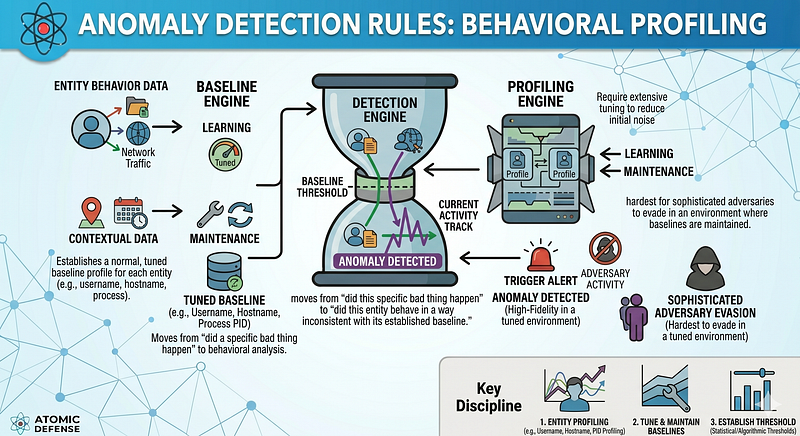
Anomaly detection moves from “did this specific bad thing happen” to “did this entity behave in a way inconsistent with its established baseline.” These rules are the hardest to build, require the most tuning, and produce the most initial noise — but they are also the hardest for a sophisticated adversary to evade in an environment where baselines are maintained.
The prerequisite for every anomaly rule: a meaningful baseline period (minimum 30 days, ideally 90) and a per-entity, not per-environment, baseline. A global threshold on a single metric will catch only the loudest signals.
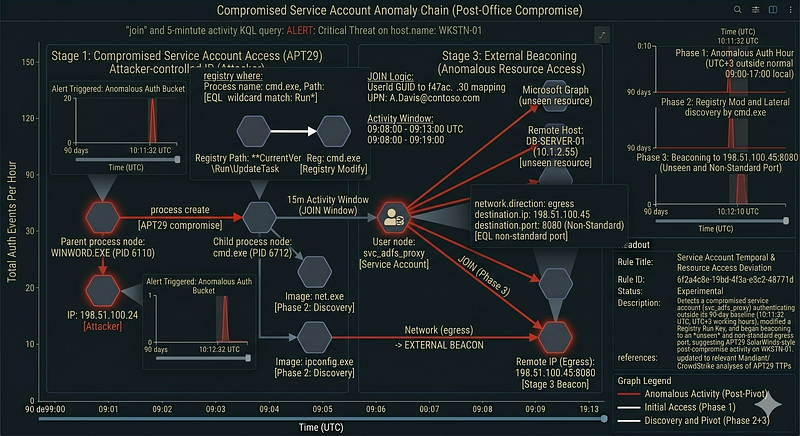
1. APT29 — Service Account Accessing Resources at Anomalous Hours
APT29 uses compromised service accounts for long-dwell lateral movement. Service accounts have extremely predictable behavioral patterns — they typically authenticate at the same times, from the same systems, accessing the same resources. Any deviation is high-signal.
Anomaly Rule: Service Account Temporal Deviation
Entity:
 Service account (identified
by
 naming convention, e.g., svc_*, *-sa, *$)
Baseline dimension: Hour-
of
-day authentication distribution per account
Baseline period:
90
 days
Metric:
 Authentication events per hour
Anomaly condition: Authentication
in
 an hour-bucket
with
 zero
or
 near-zero
                   historical frequency (>
3
 standard deviations
from
 mean)

AND
 accessing a resource
not

in
 the account
's access history
Alert payload must include:
  - Account name
  - Source IP
  - Destination resource
  - Time deviation
from
 historical pattern
  - Historical access pattern summary
Implementation note (Splunk MLTK):
  | fit DensityFunction
"hour_of_day_auth_count"

by

"ServiceAccountName"

from
 base_search

into
 model:svc_temporal_model
  | apply model:svc_temporal_model
  |
where

'IsOutlier(hour_of_day_auth_count)' = 1
APT29 relevance: Compromised service accounts were used
in
  SolarWinds post-compromise
for
 months. The actors authenticated
  outside business hours (UTC+
3
 working hours observed
in
 several
  Mandiant/CrowdStrike analyses)
using
 accounts that normally only
  authenticated
09
:
00
-
17
:
00
 local time.
Reference KQL implementation — 1 (review prerequisites before deploying)
// Platform: Microsoft Sentinel
// Requires: UEBA enabled (BehaviorAnalytics table), SigninLogs ingested
// Baseline assumption: BehaviorAnalytics uses a rolling 30-day lookback
//   maintained by Sentinel UEBA — no manual baseline setup required,
//   but UEBA must be enabled for ≥30 days before signals are reliable.
// License note: BehaviorAnalytics requires Microsoft Sentinel UEBA feature
//   (included in standard Sentinel workspace, but must be explicitly enabled
//   in Settings → Entity behavior).
BehaviorAnalytics
|
where
 TimeGenerated > ago(
1
d)
|
where
 UserPrincipalName matches regex
@"^svc_|[-_]sa$|\$$"
|
where
 ActivityInsights
has_any
 (

"UncommonlyUsedApp"
,

"UncommonlyUsedDevice"
,

"FirstTimeUserUsedApp"
,

"ActivityFromInfrequentCountry"
)
|
join
 kind
=inner (
    SigninLogs
    |
where
 TimeGenerated > ago(
1
d)
    |
where
 UserType ==
"Member"
    |
where
 ResultType ==
0
    | project
        SigninTime    = TimeGenerated,
        UserPrincipalName,
        IPAddress,
        ResourceDisplayName,
        Location,
        AuthenticationRequirement
)
on
 UserPrincipalName
|
where
 SigninTime
between
 (
TimeGenerated .. (TimeGenerated +
10
m
))
| project
    BehaviorTime
      = TimeGenerated,
    SigninTime,
    UserPrincipalName,
    IPAddress,
    ResourceDisplayName,
    Location,
    ActivityInsights,
    AuthenticationRequirement
| order
by
 BehaviorTime desc
2. APT41 — Vendor Software Loading Anomalous DLL Count
APT41 abuses trusted software by planting DLLs in the application directory. A legitimate application’s DLL load profile is highly stable across versions — the same DLLs, from the same paths, in roughly the same order. A sudden expansion in the number or diversity of loaded DLLs from a vendor application is an anomaly that survives hash rotation.
Anomaly Rule: Vendor Application DLL Load Profile Deviation
Entity: (Vendor application executable, host)
Baseline dimension:

-
 Count
of

unique
 DLLs loaded
per
 session

-
 Distribution
of
 DLL signing status (
%
 signed
by
 vendor cert)

-
 Distribution
of
 DLL load paths (
%

from
 application directory)
Baseline
period
:
60
 days
Anomaly conditions (
any

one
 triggers):

-
 DLL count
per
 session
>
 mean
+

2
 SD

-

%
 unsigned DLLs
in
 session
>
 mean
+

3
 SD

-

Any
 DLL loaded
from
 a
user
-
writable path that has zero historical
    frequency
for
 this (application, host) pair
Vendor applications
to
 prioritize:

-
 Security tools (AV, VPN clients, backup agents)

-
 Business applications
with
 wide network access

-
 IT management tools (SCCM agents, monitoring agents)
Implementation note:
  Build a rolling
60
-
day
 profile
per
 (ImageLoaded parent, host) pair.

For

each

new
 ImageLoad event, compare against the profile.
  Statistical threshold: flag
any
 DLL
where
 frequency
in
 baseline
<

1
%
.
APT41 relevance: KEYPLUG, DEADEYE,
and
 DUSTPAN were
all
 delivered
  via DLL side
-
loading
into
 legitimate vendor applications.
  The vendor
binary
 was signed
and
 trusted; the sideloaded DLL was
not

in
 the application
's historical load profile.
Reference KQL implementation — 8.2 (review prerequisites before deploying)
// Platform: Microsoft Sentinel
// Requires: SecurityEvent (Windows Event Log) or DeviceImageLoadEvents (MDE)
//   ingested. This query uses DeviceImageLoadEvents from Microsoft Defender
//   for Endpoint via the AdvancedHunting schema.
// Baseline assumption: rolling 60-day lookback using summarize/dcount.
//   Run this as a scheduled analytics rule on a 1-hour cadence.
// Note: "unsigned DLL from user-writable path" is the proxy for the anomaly;
//   a proper ML baseline requires Sentinel UEBA or a custom watchlist of
//   per-application DLL load histograms built from 60 days of DeviceImageLoadEvents.
let
 BaselineDays   =
60
d;
let
 DetectionHours =
1
h;
// Step 1: Build per-(device, initiating process) DLL profile over baseline period
let
 DLLBaseline =
    DeviceImageLoadEvents
    |
where
 TimeGenerated
between
 (
ago(BaselineDays
) ..
ago
(
DetectionHours
))
    |
where
 InitiatingProcessFileName !
in
~ (
"7z.exe"
,
"WinRAR.exe"
,
"WinZip.exe"
)
    | summarize
        BaselineDLLCount
    = dcount(FileName),
        BaselineUnsignedPct = countif(
not
(InitiatingProcessSignatureState ==
"Signed"
))
                              *
100
 / count()

by
 DeviceName, InitiatingProcessFileName;
// Step 2: Measure current session (last 1 hour)
let
 CurrentSession =
    DeviceImageLoadEvents
    |
where
 TimeGenerated > ago(DetectionHours)
    |
where
 FolderPath matches regex
@"(?i)^C:\\(Users|ProgramData|Windows\\Temp|Temp)\\"
    | summarize
        CurrentDLLCount    = dcount(FileName),
        CurrentUnsignedPct = countif(
not
(InitiatingProcessSignatureState ==
"Signed"
))
                             *
100
 / count(),
        UnsignedDLLNames   = make_set(iff(

not
(InitiatingProcessSignatureState ==
"Signed"
),
                               FileName,
""
))

by
 DeviceName, InitiatingProcessFileName;
// Step 3: Flag sessions where current metrics exceed baseline by ≥2 SD
//   (approximated here as >2× baseline values — replace with MLTK percentiles
//    if available via Sentinel Custom Analytics / Anomaly rules)
CurrentSession
|
join
 kind=inner (DLLBaseline)
on
 DeviceName, InitiatingProcessFileName
|
where
 CurrentDLLCount    > BaselineDLLCount *
2

or
 CurrentUnsignedPct > BaselineUnsignedPct *
3
| project
    DeviceName,
    InitiatingProcessFileName,
    BaselineDLLCount,
    CurrentDLLCount,
    BaselineUnsignedPct,
    CurrentUnsignedPct,
    UnsignedDLLNames
| order
by
 CurrentUnsignedPct desc
3. Lazarus — Cryptocurrency Process Accessing Financial API Endpoints
TraderTraitor and AppleJeus operations target cryptocurrency exchange employees and software. Once access is gained, operators use the victim’s legitimate credentials and applications to interact with exchange APIs. An anomaly rule on the volume, timing, and destination of financial API calls from a user’s session can detect this — a user who normally executes 5–10 trades per day suddenly executing hundreds, or doing so at 3AM local time.
Anomaly Rule:
User
 Financial API
Call
 Volume
and
 Timing Deviation
Entity:
User
 account (tied
to
 exchange employee
or
 crypto software
user
)
Baseline dimensions:

-
 Daily volume
of
 API calls
to
 trading
/
withdrawal endpoints

-

Time
-
of
-
day
 distribution
of
 API calls

-
 Geographic origin
of
 API calls (IP geolocation)

-
 Device fingerprint consistency
Baseline
period
:
90
 days
Anomaly conditions (weighted score; alert
at
 threshold):
  [HIGH weight]   API
call
 volume
>
 mean
+

4
 SD
in

any

1
-
hour

window

+
40
  [HIGH weight]   Withdrawal API calls
from
 a
new
 geographic location
+
40
  [HIGH weight]   API session
from
 an IP
with

no
 prior
user
 history
+
35
  [MEDIUM weight] API calls
at
 an
hour
-
bucket
with

<
1
%
 historical frequency
+
25
  [MEDIUM weight]
New
 device fingerprint
in
 session
+
25
  [LOW weight]    Multiple API key rotations
in
 same session
+
15
Alert
at
 score
>=

60.
Implementation note:
  This style
of
 rule
is
 best implemented
in
 a UEBA platform
or
 a custom
  risk
-
scoring layer
in
 your SIEM.
Each

condition
 contributes
to
 a

per
-
session risk score
for
 the
user
 entity. Threshold breach triggers
  an investigation alert,
not
 a block (
initial
 deployment)
or
 a step
-
up
  authentication challenge (mature deployment).
Lazarus relevance: TraderTraitor actors use compromised credentials

to
 initiate cryptocurrency withdrawals. The behavioral signature
is
:
  legitimate credentials
+

new
 IP
/
device
+
 high
-
volume withdrawal

+
 unusual time.
Each
 signal alone
is
 ambiguous; combined they
are
  high
-
confidence. The FBI
and
 CISA April
2022
 advisory documents
  this
pattern
 across multiple exchange compromises.
Reference KQL implementation — 8.3 (review prerequisites before deploying)
// Platform: Microsoft Sentinel
// Requires: Custom log table (CryptoExchangeAPILogs_CL) from exchange API
//   gateway, or equivalent CommonSecurityLog/custom connector ingestion.
//   This query pattern applies to any API gateway log with UserAccount,
//   RequestType, SourceIP, and BytesSent fields.
// Baseline assumption: rolling 90-day lookback. Run as scheduled analytics
//   rule every 30 minutes. Replace CryptoExchangeAPILogs_CL with your
//   actual API log table name — this is an illustrative table name.
// Note: For exchange-specific SIEM integrations, adapt field names to match
//   your gateway log schema (e.g., cs-username, c-ip, cs-uri-stem).
let
 BaselineDays   =
90
d;
let
 DetectionMins  =
60
;
let
 WithdrawalVerbs =
dynamic
([
"withdrawal"
,
"transfer"
,
"send"
,
"payout"
]);
// Build per-user hourly baseline: mean and p95 as approximate spread proxy.
// Note: percentile(HourlyRequests, 95) is an approximation (T-Digest) —
// sufficient for anomaly thresholding but not exact statistical inference.
let
 UserBaseline =
    CryptoExchangeAPILogs_CL
    |
where
 TimeGenerated > ago(BaselineDays)
    |
where
 RequestType_s
has_any
 (
WithdrawalVerbs
)

// Step 1: count requests per user per hour bucket
    | summarize
        HourlyRequests
 = count()

by
 UserAccount_s, hour_bucket = bin(TimeGenerated,
1
h)

// Step 2: aggregate per-user statistics across all hour buckets
    | summarize
        BaselineMean    = avg(todouble(HourlyRequests)),
        Baseline95thPct = percentile(todouble(HourlyRequests),
95
)

by
 UserAccount_s;
// Measure current window
let
 CurrentWindow =
    CryptoExchangeAPILogs_CL
    |
where
 TimeGenerated > ago(DetectionMins *
1
m)
    |
where
 RequestType_s
has_any
 (
WithdrawalVerbs
)
    | summarize
        CurrentRequestCount
  = count(),
        DistinctSourceIPs    = dcount(SourceIP_s),
        RequestedAmount      = sum(todouble(Amount_d))

by
 UserAccount_s, SourceIP_s;
// Score and alert
CurrentWindow
|
join
 kind=inner (UserBaseline)
on
 UserAccount_s
// Known-new IP: no prior logins from this IP for this user in baseline
|
join
 kind=leftanti (
    CryptoExchangeAPILogs_CL
    |
where
 TimeGenerated > ago(BaselineDays)
    | distinct UserAccount_s, SourceIP_s
)
on
 UserAccount_s, SourceIP_s
| extend
    VolumeScore  = iff(CurrentRequestCount > Baseline95thPct *
2
,
40
,
0
),
    NewIPScore   =
40
,
// already filtered to new IPs via leftanti join

// hourofday(now()) returns UTC hour, not local time. For non-UTC

// organizations, adjust: hourofday(now() + Xh) where X is your UTC offset.

// Example: UTC+3 → hourofday(now() + 3h). Hardcode offset or derive from

// a Watchlist if your org spans multiple timezones.
    HourScore    = iff(hourofday(now()) <
6

or

hourofday
(
now(
)) > 22, 25, 0)
| extend TotalRiskScore
 = VolumeScore + NewIPScore + HourScore
|
where
 TotalRiskScore >=
60
| project
    UserAccount_s,
    SourceIP_s,
    CurrentRequestCount,
    Baseline95thPct,
    RequestedAmount,
    TotalRiskScore
| order
by
 TotalRiskScore desc
4. APT29 — Unusual Outbound Data Volume from Service Following Token Grant
APT29 post-compromise typically involves quiet, low-volume data exfiltration over extended periods — often weeks to months. But after a fresh OAuth token is issued, there is frequently a reconnaissance burst: the actor reads mailboxes, enumerates directories, or accesses SharePoint to map the environment. This produces a short-term data volume anomaly from the Microsoft Graph or Exchange APIs that is detectable against a per-account baseline.
Anomaly Rule: Post
-
Authentication Data Volume Burst
from
 Cloud Service
Entity:
User
 account (
in
 cloud
identity

system
)
Trigger
 event: OAuth2 token
grant
 (
any
 flow)
Measurement
window
:
60
 minutes following token
grant
Baseline dimension: Bytes retrieved
from
 cloud service APIs
per
 session,

per

user
, rolling
90
-
day
 distribution
Anomaly
condition
: Post
-
grant
 data retrieval volume
>

95
th percentile

of
 historical post
-
grant
 sessions
for
 this
user

AND
 source IP has zero
or
 low (
<
5
) prior session history
Alert enrichment
to
 include:

-
 Volume
of
 data retrieved (bytes)

-
 API endpoints accessed (Graph
/
me
/
messages,
/
drive,
/
users)

-
 Number
of

distinct
 objects accessed

-
 IP geolocation
and
 ASN

-
 Comparison
to

user
's historical session volume
Implementation note (Microsoft Sentinel):
  Join SigninLogs (token grant) with MicrosoftGraphActivityLogs
  (subsequent API calls) on CorrelationId or UserId within a 1-hour window.
  Aggregate ResponseBytes by UserId for the session.
  Compare against a rolling 90-day per-user percentile model.
APT29 relevance: Documented in Microsoft'
s January
2024
 disclosure.
  Actors performed bulk mailbox enumeration
and
 email reading
  immediately after token issuance. The data volume
in
 the
first

30
 minutes
of
 a compromised session was multiple orders
of
 magnitude
  above the same
user
's historical baseline.
Reference KQL implementation — 8.4 (review prerequisites before deploying)
// Platform: Microsoft Sentinel
// Requires: SigninLogs and MicrosoftGraphActivityLogs both ingested.
//   MicrosoftGraphActivityLogs requires Microsoft 365 diagnostic settings
//   configured to send Graph activity to the Log Analytics workspace.
// Schema note: both SigninLogs and MicrosoftGraphActivityLogs carry a UserId
//   field that is the same Azure AD object GUID. The join below uses UserId
//   (GUID) as the join key in both tables. Do NOT join on UserPrincipalName
//   against MicrosoftGraphActivityLogs.UserId — UPN vs GUID type mismatch
//   returns zero results. See §6.1 notes for full explanation.
// Baseline assumption: 90-day rolling per-user session volume percentile.
//   This query approximates the 90th percentile using a summarize over
//   the baseline window. For production, replace with a custom Anomaly
//   Detection scheduled rule or Watchlist-based percentile lookup.
let
 BaselineDays   =
90
d;
let
 DetectionMins  =
60
;
let
 SensitiveGraphPaths =
dynamic
([

"/me/messages"
,
"/users"
,
"/me/drive"
,

"/directory"
,
"/me/mailFolders"
,
"/groups"
]);
// Schema notes for MicrosoftGraphActivityLogs (verified against Microsoft docs):
//   UserId            — string (Azure AD object GUID, e.g. "f47ac10b-...")
//   RequestUri        — string
//   ResponseBytes     — long  (native type; tolong() below is redundant but harmless)
//   ResponseStatusCode — int  (between 200..299 comparison is valid against int)
//   CallerIPAddress   — NOT present in standard MicrosoftGraphActivityLogs schema;
//                       enrich via SigninLogs join on CorrelationId if source IP needed
// Schema notes for SigninLogs (relevant fields):
//   UserId            — string (same Azure AD object GUID as above — valid join key)
//   UserPrincipalName — string (UPN, e.g. "user@contoso.com" — display only, not join key)
//   AuthenticationProtocol — string ("deviceCode" for device-code flow)
//   ResultType        — int   (0 = success)
//   IPAddress         — string
//   Location          — dynamic (LocationDetails object; project extracts the dynamic field)
// Step 1: Build per-user baseline — 90th percentile of ResponseBytes per session
let
 UserVolumeBaseline =
    MicrosoftGraphActivityLogs
    |
where
 TimeGenerated > ago(BaselineDays)
    |
where
 RequestUri
has_any
 (
SensitiveGraphPaths
)
    | summarize SessionBytes
 = sum(ResponseBytes)
by
 UserId, bin(TimeGenerated,
1
h)
    | summarize Baseline90thPct = percentile(SessionBytes,
90
)
by
 UserId;
// Step 2: Identify device-code token grants in the last detection window
let
 RecentTokenGrants =
    SigninLogs
    |
where
 TimeGenerated > ago(DetectionMins *
1
m)
    |
where
 AuthenticationProtocol ==
"deviceCode"
    |
where
 ResultType ==
0
    | project
        TokenTime         = TimeGenerated,
        UserId,
// GUID join key
        UserPrincipalName,
// UPN — display only
        IPAddress,
        Location;
// Step 3: Measure Graph activity in the 60 minutes following each token grant.
// Look back 2× the detection window (DetectionMins * 2 * 1m) to ensure we capture
// Graph events that occurred before the query execution time.
let
 PostGrantActivity =
    MicrosoftGraphActivityLogs
    |
where
 TimeGenerated > ago(DetectionMins *
2
 *
1
m)
    |
where
 RequestUri
has_any
 (
SensitiveGraphPaths
)
    |
where
 ResponseStatusCode
between
 (
200
 ..
299
)
    | project
        GraphTime
     = TimeGenerated,
        UserId,
// GUID join key
        RequestUri,
        ResponseBytes;
// long — no cast needed, native type in schema
// Step 4: Join and flag sessions exceeding baseline
RecentTokenGrants
|
join
 kind=inner (PostGrantActivity)
on
 UserId
|
where
 GraphTime
between
 (
TokenTime .. (TokenTime +
1
h
))
| summarize
    TotalResponseBytes
 = sum(ResponseBytes),
    EndpointsAccessed  = make_set(RequestUri),
    DistinctAPICalls   = count()

by
 UserId, UserPrincipalName, IPAddress, TokenTime, Location
|
join
 kind=inner (UserVolumeBaseline)
on
 UserId
// Null guard: users with insufficient baseline data (< 90 days of Graph activity)
// will have a null or zero Baseline90thPct. Exclude them to avoid divide-by-zero
// and spurious alerts on accounts with no established baseline.
|
where

isnotnull
(
Baseline90thPct
)
and
 Baseline90thPct > 0
|
where
 TotalResponseBytes > Baseline90thPct * 3
// >3× 90th percentile = anomaly
| extend
    BaselineExceedanceFactor
 = round(TotalResponseBytes / (Baseline90thPct +
1
),
1
)
| project
    TokenTime,
    UserPrincipalName,
    IPAddress,
    Location,
    TotalResponseBytes,
    Baseline90thPct,
    BaselineExceedanceFactor,
    DistinctAPICalls,
    EndpointsAccessed
| order
by
 BaselineExceedanceFactor desc
The Detection Chain: Layering All Five Tiers
Detection rules should not be evaluated in isolation. A single alert at any tier is an investigation trigger, not a confirmed incident. The value of layering is that correlation across tiers dramatically increases confidence and reduces analyst fatigue.
The following chain illustrates how all five tiers interact for the 3CX supply chain compromise (Lazarus Group, March 2023). 3CX is chosen because it demonstrates each tier firing on a different observable from the same incident — a property that makes it the clearest real-world example of why layers matter.
[
ATOMIC
]
3
CX desktop client (
3
CXDesktopApp.exe) loads d3dcompiler_47.dll

from
 the application directory —
binary
 name
is
 legitimate,
                 but file hash does
not

match
 the known
-
good vendor hash
and
                 the DLL
contains
 appended shellcode payload
                 → LOW confidence — known
-
good
binary
 name flags the load path
                   anomaly; triage workflow compares hash against vendor baseline
                 ↓
[COLLECTION]
Within
 a
48
-
hour

window
,
>
5
 hosts
in
 the same environment

execute
 the trojanized
3
CX installer
and
 subsequently
connect

to
 the same C2 FQDN cluster
in
 HTTPS egress logs
                 (raw[.]githubusercontent[.]com
/
 icon
-
staging repositories)
                 → MEDIUM confidence — abnormal install
-
rate
pattern
 across
                   multiple endpoints
to
 identical
external
 infrastructure
                 ↓
[CORRELATIONAL]
3
CXDesktopApp.exe spawns cmd.exe
as
 a child process,
                 immediately followed
by
 outbound HTTPS
to
 github.com
/
IconStorages
                 (icon files containing base64
-
encoded C2 configuration);
                 a legitimate
3
CX client has
no
 documented reason
to
 spawn
                 cmd.exe
or

fetch

binary
 data
from
 GitHub
-
hosted icon files
                 → HIGH confidence — two
-
event sequence
on
 same host
/
process
                   lineage
within

60
-
second

window
; escalated
to
 Tier
3
                 ↓
[TTP
-
BASED]      DLL side
-
loading
pattern
 confirmed: signed
3
CXDesktopApp.exe
                 loading an unsigned DLL
from
 the application install directory
                 (T1574
.002
) — rule fires regardless
of

specific
 DLL name
                 because the structural
pattern
 (signed loader
+
 unsigned DLL

in
 same directory)
matches
 the TTP independent
of

any
 hash
                 → CRITICAL — technique confirmed, incident declared,
                   forensic acquisition initiated
on
 affected hosts
                 ↓
[ANOMALY]        The service account associated
with
 the
3
CX application
                 begins authenticating
to
 internal file servers
and
 domain
                 controllers it has never previously accessed,
at

02
:
00

local

time
 — well outside its historical access
-
time
 distribution
                 (
for
 illustration: multiple standard deviations above the

per
-
hour
 mean, exact figure depends
on
 your baseline model)

and
 accessing resources
with
 zero prior session history
                 → Confirms
lateral
 movement
from
 compromised endpoint;
                   blast radius expanded
to
 include downstream
identity
                   infrastructure
and
 file shares
At each tier, the analyst answers a different question — illustrated here using the 3CX incident:
-
**Atomic:**Does this specific DLL hash match a known-bad or non-baseline value for the 3CX application?
-
**Collection:**Are multiple hosts hitting the same C2 infrastructure after a recent 3CX update at an abnormal rate?
-
**Correlational:**Did the 3CX process spawn a shell and immediately fetch external binary data in the same session?
-
**TTP:**Is a signed binary loading an unsigned DLL from its own directory, regardless of which binary or DLL name is involved?
-
**Anomaly:**Is the service account associated with this application accessing systems and at times inconsistent with its 90-day behavioral baseline?
Alert Weighting Model
A practical approach to managing alert volume across all five tiers is a per-incident risk score. Rather than treating each rule as a binary alert, assign a base score and let the score accumulate:
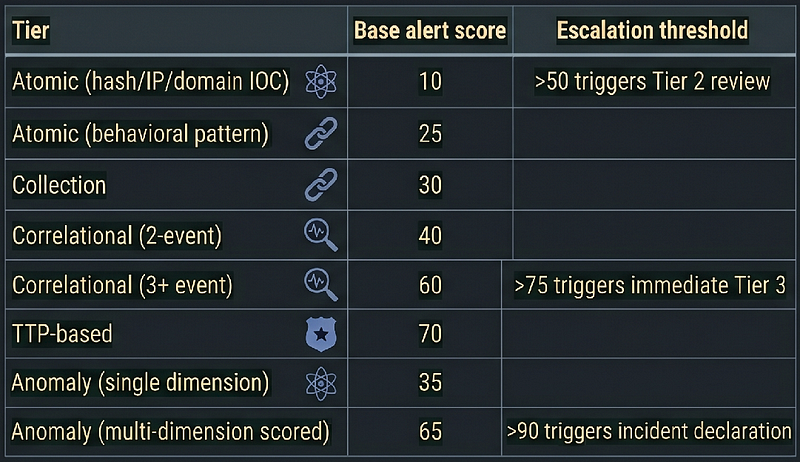
Multiple simultaneous rule fires on the same entity within a time window should be multiplicatively weighted, not additively: an atomic IOC hit plus a TTP rule fire plus an anomaly alert on the same user, same hour, is almost certainly a real incident.
> Scoring model disclaimer: The base scores and thresholds in this table are illustrative starting points, not validated empirical values. They must be calibrated against your environment’s actual false-positive rates and rule fidelity. Do not deploy with these exact numbers without a tuning period.
**Combined entity risk score formula:**When N rules fire on the same entity within the same detection window (60 minutes):
combined_score
 = max(individual_scores) + Σ(remaining_scores ×
0.5
)
Example: TTP rule (70) + Anomaly multi-dimension (65) + Atomic behavioral (25) fire on the same user within the same hour:
combined_score
 =
70
 + (
65
 ×
0.5
) + (
25
 ×
0.5
) =
70
 +
32.5
 +
12.5
 =
115
 → Incident declaration
This formula prevents linear inflation while still rewarding corroborating signals. Adjust the 0.5 coefficient based on your environment’s baseline false-positive correlation. A coefficient closer to 1.0 rewards independent signals more aggressively; closer to 0.25 is appropriate when your rules share log sources and tend to co-fire on the same benign events.
Tuning, Validation, and Measurement
1. Tuning Philosophy
The failure mode for atomic and collection rules is high false positive rate, leading to alert fatigue and rule bypass. The failure mode for TTP-based and anomaly rules is insufficient telemetry, leading to missed detections.
Tune in this order:
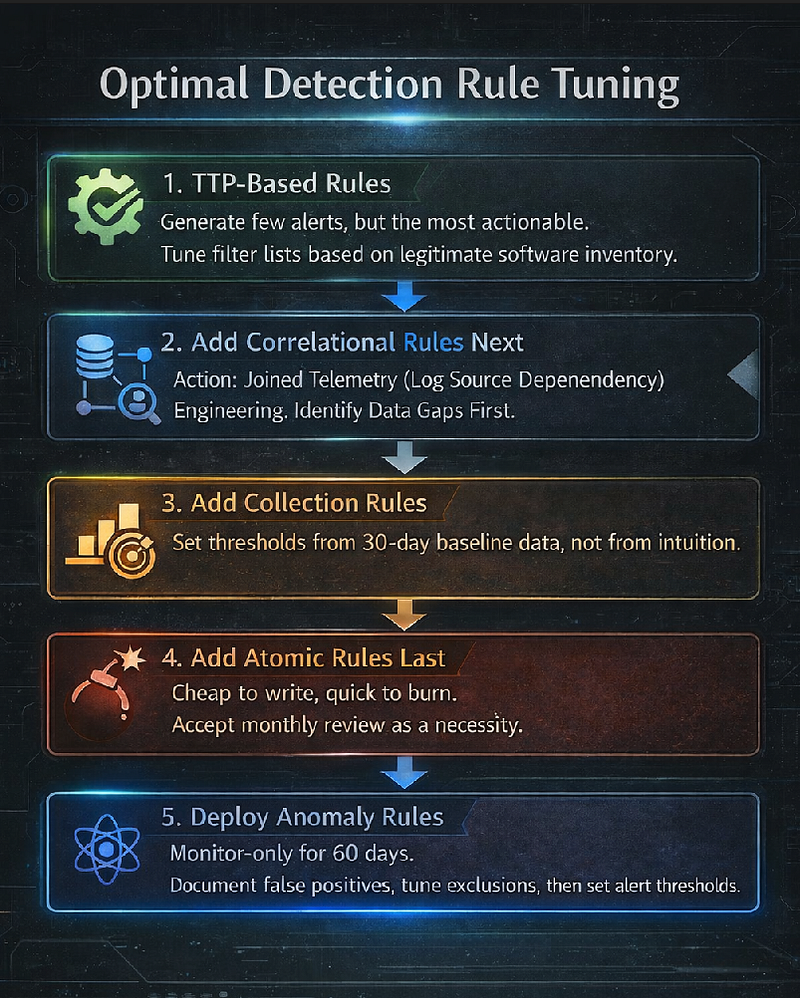
-
**Start with the TTP-based rules.**They generate the fewest alerts but the most actionable ones. Tune the filter lists based on your legitimate software inventory.
-
**Add correlational rules next.**They require joined telemetry, so identify data gaps first. A correlational rule that joins on a log source you don’t have will never fire — even if the attack is present.
-
**Add collection rules.**Set thresholds from 30-day baseline data, not from intuition.
-
**Add atomic rules last.**These are cheapest to write and burn fastest. Accept that they will need monthly review.
-
**Deploy anomaly rules in monitor-only mode for the first 60 days.**Document the false positives, tune the entity exclusions, then set alert thresholds.
2. Validation: Testing Your Detection Coverage
Every rule should be tested before production deployment and periodically thereafter. The minimum validation set for each detection layer:
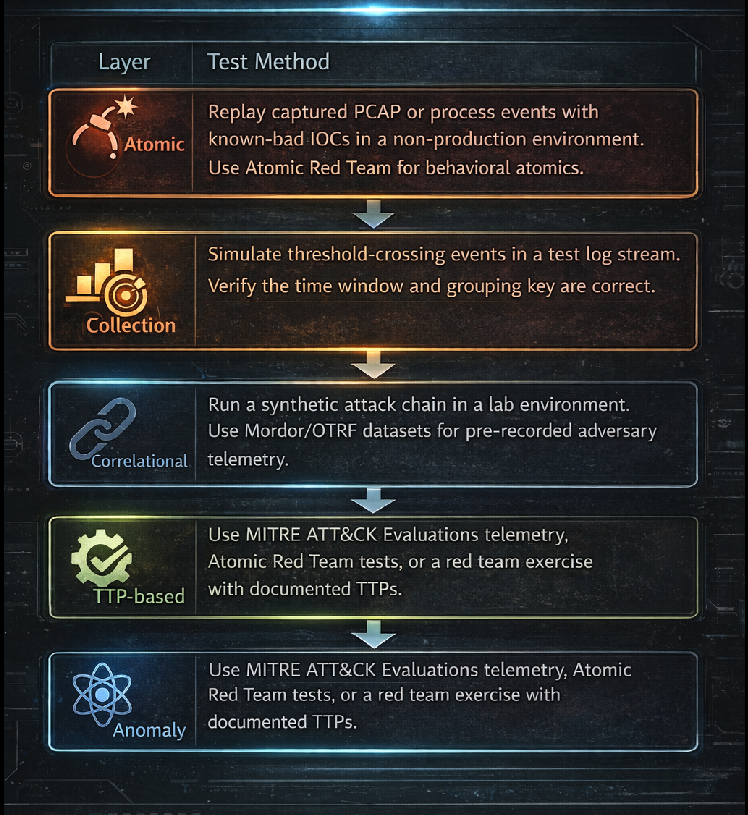
Reference datasets for validation:
-
Mordor (OTRF):github.com/OTRF/Security-Datasets— pre-recorded APT simulation telemetry
-
Atomic Red Team:github.com/redcanaryco/atomic-red-team— TTP-level test cases mapped to ATT&CK
-
EVTX-ATTACK-SAMPLES:github.com/sbousseaden/EVTX-ATTACK-SAMPLES— Windows event log samples per technique
3. Measuring Detection Coverage
Three complementary metrics matter:
**ATT&CK coverage score:**Map each rule you have to one or more ATT&CK technique IDs. Use the ATT&CK Navigator to visualize coverage gaps. A rule that fires on LSASS access covers T1003.001; a rule on web shell creation covers T1505.003. Build a coverage heatmap, prioritize the gaps that match your highest-priority adversary profiles.
**Mean Time to Detect (MTTD) by tier:**Log the time from simulated attack execution to alert generation for each tier. If your TTP-based rule for LSASS access takes 45 minutes to alert because of SIEM ingestion lag, that lag is the detection gap — address it in the data pipeline, not the rule.
**Alert fidelity rate:**Track confirmed true positives as a fraction of total alerts per rule over 30-day rolling windows. A rule below 10% fidelity rate should be tuned or retired. A rule at 100% fidelity over 90 days with zero fires should be tested — it may simply not be covering the technique it claims to cover.
4. Detection-as-Code Workflow
Sigma rules in this guide (Sections 4 and 5, and the TTP rules 7.1–7.3) follow a detection-as-code pipeline:
CTI Report → Extract TTP
/
IOC → Write Sigma Rule → Code Review →
Test
in
 Lab (
Atomic
 Red Team
/
 Mordor dataset) →
Merge

to
 main → sigma
-
cli
convert
 → Deploy
to
 SIEM →
Monitor fidelity → Review
on

30
-
day

cycle
Tools for this pipeline:
-
sigma-cli**:**Convert Sigma to Splunk SPL, Microsoft Sentinel KQL, Elastic Lucene/ES|QL, and others
-
pySigma**:**Python library for programmatic Sigma rule management
-
VECTR**:**Campaign tracking and red team exercise management (SecurityRiskAdvisors)
-
MITRE ATT&CK Navigator**:**Coverage visualization
> Note for Elastic users: sigma-cli converts Sigma rules to Elastic Lucene queries and ES|QL via the elasticsearch or esql backend. It does not produce native EQL (Elastic Event Query Language), which has distinct sequence syntax ( sequence by ... [process where ...] [network where ...] ). The correlational rules in Section 6 that use EQL sequence syntax must be written or adapted manually — they cannot be auto-generated from Sigma using current backends (as of early 2026).
Rule Lifecycle and Versioning
Detection rules are not static artifacts. They decay as infrastructure changes, attackers adapt, and platform schemas evolve. A production detection program needs an explicit lifecycle policy.
Versioning convention
Sigma rules carry adateandmodifiedfield. Usemodifiedfor all updates — it is the authoritative version timestamp. Do not change theidUUID when updating a rule: a new UUID means a new rule, not a version bump. The UUID must be stable across the entire lifecycle of a rule. Use themodifieddate for version tracking, not a new UUID. For teams that need explicit semantic versioning, add acustomfield:
custom:

version:

'1.3.0'

# major.minor.patch — increment patch for filter tuning,

# minor for detection logic changes, major for technique scope changes
Five-tier review cadence
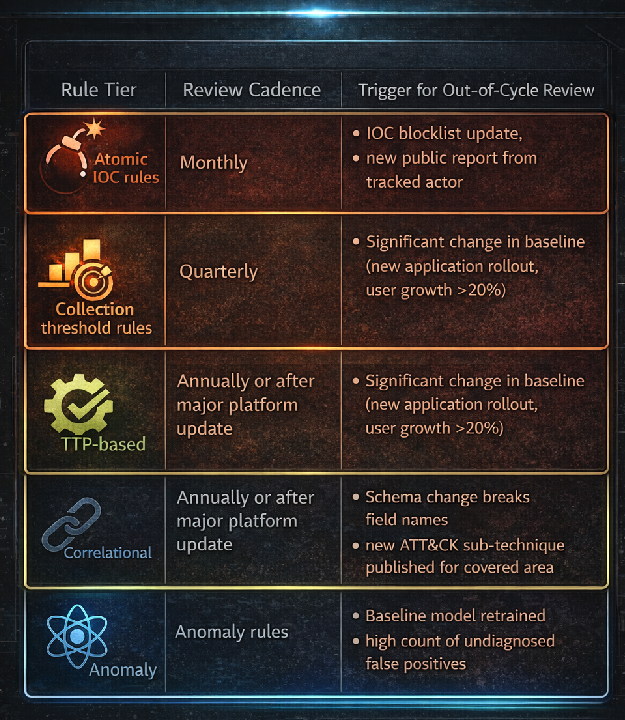
Deprecation criteria
A rule should be markedstatus: deprecatedand removed from production deployment when any of the following apply:
-
Itsfidelity rate(confirmed true positives ÷ total alerts) drops below**5%**over a 90-day rolling window despite reasonable tuning effort
-
Itslog source is decommissionedor a platform schema change breaks one or more field names in the detection condition
-
Ahigher-tier rule fully subsumes its detection surface: for example, a TTP-based LSASS rule that fires on all access-right patterns makes an older atomic rule that only checks one access mask redundant
Deprecated rules should be retained in source control with theirstatus: deprecatedflag and a comment explaining the deprecation reason and date. This preserves the analytical decision record and allows reactivation if the subsumption assumption later breaks.
Stable UUIDs — the non-negotiable rule
Every Sigma ruleidfield is a UUID that must never change after the rule is first published. If you fork a rule from the SigmaHQ repository and make changes, do not reuse the upstream UUID — generate a new one. Changing a UUID in your detection-as-code pipeline will break any alert tracking, suppression lists, or incident linkage that references the old UUID. Track what changed inmodified, not in theid.
Evasion Considerations: What Sophisticated Actors Do to Beat Each Layer
The most important thing a detection engineer can understand about their own rules is exactly how they fail. Each detection tier has a characteristic evasion path that a motivated actor can follow — and that evasion path reveals precisely why the next tier up exists. This section is written from the attacker’s perspective, because that is the only perspective that produces honest detection coverage assessment.
1. Evading Atomic Rules
Atomic rules match a specific observable: a file hash, an IP address, a domain name, a process name. The evasion options are trivial:
-
**Hash rotation:**Recompile the payload with a different compiler flag, swap a packer, or change a single byte in a resource section. The resulting hash is completely different; the functionality is identical. This takes minutes with automated build pipelines.
-
**Infrastructure rotation:**Rotate the C2 IP or domain before or immediately after the public report lands. Many sophisticated actors now run automated infrastructure provisioning that generates new IPs and domains on a schedule shorter than the typical report-to-blocklist lag. By the time an IOC appears in a threat feed and reaches a defender’s blocklist, it may already have been abandoned.
-
**File path and name manipulation:**A name-based atomic rule (
Image|endswith: '\mimikatz.exe') is bypassed by renaming the binary. A rule that matches on both name and path is bypassed by moving it. Rules that depend on filenames rather than behavior are almost always trivially evaded. -
**Stage-1 loader swap:**Even if the final payload hash is known, dropping a new loader that fetches and executes the payload in memory means the file that lands on disk (the loader) has never been seen before.
**Key insight:**Evading an atomic rule costs the attacker minutes to hours. Rotating infrastructure is now automated in many actor toolchains, making IP/domain IOCs useful for retrospective attribution but unreliable as real-time detection. The value of atomic rules is speed of deployment during an active incident — not durability.
2. Evading Collection Rules
Collection rules fire when a count crosses a threshold within a time window. The evasion strategy is straightforward: operate below the threshold.
-
**Rate reduction:**If your collection rule fires on >10 OAuth token requests in 10 minutes from a single IP, spread the same 10 requests over 100 minutes. The individual events are identical; they simply no longer co-occur in the detection window.
-
**Source IP diversification:**Use residential proxies, compromised hosts, or cloud egress nodes to spread the same volume across multiple source IPs. Each source IP individually stays below the threshold even as the aggregate attack volume is unchanged.
-
**Threshold inference:**An attacker with access to your environment over an extended period can observe what volume of their own activity generates alerts. They calibrate their operational tempo to stay just below whatever ceiling your collection rules represent.
-
**Timing jitter:**Automated tools that generate bursty traffic are easy to detect with collection rules. Introducing human-like jitter (random delays, diurnal variation in request rate) causes the traffic to blend into legitimate usage patterns that are statistically similar to what the collection rule is trying to flag.
**Key insight:**A collection rule with a fixed global threshold is a ceiling that a patient attacker learns to operate under. The correct design is per-entity dynamic thresholds — percentile-based, derived from that specific entity’s own baseline — rather than environment-wide static values. A threshold that is appropriate for a high-volume user is almost certainly wrong for a service account.
3. Evading Correlational Rules
Correlational rules join multiple events in a temporal sequence. Breaking any single link in the chain breaks the rule.
-
**Deliberate timing delays:**If your correlational rule fires on “web shell creation followed by lateral movement within 30 minutes,” the attacker simply waits 45 minutes between the web shell deployment and the first lateral movement command. The events are real and detectable individually; they just fall outside the join window.
-
**Tool substitution at one link:**A correlational rule that joins on specific process names (e.g.,
wmiprvse.exe→ lateral movement) is broken by switching to a different lateral movement protocol that does not involve WMI — RDP, WinRM, SMB, SSH — because the named process no longer appears in the event stream at the expected link. -
**Living-off-the-land at the join point:**If the correlation depends on detecting an unusual process (e.g., PowerShell spawned by a web server process), switching to a LOLBin that is routinely present in the environment (certutil, bitsadmin, msiexec) can make the individual events indistinguishable from legitimate administrator behavior. The join still fires, but the false-positive rate of the rule climbs to the point where the alert is suppressed or ignored.
-
**Multi-hop staging:**Rather than going directly from the compromised web server to lateral movement, an attacker can stage through an intermediate host that is not in your correlational rule’s scope, breaking the causal chain that the rule is designed to track.
**Key insight:**Correlational rules that join on process names rather than access patterns are broken by a single tool swap. The more durable design joins on what the process accessed, what permissions it requested, or what network destinations it reached — not what the executable was named. Behavioral joins survive tool changes; binary-name joins do not.
4. Evading TTP-Based Rules
TTP rules detect a technique regardless of the specific tool implementing it. Evading them requires actually changing the underlying operating system interaction — a much higher cost.
-
**Memory-only techniques:**File-based TTP rules (DLL drops, web shell writes) are bypassed by moving entirely to memory-resident execution. Reflective DLL injection, process hollowing, and shellcode injected into existing processes produce no file creation events and do not trigger file-based TTP rules. LSASS access rules that rely on file-based indicators do not fire if credential dumping is performed via a legitimate API call that the rule does not monitor (e.g., SSP registration, shadow copies).
-
**Kernel-mode execution (BYOVD):**TTP rules that monitor process-level behavior are bypassed entirely if the attacker operates from kernel space. A driver running at ring 0 can suppress, modify, or replay telemetry before it reaches the EDR agent. This is why BYOVD (Bring Your Own Vulnerable Driver) is specifically used to kill EDR processes before conducting the high-value action.
-
**Abusing legitimate OS APIs:**A TTP rule for scheduled task creation that fires on
schtasks.exeexecution is bypassed by creating the scheduled task directly via the Task Scheduler COM API (ITaskScheduler::AddWorkItem) from within a trusted process. The task is created; noschtasks.exeprocess is spawned; the rule does not fire. -
**Legitimate tool execution:**If a TTP rule fires on PowerShell execution with encoded commands, switching to equivalent functionality in a language or runtime that is not monitored (Python via a legitimate interpreter, AutoHotkey, JScript in a .hta file) may achieve the same goal outside the detection perimeter.
**Key insight:**TTP rules fail when the technique’s required OS interaction is functionally indistinguishable from a legitimate privileged operation performed by the same class of process. The solution is not more pattern-matching on what the binary is called — it is contextual enrichment: who is calling this API, from which parent process, at what time, on what data, with what access rights. Context is what TTP rules alone cannot provide; anomaly detection and correlational rules supply the context.
5. Evading Anomaly Rules
Anomaly detection is the hardest tier to evade, and the evasion strategies are correspondingly more sophisticated and time-intensive.
-
**Slow baseline poisoning:**Operate at low, legitimate-looking volume for 90 days or more before executing the high-value action. If the attacker’s traffic during the baselining period is indistinguishable from legitimate activity (because it IS low-volume legitimate-looking activity), the baseline absorbs it. When the attacker finally increases volume or changes behavior, the new baseline includes the attacker’s footprint, and the anomaly threshold is set relative to a contaminated baseline. This requires long dwell time but is within reach of patient state-sponsored actors with 6–12 month pre-positioning timelines.
-
**Behavioral mimicry:**If the attacker has observed the victim’s behavioral patterns (working hours, typical API call volume, device fingerprint, geographic login locations), they can deliberately mimic those patterns to remain within the normal band. A victim who always logs in from London between 09:00–17:00 and generates 50 API calls per session is relatively easy to impersonate if the attacker knows those parameters.
-
**Targeting baselining gaps:**Anomaly detection requires a baseline. New users, recently provisioned service accounts, new applications, or systems onboarded after a major change have short or absent baseline histories. These entities have high uncertainty in their anomaly models and are therefore poor targets for anomaly detection but excellent targets for attackers. A new employee’s account has no established behavioral baseline; any activity from it is, by definition, “normal” for that entity.
-
**Baselining horizon exploitation:**Most anomaly rules use a fixed lookback window (30, 60, 90 days). An attacker who compromises an account, conducts low-volume operations for 31 days, and then escalates has effectively aged their malicious activity outside the short-term anomaly window while remaining inside the baseline period — making their activity look like an established pattern.
**Key insight:**A well-resourced actor who has already conducted extensive reconnaissance may understand your environment’s behavioral baseline better than your own detection team does. Anomaly detection is hardest against patient actors with long dwell times — precisely the actors who represent the highest risk. The correct response is not to abandon anomaly detection but to ensure that the baseline includes multiple dimensions simultaneously (time, volume, geography, access pattern) so that mimicking all dimensions simultaneously becomes operationally difficult.
Synthesis: Why Layering Is the Only Correct Answer
Each tier’s characteristic evasion path assumes the attacker is operating as if that tier were the only detection mechanism in place. An attacker who rotates hashes to evade atomic rules has not changed their tool, their technique, or their behavioral pattern — all of which remain visible to higher tiers. An attacker who slows their rate to evade a collection threshold has not changed the sequence of actions they take — which remains visible to correlational and TTP-based rules. An attacker who switches tools to break a correlational rule has still executed the same underlying technique, which remains visible to TTP-based detection. And an attacker who operates below every static rule threshold has still, inevitably, changed their behavior relative to what was normal for the compromised entity — which anomaly detection is designed to catch.
No single tier is sufficient. The correct architecture is all five tiers running simultaneously, with alert scoring that aggregates signals across tiers for the same entity within the same time window. An attacker who has successfully evaded four tiers while still being caught by the fifth has not successfully evaded your detection program.
Key Sources
Adversary Behavior — Primary Intelligence Reports
APT29 / Midnight Blizzard (SVR)
-
Mandiant,Highly Evasive Attacker Leverages SolarWinds Supply Chain(SUNBURST), December 2020 —mandiant.com
-
Microsoft MSTIC,Analyzing Solorigate: the compromised DLL file, December 2020
-
CISA, Advisory AA20–352A —Advanced Persistent Threat Compromise of Government Agencies, Critical Infrastructure, and Private Sector Organizations, December 2020
-
Microsoft Security Response Center,Microsoft Actions Following Attack by Nation State Actor Midnight Blizzard, January 2024
-
CyberArk Labs,Golden SAML: Newly Discovered Attack Technique Forges Authentication to Cloud Services, November 2019
-
Mandiant, APT29 ADFS abuse follow-up, 2021:https://www.mandiant.com/resources/blog/apt29-continues-targeting-microsoft
APT41 / Double Dragon (MSS-linked)
-
Mandiant,Double Dragon: APT41, a Dual Espionage and Cyber Crime Operation, August 2019
-
Mandiant,APT41 and Recent Activity, August 2022
-
U.S. Department of Justice,Seven International Cyber Defendants, Including “APT41” Associates, Charged, September 2020
-
CISA, Advisory AA22–277A —Impacket and Exfiltration Tool Used to Steal Sensitive Information from Defense Industrial Base Organization, October 2022
-
Kaspersky GReAT,Operation ShadowHammer, April 2019
Lazarus Group / TraderTraitor (RGB)
-
Kaspersky GReAT,Operation AppleJeus: Lazarus hits cryptocurrency exchange, August 2018
-
CISA/FBI/Treasury,TraderTraitor: North Korean State-Sponsored APT Targets Blockchain Companies, April 2022 (AA22–108A)
-
ClearSky,Operation Dream Job, January 2020
-
Mandiant / CrowdStrike,3CX Supply Chain Compromise, April 2023 —mandiant.com
-
FBI,Flash: Identification of Lazarus Group Cryptocurrency Theft, March 2023
-
CISA, Advisory AA21–048A —AppleJeus: Analysis of North Korea’s Cryptocurrency Malware, February 2021
BYOVD — Vulnerable Driver Research
-
Mandiant,Hunting Attestation Signed Malware (POORTRY/WHIPEDOUT), August 2022
-
Microsoft Security Blog,Hunting for Kernel Driver Abuse, October 2022
-
LoLDrivers project —loldrivers.io— community-maintained vulnerable/malicious driver hash reference
Telemetry and Schema References
-
Microsoft,MicrosoftGraphActivityLogs schema—learn.microsoft.com/azure/azure-monitor/reference/tables/microsoftgraphactivitylogs
-
Microsoft,SigninLogs schema—learn.microsoft.com/azure/azure-monitor/reference/tables/signinlogs
-
Microsoft,DeviceImageLoadEvents (MDE Advanced Hunting)—learn.microsoft.com/defender-xdr/advanced-hunting-deviceimageloadevents-table
-
Linux man pages,ptrace(2)—man7.org/linux/man-pages/man2/ptrace.2.html
-
Linux Audit documentation,audit.rules(7)— reference for
-F a0=filter syntax and syscall argument encoding
Detection Frameworks, Tooling, and Validation Datasets
-
MITRE ATT&CK,Enterprise Matrix, current version —attack.mitre.org
-
MITRE,Cyber Analytics Repository (CAR)—car.mitre.org
-
David Bianco,The Pyramid of Pain, 2013 —detect-respond.blogspot.com
-
SigmaHQ,Sigma Rule Specification—github.com/SigmaHQ/sigma
-
SigmaHQ,sigma-cli(Sigma to SPL/KQL/Lucene/ES|QL transpiler) —github.com/SigmaHQ/sigma-cli
-
Elastic,Event Query Language (EQL) Reference—elastic.co/guide/en/elasticsearch/reference/current/eql.html
-
Red Canary,Atomic Red Team(ATT&CK-mapped test cases) —github.com/redcanaryco/atomic-red-team
-
OTRF,Mordor / Security Datasets(pre-recorded APT simulation telemetry) —github.com/OTRF/Security-Datasets
-
SecurityRiskAdvisors,VECTR(campaign tracking and red team management) —github.com/SecurityRiskAdvisors/VECTR
-
MITRE,ATT&CK Navigator—mitre-attack.github.io/attack-navigator
Evidence base: public threat intelligence through April 2026. Detection rules are illustrative; all thresholds, filter lists, and entity scopes require tuning for your environment before production deployment.
Follow for practical cybersecurity research
If you’re interested in**Offensive security,**AI security, real-world attack simulations, CTI, and detection engineering— this is exactly what I focus on.
Stay connected:
→Subscribe on Medium:medium.com/@1200km →Connect on LinkedIn:andrey-pautov →GitHub — tools & labs:github.com/anpa1200 →Contact:1200km@gmail.com