Lab Architecture — Operation DragonRx
This published article remains available in the archive, but its technical currentness has not yet been reverified. Validate it against current authoritative sources before use.
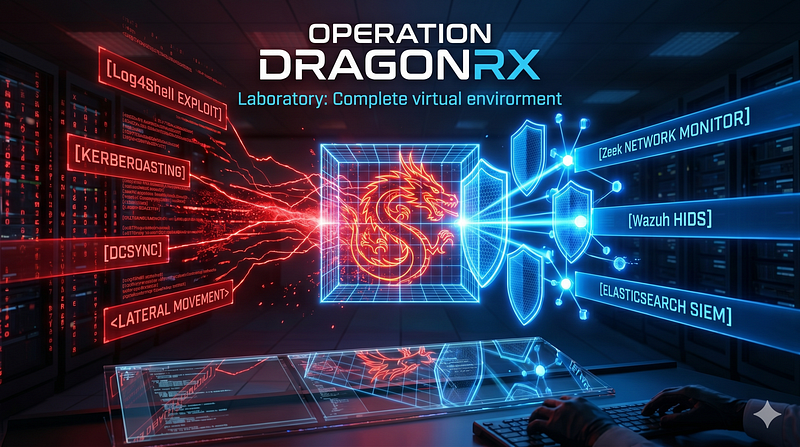
- Category: CTI
- Source article: https://medium.com/@1200km/lab-architecture-operation-dragonrx-38602f432e5c
- Published: 2026-05-02
- Preserved media: 10 image(s), including cover images, screenshots, diagrams, and infographics where present.
- Preserved technical blocks: 28 code/configuration block(s).
Ecosystem Fit
This page mirrors the original Medium article into the 1200km.com Docusaurus ecosystem. The original article flow, images, screenshots, infographics, and technical blocks are preserved from the export.
Part of the Operation DragonRx series · Overview · Lab Architecture · Attack Playbook · DFIR Walkthrough
**A fully automated, reproducible APT41 detection lab.**Docker + Vagrant + Ansible provisioned in a single command. Three Windows VMs (Active Directory, file server, workstation), eight Linux containers (attacker tooling, Log4Shell target, Wazuh/Elastic/Zeek SIEM), and custom attack simulation tooling. Built for security researchers studying Log4Shell exploitation, Kerberoasting, DCSync, and lateral movement — with full SIEM telemetry from day one.
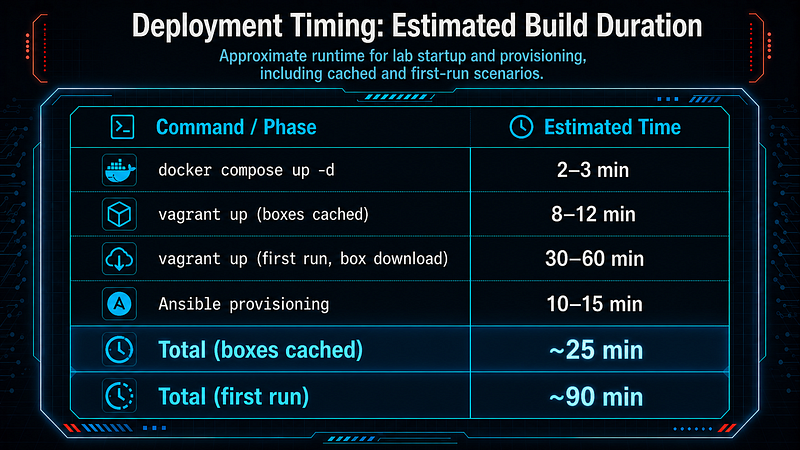
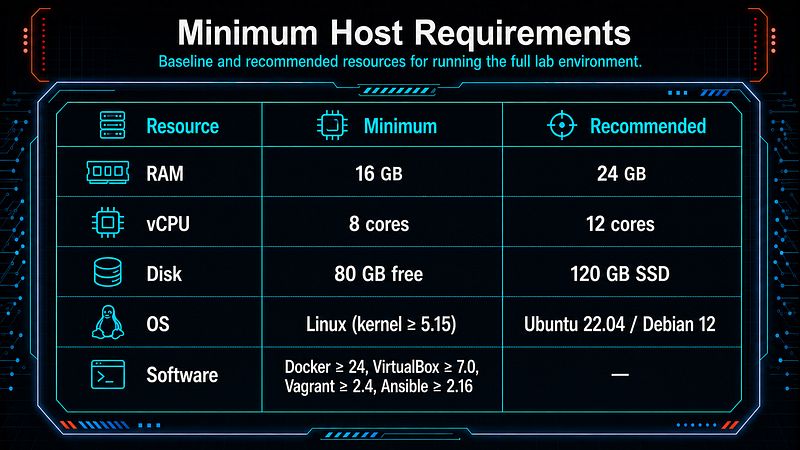
Estimated deploy time:~25 min (boxes cached) ·**Host requirements:**24 GB RAM, 8 cores, 120 GB SSD
Operation DragonRx series:
CTI Report
[APT41 Targeting Pharmaceutical Sector: Log4Shell to Domain Compromise Threat Intelligence Report | Operation DragonRx
Lab Architecture
[Lab Architecture — Operation DragonRx Part of the Operation DragonRx series · Overview · Lab Architecture · Attack Playbook · DFIR Walkthrough
Attack Playbook
[Attack Playbook — Operation DragonRx Phase-by-Phase Attack Guide: Exact Commands Against the Deployed Lab
Detection Guide (in progress…)
DFIR Playbook (in progress…)
Malware Analysis (in progress…)
Table of Content
-
Deployment Stack: Docker + Vagrant + Ansible
-
Deploy from Git
-
Destroy the Lab
-
Network Topology
-
Directory Structure
-
Prerequisites
-
Vagrantfile
-
docker-compose.yml
-
Ansible
-
Ansible Roles
-
Master Deploy Playbook
-
Test Playbook
-
Zeek Config
-
Host Networking Setup
-
Makefile
-
Deploy Sequence
-
VM Specifications
-
Full Lab Environment Summary
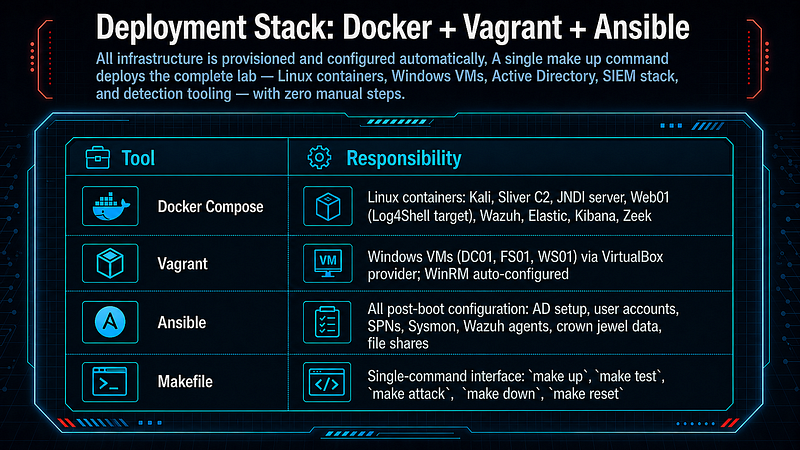
Deployment Stack: Docker + Vagrant + Ansible
All infrastructure is provisioned and configured automatically. A singlemake upcommand deploys the complete lab — Linux containers, Windows VMs, Active Directory, SIEM stack, and detection tooling — with zero manual steps.
Deploy from Git
The lab is published atgithub.com/anpa1200/dragonrx-lab.
# Clone
git
clone
 https://github.com/anpa1200/dragonrx-lab
cd
 dragonrx-lab
# Option A — Docker containers only (no Windows VMs, no Vagrant)
# Covers Log4Shell → JNDI → Sliver C2 → Wazuh/Zeek detection
docker compose up -d
until
 docker
exec
 dragonrx_wazuh pgrep wazuh-analysisd >/dev/null 2>&1;
do

sleep
 5;
done
docker
cp
 siem/wazuh/rules/dragonrx_rules.xml dragonrx_wazuh:/var/ossec/etc/rules/
docker
exec
 dragonrx_wazuh /var/ossec/bin/wazuh-control restart
# → Kibana: http://localhost:5601
# Option B — Full lab (Docker + Windows VMs + Ansible)
bash scripts/deploy.sh
# one script, ~45 min
# or: make up
> Zeek note: Zeek runs with network_mode: host (no fixed IP). Logs live inside the dragonrx_zeek container: docker exec dragonrx_zeek ls /usr/local/zeek/logs/current/
One-Script Deployment
For environments withoutmake, or when a self-contained deploy is needed:
#
Full deployment (identical to
'make up'
 +
'make test'
)
bash scripts/deploy.sh
#
Skip
 Windows VMs (reuse already
-
running
 VMs)
bash scripts
/
deploy.sh
--skip-vms
# Skip Ansible reprovisioning (reuse already-provisioned state)
bash scripts/deploy.sh --skip-vms --skip-ansible
# Deploy
without

running
 the
final
 test suite
bash scripts
/
deploy.sh
--no-test
**deploy.sh**performs all 7 steps in sequence:
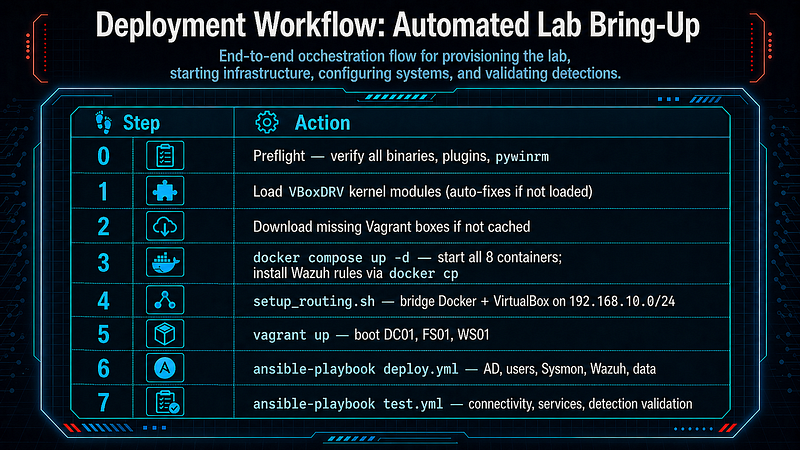
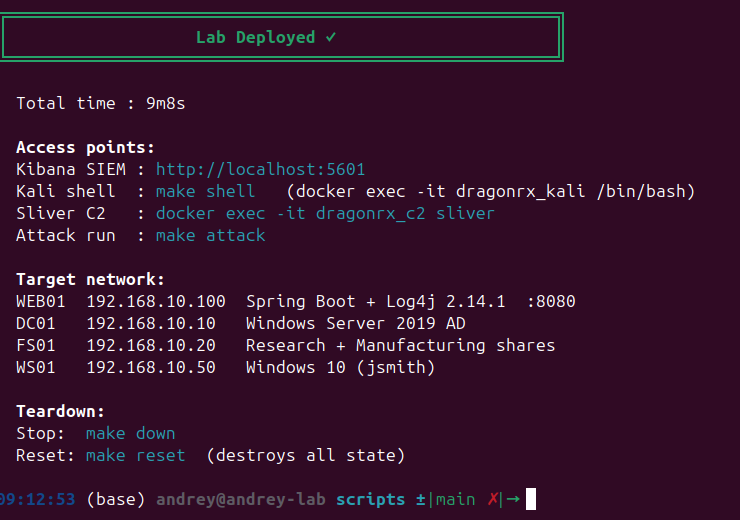
Prints a formatted access summary on completion with elapsed time.
Destroy the Lab
# Option A — Docker only
docker compose down -v
# stops containers and removes volumes
# Option B - Full lab (Docker + VMs)
bash scripts/destroy.sh
# tears down VMs via Vagrant, then docker compose down -v
# or: make down
> Volumes hold Wazuh indices and Zeek logs. -v removes them; omit it if you want to preserve data between runs.
Network Topology
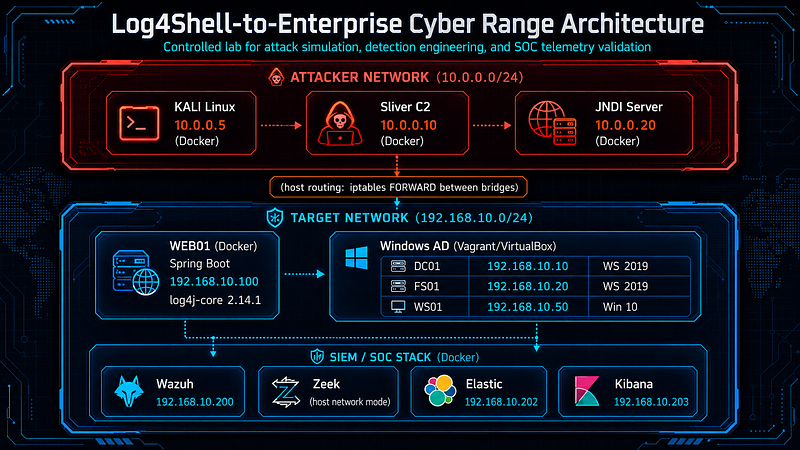
**Networking note:**VirtualBox VMs bridge NIC2 directly onto the Dockertarget_netbridge (br-xxxxxxxx) using Vagrant'spublic_networkdriver. No VirtualBox host-only adapter (vboxnet0) is needed.scripts/setup_routing.shenables IP forwarding and adds iptables FORWARD rules between the two Docker bridges (attacker_net↔target_net), and disables TX checksum offloading on the target bridge so Windows VMs accept TCP packets from Docker containers.
Directory Structure
dragonrx-lab/
├── Makefile
# make up / test / attack / shell / down / reset
├── Vagrantfile
# DC01 (WS2019), FS01 (WS2019), WS01 (Win10)
├── docker-compose.yml
# 8 Linux containers, two named subnets
│
├── scripts/
│ ├── deploy.sh
# ★ ONE-SCRIPT full deployment (see below)
│ ├── setup_routing.sh
# host iptables bridge: Docker ↔ VirtualBox
│ └── fix_vboxdrv.sh
# rebuild VBoxDRV DKMS module if needed
│
├── ansible/
│ ├── ansible.cfg
# interpreter, timeout, retry config
│ ├── requirements.yml
# Galaxy: ansible.windows, microsoft.ad, community.*
│ ├── inventory/
│ │ ├── hosts.ini
# DC01/FS01/WS01 WinRM addresses
│ │ └── group_vars/
│ │ ├── all.yml
# domain, passwords, Wazuh version
│ │ └── windows.yml
# WinRM connection vars for all Windows hosts
│ ├── playbooks/
│ │ ├── deploy.yml
# master playbook: 6 phases in order
│ │ └── test.yml
# smoke tests + detection validation
│ └── roles/
│ ├── dc01/tasks/main.yml
# AD DS install → forest promote → users → SPNs → audit SACL
│ ├── fs01/tasks/main.yml
# domain join → SMB shares → 45 crown-jewel data files
│ ├── ws01/tasks/main.yml
# domain join → jsmith local admin → C:\Temp
│ └── wazuh_agent/tasks/main.yml
# download MSI → install → enroll with manager
│
├── jndi/
│ ├── Dockerfile.jndi
# eclipse-temurin:11-jdk-jammy + Maven-built marshalsec
│ ├── start.sh
# launch HTTP payload server + marshalsec LDAP relay
│ └── payloads/
# Exploit.class served to Log4Shell victims
│
├── attacker/
│ ├── Dockerfile.kali
# kalilinux/kali-rolling base + nmap, impacket, hashcat,
│ ├── tools/
# volume-mounted into Kali container at /opt/tools
│ └── loot/
# exfil landing zone at /opt/loot
│
├── c2/
│ ├── Dockerfile.sliver
# Sliver v1.7.3 binary from GitHub releases
│ ├── configs/
# Sliver operator config (auto-generated)
│ └── loot/
# Sliver download landing zone
│
├── siem/
│ ├── wazuh/
│ │ ├── ossec.conf
# Wazuh 4.7.0 default manager config (reference copy)
│ │ └── rules/
│ │ └── dragonrx_rules.xml
# 8 custom rules: 100110-100170
│ │
# (installed via docker cp post-startup)
│ └── zeek/
│ ├── entrypoint.sh
# ★ Bridge detection + Zeek startup (-C flag, /proc/net/route)
│ └── local.zeek
# Log4Shell JNDI header + long-label DNS detection
Prerequisites
# Hardware minimum
CPU: 8 cores (VT-x/AMD-V required)
RAM: 32 GB (Docker ~10 GB + 3 Windows VMs ~18 GB + headroom)
Disk: 250 GB SSD
# Software - install before running make up
docker >= 24.0
docker compose >= 2.20
vagrant >= 2.4.0
virtualbox >= 7.0
ansible >= 2.16
python3 >= 3.10
# Ansible collections + Python deps
pip3 install pywinrm requests
ansible-galaxy collection install -r ansible/requirements.yml
# requirements.yml covers:
# ansible.windows, community.windows, microsoft.ad,
# community.docker, community.general
# Vagrant plugins
vagrant plugin install vagrant-reload
# post-domain-join reboots
vagrant plugin install vagrant-hostmanager
# /etc/hosts management
Vagrantfile
Large code or log block · 287 lines · expand raw text
# -*- mode: ruby -*-
# vi: set ft=ruby :
VAGRANTFILE_API_VERSION
 =
"2"
WINDOWS_BOXES
 = {

"DC01"
 => {
box:

"StefanScherer/windows_2019"
,
ip:

"192.168.10.10"
,
memory:

4096
,
cpus:

2
 },

"FS01"
 => {
box:

"StefanScherer/windows_2019"
,
ip:

"192.168.10.20"
,
memory:

4096
,
cpus:

2
 },

"WS01"
 => {
box:

"StefanScherer/windows_10"
,
ip:

"192.168.10.50"
,
memory:

4096
,
cpus:

2
 },
}
def

find_docker_bridge

%w[target_net dragonrx]
.each
do
 |
filter
|
    id =
`docker network ls --filter name=
#{filter}
 --format "{{.ID}}" 2>/dev/null`
.strip.split.first

return

"br-
#{id[
0
,
12
]}
"

if
 id && !id.empty?

end

nil
end
DOCKER_BRIDGE
 = find_docker_bridge
Vagrant
.configure(
VAGRANTFILE_API_VERSION
)
do
 |
config
|
  config.vagrant.plugins = [
"vagrant-reload"
,
"vagrant-hostmanager"
]

# Ignore the box's packed Vagrantfile — it declares a synced folder and

# runs a $username provisioner that fails on newer WinRM/Ruby. We set

# all WinRM, network, and provisioner config ourselves.
  config.vm.ignore_box_vagrantfile =
true
  config.hostmanager.enabled      =
true
  config.hostmanager.manage_host  =
false
  config.hostmanager.manage_guest =
false

# Ansible sets hostnames + /etc/hosts

WINDOWS_BOXES
.each
do
 |
name, cfg
|
    config.vm.define name
do
 |
node
|
      node.vm.box = cfg[
:box
]

# No vm.hostname — triggers mid-boot Windows reboot that stalls 15+ min

# on the bridged NIC (no DHCP on Docker bridge). Ansible handles it.
      node.vm.synced_folder
"."
,
"/vagrant"
,
disabled:

true
      node.vm.communicator       =
"winrm"
      node.winrm.username        =
"vagrant"
      node.winrm.password        =
"vagrant"
      node.winrm.transport       =
:negotiate
      node.winrm.basic_auth_only =
false
      node.winrm.retry_limit     =
20
      node.winrm.retry_delay     =
10

# NIC 1: NAT (internet / WinRM port forwarding)

# NIC 2: bridged to Docker target_net bridge — auto_config false so

# Vagrant doesn't trigger a reboot trying to set the IP via WinRM.

# Static IP is set by the PowerShell provisioner below instead.
      abort
"Docker target_net bridge not found — run 'docker compose up -d' first."

unless

DOCKER_BRIDGE
      node.vm.network
"public_network"
,

bridge:

DOCKER_BRIDGE
,

auto_config:

false
      node.vm.provider
"virtualbox"

do
 |
vb
|
        vb.name   =
"dragonrx_
#{name.downcase}
"
        vb.memory = cfg[
:memory
]
        vb.cpus   = cfg[
:cpus
]
        vb.gui    =
false
        vb.customize [
"modifyvm"
,
:id
,
"--nested-hw-virt"
,
"on"
]
        vb.customize [
"modifyvm"
,
:id
,
"--clipboard"
,
"bidirectional"
]

end

# Set static IP on NIC2 (bridged adapter) without triggering a reboot.

# Finds NIC2 by excluding the default-route adapter (NIC1 = NAT).
      node.vm.provision
"shell"
,
privileged:

false
,

powershell_elevated_interactive:

false
,

inline:

<<~PS
          $defIdx = (Get-NetRoute -DestinationPrefix '0.0.0.0/0' |
                     Sort-Object RouteMetric | Select-Object -First 1).InterfaceIndex
          $nic2   = Get-NetAdapter |
                    Where-Object { $_.InterfaceIndex -ne $defIdx -and $_.Status -eq 'Up' } |
                    Select-Object -First 1
          if ($nic2) {
              Remove-NetIPAddress  -InterfaceIndex $nic2.InterfaceIndex -Confirm:$false -ErrorAction SilentlyContinue
              Remove-NetRoute      -InterfaceIndex $nic2.InterfaceIndex -Confirm:$false -ErrorAction SilentlyContinue
              New-NetIPAddress     -InterfaceIndex $nic2.InterfaceIndex `
                                   -IPAddress '
#{cfg[
:ip
]}
' -PrefixLength 24
              Write-Host "NIC2 configured:
#{cfg[
:ip
]}
/24"
          } else {
              Write-Host "WARNING: NIC2 not found (may still be initialising)"
          }
          Write-Host "VM
#{name}
 ready for Ansible"
        PS

end

end
end
Vagrant boxes used:
-
StefanScherer/windows_2019— Windows Server 2019 Datacenter, WinRM pre-enabled, ~9 GB download -
StefanScherer/windows_10— Windows 10 22H2, ~8 GB download -
First
vagrant updownloads boxes; subsequent runs use local cache
> NIC2 bridging note: VMs use public_network (not private_network ) so VirtualBox bridges the NIC directly onto the Docker target_net Linux bridge via AF_PACKET. auto_config: false prevents Vagrant from attempting DHCP (there is none on the Docker bridge) or issuing a WinRM reboot mid-boot. The PowerShell provisioner assigns the static IP immediately after boot. No vboxnet0 host-only adapter is used or required.
docker-compose.yml
Large code or log block · 538 lines · expand raw text
networks:

attacker_net:

driver:

bridge

ipam:

config:

-

subnet:

10.0
.0
.0
/24

target_net:

driver:

bridge

ipam:

config:

-

subnet:

192.168
.10
.0
/24

gateway:

192.168
.10
.254
services:

# ── ATTACKER SIDE ───────────────────────────────────────────────────

rxphage_builder:

build:

context:

./attacker

dockerfile:

Dockerfile.rxphage

container_name:

dragonrx_rxphage_builder

volumes:

-

./attacker/tools:/output

kali:

image:

kalilinux/kali-rolling:latest

container_name:

dragonrx_kali

hostname:

kali

networks:

attacker_net:

ipv4_address:

10.0
.0
.5

target_net:

ipv4_address:

192.168
.10
.5

tty:

true

stdin_open:

true

volumes:

-

./attacker/tools:/opt/tools

-

./attacker/loot:/opt/loot

cap_add:
 [
NET_ADMIN
,
NET_RAW
]

sysctls:

net.ipv4.ip_forward:

1

depends_on:

rxphage_builder:

condition:

service_completed_successfully

sliver_c2:

build:

context:

./c2

dockerfile:

Dockerfile.sliver

image:

dragonrx_sliver:local

container_name:

dragonrx_c2

hostname:

c2

networks:

attacker_net:

ipv4_address:

10.0
.0
.10

ports:

-

"31337:31337"

volumes:

-

./c2/configs:/root/.sliver

-

./c2/loot:/opt/loot

restart:

unless-stopped

jndi_server:

build:

context:

./jndi

dockerfile:

Dockerfile.jndi

container_name:

dragonrx_jndi

hostname:

jndi

networks:

attacker_net:

ipv4_address:

10.0
.0
.20

ports:

-

"1389:1389"

-

"8888:8080"

# ── TARGET SIDE ─────────────────────────────────────────────────────

web01:

image:

ghcr.io/christophetd/log4shell-vulnerable-app:latest

container_name:

dragonrx_web01

hostname:

web01

networks:

attacker_net:

ipv4_address:

10.0
.0
.100

target_net:

ipv4_address:

192.168
.10
.100

ports:

-

"8080:8080"

environment:

-

DOMAIN_CONTROLLER=192.168.10.10

-

LDAP_USER=svc_ldap

-

LDAP_PASS=NovaTech2021!

healthcheck:

test:
 [
"CMD-SHELL"
,
"wget -qO- --header='X-Api-Version: health' http://localhost:8080/ >/dev/null 2>&1 || exit 1"
]

interval:

15s

timeout:

5s

retries:

5

# ── SOC / DETECTION SIDE ────────────────────────────────────────────

wazuh:

image:

wazuh/wazuh-manager:4.7.0

container_name:

dragonrx_wazuh

hostname:

wazuh

networks:

target_net:

ipv4_address:

192.168
.10
.200

ports:

-

"1514:1514/tcp"

-

"1514:1514/udp"

-

"1515:1515"

-

"55000:55000"

volumes:

-

wazuh_data:/var/ossec/data

healthcheck:

test:
 [
"CMD-SHELL"
,
"pgrep wazuh-analysisd > /dev/null && pgrep wazuh-remoted > /dev/null"
]

interval:

20s

retries:

5

elasticsearch:

image:

docker.elastic.co/elasticsearch/elasticsearch:8.11.0

container_name:

dragonrx_elastic

hostname:

elastic

networks:

target_net:

ipv4_address:

192.168
.10
.202

environment:

-

discovery.type=single-node

-

xpack.security.enabled=false

-

ES_JAVA_OPTS=-Xms4g

-Xmx4g

volumes:

-

elastic_data:/usr/share/elasticsearch/data

healthcheck:

test:
 [
"CMD-SHELL"
,
"curl -sf http://localhost:9200/_cluster/health | grep -v red"
]

interval:

20s

retries:

10

kibana:

image:

docker.elastic.co/kibana/kibana:8.11.0

container_name:

dragonrx_kibana

hostname:

kibana

networks:

target_net:

ipv4_address:

192.168
.10
.203

ports:

-

"5601:5601"

environment:

-

ELASTICSEARCH_HOSTS=http://192.168.10.202:9200

depends_on:

elasticsearch:

condition:

service_healthy

zeek:

image:

zeek/zeek:6.2.1

container_name:

dragonrx_zeek

hostname:

zeek

network_mode:

host

volumes:

-

./siem/zeek/local.zeek:/usr/local/zeek/share/zeek/site/local.zeek:ro

-

./siem/zeek/entrypoint.sh:/entrypoint.sh:ro

-

zeek_logs:/usr/local/zeek/logs

cap_add:
 [
NET_ADMIN
,
NET_RAW
]

command:
 [
"/bin/sh"
,
"/entrypoint.sh"
]
volumes:

wazuh_data:

elastic_data:

zeek_logs:
Ansible
ansible/requirements.yml
collections:

-

name:

ansible.windows

version:

">=2.3.0"

-

name:

community.windows

version:

">=2.2.0"

-

name:

microsoft.ad

version:

">=1.5.0"

-

name:

community.docker

version:

">=3.6.0"

-

name:

community.general

version:

">=8.0.0"
ansible/ansible.cfg
[defaults]
inventory
          = inventory/hosts.ini
roles_path
         = roles
stdout_callback
    = yaml
timeout
            =
60
host_key_checking
  =
False
[winrm]
transport
          = basic
server_cert_validation
 = ignore
ansible/inventory/hosts.ini
[docker_linux]
web01    ansible_host=192.168.10.100  ansible_connection=docker  ansible_docker_extra_args=
"-u root"
  ansible_container=dragonrx_web01
kali     ansible_host=10.0.0.5       ansible_connection=docker  ansible_container=dragonrx_kali
[windows]
dc01     ansible_host=192.168.10.10
fs01     ansible_host=192.168.10.20
ws01     ansible_host=192.168.10.50
[all:vars]
domain_name=novatech.local
domain_netbios=NOVATECH
domain_controller_ip=192.168.10.10
ansible/inventory/group_vars/windows.yml
ansible_user:
 vagrant
ansible_password:
 vagrant
ansible_connection:
 winrm
ansible_winrm_transport:
 basic
ansible_winrm_server_cert_validation:
 ignore
ansible_winrm_port:

5985
ansible_winrm_read_timeout_sec:

120
ansible_winrm_operation_timeout_sec:

90
ansible_become:

false
domain_admin_user:
 Administrator
domain_admin_password:

"NovaTech_Admin2024!"
safe_mode_password:

"DragonRx2024!"
> WinRM transport note: basic is required. pywinrm 0.4.x lists ntlm (not negotiate ) in its supported auth types, and OpenSSL 3.x removed the MD4 hash that NTLM depends on. basic over plain HTTP port 5985 works reliably with the StefanScherer Vagrant boxes.
ansible/inventory/group_vars/all.yml
lab_users:

-

name:

jsmith

password:

"Research#2024"

department:

"R&D"

local_admin_on:

ws01

-

name:

svc_ldap

password:

"NovaTech2021!"

description:

"LDAP service account — creds leaked in context.xml"

password_never_expires:

true

-

name:

svc_backup

password:

"Backup_Svc99!"

description:

"Kerberoastable backup service account"

password_never_expires:

true

spn:

"MSSQLSvc/fs01.novatech.local:1433"

member_of:

"Backup Operators"
# VMs cannot reach the Wazuh container IP (192.168.10.200) directly due to
# VirtualBox bridge FDB behavior. Use the host bridge IP (192.168.10.254)
# instead — docker-proxy forwards TCP 1514/1515 to the container.
wazuh_manager_ip:

192.168
.10
.254
sysmon_version:

"15.0"
sysmon_sha256:

""
> Wazuh manager IP note: VirtualBox bridges NICs via AF_PACKET sockets. The Linux bridge FDB never learns VM MACs from AF_PACKET injections, so SYN-ACKs from the Wazuh container (192.168.10.200) are flooded to bridge ports but never delivered back to the VM’s AF_PACKET socket — producing Zeek S1/Sh state (SYN sent, no ACK). Using the host bridge IP (192.168.10.254) routes Wazuh agent traffic through docker-proxy , which handles the TCP return path through the host TCP stack correctly.
Ansible Roles
roles/dc01/tasks/main.yml
Large code or log block · 403 lines · expand raw text
---
-

name:

Install

AD

DS

role

ansible.windows.win_feature:

name:

AD-Domain-Services

include_management_tools:

true

state:

present

register:

ad_feature
-

name:

Reboot

after

AD

DS

install

ansible.windows.win_reboot:

reboot_timeout:

300

post_reboot_delay:

30

when:

ad_feature.reboot_required
-

name:

Set

local

Administrator

password

(required

before

DC

promotion)

ansible.windows.win_user:

name:

Administrator

password:

"
{{ domain_admin_password }}
"

state:

present
-

name:

Promote

to

Domain

Controller

microsoft.ad.domain:

dns_domain_name:

"
{{ domain_name }}
"

domain_netbios_name:

"
{{ domain_netbios }}
"

safe_mode_password:

"
{{ safe_mode_password }}
"

reboot:

false

register:

domain_result
-

name:

Reboot

after

domain

promotion

ansible.windows.win_reboot:

reboot_timeout:

1200

post_reboot_delay:

120

connect_timeout:

60

when:

domain_result.changed

or

domain_result.reboot_required

|

default(false)
-

name:

Wait

for

AD

web

services

ansible.windows.win_wait_for:

port:

389

host:

127.0
.0
.1

timeout:

120
-

name:

Create

domain

users

microsoft.ad.user:

name:

"
{{ item.name }}
"

sam_account_name:

"
{{ item.name }}
"

password:

"
{{ item.password }}
"

password_never_expires:

"
{{ item.password_never_expires | default(false) }}
"

description:

"
{{ item.description | default(omit) }}
"

enabled:

true

state:

present

loop:

"
{{ lab_users }}
"
-

name:

Set

SPN

on

svc_backup

(Kerberoastable)

ansible.windows.win_powershell:

script:

|
      $spn  = "{{ item.spn }}"
      $acct = "{{ domain_netbios }}\{{ item.name }}"
      $existing = & setspn -L "{{ item.name }}" 2>&1
      if ($existing -notmatch [regex]::Escape($spn)) {
          & setspn -S $spn $acct
          Write-Output "SPN set: $spn on $acct"
      } else {
          Write-Output "SPN already present: $spn"
      }

loop:

"
{{ lab_users | selectattr('spn', 'defined') | list }}
"
-

name:

Add

svc_backup

to

Backup

Operators

ansible.windows.win_powershell:

script:

|
      $members = (Get-ADGroupMember "Backup Operators").SamAccountName
      if ($members -notcontains "svc_backup") {
          Add-ADGroupMember -Identity "Backup Operators" -Members "svc_backup"
          Write-Output "Added svc_backup to Backup Operators"
      } else {
          Write-Output "svc_backup already in Backup Operators"
      }
-

name:

Enable

Directory

Service

Access

auditing

(required

for

DCSync

EID

4662
)

ansible.windows.win_command:

>
    auditpol /set /subcategory:"Directory Service Access" /success:enable /failure:enable
-

name:

Set

SACL

on

domain

NC

for

DCSync

detection

ansible.windows.win_powershell:

script:

|
      $rootDSE   = [ADSI]"LDAP://RootDSE"
      $defaultNC = $rootDSE.defaultNamingContext
      $acl       = (Get-Acl "AD:\$defaultNC")
      $identity  = [System.Security.Principal.NTAccount]"Everyone"
      $adRights  = [System.DirectoryServices.ActiveDirectoryRights]"ExtendedRight"
      $type      = [System.Security.AccessControl.AccessControlType]"Success"
      $inherit   = [System.DirectoryServices.ActiveDirectorySecurityInheritance]"All"
      $guidAll   = [guid]"1131f6ad-9c07-11d1-f79f-00c04fc2dcd2"
      $ace = New-Object System.DirectoryServices.ActiveDirectoryAuditRule(
          $identity, $adRights, $type, $guidAll, $inherit)
      $acl.AddAuditRule($ace)
      Set-Acl "AD:\$defaultNC" $acl
      Write-Output "SACL configured for DCSync detection (EID 4662)"
-

name:

Set

DNS

forwarder

ansible.windows.win_powershell:

script:

|

Set-DnsServerForwarder

-IPAddress

"8.8.8.8"

-PassThru
> DC promotion notes:
-
The
rebootflag is set tofalseso Ansible controls the reboot window.reboot_timeout: 1200is needed — DC promotion + AD DS initialization takes several minutes post-reboot. -
microsoft.ad.domaindoes not accept astateparameter; idempotency is handled by the module internally. -
The local Administrator password must be set before
DCPromoor promotion exits with code 94 (blank password rejected).
roles/fs01/tasks/main.yml
Large code or log block · 275 lines · expand raw text
---
-

name:

Wait

for

DC01

LDAP

ansible.windows.win_wait_for:

host:

"
{{ domain_controller_ip }}
"

port:

389

timeout:

300
-

name:

Set

DNS

to

DC01

on

target_net

NIC

(required

for

domain

join)

ansible.windows.win_powershell:

script:

|
      $defIdx = (Get-NetRoute -DestinationPrefix '0.0.0.0/0' |
                 Sort-Object RouteMetric | Select-Object -First 1).InterfaceIndex
      $nic2 = Get-NetAdapter |
              Where-Object { $_.InterfaceIndex -ne $defIdx -and $_.Status -eq 'Up' } |
              Select-Object -First 1
      if ($nic2) {
          Set-DnsClientServerAddress -InterfaceIndex $nic2.InterfaceIndex `
              -ServerAddresses "{{ domain_controller_ip }}"
          Write-Output "DNS set to {{ domain_controller_ip }} on $($nic2.Name)"
      } else {
          throw "NIC2 not found — cannot set DNS"
      }
-

name:

Join

domain

microsoft.ad.membership:

dns_domain_name:

"
{{ domain_name }}
"

domain_admin_user:

"
{{ domain_netbios }}
\\
{{ domain_admin_user }}
"

domain_admin_password:

"
{{ domain_admin_password }}
"

state:

domain

register:

domain_join
-

name:

Reboot

after

domain

join

ansible.windows.win_reboot:

reboot_timeout:

300

when:

domain_join.changed
-

name:

Create

crown

jewel

directories

ansible.windows.win_file:

path:

"
{{ item }}
"

state:

directory

loop:

-

C:\Research

-

C:\Manufacturing

-

C:\SYSVOL_backup
-

name:

Generate

dummy

Phase

III

trial

data

ansible.windows.win_powershell:

script:

|
      1..30 | ForEach-Object {
        $content = "Phase III Antiviral Trial Data - Subject ID: $_ - Visit: $(Get-Date -Format yyyy-MM-dd)"
        $content | Out-File "C:\Research\clinical_data_record_$_.csv" -Encoding UTF8
      }
      1..15 | ForEach-Object {
        $content = "Proprietary Synthesis Process v2.3 - Batch $_ - CONFIDENTIAL"
        $content | Out-File "C:\Manufacturing\synthesis_process_$_.docx" -Encoding UTF8
      }
      "NovaTech Phase III NDA Filing 2026 - RESTRICTED" | Out-File "C:\Research\NDA_filing_2026.pdf" -Encoding UTF8
      Write-Output "Crown jewel data created"
-

name:

Create

SMB

shares

ansible.windows.win_share:

name:

"
{{ item.name }}
"

path:

"
{{ item.path }}
"

full:

"
{{ item.full }}
"

read:

"
{{ item.read }}
"

state:

present

loop:

-

name:

Research

path:

C:\Research

full:

"NOVATECH\\jsmith"

read:

"NOVATECH\\Domain Users"

-

name:

Manufacturing

path:

C:\Manufacturing

full:

"NOVATECH\\Administrator"

read:

"NOVATECH\\jsmith"
> DNS pre-join note: NIC2 (the host-only 192.168.10.0/24 adapter) must resolve novatech.local before the domain join module runs. Setting DNS to DC01 on NIC2 before calling microsoft.ad.membership is required — without it the join fails with "domain does not exist or could not be contacted."
roles/ws01/tasks/main.yml
Large code or log block · 299 lines · expand raw text
---
-

name:

Wait

for

DC01

LDAP

ansible.windows.win_wait_for:

host:

"
{{ domain_controller_ip }}
"

port:

389

timeout:

300
-

name:

Set

DNS

to

DC01

on

target_net

NIC

(required

for

domain

join)

ansible.windows.win_powershell:

script:

|
      $defIdx = (Get-NetRoute -DestinationPrefix '0.0.0.0/0' |
                 Sort-Object RouteMetric | Select-Object -First 1).InterfaceIndex
      $nic2 = Get-NetAdapter |
              Where-Object { $_.InterfaceIndex -ne $defIdx -and $_.Status -eq 'Up' } |
              Select-Object -First 1
      if ($nic2) {
          Set-DnsClientServerAddress -InterfaceIndex $nic2.InterfaceIndex `
              -ServerAddresses "{{ domain_controller_ip }}"
          Write-Output "DNS set to {{ domain_controller_ip }} on $($nic2.Name)"
      } else {
          throw "NIC2 not found — cannot set DNS"
      }
-

name:

Join

domain

microsoft.ad.membership:

dns_domain_name:

"
{{ domain_name }}
"

domain_admin_user:

"
{{ domain_netbios }}
\\
{{ domain_admin_user }}
"

domain_admin_password:

"
{{ domain_admin_password }}
"

state:

domain

register:

domain_join
-

name:

Reboot

after

domain

join

ansible.windows.win_reboot:

reboot_timeout:

300

when:

domain_join.changed
-

name:

Enable

SMB

and

set

target_net

NIC

to

Private

profile

ansible.windows.win_powershell:

script:

|
      Enable-NetFirewallRule -DisplayGroup "File and Printer Sharing"
      $defIdx = (Get-NetRoute -DestinationPrefix '0.0.0.0/0' |
                 Sort-Object RouteMetric | Select-Object -First 1).InterfaceIndex
      $nic2 = Get-NetAdapter |
              Where-Object { $_.InterfaceIndex -ne $defIdx -and $_.Status -eq 'Up' } |
              Select-Object -First 1
      if ($nic2) {
          Set-NetConnectionProfile -InterfaceIndex $nic2.InterfaceIndex -NetworkCategory Private -ErrorAction SilentlyContinue
      }
-

name:

Add

jsmith

as

local

administrator

ansible.windows.win_group_membership:

name:

Administrators

members:
 [
"NOVATECH\\jsmith"
]

state:

present
-

name:

Create

C:\Temp

for

staging

artifacts

ansible.windows.win_file:

path:

C:\Temp

state: directorySMB firewall note:

Windows

10

disables

File

and

Printer

Sharing

by

default,

and

the

Docker

bridge

NIC

gets

a

“Public”

network

profile

which

blocks

SMB.

Enable-NetFirewallRule

opens

the

rule

for

all

profiles;

Set-NetConnectionProfile

downgrades

the

lab

NIC

to

Private

so

Windows

Security

Center

stops

complaining.
roles/wazuh_agent/tasks/main.yml
---
# Remove any stale agent record for this hostname so re-enrollment isn't blocked
# by Wazuh's "not disconnected long enough" guard after container recreation.
-

name:

Remove

stale

Wazuh

agent

record

(idempotent

pre-enroll

cleanup)

delegate_to:

localhost

ansible.builtin.shell:

|
    TOKEN=$(curl -sk -u wazuh:wazuh -X POST \
      https://127.0.0.1:55000/security/user/authenticate \
      | python3 -c "import sys,json; print(json.load(sys.stdin)['data']['token'])")
    ID=$(curl -sk -H "Authorization: Bearer $TOKEN" \
      "https://127.0.0.1:55000/agents?name={{ inventory_hostname }}" \
      | python3 -c "import sys,json; items=json.load(sys.stdin)['data']['affected_items']; print(items[0]['id'] if items else '')")
    if [ -n "$ID" ]; then
      curl -sk -X DELETE -H "Authorization: Bearer $TOKEN" \
        "https://127.0.0.1:55000/agents?agents_list=$ID&status=all&older_than=0s" >/dev/null
      echo "Removed stale agent $ID for {{ inventory_hostname }}"
    else
      echo "No stale agent record for {{ inventory_hostname }}"
    fi

changed_when:

false
-

name:

Ensure

C:\Temp

exists

ansible.windows.win_file:

path:

C:\Temp

state:

directory
-

name:

Download

Wazuh

agent

MSI

ansible.windows.win_get_url:

url:

"https://packages.wazuh.com/4.x/windows/wazuh-agent-4.7.0-1.msi"

dest:

C:\Temp\wazuh-agent.msi
-

name:

Install

Wazuh

agent

ansible.windows.win_package:

path:

C:\Temp\wazuh-agent.msi

product_id:

"{54E68B4D-3C4E-4D9C-8E65-C4A62C6B9E7A}"

arguments:

>-
      WAZUH_MANAGER="{{ wazuh_manager_ip }}"
      WAZUH_REGISTRATION_SERVER="{{ wazuh_manager_ip }}"
      WAZUH_AGENT_NAME="{{ inventory_hostname }}"

state:

present
-

name:

Start

and

enable

Wazuh

agent

ansible.windows.win_service:

name:

WazuhSvc

state:

started

start_mode:

auto
> Stale agent cleanup note: After docker compose down -v and up , Wazuh starts fresh with no agent records. But if the manager container is recreated while VMs are still enrolled, Wazuh rejects re-registration with "Duplicate name — not disconnected long enough" (default agents_disconnection_time is 10 min). The pre-enroll API DELETE clears the record immediately so re-deploy works without a 10-minute wait.
Master Deploy Playbook
ansible/playbooks/deploy.yml
Large code or log block · 463 lines · expand raw text
---
# Operation DragonRx — Full Lab Deploy
# Usage: ansible-playbook ansible/playbooks/deploy.yml
# Run after: docker compose up -d && vagrant up
-

name:

"Phase 1 — Verify Docker services healthy"

hosts:

localhost

gather_facts:

false

tasks:

-

name:

Wait

for

Wazuh

manager

API

ansible.builtin.wait_for:

host:

127.0
.0
.1

port:

55000

timeout:

120

-

name:

Wait

for

Kibana

(implicitly

confirms

Elasticsearch)

ansible.builtin.uri:

url:

http://localhost:5601/api/status

status_code:

200

register:

kibana_health

until:

kibana_health.status

==

200

retries:

30

delay:

10
-

name:

"Phase 2 — Configure DC01 (Active Directory)"

hosts:

dc01

gather_facts:

true

pre_tasks:

-

name:

Set

computer

name

to

DC01

ansible.windows.win_hostname:

name:

DC01

register:

dc01_name

-

name:

Reboot

if

hostname

changed

ansible.windows.win_reboot:

reboot_timeout:

300

post_reboot_delay:

30

when:

dc01_name.reboot_required

roles:

-

dc01

-

wazuh_agent
-

name:

"Phase 3 — Configure FS01 (File Server)"

hosts:

fs01

gather_facts:

true

pre_tasks:

-

name:

Set

computer

name

to

FS01

ansible.windows.win_hostname:

name:

FS01

register:

fs01_name

-

name:

Reboot

if

hostname

changed

ansible.windows.win_reboot:

reboot_timeout:

300

post_reboot_delay:

30

when:

fs01_name.reboot_required

roles:

-

fs01

-

wazuh_agent
-

name:

"Phase 4 — Configure WS01 (Workstation)"

hosts:

ws01

gather_facts:

true

pre_tasks:

-

name:

Set

computer

name

to

WS01

ansible.windows.win_hostname:

name:

WS01

register:

ws01_name

-

name:

Reboot

if

hostname

changed

ansible.windows.win_reboot:

reboot_timeout:

300

post_reboot_delay:

30

when:

ws01_name.reboot_required

roles:

-

ws01

-

wazuh_agent
-

name:

"Phase 5 — Configure SIEM indexes"

hosts:

localhost

gather_facts:

false

tasks:

-

name:

Create

Kibana

index

pattern

for

Wazuh

ansible.builtin.uri:

url:

http://localhost:5601/api/saved_objects/index-pattern

method:

POST

headers:

Content-Type:

application/json

kbn-xsrf:

"true"

body_format:

json

body:

attributes:

title:

"wazuh-alerts-*"

timeFieldName:

"@timestamp"

status_code:
 [
200
,
409
]

-

name:

Create

Kibana

index

pattern

for

Zeek

ansible.builtin.uri:

url:

http://localhost:5601/api/saved_objects/index-pattern

method:

POST

headers:

Content-Type:

application/json

kbn-xsrf:

"true"

body_format:

json

body:

attributes:

title:

"zeek-*"

timeFieldName:

"@timestamp"

status_code:
 [
200
,
409
]
-

name:

"Phase 6 — Run smoke tests"

import_playbook:

test.yml
Test Playbook
ansible/playbooks/test.yml
Large code or log block · 659 lines · expand raw text
---
# Smoke tests + detection validation
# Usage: ansible-playbook ansible/playbooks/test.yml
-

name:

"Test 1 — Network connectivity"

hosts:

localhost

gather_facts:

false

vars:

connectivity_checks:

-
 {
host:

127.0
.0
.1
,
port:

8080
,
name:

"WEB01 patient portal"
}

-
 {
host:

192.168
.10
.10
,
port:

389
,
name:

"DC01 LDAP"
}

-
 {
host:

192.168
.10
.10
,
port:

445
,
name:

"DC01 SMB"
}

-
 {
host:

192.168
.10
.20
,
port:

445
,
name:

"FS01 SMB"
}

-
 {
host:

192.168
.10
.50
,
port:

445
,
name:

"WS01 SMB"
}

-
 {
host:

127.0
.0
.1
,
port:

1515
,
name:

"Wazuh enrollment"
}

-
 {
host:

192.168
.10
.202
,
port:

9200
,
name:

"Elasticsearch"
}

-
 {
host:

127.0
.0
.1
,
port:

5601
,
name:

"Kibana"
}

-
 {
host:

127.0
.0
.1
,
port:

1389
,
name:

"JNDI LDAP server"
}

-
 {
host:

127.0
.0
.1
,
port:

8888
,
name:

"JNDI payload server"
}

tasks:

-

name:

Check

TCP

connectivity

to

all

services

ansible.builtin.wait_for:

host:

"
{{ item.host }}
"

port:

"
{{ item.port }}
"

timeout:

30

loop:

"
{{ connectivity_checks }}
"

loop_control:

label:

"
{{ item.name }}
"
-

name:

"Test 2 — Windows services"

hosts:

windows

gather_facts:

false

tasks:

-

name:

Verify

Wazuh

agent

running

ansible.windows.win_service_info:

name:

WazuhSvc

register:

wazuh_info

failed_when:

wazuh_info.services

|

length

==

0

or

wazuh_info.services[0].state

!=

"started"
-

name:

"Test 3 — Active Directory state"

hosts:

dc01

gather_facts:

false

tasks:

-

name:

Verify

domain

functional

ansible.windows.win_powershell:

script:

|
          $domain = Get-ADDomain -ErrorAction Stop
          if ($domain.DNSRoot -ne "novatech.local") {
            Write-Error "Domain mismatch: $($domain.DNSRoot)"; exit 1
          }
          Write-Output "Domain OK: $($domain.DNSRoot)"

-

name:

Verify

all

lab

users

present

ansible.windows.win_powershell:

script:

|
          $users = @("jsmith", "svc_ldap", "svc_backup")
          foreach ($u in $users) {
            if (-not (Get-ADUser $u -ErrorAction SilentlyContinue)) {
              Write-Error "Missing user: $u"; exit 1
            }
          }
          Write-Output "All lab users present"

-

name:

Verify

svc_backup

SPN

set

(Kerberoastable)

ansible.windows.win_powershell:

script:

|
          $spns = (Get-ADUser svc_backup -Properties ServicePrincipalNames).ServicePrincipalNames
          if ($spns -notcontains "MSSQLSvc/fs01.novatech.local:1433") {
            Write-Error "Kerberoastable SPN missing"; exit 1
          }
          Write-Output "SPN OK: $spns"

-

name:

Verify

Directory

Service

Access

auditing

enabled

ansible.windows.win_powershell:

script:

|
          $result = auditpol /get /subcategory:"Directory Service Access"
          if ($result -notmatch "Success") {
            Write-Error "DS Access auditing not enabled — EID 4662 will not fire"; exit 1
          }
          Write-Output "Audit policy OK"
-

name:

"Test 4 — Detection validation (fire test payloads)"

hosts:

localhost

gather_facts:

false

tasks:

-

name:

Fire

JNDI

DNS

probe

(benign

—

no

code

execution)

ansible.builtin.uri:

url:

http://192.168.10.100:8080/

method:

GET

headers:

X-Api-Version:

"${jndi:dns://10.0.0.20/test-probe}"

validate_certs:

false

status_code:
 [
200
,
400
,
401
,
500
]

register:

probe_result

-

name:

Wait

10

seconds

for

Zeek

to

process

ansible.builtin.pause:

seconds:

10

-

name:

Check

Zeek

raised

Log4Shell

NOTICE

ansible.builtin.shell:

|
        docker exec dragonrx_zeek sh -c \
          'grep -l "Log4Shell" notice.log 2>/dev/null | head -1'

register:

zeek_detection

delegate_to:

localhost

failed_when:

zeek_detection.stdout

==

""

changed_when:

false

-

name:

Wait

for

Wazuh

Windows

agents

to

enroll

(up

to

3

min

after

fresh

deploy)

ansible.builtin.shell:

|
        TOKEN=$(curl -sk -u wazuh:wazuh -X POST \
          https://127.0.0.1:55000/security/user/authenticate \
          | python3 -c "import sys,json; print(json.load(sys.stdin)['data']['token'])")
        curl -sk -H "Authorization: Bearer $TOKEN" \
          "https://127.0.0.1:55000/agents?status=active&os.platform=windows" \
          | python3 -c "import sys,json; print(json.load(sys.stdin)['data']['total_affected_items'])"

register:

wazuh_agents

until:

wazuh_agents.stdout

|

int

>

0

retries:

12

delay:

15

changed_when:

false

failed_when:

wazuh_agents.stdout

|

int

==

0

-

name:

"DETECTION REPORT"

ansible.builtin.debug:

msg:

-

"JNDI probe HTTP status :
{{ probe_result.status }}
"

-

"Zeek notice.log        :
{{ zeek_detection.stdout | default('NOT DETECTED') }}
"

-

"Wazuh active Windows   :
{{ wazuh_agents.stdout }}
"
> Test notes:
-
Zeek check:
grep -l "Log4Shell" notice.logchecks the actual NOTICE string written bylocal.zeek. Avoidgrep -i "jndi" *.log— Zeek's random connection UIDs (e.g.CIikJNDIbKGxdH7Gl) contain "JNDI" and produce false positives. -
**Wazuh check:**Uses the Wazuh REST API (JWT auth) with
retries: 12, delay: 15(3-minute window). Elasticsearch is not used here — no Filebeat/forwarder is configured, sowazuh-alerts-*indices may be empty. The shell task re-fetches the JWT on each retry so it doesn't expire mid-loop.
Zeek Config
siem/zeek/entrypoint.sh
#!/bin/sh
set
 -e
# Parse /proc/net/route (no iproute2 required) to find the lab bridge interface.
# Destinations are stored as little-endian hex:
#   192.168.10.0/24  = 000AA8C0  (target network - priority: probe + Windows VMs)
#   10.0.0.0/24      = 0000000A  (attacker network - fallback)
IFACE=$(awk
'$2 == "000AA8C0" {print $1; exit}'
 /proc/net/route)
[ -z
"
$IFACE
"
 ] && IFACE=$(awk
'$2 == "0000000A" {print $1; exit}'
 /proc/net/route)
[ -z
"
$IFACE
"
 ] && IFACE=
"any"
echo

"[zeek] Capturing on:
$IFACE
"
exec
 zeek -C -i
"
$IFACE
"
 /usr/local/zeek/share/zeek/site/local.zeek
> Why this file exists:
-
zeek -i anyonly captures traffic on whatever the kernel routes first — on this host that was the WiFi interface (192.168.1.x internet traffic), not the Docker bridge. The Docker bridge must be specified explicitly. -
The
zeek:6.2.1image has noip/iproute2binary./proc/net/routeprovides interface → destination routing without any tools (awk is in busybox). -
The
-Cflag skips checksum validation. Docker bridge packets have placeholder TCP checksums from NIC offloading; without-C, Zeek silently discards all bridge packets and only logs areporter.logwarning. -
Zeek 6.2.1 accepts only a single
-iflag;target_net(192.168.10.0/24) is tried first because it carries both JNDI probes and Windows VM traffic.
siem/zeek/local.zeek
@load base/protocols/http
@load base/protocols/dns
@load base/protocols/ssl
@load base/protocols/smb
# Log4Shell JNDI detection
event
http_header
(
c
: connection,
is_orig
:
bool
,
name
:
string
,
value
:
string
) {

if
 ( is_orig && /\$\{[a-zA-Z0-
9
_\-:\/\.]*jndi[a-zA-Z0-
9
_\-:\/\.]*:/ in value ) {

NOTICE
([
$note
=
Notice
::
LOG
,
$conn
=c,

$msg
=
fmt
(
"Log4Shell JNDI in header %s: %s"
, name, value),

$identifier
=
cat
(c
$id
)]);
    }
}
# DNS tunnel heuristic - labels >40 chars are characteristic of data-exfil tunnels
# (legitimate public labels rarely exceed 30 chars)
event
dns_request
(
c
: connection,
msg
: dns_msg,
query
:
string
,
qtype
: count,
qclass
: count) {
    local parts =
split_string
(query, /\./);

if
 ( |parts| >
0
 ) {
        local first_label = parts[
0
];

if
 ( |first_label| >
40
 )

NOTICE
([
$note
=
Notice
::
LOG
,
$conn
=c,

$msg
=
fmt
(
"Suspicious long DNS label (tunnel?): %s"
, query),

$identifier
=
cat
(c
$id
)]);
    }
}
Host Networking Setup
scripts/setup_routing.sh
Large code or log block · 203 lines · expand raw text
#!/usr/bin/env bash
# Enable IP forwarding and iptables rules so the attacker network
# (10.0.0.0/24) can reach the target network (192.168.10.0/24).
#
# VMs bridge directly onto the Docker target_net bridge (see Vagrantfile),
# so no host-only adapter or vboxnet0 configuration is needed here.
#
# Run once: after 'docker compose up -d', before 'vagrant up'.
set
 -euo pipefail
RED=
'\033[0;31m'
; GRN=
'\033[0;32m'
; NC=
'\033[0m'
info
()  {
echo
 -e
"
${GRN}
[*]
${NC}
 $*"
; }
error
() {
echo
 -e
"
${RED}
[!]
${NC}
 $*"
 >&2;
exit
 1; }
# ── VirtualBox network policy (6.1.28+) ──────────────────────────────────────
# Allow 192.168.10.0/24 so VBox doesn't reject bridge/host-only config calls.
if
 ! grep -qsE
'^\*|192\.168\.10'
 /etc/vbox/networks.conf 2>/dev/null;
then
    info
"Whitelisting 192.168.10.0/24 in VirtualBox network policy..."
    sudo
mkdir
 -p /etc/vbox

echo

"* 192.168.10.0/24 ::/0"
 | sudo
tee
 /etc/vbox/networks.conf >/dev/null
fi
# ── IP forwarding ─────────────────────────────────────────────────────────────
info
"Enabling IP forwarding..."
sudo sysctl -w net.ipv4.ip_forward=1 >/dev/null
echo

"net.ipv4.ip_forward=1"
 | sudo
tee
 /etc/sysctl.d/99-dragonrx.conf >/dev/null
# ── Locate Docker bridges ─────────────────────────────────────────────────────
info
"Locating Docker network bridges..."
ATK_NET_ID=$(docker network
ls
 --filter name=attacker_net --format
"{{.ID}}"
 |
head
 -1)
[[ -z
"
$ATK_NET_ID
"
 ]] && error
"attacker_net bridge not found — run 'docker compose up -d' first"
ATK_BRIDGE=
"br-
${ATK_NET_ID:0:12}
"
TGT_NET_ID=$(docker network
ls
 --filter name=target_net --format
"{{.ID}}"
 |
head
 -1)
[[ -z
"
$TGT_NET_ID
"
 ]] && error
"target_net bridge not found — run 'docker compose up -d' first"
TGT_BRIDGE=
"br-
${TGT_NET_ID:0:12}
"
info
"Attacker bridge :
$ATK_BRIDGE
  (10.0.0.0/24)"
info
"Target bridge   :
$TGT_BRIDGE
  (192.168.10.0/24)"
# ── iptables forwarding between the two bridges ───────────────────────────────
info
"Adding iptables FORWARD rules (attacker ↔ target)..."
sudo iptables -I FORWARD -i
"
$ATK_BRIDGE
"
 -o
"
$TGT_BRIDGE
"
 -j ACCEPT 2>/dev/null ||
true
sudo iptables -I FORWARD -i
"
$TGT_BRIDGE
"
 -o
"
$ATK_BRIDGE
"
 -j ACCEPT 2>/dev/null ||
true
sudo iptables -t nat -I POSTROUTING -s 10.0.0.0/24     -d 192.168.10.0/24 -j MASQUERADE 2>/dev/null ||
true
sudo iptables -t nat -I POSTROUTING -s 192.168.10.0/24 -d 10.0.0.0/24     -j MASQUERADE 2>/dev/null ||
true
info
"Setting promiscuous mode on bridges..."
sudo ip
link

set

"
$ATK_BRIDGE
"
 promisc on
sudo ip
link

set

"
$TGT_BRIDGE
"
 promisc on
# Disable TX checksum offloading on the target bridge so Docker containers
# emit packets with valid TCP checksums. Without this, Windows VMs silently
# drop SYN-ACKs from Docker containers (checksum placeholder = 0x0000),
# causing Wazuh agent enrollment (port 1515) and data (port 1514) to hang.
info
"Disabling TX checksum offloading on target bridge (fixes Windows ↔ container TCP)..."
sudo ethtool -K
"
$TGT_BRIDGE
"
 tx off 2>/dev/null ||
true
# ── Remove stale vboxnet0 route (conflicts with Docker bridge route) ──────────
# vboxnet0 may persist after prior host-only deployments; its kernel route for
# 192.168.10.0/24 shadows the Docker bridge route, breaking host→container reach.
if
 ip route show dev vboxnet0 2>/dev/null | grep -q
'192.168.10'
;
then
    info
"Removing stale vboxnet0 route for 192.168.10.0/24..."
    sudo ip route del 192.168.10.0/24 dev vboxnet0 2>/dev/null ||
true
fi
echo

""
info
"Routing configured."
echo

"    Attacker (
$ATK_BRIDGE
 10.0.0.0/24) ↔ Target (
$TGT_BRIDGE
 192.168.10.0/24)"
echo

"    Windows VMs bridge directly onto
$TGT_BRIDGE
 via Vagrantfile."
Makefile
Large code or log block · 242 lines · expand raw text
.PHONY: up down
reset
 test attack status logs shell deps
ANSIBLE_DIR    := ansible
PLAYBOOK_FLAGS := -v
# ─────────────────────────────────────────────────────────────────────────────
up: deps
 @echo
"==> [1/5] Building rxphage implant (Linux ELF + Windows PE)..."
 docker compose build rxphage_builder
 @echo
"==> [2/5] Starting Docker services..."
 docker compose up -d
 @echo
"    Waiting for Wazuh to initialise..."
 @until docker
exec
 dragonrx_wazuh pgrep wazuh-analysisd >
/dev/null

2
>&
1
;
do

sleep

5
; done
 @docker cp siem/wazuh/rules/dragonrx_rules.xml dragonrx_wazuh:
/var/
ossec/etc/rules/
2
>
/dev/null
 || true
 @docker
exec
 dragonrx_wazuh /var/ossec/bin/wazuh-control restart >
/dev/null

2
>&
1
 || true
 @echo
"==> [3/5] Configuring host routing (Docker ↔ VirtualBox)..."
 bash scripts/setup_routing.sh
 @echo
"==> [4/5] Starting Windows VMs..."
 vagrant up --provider virtualbox
 @echo
"==> [5/5] Running Ansible provisioning..."
 cd $(ANSIBLE_DIR) && ansible-galaxy collection install -r requirements.yml
 cd $(ANSIBLE_DIR) && ansible-playbook playbooks/deploy.yml $(PLAYBOOK_FLAGS)
 @echo
""
 @echo
"==> Lab ready."
 @echo
"    Kibana : http://localhost:5601"
 @echo
"    Kali   : make shell"
 @echo
"    Sliver : docker exec -it dragonrx_c2 sliver"
down:
 vagrant halt
 docker compose down
 @echo
"==> Lab stopped. Data volumes preserved."
reset
:
 @echo
"==> Full reset — destroying all state..."
 -vagrant destroy -f
 docker compose down -v
 @echo
"==> Done. Run 'make up' to redeploy."
test:
 cd $(ANSIBLE_DIR) && ansible-playbook playbooks/test.yml $(PLAYBOOK_FLAGS)
attack:
 docker
exec
 -it dragonrx_kali bash /opt/tools/run_attack.sh
# ─────────────────────────────────────────────────────────────────────────────
status:
 @echo
"--- Docker ---"
 docker compose ps
 @echo
""
 @echo
"--- Vagrant ---"
 vagrant status
logs:
 docker compose logs -f --tail=
50
shell:
 docker
exec
 -it dragonrx_kali /bin/bash
deps:
 @command -v docker     >
/dev/null

2
>&
1
 || (echo
"ERROR: docker not found"
     &&
exit

1
)
 @docker compose version >
/dev/null

2
>&
1
 || (echo
"ERROR: 'docker compose' (v2 plugin) not found — upgrade Docker Desktop or install the compose plugin"
 &&
exit

1
)
 @command -v vagrant    >
/dev/null

2
>&
1
 || (echo
"ERROR: vagrant not found"
    &&
exit

1
)
 @command -v ansible    >
/dev/null

2
>&
1
 || (echo
"ERROR: ansible not found — pip3 install ansible"
 &&
exit

1
)
 @command -v VBoxManage >
/dev/null

2
>&
1
 || (echo
"ERROR: VBoxManage not found"
 &&
exit

1
)
 @python3 -c
"import winrm"

2
>
/dev/null
 || (echo
"ERROR: pywinrm not installed — pip3 install pywinrm"
 &&
exit

1
)
 @vagrant plugin list
2
>
/dev/null
 |
grep
 -
q
 vagrant-reload     || (echo
"ERROR: vagrant plugin 'vagrant-reload' missing — vagrant plugin install vagrant-reload"
 &&
exit

1
)
 @vagrant plugin list
2
>
/dev/null
 |
grep
 -
q
 vagrant-hostmanager || (echo
"ERROR: vagrant plugin 'vagrant-hostmanager' missing — vagrant plugin install vagrant-hostmanager"
 &&
exit

1
)
 @vagrant box list
2
>
/dev/null
 |
grep
 -
q

"StefanScherer/windows_2019"
 || \
  (echo
"WARN: Vagrant box StefanScherer/windows_2019 not cached locally — 'vagrant up' will download it (~8 GB)"
)
 @vagrant box list
2
>
/dev/null
 |
grep
 -
q

"StefanScherer/windows_10"
 || \
  (echo
"WARN: Vagrant box StefanScherer/windows_10 not cached locally — 'vagrant up' will download it (~8 GB)"
)
 @echo
"[+] All prerequisites satisfied."
Deploy Sequence
make up
  │
  ├─ deps
check
 docker
/
 vagrant
/
 ansible
/
 VBoxManage
  ├─ docker compose up
-
d
start
 Linux containers (Kali, Sliver, JNDI, Web01, SIEM)
  ├─ scripts
/
setup_routing.sh       bridge Docker target_net ↔ VirtualBox vboxnet0
  ├─ vagrant up                     boot DC01
+
 FS01
+
 WS01 (downloads boxes
on

first
 run
~
25
 GB)
  └─ ansible
-
playbook deploy.yml
        │
        ├─ Phase
1
  verify Docker services healthy (Wazuh API
+
 Kibana)
        ├─ Phase
2
  DC01:
set
 hostname → AD DS install → reboot →
set
 admin password →
        │           domain promotion → reboot → users → SPNs → audit policy → SACL → Wazuh agent
        ├─ Phase
3
  FS01:
set
 hostname →
set
 DNS → domain
join
 → reboot →
        │           crown jewel data → SMB shares → Wazuh agent
        ├─ Phase
4
  WS01:
set
 hostname →
set
 DNS → domain
join
 → reboot →
        │           SMB firewall → jsmith
local
 admin → C:\Temp → Wazuh agent
        ├─ Phase
5
  SIEM: Kibana index patterns (wazuh
-
alerts
-
*
, zeek
-
*
)
        └─ Phase
6
  test.yml: connectivity, Wazuh service, AD state, detection validation
Expected duration:
VM Specifications
Three Windows VMs managed by Vagrant and VirtualBox. All use WinRM for Ansible communication; no manual RDP setup required.
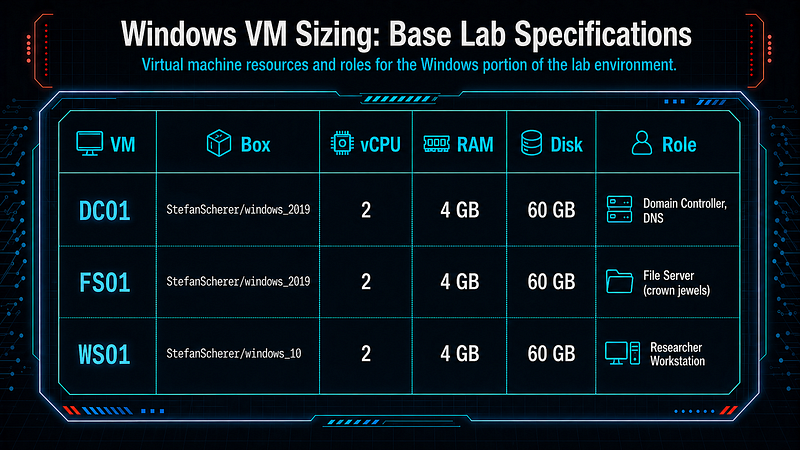
DC01 — Domain Controller (**192.168.10.10****)**Runs AD DS fornovatech.local. Ansible configures: domain promotion, DNS, user accounts (jsmith,svc_ldap,svc_backup), Kerberoastable SPN (MSSQLSvc/fs01.novatech.local:1433), Directory Service Access audit policy, SACL on the domain naming context (EID 4662 for DCSync detection), Wazuh agent enrollment.
FS01 — File Server (**192.168.10.20****)**Joined tonovatech.local. Hosts two SMB shares:
-
\\FS01\Research— synthetic Phase III clinical trial documents (CSVs, PDFs) -
\\FS01\Manufacturing— synthetic formulation data (DOCX)
Crown jewel data is generated by Ansible via PowerShell. This is the primary collection and exfiltration target.
WS01 — Researcher Workstation (**192.168.10.50****)**Windows 10 joined to the domain. Userjsmithhas local admin rights. Used as a lateral movement pivot target (Pass-the-Hash / Pass-the-Ticket from DC01 credential dump).
Full Lab Environment Summary
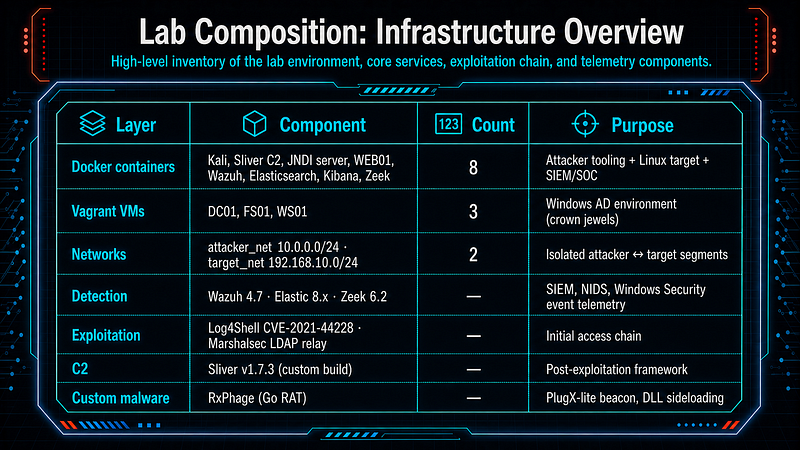
Minimum host requirements:
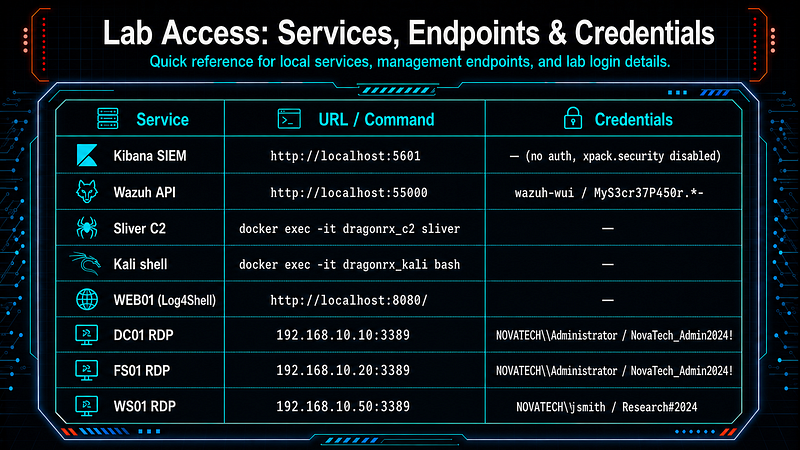
Access points once deployed:
Follow for practical cybersecurity research
If you’re interested in**Offensive security,**AI security, real-world attack simulations, CTI, and detection engineering— this is exactly what I focus on.
Stay connected:
→Subscribe on Medium:medium.com/@1200km →Connect on LinkedIn:andrey-pautov →GitHub — tools & labs:github.com/anpa1200 →Contact:1200km@gmail.com