Active Directory Lab for PenTest. Manual Deployment Guide
This published article remains available in the archive, but its technical currentness has not yet been reverified. Validate it against current authoritative sources before use.

- Category: CTI
- Source article: https://medium.com/@1200km/active-directory-lab-for-pentest-manual-deployment-guide-cab28cd4ad8d
- Published: 2026-01-24
- Preserved media: 14 image(s), including cover images, screenshots, diagrams, and infographics where present.
- Preserved technical blocks: 32 code/configuration block(s).
Ecosystem Fit
This page mirrors the original Medium article into the 1200km.com Docusaurus ecosystem. The original article flow, images, screenshots, infographics, and technical blocks are preserved from the export.
This guide is a manual, step-by-step deployment of a GOAD-Mini Active Directory environment on VirtualBox/VagrantComplete Step-by-Step Guide with DFIR Logging and Vulnerabilities
Deploy a Complete Active Directory PenTest Lab in One Prompt with Cursor AI
Introdaction
Setting up an Active Directory lab should not feel like a weekend project you have to “babysit” for hours. GOAD-Mini gets you most of the way there — but if your goal is DFIR and detection engineering, “it boots and joins the domain” is not enough. You need a baseline you can trust, logging that is actually useful, and a repeatable workflow that lets you roll forward into scenarios and roll back instantly when you break something.
This guide is a manual, step-by-step deployment of a GOAD-Mini Active Directory environment on VirtualBox/Vagrant, built for two outcomes: (1) a stable, known-good (“golden”) snapshot you can always return to, and (2) consistent, high-signal telemetry for investigations — PowerShell operational events, process creation with command lines, authentication visibility, directory service activity, and the Windows event channels that matter when you want to reconstruct attacker behavior.
Along the way, I’ll highlight the gotchas that usually waste time (Python venv pitfalls, Ansible collection versions, Vagrant provisioning behavior, port forwarding confusion), add a quick AD sanity check to validate the domain is healthy, and show exactly how to validate that your logging settings really took effect. By the end, you’ll have a lab you can use for repeatable training runs: simulate activity, collect artifacts, analyze the timeline, and iterate on detections — without rebuilding everything from scratch.
Table of Contents
-
Prerequisites
-
Initial Setup
-
GOAD-Mini Deployment
-
GOAD-Mini AD Sanity Check
-
DFIR Logging Configuration
-
Vulnerability Configuration
System Requirements
-
**OS:**Linux (Ubuntu/Debian recommended)
-
**RAM:**Minimum 8GB (16GB recommended)
-
**Disk Space:**Minimum 50GB free space
-
**CPU:**2+ cores (4+ recommended)
Required Software
- VirtualBox 7.0+
sudo apt
-
get

update
sudo apt
-
get
 install virtualbox virtualbox
-
ext
-
pack
2. Vagrant 2.3+
sudo apt-
get
 install vagrant
3. Python 3.8+ with pip
sudo apt-
get
 install python3 python3-pip python3-venv
4. Git
sudo apt-
get
 install git
5. WinRM Python Library
pip3 install pywinrm
Sanity check:
VBoxManage
--version
vagrant
--version
python3
--version
pip3
--version
git
--version
python3 -c "import winrm;
print
('pywinrm OK')"
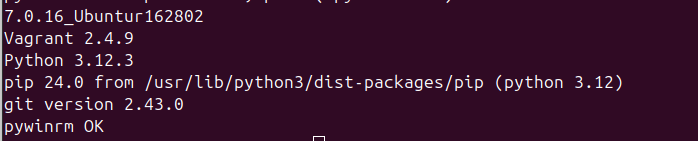
Windows ISO Files
Download and place iniso/directory:
-
Windows Server 2019 Evaluation ISO
-
Download from:https://www.microsoft.com/en-us/evalcenter/evaluate-windows-server-2019
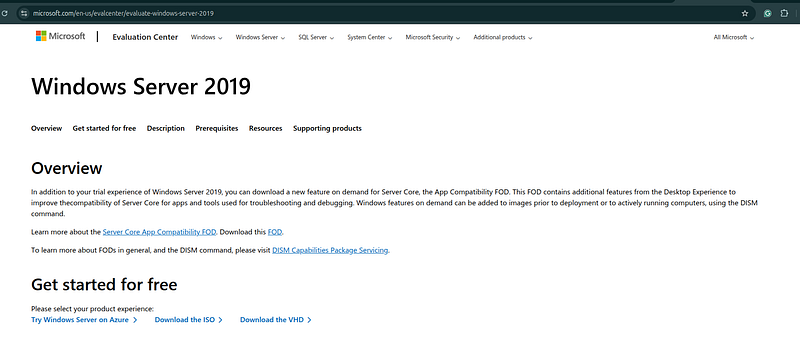
- Save as:
iso/Windows_Server_2019_Evaluation.iso
Initial Setup
Clone GOAD Repository
cd
 /home/andrey/DC_simulator
git
clone
 https://github.com/Orange-Cyberdefense/GOAD.git
cd
 GOAD
Set Up Python Virtual Environment
# From GOAD repo root
cd
 /home/andrey/DC_simulator/GOAD
# Ensure venv tooling exists
sudo apt-get update
sudo apt-get install -y python3-venv
# Create venv (use .venv to avoid conflicts)
python3 -m venv .venv
source
 .venv/bin/activate
# Upgrade pip tooling
python3 -m pip install -U pip setuptools wheel
# Install a Python 3.12 compatible Ansible core
python3 -m pip install
"ansible-core>=2.17,<2.19"
# Verify venv is used (must point to .venv)
which
 python3
which
 ansible-playbook
ansible-playbook --version
# GOAD playbooks rely on legacy Windows AD modules that were removed in collection v3+
ansible-galaxy collection install
"ansible.windows:<3.0.0"
ansible-galaxy collection install
"community.windows:<3.0.0"
# Optional verification
ansible-doc -t module ansible.windows.win_dns_client >/dev/null &&
echo

"OK: win_dns_client found"
Troubleshooting
Issue 1: externally-managed-environment (PEP 668)
Symptom:piprefuses to install packages and showsexternally-managed-environment.
Cause:You are installing intosystem Python, not a venv.
**Fix:**Create and activate a venv, then run allpipinstalls inside it:
python3 -m venv .venv
source
 .venv/bin/activate
python3 -m pip install -U pip
Issue 2: Ansible crash on Python 3.12
Symptom:
AttributeError: '_AnsiblePathHookFinder' object has no attribute 'find_spec'
**Cause:**Ansible/ansible-core version incompatible with Python 3.12.
**Fix:**Install a Python-3.12-compatibleansible-corein the venv:
source
 .venv/bin/activate
python3 -m pip install
"ansible-core>=2.17,<2.19"
Issue 3: Missing Windows Ansible modules
Symptom:
couldn't resolve module/action 'ansible.windows.win_dns_client'
**Cause:**Missingansible.windowscollection.
**Fix:**Install required collections:
source
 .venv/bin/activate
# GOAD playbooks rely on legacy Windows AD modules that were removed in collection v3+
ansible-galaxy collection install
"ansible.windows:<3.0.0"
ansible-galaxy collection install
"community.windows:<3.0.0"
Issue 4: VM already up, provisioning not re-running
**Symptom:**Vagrant says:Machine already provisioned. **Fix:**Force provisioning:
- In GOAD console:
install
--provision
- Or directly:
cd
 /home/andrey/DC_simulator/GOAD/workspace/<instance-id>/provider
vagrant provision
Configure GOAD-Mini
# Navigate to GOAD-Mini directory
cd
 ad/GOAD-Mini
# Review configuration files
cat
 data/inventory
cat
 data/config.json
Key Configuration Values:
-
Lab/Scenario name:
GOAD-Mini(fromdomain_name=GOAD-Mini) -
Domain:
sevenkingdoms.local -
NetBIOS:
SEVENKINGDOMS -
DC Hostname:
kingslanding(host id:dc01) -
Domain admin account used by playbooks:
administrator(fromadmin_user=administrator) -
Domain default password:
8dCT-DJjgScp(fromdomain_password) -
WinRM connection user (Ansible):
vagrant / vagrant(fromansible_user/ansible_password) -
DC local admin password:
8dCT-DJjgScp(fromlocal_admin_password)
GOAD-Mini Deployment
Initialize GOAD Instance
# From GOAD root directory
cd
 /home/andrey/DC_simulator/GOAD
# Activate virtual environment
source
 venv/bin/activate
# Initialize GOAD-Mini instance
python3 goad.py --provider virtualbox --lab GOAD-Mini
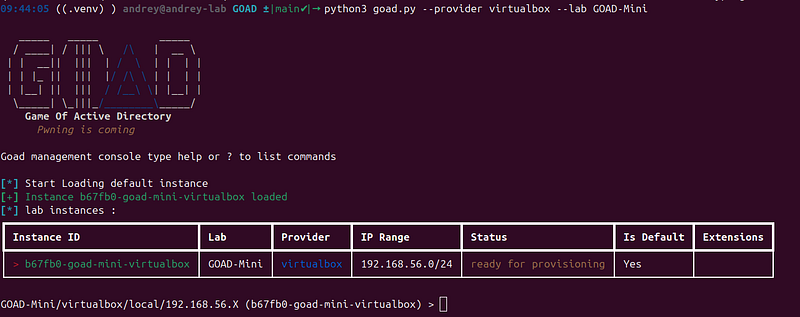
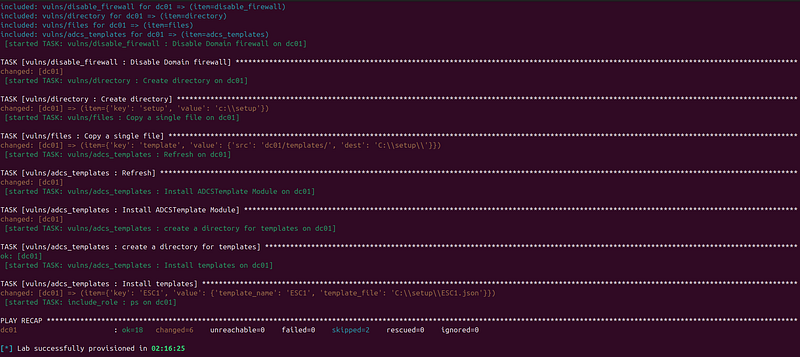
Insert: install Expected Output:
-
Creates workspace directory
-
Generates Vagrantfile
-
Prepares VM configuration
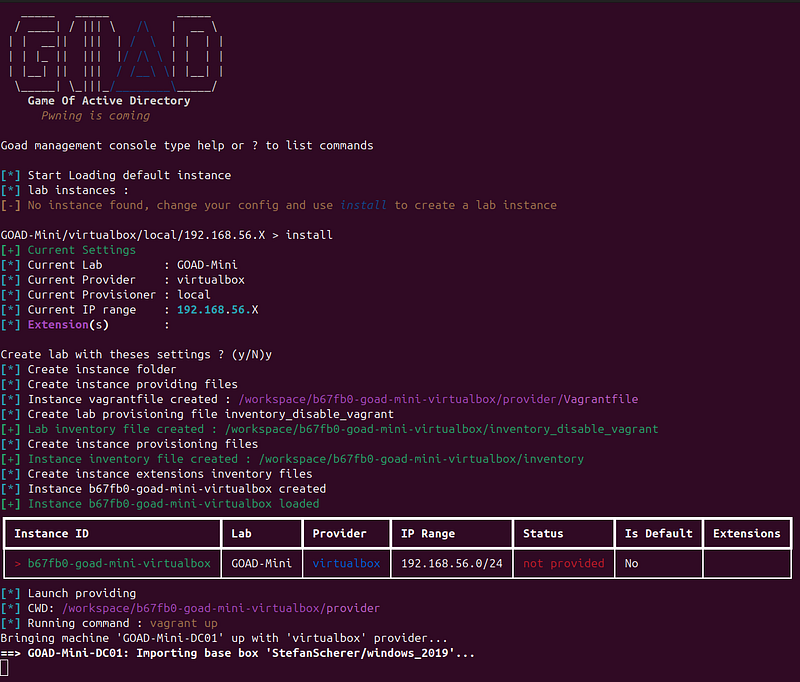
After few minutes…
Insert: status

What Happens:
-
Downloads Windows Server 2019 base box (if not cached)
-
Creates VirtualBox VM
-
Installs Windows Server 2019
-
Configures network adapters (NAT + Host-Only)
-
Installs Windows updates
-
Configures WinRM for remote management
Verify VM is Running
# Check VM status
cd
 <path/to/vargantfile>
vagrant status

Expected Results:
-
VM Status:
running -
WinRM Port: Usually forwarded to
127.0.0.1:55985(or similar) -
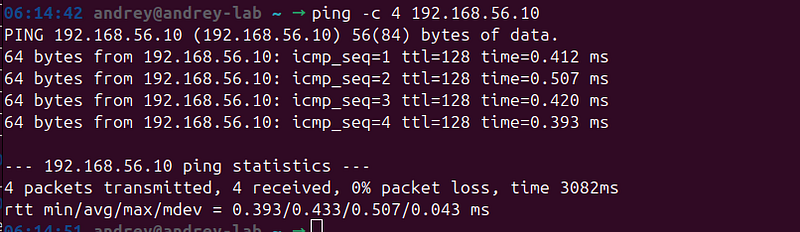
Host-Only IP:
192.168.56.10(or similar, check withvagrant ssh-config)
Network:
ping
192.168
.56
.10
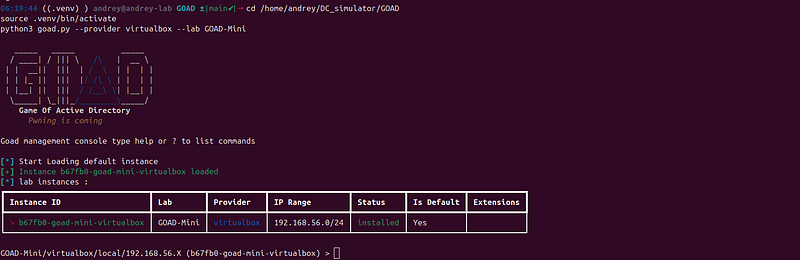
Start GOAD console:
cd
 /home/andrey/DC_simulator/GOAD
source
 .venv/bin/activate
python3 goad.py --provider virtualbox --lab GOAD-Mini
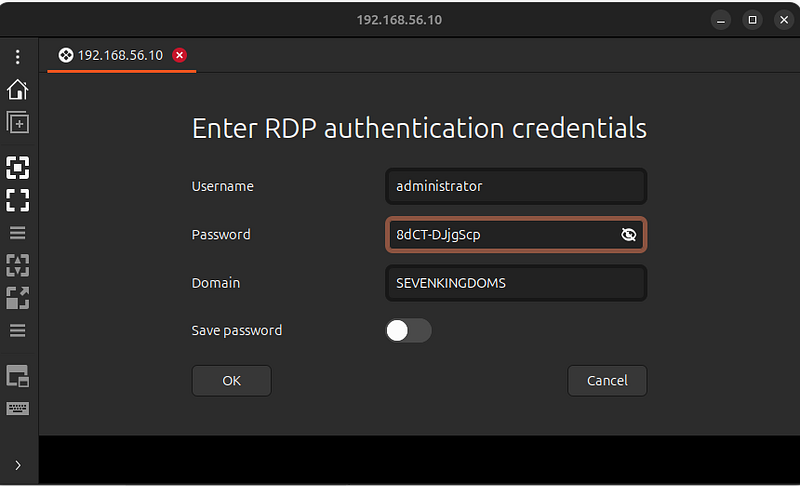
RDP:
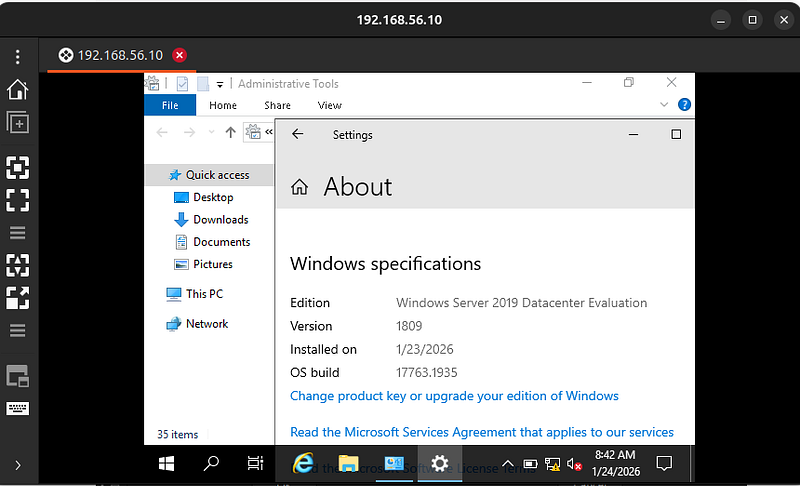
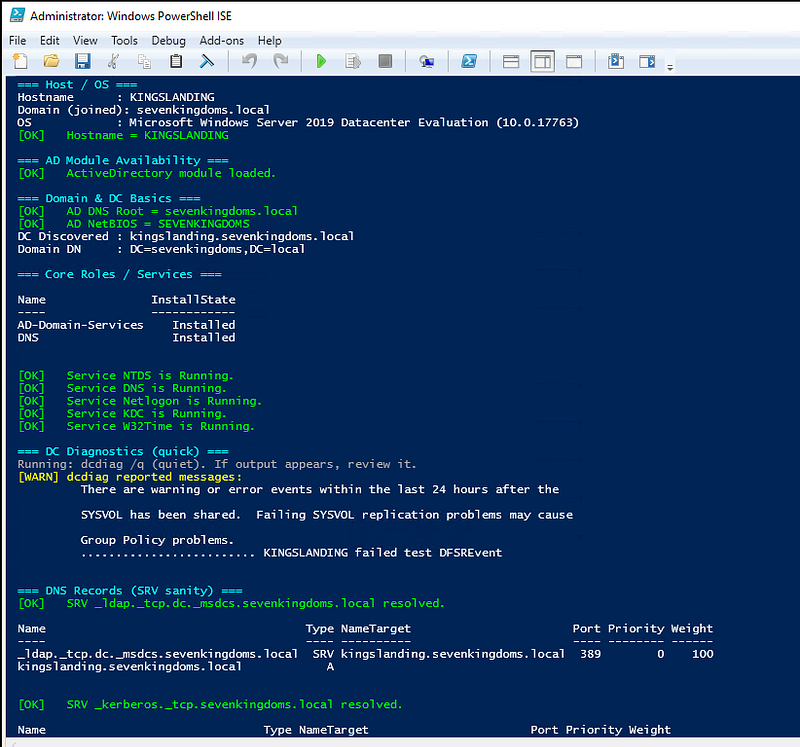
GOAD-Mini AD Sanity Check (Domain Controller)
Purpose: Quick validation that Active Directory, DNS, Kerberos, core objects (OUs/Users/Groups), local group memberships, and (optionally) ADCS are configured and healthy.
**How to run: **1) Open PowerShell as Administrator on the DC (dc01 / kingslanding) 2) Paste and run this script
Large code or log block · 690 lines · expand raw text
# -----------------------------
# Parameters (edit if needed)
# -----------------------------
$ExpectedDomainFqdn
 =
"sevenkingdoms.local"
$ExpectedNetBIOS
    =
"SEVENKINGDOMS"
$ExpectedDcHostname
 =
"kingslanding"
# Optional: GOAD-like OUs, users, and groups to spot-check (based on your config.json)
$ExpectedOUs
 = @(
"Vale"
,
"IronIslands"
,
"Riverlands"
,
"Crownlands"
,
"Stormlands"
,
"Westerlands"
,
"Reach"
,
"Dorne"
)
$ExpectedGroups
 = @(

"Lannister"
,
"Baratheon"
,
"Small Council"
,
"DragonStone"
,
"KingsGuard"
,
"DragonRider"
,
"AcrossTheNarrowSea"
,

"Domain Admins"
,
"Enterprise Admins"
,
"Protected Users"
)
$ExpectedUsers
 = @(

"tywin.lannister"
,
"jaime.lannister"
,
"cersei.lannister"
,
"tyron.lannister"
,

"robert.baratheon"
,
"joffrey.baratheon"
,
"renly.baratheon"
,
"stannis.baratheon"
,

"petyer.baelish"
,
"lord.varys"
,
"maester.pycelle"
)
# -----------------------------
# Helper functions
# -----------------------------
function

Write
-
Section
(
$title
)
{
  Write-Host
""
  Write-Host
"===
$title
 ==="
 -ForegroundColor Cyan
}
function

Write
-
Ok
(
$msg
)
{ Write-Host
"[OK]
$msg
"
 -ForegroundColor Green }
function

Write
-
Warn
(
$msg
)
{ Write-Host
"[WARN]
$msg
"
 -ForegroundColor Yellow }
function

Write
-
Fail
(
$msg
)
{ Write-Host
"[FAIL]
$msg
"
 -ForegroundColor Red }
function

Test
-
Equals
(
$label
,
$actual
,
$expected
)
{

if
 (
$actual
 -eq
$expected
) { Write-Ok
"
$label
 =
$actual
"
 }

else
 { Write-Warn
"
$label
 =
$actual
 (expected:
$expected
)"
 }
}
# -----------------------------
# Start
# -----------------------------
Write-Section
"Host / OS"
try
 {

$cs
 = Get-CimInstance Win32_ComputerSystem

$os
 = Get-CimInstance Win32_OperatingSystem
  Write-Host
"Hostname      :
$env
:COMPUTERNAME"
  Write-Host
"Domain (joined): $(
$cs
.Domain)"
  Write-Host
"OS            : $(
$os
.Caption) ($(
$os
.Version))"
  Test-Equals
"Hostname"

$env
:COMPUTERNAME
$ExpectedDcHostname
}
catch
 {
  Write-Warn
"Unable to read basic system info: $(
$_
.Exception.Message)"
}
Write-Section
"AD Module Availability"
try
 {
  Import-Module ActiveDirectory -ErrorAction Stop
  Write-Ok
"ActiveDirectory module loaded."
}
catch
 {
  Write-Fail
"ActiveDirectory module not available. On a DC this is unexpected. Error: $(
$_
.Exception.Message)"
  Write-Host
"Stopping here because AD cmdlets will fail."
 -ForegroundColor Red

return
}
Write-Section
"Domain & DC Basics"
try
 {

$domain
 = Get-ADDomain

$dc
     = Get-ADDomainController -Discover
  Test-Equals
"AD DNS Root"

$domain
.DNSRoot
$ExpectedDomainFqdn
  Test-Equals
"AD NetBIOS"

$domain
.NetBIOSName
$ExpectedNetBIOS
  Write-Host
"DC Discovered : $(
$dc
.HostName)"
  Write-Host
"Domain DN     : $(
$domain
.DistinguishedName)"
}
catch
 {
  Write-Fail
"Failed to query AD domain/DC info: $(
$_
.Exception.Message)"
}
Write-Section
"Core Roles / Services"
# Validate AD DS / DNS are installed (DC should have them)
try
 {

$features
 = Get-WindowsFeature AD-Domain-Services, DNS | Select-Object Name, InstallState

$features
 | Format-Table -AutoSize
}
catch
 {
  Write-Warn
"Get-WindowsFeature not available (Server cmdlets). Error: $(
$_
.Exception.Message)"
}
# Check critical services (best-effort)
try
 {

$svcNames
 = @(
"NTDS"
,
"DNS"
,
"Netlogon"
,
"KDC"
,
"W32Time"
)

foreach
 (
$s
 in
$svcNames
) {

$svc
 = Get-Service -Name
$s
 -ErrorAction SilentlyContinue

if
 (-not
$svc
) { Write-Warn
"Service
$s
 not found."
 ;
continue
 }

if
 (
$svc
.Status -eq
"Running"
) { Write-Ok
"Service
$s
 is Running."
 }

else
 { Write-Warn
"Service
$s
 is $(
$svc
.Status)."
 }
  }
}
catch
 {
  Write-Warn
"Service checks failed: $(
$_
.Exception.Message)"
}
Write-Section
"DC Diagnostics (quick)"
# dcdiag /q prints nothing if OK; any output indicates issues
try
 {
  Write-Host
"Running: dcdiag /q (quiet). If output appears, review it."
 -ForegroundColor Gray

$dcdiag
 = (dcdiag /q)
2
>&
1

if
 ([
string
]::
IsNullOrWhiteSpace
(
$dcdiag
)) { Write-Ok
"dcdiag /q returned no errors."
 }

else
 {
    Write-Warn
"dcdiag reported messages:"

$dcdiag
 | ForEach-Object { Write-Host
$_
 }
  }
}
catch
 {
  Write-Warn
"dcdiag failed: $(
$_
.Exception.Message)"
}
Write-Section
"DNS Records (SRV sanity)"
# SRV records are essential for LDAP/Kerberos discovery
try
 {

$srv1
 = Resolve-DnsName -Type SRV
"_ldap._tcp.dc._msdcs.
$ExpectedDomainFqdn
"
 -ErrorAction Stop
  Write-Ok
"SRV _ldap._tcp.dc._msdcs.
$ExpectedDomainFqdn
 resolved."

$srv1
 | Select-Object Name, Type, NameTarget, Port, Priority, Weight | Format-Table -AutoSize
}
catch
 {
  Write-Fail
"Failed to resolve LDAP DC SRV record: $(
$_
.Exception.Message)"
}
try
 {

$srv2
 = Resolve-DnsName -Type SRV
"_kerberos._tcp.
$ExpectedDomainFqdn
"
 -ErrorAction Stop
  Write-Ok
"SRV _kerberos._tcp.
$ExpectedDomainFqdn
 resolved."

$srv2
 | Select-Object Name, Type, NameTarget, Port, Priority, Weight | Format-Table -AutoSize
}
catch
 {
  Write-Fail
"Failed to resolve Kerberos SRV record: $(
$_
.Exception.Message)"
}
Write-Section
"Kerberos (ticket cache)"
# On a DC, you may see tickets depending on current context; this is informational
try
 {
  Write-Host
"Running: klist"
 -ForegroundColor Gray
  klist
}
catch
 {
  Write-Warn
"klist failed: $(
$_
.Exception.Message)"
}
Write-Section
"OUs Spot-Check"
try
 {

$ouNames
 = Get-ADOrganizationalUnit -Filter * | Select-Object -ExpandProperty Name

foreach
 (
$ou
 in
$ExpectedOUs
) {

if
 (
$ouNames
 -contains
$ou
) { Write-Ok
"OU present:
$ou
"
 }

else
 { Write-Warn
"OU missing (or named differently):
$ou
"
 }
  }
}
catch
 {
  Write-Warn
"OU check failed: $(
$_
.Exception.Message)"
}
Write-Section
"Groups Spot-Check"
try
 {

foreach
 (
$g
 in
$ExpectedGroups
) {

$grp
 = Get-ADGroup -Identity
$g
 -ErrorAction SilentlyContinue

if
 (
$grp
) { Write-Ok
"Group present:
$g
"
 }

else
 { Write-Warn
"Group missing (or named differently):
$g
"
 }
  }
}
catch
 {
  Write-Warn
"Group check failed: $(
$_
.Exception.Message)"
}
Write-Section
"Users Spot-Check"
try
 {

foreach
 (
$u
 in
$ExpectedUsers
) {

$usr
 = Get-ADUser -Identity
$u
 -Properties Enabled -ErrorAction SilentlyContinue

if
 (
$usr
) { Write-Ok
"User present:
$u
 (Enabled=$(
$usr
.Enabled))"
 }

else
 { Write-Warn
"User missing:
$u
"
 }
  }
}
catch
 {
  Write-Warn
"User check failed: $(
$_
.Exception.Message)"
}
Write-Section
"Local Group Membership (DC)"
# These commands show whether GOAD added expected domain principals to local groups
try
 {
  Write-Host
"`nLocalgroup: Administrators"
 -ForegroundColor Gray
  net localgroup Administrators
}
catch
 {
  Write-Warn
"Failed to query local Administrators group: $(
$_
.Exception.Message)"
}
try
 {
  Write-Host
"`nLocalgroup: Remote Desktop Users"
 -ForegroundColor Gray
  net localgroup
"Remote Desktop Users"
}
catch
 {
  Write-Warn
"Failed to query local Remote Desktop Users group: $(
$_
.Exception.Message)"
}
Write-Section
"ADCS (optional)"
# If ADCS is enabled in your scenario, CertSvc should be running.
try
 {

$cert
 = Get-Service CertSvc -ErrorAction SilentlyContinue

if
 (
$cert
) {

if
 (
$cert
.Status -eq
"Running"
) { Write-Ok
"ADCS CertSvc is Running."
 }

else
 { Write-Warn
"ADCS CertSvc status: $(
$cert
.Status)"
 }
    Write-Host
"Running: certutil -ping (CA reachability)"
 -ForegroundColor Gray
    certutil -ping
  }
else
 {
    Write-Warn
"CertSvc service not found (ADCS might not be installed in this scenario)."
  }
}
catch
 {
  Write-Warn
"ADCS check failed: $(
$_
.Exception.Message)"
}
Write-Section
"Summary"
Write-Host
"If you saw FAIL/WARN items, focus on DNS SRV resolution, dcdiag output, and missing objects."
 -ForegroundColor Gray
Write-Host
"For GOAD-Mini, the most common blockers are DNS/SRV records, AD module availability, or incomplete playbook runs."
 -ForegroundColor Gray
**Notes: **— This script reads data and prints results; it does not modify AD. — If AD module is missing, install RSAT AD DS tools (should already be present on a DC).
Comprehensive DFIR logging baseline for a Domain Controller (GOAD/GOAD-Mini)
**What it does: **- Enables key Advanced Audit Policy subcategories (better than broad categories)
- Enables PowerShell Module + ScriptBlock logging + Transcription
- Enables and sizes common DFIR event channels (best-effort if channel not present)
- Enables Kerberos/NTLM operational logs and increases log size
- Enables DNS server diagnostic logging to file (optional but enabled here)
How to run the DFIR logging script (two options)
Option A — Run directly (quick test)
-
OpenPowerShell as Administratoron the Domain Controller.
-
Paste the full script into the PowerShell window.
-
Run it.
Notes:
-
Must beelevated(Administrator).
-
If PowerShell blocks it due to policy, use Option B with a temporary bypass.
Option B — Save as a file and run (recommended for the guide)
- On the Domain Controller, create the file:
notepad
C
:\setup\enable-dfir-logging.
ps1
-
Paste the script content, save, and close Notepad.
-
Run PowerShell as Administrator and execute:
cd
 C:\setup
powershell.exe -ExecutionPolicy Bypass -File .\enable-dfir-logging.ps1
Alternative (from the folder without changing directory):
powershell.exe -ExecutionPolicy Bypass -File
"C:\setup\enable-dfir-logging.ps1"
Script:
Large code or log block · 906 lines · expand raw text
<
#
enable-dfir-logging.
ps1
 (fixed)
- Reliable auditpol success
detection
 (no
empty

exit
 codes)
- Correct handling of classic
logs
 (
Directory
 Service via Limit-EventLog, not wevtutil)
- Channels enabled/sized via wevtutil with
timeout
 (won’t hang)
Run:
  powershell.exe -ExecutionPolicy Bypass -File .\enable-dfir-logging.ps1
Optional:
  powershell.exe -ExecutionPolicy Bypass -File .\enable-dfir-logging.ps1 -EnableDnsDiagnostics
#>
[
CmdletBinding
()]
param
(
  [
switch
]
$EnableDnsDiagnostics
,
  [
int
]
$CommandTimeoutSec
 =
25
)
$ErrorActionPreference
 =
"Continue"
$WarningPreference
     =
"SilentlyContinue"
function

Write
-
Step
(
[
string
]
$msg
)
{ Write-Host
$msg
 -ForegroundColor Cyan }
function

Write
-
Ok
(
[
string
]
$msg
)
{ Write-Host
"
$msg
"
 -ForegroundColor Green }
function

Write
-
Warn
(
[
string
]
$msg
)
{ Write-Host
"
$msg
"
 -ForegroundColor Yellow }
function

Write
-
Info
(
[
string
]
$msg
)
{ Write-Host
"
$msg
"
 -ForegroundColor Gray }
function

Test
-
EventLogExists

{

param
([
Parameter
(Mandatory)][
string
]
$LogName
)

try
 {
$null
 = Get-WinEvent -ListLog
$LogName
 -ErrorAction Stop;
return

$true
 }

catch
 {
return

$false
 }
}
# Robust external command runner with timeout (for wevtutil)
function

Invoke
-
ExeWithTimeout

{

param
(
    [
Parameter
(Mandatory)][
string
]
$FilePath
,
    [
Parameter
(Mandatory)][
string
]
$Arguments
,
    [
int
]
$TimeoutSec
 =
25
  )
  Write-
Info
 (
"RUN: {0} {1}"
 -f
$FilePath
,
$Arguments
)

try
 {

$p
 = Start-Process -FilePath
$FilePath
 -ArgumentList
$Arguments
 -PassThru -NoNewWindow

if
 (
$p
.
WaitForExit
(
$TimeoutSec
 *
1000
)) {

return
 @{ TimedOut =
$false
; ExitCode =
$p
.ExitCode }
    }
else
 {

try
 {
$p
.
Kill
() }
catch
 {}

return
 @{ TimedOut =
$true
; ExitCode =
$null
 }
    }
  }
catch
 {

return
 @{ TimedOut =
$false
; ExitCode =
9999
;
Error
 =
$_
.
Exception
.Message }
  }
}
# auditpol runner (reliable exit code)
function

Set
-
AuditSubcategory

{

param
([
Parameter
(Mandatory)][
string
]
$Subcategory
)

$cmd
 =
"auditpol /set /subcategory:`"
$Subcategory
`
" /success:enable /failure:enable"
  Write-Info
"RUN:
$cmd
"

# cmd.exe /c makes exit code handling consistent
  cmd.exe /c
$cmd
 *>
$null

$ec
 =
$LASTEXITCODE

if
 (
$ec
 -eq
0
) { Write-Ok
"Audit enabled:
$Subcategory
"
 }

else
 { Write-Warn
"Audit failed (exit=
$ec
):
$Subcategory
"
 }
}
function

Set
-
ClassicLogSize

{

param
(
    [
Parameter
(Mandatory)][
string
]
$LogName
,
    [
Parameter
(Mandatory)][int64]
$MaxBytes
  )

if
 (-
not
 (Test-EventLogExists -LogName
$LogName
)) {
    Write-Warn
"Skipped classic log (not present):
$LogName
"

return
  }

try
 {

$maxKB
 = [Math]::
Floor
(
$MaxBytes
 /
1
KB)
    Write-Info
"Set classic log size:
$LogName
 =>
$maxKB
 KB"
    Limit-EventLog -LogName
$LogName
 -MaximumSize
$maxKB
 -OverflowAction OverwriteAsNeeded -ErrorAction Stop
    Write-Ok
"Enabled + sized (classic):
$LogName
"
  }
catch
 {
    Write-Warn
"Classic log config failed:
$LogName
 ($(
$_
.Exception.Message))"
  }
}
function

Enable
-
ChannelLog

{

param
(
    [
Parameter
(Mandatory)][
string
]
$LogName
,
    [
Parameter
(Mandatory)][int64]
$MaxBytes
  )

if
 (-
not
 (Test-EventLogExists -LogName
$LogName
)) {
    Write-Warn
"Skipped (not present):
$LogName
"

return
  }

$args
 =
"sl `"
$LogName
`
" /e:true /rt:false /ab:false /ms:
$MaxBytes
"

$r
 = Invoke-ExeWithTimeout -FilePath
"wevtutil.exe"
 -Arguments
$args
 -TimeoutSec
$CommandTimeoutSec

if
 (
$r
.TimedOut) { Write-Warn
"Timeout: wevtutil
$LogName
"
;
return
 }

if
 (
$r
.ExitCode -eq
0
) { Write-Ok
"Enabled + sized:
$LogName
"
 }

else
 { Write-Warn
"Configured with warnings:
$LogName
 (exit=$(
$r
.ExitCode))"
 }
}
Write-Host
"========================================"
 -ForegroundColor Cyan
Write-Host
"ENABLING COMPREHENSIVE DFIR LOGGING"
     -ForegroundColor Cyan
Write-Host
"========================================"
 -ForegroundColor Cyan
Write-Host
""
Import-Module ActiveDirectory -ErrorAction SilentlyContinue
try
 {

$domain
 = Get-ADDomain -ErrorAction Stop
  Write-Host
"Domain: $(
$domain
.DNSRoot)"
 -ForegroundColor Green
}
catch
 {
  Write-Host
"Domain: (AD module not available or not a DC yet)"
 -ForegroundColor Yellow
}
Write-Host
""
# ============================================
# 1) Advanced Audit Policy
# ============================================
Write-Step
"[1/6] Enabling Advanced Audit Policy subcategories..."
$AuditSubs
 = @(

"Logon"
,
"Logoff"
,
"Special Logon"
,

"Account Lockout"
,

"User Account Management"
,
"Computer Account Management"
,

"Security Group Management"
,
"Other Account Management Events"
,

"Directory Service Access"
,
"Directory Service Changes"
,
"Directory Service Replication"
,

"Process Creation"
,

"Authentication Policy Change"
,
"Authorization Policy Change"
,

"Sensitive Privilege Use"
,

"Security System Extension"
,

"Other Object Access Events"
,
"File Share"
)
foreach
 (
$sub
 in
$AuditSubs
) {
  Set-AuditSubcategory -Subcategory
$sub
}
Write-Ok
"Enabling 4688 command-line logging..."
try
 {

$cmdLinePath
 =
"HKLM:\SOFTWARE\Microsoft\Windows\CurrentVersion\Policies\System\Audit"
  New-Item -Path
$cmdLinePath
 -Force | Out-Null
  New-ItemProperty -Path
$cmdLinePath
 -Name
"ProcessCreationIncludeCmdLine_Enabled"
 -Value
1
 -PropertyType DWord -Force | Out-Null
  Write-Ok
"Command line logging enabled."
}
catch
 {
  Write-Warn
"Command line logging failed: $(
$_
.Exception.Message)"
}
# ============================================
# 2) PowerShell Logging
# ============================================
Write-Step
"[2/6] Enabling PowerShell Logging..."
try
 {

$psModulePath
 =
"HKLM:\SOFTWARE\Policies\Microsoft\Windows\PowerShell\ModuleLogging"
  New-Item -Path
$psModulePath
 -Force | Out-Null
  New-ItemProperty -Path
$psModulePath
 -Name
"EnableModuleLogging"
 -Value
1
 -PropertyType DWord -Force | Out-Null

$psModuleNames
 = Join-Path
$psModulePath

"ModuleNames"
  New-Item -Path
$psModuleNames
 -Force | Out-Null
  New-ItemProperty -Path
$psModuleNames
 -Name
"*"
 -Value
"*"
 -PropertyType String -Force | Out-Null

$psSblPath
 =
"HKLM:\SOFTWARE\Policies\Microsoft\Windows\PowerShell\ScriptBlockLogging"
  New-Item -Path
$psSblPath
 -Force | Out-Null
  New-ItemProperty -Path
$psSblPath
 -Name
"EnableScriptBlockLogging"
 -Value
1
 -PropertyType DWord -Force | Out-Null
  New-ItemProperty -Path
$psSblPath
 -Name
"EnableScriptBlockInvocationLogging"
 -Value
1
 -PropertyType DWord -Force | Out-Null

$psTxPath
 =
"HKLM:\SOFTWARE\Policies\Microsoft\Windows\PowerShell\Transcription"
  New-Item -Path
$psTxPath
 -Force | Out-Null
  New-ItemProperty -Path
$psTxPath
 -Name
"EnableTranscripting"
 -Value
1
 -PropertyType DWord -Force | Out-Null
  New-ItemProperty -Path
$psTxPath
 -Name
"EnableInvocationHeader"
 -Value
1
 -PropertyType DWord -Force | Out-Null
  New-ItemProperty -Path
$psTxPath
 -Name
"OutputDirectory"
 -Value
"C:\DFIR\PowerShellTranscripts"
 -PropertyType String -Force | Out-Null
  New-Item -Path
"C:\DFIR\PowerShellTranscripts"
 -Force | Out-Null
  Write-Ok
"PowerShell Module/ScriptBlock/Transcription enabled."
}
catch
 {
  Write-Warn
"PowerShell logging configuration failed: $(
$_
.Exception.Message)"
}
# ============================================
# 3) Event Logs / Channels
# ============================================
Write-Step
"[3/6] Enabling key Event Logs / Channels..."
# Classic logs (use Limit-EventLog; includes Directory Service)
Set-ClassicLogSize -LogName
"Security"
         -MaxBytes
1073741824
Set-ClassicLogSize -LogName
"System"
           -MaxBytes
268435456
Set-ClassicLogSize -LogName
"Application"
      -MaxBytes
268435456
Set-ClassicLogSize -LogName
"Directory Service"
 -MaxBytes
268435456
# Channels (use wevtutil)
$Channels
 = @{

"Microsoft-Windows-DNS-Client/Operational"
 =
134217728

"Microsoft-Windows-PowerShell/Operational"
 =
268435456

"Microsoft-Windows-TaskScheduler/Operational"
 =
134217728

"Microsoft-Windows-TerminalServices-LocalSessionManager/Operational"
 =
134217728

"Microsoft-Windows-TerminalServices-RemoteConnectionManager/Operational"
 =
134217728

"Microsoft-Windows-NTLM/Operational"
 =
134217728

"Microsoft-Windows-Kerberos/Operational"
 =
134217728

"Microsoft-Windows-WinRM/Operational"
 =
134217728

# AD/DS channels: may be absent in GOAD-Mini

"Microsoft-Windows-ActiveDirectory_DomainService"
 =
134217728

"Microsoft-Windows-Directory-Services-SAM/Operational"
 =
134217728
}
foreach
 (
$k
 in
$Channels
.Keys) {
  Enable-ChannelLog -LogName
$k
 -MaxBytes
$Channels
[
$k
]
}
# ============================================
# 4) Kerberos extra logging
# ============================================
Write-Step
"[4/6] Enabling Kerberos extra logging..."
try
 {

$kerbPath
 =
"HKLM:\SYSTEM\CurrentControlSet\Control\Lsa\Kerberos\Parameters"
  New-Item -Path
$kerbPath
 -Force | Out-Null
  New-ItemProperty -Path
$kerbPath
 -Name
"LogLevel"
 -Value
1
 -PropertyType DWord -Force | Out-Null
  Write-Ok
"Kerberos LogLevel=1 set."
}
catch
 {
  Write-Warn
"Kerberos LogLevel set failed: $(
$_
.Exception.Message)"
}
# ============================================
# 5) SMB auditing options
# ============================================
Write-Step
"[5/6] Enabling SMB auditing options..."
try
 {
  Set-SmbServerConfiguration -AuditSmb1Access
$true
 -Force | Out-Null
  Set-SmbServerConfiguration -EnableSecuritySignature
$true
 -Force | Out-Null
  Set-SmbClientConfiguration -EnableSecuritySignature
$true
 -Force | Out-Null
  Write-Ok
"SMB auditing/signing configured."
}
catch
 {
  Write-Warn
"SMB settings skipped: $(
$_
.Exception.Message)"
}
# ============================================
# 6) DNS diagnostics (optional)
# ============================================
Write-Step
"[6/6] DNS diagnostics logging..."
if
 (
$EnableDnsDiagnostics
) {

try
 {
    Import-Module DnsServer -ErrorAction SilentlyContinue
    Set-DnsServerDiagnostics -All
$true
 `
      -EnableLogFileRollover
$true
 `
      -LogFilePath
"C:\Windows\System32\dns\dns.log"
 `
      -MaxMBFileSize
500
 | Out-Null
    Write-Ok
"DNS diagnostics enabled (C:\Windows\System32\dns\dns.log)."
  }
catch
 {
    Write-Warn
"DNS diagnostics skipped: $(
$_
.Exception.Message)"
  }
}
else
 {
  Write-Warn
"Skipped (use -EnableDnsDiagnostics to enable file logging)"
}
Write-Host
""
Write-Host
"========================================"
 -ForegroundColor Green
Write-Host
"DFIR LOGGING CONFIGURATION COMPLETE"
      -ForegroundColor Green
Write-Host
"========================================"
 -ForegroundColor Green
Write-Host
""
Write-Host
"Quick verification:"
 -ForegroundColor Yellow
Write-Host
"  auditpol /get /subcategory:`"
Process Creation`
""
Write-Host
"  Get-WinEvent -ListLog Security,`"
Directory
 Service`
" | Select LogName,IsEnabled,MaximumSizeInBytes"
Write-Host
"  wevtutil gl `"
Microsoft-Windows-PowerShell/Operational`
" | findstr /i `"
enabled maxSize`
""
Write-Host
"  reg query HKLM\SOFTWARE\Policies\Microsoft\Windows\PowerShell\ScriptBlockLogging"
Write-Host
"  dir C:\DFIR\PowerShellTranscripts"
Golden snapshot procedure (recommended)
1) Gracefully shut down the DC (inside Windows)
OnGOAD-Mini-DC01, run as Administrator:
shutdown /s /t 0
Wait until the VM is fully powered off in VirtualBox.
2) Take a VirtualBox snapshot (host side)
On the Linux host:
VBoxManage snapshot
"GOAD-Mini-DC01"

take

"golden-after-provision"
 \
  --description
"GOAD-Mini fully provisioned + DFIR logging baseline"
Verify snapshots:
VBoxManage snapshot
"GOAD-Mini-DC01"
 list
3) Start the VM again (optional)
If you want to continue working:
VBoxManage startvm
"GOAD-Mini-DC01"
 --
type
 headless
(or start it from the VirtualBox UI)
Vulnerability Configuration
Create Vulnerability Configuration Script
Create file:
make
-dc-vulnerable.ps1
Large code or log block · 233 lines · expand raw text
# PowerShell Script to Make DC Vulnerable for Penetration Testing
# WARNING: This script makes the DC vulnerable to attacks. Use only in isolated lab environments!
[CmdletBinding()]
param()
$ErrorActionPreference =
"Continue"
Write-Host
"========================================"
 -ForegroundColor Red
Write-Host
"MAKING DC VULNERABLE FOR PENETRATION TESTING"
 -ForegroundColor Red
Write-Host
"========================================"
 -ForegroundColor Red
# 1. Environment Discovery
Import-Module ActiveDirectory
$domain = Get-ADDomain
$domainDN = $domain.DistinguishedName
$domainName = $domain.DNSRoot
Write-Host
"Targeting Domain: $domainName"
 -ForegroundColor Green
# Common password for lab accounts
$pw = ConvertTo-SecureString
"Password123!"
 -AsPlainText -Force
# ============================================
# 1) Kerberoasting (Service Accounts with SPNs)
# ============================================
Write-Host
"[1/7] Configuring Kerberoasting..."
 -ForegroundColor Cyan
$users = @(
"SQLService"
,
"WebService"
)
foreach
 ($u in $users) {

if
 (-
not
 (Get-ADUser -Filter
"SamAccountName -eq '$u'"
)) {
        New-ADUser -Name $u -SamAccountName $u -AccountPassword $pw -Enabled $true -PasswordNeverExpires $true
        Set-ADUser -Identity $u -ServicePrincipalNames @{Add=
"MSSQLSvc/$u.$domainName"
}
        Write-Ok
"Created: $u with SPN"
    }
else
 {
        Write-Host
"  $u already exists."
 -ForegroundColor Gray
    }
}
# ============================================
# 2) AS-REP Roasting (Bitmask Fix)
# ============================================
Write-Host
"[2/7] Configuring AS-REP Roasting..."
 -ForegroundColor Cyan
$asrep =
"ASREPUser1"
if
 (-
not
 (Get-ADUser -Filter
"SamAccountName -eq '$asrep'"
)) {
    New-ADUser -Name $asrep -SamAccountName $asrep -AccountPassword $pw -Enabled $true -PasswordNeverExpires $true
}
# Using Bitmask 0x400000 (ADS_UF_DONT_REQUIRE_PREAUTH) to avoid cmdlet parameter errors
$userObj = Get-ADUser $asrep -Properties userAccountControl
$newUAC = $userObj.userAccountControl -bor
0x400000
Set-ADUser -Identity $asrep -Replace @{userAccountControl=$newUAC}
Write-Host
"  Pre-Auth disabled (UAC bit flipped) for $asrep"
 -ForegroundColor Green
# ============================================
# 3) Weak Password Policy
# ============================================
Write-Host
"[3/7] Weakening Password Policy..."
 -ForegroundColor Cyan
Set-ADDefaultDomainPasswordPolicy -Identity $domainDN -MinPasswordLength
6
 -PasswordHistoryCount
0
 -LockoutThreshold
0
 -ComplexityEnabled $false
Write-Host
"  Policy: MinLength 6, No Complexity, No Lockout"
 -ForegroundColor Green
# ============================================
# 4) DCSync Rights (GUID Fix)
# ============================================
Write-Host
"[4/7] Granting DCSync Rights..."
 -ForegroundColor Cyan
$vulnUser =
"DCSyncUser"
if
 (-
not
 (Get-ADUser -Filter
"SamAccountName -eq '$vulnUser'"
)) {
    New-ADUser -Name $vulnUser -SamAccountName $vulnUser -AccountPassword $pw -Enabled $true
}
$sid = (Get-ADUser $vulnUser).SID
$acl = Get-Acl
"AD:$domainDN"
# GUIDs: Replicating Directory Changes (1131f6ad) & Replicating Directory Changes All (1131f6aa)
$guids = @(
"1131f6ad-9c07-11d1-f79f-00c04fc2dcd2"
,
"1131f6aa-9c07-11d1-f79f-00c04fc2dcd2"
)
foreach
 ($g in $guids) {
    $ace = New-Object System.DirectoryServices.ActiveDirectoryAccessRule($sid,
"ExtendedRight"
,
"Allow"
, [guid]$g)
    $acl.AddAccessRule($ace)
}
Set-Acl
"AD:$domainDN"
 $acl
Write-Host
"  $vulnUser now has DCSync permissions on domain root"
 -ForegroundColor Green
# ============================================
# 5) LLMNR / NetBIOS (Registry Fix)
# ============================================
Write-Host
"[5/7] Enabling LLMNR/NetBIOS (Poisoning targets)..."
 -ForegroundColor Cyan
$dnsPath =
"HKLM:\SOFTWARE\Policies\Microsoft\Windows NT\DNSClient"
if
 (-
not
 (Test-Path $dnsPath)) { New-Item $dnsPath -Force | Out-Null }
Set-ItemProperty -Path $dnsPath -Name
"EnableMulticast"
 -Value
1
# Force NetBIOS on via Registry for all interfaces
$itfPath =
"HKLM:\SYSTEM\CurrentControlSet\Services\NetBT\Parameters\Interfaces"
Get-ChildItem $itfPath | ForEach-Object {
    Set-ItemProperty -Path $_.PSPath -Name
"NetbiosOptions"
 -Value
1
 -ErrorAction SilentlyContinue
}
Write-Host
"  LLMNR and NetBIOS broadcast enabled"
 -ForegroundColor Green
# ============================================
# 6) Password Storage (WDigest & LSA)
# ============================================
Write-Host
"[6/7] Enabling WDigest (Cleartext in memory)..."
 -ForegroundColor Cyan
# Disable LSA protection
Set-ItemProperty -Path
"HKLM:\SYSTEM\CurrentControlSet\Control\Lsa"
 -Name
"RunAsPPL"
 -Value
0
 -Force
# Enable WDigest credential caching
$wdPath =
"HKLM:\SYSTEM\CurrentControlSet\Control\SecurityProviders\WDigest"
if
 (-
not
 (Test-Path $wdPath)) { New-Item $wdPath -Force | Out-Null }
Set-ItemProperty -Path $wdPath -Name
"UseLogonCredential"
 -Value
1
 -Force
Write-Host
"  WDigest enabled; LSA protection disabled"
 -ForegroundColor Green
# ============================================
# 7) High-Privileged Test Account
# ============================================
Write-Host
"[7/7] Creating Domain Admin 'TestAdmin'..."
 -ForegroundColor Cyan
$adminName =
"TestAdmin"
if
 (-
not
 (Get-ADUser -Filter
"SamAccountName -eq '$adminName'"
)) {
    New-ADUser -Name $adminName -SamAccountName $adminName -AccountPassword $pw -Enabled $true -PasswordNeverExpires $true
    Add-ADGroupMember -Identity
"Domain Admins"
 -Members $adminName
    Write-Host
"  Created $adminName (Domain Admin)"
 -ForegroundColor Green
}
Write-Host
""
Write-Host
"========================================"
 -ForegroundColor Green
Write-Host
"VULNERABILITY CONFIGURATION COMPLETE"
 -ForegroundColor Green
Write-Host
"========================================"
 -ForegroundColor Green
Run:
powershell.exe -ExecutionPolicy Bypass -File .\
make
-dc-vulnerable.ps1
This guide provides a comprehensive framework for deploying GOAD-Mini (Game of Active Directory) with advanced DFIR (Digital Forensics and Incident Response) logging and intentional vulnerabilities.
1. Access Information
RDP Access
To manage the Domain Controller via a graphical interface, use the following connection details:
SettingValueHost127.0.0.1:3389(NAT) or192.168.56.10:3389(Host-Only)
UsernameAdministratororvagrant
Password8dCT-DJjgScp(GOAD Default) orPassword123!(Script Default)
DomainSEVENKINGDOMS
Linux Command Line Examples:
# Using xfreerdp (Recommended)
xfreerdp /v:192.168.56.10 /u:Administrator /p:8dCT-DJjgScp /d:SEVENKINGDOMS /cert:ignore /dynamic-resolution
# Using rdesktop
rdesktop 192.168.56.10:3389 -u Administrator -p 8dCT-DJjgScp -d SEVENKINGDOMS
WinRM Access (For Automation/Ansible)
SettingValueHost127.0.0.1:55985(NAT) or192.168.56.10:5985(Host-Only)UsernamevagrantPasswordvagrantTransportplaintext/ntlm
2. Attack Scenarios Enabled
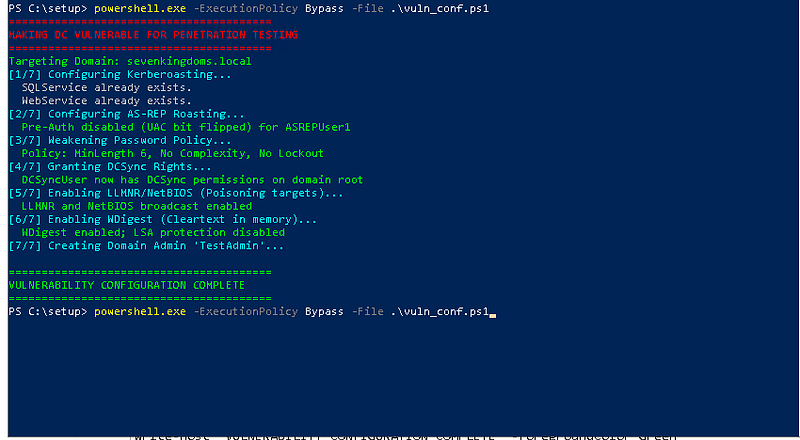
By running themake-dc-vulnerable.ps1script, you have opened the following attack vectors for testing:
-
**Kerberoasting:**Service accounts (
SQLService,WebService) have SPNs set with weak passwords. -
AS-REP Roasting:
ASREPUser1has "Do not require Kerberos preauthentication" enabled. -
DCSync:
DCSyncUserhas been granted specialized replication rights to dump the entire NTDS.dit database remotely. -
**Credential Dumping:**LSA Protection is disabled and WDigest is enabled, allowing tools like Mimikatz to extract cleartext passwords from memory.
-
**Poisoning (LLMNR/NBT-NS):**Multicast name resolution is enabled, allowing for Responder-style spoofing attacks.
-
**SMB Relay:**SMB Signing is disabled on the DC, allowing NTLM authentication to be relayed to other services.
3. DFIR Logging Summary
Theenable-dfir-logging.ps1script ensures that every action taken during an attack is recorded. This is the "Flight Recorder" for your lab.
-
**Process Auditing (Event ID 4688):**Includes the full command-line arguments used by attackers (e.g., seeing exactly what was typed into
cmd.exe). -
**PowerShell (Event ID 4104):**Captures the full content of executed scripts, even if they are obfuscated or run in memory.
-
**Service Logs:**Monitoring for the creation of malicious services (often used for lateral movement).
-
Large Log Buffers:The Security log is sized to1GBto prevent event overwriting during heavy testing.
4. Next Steps: Verification & Practice
5. Notes & Maintenance
> [!IMPORTANT]
> Isolation: Ensure the VirtualBox “Host-Only” adapter is not bridged to your physical network.
> Snapshots: Always revert to your “Golden Snapshot” before starting a new training session to ensure a clean state.