AdversaryGraph v2.0: I Built a Self-Hosted AI Threat Intelligence Platform
This article documents an earlier product version or a time-bound state. It is retained for provenance and is not current product guidance. Open current AdversaryGraph documentation.
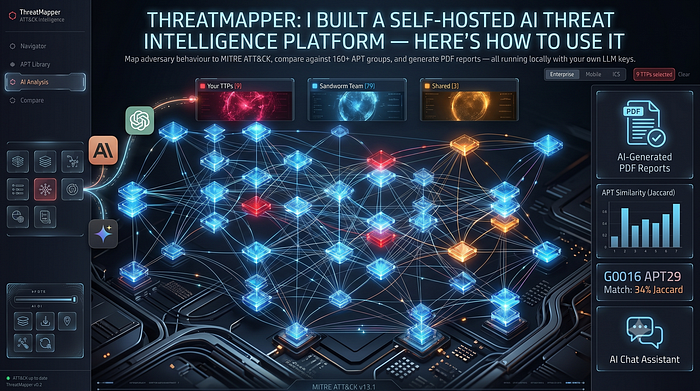
- Category: CTI
- Source article: https://infosecwriteups.com/threatmapper-v2-0-i-built-a-self-hosted-ai-threat-intelligence-platform-941a80cc5a65
- Published: 2026-06-16
- Preserved media: 25 image(s), including cover images, screenshots, diagrams, and infographics where present.
- Preserved technical blocks: 18 code/configuration block(s).
Ecosystem Fit
This page mirrors the original Medium RSS article into the 1200km.com Docusaurus ecosystem. The article flow, images, screenshots, infographics, and technical blocks are preserved from the Medium feed.
Now With Local LLMs, DFIR Examples, and OpenCTI Export.
Threat intelligence is useful only when it becomes operational.
A report is not enough. A PDF from a vendor, an incident response write-up, a malware analysis note, or a DFIR case study still needs to be translated into practical defensive work:
- What MITRE ATT&CK techniques are actually described?
- Which mappings are supported by real evidence?
- Which known groups or campaigns share similar TTPs?
- Which overlaps are only generic commodity behavior?
- Which techniques become detection gaps?
- How do I move the result into an analyst workflow, ATT&CK Navigator, PDF reporting, or OpenCTI?
That is the problem AdversaryGraph was built to solve.
AdversaryGraph is an open-source, self-hosted CTI-to-detection workbench. It helps analysts map threat reports to MITRE ATT&CK, review evidence, compare TTP overlap against groups and campaigns, export reports, and hand off structured outputs to detection engineering or CTI platforms.
Version 2.0 adds the features that make it much more useful in real analyst workflows:
- Local LLM support through OpenAI-compatible endpoints
- STIX 2.1 export for OpenCTI
- DFIR Report example indexing
- enriched ATT&CK group and actor pages
- MITRE ATT&CK reference sync
- report-to-analysis-to-comparison demo assets
- full operator documentation
GitHub:
Release v2.0.0:
Release ThreatMapper v2.0.0 · anpa1200/threatmapper
Table of Contents
- What AdversaryGraph Is
- Architecture
- Installation
- Local LLM Support
- Discover Page
- AI Analysis
- Review Status
- Navigator
- ATT&CK Group Library
- Group And Campaign Comparison
- Compare Modes
- Group vs Group
- DFIR Examples
- Reference Sync
- STIX 2.1 Export For OpenCTI
- PDF Export
- ATT&CK Navigator Export
- API
- Security And Privacy Notes
- WhatAdversaryGraphIs Not
- Recommended Workflow
- Release Evidence
- Links
- Final Thoughts
- Follow My Work
What AdversaryGraph Is

AdversaryGraph is not a SIEM.
It is not an EDR.
It is not an attribution engine.
It is a workbench for the middle part of CTI work: the place where an analyst takes narrative reporting and turns it into ATT&CK mappings, evidence, similarity leads, detection gaps, and structured exports.
The core workflow is:

This matters because most threat intelligence still arrives as prose. Someone has to read it, extract behaviors, map them to ATT&CK, check the evidence, and make the result useful for detection teams.
AdversaryGraph helps automate the repetitive parts while keeping analyst review in the loop.
Architecture
AdversaryGraph runs as a self-hosted Docker Compose stack:
- React / Vite frontend
- FastAPI backend
- PostgreSQL for ATT&CK data and analysis history
- Redis and Celery for background jobs
- scheduled MITRE ATT&CK synchronization
- optional embedded reference book

The Docker deployment is the full version. It supports private report analysis, configured LLM providers, local LLM gateways, report storage, API workflows, and exports.
The public browser workspace is for exploration and manual ATT&CK work. Do not upload private reports into public demos.
Installation
Clone the repository:
git clone https://github.com/anpa1200/AdversaryGraph.git
cd AdversaryGraph
Create the environment file:
cp .env.example .env
Configure at least one AI provider:

ANTHROPIC_API_KEY=
OPENAI_API_KEY=
OPENAI_MODEL=gpt-4.1
GEMINI_API_KEY=
Start the stack:
docker compose up -d --build

Open the UI:
http://localhost:3000

Open the API docs:
http://localhost:8000/docs

Check health:
curl http://localhost:8000/api/health
Expected result:
{"status":"ok","version":"2.0.0"}
On first startup, AdversaryGraph ingests MITRE ATT&CK STIX data into PostgreSQL. This can take a few minutes.
Local LLM Support
AdversaryGraph v2.0 supports local LLMs through OpenAI-compatible APIs.
This is important if you want to analyze sensitive reports without sending them to a public cloud provider.
Supported patterns include:
- Ollama
- LM Studio
- LocalAI
- vLLM
- any OpenAI-compatible internal gateway
Example with Ollama:
ollama pull llama3.1:8b
ollama serve
Then configure:
LOCAL_LLM_BASE_URL=http://host.docker.internal:11434/v1
LOCAL_LLM_API_KEY=local
LOCAL_LLM_MODEL=llama3.1:8b
In the UI, selectLocalas the LLM provider.
Use a capable model. Small models may fail to produce clean JSON or may produce weak ATT&CK mappings.
Discover Page
The Discover page is the starting point.

It shows:
- actor count
- technique count
- public report count
- selected TTP count
- coverage state
- most-referenced techniques
- recent public intelligence examples
It also gives quick entry points:
- investigate actor
- analyze report with AI
- compare behavior
- review coverage
This page is for orientation. It helps you decide where to start.
AI Analysis

The AI Analysis page accepts:
- pasted text
- DOCX
- TXT
The workflow:


- Select ATT&CK domain: Enterprise, Mobile, or ICS.
- Select provider: Claude, OpenAI, Gemini, or Local.
- Paste text or upload a report.
- Run analysis.
- Watch the streamed response.
- Review extracted techniques.
- Inject reviewed TTPs into Navigator.
- Export PDF or STIX/OpenCTI output.
Each extracted technique includes:
- ATT&CK ID
- technique name
- tactic
- confidence
- evidence
- review status
- evidence source
The evidence field is the most important part.
If the evidence does not show behavior, the mapping should not be accepted.
For example, an actor name in a report does not automatically prove the techniques associated with that actor. A tool name does not automatically prove every technique that tool can perform. AdversaryGraph helps generate candidates, but the analyst decides what is defensible.
Review Status
AdversaryGraph supports analyst review states:

- suggested
- accepted
- rejected
- needs evidence
This makes the tool more useful than a simple “AI says these are TTPs” output.
You can separate raw model suggestions from reviewed findings.
That distinction matters when the output is sent to another analyst, a SOC team, a detection engineer, or OpenCTI.
Navigator
Navigator is the ATT&CK matrix workspace.

You can:
- browse Enterprise, Mobile, and ICS ATT&CK
- search techniques
- expand sub-techniques
- filter by platform
- manually select TTPs
- import ATT&CK Navigator layers
- save and load server-side layers
- overlay actor/group techniques
- export layers
- export PDF summaries
After AI Analysis, you can inject extracted techniques into Navigator and continue working manually.
This is important because ATT&CK analysis is rarely finished after one model response. Analysts need to add, remove, correct, compare, and explain.
ATT&CK Group Library
AdversaryGraph v2.0 improves the ATT&CK Group Library.

Actor pages now include:
- ATT&CK group ID
- STIX ID
- aliases
- description
- created and modified metadata
- ATT&CK object version
- mapped technique count
- campaign count
- tactic coverage
- observed platform coverage
- technique usage evidence
- external references
- source names
- direct MITRE ATT&CK link
This makes the actor pages more useful for real CTI review.
Instead of only seeing a name and a list of techniques, you can inspect the supporting context and understand where the profile comes from.
Group And Campaign Comparison
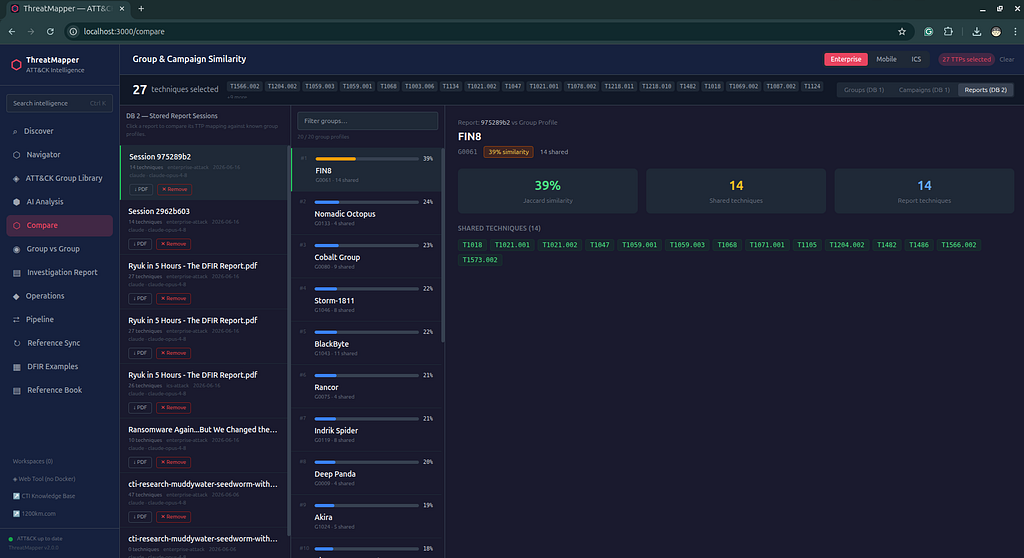
AdversaryGraph compares selected TTPs against:
- ATT&CK groups
- ATT&CK campaigns
- previous stored report analyses
The comparison uses Jaccard overlap.
This is useful for investigation, but it is not attribution.
A high overlap means:
this TTP set shares behavior with this profile
It does not mean:
this actor definitely did it
That difference matters.
Attribution needs more evidence: infrastructure, malware, victimology, timing, tooling, procedures, and external intelligence.
AdversaryGraph helps you find overlap worth investigating.
Compare Modes
The Compare page has three modes.

Groups
Compare your selected TTPs against ATT&CK group profiles.
Use this for:
- initial lead generation
- actor-profile overlap
- detection-gap planning
Campaigns
Compare against named ATT&CK campaigns.
This can be more specific than group comparison because group profiles often span years of activity, while campaigns represent narrower operations.
Reports
Compare against previous AI analyses stored in the local database.
Use this for:
- cross-report correlation
- incident clustering
- repeated behavior discovery
- retrospective comparison
Group vs Group
The Group vs Group page compares multiple ATT&CK group profiles at once.

It includes:
- overlap matrix
- combined ATT&CK view
- technique table
This is useful when you want to understand which behaviors are shared across actors and which techniques may be more distinctive.
DFIR Examples
AdversaryGraph v2.0 adds DFIR Examples.

The page indexes public DFIR Report metadata:
- title
- source URL
- date
- tags
- ATT&CK techniques
- actor mappings where available
AdversaryGraph does not mirror third-party report content. It stores metadata only.
The workflow is:
- Open an indexed DFIR example.
- Go to the original report page.
- Save the source page as a local PDF.
- Upload the PDF to AdversaryGraph AI Analysis.
- Extract ATT&CK candidates.
- Review evidence.
- Compare against groups, campaigns, and stored reports.
This gives analysts a practical way to test the workflow with public material while respecting the original source.
Reference Sync

ATT&CK changes over time.
AdversaryGraph includes Reference Sync for:
- Enterprise ATT&CK
- Mobile ATT&CK
- ICS ATT&CK
The sync page shows:
- current ingested version
- latest known version
- update state
- configured domains
- manual sync trigger
- force sync option
Scheduled sync runs through Celery Beat.
This matters because a report analyzed today may need to be compared again after ATT&CK changes.
STIX 2.1 Export For OpenCTI
This is one of the most important v2.0 additions.
AdversaryGraph can export a completed analysis as a STIX 2.1 bundle:
GET /api/export/analysis/{session_id}/stix
The UI also includes:
↓ STIX/OpenCTI
The bundle contains:
- STIX report
- ATT&CK attack-pattern objects for extracted techniques
- optional intrusion-set objects for group-similarity leads
- x_AdversaryGraph_* metadata
The custom metadata includes:
- provider
- model
- ATT&CK domain
- confidence
- review status
- evidence source
- similarity score
- shared techniques
Important: this is not an IOC export.
AdversaryGraph is not mainly about indicators.
It is about reports, TTPs, ATT&CK mapping, evidence review, and detection handoff.
The OpenCTI export reflects that. It moves report and behavior context into a CTI platform without pretending that similarity equals attribution.

PDF Export

AdversaryGraph can export a completed AI analysis as a PDF report.
The PDF includes:
- analysis metadata
- provider and model
- ATT&CK domain
- executive summary
- extracted techniques
- evidence
- confidence
- group similarity leads
- tactic coverage
This is useful for analyst handoff, internal review, and detection backlog discussions.
ATT&CK Navigator Export

Navigator layers can be exported in ATT&CK Navigator-compatible JSON format.
This is useful when your team already uses ATT&CK Navigator and wants to continue analysis there.
You can also import existing Navigator layers into AdversaryGraph.
API
AdversaryGraph exposes API endpoints for integration.

Swagger:
http://localhost:8000/docs
Common endpoints:
GET  /api/health
GET  /api/attack/versions
GET  /api/attack/techniques
GET  /api/attack/techniques/{attack_id}
GET  /api/apt/groups
GET  /api/apt/groups/{group_id}
POST /api/apt/compare
GET  /api/apt/campaigns
POST /api/apt/campaigns/compare
POST /api/analyze
POST /api/analyze/stream
GET  /api/analyze/sessions
GET  /api/analyze/{session_id}
PATCH /api/analyze/sessions/{session_id}/techniques/{attack_id}/review
GET  /api/export/analysis/{session_id}
GET  /api/export/analysis/{session_id}/stix
POST /api/export/layer
GET  /api/sync/status
POST /api/sync/trigger
The API makes it possible to connect AdversaryGraph to internal workflows, report pipelines, or CTI tooling.
Security And Privacy Notes
AdversaryGraph should be deployed in controlled environments.
For private work:
- self-host the Docker stack
- use a local LLM or an approved provider
- restrict network exposure
- put the app behind authentication
- use TLS
- define report retention
- define raw response retention
- back up PostgreSQL if report history matters
Do not upload confidential reports into public demos.
What AdversaryGraph Is Not
AdversaryGraph is not:
- an attribution engine
- a SIEM
- an EDR
- a replacement for OpenCTI
- a replacement for MISP
- a replacement for ATT&CK Navigator
- a fully automated detection generator
It is a focused workbench for CTI-to-detection workflows.
Its job is to help analysts move from report text to reviewed ATT&CK evidence and useful handoff artifacts.
Recommended Workflow
The workflow I recommend is:
- Start with a public or authorized report.
- Run AI Analysis.
- Review every extracted mapping.
- Accept only evidence-backed TTPs.
- Inject accepted TTPs into Navigator.
- Compare against groups.
- Compare against campaigns.
- Compare against previous reports.
- Review detection gaps.
- Export PDF for analyst handoff.
- Export STIX/OpenCTI if promoting to a CTI platform.
- Document uncertainty.
The most important rule:
ATT&CK overlap is not attribution.
Use similarity as a lead. Use evidence for conclusions.
Release Evidence
AdversaryGraph v2.0.0 includes:

- Docker Compose deployment
- FastAPI backend
- React frontend
- PostgreSQL report and ATT&CK storage
- Redis/Celery background workers
- Claude, OpenAI, Gemini, and Local LLM support
- MITRE ATT&CK Enterprise, Mobile, and ICS support
- enriched ATT&CK actor pages
- DFIR example metadata
- STIX/OpenCTI export
- PDF export
- Navigator JSON export
- backend test suite
- frontend production build
- demo video and GIF
- full guide and release notes
Verification for v2.0.0:
Backend tests: 76 passed
Frontend build: passed
Links
GitHub:
https://github.com/anpa1200/AdversaryGraph
Release:
https://github.com/anpa1200/AdversaryGraph/releases/tag/v2.0.0
Full guide:
https://github.com/anpa1200/AdversaryGraph/blob/main/docs/full-guide-v2.md
Project hub:
/adversarygraph/AdversaryGraph/
Public ATT&CK workspace:
ThreatMapper Web - MITRE ATT&CK CTI Workspace | 1200kmFinal Thoughts
The goal of AdversaryGraph is simple: make threat intelligence easier to operationalize.
It does not replace analysts. It gives analysts a structured place to work.
Reports become ATT&CK candidates.
Candidates become reviewed mappings.
Mappings become comparison sets.
Comparison sets become detection questions.
And reviewed results can move into PDF, Navigator, JSON, or OpenCTI.
That is the part of CTI work I wanted to improve.
Follow My Work
I publish practical cybersecurity research, CTI workflows, detection engineering notes, malware analysis projects, OpenCTI work, cloud and Kubernetes security research, AI-assisted security tooling, labs, and technical guides.
Medium:https://medium.com/@1200km
GitHub:https://github.com/anpa1200