Strings Analysis for Malware Analysis: Turning Binary Text into Defensible Hypotheses
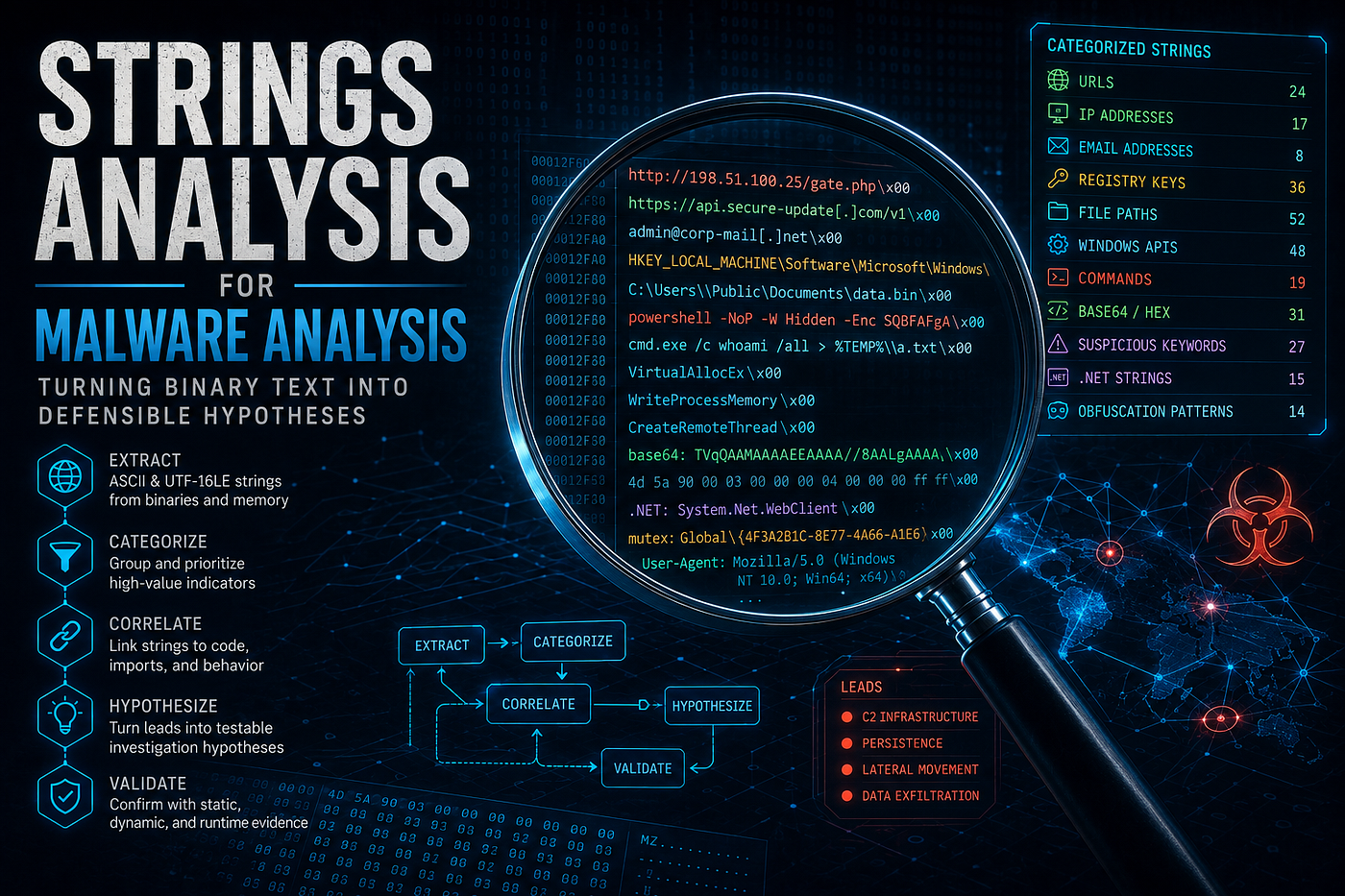
- Category: Malware Analysis
- Topics: Strings Analysis, Static Analysis, Reverse Engineering, Digital Forensics, Windows Internals, AIDebug, String Analyzer, Artificial Intelligence
- Source article: Medium publication
- Published: 2026-08-12
- Preserved media: 14 image(s), including the cover, evidence infographics, and AIDebug String Intelligence screenshots.
- Canonical edition: This local 1200km page preserves the complete evidence-first guide and its ecosystem cross-links.
Ecosystem Fit
This guide is the string-evidence layer of the 1200km malware-analysis learning path. Begin in the Malware Analysis field guide, map the executable with PE File Structure for Malware Analysis, and follow important references into Assembly for Malware Analysis. Work only inside the safe malware-analysis lab, and use AIDebug to connect extracted strings with binary structure and code.
This independent article may be used as supplementary material for TrainSec's Malware Analyst Professional – Level 1. It is not part of the official course. See my complete course review.
For the complete tool workflow around this chapter—including binary intake, PE inspection, cross-references, Ghidra, reports, and the 3.1 String Intelligence architecture—read the AIDebug 3.1 full release review.
Strings analysis is one of the fastest ways to make an unknown binary less unknown. A few readable fragments can expose network infrastructure, file paths, registry locations, commands, API names, configuration data, error messages, or clues about the compiler and runtime.
But strings are not behavior. A URL inside a file does not prove that the program contacts it. VirtualAlloc does not prove process injection. A PowerShell command may be documentation, dead code, or data embedded in a legitimate administration tool. The analyst's job is to turn strings into hypotheses and then test those hypotheses against structure, code, and—when justified—controlled runtime evidence.
This guide continues the evidence-first workflow developed in my articles on malware-analysis methods, PE file structure, and x86/x64 assembly. PE analysis tells us where data lives. Assembly analysis tells us how code uses it. Strings analysis connects those layers and helps decide where deeper reverse engineering should begin.
The practical companion is String Analyzer, my open-source Python tool for extracting and classifying ASCII and UTF-16LE strings from binaries, memory dumps, and disk artifacts.
Scope and safety: String Analyzer reads the selected file; it does not execute it. Unknown samples should still be handled in an isolated malware-analysis VM. Keep parsers patched, disable preview handlers and shared folders where possible, record hashes before analysis, and never double-click a sample.
Table of contents
- Strings occupy the middle of the evidence chain
- What a string really is
- Why raw strings output is not enough
- A repeatable workflow with String Analyzer
- AIDebug String Intelligence
- How to interpret common evidence groups
- High entropy and missing strings
- An illustrative triage case
- Turning strings into defender outputs
- What String Analyzer does not claim to do
- Analyst checklist
- Final perspective
- Resources
Strings occupy the middle of the evidence chain
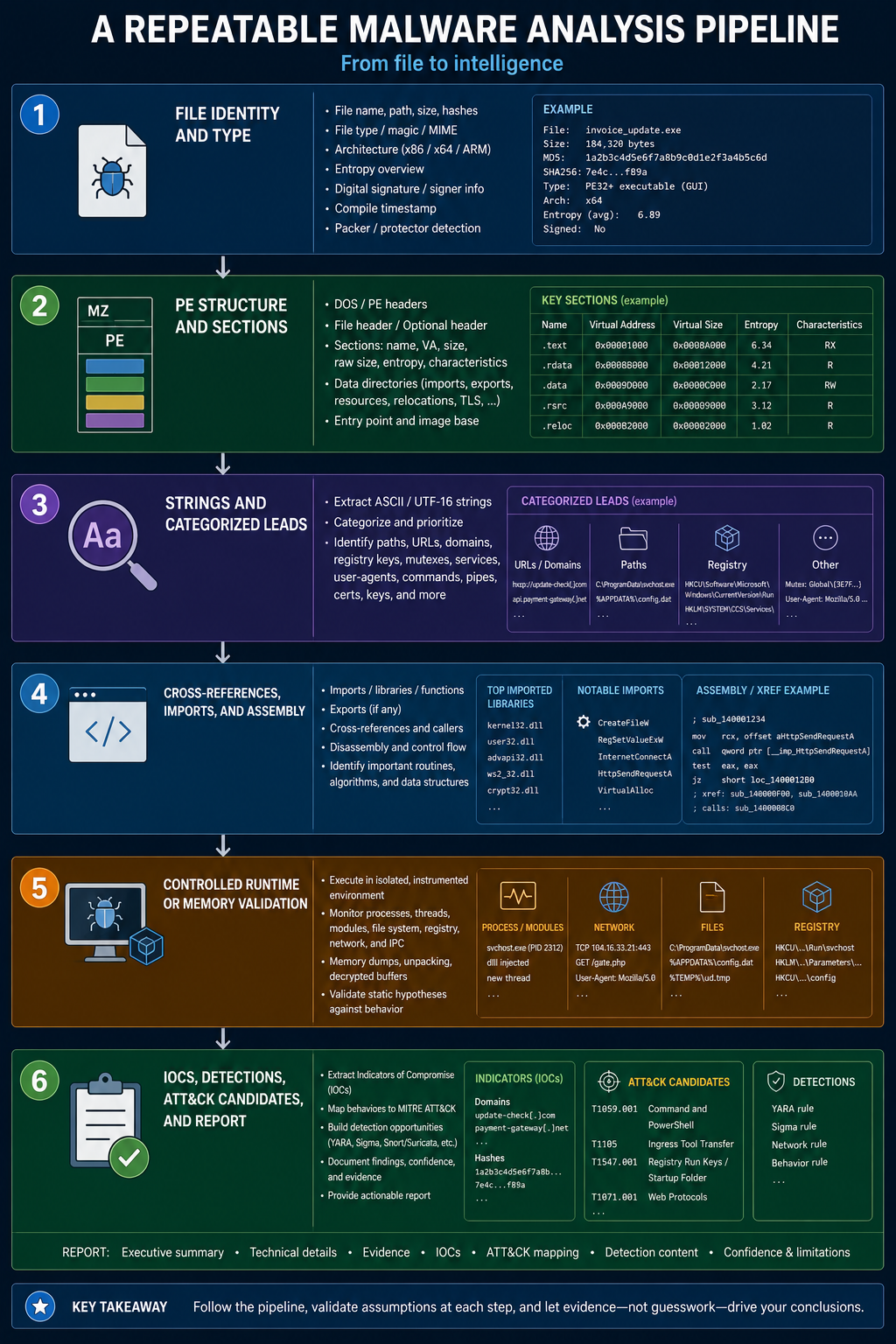
Malware analysis is not one technique. Static triage, file-format inspection, code analysis, dynamic analysis, memory forensics, and network analysis answer different questions.
Strings belong primarily to static analysis, but their value extends across the complete workflow:
file identity and type
        ↓
PE structure and sections
        ↓
strings and categorized leads
        ↓
cross-references, imports, and assembly
        ↓
controlled runtime or memory validation
        ↓
IOCs, detections, ATT&CK candidates, and report
A cryptographic hash identifies the exact sample. PE headers describe its declared structure. Strings reveal possible data and behavior. Disassembly shows whether code references those strings. Dynamic evidence shows what actually happens during one observed execution path.
Each layer raises or lowers confidence. None should silently replace another.
What a “string” really is
At the byte level, a string extractor searches for sequences that can be rendered as text. Native Windows programs commonly contain:
- narrow ASCII strings such as
kernel32.dll; - UTF-16LE strings in which most visible characters are followed by a null byte;
- compiler, runtime, and library messages;
- resource text, manifests, version information, and user-interface labels;
- hard-coded configuration, paths, mutex-like names, commands, URLs, and registry keys;
- encoded data that happens to use printable characters.
In a PE file, these sequences may appear in .rdata, .data, resources, custom sections, appended overlays, or embedded files. Section names are only labels, so a file-wide scan remains useful. The cost is context: a flat strings report does not by itself tell us which function references a value, whether it is reachable, or whether it is mapped into memory at all.
That distinction matters. A URL in an overlay may belong to an embedded payload. A registry path in a resource may be configuration. A string in executable code could be an immediate byte sequence that merely resembles text. The bytes are an observation; their role is an inference.
Why raw strings output is not enough
Traditional string utilities are excellent primitives, but a large executable can produce thousands of lines. Most are fragments, localization text, library messages, or accidental printable sequences. The problem quickly changes from extraction to prioritization.
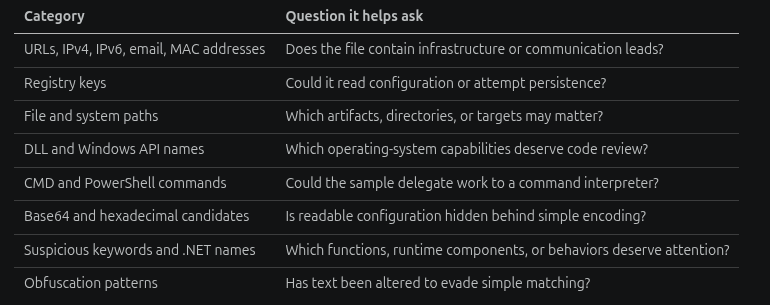
String Analyzer performs both stages. It extracts ASCII and UTF-16LE text, then groups useful candidates into categories such as:
| Category | Question it helps ask |
|---|---|
| URLs, IPv4, IPv6, email, MAC addresses | Does the file contain infrastructure or communication leads? |
| Registry keys | Could it read configuration or attempt persistence? |
| File and system paths | Which artifacts, directories, or targets may matter? |
| DLL and Windows API names | Which operating-system capabilities deserve code review? |
| CMD and PowerShell commands | Could the sample delegate work to a command interpreter? |
| Base64 and hexadecimal candidates | Is readable configuration hidden behind simple encoding? |
| Suspicious keywords and .NET names | Which functions, runtime components, or behaviors deserve attention? |
| Obfuscation patterns | Has text been altered to evade simple matching? |
It also searches inside longer text instead of requiring the entire extracted line to match. This helps recover an IP address or URL embedded in a log template, JSON object, command line, or larger configuration string.
Classification saves time, but it does not make the result a verdict. The category is a lead for validation.
A repeatable workflow with String Analyzer
1. Preserve identity and determine the real file type
Before reading individual strings, record at least SHA-256, file size, acquisition context, and detected file type. Do not trust the extension. If the sample is PE, record architecture, entry point, section layout, imports, signature state, overlay, and section entropy.
This prevents a common analytical mistake: treating extracted text as if it came from one homogeneous executable when the file may actually contain an installer, archive, embedded payload, or appended configuration.
2. Install the tool in the analysis VM
String Analyzer supports Python 3.8 or newer and has no runtime dependencies outside the Python standard library:
python3 -m venv .venv
source .venv/bin/activate
python -m pip install --upgrade pip
python -m pip install string-analyzer
string-analyzer --version
The source is also available on GitHub:
git clone https://github.com/anpa1200/String-Analyzer.git
cd String-Analyzer
python -m pip install -e .
3. Generate the categorized baseline
Run the default filtered analysis first:
string-analyzer suspicious.exe -o suspicious-strings-report.txt
The report includes categorized findings and Shannon entropy. Start with relationships, not isolated terms. A single API name is weak evidence; a coherent group is more useful. For example:
WinHttpOpen,WinHttpConnect, a host name, and a URI path support a network-client hypothesis;- a Run-key path, a dropped filename, and registry-writing APIs support a persistence hypothesis;
VirtualAllocEx,WriteProcessMemory, andCreateRemoteThreadsupport a process-injection hypothesis;- PowerShell syntax plus a Base64 candidate supports a command-execution and decoding lead.
Even a coherent group remains a hypothesis until code or runtime evidence confirms the relationship.
4. Increase sensitivity deliberately
The default scan extracts both ASCII and UTF-16LE. For noisy or evasive samples, explicitly enable sensitive analysis or change the minimum length:
string-analyzer suspicious.exe \
  --encoding both \
  --sensitive \
  --min-length 4 \
  -o suspicious-sensitive.txt
Shorter minimum lengths recover more fragments but increase false positives. Longer minimum lengths reduce noise but may miss short DLL names, registry value names, command switches, or compact configuration fields. There is no universally correct threshold; preserve the options used in your case notes.
For a very large memory or disk artifact, bound the read size:
string-analyzer memory.raw --max-bytes 100000000 -o memory-first-100mb.txt
The output then describes only the inspected prefix, not the complete artifact. That limitation belongs in the report.
5. Keep an unfiltered evidence copy
Categorization optimizes triage. It can never represent every meaningful string. Generate an unfiltered copy for manual searching and comparison:
string-analyzer suspicious.exe --unfiltered -o suspicious-all-strings.txt
Search for product names, campaign-specific vocabulary, user agents, format strings, debug paths, service names, mutex candidates, named pipes, extensions, error messages, and nearby fragments. An error message can be especially valuable because a reverse engineer can locate its cross-reference and reach the function responsible for the failing operation.
6. Review decoded candidates as transformations, not facts
String Analyzer attempts Base64 and hexadecimal decoding when the result looks printable. This is useful for recovering configuration fragments, commands, URLs, or second-stage clues, but printable output is not automatically meaningful. Many ordinary strings satisfy an encoding grammar by accident.
For every decoded candidate, preserve:
- the original text;
- the decoding operation;
- the decoded bytes or text;
- why the result appears relevant;
- where code consumes the original value.
If the program performs several transformations—Base64, XOR, decompression, then JSON parsing—the static decoded fragment is only one step in the data flow.
7. Use AI to organize questions, not manufacture certainty
String Analyzer can create a Markdown prompt from the categorized report:
string-analyzer suspicious.exe --ai-prompt -o suspicious-ai-prompt.md
It can also pass that prompt to a locally installed Codex or Gemini CLI:
string-analyzer suspicious.exe \
  --analyze-with codex \
  -o suspicious-ai-prompt.md \
  --ai-output suspicious-ai-analysis.md
The model receives the generated prompt, not an omniscient view of the sample. Its response should be treated as untrusted analyst-assistance output. A useful response proposes relationships, contradictions, and next validation steps. It cannot prove execution, attribution, reachability, or malicious intent from strings alone.
Before using an external model, review the prompt for customer names, internal domains, usernames, paths, credentials, or regulated data. The local CLI controls authentication and provider communication; String Analyzer does not make that confidentiality decision for you.
AIDebug String Intelligence
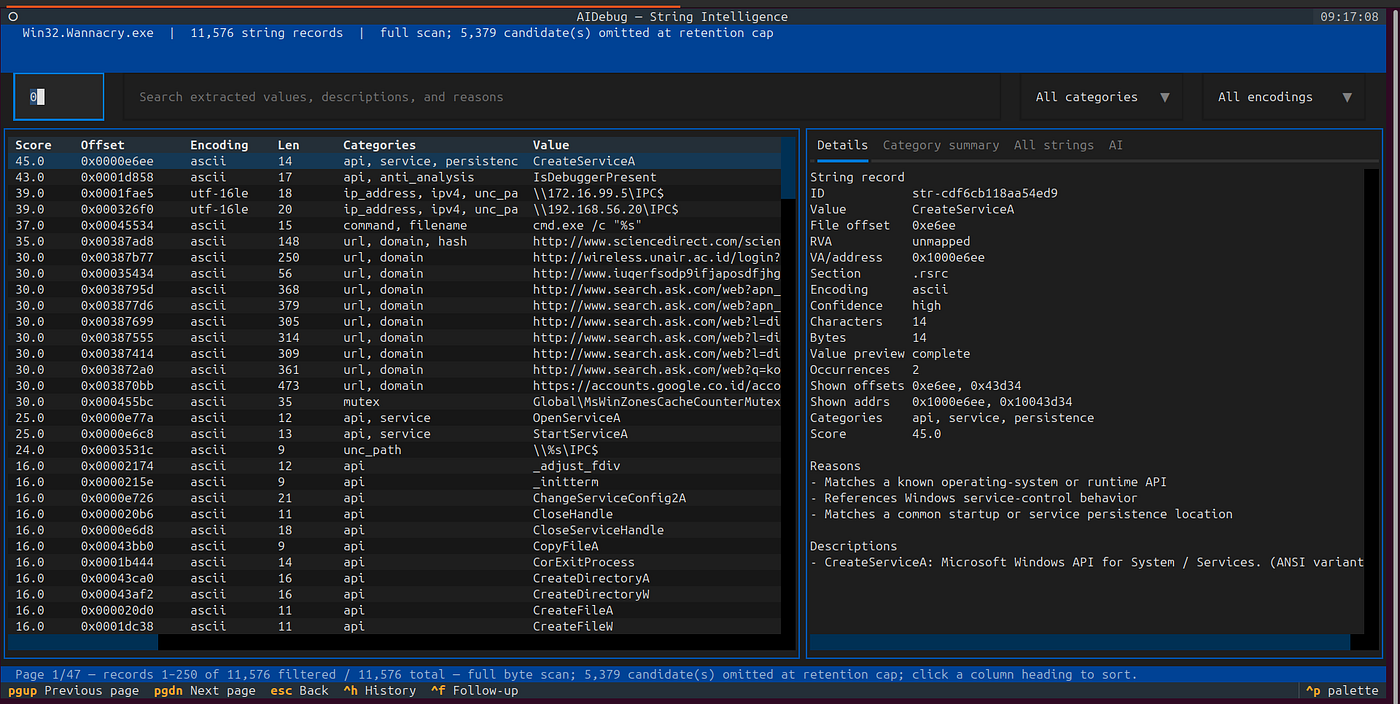
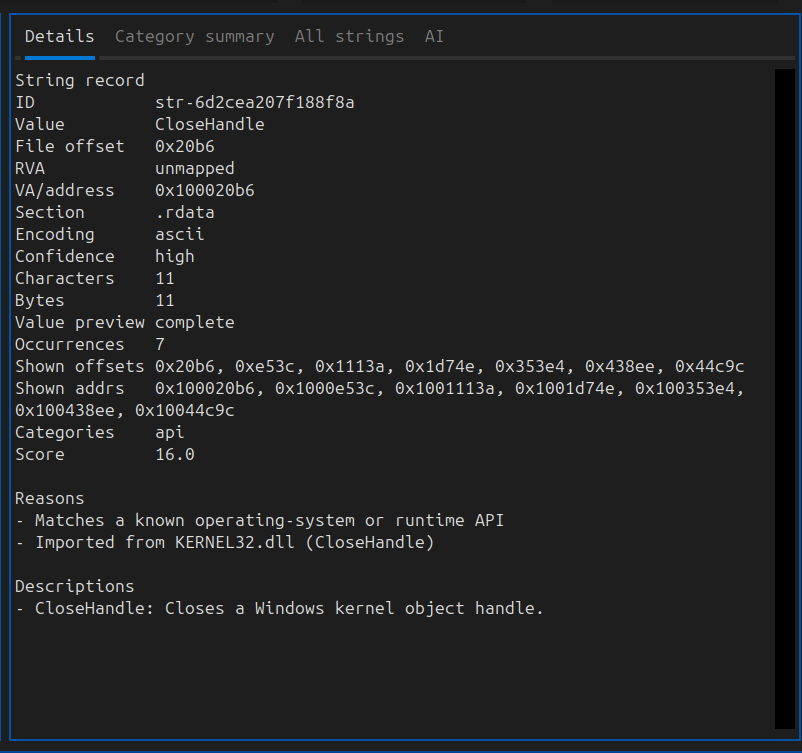
For the screenshots in this article, I also use AIDebug. Its String Intelligence workspace extracts ASCII, UTF-8, UTF-16LE, and UTF-16BE strings; preserves file offsets and mapped addresses; filters by length, encoding, category, or text; and groups leads such as DLLs, Windows APIs, URLs, IP addresses, registry keys, paths, commands, and configuration strings. Deterministic extraction works without an AI provider.
Install AIDebug from the current source tree in an isolated environment:
git clone https://github.com/anpa1200/AIDebug.git
cd AIDebug
python3 -m venv .venv
source .venv/bin/activate
python -m pip install --upgrade pip
python -m pip install -e ".[ai]"
aidebug --version
The ai extra installs optional provider clients. For optional AI review, copy
.env.example to .env, configure one provider, and never publish a real key:
AIDEBUG_LLM_PROVIDER=anthropic
ANTHROPIC_API_KEY=replace_with_your_private_key
No provider configuration is required for local analysis:
aidebug --binary /path/to/suspicious.exe --offline --strings
You can also open a binary in AIDebug's main interface and press S. The table
and detail views shown in my screenshots are produced by this workspace.

For a private JSON export, use:
aidebug --binary /path/to/suspicious.exe --offline --strings --no-tui \
  --strings-output reports/suspicious-strings.json
AI review is a separate opt-in action: press A in the workspace and confirm
the privacy/cost warning. Retained strings may contain credentials, internal
paths, customer data, and attacker-authored prompt injection, so do not enable
remote review unless that evidence is permitted to leave the analysis system.
Its categories and AI summaries remain leads that require validation against
PE structure, cross-references, code, and controlled runtime evidence.
How to interpret common evidence groups
Network strings
Domains, IP addresses, URLs, URI paths, ports, user agents, and protocol labels can identify command-and-control, download, telemetry, or update logic. They can also be benign documentation, test data, revocation endpoints, or third-party library defaults.
Validate them by checking:
- which function references the string;
- whether imported or dynamically resolved networking APIs consume it;
- whether surrounding code decrypts or constructs a different value;
- whether controlled PCAP, DNS, proxy, or sandbox evidence observes a connection;
- whether the indicator is public, private, loopback, documentation-only, or sinkholed.
Do not enrich a suspicious domain from the malware-analysis workstation. Use approved threat-intelligence infrastructure.


Registry, file, and system paths
A Run key may suggest persistence. A browser profile path may suggest data collection. A temporary filename may suggest staging. Yet a string does not show whether the program reads, writes, deletes, or merely compares that location.
Cross-reference the string and inspect the API sequence. RegOpenKeyEx with query access supports a different conclusion from RegSetValueEx. CreateFile is ambiguous until its desired access and creation disposition are recovered. Argument values turn generic API names into behavioral evidence.

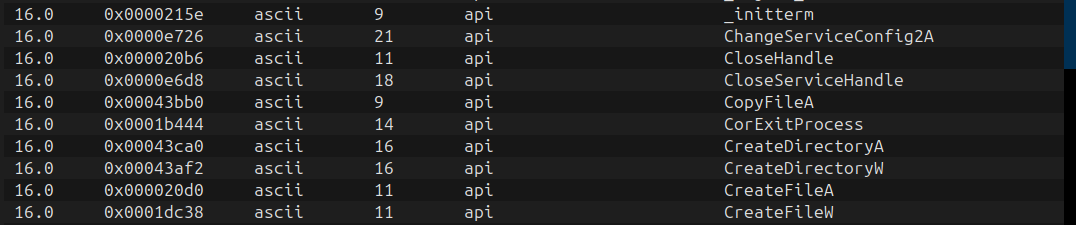
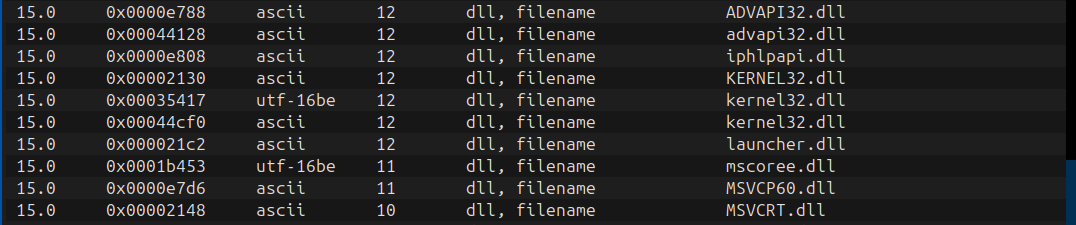
API and DLL names
API names provide a capability vocabulary. They are strongest when considered as sequences and tied to calls:
OpenProcess
VirtualAllocEx
WriteProcessMemory
CreateRemoteThread
This cluster deserves an injection review, but several caveats remain. The names might be unused imports, dynamically resolved strings, logging text, or signatures embedded by a security product. Conversely, malware can hash API names or walk the PEB, leaving few readable names.
Compare String Analyzer results with the PE import table, then follow cross-references in a disassembler. Imports show what the loader may resolve; strings show readable data; assembly shows how values and calls are connected.
Commands and scripts
CMD and PowerShell fragments can reveal complete behavior more directly than API names, particularly in loaders and living-off-the-land chains. Record the executable, switches, quoting, environment variables, encoded arguments, redirections, and child process relationship.
Do not execute a recovered command to “see what it does.” Decode and inspect it offline first. If runtime validation is necessary, use an isolated lab with controlled networking and monitoring.

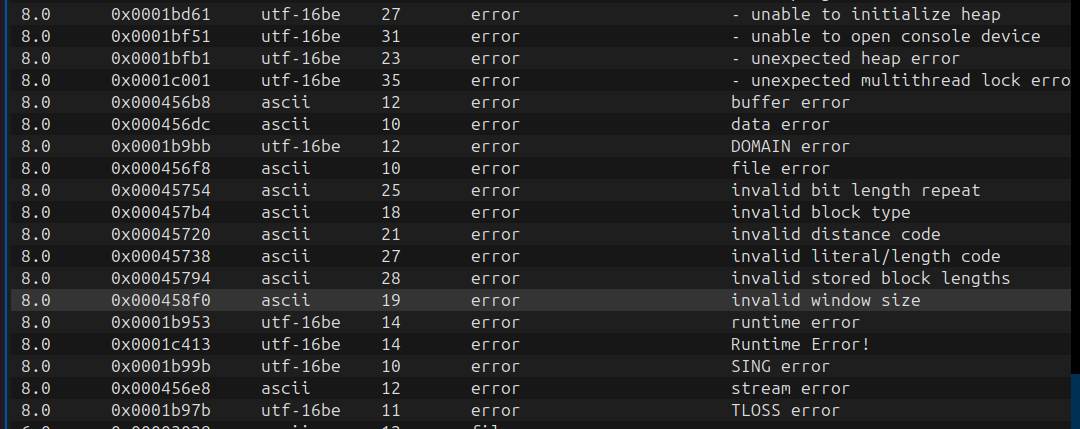
Error messages, debug paths, and language artifacts
The quietest strings are often the best navigation aids. PDB paths, source filenames, function-like log messages, exception text, Go package paths, Rust panic strings, and .NET namespaces can reveal the build environment and guide cross-reference analysis.
They are poor attribution evidence by themselves. Build paths can be copied, forged, inherited from dependencies, or left by a builder unrelated to the operator.
High entropy and missing strings
An almost empty report is a result, not a dead end. Malware may hide text through packing, encryption, compression, stack construction, character-by-character assembly, API hashing, alternate encodings, or runtime configuration retrieval.
String Analyzer computes Shannon entropy and uses a heuristic that combines high entropy with a low count of useful patterns to flag possible packing or obfuscation. This is triage evidence, not a packer detector. Compressed installers, media, encrypted archives, and legitimate protected software can also have high entropy. A packed file can contain low-entropy regions, and entropy calculated over a complete file can hide important section-level differences.
When strings are unexpectedly sparse:
- compare whole-file entropy with PE section entropy;
- inspect entry-point code and section permissions;
- check imports for loading, allocation, protection changes, or dynamic resolution;
- look for tight decoding loops and stack-string construction in assembly;
- examine resources, overlays, and embedded objects separately;
- if authorized and properly isolated, capture memory after unpacking and run String Analyzer on the dump.
Strings recovered from memory represent a particular process state. Record the process, module, address range, capture time, and trigger conditions so another analyst can reproduce the observation.
An illustrative triage case
Assume a categorized report from a synthetic laboratory sample contains these sanitized leads:
hxxps://update[.]example.invalid/api/v2/check
HKCU\Software\Microsoft\Windows\CurrentVersion\Run
%APPDATA%\SystemUpdate\updater.exe
powershell.exe -NoProfile -EncodedCommand ...
WinHttpOpen
WinHttpConnect
RegSetValueExW
VirtualAlloc
The correct first conclusion is not “this is a malicious downloader with persistence.” A defensible triage record separates observations and inferences:
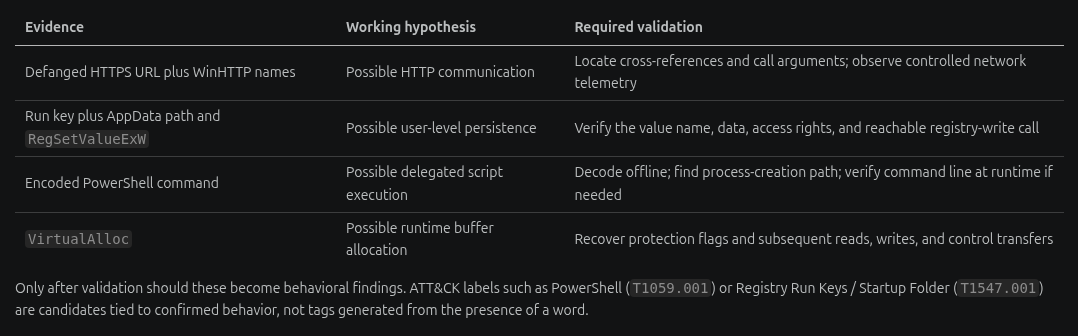
| Evidence | Working hypothesis | Required validation |
|---|---|---|
| Defanged HTTPS URL plus WinHTTP names | Possible HTTP communication | Locate cross-references and call arguments; observe controlled network telemetry |
Run key plus AppData path and RegSetValueExW | Possible user-level persistence | Verify the value name, data, access rights, and reachable registry-write call |
| Encoded PowerShell command | Possible delegated script execution | Decode offline; find process-creation path; verify command line at runtime if needed |
VirtualAlloc | Possible runtime buffer allocation | Recover protection flags and subsequent reads, writes, and control transfers |
Only after validation should these become behavioral findings. ATT&CK labels such as PowerShell (T1059.001) or Registry Run Keys / Startup Folder (T1547.001) are candidates tied to confirmed behavior, not tags generated from the presence of a word.
Turning strings into defender outputs
IOC leads
Normalize and deduplicate domains, URLs, IPs, emails, paths, hashes, and registry locations. Mark whether each was:
- statically present;
- decoded by the analyst or tool;
- constructed by code;
- observed at runtime;
- obtained from an external intelligence source.
This provenance prevents a dormant or decoy string from being reported as an observed indicator.
YARA seeds
Distinctive strings can become YARA candidates, but avoid building a rule from generic API names or common library text. Prefer several stable, family-specific strings and combine them with structural conditions such as file type, size, or PE properties. Test against benign corpora and related malicious samples. String Analyzer provides seeds; it does not prove rule quality.
Behavioral detections
Binary strings may suggest telemetry to collect, but Sigma or EDR detections should normally describe observable behavior: a process relationship, command line, registry modification, file creation, module load, or network request. Validate that the required event source records the field before publishing a rule.
ATT&CK mapping
Map the validated behavior, not the tool name or isolated string. Record the evidence and confidence for every technique. If only static strings support the hypothesis, say so. If runtime telemetry confirms it, preserve that stronger provenance.
What String Analyzer does not claim to do
String Analyzer is deliberately a focused static-analysis tool. It does not:
- execute or sandbox the sample;
- determine whether a file is malicious;
- replace PE parsing, disassembly, decompilation, debugging, or memory forensics;
- prove that a detected string is reachable or used;
- recover every encrypted, packed, hashed, or runtime-built string;
- verify that an IP, domain, or URL is active;
- attribute malware to an actor;
- turn AI output into evidence.
These are not defects in the workflow. Clear boundaries make the output easier to trust.
Analyst checklist
Before closing strings triage, ask:
- Did I hash the original and identify its real file type?
- Did I extract both ASCII and UTF-16LE text?
- Did I save categorized and unfiltered outputs?
- Did I record options, limits, tool version, and analysis time?
- Did I preserve original and decoded values separately?
- Did I distinguish observations, hypotheses, and confirmed behavior?
- Did I compare string leads with PE imports, sections, resources, and overlay data?
- Did I follow important strings into assembly or decompiler cross-references?
- Did I explain whether entropy was whole-file or section-level?
- Did I protect sensitive evidence before using an external AI provider?
- Did I mark IOC provenance and test detection candidates?
- Did I document what remains unknown?
Final perspective
Strings analysis is valuable because it compresses a large search space into a practical set of questions. It can point an analyst toward the likely network routine, persistence function, decoder, command builder, configuration parser, or embedded payload long before every function is understood.
Its speed is also its danger. Readable text feels self-explanatory, so it is easy to promote a clue into a conclusion. The stronger method is simple:
extract → classify → correlate → cross-reference → validate → report
Use PE structure to place the bytes. Use String Analyzer to organize the leads. Use assembly to recover how code consumes them. Use controlled runtime and memory evidence only when the question requires it. Then report facts, inferences, confidence, and limitations separately.
That is how a string stops being an interesting fragment and becomes defensible malware-analysis evidence.
Resources
- String Analyzer on GitHub
- String Analyzer on PyPI
- AIDebug on GitHub
- AIDebug 3.1 String Intelligence release notes
- Malware Analysis & Reverse Engineering field guide
- PE File Structure for Malware Analysis
- Assembly for Malware Analysis
- Earlier introduction: Static Malware Analysis — Strings Analysis
Andrey Pautov Malware analysis, reverse engineering, threat intelligence, and defensive security tooling