What Is Malware?
- Category: Malware Analysis
- Source article: https://medium.com/@1200km/what-is-malware-93746950ce9a
- Published: 2026-08-06
- Preserved media: 14 image(s), including cover images, screenshots, diagrams, and infographics where present.
- Preserved technical blocks: 0 code/configuration block(s).
Ecosystem Fit
This page mirrors the original Medium RSS article into the 1200km.com Docusaurus ecosystem. The article flow, images, screenshots, infographics, and technical blocks are preserved from the Medium feed.
This independent article may be used as supplementary material for TrainSec's Malware Analyst Professional – Level 1. It is not part of the official course. See my complete course review.
A Clear Guide to Malware Types, Capabilities, and Defenses
Table of contents
Introduction
Malware types and capabilities
- 1. Viruses
- 2. Worms
- 3. Trojans
- 4. Droppers, downloaders, and loaders
- 5. Ransomware and data extortion
- 6. Wipers and pseudo-ransomware
- 7. Backdoors and remote-access Trojans
- 8. Rootkits and bootkits
- 9. Fileless malware and living-off-the-land techniques
- 10. Spyware and information stealers
- 11. Keyloggers
- 12. Adware and potentially unwanted applications
- 13. Bots, botnets, and cryptominers
How malware labels fit together
How to reduce malware risk
What to do if malware is suspected
Conclusion
References
Introduction
Malware, short formalicious software, is software or code intentionally used to compromise the confidentiality, integrity, or availability of a device, application, network, or data. Attackers may use malware to steal information, obtain remote access, disrupt operations, extort victims, conduct surveillance, consume computing resources, or destroy data.[¹]
Malware can be delivered or propagated through phishing messages, malicious websites, compromised downloads, trojanized applications, software supply-chain compromises, removable media, stolen credentials, exposed remote services, and vulnerabilities in unpatched systems. It may also be installed after an attacker has already gained access by another method.
Understanding malware terminology is useful, but the categories must be applied carefully.
> Malware categories are not mutually exclusive.
> A single malicious program may belong to several categories at the same time. For example, it may be delivered as a Trojan, install a backdoor, record keystrokes, use rootkit techniques, and execute parts of its payload in memory.
Malware labels describe different dimensions:
- **Propagation:**How the malware spreads, such as a virus or worm.
- **Delivery or presentation:**How it reaches or deceives the victim, such as a Trojan.
- **Objective:**What it is intended to achieve, such as ransomware, spyware, or a wiper.
- **Capability:**What functionality it provides, such as keylogging or remote access.
- **Stealth and execution:**How it hides or runs, such as rootkit or fileless techniques.
- **Command model:**How infected systems are controlled, such as a botnet.
This distinction explains why one sample can correctly receive several labels.
Malware types and capabilities
1. Viruses
Definition
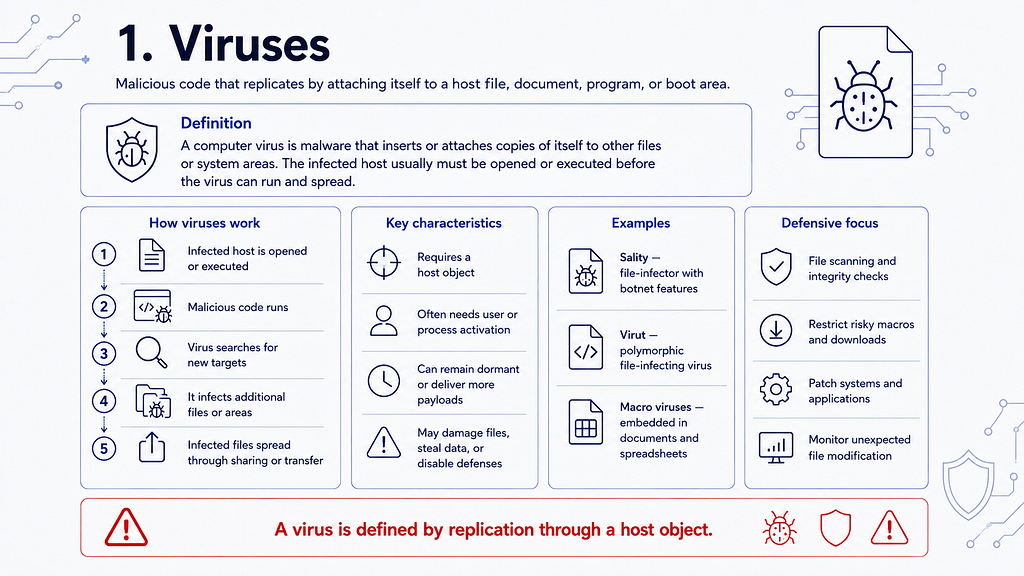
Acomputer virusis malicious code that replicates by inserting or attaching a copy of itself to another file, document, program, or boot area. The infected host must normally be executed, opened, or otherwise activated before the virus can run and continue propagating.[¹]
A virus is therefore not simply any malicious program. Its defining characteristic is replication through a host object.
How Viruses Work
A typical virus follows this sequence:
- A user or process executes an infected host file.
- The malicious code runs alongside or instead of the legitimate content.
- The virus searches for additional suitable files or system areas.
- It inserts copies of itself into those targets.
- The infected files spread through sharing, removable media, downloads, or other transfer mechanisms.
Some viruses immediately damage files or systems. Others remain dormant, steal information, disable security tools, or install additional payloads.
Representative Examples
- **Sality:**A file-infecting virus that also included botnet and malware-downloading capabilities.
- **Virut:**A polymorphic file-infecting virus that compromised executable and web-related files.
- **Macro viruses:**Malware written in document macro languages and embedded in files such as word-processing documents or spreadsheets.
2. Worms
Definition
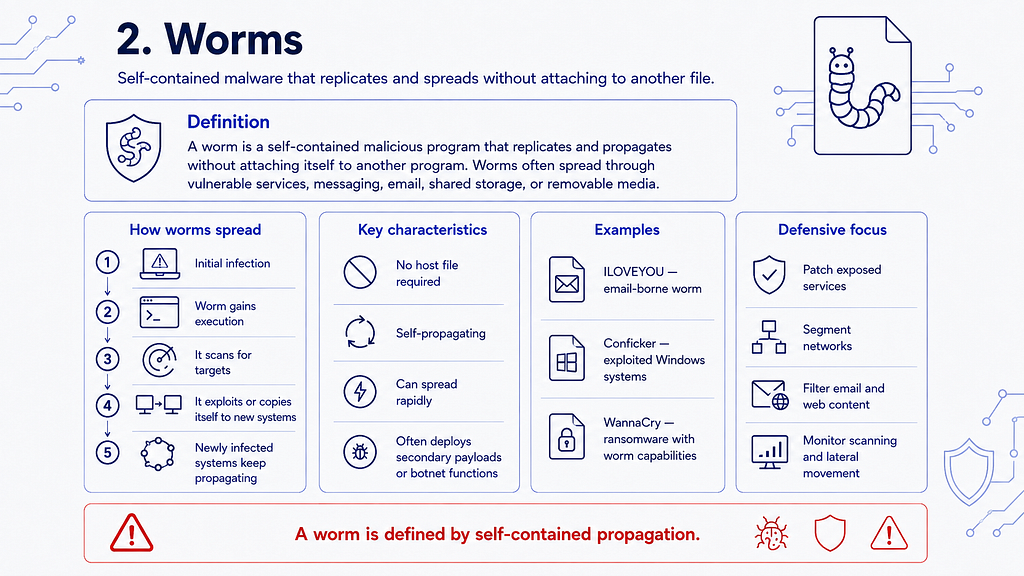
Awormis a self-contained malicious program that replicates and propagates without attaching itself to another program. Worms commonly spread through vulnerable network services, messaging systems, email, shared storage, or removable media.[¹]
Unlike a virus, a worm does not require a separate host file. Some worms can propagate automatically after compromising one system, although particular infection paths may still depend on user interaction.
Why Worms Are Dangerous
Worms can spread rapidly because each newly infected system may begin scanning for and attacking additional targets. This can produce:
- widespread compromise;
- network congestion;
- service disruption;
- rapid deployment of secondary payloads;
- large botnets;
- ransomware outbreaks.
Representative Examples
- **ILOVEYOU (2000):**An email-borne worm that used social engineering and mailed copies of itself to contacts found on infected systems.
- **Conficker (2008):**A worm that exploited a Windows vulnerability and used additional propagation methods to build a large botnet.
- **WannaCry (2017):**Ransomware with worm capabilities that used the SMB vulnerability associated with EternalBlue to spread between vulnerable Windows systems.[²]
WannaCry is an important example of overlapping classification: it was bothransomware, because it encrypted data and demanded payment, and aworm, because it could propagate between vulnerable systems.
3. Trojans
Definition
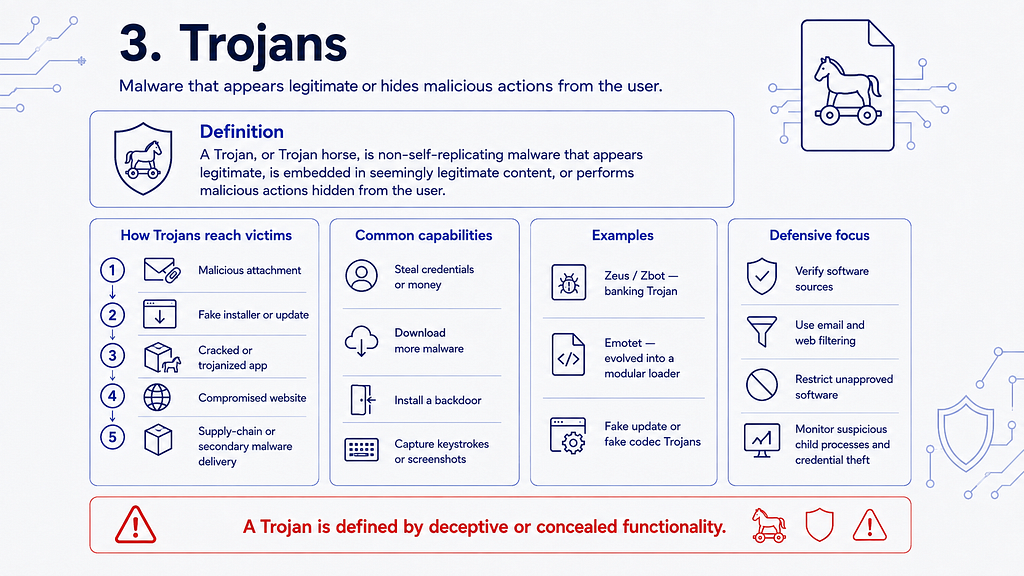
ATrojan, orTrojan horse, is non-self-replicating malware that appears legitimate, is embedded in apparently legitimate content, or performs malicious actions hidden from the user.
A Trojan does not have to be installed voluntarily. It may arrive through a malicious attachment, a fake installer, a cracked application, a compromised website, another malware component, or a software supply-chain compromise.
The defining characteristic is deceptive or concealed functionality — not a specific delivery channel.
Common Trojan Capabilities
A Trojan may:
- steal credentials or financial information;
- download additional malware;
- install a backdoor;
- join the system to a botnet;
- record keystrokes;
- capture screenshots;
- manipulate browser sessions;
- provide remote command execution.
Representative Examples
- **Zeus / Zbot:**A banking Trojan known for stealing online-banking credentials through techniques such as keylogging and form grabbing.
- **Emotet:**First identified as a banking Trojan in 2014, it evolved into a modular loader and cybercrime service used to provide access and deliver additional malware. An international law-enforcement operation disrupted its infrastructure in January 2021.[³]
- **Fake codec and fake update Trojans:**Malware presented as a media component, browser update, security tool, or other apparently useful software.
A Trojan describes how malicious functionality is concealed or presented. It does not describe the complete set of actions the malware performs after execution.
4. Droppers, Downloaders, and Loaders
These terms describe components used to install or execute another payload.
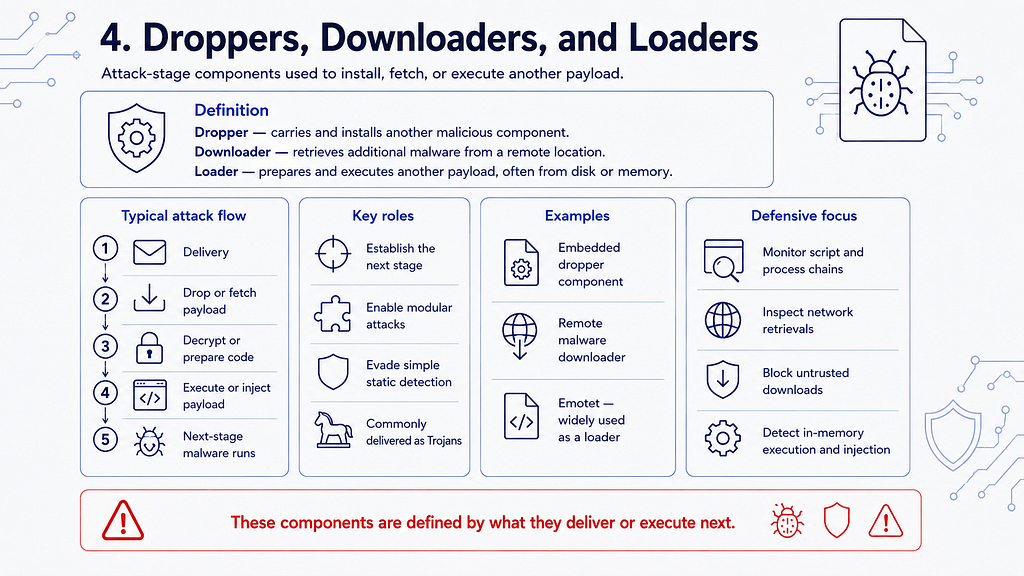
Dropper
Adroppercarries another malicious component inside itself and writes or installs that component on the target system.
Downloader
Adownloaderretrieves additional malware from a remote location after it runs.
Loader
Aloaderprepares and executes another payload. It may load code from disk, decrypt embedded code, inject code into another process, or execute a payload directly in memory.
These components are frequently delivered as Trojans. Their primary purpose is to establish the next stage of an attack rather than to perform the final objective themselves.
Emotet, for example, evolved beyond its original banking-Trojan role and became widely used as a loader that enabled delivery of other criminal malware.[³]
5. Ransomware and Data Extortion
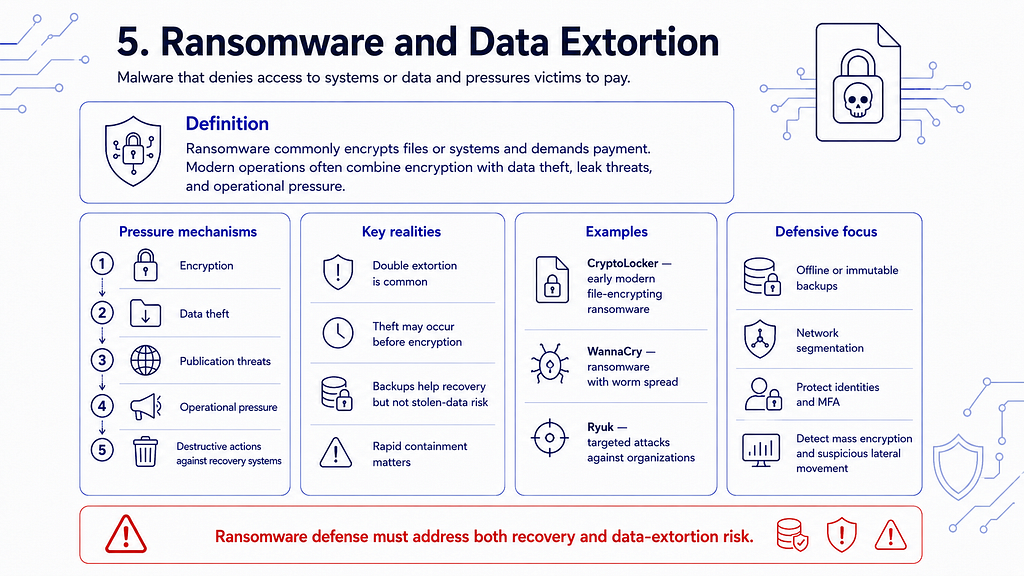
Definition
Ransomwareis malware that restricts access to systems or data and demands payment. The most common form encrypts files or systems and offers a decryption mechanism in exchange for a ransom.
Modern ransomware operations often combine several pressure mechanisms:
- **Encryption:**The victim loses access to files or systems.
- **Data theft:**Information is stolen before encryption.
- **Publication threats:**The operator threatens to leak stolen data.
- **Operational pressure:**Customers, partners, regulators, or employees may be contacted.
- **Destructive actions:**Backups, virtual infrastructure, or recovery systems may be targeted.
The combination of encryption and data-theft threats is commonly calleddouble extortion. Some extortion operations steal data and demand payment without deploying ransomware at all.[⁴]
Representative Examples
- **CryptoLocker (2013):**An influential early example of modern file-encrypting ransomware distributed through criminal infrastructure.
- **WannaCry (2017):**Ransomware with worm-like propagation that affected organizations in many countries.[²]
- **Ryuk:**Ransomware associated with targeted attacks against organizations and frequently deployed after an earlier compromise.
Important Limitation of Backups
Offline, immutable, and versioned backups are critical recovery controls, but they do not prevent initial compromise or protect information that has already been stolen.
A complete ransomware strategy must address prevention, detection, containment, recovery, and data-extortion risk.[⁴]
6. Wipers and Pseudo-Ransomware
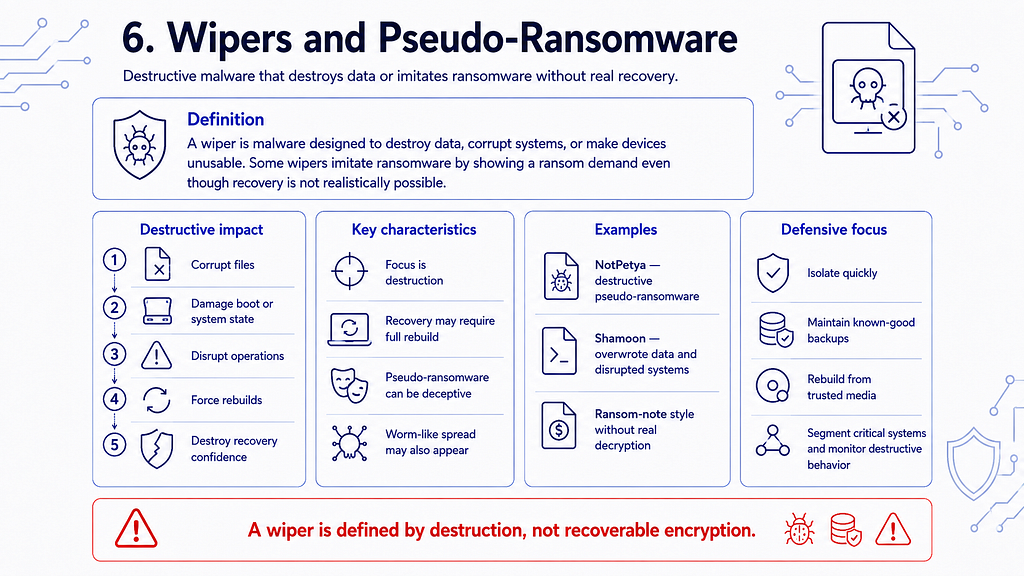
Definition
Awiperis malware designed to destroy data, corrupt systems, or make devices unusable. Recovery may be impossible without rebuilding systems and restoring data from known-good backups.
Some wipers imitate ransomware by displaying a ransom message, even though the malware does not provide a functional recovery mechanism. This is often calledpseudo-ransomwareorransomware-like destructive malware.
Representative Examples
- **NotPetya (2017):**Destructive malware designed to resemble ransomware. Its payment and recovery process did not provide victims with a reliable path to restore encrypted systems. It also used worm-like propagation techniques.[¹¹]
- **Shamoon:**Destructive malware used in attacks that overwrote data and rendered affected systems inoperable.
NotPetya should not be described as ordinary ransomware merely because it displayed a ransom demand. Its defining outcome was destructive wiping rather than recoverable encryption.
7. Backdoors and Remote-Access Trojans
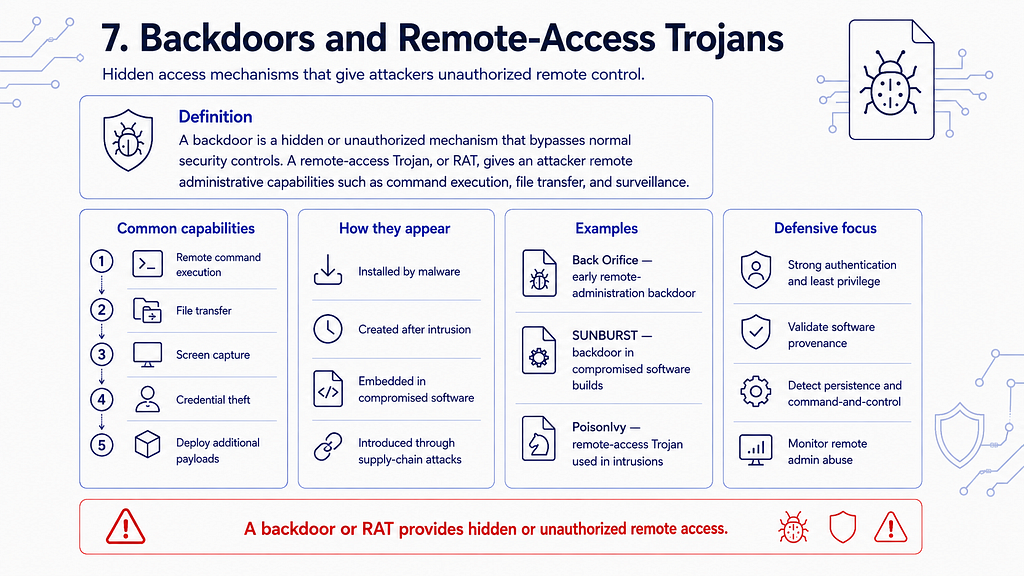
Backdoor Definition
Abackdooris a hidden or unauthorized mechanism that bypasses normal authentication or security controls and enables access, command execution, or control of a system.
A backdoor may be:
- installed by malware;
- created manually after an intrusion;
- embedded in compromised software;
- introduced through a supply-chain attack;
- implemented through modified accounts, services, code, or configurations.
Remote-Access Trojan
Aremote-access Trojan, often abbreviated asRAT, is malware that gives an attacker remote administrative capabilities. Depending on the tool, those capabilities may include command execution, file transfer, screen capture, credential theft, microphone or camera access, and deployment of additional payloads.
Legitimate remote-administration tools can provide similar functions. The distinction depends on authorization, intent, deployment, and control.
Representative Examples
- **Back Orifice (1998):**An early and widely known Windows remote-administration backdoor.
- **SUNBURST (2020):**A backdoor inserted into compromised SolarWinds Orion software builds and distributed through legitimate update channels. SolarWinds initially reported up to 18,000 potentially vulnerable customer downloads, but the number of organizations selected for follow-on exploitation was substantially smaller.[⁵]
- **PoisonIvy:**A remote-access Trojan used in multiple targeted intrusion campaigns.
A backdoor is a capability or access mechanism. The malware that installs it may simultaneously be classified as a Trojan, loader, rootkit, spyware platform, or bot.
8. Rootkits and Bootkits
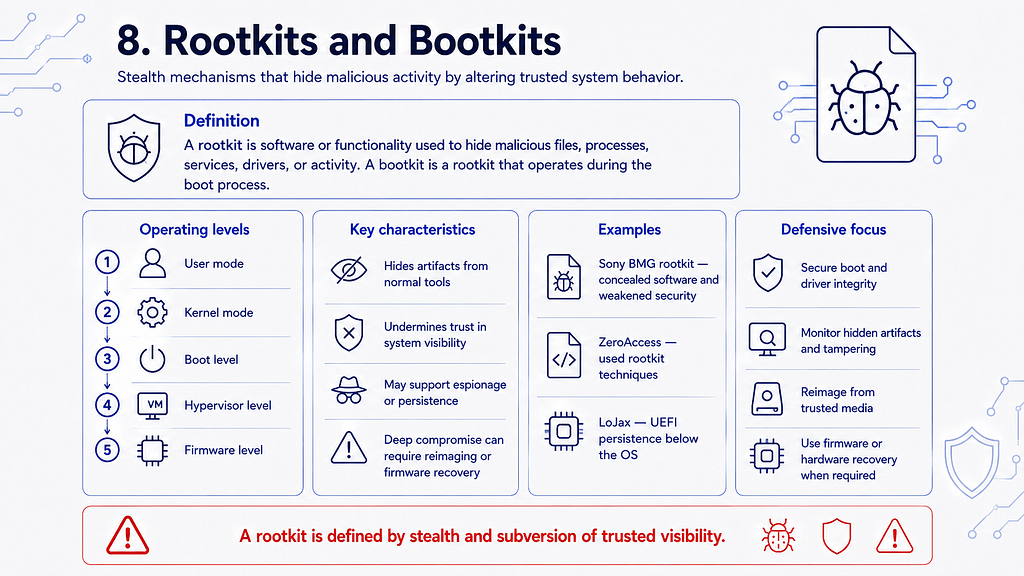
Rootkit Definition
Arootkitis software or functionality used to hide malicious programs, files, processes, drivers, accounts, services, network connections, or other system components.
Rootkits may alter or intercept operating-system behavior so that ordinary tools receive false or incomplete information.[⁶]
Rootkits can operate at several levels:
- **User mode:**Hides artifacts by manipulating user-level processes or libraries.
- **Kernel mode:**Alters or hooks operating-system kernel behavior.
- Boot level:Runs during the boot process; this form is often called abootkit.
- **Hypervisor level:**Operates beneath the normal operating system.
- **Firmware level:**Persists in device or system firmware.
Representative Examples
- **Sony BMG rootkit (2005):**Copy-protection software installed from certain music CDs that concealed itself and introduced security risks.
- **ZeroAccess:**Malware that used rootkit techniques to hide botnet and monetization components.
- **LoJax:**A UEFI rootkit used to maintain persistence below the operating-system level.
A rootkit is primarily astealth mechanism. Malware using a rootkit may also provide espionage, remote access, credential theft, or other capabilities.
Remediation
Deep rootkit or firmware compromise can undermine trust in the operating system and security tools.
Depending on the affected layer, remediation may require full reimaging, boot-chain repair, firmware replacement, or hardware-specific recovery procedures.
9. Fileless Malware and Living-off-the-Land Techniques
What “Fileless” Means
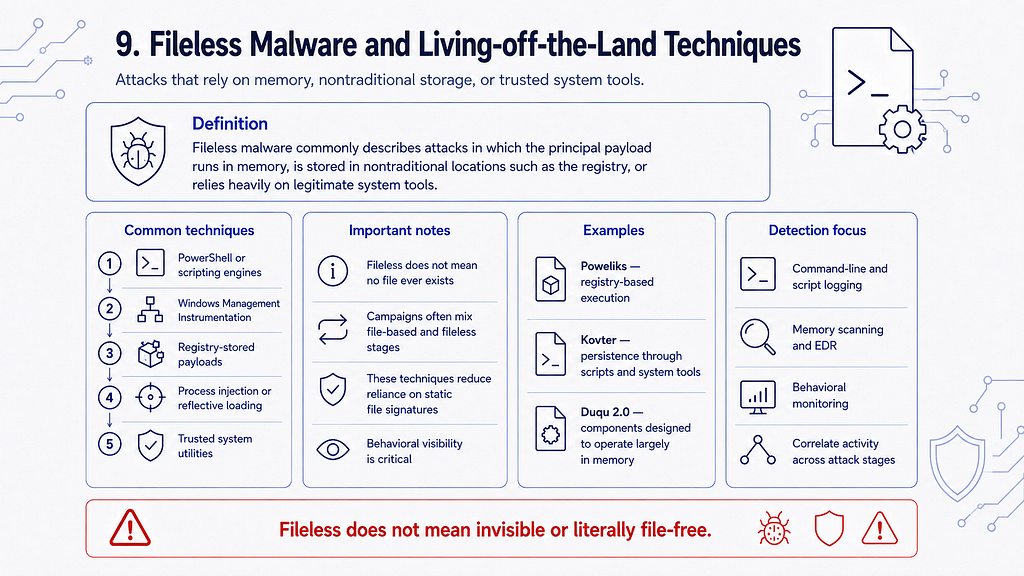
There is no single universally accepted definition offileless malware. The term is commonly used for attacks in which the principal malicious payload executes in memory, is stored in a nontraditional location such as the registry, or relies heavily on legitimate system tools.[⁷]
“Fileless” doesnotnecessarily mean that no file is ever used. A campaign may begin with a document, script, shortcut, or other file while executing its main payload directly in memory.
Different stages of the same attack may be file-based or fileless.
Common Techniques
Fileless and memory-resident attacks may use:
- PowerShell or other scripting engines;
- Windows Management Instrumentation;
- registry-stored payloads;
- scheduled tasks;
- process injection;
- reflective loading;
- macros;
- trusted system utilities;
- direct execution of code in memory.
The abuse of legitimate tools already present on a system is often calledliving off the land.
Representative Examples
- **Poweliks:**Stored malicious code in the Windows Registry and used legitimate Windows components for execution.
- **Kovter:**Used registry-based persistence and script or system-tool execution.
- **Duqu 2.0:**An advanced espionage platform whose principal components were designed to operate largely in memory.
Detection
Fileless techniques can reduce the effectiveness of controls based only on static file signatures. They are not invisible.
Detection may rely on behavioral monitoring, script inspection, memory scanning, process telemetry, command-line logging, endpoint detection and response, and correlation across multiple attack stages.[⁷]
10. Spyware and Information Stealers
Spyware
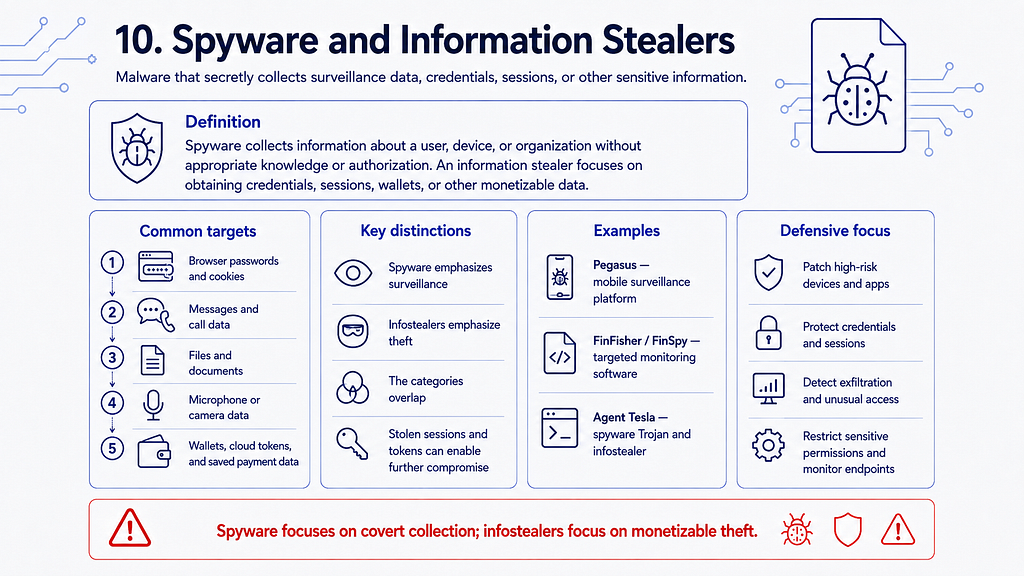
Spywareis malware designed to collect information about a user, device, or organization without appropriate knowledge or authorization.
It may collect:
- credentials;
- messages and call data;
- browser activity;
- files and documents;
- screenshots;
- clipboard contents;
- microphone or camera data;
- device identifiers;
- location information.
Information Stealers
Aninformation stealer, orinfostealer, focuses on obtaining data that can be monetized or used for further compromise.
Common targets include:
- browser passwords;
- authentication cookies;
- cryptocurrency wallets;
- email credentials;
- VPN credentials;
- cloud tokens;
- saved payment data;
- system and application information.
The terms spyware and infostealer overlap. “Spyware” often emphasizes surveillance, while “infostealer” often emphasizes theft of credentials, sessions, and financially useful data.
Representative Examples
- **Pegasus:**A sophisticated mobile-surveillance platform developed by NSO Group. Public research has documented multiple infection methods, including zero-click exploit chains such as FORCEDENTRY.[⁸]
- **FinFisher / FinSpy:**Commercial surveillance software documented in investigations involving targeted monitoring.
- **Agent Tesla:**A spyware Trojan and information stealer with capabilities including keylogging, clipboard collection, credential theft, and screen capture.[⁹]
11. Keyloggers
Definition
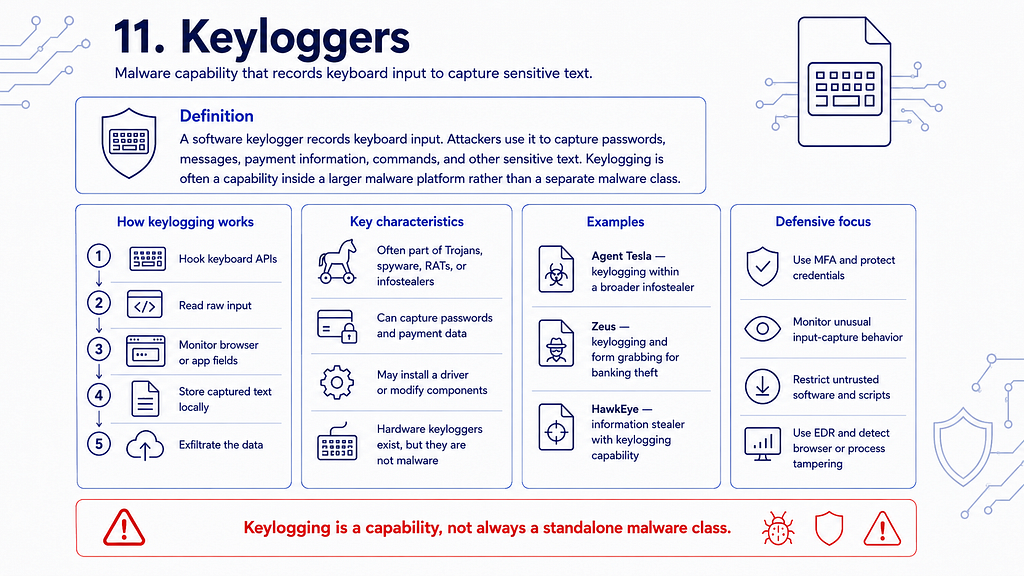
Asoftware keyloggerrecords keyboard input. Attackers may use it to capture passwords, messages, payment information, commands, and other sensitive text.
Keylogging is often a capability inside a larger malware platform rather than a completely separate malware class. Banking Trojans, spyware, remote-access Trojans, and information stealers may all include keylogging modules.[⁹]
Keylogging Methods
Software keyloggers may:
- hook keyboard-related application programming interfaces;
- read raw keyboard input;
- install a driver;
- monitor browser or application input;
- modify system components;
- store captured data locally before exfiltration.
Representative Examples
- **Agent Tesla:**Includes keylogging among a broader set of information-stealing capabilities.
- **Zeus:**Used keylogging and form grabbing to obtain banking credentials.
- **HawkEye:**An information-stealing malware family with keylogging functionality.
Hardware Keyloggers
A physical device placed between a keyboard and computer may also record keystrokes. It is a surveillance device, but it isnot malware, because malware is software or code.
12. Adware and Potentially Unwanted Applications
Definition
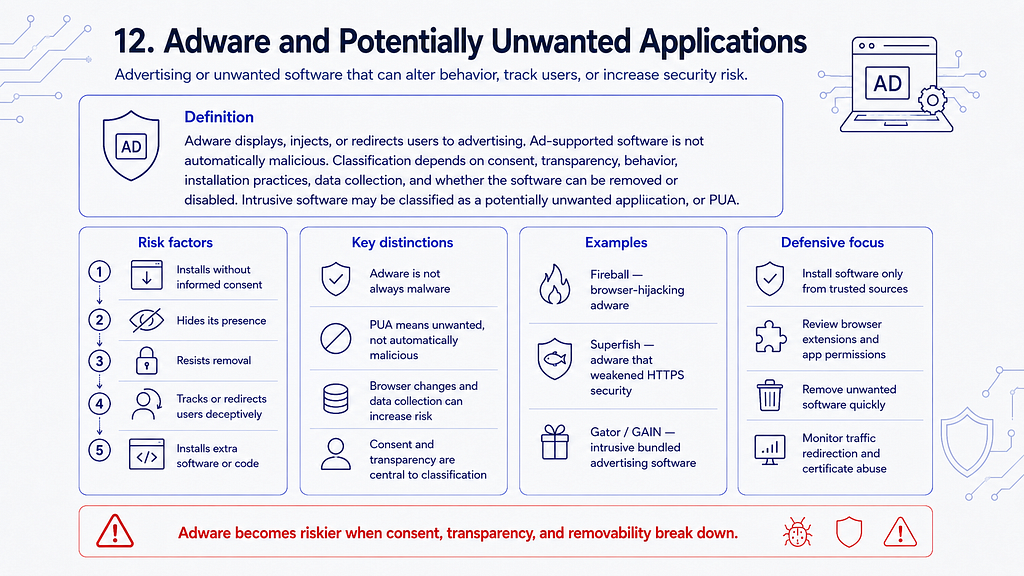
Adwareis software that displays, injects, or redirects users to advertising. Ad-supported software is not automatically malicious.
Classification depends on consent, transparency, behavior, installation practices, data collection, and the ability to remove or disable the software.
Security vendors may classify intrusive advertising software as apotentially unwanted application, orPUA, rather than malware. Potentially unwanted applications are not necessarily malicious, but they can degrade performance, alter browser settings, install additional unwanted components, or increase exposure to security threats.[¹⁰]
Adware is more likely to be considered malicious when it:
- installs without informed consent;
- hides its presence;
- resists removal;
- intercepts or modifies encrypted traffic;
- tracks users deceptively;
- redirects traffic;
- installs additional software;
- executes unauthorized code.
Representative Examples
- **Fireball:**Browser-hijacking adware associated with traffic manipulation and advertising revenue.
- **Superfish:**Advertising software preinstalled on some Lenovo systems that installed a root certificate and weakened HTTPS security.
- **Gator / GAIN:**Early advertising software known for bundling, tracking, and intrusive advertisements.
13. Bots, Botnets, and Cryptominers
Bots and Botnets
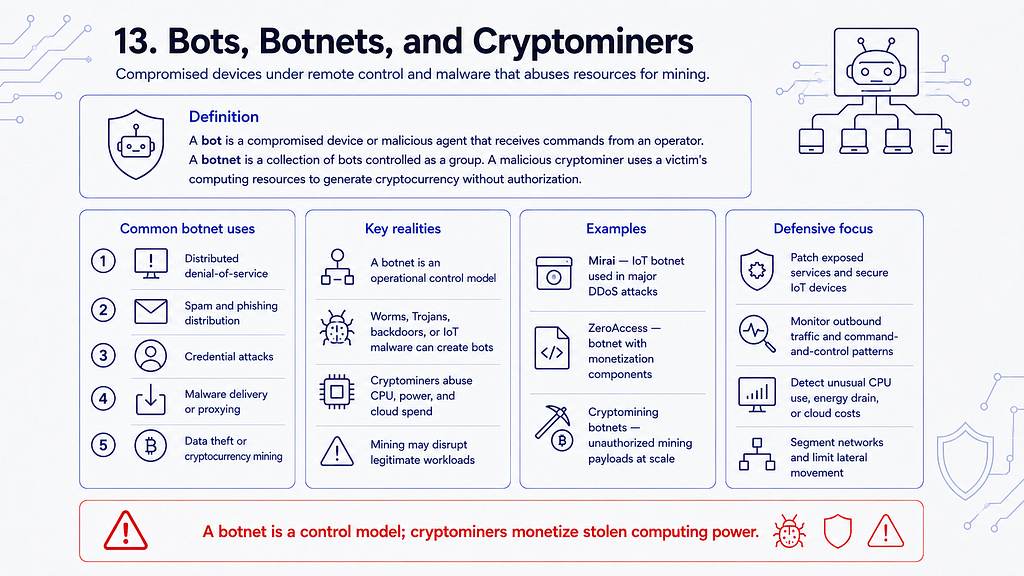
Abotis a compromised device or malicious agent that receives commands from an operator. Abotnetis a collection of bots controlled as a group.
Botnets may be used for:
- distributed denial-of-service attacks;
- spam and phishing distribution;
- credential attacks;
- malware delivery;
- proxying malicious traffic;
- click fraud;
- cryptocurrency mining;
- data theft.
A botnet is an operational control model, not a mutually exclusive malware category. A worm, Trojan, backdoor, or Internet of Things malware family may turn a device into a bot.
Cryptominers
Amalicious cryptomineruses a victim’s computing resources to generate cryptocurrency without authorization.
Cryptomining malware may cause:
- performance degradation;
- increased energy consumption;
- hardware stress;
- unexpected cloud-computing costs;
- disruption of legitimate workloads.
Some cryptominers spread as worms, arrive as Trojans, exploit internet-facing services, or operate as payloads deployed through a botnet.
How Malware Labels Fit Together
The following examples show why malware should be classified across multiple dimensions:
ExamplePropagation or deliveryObjectiveCapabilities or techniquesWannaCryWorm-like network propagationRansomwareExploitation and encryptionEmotetTrojan and email deliveryAccess brokerage and payload deliveryLoader and botnet functionalityNotPetyaSupply-chain delivery and worm-like propagationDestructionWiping, credential abuse, and lateral movementAgent TeslaTrojan commonly delivered through phishingInformation theftKeylogging, credential collection, and screen captureSUNBURSTCompromised software updateEspionage and persistent accessBackdoor and command and controlPegasusExploit-based mobile compromiseSurveillanceData collection and microphone or camera access
A technically accurate description therefore looks like this:
> Agent Tesla is a spyware Trojan and information stealer that includes keylogging.
It is less accurate to say:
> Agent Tesla is only a keylogger.
How to Reduce Malware Risk
No single product or control can stop every malware attack. Effective defense uses multiple layers.
1. Maintain an Accurate Asset Inventory
Organizations should know which devices, operating systems, applications, services, cloud resources, and identities they operate.
Unknown assets cannot be patched, monitored, or protected reliably.
2. Patch Operating Systems and Applications
Apply security updates promptly, prioritizing:
- internet-facing systems;
- remote-access services;
- browsers;
- email clients;
- document readers;
- identity infrastructure;
- vulnerabilities known to be actively exploited.
3. Protect Identities
Use:
- strong, unique passwords;
- a password manager;
- multi-factor authentication;
- least privilege;
- separate administrative accounts;
- privileged-access controls;
- rapid revocation of exposed credentials and sessions.
Multi-factor authentication reduces risk, but phishing-resistant methods provide stronger protection against credential theft and adversary-in-the-middle attacks.
4. Control Email, Web, and Software Delivery
Use email and web filtering, attachment inspection, reputation controls, sandboxing where appropriate, and policies that restrict software installation.
Obtain software from trusted sources and verify publishers, signatures, hashes, or release provenance when the risk justifies it.
5. Use Endpoint Protection and Behavioral Visibility
Modern endpoint defenses should combine file scanning with:
- behavioral detection;
- script visibility;
- memory inspection;
- process telemetry;
- exploit protection;
- endpoint detection and response.
Monitor high-risk behavior such as:
- unusual scripting-engine activity;
- suspicious process trees;
- credential access;
- process injection;
- unexpected scheduled tasks or services;
- mass file modification;
- security-tool tampering;
- abnormal outbound connections.
6. Restrict Scripts, Macros, and Administrative Tools
Disable unnecessary macros and scripting capabilities. Apply application control or allowlisting where practical.
Monitor legitimate administration tools because attackers may abuse them for living-off-the-land activity.
7. Segment Networks and Harden Remote Access
Limit lateral movement through:
- network segmentation;
- host firewalls;
- restricted administrative paths;
- secure remote-access gateways;
- careful control of protocols such as SMB and RDP;
- separation of user, server, administrative, and backup environments.
8. Maintain Protected Backups
Keep multiple backup generations and protect them from ordinary administrative compromise.
Use offline, immutable, or logically isolated backups where appropriate, and test restoration procedures regularly.[⁴]
Backups support recovery from encryption or destruction. They do not prevent theft or publication of sensitive data.
9. Centralize Logs and Prepare Incident Response
Collect and retain relevant:
- endpoint telemetry;
- identity and authentication logs;
- network records;
- email security logs;
- cloud audit logs;
- application events;
- administrative activity.
Define escalation paths, containment procedures, forensic processes, legal responsibilities, and external communication plans before an incident occurs.
10. Train Users Without Relying on Them as the Only Defense
Users should know how to report:
- suspicious messages;
- unexpected authentication prompts;
- unusual device behavior;
- unapproved software;
- possible data exposure.
Training is useful, but technical controls must assume that some malicious content will eventually be opened or executed.
These layered practices align with NIST malware-handling guidance and CISA ransomware-resilience recommendations.[¹][⁴]
What to Do If Malware Is Suspected
- Isolate the affected devicefrom wired, wireless, and remote-access networks when doing so will not create a safety or operational hazard.
- Notify the responsible security or IT teamimmediately.
- Do not continue using the systemfor email, banking, administration, or password changes.
- Preserve evidencewhen the incident may require investigation. Random cleanup tools, reboots, or deletion can destroy volatile or forensic data.
- Identify the scope, including affected accounts, endpoints, servers, cloud resources, and data.
- Contain attacker accessby revoking compromised sessions, tokens, keys, and credentials from a known-clean system.
- Eradicate the malware and persistence mechanismsusing validated procedures.
- Rebuild systems from trusted mediawhen system integrity cannot be established.
- Restore only from known-good backupsand monitor carefully for reinfection.
- Review the initial-access path and control failuresso the same technique cannot immediately succeed again.
For organizations, malware response should be handled as an incident-response process rather than as a simple antivirus-cleanup task.
Conclusion
Malware is not a collection of clean, mutually exclusive species. Modern malicious software is modular and multifunctional.
A single intrusion may use:
- a Trojan for delivery;
- a loader for execution;
- a backdoor for access;
- a rootkit for stealth;
- keylogging for credential theft;
- ransomware or a wiper for final impact.
The most useful way to analyze malware is to ask several separate questions:
- How did it reach the system?
- How does it propagate?
- What objective does it serve?
- What capabilities does it provide?
- How does it persist or hide?
- How is it controlled?
- What evidence does it leave?
- Which preventive, detective, and recovery controls apply?
This multidimensional approach is more accurate than assigning one label, and it leads to better detection, incident response, and defensive design.
References
[¹]: National Institute of Standards and Technology,SP 800–83 Rev. 1: Guide to Malware Incident Prevention and Handling for Desktops and Laptops.
[²]: Microsoft Security,WannaCrypt Ransomware Worm Targets Out-of-Date Systems.
[³]: Europol,World’s Most Dangerous Malware EMOTET Disrupted Through Global Action.
[⁴]: Cybersecurity and Infrastructure Security Agency,#StopRansomware Guide.
[⁵]: SolarWinds Corporation, US Securities and Exchange Commission filings concerning the SUNBURST incident.
[⁶]: MITRE ATT&CK,Rootkit — Technique T1014.
[⁷]: Microsoft Threat Intelligence,Out of Sight but Not Invisible: Defeating Fileless Malware.
[⁸]: Citizen Lab,FORCEDENTRY: NSO Group iMessage Zero-Click Exploit Captured in the Wild.
[⁹]: MITRE ATT&CK,Input Capture: Keylogging — T1056.001andAgent Tesla — S0331.
[¹⁰]: Microsoft Defender for Endpoint,Potentially Unwanted Applications.
[¹¹]: Microsoft Security,Overview of Petya, a Rapid Cyberattack.
Follow my works
I publish practical cybersecurity research, CTI workflows, detection engineering notes, malware analysis projects, OpenCTI work, cloud and Kubernetes security research, AI-assisted security tooling, labs, and technical guides.