HexStrike + Gemini. AI-Assisted SMB Exposure Credential Brute-Force
This published article remains available in the archive, but its technical currentness has not yet been reverified. Validate it against current authoritative sources before use.

- Category: CTI
- Source article: https://medium.com/@1200km/hexstrike-gemini-ai-assisted-smb-exposure-credential-brute-force-2c5f99dcdbf4
- Published: 2026-01-05
- Preserved media: 7 image(s), including cover images, screenshots, diagrams, and infographics where present.
- Preserved technical blocks: 2 code/configuration block(s).
Ecosystem Fit
This page mirrors the original Medium article into the 1200km.com Docusaurus ecosystem. The original article flow, images, screenshots, infographics, and technical blocks are preserved from the export.
From Toolchain Failures → Service Fingerprinting → Authentication Findings → Share Risk
Overview
This session aimed to validate whether a Windows host exposed SMB, then assesscredential hygieneusing a controlled test dataset, and finally confirm what level ofshare accessthose credentials provide.
The key value in the log is not “the attack,” but:
-
how the workflow handled missing tooling and incorrect arguments,
-
what the SMB stack reveals about security posture,
-
and how to translate outputs intodefensible remediation + detection.
Scenario
Objective
-
Identify SMB exposure (port 445 / NetBIOS).
-
Validate authentication posture (credential hygiene results from an authorized test set).
-
Enumerate SMB shares and characterize access risk (read/write shares).
Inputs
-
Target:
172.16.59.129 -
Custom test lists:
~/Documents/users_list.txt,~/Documents/passwords_list.txt
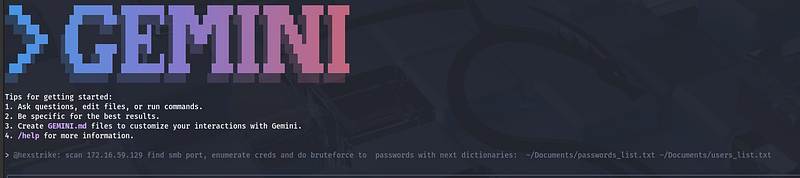
Prompt:
@hexstrike:
 scan
172.16
.
59.129
 find smb port, enumerate creds
and
 do bruteforce to  passwords with next
dictionaries
:  ~/Documents/passwords_list.txt ~/Documents/users_list.txt
Execution flow (what actually happened)
1) Fast scan failed → fallback to a full Nmap fingerprint
The workflow attempted a fast scan first and immediately failed:
rustscanwasnot installed(/bin/sh: 1: rustscan: not found)
The agent recovered correctly by switching toNmap service detection, which produced a solid baseline.
Nmap highlights (security-relevant):
-
445/tcp open microsoft-ds(SMB) -
139/tcp open netbios-ssn -
22/tcp open OpenSSH for Windows -
3389/tcp open RDP -
Host fingerprint suggests Windows 10 / Server 2019 family
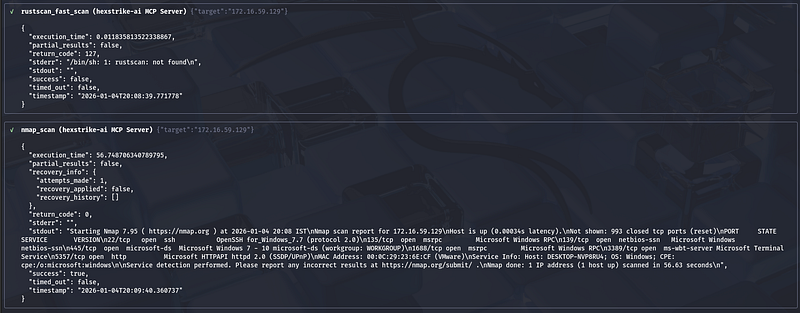
**Takeaway:**Your lab target is an intentionally “wide-open” Windows surface: SMB + RDP + SSH simultaneously, which is a high-risk posture in any real network.
2) SMB enumeration tooling mismatch (enum4linux-ng wrapper issue)
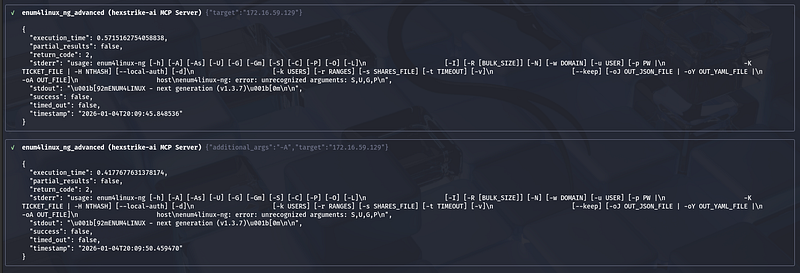
Two consecutive runs of enum4linux-ng failed with the same pattern:
enum4linux-ng: error: unrecognized arguments: S,U,G,P
This looks like awrapper/parameter bug, where legacy enum4linux flags are being passed into enum4linux-ng. Even when-Awas provided, the wrapper still injected the invalid flags, so it failed again.
Practical fix (operational):
-
Treat this as a HexStrike tool adapter issue, not an enum4linux-ng issue.
-
Use a different enumeration primitive (as you did), or update/patch the wrapper.
3) SMBMap unauthenticated run produced a transport/read error
The firstsmbmap_scan(no credentials) connected but reported:
-
“0 authenticated sessions”
-
“Something weird happened… Error occurs while reading from remote(104)…”
This is consistent with SMBMap occasionally being brittle against certain SMB configurations, resets, or SMBv1 negotiation oddities.
**Takeaway:**Use SMBMap primarily once you have known-good credentials; for unauthenticated posture checks, rely on more stable fingerprinting outputs (like the next step).
4) NetExec fingerprinting revealed two critical posture flags
Thenetexec_scanoutput is the single most important SMB posture line in the log:
-
SMB signing: False
-
SMBv1: True
Why this matters
-
SMBv1 enabledis broadly considered unsafe in modern environments.
-
Signing disabledweakens integrity protections and often correlates with legacy compatibility configurations.
In a real enterprise, this combination is a red flag and typically violates baseline hardening standards.
5) Hydra Attack
6) Credential hygiene test succeeded (but reveals systemic weakness)
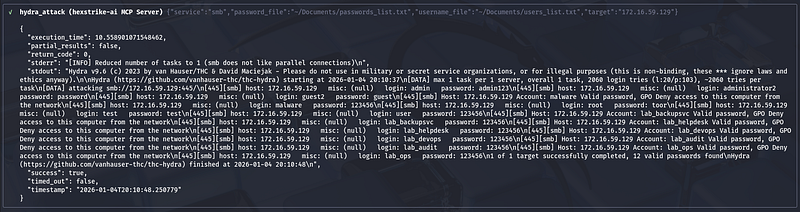
The credential test completed quickly (reduced to 1 task due to SMB’s intolerance for parallel auth attempts) and returned12 valid credentialsfrom your controlled dataset.
Several accounts also returned a notable message:
- “Valid password, GPO Deny access to this computer from the network”
Interpretation
-
Password quality is weak (multiple accounts accept low-entropy credentials).
-
Some accounts are blocked from network logon via policy, which is good — but the password is still valid, meaning:
-
those credentials remain usable elsewhere,
-
and still represent password reuse / lateral movement risk.
7) Authenticated share enumeration succeeded
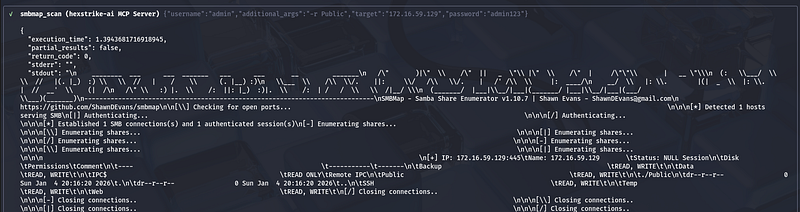
Once valid credentials were used, SMBMap successfully enumerated shares and showed multiple shares withREAD/WRITEaccess:
-
Backup,Data,Public,SSH,Temp,Web(all R/W) -
IPC$(read only; expected)
It also reported “Status: NULL Session” while simultaneously indicating an authenticated session. That can occur due to how SMBMap labels sessions even when authentication is successful; the important part iseffective access(R/W).
The shares appeared empty (only.and..listed).
Interpretation
-
The account used has broad share permissions across multiple shares
-
“Empty” may mean:
-
genuinely empty directories,
-
lack of list permissions beyond top-level,
-
or the environment is staged for later tasks.
In real environments, the risk is not “empty vs not empty,” butR/W on multiple shareswith weak credentials. That is a classic ransomware and data-exfiltration enabler.
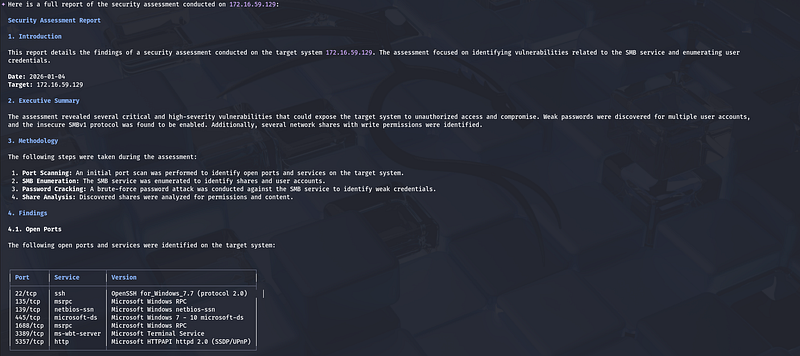
Findings summary
Large code or log block · 423 lines · expand raw text
  Security Assessment Report

1.
 Introduction
  This report details the findings
of
 a security assessment conducted
on
 the target
system

172.16
.59
.129
. The assessment focused
on
 identifying vulnerabilities related
to
 the SMB service
and
 enumerating
user
  credentials.

Date
:
2026
-01
-04
  Target:
172.16
.59
.129

2.
 Executive Summary
  The assessment revealed several critical
and
 high
-
severity vulnerabilities that could expose the target
system

to
 unauthorized access
and
 compromise. Weak passwords were discovered
for
 multiple
user
 accounts,

and
 the insecure SMBv1 protocol was found
to
 be enabled. Additionally, several network shares
with
 write permissions were identified.

3.
 Methodology
  The following steps were taken during the assessment:

1.
 Port Scanning: An
initial
 port scan was performed
to
 identify
open
 ports
and
 services
on
 the target system.

2.
 SMB Enumeration: The SMB service was enumerated
to
 identify shares
and

user
 accounts.

3.
 Password Cracking: A brute
-
force password attack was conducted against the SMB service
to
 identify weak credentials.

4.
 Share Analysis: Discovered shares were analyzed
for
 permissions
and
 content.

4.
 Findings

4.1
.
Open
 Ports
  The following
open
 ports
and
 services were identified
on
 the target
system
:
  ┌──────────┬───────────────┬─────────────────────────────────────────┐
  │ Port     │ Service       │ Version                                 │
  ├──────────┼───────────────┼─────────────────────────────────────────┤
  │
22
/
tcp   │ ssh           │ OpenSSH for_Windows_7
.7
 (protocol
2.0
)    │
  │
135
/
tcp  │ msrpc         │ Microsoft Windows RPC                   │
  │
139
/
tcp  │ netbios
-
ssn   │ Microsoft Windows netbios
-
ssn           │
  │
445
/
tcp  │ microsoft
-
ds  │ Microsoft Windows
7

-

10
 microsoft
-
ds   │
  │
1688
/
tcp │ msrpc         │ Microsoft Windows RPC                   │
  │
3389
/
tcp │ ms
-
wbt
-
server │ Microsoft Terminal Service              │
  │
5357
/
tcp │ http          │ Microsoft HTTPAPI httpd
2.0
 (SSDP
/
UPnP) │
  └──────────┴───────────────┴─────────────────────────────────────────┘

4.2
. Vulnerabilities

4.2
.1
. Weak Passwords (High)
  A brute
-
force attack successfully identified several
user
 accounts
with
 weak
and
 easily guessable passwords. This vulnerability could allow an attacker
to
 gain unauthorized access
to
 the system.
  Affected Accounts:

1
 admin:admin123

2
 administrator2:password

3
 guest2:guest

4
 malware:
123456

5
 root:toor

6
 test:test

7

user
:
123456

8
 lab_backupsvc:
123456

9
 lab_helpdesk:
123456

10
 lab_devops:
123456

11
 lab_audit:
123456

12
 lab_ops:
123456

4.2
.2
. SMBv1 Enabled (High)
  The SMBv1 protocol
is
 enabled
on
 the target system. SMBv1
is
 an outdated
and
 insecure protocol
with
 known vulnerabilities, such
as
 EternalBlue, which can be exploited
to
 gain remote code execution.

4.2
.3
. Excessive Share Permissions (Medium)
  The admin
user
 has read
and
 write access
to
 multiple shares. Overly permissive shares can lead
to
 unauthorized data modification
or
 deletion.
  Writable Shares:
  ┌────────┬─────────────┐
  │ Share  │ Permissions │
  ├────────┼─────────────┤
  │ Backup │ READ, WRITE │
  │ Data   │ READ, WRITE │
  │ Public │ READ, WRITE │
  │ SSH    │ READ, WRITE │
  │ Temp   │ READ, WRITE │
  │ Web    │ READ, WRITE │
  └────────┴─────────────┘

4.3
. Share Content

All
 enumerated shares
with
 write access were found
to
 be empty.

5.
 Recommendations
  It
is
 strongly recommended
to
 address the identified vulnerabilities
to
 improve the security posture
of
 the target system.

>
    Password Security:
*

>

*
   Enforce a strong password policy that requires a mix
of
 uppercase
and
 lowercase letters, numbers,
and
 symbols.

>

*
   Immediately change the passwords
for

all
 accounts
with
 weak credentials.

>

*
   Implement account lockout policies
to
 mitigate brute
-
force attacks.

>
    SMB Configuration:
*

>

*
   Disable the SMBv1 protocol
and
 use SMBv2
or
 a later version.

>
    Share Permissions:
*

>

*
   Review
and
 restrict share permissions based
on
 the principle
of
 least privilege.

>

*
   Ensure that users
only
 have access
to
 the resources necessary
for
 their roles.

>

User
 Accounts:
*

>

*
   Investigate the purpose
of
 the discovered
user
 accounts
and
 disable
any
 that
are

not
 required.

6.
 Conclusion
  The security assessment
of

172.16
.59
.129
 has identified significant vulnerabilities that require immediate attention.
By
 implementing the recommendations outlined
in
 this report, the overall security
of
 the

system
 can be substantially improved.
Defensive remediation checklist (prioritized)
1) Fix protocol posture (high impact)
-
DisableSMBv1
-
EnableSMB signing
-
Prefer modern SMB configuration and remove legacy compatibility where possible
2) Reduce exposure
-
Block inbound SMB from non-admin networks (segmentation / firewall)
-
Restrict 445/139 to only what absolutely requires it (ideally admin subnets or internal file servers)
3) Repair identity controls
-
Enforce strong password policy + banned-password list
-
Remove default/weak credentials (especially for admin and service accounts)
-
Ensure service accounts:
-
are not interactive,
-
have least privilege,
-
have managed rotation (where possible)
4) Tighten share permissions
-
Remove blanket R/W access
-
Apply least privilege per share (read-only where possible)
-
Audit share ACLs and NTFS permissions together (both matter)
5) Keep the good part: network logon restrictions
-
The “GPO deny access from the network” is a useful mitigation.
-
Extend it consistently for accounts that should never authenticate over SMB.
Detection engineering (what to monitor)
Windows logs to prioritize
-
4625(failed logons) — look for volume spikes and many usernames from one source
-
4624(successful logons) — specifically logon type associated with network access (commonly type 3)
-
5140 / 5145(SMB share access / object access) — access to many shares in short time
-
4672(special privileges assigned) — privileged logons
-
Correlate: burst of failures → first success → share enumeration activity
Network telemetry
-
High-rate connection attempts to 445
-
Many SMB sessions from a single source host
-
SMB negotiation using legacy dialects (often correlates with SMBv1 usage)
Conclusion
This exercise demonstrated why “AI-assisted pentesting” is most valuable when it behaves like a disciplined operator, not a click-to-hack shortcut.
HexStrike + Gemini did not deliver value merely by running a brute-force; the value was in theoperational recoveryanddecision-makingwhen the toolchain and assumptions broke:
-
A missing dependency (rustscan) forced afallback to reliable fingerprinting(Nmap), establishing a defensible baseline of exposed services (SMB, RDP, SSH) and confirming a high-risk attack surface.
-
Enumeration friction (enum4linux-ng wrapper flag injection) made it clear thatorchestration layers can fail in non-obvious ways— and that successful assessment depends on switching primitives, not insisting on one “preferred” tool.
-
NetExec produced the single most security-relevant posture finding:SMBv1 enabled and signing disabled— a combination that materially increases the likelihood and blast radius of compromise in real networks.
-
The controlled credential test converted posture into impact:weak passwords existed at scale, and even where GPO blocked network logon, the credentials were still valid — preserving reuse and lateral movement risk.
-
Authenticated enumeration then validated the business risk:broad write access across multiple shares, which is a common precursor condition for ransomware staging, mass encryption, and rapid data collection.
Taken together, the assessment shows a clear chain:exposure → insecure protocol posture → weak identity controls → excessive authorization. That chain is exactly what defenders need to break.
In short: the workflow did what a real assessment must do —turn messy tool output into a coherent, actionable security narrativethat maps directly to hardening and monitoring decision