Get Started: Full Deployment Flow
This page covers the complete first-run path for the self-hosted AdversaryGraph platform: clone, configure, start Docker, verify health, synchronize references, connect feeds, and run the first analysis.
1. Clone The Repository
git clone https://github.com/anpa1200/adversarygraph.git
cd adversarygraph
Check that Docker Compose is available:
docker compose version
2. Create .env
cp .env.example .env
Edit .env before the first docker compose up.
Minimum required settings:
DB_NAME=adversarygraph
DB_USER=tm_user
DB_PASS=choose_a_strong_password

ATTCK_DOMAINS=enterprise-attack,mobile-attack,ics-attack,atlas
LOG_LEVEL=info
AUTH_ENABLED=false
AUTH_DEFAULT_ROLE=admin
Add at least one AI provider if you want report analysis:
ANTHROPIC_API_KEY=
OPENAI_API_KEY=
GEMINI_API_KEY=
MINIMAX_API_KEY=
MINIMAX_MODEL=MiniMax-M3
MINIMAX_BASE_URL=https://api.minimax.io/v1
For a local or private OpenAI-compatible LLM gateway:
LOCAL_LLM_BASE_URL=http://host.docker.internal:11434/v1
LOCAL_LLM_API_KEY=local
LOCAL_LLM_MODEL=llama3.1:8b
3. Add Optional Enrichment Keys
These keys are not required for initial ATT&CK/ATLAS sync, but they unlock IOC enrichment and reputation workflows.
# abuse.ch ThreatFox recent IOC sync
THREATFOX_AUTH_KEY=
AUTO_THREATFOX_SYNC_ON_STARTUP=true
AUTO_THREATFOX_SYNC_DAYS=7

# AlienVault OTX actor-attributed pulse enrichment
OTX_API_KEY=

# VirusTotal on-demand IOC reputation and relationship lookup
VIRUSTOTAL_API_KEY=

# IOC Investigation pivots
URLSCAN_API_KEY=
GREYNOISE_API_KEY=
SHODAN_API_KEY=
ABUSEIPDB_API_KEY=
CENSYS_API_KEY=
CENSYS_ORG_ID=

# OpenCTI symmetric sync
OPENCTI_URL=
OPENCTI_TOKEN=
OPENCTI_SYNC_LIMIT=500
OPENCTI_VERIFY_TLS=true

# Daily dynamic DB refresh schedule in UTC
DYNAMIC_DB_SYNC_HOUR=3
DYNAMIC_DB_SYNC_MINUTE=30
DYNAMIC_DB_IOC_SYNC_DAYS=7
Keep filled .env files private. Do not commit secrets.
4. Start The Stack
docker compose up -d --build
Watch startup logs:
docker compose logs -f api
The first startup downloads and ingests MITRE ATT&CK/ATLAS references. This can take several minutes.
5. Verify Services
Open the UI:
http://localhost:3000
Check API health:
curl http://localhost:3000/api/health
Open API docs:
http://localhost:3000/docs
Run the built-in selftest:
docker compose run --rm selftest
The UI also runs selftest checks and shows clear error popups with recheck and troubleshooting actions.
6. Confirm The External Database
The default persistent PostgreSQL directory is created outside the containers:
./data/postgres
This database stores private analyses, custom IOCs, feed metadata, synced references, report history, and local operator data. Keep it during rebuilds and upgrades.
If you change database credentials after the data directory already exists, apply them to the existing PostgreSQL role:
./scripts/apply-db-env-creds.sh
docker compose up -d --force-recreate api worker beat frontend
7. Synchronize ATT&CK And ATLAS References
Open:
http://localhost:3000/feeds
Run the reference synchronization for the domains you need:
- Enterprise ATT&CK
- Mobile ATT&CK
- ICS ATT&CK
- MITRE ATLAS
The sync imports matrices, tactics, techniques, sub-techniques, groups, campaigns, relationships, references, and metadata.
You can also trigger sync through the API:
curl -X POST http://localhost:3000/api/sync/trigger \
  -H 'Content-Type: application/json' \
  -d '{"domains":["enterprise-attack","mobile-attack","ics-attack","atlas"],"force":false}'
8. Synchronize Actor And Sector Metadata
From Feeds Management, run public metadata syncs:
- MISP Galaxy actor and sector context
- Malpedia malware-family and actor evidence
- dynamic actor-sector relevance data
- MITRE campaign and group updates
This populates Sector Intelligence, actor pages, aliases, activity windows, campaign context, and relevance explanations.
9. Synchronize IOC Sources
From Feeds Management or IOC Library, connect and sync IOC sources:
- ThreatFox recent IOC feed
- AlienVault OTX pulses
- custom JSON/CSV/TXT IOC feeds
- MISP JSON exports
- STIX 2.1 bundles
- TAXII 2.1 collection object URLs
After feed sync, choose whether to run IOC-to-TTP enrichment for new unmapped IOCs.
Recommended priority model:
- strict report/source evidence
- enrichment-platform metadata
- optional AI fallback
10. Connect Detection And Behavior Feeds
Use Feeds Management for rule and behavior context:
- Sigma rule feeds
- YARA rule feeds
- sandbox behavior feeds
- malware behavior reports
- custom internal rule repositories
These sources help connect observables and malware behavior to ATT&CK techniques and detection opportunities.
11. Run The First IOC Check
Open:
http://localhost:3000/virustotal
Search an IP, domain, URL, MD5, SHA1, or SHA256.
The enrichment view can show:
- reputation verdicts
- detection ratio
- last analysis stats
- tags
- related malware/family context
- extracted ATT&CK candidates
- possible actor links
- actions to add relevant TTPs to My TTPs
- actions to show relevant TTPs on the matrix
12. Run The First IOC Investigation
Open:
http://localhost:3000/ioc-investigation
Submit an IP, domain, URL, hash, or suspicious artifact. Use Tier 1 / Tier 2 for fast triage and Tier 3 when you need broader pivoting. Optional AI summary generation turns the gathered evidence into a report-ready analyst narrative.
For the complete end-to-end example, see: From Log to Report: Using AdversaryGraph to Turn Firewall and EDR Noise Into a CTI Investigation.
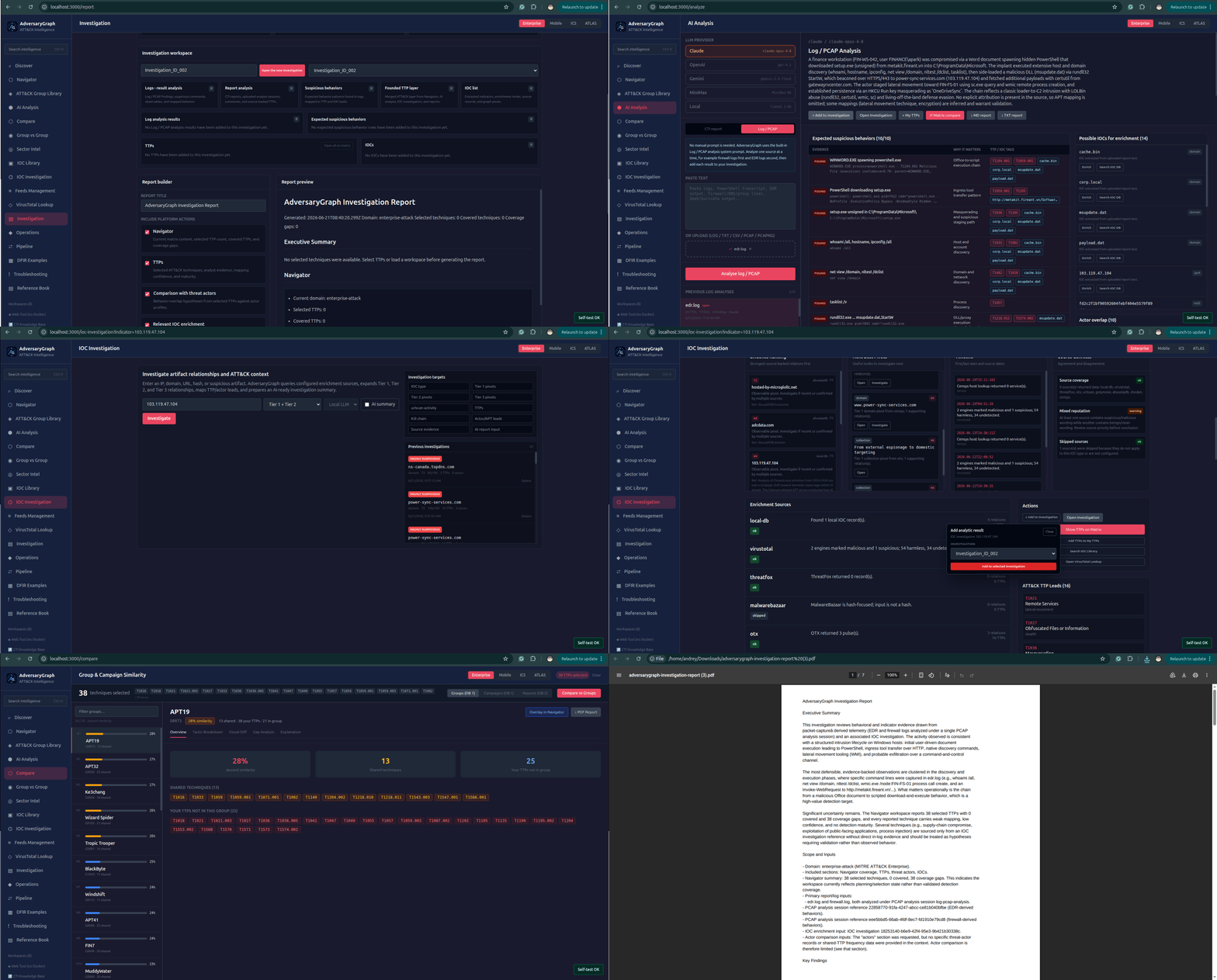
13. Build An Investigation-Centered Report
Open:
http://localhost:3000/report
Use the Investigation page as the case workspace:
- Create a new investigation.
- Upload or paste one log source into AI Analysis Log / PCAP mode, for example firewall logs.
- Add that analysis result to the investigation.
- Run the next log source separately, for example EDR logs, and add that result to the same investigation.
- Run additional IOC investigations and add useful results to the same investigation.
- Review the structured investigation buckets: logs, reports, TTP layer, IOC list, evidence nodes, and timeline.
- Send the investigation TTP layer to the matrix.
- Compare the investigation TTP layer with threat actors and save the result to the investigation.
- Generate an AI summary of the whole investigation.
- Generate the final investigation report and export it as PDF, Markdown, or TXT.
14. Run The First Report Analysis
Open:
http://localhost:3000/analysis
Use paste, PDF, DOCX, or TXT input.
Choose a configured provider:
- Claude
- OpenAI
- Gemini
- MiniMax
- local OpenAI-compatible LLM
Review every mapping. Accept only mappings supported by behavior evidence.
14. Move Findings To The Matrix
After report analysis or IOC enrichment:
- Add relevant TTPs to My TTPs.
- Open Navigator.
- Review matrix coverage.
- Overlay actor or campaign profiles.
- Export ATT&CK Navigator JSON if needed.
15. Compare Against Actors, Campaigns, And Reports
Use Compare workflows to answer:
- Which groups share the strongest TTP overlap?
- Which campaigns look behaviorally similar?
- Which previous internal report overlaps this incident?
- Which overlap is generic commodity behavior?
- Which techniques are detection gaps?
Similarity is an investigation lead, not attribution proof.
16. Export Outputs
Export analyst-ready deliverables:
- PDF reports
- JSON analysis output
- ATT&CK Navigator layers
- STIX 2.1 bundles
- CSV IOC exports
- detection backlog material
17. Operate The Platform
Regular operator workflow:
git pull
docker compose up -d --build
docker compose run --rm selftest
Use:
- Troubleshooting for deployment errors
- Feeds Management for sync status and feed actions
- IOC Library for observables and enrichment
- Compare → Reports for previous analysis sessions
- API docs for automation
First-Day Checklist
.envexists and contains correct DB credentials.- At least one LLM provider or local LLM endpoint is configured.
- Docker stack is running.
- API health returns OK.
- Selftest passes.
- ATT&CK/ATLAS references are synced.
- ThreatFox/OTX/VirusTotal keys are configured if needed.
- Custom IOC, MISP, STIX/TAXII, Sigma, YARA, and sandbox feeds are connected.
- First IOC check works.
- First report analysis works.
- My TTPs can be shown on Navigator.
- PDF and Navigator exports work.