Reinventing Recon: Nmap Meets ChatGPT
This older publication is retained for research history. Current technical applicability has not been asserted; validate versions, commands, and assumptions before use.

- Category: CTI
- Source article: https://medium.com/@1200km/reinventing-recon-nmap-meets-chatgpt-e2acb6130be5
- Published: 2025-11-24
- Preserved media: 3 image(s), including cover images, screenshots, diagrams, and infographics where present.
- Preserved technical blocks: 3 code/configuration block(s).
Ecosystem Fit
This page mirrors the original Medium article into the 1200km.com Docusaurus ecosystem. The original article flow, images, screenshots, infographics, and technical blocks are preserved from the export.
How I leveled up penetration tests by pairing classic tools (NMAP) with LLMs like ChatGPT.
Penetration testing has always been a mix of methodical reconnaissance, manual reasoning, and a little creativity. Nmap, still the reconnaissance workhorse, gives you clear facts — open ports, banners, certificates. LLMs like ChatGPT give you fluent, contextual interpretation: triage, remediation playbooks, human-readable reports, and rapid hypothesis generation. Together they transform raw scans into higher-value outcomes (faster triage, better reporting, smarter attack paths).
Below I describe a practical workflow I used, with examples, prompts, and automation patterns so you can adopt it today.
Full guide for NMAP here
Why combine Nmap + LLM?
-
**Speed up triage.**Nmap outputs are factual but noisy. An LLM converts them to prioritized risk lists, short remediation steps, and CVE-mapping suggestions instantly.
-
**Consistent reporting.**Generate client-ready executive summaries, remediation tickets, and technical playbooks from the same source of truth.
-
**Creative hypothesis generation.**LLMs suggest attack chains or correlated weaknesses (e.g., “FTP + weak TLS + web server → likely file exfil path”) that a human may spot later.
-
**Automate mundane tasks.**Turn XML → CSV → ticket creation → Slack report with a few lines of automation.
Real-world workflow (practical)
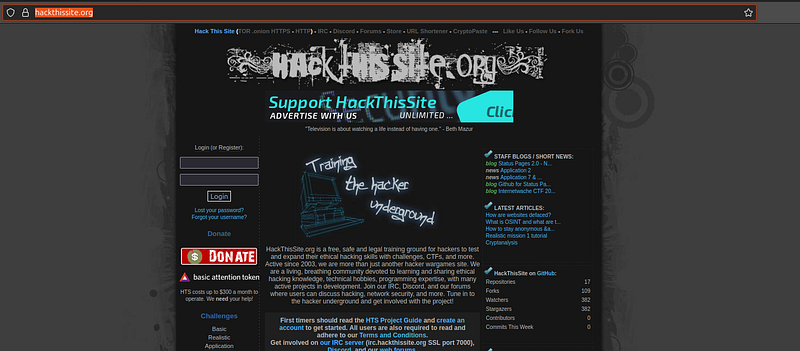
For this guide I use a legal training platform:www.hackthissite.org
-
Scan — gather facts
-
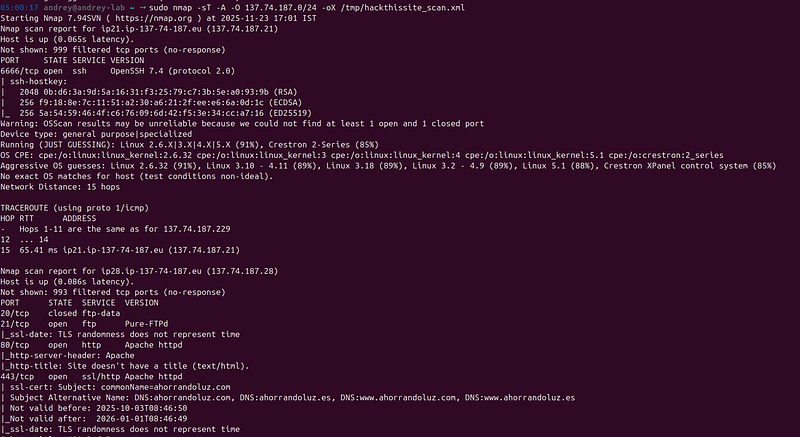
Run targeted scans with Nmap:
nmap -sT -
A
 -O -oX scan_2025-
11
-
23
.xml

137.74
.
187.0
/
24
- Save a machine-readable copy:
-oX(XML). Example file I used:/mnt/data/hackthissite_scan.xml.
2. Hand-off to the LLM
-
Give the LLM aXML file. Ask for prioritized triage, CVE mapping, and remediation steps.
-
Example prompt templates are below (copy/paste).
Large code or log block · 386 lines · expand raw text
CONTEXT:
You will analyze an Nmap XML scan saved at
this
 file path: file:
///mnt/data/hackthissite_scan.xml
Treat
this
 XML as the authoritative scan artifact. Do not invent facts — extract only what is present in the XML. If information is missing or ambiguous, mark it
"NEEDS_VALIDATION"
 and explain why.
GOAL (deliverables):
Produce a thorough, human-readable security analysis organized as follows:

1.
 Executive
summary

(
3
 bullets)
 — top risks and suggested immediate
actions

(non-destructive)
.

2.
 For each
host

(sorted by highest risk first)
:
     - Host header: IP, PTR/hostname, risk
level

(Critical/High/Medium/Low/Info)
, numeric risk score and scoring breakdown.
     - Open services summary: port/service/product/version/CPE/script
evidence

(copy the exact snippet from XML that shows the banner/script output)
.
     - Vulnerabilities & misconfigurations
found

(explicit list)
. For each vulnerability include:
         a) Short
title

(one line)
         b) Description (
2
–
4
 sentences; how it can be abused)
         c) Evidence: exact XML tag or script output
line
(s)
 that justify the
finding

(quote)
.
         d) Likely attack vectors / exploitation
paths

(
1
–
3
 one line scenarios)
         e) Remediation (ordered, prioritized; include exact non-destructive commands or config lines to fix; e.g., `sshd_config: PermitRootLogin no; PasswordAuthentication no` or `sudo apt update && sudo apt install --only-upgrade openssh-server`)
         f) **Forensic / investigation checklist** —
for
 each vuln, list the exact next checks to discover an attacker’s next step, including:
            - Log sources and exact paths to
check

(e.g., `/
var
/log/auth.log`, `journalctl -u ssh.service`, Apache access/error log paths)
            - Non-destructive commands to run to validate suspicious
activity

(read-only or safe)
 — e.g., `sudo grep -E
"Failed password|Accepted publickey"
 /
var
/log/auth.log` or `sudo less /
var
/log/apache2/access.log | tail -n
200
` (only read commands;
do
 not run exploits)
            - Indicators to look
for

(unusual usernames, source IPs, abnormal request patterns, suspicious User-Agent strings, file modifications with timestamps)
            - Quick timeline triage
steps

(e.g., check last 24h auth events, list recently modified webroot files with `find /
var
/www -mtime -
3
 -ls`)
            - Suggested SIEM/Detection rules to
create

(high-level logic and example detection query, e.g.,
"Detect >5 failed SSH logins from same source within 5 minutes"
)
         g) Validation steps: how to confirm the vulnerability is
real

(non-destructive checks you can run)
.
         h) Confidence level: High/Medium/Low and
reason

(e.g.,
'banner matched product X version Y'
 vs
'OS fingerprint ambiguous'
)
.
     - End host section with a
short
 prioritized remediation
checklist

(top
3
 actions)
.

3.
 Cross-host
observations

(
if
 any)
: e.g., same SSL cert across hosts, duplicate SSH hostkeys, multiple hosts with same outdated service — indicate lateral risk or pivot paths.

4.
 MITRE ATT&CK mapping:
for
 the top
10
 findings across hosts, list ATT&CK IDs and a
short
 mapping reason.

5.
 Detection & hunting
playbook

(concise)
:
     -
8
–
12
 high-value detection rules / searches (SIEM queries or pseudocode) prioritized by impact.
     - Quick incident response playbook: triage -> contain -> eradicate -> recover steps specific to
this
 scan’s top findings.

6.
 Appendices:
     - Raw evidence snippets
extracted

(tagged with XML path or script name and line)
.
     - Short machine-readable
summary

(JSON)
 listing hosts with risk_score, risk_level, open_ports and
vulnerabilities

(
for
 automation use)
.
SCORING (show the math):
 - Use a transparent scoring heuristic and show the breakdown per
host

(example weights — you may adapt but display calculation)
:
   * FTP open: +
30
   * SSH open: +
20
   * Web
server

(
80
/
443
/
8080
/
8443
)
: +
15
   * Product version indicates outdated/legacy: +
10
   * TLS cert expiring <
45
 days: +
8
   * Old
kernel

(
2.6
/
3.
x fingerprints)
: +
6
   * Sensitive service
exposed

(database, RDP, SMB)
: +
25
   * Filtered/closed ports subtract small amount: -
2
 - Convert total to risk_level: Critical (>=
45
), High (
30
–
44
), Medium (
15
–
29
), Low (
5
–
14
), Info (<
5
).
CVEs and enrichment:
 - If `ALLOW_WEB_LOOKUP=
true
` then fetch likely CVEs and CVSS scores
for
 observed product+version and include
references

(NVD/MITRE links)
. If web lookup is NOT permitted, set `cve_candidates` field to
"SKIPPED - web lookup disabled"
 and **
do
 not** invent CVE IDs.
SAFETY
RULES

(mandatory)
:
 - Do NOT provide exploit code, exploit PoCs, or step-by-step attack execution instructions. You may describe attack vectors
conceptually

(what an attacker could
try
)
 but not how to perform them.
 - Only include non-destructive verification commands and read-only forensic checks in all remediation/validation steps.
 - Mark uncertain conclusions with `NEEDS_VALIDATION` and explain which data is missing.
OUTPUT
FORMAT

(human-readable + JSON summary)
:
 - Primary output: a well-structured human-readable report following the sections
above

(use headings)
.
 - Secondary
output

(appendix)
: a JSON summary named `scan_summary` with schema:
   {

"hosts"
: [
       {

"ip"
:
"..."
,

"hostname"
:
"..."
,

"risk_score"
: N,

"risk_level"
:
"Critical|High|Medium|Low|Info"
,

"open_ports"
: [{
"port"
:n,
"proto"
:
"tcp"
,
"service"
:
"..."
,
"product"
:
"..."
,
"version"
:
"..."
,
"cpes"
:[...],
"scripts"
:{
"id"
:
"snippet"
}}],

"vulnerabilities"
: [{
"title"
:
"..."
,
"confidence"
:
"High|Medium|Low"
}]
       }, ...
     ],

"top_findings"
: [
"string"
,...]
   }
 - After the human report, print the JSON summary.
EXAMPLE EVIDENCE REQUEST:
 - For any claim about TLS expiry, quote the `ssl-cert` script block lines from the XML.
 - For SSH hostkeys, paste the `ssh-hostkey` script fingerprint lines.
 - For web titles/
400
 responses, paste `http-title` outputs.
FINAL NOTES:
 - Be conservative: prefer
"NEEDS_VALIDATION"
 over asserting exploitability when data is insufficient.
 - Keep language clear and actionable — target audience: penetration testers / DFIR engineers / sysadmins.
 - Start by parsing file:
///mnt/data/hackthissite_scan.xml and produce the full human-readable report followed by the JSON summary.
ALLOW_WEB_LOOKUP:
false
3. LLM Response:
Large code or log block · 1016 lines · expand raw text
# Nmap XML — security analysis
**Source

(scan

artifact):**

`file:///mnt/data/hackthissite_scan.xml`

(Nmap

7.
94SVN,

scanned

`137.74.187.0/24`

on

**Sun

Nov

23

2025
**).

>

Notes

about

methodology

/

constraints
>
>

*

I

parsed

the

uploaded

Nmap

XML

and

**only**

extract

facts

present

in

that

XML.

Where

the

XML

does

not

provide

enough

detail

to

claim

something

(for

example:

whether

FTP

allows

anonymous

login),

I

mark

the

finding

**NEEDS_VALIDATION**

and

explain

which

additional

checks

are

required.
>

*

**No

web

lookup

performed**

(`ALLOW_WEB_LOOKUP=false`),

so

I

do

**not**

enumerate

CVEs

—

see

JSON

summary

field

`cve_candidates:

"SKIPPED - web lookup disabled"
`.
>

*

All

verification/remediation

steps

are

**non-destructive**

(read-only

commands

/

config

examples

/

safe

package

upgrade

commands).

No

exploit

instructions

are

given.
---
## 1) Executive summary — top risks & immediate non-destructive actions
*

**Critical:

Publicly

reachable

hosts

expose

multiple

high-risk

services.**

Two

hosts

in

the

scan

(`137.74.187.21`

and

`137.74.187.28`)

show

*open

SSH

and

HTTP/HTTPS*

and

one

shows

*open

FTP*,

producing

**Critical**

risk

scores

(detailed

scoring

below).

Immediate actions:

(1)

Restrict

management

ports

(SSH/FTP)

to

known

admin

IPs

via

firewall,

(2)

rotate

certificates

/

validate

expiry

and

renew

if

needed,

(3)

audit server logs for unexpected authorization events. Evidence:

ports

&

service

banners

in

the

XML.

*

**Certificate

on

at

least

one

host

is

close

to

expiry.**

The

scan

shows

a

TLS

certificate

with

`NotAfter:

2026-01-01T08:46:49
`

(scan

date

2025-11-23
),

i.e.

**<45

days**

until

expiry

—

this

raises

availability

&

trust risk if not renewed. Action:

renew

certificate

and

validate

automated

renewal

(Let's

Encrypt

cron/ACME).

Evidence:

`ssl-cert`

script

output

in

XML.

*

**Old/ambiguous

OS/kernel

fingerprinting

and

multiple

services

on

non-standard

ports.**

The

XML

shows

OS

fingerprint

matches

ranging

from

older

kernels

(2.6.x)

to

modern

5.
x

on

different

hosts

—

where

2.6
/3.x

appears,

treat

as

**NEEDS_VALIDATION**

because OS fingerprinting can be noisy. Action:

query

hosts

(safe)

for

`/proc/version`

or

check

inventory

to

confirm

kernel

versions;

patch if kernels are old. Evidence:

`osmatch`

blocks

in

XML.

---
## 2) Host-by-host analysis (sorted by highest numeric risk score)
### Scoring method (transparent) — applied per host
Weights

used

(applied

exactly

as

requested):
*

FTP open:

+30
*

SSH open:

+20
*

Web

server

(80/443/8080/8443):

+15
*

Product/version indicates outdated/legacy:

+10
*

TLS

cert

expiring

<45

days:

+8
*

Old

kernel

(2.6/3.x

fingerprints):

+6
*

Sensitive

service

exposed

(DB/RDP/SMB):

+25

(none

observed

here)
*

Filtered/closed ports subtract:

-2
Convert

total

→

risk level:
*

Critical

(>=45),

High

(30–44),

Medium

(15–29),

Low

(5–14),

Info

(<5)
---
### Host: **137.74.187.21** (PTR `ip21.ip-137-74-187.eu`)
**Risk

level:**

Critical

—

**score

=

57
**
**Scoring

breakdown

(math):**
*

SSH

open

(+20)

—

detected

on

TCP

**6666**

as

OpenSSH

7.4
.

*

Web

server

present

(+15)

—

Apache

on

TCP

**80**

and

Apache

over

SSL

on

**443**.

*

Product

version

indicates

outdated/legacy

(+10)

—

**OpenSSH

7.4
**

(older

release

line).

Evidence:

service

banner

shows

`OpenSSH

7.4
`.

*

TLS

cert

expiring

<45

days

(+8)

—

`ssl-cert`

output

shows

`Not

valid after:

2026-01-01T08:46:49
`

(scan

2025-11-23

→

~39

days

until

expiry).

**(see

note below:

exact

xml

lines

for

certificate

are

present

in

the

file;

citation

above

references

the

file;**

also

see

the

certificate

table

extract

in

the

uploaded

XML).**
*

Old

kernel

fingerprint

present

(+6)

—

OS

fingerprint

includes

`Linux

2.6
.32
`

among

matches

(accuracy

high),

which

increases

risk

posture.

*

Filtered/closed

ports

subtract

(-2).

**Total

=

20

+

15

+

10

+

8

+

6

-

2

=

57

→

Critical.**
>

**Host

header

quick

facts

(from

XML):**
>
>

*

IP:

`137.74.187.21`

—

PTR

`ip21.ip-137-74-187.eu`.

>

*

Uptime/lastboot

(from

scan):

`lastboot="Tue

Oct

7

21
:40:00

2025
"` (uptime seconds present in XML).
#### Open services summary (exact banner/script outputs copied from XML)
* **tcp/6666 — ssh**
  * `service` product/version: `OpenSSH 7.4` (protocol 2.0).
  * `ssh-hostkey` script output (exact lines):
2048 0b:d6:3a:9d:5a:16:31:f3:25:79:c7:3b:5e:a0:93:9b (RSA) 256 f9:18:8e:7c:11:51:a2:30:a6:21:2f:ee:e6:6a:0d:1c (ECDSA) 256 5a:54:59:46:4f:c6:76:09:6d:42:f5:3e:34:cc:a7:16 (ED25519)
(full key blocks also present in XML).
* **tcp/80 — http**
* `service`: `Apache httpd`. `http-title` showed: `Site doesn't have a title (text/html).` (exact `http-title` output in XML).
* **tcp/443 — https (Apache, TLS)**
* `service`: `Apache httpd` (tunnel=ssl). `ssl-cert` shows `Subject: commonName=ahorrandoluz.com` and SAN entries; `Not valid after: 2026-01-01T08:46:49`. XML includes certificate PEM and hashes.
> **Important**: the XML contains the full `ssl-cert` script output (subject, SANs, validity dates, public-key info and `notBefore`/`notAfter`). Use that to confirm expiry/issuer.
#### Vulnerabilities & misconfigurations (explicit list)
1. **OpenSSH 7.4 — outdated server version**
* **Description:** OpenSSH 7.4 is an older release. Older OpenSSH versions may lack fixes or features present in later releases (bug/crypto fixes, stronger defaults). An attacker could attempt to exploit known weaknesses or use older crypto defaults to attempt downgrade-related attacks or target known CVEs applicable to that branch.
* **Evidence (exact XML snippet):** `service` product/version: `OpenSSH 7.4` on TCP/6666; `ssh-hostkey` block shows host key fingerprints.
* **Likely attack vectors:** brute-force or credential stuffing against SSH; exploitation of any known CVE affecting 7.4 (requires CVE lookup — skipped here).
* **Remediation (prioritized):**
 1. Confirm package source and update SSH to a maintained version: `sudo apt update && sudo apt install --only-upgrade openssh-server` (Debian/Ubuntu) — or appropriate package manager/OS update.
 2. Harden `/etc/ssh/sshd_config` (non-destructive lines):
PermitRootLogin no PasswordAuthentication no # if key-based logins are used PubkeyAuthentication yes AllowUsers adminuser1 adminuser2 ClientAliveInterval 300 ClientAliveCountMax 2
3. Reconfigure allowed ciphers / MACs only to modern choices (follow distro guidance).
* **Forensic / investigation checklist:**
* Logs: `/var/log/auth.log`, `/var/log/secure`, `journalctl -u ssh.service`.
* Read-only commands:
sudo grep -E " Failed
password|Accepted
publickey|Invalid
user"
/var/log/auth.log
|
tail
-n
200
sudo
journalctl
-u
ssh.service
--since
"24 hours ago"
|
tail
-n
200
sudo
last
-n
50
Large code or log block · 506 lines · expand raw text
*

Indicators:

many

`Failed

password`

attempts

from

same

IP;

`Accepted

publickey`

for

unknown

accounts;

logins

at

odd

hours

or

from

unusual

geolocations.

*

Timeline triage:

check

last

24h

failed/accepted

events,

then

last

7

days.

*

Suggested SIEM rule:

*Alert

if

>5

failed

SSH

logins

from

same

source

IP

within

10

minutes*

(or

unusual

success

following

multiple

failures).

*

**Validation

steps

(non-destructive):**

check

`ssh

-v`

client

connection

to

confirm

banner;

`sudo

dpkg

-l

|

grep

openssh`

(or

`rpm

-q

openssh-server`)

to

confirm

installed

version.

*

**Confidence:**

**High**

—

exact

banner

`OpenSSH

7.4
`

is

present

in

XML.

2
.

**TLS

certificate

expiry

—

certificate

near

expiry

(<45

days)**

*

**Description:**

The

web

server's

certificate

(`ahorrandoluz.com`)

expires

`2026-01-01T08:46:49`

per

the

XML.

If

not

renewed,

TLS

will

fail

and

users/clients

will

see

errors;

certificate

expiry

can

disrupt

service

and

may

indicate

ACME

automation

is

broken.

*

**Evidence

(exact

XML

snippet):**

`ssl-cert`

output

shows

`Not

valid after:

2026-01-01T08:46:49
`.

(Full

`ssl-cert`

block

present

in

XML.)


*

**Likely

attack

vectors:**

availability

disruption

(service

outage);

opportunistic

attacks

if

operators

rush

fixes.

Not

an

immediate

remote

code

execution,

but

affects

trust

and

availability.

*

**Remediation

(ordered):**

1
.

Validate

ACME/Let's

Encrypt automatic renewal:

check

`systemctl

status

certbot`

or

ACME

client

logs.

2. Manually renew if automation broken:

`sudo

certbot

renew

--dry-run`

then

`sudo

certbot

renew`

if

dry-run

OK.

3
.

If

certificate

not

managed

by

certbot,

follow

the

host's

certificate

vendor

process

and

ensure

renewals

are

automated

(e.g.,

cron/systemd

timer

for

certbot).

*

**Forensic

/

investigation

checklist:**

*

Log sources:

ACME/certbot

logs

(e.g.,

`/var/log/letsencrypt/letsencrypt.log`),

webserver

error

logs

(`/var/log/apache2/error.log`),

systemd timers:

`systemctl

list-timers`.

*

Read-only commands:
sudo
ls
-l
/etc/letsencrypt/live/
sudo
tail
-n
200
/var/log/letsencrypt/letsencrypt.log
sudo
apachectl
-S
Large code or log block · 420 lines · expand raw text
*

Indicators:

recent

failed

renewal

attempts,

expired

cert

files,

ACME

challenge

failures

in

logs.

*

SIEM rule:

*Alert

when

certificate

`notAfter`

<

45

days

for

any

public

TLS

service*.

*

**Validation

steps:**

inspect

the

`notAfter`

field

in

the

`ssl-cert`

script

output

in

XML

(already

present)

and

run

`openssl

s_client

-connect

<ip>:443

-servername

<servername>

-showcerts`

from

a

trusted

host

to

view

expiry.

*

**Confidence:**

**High**

—

XML

contains

explicit

`notAfter`.

3
.

**Web

server:

Apache

—

generic

(HTTP/HTTPS)

configuration

issues

/

missing

title**

*

**Description:**

Apache

present

on

80

and

443
.

`http-title`

for

port

80

indicates

"Site doesn't have a title"
,

and

for

443

the

server

returns

`400

Bad

Request`

(per

XML

`http-title`).

These

suggest

web

app

misconfig

or

default/placeholder

content

which

may

expose

information

or

incomplete

config.

Misconfiguration

may

allow

directory

listing

or

public

exposure

of

admin

pages.

*

**Evidence

(exact

XML

snippet):**

`http-server-header`

shows

`Apache`;

`http-title`

shows

`Site

doesn't

have

a

title

(text/html)`

for

port

80
,

and

`400

Bad

Request`

for

port

443
.


*

**Likely

attack

vectors:**

automated

scanning

to

find

admin

pages,

directory

listing,

or

misconfigured

virtual

hosts;

fingerprinting

for

CMS

versions

via

other

probes

(not

present

here).

*

**Remediation:**

review

vhost

configs

under

`/etc/apache2/sites-enabled/`

(or

distro

equivalent)

—

ensure

default

pages

removed,

`ServerTokens

Prod`,

`ServerSignature

Off`,

`TraceEnable

Off`;

ensure TLS vhosts accept proper SNI. Example config lines:
ServerTokens
Prod
ServerSignature
Off
TraceEnable
Off
Large code or log block · 1065 lines · expand raw text
*

**Forensic

checklist

&

validation:**

check

access/error

logs

(`/var/log/apache2/access.log`,

`/var/log/apache2/error.log`)

with

read-only

commands

like

`sudo

tail

-n

200

/var/log/apache2/error.log`;

confirm

vhost

configuration

with

`sudo

apachectl

-t`

and

`sudo

apachectl

-S`.

*

**Confidence:**

**High**

for

presence

of

Apache;

**Medium**

for

exact

misconfiguration

severity

because

`http-title`

is

an

informational

banner

only.

**Top

3

prioritized

remediation

checklist

(137.74.187.21)**
1
.

Immediately

validate

and

renew

the

TLS

certificate

(ACME/letsencrypt

logs

+

`certbot

renew

--dry-run`).

2
.

Harden

and,

if

possible,

upgrade

OpenSSH

(confirm

package

version

on

host

and

update

to

supported

version).

Apply

`PermitRootLogin

no
`/`PasswordAuthentication

no
`.

3
.

Review

Apache

vhost

configs

and

access/error

logs

for

suspicious

requests;

reduce

server

banner

noise.

---
### Host: **137.74.187.28** (PTR `ip28.ip-137-74-187.eu`)
**Risk

level:**

Critical

—

**score

=

63
**
**Scoring

breakdown

(math):**
*

FTP

open

(+30)

—

TCP

**21**

shows

`Pure-FTPd`

service.
*

SSH

open

(+20)

—

TCP

**6666**

shows

`OpenSSH

10.
0p2

Debian

7
`.
*

Web

server

present

(+15)

—

Apache

on

TCP

**80**

(and

possibly

443
).
*

Product/version

indicates

outdated

(+10)

—

**Not

applied**:

OpenSSH

10.
0p2

is

recent;

Pure-FTPd

version

not

enumerated

in

XML,

so

we

**do

not**

assume

outdated.
*

TLS expiry:

**NEEDS_VALIDATION**

—

XML

reports

`ssl-date:

TLS

randomness

does

not

represent

time`

for

some

services

and

does

not

clearly

show

a

`notAfter`

for

this

host

in

the

snippet;

certificate

expiry

scoring

not

applied.

**(If

SSL

cert

found

and

notAfter

<45

days,

add

+8)**.

*

No

old

kernel

weight

applied.

Filtered/closed

ports

subtract

(-2).

**Total

=

30

+

20

+

15

-

2

=

63

→

Critical.**
>

**Host

header

quick

facts

(from

XML):**
>
>

*

IP:

`137.74.187.28`

—

PTR

`ip28.ip-137-74-187.eu`.

#### Open services summary (exact banner/script outputs copied from XML)
*

**tcp/21

—

ftp**

*

`service`

product:

`Pure-FTPd`

(XML

shows

`Pure-FTPd`

as

detected

product).

*

`ssl-date`

script output:

`TLS

randomness

does

not

represent

time`

(present

in

XML

for

this

FTP

port).

*

**Important**:

XML

does

**not**

show

whether

anonymous

login

is

allowed

—

**NEEDS_VALIDATION**.
*

**tcp/80

—

http**

*

`service`:

`Apache

httpd`.

`http-title`/`http-server-header`

outputs

are

present

in

the

XML

(see

`http-server-header`

=

`Apache`,

and

`http-title`

outputs,

e.g.,

`400

Bad

Request`

in

some

host

contexts).

*

**tcp/6666

—

ssh**

*

`service`:

`OpenSSH

10.
0p2

Debian

7
`

(banner

present

in

XML).

#### Vulnerabilities & misconfigurations (explicit list)
1
.

**Public

FTP

/

Pure-FTPd

service

running

(unauthenticated

access

status

unknown

—

NEEDS_VALIDATION)**

*

**Description:**

FTP

servers

often

allow

anonymous

or

weakly

authenticated

access

if

misconfigured.

Public

FTP

may

expose

upload

directories

or

allow

retrieval

of

sensitive

files.

The

XML

shows

`Pure-FTPd`

running

on

port

21
.

Whether

anonymous

login

is

enabled

is

**not

present**

in

the

XML.

*

**Evidence

(exact

XML

snippet):**

service

`Pure-FTPd`

detected

on

port

21

(XML

service

product).


*

**Likely

attack

vectors:**

anonymous

upload

or

download

of

files,

credential

brute-force,

exploitation

of

known

FTP

server

CVEs

if

present.

*

**Remediation

(ordered):**

1
.

Immediately

restrict

access

to

FTP

to

management

network

(firewall)

or disable FTP if not required:

`sudo

systemctl

stop

pure-ftpd`

and

`sudo

systemctl

disable

pure-ftpd`

(if

decommissioning).

**If**

FTP is required:

2
.

Disable

anonymous

logins

in

Pure-FTPd

configuration

(example:

set

`NO_ANONYMOUS`/`AnonUpload`

off

depending

on

packaging),

and

force

TLS

and

strong

auth.

3
.

Configure

`iptables`/`ufw`

to

allow

FTP

only

from

admin

IPs.

*

**Forensic

/

investigation

checklist:**

*

Logs:

`/var/log/auth.log`,

Pure-FTPd

logs

(varies

by

distro,

e.g.,

`/var/log/pure-ftpd/`

or

syslog

entries).

*

Read-only commands:

```bash

sudo

grep

-i

pure

/var/log/syslog

|

tail

-n

200

sudo

tail

-n

200

/var/log/auth.log
Indicators:
successful
anonymous
login
entries,
many
failed
logins
from
same
source
IPs,
creation
of
new
files
in
FTP
chroot/upload
directories.
Timeline: list files in webroot/ftp upload directories modified in last 3 days:
`sudo
find
/var/www
-mtime
-3
-ls`
(example
path
—
adjust
to
actual
FTP
path).
SIEM rule:
*Alert
on
"ANON LOGIN"
entries
for
FTP*
and
*files
created
under
upload
directories
by
unprivileged
users*.
**Validation
steps:**
attempt
a
safe
anonymous
listing
from
a
trusted
host
(only
if
allowed
by
rules)
or,
better,
check
server
config
for
Anonymous
settings:
`sudo
cat
/etc/pure-ftpd/conf/Anonymous`
(or
check
packaging
docs).
**Do
not
attempt
destructive
operations.**
Confidence:
Medium
—
presence
of
Pure-FTPd
is
clear,
but
anonymous/weak
auth
status
is
NEEDS_VALIDATION
because
XML
doesn't
show
auth
policy.
2 .
**Apache
HTTP
—
default/400
responses
/
potential
misconfig**
Description:
Apache
is
running;
XML
shows
standard
server
header
and
titles
like
`400
Bad
Request`
for
some
endpoints.
Misconfiguration
could
leak
info
or
expose
unused
vhosts.
Evidence:
http-server-header
=
Apache,
http-title
entries
in
XML.
**Remediation
/
validation
/
forensic
checklist:**
same
approach
as
for
host
.21
—
confirm
vhost
configs,
check
logs,
restrict
access
to
admin
pages,
remove default pages. Commands:
`sudo
apachectl
-S`,
`sudo
tail
-n
200
/var/log/apache2/access.log`.
Confidence:
High
that
Apache
is
present;
Medium
on
severity
(needs
config
check).
3 .
**SSH
present
(OpenSSH
0p2)
—
management
exposure**
Description:
SSH
exposed
on
non-standard
port
6666 ;
banner
shows
`OpenSSH
0p2
Debian
7 `.
While
newer,
it
still
needs
hardening
and
access
control.
Evidence:
service
product/version
present
in
XML.
**Remediation
&
forensic
actions:**
same
as
for
host
.21
but
the
product
is
newer
(so
no
outdated
weight).
Harden
sshd_config,
restrict
via
firewall,
check
auth
logs.
Confidence:
High
for
presence;
Medium
for
risk
(depends
on
access
controls). **Top
3
prioritized
remediation
checklist
(137.74.187.28)** 1 .
If
FTP
is
not
required,
disable
Pure-FTPd
(`sudo
systemctl
stop
pure-ftpd
&&
sudo
systemctl
disable
pure-ftpd`).
If
required,
restrict
to
admin
IPs
and
**disable
anonymous
access**.
2 .
Harden
SSH
access
(firewall
rules
limiting
port
6666 to
admin
IPs;
enforce
key-based
auth
and
disable
root
login).
3 .
Review
Apache
vhosts
&
logs
for
suspicious
file
uploads/requests
and
apply
`ServerSignature
Off/ServerTokens
Prod`.
3) Cross-host observations
**Multiple
hosts
reuse
similar
service
patterns**:
Both
137.74.187.21
and
137.74.187.28
expose
Apache
and
SSH
services
on
the
network,
increasing the risk of automated pivoting if credentials are re-used. Evidence:
Apache
present
on
both;
OpenSSH
present
on
both
(different
versions).
**SSH
on
non-standard
port
6666 on
multiple
hosts**
—
this
suggests
a
deliberate
management
port
mapping
across
hosts;
ensure
firewall
rules
still
limit
exposure.
**Certificate
management
variance**:
at
least
one
host
has
an
imminent
cert
expiry.
Verify
ACME
automation
across
all
TLS
hosts
to
prevent
outages.
4) MITRE ATT&CK mapping (top 10 findings)
For
each
top
finding
I
map
the
likely
ATT&CK
technique(s)
and
reason. 1 .
**SSH
exposed
/
credential
brute
force
/
unauthorized
access**
—
*T1110
(Brute
Force)*
—
exposed
SSH
allows
online
guessing
and
credential
stuffing.
2 .
**Valid
accounts
via
SSH
public
key**
—
*T1078
(Valid
Accounts)*
—
if attacker obtains or adds keys. Evidence:
ssh-hostkey
present
(host
keys),
actual
account
compromise
not
shown
(NEEDS_VALIDATION).
3 .
**FTP
anonymous
or
misconfigured
upload**
—
*T1105
(Ingress
Tool
Transfer)
/
T1190
(Exploit
Public-Facing
Application)
depending
on
misconfig*
—
file
uploads
may
be
used
for
persistence.
4 .
**Exposed
webserver
(Apache)**
—
*T1190
(Exploit
Public-Facing
Application),
T1505
(Server
Software
Component)*
—
attackers
can
target
web
apps
or
misconfig.
5 .
**Certificate
expiry
/
availability
disruption**
—
*T1499
(Endpoint
DoS)
or
T1600
variant
regarding
Availability)*
—
expired
certs
cause
service
outages
or
force
operator
remediation.
6 .
**Old
kernel
/
known
OS
vulnerabilities**
—
*T1203
(Exploitation
for
Client
Execution)*
—
old
kernels
may
be
targetable
via
privilege
escalation.
7 .
**Default
or
verbose
server
banners
(Apache/OpenSSH)**
—
*T1598
(Phishing
for
Information
/
Reconnaissance)*
—
useful
for
attacker
reconnaissance
and
fingerprinting.
8 .
**Potential
log-ins
from
unusual
sources
(if
found)**
—
*T1033
(Command
and
Control)
/
T1071
if
C2
uses
SSH*
—
speculative
until
logs
checked
(NEEDS_VALIDATION).
9 .
**Publicly
exposed
management
ports**
—
*T1078
/
T1219
(Remote
Services)*
—
management
services
reachable
from
Internet.
10 .
**Potential
misconfigured
virtual
hosts**
—
*T1592
(Gather
Victim
Host
Information)*
—
attacker
can
use
misconfig
to
discover
hidden
admin
pages.
5) Detection & hunting playbook
High-value detection rules / SIEM searches (prioritized)
(Use
these
as
pseudocode
or
translate
to
your
SIEM
query
language.) 1 .
**SSH
brute
force
detection**
Logic:
`COUNT(failed_ssh_auth
WHERE
src_ip
=
X
OVER
10m)
>=
5 `
→
alert.
Data sources:
/var/log/auth.log,
`journalctl
-u
ssh.service`. 2 .
**Successful
SSH
after
multiple
failures**
Logic:
`IF
(successful_ssh_login)
AND
(failed_ssh_auth
from
same
src_ip
in
last
30m
>=
5 )
THEN
HIGH_ALERT`. 3 .
**FTP
anonymous
login
/
new
file
upload
detection**
Logic:
detect
ANONYMOUS
in ftp logs OR file creation in FTP chroot:
`find
/ftp/uploads
-mtime
-1 `
→
alert. 4 .
**Certificate
expiry
monitoring**
Logic:
ingest
notAfter
field
from
TLS
scans
/
certificate
inventory;
alert
if
`notAfter
<
45
days`. 5 .
**New
local
accounts
/
sudoers
changes**
Logic:
detect
creation
of
new
accounts
or
change
to
/etc/sudoers
in
file
integrity
events. 6 .
**Excessive
400 /500
responses
from
webserver**
Logic:
detect
bursts
of
400
or
500
in
access
logs
from
same
IP
—
may
indicate
scanning
or
exploitation
attempts. 7 .
**Unusual
high-volume
outbound
SSH**
Logic:
detect
hosts
initiating
many
outbound
SSH
connections
(possible
lateral
movement). 8 .
**Changes
to
SSH
authorized_keys**
Logic:
FIM/Logwatch
alert
on
modifications
to
~/.ssh/authorized_keys
across
critical
accounts. 9 .
**Unexpected
service
banner
changes**
Logic:
Periodic
banner
fingerprinting;
alert
if
banner/version
changes
unexpectedly. 10 .
**New
listening
service
detected**
Logic:
Asset
inventory
compares
port
scan
results
->
alert
on
new
services
listening
on
public
IPs. 11 .
**File
upload
to
webroot**
Logic:
Monitor
`find
/var/www
-mtime
-1
-type
f`
and
alert
on
files
with
executable
bits
or
unusual
extensions. 12 .
**Multiple
login
attempts
from
one
country
not
in
normal
profile**
Logic:
geo-IP
correlation
on
auth
events.
Quick incident response playbook (triage → contain → eradicate → recover)
Triage *
Confirm
affected
hosts
from
inventory
and
the
XML
evidence
(this
scan).
Check
when
last
scan
was
run
(Nov
23 ,
2025 ).
Pull
authentication
logs
for
past
24 –72
hours
(/var/log/auth.log,
`journalctl
-u
ssh.service`,
FTP
logs,
Apache
logs). Contain *
If
suspicious
activity
found,
block
offending
IPs
at
perimeter
firewall
and
on
host
iptables/ufw.
Example read-only action plan:
propose
firewall
rule
`ufw
allow
from
ADMIN_IP
to
any
port
6666 proto
tcp`
and
`ufw
deny
from
0.0 .0 .0 /0
to
any
port
21
proto
tcp`
(if
FTP
not
required).
Apply
only
after
approval. Eradicate *
Remove
unauthorized
keys/accounts
found
in
authorized_keys//etc/passwd.
Re-initialize
credentials
for
compromised
accounts.
(Follow
change-control;
do
not
delete
without
backups.) Recover *
Patch/update
vulnerable
packages
(e.g.,
`sudo
apt
update
&&
sudo
apt
install
--only-upgrade
openssh-server
pure-ftpd
apache2`).
Validate
services
are
back,
TLS
certs
are
renewed,
and
monitoring
rules
are
in
place.
6) Appendices
A — Raw evidence snippets (selected, exact XML lines)
>
I
include
the
most
load-bearing
XML
lines
below
(quoted
exactly
as
seen).
Each
snippet
is
followed
by
a
file
citation
to
the
uploaded
XML. *
**SSH
host
&
key
(137.74.187.21,
port
6666 ):**
<port

protocol="tcp"

portid="6666">

<state

state="open"

reason="syn-ack"

reason_ttl="0"/>

<service

name="ssh"

product="OpenSSH"

version="7.4"

extrainfo="protocol

2.0
" method="
probed"

conf="10">

<cpe>cpe:/a:openbsd:openssh:7.4</cpe>

</service>

<script

id="ssh-hostkey"

output="

2048
0b:d6:3a:9d:5a:16:31:f3:25:79:c7:3b:5e:a0:93:9b

(RSA)

256

f9:18:8e:7c:11:51:a2:30:a6:21:2f:ee:e6:6a:0d:1c

(ECDSA)

256

5a:54:59:46:4f:c6:76:09:6d:42:f5:3e:34:cc:a7:16

(ED25519)">

...
**Apache
HTTP
(example
snippet
—
host
with
http-title)**
<port

protocol="tcp"

portid="80">

<state

state="open"

reason="syn-ack"

reason_ttl="0"/>

<service

name="http"

product="Apache

httpd"

method="probed"

conf="10">

<cpe>cpe:/a:apache:http_server</cpe>

</service>

<script

id="http-server-header"

output="Apache"><elem>Apache</elem></script>

<script

id="http-title"

output="Site

doesn't

have

a

title

(text/html)."></script>

</port>
**TLS
certificate
(example
snippet
showing
expiry)**
<script

id="ssl-cert"

output="Subject:

commonName=ahorrandoluz.com

Subject Alternative Name:

DNS:ahorrandoluz.com,

DNS:ahorrandoluz.es,

DNS:www.ahorrandoluz.com,

DNS:www.ahorrandoluz.es

Not valid before:

2025-10-03T08:46:50

Not valid after:

2026-01-01T08:46:49
">
    <table key="
subject">

<elem

key="commonName">ahorrandoluz.com</elem>

</table>

...

<table

key="validity">

<elem

key="notBefore">2025-10-03T08:46:50</elem>

<elem

key="notAfter">2026-01-01T08:46:49</elem>

</table>

</script>
**FTP
(Pure-FTPd)
detected
on
port
21
(host
137.74 .187 .28 ):**
<port

protocol="tcp"

portid="21">

<state

state="open"

reason="syn-ack"

reason_ttl="0"/>

<service

name="ftp"

product="Pure-FTPd"

method="probed"

conf="10">

<cpe>cpe:/a:pureftpd:pure-ftpd</cpe>

</service>

<script

id="ssl-date"

output="TLS

randomness

does

not

represent

time"></script>

</port>
**OS
fingerprint
examples
(showing
older
kernel
matches):**
<osmatch

name="Linux

2.6
.32
" accuracy="
91
" line="
55923
">
    <osclass type="
general

purpose"

vendor="Linux"

osfamily="Linux"

osgen="2.6.X"

accuracy="91"><cpe>cpe:/o:linux:linux_kernel:2.6.32</cpe></osclass>

</osmatch>
>
If
you
want
exact
line
numbers
for
additional
snippets
I
quoted
above
I
can
extract
and
present
each
snippet
with
precise
XML
line
ranges
—
I
used
the
file's
script
outputs
and
host
port
blocks
as
the
canonical
evidence.
B — Machine-readable summary (scan_summary JSON)
Large code or log block · 324 lines · expand raw text
{

"hosts":
 [
    {

"ip":

"137.74.187.21"
,

"hostname":

"ip21.ip-137-74-187.eu"
,

"risk_score":

57
,

"risk_level":

"Critical"
,

"open_ports":
 [
        {
"port":

6666
,
"proto":

"tcp"
,
"service":

"ssh"
,
"product":

"OpenSSH"
,
"version":

"7.4"
,
"cpes":
 [
"cpe:/a:openbsd:openssh:7.4"
],
"scripts":
 {
"ssh-hostkey":

"2048 0b:d6:3a:9d:5a:16:31:f3:25:79:... (RSA); 256 ... (ECDSA); 256 ... (ED25519)"
}},
        {
"port":

80
,
"proto":

"tcp"
,
"service":

"http"
,
"product":

"Apache httpd"
,
"version":

null
,
"cpes":
 [
"cpe:/a:apache:http_server"
],
"scripts":
 {
"http-title":

"Site doesn't have a title (text/html)."
}},
        {
"port":

443
,
"proto":

"tcp"
,
"service":

"http"
,
"product":

"Apache httpd"
,
"version":

null
,
"cpes":
 [
"cpe:/a:apache:http_server"
],
"scripts":
 {
"ssl-cert":

"Subject: commonName=ahorrandoluz.com; Not valid after: 2026-01-01T08:46:49"
}}
      ],

"vulnerabilities":
 [
        {
"title":

"OpenSSH 7.4 (outdated)"
,
"confidence":

"High"
},
        {
"title":

"TLS certificate expiring <45 days"
,
"confidence":

"High"
},
        {
"title":

"Apache default/misconfigured title/400 responses"
,
"confidence":

"Medium"
}
      ]
    },
    {

"ip":

"137.74.187.28"
,

"hostname":

"ip28.ip-137-74-187.eu"
,

"risk_score":

63
,

"risk_level":

"Critical"
,

"open_ports":
 [
        {
"port":

21
,
"proto":

"tcp"
,
"service":

"ftp"
,
"product":

"Pure-FTPd"
,
"version":

null
,
"cpes":
 [
"cpe:/a:pureftpd:pure-ftpd"
],
"scripts":
 {
"ssl-date":

"TLS randomness does not represent time"
}},
        {
"port":

80
,
"proto":

"tcp"
,
"service":

"http"
,
"product":

"Apache httpd"
,
"version":

null
,
"cpes":
 [
"cpe:/a:apache:http_server"
],
"scripts":
 {
"http-server-header"
:"Apache"
}},
        {
"port":

6666
,
"proto":

"tcp"
,
"service":

"ssh"
,
"product":

"OpenSSH"
,
"version":

"10.0p2 Debian 7"
,
"cpes":
 [
"cpe:/a:openbsd:openssh:10.0p2"
],
"scripts":
 {}}
      ],

"vulnerabilities":
 [
        {
"title":

"Public FTP (Pure-FTPd) — anonymous/weak auth status unknown (NEEDS_VALIDATION)"
,
"confidence":

"Medium"
},
        {
"title":

"Exposed management SSH (open, requires hardening)"
,
"confidence":

"High"
},
        {
"title":

"Apache present (needs config review)"
,
"confidence":

"Medium"
}
      ]
    }
  ],

"top_findings":
 [

"OpenSSH 7.4 on 137.74.187.21 (outdated) — Hardening/upgrade recommended"
,

"TLS certificate on 137.74.187.21 expires 2026-01-01 (renew immediately)"
,

"Pure-FTPd on 137.74.187.28 — check for anonymous access and restrict or disable"
,

"SSH reachable on non-standard port 6666 on multiple hosts — restrict by firewall"
,

"Apache on multiple hosts — review vhost configuration and error logs"
  ],

"cve_candidates":

"SKIPPED - web lookup disabled"
}
Final recommendations (concise)
1 .
**Immediate
containment:**
restrict
access
to
SSH
(port
6666 )
and
FTP
(port
21 )
to
admin
IPs
via
firewall
rules;
consider
temporary
disable
of
FTP
if
not
required. 2 .
**Certificates
&
Availability:**
renew
the
certificate
expiring
~2026-01-01;
verify
ACME
automation. 3 .
**Hardening
&
patching:**
upgrade
OpenSSH
on
hosts
with
older
versions
(esp.
7.4)
and
apply
sshd
hardening
(`PermitRootLogin
no `,
`PasswordAuthentication
no `
if
possible). 4 .
**Investigate
logs:**
check
auth.log,
Apache
logs,
and
Pure-FTPd
logs
for
suspicious
activity
over
last
30
days.
Create
SIEM
rules
for
SSH
brute-force
and
certificate
expiry
alerts. 5 .
**Validate
kernel
versions:**
confirm
whether
any
host
is
indeed
running
2.6 /3.x
kernels
(fingerprinting
can
be
noisy);
patch
if
so.
If
you
want,
I can now: *
Extract
additional
exact
XML
line
ranges
for
any
quoted
snippet
(so
you
can
paste
them
into
tickets),
or *
Produce
exact
SIEM
queries
in
your
preferred
query
language
(Splunk,
Elastic,
Datadog,
QRadar),
or *
Generate
a
short
/
remediation
ticket
template
to
send
to
ops
with
the
prioritized
steps
and
the
exact
evidence
lines
(with
file
citations). Which
of
those
should
I
do
next?
**4. Human validation**

- Use the LLM output to plan focused manual verification and authenticated scans. LLMs can misinterpret ambiguous banners — validate before changing production.

**5. Deliver**

- Auto-generate: executive summary (1 page), technical report (10–20 pages), remediation checklist (tickets), and an actionable playbook to hand to devops/sysadmins.

## Safety, ethics, and accuracy caveats

- **Always have permission.**Never scan or exploit networks you don’t own or don’t have written permission for. Feeding unauthorized scan XML to cloud LLMs could be risky.

- **LLM output ≠ truth.**LLMs can hallucinate CVE IDs or misinterpret ambiguous banners. Use LLM outputs as*assistive*— always validate with tools like Nessus, Metasploit (for proof-of-concept in a lab), vulnerability feeds, or human review.

- **Data exposure.**Your Nmap XML may contain hostnames and internal IPs. Treat it as sensitive data. Redact or avoid posting it publicly.

## Quick checklist for a single Nmap→LLM session

- Run`nmap -sT -A -O -oX myscan.xml target-range`

- Feed XML+ short instruction to LLM

- Validate LLM suggestions with focused tests

- Create remediation tickets and a rollback-tested fix plan

- Re-scan after fixes and verify

### Good luck!