Deploying Fluent Bit as a Windows Service for Centralized Log Forwarding
This older publication is retained for research history. Current technical applicability has not been asserted; validate versions, commands, and assumptions before use.
- Category: CTI
- Source article: https://medium.com/@1200km/deploying-fluent-bit-as-a-windows-service-for-centralized-log-forwarding-baec55b8aaf8
- Published: 2025-11-02
- Preserved media: 7 image(s), including cover images, screenshots, diagrams, and infographics where present.
- Preserved technical blocks: 11 code/configuration block(s).
Ecosystem Fit
This page mirrors the original Medium article into the 1200km.com Docusaurus ecosystem. The original article flow, images, screenshots, infographics, and technical blocks are preserved from the export.
A step-by-step guide to collecting Windows Event Logs and securely shipping them to PortX — XPLG (other log collector) using Fluent Bit
Overview
Fluent Bit is a lightweight log forwarder that can collect, filter, and ship logs from Windows to your central logging platform (PortX/XpoLog in your case).
You’ll install it as aWindows serviceso that it starts automatically and continuously forwards logs.
1. Folder Structure
Create the following structure under C:\fluent-bit:
C:
\fluent-bit\
│
├── bin\
│   └── fluent-bit.exe
│
├── conf\
│   ├── fluent-bit.conf       ← (your main config file: fb.conf)
│   ├── parsers.conf          ←
optional
,
if
 you define extra parsers
│   └── plugins.conf          ←
optional
,
for
 external plugins
│
└── storage\
    └── (
auto
-created
by
 Fluent Bit)
2. Install Fluent Bit
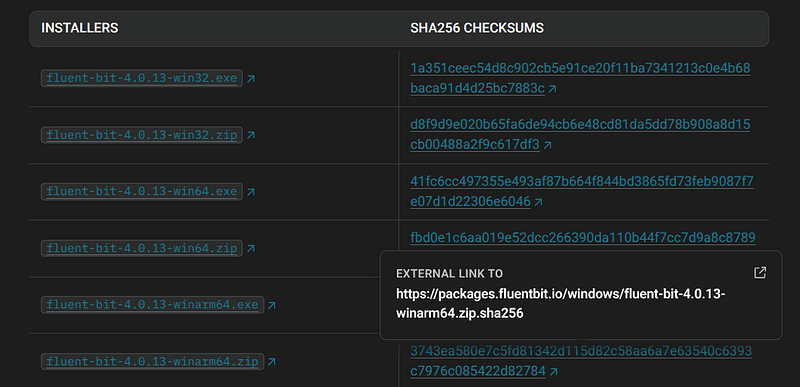
- Download the latestFluent Bit Windows zipfrom https://fluentbit.io/download/
-
Extract the archive into
C:\fluent-bit\. -
Confirm that
C:\fluent-bit\bin\fluent-bit.exeexists. -
Configure your FluentBit
For example, my configuration:
Large code or log block · 215 lines · expand raw text
[
SERVICE
]

# Flush

# =====

# set an interval of seconds before to flush records to a destination
    flush
5

# Daemon

# ======

# instruct Fluent Bit to run in foreground or background mode.
    daemon       Off

# Log_Level

# =========

# Set the verbosity level of the service, values can be:

#

# - error

# - warning

# - info

# - debug

# - trace

#

# by default 'info' is set, that means it includes 'error' and 'warning'.
    log_level    info

# Parsers File

# ============

# specify an optional 'Parsers' configuration file
    parsers_file parsers.conf

# Plugins File

# ============

# specify an optional 'Plugins' configuration file to load external plugins.
    plugins_file plugins.conf

# HTTP Server

# ===========

# Enable/Disable the built-in HTTP Server for metrics
    http_server
On
    http_listen
0.0
.
0.0
    http_port
2020

# Storage

# =======

# Fluent Bit can use memory and filesystem buffering based mechanisms

#

# - https://docs.fluentbit.io/manual/administration/buffering-and-storage

#

# storage metrics

# ---------------

# publish storage pipeline metrics in '/api/v1/storage'. The metrics are

# exported only if the 'http_server' option is enabled.

#
    storage.metrics
on

# storage.path

# ------------

# absolute file system path to store filesystem data buffers (chunks).

#
    storage.path
C
:
\fluent-bit\storage

# storage.sync

# ------------

# configure the synchronization mode used to store the data into the

# filesystem. It can take the values normal or full.

#
    storage.sync full

# storage.checksum

# ----------------

# enable the data integrity check when writing and reading data from the

# filesystem. The storage layer uses the CRC32 algorithm.

#

# storage.checksum off

# storage.backlog.mem_limit

# -------------------------

# if storage.path is set, Fluent Bit will look for data chunks that were

# not delivered and are still in the storage layer, these are called

# backlog data. This option configure a hint of maximum value of memory

# to use when processing these records.

#
    storage.backlog.mem_limit
128
M
[
INPUT
]
    Name         winlog
    tag          winlog
    Channels     Security,Application,System
    Interval_Sec
1
    DB
C
:
\fluent-bit\winlog.sqlite
    storage.
type
 filesystem
    Mem_Buf_Limit
128
M
#[INPUT]
#    name      tail
#    path      [ENTER_ABSOLUTE_PATH_TO_LOGS]
#    storage.type filesystem
#    DB           C:\fluent-bit\tail.sqlite
#    Path_key    filepath
#    Mem_Buf_Limit 128M
#[FILTER]
#    Name modify
#    Match tail
#    Add fluentbittype tail
[
FILTER
]
    Name modify
    Match winlog
    Add fluentbittype winlog
    Copy Channel filepath
[
OUTPUT
]
    Name http
    Match *
    Host
172.16
.
11.1
    Port
30443
    URI /logeye/api/logger.jsp?token
=
53
db5aff-
207
b-
457
e-
9
a19-
5
db73e24a864
    Format json
    header_tag message
    tls
On
    tls.verify Off
    Retry_Limit
False
    storage.total_limit_size
10
G
- Copy your
fb.conffile intoC:\fluent-bit\conf\fluent-bit.conf.
3. Verify Configuration
Run this command manually to ensure the configuration is valid:
cd
 C:\fluent-bit\bin
.\fluent-bit.exe -c
"C:\fluent-bit\conf\fluent-bit.conf"
You should see log lines like:
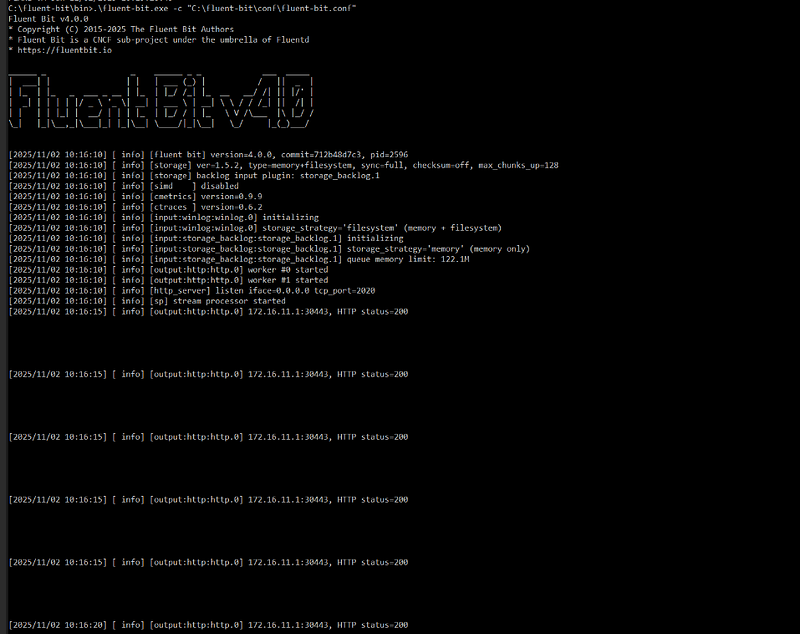
Stop withCtrl + Cwhen ready.
4. Install as a Windows Service
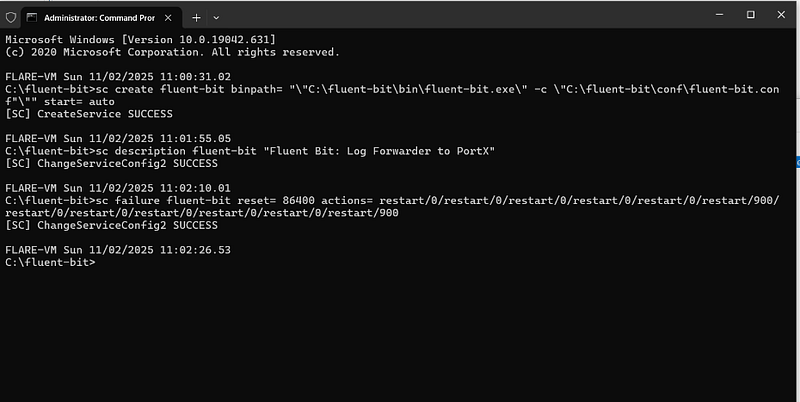
Run the followingin an elevated PowerShell or CMD(as Administrator):
sc
create
 fluent
-
bit binpath
=
 "\"C:\fluent
-
bit\bin\fluent
-
bit.exe\" -c \"C:\fluent
-
bit\conf\fluent
-
bit.conf\""
start
=
 auto
sc description fluent
-
bit "Fluent Bit: Log Forwarder to PortX"
sc failure fluent
-
bit reset
=

86400
 actions
=
 restart
/
0
/
restart
/
0
/
restart
/
900
Then start it:
sc
start
 fluent
-
bit
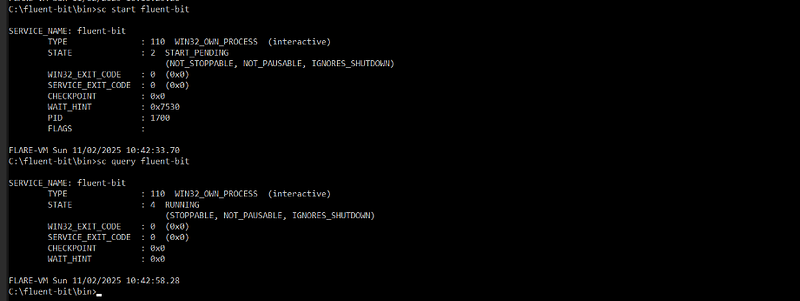
Check status:
sc
query
 fluent-bit
You should see:
5. GUI Verification
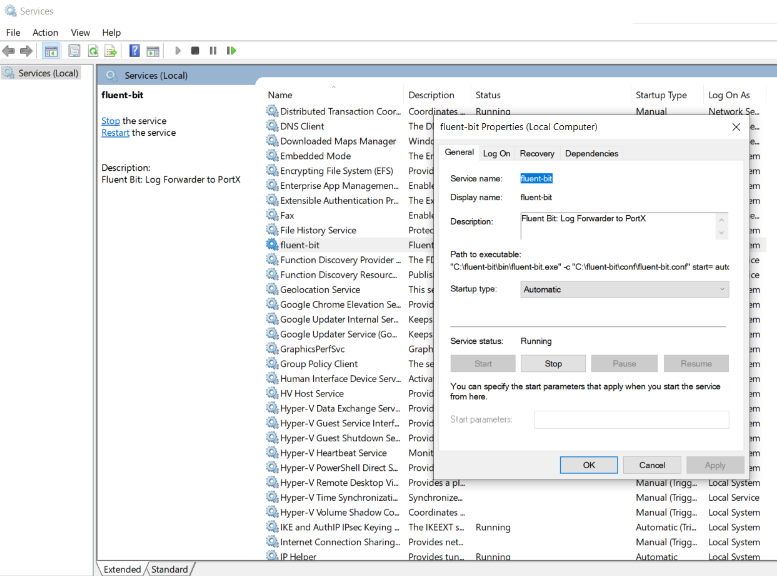
OpenServices (services.msc)→ locatefluent-bit → ensure:
-
Startup Type= Automatic
-
Service Status= Running
-
Path to executable= “C:\fluent-bit\bin\fluent-bit.exe” -c “C:\fluent-bit\conf\fluent-bit.conf”
Troubleshooting: Error 1057 / Error 1067
1. Check your Fluent Bit configuration
- Run interactively to reveal the real error:
cd
 C:\fluent-bit\bin .\fluent-bit.exe -c
"C:\fluent-bit\conf\fluent-bit.conf"
-
Look for syntax issues, wrong indentation, or unsupported parameters.
-
Common problems: wrong section names (
[SERVICE],[INPUT], etc.), missing paths, or duplicate directives.
2. Check HTTPS output configuration
If you send logs via HTTPS, confirm these lines are correct:
[
OUTPUT
]
    Name  http
    tls
On
    tls.verify Off
# or On if you have valid CA chain
-
A wrong or unreachable HTTPS endpoint can make Fluent Bit exit instantly → error 1067.
-
Test reachability:
Test-NetConnection
172.16
.11
.1
 -Port
30443
 curl -k https:
//172.16.11.1:30443/
3. If you copied the Fluent Bit working directory from another machine
Remove anypersistent databefore starting the service:
del
 /Q
"C:\fluent-bit\storage\*"
del
 /Q
"C:\fluent-bit\*.sqlite"
- Old checkpoint or DB files (e.g.,
winlog.sqlite,tail.sqlite) tied to another system path can crash initialization.
4. Verify all file paths
Ensure every referenced path exists and is accessible by the service account:
-
C:\fluent-bit\bin\fluent-bit.exe -
C:\fluent-bit\conf\fluent-bit.conf -
C:\fluent-bit\storage\ -
C:\fluent-bit\winlog.sqlite(auto-created but needs folder write rights) -
Optional:
C:\fluent-bit\tail.sqlite
Useabsolute pathsonly — relative paths often cause Error 1057 (bad command line) or Error 1067 (crash).
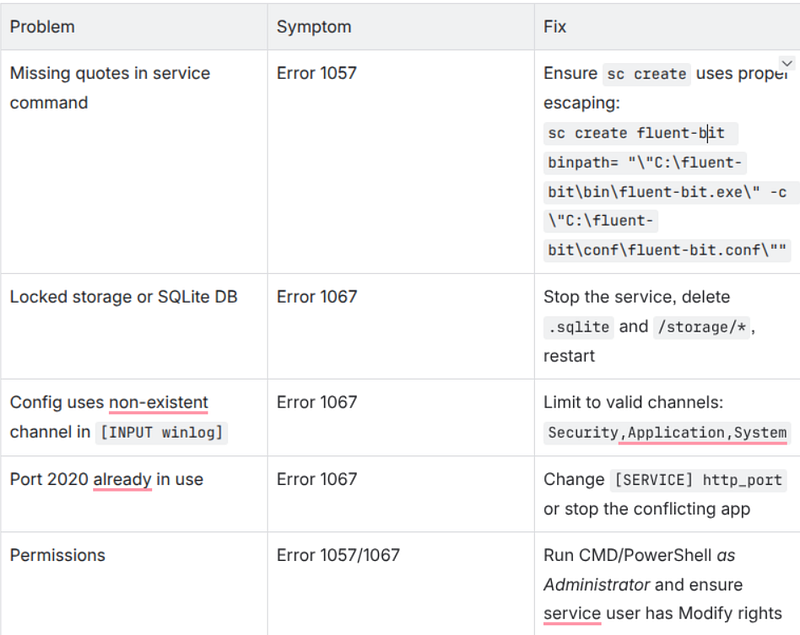
Extra quick checks
If all above fails
- Delete and recreate the service cleanly:
sc stop fluent
-
bit sc
delete
 fluent
-
bit sc
create
 fluent
-
bit binpath
=
 "\"C:\fluent
-
bit\bin\fluent
-
bit.exe\" -c \"C:\fluent
-
bit\conf\fluent
-
bit.conf\""
start
=
 auto sc
start
 fluent
-
bit
- Watch live logs interactively again to pinpoint the crash reason.