Fluent Bit on AWS-EKS: Centralized Kubernetes Log Shipping to XPLG
This older publication is retained for research history. Current technical applicability has not been asserted; validate versions, commands, and assumptions before use.
- Category: CTI
- Source article: https://medium.com/@1200km/fluent-bit-on-aws-eks-centralized-kubernetes-log-shipping-to-xplg-78811b8db55f
- Published: 2025-07-08
- Preserved media: 7 image(s), including cover images, screenshots, diagrams, and infographics where present.
- Preserved technical blocks: 14 code/configuration block(s).
Ecosystem Fit
This page mirrors the original Medium article into the 1200km.com Docusaurus ecosystem. The original article flow, images, screenshots, infographics, and technical blocks are preserved from the export.
Deploy Fluent Bit as a DaemonSet with full metadata enrichment, RBAC, and HTTP output to XPLG for real-time observability
What is Fluent Bit?
Fluent Bitis a lightweight and high-performance log processor and forwarder. It collects logs from files, systemd, or containers (like Docker or Kubernetes pods), enriches them with metadata, transforms if needed, and routes them to various destinations (e.g., Elasticsearch, S3, HTTP APIs).

Key Features:
-
Resource-efficient (~450KB memory)
-
Built-in support for Kubernetes metadata enrichment
-
Pluggable architecture (inputs, filters, outputs)
-
Supports log forwarding to HTTP, Elasticsearch, Kafka, and more
-
Cloud-native and optimized for Kubernetes (via DaemonSet or Sidecar)
In our setup, Fluent Bit:
-
Tails logs from all containers
-
Enriches them with Kubernetes metadata (namespace, pod, labels, etc.)
-
Sends them via HTTP directly to XPLG
What is XPLG?
XPLGis an advanced observability and log analytics platform built to provide full visibility into your applications, infrastructure, and security landscape. It enables real-time log collection, storage, search, visualization, and alerting across hybrid and cloud-native environments.

Key Capabilities:
-
High-performance log indexing and querying
-
Real-time anomaly and threat detection
-
Interactive dashboards and alerting
-
Agentless log collection or via Fluent Bit, Fluentd, Syslog, and API
-
Supports cloud, on-prem, and hybrid deployments
-
Built-in support for MITRE ATT&CK mapping and security detection rules
In this guide, we useFluent Bit to push logs from EKSdirectly to XPLG’sHTTP Listener API, enabling powerful monitoring and detection based on Kubernetes logs.
Prerequisites
-
Access to an AWS account with permission to configure EKS
-
EKS cluster deployed (fluentbit-andrey in this case)
-
kubectl, aws-cli and eksctl installed
-
Fluent Bit-compatible XPLG listener with a valid token
-
Kubernetes >= 1.32
-
VPC and networking set up for cluster internal communication
What is a DaemonSet in AWS EKS?
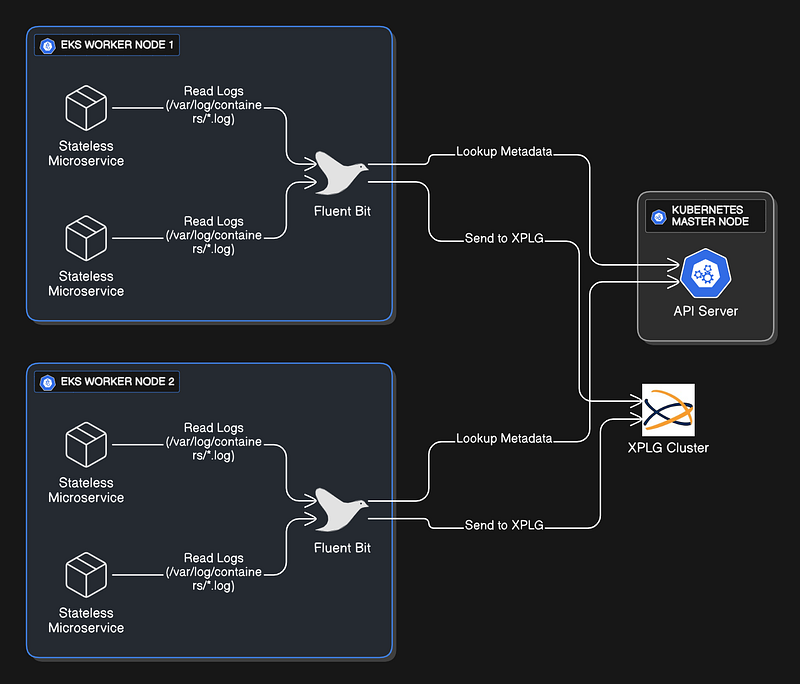
DaemonSetis a core Kubernetes controller that ensuresexactly one copy of a specific Pod is running on every nodein your Amazon EKS cluster. As new nodes join the EKS cluster, the DaemonSetautomatically deploys Fluent Biton them. If nodes are removed, Kubernetescleans up the associated Fluent Bit Pods.
Reference:https://kubernetes.io
Why Fluent Bit Uses a DaemonSet in EKS
In Amazon EKS, logs generated by containers (running on EC2 or Fargate nodes) arestored locallyon each node in these paths:
-
/var/log/containers/*.log — symbolic links to container logs
-
/var/log/pods/<namespace><pod><uid>/ — pod-level directories
-
/var/lib/docker/containers/<cid>/<cid>-json.log — legacy Docker format
Becauselogs live on the node that runs the pod, Fluent Bit needsnode-local accessto read them. That’s why the DaemonSet pattern is essential: it runs one Fluent Bit agentper node, ensuring it can directly tail and ship logs from local disk to your logging backend.
Deploying Fluent Bit as a DaemonSet in EKS is the officially recommended and production-ready pattern for scalable, reliable, and secure log collection.
Important:
If you operate multiple EKS clusters, you must deploy the Fluent Bit DaemonSet separately on each cluster.
Kubernetes objects like DaemonSets are cluster-scoped and cannot be shared across clusters.
Even if all your clusters send logs to a centralized log destination (like XPLG, CloudWatch, or S3), each cluster still requires its own Fluent Bit DaemonSet to collect logs from local nodes.
1. Connect to AWS & Your Cluster
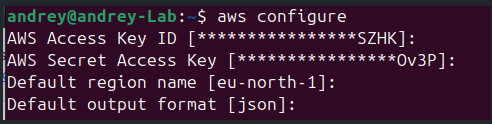
Configure AWS credentials:
aws configure
2. Connect kubectl to EKS:
aws eks update-kubeconfig
--region
 <cluster_region>
--name
 <cluster_name>

Optional: Set environment variables:
export

CLUSTER
=
"fluentbit-andrey"
export
 REGION=
"eu-north-1"
export
 ACCOUNT_ID=
"655536767854"
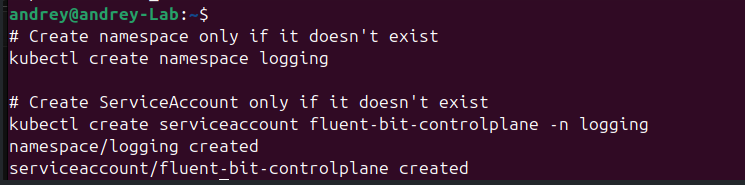
3. Create (or verify) the Kubernetes namespace and Service Account.
# Create namespace only if it doesn't exist
kubectl create namespace logging
# Create ServiceAccount only if it doesn't exist
kubectl create serviceaccount fluent-bit-controlplane -n logging
4. Configure RBAC
RBAC (Role-Based Access Control) ensures Fluent Bit can read Kubernetes metadata like pod names and labels, but without giving it write access.
-
ClusterRole: Grants read-only access to pods and namespaces.
-
ServiceAccount: Identity for Fluent Bit pods.
-
ClusterRoleBinding: Links the role to the ServiceAccount.
Create RBAC config for Fluent Bit
apiVersion:

rbac.authorization.k8s.io/v1
kind:

ClusterRole
metadata:

name:

fluent-bit-read
rules:
-

apiGroups:
 [
""
]

resources:
 [
"pods"
,
"namespaces"
]

verbs:
 [
"get"
,
"list"
,
"watch"
]
---
apiVersion:

rbac.authorization.k8s.io/v1
kind:

ClusterRoleBinding
metadata:

name:

fluent-bit-read
roleRef:

apiGroup:

rbac.authorization.k8s.io

kind:

ClusterRole

name:

fluent-bit-read
subjects:
-

kind:

ServiceAccount

name:

fluent-bit

namespace:

logging
Apply it:
kubectl apply -f rbac.
yaml
5. Create Fluent Bit Configuration (ConfigMap)
nano fluent-bit-
config
.yaml
Full yaml includes RBAC. Just change the token and requirements
Large code or log block · 435 lines · expand raw text
# --- NAMESPACE ---
apiVersion:

v1
kind:

Namespace
metadata:

name:

logging

# Create a dedicated namespace for Fluent Bit and logging components
# --- SERVICE ACCOUNT ---
---
apiVersion:

v1
kind:

ServiceAccount
metadata:

name:

fluent-bit

# Service account Fluent Bit will use

namespace:

logging

# Must be in the same namespace as the DaemonSet
# --- RBAC: Role and Binding ---
---
apiVersion:

rbac.authorization.k8s.io/v1
kind:

ClusterRole
metadata:

name:

fluent-bit-read
rules:
-

apiGroups:
 [
""
]

resources:

-

namespaces

-

pods

# Needed to get metadata for enrichment

verbs:
 [
"get"
,
"list"
,
"watch"
]
# Read-only permissions
---
apiVersion:

rbac.authorization.k8s.io/v1
kind:

ClusterRoleBinding
metadata:

name:

fluent-bit-read
roleRef:

apiGroup:

rbac.authorization.k8s.io

kind:

ClusterRole

name:

fluent-bit-read
subjects:
-

kind:

ServiceAccount

name:

fluent-bit

namespace:

logging

# Binds the role to our ServiceAccount
# --- CONFIGMAP: Fluent Bit Configuration Files ---
---
apiVersion:

v1
kind:

ConfigMap
metadata:

name:

fluent-bit-config

namespace:

logging

labels:

app.kubernetes.io/name:

fluent-bit
data:

fluent-bit.conf:

|
    [SERVICE]
        Flush        5               # Flush logs every 5 seconds
        Daemon       Off             # Run in foreground
        Log_Level    info            # Log verbosity
        Parsers_File parsers.conf    # Use custom parser
        HTTP_Server  On              # Enable health check server
        HTTP_Listen  0.0.0.0
        HTTP_Port    2020            # Health check port

@INCLUDE

inputs.conf

# Include log input config

@INCLUDE

filters.conf

# Include filter config (e.g., enrich with metadata)

@INCLUDE

outputs.conf

# Include output config (e.g., send logs to XPLG)

inputs.conf:

|
    [INPUT]
        Name              tail                          # Tail log files
        Tag               kube.*                        # Tag format for filtering
        Path              /var/log/containers/*.log     # Path to container logs
        Parser            docker                        # Use docker-style parser
        Mem_Buf_Limit     5MB                           # Buffer limit per file
        Skip_Long_Lines   On                            # Skip lines too long
        Refresh_Interval  10                            # Check for new files every 10 sec

filters.conf:

|
    [FILTER]
        Name                kubernetes
        Match               kube.*                      # Match logs from inputs with kube.* tag
        Kube_Tag_Prefix     kube.var.log.containers.    # Strip this prefix
        Merge_Log           On                          # Merge log line with Kubernetes metadata
        Merge_Log_Key       log                         # Field name for original log line
        Keep_Log            Off                         # Discard original log if merged

outputs.conf:

|
    [OUTPUT]
        Name              http                          # Output plugin (HTTP)
        Match             *                             # Send all logs
        Host              xpolog-service.default.svc.cluster.local  # XPLG service DNS name in-cluster
        Port              30303                         # Port XPLG listens on
        URI               /logeye/api/logger.jsp?token=d450a348-6353-405c-a980-27c51f5f7131  # Auth token in URI
        Format            json_lines                    # Format logs as newline-delimited JSON
        Json_date_key     time                          # Key for timestamp
        Json_date_format  iso8601                       # Format timestamps in ISO8601
        Header            X-Xpolog-Sender   eks-pod-logs  # Custom HTTP header
        Retry_Limit       5                             # Retry up to 5 times on failure

parsers.conf:

|
    [PARSER]
        Name             docker                         # Parser name
        Format           json                           # Input format
        Time_Key         time                           # Field to use as timestamp
        Time_Format      %Y-%m-%dT%H:%M:%S.%L%z          # Timestamp format (ISO8601 with ms and timezone)
        Time_Keep        On                             # Preserve original time
        Decode_Field_As  escaped log do_next            # Decode any escaped characters in log
        Decode_Field_As  json log                       # Parse nested JSON from "log" field
# --- DAEMONSET: Deploy Fluent Bit on Each Node ---
---
apiVersion:

apps/v1
kind:

DaemonSet
metadata:

name:

fluent-bit

namespace:

logging

labels:

app.kubernetes.io/name:

fluent-bit
spec:

selector:

matchLabels:

app.kubernetes.io/name:

fluent-bit

template:

metadata:

labels:

app.kubernetes.io/name:

fluent-bit

spec:

serviceAccountName:

fluent-bit

# Use previously created service account

tolerations:

-

operator:

Exists

# Run on any tainted node (master, control-plane, etc.)

containers:

-

name:

fluent-bit

image:

public.ecr.aws/aws-observability/aws-for-fluent-bit:2.32.0

# AWS-optimized Fluent Bit image

resources:

requests:

cpu:

50m

memory:

100Mi

# Minimal required resources

limits:

cpu:

100m

memory:

200Mi

# Maximum allowed usage

volumeMounts:

-

name:

config

mountPath:

/fluent-bit/etc/

# Mount config from ConfigMap

-

name:

varlog

mountPath:

/var/log

# Mount logs directory

readOnly:

true

-

name:

varlibdockercontainers

mountPath:

/var/lib/docker/containers

readOnly:

true

# For container log metadata

livenessProbe:

httpGet:

path:

/api/v1/health

# Health check endpoint

port:

2020

initialDelaySeconds:

10

periodSeconds:

60

volumes:

-

name:

config

configMap:

name:

fluent-bit-config

# Reference to the above ConfigMap

-

name:

varlog

hostPath:

path:

/var/log

# Mount node log path

-

name:

varlibdockercontainers

hostPath:

path:

/var/lib/docker/containers

# Mount container metadata
Apply it:
kubectl apply -f fluent-bit-
config
.yaml
Optional
Deploy Fluent Bit from Private Image in EKS (or any K8s)
Push Your Fluent Bit Image to Your Registry (e.g., Amazon ECR)
If you’re using ECR:
aws ecr create-repository --repository-name fluent-bit-
custom
# Tag
and
 push your image
docker tag fluent-bit:
custom

123456789012
.dkr.ecr.eu-north-
1
.amazonaws.com/fluent-bit-
custom
aws ecr
get
-login-password | docker login --username AWS --password-stdin
123456789012
.dkr.ecr.eu-north-
1
.amazonaws.com
docker push
123456789012
.dkr.ecr.eu-north-
1
.amazonaws.com/fluent-bit-
custom
Update Your DaemonSet (or Pod) with Custom Image
In your Fluent Bit DaemonSet YAML:
containers:

-

name:

fluent-bit

image:

123456789012.
dkr.ecr.eu-north-1.amazonaws.com/fluent-bit-custom:latest
6. Deploy Fluent Bit as a DaemonSet(separated from ConfigMap)
nano fluent-bit-daemonset.
yaml
Large code or log block · 187 lines · expand raw text
apiVersion:

apps/v1
kind:

DaemonSet
metadata:

name:

fluent-bit

namespace:

logging

labels:

app.kubernetes.io/name:

fluent-bit
spec:

selector:

matchLabels:

app.kubernetes.io/name:

fluent-bit

template:

metadata:

labels:

app.kubernetes.io/name:

fluent-bit

spec:

serviceAccountName:

fluent-bit

tolerations:

-

operator:

Exists

containers:

-

name:

fluent-bit

image:

public.ecr.aws/aws-observability/aws-for-fluent-bit:2.32.0

resources:

requests:

cpu:

50m

memory:

100Mi

limits:

cpu:

100m

memory:

200Mi

volumeMounts:

-

name:

config

mountPath:

/fluent-bit/etc/

-

name:

varlog

mountPath:

/var/log

readOnly:

true

-

name:

varlibdockercontainers

mountPath:

/var/lib/docker/containers

readOnly:

true

livenessProbe:

httpGet:

path:

/api/v1/health

port:

2020

initialDelaySeconds:

10

periodSeconds:

60

volumes:

-

name:

config

configMap:

name:

fluent-bit-config

-

name:

varlog

hostPath:

path:

/var/log

-

name:

varlibdockercontainers

hostPath:

path:

/var/lib/docker/containers
kubectl apply -f fluent-bit-daemonset.
yaml
References
XPLG Official site:
**XPLG Official Documentation: **https://xpolog.atlassian.net/wiki/spaces/XPOL/overview
Fluent Bit Official Documentation https://docs.fluentbit.io
- Full configuration options for inputs, filters, outputs, parsers, and service settings.
AWS for Fluent Bit (AWS Distro) https://github.com/aws/aws-for-fluent-bit
- Official Fluent Bit image optimized for AWS with pre-installed plugins and performance tuning.
Amazon EKS Documentation https://docs.aws.amazon.com/eks/latest/userguide/what-is-eks.html
- Guides for managing and connecting to EKS clusters.
Kubernetes RBAC Authorization https://kubernetes.io/docs/reference/access-authn-authz/rbac/
- Role, ClusterRole, RoleBinding, and ClusterRoleBinding explained.
Kubernetes DaemonSet https://kubernetes.io/docs/concepts/workloads/controllers/daemonset/
- Explains the controller that ensures a pod runs on every node.
Kubernetes ConfigMap https://kubernetes.io/docs/concepts/configuration/configmap/
- How to inject configuration into your containers via ConfigMaps.
kubectl command-line tool https://kubernetes.io/docs/reference/kubectl/
- Reference for all kubectl commands used during deployment.
AWS CLI — eks update-kubeconfig https://docs.aws.amazon.com/cli/latest/reference/eks/update-kubeconfig.html